You need to enable JavaScript in order to use the AI chatbot tool powered by ChatBot

Automating GitHub License Management with CloudEagle.ai for Development Teams

Share via:
blog-cms-banner-bg
Little-Known Negotiation Hacks to Get the Best Deal on Slack
cta-bg-blogDownload Your Copy

HIPAA Compliance Checklist for 2025

Download PDF

Optimize GitHub License Usage

Use this guide to identify inactive contributors, reclaim unused seats, and reduce GitHub license waste.

Download License Guide
CTA Thumbnail

If you want to watch a development team collectively lose interest, ask them who’s managing GitHub licenses. Suddenly everyone is “in the middle of a deploy.” GitHub enterprise pricing looks simple but scaling turns into a tangle of seats and SSO logs

The real trouble is speed. Developers move fast and GitHub just keeps handing out seats without asking many questions. According to Nexthink, nearly 33% of engineering-related SaaS licenses in enterprises go unused.

And that’s how GitHub pricing​ creeps up quietly. Engineers don’t have time to investigate. IT doesn’t have context. CloudEagle.ai tracks real usage, flags inactive developers, maps roles to the right license tiers, and catches the silent seat drift before it becomes a budget problem.

TL;DR

  • GitHub license sprawl grows quietly as teams scale, leaving many paid seats unused or misaligned.
  • Inactive developers, test accounts, and contractors often retain full access long after they’re needed.
  • CloudEagle.ai gives real-time visibility into GitHub usage, spend, and license tier alignment.
  • Automated workflows reclaim inactive seats, right-size licenses, and prevent renewal-time surprises.
  • Teams cut costs, reduce access risk, and manage GitHub licenses without slowing developers down

Prevent Orphaned GitHub Access

Use this offboarding checklist to ensure former employees don’t retain access to GitHub and other dev tools.

Download Checklist
CTA Thumbnail

1. When Did GitHub Licenses Become Harder To Track?

No one can pinpoint the exact moment GitHub licensing stopped being simple. It doesn’t happen all at once. Every tiny decision stacks on top of the last one, and suddenly the org feels bigger and more expensive.

  • Contractors rotate in and out without anyone cleaning up their seats afterward.
  • Teams create repos autonomously, each carrying its own permission footprint.
  • Old projects stay archived, but still attached to paid users.
  • License tiers of GitHub Copilot pricing don’t match roles, because upgrades happen in a hurry

And the numbers back it up. Ramp found that 28% of engineering tool licenses remain assigned to inactive users for 90+ days, simply because no one revisits access after the initial setup.

Once the drift starts, finance sees rising bills, IT sees unclear ownership, and engineering sees… well, nothing. Because everything still works. Until the renewal hits.

2. How Many GitHub Licenses Are You Funding Without Real Usage?

Every engineering leader has felt this moment: the GitHub pricing​ arrives, the total looks… bigger than expected, and suddenly everyone is asking the same quiet question: “Who are we actually paying for?”

A. Developers Who Haven’t Pushed Code In Months

It’s surprising how quietly inactive accounts blend into a GitHub Copilot pricing. A developer leaves the team, shifts to a non-coding role, or pauses contributions for a long-running project. 

However, their seat stays active, their permissions stay untouched, and their license keeps billing due to a lack of renewal calendar.

  • The Role-Shift Oversight: Engineers who move into managerial or product roles still hold contributor seats.
  • The “We Thought They Still Needed It” Assumption: Teams keep seats active because removing them “might break something.”
  • The Long-Pause Contributor: Developers who haven’t shipped in months but retain full privileges across repos.

This is more common than teams admit. As Simon Sinek once said,

“If no one owns the responsibility, everyone assumes someone else does.”

And in the GitHub enterprise license, that assumption becomes a line item, one you pay for every month. Left untouched, these inactive accounts quietly drain budgets and inflate license counts.

B. Test Accounts Holding Full Paid Access

Somewhere inside every GitHub enterprise pricing tier, there’s at least one test account quietly living its best life with a fully paid seat. Nobody remembers who created it, nobody knows which workflow depends on it, and nobody wants to touch it.

  • The “Automation Testing” Identity: Created for CI checks, but accidentally given full privileged access.
  • The Sandbox User Gone Rogue: Used briefly for staging demos, then forgotten, but still billed.
  • The Bot With Too Much Power: A workflow bot holding permissions even real humans don’t need.
  • The “Temporary” QA Login: Kept active because no one knows what dependencies it triggers.

These accounts survive not because they’re valuable, but because no one wants to risk deleting something mysterious. And in engineering culture, “mysterious” is just another word for “probably important.”

C. Contractors Retaining Rights To Private Repos

Contractors often join fast and leave even faster, but their GitHub access rarely follows the same schedule. A contractor finishes a sprint yet their account stays active. No one removes them because access cleanup isn’t built into the offboarding rhythm.

This isn’t just a visibility problem. Former contractors can still view private repos, old branches, documentation, and internal tools long after their engagement ends. A 2023 Verizon Data Breach Investigations Report found that 74% of breaches involved human elements.

The longer these accounts stay unnoticed, the more they distort everything: license counts rise, audits get messy, and security teams inherit a repository map that doesn’t reflect reality

Build a Smarter SaaS Stack for Engineering

Learn best practices to manage DevOps tools, optimize usage, and eliminate redundant app spending.

Get Best Practices
CTA Thumbnail

3. How CloudEagle.ai Controls GitHub License Chaos?

Managing GitHub enterprise licenses scattered across multiple SSO portals, usage dashboards, and billing records can quickly become overwhelming. Traditional spreadsheets may only capture the most visible apps, leaving many licenses untracked and overlooked.

This disjointed approach leads to avoidable overspending, SaaS compliance concerns, and missed chances to optimize usage.
CloudEagle.ai provides a unified, real-time view of every GitHub license and related spend. It automates monitoring, usage insights, and renewal workflows, turning a previously manual and inconsistent process into a structured, intelligent, and data-guided system.

A. Direct GitHub Admin Console Sync

Manually managing GitHub licenses is slow, prone to mistakes, and draining for IT teams. Building tracking spreadsheets can take weeks, and by the time they are assembled, the information is already outdated. This leaves teams without accurate visibility into subscriptions, usage levels, or GitHub plan details.

Current Process

Most organizations rely on spreadsheets and scattered tools to monitor renewals, license allocations, and user activity. This creates disconnected data sources, and updates often become stale before anyone evaluates them.

Pain Points

Manual data entry and delayed updates introduce inaccuracies and blind spots in software spend oversight. IT and finance teams are left without dependable, real-time visibility.
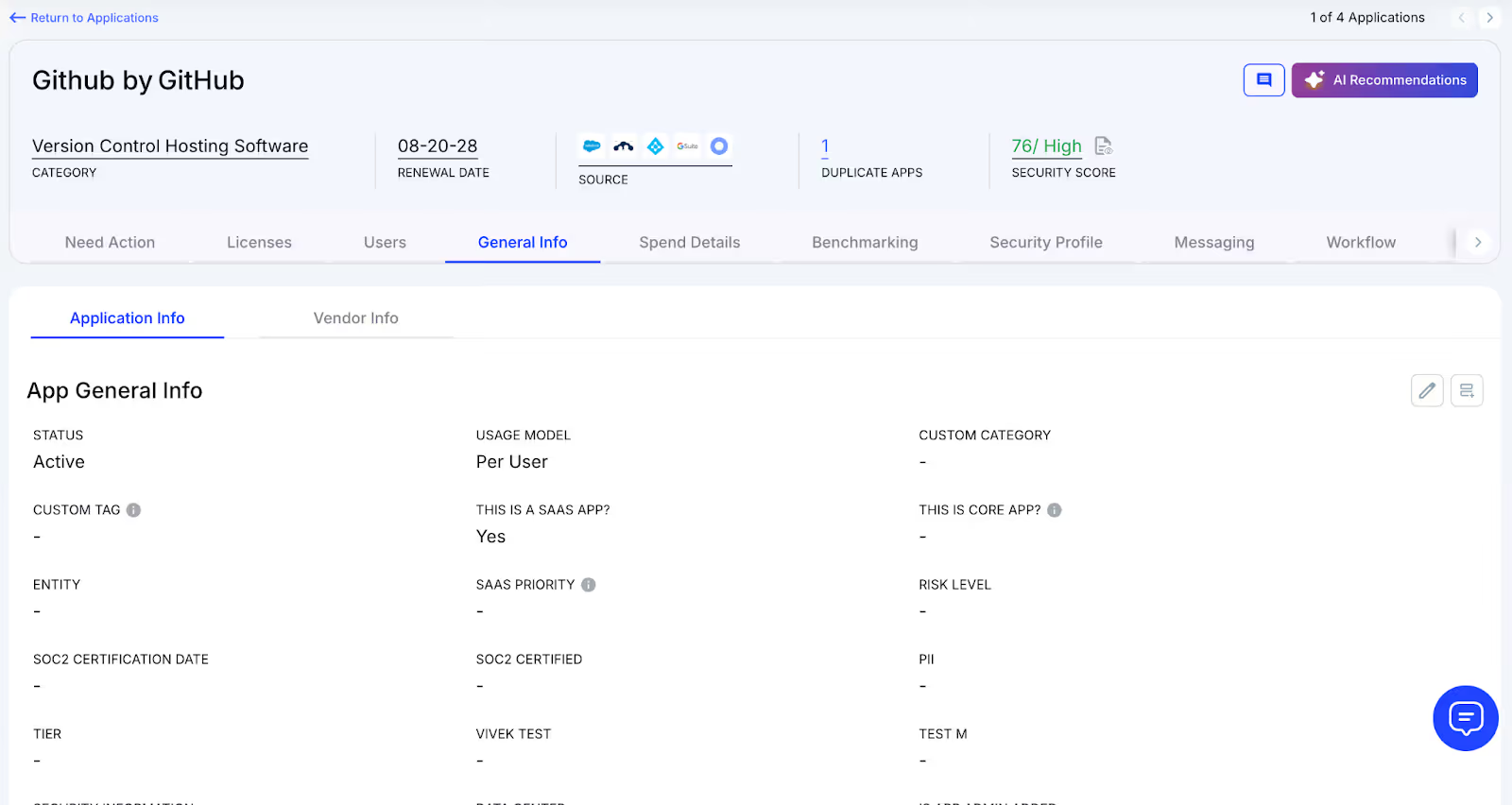
How We Do It

CloudEagle.ai consolidates vendor spend, usage trends, and AI-powered metadata extraction from every connected system in real time. Renewal timelines, cost summaries, and active usage appear together for quick, confident analysis.

Why We Are Better

Implementation requires only a few days. With 500+ native integrations and automated metadata extraction, CloudEagle.ai centralizes all license data in one place, ensuring it stays consistent, trustworthy, and continuously up to date.

B. Live Usage Insights & Shadow IT Visibility

Without centralized governance, GitHub license usage and overlapping tools can quickly get out of hand. Shadow IT often slips under the radar, making it difficult for IT teams to identify redundant applications scattered across teams.

Current Process

Teams may purchase duplicate tools through corporate cards or sign up for free trials that later convert into billable subscriptions. Manually uncovering these overlaps across departments is incredibly challenging.

Pain Points

Shadow IT creates unmonitored GitHub spend and introduces avoidable SaaS security risks. Trying to locate duplicate applications by hand is time-consuming and often fails to surface all redundancies.
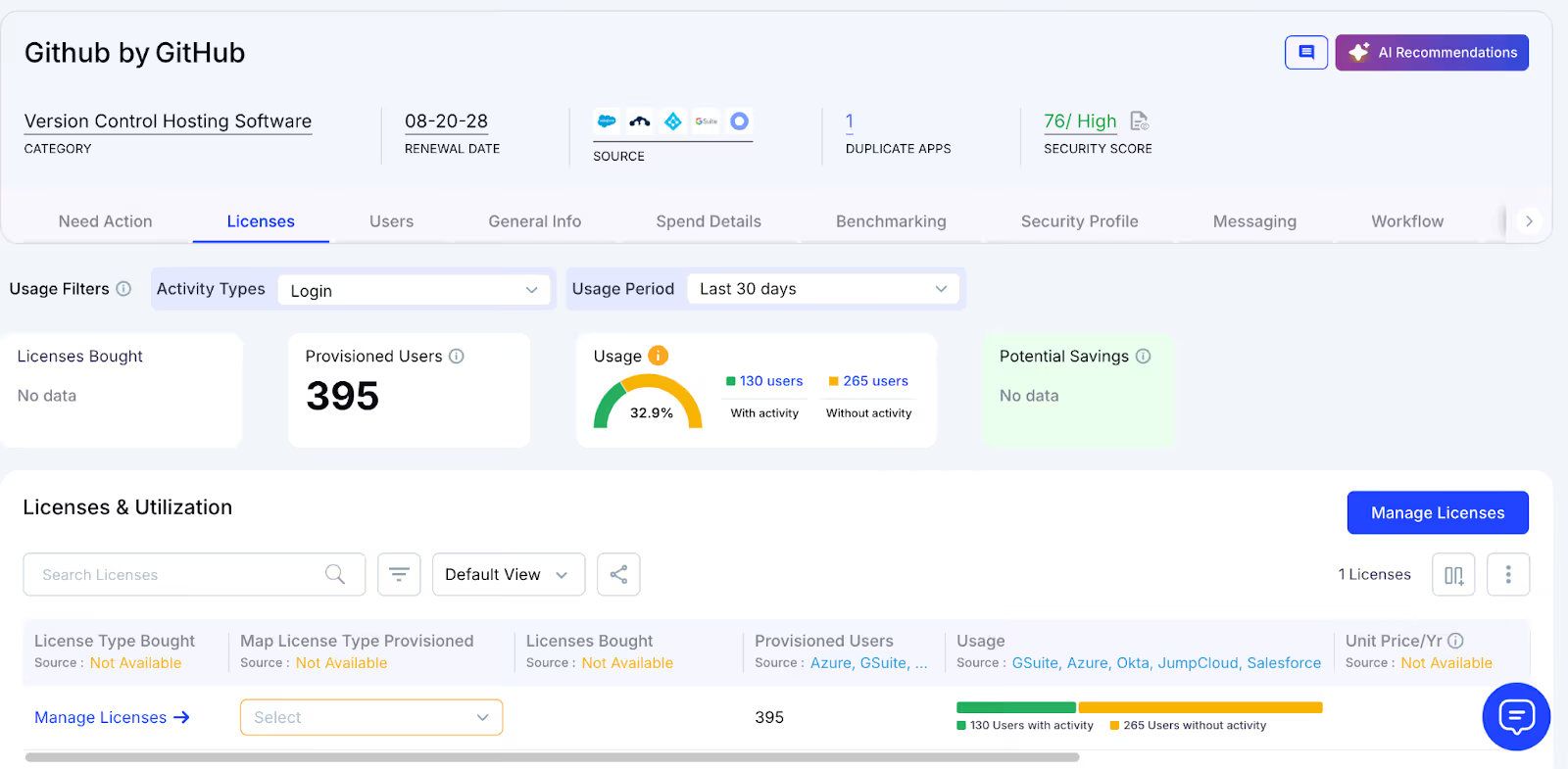
How We Do It

CloudEagle.ai continuously scans for duplicate and overlapping applications using AI, while also monitoring usage at a feature level. Any shadow tool is flagged immediately.
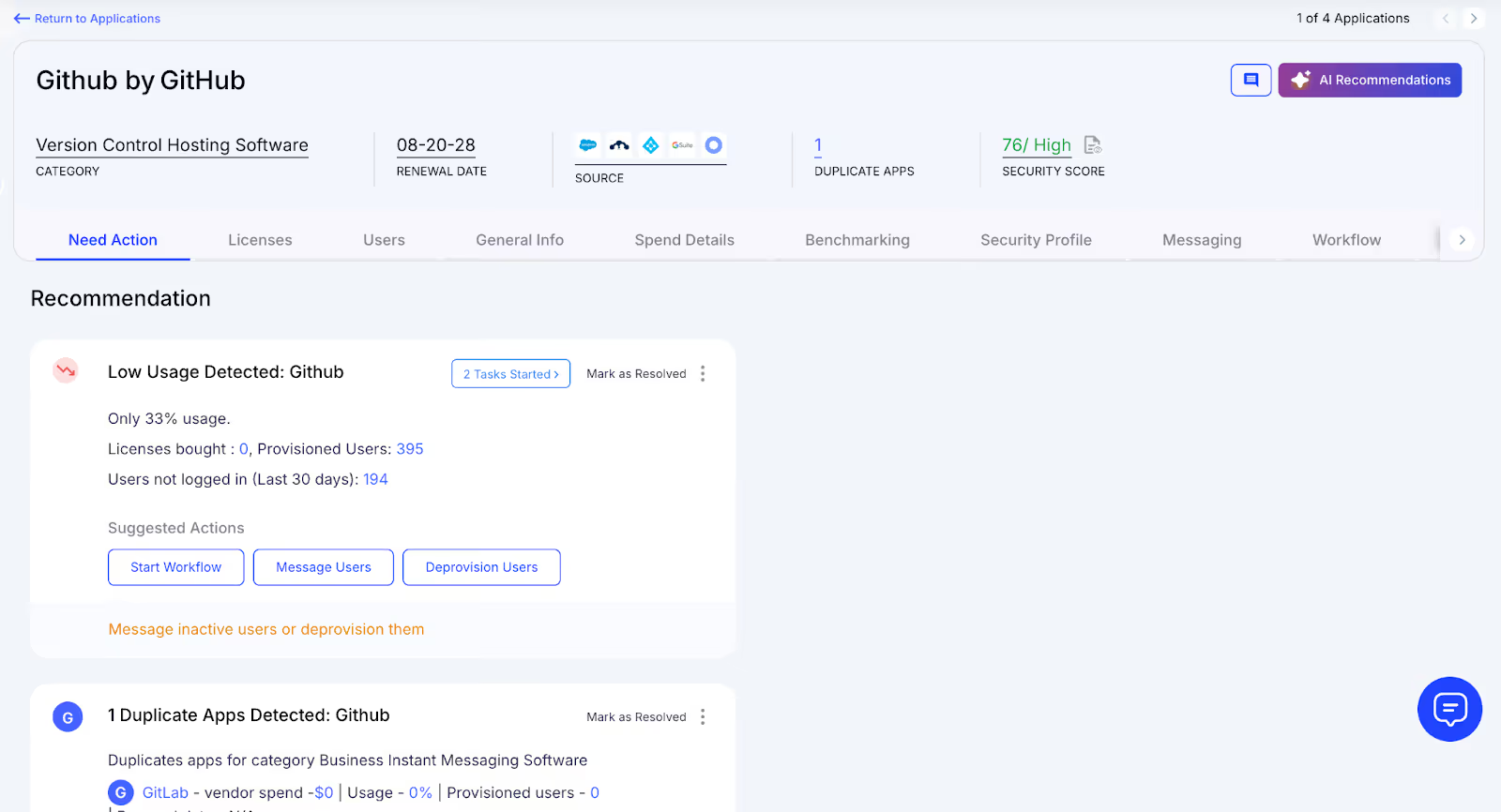
Why We Are Better

Our AI compares applications based on capabilities, not just their names. IT teams can automatically notify users, trigger workflows, or generate ITSM tickets to reclaim underused licenses and reduce risk exposure.

C. Unified License Oversight Across Teams

Handling GitHub licenses distributed across various teams can quickly become overwhelming. Many organizations still rely on spreadsheets to track key applications, while manually piecing together SSO data, usage metrics, and contract details.

Current Process

Most companies only track their primary applications in spreadsheets, manually merging identity provider logs, feature usage data, and contract information. This slows updates, reduces accuracy, and creates inconsistent reporting.

Pain Points

Applications that go unmonitored drive avoidable spending, and license reassignments rarely happen at the right time. Renewal tracking often lacks consistency, leading to missed cost-saving opportunities.
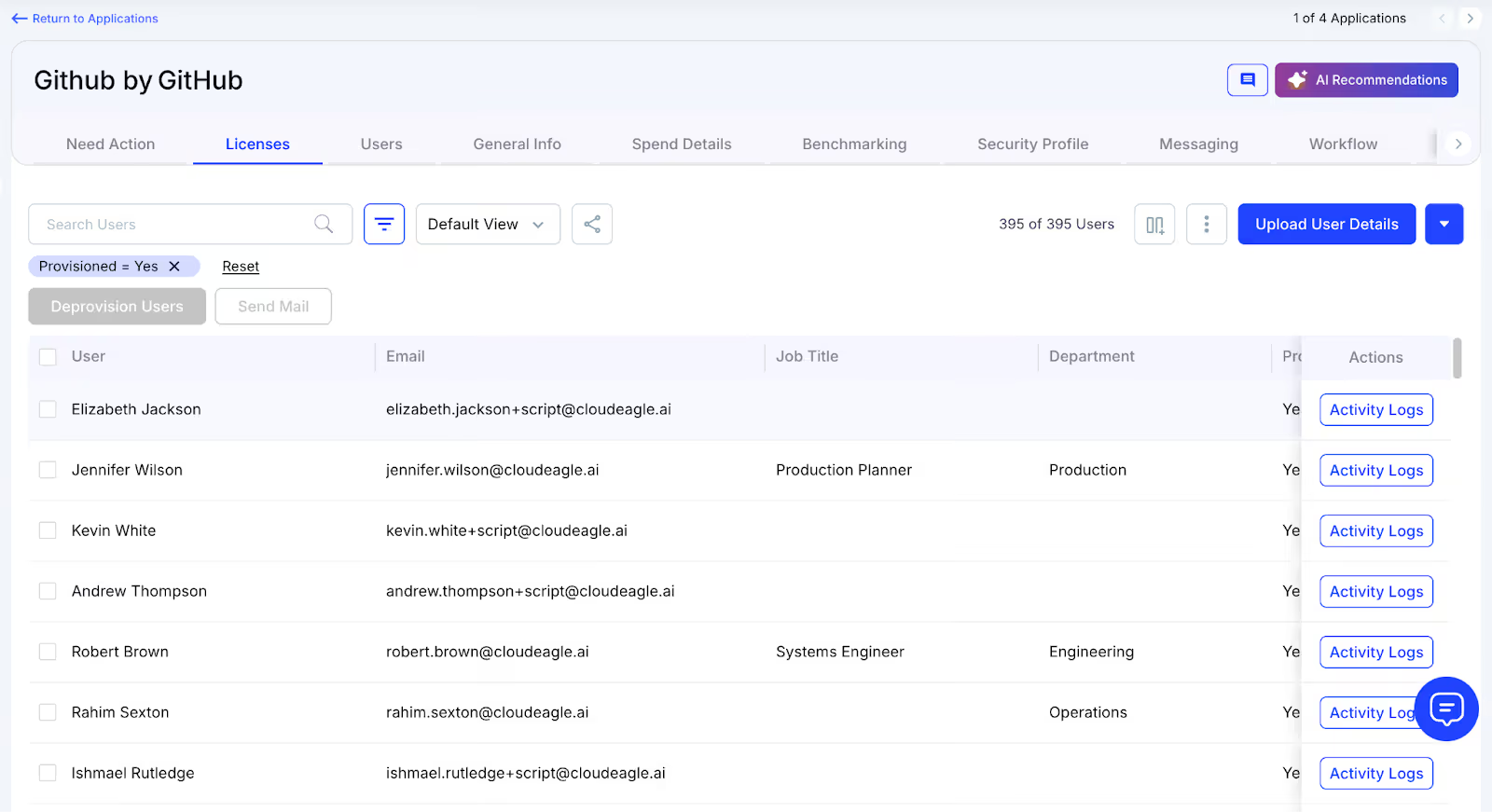
How We Do It

CloudEagle.ai brings all license management into a single, centralized platform. Nightly synchronization merges IDP records, contract data, and connector inputs, providing real-time transparency into license allocation and usage.

Why We Are Better

Automated updates match purchased licenses to active users and feature-level usage across every application. Teams can filter by license tier and instantly make informed, data-backed decisions to SaaS spend optimization and allocation.

D. Automated License Reclamation

Unused GitHub licenses can quietly inflate expenses, and most IT teams lack a scalable way to reclaim them. Manually reviewing usage patterns and emailing large groups of users every week is repetitive, error-prone, and consumes valuable time.

Current Process

IT departments often send one-off emails to inactive users and update spreadsheets by hand, making the workflow slow, manual, and frequently deprioritized.

Pain Points

Inactive seats remain assigned, increasing software costs and exposing the organization to unnecessary security and access risks. Manual reclamation processes simply do not scale with growth.
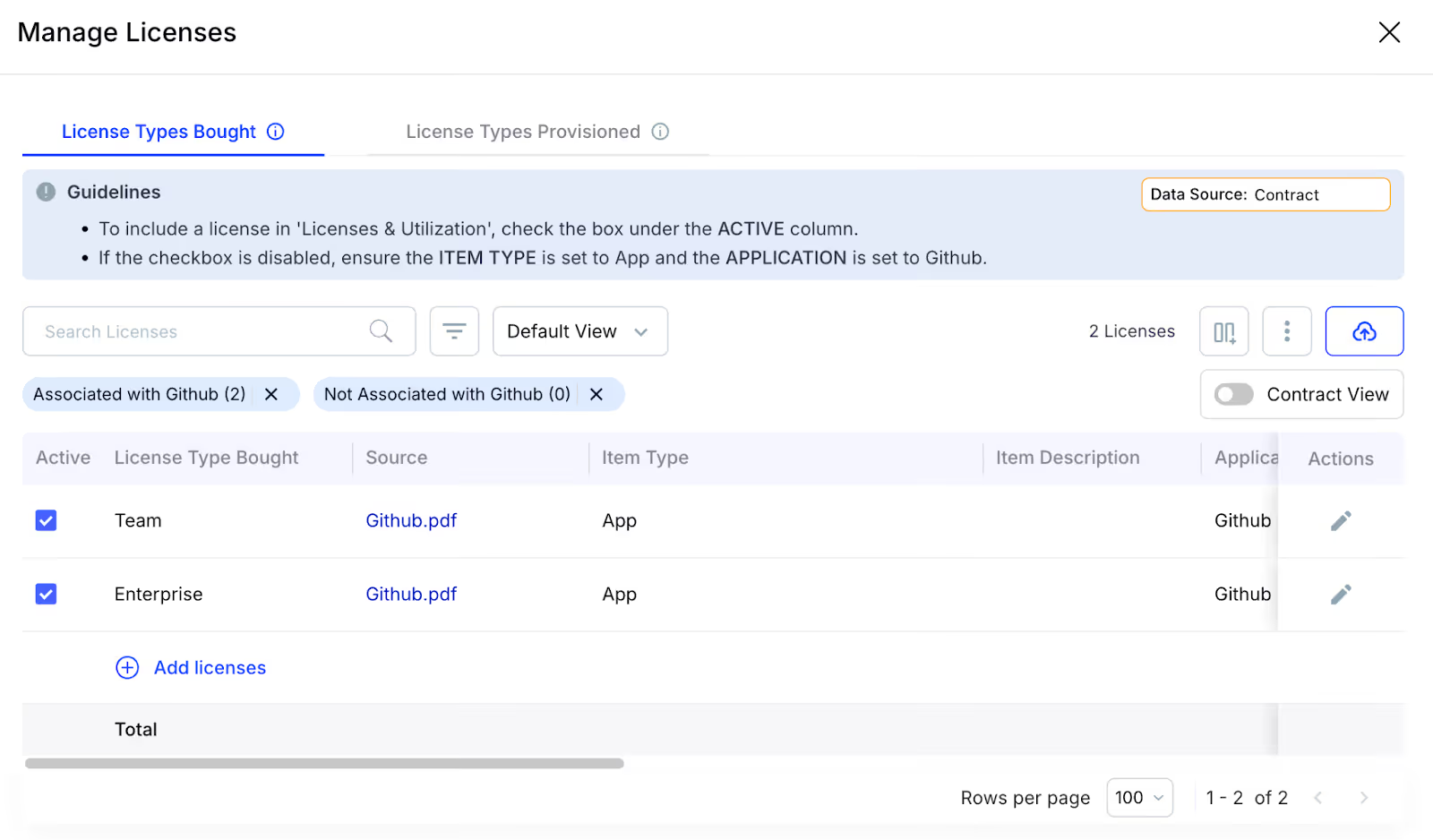
How We Do It

CloudEagle.ai automates the entire license harvesting cycle. Scheduled workflows detect inactivity, notify users, and reclaim or downgrade licenses automatically based on real usage data.

Why We Are Better

Automations can run daily or weekly through Okta or Microsoft AD. Licenses are reclaimed instantly, minimizing waste, saving operational time, and improving overall utilization efficiency.

E. License Cost Benchmarking for Smarter Renewals

CloudEagle.ai’s benchmarking capability helps organizations secure stronger pricing during renewal cycles. By comparing contract terms against current market data, enterprises can negotiate confidently and avoid unnecessary overspending.

Current Process

Procurement teams often depend on vendor-provided quotes or legacy contracts. Peer comparisons are minimal, and available pricing references rarely reflect real, up-to-date market rates.

Pain Points

Insufficient pricing insight weakens negotiation leverage, resulting in higher-than-necessary costs or less favorable renewal terms.
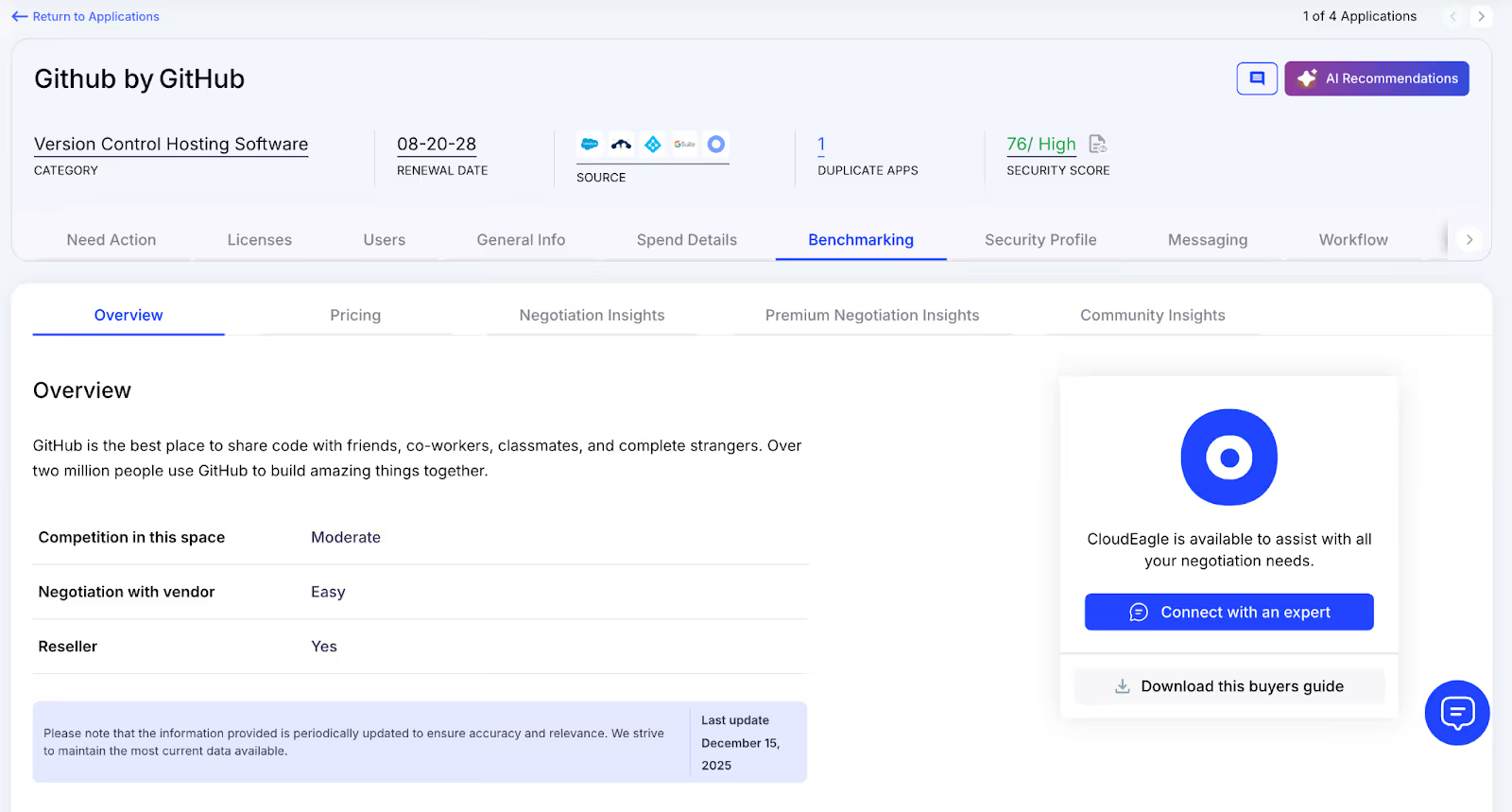
How We Do It

CloudEagle.ai delivers real-time benchmark data, historical pricing patterns, and structured GitHub pricing guide to empower informed negotiation strategies supported by verifiable data.

Why We Are Better

Pricing insights are broken down by SKU, license tier, and volume, along with recommended negotiation levers, ensuring renewal outcomes align with true market value rather than vendor-driven baselines.

F. Renewal Management, Done Proactively

CloudEagle.ai automates renewal oversight by triggering workflows aligned with contract timelines. From approval routing to adjusting GitHub license counts, it helps teams avoid accidental auto-renewals and keeps SaaS renewal management streamlined and predictable.

Current Process

Renewals are typically monitored through spreadsheets and long email threads. Approval cycles slow down, and auto-renewal deadlines often slip past unnoticed.

Pain Points

Missed renewal windows lead to unnecessary spend, and last-minute vendor negotiations reduce leverage to secure better pricing or adjust license counts appropriately.
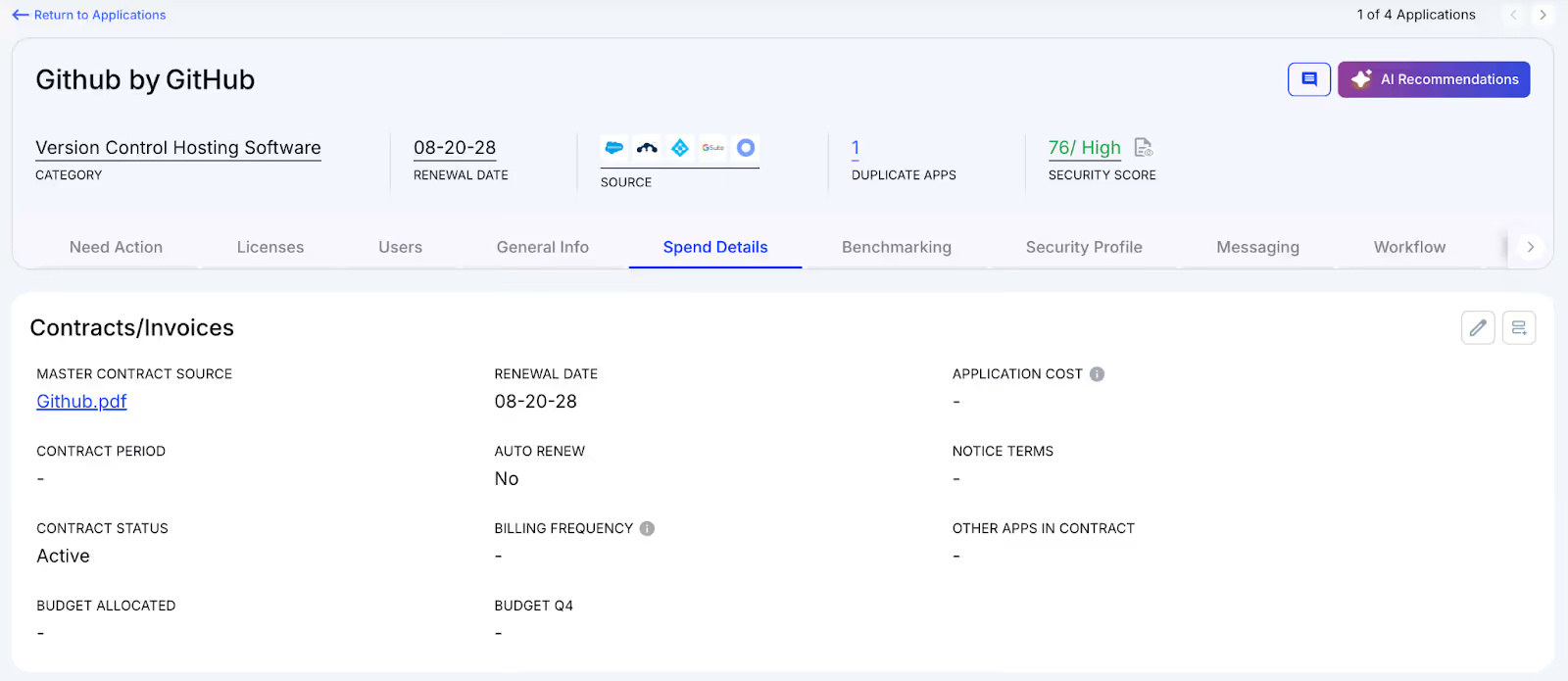
How We Do It

CloudEagle.ai creates an automated renewal calendar using AI-extracted contract data or integrations with CLMs such as Ironclad, GitHub, or Zip. Workflows activate 90 days before notice dates, routing tasks to finance, legal, and business stakeholders for coordinated action.

Why We Are Better

Teams receive alerts that include usage trends, pricing benchmarks, and alternative vendor considerations. Approval decisions are tracked automatically, preventing missed renewals, accidental spend commitments, and stalled negotiations.

G. Utilize Centralized Vendor Dashboards

CloudEagle.ai offers vendor-specific dashboards that consolidate all GitHub subscription data into one place. Teams gain visibility into license usage, renewal timelines, and spending patterns, enabling more informed, data-backed decisions.
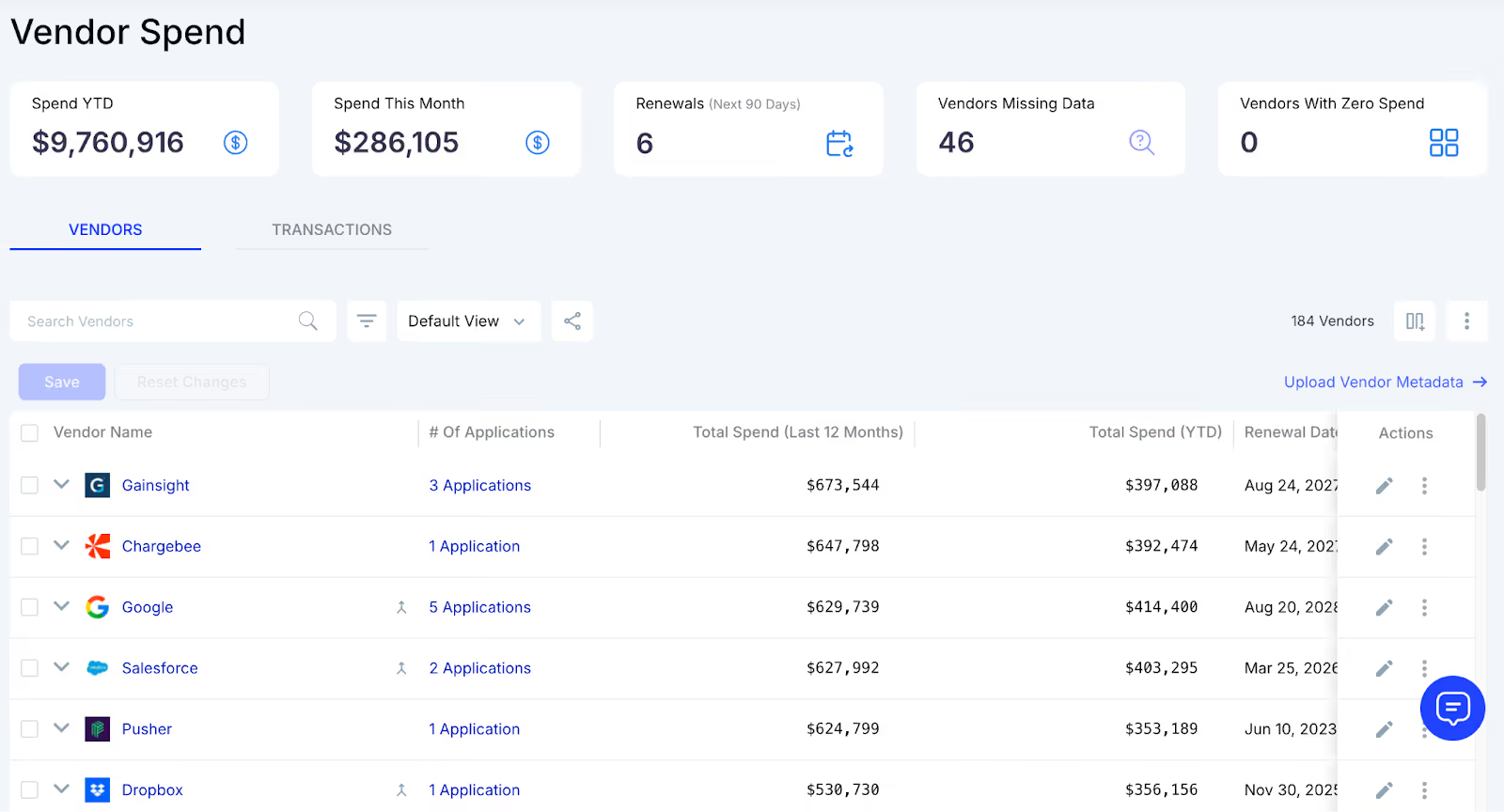
These dashboards surface overspending and identify unused licenses, making reclamation straightforward. They also reveal adoption and usage trends, allowing organizations to proactively adjust license allocations and optimize overall GitHub spending.

H. Streamlined Application Access Requests

CloudEagle.ai simplifies GitHub access by enabling employees to request licenses directly through the platform or via Slack, removing the need for lengthy email threads and manual coordination. Managers can review and approve these requests in real time, ensuring users get timely access.
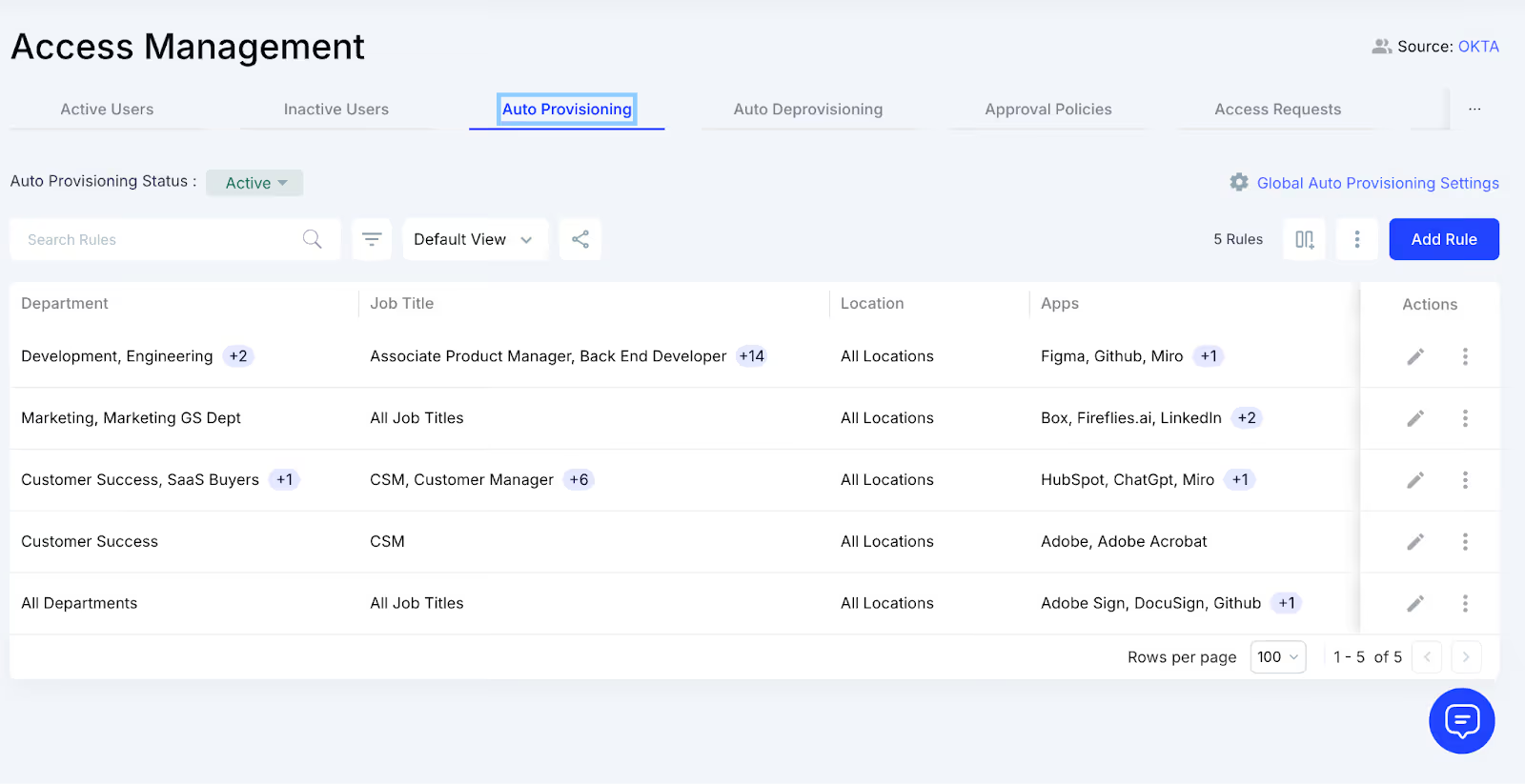
This process ensures employees receive the correct license type without unnecessary delays and eliminates approval bottlenecks. Every request is automatically logged for transparency and compliance, reducing administrative overhead while keeping access management efficient and traceable.

4. What Changes When License Management Stops Being Manual?

There’s a noticeable shift the moment teams stop relying on spreadsheets, memory, and “Who added this person?” detective work. Suddenly, license management stops feeling like weekend cleanup.

From the engineering team’s perspective:

They no longer need to second-guess whether someone still has access, whether a seat is available, or whether adding a new team member will blow up the budget. Seats get reassigned automatically, inactive users get flagged without anyone hunting them down.

From finance or IT’s perspective:

The fog lifts. They finally see who’s using what, who shouldn’t have access anymore, which teams are growing, and where spend is drifting. There’s no more stitching together reports or guessing which account belongs to which project.

And the ripple effects appear almost immediately. Access stays clean. SaaS budgets stop swelling unexpectedly. Audits lose their sting. And repos stop filling up with ghost users who left months ago.

5. Conclusion

GitHub gets messy because the tools for managing licenses and access rarely move with them. And the license cleanup? That part never happens automatically. The result is predictable: rising costs, ghost users, and stale permissions.

When license management stops being manual, everything changes. You get real visibility, but the kind that shows you exactly who’s using what, who shouldn’t be there, and where the budget is quietly leaking.

CloudEagle.ai brings that clarity without slowing anyone down. It detects inactive seats, reclaims unused licenses, maps contributors to the right tiers, and makes sure offboarding actually means offboarding.

6. FAQs

1. Which license is best for GitHub?

It depends on your needs. MIT is simple and permissive, GPL protects open-source contributions, and Apache adds patent protection. Choose based on how you want others to use your code.

2. Is GitHub fully free?

GitHub offers free plans for individuals and small teams, but advanced features like SSO, security tools, and team management require paid tiers.

3. Can I sell software with the MIT License?

Yes. The MIT License allows commercial use, modification, distribution, and selling — as long as you include the original license and copyright notice.

4. Can I host my website on GitHub for free?

Yes. GitHub Pages lets you host static websites for free directly from a repo. It's ideal for personal sites, portfolios, and documentation.

5. Can my company use GitHub for free?

Yes, but only for limited features. Companies often need paid plans for advanced permissions, security, compliance, and team management.

Advertisement for a SaaS Subscription Tracking Template with a call-to-action button to download and a partial graphic of a tablet showing charts.Banner promoting a SaaS Agreement Checklist to streamline SaaS management and avoid budget waste with a call-to-action button labeled Download checklist.Blue banner with text 'The Ultimate Employee Offboarding Checklist!' and a black button labeled 'Download checklist' alongside partial views of checklist documents from cloudeagle.ai.Digital ad for download checklist titled 'The Ultimate Checklist for IT Leaders to Optimize SaaS Operations' by cloudeagle.ai, showing checklist pages.Slack Buyer's Guide offer with text 'Unlock insider insights to get the best deal on Slack!' and a button labeled 'Get Your Copy', accompanied by a preview of the guide featuring Slack's logo.Monday Pricing Guide by cloudeagle.ai offering exclusive pricing secrets to maximize investment with a call-to-action button labeled Get Your Copy and an image of the guide's cover.Blue banner for Canva Pricing Guide by cloudeagle.ai offering a guide to Canva costs, features, and alternatives with a call-to-action button saying Get Your Copy.Blue banner with white text reading 'Little-Known Negotiation Hacks to Get the Best Deal on Slack' and a white button labeled 'Get Your Copy'.Blue banner with text 'Little-Known Negotiation Hacks to Get the Best Deal on Monday.com' and a white button labeled 'Get Your Copy'.Blue banner with text 'Little-Known Negotiation Hacks to Get the Best Deal on Canva' and a white button labeled 'Get Your Copy'.Banner with text 'Slack Buyer's Guide' and a 'Download Now' button next to images of a guide titled 'Slack Buyer’s Guide: Features, Pricing & Best Practices'.Digital cover of Monday Pricing Guide with a button labeled Get Your Copy on a blue background.Canva Pricing Guide cover with a button labeled Get Your Copy on a blue gradient background.

Enter your email to
unlock the report

Oops! Something went wrong while submitting the form.
License Count
Benchmark
Per User/Per Year

Enter your email to
unlock the report

Oops! Something went wrong while submitting the form.
License Count
Benchmark
Per User/Per Year

Enter your email to
unlock the report

Oops! Something went wrong while submitting the form.
Notion Plus
License Count
Benchmark
Per User/Per Year
100-500
$67.20 - $78.72
500-1000
$59.52 - $72.00
1000+
$51.84 - $57.60
Canva Pro
License Count
Benchmark
Per User/Per Year
100-500
$74.33-$88.71
500-1000
$64.74-$80.32
1000+
$55.14-$62.34

Enter your email to
unlock the report

Oops! Something went wrong while submitting the form.

Enter your email to
unlock the report

Oops! Something went wrong while submitting the form.
Zoom Business
License Count
Benchmark
Per User/Per Year
100-500
$216.00 - $264.00
500-1000
$180.00 - $216.00
1000+
$156.00 - $180.00

Enter your email to
unlock the report

Oops! Something went wrong while submitting the form.

Get the Right Security Platform To Secure Your Cloud Infrastructure

Please enter a business email
Thank you!
The 2023 SaaS report has been sent to your email. Check your promotional or spam folder.
Oops! Something went wrong while submitting the form.

Access full report

Please enter a business email
Thank you!
The 2023 SaaS report has been sent to your email. Check your promotional or spam folder.
Oops! Something went wrong while submitting the form.

Optimize GitHub License Usage

Use this guide to identify inactive contributors, reclaim unused seats, and reduce GitHub license waste.

Download License Guide
CTA Thumbnail

If you want to watch a development team collectively lose interest, ask them who’s managing GitHub licenses. Suddenly everyone is “in the middle of a deploy.” GitHub enterprise pricing looks simple but scaling turns into a tangle of seats and SSO logs

The real trouble is speed. Developers move fast and GitHub just keeps handing out seats without asking many questions. According to Nexthink, nearly 33% of engineering-related SaaS licenses in enterprises go unused.

And that’s how GitHub pricing​ creeps up quietly. Engineers don’t have time to investigate. IT doesn’t have context. CloudEagle.ai tracks real usage, flags inactive developers, maps roles to the right license tiers, and catches the silent seat drift before it becomes a budget problem.

TL;DR

  • GitHub license sprawl grows quietly as teams scale, leaving many paid seats unused or misaligned.
  • Inactive developers, test accounts, and contractors often retain full access long after they’re needed.
  • CloudEagle.ai gives real-time visibility into GitHub usage, spend, and license tier alignment.
  • Automated workflows reclaim inactive seats, right-size licenses, and prevent renewal-time surprises.
  • Teams cut costs, reduce access risk, and manage GitHub licenses without slowing developers down

Prevent Orphaned GitHub Access

Use this offboarding checklist to ensure former employees don’t retain access to GitHub and other dev tools.

Download Checklist
CTA Thumbnail

1. When Did GitHub Licenses Become Harder To Track?

No one can pinpoint the exact moment GitHub licensing stopped being simple. It doesn’t happen all at once. Every tiny decision stacks on top of the last one, and suddenly the org feels bigger and more expensive.

  • Contractors rotate in and out without anyone cleaning up their seats afterward.
  • Teams create repos autonomously, each carrying its own permission footprint.
  • Old projects stay archived, but still attached to paid users.
  • License tiers of GitHub Copilot pricing don’t match roles, because upgrades happen in a hurry

And the numbers back it up. Ramp found that 28% of engineering tool licenses remain assigned to inactive users for 90+ days, simply because no one revisits access after the initial setup.

Once the drift starts, finance sees rising bills, IT sees unclear ownership, and engineering sees… well, nothing. Because everything still works. Until the renewal hits.

2. How Many GitHub Licenses Are You Funding Without Real Usage?

Every engineering leader has felt this moment: the GitHub pricing​ arrives, the total looks… bigger than expected, and suddenly everyone is asking the same quiet question: “Who are we actually paying for?”

A. Developers Who Haven’t Pushed Code In Months

It’s surprising how quietly inactive accounts blend into a GitHub Copilot pricing. A developer leaves the team, shifts to a non-coding role, or pauses contributions for a long-running project. 

However, their seat stays active, their permissions stay untouched, and their license keeps billing due to a lack of renewal calendar.

  • The Role-Shift Oversight: Engineers who move into managerial or product roles still hold contributor seats.
  • The “We Thought They Still Needed It” Assumption: Teams keep seats active because removing them “might break something.”
  • The Long-Pause Contributor: Developers who haven’t shipped in months but retain full privileges across repos.

This is more common than teams admit. As Simon Sinek once said,

“If no one owns the responsibility, everyone assumes someone else does.”

And in the GitHub enterprise license, that assumption becomes a line item, one you pay for every month. Left untouched, these inactive accounts quietly drain budgets and inflate license counts.

B. Test Accounts Holding Full Paid Access

Somewhere inside every GitHub enterprise pricing tier, there’s at least one test account quietly living its best life with a fully paid seat. Nobody remembers who created it, nobody knows which workflow depends on it, and nobody wants to touch it.

  • The “Automation Testing” Identity: Created for CI checks, but accidentally given full privileged access.
  • The Sandbox User Gone Rogue: Used briefly for staging demos, then forgotten, but still billed.
  • The Bot With Too Much Power: A workflow bot holding permissions even real humans don’t need.
  • The “Temporary” QA Login: Kept active because no one knows what dependencies it triggers.

These accounts survive not because they’re valuable, but because no one wants to risk deleting something mysterious. And in engineering culture, “mysterious” is just another word for “probably important.”

C. Contractors Retaining Rights To Private Repos

Contractors often join fast and leave even faster, but their GitHub access rarely follows the same schedule. A contractor finishes a sprint yet their account stays active. No one removes them because access cleanup isn’t built into the offboarding rhythm.

This isn’t just a visibility problem. Former contractors can still view private repos, old branches, documentation, and internal tools long after their engagement ends. A 2023 Verizon Data Breach Investigations Report found that 74% of breaches involved human elements.

The longer these accounts stay unnoticed, the more they distort everything: license counts rise, audits get messy, and security teams inherit a repository map that doesn’t reflect reality

Build a Smarter SaaS Stack for Engineering

Learn best practices to manage DevOps tools, optimize usage, and eliminate redundant app spending.

Get Best Practices
CTA Thumbnail

3. How CloudEagle.ai Controls GitHub License Chaos?

Managing GitHub enterprise licenses scattered across multiple SSO portals, usage dashboards, and billing records can quickly become overwhelming. Traditional spreadsheets may only capture the most visible apps, leaving many licenses untracked and overlooked.

This disjointed approach leads to avoidable overspending, SaaS compliance concerns, and missed chances to optimize usage.

CloudEagle.ai provides a unified, real-time view of every GitHub license and related spend. It automates monitoring, usage insights, and renewal workflows, turning a previously manual and inconsistent process into a structured, intelligent, and data-guided system.

A. Direct GitHub Admin Console Sync

Manually managing GitHub licenses is slow, prone to mistakes, and draining for IT teams. Building tracking spreadsheets can take weeks, and by the time they are assembled, the information is already outdated. This leaves teams without accurate visibility into subscriptions, usage levels, or GitHub plan details.

Current Process

Most organizations rely on spreadsheets and scattered tools to monitor renewals, license allocations, and user activity. This creates disconnected data sources, and updates often become stale before anyone evaluates them.

Pain Points

Manual data entry and delayed updates introduce inaccuracies and blind spots in software spend oversight. IT and finance teams are left without dependable, real-time visibility.

How We Do It

CloudEagle.ai consolidates vendor spend, usage trends, and AI-powered metadata extraction from every connected system in real time. Renewal timelines, cost summaries, and active usage appear together for quick, confident analysis.

Why We Are Better

Implementation requires only a few days. With 500+ native integrations and automated metadata extraction, CloudEagle.ai centralizes all license data in one place, ensuring it stays consistent, trustworthy, and continuously up to date.

B. Live Usage Insights & Shadow IT Visibility

Without centralized governance, GitHub license usage and overlapping tools can quickly get out of hand. Shadow IT often slips under the radar, making it difficult for IT teams to identify redundant applications scattered across teams.

Current Process

Teams may purchase duplicate tools through corporate cards or sign up for free trials that later convert into billable subscriptions. Manually uncovering these overlaps across departments is incredibly challenging.

Pain Points

Shadow IT creates unmonitored GitHub spend and introduces avoidable SaaS security risks. Trying to locate duplicate applications by hand is time-consuming and often fails to surface all redundancies.

How We Do It

CloudEagle.ai continuously scans for duplicate and overlapping applications using AI, while also monitoring usage at a feature level. Any shadow tool is flagged immediately.

Why We Are Better

Our AI compares applications based on capabilities, not just their names. IT teams can automatically notify users, trigger workflows, or generate ITSM tickets to reclaim underused licenses and reduce risk exposure.

C. Unified License Oversight Across Teams

Handling GitHub licenses distributed across various teams can quickly become overwhelming. Many organizations still rely on spreadsheets to track key applications, while manually piecing together SSO data, usage metrics, and contract details.

Current Process

Most companies only track their primary applications in spreadsheets, manually merging identity provider logs, feature usage data, and contract information. This slows updates, reduces accuracy, and creates inconsistent reporting.

Pain Points

Applications that go unmonitored drive avoidable spending, and license reassignments rarely happen at the right time. Renewal tracking often lacks consistency, leading to missed cost-saving opportunities.

How We Do It

CloudEagle.ai brings all license management into a single, centralized platform. Nightly synchronization merges IDP records, contract data, and connector inputs, providing real-time transparency into license allocation and usage.

Why We Are Better

Automated updates match purchased licenses to active users and feature-level usage across every application. Teams can filter by license tier and instantly make informed, data-backed decisions to SaaS spend optimization and allocation.

D. Automated License Reclamation

Unused GitHub licenses can quietly inflate expenses, and most IT teams lack a scalable way to reclaim them. Manually reviewing usage patterns and emailing large groups of users every week is repetitive, error-prone, and consumes valuable time.

Current Process

IT departments often send one-off emails to inactive users and update spreadsheets by hand, making the workflow slow, manual, and frequently deprioritized.

Pain Points

Inactive seats remain assigned, increasing software costs and exposing the organization to unnecessary security and access risks. Manual reclamation processes simply do not scale with growth.

How We Do It

CloudEagle.ai automates the entire license harvesting cycle. Scheduled workflows detect inactivity, notify users, and reclaim or downgrade licenses automatically based on real usage data.

Why We Are Better

Automations can run daily or weekly through Okta or Microsoft AD. Licenses are reclaimed instantly, minimizing waste, saving operational time, and improving overall utilization efficiency.

E. License Cost Benchmarking for Smarter Renewals

CloudEagle.ai’s benchmarking capability helps organizations secure stronger pricing during renewal cycles. By comparing contract terms against current market data, enterprises can negotiate confidently and avoid unnecessary overspending.

Current Process

Procurement teams often depend on vendor-provided quotes or legacy contracts. Peer comparisons are minimal, and available pricing references rarely reflect real, up-to-date market rates.

Pain Points

Insufficient pricing insight weakens negotiation leverage, resulting in higher-than-necessary costs or less favorable renewal terms.

How We Do It

CloudEagle.ai delivers real-time benchmark data, historical pricing patterns, and structured GitHub pricing guide to empower informed negotiation strategies supported by verifiable data.

Why We Are Better

Pricing insights are broken down by SKU, license tier, and volume, along with recommended negotiation levers, ensuring renewal outcomes align with true market value rather than vendor-driven baselines.

F. Renewal Management, Done Proactively

CloudEagle.ai automates renewal oversight by triggering workflows aligned with contract timelines. From approval routing to adjusting GitHub license counts, it helps teams avoid accidental auto-renewals and keeps SaaS renewal management streamlined and predictable.

Current Process

Renewals are typically monitored through spreadsheets and long email threads. Approval cycles slow down, and auto-renewal deadlines often slip past unnoticed.

Pain Points

Missed renewal windows lead to unnecessary spend, and last-minute vendor negotiations reduce leverage to secure better pricing or adjust license counts appropriately.

How We Do It

CloudEagle.ai creates an automated renewal calendar using AI-extracted contract data or integrations with CLMs such as Ironclad, GitHub, or Zip. Workflows activate 90 days before notice dates, routing tasks to finance, legal, and business stakeholders for coordinated action.

Why We Are Better

Teams receive alerts that include usage trends, pricing benchmarks, and alternative vendor considerations. Approval decisions are tracked automatically, preventing missed renewals, accidental spend commitments, and stalled negotiations.

G. Utilize Centralized Vendor Dashboards

CloudEagle.ai offers vendor-specific dashboards that consolidate all GitHub subscription data into one place. Teams gain visibility into license usage, renewal timelines, and spending patterns, enabling more informed, data-backed decisions.

These dashboards surface overspending and identify unused licenses, making reclamation straightforward. They also reveal adoption and usage trends, allowing organizations to proactively adjust license allocations and optimize overall GitHub spending.

H. Streamlined Application Access Requests

CloudEagle.ai simplifies GitHub access by enabling employees to request licenses directly through the platform or via Slack, removing the need for lengthy email threads and manual coordination. Managers can review and approve these requests in real time, ensuring users get timely access.

This process ensures employees receive the correct license type without unnecessary delays and eliminates approval bottlenecks. Every request is automatically logged for transparency and compliance, reducing administrative overhead while keeping access management efficient and traceable.

4. What Changes When License Management Stops Being Manual?

There’s a noticeable shift the moment teams stop relying on spreadsheets, memory, and “Who added this person?” detective work. Suddenly, license management stops feeling like weekend cleanup.

From the engineering team’s perspective:

They no longer need to second-guess whether someone still has access, whether a seat is available, or whether adding a new team member will blow up the budget. Seats get reassigned automatically, inactive users get flagged without anyone hunting them down.

From finance or IT’s perspective:

The fog lifts. They finally see who’s using what, who shouldn’t have access anymore, which teams are growing, and where spend is drifting. There’s no more stitching together reports or guessing which account belongs to which project.

And the ripple effects appear almost immediately. Access stays clean. SaaS budgets stop swelling unexpectedly. Audits lose their sting. And repos stop filling up with ghost users who left months ago.

5. Conclusion

GitHub gets messy because the tools for managing licenses and access rarely move with them. And the license cleanup? That part never happens automatically. The result is predictable: rising costs, ghost users, and stale permissions.

When license management stops being manual, everything changes. You get real visibility, but the kind that shows you exactly who’s using what, who shouldn’t be there, and where the budget is quietly leaking.

CloudEagle.ai brings that clarity without slowing anyone down. It detects inactive seats, reclaims unused licenses, maps contributors to the right tiers, and makes sure offboarding actually means offboarding.

6. FAQs

1. Which license is best for GitHub?

It depends on your needs. MIT is simple and permissive, GPL protects open-source contributions, and Apache adds patent protection. Choose based on how you want others to use your code.

2. Is GitHub fully free?

GitHub offers free plans for individuals and small teams, but advanced features like SSO, security tools, and team management require paid tiers.

3. Can I sell software with the MIT License?

Yes. The MIT License allows commercial use, modification, distribution, and selling — as long as you include the original license and copyright notice.

4. Can I host my website on GitHub for free?

Yes. GitHub Pages lets you host static websites for free directly from a repo. It's ideal for personal sites, portfolios, and documentation.

5. Can my company use GitHub for free?

Yes, but only for limited features. Companies often need paid plans for advanced permissions, security, compliance, and team management.

CloudEagle.ai recognized in the 2025 Gartner® Magic Quadrant™ for SaaS Management Platforms
Download now
gartner chart
5x
Faster employee
onboarding
80%
Reduction in time for
user access reviews
30k
Workflows
automated
$15Bn
Analyzed in
contract spend
$2Bn
Saved in
SaaS spend

Recognized as an Industry leader for our AI

CloudEagle.ai is Recognized in the 2024 Gartner® Magic Quadrant™ for SaaS Management Platforms

Recognition highlights CloudEagle’s innovation and leadership in the rapidly evolving SaaS management and procurement space.
Read More
Gartner Magic Quadrant for SaaS Management Platforms showing a chart divided into Challengers and Leaders quadrants with various companies plotted as dots.

CloudEagle.ai Recognized in the GigaOm Radar for SaaS Management Platforms

CloudEagle named a Leader and Outperformer in GigaOm Radar Report, validating its impact in the SaaS management platform landscape.
Read More
gigaom

Everest Group Positions CloudEagle.ai as a Trailblazer in SaaS Management Platforms

CloudEagle recognized as a Trailblazer by Everest Group, showcasing its rapid growth and innovation in SaaS spend and operations management.
Read More
qks

CloudEagle.ai is Recognized in the 2024 Gartner® Magic Quadrant™ for SaaS Management Platforms

Recognition highlights CloudEagle’s innovation and leadership in the rapidly evolving SaaS management and procurement space.
Read More
gartner

Streamline SaaS governance and save 10-30%

Book a Demo with Expert
CTA image
One platform to Manage
all SaaS Products
Learn More