
%201.svg)


HIPAA Compliance Checklist for 2025

Here’s the irony of productivity platforms: the more teams rely on them, the less productive their budgets become. Monday.com is brilliant at helping teams move faster, but without guardrails, that speed can quietly multiply unused seats and forgotten add-ons.
It usually starts small. Marketing spins up a new workspace. Product buys a few Pro seats “just for a quarter.” IT approves both, because… why not? Fast-forward six months, and no one remembers who owns what, yet everyone’s still paying.
CloudEagle.ai steps in before that story repeats. It tracks how every seat, workspace, and automation is actually used, surfacing underutilized licenses that add nothing but cost. Think of it as your eagle eye for Monday.com, ensuring your productivity platform doesn’t outgrow its purpose.
TL;DR
- Monday.com grows fast across teams, but licenses, upgrades, and add-ons often expand without oversight, quietly inflating spend.
- Idle seats and forgotten project licenses stay active, meaning organizations keep paying long after usage stops.
- Trial seats and temporary upgrades often convert to recurring costs, becoming hidden monthly expenses that go unnoticed.
- Manual tracking across dashboards and spreadsheets gives only partial visibility, making it hard for finance and IT to see the full picture.
- CloudEagle.ai centralizes license data, automates reclamation, flags unused seats, and benchmarks pricing, ensuring every license is purposeful, efficient, and fairly priced.
Monday.com Pricing: Flexible for Teams, Tricky for Finance
Monday.com makes work look easy: add a board, assign a seat, enable a few integrations. However, finance often sees a different story. Seats get added, upgraded, or forgotten, and by the time the invoice arrives, the numbers don’t match reality.
A 2024 2Data report found that enterprises waste nearly 49% SaaS licenses go unused, and Monday.com contributes its fair share.
- Tiered Plans: Basic, Standard, Pro, Enterprise promises more features, yet tracking who really uses what can feel like herding cats.
- Sneaky Add-Ons: Automations, dashboards, extra storage sound small until they quietly stack up on the monthly bill.
- Seat Swaps: Users come and go, Monday.com licensing gets shifted, and reconciling it all quickly becomes a juggling act.
Marketing upgraded for a new campaign. Product added seats “just for this quarter.” IT approved everything without a second thought. And it’s a complete chaos.
- Idle Seats: Licenses for dormant accounts quietly keep costing.
- Auto-Renewal Surprises: Forgetting to adjust before renewal quietly inflates the bill.
Monday.com gives teams flexibility, but without oversight, that flexibility quietly turns into wasted spend.
The Hidden Productivity Leak No One Notices
Your Monday.com boards look perfect. But here’s the twist: just because it looks tidy doesn’t mean it is. Somewhere between seat assignments and overlapping permissions, hours of productive work quietly slip through the cracks. It’s the kind of problem that sneaks up unnoticed.
1. The Myth of 100% Active Users
You might assume every Monday.com seat you purchase is actively used. Reality check: many licenses sit idle while teams pay full price. It’s the classic trap of overestimating engagement, and it silently affects SaaS license management and budget.
- Dormant Accounts: Users leave projects, shift roles, or go on extended leave, but their licenses remain active.
- Misaligned Perceptions: Managers often assume everyone is contributing just because they have access.
- Invisible Cost: Idle licenses add up, quietly inflating monthly bills without raising alarms.
As SaaS consultant Laura Becker once noted,
"In large enterprises, it’s common to find 20–30% of licenses allocated but never used. The budget impact is real, even if invisible."
Understanding that “full utilization” is often a myth is the first step in reclaiming wasted spend and regaining true productivity visibility.
2. Projects End, Licenses Don’t
Imagine this: a project wraps up, the team celebrates, and everyone moves on. Everything seems perfect, except your Monday.com licenses didn’t get the memo. They’re still active, quietly drawing money from your budget every month.
- Lingering Licenses: Seats stay assigned even after projects conclude.
- Overlooked Deactivation: Managers forget to eliminate app access for users who no longer need it.
- Phantom Cost: Finance notices the charge much later, often buried in a spreadsheet jungle.
Meanwhile, teams might be celebrating efficiency, unaware that the leftover licenses are the silent party crashers draining your resources. The lesson? Just because a project ends doesn’t mean its Monday.com licensing obligations do.
- Hidden Pattern: This is how many organizations accumulate redundant SaaS apps, slowly inflating costs and complicating renewals.
- Narrative Twist: What started as a simple celebration can turn into a sneaky financial headache if you aren’t watching.
3. How “Trial Seats” Quietly Become Permanent Expenses
Trial seats are just a taste of Monday.com’s features. But left unchecked, they’re like those free samples at a store: you think you’re just trying it out, but before you know it, your cart is full, and the bill lands weeks later.
- Automatic Conversion: Trials often switch to paid plans silently, quietly adding recurring costs.
- Forgotten Explorers: Users set up for testing remain on accounts long after their projects end.
- Idle Features: Licenses exist, but nobody actually uses the premium tools.
- Snowball Effect: One or two leftover trials each month quietly become dozens by year-end.
According to Ramp, up to 28% of software budgets vanish on unused or leftover trial licenses. Basically, your “free test drive” just became a full-priced ride. These phantom seats live in your account like ghosts, quietly inflating monthly costs.
Manual Tracking: The Slowest Form of Automation
Imagine staring at a maze of Monday.com license spreadsheets, chasing approvals, and counting seats like it’s an Olympic sport. The more departments you juggle, the messier it gets. Finance sees numbers, IT sees chaos, and managers are left wondering if they’re paying for work that’s actually happening.
1. Dashboards That Tell Half the Story
You log in to your Monday.com dashboard expecting clarity, but instead, it feels like peeking through frosted glass. Metrics are there, sure, but critical details are scattered, hidden in tabs, or buried in reports nobody checks. Teams see activity but no one sees the full picture.
Departments interpret data differently. What IT flags as “active usage” might look like overspending to finance. Managers wrestle with incomplete snapshots, making decisions based on half the story.
When dashboards fail to consolidate, small issues snowball into larger problems: unused Monday.com licensing linger, renewals catch teams off guard, and productivity quietly leaks away.
2. Admin Access You Lost Track Of Months Ago
It starts small: one team adds a new admin to handle project boards, another department follows suit, and suddenly, nobody knows who actually has top-level access. What seemed harmless quickly turns into a maze of permissions, forgotten roles, and invisible risks.
- Hidden Admins: Multiple people hold admin privileges without ever using them.
- Stale Accounts: Employees leave, but their access remains active.
- Overlapping Responsibilities: Teams unknowingly duplicate admin rights.
According to Forbes, 43% of organizations admit they cannot accurately track who has administrative access across SaaS tools.
- Security Blindspots: Each dormant admin account is a potential entry point for misuse.
- Delayed Audits: Compliance reviews take longer and require digging through layers of forgotten permissions.
Without centralized oversight, even a single unnoticed admin account can expose sensitive workflows, inflate costs, and create unnecessary headaches for IT.
3. Data Spread Across Departments Like Confetti
Tracking Monday.com licenses shouldn’t feel like piecing together a jigsaw puzzle, but that’s exactly what happens when usage data is scattered across departments. Each team keeps its own records, finance maintains another, and IT has yet another set of logs.
- Fragmented Reports: Usage stats live in separate spreadsheets, making SaaS management tedious.
- Cross-Team Confusion: Different interpretations of the same data cause inconsistent decisions.
- Missed Optimization Opportunities: Without a central view, idle licenses remain unnoticed.
- Time Wasted on Manual Checks: Teams spend hours chasing numbers instead of focusing on work.
When departments operate in silos, consolidating data for budgeting or audits becomes a guessing game. Each reconciling attempt uncovers minor discrepancies, creating friction and slowing down decision-making.
How CloudEagle.ai Puts Monday.com License Management on Autopilot
Managing Monday.com licenses across multiple SSO logs, usage reports, and invoices often turns chaotic. Spreadsheets may track only a few core applications, leaving many others completely unmonitored.
This fragmented method results in unnecessary spending, compliance risks, and missed opportunities for optimization.
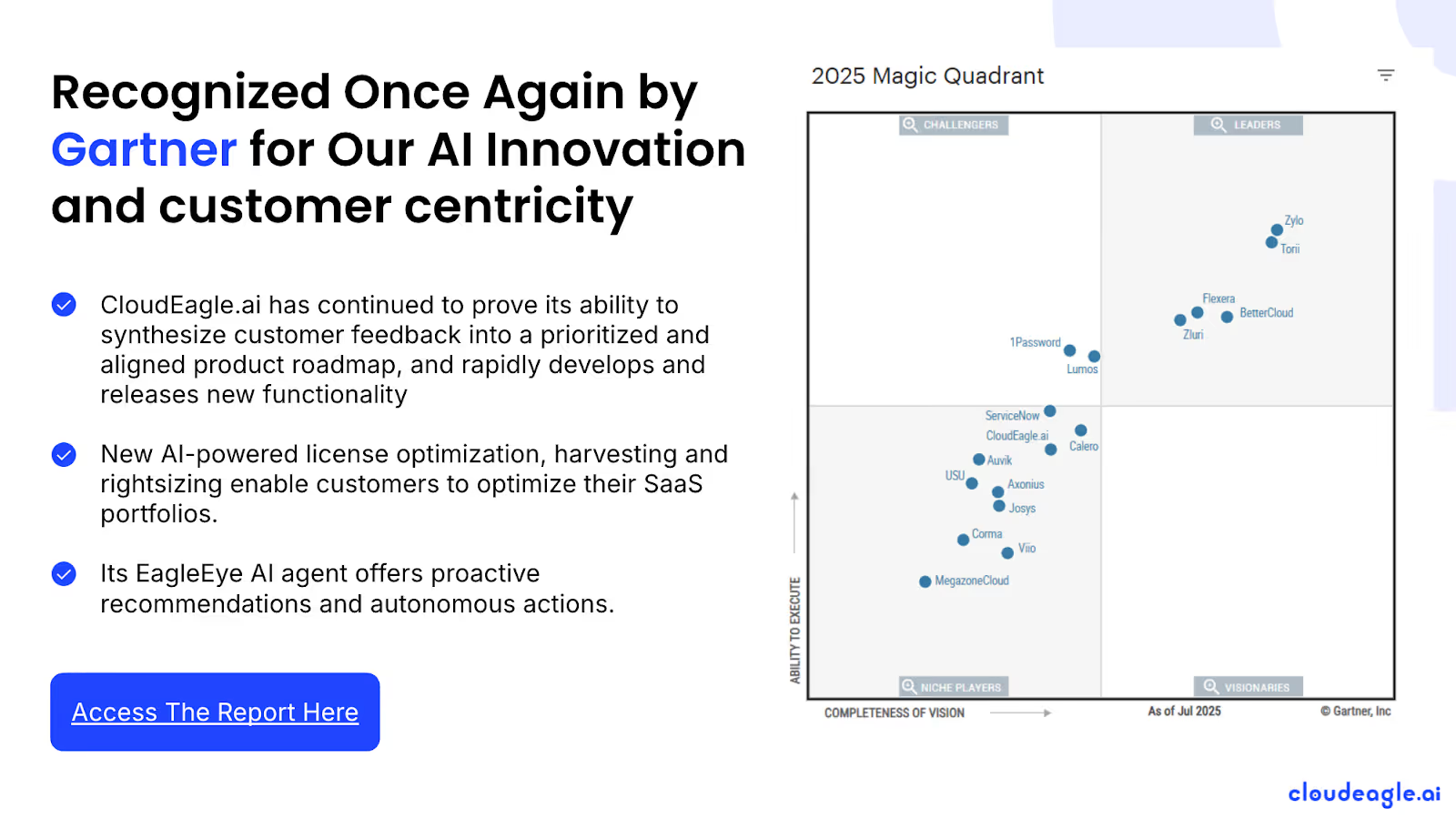
CloudEagle.ai's license management module delivers a centralized, real-time overview of all Monday.com licensing and spending. It automates tracking, usage analytics, and renewals, transforming a fragmented, manual process into a structured, data-driven workflow.
1. Seamless Monday.com Admin Console Integration
Manually handling Monday.com licenses is slow, error-prone, and frustrating. Building spreadsheets can take weeks, and by the time they’re ready, data is often outdated, leaving IT teams with incomplete insights on subscriptions, usage, and Monday.com pricing plans.
Current Process
Organizations often depend on spreadsheets and disconnected systems to track renewals, license counts, and user activity. This approach fragments data, and updates frequently become outdated before review.
Pain Points
Manual entry and delayed updates lead to errors and blind spots in software spend visibility. IT and finance teams lack accurate, real-time insights.
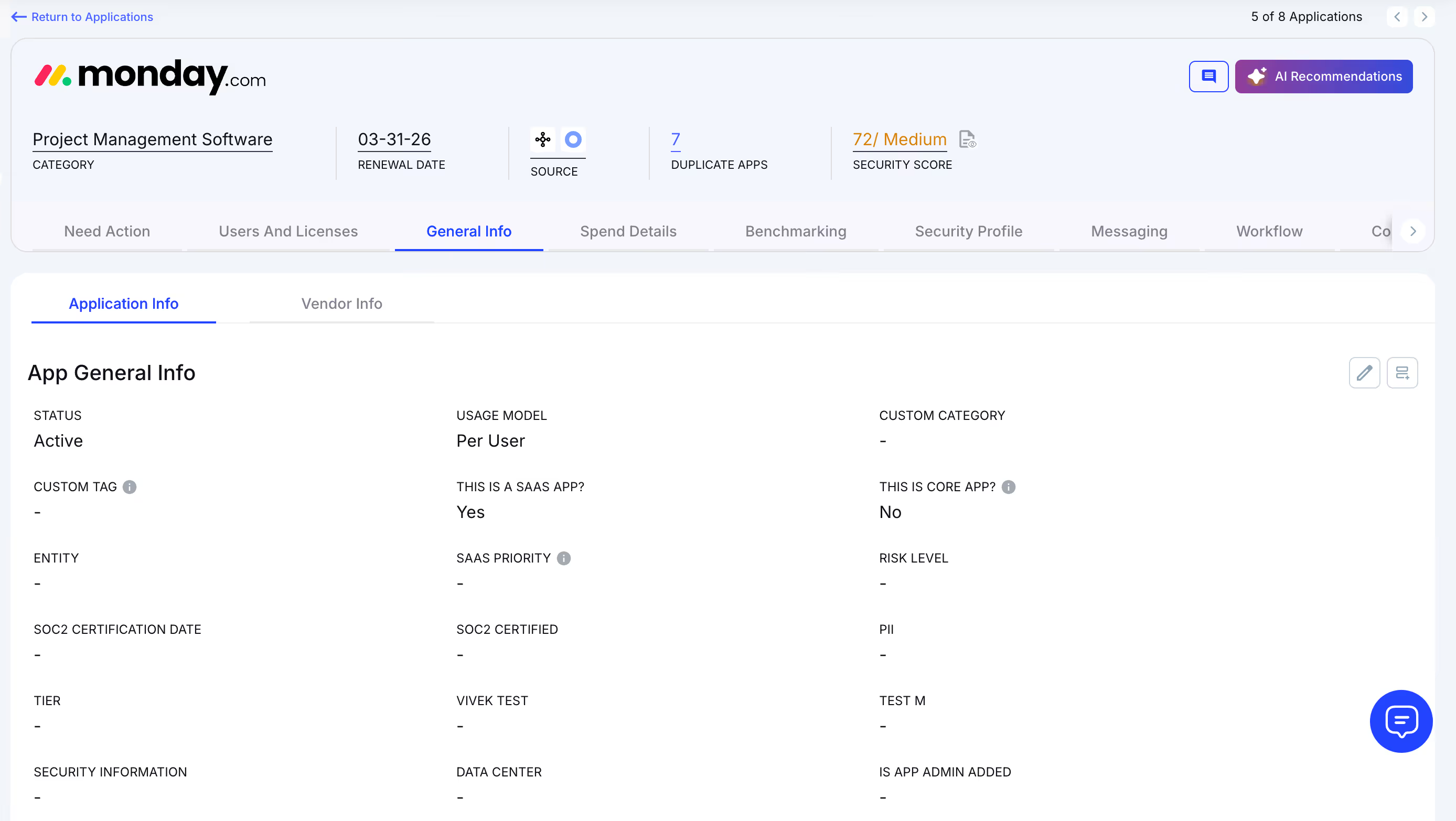
How We Do It
CloudEagle.ai aggregates vendor spend, usage data, and AI metadata extraction from all connected systems in real time. Renewal dates, costs, and usage are displayed side by side for easy analysis.
Why We Are Better
Onboarding takes only a few days. With over 500 integrations and AI-driven metadata extraction, CloudEagle.ai centralizes all license data, ensuring it remains accurate, reliable, and up to date.
2. Real-Time Usage Analytics & Shadow IT Detection
Without centralized oversight, Monday.com license management and duplicate apps can spiral out of control. Shadow IT often goes unnoticed, making it difficult for IT teams to spot redundant applications.
Current Process
Teams sometimes purchase duplicate applications through credit cards or free trials, which quietly convert into paid subscriptions. Detecting these overlaps manually is challenging.
Pain Points
Shadow IT leads to untracked Monday.com pricing and potential security issues. Manually identifying duplicates is labor-intensive and often misses overlapping applications.
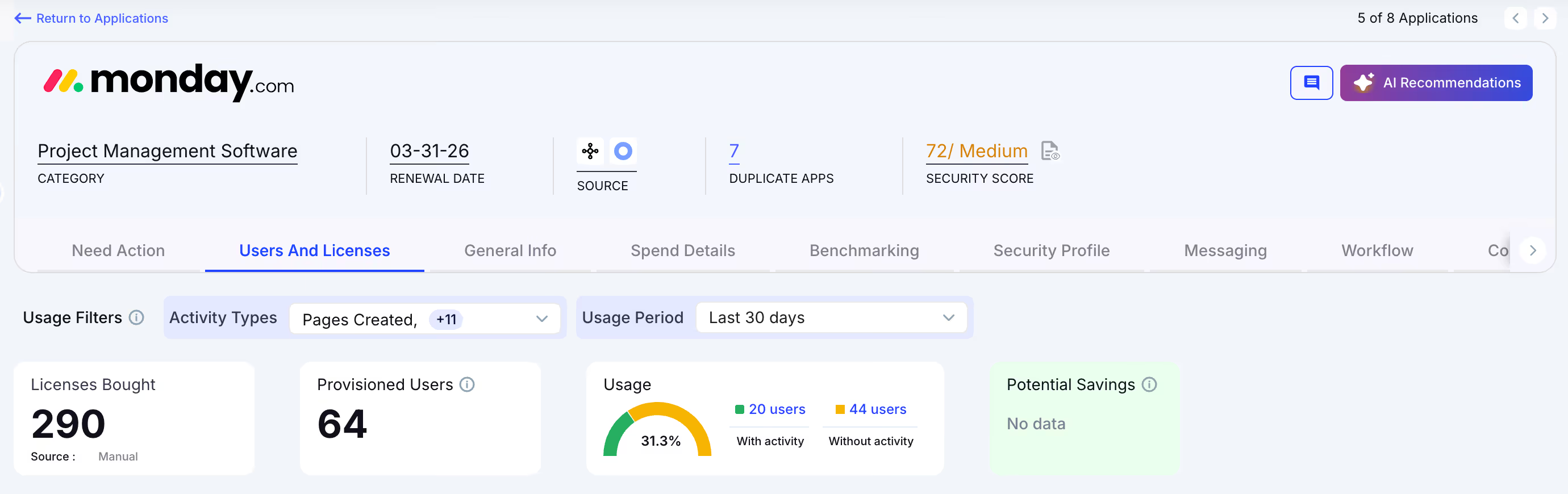
How We Do It
CloudEagle.ai uses AI to automatically detect duplicate and overlapping applications while tracking feature-level usage. Shadow apps are flagged instantly.
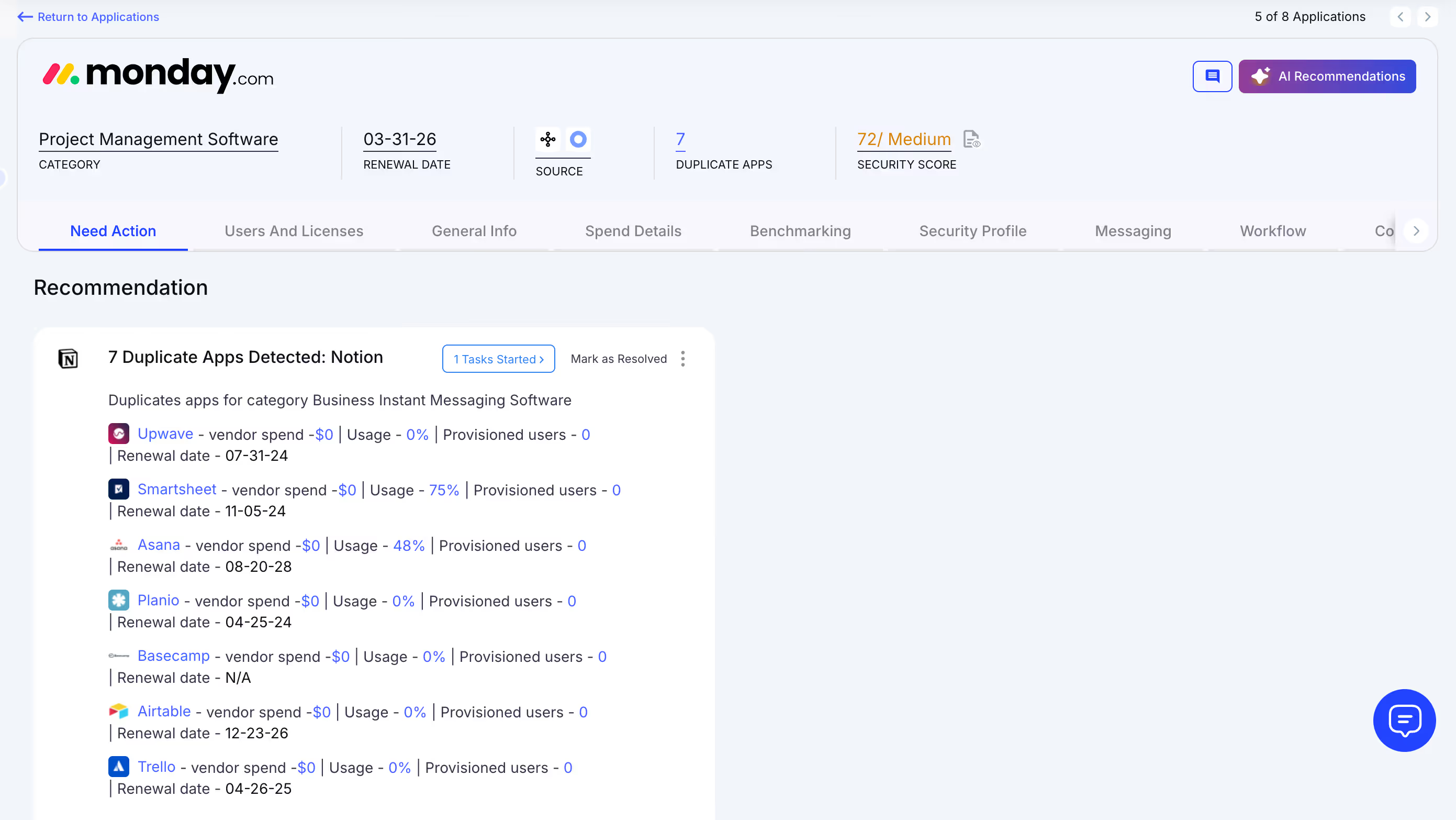
Why We Are Better
Our AI evaluates functionality, not just app names. IT teams can automatically email users, trigger workflows, or create ITSM tickets to reclaim licenses and reduce risks.
3. Centralized License Management
Managing Monday.com licenses across multiple teams can feel overwhelming. Many enterprises rely on spreadsheets to track top applications while manually consolidating SSO logs, usage, and contract data.
Current Process
Most organizations manage only core apps in spreadsheets, combining SSO logs, feature usage, and contracts manually, slowing updates and accuracy.
Pain Points
Unmonitored applications waste budgets, and license reassignment rarely happens. Renewal tracking is inconsistent, resulting in missed cost savings.
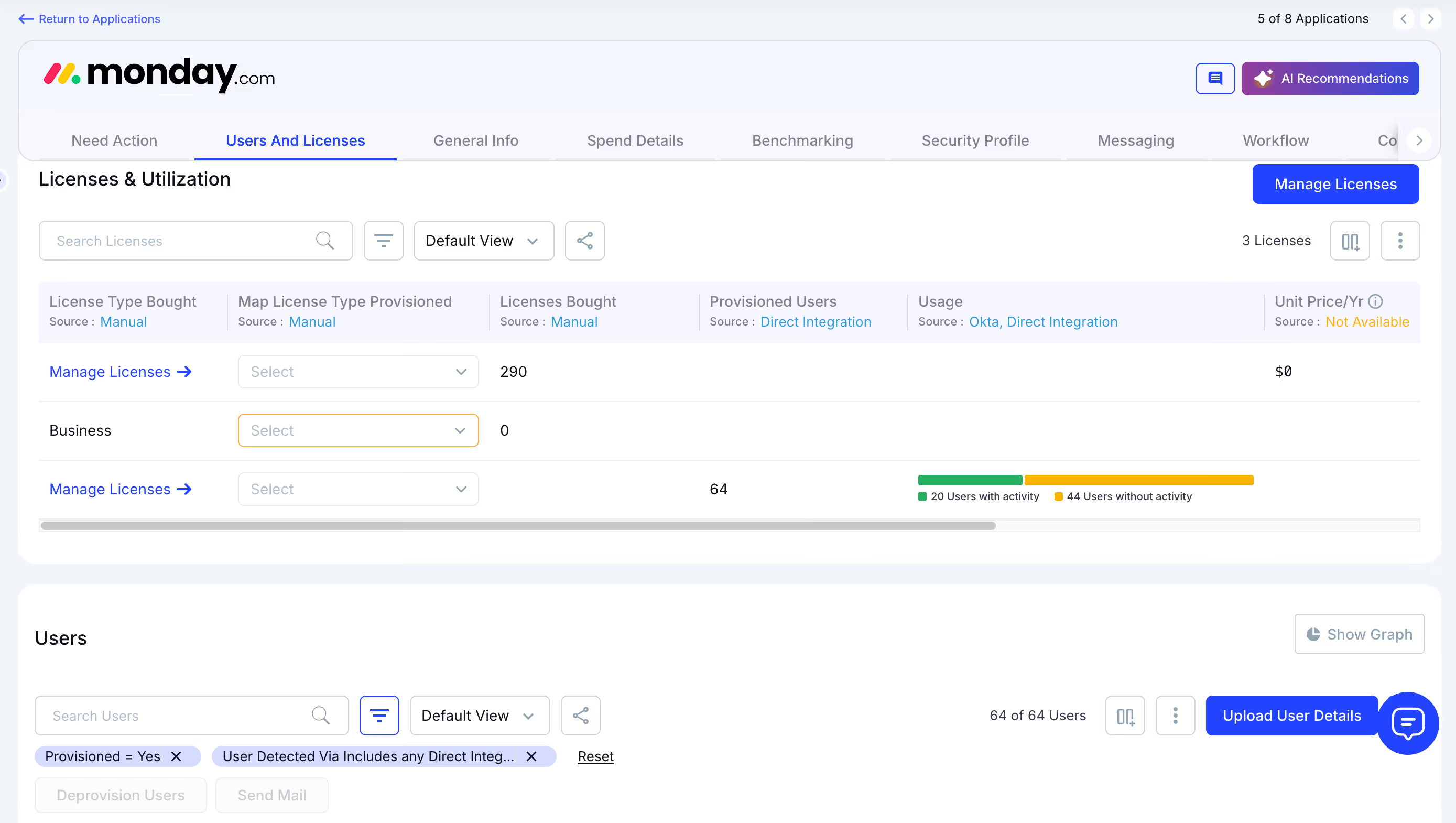
How We Do It
CloudEagle.ai centralizes license management on a single platform. Nightly syncs consolidate IDP, contract, and connector data, offering real-time visibility into usage.
Why We Are Better
Automatic updates correlate purchased licenses, users, and feature usage across all apps. Teams can filter by license type and make fast, data-backed decisions.
4. Automated License Harvesting
Unused Monday.com licenses silently inflate costs, yet IT teams often lack a systematic way to reclaim them. Manually tracking usage and sending weekly emails to hundreds of users is tedious, error-prone, and time-consuming.
Current Process
IT teams email inactive users manually and update spreadsheets, making the process slow, repetitive, and often skipped.
Pain Points
Inactive licenses remain active, draining budgets and increasing SaaS security risks. Manual reclamation does not scale efficiently.
How We Do It
CloudEagle.ai automates license harvesting. Weekly workflows detect inactivity, notify users, and reclaim or downgrade licenses based on usage.
Why We Are Better
Automations run daily or weekly via Okta or Microsoft AD. Licenses are reclaimed instantly, reducing waste, saving time, and maximizing utilization.
5. License Price Benchmarking
CloudEagle.ai’s benchmarking feature enables organizations to secure the best value during license renewals. By comparing contracts against industry standards, enterprises can negotiate competitive rates and avoid overpaying.
Current Process
Procurement teams rely on vendor quotes or outdated deals. Peer comparisons are limited and often fail to reflect real market prices.
Pain Points
Lack of accurate data hinders negotiations, leading to overpayment or unfavorable contract terms.
How We Do It
CloudEagle.ai provides real-time price benchmarks, historical trends, and Monday.com pricing guide to support informed, data-driven negotiation strategies.
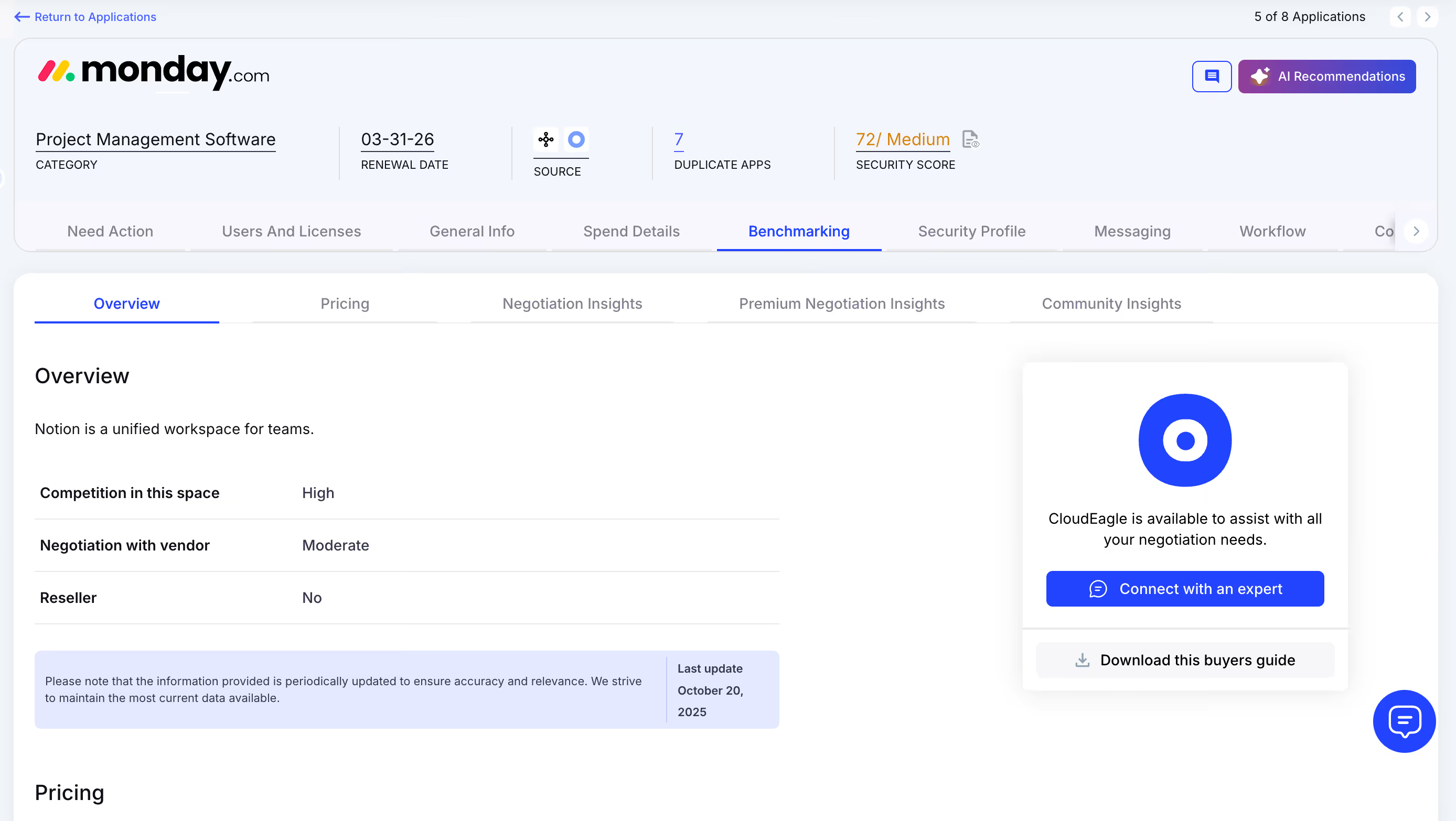
Why We Are Better
Monday.com pricing is detailed by SKU, license tier, and quantity, alongside key negotiation levers, ensuring renewals reflect actual market value.
6. Proactive Renewal Management
CloudEagle.ai supports renewal management with automated workflows triggered by contract dates. From approvals to adjusting Monday.com licensing counts, it prevents accidental auto-renewals and streamlines the process.
Current Process
Renewals are tracked through spreadsheets and long email chains. Approvals are slow, and auto-renewals are often overlooked.
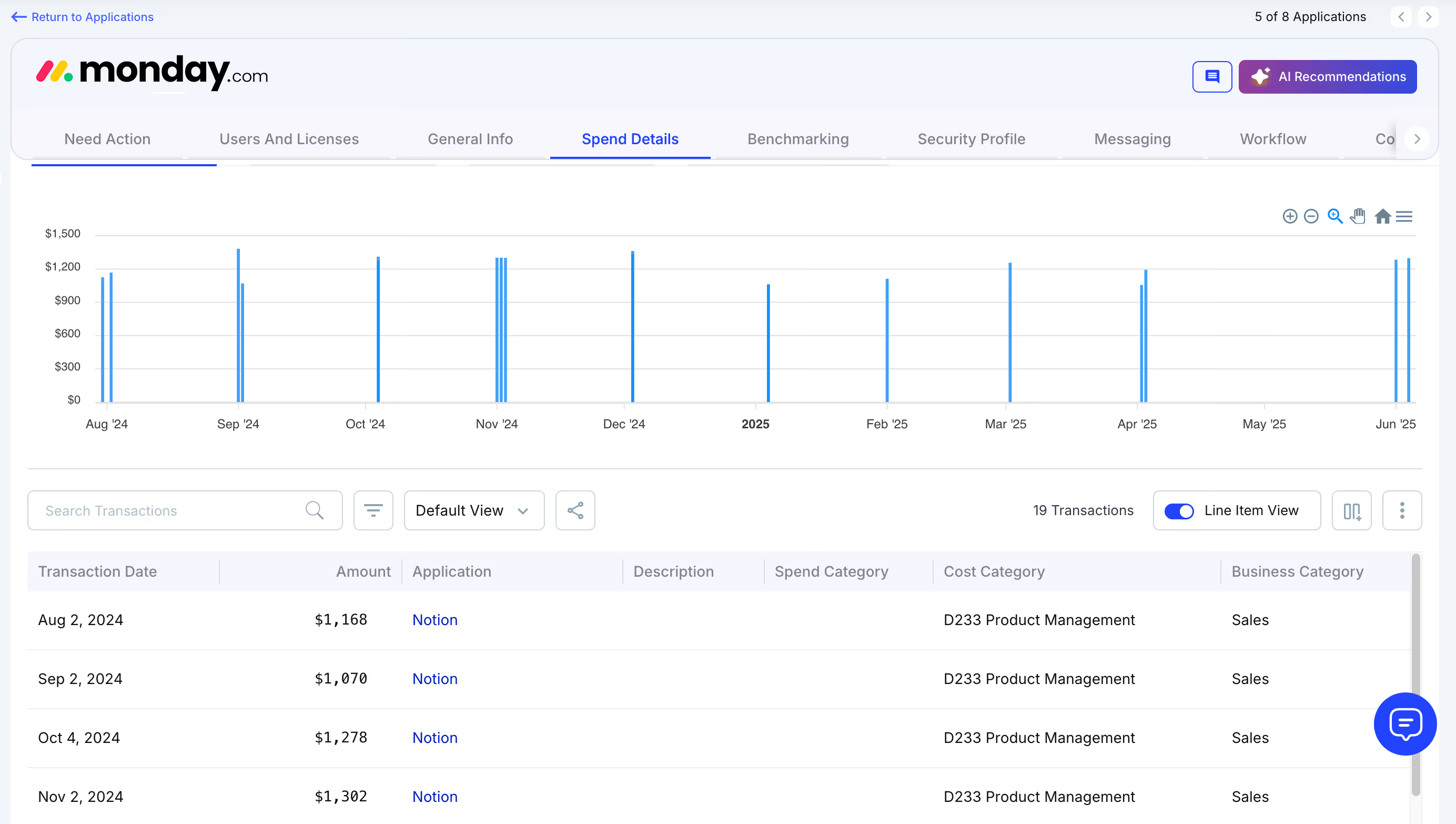
How We Do It
CloudEagle.ai generates a renewal calendar using AI-extracted metadata or integrates with CLMs like Ironclad, Monday.com, or Zip. Renewal workflows trigger 90 days before the notice period, assigning tasks to finance, legal, and business owners.
Why We Are Better
Teams receive alerts with usage insights, price benchmarks, and alternative options. Approvals are tracked automatically, preventing missed renewals and unnecessary spending.
7. Leverage Vendor Dashboards
CloudEagle.ai provides vendor dashboards for a complete view of Monday.com subscription data. Teams can track Monday.com licensing usage, renewal dates, and spending patterns to make data-driven decisions.
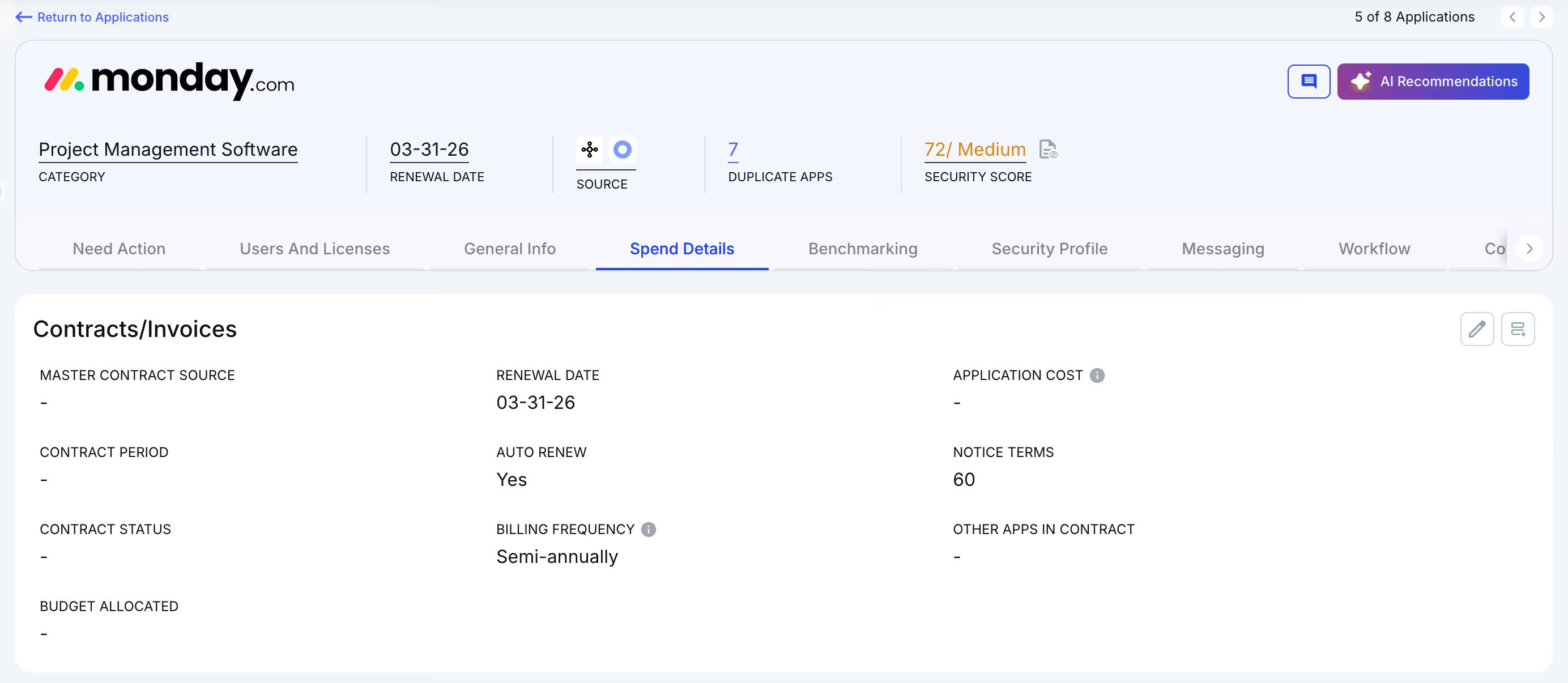
These dashboards highlight overspending and unused licenses, simplifying reclamation. They also reveal usage trends, helping organizations proactively adjust subscriptions and optimize Monday.com costs.
8. Simplified App Access Management
CloudEagle.ai streamlines Monday.com access by allowing employees to request licenses directly through the platform or Slack, eliminating long email chains and manual steps. Managers can review and approve requests in real time, ensuring prompt access.
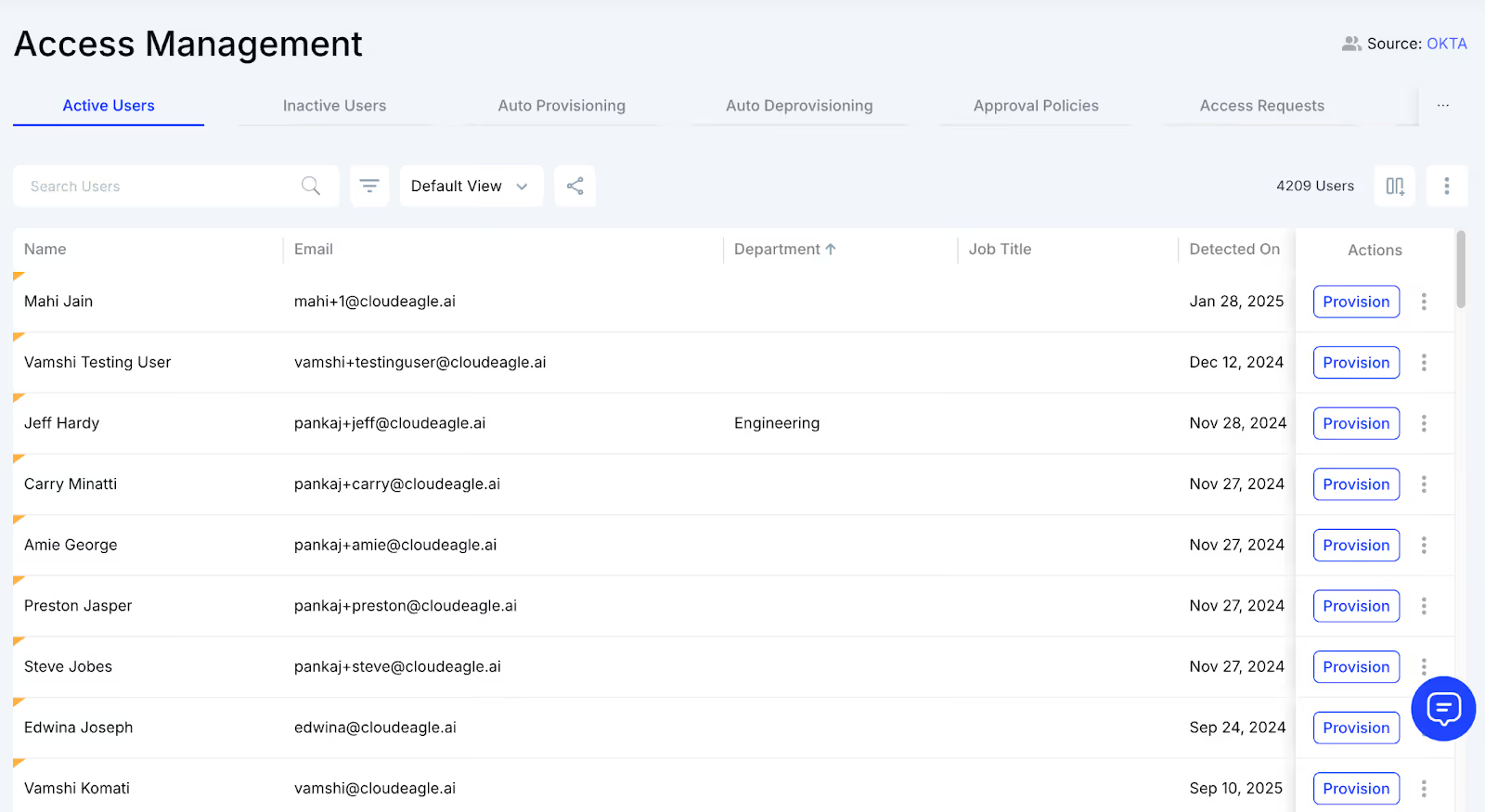
This method guarantees employees receive correct licenses without delays and removes approval bottlenecks. Each request is logged for transparency and compliance, making access management efficient while reducing administrative workload.
Conclusion
Manual tracking of Monday.com licenses might seem harmless at first, but the scattered dashboards, forgotten admin access, and departmental data silos quietly drain time, money, and productivity.
Teams struggle to see the real picture, and finance ends up guessing, while IT juggles compliance headaches.
CloudEagle.ai provides that single source of truth. By consolidating license data, flagging inactive accounts, and streamlining renewals, it ensures every Monday.com license is effective. Stop letting manual tracking slow you down and turn license chaos into clarity.
FAQs
1. Is Monday.com free for personal use?
Yes, Monday.com offers a free plan for individuals or small teams with limited boards, basic views, and essential collaboration features.
2. Is Monday free for two users?
Yes, the free plan supports up to 2 users, making it ideal for personal projects or very small teams starting out.
3. What are the limitations of Monday free version?
The free plan limits boards, automations, and integrations. Advanced features, timeline views, dashboards, and higher storage are only available on paid plans.
4. How much does the Monday.com certification cost?
Monday.com offers free and paid certification options. Paid courses vary in cost depending on the program and level of certification.
5. Is there a free alternative to Monday?
Yes, alternatives include Trello, ClickUp, and Asana free plans, offering basic project and task management features suitable for small teams.


.avif)


.avif)
.avif)




.png)






.avif)
.avif)
.avif)


