
%201.svg)


HIPAA Compliance Checklist for 2025

Most organizations enabling Microsoft Copilot are focused on one thing: productivity. What they are not focused on, at least not yet, is what Copilot can actually see inside their environment.
Copilot does not create new access. It inherits the access permissions that already exist in your Microsoft 365 tenant. If a user has overly broad access to SharePoint, email threads, or Teams conversations, Copilot can surface all of it in response to a single prompt. No additional breach required.
Microsoft Copilot security best practices are not complicated. But they require IT and security teams to take permissions architecture seriously before rollout, not after the first incident. This guide covers exactly what to do, in what order, and why it matters.
TL;DR
1. Copilot Is Already Inside Your Org. The Real Question Is Who Controls What It Sees
Microsoft 365 Copilot uses existing permissions and RBAC to control what users can access. Admins manage boundaries with tools like Microsoft Purview, ensuring Copilot only surfaces data users already have access to.
How Copilot plugs into Microsoft Graph and why your permissions architecture matters more than ever?
Microsoft 365 Copilot sits on top of Microsoft Graph, so it can access everything a user already has permission to see across emails, Teams, SharePoint, OneDrive, and more.
When asked to summarize a project, it pulls from all accessible content, not just one file. In most environments, that access is broader than expected.
This makes Microsoft 365 Copilot data security a real concern. Common issues include:
- Overexposed SharePoint sites
- Unlabeled sensitive data
- Excess access after role changes
- Forgotten external sharing
Copilot does not create these risks. It surfaces them, making Copilot governance and compliance, and Microsoft Copilot security best practices critical.
What the EchoLeak vulnerability revealed about AI-integrated enterprise environments
In June 2025, researchers at Aim Security disclosed EchoLeak (CVE-2025-32711), the first zero-click prompt injection attack on an enterprise AI assistant.
- No user action required, a normal email triggered the attack
- Hidden prompts were processed by Microsoft Copilot
- Sensitive data like chat history and internal files was exfiltrated
- Data was sent via an attacker-controlled Microsoft Teams URL
Rated CVSS 9.3 (critical), it was patched quickly. But the bigger takeaway remains.
AI assistants with broad access and weak trust boundaries introduce a new class of risk, making prompt injection a key concern for Copilot governance and compliance and Microsoft Copilot security best practices.

2. What Microsoft Actually Secures vs. What Your Team Still Owns?
Microsoft follows a shared responsibility model. It secures the infrastructure of the cloud, while your organization is responsible for security in the cloud, including data, identities, and configurations.
Built-in protections
Microsoft 365 Copilot includes:
- Encryption (AES-256 at rest, TLS 1.2+ in transit)
- Compliance (SOC 2, ISO 27001, ISO 27018, HIPAA)
- Microsoft Entra ID for access control
- Tenant isolation and no default model training on your data
- Microsoft Purview for audit logs and data loss prevention
- Copilot Control System for admin visibility
These are strong controls. The platform itself is not the weak point.
Where your responsibility begins
Microsoft does not control:
- Who has access to what data
- Whether sensitive data is labeled
- What users input into Copilot
- Permissions for Copilot Studio agents
- Shadow AI usage and third-party plugins
The risk sits in permissions, data classification, and monitoring, making Copilot governance and compliance, and Microsoft Copilot security best practices essential.
What the U.S. House ban highlights
In March 2024, the United States House of Representatives banned Copilot due to data exposure risks from non-enterprise versions.
Version control matters. Enterprise and consumer Copilot have very different security postures, and knowing what your employees use is critical for Microsoft 365 Copilot data security.
Want a deeper breakdown of real-world risks and trade-offs? Read: Microsoft Copilot Security Risks: Is it Worth It?
Building a Copilot governance program that actually scales requires thinking about AI governance as a cross-functional discipline, not just an IT problem. This podcast covers exactly that.
Podcast: How AI-Driven Innovation Meets Real-World Governance: A Blueprint for CIOs and CTOs. A practical conversation on what enterprise AI governance looks like when it actually works. 👉 Listen now
3. Microsoft Copilot Security Best Practices for Enterprise Teams
Securing Microsoft Copilot for enterprise requires a least-privilege approach, strong authentication, and data governance through Microsoft Purview.
It includes auditing permissions, applying sensitivity labels, enforcing DLP policies, and training users to keep AI interactions secure within Microsoft 365. Below are the best practices.
1. Enforce least privilege before rollout
Copilot amplifies existing access, so fix it upfront.
- Remove broad “everyone” or “all staff” access from SharePoint
- Tighten OneDrive sharing across the tenant
- Clean up stale access from role changes and offboarding
- Apply RBAC via Microsoft Entra ID
2. Apply sensitivity labels and DLP policies
Without labels, Copilot treats all data equally.
- Label confidential, legal, financial, and HR data
- Prevent Copilot from surfacing restricted content via DLP
- Block sensitive data in externally shared outputs
- Regularly review label coverage
3. Fix SharePoint oversharing before rollout
Most risk comes from legacy exposure.
- Map current permissions using admin or third-party tools
- Identify and fix sites with broad internal or external access
- Remove outdated external sharing links
- Set up recurring permission reviews
4. Require MFA and Conditional Access
Copilot increases the impact of compromised credentials.
- Enforce MFA for all users
- Require compliant devices and approved locations
- Restrict access from unmanaged devices
- Monitor sign-in logs for anomalies
5. Monitor usage and policy drift
Visibility is often enabled but not used.
- Review the Copilot Control System for unusual activity
- Detect configuration drift from the initial setup
- Track high-volume users and unexpected access patterns
- Set alerts for policy violations
6. Govern Copilot Studio agents and connectors
Agents expand your data access surface.
- Require IT approval before production use
- Audit permission scopes for agents and connectors
- Apply least privilege to all data connections
- Review agent activity regularly
7. Define and enforce an acceptable use policy (AUP)
Policies must be specific and enforced.
- Restrict sensitive data in prompts (PII, contracts, source code, etc.)
- Define approved use cases and Copilot tiers
- Set approval workflows for agents and connectors
- Define response steps for accidental exposure
8. Enable audit logging and incident readiness
Logs are critical for compliance and response.
- Enable Copilot audit logs in Microsoft Purview
- Integrate logs with SIEM
- Set retention aligned with compliance requirements
- Define investigation workflows before incidents
Preparing for audits? See what auditors actually evaluate in Copilot environments: Microsoft Copilot Access Reviews: What Auditors Will Ask in 2026
Most AI governance gaps in Microsoft 365 environments are discovered reactively. This webinar covers how enterprise security teams are getting ahead of it.
Watch the Webinar: Managing SaaS Risk and Compliance: how enterprises are rethinking AI governance in environments where 60% of apps operate outside IT visibility. 👉 Watch now
5. How to Build a Copilot Governance Program That Scales With Your Team?
Structuring ownership across IT, Security, Legal, and HR
Copilot governance is not an IT-only problem. Effective programs distribute ownership clearly:
Without clear ownership across these functions, governance decisions either do not get made or get made inconsistently.
Mapping Copilot to compliance frameworks
Most compliance teams have not yet formally mapped Copilot into their framework obligations. This is a gap that auditors are beginning to ask about. Tools that discover and govern every AI tool in use give them the inventory to start that mapping.
Copilot readiness checklist before rollout
Before enabling Copilot for additional users or teams, run through this readiness checklist:
Readiness assessments prevent the most common post-rollout problems. They are significantly faster than incident response.
6. How CloudEagle.ai Gives IT Teams the Cross-Stack Visibility to Make Copilot Governance Actually Work
Microsoft's native Copilot controls govern usage within your approved Microsoft 365 environment. They do not see the personal Microsoft accounts employees use on their own devices.
They do not discover the other AI tools that have become part of your team's workflow alongside Copilot. They do not connect Copilot governance to your broader identity lifecycle management program.
Shadow AI and Copilot Discovery
CloudEagle discovers every AI tool in use across your environment, including personal Copilot accounts and alternative AI tools, by correlating SSO signals, browser activity, and financial data.
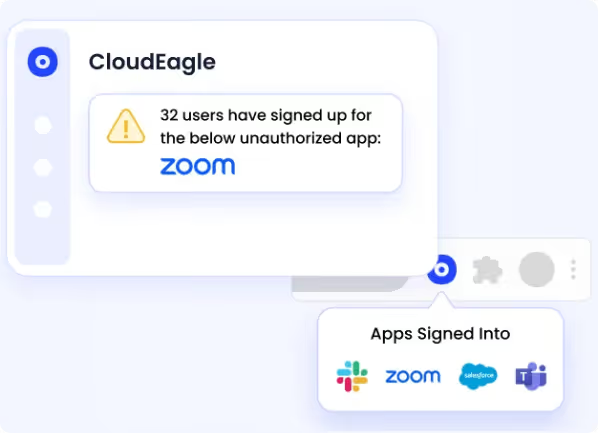
You get a complete picture of AI adoption before writing a governance policy.
Access Governance for AI Tools
Every AI tool that gets approved goes through CloudEagle's provisioning workflow. Access is tied to role, reviewed on schedule, and revoked immediately when an employee changes responsibilities or leaves.
The same governance that applies to your SaaS stack applies to Copilot and every other AI tool in use.
Continuous Monitoring Across Your AI Stack
CloudEagle monitors AI tool usage continuously.

When a new unsanctioned AI tool appears, when access patterns change, or when a policy is violated, it surfaces immediately rather than being discovered weeks later in an audit log nobody was watching.
Multi-Framework Compliance Coverage
Copilot usage creates obligations under GDPR, HIPAA, SOC 2, and ISO 27001.
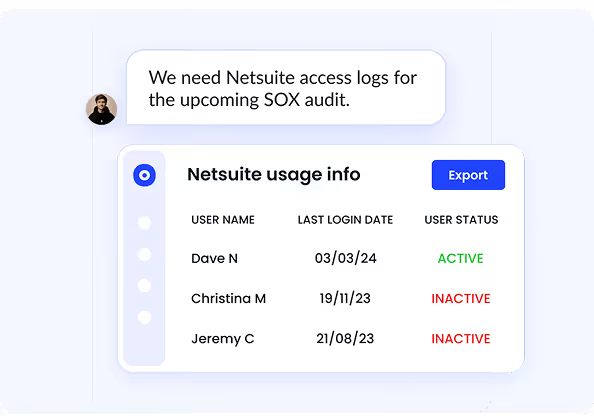
CloudEagle maps your AI governance controls to these frameworks automatically, so your Copilot program is included in your compliance boundary rather than sitting outside it.
Copilot Isn’t Your Only AI Risk.


7. Is Microsoft Copilot Secure Enough for Your Business?
Microsoft Copilot is secure for enterprise use, provided strong data governance and access controls are in place. It builds on Microsoft 365’s enterprise-grade security, compliance, and privacy foundations.
Check out how CloudEagle is integrated with Microsoft 365 for License Optimization.
But security ultimately depends on how well your environment is configured before rollout. Use this checklist to assess your readiness:
- Have you completed a SharePoint permissions audit and fixed oversharing?
- Are sensitivity labels applied to confidential data across your tenant?
- Is Copilot audit logging enabled and integrated with your SIEM?
- Do you have a process to govern custom Copilot Studio agents?
- Are all users on enterprise tiers with SSO, MFA, and Conditional Access enforced?
- Have you mapped Copilot to SOC 2, GDPR, and HIPAA requirements?
- Do you have visibility into shadow AI usage alongside Copilot?
When to layer third-party governance tools on top of native Microsoft controls
Conclusion
Microsoft Copilot is secure at the infrastructure level, with encryption, tenant isolation, audit logging, and compliance certifications built in. But the real risk is not the platform; it is the environment it operates in.
Copilot runs on top of your existing permissions and data access. If those are overly broad or poorly managed, it will surface sensitive information instantly and accurately. Microsoft Copilot security best practices are about fixing that foundation, not restricting productivity.
Microsoft 365 Copilot data security requires clear ownership across IT, Security, Legal, and HR, along with permissions audits, data classification, DLP policies, and continuous monitoring. CloudEagle.ai helps you get visibility into your actual AI risk surface before it becomes a problem.
Frequently Asked Questions
- How secure is using Microsoft Copilot?
Microsoft Copilot is secure at the infrastructure level, with encryption, tenant isolation, and compliance built into Microsoft 365. However, its real security depends on your permissions, data classification, and governance setup. - Which of the following are best practices for effectively using Microsoft Copilot?
Best practices include enforcing least-privilege access, applying sensitivity labels and DLP using Microsoft Purview, auditing SharePoint permissions, requiring MFA and Conditional Access, monitoring usage, and governing Copilot Studio agents. - What is Microsoft Copilot for security?
Microsoft Copilot for Security is an AI assistant that helps security teams detect threats, investigate incidents, and automate response actions using Microsoft’s security tools. - How do I secure Copilot?
To secure Copilot, audit and restrict access, apply sensitivity labels, enforce DLP policies, enable MFA, and monitor usage continuously. Effective governance across IT, Security, Legal, and HR is key. - Is Copilot safe to handle confidential information?
Copilot can handle confidential data if proper controls are in place. With correct permissions, labeling, and DLP policies, it respects boundaries. Without them, it may expose sensitive data already accessible to users.
Copilot Isn’t Your Only AI Risk.


.avif)


.avif)
.avif)




.png)








.avif)
.avif)
.avif)


