
%201.svg)


HIPAA Compliance Checklist for 2025

Microsoft Copilot improves productivity, but it also expands how data is accessed, interpreted, and shared. Because it works across emails, documents, and meetings, it can surface sensitive information faster than teams expect.
The risk isn’t that Microsoft Copilot breaks security controls. It’s that it uses existing access in ways enterprises haven’t fully accounted for. What a user can see, Copilot can process, summarize, and redistribute in new contexts.
In this article, we’ll break down the key security risks associated with Microsoft Copilot, where those SaaS security risks actually show up, and whether the value it delivers outweighs the potential exposure for your enterprise.
TL;DR
- Microsoft Copilot amplifies existing access, making sensitive data easier to surface, combine, and share.
- Risks appear in daily work through summaries, cross-source aggregation, and auto-generated sensitive content.
- High-risk users include over-permissioned employees, cross-tool workers, and teams handling financial or customer data.
- Security gaps grow when access expands faster than governance, especially without continuous visibility and control.
- CloudEagle reduces risk by enforcing structured access, continuous reviews, and audit-ready visibility without slowing teams.

1. Where Does Microsoft Copilot Actually Introduce Security Risk In Daily Work?
Copilot introduces risk by turning existing access into instant, structured outputs that are easier to consume and share. The issue isn’t access, it’s how data is reshaped and surfaced.
Summarizing Private Conversations
Copilot can convert a long Teams discussion into a clean summary that can be forwarded outside the original context.
Combining Multiple Internal Sources
It can pull inputs from emails, documents, and chats to generate a single response without clearly showing boundaries.
Auto-Drafting Sensitive Content
Copilot-generated emails or reports may include financial, legal, or internal details that users don’t fully review.
These risks are not hypothetical. According to IBM Report 2025, the average cost of a data breach reached $4.45 million globally, showing how quickly small exposure points can scale into major impact.
Microsoft Copilot doesn’t bypass security, but it removes friction. And when friction disappears, sensitive data moves faster than users expect.
2. Which Users And Roles Create The Highest Risk With Microsoft Copilot?
The highest risk comes from users who already have broad access and actively work with large volumes of information. Copilot amplifies both.
Poor access management increases when high-access roles combine large data visibility with AI-assisted actions. Microsoft Copilot doesn’t create new permissions, but it makes existing access more powerful, which is where exposure starts to scale.
A. Over-Permissioned Employees With Broad Data Access
The highest risk comes from employees who have access to more data than their role currently requires. These permissions often build up over time and stay unreviewed.
- Access To Legacy Data: Users retain access to old project folders, past team documents, or shared drives..
- Wide Document Visibility: Access includes internal reports, strategy docs, or sensitive team files. In such cases, role-based access control will prove beneficial.
- Visibility Without Intent: Users can access sensitive data even if they don’t actively need it.
Microsoft Copilot makes this risk immediate. A user can ask a broad question and receive insights pulled from documents they forgot they had access to.
- Faster Data Exposure: Sensitive information surfaces quickly through prompts and summaries.
- Reduced Friction: Less effort is needed to access and combine data across sources.
As Bruce Schneier put it,
“Security is a process, not a product.”
When permissions aren’t maintained, Microsoft Copilot turns passive access into active exposure.
B. Users Working Across Multiple Tools And Data Sources
Users working across multiple tools create risk because Copilot connects data that was previously separated. Their workflows naturally span systems, and Copilot follows that flow.
- Cross-Platform Access: Microsoft Copilot can combine insights from Outlook emails, Teams chats, and SharePoint files..
- Context Aggregation: Microsoft Copilot combines inputs from different sources into one response, increasing exposure.
- Workflow Bridging: Users move between tools quickly, and Microsoft Copilot follows that flow without friction.
This changes how information is consumed. Instead of opening multiple tools, users get one synthesized output.
When multiple sources are involved, user provisioning can reveal patterns or insights that weren’t visible in isolation.
When users work across systems, Microsoft Copilot turns that breadth into depth. And that’s where the risk shifts from access to interpretation.
C. Teams Handling Financial, Legal, Or Customer Data
The highest impact risk comes from teams working with sensitive data like financial reports, legal documents, or customer records. Copilot accelerates how this data is processed and shared.
In one scenario, a finance team uses Copilot to summarize quarterly performance. The output is clean and ready to share, but may include sensitive projections or internal assumptions.
- Financial summaries shared beyond intended stakeholders
- Sensitive projections surfaced in simplified formats
In another scenario, customer support or legal teams rely on Microsoft Copilot to pull insights from multiple records. The response combines data points that, when viewed together, increases exposure risk.
- Customer data aggregated across tickets and systems
- Legal context simplified in ways that lose nuance or restrictions
This risk is well documented. According to Verizon Business, 73% of data breaches involve the human element, including errors, misuse, or unintended exposure.
- Higher likelihood of human-driven exposure in sensitive roles
- Increased impact when data is shared or interpreted incorrectly
When Microsoft Copilot is used in high-sensitivity environments, the risk isn’t just access, it’s amplification. Sensitive data becomes easier to interpret, summarize, and share, which raises the stakes for how it’s controlled.
3. How Does CloudEagle.ai Help Reduce Microsoft Copilot Risk Without Slowing Teams Down?
AI tools like Microsoft Copilot accelerate productivity, but they also expand access risks faster than teams can track. Employees gain access to sensitive data, permissions extend beyond necessity, and approvals often lack structure or auditability.
CloudEagle.ai brings control without friction by ensuring every access decision is visible, time-bound, and aligned with role and usage.
Instead of slowing teams down, CloudEagle.ai enables fast, secure access while continuously reducing risk, tightening SaaS compliance, and eliminating manual bottlenecks across the lifecycle.
A: Controlled App Access Through a Centralized Catalog
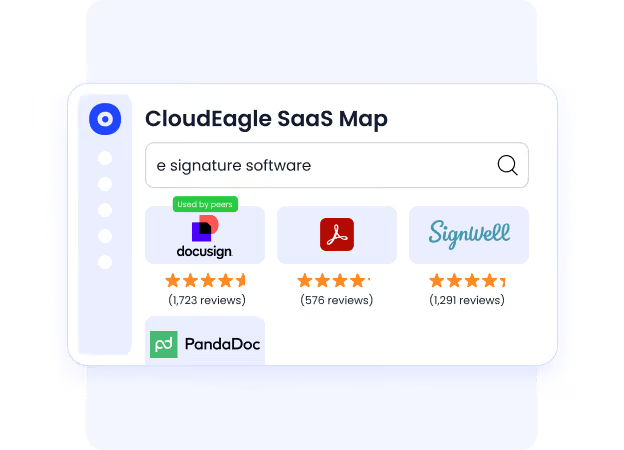
CloudEagle.ai ensures employees access only the right tools, with clear visibility and structured approvals that reduce security risks without delaying productivity.
Current Process
Employees request access through email or Slack without knowing which apps are approved. Requests sit in queues while IT chases approvals across channels.
Pain Points
Approvals are slow and fragmented. Audit trails are incomplete, and employees often bypass IT, leading to shadow IT and security gaps.
How We Do It
CloudEagle.ai provides a centralized app catalog with role-based visibility. Requests follow automated approval workflows with complete logging.
Why We Are Better
Employees see only approved tools, approvals are documented automatically, and access is granted faster without compromising control.
B: Time-Bound Access That Reduces Long-Term Risk
CloudEagle.ai ensures access does not remain open longer than necessary, limiting exposure while maintaining flexibility for teams.
Current Process
IT grants perpetual access even for short-term needs. Users retain permissions long after tasks are completed.
Pain Points
Excess privileged access increases risk and leads to unused licenses. Over time, permissions expand without review or cleanup.

How We Do It
CloudEagle.ai enables time-based access with automatic revocation after defined periods, aligned with task or project needs.
Why We Are Better
Access expires automatically without manual intervention, reducing risk while optimizing license usage.
C: Zero-Touch Onboarding and Offboarding Across All Apps
CloudEagle.ai ensures employees get the right access instantly while removing access completely when they leave, without manual effort.
Current Process
IT provisions and deprovisions access manually across multiple apps. Not all apps are connected to identity providers, requiring extra steps.
Pain Points
Onboarding delays reduce productivity. Ex-employees may retain access, creating security risks and compliance gaps.

How We Do It
CloudEagle.ai automates onboarding and offboarding using role-based rules. Access is provisioned or removed automatically across all apps.
Why We Are Better
The system works across apps, even outside IDPs. Licenses are reclaimed instantly, and access remains accurate at all times.
D: Continuous Access Reviews Without Slowing Teams Down
CloudEagle.ai replaces periodic, manual reviews with continuous monitoring, helping teams stay compliant without added workload.
Current Process
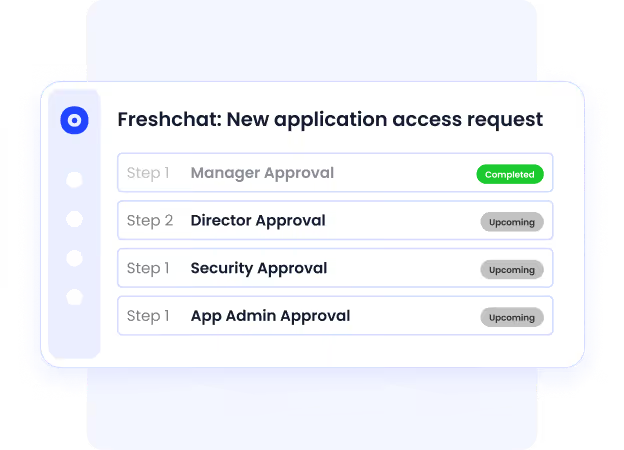
Access reviews happen quarterly. Teams manually verify roles, permissions, and admin access across multiple systems.
Pain Points
Reviews are slow and incomplete. Managers often approve access without proper checks, increasing compliance risks.
How We Do It
CloudEagle.ai centralizes access reviews in one dashboard and schedules automated reviews with risk-based prioritization.
Why We Are Better
High-risk users are flagged automatically, reducing review fatigue and improving accuracy without adding overhead.
E: Automated Evidence and Compliance-Ready Audit Trails
CloudEagle.ai ensures every access decision is traceable, documented, and ready for audit without manual effort.
Current Process
Teams gather approval history and deprovisioning proof manually from emails, tickets, and logs during audits.
Pain Points
Audit preparation takes weeks. Missing evidence creates compliance risks and delays.

How We Do It
CloudEagle.ai logs approvals, changes, and deprovisioning actions automatically, attaching proof within workflows.
Why We Are Better
Audit trails are always ready. Teams generate compliance reports instantly without chasing data.
Control Microsoft Copilot access


4. What Does Secure Microsoft Copilot Adoption Look Like In Practice?
A team rolls out Microsoft Copilot across departments in a single quarter. Access is granted quickly, adoption looks strong, and early feedback is positive.
From one perspective, this feels like progress. Employees are moving faster, producing more, and leadership sees visible gains in productivity.
From another, the picture is less clear. Security teams don’t fully know how data is being surfaced, access reviews lag behind usage, and policies are still catching up.
As Satya Nadella said,
“Every organization will need to think about how they govern AI.”
Nothing breaks immediately. But over time, small gaps begin to matter. Access grows faster than oversight, and usage expands faster than understanding.
Secure adoption isn’t about slowing Copilot down. It’s about making sure clarity grows at the same pace as usage, so control doesn’t fall behind
5. Conclusion
Microsoft Copilot introduces real security risks, but those risks don’t come from the tool itself. They come from how existing access, data, and usage patterns are amplified in daily work.
The question isn’t whether Microsoft Copilot is worth it. It’s whether your enterprise has the visibility and control to support how it actually behaves. Without that, even small gaps in access or identity governance can scale quickly.
This is where CloudEagle becomes important. By connecting access, usage, and license data in one place, it helps teams identify over-permissioned users, monitor real usage, and enforce smarter controls. Instead of reacting to risks later, teams can address them early.
When Microsoft Copilot is managed with that level of clarity, it stops being a security concern to debate. It becomes a capability you can trust, because it’s aligned with how your enterprise actually works.
6. FAQs
1. Does Microsoft Copilot create new security risks?
Microsoft Copilot doesn’t create new access, but it amplifies existing permissions. Risks arise from how data is surfaced and combined.
2. Which users are most at risk when using Microsoft Copilot?
Users with broad data access, cross-functional roles, or involvement with sensitive data carry the highest risk.
3. Can Microsoft Copilot expose sensitive information unintentionally?
Yes. Microsoft Copilot can summarize and combine data from multiple sources, sometimes revealing insights beyond intended visibility.
4. How can organizations reduce Microsoft Copilot security risks?
By reviewing access regularly, aligning permissions with roles, and monitoring how Microsoft Copilot features are actually used.
5. How does CloudEagle help secure Microsoft Copilot usage?
CloudEagle provides visibility into access, usage, and licenses. It helps identify risks early and enforce better governance controls.


.avif)


.avif)
.avif)




.png)








.avif)
.avif)
.avif)


