.avif)
%201.svg)


HIPAA Compliance Checklist for 2025

An employee pastes a customer contract into an AI tool nobody approved. The CISO wants it blocked. Legal wants to assess exposure first. The CIO wants to know if it was filling a real gap. HR wants to know if it's a policy violation. Four functions, four legitimate claims, and nobody with the authority to make the call alone.
This is what AI governance oversight looks like at most organizations: real risk, no defined owner. An AI governance committee fixes that, but only with assigned AI decision rights attached.
A committee without decision rights is just a discussion group, and AI governance oversight without one is a policy nobody's actually enforcing.
Here's how to build one that actually decides things.
TL;DR
- Build the committee in five steps: mandate, staffing, decision rights, cadence, inventory.
- Five decisions need a named owner: tool approval, risk tolerance, agent deployment, incident response, and spend authorization.
- Seven seats cover it: Executive Sponsor, CISO, IT Director, Legal, Finance, Business Unit (rotating), HR.
- Most AI governance oversight fails from a missing decision-rights map.
- The biggest blind spot: governing only the tools IT already approved.
1. How to Build an AI Governance Committee: The Launch Sequence
Building the committee involves five sequential steps. This is the operating model behind real AI governance oversight.
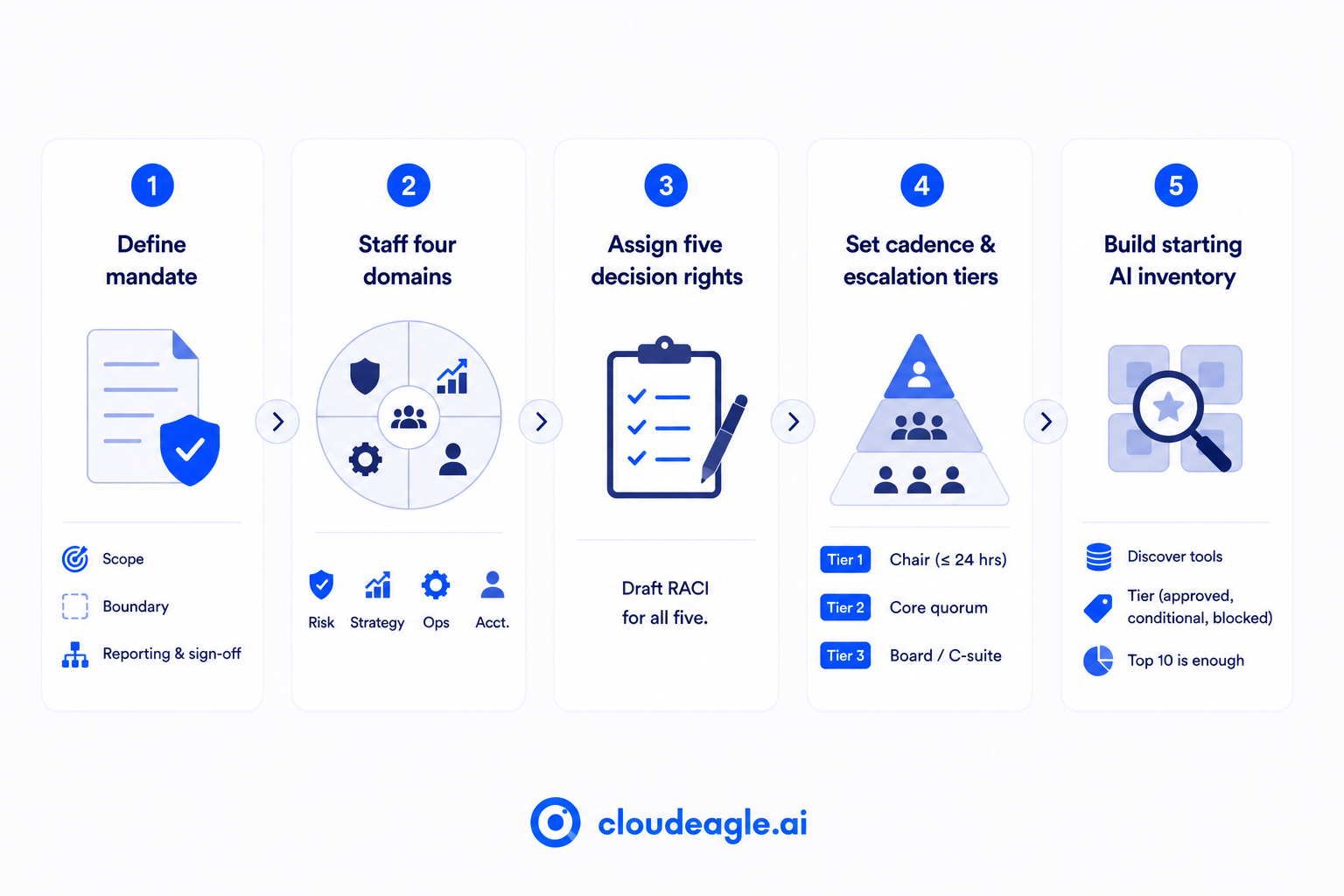
1. Define the mandate in one paragraph:
Write down what the committee decides, what it doesn't, and who it reports to before recruiting a single member.
- Scope: which AI decisions belong to this committee versus existing IT or security governance
- Boundary: what the committee explicitly does not own, so it doesn't become a catch-all
- Reporting line: board or audit committee
- Sign-off: get this from the CEO or board first. A committee that starts meeting before its mandate exists spends its first three sessions arguing about its own authority instead of deciding anything.
2. Staff the four domains, not four job titles:
Every committee needs Risk, Strategy, Operations, and Accountability represented, mapped to people rather than titles.
- Risk: CISO, covering what can go wrong
- Strategy: CIO or CAIO, covering what the organization is trying to achieve with AI
- Operations: IT Director, covering how tools are actually used day-to-day
- Accountability: Legal and Finance, covering who answers to regulators, customers, and the board
The full seven-seat breakdown, including the rotating Business Unit and HR seats, is below.
3. Assign the five decision rights before the first meeting:
Walk in with a draft RACI. For each of the five decisions covered in the next section, the draft should already name who's Responsible, who's Accountable, who's Consulted, and who's Informed.
The first meeting's job is to refine that draft, which is the difference between a working session and a two-hour debate about process.
4. Set cadence and escalation tiers:
Monthly for standing decisions, with a defined fast-track path for anything urgent.
- Tier 1: The chair decides solo within 24 hours
- Tier 2: needs a quorum of core members
- Tier 3: needs board or C-suite sign-off
Map a few realistic scenarios to these tiers now, while there's no live incident forcing the decision under pressure. Without this, every AI-related incident becomes an ad hoc emergency meeting with whoever happens to be reachable.
5. Build the starting AI tool inventory:
Skip the approved list and start with what's actually running. This is the committee's first substantive agenda item, before any of the five decisions mean anything.
- Pull from SSO logs, expense reports, and browser activity
- Tier each tool found as approved, conditionally approved, or blocked
- Treat this as a starting picture.
The top 10 tools in use are enough to make the first round of decisions real.
That's the whole launch. Everything after this is what keeps the committee running.

2. Assign Decision Rights: The Five Decisions and Who Owns Each
Assigning AI decision rights means naming, per decision, who recommends, who approves, who's consulted, and who's informed.
Most organizations skip this step, which is why the same tool gets approved by one team and blocked by another in the same quarter, and why AI governance oversight breaks down at the exact moment it matters most.
Five decisions cover most of what an AI governance committee will face:
- Approve or tier a new AI tool: approved, conditionally approved, or blocked
- Set AI risk tolerance and the acceptable use policy: what data can never reach an external tool
- Approve agent and agentic AI deployment: which autonomous workflows get greenlit
- Respond to policy violations: who investigates, who decides consequences
- Authorize AI spend and set board reporting format: budget thresholds, escalation triggers
Without this table, "that tool isn't approved" is just a recommendation a business unit can ignore. With it, the same sentence is a decision with enforcement behind it.
3. Who Sits on the Committee: The Seven Seats
Seven roles, no more. Past that, the committee becomes the bureaucracy it exists to prevent.
Two calls matter most. When the CIO and CISO are the same person, the committee serves as a check on single-person authority. And the chair should be the CISO or CAIO, never the CIO alone: the CIO buys and deploys the technology, so governing it too is a conflict of interest.
One more detail: the committee should report to the board or the audit committee. Reporting only to the CEO, it needs to say no to make it advisory, not independent, and that gap is where AI governance oversight quietly loses its authority.
Three Lines of Defense, Applied to This Committee
The seven seats map onto a risk model most finance and audit teams already use.
- First line: business units and employees using AI tools daily. Follow the acceptable use policy, and escalate when something feels off-scope.
- Second line: this committee. Designs the policy, runs approvals, and reports risk posture upward.
- Third line: internal audit, outside the committee, testing whether decision rights on paper match reality, reporting straight to the board.
Each line fails differently. Employees not knowing the policy is a first-line gap. The committee approving the wrong tool is second-line. Knowing which one failed is how AI governance oversight actually improves.
4. How the Committee Runs Once It's Live
Standing it up is the launch sequence above. Running it well is a separate set of habits, and it's usually where AI governance oversight either becomes real or quietly stays theoretical.
Cadence and pre-reads:
Monthly, with materials circulated in advance. A tool approval reviewed for the first time in the meeting gets rubber-stamped or tabled, neither of which is governance.
Standing agenda, same order every time:
- Tool approval queue
- Policy exception log, with review dates attached
- Risk posture update: new tools discovered, unsanctioned usage trends
- Incident log since the last meeting
Three escalation tiers, defined before anyone needs them:
- Chair decides solo within 24 hours
- Quorum of core members required
- Board or C-suite sign-off required
Map common scenarios to these tiers in advance. Deciding the tier mid-incident is how AI governance oversight turns into whoever's in the room that day.
Sunset clauses on everything:
Every approval and exception gets a review date.
Without one, decisions made eighteen months ago sit unexamined while the tool's risk has moved on, which is its own quiet failure of AI governance oversight.
Decision documentation:
Every decision is logged with date, rationale, dissenting views, and a review date. This is the audit trail that proves the framework operates.
5. Where CloudEagle.ai Supports the Committee's Decisions
The committee decides only based on the data behind it. Three categories need to stay current, checked continuously rather than reviewed once a quarter.
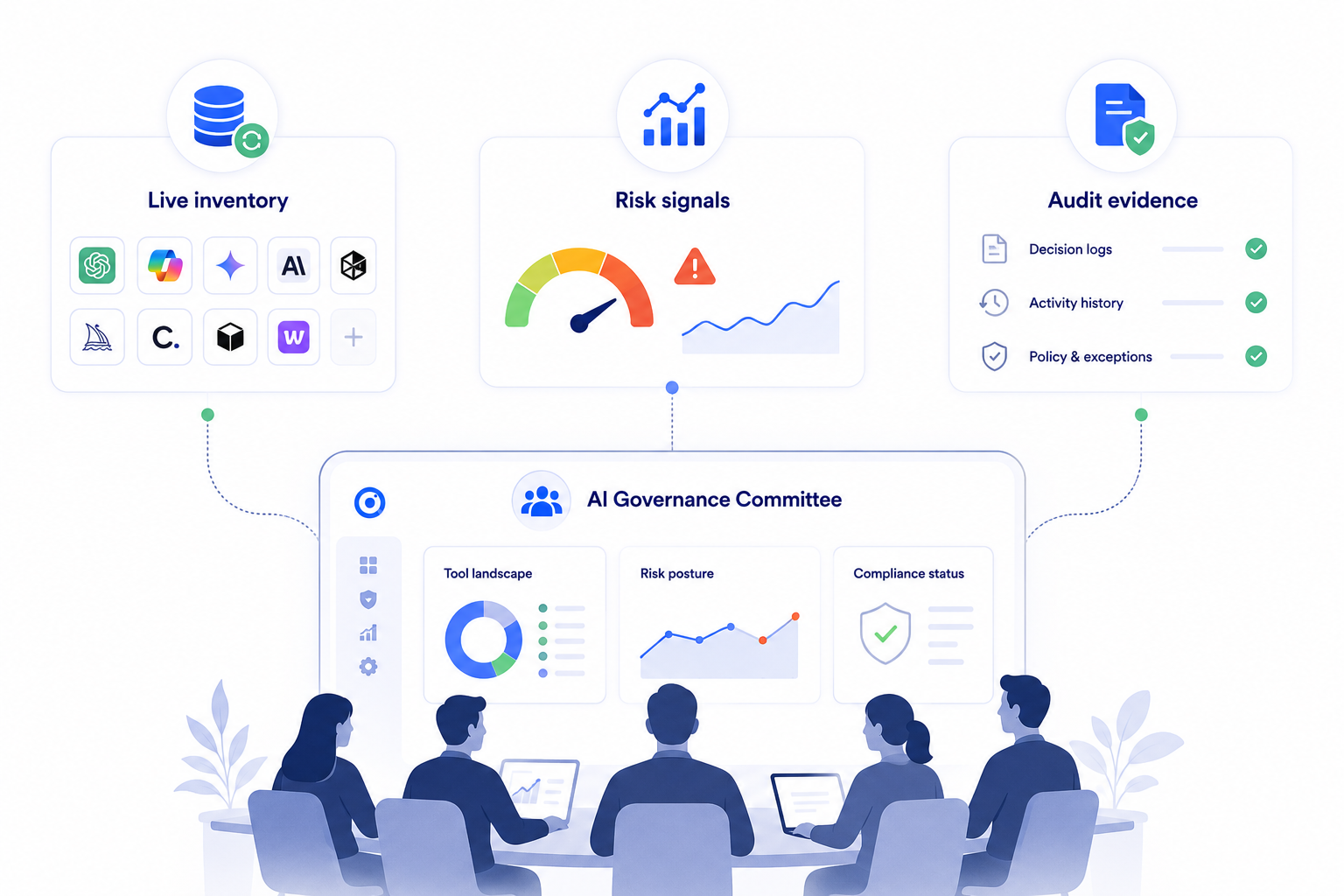
a) A live AI tool inventory:
The committee can't govern tools it doesn't know exist, and a spreadsheet from the last audit is already stale.
How CloudEagle.ai solves it:
- Correlates SSO, browser extension, firewall, and finance data against a proprietary AI application catalog
- Surfaces a new tool within hours of first use, not at the next quarterly scan

Rec Room's team reported a comprehensive view of their SaaS stack after adopting CloudEagle.ai, catching unsanctioned tools early instead of after the fact.
"Thanks to CloudEagle.ai, we now have a comprehensive view of our SaaS stack. The platform made it easier to identify free apps and promptly sends alerts after detecting unsanctioned apps entering our system, helping us prevent shadow IT in the early stages”.
- Devin Murphy, Senior Accounting Manager, Rec Room.
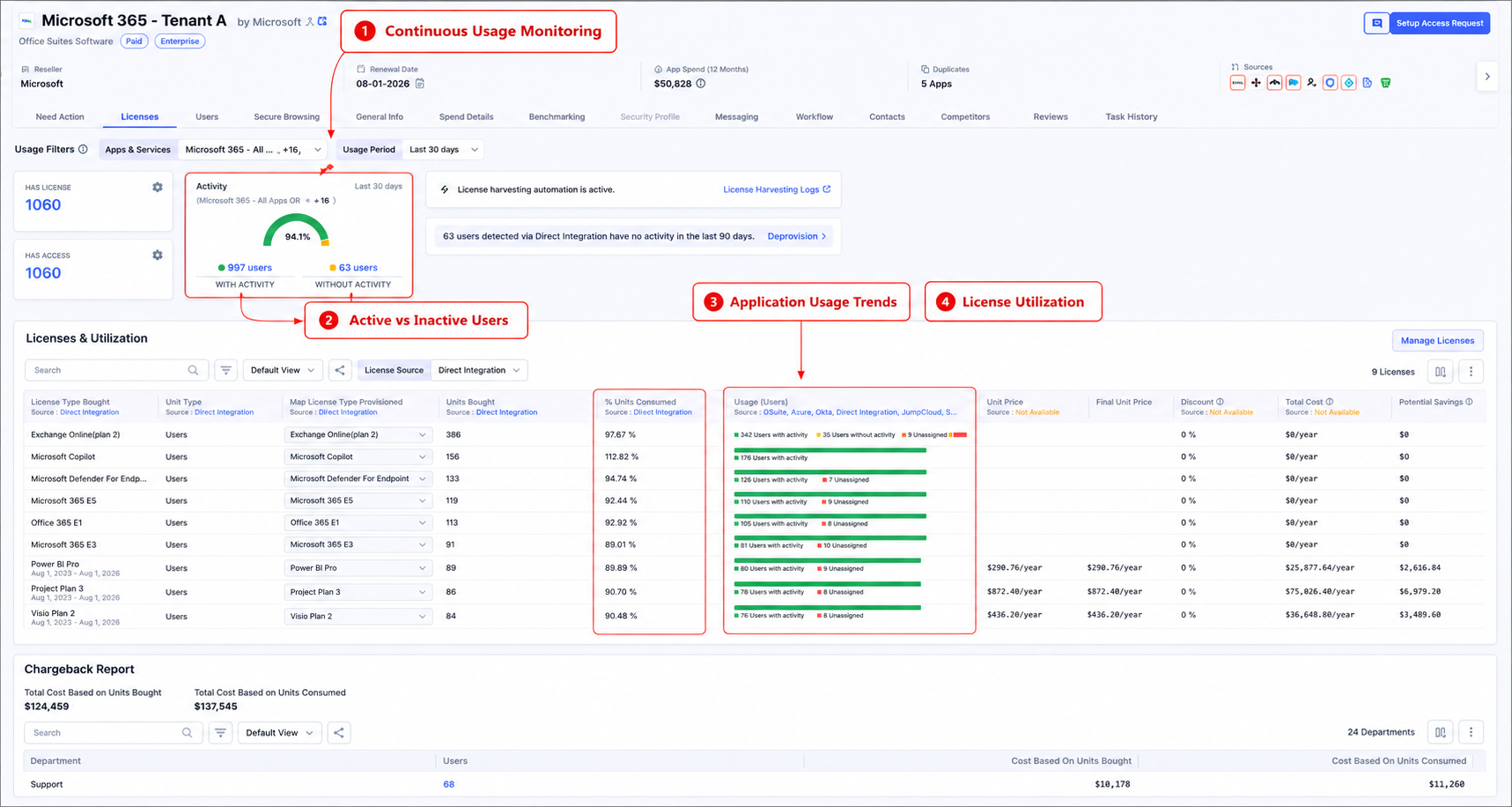
b) Usage and risk signals:
The standing risk posture update needs to know which teams are using which tools and whether that usage looks like compliance or drift.
How CloudEagle.ai solves it:
- Tracks usage continuously through the same monitoring layer that surfaces the inventory
- Removes the manual assembly work before every meeting
c) Audit evidence:
Every committee decision needs to be defensible later, to an auditor, a regulator, or the board.
How CloudEagle.ai solves it:
- Maintains the governance record automatically as decisions happen
- Covers tool approvals, policy exceptions, and incident responses without manual reconstruction

The committee decides. CloudEagle.ai makes sure AI governance oversight is based on what's actually running, not what was documented six months ago.
Your Committee Decides. CloudEagle.ai Makes Sure the Data Is Real.


6. AI Governance Oversight: What Turns the Committee Into Theater
Three mistakes account for most committees where AI governance oversight exists on paper but doesn't function in practice.
- Governance without decision rights: A committee that advises but doesn't decide is just a meeting. Without the RACI structure written down, decisions get deferred or duplicated.
- Security as the only real voice: A CISO-driven committee produces risk-averse calls that block adoption of the business needs. The Business Unit seat exists to balance that.
- Governing only the tools IT already approved: The largest AI risk usually isn't on the sanctioned list; it's in the tools nobody approved in the first place. A committee that only reviews sanctioned tools governs the smaller half of the footprint.
7. FAQs
1. How big should an AI governance committee be?
Seven seats maximum: Executive Sponsor, CISO, IT Director, Legal, Finance, a rotating Business Unit seat, and HR. Beyond that, decisions slow down.
2. What's the difference between an AI governance committee and an AI steering committee?
A steering committee sets AI strategy and roadmap. A governance committee owns risk decisions and enforcement. Many organizations need both.
3. Does the AI governance committee need a board seat?
A direct reporting line matters more than a formal seat. Reporting only to one executive undermines independence.
4. How often should the committee meet?
Monthly for standing decisions, with a 24-hour fast-track path for urgent tool or incident decisions.
5. Who is responsible for AI governance oversight in an enterprise?
No single role. It's shared across the committee's seven seats, chaired by the CISO or CAIO, reporting to the board.
AI governance oversight without a committee is a policy nobody enforces. A committee without assigned AI decision rights is a meeting nobody's bound by. Put both in place, and every AI governance decision gets a defined owner.
See how CloudEagle.ai gives your AI governance committee the live inventory and audit evidence it needs → Book a demo
A Committee Without Data Is Just a Meeting


.avif)


.avif)
.avif)




.png)





.avif)
.avif)
.avif)


