AI Governance

How to Track and Reduce ChatGPT Token Costs in Enterprises

Share via:
Written by:
CloudEagle.ai Team
Reviewed by
Nidhi Jain
Last Updated:
September 3, 2026
blog-cms-banner-bg
Little-Known Negotiation Hacks to Get the Best Deal on Slack
cta-bg-blogDownload Your Copy

HIPAA Compliance Checklist for 2025

Download PDF

Finance asks what ChatGPT is costing this quarter. IT pulls up the admin console and finds login counts and seat totals, nothing that resembles an actual dollar figure.

Tracking ChatGPT token costs means separating that login data from real per-user, per-key spend. Reducing it means going after the spend that's wasted on unused seats and the wrong model tier, and the spend that's invisible, usage happening outside your sanctioned tenant.

Here's how to do both, starting with the tracking gap most teams don't know they have.

See What ChatGPT Is Actually Costing You

  1. Separate login data from actual cost data
  2. Reconcile your seat count against what you're actually paying for

1. Separate Login Data From Actual Cost Data

SSO only shows who logged in. Most enterprises manage ChatGPT token costs using that login number and assume it covers cost too, and that assumption is where the surprise invoice comes from. Real ChatGPT usage tracking starts from token and spend data.

One 400-person company was three weeks into a paid ChatGPT deployment and still couldn't answer "what is this costing us" when finance asked directly. Nobody had set up a direct analytics connection between ChatGPT and their reporting layer, so usage existed but cost visibility didn't.

Gartner's research on token-based AI pricing points at the same root issue: most vendors don't make their token calculations transparent enough for enterprises to forecast spend on their own.

The fix is usually a missing connection step most IT teams skip during initial rollout, a single integration away from being solved.

Login Counts Are Not Cost Data. Treat Them Differently.

Get the FinOps practices that turn AI spend into a managed line item.
Download Checklist

2. Reconcile Your Seat Count Against What You're Actually Paying For

Platform-reported seat counts and invoiced seat counts drift apart within a few billing cycles. Treat this as a monthly check instead of a renewal-time surprise.

Data source What it shows Where it comes from
ChatGPT admin console Active licensed users Platform-reported
Finance invoice Seats billed Vendor billing system
HR or IT directory Actual employee headcount Identity system

A gap of 300 shown against 325 paid for is common, and it happens because active-user counts and purchased-license counts get pulled from two different systems that rarely talk to each other. Building a monthly reconciliation habit here has a direct payoff: it catches ghost seats before renewal

Offboarded employees often keep a licensed status long after they lose system access, and eight users with no login activity but active licenses adds up to a recoverable line item worth chasing.

Break Down and Report on That Spend

  1. Break spend down by API key and use case
  2. Turn usage data into chargeback numbers finance can use
  3. Find the ChatGPT spend happening outside your tenant

1. Break Spend Down by API Key and Use Case

Org-level totals blend chat usage, embedded tools, and API calls into one number that tells you nothing actionable. Breaking that number apart is what turns ChatGPT token costs from a mystery into a managed line item.

  • By API key: Most platforms need a second, separate connection to unlock this. API usage from internal scripts or integrations often grows quietly alongside seat-based usage.
  • By product or use case: A single per-user total can hide chat usage, embedded tools, and automated API calls inside one blended figure.
  • By custom report: This breakdown usually has to be built manually, and it's what tells you whether ChatGPT token costs are coming from something worth cutting or scaling.

2. Turn Usage Data Into Chargeback Numbers Finance Can Use

"Chargeback" means something specific to finance: cost split by department, tied to the org chart, ready for invoice allocation. Most AI usage tooling doesn't speak that language by default, which is exactly where AI spend visibility efforts stall out before they reach finance.

Finance needs department-level totals that map to cost centers, not raw usage logs with employee names attached. SSO data and department data usually already exist somewhere, just never connected into one report finance can use directly.

Multi-vendor AI contracts compound this, since Claude, ChatGPT, and Cursor all bill on different cycles, and quarter-end reconciliation becomes a manual export-and-match exercise unless the chargeback layer already unifies them.

3. Find the ChatGPT Spend Happening Outside Your Tenant

Shadow ChatGPT usage happens through personal accounts that never touch the systems you monitor, logins to chatgpt.com outside SSO, and personal ChatGPT Plus subscriptions on expense reports. Cyberhaven's AI Adoption and Risk Report puts nearly a third of all ChatGPT usage on personal rather than corporate accounts, a governance risk as much as a cost one.

Watch for these signals:

  • Browsing activity to chatgpt.com from users with no corporate-tenant login on record
  • Expense reports with recurring $20 charges to "OpenAI" or "ChatGPT"
  • Corporate email addresses used to register personal ChatGPT Plus accounts

This is the same bypass incentive that shows up whenever enterprise token limits get hit, and IT hasn't built a fast path to increase them. Ungoverned data exposure is the bigger risk here, but the untracked spend is what finance notices first.

If you're already mapping this gap for Claude usage too, the per-user Claude consumption breakdown walks through the same visibility model applied to a different vendor, useful if your stack runs both.

A Third of ChatGPT Usage Never Touches Your Systems.

Use this checklist to find the AI spend your SSO logs will never show.
Download Checklist

How to Reduce ChatGPT Token Costs

  1. Match the model to the task before usage scales
  2. Set up an approval path before anyone hits a cap

1. Match the Model to the Task Before Usage Scales

The same category of task can cost wildly different amounts depending on which model tier handles it. This is a default-setting problem: employees rarely pick the cheaper model on their own, so the workflow needs to nudge them toward it.

Task type Recommended tier Why
Support drafts, formatting, simple lookups Lower-cost tier High volume, low complexity, minimal quality loss
Analysis, research synthesis Mid tier Balances cost against reasoning depth
Complex reasoning, long-context work Top tier Justifies the premium on accuracy-critical tasks

OpenAI's own enterprise rate card confirms this directly. Input tokens, cached tokens, and output tokens each carry a different rate depending on the model tier selected. 

The full ChatGPT pricing breakdown by tier is worth bookmarking if you're negotiating or forecasting, since the gap between tiers is where most of the reducible ChatGPT token costs live. High-volume, low-complexity tasks save the most here, since they're the ones most often running on the wrong tier.

2. Set Up an Approval Path Before Anyone Hits a Cap

Most organizations still handle limit increases manually. Someone asks, IT bumps the limit, and no workflow or record exists afterward.

That creates two problems at once:

  1. Slow resolution for the person actually blocked from working
  2. Zero audit trail for finance when the same request repeats next month, which makes rising ChatGPT token costs harder to explain at renewal

A lightweight approval path fixes both. Manager sign-off tied to actual usage data, not a blank-check increase, keeps the request fast for the employee and traceable for finance. This single change also surfaces which teams are consistently under-provisioned, which is useful input for the next time you're negotiating ChatGPT token costs at renewal.

Know What's Automated Today and What Still Needs a Workaround

Some parts of ChatGPT token cost tracking are still catching up industry-wide. Knowing which ones saves you from chasing automation that isn't built yet.

Automated today Still manual or in progress
Per-user, per-model token tracking Division-level rollups across large orgs
SSO and department correlation Cross-product breakdowns spanning multiple AI vendors
Chargeback reporting by cost center MCP-based query access to usage data

Most of the savings covered above come from the parts already automated, so there's no need to wait on the rest. A structured AI governance model gives finance and IT a shared framework for what's automated today, while the manual gaps close over the next few product cycles.

How CloudEagle.ai Closes the ChatGPT Cost Gap

Every gap covered above traces back to the same root cause: no single system connects usage, identity, and finance data for ChatGPT. CloudEagle.ai is built to close that gap and keep ChatGPT token costs visible without a manual report every time finance asks.

a) See ChatGPT token costs at the user and team level instead of the org total: 

How CloudEagle.ai solves it:

  • Direct API integration pulls per-user, per-model token consumption for ChatGPT alongside Claude, Cursor, and Gemini
  • Usage rolls up automatically by team and department without a manual export
  • Spend breaks down by input, cached input, and output tokens to match how OpenAI actually bills
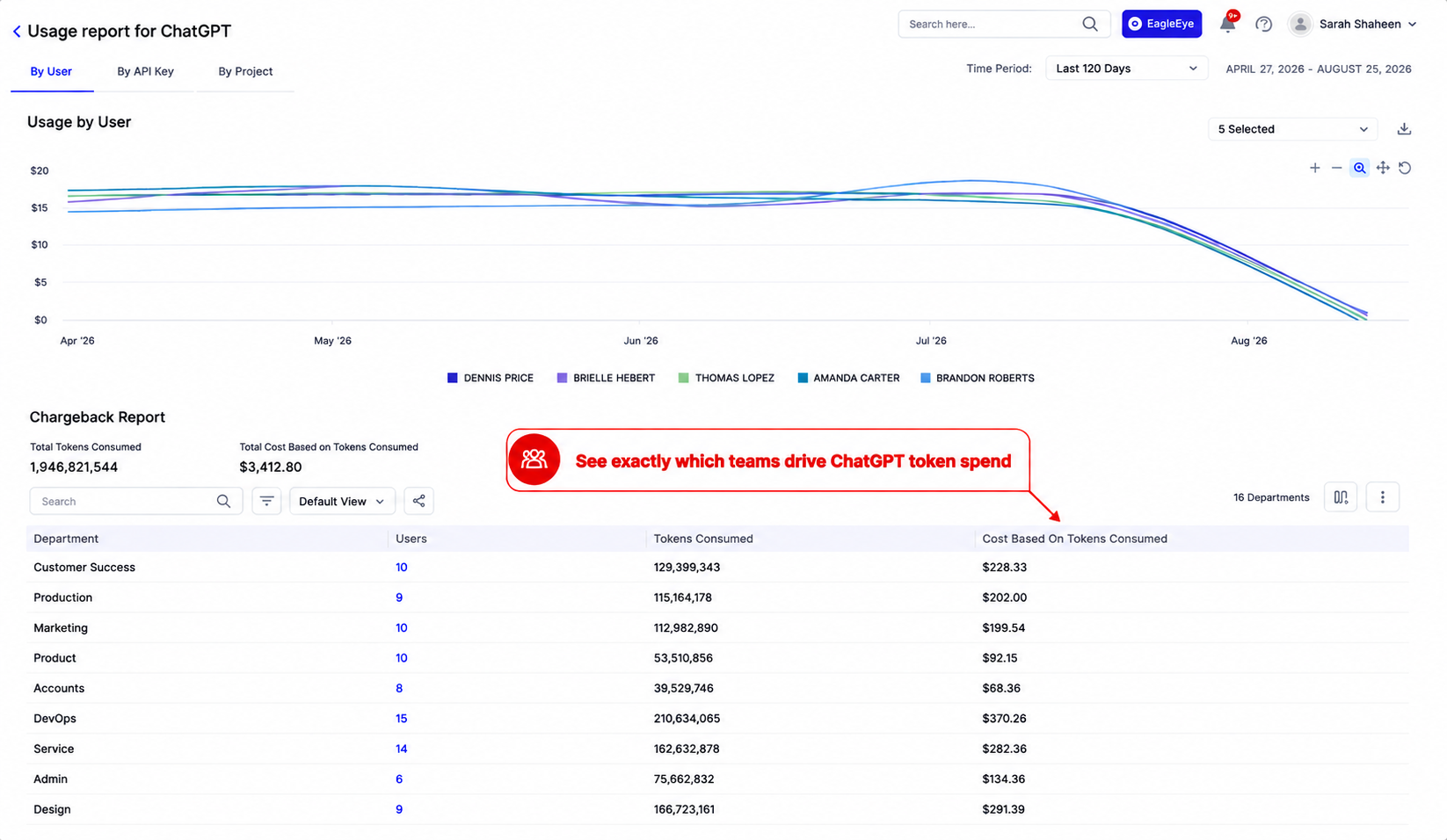
ChatGPT usage report showing token consumption and spend by department, with a graph tracking usage by user over time.

Finance gets chargeback-ready numbers without building a spreadsheet each month, and IT can see which teams are driving ChatGPT token costs before the invoice lands.

b) Catch license drift before renewal: 

How CloudEagle.ai solves it:

  • Cross-references active-directory status against licensed-seat status on a recurring schedule
  • Flags dormant seats and offboarded users still marked as licensed
  • Surfaces the gap between platform-reported seats and invoiced seats automatically

ChatGPT license utilization dashboard showing unused licenses, user activity, license usage, and chargeback costs by department.

That reconciliation, done manually, is a monthly chore. Automated, it's a standing report finance can trust at renewal time.

c) Surface shadow ChatGPT usage before it becomes a security incident: 

How CloudEagle.ai solves it:

  • Detects personal-account ChatGPT activity through browser-level signals beyond SSO
  • Correlates that activity against finance and expense data to flag shadow spend
  • Applies policy enforcement to redirect users toward the governed tenant

CloudEagle.ai gives IT, security, and finance the same view of ChatGPT token costs and AI spend visibility across the rest of the AI stack, without needing a custom report built for every new question that comes up.

FAQs

1. How do I track ChatGPT token usage per user? 

Connect ChatGPT's admin API to a spend visibility platform that reports usage by user, model, and time period instead of relying on login counts alone.

2. What's the difference between ChatGPT seats and API tokens? 

Seats are per-user subscription licenses. API tokens are usage-based charges for calls outside the chat interface, billed on a separate schedule.

3. Can I cap ChatGPT spend by team or department? 

Yes. Once usage is broken down by team, you can set spend thresholds and trigger alerts before a department exceeds its allocated budget.

4. How do you calculate ChatGPT token cost? 

Multiply tokens processed by the per-token rate for the model tier used, counting input, cached input, and output tokens separately since each is priced differently.

5. Does ChatGPT usage show up in SSO logs? 

SSO logs only show login activity, not token consumption or cost, so login data alone cannot answer what ChatGPT is actually costing your organization.

See your actual ChatGPT token costs, broken down by user, team, and model. Book a CloudEagle.ai demo.

Advertisement for a SaaS Subscription Tracking Template with a call-to-action button to download and a partial graphic of a tablet showing charts.Banner promoting a SaaS Agreement Checklist to streamline SaaS management and avoid budget waste with a call-to-action button labeled Download checklist.Blue banner with text 'The Ultimate Employee Offboarding Checklist!' and a black button labeled 'Download checklist' alongside partial views of checklist documents from cloudeagle.ai.Digital ad for download checklist titled 'The Ultimate Checklist for IT Leaders to Optimize SaaS Operations' by cloudeagle.ai, showing checklist pages.Slack Buyer's Guide offer with text 'Unlock insider insights to get the best deal on Slack!' and a button labeled 'Get Your Copy', accompanied by a preview of the guide featuring Slack's logo.Monday Pricing Guide by cloudeagle.ai offering exclusive pricing secrets to maximize investment with a call-to-action button labeled Get Your Copy and an image of the guide's cover.Blue banner for Canva Pricing Guide by cloudeagle.ai offering a guide to Canva costs, features, and alternatives with a call-to-action button saying Get Your Copy.Blue banner with white text reading 'Little-Known Negotiation Hacks to Get the Best Deal on Slack' and a white button labeled 'Get Your Copy'.Blue banner with text 'Little-Known Negotiation Hacks to Get the Best Deal on Monday.com' and a white button labeled 'Get Your Copy'.Blue banner with text 'Little-Known Negotiation Hacks to Get the Best Deal on Canva' and a white button labeled 'Get Your Copy'.Banner with text 'Slack Buyer's Guide' and a 'Download Now' button next to images of a guide titled 'Slack Buyer’s Guide: Features, Pricing & Best Practices'.Digital cover of Monday Pricing Guide with a button labeled Get Your Copy on a blue background.Canva Pricing Guide cover with a button labeled Get Your Copy on a blue gradient background.

Enter your email to
unlock the report

Oops! Something went wrong while submitting the form.
License Count
Benchmark
Per User/Per Year

Enter your email to
unlock the report

Oops! Something went wrong while submitting the form.
License Count
Benchmark
Per User/Per Year

Enter your email to
unlock the report

Oops! Something went wrong while submitting the form.
Notion Plus
License Count
Benchmark
Per User/Per Year
100-500
$67.20 - $78.72
500-1000
$59.52 - $72.00
1000+
$51.84 - $57.60
Canva Pro
License Count
Benchmark
Per User/Per Year
100-500
$74.33-$88.71
500-1000
$64.74-$80.32
1000+
$55.14-$62.34

Enter your email to
unlock the report

Oops! Something went wrong while submitting the form.

Enter your email to
unlock the report

Oops! Something went wrong while submitting the form.
Zoom Business
License Count
Benchmark
Per User/Per Year
100-500
$216.00 - $264.00
500-1000
$180.00 - $216.00
1000+
$156.00 - $180.00

Enter your email to
unlock the report

Oops! Something went wrong while submitting the form.

Get the Right Security Platform To Secure Your Cloud Infrastructure

Please enter a business email
Thank you!
The 2023 SaaS report has been sent to your email. Check your promotional or spam folder.
Oops! Something went wrong while submitting the form.

Access full report

Please enter a business email
Thank you!
The 2023 SaaS report has been sent to your email. Check your promotional or spam folder.
Oops! Something went wrong while submitting the form.

TL;DR

  • Login data and cost data are two different things, and ChatGPT usage tracking has to start from token and spend data instead of logins.
  • License counts drift from invoiced seat counts fast. Build a monthly reconciliation habit instead of waiting for renewal.
  • Org-level totals hide which key, script, or team drives ChatGPT token costs. Break spend down by API key and use case.
  • Model tier selection is the single biggest lever for reducing ChatGPT token costs at scale.
  • Shadow usage through personal accounts bypasses tracking entirely and still costs you, just invisibly.

Finance asks what ChatGPT is costing this quarter. IT pulls up the admin console and finds login counts and seat totals, nothing that resembles an actual dollar figure.

Tracking ChatGPT token costs means separating that login data from real per-user, per-key spend. Reducing it means going after the spend that's wasted on unused seats and the wrong model tier, and the spend that's invisible, usage happening outside your sanctioned tenant.

Here's how to do both, starting with the tracking gap most teams don't know they have.

See What ChatGPT Is Actually Costing You

  1. Separate login data from actual cost data
  2. Reconcile your seat count against what you're actually paying for

1. Separate Login Data From Actual Cost Data

SSO only shows who logged in. Most enterprises manage ChatGPT token costs using that login number and assume it covers cost too, and that assumption is where the surprise invoice comes from. Real ChatGPT usage tracking starts from token and spend data.

One 400-person company was three weeks into a paid ChatGPT deployment and still couldn't answer "what is this costing us" when finance asked directly. Nobody had set up a direct analytics connection between ChatGPT and their reporting layer, so usage existed but cost visibility didn't.

Gartner's research on token-based AI pricing points at the same root issue: most vendors don't make their token calculations transparent enough for enterprises to forecast spend on their own.

The fix is usually a missing connection step most IT teams skip during initial rollout, a single integration away from being solved.

Login Counts Are Not Cost Data. Treat Them Differently.

Get the FinOps practices that turn AI spend into a managed line item.
Download Checklist

2. Reconcile Your Seat Count Against What You're Actually Paying For

Platform-reported seat counts and invoiced seat counts drift apart within a few billing cycles. Treat this as a monthly check instead of a renewal-time surprise.

Data source What it shows Where it comes from
ChatGPT admin console Active licensed users Platform-reported
Finance invoice Seats billed Vendor billing system
HR or IT directory Actual employee headcount Identity system

A gap of 300 shown against 325 paid for is common, and it happens because active-user counts and purchased-license counts get pulled from two different systems that rarely talk to each other. Building a monthly reconciliation habit here has a direct payoff: it catches ghost seats before renewal

Offboarded employees often keep a licensed status long after they lose system access, and eight users with no login activity but active licenses adds up to a recoverable line item worth chasing.

Break Down and Report on That Spend

  1. Break spend down by API key and use case
  2. Turn usage data into chargeback numbers finance can use
  3. Find the ChatGPT spend happening outside your tenant

1. Break Spend Down by API Key and Use Case

Org-level totals blend chat usage, embedded tools, and API calls into one number that tells you nothing actionable. Breaking that number apart is what turns ChatGPT token costs from a mystery into a managed line item.

  • By API key: Most platforms need a second, separate connection to unlock this. API usage from internal scripts or integrations often grows quietly alongside seat-based usage.
  • By product or use case: A single per-user total can hide chat usage, embedded tools, and automated API calls inside one blended figure.
  • By custom report: This breakdown usually has to be built manually, and it's what tells you whether ChatGPT token costs are coming from something worth cutting or scaling.

2. Turn Usage Data Into Chargeback Numbers Finance Can Use

"Chargeback" means something specific to finance: cost split by department, tied to the org chart, ready for invoice allocation. Most AI usage tooling doesn't speak that language by default, which is exactly where AI spend visibility efforts stall out before they reach finance.

Finance needs department-level totals that map to cost centers, not raw usage logs with employee names attached. SSO data and department data usually already exist somewhere, just never connected into one report finance can use directly.

Multi-vendor AI contracts compound this, since Claude, ChatGPT, and Cursor all bill on different cycles, and quarter-end reconciliation becomes a manual export-and-match exercise unless the chargeback layer already unifies them.

3. Find the ChatGPT Spend Happening Outside Your Tenant

Shadow ChatGPT usage happens through personal accounts that never touch the systems you monitor, logins to chatgpt.com outside SSO, and personal ChatGPT Plus subscriptions on expense reports. Cyberhaven's AI Adoption and Risk Report puts nearly a third of all ChatGPT usage on personal rather than corporate accounts, a governance risk as much as a cost one.

Watch for these signals:

  • Browsing activity to chatgpt.com from users with no corporate-tenant login on record
  • Expense reports with recurring $20 charges to "OpenAI" or "ChatGPT"
  • Corporate email addresses used to register personal ChatGPT Plus accounts

This is the same bypass incentive that shows up whenever enterprise token limits get hit, and IT hasn't built a fast path to increase them. Ungoverned data exposure is the bigger risk here, but the untracked spend is what finance notices first.

If you're already mapping this gap for Claude usage too, the per-user Claude consumption breakdown walks through the same visibility model applied to a different vendor, useful if your stack runs both.

A Third of ChatGPT Usage Never Touches Your Systems.

Use this checklist to find the AI spend your SSO logs will never show.
Download Checklist

How to Reduce ChatGPT Token Costs

  1. Match the model to the task before usage scales
  2. Set up an approval path before anyone hits a cap

1. Match the Model to the Task Before Usage Scales

The same category of task can cost wildly different amounts depending on which model tier handles it. This is a default-setting problem: employees rarely pick the cheaper model on their own, so the workflow needs to nudge them toward it.

Task type Recommended tier Why
Support drafts, formatting, simple lookups Lower-cost tier High volume, low complexity, minimal quality loss
Analysis, research synthesis Mid tier Balances cost against reasoning depth
Complex reasoning, long-context work Top tier Justifies the premium on accuracy-critical tasks

OpenAI's own enterprise rate card confirms this directly. Input tokens, cached tokens, and output tokens each carry a different rate depending on the model tier selected. 

The full ChatGPT pricing breakdown by tier is worth bookmarking if you're negotiating or forecasting, since the gap between tiers is where most of the reducible ChatGPT token costs live. High-volume, low-complexity tasks save the most here, since they're the ones most often running on the wrong tier.

2. Set Up an Approval Path Before Anyone Hits a Cap

Most organizations still handle limit increases manually. Someone asks, IT bumps the limit, and no workflow or record exists afterward.

That creates two problems at once:

  1. Slow resolution for the person actually blocked from working
  2. Zero audit trail for finance when the same request repeats next month, which makes rising ChatGPT token costs harder to explain at renewal

A lightweight approval path fixes both. Manager sign-off tied to actual usage data, not a blank-check increase, keeps the request fast for the employee and traceable for finance. This single change also surfaces which teams are consistently under-provisioned, which is useful input for the next time you're negotiating ChatGPT token costs at renewal.

Know What's Automated Today and What Still Needs a Workaround

Some parts of ChatGPT token cost tracking are still catching up industry-wide. Knowing which ones saves you from chasing automation that isn't built yet.

Automated today Still manual or in progress
Per-user, per-model token tracking Division-level rollups across large orgs
SSO and department correlation Cross-product breakdowns spanning multiple AI vendors
Chargeback reporting by cost center MCP-based query access to usage data

Most of the savings covered above come from the parts already automated, so there's no need to wait on the rest. A structured AI governance model gives finance and IT a shared framework for what's automated today, while the manual gaps close over the next few product cycles.

How CloudEagle.ai Closes the ChatGPT Cost Gap

Every gap covered above traces back to the same root cause: no single system connects usage, identity, and finance data for ChatGPT. CloudEagle.ai is built to close that gap and keep ChatGPT token costs visible without a manual report every time finance asks.

a) See ChatGPT token costs at the user and team level instead of the org total: 

How CloudEagle.ai solves it:

  • Direct API integration pulls per-user, per-model token consumption for ChatGPT alongside Claude, Cursor, and Gemini
  • Usage rolls up automatically by team and department without a manual export
  • Spend breaks down by input, cached input, and output tokens to match how OpenAI actually bills

ChatGPT usage report showing token consumption and spend by department, with a graph tracking usage by user over time.

Finance gets chargeback-ready numbers without building a spreadsheet each month, and IT can see which teams are driving ChatGPT token costs before the invoice lands.

b) Catch license drift before renewal: 

How CloudEagle.ai solves it:

  • Cross-references active-directory status against licensed-seat status on a recurring schedule
  • Flags dormant seats and offboarded users still marked as licensed
  • Surfaces the gap between platform-reported seats and invoiced seats automatically

ChatGPT license utilization dashboard showing unused licenses, user activity, license usage, and chargeback costs by department.

That reconciliation, done manually, is a monthly chore. Automated, it's a standing report finance can trust at renewal time.

c) Surface shadow ChatGPT usage before it becomes a security incident: 

How CloudEagle.ai solves it:

  • Detects personal-account ChatGPT activity through browser-level signals beyond SSO
  • Correlates that activity against finance and expense data to flag shadow spend
  • Applies policy enforcement to redirect users toward the governed tenant

CloudEagle.ai gives IT, security, and finance the same view of ChatGPT token costs and AI spend visibility across the rest of the AI stack, without needing a custom report built for every new question that comes up.

FAQs

1. How do I track ChatGPT token usage per user? 

Connect ChatGPT's admin API to a spend visibility platform that reports usage by user, model, and time period instead of relying on login counts alone.

2. What's the difference between ChatGPT seats and API tokens? 

Seats are per-user subscription licenses. API tokens are usage-based charges for calls outside the chat interface, billed on a separate schedule.

3. Can I cap ChatGPT spend by team or department? 

Yes. Once usage is broken down by team, you can set spend thresholds and trigger alerts before a department exceeds its allocated budget.

4. How do you calculate ChatGPT token cost? 

Multiply tokens processed by the per-token rate for the model tier used, counting input, cached input, and output tokens separately since each is priced differently.

5. Does ChatGPT usage show up in SSO logs? 

SSO logs only show login activity, not token consumption or cost, so login data alone cannot answer what ChatGPT is actually costing your organization.

See your actual ChatGPT token costs, broken down by user, team, and model. Book a CloudEagle.ai demo.

CloudEagle.ai recognized in the 2025 Gartner® Magic Quadrant™ for SaaS Management Platforms
Download now
gartner chart
5x
Faster employee
onboarding
80%
Reduction in time for
user access reviews
30k
Workflows
automated
$15Bn
Analyzed in
contract spend
$2Bn
Saved in
SaaS spend

Streamline SaaS governance and save 10-30%

Book a Demo with Expert
CTA image




