How to Monitor Claude Code Usage Across Engineering Teams

Share via:
blog-cms-banner-bg
Little-Known Negotiation Hacks to Get the Best Deal on Slack
cta-bg-blogDownload Your Copy

HIPAA Compliance Checklist for 2025

Download PDF

Unmanaged Claude Code usage leaves engineering teams exposed to untracked spend, dormant licenses, and proprietary code moving through AI tools with no governance behind it. 

Unlike traditional shadow SaaS, AI coding assistants interact directly with your source code, making that exposure far more serious. 

Monitoring starts with knowing who's using it, how much it's costing, and whether it's within approved security policies. CloudEagle.ai combines identity, usage, spend, and risk data into a single governance layer. 

In this guide, we'll show how to monitor Claude Code usage across engineering teams using that approach.

TL;DR

  • Monitoring Claude Code requires combining identity sync, API telemetry, browser visibility, and centralized reporting to eliminate governance blind spots.
  • Teams should track active licenses, token consumption, AI spend, and unmanaged Claude Code usage, not just seat counts.
  • CloudEagle.ai unifies identity, usage, browser, and finance signals into a single AI governance layer for engineering teams.
  • Shadow AI discovery, policy enforcement, and secure browsing help reduce code exposure and control unsanctioned AI usage.
  • CloudEagle.ai enables engineering teams to optimize Claude Code adoption by governing usage, spend, security, and AI policies from one platform

1. How To Monitor Claude Code Usage Across Engineering Teams

Monitoring Claude Code usage requires four layers: identity sync, API usage, browser visibility, and centralized reporting. Together, they eliminate blind spots across engineering teams.

A. Sync Identity Through SSO Or SCIM Provisioning

Connect Claude Code to your identity provider through SSO and SCIM provisioning. This keeps Claude code usage mapped to the right team automatically. Onboarding and offboarding stay aligned with your identity system.

Without proper identity sync, usage data quickly becomes unreliable. One engineering team, for example, had 171 developers authenticated through SSO, yet only one appeared correctly in their governance platform.

If identities aren't synchronized correctly, license utilization, departmental reporting, and AI governance become inaccurate from day one.

B. Connect Claude Enterprise API Keys For Usage Data

Identity tells you who has access. The Claude Enterprise APIs tell you how they're actually using it.
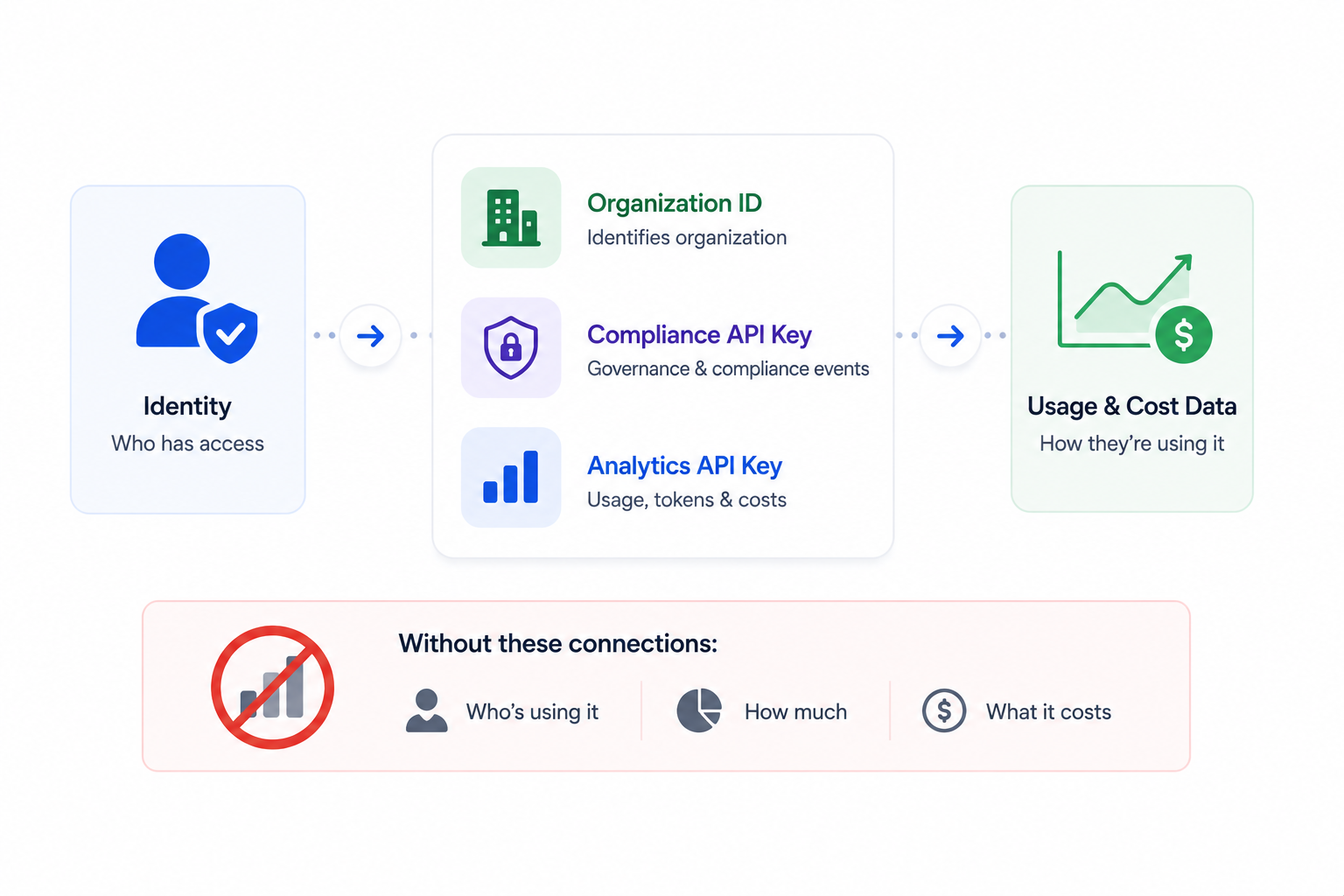
To collect Claude code usage and cost data, connect your Claude Enterprise workspace using:

  • Organization ID: Identifies the Claude Enterprise organization to monitor.
  • Compliance API Key: Retrieves governance and compliance-related events.
  • Analytics API Key: Collects usage metrics, token consumption, and cost data.

A recent enterprise deployment required all three before usage analytics became available.

Without these connections, you'll know who can access Claude Code but not who's actively using it, how much they're consuming, or what Claude code usage costs each team.

C. Deploy Browser Or Endpoint Monitoring For Unmanaged Use

Enterprise API integrations only show activity inside managed Claude environments. They don't detect developers using personal Claude accounts or unsanctioned AI coding tools.

That's why many organizations add browser or endpoint monitoring to close the remaining visibility gap. A practical rollout is to pilot deployment with a small engineering group before scaling company-wide.

One enterprise team silently deployed the monitoring agent through SCCM, targeting only machines with active Claude users first to keep the pilot narrow and low-disruption.

D. Centralize Reporting Into One Dashboard

Monitoring becomes difficult when identity, usage, and endpoint data live in separate systems. Engineering leaders shouldn't have to reconcile three dashboards to answer simple questions about Claude code usage.

A centralized governance dashboard combines every signal into one view, allowing teams to monitor:

  • Active vs. inactive Claude Code seats
  • Token consumption and spend by developer or team
  • Unmanaged or unsanctioned Claude usage
  • Overall governance and risk posture

With identity, API, and browser telemetry in one place, engineering teams work from the same data. This turns Claude code usage from a reporting exercise into an operational governance process.

Security Slips One App At A Time

Don't miss the next one.
Get The Checklist

2. How CloudEagle.ai Brings AI Usage Code Into One Governance Layer

CloudEagle.ai gives security and engineering teams one view of Claude code usage and other AI tools usage across the enterprise.

The AI governance combines AI app discovery, usage signals, and policy controls so teams can see who is using Claude Code, identify unmanaged AI activity, and enforce governance without relying on scattered logs.

A. AI Usage Control: See Who Is Using AI and How

CloudEagle.ai combines SSO data with browser extensions, firewall logs, and finance integrations to build a centralized, real-time inventory of Claude code usage.
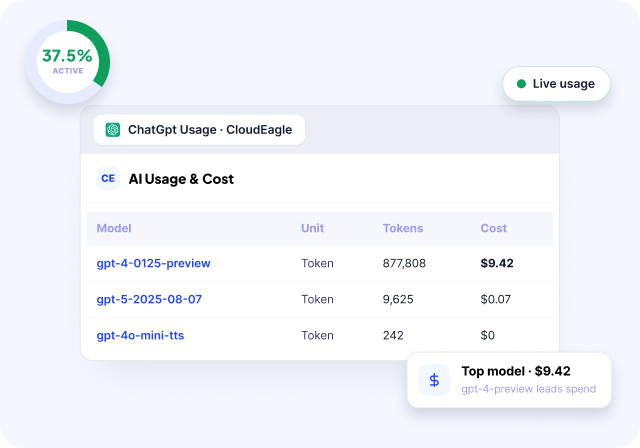
The platform identifies AI tools, duplicate copilots, underutilized licenses, orphaned accounts, and renewal exposure, giving teams visibility into adoption and potential waste.
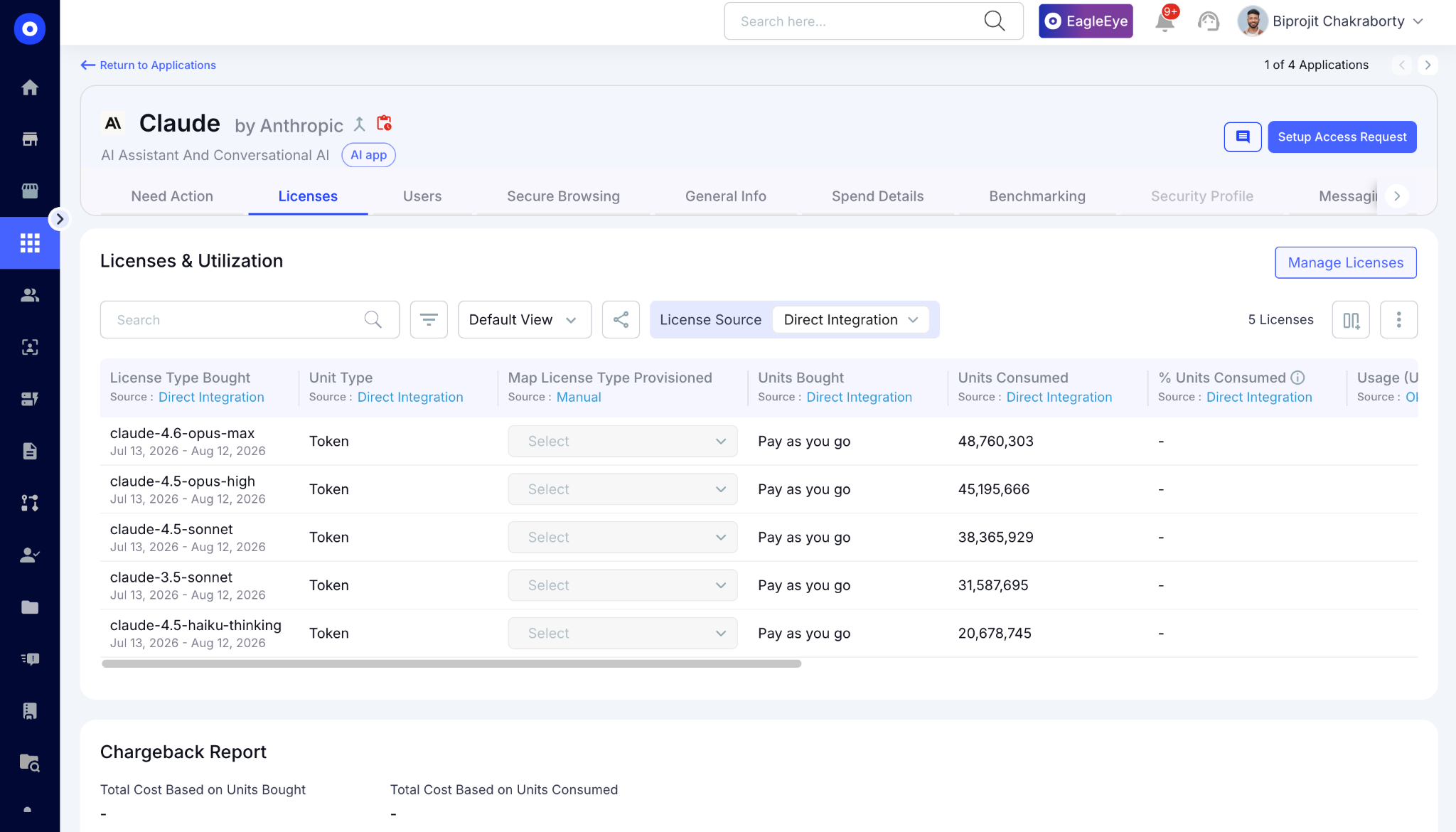
Engineering and security teams can use this visibility to understand where AI tools are being adopted and whether usage aligns with actual business value.

B. AI Policy Enforcement: Put Controls Around AI Usage

Visibility alone doesn't prevent risky Claude code usage. CloudEagle.ai enables teams to monitor or block sensitive data shared with AI tools and redirect employees from unsanctioned applications.
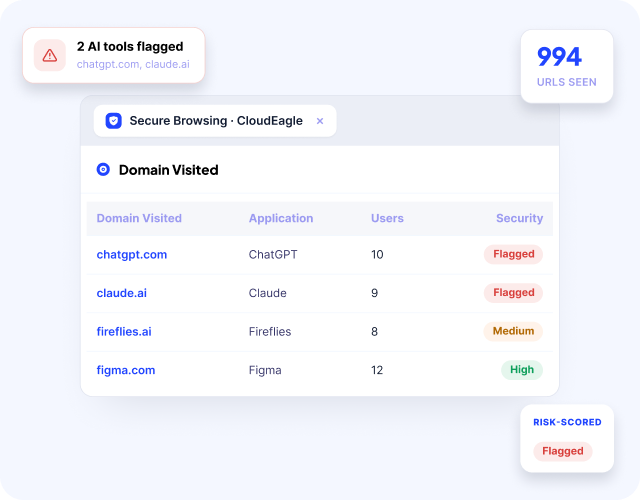
When an employee attempts to use an unapproved AI tool, CloudEagle.ai can present a flash page directing them to an approved alternative. Secure browsing can also detect whether sensitive information such as PII is being shared with AI vendors.
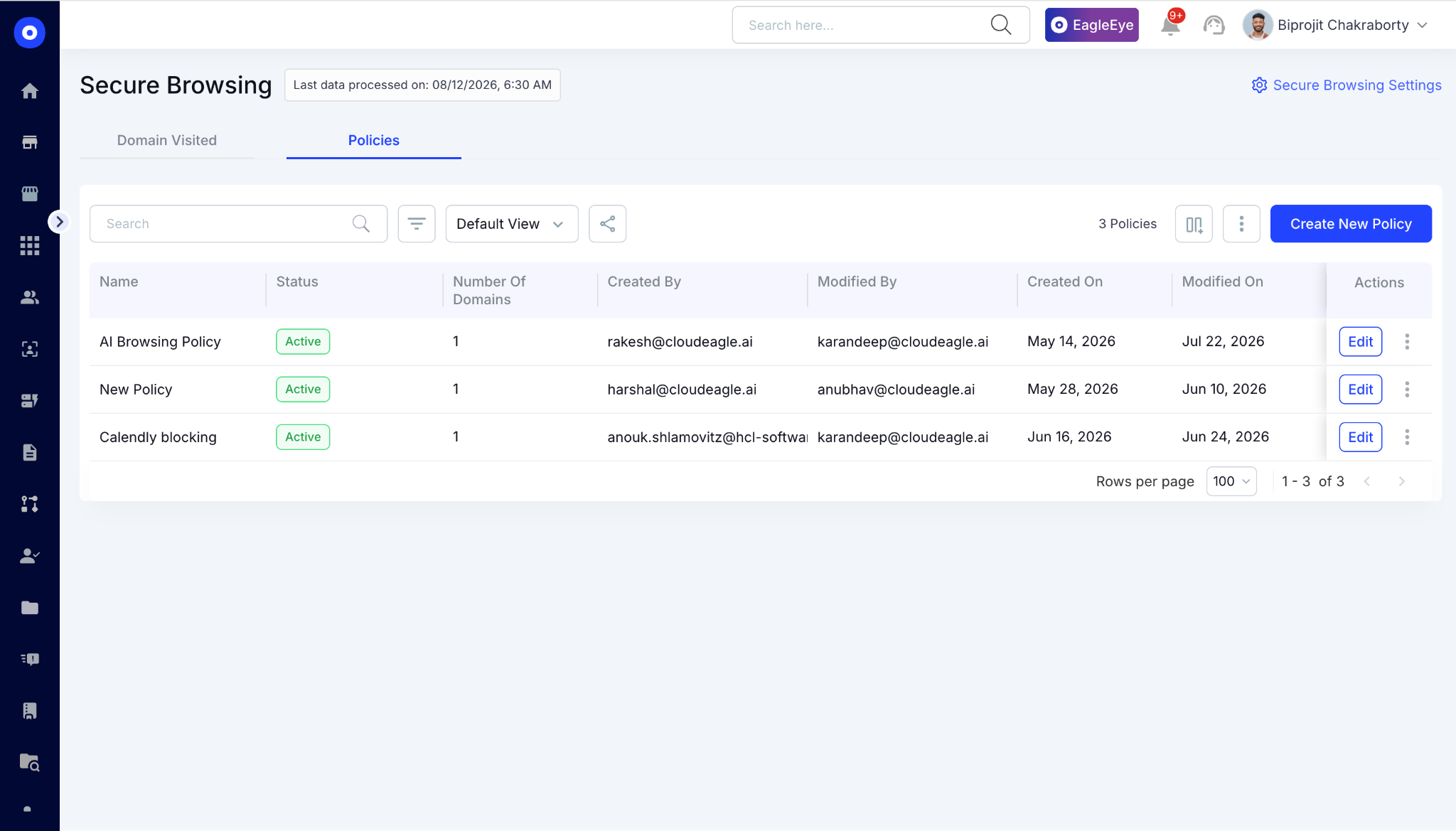
This gives organizations a way to show not just which AI tools are being used, but what controls are actively protecting that usage.

C. Shadow AI & AI App Discovery: Find AI Tools Outside IT's View

CloudEagle.ai maintains an inventory of AI applications in SaaSMap by correlating browser plugin, Zscaler, and CrowdStrike signals.
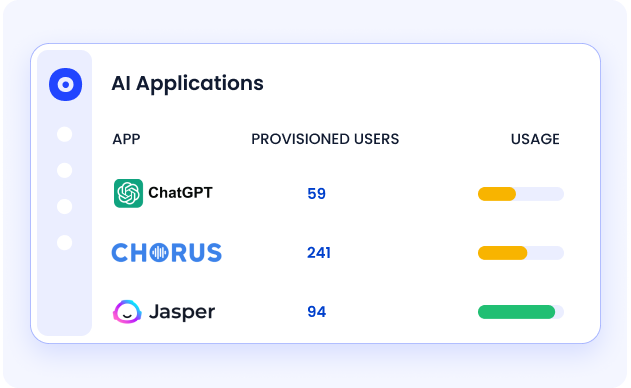
It identifies and risk-scores AI applications, highlighting high-risk, duplicate, or unsanctioned tools so security teams can prioritize what needs review.
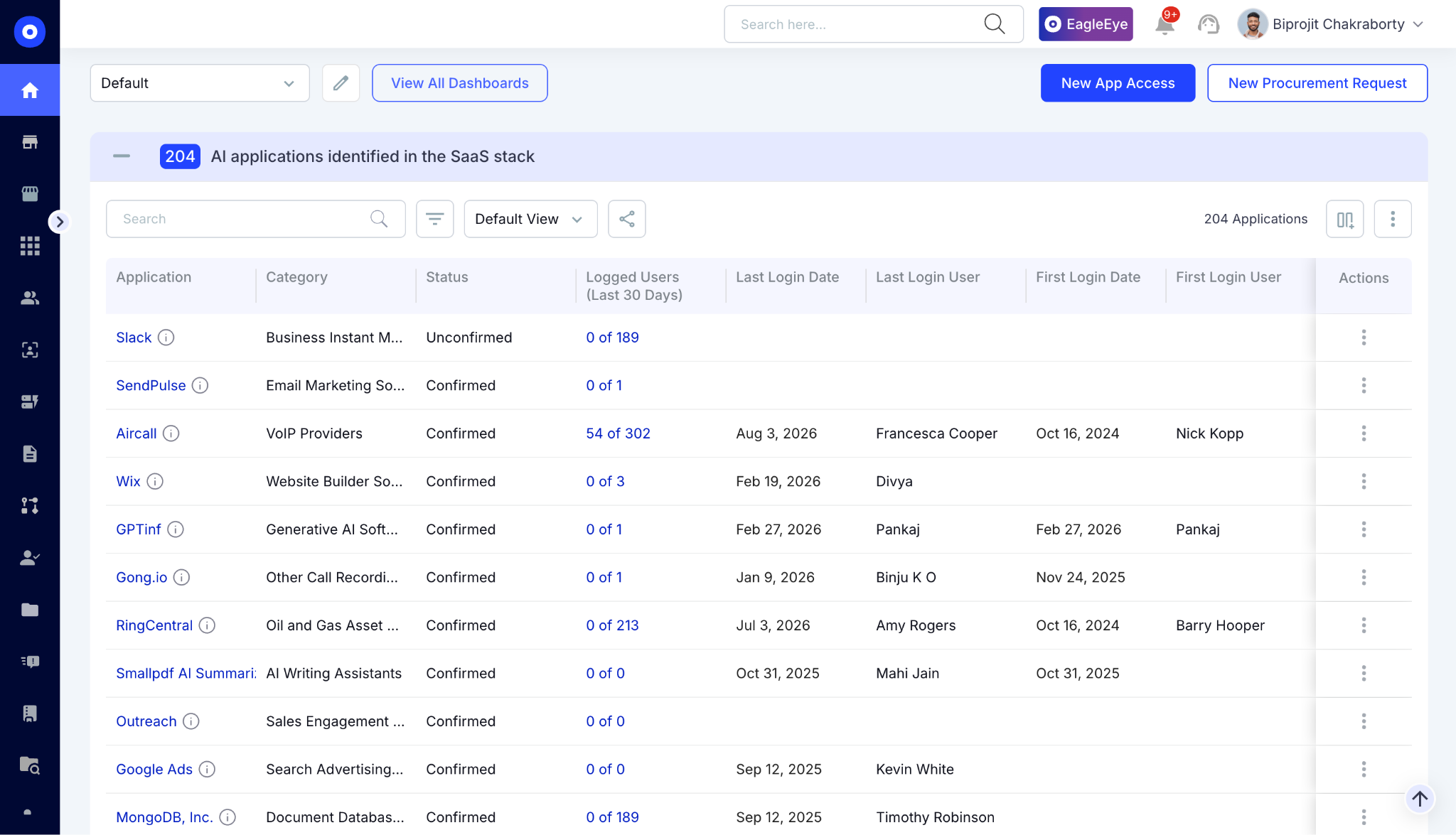
This extends visibility beyond Claude Code to the wider AI environment, helping teams identify shadow AI before it creates security, compliance, or cost exposure.

3. What To Track When Monitoring Claude Code Across Engineering Teams

The wrong metrics leave you optimizing for seat count while spend, adoption gaps, and Claude code usage go untracked.

A. Seat And License Utilization By Team

Knowing how many Claude Code licenses you've purchased isn't enough, you need to know how many are actually being used.
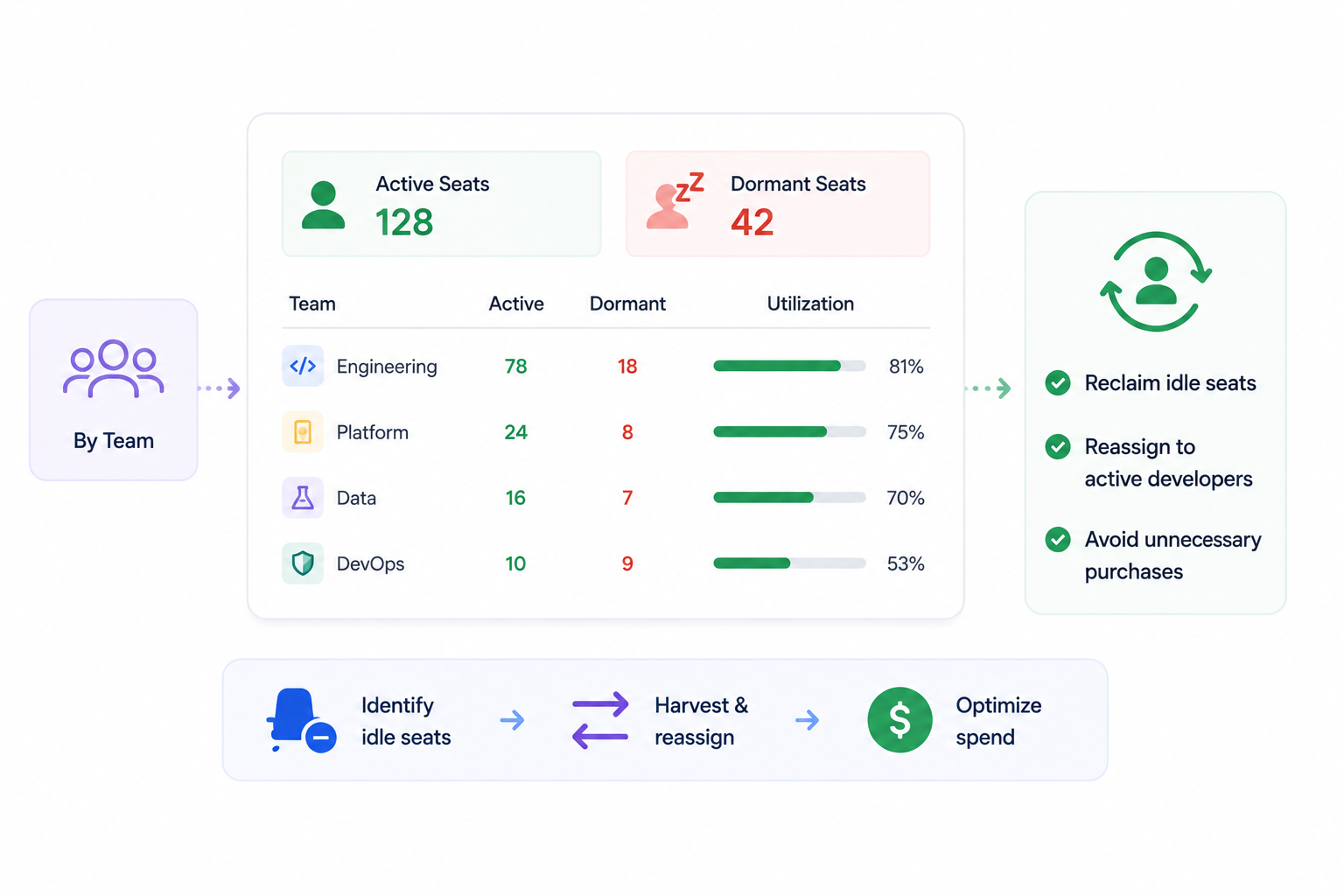
Track active and dormant seats by team, department, and engineering function to identify underutilized licenses before renewal. 

Applying the same license-harvesting approach used for Microsoft 365 and Adobe helps reclaim idle AI coding seats, reassign them to active developers, and avoid purchasing unnecessary licenses.

B. Token Consumption And Spend Per Developer

Seat count only tells part of the story. Claude code usage can also vary based on token consumption and developer activity.

Monitor the following metrics:

  • Token usage by developer to identify heavy and low-value users.
  • Department-level AI spend for accurate chargeback and budget allocation.
  • Spend trends over time to forecast costs before they exceed budget.
  • API key-level consumption to understand which integrations or workflows generate the highest AI costs.

In one deployment, departmental usage reporting was used to allocate Claude code usage costs accurately, the same team later asked for API-key-level tracking to get visibility into automated workloads.

C. Code And Data Exposure Risk

AI coding assistants interact directly with proprietary source code, making governance different from traditional SaaS monitoring.

Rather than inspecting developers' prompts, organizations should focus on governance signals that respect privacy while reducing risk:

  • Monitor Claude code usage, including managed and unmanaged environments.
  • Track browsing and usage activity to identify unsanctioned AI coding tools.
  • Detect policy violations such as the use of personal AI accounts where enterprise tools are required.
  • Protect developer privacy by monitoring usage and token consumption.

This boundary is important. It gives security teams the visibility they need while preserving developer trust and simplifying legal and privacy approvals for enterprise deployments.

Shadow AI Starts With One Login

Know where it spreads.
Catch Hidden AI

4. Conclusion

Claude Code usage moves faster than most engineering orgs can track it. Identity, spend, and risk data end up scattered across SSO logs and whatever browser telemetry IT has managed to piece together.

CloudEagle.ai combines the visibility into one governance platform. Engineering leaders get a single view of active seats, spend by developer or team, and unmanaged usage.

The result isn't just visibility. It's the ability to act on it such as reclaiming idle seats, capping spend before it runs over budget, and enforcing policy without slowing developers down.

5. FAQs

1. What is the usage of Claude Code?

Claude Code is Anthropic's AI coding agent, used from the terminal to write, debug, and refactor code. Engineering teams use it for multi-file refactors, test generation, and complex debugging beyond simple autocomplete.

2. What is Claude Code and how do you use it?

Claude Code is a CLI-based coding agent included with Claude Pro, Max, Team, and Enterprise plans. Developers install it, connect it to their codebase, and prompt it in natural language to write or fix code.

3. What is the usage limit for Claude Code?

Claude Code has two limits: a rolling five-hour session cap and a weekly cap, shared with Claude.ai chat usage. Anthropic doesn't publish exact token counts, limits scale by plan (Pro, Max 5x, Max 20x), so check current usage inside the app's settings.

4. How to fully utilize Claude Code?

Track active vs. idle seats, monitor token consumption by developer, and centralize that data instead of letting it scatter across dashboards. Use it for complex, multi-step coding tasks, where it adds more value than basic autocomplete.

5. Is Claude Code worth using?

Yes, for teams doing complex development work, it's one of the stronger agentic coding tools available. Its ROI depends on usage discipline, since untracked seats and spend can outpace the productivity gains.

Advertisement for a SaaS Subscription Tracking Template with a call-to-action button to download and a partial graphic of a tablet showing charts.Banner promoting a SaaS Agreement Checklist to streamline SaaS management and avoid budget waste with a call-to-action button labeled Download checklist.Blue banner with text 'The Ultimate Employee Offboarding Checklist!' and a black button labeled 'Download checklist' alongside partial views of checklist documents from cloudeagle.ai.Digital ad for download checklist titled 'The Ultimate Checklist for IT Leaders to Optimize SaaS Operations' by cloudeagle.ai, showing checklist pages.Slack Buyer's Guide offer with text 'Unlock insider insights to get the best deal on Slack!' and a button labeled 'Get Your Copy', accompanied by a preview of the guide featuring Slack's logo.Monday Pricing Guide by cloudeagle.ai offering exclusive pricing secrets to maximize investment with a call-to-action button labeled Get Your Copy and an image of the guide's cover.Blue banner for Canva Pricing Guide by cloudeagle.ai offering a guide to Canva costs, features, and alternatives with a call-to-action button saying Get Your Copy.Blue banner with white text reading 'Little-Known Negotiation Hacks to Get the Best Deal on Slack' and a white button labeled 'Get Your Copy'.Blue banner with text 'Little-Known Negotiation Hacks to Get the Best Deal on Monday.com' and a white button labeled 'Get Your Copy'.Blue banner with text 'Little-Known Negotiation Hacks to Get the Best Deal on Canva' and a white button labeled 'Get Your Copy'.Banner with text 'Slack Buyer's Guide' and a 'Download Now' button next to images of a guide titled 'Slack Buyer’s Guide: Features, Pricing & Best Practices'.Digital cover of Monday Pricing Guide with a button labeled Get Your Copy on a blue background.Canva Pricing Guide cover with a button labeled Get Your Copy on a blue gradient background.

Enter your email to
unlock the report

Oops! Something went wrong while submitting the form.
License Count
Benchmark
Per User/Per Year

Enter your email to
unlock the report

Oops! Something went wrong while submitting the form.
License Count
Benchmark
Per User/Per Year

Enter your email to
unlock the report

Oops! Something went wrong while submitting the form.
Notion Plus
License Count
Benchmark
Per User/Per Year
100-500
$67.20 - $78.72
500-1000
$59.52 - $72.00
1000+
$51.84 - $57.60
Canva Pro
License Count
Benchmark
Per User/Per Year
100-500
$74.33-$88.71
500-1000
$64.74-$80.32
1000+
$55.14-$62.34

Enter your email to
unlock the report

Oops! Something went wrong while submitting the form.

Enter your email to
unlock the report

Oops! Something went wrong while submitting the form.
Zoom Business
License Count
Benchmark
Per User/Per Year
100-500
$216.00 - $264.00
500-1000
$180.00 - $216.00
1000+
$156.00 - $180.00

Enter your email to
unlock the report

Oops! Something went wrong while submitting the form.

Get the Right Security Platform To Secure Your Cloud Infrastructure

Please enter a business email
Thank you!
The 2023 SaaS report has been sent to your email. Check your promotional or spam folder.
Oops! Something went wrong while submitting the form.

Access full report

Please enter a business email
Thank you!
The 2023 SaaS report has been sent to your email. Check your promotional or spam folder.
Oops! Something went wrong while submitting the form.

Unmanaged Claude Code usage leaves engineering teams exposed to untracked spend, dormant licenses, and proprietary code moving through AI tools with no governance behind it. 

Unlike traditional shadow SaaS, AI coding assistants interact directly with your source code, making that exposure far more serious. 

Monitoring starts with knowing who's using it, how much it's costing, and whether it's within approved security policies. CloudEagle.ai combines identity, usage, spend, and risk data into a single governance layer. 

In this guide, we'll show how to monitor Claude Code usage across engineering teams using that approach.

TL;DR

  • Monitoring Claude Code requires combining identity sync, API telemetry, browser visibility, and centralized reporting to eliminate governance blind spots.
  • Teams should track active licenses, token consumption, AI spend, and unmanaged Claude Code usage, not just seat counts.
  • CloudEagle.ai unifies identity, usage, browser, and finance signals into a single AI governance layer for engineering teams.
  • Shadow AI discovery, policy enforcement, and secure browsing help reduce code exposure and control unsanctioned AI usage.
  • CloudEagle.ai enables engineering teams to optimize Claude Code adoption by governing usage, spend, security, and AI policies from one platform

1. How To Monitor Claude Code Usage Across Engineering Teams

Monitoring Claude Code usage requires four layers: identity sync, API usage, browser visibility, and centralized reporting. Together, they eliminate blind spots across engineering teams.

A. Sync Identity Through SSO Or SCIM Provisioning

Connect Claude Code to your identity provider through SSO and SCIM provisioning. This keeps Claude code usage mapped to the right team automatically. Onboarding and offboarding stay aligned with your identity system.

Without proper identity sync, usage data quickly becomes unreliable. One engineering team, for example, had 171 developers authenticated through SSO, yet only one appeared correctly in their governance platform.

If identities aren't synchronized correctly, license utilization, departmental reporting, and AI governance become inaccurate from day one.

B. Connect Claude Enterprise API Keys For Usage Data

Identity tells you who has access. The Claude Enterprise APIs tell you how they're actually using it.

To collect Claude code usage and cost data, connect your Claude Enterprise workspace using:

  • Organization ID: Identifies the Claude Enterprise organization to monitor.
  • Compliance API Key: Retrieves governance and compliance-related events.
  • Analytics API Key: Collects usage metrics, token consumption, and cost data.

A recent enterprise deployment required all three before usage analytics became available.

Without these connections, you'll know who can access Claude Code but not who's actively using it, how much they're consuming, or what Claude code usage costs each team.

C. Deploy Browser Or Endpoint Monitoring For Unmanaged Use

Enterprise API integrations only show activity inside managed Claude environments. They don't detect developers using personal Claude accounts or unsanctioned AI coding tools.

That's why many organizations add browser or endpoint monitoring to close the remaining visibility gap. A practical rollout is to pilot deployment with a small engineering group before scaling company-wide.

One enterprise team silently deployed the monitoring agent through SCCM, targeting only machines with active Claude users first to keep the pilot narrow and low-disruption.

D. Centralize Reporting Into One Dashboard

Monitoring becomes difficult when identity, usage, and endpoint data live in separate systems. Engineering leaders shouldn't have to reconcile three dashboards to answer simple questions about Claude code usage.

A centralized governance dashboard combines every signal into one view, allowing teams to monitor:

  • Active vs. inactive Claude Code seats
  • Token consumption and spend by developer or team
  • Unmanaged or unsanctioned Claude usage
  • Overall governance and risk posture

With identity, API, and browser telemetry in one place, engineering teams work from the same data. This turns Claude code usage from a reporting exercise into an operational governance process.

Security Slips One App At A Time

Don't miss the next one.
Get The Checklist

2. How CloudEagle.ai Brings AI Usage Code Into One Governance Layer

CloudEagle.ai gives security and engineering teams one view of Claude code usage and other AI tools usage across the enterprise.

The AI governance combines AI app discovery, usage signals, and policy controls so teams can see who is using Claude Code, identify unmanaged AI activity, and enforce governance without relying on scattered logs.

A. AI Usage Control: See Who Is Using AI and How

CloudEagle.ai combines SSO data with browser extensions, firewall logs, and finance integrations to build a centralized, real-time inventory of Claude code usage.

The platform identifies AI tools, duplicate copilots, underutilized licenses, orphaned accounts, and renewal exposure, giving teams visibility into adoption and potential waste.

Engineering and security teams can use this visibility to understand where AI tools are being adopted and whether usage aligns with actual business value.

B. AI Policy Enforcement: Put Controls Around AI Usage

Visibility alone doesn't prevent risky Claude code usage. CloudEagle.ai enables teams to monitor or block sensitive data shared with AI tools and redirect employees from unsanctioned applications.

When an employee attempts to use an unapproved AI tool, CloudEagle.ai can present a flash page directing them to an approved alternative. Secure browsing can also detect whether sensitive information such as PII is being shared with AI vendors.

This gives organizations a way to show not just which AI tools are being used, but what controls are actively protecting that usage.

C. Shadow AI & AI App Discovery: Find AI Tools Outside IT's View

CloudEagle.ai maintains an inventory of AI applications in SaaSMap by correlating browser plugin, Zscaler, and CrowdStrike signals.

It identifies and risk-scores AI applications, highlighting high-risk, duplicate, or unsanctioned tools so security teams can prioritize what needs review.

This extends visibility beyond Claude Code to the wider AI environment, helping teams identify shadow AI before it creates security, compliance, or cost exposure.

3. What To Track When Monitoring Claude Code Across Engineering Teams

The wrong metrics leave you optimizing for seat count while spend, adoption gaps, and Claude code usage go untracked.

A. Seat And License Utilization By Team

Knowing how many Claude Code licenses you've purchased isn't enough, you need to know how many are actually being used.

Track active and dormant seats by team, department, and engineering function to identify underutilized licenses before renewal. 

Applying the same license-harvesting approach used for Microsoft 365 and Adobe helps reclaim idle AI coding seats, reassign them to active developers, and avoid purchasing unnecessary licenses.

B. Token Consumption And Spend Per Developer

Seat count only tells part of the story. Claude code usage can also vary based on token consumption and developer activity.

Monitor the following metrics:

  • Token usage by developer to identify heavy and low-value users.
  • Department-level AI spend for accurate chargeback and budget allocation.
  • Spend trends over time to forecast costs before they exceed budget.
  • API key-level consumption to understand which integrations or workflows generate the highest AI costs.

In one deployment, departmental usage reporting was used to allocate Claude code usage costs accurately, the same team later asked for API-key-level tracking to get visibility into automated workloads.

C. Code And Data Exposure Risk

AI coding assistants interact directly with proprietary source code, making governance different from traditional SaaS monitoring.

Rather than inspecting developers' prompts, organizations should focus on governance signals that respect privacy while reducing risk:

  • Monitor Claude code usage, including managed and unmanaged environments.
  • Track browsing and usage activity to identify unsanctioned AI coding tools.
  • Detect policy violations such as the use of personal AI accounts where enterprise tools are required.
  • Protect developer privacy by monitoring usage and token consumption.

This boundary is important. It gives security teams the visibility they need while preserving developer trust and simplifying legal and privacy approvals for enterprise deployments.

Shadow AI Starts With One Login

Know where it spreads.
Catch Hidden AI

4. Conclusion

Claude Code usage moves faster than most engineering orgs can track it. Identity, spend, and risk data end up scattered across SSO logs and whatever browser telemetry IT has managed to piece together.

CloudEagle.ai combines the visibility into one governance platform. Engineering leaders get a single view of active seats, spend by developer or team, and unmanaged usage.

The result isn't just visibility. It's the ability to act on it such as reclaiming idle seats, capping spend before it runs over budget, and enforcing policy without slowing developers down.

5. FAQs

1. What is the usage of Claude Code?

Claude Code is Anthropic's AI coding agent, used from the terminal to write, debug, and refactor code. Engineering teams use it for multi-file refactors, test generation, and complex debugging beyond simple autocomplete.

2. What is Claude Code and how do you use it?

Claude Code is a CLI-based coding agent included with Claude Pro, Max, Team, and Enterprise plans. Developers install it, connect it to their codebase, and prompt it in natural language to write or fix code.

3. What is the usage limit for Claude Code?

Claude Code has two limits: a rolling five-hour session cap and a weekly cap, shared with Claude.ai chat usage. Anthropic doesn't publish exact token counts, limits scale by plan (Pro, Max 5x, Max 20x), so check current usage inside the app's settings.

4. How to fully utilize Claude Code?

Track active vs. idle seats, monitor token consumption by developer, and centralize that data instead of letting it scatter across dashboards. Use it for complex, multi-step coding tasks, where it adds more value than basic autocomplete.

5. Is Claude Code worth using?

Yes, for teams doing complex development work, it's one of the stronger agentic coding tools available. Its ROI depends on usage discipline, since untracked seats and spend can outpace the productivity gains.

CloudEagle.ai recognized in the 2025 Gartner® Magic Quadrant™ for SaaS Management Platforms
Download now
gartner chart
5x
Faster employee
onboarding
80%
Reduction in time for
user access reviews
30k
Workflows
automated
$15Bn
Analyzed in
contract spend
$2Bn
Saved in
SaaS spend

Streamline SaaS governance and save 10-30%

Book a Demo with Expert
CTA image