HIPAA Compliance Checklist for 2025

Your CFO asks which apps cost the most and which licenses nobody uses. Someone promises a report by Friday. By Friday, the question has changed.
Getting an answer today means logging into the platform, finding the right module, and exporting data into something a CFO can read. Every new question restarts that loop.
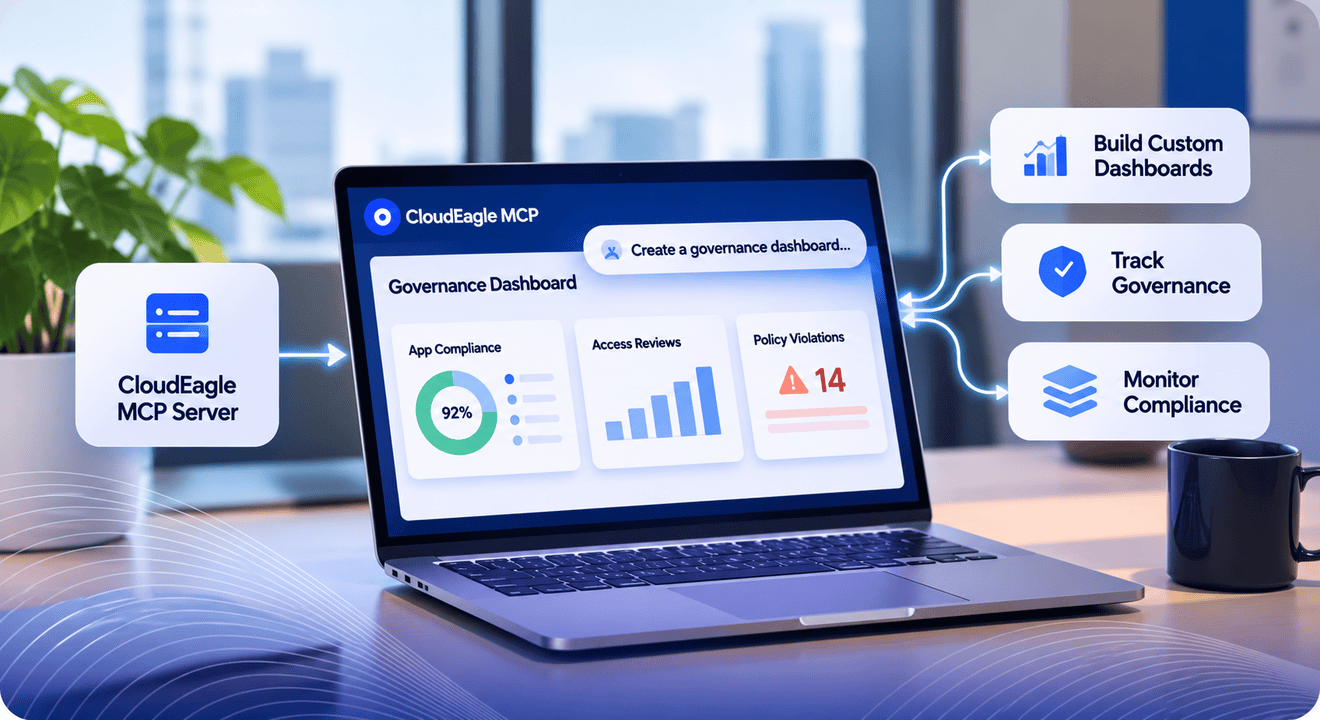
The CloudEagle.ai MCP server ends it. It lets Claude read your live CloudEagle.ai data directly. You describe the dashboard you want, Claude pulls only the data you ask for through the server, and the view is ready in minutes.
1. Why Does the CloudEagle.ai MCP Server Make Dashboards Faster?
Want only licenses, inactive users, and renewal dates for one app? Ask for exactly that. Need it laid out for a CFO instead of an IT lead? Say so, and the same data comes back in a different shape.
Claude is the interface. The CloudEagle.ai MCP server is what lets it read your data, so every answer comes from your own CloudEagle.ai environment.
No filters to set, no modules to open, no export to clean up. A follow-up message reshapes the view.
The data was always in CloudEagle.ai. The MCP server means you no longer have to go find it.
2. How Does the CloudEagle.ai MCP Server Work With Claude??
The CloudEagle.ai MCP server is the connection between Claude and your CloudEagle.ai data. Setup needs no engineering work, and our setup guide walks you through it.
Once it is connected, a prompt does the work. Ask “which contracts will be renewed next quarter?” and Claude reads the answer from your live data through the server. Ask for a dashboard and Claude builds one around your question.
The view is shaped by whoever is asking. A CFO sees AI token spend. An IT lead sees licenses. Procurement sees which workflow is stuck, who owns it, and how long it has been there.
3. What Does a Good Dashboard Prompt Look Like??
Claude does not do this alone. Through the CloudEagle.ai MCP server, Claude can read your SaaS license data directly, from reviewing usage to drafting license harvesting rules.
Every use case in this post follows the same pattern: pull, judge, propose. Here is License Management:
From CloudEagle.ai, for [Zoom]:
1. Compare licenses bought, users provisioned, and users not logged in for 30 and 90 days.
2. Tell me whether the numbers look trustworthy. Flag it if:
- Inactive users exceed 25% of provisioned (possible SSO or sync problem)
- Provisioned exceeds licenses bought
3. Propose a harvesting rule as a table, with the reasoning for each setting:
- Inactivity window
- Reviewer
- Email warning
- Opt-out period
Here is what each part does:
- Pull: Through the CloudEagle.ai MCP server, Claude retrieves licenses purchased, users provisioned, and users inactive for 30 and 90 days.
- Judge: Claude validates the data retrieved from CloudEagle.ai before recommending any action.
- Propose: Claude drafts a license harvesting rule, explaining the reasoning behind every setting.
Most dashboards stop at the first step. With the CloudEagle.ai MCP server behind it, Claude finishes the job and leaves the decision with you.
4. What Can Teams Build With It: Real-Life Use Cases
Here are thirteen prompts, each built around a problem your team already has.
Every one of them runs through the CloudEagle.ai MCP server, so Claude reads your own data each time. Copy any prompt as written.
Then swap in your own app, your own thresholds, or your own definition of “inactive”, and the dashboard rebuilds around your numbers
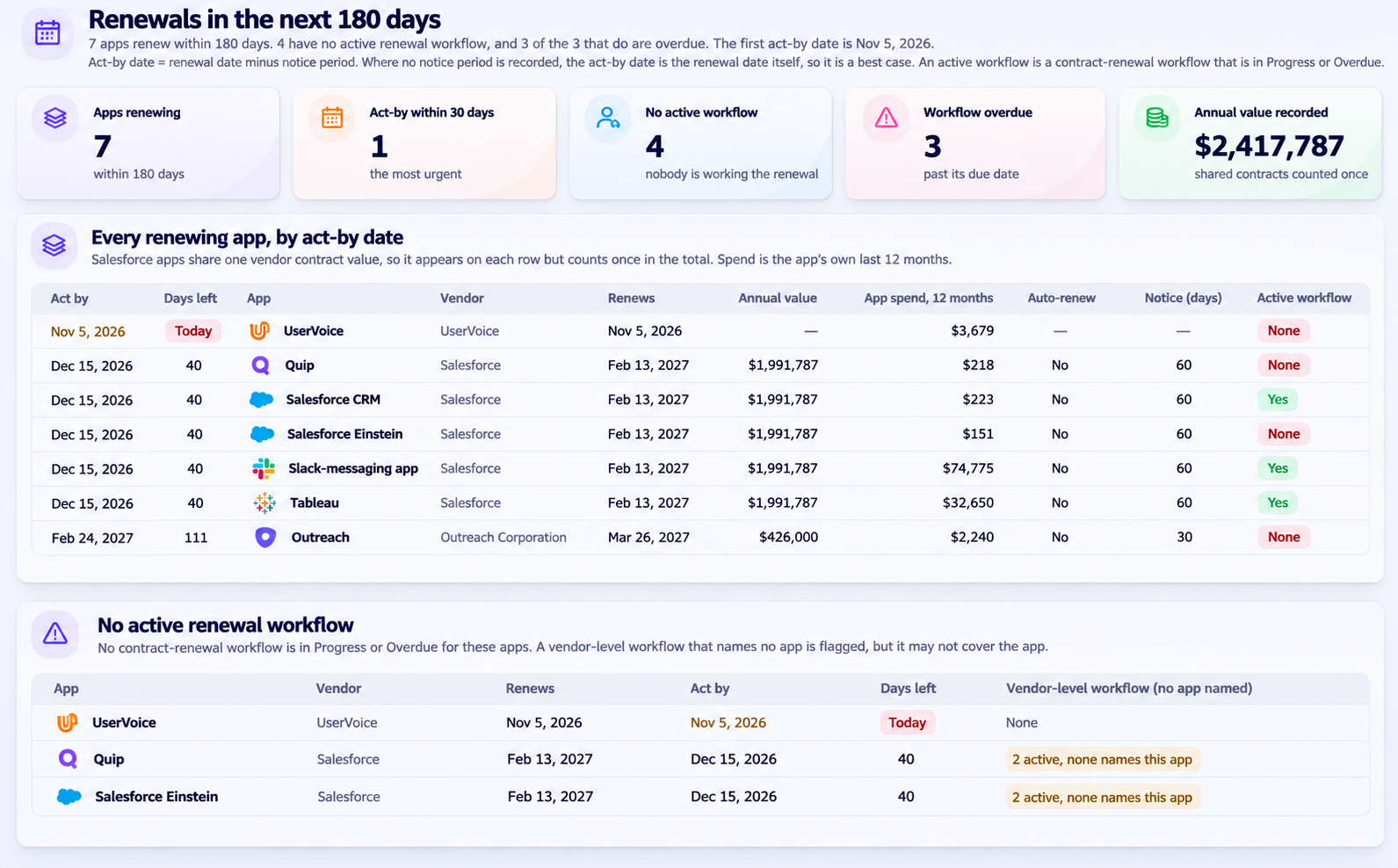
A. Which Renewals Will Lock In Before Anyone Notices?
Module: Renewal Calendar + Procurement Workflows
The pain point: The renewal date is not the deadline. The notice date is, and it usually passes while nobody is looking. By the time someone spots the contract, it has auto-renewed for another year.
The prompt:
From CloudEagle.ai:
1. List every app renewing in the next 180 days with:
- Annual value
- Auto-renew status
- Notice terms
2. Calculate the act-by date (renewal date minus notice period) and sort by it.
3. Check which apps have an active renewal workflow:
- Show the apps with none
- For the rest, show current step, assignee, due date, and whether it's overdue
4. For any renewal over [$50k] without a workflow, list the template options and tell me which fits.
Why this prompt works: It sorts by the act-by date, so the most urgent decision sits at the top. It then checks workflows and flags big renewals with nobody on them, and it asks before creating anything.
B. Are We Paying for Licenses Nobody Uses?
Module: License Management
The pain point: Licenses get bought, people stop logging in, and nobody reclaims the seats. Even when you find the waste, the numbers can be wrong because SSO and sync issues skew them.
The prompt:
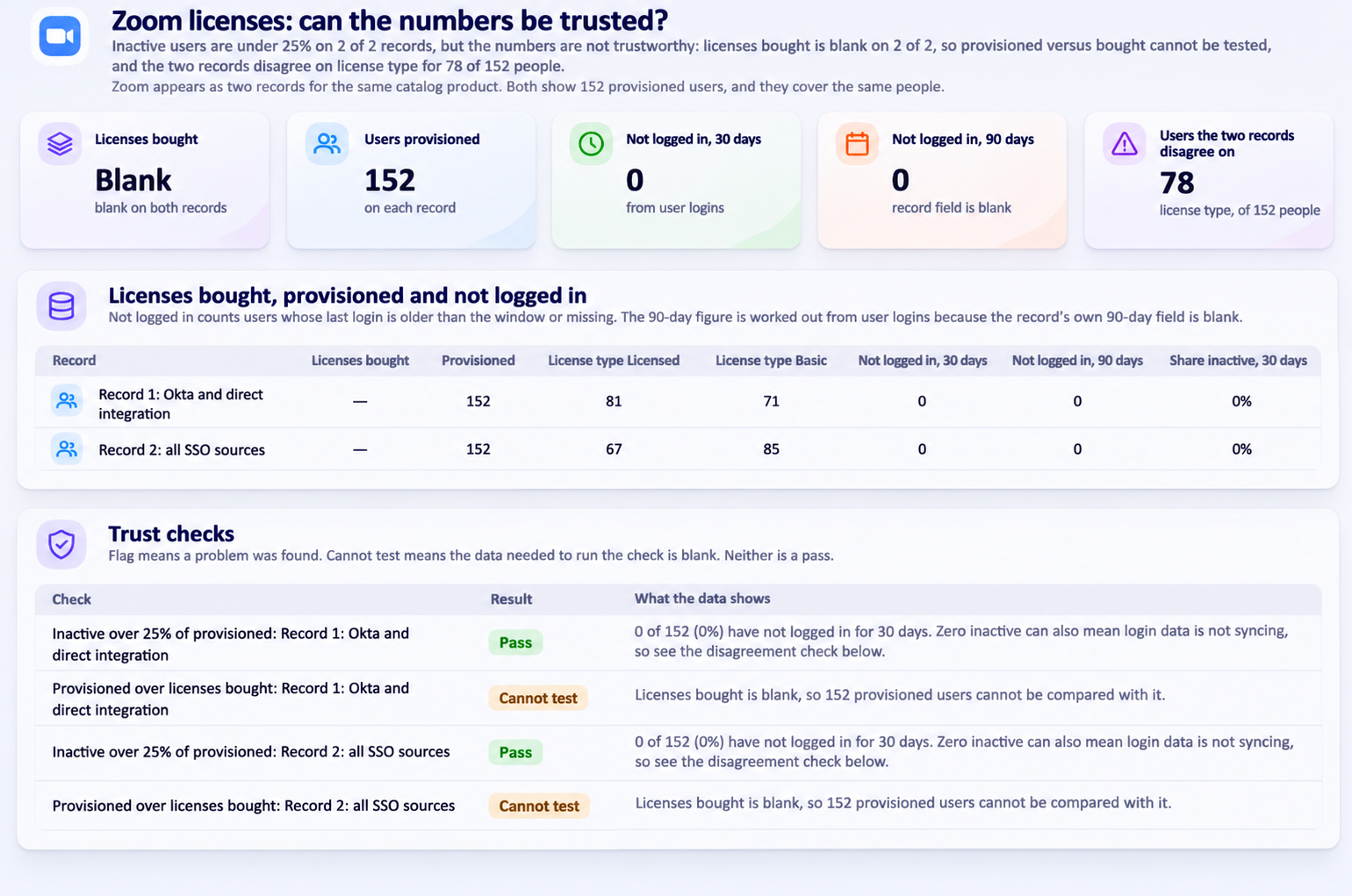
From CloudEagle.ai, for [Zoom]:
1. Compare licenses bought, users provisioned, and users not logged in for 30 and 90 days.
2. Tell me whether the numbers look trustworthy. Flag it if:
- Inactive users exceed 25% of provisioned (possible SSO or sync problem)
- Provisioned exceeds licenses bought
3. Propose a harvesting rule as a table, with the reasoning for each setting:
- Inactivity window
- Reviewer
- Email warning
- Opt-out period
Why this prompt works: It checks the data before acting on it. The two flags catch bad numbers early, and the rule comes with reasoning for every setting.
C. Are We Overpaying at Renewal?
Module: Price Benchmarking
The pain point: Most teams walk into a negotiation with the vendor’s quote and no outside reference. Leadership asks “is this a fair price?” and nobody can answer with confidence.
The prompt:
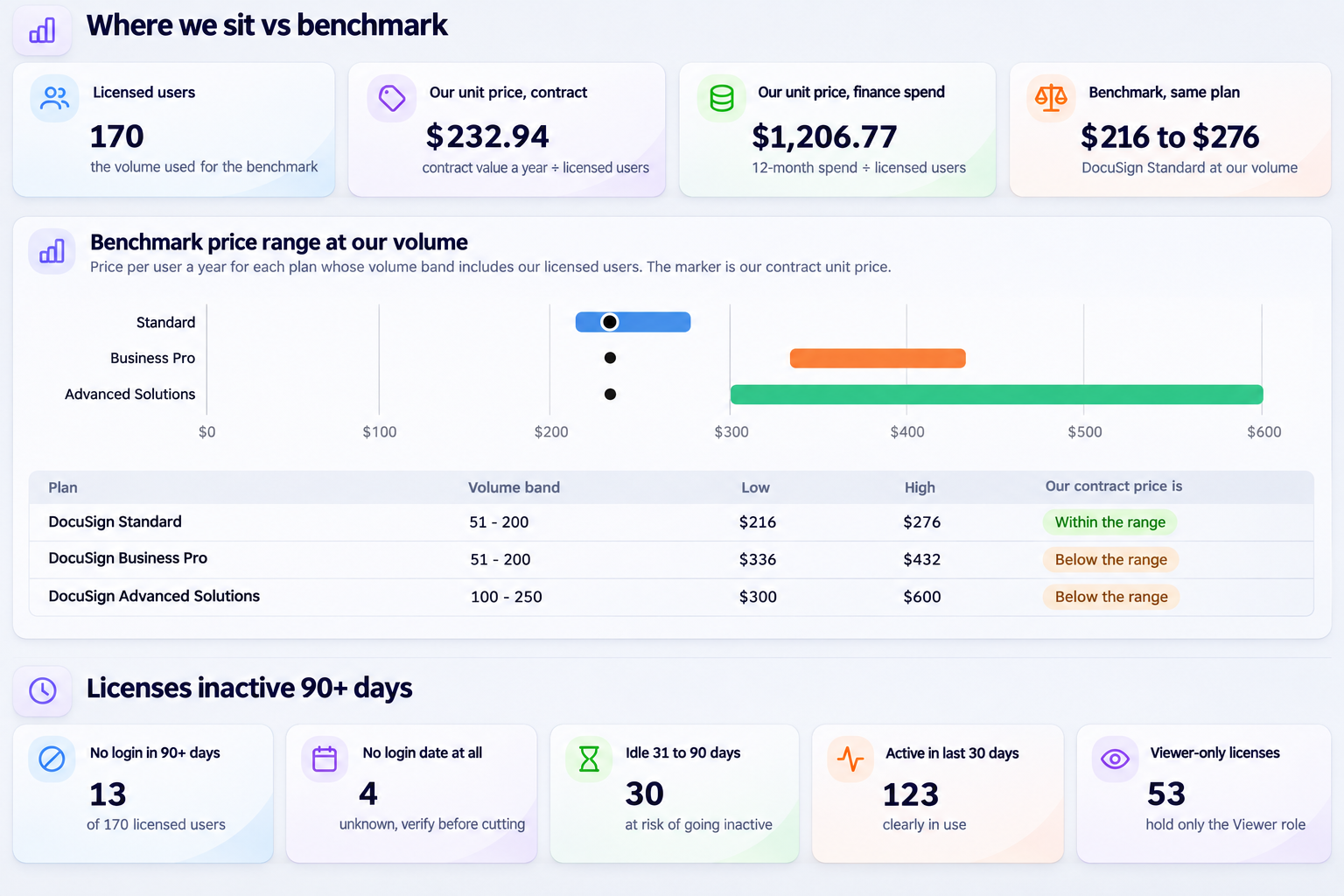
Create a dashboard for our [Docusign] renewal on [13/03/2027].
1. From CloudEagle.ai, get the benchmark for this product:
- Price range for our license volume
- Discount levers and their effectiveness for renewals
- Community deal stories
2. Then:
A. Compare it with our actual unit price.
B. Tell me how many licenses were inactive for 90+ days.
C. Write a one-page negotiation brief for leadership covering:
- Where we sit vs. benchmark
- Our three strongest levers from our own data
- A recommended opening ask
Say plainly if benchmark data at our volume is thin.
Why this prompt works: It pairs the market benchmark with your own usage data, so every lever is backed by your numbers. The last line stops the brief from sounding more certain than the data allows.
D. Who Has an AI License and Never Opens It?
Module: AI App Users
The pain point: AI seats are often bought in bulk and rolled out fast. A few months later, nobody can say who actually uses them or what they cost.
The prompt:
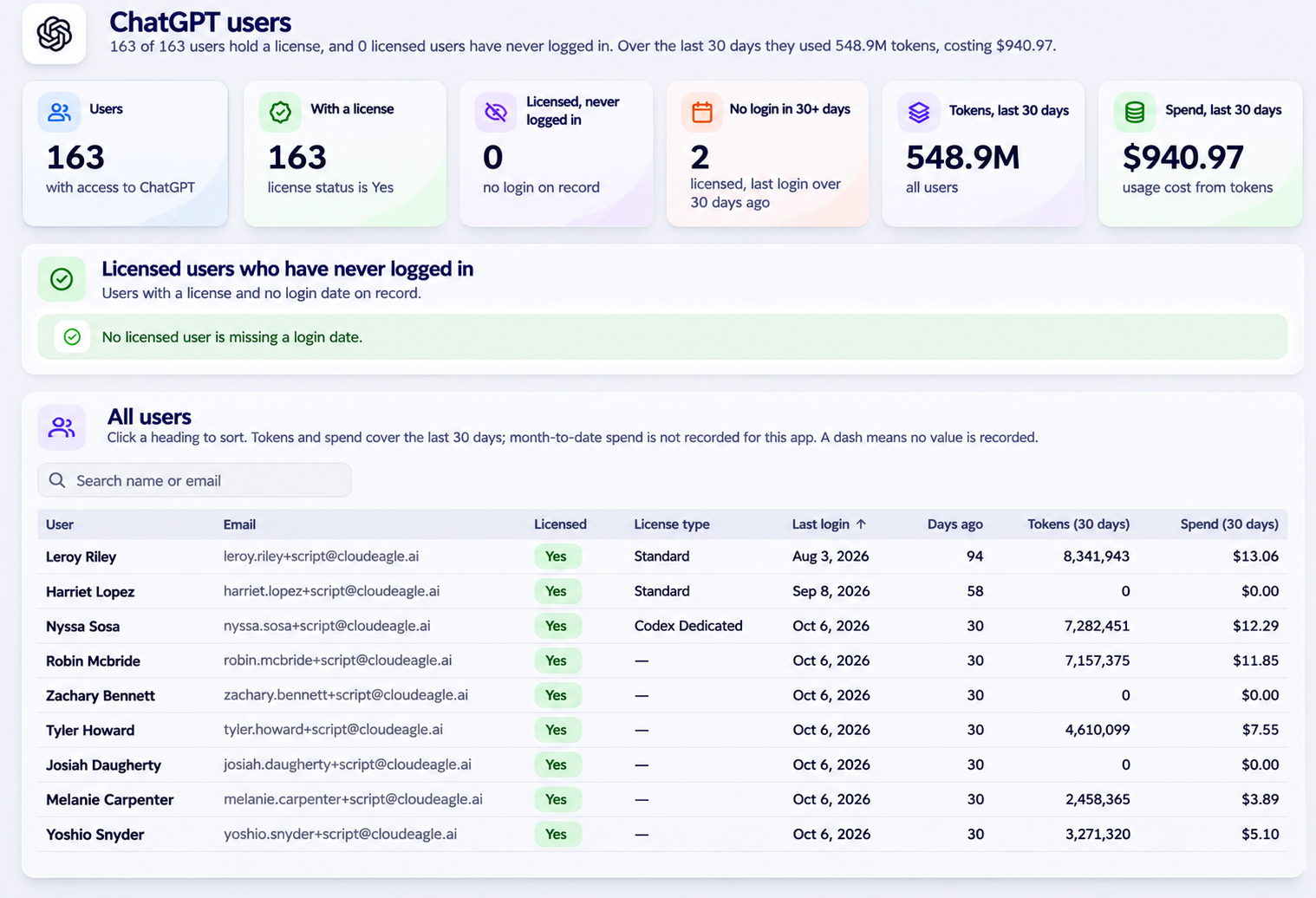
1. From CloudEagle.ai, list the users of [ChatGPT] with:
- License status
- Last login
2. Then:
- Show anyone with a license who has never logged in
- If the data is there, show tokens used and spend this month
Why this prompt works: It is scoped to one app and one clear question. The “if the data is there” clause stops Claude from guessing on spend.
E. Can We Trust This AI Vendor With Our Data?
Module: AI Data and Vendor Risk
The pain point: Vendor reviews mean chasing questionnaires. The questions security asks first are simple, and the answers are scattered across policy pages and certificates.
The prompt:
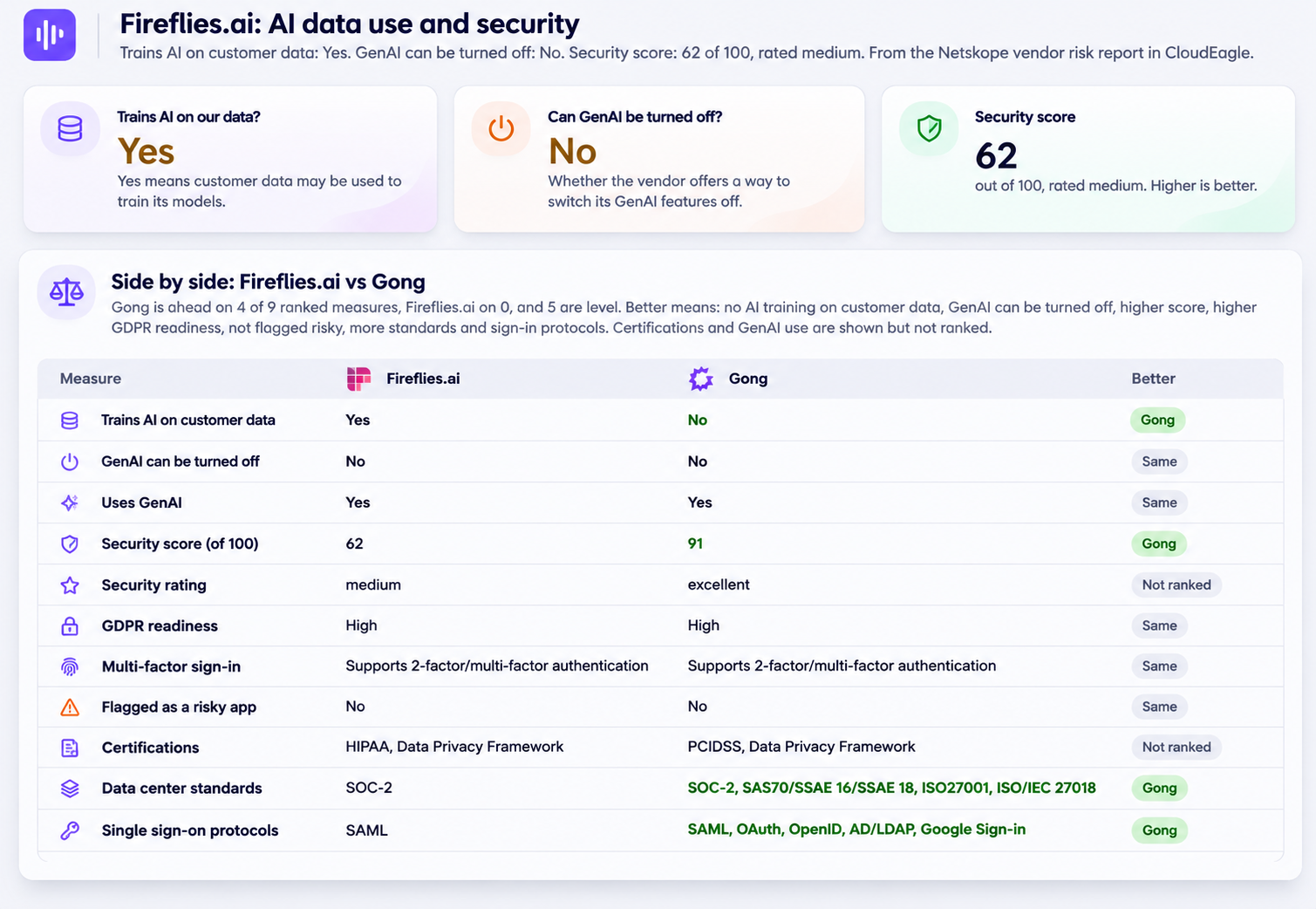
1. From CloudEagle.ai, create a dashboard for [Fireflies.ai] that answers:
- Does the vendor train AI on our data?
- Can GenAI be turned off?
- What's its security score and certifications?
- Comparison with Gong
Why this prompt works: It asks the three questions that decide most AI vendor reviews and puts the answers side by side.
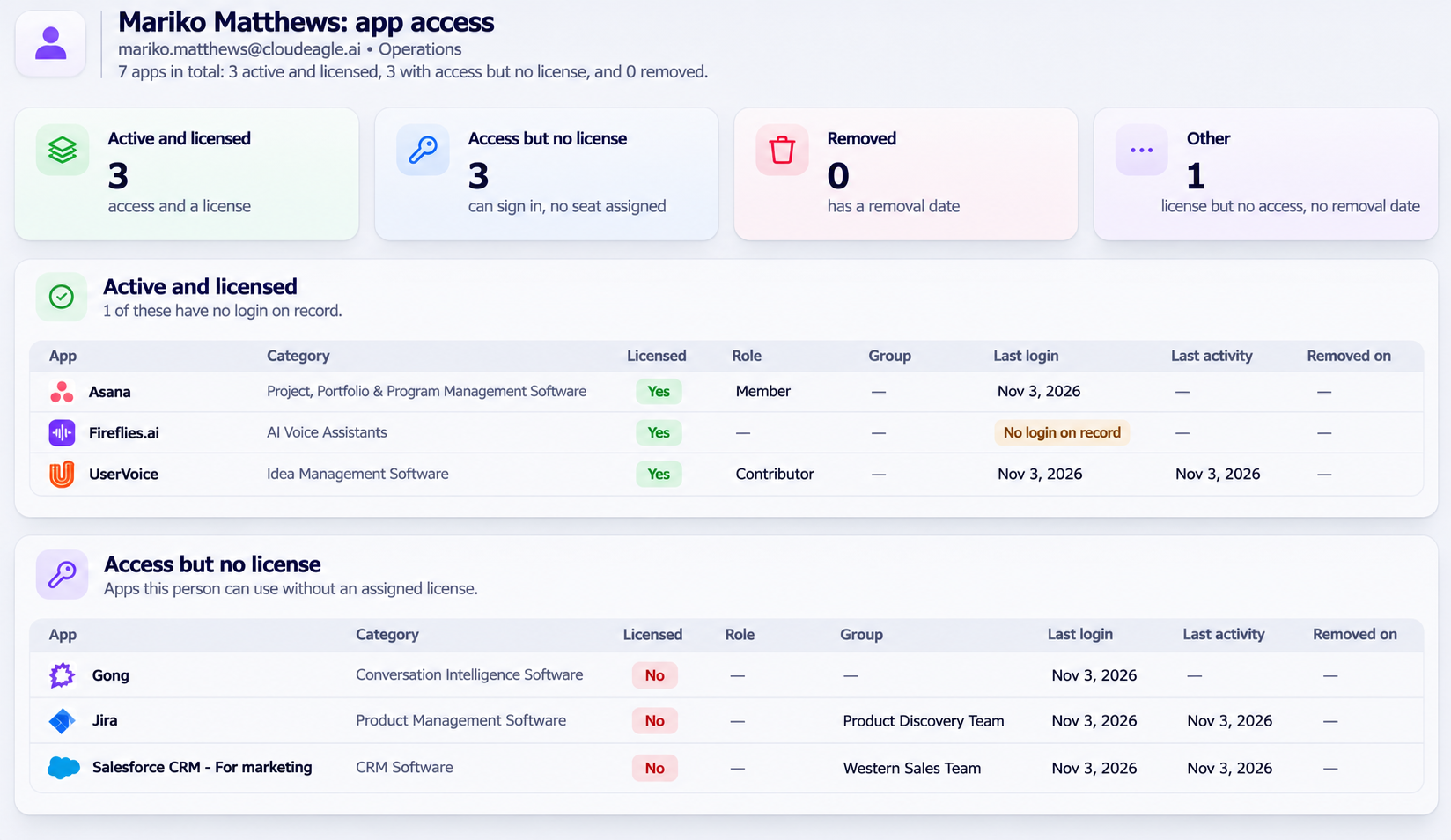
F. What Can This One Person Access?
Module: App Access
The pain point: When someone changes roles, leaves, or comes up in an investigation, answering “what do they have access to?” means checking app by app.
The prompt:
1. From CloudEagle.ai, show every app [Mariko Matthews] has access to, with:
- License status
- Role
- Last login
- Removal date, if access was removed
2. Group them as:
- Active and licensed
- Access but no license
- Removed
G. Who Left but Still Has Access?
Module: Onboarding & Offboarding
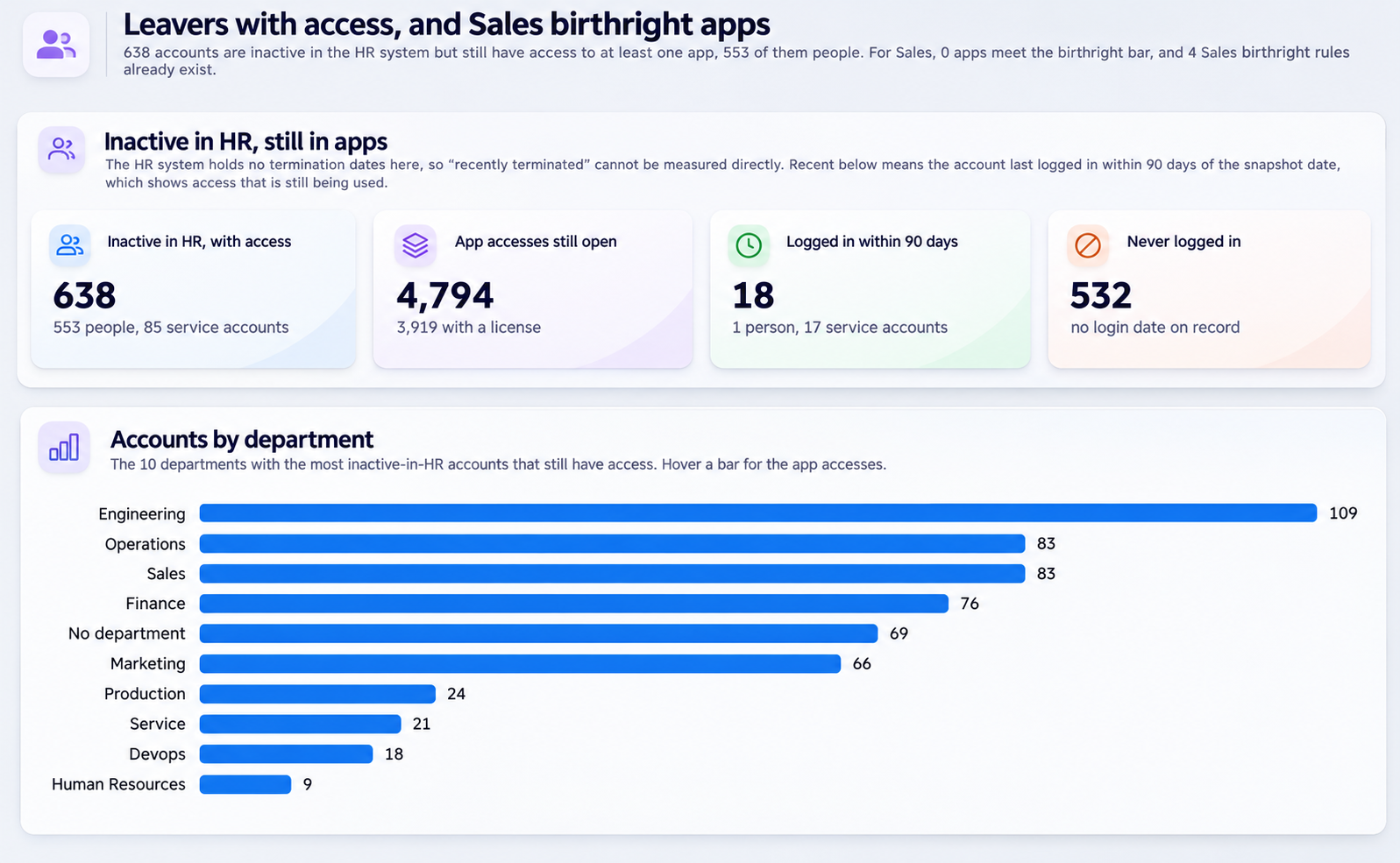
The pain point: Leavers keep access to apps long after their last day, which is a security risk and a cost. On the other side, new hires wait days for the apps their team always uses.
The prompt:
From CloudEagle.ai, create a dashboard that shows:
- How many recently terminated employees still have access to any app
- Which apps they still have access to
Then, for the [Sales] department, recommend birthright apps:
- Apps where usage is concentrated in that department (at least 3 users, 50%+ concentration)
- Check whether rules already exist
Why this prompt works: It covers both ends of the employee lifecycle in one view. The thresholds make the birthright recommendations defensible, and the rule check avoids duplicates.
H. Can We Hand the Auditor Clean Evidence?
Module: User Access Reviews + Excessive Privileged Users
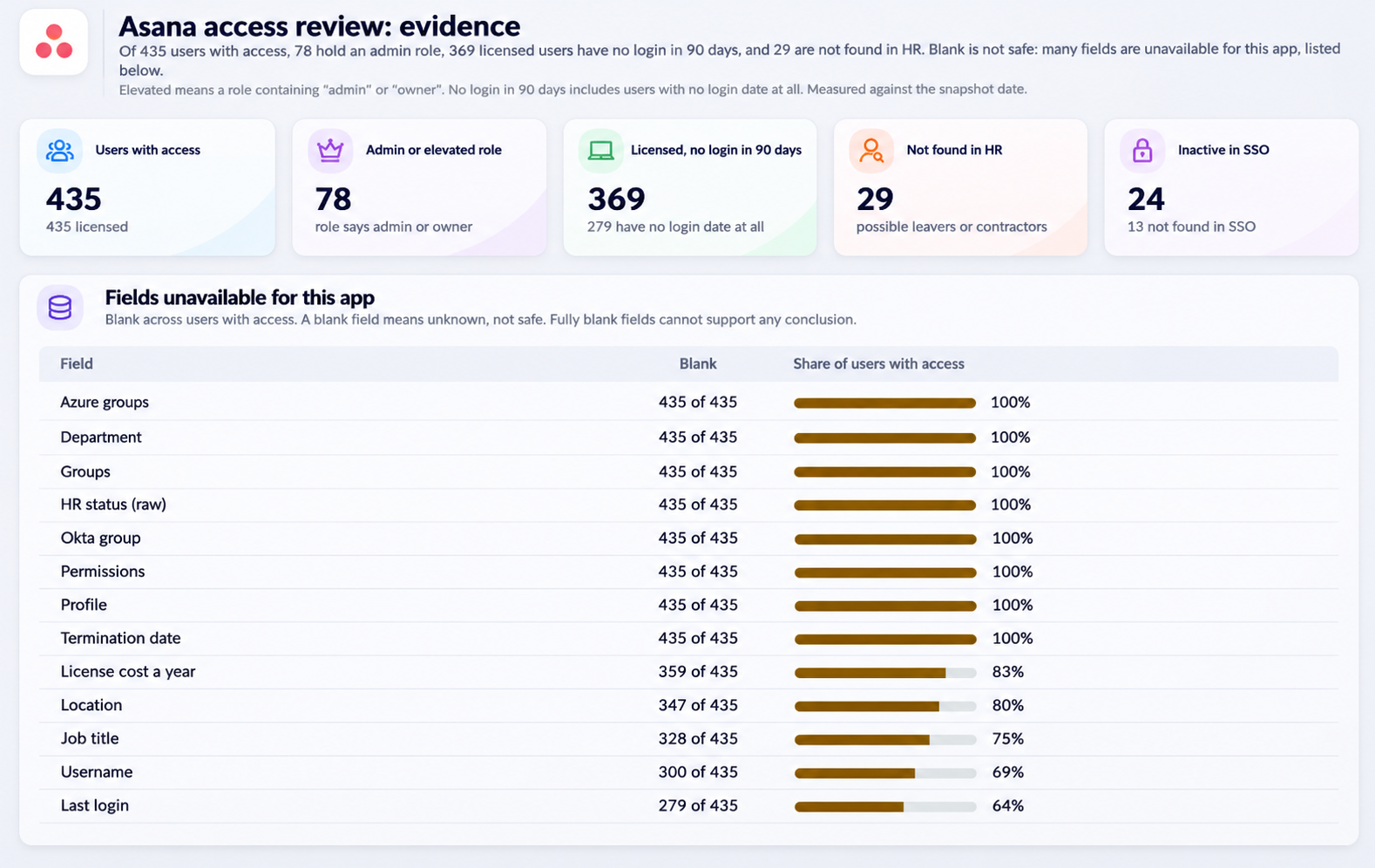
The pain point: Access review prep is manual evidence gathering. Worse, a blank field in an export looks like “no issue” when it may just mean the data is missing.
The prompt:
I'm preparing evidence for our access review of [Lucid].
1. From CloudEagle.ai, list every user with:
- Role or permissions, where available
- License type
- Last login
- SSO and HR status
2. Isolate:
- Admin or elevated roles
- Licensed users with no login in 90 days
- Users not found in HR (possible leavers or contractors)
3. Tell me which fields are unavailable for this app so I don't mistake blank for safe.
4. For the three most privileged people, show every other app they can access.
Why this prompt works: The three groups match what reviewers look for. Asking which fields are unavailable keeps blanks from being mistaken for safe. Tracing the top three privileged users shows risk beyond this one app.
I. Are Claude and ChatGPT Priced the Right Way for Us?
Module: AI Usage Control
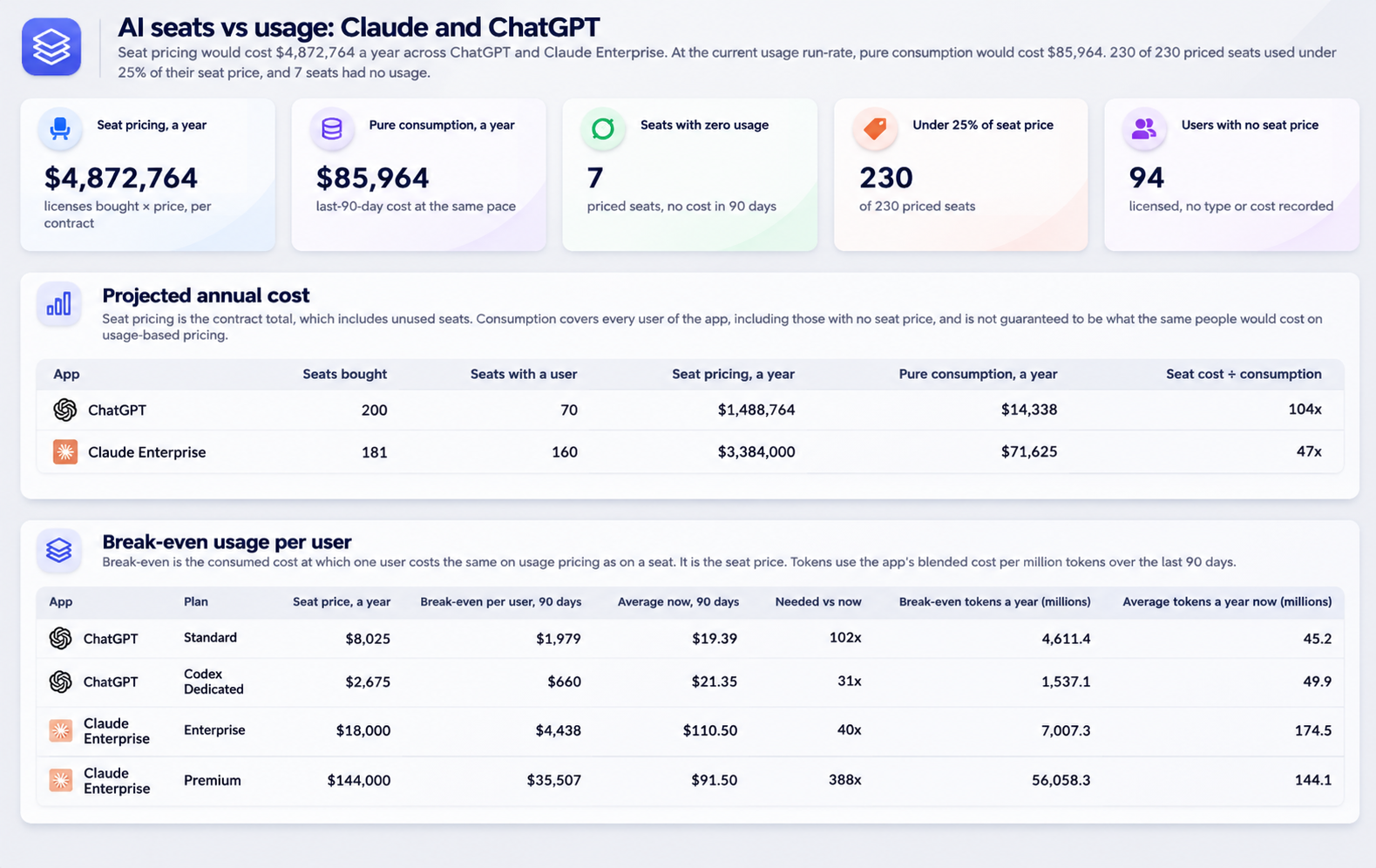
The pain point: Seat pricing and consumption pricing can differ a lot, and usage varies widely by person. Without per-user data, teams can’t tell which model costs less.
The prompt:
1. From CloudEagle.ai, for Claude and ChatGPT, list every user with:
- Purchased license cost
- Consumed usage cost over the last 90 days
2. Show:
- Seats with zero usage
- Seats where consumed cost is under 25% of the seat price
3. Then:
- Project annual cost under seat pricing and under pure consumption at current run-rate
- State your assumptions
- Give the break-even usage per user
4. Label projections as straight-line estimates.
Why this prompt works: It compares both pricing models on your own usage and gives a break-even point per user. Stating assumptions and labeling projections as estimates keeps the numbers honest.
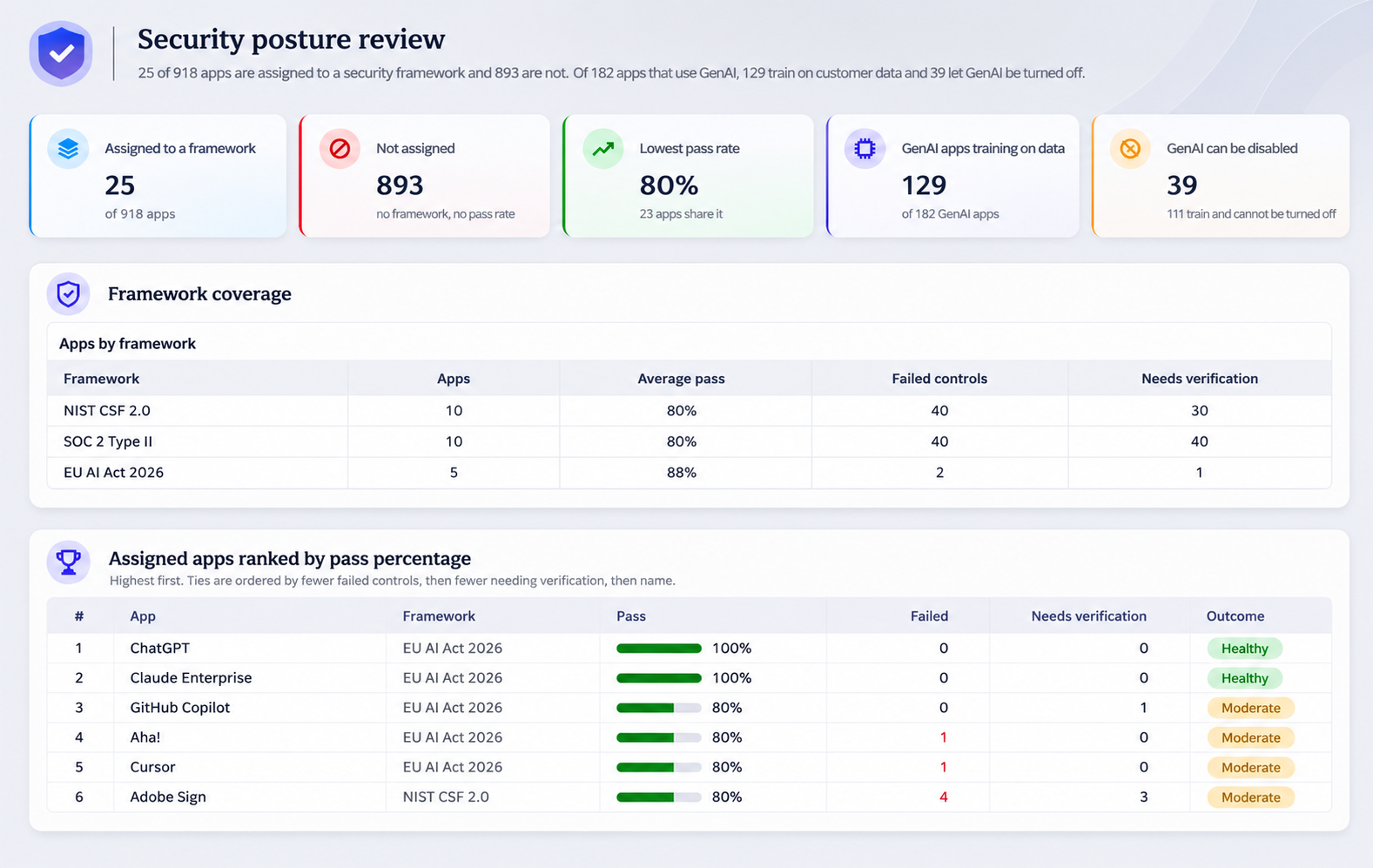
J. How Exposed Are We, in One View?
Module: SaaS Security & Compliance
The pain point: Security posture is spread across frameworks, vendor reviews, and AI apps. When leadership asks “how are we doing?”, the answer takes a week to assemble.
The prompt:
1. From CloudEagle.ai, create a dashboard that shows our security posture.
2. Which apps are assigned to a framework and which aren't?
3. For those that are, rank by pass percentage.
4. For the bottom five, list failed high-severity controls, separating "failed" from "needs verification."
5. Check our AI apps: which train on customer data, and which allow GenAI to be disabled?
6. Finish with the dashboard's access-risk counts:
- Apps without SSO
- Risky apps
- Vendors over budget
- Policy violations
Why this prompt works: It moves from broad to specific: frameworks, then the weakest five apps, then AI apps, then the headline risk counts. Separating “failed” from “needs verification” avoids false alarms.
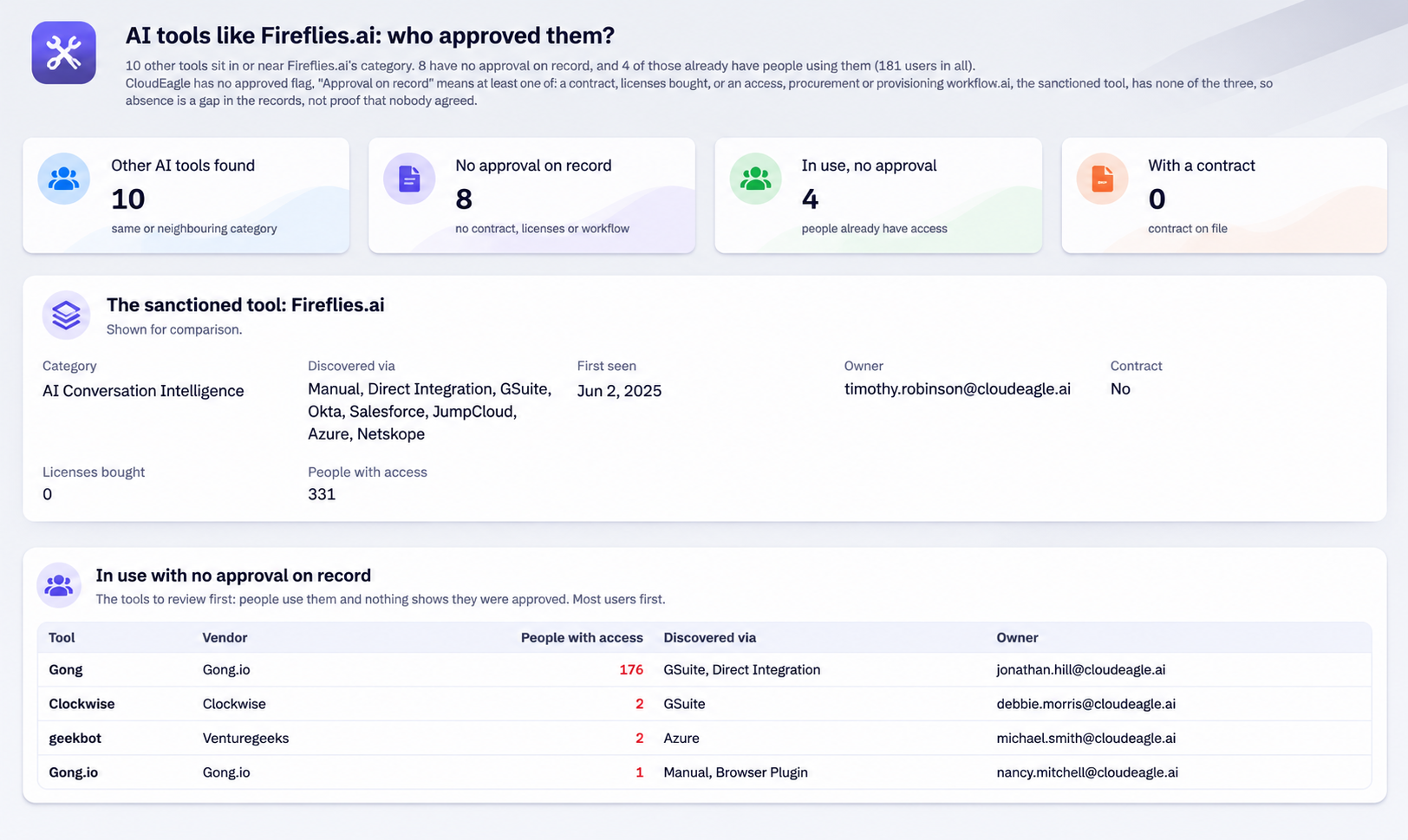
K. Which AI Tools Are Running That Nobody Approved?
Module: Shadow AI
The pain point: Employees adopt AI tools alongside the approved ones. The result is overlapping tools, no contracts, and no owner.
The prompt:
From CloudEagle.ai, create a dashboard for our sanctioned AI tool [Fireflies.ai].
1. Find other AI tools in the same category in our environment.
2. Show for each: how it was discovered, whether it has a contract or licenses, and who owns it.
3. Tell me which ones nobody has approved.
Why this prompt works: It starts from a tool you already approved and finds its lookalikes. For each one it shows how it was discovered, whether it has a contract, and who owns it, which tells you where to act first.
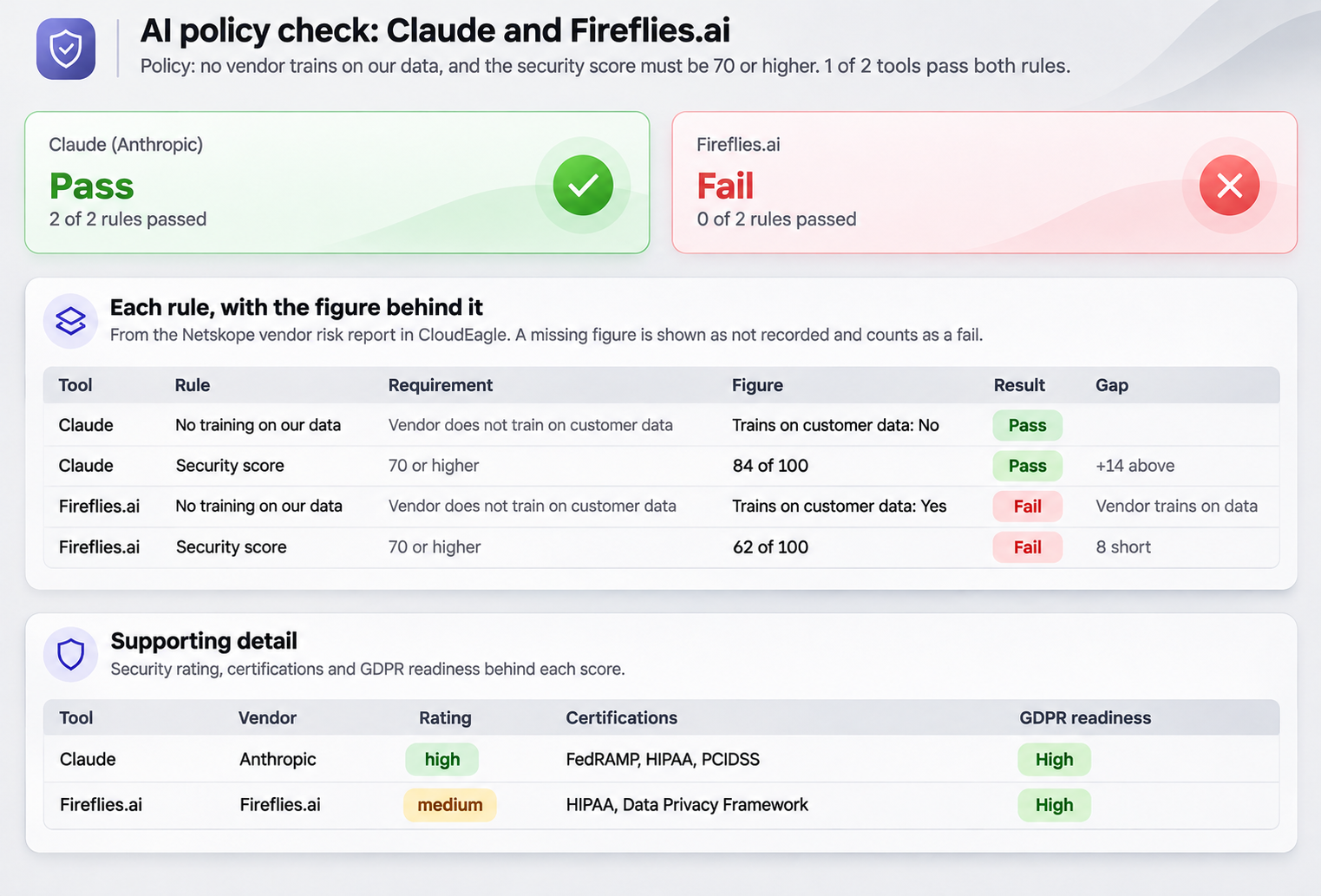
L. Does This AI Vendor Pass Our Policy?
Module: AI Policy Enforcement
The pain point: An AI policy on paper is easy to write and hard to check. Reviewing each vendor against it by hand means the policy only gets applied sometimes.
The prompt:
1. Our AI policy:
- No vendor trains on our data
- The security score must be 70 or higher
2. From CloudEagle.ai, check [Claude] and [Fireflies.ai] against it. Give pass or fail per rule, with the figure behind each.
Why this prompt works: The policy is written into the prompt, so the check follows your rules. Pass or fail per rule, with the figure behind each, gives you evidence instead of an opinion.
6. What Changes When Anyone Can Build the Dashboard?
The shift is simple to describe. The dashboard no longer waits in a queue. Whoever needs the answer describes it, and Claude builds it from live data.
CloudEagle.ai holds the data across your apps, contracts, licenses, and spend. The CloudEagle.ai MCP server lets Claude read it. Claude does the build. Your team asks the question and keeps the final call on anything that changes.
Start with the prompt closest to a problem you already have. Run it on one app. The numbers will show you quickly whether it is worth running on the rest.
7. FAQs
1. Which AI tools can I use with the CloudEagle.ai MCP server?
You can use the CloudEagle.ai MCP server with Claude, ChatGPT, Gemini, or any other AI tool that supports MCP. Connect once, and the tool can query your CloudEagle.ai data in plain language. This blog uses Claude for the dashboards, but the same connection works with the assistants your team already uses, so you are not locked into one.
2. Do I need engineers to connect the CloudEagle.ai MCP server to Claude?
No. Connecting the CloudEagle.ai MCP server to Claude needs no engineering work. Our setup guide walks through each step, so an IT admin or a SaaS owner can handle it directly. Once it is connected, you can start asking questions about your SaaS data in plain language.
3. What data can Claude read through the CloudEagle.ai MCP server?
Through the CloudEagle.ai MCP server, Claude can read the data CloudEagle.ai holds: your applications, contracts, licenses, usage, vendor spend, renewals, and workflows. That lets one prompt compare things that normally sit in different systems, such as licenses bought, users provisioned in your SSO, and last login activity. The dashboard is built from live data, not from an export.
4. How is a Claude dashboard different from the dashboards inside CloudEagle.ai?
CloudEagle.ai gives you dashboards and reports inside the platform. The CloudEagle.ai MCP server adds a faster route to custom views: you describe what you want in plain English, and Claude reads the data and builds the view around your question. For small questions, you do not need to open the platform at all.
5. How do I know the numbers Claude shows are reliable?
Claude reads your live CloudEagle.ai data through the MCP server, and the prompts in this blog add a check before any recommendation. For example, Claude flags it when inactive users exceed 25% of provisioned, which can point to an SSO or sync problem, or when provisioned exceeds licenses bought. You review the findings, and nothing is created until you confirm.