HIPAA Compliance Checklist for 2025

NIST AI 600-1 lists more than 200 suggested actions for managing generative AI risk. Most guides ranking for it cover red teaming and model testing, which is work for model builders.
Your team probably didn't build any. You bought ChatGPT Enterprise and rolled out Copilot, then watched approved SaaS apps quietly add AI assistants after the contract was signed.
NIST itself says developer actions may not apply to deployers, so the question is which ones apply to you.
The answer starts with an inventory, and that's where most programs are already behind. IBM's 2026 Cost of a Data Breach Report found shadow AI involved in 43% of incidents at breached organizations, more than double the year before.
What NIST AI 600-1 Asks of Companies That Buy Their AI
NIST AI 600-1 asks companies that buy AI to account for every GenAI tool they run and the vendors behind each one. It's a companion to the AI RMF that applies its four functions (Govern, Map, Measure, Manage) to generative AI.
If you need the four functions explained first, here's how the NIST AI RMF applies to the AI tools your team already uses.
Why most of those 200+ actions belong to someone else:
- NIST draws the line itself: The profile states that actions relevant to GAI developers may not be relevant to GAI deployers.
- Model testing sits with your vendor: Red teaming a model (MS-2.7-007) is OpenAI's or Microsoft's job, and so is verifying fine-tuning (MS-2.7-008).
- Govern actions apply to everyone: Inventory and third-party risk land on every deployer.
The 5 NIST AI 600-1 Risks That Live Inside Employee AI Tools
Five of the twelve risks in NIST AI 600-1 surface daily in the chat assistants and SaaS AI features your employees already use.
The other seven, such as CBRN information and environmental impacts, mostly sit with the model provider, so cover them in vendor due diligence.
Gartner found 69% of organizations suspect or have evidence that employees use prohibited public GenAI, and it predicts more than 40% of enterprises will face a shadow AI incident by 2030.

A 6-Step Sequence for Applying NIST AI 600-1 to Enterprise AI Tools
Apply NIST AI 600-1 to enterprise tools in this order, because each step feeds the next. Every action ID below comes from the NIST AI 600-1 Generative AI Profile itself.
Step 1: Inventory Every GenAI Tool, Including Those Inside Approved Apps
- GV-1.6-001: Enumerate your GenAI systems and add them to the AI inventory.
- GV-1.6-002: Define any inventory exemptions for GenAI embedded in application software. Most teams exempt it by accident, since the app was approved before it added AI.
- GV-1.6-003: Record the underlying foundation model and human oversight roles for each entry.
- Owner: IT, with security reviewing.
Step 2: Publish an Approved Provider List and an Acceptable Use Policy
- GV-6.1-007: Inventory third parties with access to your content and keep an approved list of GenAI providers.
- GV-1.4-002 and GV-3.2-003: Write transparent acceptable use policies for GenAI tools and interfaces.
- GV-6.1-010: Extend the policy to contractors and consultants.
- Owner: IT and legal.
If your policy is a one-page "be careful" memo, this AI usage policy template shows what enforceable looks like.
Step 3: Extend Vendor Due Diligence and Contracts to GenAI
- GV-6.1-009: Update procurement assessments to cover embedded GenAI and ongoing vendor monitoring.
- GV-6.1-004: Write contracts and SLAs that specify content ownership and security requirements.
- GV-6.2-007: Ask for notification of serious incidents and watch for secondary data use by vendors.
- Owner: Procurement and security.
Before your next renewal, use these questions to vet Claude, ChatGPT or Copilot.
Step 4: Monitor What Data Goes Into AI Tools
- MP-4.1-001: Periodically monitor for privacy risk and address any exposure of personal or sensitive data.
- GV-6.2-004: Continuously monitor third-party GenAI systems once they're deployed.
- Owner: Security.
Step 5: Plan for Incidents That Start at a Vendor
- GV-6.2-003: Build incident response plans for third-party GenAI, with named owners and regular rehearsals.
- GV-4.3-002: Set minimum incident fields such as system ID, reporter, date and impact.
- Owner: Security operations.
Step 6: Make Sure You Can Switch a Tool Off
- GV-1.7-001: Put protocols in place to deactivate GenAI systems when necessary.
- GV-1.7-002: Account for data retention and leakage after a tool is decommissioned.
- Owner: IT.
Once these six steps are running, the NIST AI RMF implementation checklist turns them into a documented Current and Target Profile.
Is NIST AI 600-1 Mandatory? Texas Just Made It Worth Following
NIST AI 600-1 is voluntary, but Texas now ties a liability defense to it.
- TRAIGA is in force: The Texas Responsible AI Governance Act (HB 149) took effect January 1, 2026.
- The profile is named in the law: Under Section 552.105, a company that finds a violation through internal review can't be held liable if it substantially complies with the latest NIST Generative AI Profile or another recognized framework.
- Enforcement is narrow: The Texas Attorney General enforces the Act, with a 60-day cure period and no private right of action.
- Substantial compliance needs proof: That means inventories, review records and logs.
Talk to counsel about how the defense applies to your company.
NIST AI 600-1 vs NIST AI 100-1, AI 100-2 and the AI RMF Playbook
NIST AI 600-1 is one document in a family, and each one answers a different question.
If you're also weighing a certifiable standard, this comparison of ISO 42001, the NIST AI RMF and the EU AI Act shows what each one proves.
How CloudEagle.ai Turns NIST AI 600-1 Into Evidence for Enterprise AI Tools
CloudEagle.ai runs the deployer actions in NIST AI 600-1 as one workflow, and every step works from the inventory built first.
1. Every AI tool lands in one inventory (GV-1.6)
Your IdP only sees tools that sign in through it. An assistant joined with a personal email, or expensed on a corporate card, never appears on its report.
How CloudEagle.ai solves it:
- EagleIQ correlates seven discovery sources, from IdP and contract data to expense records and browser-extension sessions.
- It reconciles them into one list, so each tool appears once.
- Each tool is matched to the employees using it and risk-scored as soon as it's found.
You get one AI inventory, personal-account and expensed tools included, with users and a risk score on every entry. That's the record GV-1.6-001 asks for.
2. Approved apps get re-checked when they add AI (GV-1.6-002, GV-6.1-009)
Most SaaS apps were approved before they had AI. When a vendor starts training on customer data under new terms, nothing sends the app back for review.
How CloudEagle.ai solves it:
- Every SaaS vendor carries a GenAI risk score built from seven signals, including whether it trains on customer data and whether that training can be switched off.
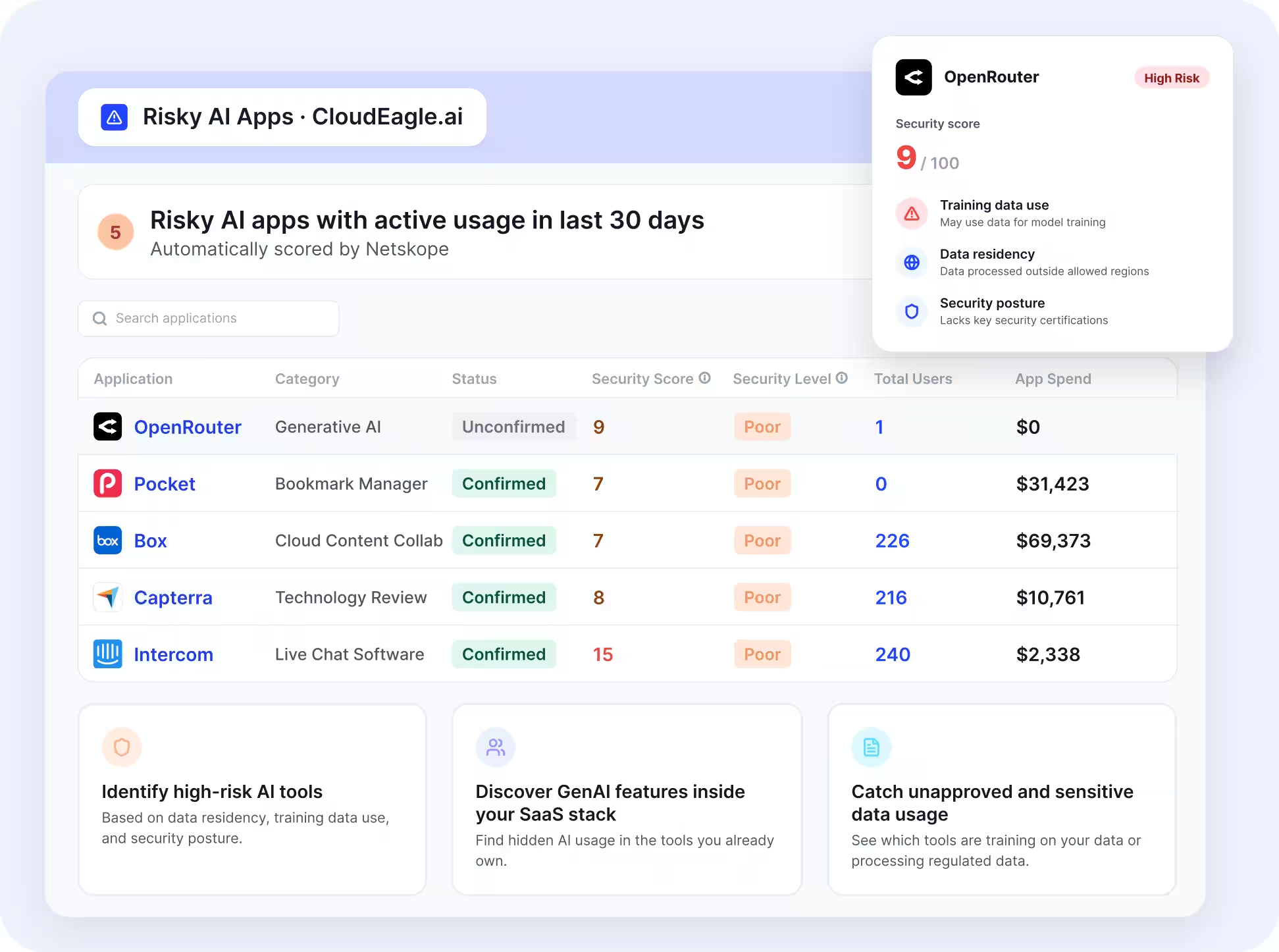
- One filter across the portfolio lists every vendor training on your data, with links to the admin setting that disables it.
- When a vendor's signals change, such as turning on training or dropping MFA, the change arrives as an alert.
Embedded AI stops slipping through as an accidental inventory exemption, and each fix is recorded against the vendor with an owner. Benchling found 63 of its 287 approved SaaS vendors had become GenAI platforms, 11 of them training on customer data by default, and switched training off in 8 of those in a single afternoon.
3. Access follows the approved list (GV-6.1-007)
An approved provider list only works if access requests check it. Most requests go through a ticket queue that never looks at vendor risk.
How CloudEagle.ai solves it:
- The Self-Service App Catalog shows the vendor's GenAI risk score on every AI tool request.
- Requests for high-risk vendors need a documented risk acceptance before they're approved.
- Continuous user access reviews, service accounts, and API tokens are included, narrowing access to a vendor that turns risky.
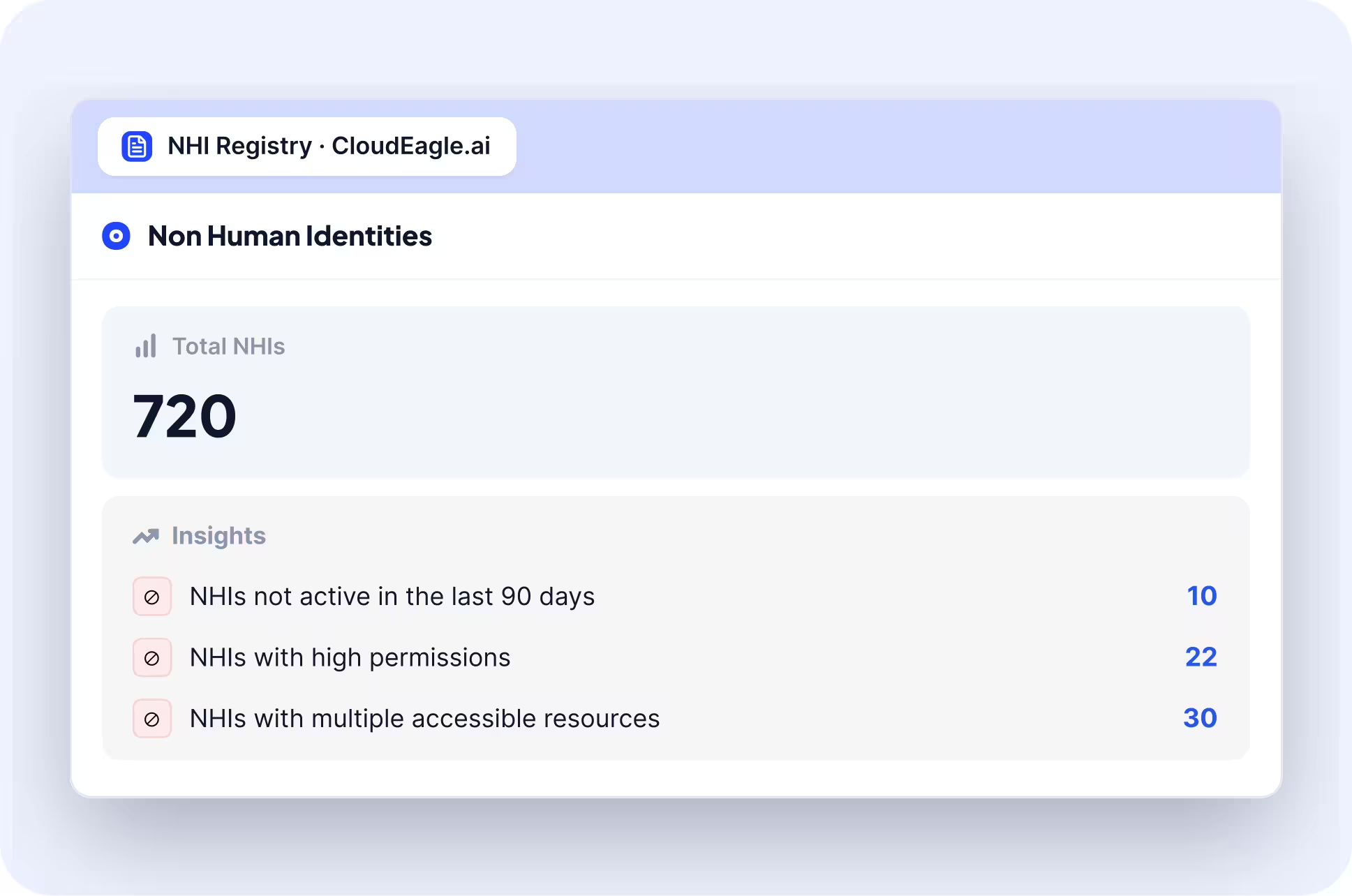
Your approved list becomes the actual gate for AI access, and every approval or rejection leaves a record you can show an auditor.
4. Sensitive data is stopped at the browser (MP-4.1-001, GV-6.2-004)
An acceptable use policy tells people not to paste customer data into AI tools, but it can't catch the moment someone does.
How CloudEagle.ai solves it:
- Secure Browser checks for PII and PHI as it's typed into any AI tool and blocks the submission before it's sent.
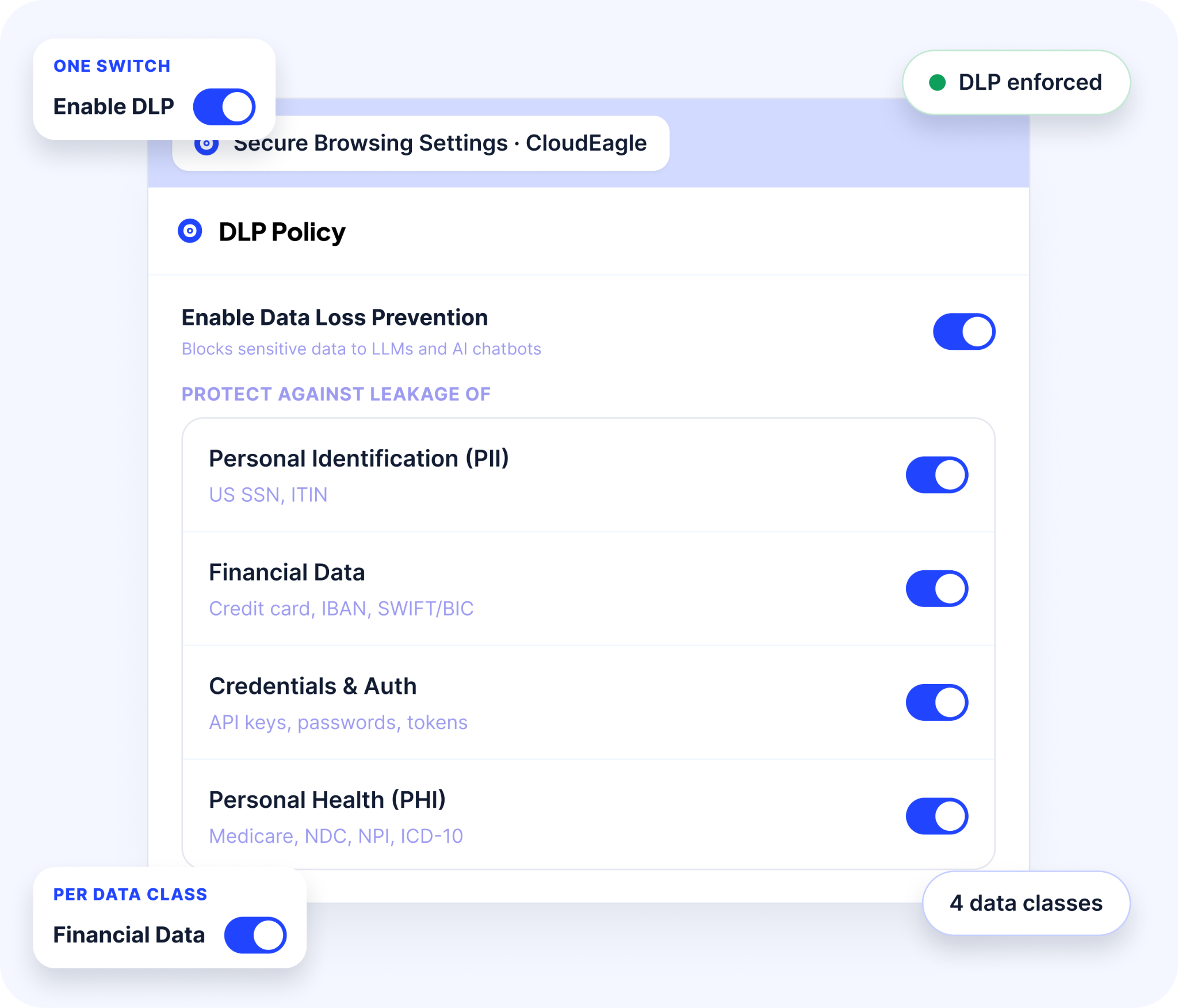
- Users opening an unapproved AI tool are redirected to the sanctioned one.
- Rules apply by role and department, so engineering and marketing can run different policies.
- Every block and redirect is logged automatically.
Privacy monitoring runs continuously at the point of use, and the logs prove your policy works instead of only stating it.
5. Any AI tool or agent can be shut off (GV-1.7-001)
A deactivation protocol on paper does nothing about the access a tool or agent already holds.
How CloudEagle.ai solves it:
- AI tools are deprovisioned through the same offboarding workflows IT already runs for other SaaS apps.
- AI agent management shows each agent's owner and what it can access, with a kill switch to shut it down.
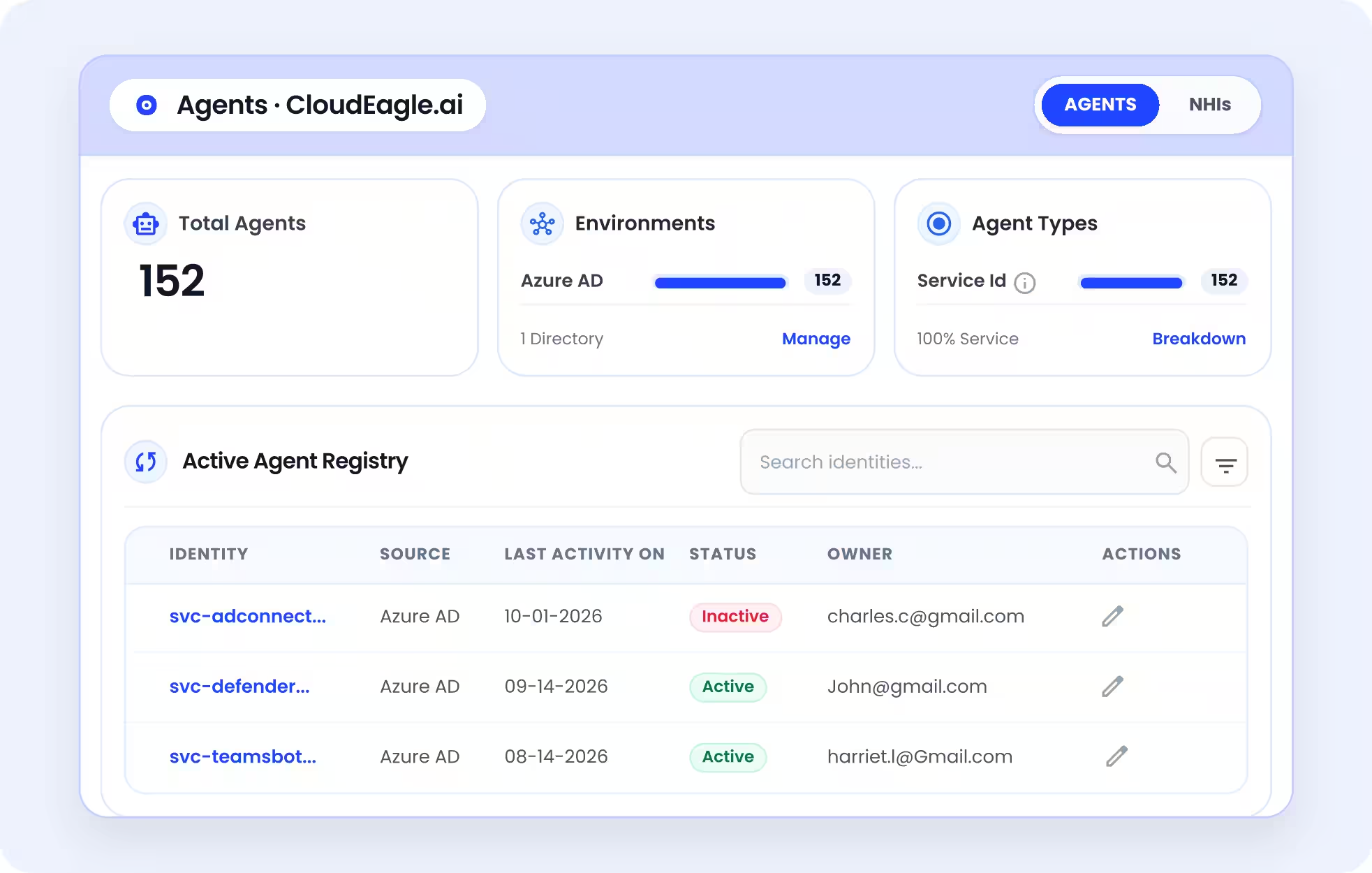
Switching a tool off becomes a recorded action with a named owner. These records together are your proof of substantial compliance, and here's how to prepare them for an AI audit.
Where to Start With NIST AI 600-1
Start with the inventory, because every other action in NIST AI 600-1 depends on it. A practical order for the next two quarters:
- First 30 days: Build the AI inventory, including AI inside approved apps (GV-1.6).
- Days 30 to 90: Publish the approved list and policy, then add GenAI to vendor reviews (GV-6.1).
- Quarter two: Monitor data at the point of use and confirm every tool can be switched off (MP-4.1, GV-1.7).
Keep the evidence as you go. Texas already counts documented alignment toward a liability defense, and NIST is revising the AI RMF, so keep your mapping easy to update.
FAQs
1. What is NIST AI 600-1?
NIST AI 600-1 is the Generative AI Profile of the NIST AI RMF, published in July 2024. It names 12 GenAI risks and suggests actions to govern, map, measure, and manage them.
2. What are the NIST AI standards?
The core is NIST AI 100-1, the AI RMF. Its companions include the NIST AI 600-1 Generative AI Profile, the NIST AI 100-2 attack taxonomy, and the NIST AI RMF Playbook.
3. Is NIST AI RMF mandatory?
No. The AI RMF and NIST AI 600-1 are voluntary. Texas TRAIGA does tie a liability defense to substantially complying with the Generative AI Profile, so documented alignment has value.
4. What's the difference between NIST and ISO?
The NIST AI RMF is free, voluntary guidance with no certification. ISO/IEC 42001 is a certifiable AI management system standard audited by accredited bodies. Many teams map one to the other.
5. Is there a NIST AI 600-2?
As of November 2026, NIST hasn't published an AI 600-2. The AI 600 series holds AI RMF profiles, and NIST released a concept note for a critical infrastructure profile in April 2026.
6. Where can I download the NIST AI 600-1 PDF?
NIST publishes the NIST AI 600-1 PDF for free at nvlpubs.nist.gov. Its DOI, 10.6028/NIST.AI.600-1, resolves to the same official document, and NIST's publication page links to both.
See which AI tools your inventory is missing before you map them to NIST AI 600-1. Book a demo with CloudEagle.ai.
See Which AI Tools You’re Missing