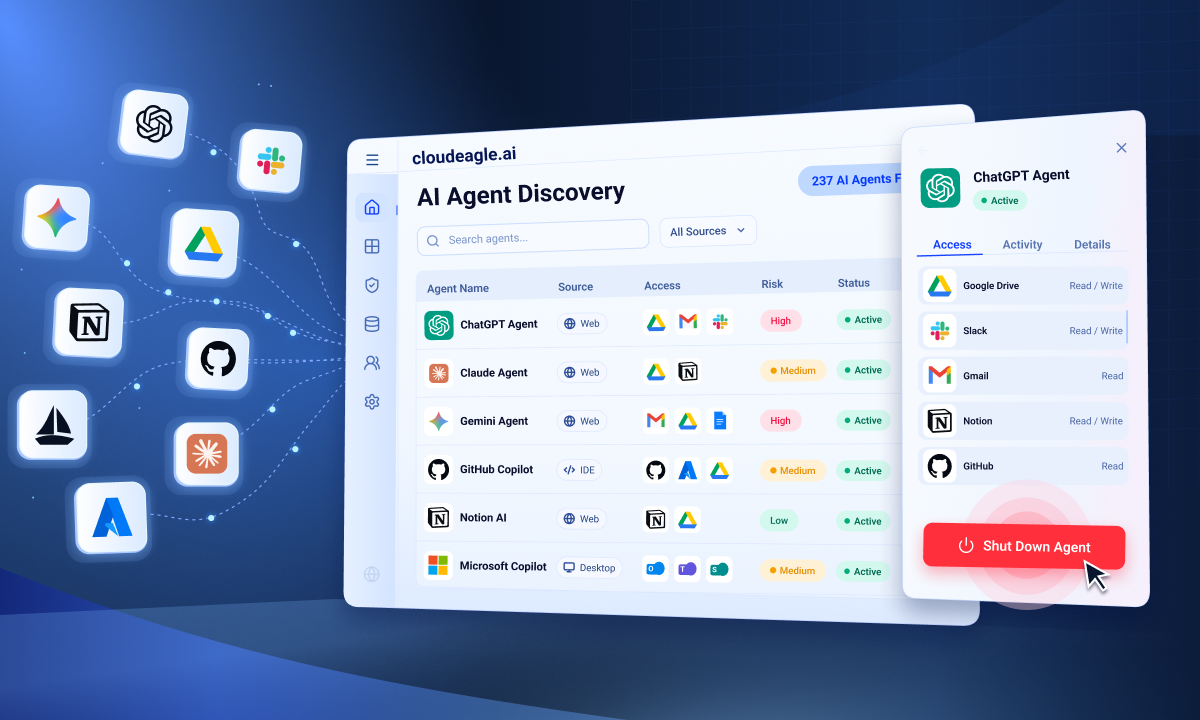
AI Governance

How to Prevent Sensitive Data Leaks in ChatGPT

Share via:
Written by:
CloudEagle.ai Team
Review by:
Nidhi Jain
Last Updated:
August 24, 2026
blog-cms-banner-bg
Little-Known Negotiation Hacks to Get the Best Deal on Slack
cta-bg-blogDownload Your Copy

HIPAA Compliance Checklist for 2025

Download PDF

Customer records, financial data, and source code get pasted into ChatGPT every day. And the scary part? It happens often through personal accounts IT has no visibility into.

Once that data is submitted, it's gone. There's no recall button, no way to know where it ends up. Preventing that requires more than a security policy.

CloudEagle.ai provides browser based integration and external telemetry to show flash page warning, AI traffic inspection, and continuous monitoring to stop sensitive data before it leaves your organization.

In this guide, we will show you how to prevent sensitive data leaks in ChatGPT and how CloudEagle.ai helps with the process.

TL;DR

  • Sensitive data leaks in ChatGPT often occur through personal accounts and free-form prompts that bypass enterprise controls.
  • Effective prevention combines enterprise account enforcement, real-time warnings, network inspection, and continuous AI usage monitoring.
  • CloudEagle.ai blocks risky ChatGPT sessions with secure browser controls, flash pages, and prompt-level DLP before data leaves the browser.
  • AI policy enforcement and security posture management help govern ChatGPT while reducing Shadow AI and compliance risks.
  • CloudEagle.ai helps organizations prevent sensitive data leaks by combining AI governance, browser controls, DLP, and continuous monitoring in one platform

1. Why ChatGPT Creates Unique Data Leak Risks

ChatGPT creates a different security challenge than traditional SaaS applications. It accepts free-form prompts instead of controlled file uploads.

An engineer can paste a GitHub repository containing API keys. A finance analyst can submit next quarter's revenue forecast. None of these actions trigger a permission check before the data leaves the browser.

Three structural gaps make ChatGPT difficult to govern:

  • No Content Validation Before Submission: ChatGPT never checks whether SQL query results, customer contracts, or source code should be shared with an AI service.
  • Personal Accounts Bypass Enterprise Controls: Personal ChatGPT accounts sit entirely outside enterprise SSO, DLP policies, etc. IT loses visibility into who's using ChatGPT.
  • Regulated Data Can Leave Without Classification: PHI, PII, financial records, and 340B healthcare data can be pasted into a prompt with no compliance check in the way. For regulated organizations, this creates immediate risk.

The risk isn't simply that employees use ChatGPT. It's that business-critical data can move from internal systems to an external AI service in seconds, often through workflows existing outside security controls.

Shadow AI Apps Multiply Quietly

Until they become a problem.
Find Them

2. How To Prevent Sensitive Data Leaks in ChatGPT

Prevent sensitive data leaks in ChatGPT by requiring employees to use approved enterprise accounts instead of personal ones. 

You can add real-time warnings before sensitive information is submitted. Together, these controls give security teams visibility before risky AI use becomes a data exposure incident.

A. Enforce Enterprise ChatGPT Accounts Over Personal Ones

The first line of defense is bringing ChatGPT usage under enterprise governance. Require employees to use managed enterprise accounts instead of personal accounts.

This closes the visibility gap created by unmanaged personal accounts:

  • Centralize ChatGPT Usage: Route employees through an approved enterprise workspace instead of consumer accounts.
  • Apply Enterprise Controls: Keep access, usage, and data handling within the organization's governance framework.
  • Identify Personal Account Use First: Customer examples like UCLA and Strada show why flagging personal AI accounts is often the first step enterprises take before deeper AI governance controls.

Once ChatGPT usage is brought into a managed environment, organizations can add controls that intervene when employees are about to submit sensitive information.

B. Warn Users Before Sensitive Data Is Submitted

Real-time warnings provide a softer layer of governance. An in-browser control can detect sensitive information before it is pasted into a ChatGPT prompt and warn the employee about the potential exposure.

  • Detect Sensitive Data Before Submission: Flag sensitive information while it's being entered into a prompt.
  • Warn Instead Of Immediately Blocking: Give employees a chance to remove the data or reconsider the submission.
  • Log Overrides For Visibility: Use a browser plugin to surface sensitive-data warnings and logs when users override them.

This approach combines user awareness with an audit trail, allowing security teams to identify where additional controls may be needed.

C. Inspect AI Traffic At The Network Level

Browser controls provide an important first layer, but they cannot capture every AI interaction. 

Network-level inspection adds deeper visibility by analyzing AI traffic in real time, helping security teams identify unsanctioned AI use and prompts that introduce data or security risks.

  • Analyze Traffic In Real Time: Portal26 demonstrates this approach with AI traffic inspection at sub-25ms latency, catching risky activity as it happens rather than after the fact.
  • Apply Token Limits And Risk Detection: Controls tuned specifically for AI-related data risks catch patterns browser-level tools alone would miss.
  • Move Controls Closer To The Traffic Itself: This layer works independently of what happens inside any single browser, closing gaps that endpoint-only monitoring leaves open.

D. Monitor For Policy Violations And Data Exposure Patterns

Preventing data leaks requires continuous monitoring after the initial controls are in place. Security teams should track repeated warning overrides and sensitive data categories such as PHI moving through ChatGPT.

  • Track Repeated Override Behavior: Repeated dismissals of sensitive-data warnings signal where additional controls or training may be needed.
  • Watch For Unusual Usage Spikes: Sudden increases in AI usage can point to new workflows or tools that haven't been reviewed for risk.

Continuous monitoring closes that gap by turning AI governance into an ongoing control rather than a one-time policy exercise.

Shadow AI Apps Multiply Quietly

Until they become a problem.
Find Them

3. How CloudEagle.ai Prevents Sensitive Data Leaks In ChatGPT

CloudEagle.ai prevents data exposure to ChatGPT usage at multiple points, from controlling access to unapproved AI sessions to inspecting data before it reaches the model. 

The combines browser-level controls, prompt-level DLP, AI policies, security posture checks, and usage monitoring in one governance layer.

A. Secure Browser and Flash Page: Stop Unapproved ChatGPT Sessions Before Data Enters

CloudEagle.ai’s browser plugin detects when an employee opens an unapproved AI tool in a browser tab. A real-time flash page can then redirect them to an approved alternative before company data is entered.
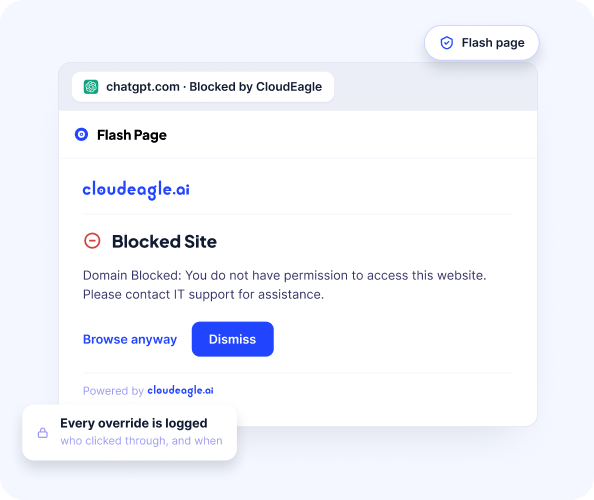
Flash page rules can be configured by team, department, and tool. Engineering, for example, can use approved tools such as Cursor while users are redirected away from consumer ChatGPT.
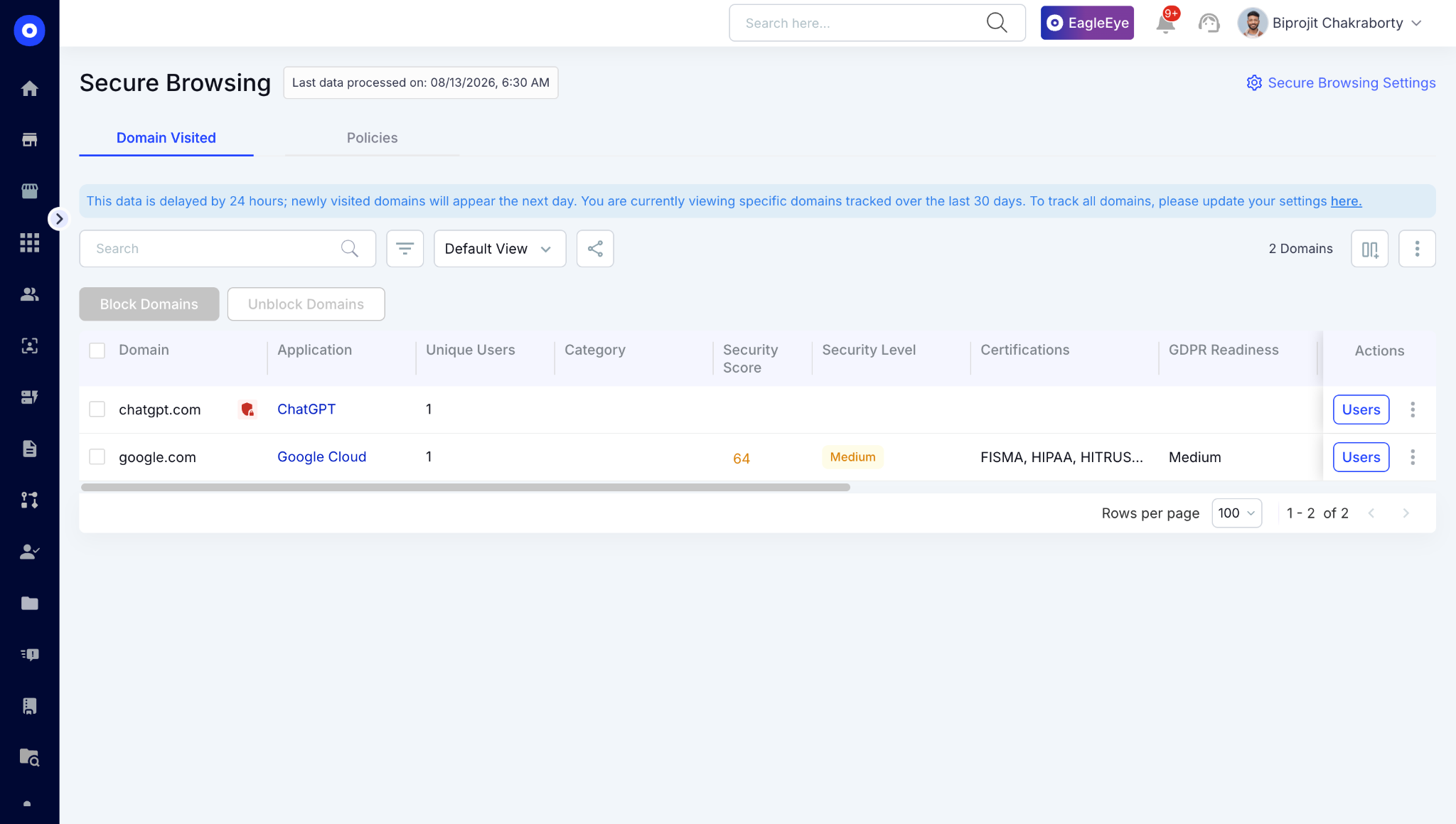
Every redirect records the tool accessed, its sanctioned status, the flash page trigger, and timestamp, creating a real-time, audit-ready trail without manual evidence collection.

B. Data Loss Prevention: Block Sensitive Data Before It Reaches ChatGPT

CloudEagle.ai’s DLP operates at the prompt-entry layer, detecting sensitive content before it is submitted to the AI model. It can protect both sanctioned and shadow AI usage, closing the browser-level gap that traditional DLP, CASB, and LLM gateways can miss.
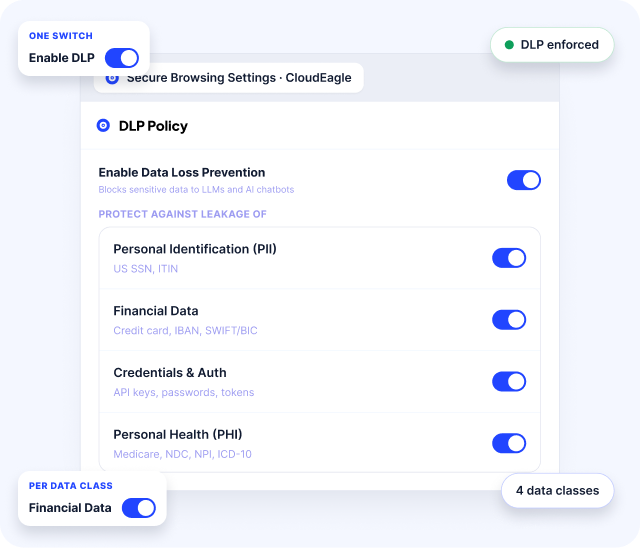
If an employee attempts to paste PII, PHI, financial data, proprietary code, or other sensitive information into ChatGPT, CloudEagle.ai can trigger the configured enforcement rule before the content leaves the browser.
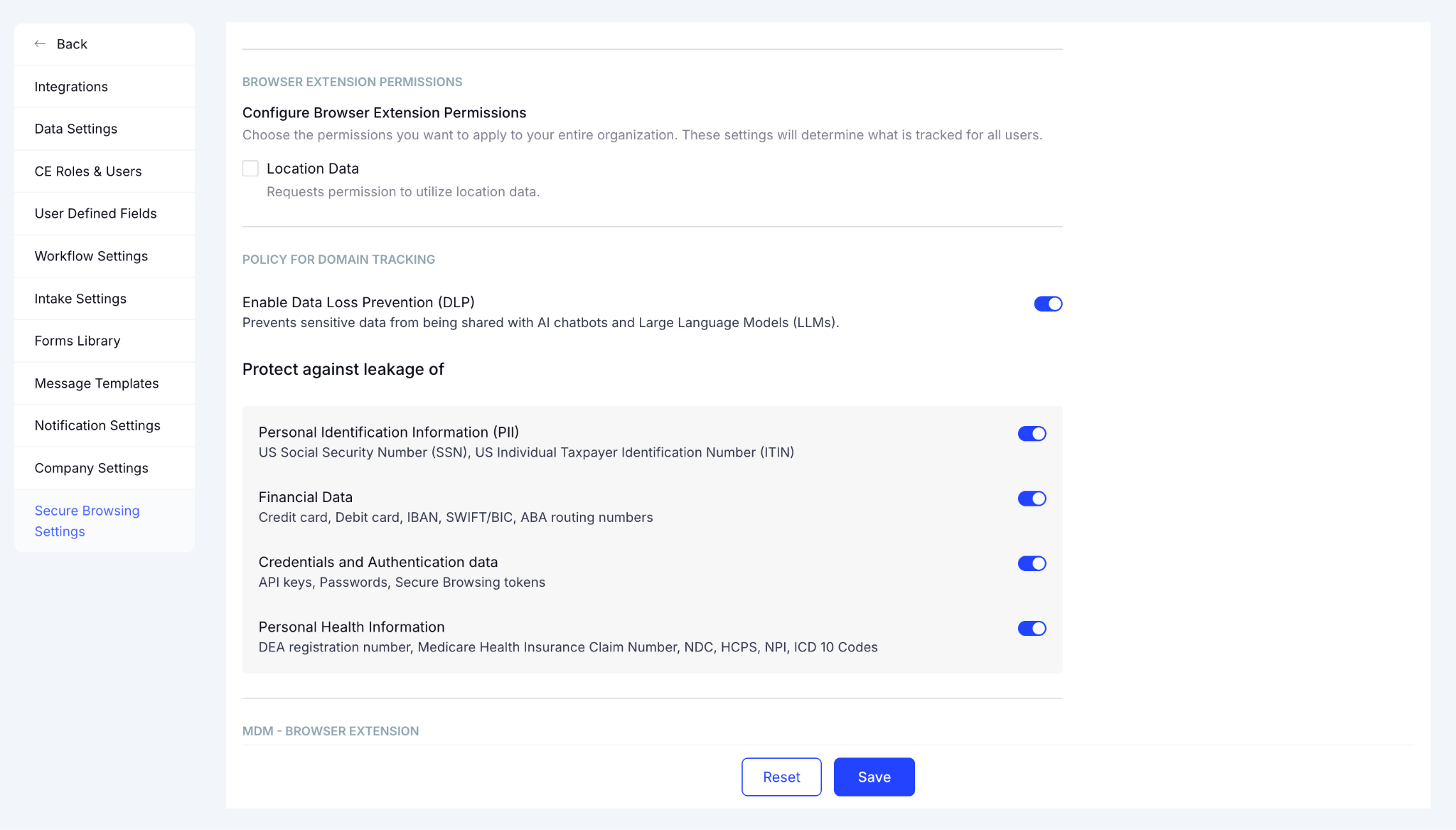
Security teams can configure separate enforcement rules for sensitive categories such as credit card numbers, PHI, source code, and proprietary data.

C. AI Policy Enforcement: Apply Consistent Controls Across AI Tools

CloudEagle.ai extends these controls into broader AI governance, allowing teams to monitor or block sensitive data shared with AI vendors and redirect users from unsanctioned tools.
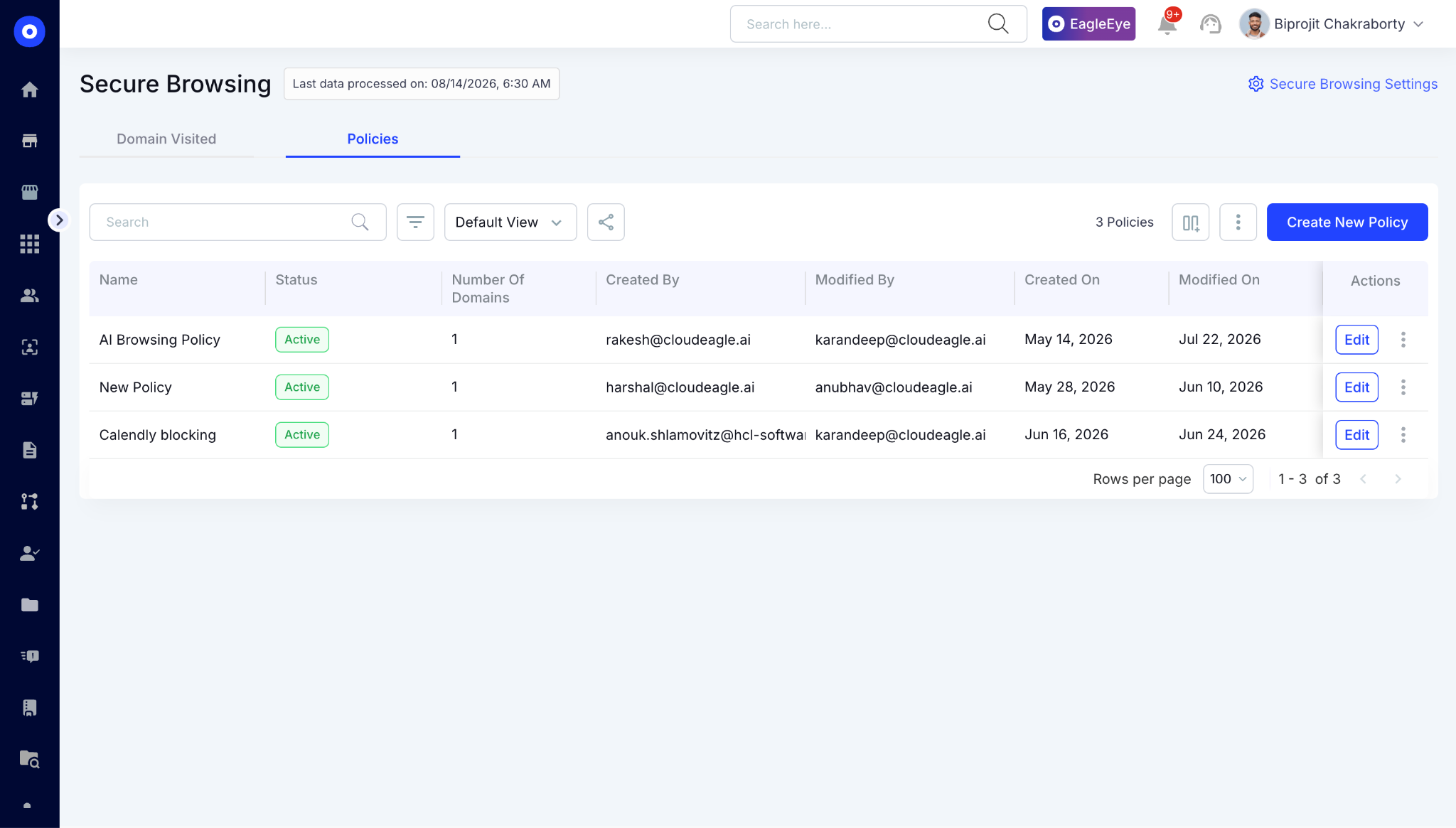
This gives security teams a defensible record of which AI tools are being used, what controls are applied, and how risky usage is remediated. 

It also helps surface and manage Shadow AI while eliminating orphaned AI accounts and API tokens through broader governance workflows.

D. Security Posture Management: Verify ChatGPT’s Security Controls

CloudEagle.ai tracks application security posture against frameworks such as NIST 800 and consolidates controls such as MFA and SSO into a single view.
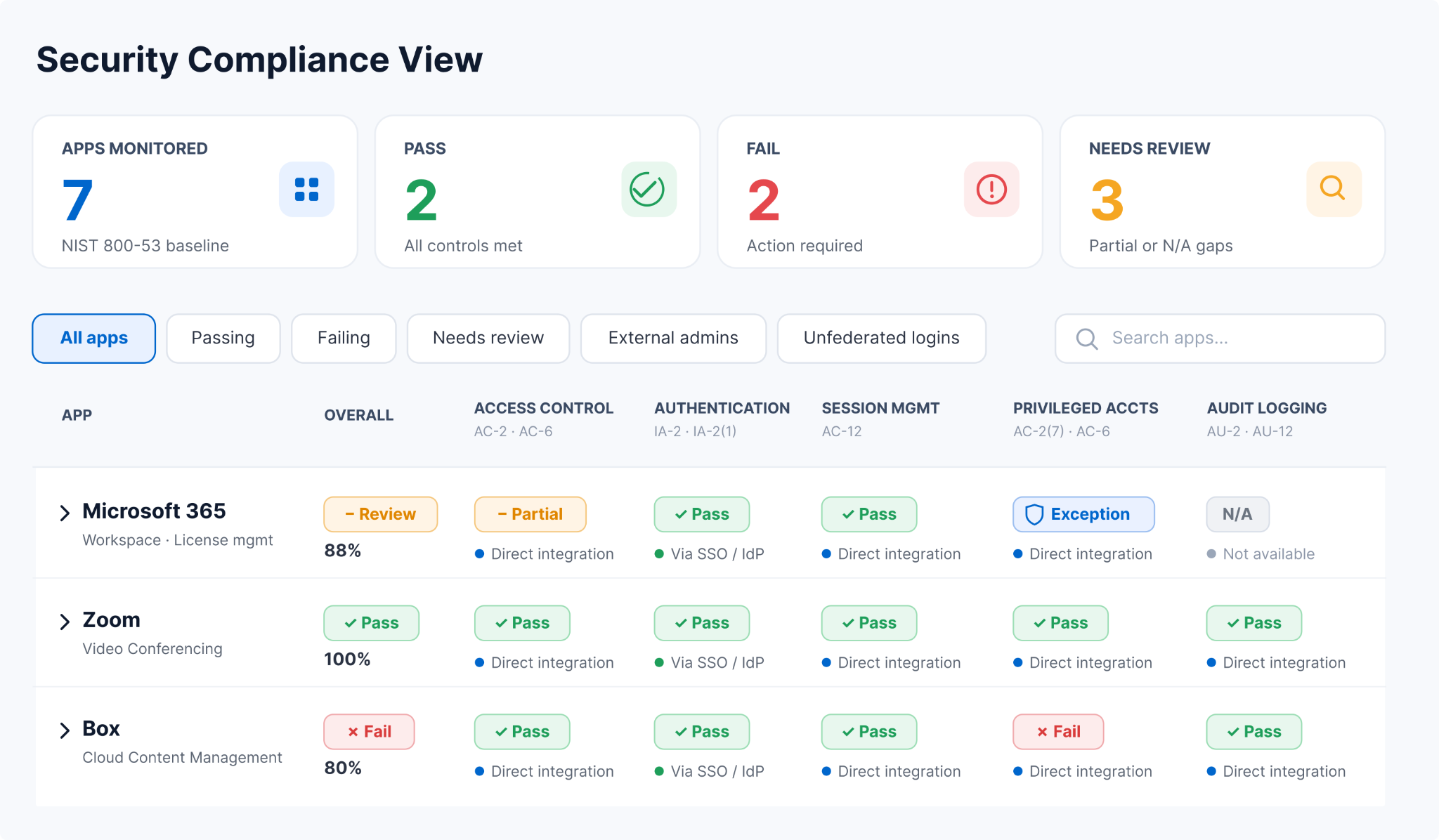
The platform pulls federation signals such as MFA and SSO from Okta and Entra, retrieves available compliance data through direct APIs, and supplements it with Netskope’s Cloud Confidence Index for broader risk scoring. 

These signals are rolled into a single pass/fail view for each application, giving security teams a continuously updated view of ChatGPT and other application security posture instead of relying on manual, app-by-app audits.

4. Conclusion

Sensitive data doesn't leak through a single failure point. It moves through personal accounts and unmonitored prompts without inspection. 

CloudEagle.ai closes each of those gaps at once. AI policy enforcement brings ChatGPT usage under governance, real-time browser flash pages catch risky submissions, and prevents data loss. 

The result is a security team that can see risk building and take actions before it becomes an incident, instead of finding out after the fact.

5. FAQs

1. Is it safe to put sensitive data in ChatGPT?

Pasting sensitive data like customer records, financial details, or source code into ChatGPT carries real risk, especially through personal accounts with no enterprise controls. Enterprise governance tools like CloudEagle.ai reduce that risk with real-time warnings and account-level controls before submission happens.

2. Can ChatGPT leak my information?

Information can be exposed if it's entered into prompts without safeguards, particularly through unmanaged personal accounts. The risk comes less from ChatGPT itself and more from the absence of controls like real-time warnings or traffic inspection that catch sensitive submissions before they happen.

3. Does ChatGPT keep your data private?

Privacy depends heavily on account type and settings, not just the platform. Enterprise accounts typically offer stronger data-handling terms than personal ones, which is why routing usage through managed enterprise workspaces is a key first step in reducing exposure.

4. Can ChatGPT share your chats?

Data handling depends on account settings and enterprise agreements in place. This is exactly why enterprises enforce managed accounts with defined terms, instead of leaving usage on personal accounts where data handling policies aren't controlled by the organization.

5. Can I trust ChatGPT with my data?

Trust depends on the controls wrapped around it. Enterprises reduce risk by combining enterprise account enforcement, real-time sensitive-data warnings, and continuous monitoring, rather than relying on ChatGPT's default settings or employee judgment alone.

Advertisement for a SaaS Subscription Tracking Template with a call-to-action button to download and a partial graphic of a tablet showing charts.Banner promoting a SaaS Agreement Checklist to streamline SaaS management and avoid budget waste with a call-to-action button labeled Download checklist.Blue banner with text 'The Ultimate Employee Offboarding Checklist!' and a black button labeled 'Download checklist' alongside partial views of checklist documents from cloudeagle.ai.Digital ad for download checklist titled 'The Ultimate Checklist for IT Leaders to Optimize SaaS Operations' by cloudeagle.ai, showing checklist pages.Slack Buyer's Guide offer with text 'Unlock insider insights to get the best deal on Slack!' and a button labeled 'Get Your Copy', accompanied by a preview of the guide featuring Slack's logo.Monday Pricing Guide by cloudeagle.ai offering exclusive pricing secrets to maximize investment with a call-to-action button labeled Get Your Copy and an image of the guide's cover.Blue banner for Canva Pricing Guide by cloudeagle.ai offering a guide to Canva costs, features, and alternatives with a call-to-action button saying Get Your Copy.Blue banner with white text reading 'Little-Known Negotiation Hacks to Get the Best Deal on Slack' and a white button labeled 'Get Your Copy'.Blue banner with text 'Little-Known Negotiation Hacks to Get the Best Deal on Monday.com' and a white button labeled 'Get Your Copy'.Blue banner with text 'Little-Known Negotiation Hacks to Get the Best Deal on Canva' and a white button labeled 'Get Your Copy'.Banner with text 'Slack Buyer's Guide' and a 'Download Now' button next to images of a guide titled 'Slack Buyer’s Guide: Features, Pricing & Best Practices'.Digital cover of Monday Pricing Guide with a button labeled Get Your Copy on a blue background.Canva Pricing Guide cover with a button labeled Get Your Copy on a blue gradient background.

Enter your email to
unlock the report

Oops! Something went wrong while submitting the form.
License Count
Benchmark
Per User/Per Year

Enter your email to
unlock the report

Oops! Something went wrong while submitting the form.
License Count
Benchmark
Per User/Per Year

Enter your email to
unlock the report

Oops! Something went wrong while submitting the form.
Notion Plus
License Count
Benchmark
Per User/Per Year
100-500
$67.20 - $78.72
500-1000
$59.52 - $72.00
1000+
$51.84 - $57.60
Canva Pro
License Count
Benchmark
Per User/Per Year
100-500
$74.33-$88.71
500-1000
$64.74-$80.32
1000+
$55.14-$62.34

Enter your email to
unlock the report

Oops! Something went wrong while submitting the form.

Enter your email to
unlock the report

Oops! Something went wrong while submitting the form.
Zoom Business
License Count
Benchmark
Per User/Per Year
100-500
$216.00 - $264.00
500-1000
$180.00 - $216.00
1000+
$156.00 - $180.00

Enter your email to
unlock the report

Oops! Something went wrong while submitting the form.

Get the Right Security Platform To Secure Your Cloud Infrastructure

Please enter a business email
Thank you!
The 2023 SaaS report has been sent to your email. Check your promotional or spam folder.
Oops! Something went wrong while submitting the form.

Access full report

Please enter a business email
Thank you!
The 2023 SaaS report has been sent to your email. Check your promotional or spam folder.
Oops! Something went wrong while submitting the form.

Customer records, financial data, and source code get pasted into ChatGPT every day. And the scary part? It happens often through personal accounts IT has no visibility into.

Once that data is submitted, it's gone. There's no recall button, no way to know where it ends up. Preventing that requires more than a security policy.

CloudEagle.ai provides browser based integration and external telemetry to show flash page warning, AI traffic inspection, and continuous monitoring to stop sensitive data before it leaves your organization.

In this guide, we will show you how to prevent sensitive data leaks in ChatGPT and how CloudEagle.ai helps with the process.

TL;DR

  • Sensitive data leaks in ChatGPT often occur through personal accounts and free-form prompts that bypass enterprise controls.
  • Effective prevention combines enterprise account enforcement, real-time warnings, network inspection, and continuous AI usage monitoring.
  • CloudEagle.ai blocks risky ChatGPT sessions with secure browser controls, flash pages, and prompt-level DLP before data leaves the browser.
  • AI policy enforcement and security posture management help govern ChatGPT while reducing Shadow AI and compliance risks.
  • CloudEagle.ai helps organizations prevent sensitive data leaks by combining AI governance, browser controls, DLP, and continuous monitoring in one platform

1. Why ChatGPT Creates Unique Data Leak Risks

ChatGPT creates a different security challenge than traditional SaaS applications. It accepts free-form prompts instead of controlled file uploads.

An engineer can paste a GitHub repository containing API keys. A finance analyst can submit next quarter's revenue forecast. None of these actions trigger a permission check before the data leaves the browser.

Three structural gaps make ChatGPT difficult to govern:

  • No Content Validation Before Submission: ChatGPT never checks whether SQL query results, customer contracts, or source code should be shared with an AI service.
  • Personal Accounts Bypass Enterprise Controls: Personal ChatGPT accounts sit entirely outside enterprise SSO, DLP policies, etc. IT loses visibility into who's using ChatGPT.
  • Regulated Data Can Leave Without Classification: PHI, PII, financial records, and 340B healthcare data can be pasted into a prompt with no compliance check in the way. For regulated organizations, this creates immediate risk.

The risk isn't simply that employees use ChatGPT. It's that business-critical data can move from internal systems to an external AI service in seconds, often through workflows existing outside security controls.

Shadow AI Apps Multiply Quietly

Until they become a problem.
Find Them

2. How To Prevent Sensitive Data Leaks in ChatGPT

Prevent sensitive data leaks in ChatGPT by requiring employees to use approved enterprise accounts instead of personal ones. 

You can add real-time warnings before sensitive information is submitted. Together, these controls give security teams visibility before risky AI use becomes a data exposure incident.

A. Enforce Enterprise ChatGPT Accounts Over Personal Ones

The first line of defense is bringing ChatGPT usage under enterprise governance. Require employees to use managed enterprise accounts instead of personal accounts.

This closes the visibility gap created by unmanaged personal accounts:

  • Centralize ChatGPT Usage: Route employees through an approved enterprise workspace instead of consumer accounts.
  • Apply Enterprise Controls: Keep access, usage, and data handling within the organization's governance framework.
  • Identify Personal Account Use First: Customer examples like UCLA and Strada show why flagging personal AI accounts is often the first step enterprises take before deeper AI governance controls.

Once ChatGPT usage is brought into a managed environment, organizations can add controls that intervene when employees are about to submit sensitive information.

B. Warn Users Before Sensitive Data Is Submitted

Real-time warnings provide a softer layer of governance. An in-browser control can detect sensitive information before it is pasted into a ChatGPT prompt and warn the employee about the potential exposure.

  • Detect Sensitive Data Before Submission: Flag sensitive information while it's being entered into a prompt.
  • Warn Instead Of Immediately Blocking: Give employees a chance to remove the data or reconsider the submission.
  • Log Overrides For Visibility: Use a browser plugin to surface sensitive-data warnings and logs when users override them.

This approach combines user awareness with an audit trail, allowing security teams to identify where additional controls may be needed.

C. Inspect AI Traffic At The Network Level

Browser controls provide an important first layer, but they cannot capture every AI interaction. 

Network-level inspection adds deeper visibility by analyzing AI traffic in real time, helping security teams identify unsanctioned AI use and prompts that introduce data or security risks.

  • Analyze Traffic In Real Time: Portal26 demonstrates this approach with AI traffic inspection at sub-25ms latency, catching risky activity as it happens rather than after the fact.
  • Apply Token Limits And Risk Detection: Controls tuned specifically for AI-related data risks catch patterns browser-level tools alone would miss.
  • Move Controls Closer To The Traffic Itself: This layer works independently of what happens inside any single browser, closing gaps that endpoint-only monitoring leaves open.

D. Monitor For Policy Violations And Data Exposure Patterns

Preventing data leaks requires continuous monitoring after the initial controls are in place. Security teams should track repeated warning overrides and sensitive data categories such as PHI moving through ChatGPT.

  • Track Repeated Override Behavior: Repeated dismissals of sensitive-data warnings signal where additional controls or training may be needed.
  • Watch For Unusual Usage Spikes: Sudden increases in AI usage can point to new workflows or tools that haven't been reviewed for risk.

Continuous monitoring closes that gap by turning AI governance into an ongoing control rather than a one-time policy exercise.

Shadow AI Apps Multiply Quietly

Until they become a problem.
Find Them

3. How CloudEagle.ai Prevents Sensitive Data Leaks In ChatGPT

CloudEagle.ai prevents data exposure to ChatGPT usage at multiple points, from controlling access to unapproved AI sessions to inspecting data before it reaches the model. 

The combines browser-level controls, prompt-level DLP, AI policies, security posture checks, and usage monitoring in one governance layer.

A. Secure Browser and Flash Page: Stop Unapproved ChatGPT Sessions Before Data Enters

CloudEagle.ai’s browser plugin detects when an employee opens an unapproved AI tool in a browser tab. A real-time flash page can then redirect them to an approved alternative before company data is entered.

Flash page rules can be configured by team, department, and tool. Engineering, for example, can use approved tools such as Cursor while users are redirected away from consumer ChatGPT.

Every redirect records the tool accessed, its sanctioned status, the flash page trigger, and timestamp, creating a real-time, audit-ready trail without manual evidence collection.

B. Data Loss Prevention: Block Sensitive Data Before It Reaches ChatGPT

CloudEagle.ai’s DLP operates at the prompt-entry layer, detecting sensitive content before it is submitted to the AI model. It can protect both sanctioned and shadow AI usage, closing the browser-level gap that traditional DLP, CASB, and LLM gateways can miss.

If an employee attempts to paste PII, PHI, financial data, proprietary code, or other sensitive information into ChatGPT, CloudEagle.ai can trigger the configured enforcement rule before the content leaves the browser.

Security teams can configure separate enforcement rules for sensitive categories such as credit card numbers, PHI, source code, and proprietary data.

C. AI Policy Enforcement: Apply Consistent Controls Across AI Tools

CloudEagle.ai extends these controls into broader AI governance, allowing teams to monitor or block sensitive data shared with AI vendors and redirect users from unsanctioned tools.

This gives security teams a defensible record of which AI tools are being used, what controls are applied, and how risky usage is remediated. 

It also helps surface and manage Shadow AI while eliminating orphaned AI accounts and API tokens through broader governance workflows.

D. Security Posture Management: Verify ChatGPT’s Security Controls

CloudEagle.ai tracks application security posture against frameworks such as NIST 800 and consolidates controls such as MFA and SSO into a single view.

The platform pulls federation signals such as MFA and SSO from Okta and Entra, retrieves available compliance data through direct APIs, and supplements it with Netskope’s Cloud Confidence Index for broader risk scoring. 

These signals are rolled into a single pass/fail view for each application, giving security teams a continuously updated view of ChatGPT and other application security posture instead of relying on manual, app-by-app audits.

4. Conclusion

Sensitive data doesn't leak through a single failure point. It moves through personal accounts and unmonitored prompts without inspection. 

CloudEagle.ai closes each of those gaps at once. AI policy enforcement brings ChatGPT usage under governance, real-time browser flash pages catch risky submissions, and prevents data loss. 

The result is a security team that can see risk building and take actions before it becomes an incident, instead of finding out after the fact.

5. FAQs

1. Is it safe to put sensitive data in ChatGPT?

Pasting sensitive data like customer records, financial details, or source code into ChatGPT carries real risk, especially through personal accounts with no enterprise controls. Enterprise governance tools like CloudEagle.ai reduce that risk with real-time warnings and account-level controls before submission happens.

2. Can ChatGPT leak my information?

Information can be exposed if it's entered into prompts without safeguards, particularly through unmanaged personal accounts. The risk comes less from ChatGPT itself and more from the absence of controls like real-time warnings or traffic inspection that catch sensitive submissions before they happen.

3. Does ChatGPT keep your data private?

Privacy depends heavily on account type and settings, not just the platform. Enterprise accounts typically offer stronger data-handling terms than personal ones, which is why routing usage through managed enterprise workspaces is a key first step in reducing exposure.

4. Can ChatGPT share your chats?

Data handling depends on account settings and enterprise agreements in place. This is exactly why enterprises enforce managed accounts with defined terms, instead of leaving usage on personal accounts where data handling policies aren't controlled by the organization.

5. Can I trust ChatGPT with my data?

Trust depends on the controls wrapped around it. Enterprises reduce risk by combining enterprise account enforcement, real-time sensitive-data warnings, and continuous monitoring, rather than relying on ChatGPT's default settings or employee judgment alone.

CloudEagle.ai recognized in the 2025 Gartner® Magic Quadrant™ for SaaS Management Platforms
Download now
gartner chart
5x
Faster employee
onboarding
80%
Reduction in time for
user access reviews
30k
Workflows
automated
$15Bn
Analyzed in
contract spend
$2Bn
Saved in
SaaS spend

Streamline SaaS governance and save 10-30%

Book a Demo with Expert
CTA image