AI Governance

ISO 27001 Statement of Applicability: What It Is and How to Write One

Share via:
Written by:
CloudEagle.ai Team
Reviewed by
Nidhi Jain
Last Updated:
September 29, 2026
blog-cms-banner-bg
Little-Known Negotiation Hacks to Get the Best Deal on Slack
cta-bg-blogDownload Your Copy

HIPAA Compliance Checklist for 2025

Download PDF

‍

ISO 27001 certification requires more than security policies. Organizations must identify relevant controls, explain why they apply, and demonstrate how they are implemented. The Statement of Applicability (SoA) brings these decisions together.

Required under Clause 6.1.3(d) of ISO/IEC 27001:2022, the SoA documents selected controls, their implementation status, and the reasons for excluding any Annex A controls.

For businesses using SaaS applications, cloud services, and AI tools, keeping the SoA aligned with changing risks and technology can be challenging. 

This guide explains what an ISO 27001 Statement of Applicability includes, how to document control decisions, and how to keep it audit-ready.

‍

What Is an ISO 27001 Statement of Applicability?

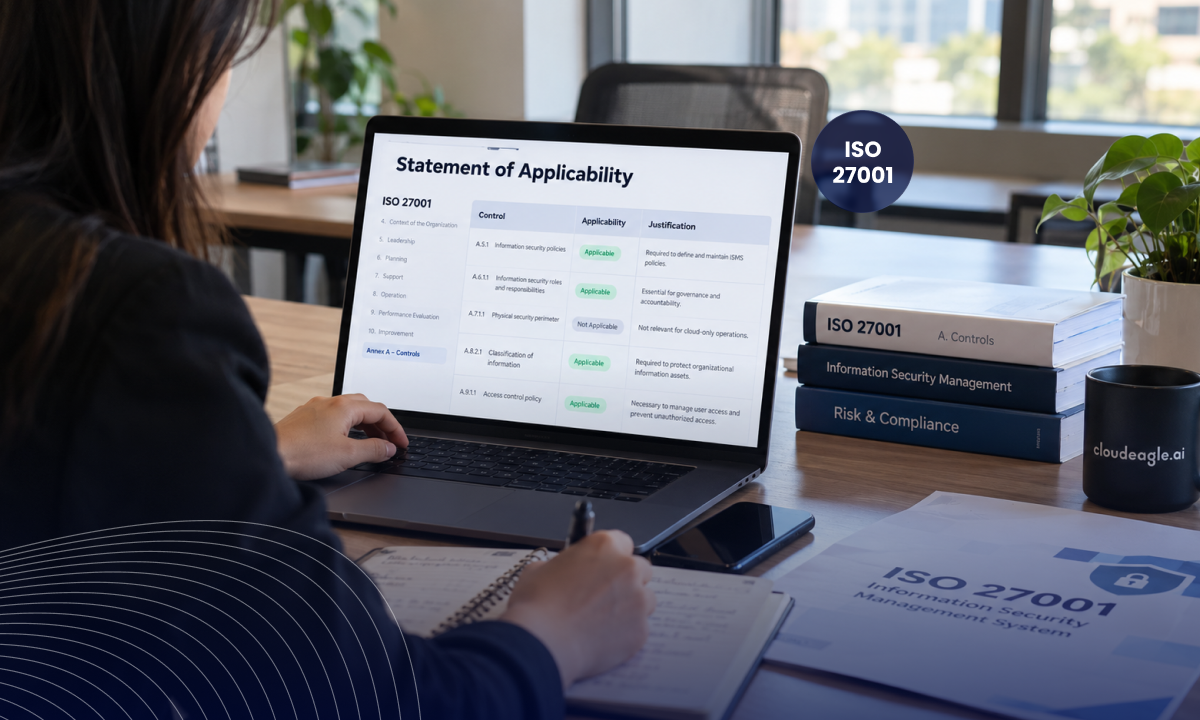
An ISO 27001 Statement of Applicability (SoA) is a document that explains which security controls an organization needs, why they apply, and how they are implemented. It is required under Clause 6.1.3(d) of ISO/IEC 27001:2022.

The SoA connects the organization’s risk assessment with its selected security controls. It helps teams and auditors understand:

  • Which controls address identified risks.
  • Why each control applies or is excluded.
  • The current implementation status of applicable controls.
  • What evidence supports control implementation.

The SoA is not simply a checklist of all 93 Annex A controls. Organizations must assess the controls against their risks, business operations, and ISMS scope, then document their decisions. For example, a SaaS company may need controls related to access management, cloud security, and supplier relationships based on its operating environment.

A well-maintained SoA provides a clear link between security risks, control decisions, implementation, and supporting evidence.

‍

What Must an ISO 27001 Statement of Applicability Include?

An ISO 27001 Statement of Applicability (SoA) should document the controls selected through the organization’s risk assessment and explain why each control applies or has been excluded. It must also include the justification for excluding any Annex A controls, as required under Clause 6.1.3(d).

A practical SoA should include:

  • Control reference: Identify the relevant security control.
  • Applicability and justification: Explain why the control applies or why it has been excluded.
  • Implementation status: Record whether the control is planned, partially implemented, or implemented.
  • Control owner: Assign responsibility for maintaining and reviewing the control.
  • Supporting evidence: Reference policies, access reviews, configurations, or other records that demonstrate implementation.

For SaaS-based organizations, the SoA should also consider applications, integrations, user access, service accounts, and non-human identities where they affect the control environment.

The required information should remain distinct from recommended operational fields. Owners, evidence references, and review triggers improve traceability but should be presented as practical additions rather than individually stated requirements under Clause 6.1.3(d).

‍

Controls on Paper Won't Pass Clause 6.1.3

Build the evidence trail auditors actually ask for.
Download Checklist

‍

How Does the SoA Connect to Risk Assessment and Risk Treatment?

The Statement of Applicability connects risk assessment and treatment decisions to the controls selected for the ISMS.

Risk assessment → Risk treatment → Control selection → SoA → Implementation → Evidence

The risk treatment plan defines how identified risks will be addressed, accepted, transferred, or avoided. The SoA records the controls selected and documents their applicability, including reasons for excluding any controls.

For example, if excessive access to SaaS applications is identified as a risk, the organization may select least-privilege controls and periodic access reviews. The SoA records these decisions and tracks implementation status, supporting traceability from risk treatment to control implementation.

‍

How to Write an ISO 27001 Statement of Applicability

Creating an ISO 27001 Statement of Applicability involves translating risk treatment decisions into documented control selections. Follow a structured process to ensure the SoA reflects the organization’s scope, risk profile, and security requirements.

1. Define the ISMS Scope

Start by documenting the scope of the Information Security Management System (ISMS). Identify the business units, processes, locations, systems, applications, and information assets covered by the certification.

The scope determines which risks and controls the SoA must address. For organizations using SaaS platforms, include relevant cloud environments, integrations, third-party services, and access points.

2. Conduct a Risk Assessment

Identify information security risks within the defined ISMS scope. Assess the likelihood and potential impact of each risk, considering factors such as unauthorized access, data loss, supplier dependencies, and system disruptions.

Document the assessment results so control decisions can be traced back to identified risks.

3. Develop the Risk Treatment Plan

Decide how the organization will address each identified risk. Treatment options may include reducing, avoiding, transferring, or accepting the risk.

The risk treatment plan should identify the actions required to manage the risks and inform the selection of appropriate security controls.

4. Select and Assess Applicable Controls

Review the controls in Annex A of ISO/IEC 27001:2022, along with any additional controls needed to address the organization’s risks.

For each control, determine whether it is:

  • Applicable: The control is relevant to the organization’s risks, obligations, or operating environment.
  • Not applicable: The control is not required based on the organization’s documented circumstances and risk assessment.

Record the rationale for each applicability decision, including the justification for excluding any Annex A controls.

5. Prepare and Review the SoA

Compile the control decisions into a structured SoA. For each selected control, document its applicability, justification, and implementation status. Include references to relevant risk treatment decisions where appropriate.

Review the completed document against the risk assessment and treatment plan to confirm that the control selections are consistent and traceable. The SoA should provide a clear record of which controls were selected, why they apply, and whether they have been implemented.

‍

How to Justify Applicable and Excluded Controls

Each control decision in the Statement of Applicability should be supported by a clear rationale based on the organization’s ISMS scope, risk assessment, and operating environment.

1. Justify Applicable Controls

Explain how the control addresses an identified risk, business requirement, or legal obligation. For example, access controls may be applicable because the organization manages sensitive customer data and needs to restrict employee, administrator, and service account access.

2. Justify Excluded Controls

Document why a control does not apply to the organization. The justification should relate to the ISMS scope, business activities, or risk profile rather than simply stating that the control is unnecessary or difficult to implement.

3. Distinguish Exclusion From Non-Implementation

Excluding a control means it is not applicable. Non-implementation means an applicable control has not yet been put in place. A required but incomplete control should remain applicable in the SoA, with its implementation gap addressed through the risk treatment plan.

Clear justifications help maintain consistency between the risk assessment, control decisions, and audit evidence.

‍

ISO 27001 Statement of Applicability Example

A practical SoA entry should connect the selected control to the risk it addresses, its implementation status, and the evidence used to demonstrate implementation.

For example, a SaaS company managing customer data could document an access control as follows:

Field Example
Control Access control
Applicable Yes
Justification Required to restrict access to customer data and business applications based on job responsibilities.
Risk addressed Unauthorized or excessive access to sensitive information
Implementation status Implemented
Implementation approach Role-based access, periodic privilege reviews, and timely access removal during offboarding
Evidence Access control policy, permission records, access review reports, and offboarding records
Owner Information Security Manager

‍

This example is illustrative. The control justification, implementation details, and evidence should reflect the organization’s actual ISMS scope and risk assessment.

The key is to maintain a clear connection between the identified risk, selected control, implementation status, and supporting evidence.

Common ISO 27001 SoA Mistakes to Avoid

A Statement of Applicability can appear complete while failing to reflect how security controls operate in practice. The following mistakes can create gaps during certification or surveillance audits.

1. Using Generic Justifications

Statements such as “required for security” do not explain why a control applies. Link each decision to a specific risk, business process, legal requirement, or operational need.

2. Marking Controls as Implemented Without Evidence

A documented policy does not prove that a control is operating effectively. Support implementation claims with relevant evidence, such as access review records, configuration settings, approval logs, or monitoring reports.

3. Disconnecting the SoA From the Risk Register

The SoA and risk register should support the same security decisions. When a risk changes, review whether the related controls, implementation status, and risk treatment activities also need to be updated.

4. Overlooking SaaS and Cloud Dependencies

SaaS applications, cloud services, integrations, and third-party providers can affect control applicability and implementation. Assess these dependencies within the ISMS scope, including data access, shared responsibilities, and privileged permissions.

5. Treating the SoA as a One-Time Document

The SoA should be reviewed when material changes affect the organization’s risks or control environment. New applications, integrations, data processing activities, and access requirements may require updates before the next scheduled audit.

The key principle: Keep the SoA, risk assessment, control implementation, and supporting evidence aligned with the organization’s actual security environment.

‍

How Do SaaS, Cloud, and AI Changes Affect the SoA?

Your Statement of Applicability should reflect changes in the technology environment. New SaaS applications, cloud integrations, and AI tools can introduce risks or change how existing controls operate.

1. Review New Applications and Integrations

When adopting a new SaaS application, assess the data it processes, users who can access it, and systems it connects to. Review whether the integration introduces new access paths, data-sharing requirements, or third-party dependencies.

2. Include AI Tools and Non-Human Identities

AI applications, service accounts, API keys, and automated AI agents may access business systems without operating like traditional users. Review their ownership, purpose, permissions, and access to sensitive information.

3. Reassess Controls After Material Changes

Changes to cloud infrastructure, data processing, privileged access, or supplier arrangements may affect existing control decisions. Revisit the relevant risks and update the SoA when these changes alter security requirements.

4. Connect Changes to Supporting Evidence

Update the SoA alongside related documentation, including access records, vendor assessments, risk registers, and security procedures. This helps ensure that control decisions remain consistent with the actual operating environment.

The SoA should function as a living record of your security environment, not a document reviewed only before an audit.

‍

New AI Tools Are Changing Your Control Surface

Find every app, agent, and NHI before your next SoA review.
Download Checklist

‍

How to Keep the Statement of Applicability Updated

Your SoA should reflect the organization’s current risks, controls, and technology environment. A planned review is useful, but material changes may require an update sooner.

1. Schedule Regular Reviews

Set review intervals that align with your risk assessments, internal audits, and management reviews. Check whether control justifications, implementation statuses, and supporting records are still accurate.

2. Define Change-Based Review Triggers

Review relevant controls when the organization introduces a new SaaS application, changes its ISMS scope, expands an integration, modifies privileged access, or identifies a new security risk.

3. Record Changes and Approvals

Maintain version history for the SoA. Record what changed, who reviewed it, and whether the change affects related risks, controls, or remediation activities.

4. Check Alignment With the Actual Environment

Compare the SoA with current applications, access arrangements, cloud services, and third-party dependencies. This helps identify cases where documented controls no longer match how the organization operates.

The goal is to keep the SoA accurate throughout the year, not update it only when an audit is approaching.

‍

How Can CloudEagle.ai Support ISO 27001 Readiness?

An SoA documents the controls an organization needs. CloudEagle.ai can support security teams by improving visibility into the SaaS, AI, and identity environment relevant to those controls.

  • Discover applications and identities: Identify SaaS and AI applications, service accounts, API tokens, and AI agents across the environment.
  • Strengthen access governance: Review privileged access, identify excessive permissions, and support remediation workflows.
  • Improve operational visibility: Monitor applications, integrations, identities, and security posture to help teams respond to changes.

CloudEagle.ai can support control monitoring and remediation, but the SoA must still be based on the organization’s own ISMS scope, risk assessment, control decisions, and audit evidence.

Armorcode Case Study

Armorcode used CloudEagle.ai to increase visibility into non-human identities from 40% to 95%. The organization also remediated 480 unmanaged identities and optimized more than 220 over-privileged identities.

These results illustrate how identity visibility can support access governance and remediation activities within a broader security program.

‍

‍

Conclusion

An ISO 27001 Statement of Applicability explains which security controls apply to an organization, why they were selected, and how their implementation is tracked.

As SaaS applications, cloud services, and AI tools evolve, organizations must keep the SoA aligned with changing risks, systems, and access requirements. Regular reviews, clear justifications, and reliable evidence help maintain consistency between documented controls and day-to-day security operations.

CloudEagle.ai supports this process by improving visibility into applications, integrations, access permissions, and non-human identities. This visibility can help security teams identify changes and support remediation while keeping the SoA connected to the organization’s actual security environment.

‍

FAQs

1. Is a Statement of Applicability mandatory for ISO 27001 certification?

A. Yes. ISO/IEC 27001:2022 Clause 6.1.3(d) requires organizations to document their Statement of Applicability, including selected controls, inclusion justifications, implementation status, and exclusion justifications for Annex A controls.

2. How many controls are included in an ISO 27001 Statement of Applicability?

A. Annex A of ISO/IEC 27001:2022 contains 93 controls across four themes. Organizations should assess the Annex A controls, document their applicability decisions, and justify exclusions where relevant.

3. Can an organization exclude controls from its SoA?

A. Yes. A control can be excluded when it does not apply to the organization’s scope or risk profile. The exclusion must have a clear, specific justification. A control that is necessary but not yet implemented should remain applicable and be tracked through the risk treatment process.

4. What is the difference between the SoA and the risk treatment plan?

A. The risk treatment plan explains how the organization will address identified risks. The SoA records the controls selected, why they apply or are excluded, and their implementation status. Both documents should remain consistent and connected.

5. How often should an ISO 27001 Statement of Applicability be updated?

A. There is no single fixed review interval prescribed for every organization. The SoA should be reviewed when risks, systems, suppliers, or the ISMS scope change, and at planned intervals within the ISMS review cycle.

‍

Advertisement for a SaaS Subscription Tracking Template with a call-to-action button to download and a partial graphic of a tablet showing charts.Banner promoting a SaaS Agreement Checklist to streamline SaaS management and avoid budget waste with a call-to-action button labeled Download checklist.Blue banner with text 'The Ultimate Employee Offboarding Checklist!' and a black button labeled 'Download checklist' alongside partial views of checklist documents from cloudeagle.ai.Digital ad for download checklist titled 'The Ultimate Checklist for IT Leaders to Optimize SaaS Operations' by cloudeagle.ai, showing checklist pages.Slack Buyer's Guide offer with text 'Unlock insider insights to get the best deal on Slack!' and a button labeled 'Get Your Copy', accompanied by a preview of the guide featuring Slack's logo.Monday Pricing Guide by cloudeagle.ai offering exclusive pricing secrets to maximize investment with a call-to-action button labeled Get Your Copy and an image of the guide's cover.Blue banner for Canva Pricing Guide by cloudeagle.ai offering a guide to Canva costs, features, and alternatives with a call-to-action button saying Get Your Copy.Blue banner with white text reading 'Little-Known Negotiation Hacks to Get the Best Deal on Slack' and a white button labeled 'Get Your Copy'.Blue banner with text 'Little-Known Negotiation Hacks to Get the Best Deal on Monday.com' and a white button labeled 'Get Your Copy'.Blue banner with text 'Little-Known Negotiation Hacks to Get the Best Deal on Canva' and a white button labeled 'Get Your Copy'.Banner with text 'Slack Buyer's Guide' and a 'Download Now' button next to images of a guide titled 'Slack Buyer’s Guide: Features, Pricing & Best Practices'.Digital cover of Monday Pricing Guide with a button labeled Get Your Copy on a blue background.Canva Pricing Guide cover with a button labeled Get Your Copy on a blue gradient background.

Enter your email to
unlock the report

Oops! Something went wrong while submitting the form.
License Count
Benchmark
Per User/Per Year

Enter your email to
unlock the report

Oops! Something went wrong while submitting the form.
License Count
Benchmark
Per User/Per Year

Enter your email to
unlock the report

Oops! Something went wrong while submitting the form.
Notion Plus
License Count
Benchmark
Per User/Per Year
100-500
$67.20 - $78.72
500-1000
$59.52 - $72.00
1000+
$51.84 - $57.60
Canva Pro
License Count
Benchmark
Per User/Per Year
100-500
$74.33-$88.71
500-1000
$64.74-$80.32
1000+
$55.14-$62.34

Enter your email to
unlock the report

Oops! Something went wrong while submitting the form.

Enter your email to
unlock the report

Oops! Something went wrong while submitting the form.
Zoom Business
License Count
Benchmark
Per User/Per Year
100-500
$216.00 - $264.00
500-1000
$180.00 - $216.00
1000+
$156.00 - $180.00

Enter your email to
unlock the report

Oops! Something went wrong while submitting the form.

Get the Right Security Platform To Secure Your Cloud Infrastructure

Please enter a business email
Thank you!
The 2023 SaaS report has been sent to your email. Check your promotional or spam folder.
Oops! Something went wrong while submitting the form.

Access full report

Please enter a business email
Thank you!
The 2023 SaaS report has been sent to your email. Check your promotional or spam folder.
Oops! Something went wrong while submitting the form.

TL;DR

‍

  • The SoA is mandatory: It documents applicable controls, implementation status, and exclusion justifications.
  • Link controls to risks: Every decision should have a clear rationale and supporting evidence.
  • Update with technology changes: SaaS, cloud, and AI tools can introduce new risks and control requirements.
  • Keep it audit-ready: Regular reviews and visibility into identities and access help maintain accurate control records.

‍

‍

ISO 27001 certification requires more than security policies. Organizations must identify relevant controls, explain why they apply, and demonstrate how they are implemented. The Statement of Applicability (SoA) brings these decisions together.

Required under Clause 6.1.3(d) of ISO/IEC 27001:2022, the SoA documents selected controls, their implementation status, and the reasons for excluding any Annex A controls.

For businesses using SaaS applications, cloud services, and AI tools, keeping the SoA aligned with changing risks and technology can be challenging. 

This guide explains what an ISO 27001 Statement of Applicability includes, how to document control decisions, and how to keep it audit-ready.

‍

What Is an ISO 27001 Statement of Applicability?

An ISO 27001 Statement of Applicability (SoA) is a document that explains which security controls an organization needs, why they apply, and how they are implemented. It is required under Clause 6.1.3(d) of ISO/IEC 27001:2022.

The SoA connects the organization’s risk assessment with its selected security controls. It helps teams and auditors understand:

  • Which controls address identified risks.
  • Why each control applies or is excluded.
  • The current implementation status of applicable controls.
  • What evidence supports control implementation.

The SoA is not simply a checklist of all 93 Annex A controls. Organizations must assess the controls against their risks, business operations, and ISMS scope, then document their decisions. For example, a SaaS company may need controls related to access management, cloud security, and supplier relationships based on its operating environment.

A well-maintained SoA provides a clear link between security risks, control decisions, implementation, and supporting evidence.

‍

What Must an ISO 27001 Statement of Applicability Include?

An ISO 27001 Statement of Applicability (SoA) should document the controls selected through the organization’s risk assessment and explain why each control applies or has been excluded. It must also include the justification for excluding any Annex A controls, as required under Clause 6.1.3(d).

A practical SoA should include:

  • Control reference: Identify the relevant security control.
  • Applicability and justification: Explain why the control applies or why it has been excluded.
  • Implementation status: Record whether the control is planned, partially implemented, or implemented.
  • Control owner: Assign responsibility for maintaining and reviewing the control.
  • Supporting evidence: Reference policies, access reviews, configurations, or other records that demonstrate implementation.

For SaaS-based organizations, the SoA should also consider applications, integrations, user access, service accounts, and non-human identities where they affect the control environment.

The required information should remain distinct from recommended operational fields. Owners, evidence references, and review triggers improve traceability but should be presented as practical additions rather than individually stated requirements under Clause 6.1.3(d).

‍

Controls on Paper Won't Pass Clause 6.1.3

Build the evidence trail auditors actually ask for.
Download Checklist

‍

How Does the SoA Connect to Risk Assessment and Risk Treatment?

The Statement of Applicability connects risk assessment and treatment decisions to the controls selected for the ISMS.

Risk assessment → Risk treatment → Control selection → SoA → Implementation → Evidence

The risk treatment plan defines how identified risks will be addressed, accepted, transferred, or avoided. The SoA records the controls selected and documents their applicability, including reasons for excluding any controls.

For example, if excessive access to SaaS applications is identified as a risk, the organization may select least-privilege controls and periodic access reviews. The SoA records these decisions and tracks implementation status, supporting traceability from risk treatment to control implementation.

‍

How to Write an ISO 27001 Statement of Applicability

Creating an ISO 27001 Statement of Applicability involves translating risk treatment decisions into documented control selections. Follow a structured process to ensure the SoA reflects the organization’s scope, risk profile, and security requirements.

1. Define the ISMS Scope

Start by documenting the scope of the Information Security Management System (ISMS). Identify the business units, processes, locations, systems, applications, and information assets covered by the certification.

The scope determines which risks and controls the SoA must address. For organizations using SaaS platforms, include relevant cloud environments, integrations, third-party services, and access points.

2. Conduct a Risk Assessment

Identify information security risks within the defined ISMS scope. Assess the likelihood and potential impact of each risk, considering factors such as unauthorized access, data loss, supplier dependencies, and system disruptions.

Document the assessment results so control decisions can be traced back to identified risks.

3. Develop the Risk Treatment Plan

Decide how the organization will address each identified risk. Treatment options may include reducing, avoiding, transferring, or accepting the risk.

The risk treatment plan should identify the actions required to manage the risks and inform the selection of appropriate security controls.

4. Select and Assess Applicable Controls

Review the controls in Annex A of ISO/IEC 27001:2022, along with any additional controls needed to address the organization’s risks.

For each control, determine whether it is:

  • Applicable: The control is relevant to the organization’s risks, obligations, or operating environment.
  • Not applicable: The control is not required based on the organization’s documented circumstances and risk assessment.

Record the rationale for each applicability decision, including the justification for excluding any Annex A controls.

5. Prepare and Review the SoA

Compile the control decisions into a structured SoA. For each selected control, document its applicability, justification, and implementation status. Include references to relevant risk treatment decisions where appropriate.

Review the completed document against the risk assessment and treatment plan to confirm that the control selections are consistent and traceable. The SoA should provide a clear record of which controls were selected, why they apply, and whether they have been implemented.

‍

How to Justify Applicable and Excluded Controls

Each control decision in the Statement of Applicability should be supported by a clear rationale based on the organization’s ISMS scope, risk assessment, and operating environment.

1. Justify Applicable Controls

Explain how the control addresses an identified risk, business requirement, or legal obligation. For example, access controls may be applicable because the organization manages sensitive customer data and needs to restrict employee, administrator, and service account access.

2. Justify Excluded Controls

Document why a control does not apply to the organization. The justification should relate to the ISMS scope, business activities, or risk profile rather than simply stating that the control is unnecessary or difficult to implement.

3. Distinguish Exclusion From Non-Implementation

Excluding a control means it is not applicable. Non-implementation means an applicable control has not yet been put in place. A required but incomplete control should remain applicable in the SoA, with its implementation gap addressed through the risk treatment plan.

Clear justifications help maintain consistency between the risk assessment, control decisions, and audit evidence.

‍

ISO 27001 Statement of Applicability Example

A practical SoA entry should connect the selected control to the risk it addresses, its implementation status, and the evidence used to demonstrate implementation.

For example, a SaaS company managing customer data could document an access control as follows:

Field Example
Control Access control
Applicable Yes
Justification Required to restrict access to customer data and business applications based on job responsibilities.
Risk addressed Unauthorized or excessive access to sensitive information
Implementation status Implemented
Implementation approach Role-based access, periodic privilege reviews, and timely access removal during offboarding
Evidence Access control policy, permission records, access review reports, and offboarding records
Owner Information Security Manager

‍

This example is illustrative. The control justification, implementation details, and evidence should reflect the organization’s actual ISMS scope and risk assessment.

The key is to maintain a clear connection between the identified risk, selected control, implementation status, and supporting evidence.

Common ISO 27001 SoA Mistakes to Avoid

A Statement of Applicability can appear complete while failing to reflect how security controls operate in practice. The following mistakes can create gaps during certification or surveillance audits.

1. Using Generic Justifications

Statements such as “required for security” do not explain why a control applies. Link each decision to a specific risk, business process, legal requirement, or operational need.

2. Marking Controls as Implemented Without Evidence

A documented policy does not prove that a control is operating effectively. Support implementation claims with relevant evidence, such as access review records, configuration settings, approval logs, or monitoring reports.

3. Disconnecting the SoA From the Risk Register

The SoA and risk register should support the same security decisions. When a risk changes, review whether the related controls, implementation status, and risk treatment activities also need to be updated.

4. Overlooking SaaS and Cloud Dependencies

SaaS applications, cloud services, integrations, and third-party providers can affect control applicability and implementation. Assess these dependencies within the ISMS scope, including data access, shared responsibilities, and privileged permissions.

5. Treating the SoA as a One-Time Document

The SoA should be reviewed when material changes affect the organization’s risks or control environment. New applications, integrations, data processing activities, and access requirements may require updates before the next scheduled audit.

The key principle: Keep the SoA, risk assessment, control implementation, and supporting evidence aligned with the organization’s actual security environment.

‍

How Do SaaS, Cloud, and AI Changes Affect the SoA?

Your Statement of Applicability should reflect changes in the technology environment. New SaaS applications, cloud integrations, and AI tools can introduce risks or change how existing controls operate.

1. Review New Applications and Integrations

When adopting a new SaaS application, assess the data it processes, users who can access it, and systems it connects to. Review whether the integration introduces new access paths, data-sharing requirements, or third-party dependencies.

2. Include AI Tools and Non-Human Identities

AI applications, service accounts, API keys, and automated AI agents may access business systems without operating like traditional users. Review their ownership, purpose, permissions, and access to sensitive information.

3. Reassess Controls After Material Changes

Changes to cloud infrastructure, data processing, privileged access, or supplier arrangements may affect existing control decisions. Revisit the relevant risks and update the SoA when these changes alter security requirements.

4. Connect Changes to Supporting Evidence

Update the SoA alongside related documentation, including access records, vendor assessments, risk registers, and security procedures. This helps ensure that control decisions remain consistent with the actual operating environment.

The SoA should function as a living record of your security environment, not a document reviewed only before an audit.

‍

New AI Tools Are Changing Your Control Surface

Find every app, agent, and NHI before your next SoA review.
Download Checklist

‍

How to Keep the Statement of Applicability Updated

Your SoA should reflect the organization’s current risks, controls, and technology environment. A planned review is useful, but material changes may require an update sooner.

1. Schedule Regular Reviews

Set review intervals that align with your risk assessments, internal audits, and management reviews. Check whether control justifications, implementation statuses, and supporting records are still accurate.

2. Define Change-Based Review Triggers

Review relevant controls when the organization introduces a new SaaS application, changes its ISMS scope, expands an integration, modifies privileged access, or identifies a new security risk.

3. Record Changes and Approvals

Maintain version history for the SoA. Record what changed, who reviewed it, and whether the change affects related risks, controls, or remediation activities.

4. Check Alignment With the Actual Environment

Compare the SoA with current applications, access arrangements, cloud services, and third-party dependencies. This helps identify cases where documented controls no longer match how the organization operates.

The goal is to keep the SoA accurate throughout the year, not update it only when an audit is approaching.

‍

How Can CloudEagle.ai Support ISO 27001 Readiness?

An SoA documents the controls an organization needs. CloudEagle.ai can support security teams by improving visibility into the SaaS, AI, and identity environment relevant to those controls.

  • Discover applications and identities: Identify SaaS and AI applications, service accounts, API tokens, and AI agents across the environment.
  • Strengthen access governance: Review privileged access, identify excessive permissions, and support remediation workflows.
  • Improve operational visibility: Monitor applications, integrations, identities, and security posture to help teams respond to changes.

CloudEagle.ai can support control monitoring and remediation, but the SoA must still be based on the organization’s own ISMS scope, risk assessment, control decisions, and audit evidence.

Armorcode Case Study

Armorcode used CloudEagle.ai to increase visibility into non-human identities from 40% to 95%. The organization also remediated 480 unmanaged identities and optimized more than 220 over-privileged identities.

These results illustrate how identity visibility can support access governance and remediation activities within a broader security program.

‍

‍

Conclusion

An ISO 27001 Statement of Applicability explains which security controls apply to an organization, why they were selected, and how their implementation is tracked.

As SaaS applications, cloud services, and AI tools evolve, organizations must keep the SoA aligned with changing risks, systems, and access requirements. Regular reviews, clear justifications, and reliable evidence help maintain consistency between documented controls and day-to-day security operations.

CloudEagle.ai supports this process by improving visibility into applications, integrations, access permissions, and non-human identities. This visibility can help security teams identify changes and support remediation while keeping the SoA connected to the organization’s actual security environment.

‍

FAQs

1. Is a Statement of Applicability mandatory for ISO 27001 certification?

A. Yes. ISO/IEC 27001:2022 Clause 6.1.3(d) requires organizations to document their Statement of Applicability, including selected controls, inclusion justifications, implementation status, and exclusion justifications for Annex A controls.

2. How many controls are included in an ISO 27001 Statement of Applicability?

A. Annex A of ISO/IEC 27001:2022 contains 93 controls across four themes. Organizations should assess the Annex A controls, document their applicability decisions, and justify exclusions where relevant.

3. Can an organization exclude controls from its SoA?

A. Yes. A control can be excluded when it does not apply to the organization’s scope or risk profile. The exclusion must have a clear, specific justification. A control that is necessary but not yet implemented should remain applicable and be tracked through the risk treatment process.

4. What is the difference between the SoA and the risk treatment plan?

A. The risk treatment plan explains how the organization will address identified risks. The SoA records the controls selected, why they apply or are excluded, and their implementation status. Both documents should remain consistent and connected.

5. How often should an ISO 27001 Statement of Applicability be updated?

A. There is no single fixed review interval prescribed for every organization. The SoA should be reviewed when risks, systems, suppliers, or the ISMS scope change, and at planned intervals within the ISMS review cycle.

‍

CloudEagle.ai recognized in the 2025 Gartner® Magic Quadrant™ for SaaS Management Platforms
Download now
gartner chart
5x
Faster employee
onboarding
80%
Reduction in time for
user access reviews
30k
Workflows
automated
$15Bn
Analyzed in
contract spend
$2Bn
Saved in
SaaS spend

Streamline SaaS governance and save 10-30%

Book a Demo with Expert
CTA image