CloudEagle.ai vs Productiv: Complete SaaS & AI Governance

Share via:
blog-cms-banner-bg
Little-Known Negotiation Hacks to Get the Best Deal on Slack
cta-bg-blogDownload Your Copy

HIPAA Compliance Checklist for 2025

Download PDF

Usage analytics tells you what's happening in your SaaS environment. AI Governance determines what happens next. That's the fundamental difference between Productiv and CloudEagle.ai.

Productiv helped IT teams understand application usage and license utilization through centralized analytics. 

CloudEagle.ai does more such as optimizing licenses, automating renewals, and governing both SaaS and AI spend from one platform.

In this comparison, we'll look at what Productiv did well, where visibility-only platforms reach their limits, and how CloudEagle.ai closes the governance gap with a single source of truth. 

TL;DR

  • Productiv excels at SaaS usage analytics, but governance requires automating actions beyond visibility.
  • Manual workflows, disconnected compliance, unclear budget ownership, and limited AI spend tracking create governance gaps.
  • CloudEagle.ai closes those gaps with Shadow AI discovery, secure browser controls, DLP, GenAI risk scoring, and AI usage tracking.
  • Built-in NHI inventory, risk prioritization, and ownership visibility extend governance beyond traditional SaaS management.
  • CloudEagle.ai unifies usage analytics, procurement, renewals, compliance, and AI governance into a single operational platform

1. Where Productiv Stood: Strong on Usage Analytics, Limited on Governance

Productiv gave IT teams strong visibility into SaaS usage. But governance requires acting on those insights, not just reporting them.

A. What Productiv Was Built to Do

Productiv was built to help organizations understand how their SaaS applications were being used. 
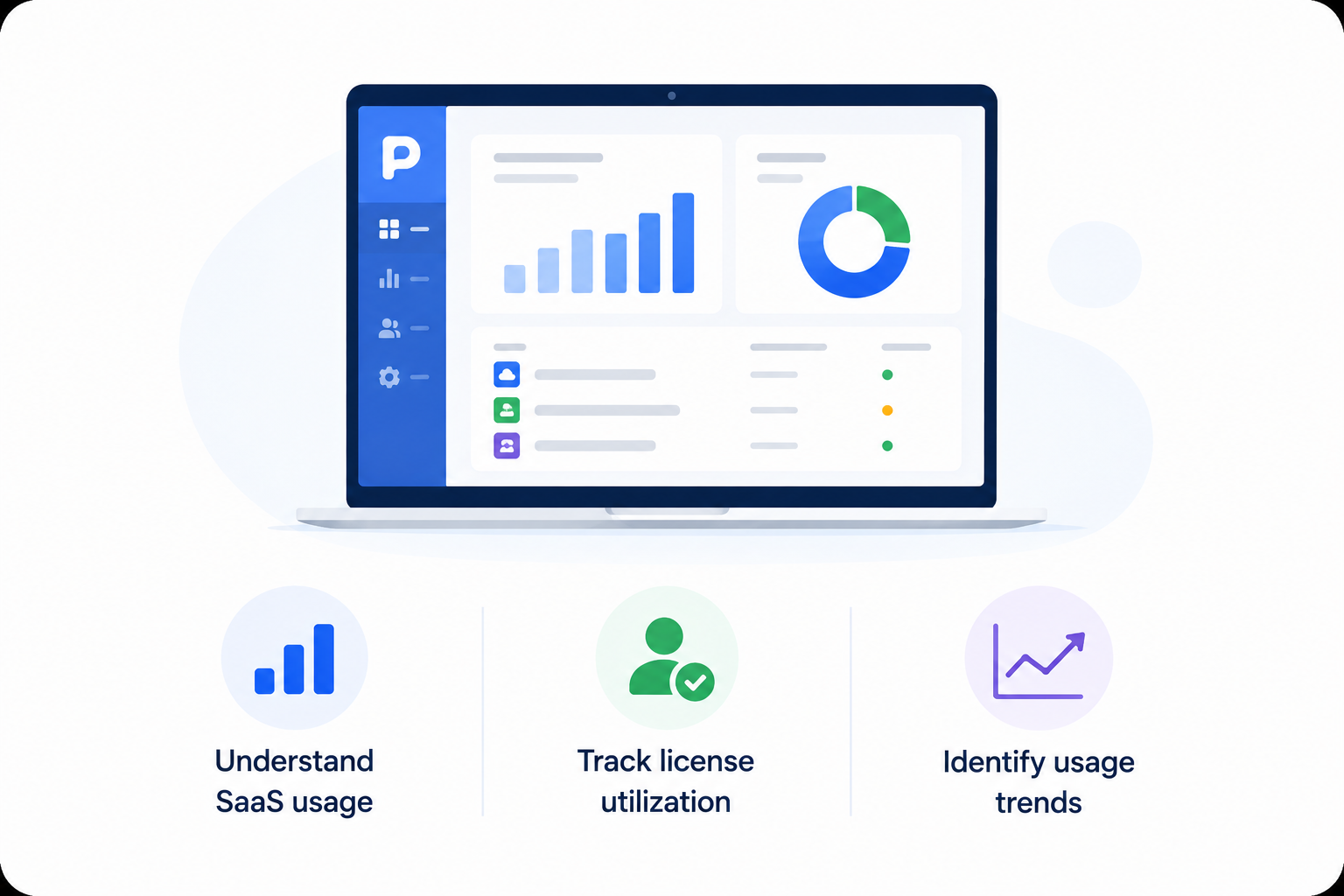
Its centralized dashboards gave IT teams visibility into application adoption, license utilization, and overall software usage, making it easier to identify trends across the SaaS portfolio.

B. Why Visibility Alone Isn't the Same as Governance

Seeing a problem isn't the same as solving it. Knowing a license is unused doesn't reclaim it. Seeing a renewal approaching doesn't negotiate it. Governance closes that gap, turning insight into structured workflows.

C. The Gap That Shows Up Once You Look Past the Dashboard

The limitations become clearer once organizations move beyond reporting and into day-to-day operations.

  • Manual Reconciliation: Teams still transfer information between multiple systems to complete procurement and renewal workflows.
  • Disconnected Compliance Status: Vendor reviews and contract status often require manual updates across separate platforms.
  • Limited AI Spend Visibility: Traditional SaaS usage dashboards weren't designed to track AI subscriptions, model usage, or token consumption.

These gaps don't make visibility less valuable but highlight where organizations need AI governance capabilities that extend beyond the dashboard.

Productiv Didn't Stop Shadow AI

Govern every unsanctioned app
Learn More

2. Why Usage-Analytics Platforms Fall Short on Governance

Usage-analytics platforms excel at showing what's happening, but governance requires owning the workflows that turn insights into action. That's where the structural gaps begin.

A. Manual Double-Entry Happens Between Systems

Usage-analytics platforms are designed to collect and report data, not manage the workflows that follow. As a result, teams often have to manually transfer information between systems whenever a contract status changes.

We were talking to one operations team and they had to update vendor status in a separate compliance platform after already recording the same contract information in Productiv, 

The reason? The two systems didn't share a common workflow. The issue wasn't the data itself but the lack of workflow ownership.

B. Budget Ownership Gets Lost Without Structured Chargeback

Usage dashboards show how much is being consumed. They don't always show who is accountable for that spend. Without a structured ownership layer:

  • Ownership Becomes Manual: Teams rely on custom fields or spreadsheets to assign budget owners.
  • Information Goes Stale: Department changes and team reorganizations aren't automatically reflected.
  • Accountability Becomes Unclear: When renewal time arrives, identifying the right decision-maker takes longer than it should.

Governance isn't just about tracking software usage. You also must ensure every application has a clear owner responsible for its budget and renewal decisions.

C. Compliance Status Doesn't Update Itself

Usage-analytics platforms typically sit outside the procurement lifecycle, so vendor review status, approvals, and contract milestones have to be updated manually as they progress. 

One team, for instance, had to manually toggle a vendor's status from "in review" to "active" in a separate compliance tool every time a contract moved forward.
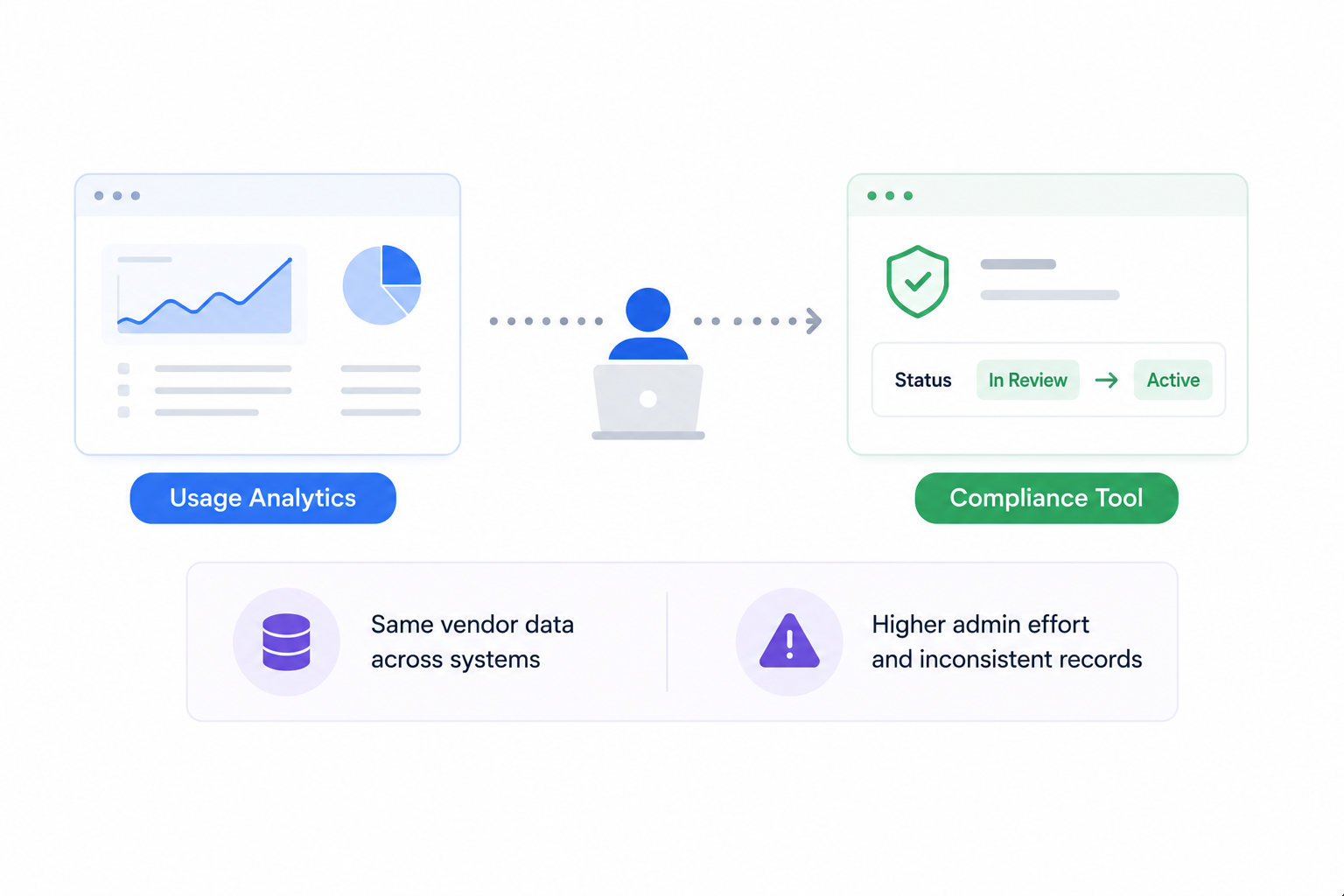
The result is the same vendor information maintained across multiple systems, increasing administrative effort and the risk of inconsistent records.

D. AI Spend Falls Outside Traditional Usage Tracking

Traditional usage analytics were built around seat-based SaaS licensing. AI spending has introduced a different pricing model, where costs are increasingly driven by token consumption, API usage, and model tiers.

Because of that, dashboards designed to track software licenses don't always capture how AI costs accumulate. 

This isn't a missing feature but a limitation of a category that was built before AI consumption became a core part of enterprise software spend.

SaaS Visibility Doesn't Equal AI Visibility

See the difference
Explore The Guide

3. How CloudEagle.ai Closes the Governance Gap

Each of these gaps comes down to the same root cause: usage-analytics platforms weren't built to own workflows, only to report on them. 

CloudEagle.ai addresses the AI governance gaps. It surfaces ungoverned AI tools to block sensitive data, scoring risky applications, and tracking exactly who is consuming what across every AI tool in the stack.

A. Shadow AI Discovery: Surface Every Tool Before You Govern It

CloudEagle.ai detects Shadow AI through browser extensions, firewall logs, Zscaler, CrowdStrike, and finance signals simultaneously, building a single source of truth across every AI tool in use, sanctioned or not.

Here's how multi-signal Shadow AI discovery is designed to work:
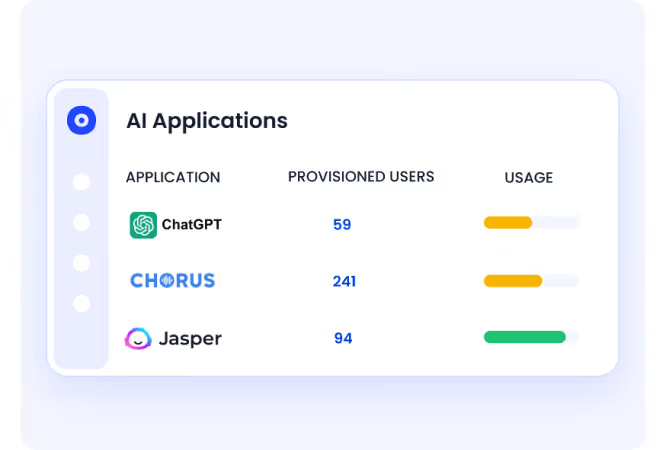
In CloudEagle.ai's AI application inventory, every tool appears with adoption by team and department. 

It surfaces whether it was sanctioned or discovered through external signals, and whether it carries GenAI capabilities that were never part of the original procurement decision.

B. Secure Browser and Flash Page: Redirect Before Data Enters an Unapproved Session

CloudEagle.ai's browser plugin catches what CASB, DLP, and LLM gateways all miss, the moment an employee opens an unapproved AI tool in a browser tab. Here’s how the browser plugin works:
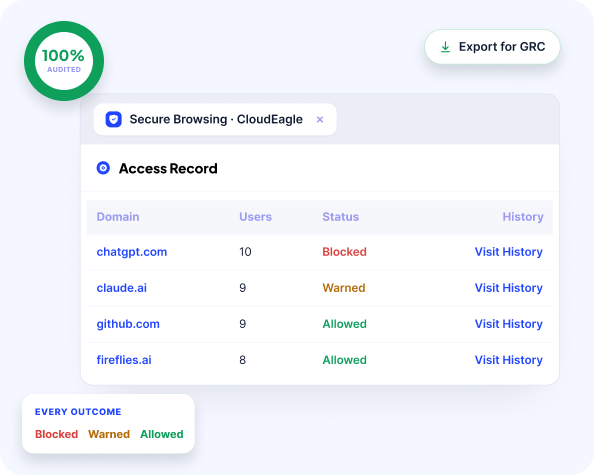
When that happens, a real-time flash page steps in before any company data is entered, redirecting the employee to the approved alternative automatically.
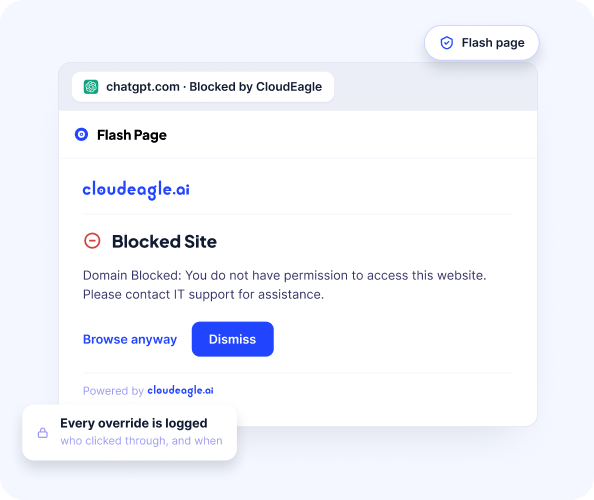
In CloudEagle.ai's Secure Browser policy view, flash page rules are configurable by team, department, and tool so Engineering can be permitted Cursor while redirected away from consumer ChatGPT.

Every redirect is logged automatically, tool accessed, sanctioned status, flash page triggered, and timestamp. The audit record exists in real time without additional effort.

C. Data Loss Prevention: Block Sensitive Data Before It Reaches the Model

CloudEagle.ai’s DLP operates at the prompt entry layer, catching what is typed into an AI interface before it is submitted to the model. 

When an employee attempts to paste sensitive content like PII, PHI, financial data, proprietary code, into an AI tool, CloudEagle.ai fires before the content leaves the browser.
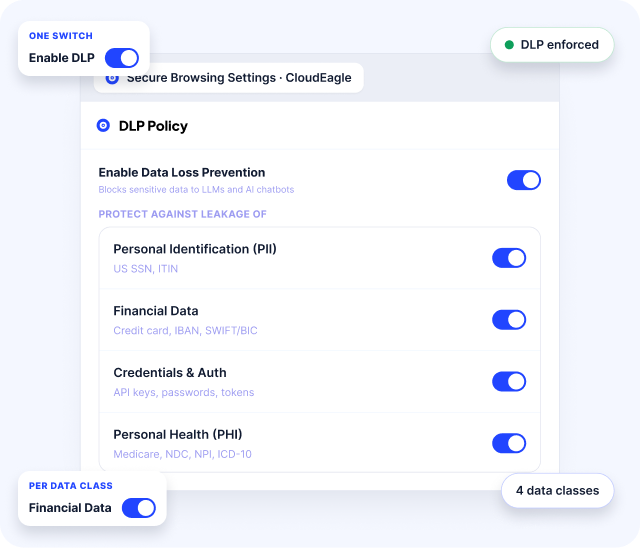
In CloudEagle.ai's DLP policy view, sensitive content categories are configurable. Credit card numbers, PHI, source code, and proprietary data each carry their own enforcement rules.

D. GenAI Risk Scoring: Prioritize the Riskiest Apps First

CloudEagle.ai automatically assigns a GenAI risk score to every AI tool and feature in the environment, powered by Netskope's Cloud Confidence Index.
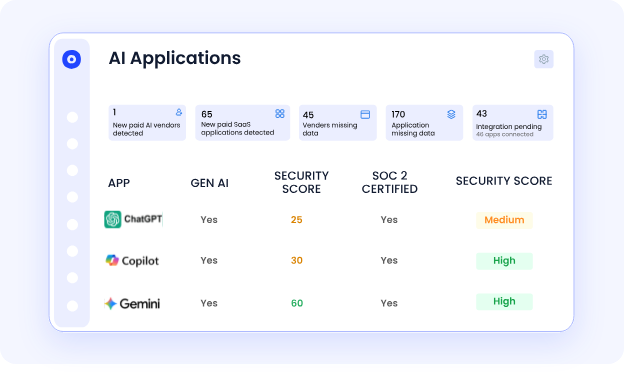
Every tool is scored on data residency, training data use, security posture, and compliance alignment, so security teams have a prioritized remediation list, not a flat inventory of 200 tools with no indication of where to start.
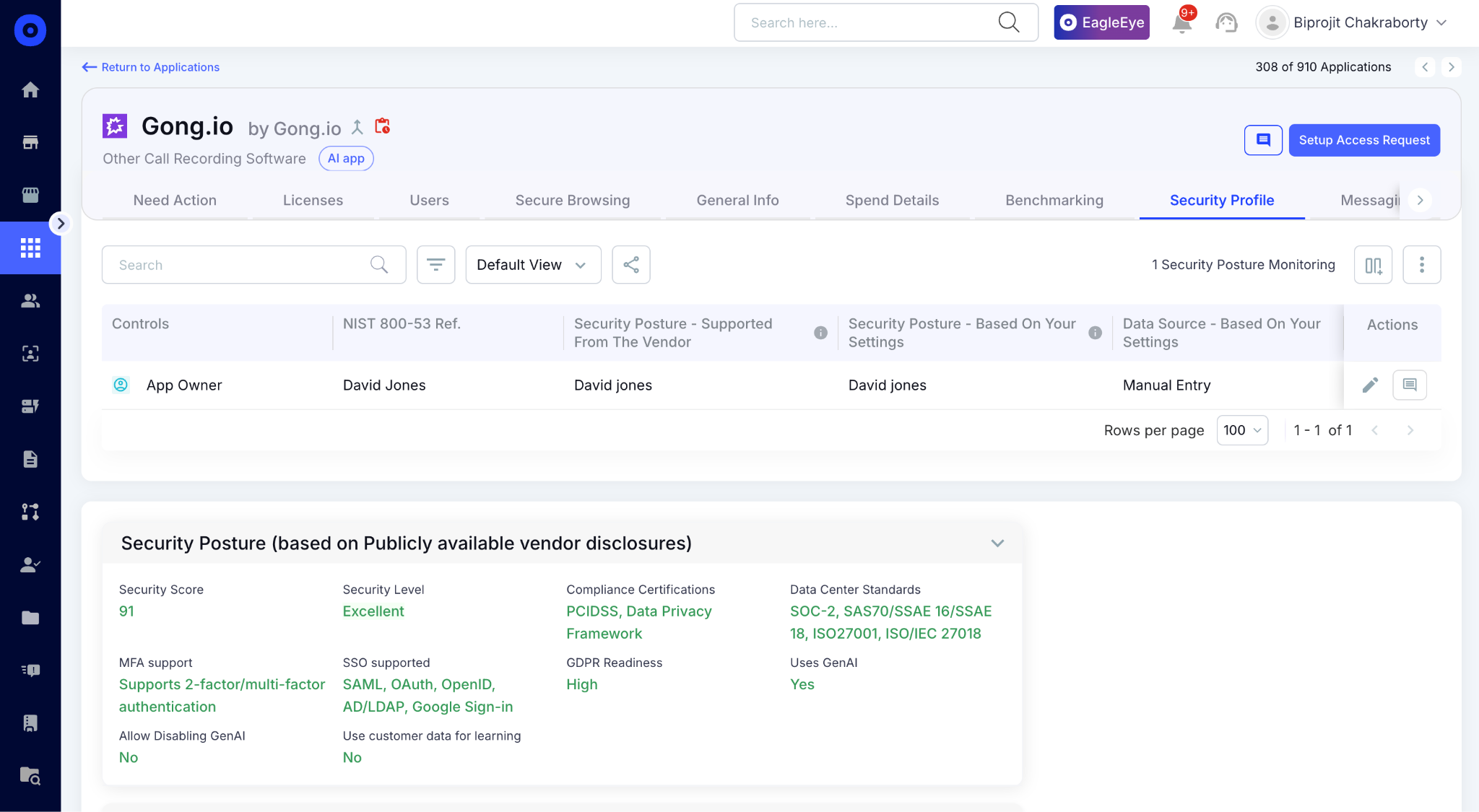
In CloudEagle.ai's risk scoring view, every AI vendor appears with its risk level, whether it trains on company data, and whether it processes regulated data without a formal agreement in place.

E. AI Usage and Token Consumption Tracking: See Who Is Using What and at What Scale

CloudEagle.ai tracks token consumption and API spend for Claude, ChatGPT, Cursor, Gemini, and GitHub Copilot, on per user, per team, per department basis.

This matters for blast radius because unusual token consumption is often the first behavioral signal that something is wrong. Here's how per-user AI usage tracking is designed:
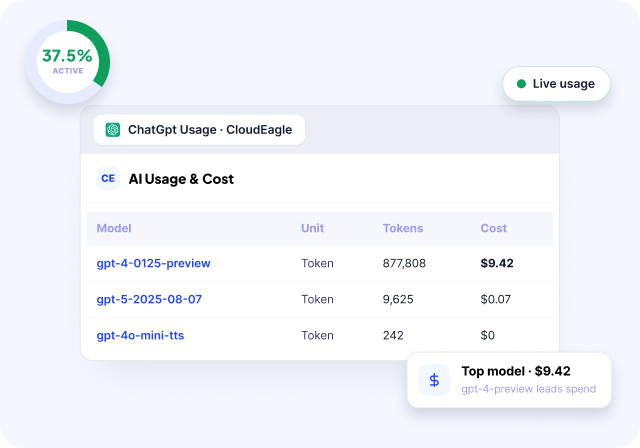
In CloudEagle.ai's AI usage dashboard, every user's consumption is visible by model tier and time period. 
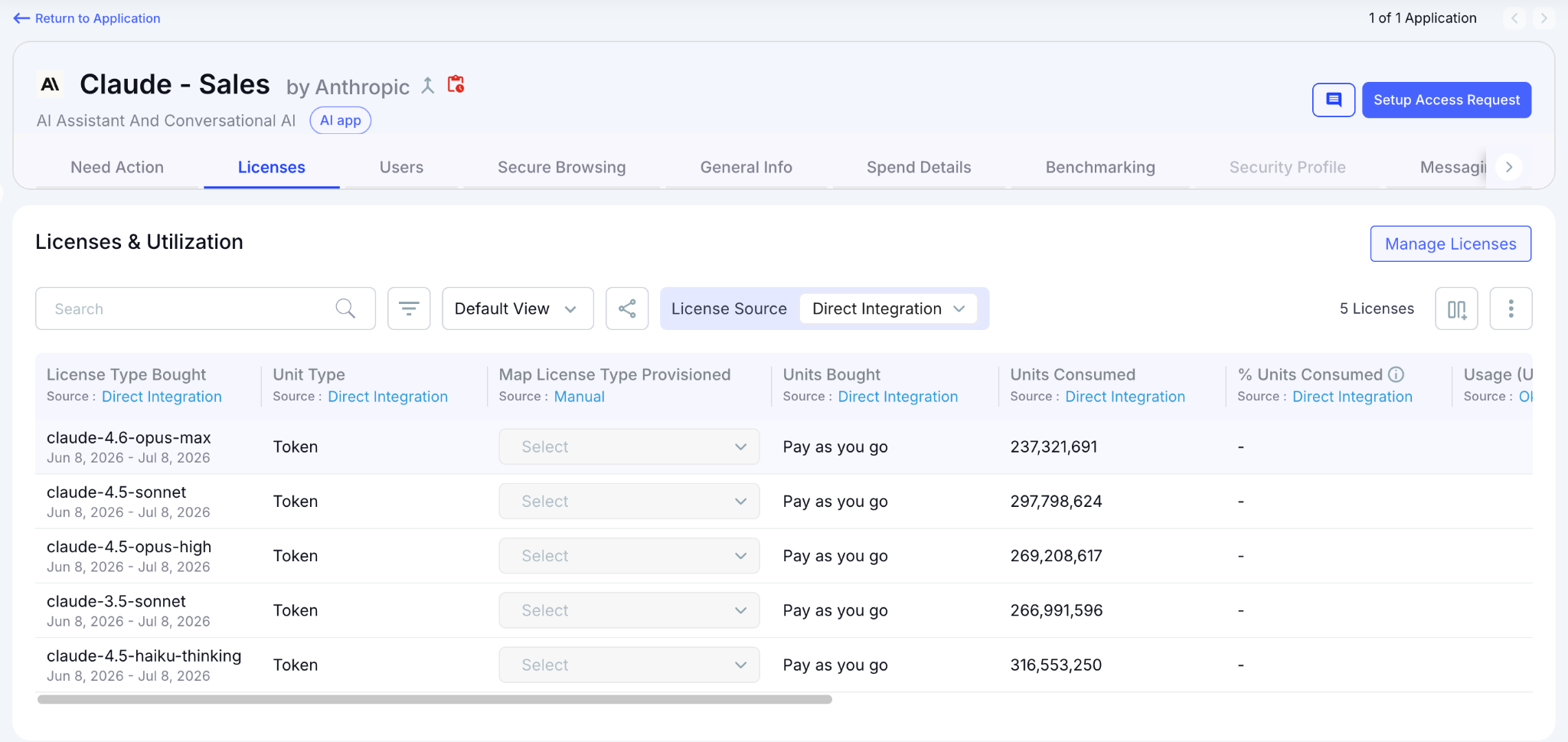
Security teams identify anomalies and Finance gets the chargeback data needed to enforce budget accountability.

F. NHI Dashboard: Inventory and Risk in One View

The moment CloudEagle.ai connects to your environment, the NHI dashboard surfaces total NHIs, environment breakdown, identity type split, and a risk-prioritized insights panel that tells your security team exactly where to start.

Here's how the NHI dashboard surfaces inventory and risk simultaneously:
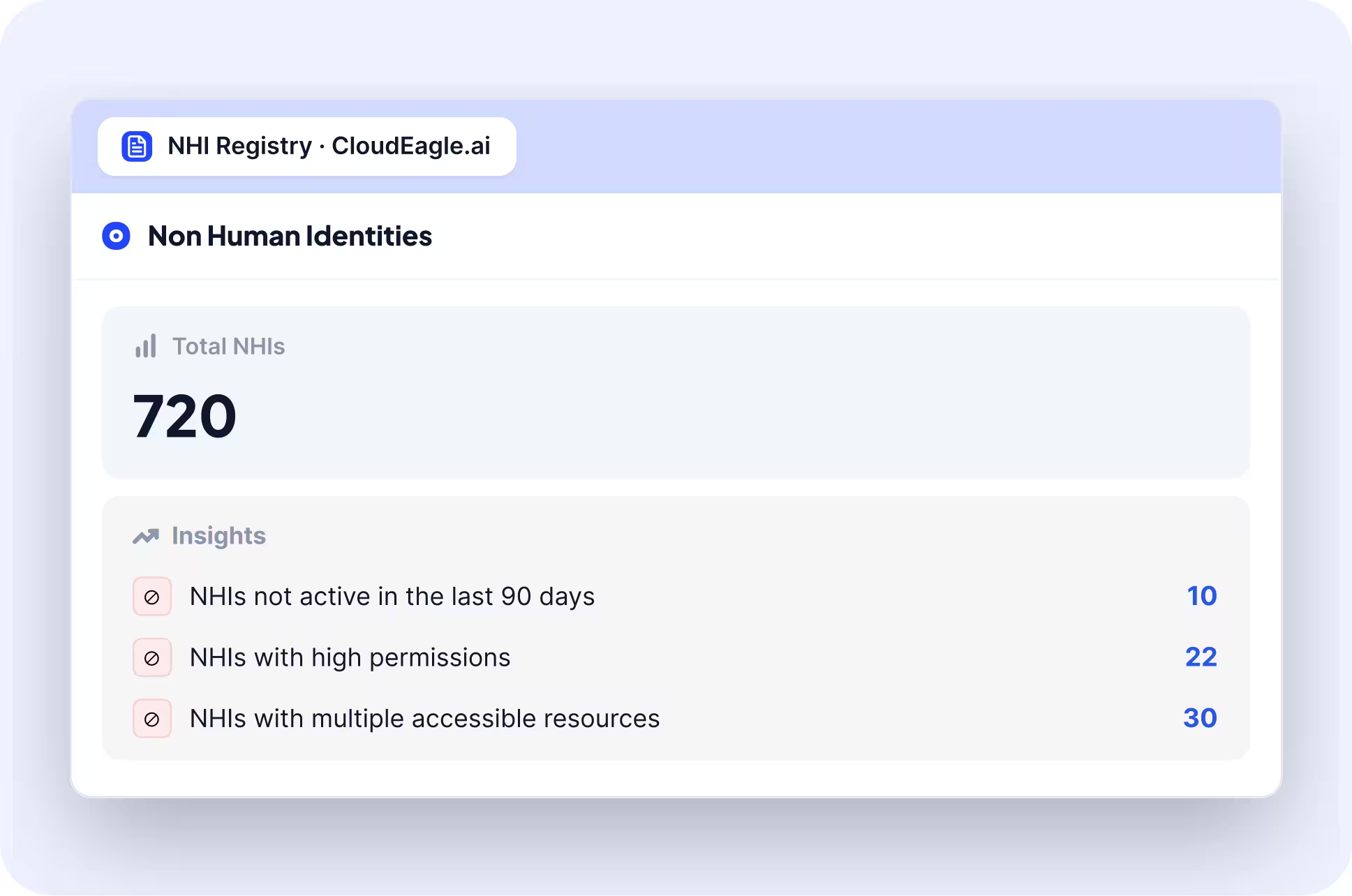
In CloudEagle.ai's NHI dashboard, the insights panel flags the three highest-priority risk categories immediately: NHIs not active in the last 90 days, NHIs with admin permissions, and NHIs with multiple accessible resources:
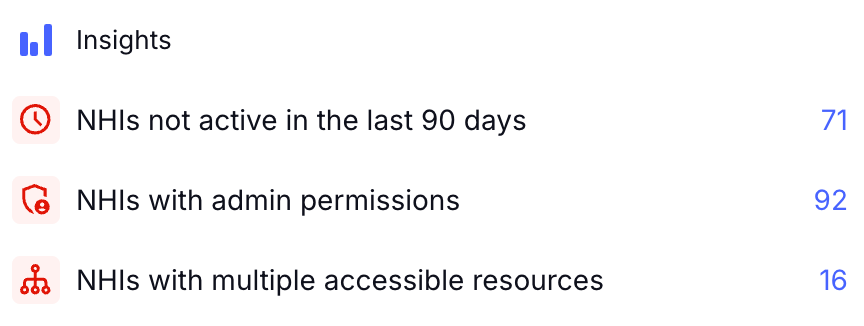
In the Freshworks deployment, this view was live in production the moment Azure AD was connected without separate data collection exercise and manual export. 

AWS and GCP are confirmed on the roadmap, expanding the same inventory and risk layer to cloud infrastructure NHIs in phase two.

G. NHI Inventory: Every Identity, Credential Type, and Owner in One Table

The full NHI inventory delivers the detailed per-identity view the program requires, credential type, last activity date, source environment, and owner status visible in a single table without opening a separate system.

Here's how the NHI inventory surfaces the full per-identity picture:
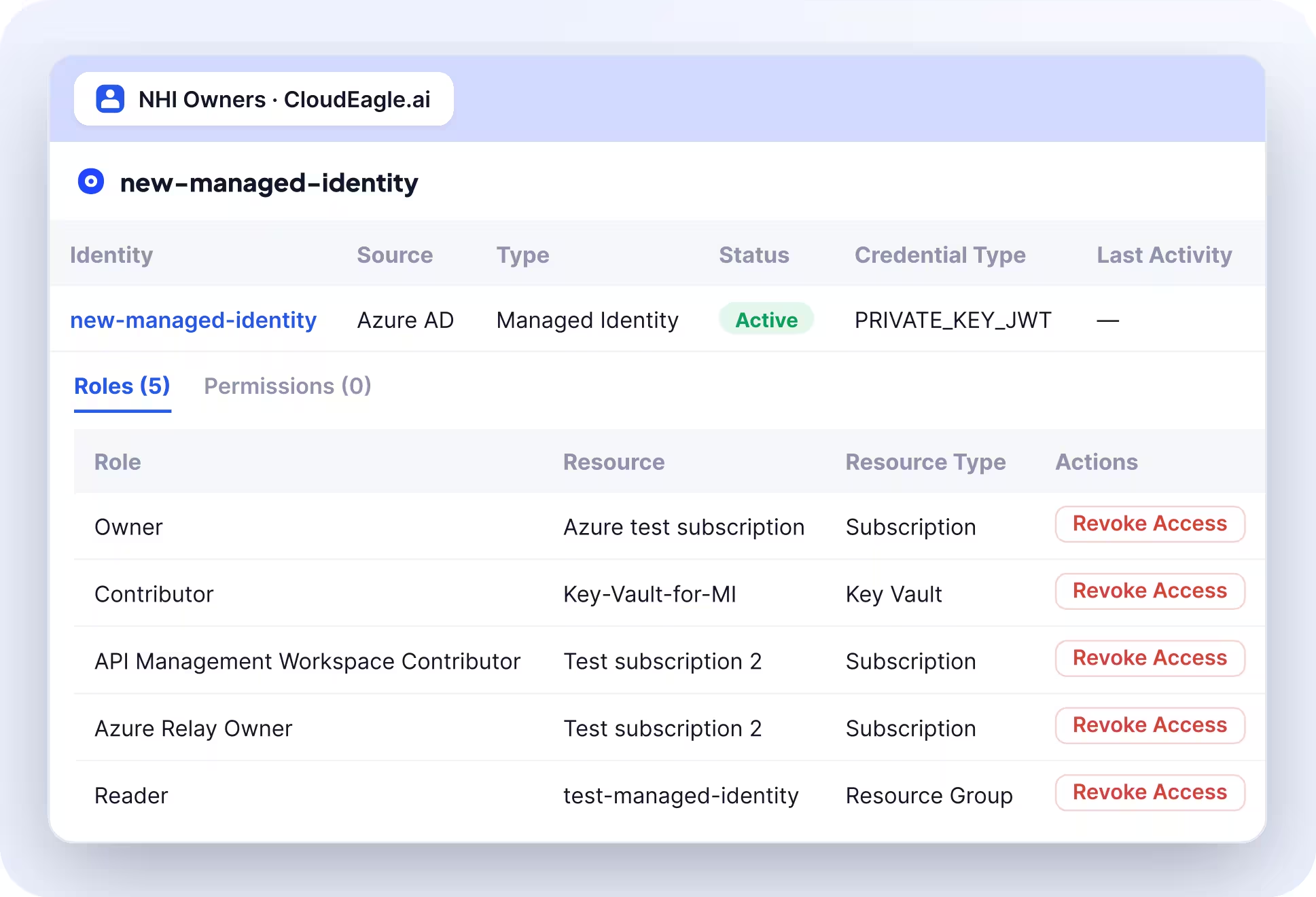
In CloudEagle.ai's NHI inventory, every identity appears with its source, type, active status, credential type, last activity date, and assigned owner. Every NHI with a missing owner is immediately visible:
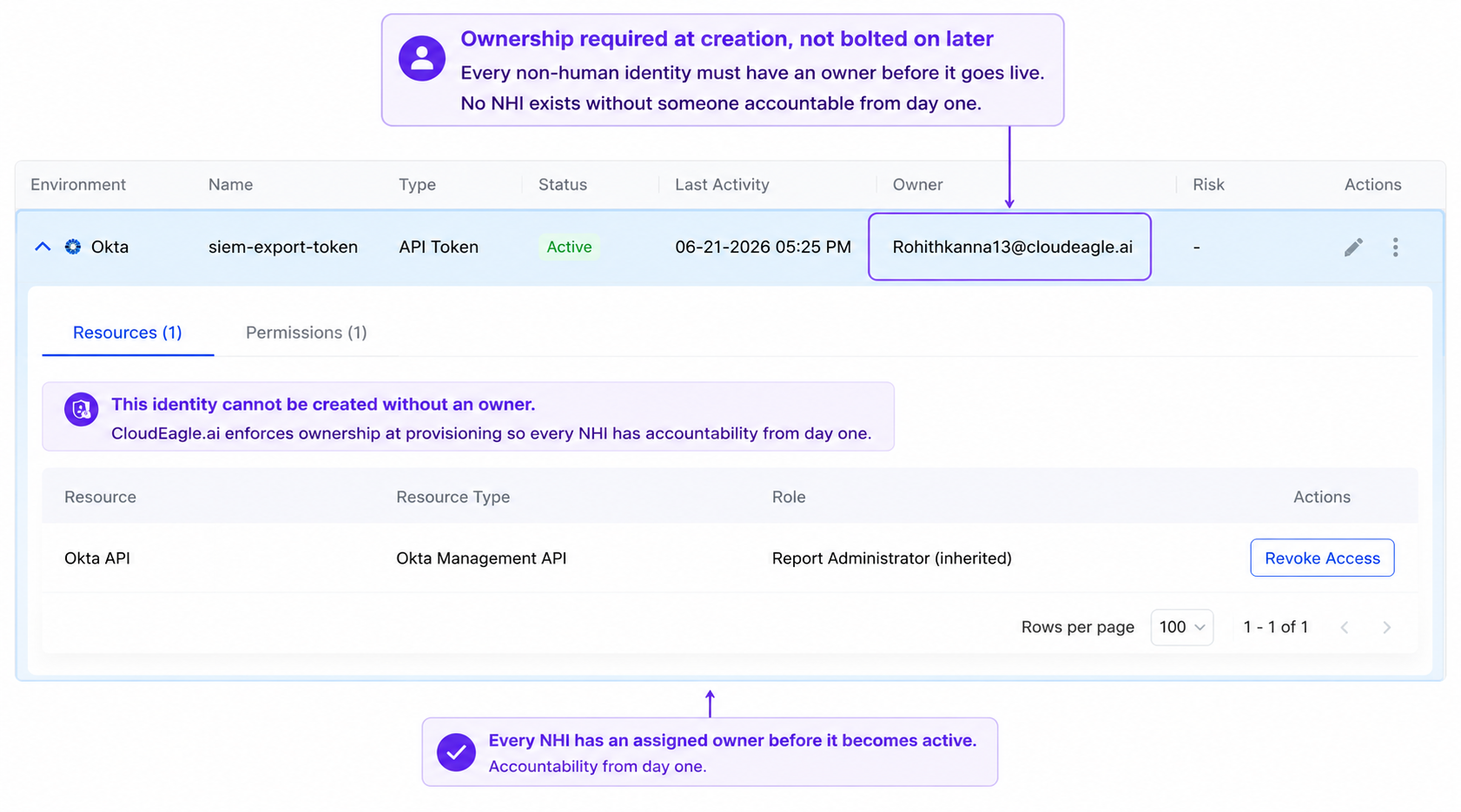
Expanding any row surfaces the role and permission drill-down, the exact view an access review requires to answer whether the permission scope is still appropriate. 

4. Conclusion

Productiv proved that teams can't manage what they can't see. But seeing a problem and solving it are two different things, and that gap is exactly where usage-analytics platforms reach their limit.

AI Governance closes that gap. It means licenses get reclaimed automatically, compliance status updates itself, and AI spend is tracked with the same rigor as SaaS licenses.

That's the difference CloudEagle.ai is built around: one platform where usage analytics, license optimization, procurement, renewals, compliance, and AI governance all operate as a single connected workflow.

5. FAQs

1. What's the main difference between Productiv and CloudEagle.ai?

Productiv focused on usage analytics and dashboards, giving teams visibility into application adoption and license utilization. CloudEagle.ai builds on that visibility with automated workflows for license optimization, procurement, renewals, compliance sync, and AI spend governance, turning insights into action rather than just reporting them.

2. Is usage analytics enough to manage SaaS spend effectively?

Usage analytics helps identify issues like unused licenses or upcoming renewals, but it doesn't resolve them on its own. Reclaiming a license, negotiating a renewal, or updating compliance status all require workflows that act on that data, not just dashboards that display it.

3. How does CloudEagle.ai handle AI spend differently from traditional SaaS tools?

Traditional usage-analytics platforms were built around seat-based licensing, which doesn't capture how AI tools are priced today. CloudEagle.ai tracks token consumption, model usage, and API-based costs directly, alongside standard SaaS license data, so AI spend doesn't fall outside visibility the way it does in legacy tools.

4. Does CloudEagle.ai require manual updates between compliance and procurement systems?

No. CloudEagle.ai connects procurement workflows directly to compliance status, so vendor review stages and contract milestones update automatically as a deal progresses, rather than requiring a second manual update in a separate system.

5. What happens to budget ownership tracking without a structured chargeback system?

Without structured ownership, budget accountability typically relies on manual custom fields or spreadsheets that go stale as teams reorganize. CloudEagle.ai ties spend directly to department and budget owners, so accountability stays current without manual upkeep.

Advertisement for a SaaS Subscription Tracking Template with a call-to-action button to download and a partial graphic of a tablet showing charts.Banner promoting a SaaS Agreement Checklist to streamline SaaS management and avoid budget waste with a call-to-action button labeled Download checklist.Blue banner with text 'The Ultimate Employee Offboarding Checklist!' and a black button labeled 'Download checklist' alongside partial views of checklist documents from cloudeagle.ai.Digital ad for download checklist titled 'The Ultimate Checklist for IT Leaders to Optimize SaaS Operations' by cloudeagle.ai, showing checklist pages.Slack Buyer's Guide offer with text 'Unlock insider insights to get the best deal on Slack!' and a button labeled 'Get Your Copy', accompanied by a preview of the guide featuring Slack's logo.Monday Pricing Guide by cloudeagle.ai offering exclusive pricing secrets to maximize investment with a call-to-action button labeled Get Your Copy and an image of the guide's cover.Blue banner for Canva Pricing Guide by cloudeagle.ai offering a guide to Canva costs, features, and alternatives with a call-to-action button saying Get Your Copy.Blue banner with white text reading 'Little-Known Negotiation Hacks to Get the Best Deal on Slack' and a white button labeled 'Get Your Copy'.Blue banner with text 'Little-Known Negotiation Hacks to Get the Best Deal on Monday.com' and a white button labeled 'Get Your Copy'.Blue banner with text 'Little-Known Negotiation Hacks to Get the Best Deal on Canva' and a white button labeled 'Get Your Copy'.Banner with text 'Slack Buyer's Guide' and a 'Download Now' button next to images of a guide titled 'Slack Buyer’s Guide: Features, Pricing & Best Practices'.Digital cover of Monday Pricing Guide with a button labeled Get Your Copy on a blue background.Canva Pricing Guide cover with a button labeled Get Your Copy on a blue gradient background.

Enter your email to
unlock the report

Oops! Something went wrong while submitting the form.
License Count
Benchmark
Per User/Per Year

Enter your email to
unlock the report

Oops! Something went wrong while submitting the form.
License Count
Benchmark
Per User/Per Year

Enter your email to
unlock the report

Oops! Something went wrong while submitting the form.
Notion Plus
License Count
Benchmark
Per User/Per Year
100-500
$67.20 - $78.72
500-1000
$59.52 - $72.00
1000+
$51.84 - $57.60
Canva Pro
License Count
Benchmark
Per User/Per Year
100-500
$74.33-$88.71
500-1000
$64.74-$80.32
1000+
$55.14-$62.34

Enter your email to
unlock the report

Oops! Something went wrong while submitting the form.

Enter your email to
unlock the report

Oops! Something went wrong while submitting the form.
Zoom Business
License Count
Benchmark
Per User/Per Year
100-500
$216.00 - $264.00
500-1000
$180.00 - $216.00
1000+
$156.00 - $180.00

Enter your email to
unlock the report

Oops! Something went wrong while submitting the form.

Get the Right Security Platform To Secure Your Cloud Infrastructure

Please enter a business email
Thank you!
The 2023 SaaS report has been sent to your email. Check your promotional or spam folder.
Oops! Something went wrong while submitting the form.

Access full report

Please enter a business email
Thank you!
The 2023 SaaS report has been sent to your email. Check your promotional or spam folder.
Oops! Something went wrong while submitting the form.

Usage analytics tells you what's happening in your SaaS environment. AI Governance determines what happens next. That's the fundamental difference between Productiv and CloudEagle.ai.

Productiv helped IT teams understand application usage and license utilization through centralized analytics. 

CloudEagle.ai does more such as optimizing licenses, automating renewals, and governing both SaaS and AI spend from one platform.

In this comparison, we'll look at what Productiv did well, where visibility-only platforms reach their limits, and how CloudEagle.ai closes the governance gap with a single source of truth. 

TL;DR

  • Productiv excels at SaaS usage analytics, but governance requires automating actions beyond visibility.
  • Manual workflows, disconnected compliance, unclear budget ownership, and limited AI spend tracking create governance gaps.
  • CloudEagle.ai closes those gaps with Shadow AI discovery, secure browser controls, DLP, GenAI risk scoring, and AI usage tracking.
  • Built-in NHI inventory, risk prioritization, and ownership visibility extend governance beyond traditional SaaS management.
  • CloudEagle.ai unifies usage analytics, procurement, renewals, compliance, and AI governance into a single operational platform

1. Where Productiv Stood: Strong on Usage Analytics, Limited on Governance

Productiv gave IT teams strong visibility into SaaS usage. But governance requires acting on those insights, not just reporting them.

A. What Productiv Was Built to Do

Productiv was built to help organizations understand how their SaaS applications were being used. 

Its centralized dashboards gave IT teams visibility into application adoption, license utilization, and overall software usage, making it easier to identify trends across the SaaS portfolio.

B. Why Visibility Alone Isn't the Same as Governance

Seeing a problem isn't the same as solving it. Knowing a license is unused doesn't reclaim it. Seeing a renewal approaching doesn't negotiate it. Governance closes that gap, turning insight into structured workflows.

C. The Gap That Shows Up Once You Look Past the Dashboard

The limitations become clearer once organizations move beyond reporting and into day-to-day operations.

  • Manual Reconciliation: Teams still transfer information between multiple systems to complete procurement and renewal workflows.
  • Disconnected Compliance Status: Vendor reviews and contract status often require manual updates across separate platforms.
  • Limited AI Spend Visibility: Traditional SaaS usage dashboards weren't designed to track AI subscriptions, model usage, or token consumption.

These gaps don't make visibility less valuable but highlight where organizations need AI governance capabilities that extend beyond the dashboard.

Productiv Didn't Stop Shadow AI

Govern every unsanctioned app
Learn More

2. Why Usage-Analytics Platforms Fall Short on Governance

Usage-analytics platforms excel at showing what's happening, but governance requires owning the workflows that turn insights into action. That's where the structural gaps begin.

A. Manual Double-Entry Happens Between Systems

Usage-analytics platforms are designed to collect and report data, not manage the workflows that follow. As a result, teams often have to manually transfer information between systems whenever a contract status changes.

We were talking to one operations team and they had to update vendor status in a separate compliance platform after already recording the same contract information in Productiv, 

The reason? The two systems didn't share a common workflow. The issue wasn't the data itself but the lack of workflow ownership.

B. Budget Ownership Gets Lost Without Structured Chargeback

Usage dashboards show how much is being consumed. They don't always show who is accountable for that spend. Without a structured ownership layer:

  • Ownership Becomes Manual: Teams rely on custom fields or spreadsheets to assign budget owners.
  • Information Goes Stale: Department changes and team reorganizations aren't automatically reflected.
  • Accountability Becomes Unclear: When renewal time arrives, identifying the right decision-maker takes longer than it should.

Governance isn't just about tracking software usage. You also must ensure every application has a clear owner responsible for its budget and renewal decisions.

C. Compliance Status Doesn't Update Itself

Usage-analytics platforms typically sit outside the procurement lifecycle, so vendor review status, approvals, and contract milestones have to be updated manually as they progress. 

One team, for instance, had to manually toggle a vendor's status from "in review" to "active" in a separate compliance tool every time a contract moved forward.

The result is the same vendor information maintained across multiple systems, increasing administrative effort and the risk of inconsistent records.

D. AI Spend Falls Outside Traditional Usage Tracking

Traditional usage analytics were built around seat-based SaaS licensing. AI spending has introduced a different pricing model, where costs are increasingly driven by token consumption, API usage, and model tiers.

Because of that, dashboards designed to track software licenses don't always capture how AI costs accumulate. 

This isn't a missing feature but a limitation of a category that was built before AI consumption became a core part of enterprise software spend.

SaaS Visibility Doesn't Equal AI Visibility

See the difference
Explore The Guide

3. How CloudEagle.ai Closes the Governance Gap

Each of these gaps comes down to the same root cause: usage-analytics platforms weren't built to own workflows, only to report on them. 

CloudEagle.ai addresses the AI governance gaps. It surfaces ungoverned AI tools to block sensitive data, scoring risky applications, and tracking exactly who is consuming what across every AI tool in the stack.

A. Shadow AI Discovery: Surface Every Tool Before You Govern It

CloudEagle.ai detects Shadow AI through browser extensions, firewall logs, Zscaler, CrowdStrike, and finance signals simultaneously, building a single source of truth across every AI tool in use, sanctioned or not.

Here's how multi-signal Shadow AI discovery is designed to work:

In CloudEagle.ai's AI application inventory, every tool appears with adoption by team and department. 

It surfaces whether it was sanctioned or discovered through external signals, and whether it carries GenAI capabilities that were never part of the original procurement decision.

B. Secure Browser and Flash Page: Redirect Before Data Enters an Unapproved Session

CloudEagle.ai's browser plugin catches what CASB, DLP, and LLM gateways all miss, the moment an employee opens an unapproved AI tool in a browser tab. Here’s how the browser plugin works:

When that happens, a real-time flash page steps in before any company data is entered, redirecting the employee to the approved alternative automatically.

In CloudEagle.ai's Secure Browser policy view, flash page rules are configurable by team, department, and tool so Engineering can be permitted Cursor while redirected away from consumer ChatGPT.

Every redirect is logged automatically, tool accessed, sanctioned status, flash page triggered, and timestamp. The audit record exists in real time without additional effort.

C. Data Loss Prevention: Block Sensitive Data Before It Reaches the Model

CloudEagle.ai’s DLP operates at the prompt entry layer, catching what is typed into an AI interface before it is submitted to the model. 

When an employee attempts to paste sensitive content like PII, PHI, financial data, proprietary code, into an AI tool, CloudEagle.ai fires before the content leaves the browser.

In CloudEagle.ai's DLP policy view, sensitive content categories are configurable. Credit card numbers, PHI, source code, and proprietary data each carry their own enforcement rules.

D. GenAI Risk Scoring: Prioritize the Riskiest Apps First

CloudEagle.ai automatically assigns a GenAI risk score to every AI tool and feature in the environment, powered by Netskope's Cloud Confidence Index.

Every tool is scored on data residency, training data use, security posture, and compliance alignment, so security teams have a prioritized remediation list, not a flat inventory of 200 tools with no indication of where to start.

In CloudEagle.ai's risk scoring view, every AI vendor appears with its risk level, whether it trains on company data, and whether it processes regulated data without a formal agreement in place.

E. AI Usage and Token Consumption Tracking: See Who Is Using What and at What Scale

CloudEagle.ai tracks token consumption and API spend for Claude, ChatGPT, Cursor, Gemini, and GitHub Copilot, on per user, per team, per department basis.

This matters for blast radius because unusual token consumption is often the first behavioral signal that something is wrong. Here's how per-user AI usage tracking is designed:

In CloudEagle.ai's AI usage dashboard, every user's consumption is visible by model tier and time period. 

Security teams identify anomalies and Finance gets the chargeback data needed to enforce budget accountability.

F. NHI Dashboard: Inventory and Risk in One View

The moment CloudEagle.ai connects to your environment, the NHI dashboard surfaces total NHIs, environment breakdown, identity type split, and a risk-prioritized insights panel that tells your security team exactly where to start.

Here's how the NHI dashboard surfaces inventory and risk simultaneously:

In CloudEagle.ai's NHI dashboard, the insights panel flags the three highest-priority risk categories immediately: NHIs not active in the last 90 days, NHIs with admin permissions, and NHIs with multiple accessible resources:

In the Freshworks deployment, this view was live in production the moment Azure AD was connected without separate data collection exercise and manual export. 

AWS and GCP are confirmed on the roadmap, expanding the same inventory and risk layer to cloud infrastructure NHIs in phase two.

G. NHI Inventory: Every Identity, Credential Type, and Owner in One Table

The full NHI inventory delivers the detailed per-identity view the program requires, credential type, last activity date, source environment, and owner status visible in a single table without opening a separate system.

Here's how the NHI inventory surfaces the full per-identity picture:

In CloudEagle.ai's NHI inventory, every identity appears with its source, type, active status, credential type, last activity date, and assigned owner. Every NHI with a missing owner is immediately visible:

Expanding any row surfaces the role and permission drill-down, the exact view an access review requires to answer whether the permission scope is still appropriate. 

4. Conclusion

Productiv proved that teams can't manage what they can't see. But seeing a problem and solving it are two different things, and that gap is exactly where usage-analytics platforms reach their limit.

AI Governance closes that gap. It means licenses get reclaimed automatically, compliance status updates itself, and AI spend is tracked with the same rigor as SaaS licenses.

That's the difference CloudEagle.ai is built around: one platform where usage analytics, license optimization, procurement, renewals, compliance, and AI governance all operate as a single connected workflow.

5. FAQs

1. What's the main difference between Productiv and CloudEagle.ai?

Productiv focused on usage analytics and dashboards, giving teams visibility into application adoption and license utilization. CloudEagle.ai builds on that visibility with automated workflows for license optimization, procurement, renewals, compliance sync, and AI spend governance, turning insights into action rather than just reporting them.

2. Is usage analytics enough to manage SaaS spend effectively?

Usage analytics helps identify issues like unused licenses or upcoming renewals, but it doesn't resolve them on its own. Reclaiming a license, negotiating a renewal, or updating compliance status all require workflows that act on that data, not just dashboards that display it.

3. How does CloudEagle.ai handle AI spend differently from traditional SaaS tools?

Traditional usage-analytics platforms were built around seat-based licensing, which doesn't capture how AI tools are priced today. CloudEagle.ai tracks token consumption, model usage, and API-based costs directly, alongside standard SaaS license data, so AI spend doesn't fall outside visibility the way it does in legacy tools.

4. Does CloudEagle.ai require manual updates between compliance and procurement systems?

No. CloudEagle.ai connects procurement workflows directly to compliance status, so vendor review stages and contract milestones update automatically as a deal progresses, rather than requiring a second manual update in a separate system.

5. What happens to budget ownership tracking without a structured chargeback system?

Without structured ownership, budget accountability typically relies on manual custom fields or spreadsheets that go stale as teams reorganize. CloudEagle.ai ties spend directly to department and budget owners, so accountability stays current without manual upkeep.

CloudEagle.ai recognized in the 2025 Gartner® Magic Quadrant™ for SaaS Management Platforms
Download now
gartner chart
5x
Faster employee
onboarding
80%
Reduction in time for
user access reviews
30k
Workflows
automated
$15Bn
Analyzed in
contract spend
$2Bn
Saved in
SaaS spend

Streamline SaaS governance and save 10-30%

Book a Demo with Expert
CTA image