
%201.svg)


HIPAA Compliance Checklist for 2025

Most organizations don't need another reminder that they have a non-human identity problem. They need a practical way to start governing it.
Launching an NHI governance program isn't about deploying another security tool. It's about putting a repeatable process in place: discover your non-human identities, prioritize the riskiest ones, review their access, and take action.
The gap between knowing you have NHI risk and having a program to govern it is structural. Most teams have no inventory layer, no risk layer, no review cadence, and no action workflow.
CloudEagle.ai's NHI module automates all four, giving security and IAM teams the infrastructure to go from NHI awareness to a functioning AI governance program in 30 days without a full infrastructure overhaul.
In this guide, we'll walk through the five-step sequence to get there.
TL;DR
- Non-human identity (NHI) governance programs often stall because ownership, inventory, and review processes are fragmented.
- A successful NHI program starts with centralized ownership, inventory, risk scoring, access reviews, and recurring governance.
- CloudEagle.ai discovers and prioritizes service accounts, API keys, OAuth tokens, and AI agents from a unified platform.
- Automated ownership assignment, audit trails, and remediation workflows simplify continuous NHI governance.
- CloudEagle.ai helps security and IAM teams launch and scale an audit-ready NHI governance program with minimal operational overhead
1. Why Most NHI Governance Programs Stall Before They Start
Most organizations don't struggle because they lack awareness of NHI risk. They struggle because they don't know where to begin. The execution gap usually comes down to three things:
- No Single Owner: PAM teams focus on privileged credentials, IAM teams on human identities, and DevOps on infrastructure secrets. Non-human identities span all three but rarely have one accountable owner.
- No Consolidated Inventory: Service accounts, OAuth tokens, API keys, AI agents, and machine identities are scattered across PAM vaults, SaaS applications, CASB logs, and spreadsheets.
- No Clear Starting Point: The scope feels overwhelming. Should you start with service accounts, API keys, OAuth tokens, AI agents, or certificates?
The problem is more tangible than it sounds. As Nidhi Jain, CEO of CloudEagle.ai, described it:
"You create a Salesforce token and now it's a bot floating around in the environment. Understanding where your NHI risk is, that's another area."
One IT Security Manager at a mid-size financial institution put the governance gap plainly:
"We are seeing a large number of personal agents and AI agents being created. I want to almost claw that back so we can have a more refined governance around that."
That's the intent. The program gap is everything between recognizing the problem and building a repeatable governance workflow.
NHI governance doesn't stall because nobody cares. It stalls because nobody owns it end-to-end, and the scope feels too large to start.

2. How to Launch an NHI Governance Program: The Five-Step Sequence
Launching an NHI governance program doesn't require a massive infrastructure project. It requires the right sequence.
The five steps below take you from scattered visibility to a structured governance program by building the inventory, risk, review, and action layers one at a time.
Step 1: Assign an Owner Across PAM, IAM, and SaaS
The biggest reason NHI programs stall is unclear ownership. PAM, IAM, and SaaS teams all manage part of the problem but no one owns it end to end.
Assign a single program owner from IAM or IT Security with a mandate that explicitly covers SaaS-resident credentials, not just infrastructure.
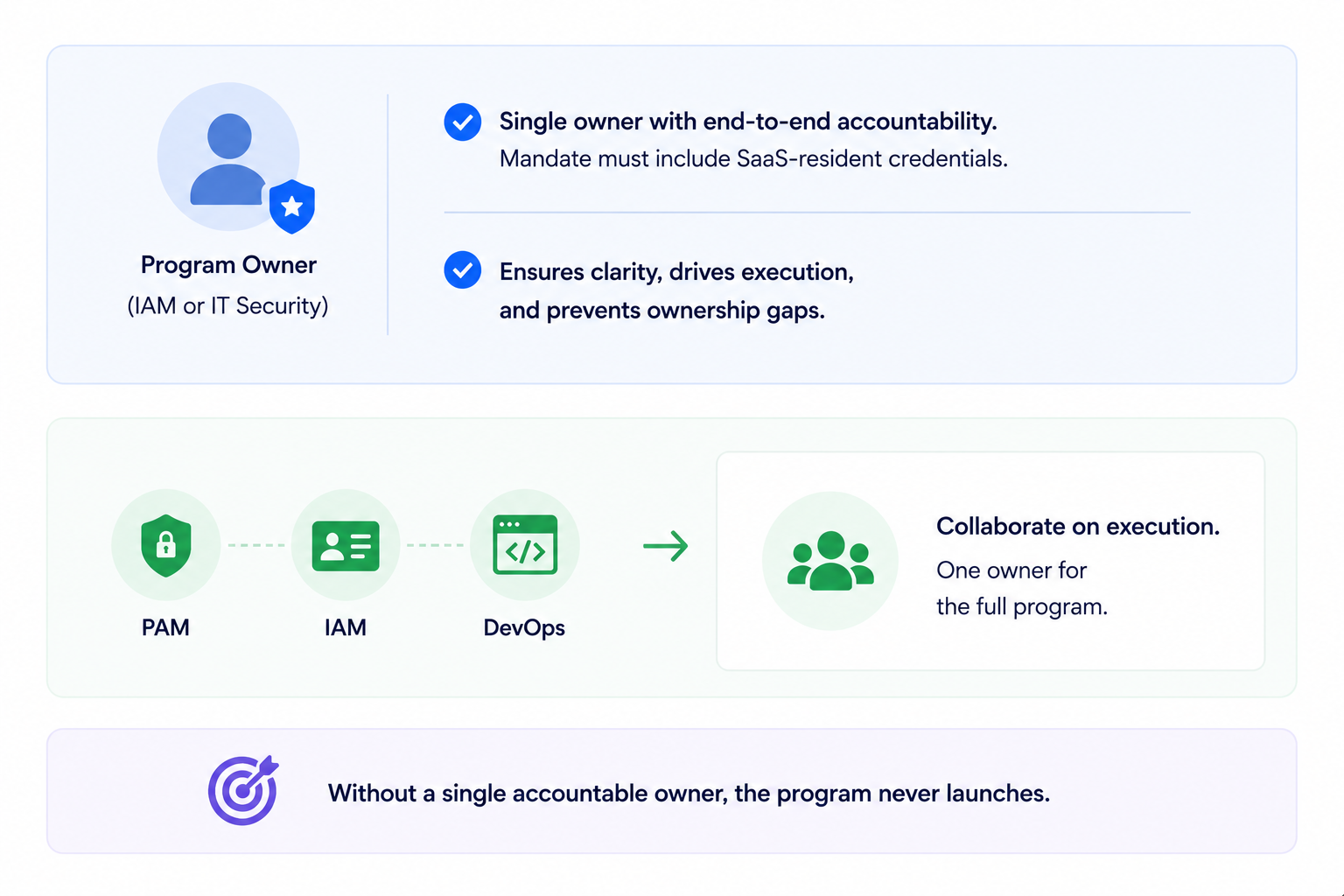
Create a cross-functional working group with PAM and DevOps for the infrastructure layer, but keep one accountable owner for the full program. Without that, accountability diffuses and the program never launches.
Step 2: Build Your NHI Inventory Starting With Three Priority Apps
Don't begin with a full infrastructure scan. Start with the SaaS applications that typically contain the highest concentration of non-human identities:
- Salesforce
- GitHub
- Microsoft Copilot
These apps quickly surface service accounts, machine tokens, OAuth integrations, and AI agents.
CloudEagle's NHI module is already live in production for customers on Azure AD, with AWS and GCP support confirmed on the roadmap, so the inventory layer is available immediately for the most common enterprise environments.
Expand to infrastructure identities once the SaaS layer is under control.
Step 3: Run Your First Risk Scoring Pass
An inventory tells you what exists. Risk scoring tells you what to fix first. Prioritize NHIs based on whether they are:
- Orphaned (no owner)
- Over-privileged (more access than needed)
- Stale (inactive for 90+ days)
- Unprotected (broad permissions or weak controls)
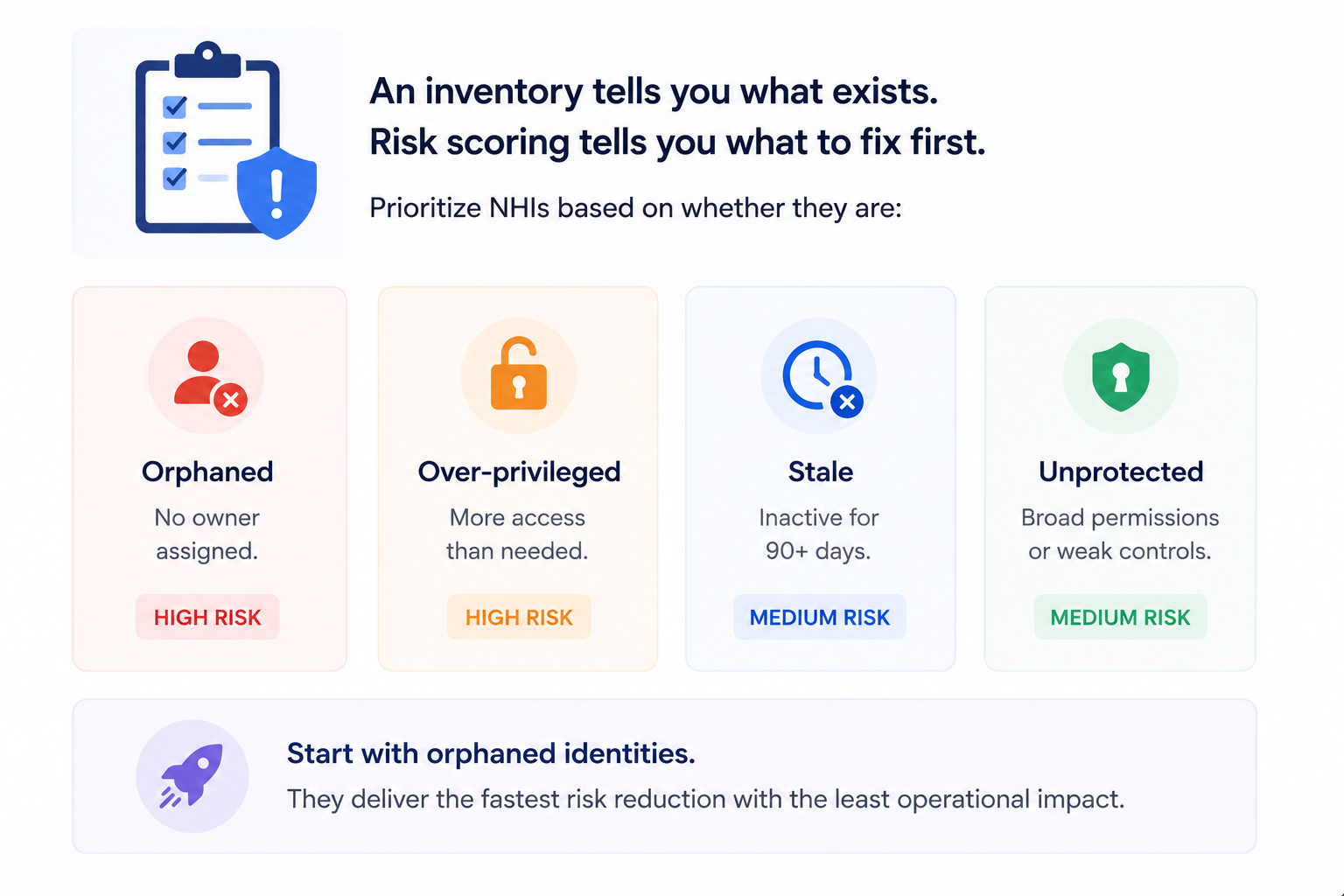
Start with orphaned identities, they usually deliver the fastest risk reduction with the least operational impact.
Step 4: Execute Your First Access Review Cycle
Run your first review within 30 days of launching the program, focusing only on high-risk NHIs. For each identity, ask:
- Does it still need to exist?
- Is its permission scope appropriate?
- Who owns it today?
Keep the first workflow simple: confirm, flag, or revoke. You can introduce more complex approval workflows once the program matures.
Step 5: Establish a Governance Cadence and Audit Trail
A governance program without a cadence is a one-time audit. Set the recurring review cycle such as quarterly for high-risk NHIs, semi-annual for medium-risk and automate the trigger so it doesn't depend on someone remembering to run it.
Record every action like revocations, permission changes, ownership updates, and approvals with the reviewer and timestamp.
After 90 days, the goal is a complete inventory, risk-tiered identities, recurring review cycles, and an audit trail that demonstrates your governance process end to end.
3. How CloudEagle's NHI Module Delivers the Full Program in One Platform
CloudEagle's NHI module maps directly to all five steps: inventory, risk scoring, access reviews, ownership assignment, and audit trail. Here's what each capability looks like in the product:
A. CloudEagle's NHI Dashboard: Inventory and Risk in One View
The moment CloudEagle connects to your environment, the NHI dashboard surfaces total NHIs, environment breakdown, identity type split, and a risk-prioritized insights panel that tells your security team exactly where to start.
Here's how the NHI dashboard surfaces inventory and risk simultaneously:
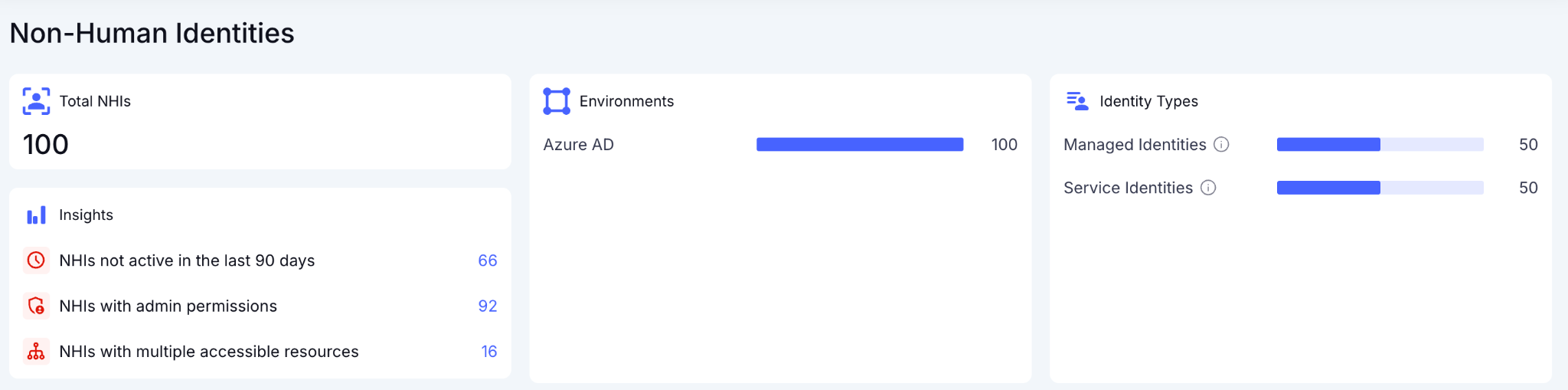
In CloudEagle's NHI dashboard, the insights panel flags the three highest-priority risk categories immediately: NHIs not active in the last 90 days, NHIs with admin permissions, and NHIs with multiple accessible resources:
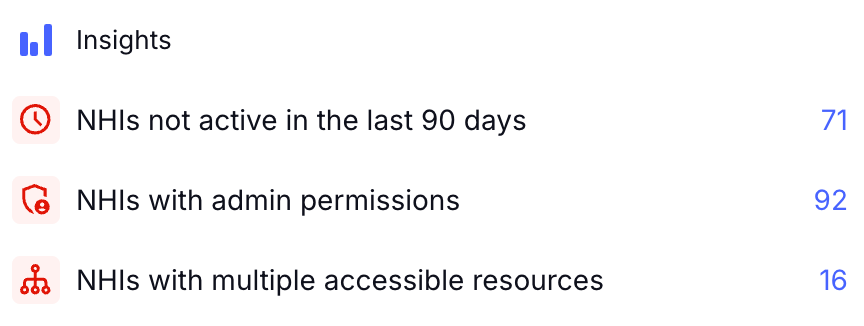
In the Freshworks deployment, this view was live in production the moment Azure AD was connected without separate data collection exercise and manual export.
AWS and GCP are confirmed on the roadmap, expanding the same inventory and risk layer to cloud infrastructure NHIs in phase two.
B. CloudEagle's NHI Inventory: Every Identity, Credential Type, and Owner in One Table
The full NHI inventory delivers the detailed per-identity view the program requires, credential type, last activity date, source environment, and owner status visible in a single table without opening a separate system.
Here's how the NHI inventory surfaces the full per-identity picture:
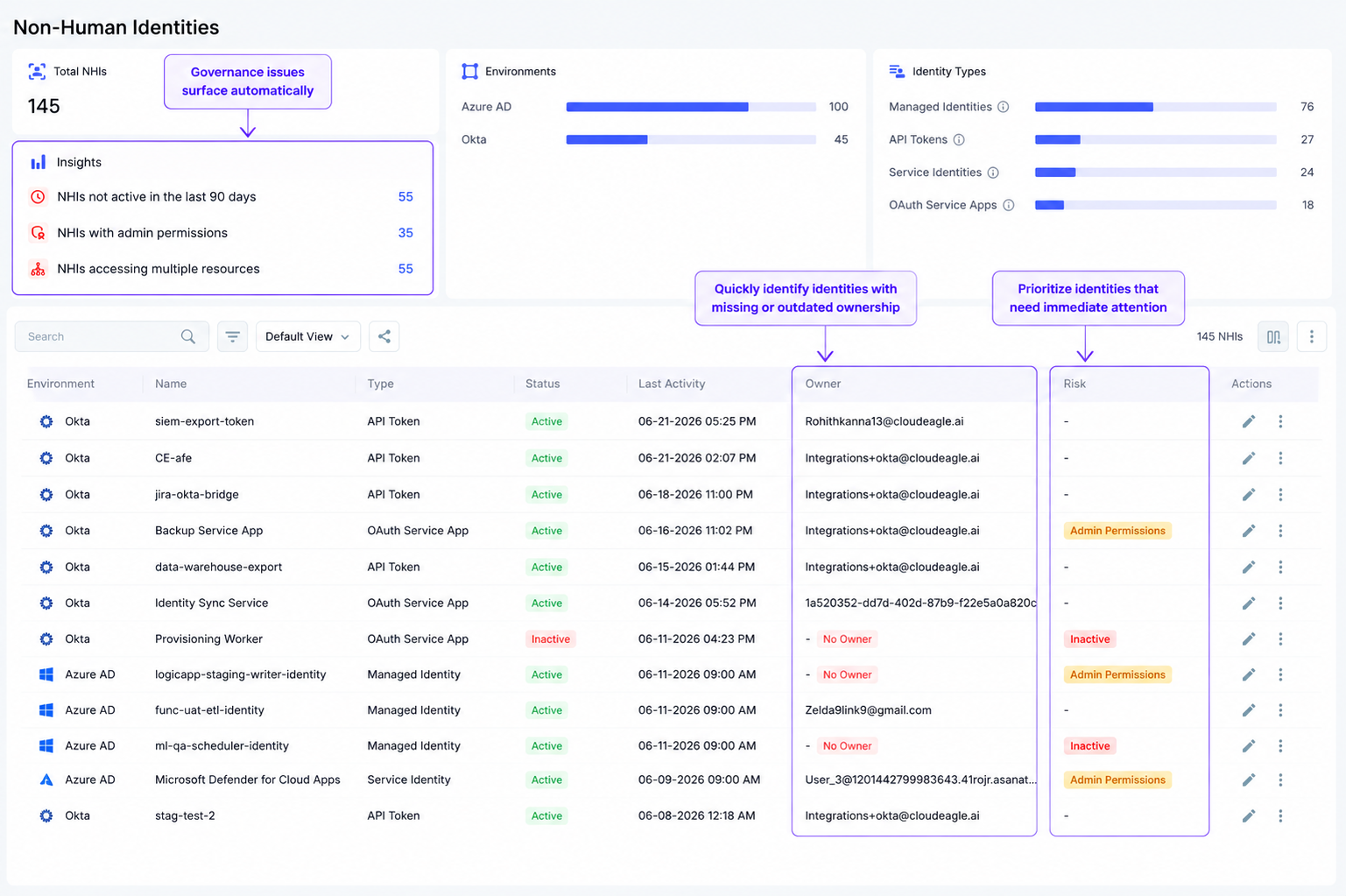
In CloudEagle's NHI inventory, every identity appears with its source, type, active status, credential type, last activity date, and assigned owner. Every NHI with a missing owner is immediately visible:
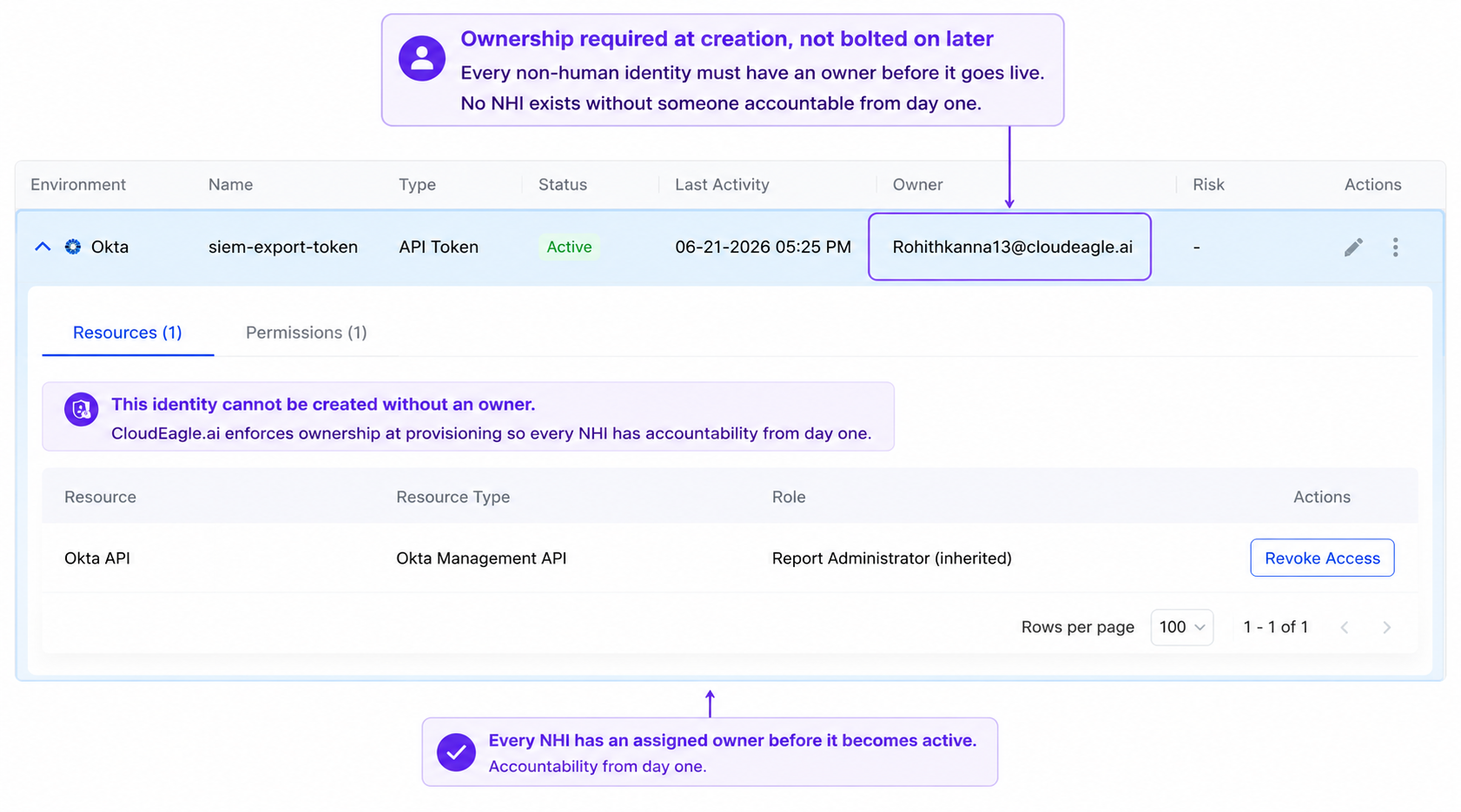
Expanding any row surfaces the role and permission drill-down, the exact view an access review requires to answer whether the permission scope is still appropriate.
C. Ownership Assignment: Every Unowned NHI Flagged and Routed
CloudEagle flags every unowned NHI automatically and routes it to the most likely owner based on application context including the integration creator, the application administrator, or the team responsible for the connected system.
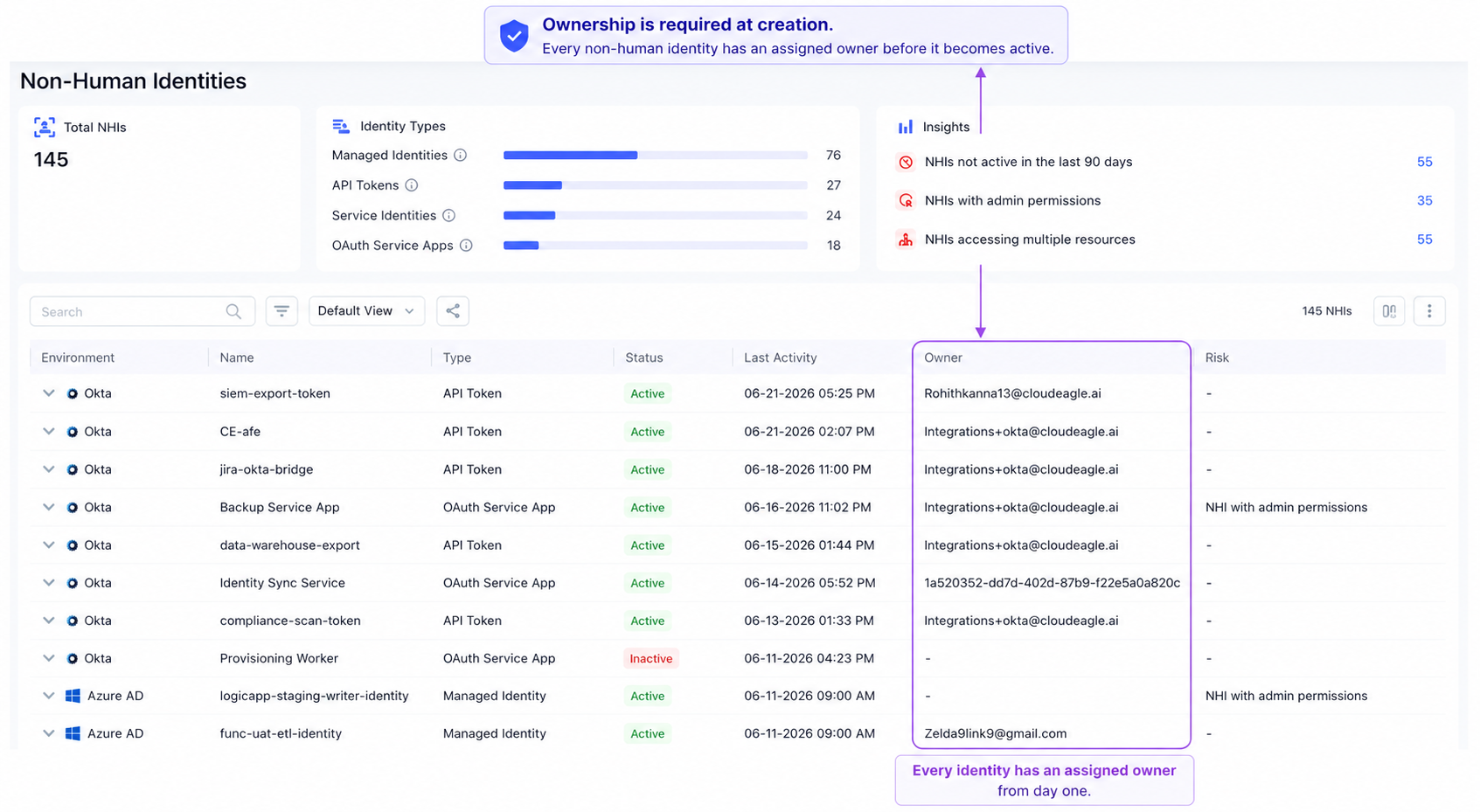
Every unowned NHI surfaces in a queue with suggested owner, application context, and permission scope. Ownership is confirmed before the next review cycle rather than discovered during an incident.
D. Audit Log: Every Governance Action Timestamped and Traceable
Every action taken on a non-human identity such as ownership assignment, access revocation, permission downscope, credential rotation is logged automatically with the action, the change, who performed it, and the exact timestamp.
In CloudEagle's audit log, every governance action is timestamped and attributable, producing the defensible evidence trail the program requires without any manual compilation:
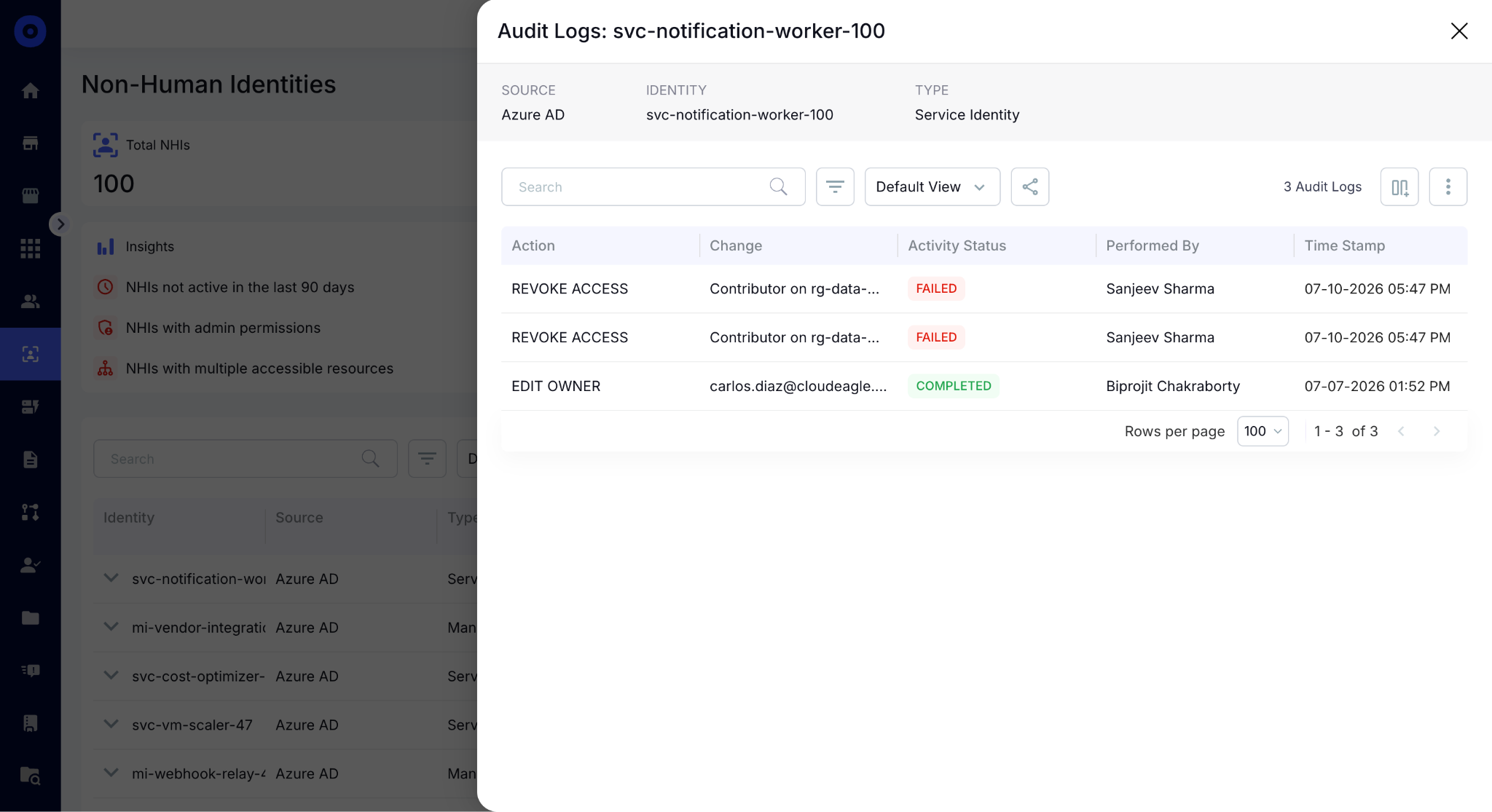
When an auditor asks who owns a specific service account and what actions have been taken on it, the answer is already in CloudEagle, not assembled from Jira tickets the night before the review.
You Can't Secure What You Can't Identify


4. Conclusion
An NHI governance program doesn't have to be built from scratch or require a new tool category.
The organizations getting ahead of this are starting with the SaaS applications that already have the highest NHI density, building the inventory and risk layer first, and running their first review cycle within 30 days of launch.
CloudEagle.ai is an AI-powered Security and Identity Governance platform that gives security and IAM teams the inventory, risk scoring, review workflow, and action layer to launch a functioning NHI governance program.
5. FAQs
1. What happens to NHIs created by contractors or vendors who are no longer engaged?
CloudEagle flags NHIs as orphaned the moment their associated owner is no longer active in the connected HRIS or IdP. Contractor and vendor credentials don't require a separate offboarding process, they surface in the ownership queue automatically when the human relationship ends.
2. Can CloudEagle detect NHIs that were created directly inside SaaS applications without going through IT?
CloudEagle surfaces NHIs through the same integration layer it uses for SaaS discovery, pulling directly from Azure AD, Salesforce, GitHub, and other connected applications rather than relying on SSO logs. Credentials created inside vendor consoles without IT involvement appear in the inventory the moment the integration connects.
3. How does CloudEagle handle NHIs with rotating credentials, like API keys that change on a scheduled basis?
CloudEagle tracks NHIs at the identity level, not the credential level, so a rotating API key tied to the same service account remains governed continuously regardless of how frequently the underlying credential changes. Rotation events are logged in the audit trail without creating duplicate or orphaned identity records.
4. Can CloudEagle distinguish between NHIs that carry production access and those limited to development or staging environments?
CloudEagle's inventory view surfaces the resource type and environment context for every NHI role assignment, visible in the Roles tab per identity. Production, staging, and development access appear separately, so risk prioritization reflects actual blast radius rather than treating all NHIs equally regardless of environment.
5. Does CloudEagle support bulk remediation for large NHI populations, or is every action taken individually?
Remediation actions can be applied in bulk across filtered NHI segments, for example, revoking access for all identities inactive for 180 days or assigning ownership to all unowned NHIs in a specific application simultaneously. Every bulk action is logged individually in the audit trail so the compliance record remains granular even when the remediation was executed at scale.
Modern SaaS Includes Machine Identities


.avif)


.avif)
.avif)




.png)







.avif)
.avif)
.avif)


