You need to enable JavaScript in order to use the AI chatbot tool powered by ChatBot

Identity Drift in SaaS: Why the Access You Granted in 2024 Is a Compliance Problem in 2026

Share via:
blog-cms-banner-bg
Little-Known Negotiation Hacks to Get the Best Deal on Slack
cta-bg-blogDownload Your Copy

HIPAA Compliance Checklist for 2025

Download PDF

Your last access review shows who has access to what and when it was approved. That's it.

It won't tell you that the person changed roles eight months ago and kept the old permissions.

It won't tell you the person left the company, and three apps outside SSO never got the memo.

Nor would it tell you that the project this access was granted for ended a year ago.

That is the identity drift problem. Access granted correctly in 2024 doesn't update itself, and by 2026, the gap between what a review shows and what's actually true is exactly what auditors are finding.

The answer is connecting access governance directly to the HRIS event that should have triggered a change in the first place. Here is exactly how that gap forms and what closes it.

TL;DR

  • Identity drift is the gradual mismatch between an employee's current role and the access granted under a previous one
  • 2023 and 2024's hiring and SaaS expansion outpaced deprovisioning workflows, so access today still reflects the organization as it was
  • Five mechanisms drive it: untriggered role changes, terminations that miss apps outside the IDP, non-authoritative identity data, project access that never expires, and rubber-stamped reviews
  • Verizon's DBIR names Privilege Misuse as one of its core breach patterns, alongside credential abuse and phishing as leading causes
  • Fixing drift means moving the trigger for access change from a manually filed IT ticket to the HRIS event itself

1. Why 2026 Is When Identity Drift Finally Catches Up With You

2023 and 2024 were a SaaS land grab. Companies hired fast, restructured faster, and provisioned access to match the pace.

Almost nobody built a matching deprovisioning workflow. Nobody was thinking about what that access would look like two years later.

They're thinking about it now. Access profiles today still reflect headcount, team structures, and role assignments from an organization that no longer exists, and that gap is exactly what 2026 audits are surfacing.

The core question every access review is supposed to answer hasn't changed: 

  • If someone changed roles, did their permissions update? 
  • If they left, was their access actually terminated? 
  • Most teams can answer that question for the systems they're watching closely. 

Few can answer it for everything else.

2. The 5 Ways Identity Drift Accumulates Without Anyone Noticing

Identity drift comes from one dramatic failure. It comes from five ordinary processes that each leave a small gap, and the gaps compound for two years before anyone looks.

1. Role Changes That Don't Trigger Access Changes

An employee gets promoted from individual contributor to manager. They get access to the manager-level tools.

Nobody removes the IC-level tools, because no automated trigger connects a role change to an access revision. Two years later:

  • The person holds both the manager stack and the individual contributor stack
  • The exposure surface has effectively doubled, with nobody deciding that on purpose
  • No record exists explaining why the old access is still active

The root cause sits at the system boundary. Role changes happen in HR.

Access lives in SaaS tools. Without a live connection between the two, the access profile freezes at the last manual update and stays there.

2. Terminations Where Access Outlasts the Employee

Someone leaves. IT gets a ticket from HR, from a manager, or sometimes not at all.

The ticket gets worked, and the primary systems get deprovisioned. The apps' IT never knew the person had access to stay exactly as they were.

That gap isn't a rounding error. CloudEagle's IGA Report surveyed enterprises directly on this, and the numbers are stark:

  • 48% of former employees retain access six months past termination, on average
  • 35% of organizations see access linger for over half of their departed employees
  • 75% of IT-related access stays active post-termination, the worst offender of any department, largely due to admin rights and system dependencies nobody wants to touch

An ex-employee with active access to Salesforce, Notion, or GitHub is exactly the kind of finding that shows up in SOC 2 and ISO 27001 audits. Offboarding workflows are built around the apps IT already knows about. 

Shadow IT and anything outside SSO is invisible to that workflow by design, which means the riskiest accounts are the ones nobody is watching.
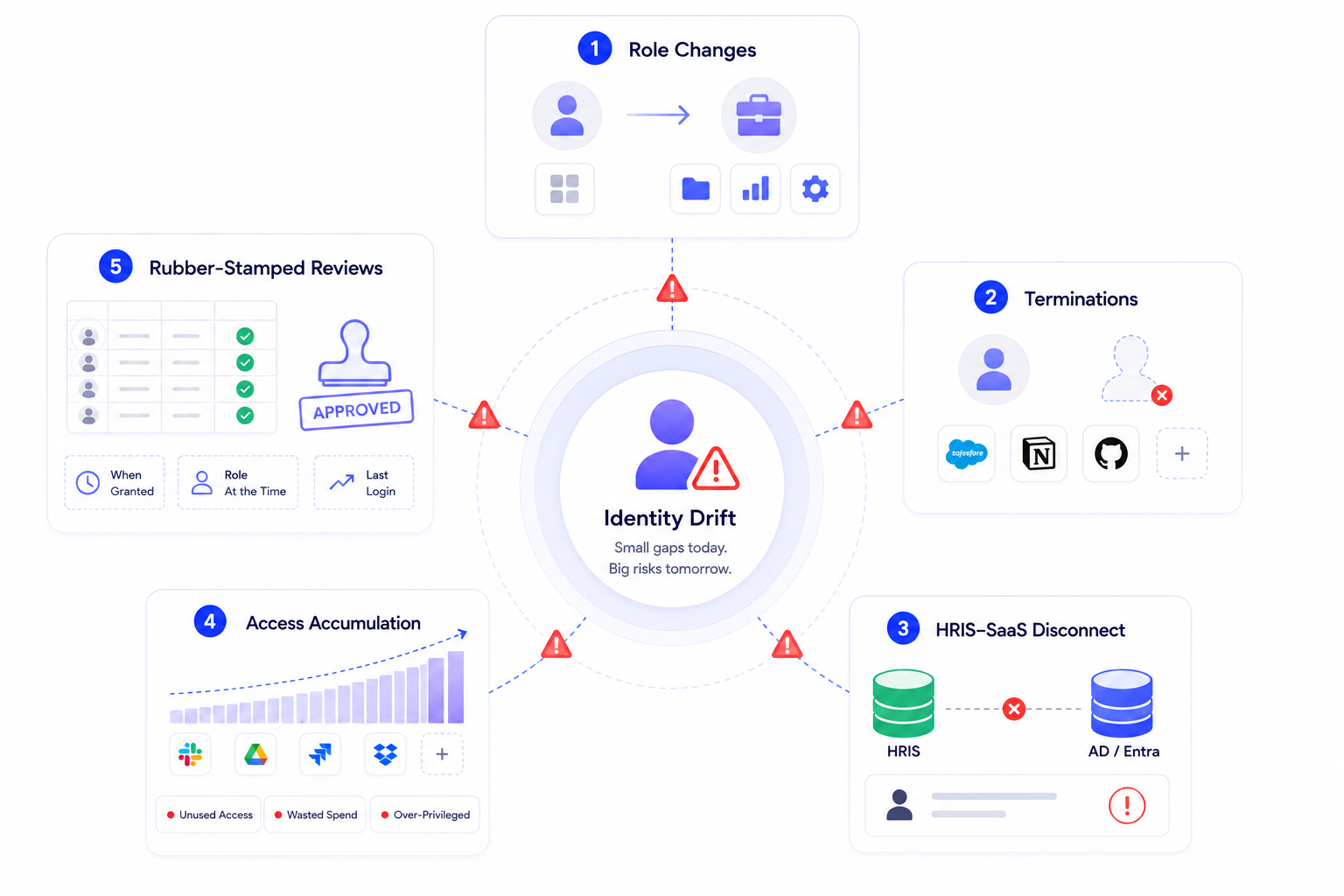
Identity governance dashboard illustrating the five leading causes of identity drift: role changes, employee terminations, HRIS disconnects, access accumulation, and ineffective access reviews that create security risks and excessive user permissions.

3. The HRIS-SaaS Disconnect That Makes Access Decisions Stale by Default

HR is the system of record for who someone is. Their role, department, employment status, and reporting line all live there first.

That data is rarely connected directly to SaaS access governance. Most teams instead rely on Active Directory or Entra as the working source of truth, but those are secondary systems:

  • Job title and department fields in AD can be edited manually by an employee or their manager
  • Nothing forces AD to stay synced with what HR actually has on record
  • An access review built on AD data inherits whatever drift already exists in AD itself

This is identity drift happening at the data layer, before a single access decision gets made. HRIS holds the truth; SaaS governance reads from a system one step removed from it.

4. Access Accumulation Across Projects and Teams

Every cross-functional initiative grants a little more access. A workspace here, a shared drive there, a specific view for one quarter's project.

When the project ends, nobody revokes the access. There's no project-end trigger tied to access governance in the first place.

The pattern shows up clearly in tool sprawl. Employees often hold live seats in dozens of app instances or workspaces, but only use a handful regularly. Nobody removes them from the unused ones because nobody is tracking which are actually in use.

Over two years, that adds up to:

  • Access to systems that have nothing to do with the person's current role
  • Licensing costs sitting underneath access nobody is using
  • A quiet, direct violation of least privilege, exactly what auditors are trained to check for

5. Rubber-Stamped Access Reviews That Don't Actually Catch Drift

The quarterly review arrives. Reviewers get a spreadsheet listing hundreds of users, each one needing a decision: keep or remove.

What they don't get:

So most reviewers approve the bulk and flag only the obvious outliers. The review happens. The documentation exists.

But it never does the one thing it's supposed to do: catch access that no longer matches a current role or employment status. Auditors are increasingly asking not whether a review happened, but whether it was effective. A rubber-stamped review fails that question every time, no matter how clean the paperwork looks.

48% of Ex-Employees Still Have Access Six Months Later

Use this checklist to find every drift before auditors do.
Download Checklist

3. The Compounding Problem: Why Auditors Find a Pattern

Each mechanism above is manageable in isolation. Left unchecked for a single quarter, most teams catch it before it matters.

The compliance problem appears when all five run at once, undetected, for two years.

Independent breach data backs this up. Verizon's Data Breach Investigations Report names Privilege Misuse as one of its core breach patterns, distinct from but alongside credential abuse and phishing. That's not a hypothetical category. It's access that should have been revisited long before an attacker found it.

By the time an audit surfaces the issue, the finding is never one stale account. It's a pattern across:

  • Role changes that never updated permissions
  • Terminations that left apps untouched
  • Project access that outlived the project
  • Reviews that approved without scrutiny

All four point to the same root cause: nothing in the process was built to notice drift as it happened.

As Nidhi Jain, CEO and Co-founder of CloudEagle.ai, puts it: "Every quarter we wait to catch drift is a quarter where the gap between what access says and what's actually true keeps getting wider. By the time it shows up in an audit, it's not a fluke. It's two years of small decisions nobody revisited."

Auditors Don't Find One Stale Account. They Find a Pattern

This checklist catches the drift before it becomes a finding.
Download Checklist

4. Same Access, Different Verdict: Why Audit Timing Changes the Finding

Picture the same access grant checked at three different points.

Month 3:

The person still holds the role that justified it. Nothing to flag.

Month 18:

They've changed teams, but the access is recent enough that a reviewer might assume it's still relevant. Borderline, easy to wave through.

Month 24, audit week:

Same access, same person, same SaaS tool. Now it's a finding, because two years is long enough that "still relevant" stopped being a reasonable assumption a long time ago.

Nothing about the access changed across those three checks. What changed was the distance between when it was granted and when someone finally looked. That distance is the actual variable auditors are testing for, more than the access itself.

This is why annual or biennial audit cycles are structurally worse at catching drift than the underlying risk would suggest. 

A SOC 2 Type II observation window or an annual ISO 27001 surveillance audit only samples access at specific points in time. Drift that started the week after the last audit has the maximum possible runway before the next one catches it. The control didn't fail. The clock did.

For the operational side of how this actually happens day to day, role changes, repo access, and shared workspaces, see The Identity Drift Crisis.

5. What Most Access Reviews Miss, and What Closes the Gap

Most teams already know quarterly reviews aren't enough. The fix isn't running them more often. It's changing what triggers an access change, and what reviewers see when they finally sit down to decide.

Three structural gaps explain why drift keeps winning, and what closes each one, the same problems CloudEagle's identity governance approach is built to address.

1. The Trigger Problem: IT Tickets Don't Scale to Every Role Change

Role changes and terminations happen in HR systems first. Access lives in SaaS tools. Without a direct line between the two, someone has to remember to file a ticket, and that's exactly the step that gets skipped under deadline pressure.

How CloudEagle.ai closes it:

  • Connects directly to the HRIS, so role changes and terminations are visible the moment they're recorded
  • Fires the access governance action automatically from that HRIS event, not from a ticket someone has to remember to file
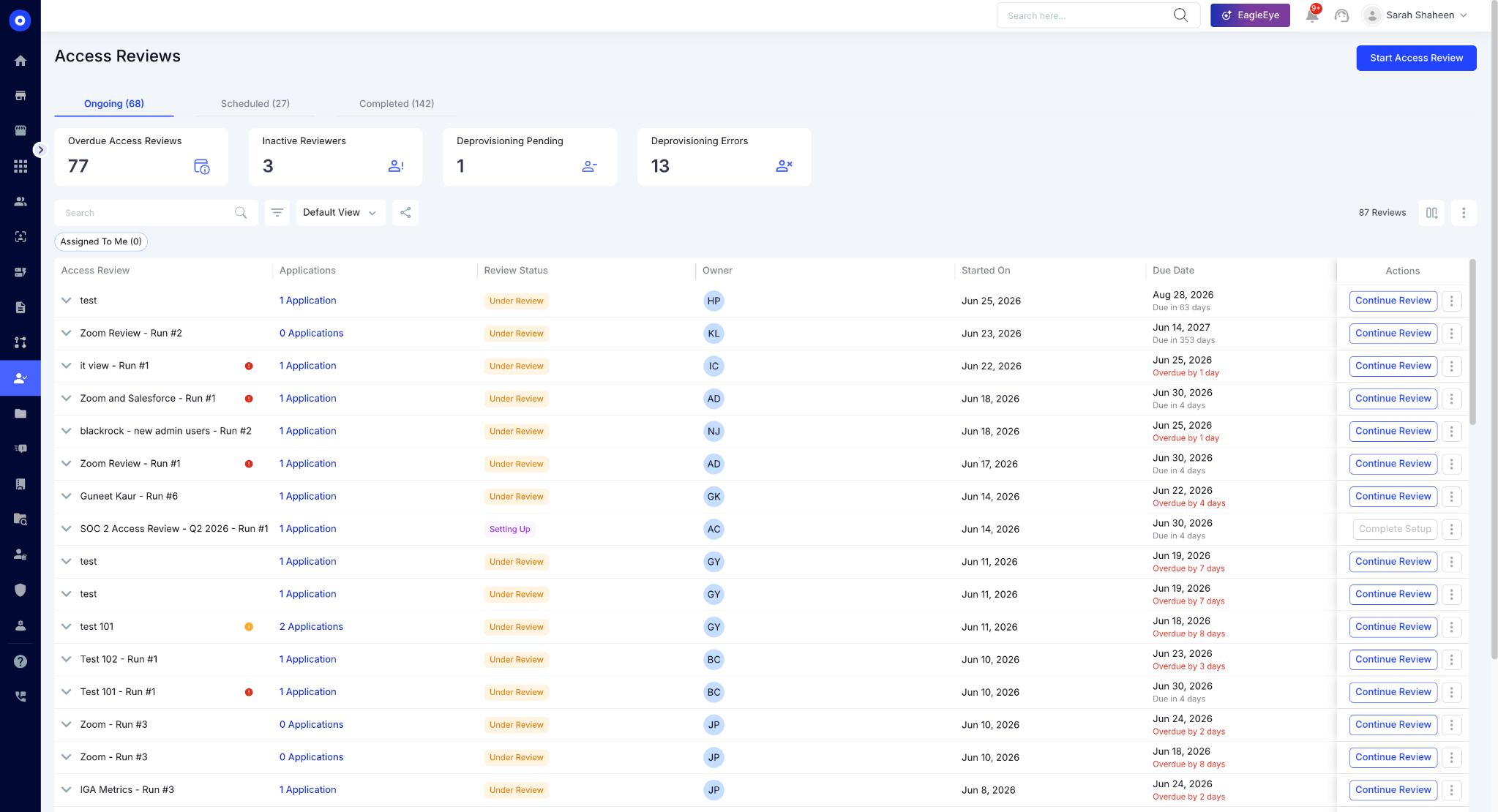
Access Reviews dashboard showing ongoing review campaigns, overdue certifications, deprovisioning issues, review owners, due dates, and application-level review progress to simplify user access governance and compliance.

  • Keeps the trigger at the source of the change, not three systems downstream of it

2. The Context Problem: A Bare User List Invites Rubber-Stamping

A spreadsheet with hundreds of rows and no context turns every review into a guessing game. Reviewers don't know when access was granted, what role the person had then, or whether they've logged in since. So they approve the bulk and move on.

How CloudEagle.ai closes it:

  • Shows reviewers when access was granted and what role the person held at the time

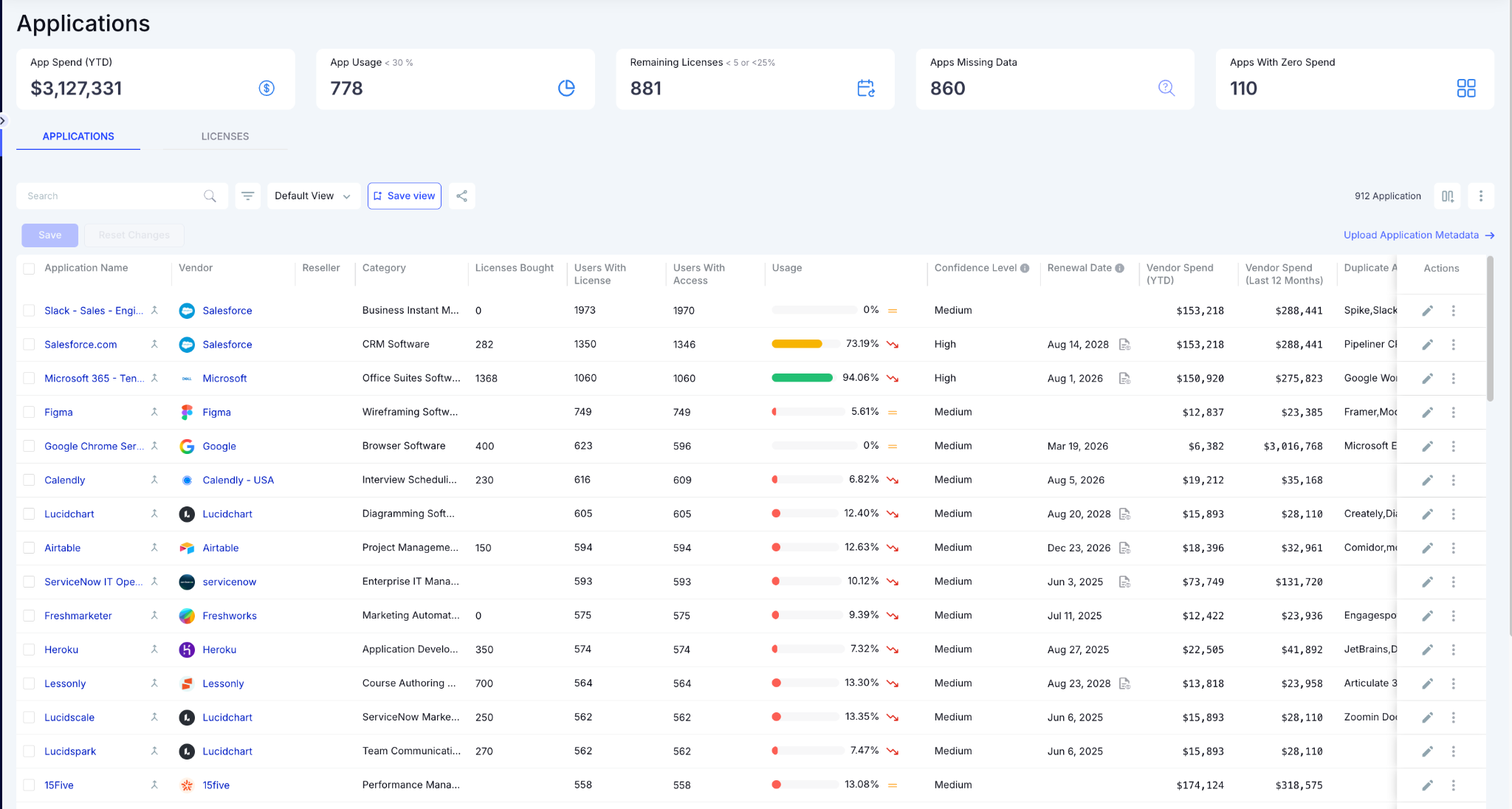
Application inventory dashboard providing a centralized view of SaaS applications, license allocation, user access, utilization, renewal dates, vendor spend, and duplicate applications to optimize software usage and costs.

  • Surfaces recent login activity alongside current HRIS status, so mismatches are visible at a glance
  • Exports the full review trail automatically as audit-ready evidence, instead of assembling it by hand the week before the audit

3. The Coverage Problem: Reviews Built Around the IDP Miss the Apps That Cause Findings

Reviews scoped to SSO-connected apps look complete on paper. They miss exactly the shadow IT layer where drift accumulates fastest, the tools nobody remembered to bring under IT's umbrella in the first place.

How CloudEagle.ai closes it:

  • Runs discovery first, across every app the organization actually uses, not just the ones behind SSO
Expanded access review showing application-level certification details, pending users, accepted and rejected reviews, assigned reviewers, and review actions to streamline access certification workflows.

  • Brings apps outside the identity provider into the same review process as everything else
  • Matches review coverage to the real app environment, not the convenient subset of it

5. FAQs

1. What is identity drift in SaaS access management? 

Identity drift is the gradual gap between an employee's current role and the access they were granted under a previous one.

2. Why do quarterly access reviews fail to catch identity drift? 

Reviewers face large, context-free user lists and tend to approve the majority, missing access that drifted since the last cycle.

3. How much access do ex-employees typically retain after leaving? 

CloudEagle's IGA Report found that 48% of former employees retain access six months post-termination on average, with IT accounts retaining access at the highest rate.

4. What triggers should organizations use to catch access drift early? 

Role changes, promotions, department transfers, and terminations recorded in the HRIS should automatically trigger a review or revocation.

5. Why is Active Directory data not reliable for access decisions? 

AD fields like job title and department can be edited manually, so they aren't authoritative compared to HRIS records.

See how CloudEagle.ai automates user access reviews with HRIS-triggered lifecycle governance. Book a demo.

Advertisement for a SaaS Subscription Tracking Template with a call-to-action button to download and a partial graphic of a tablet showing charts.Banner promoting a SaaS Agreement Checklist to streamline SaaS management and avoid budget waste with a call-to-action button labeled Download checklist.Blue banner with text 'The Ultimate Employee Offboarding Checklist!' and a black button labeled 'Download checklist' alongside partial views of checklist documents from cloudeagle.ai.Digital ad for download checklist titled 'The Ultimate Checklist for IT Leaders to Optimize SaaS Operations' by cloudeagle.ai, showing checklist pages.Slack Buyer's Guide offer with text 'Unlock insider insights to get the best deal on Slack!' and a button labeled 'Get Your Copy', accompanied by a preview of the guide featuring Slack's logo.Monday Pricing Guide by cloudeagle.ai offering exclusive pricing secrets to maximize investment with a call-to-action button labeled Get Your Copy and an image of the guide's cover.Blue banner for Canva Pricing Guide by cloudeagle.ai offering a guide to Canva costs, features, and alternatives with a call-to-action button saying Get Your Copy.Blue banner with white text reading 'Little-Known Negotiation Hacks to Get the Best Deal on Slack' and a white button labeled 'Get Your Copy'.Blue banner with text 'Little-Known Negotiation Hacks to Get the Best Deal on Monday.com' and a white button labeled 'Get Your Copy'.Blue banner with text 'Little-Known Negotiation Hacks to Get the Best Deal on Canva' and a white button labeled 'Get Your Copy'.Banner with text 'Slack Buyer's Guide' and a 'Download Now' button next to images of a guide titled 'Slack Buyer’s Guide: Features, Pricing & Best Practices'.Digital cover of Monday Pricing Guide with a button labeled Get Your Copy on a blue background.Canva Pricing Guide cover with a button labeled Get Your Copy on a blue gradient background.

Enter your email to
unlock the report

Oops! Something went wrong while submitting the form.
License Count
Benchmark
Per User/Per Year

Enter your email to
unlock the report

Oops! Something went wrong while submitting the form.
License Count
Benchmark
Per User/Per Year

Enter your email to
unlock the report

Oops! Something went wrong while submitting the form.
Notion Plus
License Count
Benchmark
Per User/Per Year
100-500
$67.20 - $78.72
500-1000
$59.52 - $72.00
1000+
$51.84 - $57.60
Canva Pro
License Count
Benchmark
Per User/Per Year
100-500
$74.33-$88.71
500-1000
$64.74-$80.32
1000+
$55.14-$62.34

Enter your email to
unlock the report

Oops! Something went wrong while submitting the form.

Enter your email to
unlock the report

Oops! Something went wrong while submitting the form.
Zoom Business
License Count
Benchmark
Per User/Per Year
100-500
$216.00 - $264.00
500-1000
$180.00 - $216.00
1000+
$156.00 - $180.00

Enter your email to
unlock the report

Oops! Something went wrong while submitting the form.

Get the Right Security Platform To Secure Your Cloud Infrastructure

Please enter a business email
Thank you!
The 2023 SaaS report has been sent to your email. Check your promotional or spam folder.
Oops! Something went wrong while submitting the form.

Access full report

Please enter a business email
Thank you!
The 2023 SaaS report has been sent to your email. Check your promotional or spam folder.
Oops! Something went wrong while submitting the form.

Your last access review shows who has access to what and when it was approved. That's it.

It won't tell you that the person changed roles eight months ago and kept the old permissions.

It won't tell you the person left the company, and three apps outside SSO never got the memo.

Nor would it tell you that the project this access was granted for ended a year ago.

That is the identity drift problem. Access granted correctly in 2024 doesn't update itself, and by 2026, the gap between what a review shows and what's actually true is exactly what auditors are finding.

The answer is connecting access governance directly to the HRIS event that should have triggered a change in the first place. Here is exactly how that gap forms and what closes it.

TL;DR

  • Identity drift is the gradual mismatch between an employee's current role and the access granted under a previous one
  • 2023 and 2024's hiring and SaaS expansion outpaced deprovisioning workflows, so access today still reflects the organization as it was
  • Five mechanisms drive it: untriggered role changes, terminations that miss apps outside the IDP, non-authoritative identity data, project access that never expires, and rubber-stamped reviews
  • Verizon's DBIR names Privilege Misuse as one of its core breach patterns, alongside credential abuse and phishing as leading causes
  • Fixing drift means moving the trigger for access change from a manually filed IT ticket to the HRIS event itself

1. Why 2026 Is When Identity Drift Finally Catches Up With You

2023 and 2024 were a SaaS land grab. Companies hired fast, restructured faster, and provisioned access to match the pace.

Almost nobody built a matching deprovisioning workflow. Nobody was thinking about what that access would look like two years later.

They're thinking about it now. Access profiles today still reflect headcount, team structures, and role assignments from an organization that no longer exists, and that gap is exactly what 2026 audits are surfacing.

The core question every access review is supposed to answer hasn't changed: 

  • If someone changed roles, did their permissions update? 
  • If they left, was their access actually terminated? 
  • Most teams can answer that question for the systems they're watching closely. 

Few can answer it for everything else.

2. The 5 Ways Identity Drift Accumulates Without Anyone Noticing

Identity drift comes from one dramatic failure. It comes from five ordinary processes that each leave a small gap, and the gaps compound for two years before anyone looks.

1. Role Changes That Don't Trigger Access Changes

An employee gets promoted from individual contributor to manager. They get access to the manager-level tools.

Nobody removes the IC-level tools, because no automated trigger connects a role change to an access revision. Two years later:

  • The person holds both the manager stack and the individual contributor stack
  • The exposure surface has effectively doubled, with nobody deciding that on purpose
  • No record exists explaining why the old access is still active

The root cause sits at the system boundary. Role changes happen in HR.

Access lives in SaaS tools. Without a live connection between the two, the access profile freezes at the last manual update and stays there.

2. Terminations Where Access Outlasts the Employee

Someone leaves. IT gets a ticket from HR, from a manager, or sometimes not at all.

The ticket gets worked, and the primary systems get deprovisioned. The apps' IT never knew the person had access to stay exactly as they were.

That gap isn't a rounding error. CloudEagle's IGA Report surveyed enterprises directly on this, and the numbers are stark:

  • 48% of former employees retain access six months past termination, on average
  • 35% of organizations see access linger for over half of their departed employees
  • 75% of IT-related access stays active post-termination, the worst offender of any department, largely due to admin rights and system dependencies nobody wants to touch

An ex-employee with active access to Salesforce, Notion, or GitHub is exactly the kind of finding that shows up in SOC 2 and ISO 27001 audits. Offboarding workflows are built around the apps IT already knows about. 

Shadow IT and anything outside SSO is invisible to that workflow by design, which means the riskiest accounts are the ones nobody is watching.

Identity governance dashboard illustrating the five leading causes of identity drift: role changes, employee terminations, HRIS disconnects, access accumulation, and ineffective access reviews that create security risks and excessive user permissions.

3. The HRIS-SaaS Disconnect That Makes Access Decisions Stale by Default

HR is the system of record for who someone is. Their role, department, employment status, and reporting line all live there first.

That data is rarely connected directly to SaaS access governance. Most teams instead rely on Active Directory or Entra as the working source of truth, but those are secondary systems:

  • Job title and department fields in AD can be edited manually by an employee or their manager
  • Nothing forces AD to stay synced with what HR actually has on record
  • An access review built on AD data inherits whatever drift already exists in AD itself

This is identity drift happening at the data layer, before a single access decision gets made. HRIS holds the truth; SaaS governance reads from a system one step removed from it.

4. Access Accumulation Across Projects and Teams

Every cross-functional initiative grants a little more access. A workspace here, a shared drive there, a specific view for one quarter's project.

When the project ends, nobody revokes the access. There's no project-end trigger tied to access governance in the first place.

The pattern shows up clearly in tool sprawl. Employees often hold live seats in dozens of app instances or workspaces, but only use a handful regularly. Nobody removes them from the unused ones because nobody is tracking which are actually in use.

Over two years, that adds up to:

  • Access to systems that have nothing to do with the person's current role
  • Licensing costs sitting underneath access nobody is using
  • A quiet, direct violation of least privilege, exactly what auditors are trained to check for

5. Rubber-Stamped Access Reviews That Don't Actually Catch Drift

The quarterly review arrives. Reviewers get a spreadsheet listing hundreds of users, each one needing a decision: keep or remove.

What they don't get:

So most reviewers approve the bulk and flag only the obvious outliers. The review happens. The documentation exists.

But it never does the one thing it's supposed to do: catch access that no longer matches a current role or employment status. Auditors are increasingly asking not whether a review happened, but whether it was effective. A rubber-stamped review fails that question every time, no matter how clean the paperwork looks.

48% of Ex-Employees Still Have Access Six Months Later

Use this checklist to find every drift before auditors do.
Download Checklist

3. The Compounding Problem: Why Auditors Find a Pattern

Each mechanism above is manageable in isolation. Left unchecked for a single quarter, most teams catch it before it matters.

The compliance problem appears when all five run at once, undetected, for two years.

Independent breach data backs this up. Verizon's Data Breach Investigations Report names Privilege Misuse as one of its core breach patterns, distinct from but alongside credential abuse and phishing. That's not a hypothetical category. It's access that should have been revisited long before an attacker found it.

By the time an audit surfaces the issue, the finding is never one stale account. It's a pattern across:

  • Role changes that never updated permissions
  • Terminations that left apps untouched
  • Project access that outlived the project
  • Reviews that approved without scrutiny

All four point to the same root cause: nothing in the process was built to notice drift as it happened.

As Nidhi Jain, CEO and Co-founder of CloudEagle.ai, puts it: "Every quarter we wait to catch drift is a quarter where the gap between what access says and what's actually true keeps getting wider. By the time it shows up in an audit, it's not a fluke. It's two years of small decisions nobody revisited."

Auditors Don't Find One Stale Account. They Find a Pattern

This checklist catches the drift before it becomes a finding.
Download Checklist

4. Same Access, Different Verdict: Why Audit Timing Changes the Finding

Picture the same access grant checked at three different points.

Month 3:

The person still holds the role that justified it. Nothing to flag.

Month 18:

They've changed teams, but the access is recent enough that a reviewer might assume it's still relevant. Borderline, easy to wave through.

Month 24, audit week:

Same access, same person, same SaaS tool. Now it's a finding, because two years is long enough that "still relevant" stopped being a reasonable assumption a long time ago.

Nothing about the access changed across those three checks. What changed was the distance between when it was granted and when someone finally looked. That distance is the actual variable auditors are testing for, more than the access itself.

This is why annual or biennial audit cycles are structurally worse at catching drift than the underlying risk would suggest. 

A SOC 2 Type II observation window or an annual ISO 27001 surveillance audit only samples access at specific points in time. Drift that started the week after the last audit has the maximum possible runway before the next one catches it. The control didn't fail. The clock did.

For the operational side of how this actually happens day to day, role changes, repo access, and shared workspaces, see The Identity Drift Crisis.

5. What Most Access Reviews Miss, and What Closes the Gap

Most teams already know quarterly reviews aren't enough. The fix isn't running them more often. It's changing what triggers an access change, and what reviewers see when they finally sit down to decide.

Three structural gaps explain why drift keeps winning, and what closes each one, the same problems CloudEagle's identity governance approach is built to address.

1. The Trigger Problem: IT Tickets Don't Scale to Every Role Change

Role changes and terminations happen in HR systems first. Access lives in SaaS tools. Without a direct line between the two, someone has to remember to file a ticket, and that's exactly the step that gets skipped under deadline pressure.

How CloudEagle.ai closes it:

  • Connects directly to the HRIS, so role changes and terminations are visible the moment they're recorded
  • Fires the access governance action automatically from that HRIS event, not from a ticket someone has to remember to file

Access Reviews dashboard showing ongoing review campaigns, overdue certifications, deprovisioning issues, review owners, due dates, and application-level review progress to simplify user access governance and compliance.

  • Keeps the trigger at the source of the change, not three systems downstream of it

2. The Context Problem: A Bare User List Invites Rubber-Stamping

A spreadsheet with hundreds of rows and no context turns every review into a guessing game. Reviewers don't know when access was granted, what role the person had then, or whether they've logged in since. So they approve the bulk and move on.

How CloudEagle.ai closes it:

  • Shows reviewers when access was granted and what role the person held at the time

Application inventory dashboard providing a centralized view of SaaS applications, license allocation, user access, utilization, renewal dates, vendor spend, and duplicate applications to optimize software usage and costs.

  • Surfaces recent login activity alongside current HRIS status, so mismatches are visible at a glance
  • Exports the full review trail automatically as audit-ready evidence, instead of assembling it by hand the week before the audit

3. The Coverage Problem: Reviews Built Around the IDP Miss the Apps That Cause Findings

Reviews scoped to SSO-connected apps look complete on paper. They miss exactly the shadow IT layer where drift accumulates fastest, the tools nobody remembered to bring under IT's umbrella in the first place.

How CloudEagle.ai closes it:

  • Runs discovery first, across every app the organization actually uses, not just the ones behind SSO

Expanded access review showing application-level certification details, pending users, accepted and rejected reviews, assigned reviewers, and review actions to streamline access certification workflows.

  • Brings apps outside the identity provider into the same review process as everything else
  • Matches review coverage to the real app environment, not the convenient subset of it

5. FAQs

1. What is identity drift in SaaS access management? 

Identity drift is the gradual gap between an employee's current role and the access they were granted under a previous one.

2. Why do quarterly access reviews fail to catch identity drift? 

Reviewers face large, context-free user lists and tend to approve the majority, missing access that drifted since the last cycle.

3. How much access do ex-employees typically retain after leaving? 

CloudEagle's IGA Report found that 48% of former employees retain access six months post-termination on average, with IT accounts retaining access at the highest rate.

4. What triggers should organizations use to catch access drift early? 

Role changes, promotions, department transfers, and terminations recorded in the HRIS should automatically trigger a review or revocation.

5. Why is Active Directory data not reliable for access decisions? 

AD fields like job title and department can be edited manually, so they aren't authoritative compared to HRIS records.

See how CloudEagle.ai automates user access reviews with HRIS-triggered lifecycle governance. Book a demo.

CloudEagle.ai recognized in the 2025 Gartner® Magic Quadrant™ for SaaS Management Platforms
Download now
gartner chart
5x
Faster employee
onboarding
80%
Reduction in time for
user access reviews
30k
Workflows
automated
$15Bn
Analyzed in
contract spend
$2Bn
Saved in
SaaS spend

Streamline SaaS governance and save 10-30%

Book a Demo with Expert
CTA image