.avif)
%201.svg)


HIPAA Compliance Checklist for 2025

A developer sets up a service account for an integration project, and it does exactly what it's supposed to until the project ships and the developer moves to a different team.
Six months later, a new team inherits the codebase but not the account inventory that came with it, so the service account just keeps running with credentials that are never rotated and permissions that are never reviewed, still connected to three production systems with admin scope nobody remembers granting.
Nobody filed a ticket to keep it, and nobody filed one to delete it either, because no one was ever assigned to notice it existed in the first place.
Human identities come with offboarding triggers built in, while service account management in most organizations has none, and that gap is where the account has been sitting ever since. Finding stale service accounts starts with understanding why they pile up, and the reasons turn out to be far more structural than most teams expect.
TL;DR
- Stale service accounts accumulate because provisioning is instant and deprovisioning has no trigger. Negligence has little to do with it.
- Service account management comes down to three states: orphaned, over-permissioned, dormant. Each needs a different response.
- Stale accounts are a security and compliance risk with real operational costs attached, and all three compound quietly.
- Finding them requires a six-layer discovery framework that goes beyond your IDP, followed by a platform-by-platform pass through AD, AWS, and SaaS consoles.
- CloudEagle.ai surfaces stale accounts with context as part of ongoing service account management. It doesn't auto-decommission them.
1. Why Stale Service Accounts Pile Up (Six Reasons)
Service account management breaks down at a structural level: the systems built for human identity were never designed to track the accounts humans create.
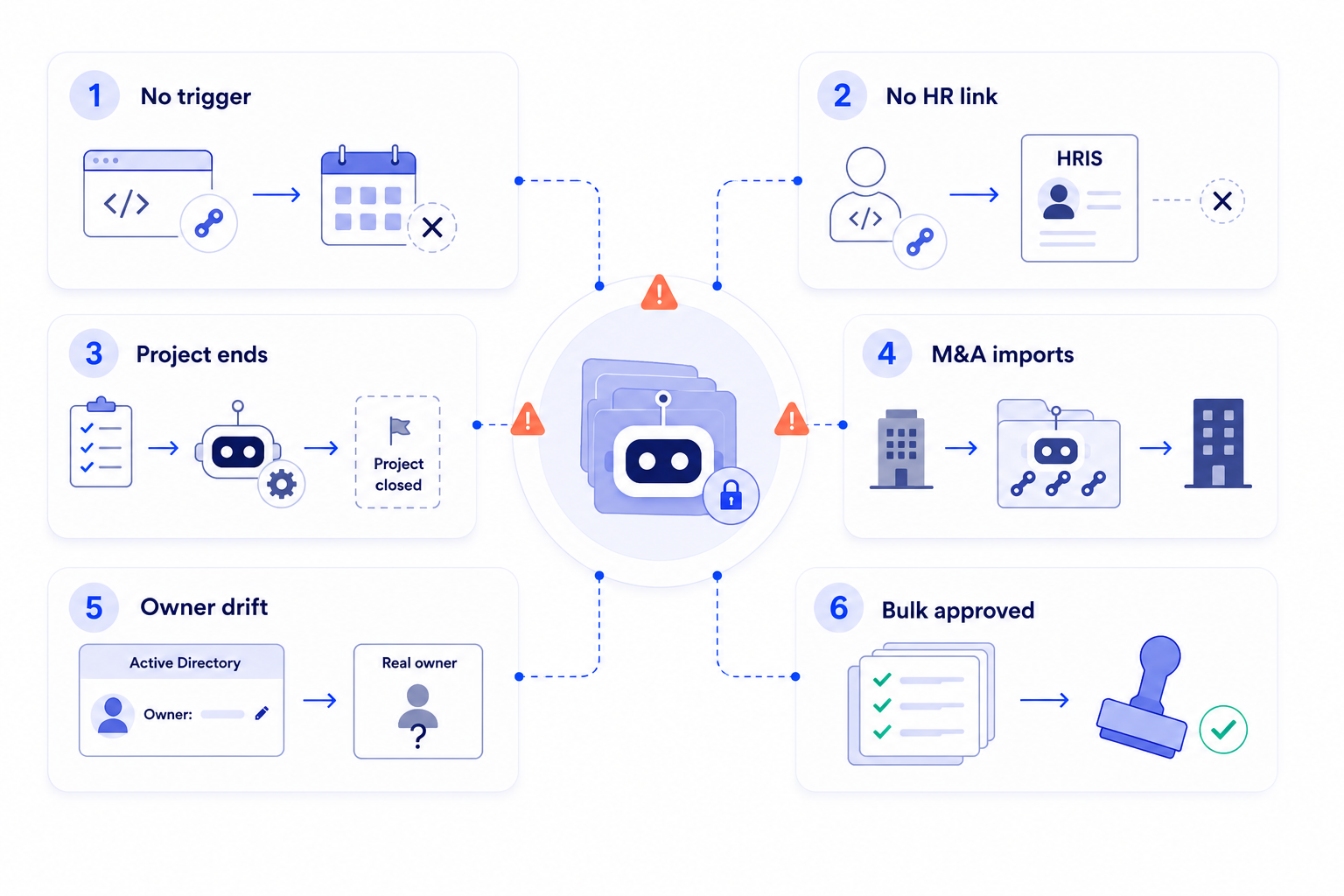
a) Provisioning is fast. Deprovisioning has no trigger:
Creating a service account takes minutes: an API key for a new integration, a scheduled job credential. Removing one requires a human to notice it's no longer needed, and nothing fires automatically when that happens.
One IT leader described the closest thing to active service account management his team has: a manual review of license usage every two weeks.
His words: "That's old school, I don't have time for that."
That process only ever catches inactive human users, never the service accounts those users created.
b) No HR record means offboarding never sees them:
Human offboarding fires off a termination date in the HRIS.
A service account has no HRIS entry. A developer creates an API key, embeds it in a script, and leaves. HR records the exit, SSO gets deprovisioned, and the API key keeps authenticating because nothing in the offboarding checklist looks for embedded credentials in code.
c) Nobody owns cleanup once a project ends:
Service accounts get created for projects with clear start dates: sign-off, resource allocation, and credential provisioned.
Projects rarely get an equally clear close-out step, which is exactly where service account management usually stops. A service account built for a 2023 migration can still be live in 2026, long after the integration it served was replaced.
d) Acquisitions import an entire shadow service account history:
Every acquisition brings the acquired company's API keys, integrations, and automation credentials along with its people. Those accounts were never provisioned by the parent company and rarely show up in its IDP.
One IT director put it plainly: acquired entities carry "smaller shadow groups that we're trying to keep track of and run governance over" until full systems integration happens, which can take years.
e) Ownership data isn't as authoritative as it looks:
Active Directory is usually the source IT teams treat as ground truth for service account ownership, but AD fields are editable by anyone with the right permissions and drift from what HR actually shows.
As one enterprise IT leader summed it up: "It's not mastered data when it's coming from AD."
A service account's listed owner may just be the last person who touched that field, not the person accountable for it now.
That gap is exactly what real service account management has to close. See how CloudEagle.ai assigns and enforces NHI ownership.
f) Rubber-stamped certifications make the problem worse:
When service account reviews do happen, they're often bulk approvals done under deadline pressure.
This is the most counterintuitive part of the picture: a certified stale account is worse than an uncertified one. It now carries a compliance record saying it was reviewed and approved, even though nobody verified it was still needed.

2. What "Stale" Actually Means: Orphaned, Over-Permissioned, Dormant
"Stale" is not one thing. Effective service account discovery depends on telling these three states apart.
- Orphaned: no accountable human behind it anymore. The owner left, changed roles, or the project that spawned the account no longer exists. Top priority, since there's no natural trigger left to catch it.
- Over-permissioned: still has an owner, but access has outgrown the job. This is the state most service account management programs miss entirely, since the admin scope granted for convenience rarely gets a downscoping review later. A routine read-only job running under admin credentials is the classic version.
- Dormant: has an owner and a defined purpose, but no login or API activity in 90+ days. Dormancy alone doesn't confirm staleness, since some accounts run on quarterly or annual schedules. A dormant account with no documented schedule and no usage explanation is the one worth chasing.
3. What It Costs When Nobody's Looking
Weak service account management doesn't show up as one cost. It shows up as three:
Machine identities already outnumber human identities by roughly 109 to 1 in the average enterprise, a ratio that jumped nearly 33% in a single year, according to Palo Alto Networks' 2026 Identity Security Landscape report.
Separate research found more than 824,000 orphaned identities in its dataset, a 40% year-over-year increase, with 38% of dormant accounts still holding live entitlements in core business applications.
Stale service accounts aren't a security problem or a compliance problem or an operational problem on their own. They're all three, and they compound quietly until they aren't quiet anymore.
4. How to Find Every Stale Service Account
Real service account discovery means looking past the identity provider, since that's where most stale accounts hide. It takes two passes: a general discovery framework, then a platform-by-platform check.
The Six-Layer Discovery Framework
A single layer doesn’t find everything.
Layers 1 and 2 catch the highest volume for the least effort and are the right starting point for most service account management programs.
Layers 4 through 6 need more tooling but surface the highest-risk credentials.
Inventory first, triage second, remediate third: trying to decommission accounts while you're still discovering them slows down both steps.
Where to Look, Platform by Platform
- Active Directory: filter service account OUs on lastLogonDate older than 90 days.
Use Search-ADAccount -AccountInactive or Get-ADUser with a lastLogonDate filter to pull the full inactive list in one pass. Cross-reference against disabled user accounts and flag anything with Password Never Expires set.
- AWS: Use IAM Access Analyzer and IAM credential reports to identify roles and users with no recent activity. Filter by last-used date, and flag access keys older than 90 days with no rotation on record.
- SaaS platforms: pull OAuth grant lists from Google Workspace, Microsoft 365, and Salesforce admin consoles. Filter by grant date and last activity, and flag any grant where the authorizing user is no longer active.
Each platform shows its own slice. Correlating across all three by hand is exactly the bottleneck that causes most discovery exercises to stall out before they're complete.
5. How CloudEagle.ai Surfaces Stale Service Accounts Before They Become a Risk
CloudEagle.ai surfaces stale accounts with enough context for the right person to make an informed decommission or transfer decision, mapped to the discovery layers above.
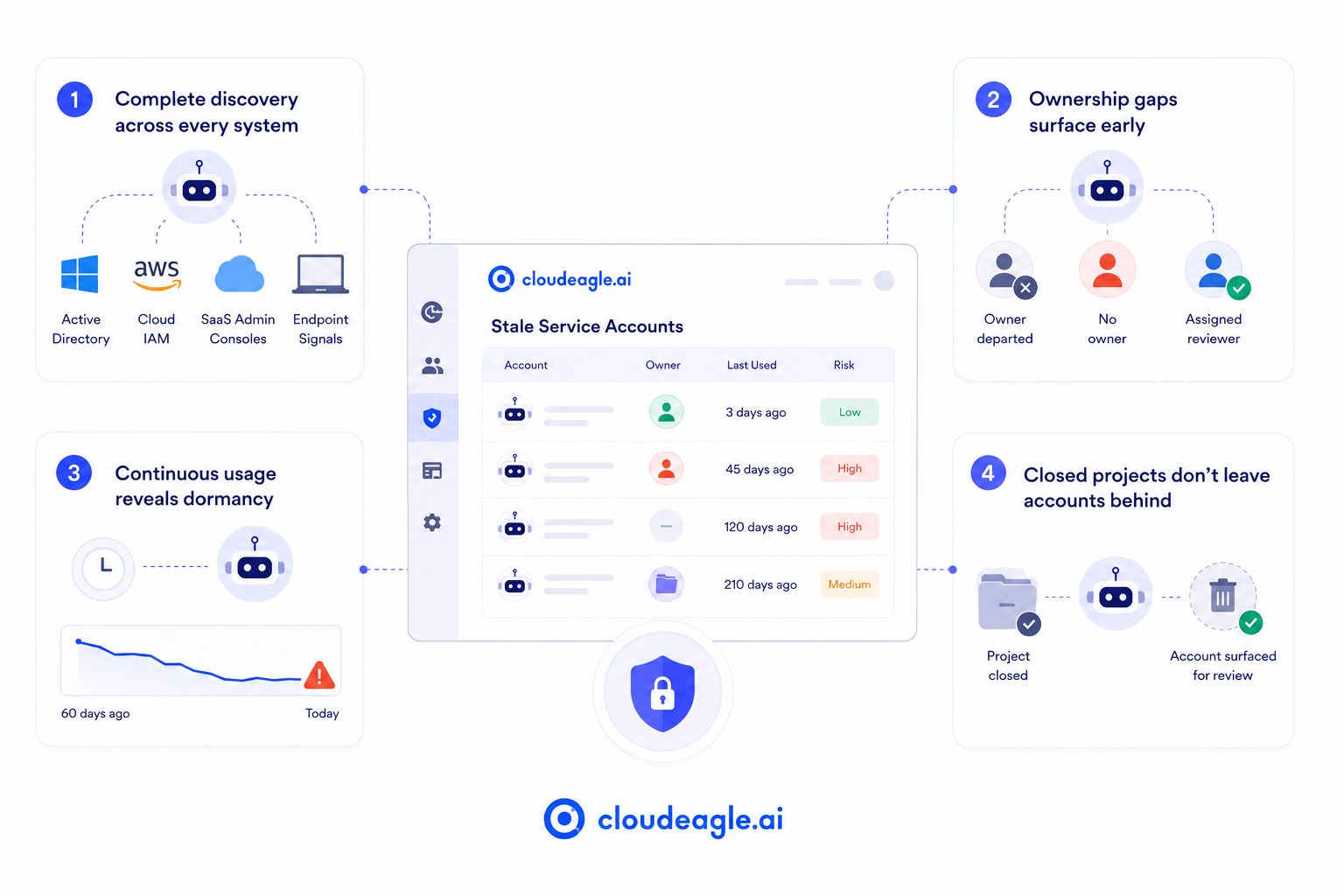
a) Registry-only discovery misses everything outside the formal system:
Most teams run one registry pull and call it service account management, missing accounts created outside the formal system entirely.
How CloudEagle.ai solves it:
- Correlates service account data across Active Directory, cloud IAM, SaaS admin consoles, and endpoint signals
- Surfaces accounts that exist outside the formal registry, the same shadow accounts that an acquisition or a developer's personal API key would otherwise hide
- Keeps that inventory current instead of point-in-time
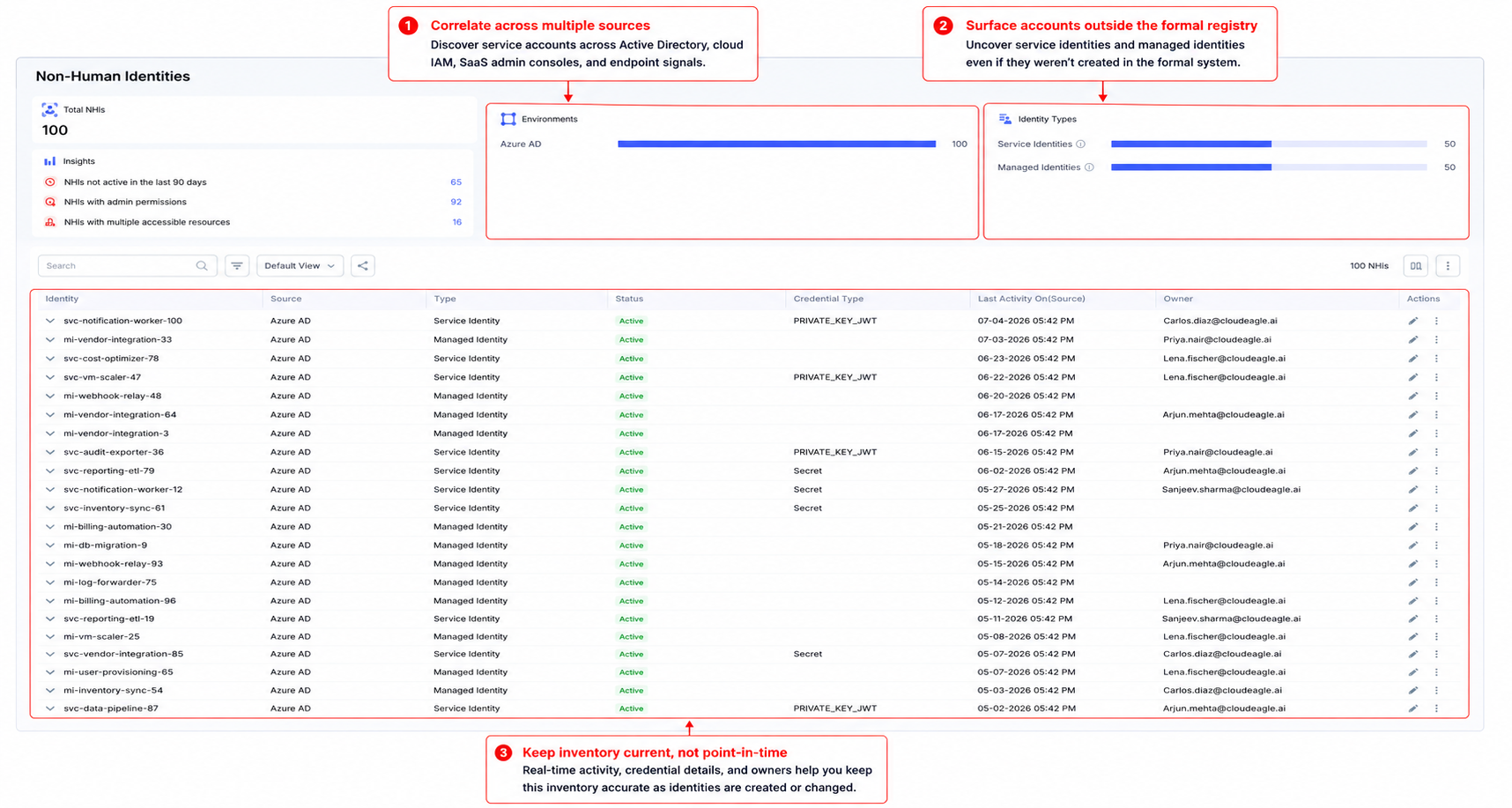
Teams get a single, standing inventory instead of a stitched-together snapshot from five different consoles.
b) Ownerless accounts are the highest-priority signal, and most teams have no way to flag them:
An orphaned account with no assigned owner has nobody to notify for certification and nobody to approve decommissioning.
How CloudEagle.ai solves it:
- Flags service accounts whose owner has departed or whose ownership field is blank
- Extends the same high-risk and ex-employee flagging logic already applied to human accounts
- Routes flagged accounts to a named reviewer instead of leaving them unassigned
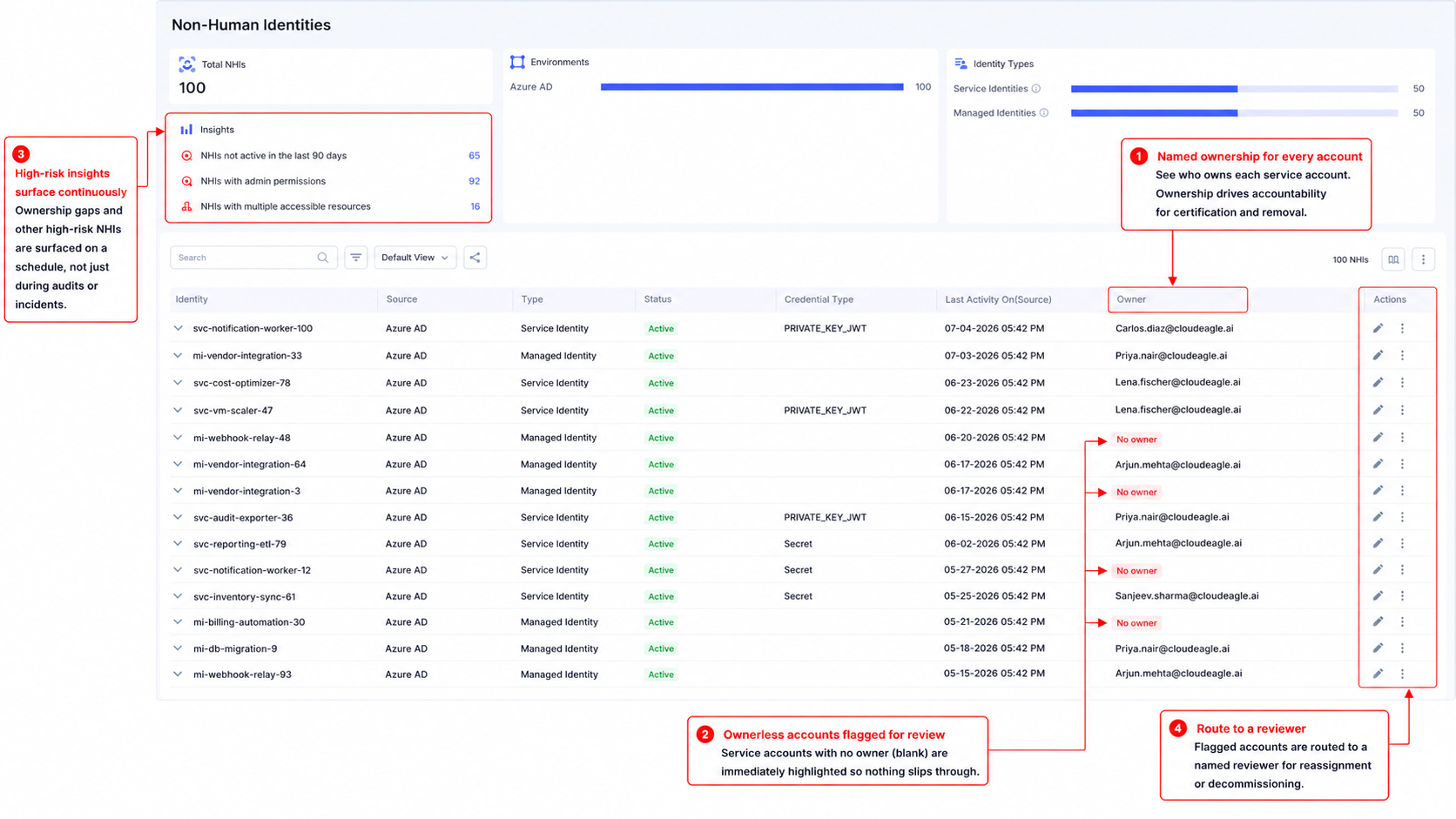
Ownership gaps surface on a schedule instead of at the next audit or incident.
c) Knowing an account exists isn't the same as knowing it's still in use:
Dormant accounts hide in plain sight because most tools only show that an account exists, not whether it's doing anything.
How CloudEagle.ai solves it:
- Runs continuous usage monitoring rather than a point-in-time snapshot
- Filters flagged accounts by account type
- Routes dormant accounts for investigation rather than automatic deletion

Dormancy becomes a discovery signal your team can act on, rather than a data point buried in a report nobody reads.
d) Accounts built for closed projects keep running because nothing ties project closure to credential revocation:
A service account for a finished migration or a retired integration has no natural trigger telling anyone it's done.
How CloudEagle.ai solves it:
- Correlates identity data against HR records and finance systems
- Matches service accounts against active application and project records
- Surfaces accounts whose originating use case no longer exists
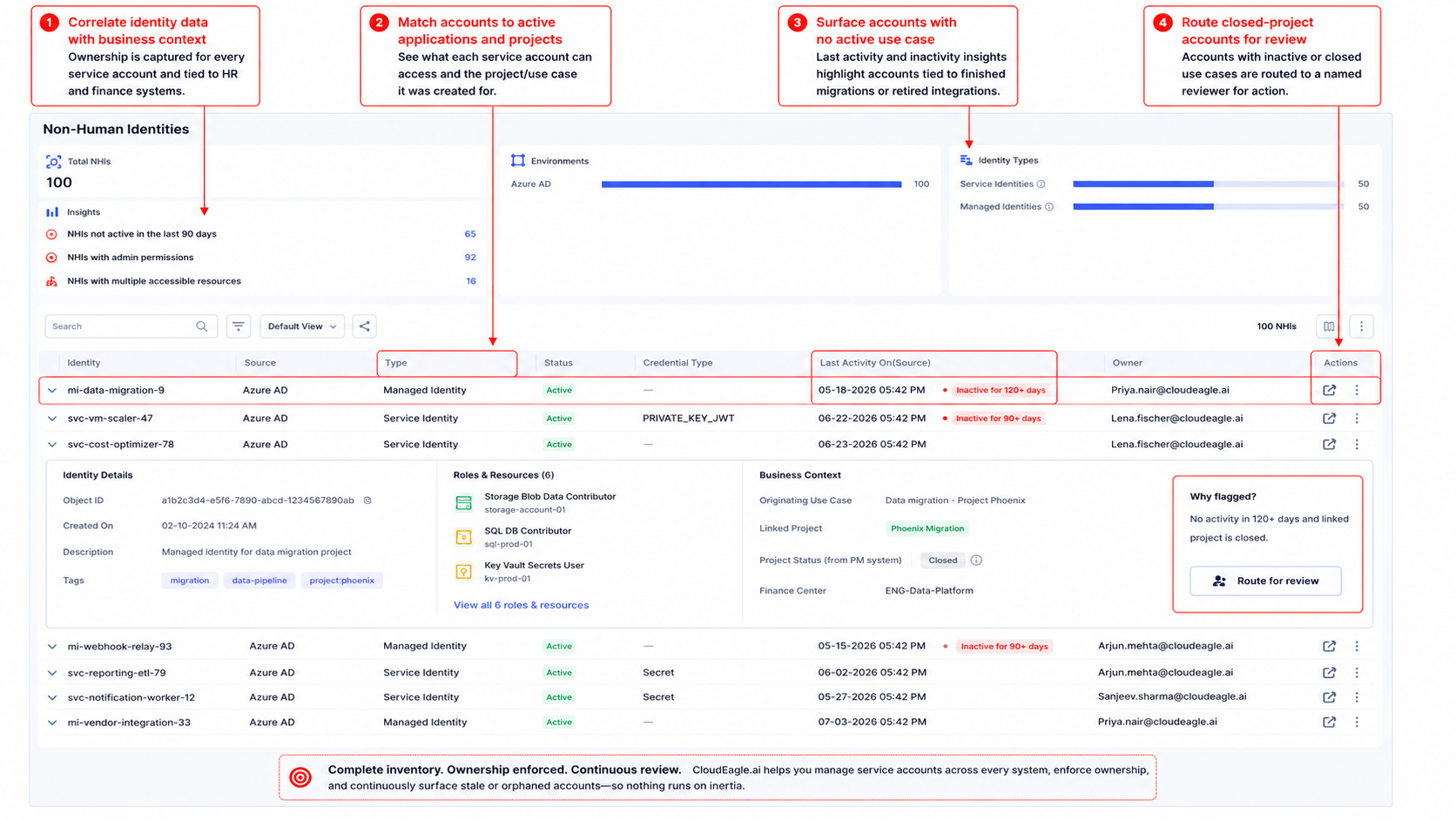
Accounts tied to closed projects get surfaced for review instead of running indefinitely on inertia.
A mature service account management program runs on three things: complete inventory across every system, ownership enforced at creation, and continuous review instead of an annual scramble.
That's the infrastructure CloudEagle.ai's service account management and governance layer is built to run on.
See how CloudEagle.ai discovers and inventories service accounts and non-human identities across your environment →
Your Registry Says 847 Accounts. Reality Says More.


6. FAQs
How do I find stale service accounts?
Cross-reference your IDP against HR data, check app-level usage, and audit OAuth grants alongside finance and network logs.
What are stale accounts?
Accounts that are orphaned, over-permissioned, or dormant: still authenticated, but no longer tied to an active owner or active purpose.
How do I get a full list of inactive Active Directory users?
Use Search-ADAccount -AccountInactive or Get-ADUser with a lastLogonDate filter to pull every account inactive past your chosen threshold.
Stale service accounts don't pile up because anyone was careless. They pile up because no lifecycle process governs them, and closing that gap is what service account management is actually for.
See how CloudEagle.ai surfaces stale service accounts across your environment → Book a demo
Related reading: If ownership gaps are your bigger concern right now, this is the deeper dive: Why Every Non-Human Identity Needs an Owner.
For the broader non-human identity risk picture, start here.
Stale Accounts Pile Up Without a Process.


.avif)


.avif)
.avif)




.png)






.avif)
.avif)
.avif)


