You need to enable JavaScript in order to use the AI chatbot tool powered by ChatBot

Why Are IT Leaders Automating IGA with CloudEagle.ai?

Share via:
blog-cms-banner-bg
Little-Known Negotiation Hacks to Get the Best Deal on Slack
cta-bg-blogDownload Your Copy

HIPAA Compliance Checklist for 2025

Download PDF

Picture this: An employee gets promoted, moves on, and two months later still has admin access to every system from their old role. Nobody flagged it. And now it's a compliance finding in your next audit.

This is the everyday reality for IT teams relying on manual identity governance. And it's exactly the kind of risk that IAM platforms alone can't prevent.

CloudEagle.ai goes beyond traditional IAM by automating Identity Governance end-to-end. It handles access reviews, provisioning, policy enforcement, and real-time risk detection.

In this article, we will discuss what IGA is, why it matters, and how CloudEagle.ai helps IT leaders automate the entire identity governance. 

TL;DR

  • Identity Governance and Administration (IGA) ensures the right users have the right access at the right time.
  • Manual IGA processes create risks through shadow IT, privilege creep, delayed offboarding, and poor visibility.
  • CloudEagle.ai automates access requests, onboarding, offboarding, reviews, and policy enforcement across SaaS apps.
  • Features like self-service access, JIT permissions, and audit-ready logs strengthen security and compliance.
  • CloudEagle.ai extends IAM platforms with end-to-end identity governance, automation, and continuous access control

1. What Is IGA and Why Does It Matter?

Identity Governance and Administration secures access to systems and data. Rather than relying on network firewalls, IGA ensures the right users can access the right resources at the right time.

IGA makes it easier to maintain compliance, audit access, and adapt quickly to changes like new hires, role shifts, or team restructures. But why is it so critical right now?

With employees accessing data from multiple locations and devices, and SaaS platforms storing information across dozens of applications, the traditional security perimeter no longer exists.

It's been replaced by identity. That means enterprises need to actively govern three things:

  • Who has access? Ensuring only authorized users can reach critical resources.
  • What can they access? Granting permissions based on roles and responsibilities.
  • How long do they need it? Providing time-bound access to reduce unnecessary exposure.

According to CloudEagle.ai's IGA report, 85% of enterprises have not updated their identity governance processes, leaving them exposed to risks that a proper IGA strategy would eliminate.
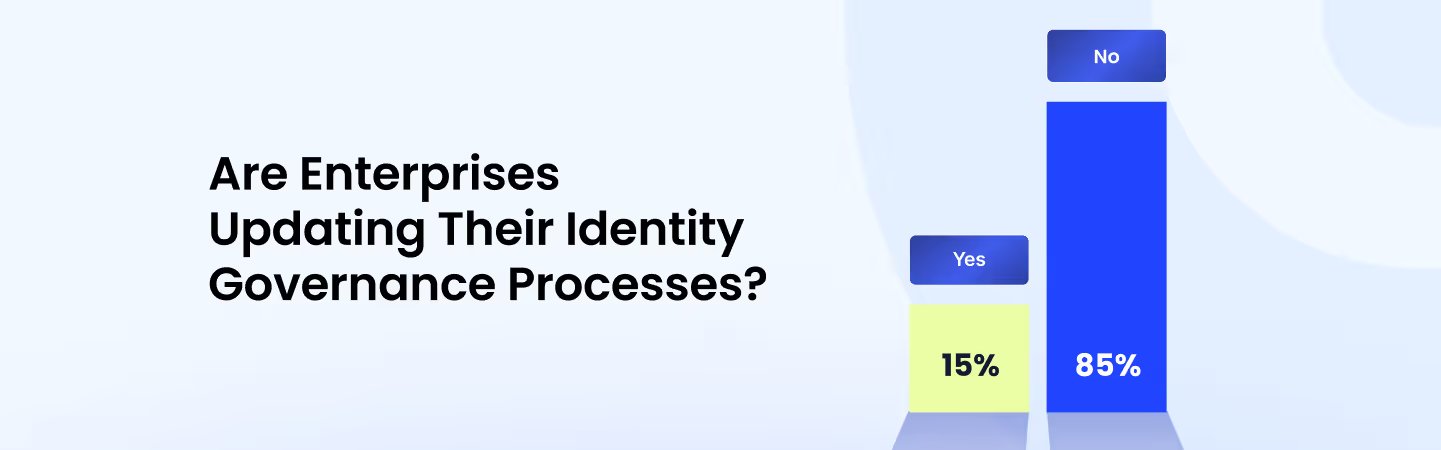
Stats Representing What Percentage of Enterprises Are Updating Their Identity Governance Processes

IGA is essential, but genuinely hard to implement well. Here's what makes it difficult for most IT teams:

1. Data Spread Across Multiple Platforms

Access data is scattered across emails, shared folders, collaboration tools, and SaaS apps, making it nearly impossible to get a unified view of who has access to what.

2. Fragmented Access Control: 

When platforms aren't connected, enforcing consistent access policies becomes a significant challenge and gaps appear quickly.

3. Legacy Tools: 

Many enterprises still rely on outdated tools built for on-premise setups that don't support SaaS automation or real-time monitoring.

4. Managing Identities at Scale: 

As companies grow, the volume of users and apps compounds the problem. Delays in provisioning, human errors, and security gaps become the norm without systems built for scale.

The Wrong People Already Have Access

You just don't know who.
See Who

2. Why Choose CloudEagle.ai for Automating IGA End-to-End?

More than 50% of organizations consider automation capabilities a critical factor when selecting new IGA solutions.

CloudEagle.ai doesn't replace your Identity Provider (Okta, Azure AD, or Ping). It enhances it by covering the entire identity lifecycle across 500+ SaaS integrations, turning manual governance into a zero-touch automated process.

A. Self-Service App Catalog: Employees Get Tools Without IT Tickets

Instead of emailing IT for every tool, employees browse a curated self service app catalog of approved apps and request access on their own, with IT in full control of visibility, approval flows, and what gets provisioned.
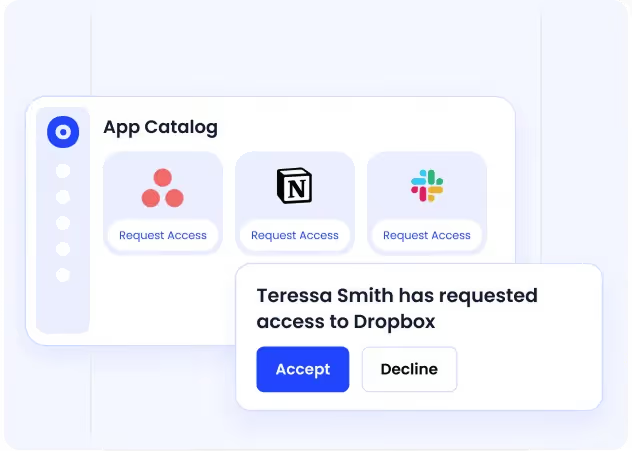
CloudEagle self-service app catalog showing IT-approved applications organized by role and department for employee self-serve access requests

  • Role-filtered visibility: Employees only see apps relevant to their role, team, or location, reducing incorrect requests and over-provisioning.
  • Slack-based approvals: Managers approve access directly in Slack without switching tools or creating tickets.
  • Shadow IT prevention: Employees are guided toward existing approved tools first, stopping unapproved app purchases before they start.
  • Audit-ready logs: Every request, approval, and access change is recorded automatically.

B. Automated App Access Requests: Resolved in Slack, Without the Back-and-Forth

For access needs beyond the initial catalog, employees raise app access requests directly in Slack, tied to their identity, routed through the right approval chain, and provisioned automatically once approved.

 CloudEagle automated access request workflow showing identity-driven approval routing with end-to-end audit trail for every request, approval, and provisioning action

  • Slack-native requests: Employees trigger slack access requests /raise-app-access-request without leaving their workflow.
  • Identity-based approvals: Approval policies are enforced by role, app sensitivity, and department, not ad-hoc manager decisions.
  • Automatic provisioning: For integrated apps, access is provisioned the moment it's approved; non-integrated apps route to the app owner with an automated task.
  • Time-bound access: Access is granted for a defined duration, so short-term needs never become permanent permissions.

C. Just-in-Time Access: Permissions That Expire When the Work Is Done

Not all access should be permanent. CloudEagle.ai provisions just-in-time access only when it's needed and revokes it automatically when it's not, eliminating the lingering permissions that create compliance risk.
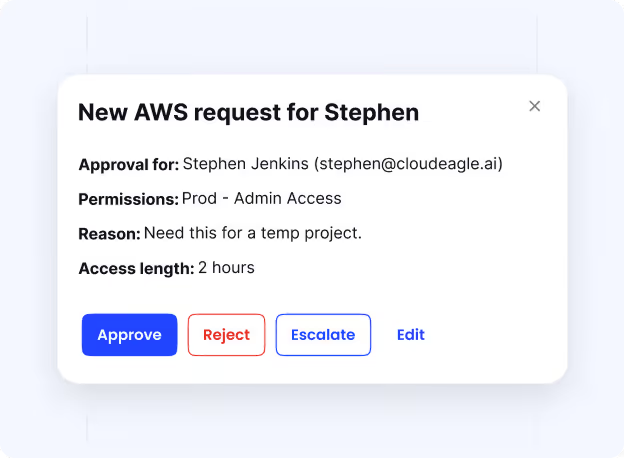
 CloudEagle time-based access controls showing temporary elevated permissions set to expire automatically when project or contractor work ends

  • Auto-expiring permissions: Access expires after a defined period, removing the need for manual cleanup or follow-up reviews.
  • Least-privilege enforcement: Users receive only what their current role requires, nothing more, nothing carried forward.
  • Sensitive access controls: High-risk apps require the right approvals before access is granted, with no exceptions or workarounds.
  • No privilege accumulation: Permissions don't outlast their business need, reducing the attack surface over time.

D. Automated Employee Onboarding: Right Access from Day One

When a new hire is added, CloudEagle.ai provisions access across all applications (IDP-managed and non-IDP) from a single console, based on role, team, and peer usage patterns.
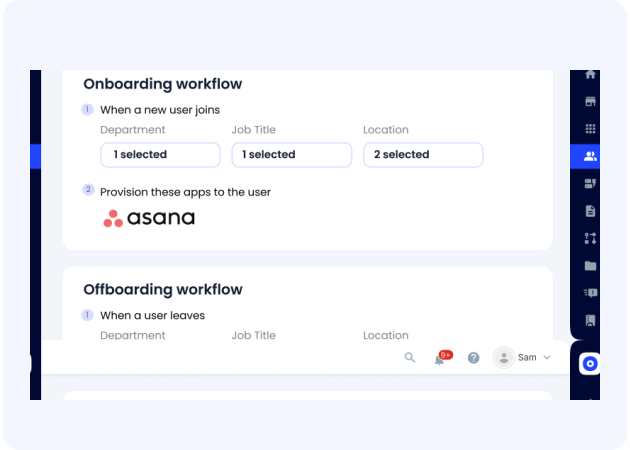
CloudEagle employee onboarding dashboard showing role-based app access automatically provisioned across IDP and non-IDP apps from a single console

  • Single console provisioning: Access is set up across IDP and non-IDP apps without IT touching individual app admin panels.
  • Role-based suggestions: Apps are recommended automatically based on the employee's role, department, and what peers in the same team use.
  • Policy-based automation: Rules are configured once and applied consistently, no manual intervention, no last-minute fixes.
  • Live license tracking: License counts update in real time as access is granted, keeping inventory accurate from day one.

Fred Anthony, VP of Technology at JoVe, said: 

"Although we initially used Okta for app access provisioning and deprovisioning, we later augmented it with CloudEagle.ai to enhance its capabilities. The tool provided more customization and advanced features, improving the efficiency of employee onboarding and offboarding processes with better control and reporting."

E. Employee Offboarding: No Lingering Access, No Orphaned Licenses

When an employee leaves, CloudEagle.ai revokes all access instantly, across every app, IDP-managed or not, and reclaims licenses in real time.
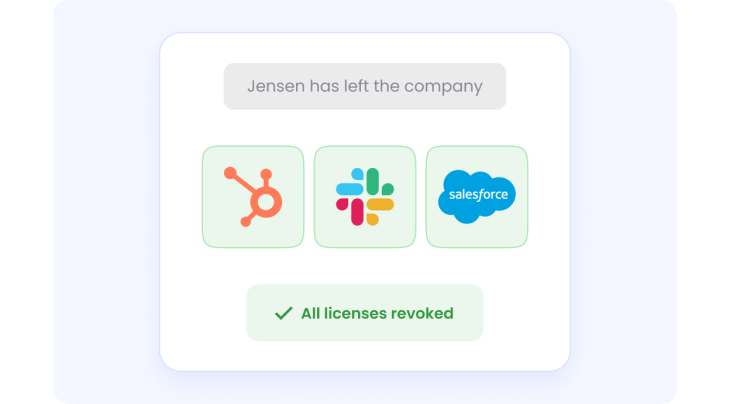
CloudEagle employee offboarding workflow showing automatic access revocation across all apps and instant license reclamation upon employee exit

  • Instant, complete revocation: All application access is removed automatically across IDP and non-IDP apps from one unified console.
  • No IDP dependency: Offboarding rules are configured once and applied consistently, without requiring expensive IDP tier upgrades.
  • Immediate license reclamation: Freed licenses are reflected in the inventory right away, keeping spend aligned with active headcount.
  • Role-change handling: When employees change roles internally, access adjusts automatically to prevent privilege creep before it accumulates.

F. Audit-Ready Access History: A Complete Trail from Day One to Last Day

Every access event from the first day to the last is logged in a tamper-proof trail that's always ready for compliance reviews, investigations, and audits.
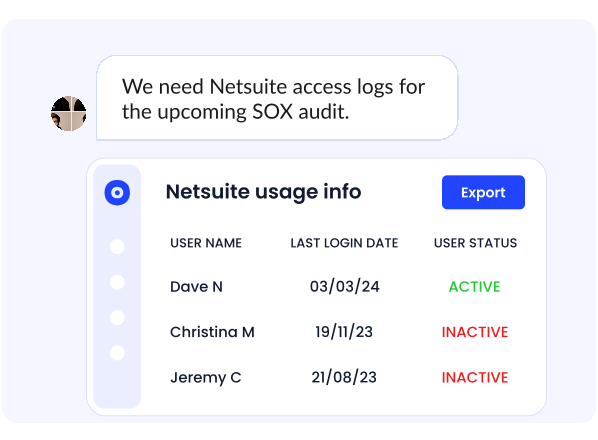
CloudEagle employee access history dashboard showing tamper-proof lifecycle audit trail from onboarding through role changes to offboarding

  • Full lifecycle record: Every app each employee accessed, from onboarding through role changes to offboarding, is captured in one place.
  • On-demand audit reports: Historical access reports for any employee can be generated instantly, replacing fragmented logs and manual reconstruction.
  • Time-stamped evidence: Every access change is recorded with timestamps, making it verifiable and defensible during audits.
  • No spreadsheet archaeology: Compliance teams stop piecing together evidence from emails and tickets, it's all queryable from a single dashboard.

3. Why Are Traditional IGA Approaches Failing?

Most enterprises know they need better identity governance. The gap is in execution. IT teams are doing their best with processes and tools that weren't designed for today's SaaS-first, AI-driven environment.

Here are the core issues IT leaders deal with every day:

1. Shadow IT is Out of Control

According to CloudEagle's IGA report, 60% of SaaS and AI tools are used without IT knowledge. Employees adopt apps independently, bypassing security reviews and creating compliance exposure.

2. Over-Privileged Access Lingers 

When employees change roles or leave, their access often stays behind. Former admins still in systems and role changes never reflected in access settings. This privilege creep becomes a serious liability.

3. Manual Processes Can't Keep Up

Many organizations are still running identity governance on systems that weren't designed for modern SaaS environments. These slow, error-prone methods struggle to scale as apps and headcount grow.

4. Human Error is Inevitable

With manual provisioning and deprovisioning, mistakes happen like over-permissioned accounts, missed offboarding steps, delayed access changes. Each one is a potential compliance violation or breach waiting to surface. These mistakes introduce security gaps that can easily turn into data breaches.

5. Poor Visibility Slows Everything Down

Spreadsheets and ticketing systems can't give you a real-time picture of who has access to what. By the time IT notices a problem, the damage is often already done.
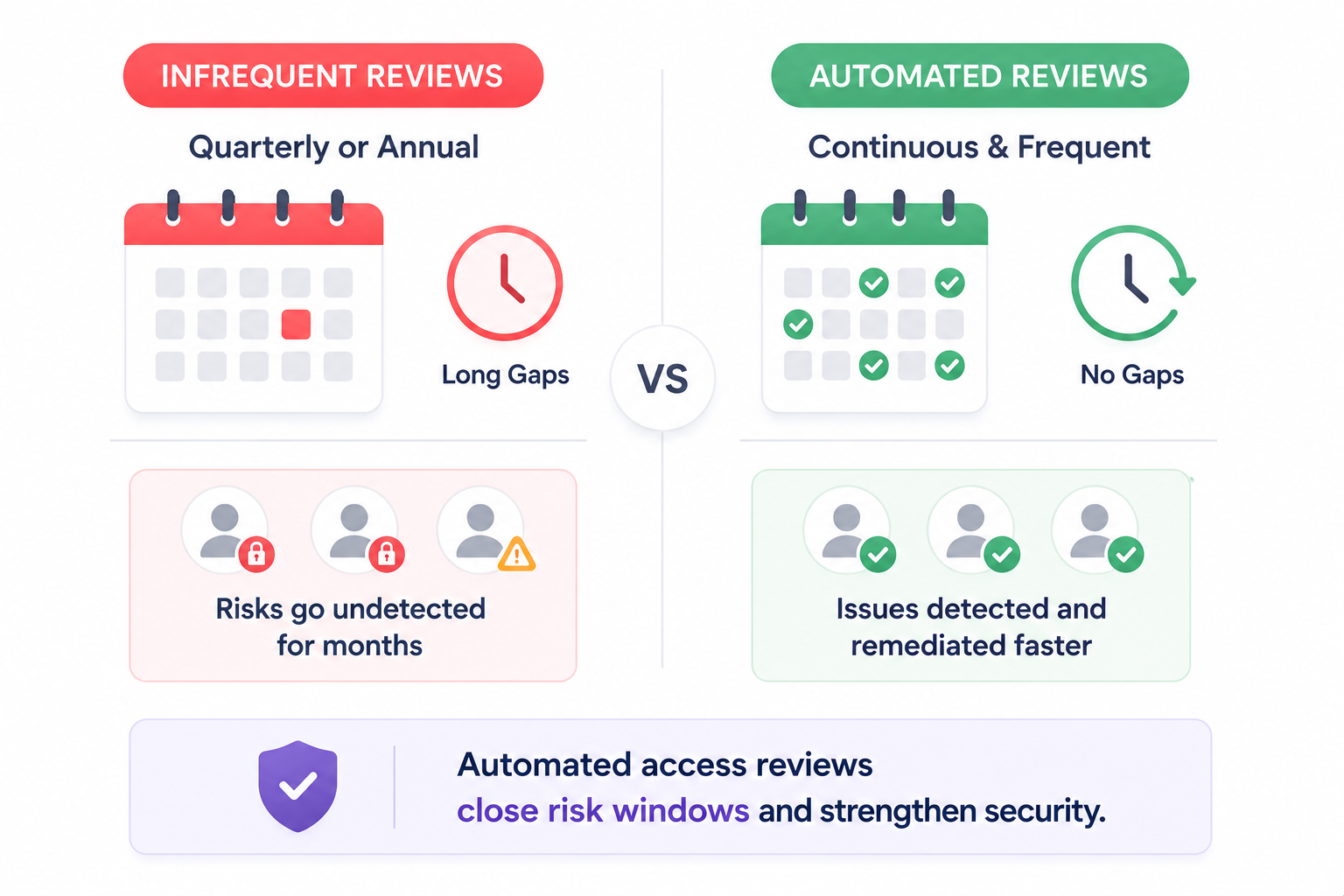
Access Reviews Are Too Infrequent cloudeagle

6. Access Reviews Are Too Infrequent

Most enterprises run quarterly or annual reviews, meaning unauthorized or excessive access can go undetected for months. Automated access reviews are critical for faster remediation.

7. Onboarding and Offboarding Take Too Long

With manual processes, provisioning new hires can take days. More critically, former employees often retain access far longer than they should, increasing the risk of unauthorized data access.

8. Hidden IDP Costs

Identity Providers like Okta or Azure AD require expensive enterprise plans to push every app behind SSO. And even then, they don't cover non-SSO apps, license reclamation, or shadow IT.

This patchwork approach leaves enterprises exposed to security risks, wasted spend, and compliance failures. As SaaS adoption accelerates, manual IGA simply can't keep up, making automation a necessity.

4. Why Are IAM Tools Alone Not Enough?

IAM platforms like Okta and SailPoint are excellent at what they do. But they were built for a different problem  and using them as a complete IGA solution leaves real gaps.

1. Different Focus Areas

IAM manages who can access systems through authentication and authorization. IGA goes further by enforcing access control policies on whether users should have access.

2. Limited to SSO and Authentication

IAM systems are built around SSO workflows. They don't have robust features for access reviews, governance automation, or compliance reporting at scale.

3. Disconnected from SaaS Ecosystems

IAM platforms often lack visibility into shadow IT or unauthorized SaaS usage. CloudEagle.ai's deep integrations fill this gap by automating governance tasks across the full SaaS stack in real time.

4. No End-to-End Workflow Automation

IAM tools typically can't automate full governance workflows like access reviews, license harvesting, and renewals. These require significant manual effort and regularly fall through the cracks.

5. Access Lifecycle Management Gaps

While IAM handles provisioning and deprovisioning, it doesn't continuously review and certify access rights to prevent privilege creep or enforce segregation of duties, reducing insider threat risks.

Nidhi Jain, CEO and Founder of CloudEagle.ai, has seen this pattern play out repeatedly:

"I've seen it happen too many times: an employee changes roles, yet months later, they still have admin access to systems they no longer need. Manual access reviews are just too slow to catch these issues in time. By the time someone notices, privilege creep has already turned into a serious security risk."

6. Complementary, Not Competing

IAM forms the operational foundation for identity management, while IGA builds on it with governance, compliance, and risk management. Enterprises need both.

Most Audit Findings Aren't Surprises

They were simply ignored.
See What's Missing

5. Conclusion

As enterprises grow and SaaS environments become more complex, managing identity and access manually isn't enough. The risks are too compounding and the consequences of gaps too serious.

IT leaders are turning to automation and CloudEagle.ai is built for exactly that. By automating identity governance, CloudEagle.ai improves security, ensures compliance, and eliminates manual access management.

The result: a governance posture that's proactive, auditable, and built for the SaaS era.

6. FAQs

1. What is the difference between IAM and IGA? 

IAM manages who can access systems through authentication and authorization. IGA governs whether users should have that access, ensuring permissions stay aligned with roles, compliance requirements, and business needs over time. Enterprises need both, IAM as the foundation and IGA as the ongoing governance layer on top.

2. Why is manual IGA a security risk? 

Manual processes can't scale with modern SaaS environments. Quarterly access reviews miss unauthorized access for months, offboarding delays leave former employees in systems, and spreadsheet-based tracking provides no real-time visibility. Each gap is a potential breach or compliance violation.

3. Does CloudEagle.ai replace Okta or SailPoint? 

No. CloudEagle.ai complements your existing IAM platforms by adding the governance layer they lack, automated access reviews, shadow IT detection, license management, and end-to-end provisioning workflows. It works alongside Okta, SailPoint, and other IDPs, not instead of them.

4. How does CloudEagle.ai help with compliance frameworks like SOC 2 or ISO 27001?

CloudEagle.ai automates access reviews, maintains audit-ready logs, and generates compliance reports aligned with frameworks like SOC 2, ISO 27001, and GDPR. This significantly reduces the manual effort of audit preparation and the risk of compliance gaps going undetected.

5. How quickly can CloudEagle.ai be deployed alongside existing IAM tools?

CloudEagle.ai connects to your existing SaaS stack through 500+ direct integrations and is designed to layer on top of your current IAM setup without requiring a rip-and-replace. Most teams see full visibility across their SaaS environment within days of connecting their integrations.

Advertisement for a SaaS Subscription Tracking Template with a call-to-action button to download and a partial graphic of a tablet showing charts.Banner promoting a SaaS Agreement Checklist to streamline SaaS management and avoid budget waste with a call-to-action button labeled Download checklist.Blue banner with text 'The Ultimate Employee Offboarding Checklist!' and a black button labeled 'Download checklist' alongside partial views of checklist documents from cloudeagle.ai.Digital ad for download checklist titled 'The Ultimate Checklist for IT Leaders to Optimize SaaS Operations' by cloudeagle.ai, showing checklist pages.Slack Buyer's Guide offer with text 'Unlock insider insights to get the best deal on Slack!' and a button labeled 'Get Your Copy', accompanied by a preview of the guide featuring Slack's logo.Monday Pricing Guide by cloudeagle.ai offering exclusive pricing secrets to maximize investment with a call-to-action button labeled Get Your Copy and an image of the guide's cover.Blue banner for Canva Pricing Guide by cloudeagle.ai offering a guide to Canva costs, features, and alternatives with a call-to-action button saying Get Your Copy.Blue banner with white text reading 'Little-Known Negotiation Hacks to Get the Best Deal on Slack' and a white button labeled 'Get Your Copy'.Blue banner with text 'Little-Known Negotiation Hacks to Get the Best Deal on Monday.com' and a white button labeled 'Get Your Copy'.Blue banner with text 'Little-Known Negotiation Hacks to Get the Best Deal on Canva' and a white button labeled 'Get Your Copy'.Banner with text 'Slack Buyer's Guide' and a 'Download Now' button next to images of a guide titled 'Slack Buyer’s Guide: Features, Pricing & Best Practices'.Digital cover of Monday Pricing Guide with a button labeled Get Your Copy on a blue background.Canva Pricing Guide cover with a button labeled Get Your Copy on a blue gradient background.

Enter your email to
unlock the report

Oops! Something went wrong while submitting the form.
License Count
Benchmark
Per User/Per Year

Enter your email to
unlock the report

Oops! Something went wrong while submitting the form.
License Count
Benchmark
Per User/Per Year

Enter your email to
unlock the report

Oops! Something went wrong while submitting the form.
Notion Plus
License Count
Benchmark
Per User/Per Year
100-500
$67.20 - $78.72
500-1000
$59.52 - $72.00
1000+
$51.84 - $57.60
Canva Pro
License Count
Benchmark
Per User/Per Year
100-500
$74.33-$88.71
500-1000
$64.74-$80.32
1000+
$55.14-$62.34

Enter your email to
unlock the report

Oops! Something went wrong while submitting the form.

Enter your email to
unlock the report

Oops! Something went wrong while submitting the form.
Zoom Business
License Count
Benchmark
Per User/Per Year
100-500
$216.00 - $264.00
500-1000
$180.00 - $216.00
1000+
$156.00 - $180.00

Enter your email to
unlock the report

Oops! Something went wrong while submitting the form.

Get the Right Security Platform To Secure Your Cloud Infrastructure

Please enter a business email
Thank you!
The 2023 SaaS report has been sent to your email. Check your promotional or spam folder.
Oops! Something went wrong while submitting the form.

Access full report

Please enter a business email
Thank you!
The 2023 SaaS report has been sent to your email. Check your promotional or spam folder.
Oops! Something went wrong while submitting the form.

Picture this: An employee gets promoted, moves on, and two months later still has admin access to every system from their old role. Nobody flagged it. And now it's a compliance finding in your next audit.

This is the everyday reality for IT teams relying on manual identity governance. And it's exactly the kind of risk that IAM platforms alone can't prevent.

CloudEagle.ai goes beyond traditional IAM by automating Identity Governance end-to-end. It handles access reviews, provisioning, policy enforcement, and real-time risk detection.

In this article, we will discuss what IGA is, why it matters, and how CloudEagle.ai helps IT leaders automate the entire identity governance. 

TL;DR

  • Identity Governance and Administration (IGA) ensures the right users have the right access at the right time.
  • Manual IGA processes create risks through shadow IT, privilege creep, delayed offboarding, and poor visibility.
  • CloudEagle.ai automates access requests, onboarding, offboarding, reviews, and policy enforcement across SaaS apps.
  • Features like self-service access, JIT permissions, and audit-ready logs strengthen security and compliance.
  • CloudEagle.ai extends IAM platforms with end-to-end identity governance, automation, and continuous access control

1. What Is IGA and Why Does It Matter?

Identity Governance and Administration secures access to systems and data. Rather than relying on network firewalls, IGA ensures the right users can access the right resources at the right time.

IGA makes it easier to maintain compliance, audit access, and adapt quickly to changes like new hires, role shifts, or team restructures. But why is it so critical right now?

With employees accessing data from multiple locations and devices, and SaaS platforms storing information across dozens of applications, the traditional security perimeter no longer exists.

It's been replaced by identity. That means enterprises need to actively govern three things:

  • Who has access? Ensuring only authorized users can reach critical resources.
  • What can they access? Granting permissions based on roles and responsibilities.
  • How long do they need it? Providing time-bound access to reduce unnecessary exposure.

According to CloudEagle.ai's IGA report, 85% of enterprises have not updated their identity governance processes, leaving them exposed to risks that a proper IGA strategy would eliminate.

Stats Representing What Percentage of Enterprises Are Updating Their Identity Governance Processes

IGA is essential, but genuinely hard to implement well. Here's what makes it difficult for most IT teams:

1. Data Spread Across Multiple Platforms

Access data is scattered across emails, shared folders, collaboration tools, and SaaS apps, making it nearly impossible to get a unified view of who has access to what.

2. Fragmented Access Control: 

When platforms aren't connected, enforcing consistent access policies becomes a significant challenge and gaps appear quickly.

3. Legacy Tools: 

Many enterprises still rely on outdated tools built for on-premise setups that don't support SaaS automation or real-time monitoring.

4. Managing Identities at Scale: 

As companies grow, the volume of users and apps compounds the problem. Delays in provisioning, human errors, and security gaps become the norm without systems built for scale.

The Wrong People Already Have Access

You just don't know who.
See Who

2. Why Choose CloudEagle.ai for Automating IGA End-to-End?

More than 50% of organizations consider automation capabilities a critical factor when selecting new IGA solutions.

CloudEagle.ai doesn't replace your Identity Provider (Okta, Azure AD, or Ping). It enhances it by covering the entire identity lifecycle across 500+ SaaS integrations, turning manual governance into a zero-touch automated process.

A. Self-Service App Catalog: Employees Get Tools Without IT Tickets

Instead of emailing IT for every tool, employees browse a curated self service app catalog of approved apps and request access on their own, with IT in full control of visibility, approval flows, and what gets provisioned.

CloudEagle self-service app catalog showing IT-approved applications organized by role and department for employee self-serve access requests

  • Role-filtered visibility: Employees only see apps relevant to their role, team, or location, reducing incorrect requests and over-provisioning.
  • Slack-based approvals: Managers approve access directly in Slack without switching tools or creating tickets.
  • Shadow IT prevention: Employees are guided toward existing approved tools first, stopping unapproved app purchases before they start.
  • Audit-ready logs: Every request, approval, and access change is recorded automatically.

B. Automated App Access Requests: Resolved in Slack, Without the Back-and-Forth

For access needs beyond the initial catalog, employees raise app access requests directly in Slack, tied to their identity, routed through the right approval chain, and provisioned automatically once approved.

 CloudEagle automated access request workflow showing identity-driven approval routing with end-to-end audit trail for every request, approval, and provisioning action

  • Slack-native requests: Employees trigger slack access requests /raise-app-access-request without leaving their workflow.
  • Identity-based approvals: Approval policies are enforced by role, app sensitivity, and department, not ad-hoc manager decisions.
  • Automatic provisioning: For integrated apps, access is provisioned the moment it's approved; non-integrated apps route to the app owner with an automated task.
  • Time-bound access: Access is granted for a defined duration, so short-term needs never become permanent permissions.

C. Just-in-Time Access: Permissions That Expire When the Work Is Done

Not all access should be permanent. CloudEagle.ai provisions just-in-time access only when it's needed and revokes it automatically when it's not, eliminating the lingering permissions that create compliance risk.

 CloudEagle time-based access controls showing temporary elevated permissions set to expire automatically when project or contractor work ends

  • Auto-expiring permissions: Access expires after a defined period, removing the need for manual cleanup or follow-up reviews.
  • Least-privilege enforcement: Users receive only what their current role requires, nothing more, nothing carried forward.
  • Sensitive access controls: High-risk apps require the right approvals before access is granted, with no exceptions or workarounds.
  • No privilege accumulation: Permissions don't outlast their business need, reducing the attack surface over time.

D. Automated Employee Onboarding: Right Access from Day One

When a new hire is added, CloudEagle.ai provisions access across all applications (IDP-managed and non-IDP) from a single console, based on role, team, and peer usage patterns.

CloudEagle employee onboarding dashboard showing role-based app access automatically provisioned across IDP and non-IDP apps from a single console

  • Single console provisioning: Access is set up across IDP and non-IDP apps without IT touching individual app admin panels.
  • Role-based suggestions: Apps are recommended automatically based on the employee's role, department, and what peers in the same team use.
  • Policy-based automation: Rules are configured once and applied consistently, no manual intervention, no last-minute fixes.
  • Live license tracking: License counts update in real time as access is granted, keeping inventory accurate from day one.

Fred Anthony, VP of Technology at JoVe, said: 

"Although we initially used Okta for app access provisioning and deprovisioning, we later augmented it with CloudEagle.ai to enhance its capabilities. The tool provided more customization and advanced features, improving the efficiency of employee onboarding and offboarding processes with better control and reporting."

E. Employee Offboarding: No Lingering Access, No Orphaned Licenses

When an employee leaves, CloudEagle.ai revokes all access instantly, across every app, IDP-managed or not, and reclaims licenses in real time.

CloudEagle employee offboarding workflow showing automatic access revocation across all apps and instant license reclamation upon employee exit

  • Instant, complete revocation: All application access is removed automatically across IDP and non-IDP apps from one unified console.
  • No IDP dependency: Offboarding rules are configured once and applied consistently, without requiring expensive IDP tier upgrades.
  • Immediate license reclamation: Freed licenses are reflected in the inventory right away, keeping spend aligned with active headcount.
  • Role-change handling: When employees change roles internally, access adjusts automatically to prevent privilege creep before it accumulates.

F. Audit-Ready Access History: A Complete Trail from Day One to Last Day

Every access event from the first day to the last is logged in a tamper-proof trail that's always ready for compliance reviews, investigations, and audits.

CloudEagle employee access history dashboard showing tamper-proof lifecycle audit trail from onboarding through role changes to offboarding

  • Full lifecycle record: Every app each employee accessed, from onboarding through role changes to offboarding, is captured in one place.
  • On-demand audit reports: Historical access reports for any employee can be generated instantly, replacing fragmented logs and manual reconstruction.
  • Time-stamped evidence: Every access change is recorded with timestamps, making it verifiable and defensible during audits.
  • No spreadsheet archaeology: Compliance teams stop piecing together evidence from emails and tickets, it's all queryable from a single dashboard.

3. Why Are Traditional IGA Approaches Failing?

Most enterprises know they need better identity governance. The gap is in execution. IT teams are doing their best with processes and tools that weren't designed for today's SaaS-first, AI-driven environment.

Here are the core issues IT leaders deal with every day:

1. Shadow IT is Out of Control

According to CloudEagle's IGA report, 60% of SaaS and AI tools are used without IT knowledge. Employees adopt apps independently, bypassing security reviews and creating compliance exposure.

2. Over-Privileged Access Lingers 

When employees change roles or leave, their access often stays behind. Former admins still in systems and role changes never reflected in access settings. This privilege creep becomes a serious liability.

3. Manual Processes Can't Keep Up

Many organizations are still running identity governance on systems that weren't designed for modern SaaS environments. These slow, error-prone methods struggle to scale as apps and headcount grow.

4. Human Error is Inevitable

With manual provisioning and deprovisioning, mistakes happen like over-permissioned accounts, missed offboarding steps, delayed access changes. Each one is a potential compliance violation or breach waiting to surface. These mistakes introduce security gaps that can easily turn into data breaches.

5. Poor Visibility Slows Everything Down

Spreadsheets and ticketing systems can't give you a real-time picture of who has access to what. By the time IT notices a problem, the damage is often already done.

Access Reviews Are Too Infrequent cloudeagle

6. Access Reviews Are Too Infrequent

Most enterprises run quarterly or annual reviews, meaning unauthorized or excessive access can go undetected for months. Automated access reviews are critical for faster remediation.

7. Onboarding and Offboarding Take Too Long

With manual processes, provisioning new hires can take days. More critically, former employees often retain access far longer than they should, increasing the risk of unauthorized data access.

8. Hidden IDP Costs

Identity Providers like Okta or Azure AD require expensive enterprise plans to push every app behind SSO. And even then, they don't cover non-SSO apps, license reclamation, or shadow IT.

This patchwork approach leaves enterprises exposed to security risks, wasted spend, and compliance failures. As SaaS adoption accelerates, manual IGA simply can't keep up, making automation a necessity.

4. Why Are IAM Tools Alone Not Enough?

IAM platforms like Okta and SailPoint are excellent at what they do. But they were built for a different problem  and using them as a complete IGA solution leaves real gaps.

1. Different Focus Areas

IAM manages who can access systems through authentication and authorization. IGA goes further by enforcing access control policies on whether users should have access.

2. Limited to SSO and Authentication

IAM systems are built around SSO workflows. They don't have robust features for access reviews, governance automation, or compliance reporting at scale.

3. Disconnected from SaaS Ecosystems

IAM platforms often lack visibility into shadow IT or unauthorized SaaS usage. CloudEagle.ai's deep integrations fill this gap by automating governance tasks across the full SaaS stack in real time.

4. No End-to-End Workflow Automation

IAM tools typically can't automate full governance workflows like access reviews, license harvesting, and renewals. These require significant manual effort and regularly fall through the cracks.

5. Access Lifecycle Management Gaps

While IAM handles provisioning and deprovisioning, it doesn't continuously review and certify access rights to prevent privilege creep or enforce segregation of duties, reducing insider threat risks.

Nidhi Jain, CEO and Founder of CloudEagle.ai, has seen this pattern play out repeatedly:

"I've seen it happen too many times: an employee changes roles, yet months later, they still have admin access to systems they no longer need. Manual access reviews are just too slow to catch these issues in time. By the time someone notices, privilege creep has already turned into a serious security risk."

6. Complementary, Not Competing

IAM forms the operational foundation for identity management, while IGA builds on it with governance, compliance, and risk management. Enterprises need both.

Most Audit Findings Aren't Surprises

They were simply ignored.
See What's Missing

5. Conclusion

As enterprises grow and SaaS environments become more complex, managing identity and access manually isn't enough. The risks are too compounding and the consequences of gaps too serious.

IT leaders are turning to automation and CloudEagle.ai is built for exactly that. By automating identity governance, CloudEagle.ai improves security, ensures compliance, and eliminates manual access management.

The result: a governance posture that's proactive, auditable, and built for the SaaS era.

6. FAQs

1. What is the difference between IAM and IGA? 

IAM manages who can access systems through authentication and authorization. IGA governs whether users should have that access, ensuring permissions stay aligned with roles, compliance requirements, and business needs over time. Enterprises need both, IAM as the foundation and IGA as the ongoing governance layer on top.

2. Why is manual IGA a security risk? 

Manual processes can't scale with modern SaaS environments. Quarterly access reviews miss unauthorized access for months, offboarding delays leave former employees in systems, and spreadsheet-based tracking provides no real-time visibility. Each gap is a potential breach or compliance violation.

3. Does CloudEagle.ai replace Okta or SailPoint? 

No. CloudEagle.ai complements your existing IAM platforms by adding the governance layer they lack, automated access reviews, shadow IT detection, license management, and end-to-end provisioning workflows. It works alongside Okta, SailPoint, and other IDPs, not instead of them.

4. How does CloudEagle.ai help with compliance frameworks like SOC 2 or ISO 27001?

CloudEagle.ai automates access reviews, maintains audit-ready logs, and generates compliance reports aligned with frameworks like SOC 2, ISO 27001, and GDPR. This significantly reduces the manual effort of audit preparation and the risk of compliance gaps going undetected.

5. How quickly can CloudEagle.ai be deployed alongside existing IAM tools?

CloudEagle.ai connects to your existing SaaS stack through 500+ direct integrations and is designed to layer on top of your current IAM setup without requiring a rip-and-replace. Most teams see full visibility across their SaaS environment within days of connecting their integrations.

CloudEagle.ai recognized in the 2025 Gartner® Magic Quadrant™ for SaaS Management Platforms
Download now
gartner chart
5x
Faster employee
onboarding
80%
Reduction in time for
user access reviews
30k
Workflows
automated
$15Bn
Analyzed in
contract spend
$2Bn
Saved in
SaaS spend

Streamline SaaS governance and save 10-30%

Book a Demo with Expert
CTA image