You need to enable JavaScript in order to use the AI chatbot tool powered by ChatBot

Why One-Time Service Account Audits Fail and How Continuous Monitoring Helps

Share via:
blog-cms-banner-bg
Little-Known Negotiation Hacks to Get the Best Deal on Slack
cta-bg-blogDownload Your Copy

HIPAA Compliance Checklist for 2025

Download PDF

Your last service account audit is already out of date. The report is filed, the findings are remediated, and the compliance box is checked. Six weeks later, a developer spins up a new service account with admin scope for a project that ends in two weeks. Nobody reviews it until the next service account audit, nine months away.

This is the structural problem with the traditional service account audit. It produces a point-in-time picture of an environment that changes daily. Accounts get created, modified, and orphaned between cycles, and those gaps accumulate silently until the next audit finds them, or an incident does.

Continuous monitoring is not a more frequent service account audit. It is a different model, one that surfaces changes the moment they happen instead of months later.

TL;DR

  • A service account audit shows what existed at the moment of review. It says nothing about what exists right now
  • Service accounts get created, modified, and orphaned continuously between audit cycles
  • The gap between audits is where over-permissioned accounts, orphaned identities, and failed compliance evidence accumulate
  • Continuous service account monitoring detects changes the day they happen, no quarterly cycle required
  • CloudEagle.ai turns service account governance into a running log instead of a quarterly snapshot

1. Why One-Time Service Account Audits Fail, Even When You Do Everything Right

One-time service account audits fail because the environment they measure changes faster than any fixed review cycle can track.
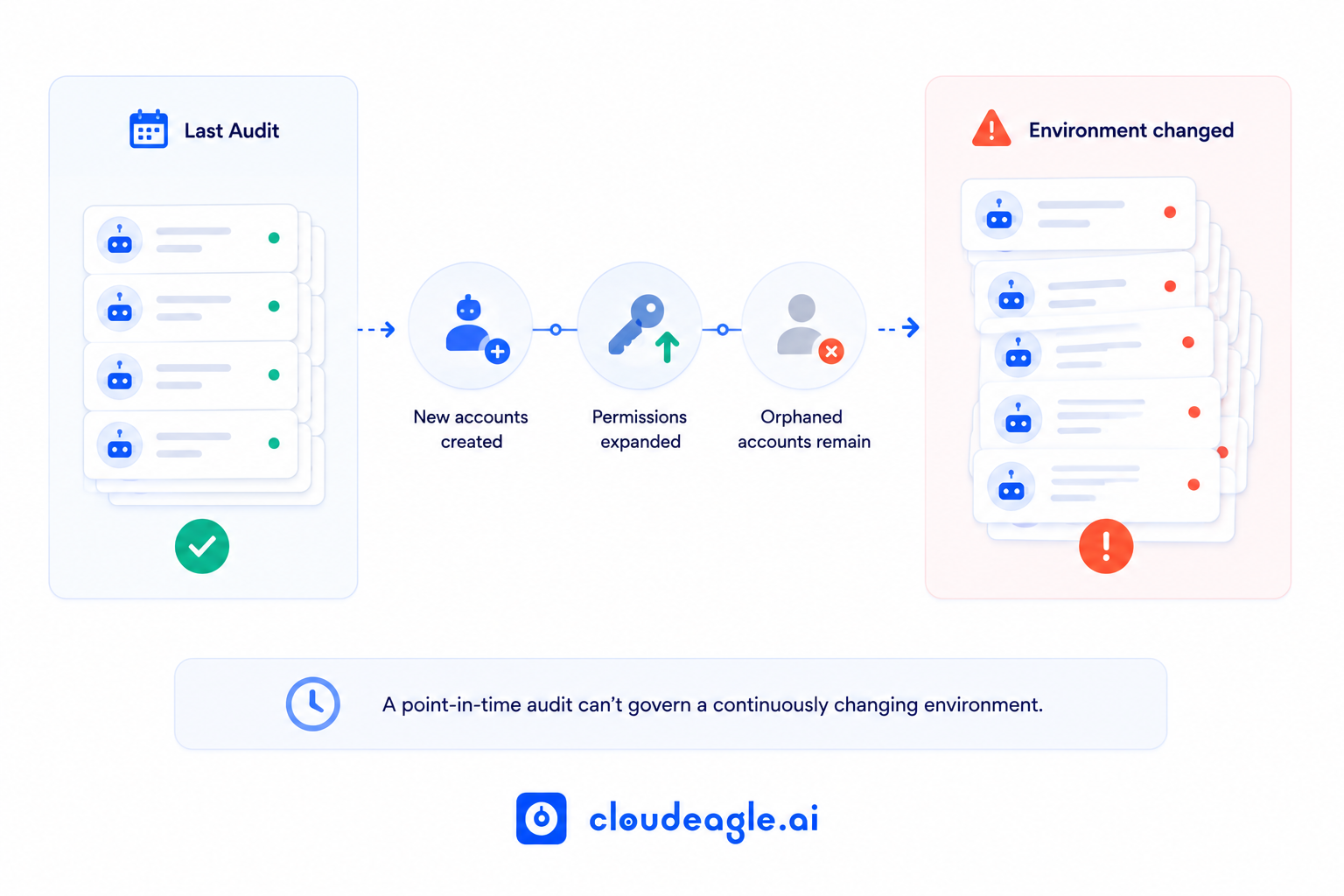
Diagram showing how a last audit can become outdated as new service accounts are created, permissions expand, and orphaned accounts remain, leading to an environment change alert. Text notes that a point-in-time audit cannot govern a continuously changing environment.

The Snapshot Problem

A service account audit run on March 31 finds 847 accounts. By June 30, the environment will have 923. The 76 new accounts were created after the last review closed, so none were in scope. 

Several belong to employees who have since left. One carries admin permissions for a project that ended in April.

The audit report says 847 accounts were reviewed, all accounted for. The environment says otherwise. That gap between what a service account audit covers and what actually exists is the entire problem in miniature.

Why the Environment Outruns the Audit Cycle

Three forces widen that gap every quarter.

  • Creation rate: AI agents, low-code platforms, and developer tooling generate new service accounts continuously. A single Copilot agent rollout can spin up dozens of agent-owned accounts within weeks, each one an identity the last service account audit never saw.
  • Modification rate: scope creep happens quietly. A developer expands a service account's permissions for one task and never narrows it back, and no change management trigger fires for an expansion that feels minor in the moment.
  • Orphan rate: a service account created for a now-closed project stays active because no offboarding event covers it.

Quarterly service account audits were built for an environment that changed quarterly. This one doesn't.

Why Reviewers Rubber-Stamp the List

Present 847 service accounts to three reviewers with only an account name, creation date, and last-used field, and the outcome is predictable. Reviewers approve what looks familiar and flag what looks obviously wrong.

That is an information problem. Nobody can make 847 real decisions with that little context in one sitting, and every service account audit built on a flat list runs into this same ceiling.

Your Last Audit Is Already Nine Months Out of Date

Close the gaps before the next one surfaces them.
Download Checklist

2. The Real Cost of Auditing Service Accounts Only Once a Quarter

The cost is the exposure that builds in the space between two clean audits.

  • Dormant accounts turned active: a service account goes quiet for eight months, its owner leaves, and a threat actor reactivates it using credentials pulled from an unrelated breach. The last service account audit called this account clean.
  • Standing over-permission: admin scope granted for a single task stays in place indefinitely. Multiplied across dozens of accounts created between review cycles, it becomes a durable lateral movement path.
  • Accounts the audit never sees: service accounts created outside IT's formal provisioning process, by developers, AI agents, or low-code automations, don't appear in the registry a service account audit checks against. 

CloudEagle's Identity Governance Report finds that 48% of former employees retain access to at least one application six months after termination, and orphaned service accounts follow the same pattern.

  • Evidence that doesn't hold up: an account still active 47 days after an employee's termination is a finding under most SOC 2 and ISO 27001 frameworks, regardless of how clean the prior quarter's service account audit looked.
  • Compounding remediation cost: a scope issue caught the day it happens is a five-minute fix. 

The same issue, caught nine months later, after it has touched three integrations and been copied into two other service accounts, takes a full investigation to unwind. Every cycle, a service account audit misses something, and the eventual fix gets more expensive.

The audit finds what it knows to look for. The incident happens in what it doesn't.

Admin Scope Granted Once. Never Walked Back. Classic Finding.

This checklist finds every over-permissioned account before auditors do.
Download Checklist

3. How Continuous Service Account Monitoring Closes the Gap

Continuous service account monitoring moves detection to the moment of change instead of waiting for the next scheduled review.

  • Real-time creation detection: every new service account is logged with creator, purpose, connected systems, and scope on the day it's created.
  • Scope change alerting: a permission expansion on an existing account triggers a review task for the owner the same day it happens.
  • Orphan detection on HR trigger: when an employee is offboarded, every service account they own surfaces automatically for transfer or decommission.
  • Dormancy-to-activation detection: an account that's been inactive for months and suddenly starts making calls triggers a same-day alert instead of waiting for the next scheduled review.
  • Rolling certification: ownership certifications run on a continuous schedule instead of a single annual deadline that produces rubber-stamping.

This is the model that an annual service account audit was never designed to deliver on its own.

4. How CloudEagle.ai Makes Service Account Governance Continuous

A quarterly service account audit can't see what happens in the other eighty-nine days of the quarter. CloudEagle.ai closes that window by treating service account governance as a continuous process instead of a periodic event.
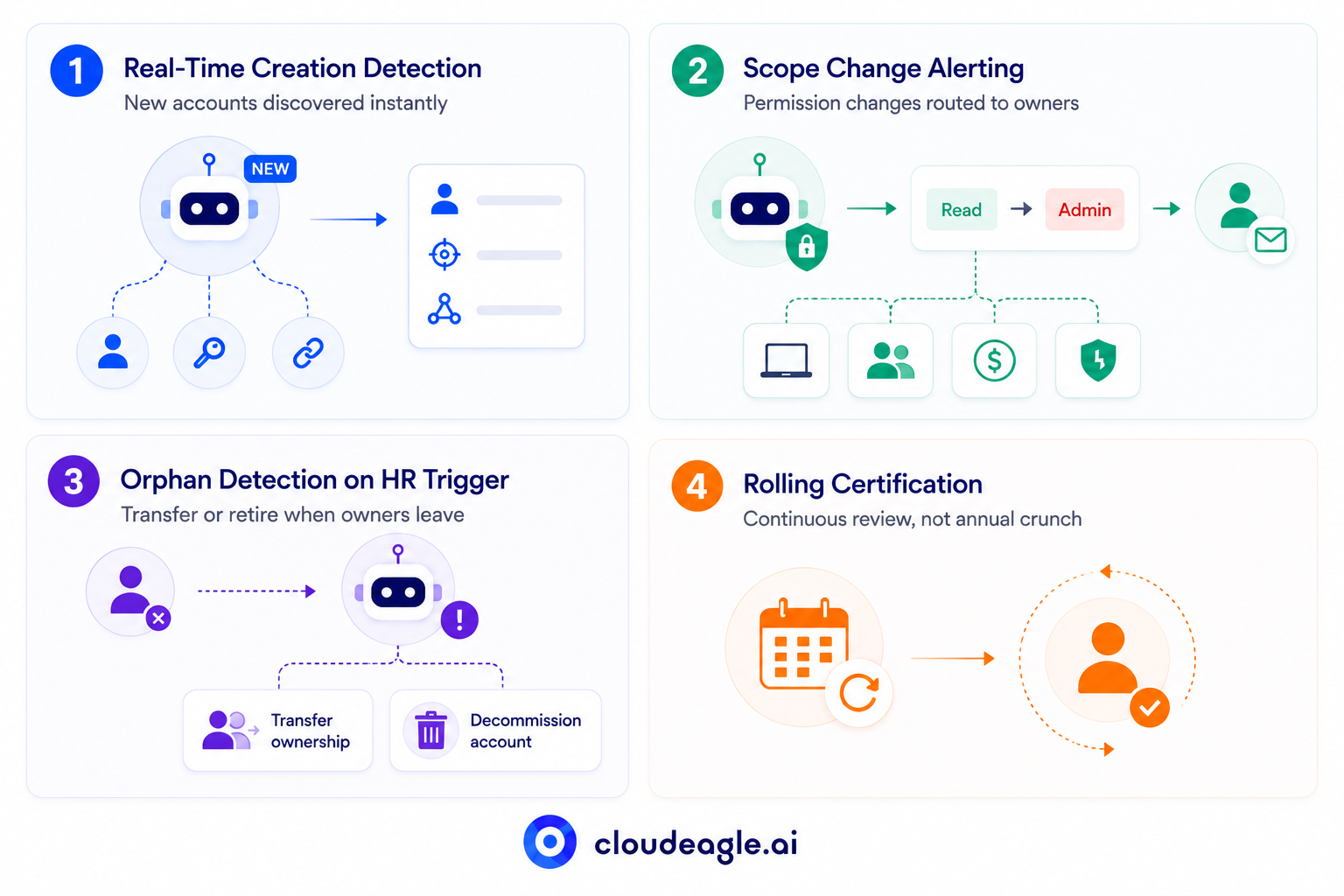
Four-part CloudEagle.ai infographic showing continuous service account governance: real-time detection of new accounts, alerts for permission changes, HR-triggered orphan account detection with transfer or decommissioning options, and rolling certification for ongoing access reviews.

a) Real-Time Creation Detection

New service accounts, especially ones spun up by AI agents and low-code automations, get created faster than any team can track manually, and most never touch IT's formal provisioning workflow. 

CloudEagle.ai closes that visibility gap the moment an account exists instead of the moment someone remembers to look for it.

  • Every new service account, API key, and agent connection is logged with creator, purpose, and connected systems on day one
  • Discovery runs against creation events across SSO logs, OAuth registries, and automation platforms instead of a manually maintained spreadsheet
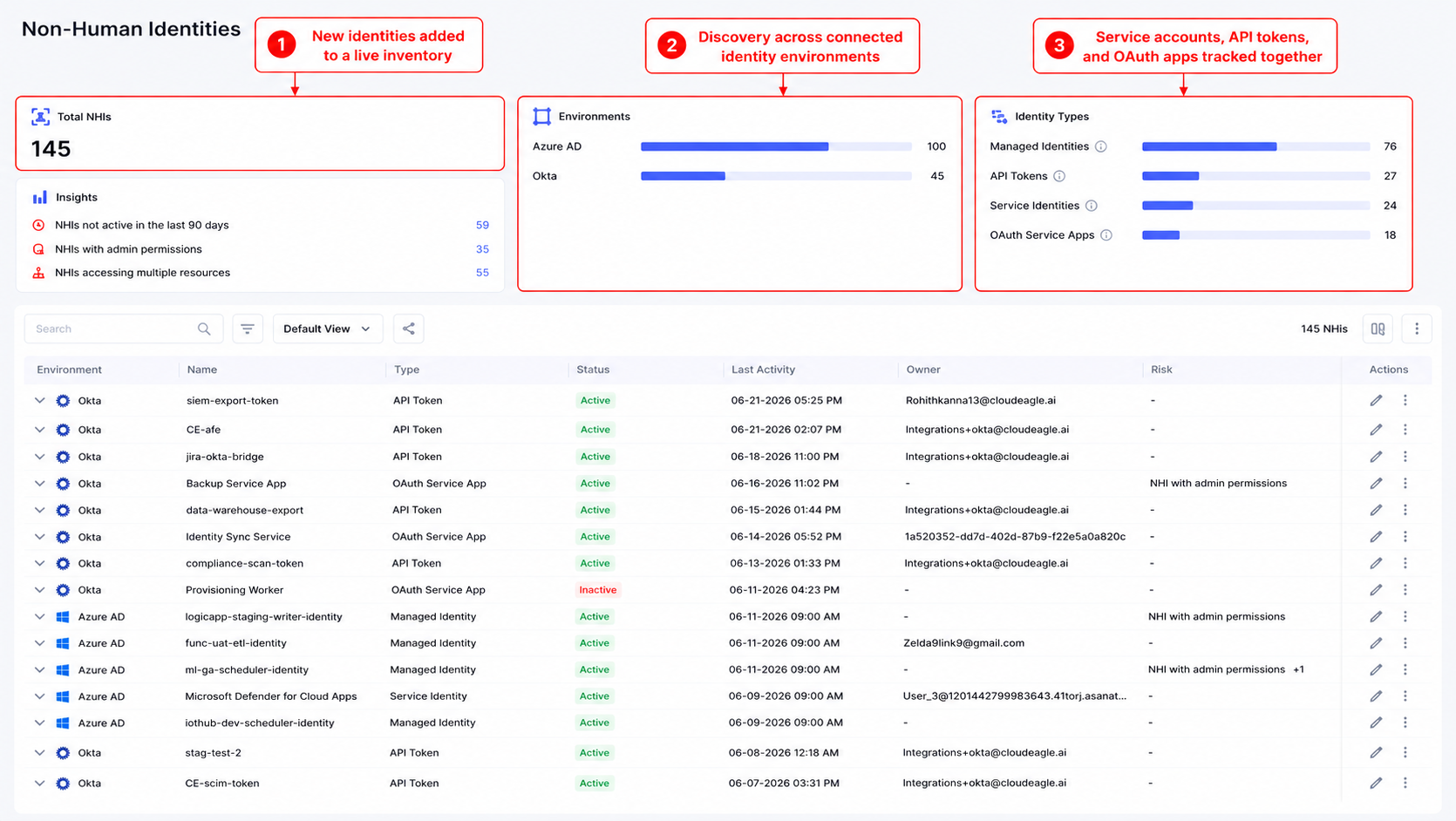
Non-human identity inventory dashboard showing 145 identities across Azure AD and Okta, categorized as managed identities, API tokens, service identities, and OAuth service apps, with activity, owner, risk, and action details.

The inventory feeding your next service account audit stays hours behind the real environment instead of months behind it.

b) Scope Change Alerting

Permission expansions are usually small and easy to justify in the moment, which is exactly why they never get walked back and quietly accumulate into standing over-permission. 

CloudEagle.ai treats every scope change as an event worth flagging rather than a detail buried in the next review cycle.

  • Permission changes on any service account route to its owner automatically for review
  • IT, HR, Finance, and Security data are correlated, so a scope change tied to a departed employee or closed project gets caught immediately
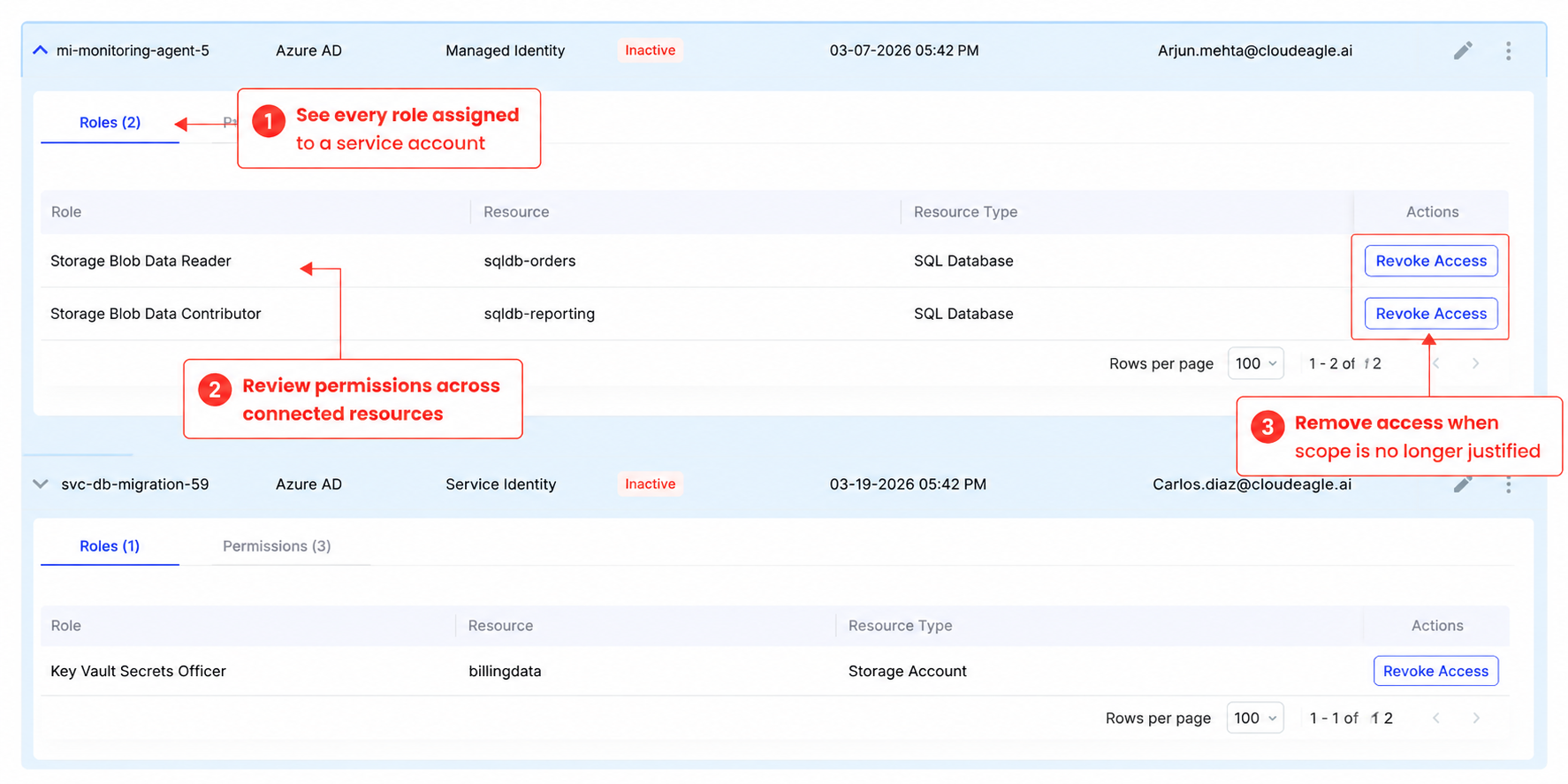
Expanded non-human identity records showing assigned roles and connected resources for inactive Azure AD service accounts. Teams can review permissions such as Storage Blob Data Reader, Storage Blob Data Contributor, and Key Vault Secrets Officer, then revoke access when it is no longer justified.

Scope creep gets addressed the week it happens instead of the quarter someone finally notices.

c) Orphan Detection on HR Trigger

When an employee leaves, IT's offboarding checklist rarely extends to the service accounts they created or owned, and those accounts keep running with no one monitoring them. 

CloudEagle.ai connects directly to your HRIS, so an ownership change triggers action instead of waiting for someone to notice.

  • Every service account tied to a departing employee surfaces for transfer or decommissioning the same day their status changes in the HRIS
  • Ownership reassignment happens through a routed workflow instead of a manual search across systems
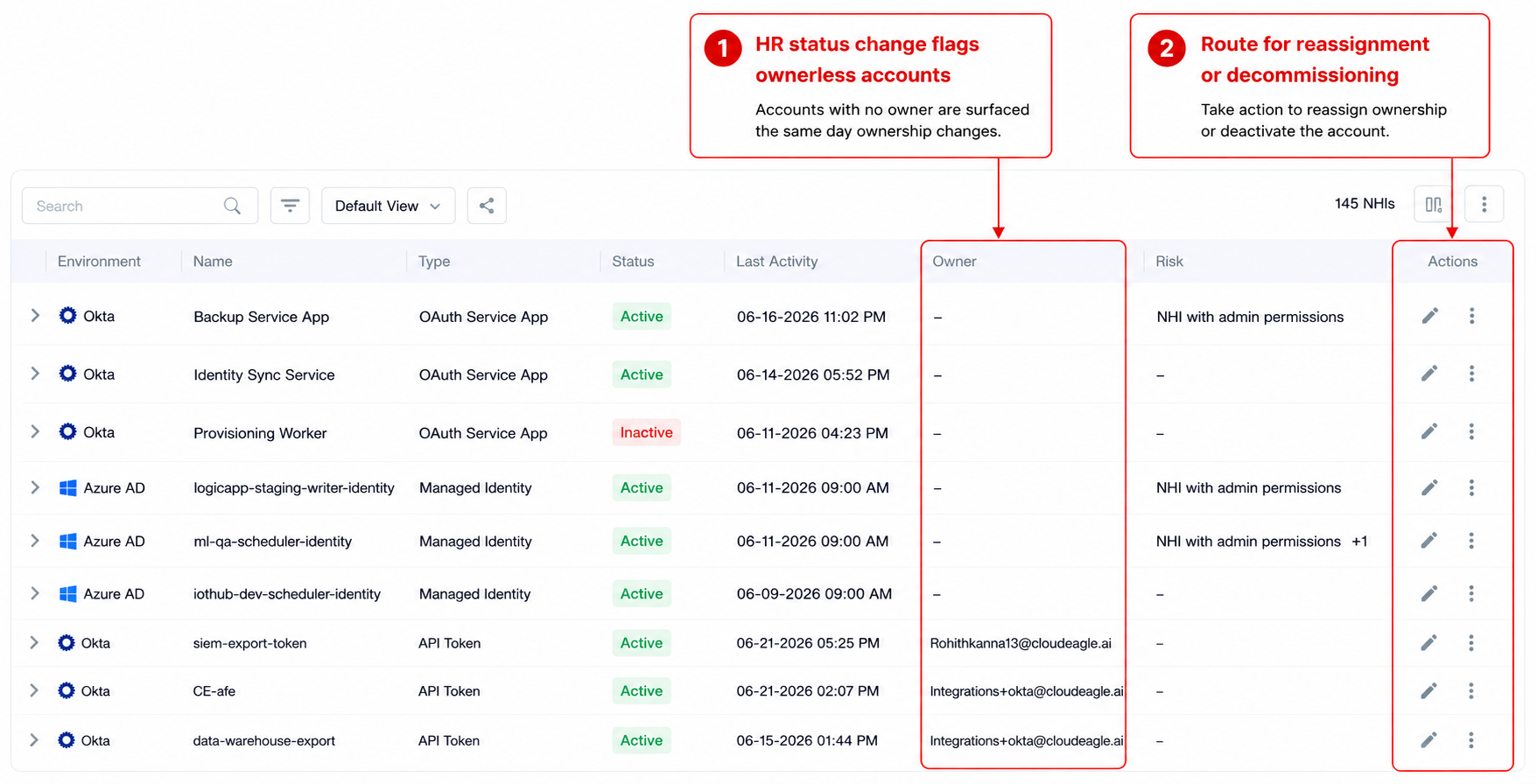
Non-human identity dashboard highlighting ownerless accounts after an HR status change. The Owner column shows unassigned service accounts, with action controls to reassign ownership or decommission accounts.

An orphaned account never goes unnoticed, so it stops being something your next service account audit has to find.

d) Rolling Certification

A single annual certification deadline forces reviewers through hundreds of decisions at once, and under that kind of pressure, most of those decisions turn into a rubber stamp. 

CloudEagle.ai replaces that deadline with a rolling cadence, so certification happens in smaller batches with more context attached to each one.

  • Owners certify their service accounts on a continuous schedule instead of one annual crunch
  • The full assignment, review, and evidence collection pipeline runs automatically, from task routing to compliance report generation
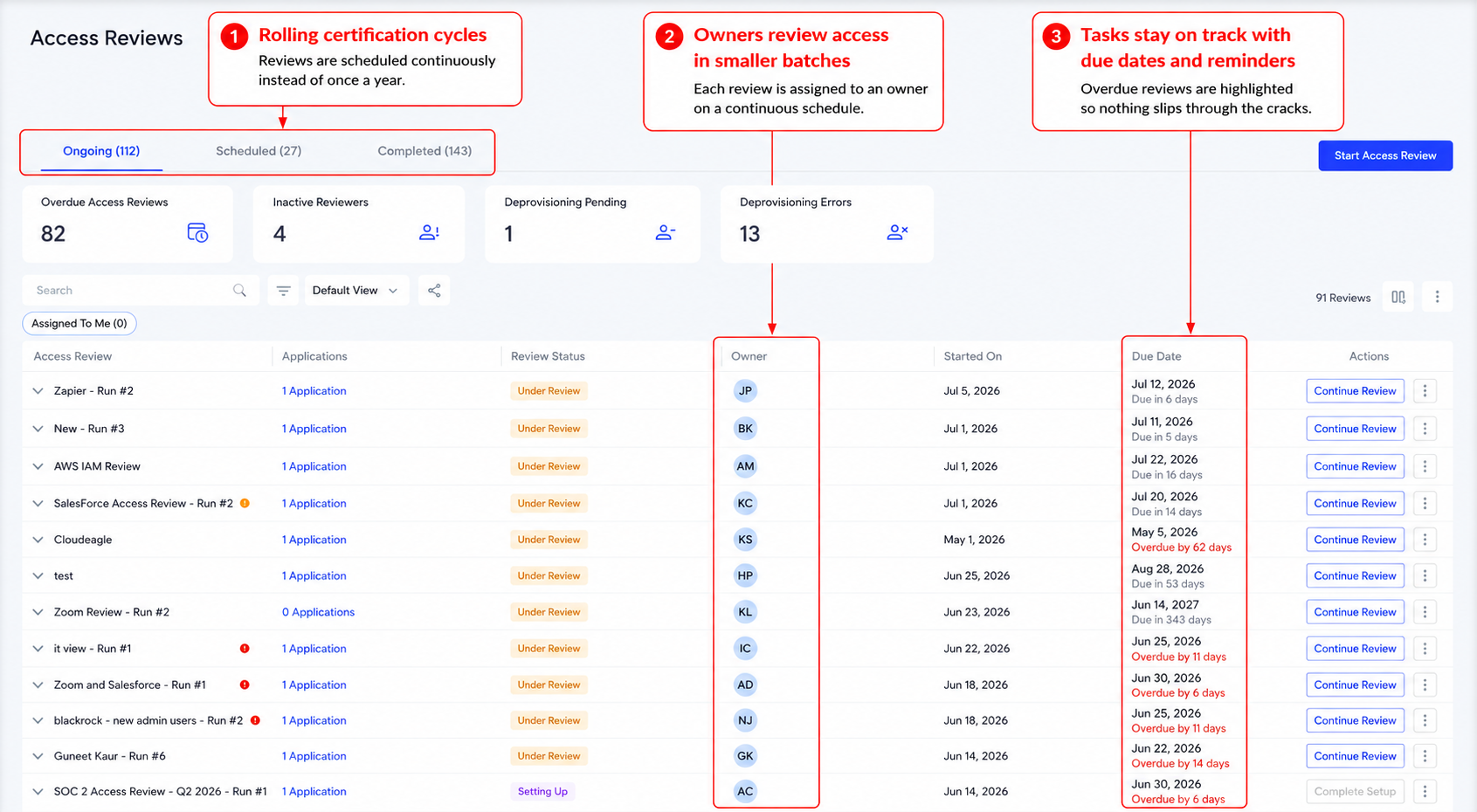
Access Reviews dashboard showing continuous certification cycles, assigned review owners, due dates, and reminders. The table highlights ongoing reviews, overdue tasks, review status, and actions to continue each access review.

ICEYE moved to this model and cut manual review time by 90%, saving the team more than 1,500 hours a year, according to Michal Lipinski, Director of IT and Security at ICEYE.

“We went from spreadsheet-driven access reviews that took months to a fully automated, structured process. CloudEagle.ai gave us complete visibility into users, roles, and permissions, while eliminating delays and reducing risk.”
~ Michal Lipinski, Director of IT & Security, ICEYE

CloudEagle.ai extends this same continuous model to broader access governance across your entire SaaS and AI stack, so a service account audit becomes a formality instead of a discovery exercise.

If the staffing question in the next section is what's holding your team back, CloudEagle's CIO AI Governance Checklist walks through how one team made this exact shift without adding headcount.

5. What Auditors Actually Expect vs. What Most Service Account Programs Deliver

Auditors running SOC 2 Type II, ISO 27001, and NIST CSF reviews expect three specific things, and most programs only deliver one.

→ What auditors expect: evidence that access is reviewed on a defined cadence, evidence that over-permissioned accounts get remediated promptly, and evidence that orphaned accounts are decommissioned when no longer needed.

→ What most programs deliver: an annual report showing what was found and fixed, with a nine-month gap behind it where none of that was happening.

→ How continuous evidence changes this: creation logs, scope change records, and remediation timestamps get generated automatically. When an auditor asks about a specific account, the answer is a complete access history instead of "it was clean last quarter."

The distinction matters most in a SOC 2 Type II window, which evaluates control effectiveness over months rather than a single point in time. A service account audit that only produces evidence at quarter-end has nothing to show for the other eleven weeks. 

Continuous monitoring produces that evidence by default, because the log is being written every day instead of assembled right before the auditor asks for it.

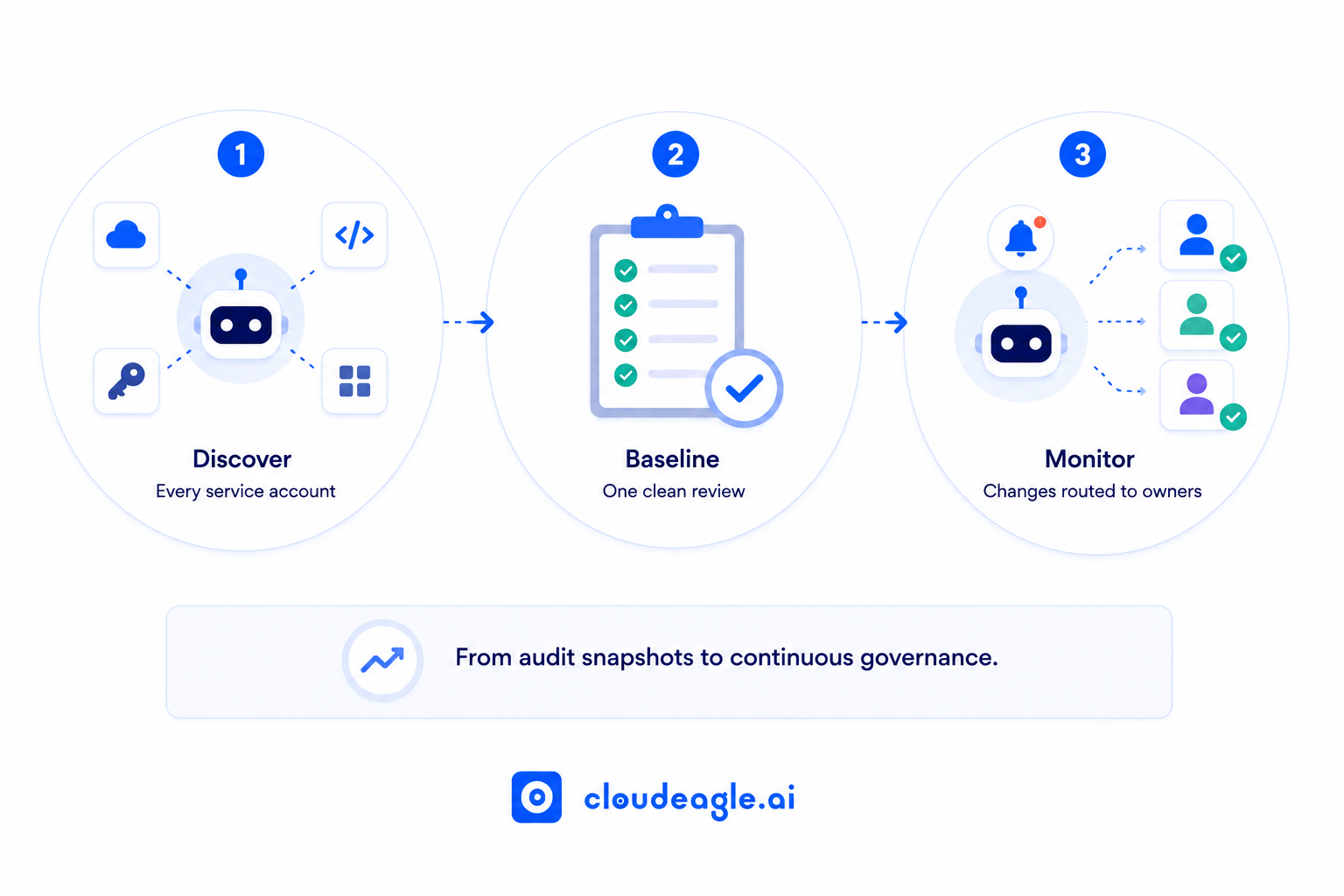
6. How to Move From Periodic Service Account Audits to Continuous Monitoring

The shift happens in three deliberate phases: 
Five-part continuous service account governance process: real-time account creation detection, permission change alerts, orphan detection triggered by HR changes, credential age monitoring, and rolling owner certification.

1. Build the inventory: surface every service account, including the ones outside the known registry, with an owner and purpose attached to each. 

This step alone usually surfaces more accounts than the last service account audit ever covered, since it pulls from creation logs, OAuth registries, and automation platforms instead of a manually maintained list.

2. Establish the baseline: run one clean, comprehensive service account audit to understand the current state before continuous monitoring activates. 

Treat this audit as the last point-in-time snapshot the program will ever need. Everything after it should be continuous.

3. Activate continuous detection: route changes to owners in real time instead of stockpiling them for the next review. 

Ownership assignment matters here as much as the detection itself. A flagged change with no owner to route it to just becomes a new backlog.

The Staffing Objection

"We don't have enough people to review every change in real time" 

The most common pushback and it gets the mechanism backward. Continuous monitoring catches small changes while they're still small. That means less large-scale remediation later, and it directly reduces the review burden a traditional service account audit creates once a quarter.

A one-time service account audit tells you what your posture was three months ago. Continuous monitoring tells you what it is right now.

7. FAQs

1. How does continuous compliance monitoring help prevent compliance issues over time? 

It closes the gap between audits by flagging scope changes, orphaned accounts, and dormant reactivations the moment they happen.

2. Why do audits support continual improvement? 

Each audit creates a baseline showing where controls broke down, and that baseline shapes stronger checks in the following cycle.

3. What is the purpose of continuous monitoring and auditing of privileged accounts? 

It validates elevated access in real time instead of only at certification time, catching misuse or scope creep before it compounds.

4. What is a key benefit of continuous process monitoring? 

It catches issues at the point they occur, which keeps remediation small instead of letting problems compound until the next scheduled review.

See how CloudEagle.ai makes service account governance continuous. Book a demo.

Advertisement for a SaaS Subscription Tracking Template with a call-to-action button to download and a partial graphic of a tablet showing charts.Banner promoting a SaaS Agreement Checklist to streamline SaaS management and avoid budget waste with a call-to-action button labeled Download checklist.Blue banner with text 'The Ultimate Employee Offboarding Checklist!' and a black button labeled 'Download checklist' alongside partial views of checklist documents from cloudeagle.ai.Digital ad for download checklist titled 'The Ultimate Checklist for IT Leaders to Optimize SaaS Operations' by cloudeagle.ai, showing checklist pages.Slack Buyer's Guide offer with text 'Unlock insider insights to get the best deal on Slack!' and a button labeled 'Get Your Copy', accompanied by a preview of the guide featuring Slack's logo.Monday Pricing Guide by cloudeagle.ai offering exclusive pricing secrets to maximize investment with a call-to-action button labeled Get Your Copy and an image of the guide's cover.Blue banner for Canva Pricing Guide by cloudeagle.ai offering a guide to Canva costs, features, and alternatives with a call-to-action button saying Get Your Copy.Blue banner with white text reading 'Little-Known Negotiation Hacks to Get the Best Deal on Slack' and a white button labeled 'Get Your Copy'.Blue banner with text 'Little-Known Negotiation Hacks to Get the Best Deal on Monday.com' and a white button labeled 'Get Your Copy'.Blue banner with text 'Little-Known Negotiation Hacks to Get the Best Deal on Canva' and a white button labeled 'Get Your Copy'.Banner with text 'Slack Buyer's Guide' and a 'Download Now' button next to images of a guide titled 'Slack Buyer’s Guide: Features, Pricing & Best Practices'.Digital cover of Monday Pricing Guide with a button labeled Get Your Copy on a blue background.Canva Pricing Guide cover with a button labeled Get Your Copy on a blue gradient background.

Enter your email to
unlock the report

Oops! Something went wrong while submitting the form.
License Count
Benchmark
Per User/Per Year

Enter your email to
unlock the report

Oops! Something went wrong while submitting the form.
License Count
Benchmark
Per User/Per Year

Enter your email to
unlock the report

Oops! Something went wrong while submitting the form.
Notion Plus
License Count
Benchmark
Per User/Per Year
100-500
$67.20 - $78.72
500-1000
$59.52 - $72.00
1000+
$51.84 - $57.60
Canva Pro
License Count
Benchmark
Per User/Per Year
100-500
$74.33-$88.71
500-1000
$64.74-$80.32
1000+
$55.14-$62.34

Enter your email to
unlock the report

Oops! Something went wrong while submitting the form.

Enter your email to
unlock the report

Oops! Something went wrong while submitting the form.
Zoom Business
License Count
Benchmark
Per User/Per Year
100-500
$216.00 - $264.00
500-1000
$180.00 - $216.00
1000+
$156.00 - $180.00

Enter your email to
unlock the report

Oops! Something went wrong while submitting the form.

Get the Right Security Platform To Secure Your Cloud Infrastructure

Please enter a business email
Thank you!
The 2023 SaaS report has been sent to your email. Check your promotional or spam folder.
Oops! Something went wrong while submitting the form.

Access full report

Please enter a business email
Thank you!
The 2023 SaaS report has been sent to your email. Check your promotional or spam folder.
Oops! Something went wrong while submitting the form.

Your last service account audit is already out of date. The report is filed, the findings are remediated, and the compliance box is checked. Six weeks later, a developer spins up a new service account with admin scope for a project that ends in two weeks. Nobody reviews it until the next service account audit, nine months away.

This is the structural problem with the traditional service account audit. It produces a point-in-time picture of an environment that changes daily. Accounts get created, modified, and orphaned between cycles, and those gaps accumulate silently until the next audit finds them, or an incident does.

Continuous monitoring is not a more frequent service account audit. It is a different model, one that surfaces changes the moment they happen instead of months later.

TL;DR

  • A service account audit shows what existed at the moment of review. It says nothing about what exists right now
  • Service accounts get created, modified, and orphaned continuously between audit cycles
  • The gap between audits is where over-permissioned accounts, orphaned identities, and failed compliance evidence accumulate
  • Continuous service account monitoring detects changes the day they happen, no quarterly cycle required
  • CloudEagle.ai turns service account governance into a running log instead of a quarterly snapshot

1. Why One-Time Service Account Audits Fail, Even When You Do Everything Right

One-time service account audits fail because the environment they measure changes faster than any fixed review cycle can track.

Diagram showing how a last audit can become outdated as new service accounts are created, permissions expand, and orphaned accounts remain, leading to an environment change alert. Text notes that a point-in-time audit cannot govern a continuously changing environment.

The Snapshot Problem

A service account audit run on March 31 finds 847 accounts. By June 30, the environment will have 923. The 76 new accounts were created after the last review closed, so none were in scope. 

Several belong to employees who have since left. One carries admin permissions for a project that ended in April.

The audit report says 847 accounts were reviewed, all accounted for. The environment says otherwise. That gap between what a service account audit covers and what actually exists is the entire problem in miniature.

Why the Environment Outruns the Audit Cycle

Three forces widen that gap every quarter.

  • Creation rate: AI agents, low-code platforms, and developer tooling generate new service accounts continuously. A single Copilot agent rollout can spin up dozens of agent-owned accounts within weeks, each one an identity the last service account audit never saw.
  • Modification rate: scope creep happens quietly. A developer expands a service account's permissions for one task and never narrows it back, and no change management trigger fires for an expansion that feels minor in the moment.
  • Orphan rate: a service account created for a now-closed project stays active because no offboarding event covers it.

Quarterly service account audits were built for an environment that changed quarterly. This one doesn't.

Why Reviewers Rubber-Stamp the List

Present 847 service accounts to three reviewers with only an account name, creation date, and last-used field, and the outcome is predictable. Reviewers approve what looks familiar and flag what looks obviously wrong.

That is an information problem. Nobody can make 847 real decisions with that little context in one sitting, and every service account audit built on a flat list runs into this same ceiling.

Your Last Audit Is Already Nine Months Out of Date

Close the gaps before the next one surfaces them.
Download Checklist

2. The Real Cost of Auditing Service Accounts Only Once a Quarter

The cost is the exposure that builds in the space between two clean audits.

  • Dormant accounts turned active: a service account goes quiet for eight months, its owner leaves, and a threat actor reactivates it using credentials pulled from an unrelated breach. The last service account audit called this account clean.
  • Standing over-permission: admin scope granted for a single task stays in place indefinitely. Multiplied across dozens of accounts created between review cycles, it becomes a durable lateral movement path.
  • Accounts the audit never sees: service accounts created outside IT's formal provisioning process, by developers, AI agents, or low-code automations, don't appear in the registry a service account audit checks against. 

CloudEagle's Identity Governance Report finds that 48% of former employees retain access to at least one application six months after termination, and orphaned service accounts follow the same pattern.

  • Evidence that doesn't hold up: an account still active 47 days after an employee's termination is a finding under most SOC 2 and ISO 27001 frameworks, regardless of how clean the prior quarter's service account audit looked.
  • Compounding remediation cost: a scope issue caught the day it happens is a five-minute fix. 

The same issue, caught nine months later, after it has touched three integrations and been copied into two other service accounts, takes a full investigation to unwind. Every cycle, a service account audit misses something, and the eventual fix gets more expensive.

The audit finds what it knows to look for. The incident happens in what it doesn't.

Admin Scope Granted Once. Never Walked Back. Classic Finding.

This checklist finds every over-permissioned account before auditors do.
Download Checklist

3. How Continuous Service Account Monitoring Closes the Gap

Continuous service account monitoring moves detection to the moment of change instead of waiting for the next scheduled review.

  • Real-time creation detection: every new service account is logged with creator, purpose, connected systems, and scope on the day it's created.
  • Scope change alerting: a permission expansion on an existing account triggers a review task for the owner the same day it happens.
  • Orphan detection on HR trigger: when an employee is offboarded, every service account they own surfaces automatically for transfer or decommission.
  • Dormancy-to-activation detection: an account that's been inactive for months and suddenly starts making calls triggers a same-day alert instead of waiting for the next scheduled review.
  • Rolling certification: ownership certifications run on a continuous schedule instead of a single annual deadline that produces rubber-stamping.

This is the model that an annual service account audit was never designed to deliver on its own.

4. How CloudEagle.ai Makes Service Account Governance Continuous

A quarterly service account audit can't see what happens in the other eighty-nine days of the quarter. CloudEagle.ai closes that window by treating service account governance as a continuous process instead of a periodic event.

Four-part CloudEagle.ai infographic showing continuous service account governance: real-time detection of new accounts, alerts for permission changes, HR-triggered orphan account detection with transfer or decommissioning options, and rolling certification for ongoing access reviews.

a) Real-Time Creation Detection

New service accounts, especially ones spun up by AI agents and low-code automations, get created faster than any team can track manually, and most never touch IT's formal provisioning workflow. 

CloudEagle.ai closes that visibility gap the moment an account exists instead of the moment someone remembers to look for it.

  • Every new service account, API key, and agent connection is logged with creator, purpose, and connected systems on day one
  • Discovery runs against creation events across SSO logs, OAuth registries, and automation platforms instead of a manually maintained spreadsheet

Non-human identity inventory dashboard showing 145 identities across Azure AD and Okta, categorized as managed identities, API tokens, service identities, and OAuth service apps, with activity, owner, risk, and action details.

The inventory feeding your next service account audit stays hours behind the real environment instead of months behind it.

b) Scope Change Alerting

Permission expansions are usually small and easy to justify in the moment, which is exactly why they never get walked back and quietly accumulate into standing over-permission. 

CloudEagle.ai treats every scope change as an event worth flagging rather than a detail buried in the next review cycle.

  • Permission changes on any service account route to its owner automatically for review
  • IT, HR, Finance, and Security data are correlated, so a scope change tied to a departed employee or closed project gets caught immediately

Expanded non-human identity records showing assigned roles and connected resources for inactive Azure AD service accounts. Teams can review permissions such as Storage Blob Data Reader, Storage Blob Data Contributor, and Key Vault Secrets Officer, then revoke access when it is no longer justified.

Scope creep gets addressed the week it happens instead of the quarter someone finally notices.

c) Orphan Detection on HR Trigger

When an employee leaves, IT's offboarding checklist rarely extends to the service accounts they created or owned, and those accounts keep running with no one monitoring them. 

CloudEagle.ai connects directly to your HRIS, so an ownership change triggers action instead of waiting for someone to notice.

  • Every service account tied to a departing employee surfaces for transfer or decommissioning the same day their status changes in the HRIS
  • Ownership reassignment happens through a routed workflow instead of a manual search across systems

Non-human identity dashboard highlighting ownerless accounts after an HR status change. The Owner column shows unassigned service accounts, with action controls to reassign ownership or decommission accounts.

An orphaned account never goes unnoticed, so it stops being something your next service account audit has to find.

d) Rolling Certification

A single annual certification deadline forces reviewers through hundreds of decisions at once, and under that kind of pressure, most of those decisions turn into a rubber stamp. 

CloudEagle.ai replaces that deadline with a rolling cadence, so certification happens in smaller batches with more context attached to each one.

  • Owners certify their service accounts on a continuous schedule instead of one annual crunch
  • The full assignment, review, and evidence collection pipeline runs automatically, from task routing to compliance report generation

Access Reviews dashboard showing continuous certification cycles, assigned review owners, due dates, and reminders. The table highlights ongoing reviews, overdue tasks, review status, and actions to continue each access review.

ICEYE moved to this model and cut manual review time by 90%, saving the team more than 1,500 hours a year, according to Michal Lipinski, Director of IT and Security at ICEYE.

“We went from spreadsheet-driven access reviews that took months to a fully automated, structured process. CloudEagle.ai gave us complete visibility into users, roles, and permissions, while eliminating delays and reducing risk.”
~ Michal Lipinski, Director of IT & Security, ICEYE

CloudEagle.ai extends this same continuous model to broader access governance across your entire SaaS and AI stack, so a service account audit becomes a formality instead of a discovery exercise.

If the staffing question in the next section is what's holding your team back, CloudEagle's CIO AI Governance Checklist walks through how one team made this exact shift without adding headcount.

5. What Auditors Actually Expect vs. What Most Service Account Programs Deliver

Auditors running SOC 2 Type II, ISO 27001, and NIST CSF reviews expect three specific things, and most programs only deliver one.

→ What auditors expect: evidence that access is reviewed on a defined cadence, evidence that over-permissioned accounts get remediated promptly, and evidence that orphaned accounts are decommissioned when no longer needed.

→ What most programs deliver: an annual report showing what was found and fixed, with a nine-month gap behind it where none of that was happening.

→ How continuous evidence changes this: creation logs, scope change records, and remediation timestamps get generated automatically. When an auditor asks about a specific account, the answer is a complete access history instead of "it was clean last quarter."

The distinction matters most in a SOC 2 Type II window, which evaluates control effectiveness over months rather than a single point in time. A service account audit that only produces evidence at quarter-end has nothing to show for the other eleven weeks. 

Continuous monitoring produces that evidence by default, because the log is being written every day instead of assembled right before the auditor asks for it.

6. How to Move From Periodic Service Account Audits to Continuous Monitoring

The shift happens in three deliberate phases: 

Five-part continuous service account governance process: real-time account creation detection, permission change alerts, orphan detection triggered by HR changes, credential age monitoring, and rolling owner certification.

1. Build the inventory: surface every service account, including the ones outside the known registry, with an owner and purpose attached to each. 

This step alone usually surfaces more accounts than the last service account audit ever covered, since it pulls from creation logs, OAuth registries, and automation platforms instead of a manually maintained list.

2. Establish the baseline: run one clean, comprehensive service account audit to understand the current state before continuous monitoring activates. 

Treat this audit as the last point-in-time snapshot the program will ever need. Everything after it should be continuous.

3. Activate continuous detection: route changes to owners in real time instead of stockpiling them for the next review. 

Ownership assignment matters here as much as the detection itself. A flagged change with no owner to route it to just becomes a new backlog.

The Staffing Objection

"We don't have enough people to review every change in real time" 

The most common pushback and it gets the mechanism backward. Continuous monitoring catches small changes while they're still small. That means less large-scale remediation later, and it directly reduces the review burden a traditional service account audit creates once a quarter.

A one-time service account audit tells you what your posture was three months ago. Continuous monitoring tells you what it is right now.

7. FAQs

1. How does continuous compliance monitoring help prevent compliance issues over time? 

It closes the gap between audits by flagging scope changes, orphaned accounts, and dormant reactivations the moment they happen.

2. Why do audits support continual improvement? 

Each audit creates a baseline showing where controls broke down, and that baseline shapes stronger checks in the following cycle.

3. What is the purpose of continuous monitoring and auditing of privileged accounts? 

It validates elevated access in real time instead of only at certification time, catching misuse or scope creep before it compounds.

4. What is a key benefit of continuous process monitoring? 

It catches issues at the point they occur, which keeps remediation small instead of letting problems compound until the next scheduled review.

See how CloudEagle.ai makes service account governance continuous. Book a demo.

CloudEagle.ai recognized in the 2025 Gartner® Magic Quadrant™ for SaaS Management Platforms
Download now
gartner chart
5x
Faster employee
onboarding
80%
Reduction in time for
user access reviews
30k
Workflows
automated
$15Bn
Analyzed in
contract spend
$2Bn
Saved in
SaaS spend

Streamline SaaS governance and save 10-30%

Book a Demo with Expert
CTA image