You need to enable JavaScript in order to use the AI chatbot tool powered by ChatBot

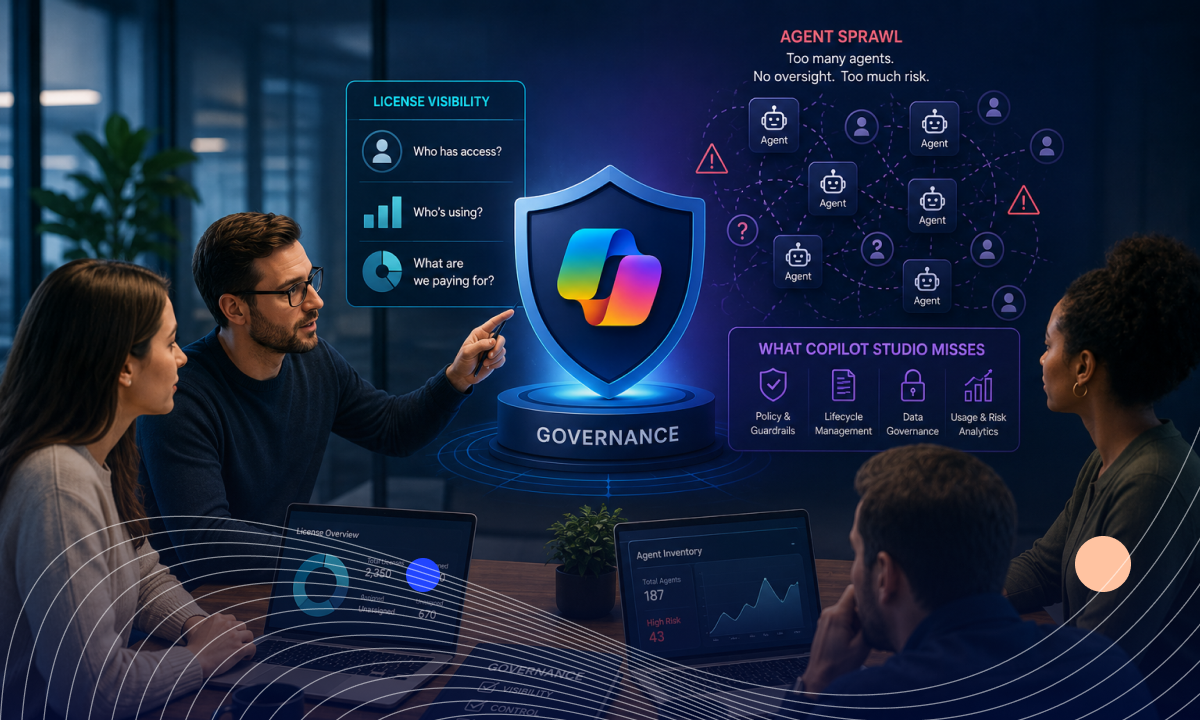
How to Govern Microsoft Copilot: License Visibility, Agent Sprawl, and What Copilot Studio Misses

Share via:
blog-cms-banner-bg
Little-Known Negotiation Hacks to Get the Best Deal on Slack
cta-bg-blogDownload Your Copy

HIPAA Compliance Checklist for 2025

Download PDF

You buy 500 Microsoft Copilot licenses. Six months later, finance asks a simple question: "Which teams are actually using them?". You'd think that's easy to answer. But then a second question comes up:

"And how many Copilot agents have been created across the business?"

That's the question Microsoft's native tooling wasn't built to answer cleanly.

A department manager can create a Microsoft Copilot agent that pulls answers from SharePoint. Another team can build one that summarizes internal documents.

At $30 per user per month, a 500-seat deployment running at 70% utilization means $54K in annual spend attached to licenses nobody is actively using. 

The risk isn't that these agents exist. The risk is that most organizations can't answer:

  • which agents are active
  • who owns them
  • what data sources they can access
  • or whether anyone still needs them

That's why governing Microsoft Copilot is a different challenge from managing Microsoft 365 licenses, and why the tools Microsoft provides for one don't fully solve the other.

Governing Copilot doesn't require replacing the Microsoft stack you've already built. CloudEagle.ai connects to M365, Entra ID, and Copilot Studio to consolidate license status, agent inventory, and usage signals into a single governance layer.

In this article, we'll break down how to govern Microsoft Copilot, where organizations lose visibility into licenses and agents, and what gaps remain even after adopting Copilot Studio.

TL;DR

  • Microsoft Copilot governance becomes difficult when license growth and agent creation outpace oversight processes.
  • Native Microsoft tools provide visibility but do not automate license reclaim, agent governance, or cross-platform oversight.
  • Copilot Studio lacks centralized controls for agent ownership, approvals, activity monitoring, and lifecycle management.
  • CloudEagle.ai connects Microsoft 365, Entra ID, Copilot Studio, HRIS, and ITSM systems into a unified governance layer.
  • CloudEagle.ai automates Copilot license optimization, agent governance, shadow AI visibility, and risk-based policy enforcement.

1. The Governance Problem Copilot Deployments Hit After the Pilot

The governance problem starts when Microsoft Copilot moves beyond a pilot group and becomes part of everyday work. 

At 50 users, IT knows who has access, what they're testing, and which data sources they're touching. At 500, that visibility disappears fast.
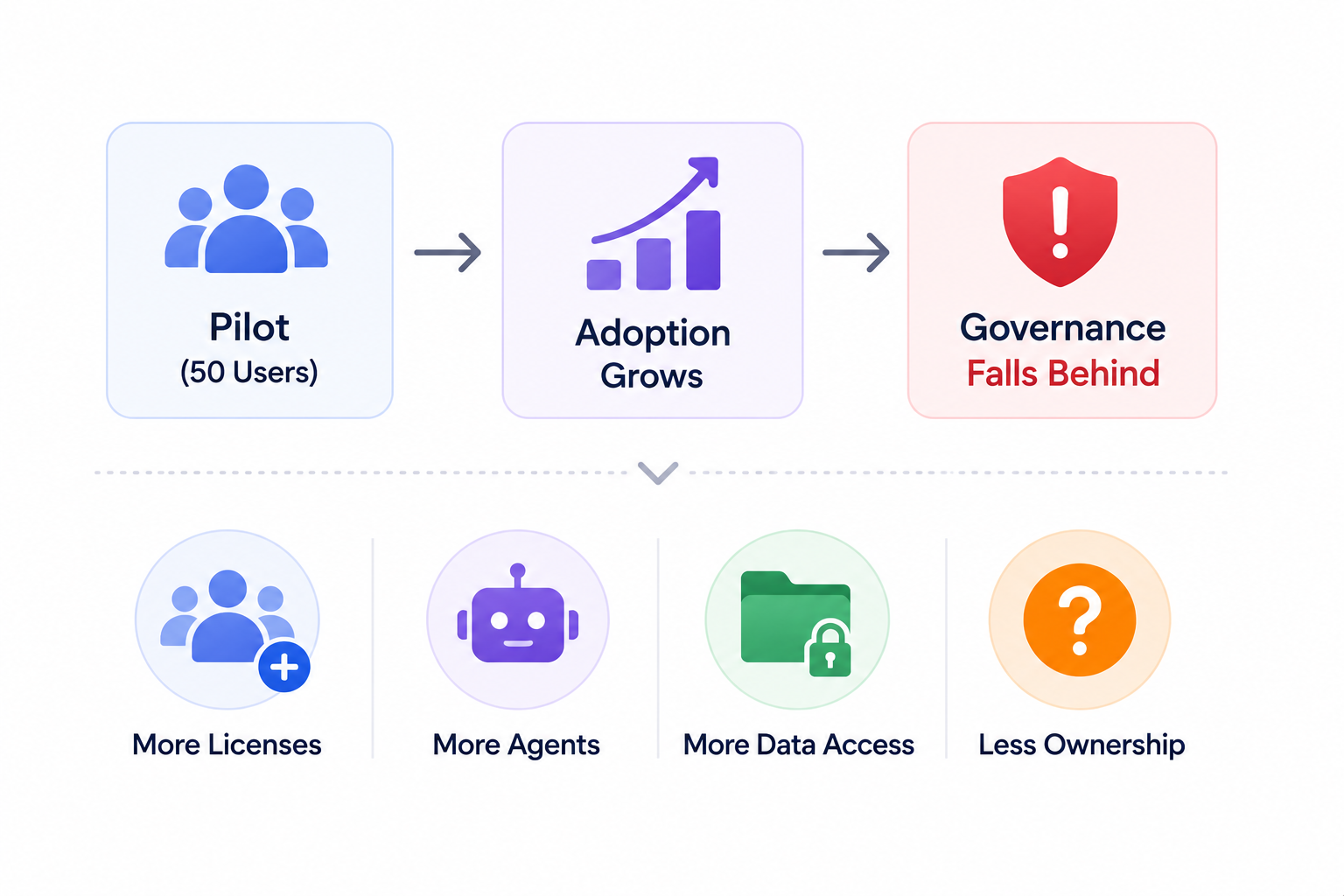
  • License Sprawl: New users are added regularly, inactive licenses accumulate, and manual tracking doesn't scale.
  • Agent Sprawl: Teams build agents for different use cases. When the employees who built them leave, those agents keep running with no owner assigned.
  • Inherited Data Access: AI agents inherit access to SharePoint sites and confidential documents based on the creator's existing permissions.
  • Blurred Ownership: It becomes difficult to identify who is responsible for each agent, what data it can reach, and whether it was ever reviewed.

Microsoft 365, Entra ID, and Copilot Studio weren't designed to provide a single governance layer that answers:

  • Which Microsoft Copilot licenses are unused and recoverable?
  • Which agents haven't been accessed in 90 days or are owned by someone who left?
  • Which agents can access sensitive SharePoint content with no DLP policy applied?
  • What is the GenAI risk profile of each agent currently running?

The pilot proved the Copilot could deliver value. Now IT needs a way to govern it at scale and the tools that got them here aren't enough to do it alone.

Every License Has A Story

Most teams never read it.
See The Truth

2. How to Govern Microsoft Copilot Using CloudEagle.ai

CloudEagle.ai provides complete visibility into Microsoft Copilot licenses, usage, and spending through direct integrations with Microsoft environments and identity providers. 

It connects with Microsoft Entra ID, Active Directory, and SSO platforms like Okta to collect user, entitlement, and access data. The platform also analyzes finance and procurement records to match software spend against actual adoption.

CloudEagle.ai surfaces feature-level usage data across Microsoft applications, helping IT and procurement teams identify who is actively using Microsoft Copilot and who is not. Follow these steps to govern Microsoft Copilot effectively:

A. Select Microsoft Copilot from the Usage Filter

Navigate to the Microsoft tenant from the Application Dashboard. This provides centralized visibility into your Microsoft ecosystem, including Microsoft 365 applications and services.
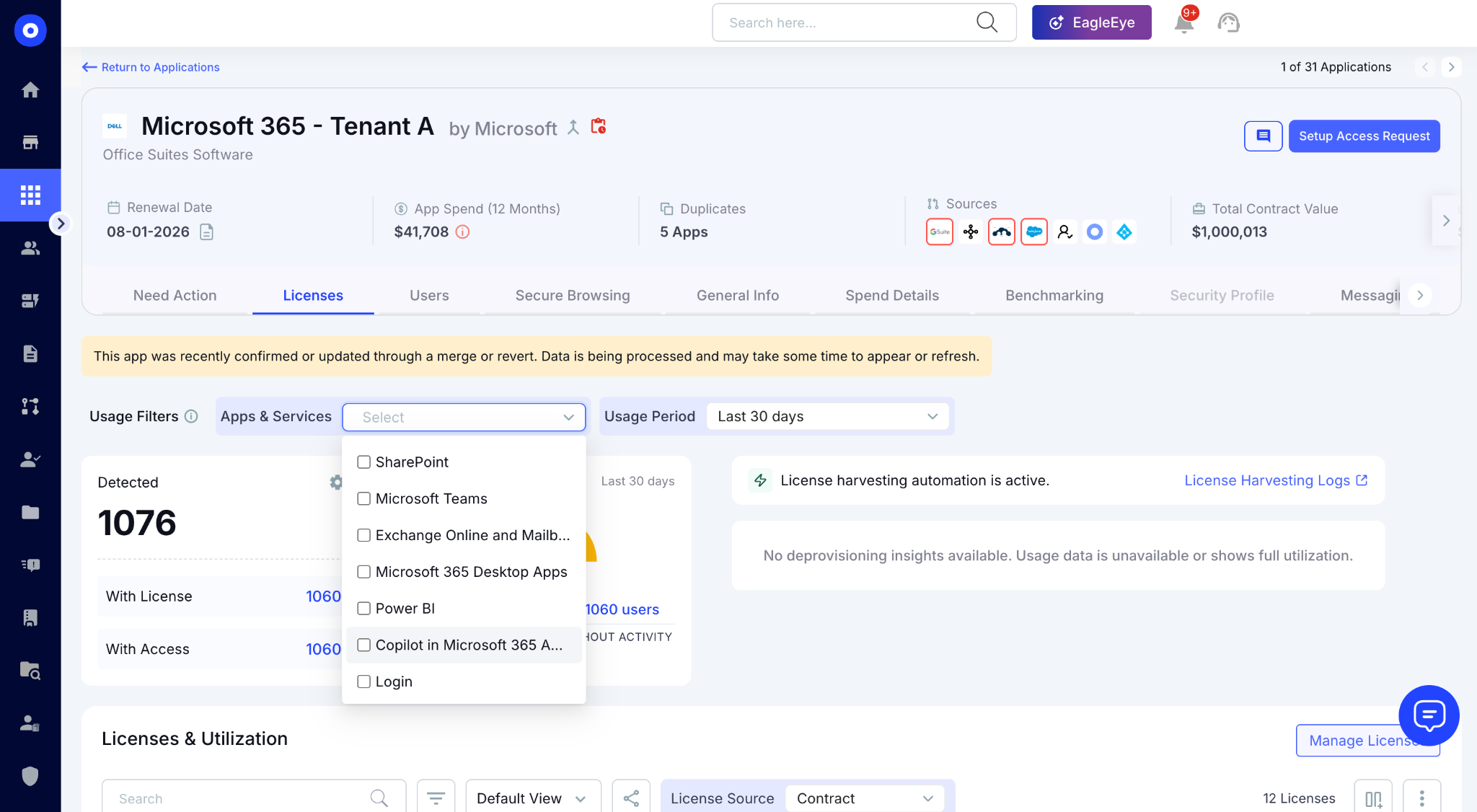
Under the Usage Filter, select Copilot from the Apps & Services section to view dedicated Copilot analytics.

B. Review Copilot Usage and Spending

The Licenses and Utilization page provides a detailed view of Copilot consumption across your organization. 
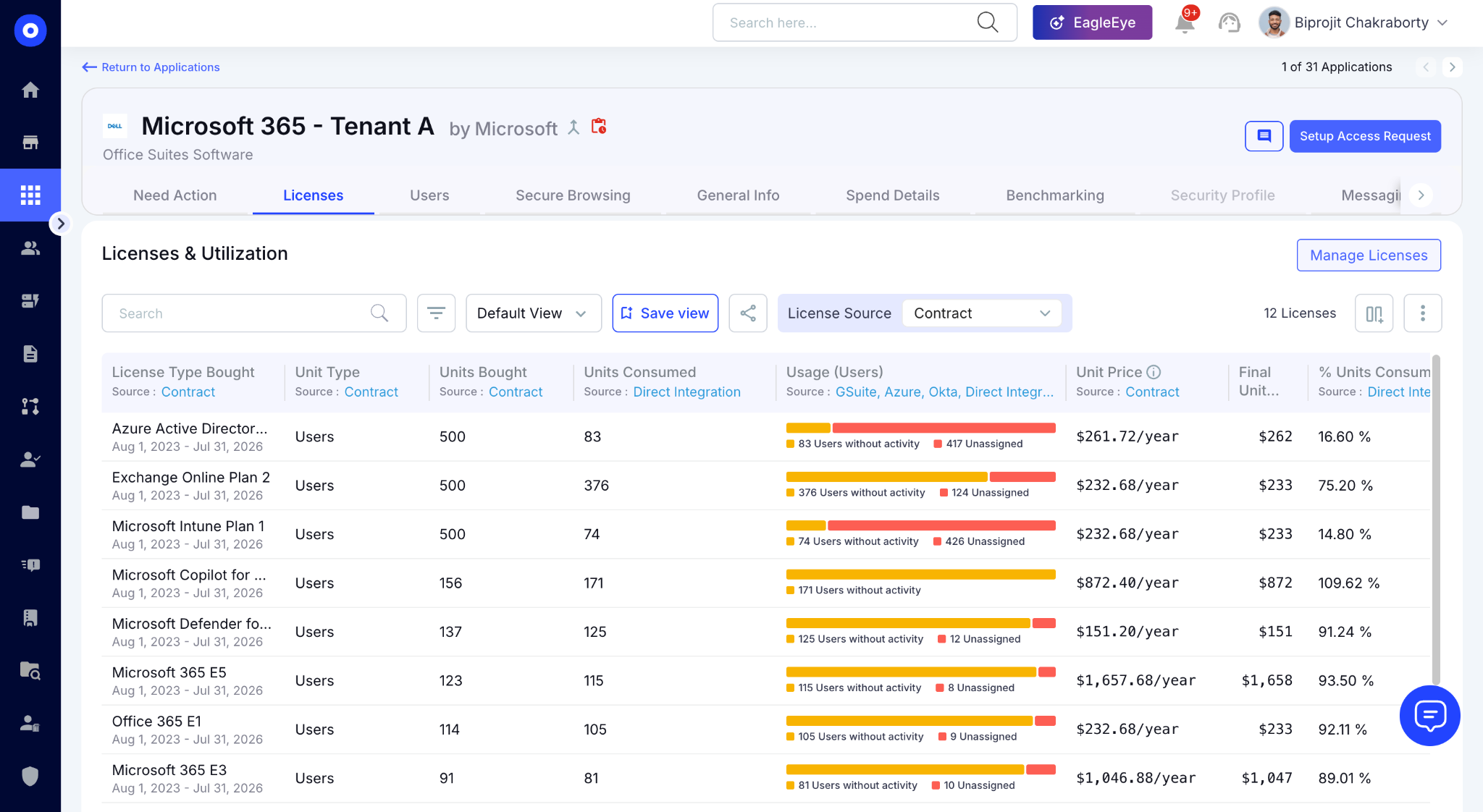
You can review license types, purchased versus consumed units, utilization rates, and associated costs from a single dashboard. 

C. Analyze Department-Level Costs with Chargeback Reports

To understand how Copilot costs are distributed across the business, open the Chargeback Report. 
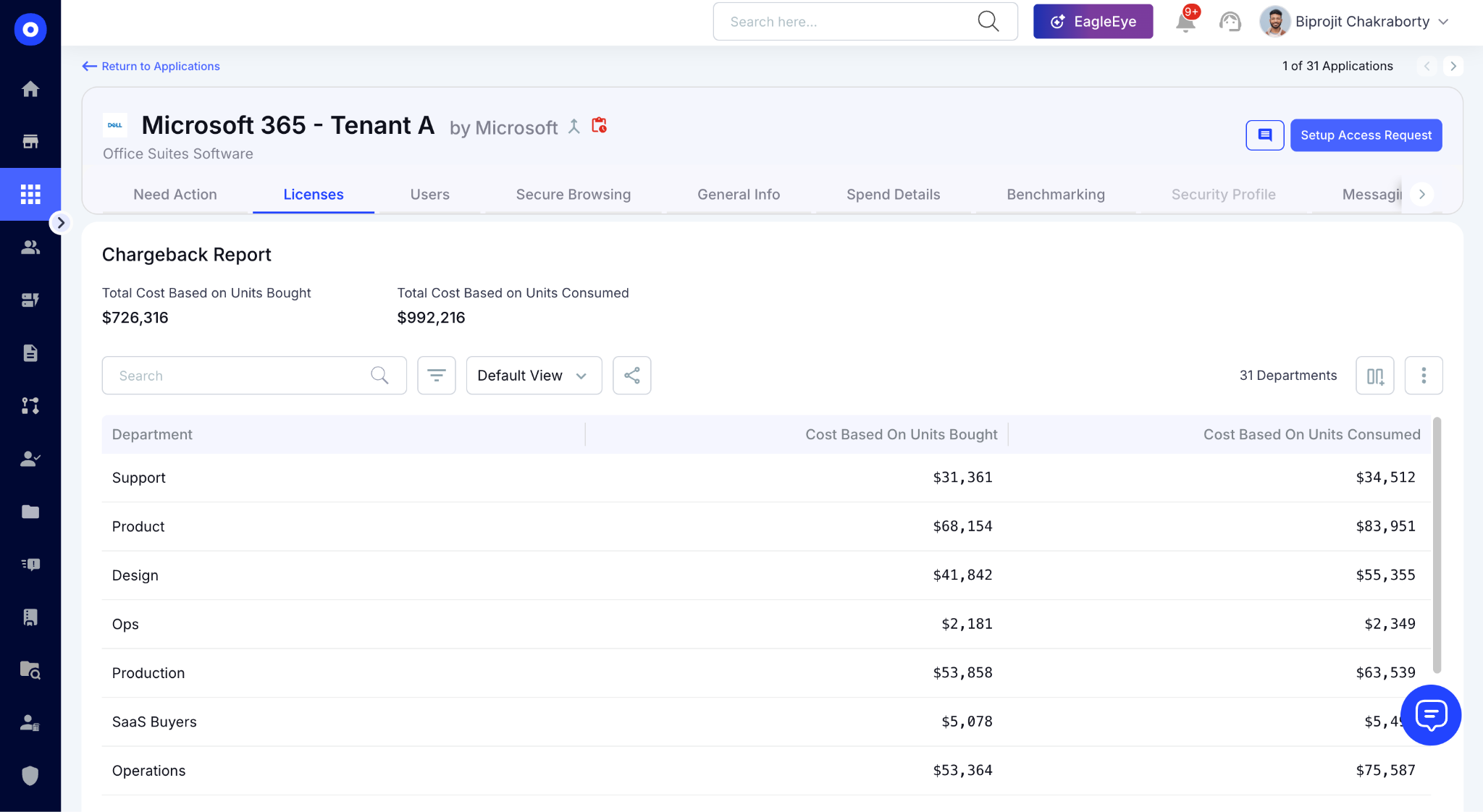
The report attributes spending to individual departments and teams, showing both purchased and consumed license costs. 

D. Identify Users with Copilot Access

The Users section provides a granular view of Copilot access and adoption. 
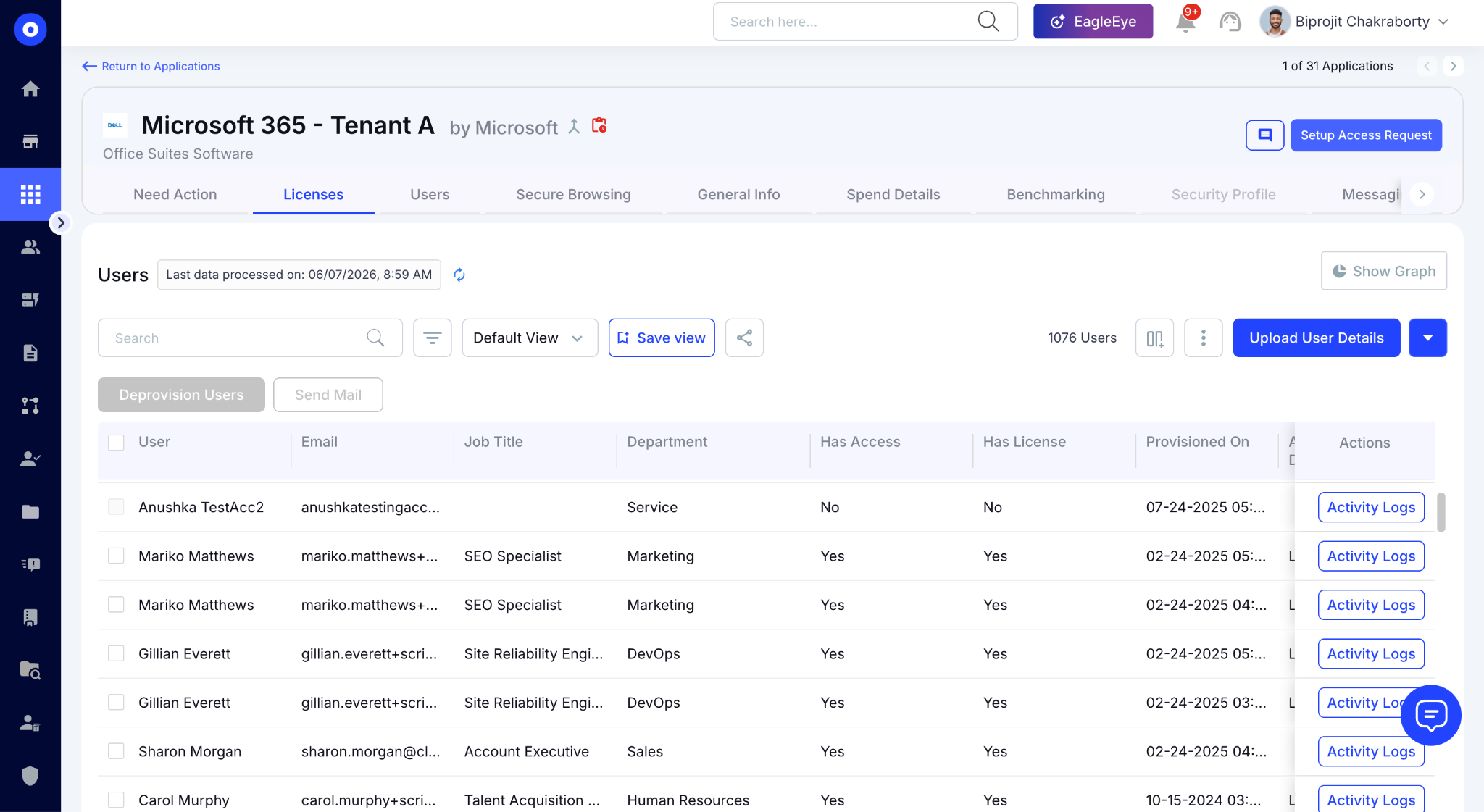
Here, you can see which employees have been assigned licenses, whether they currently have access, their department information, and their SSO status.

E. Automate License Harvesting for Unused Microsoft Copilot Licenses

CloudEagle.ai reclaims unused licenses through automated harvesting workflows. To get started, navigate to License Harvesting under Access Management and select Build Automation to create a new workflow.

Choose Microsoft Copilot as the target application and define inactivity thresholds based on your governance policy, such as 30, 60, 90, 120, or 180 days without activity. 
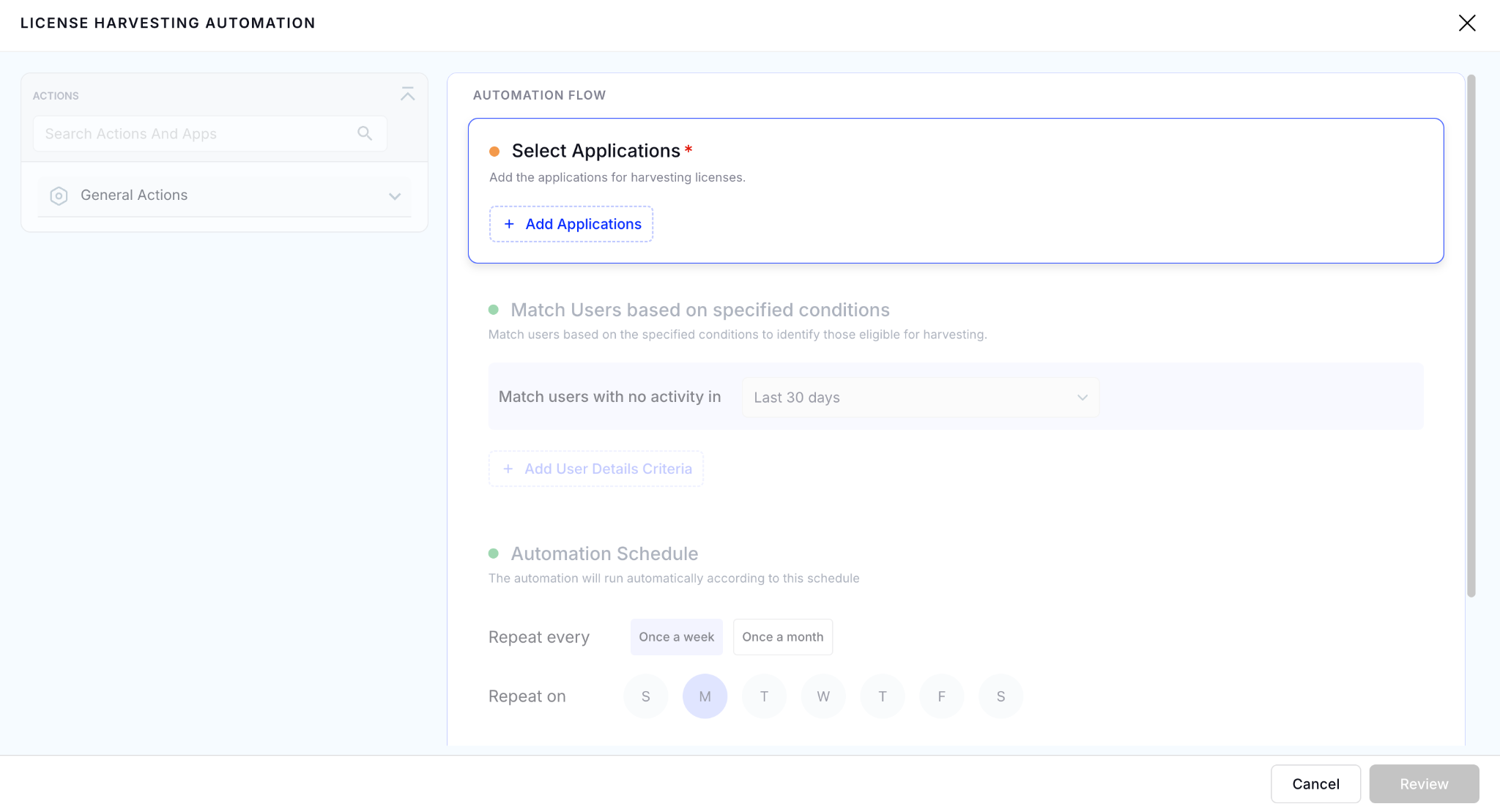
Once the conditions are configured, set the workflow schedule and select the actions you want CloudEagle.ai to take when inactive licenses are detected.
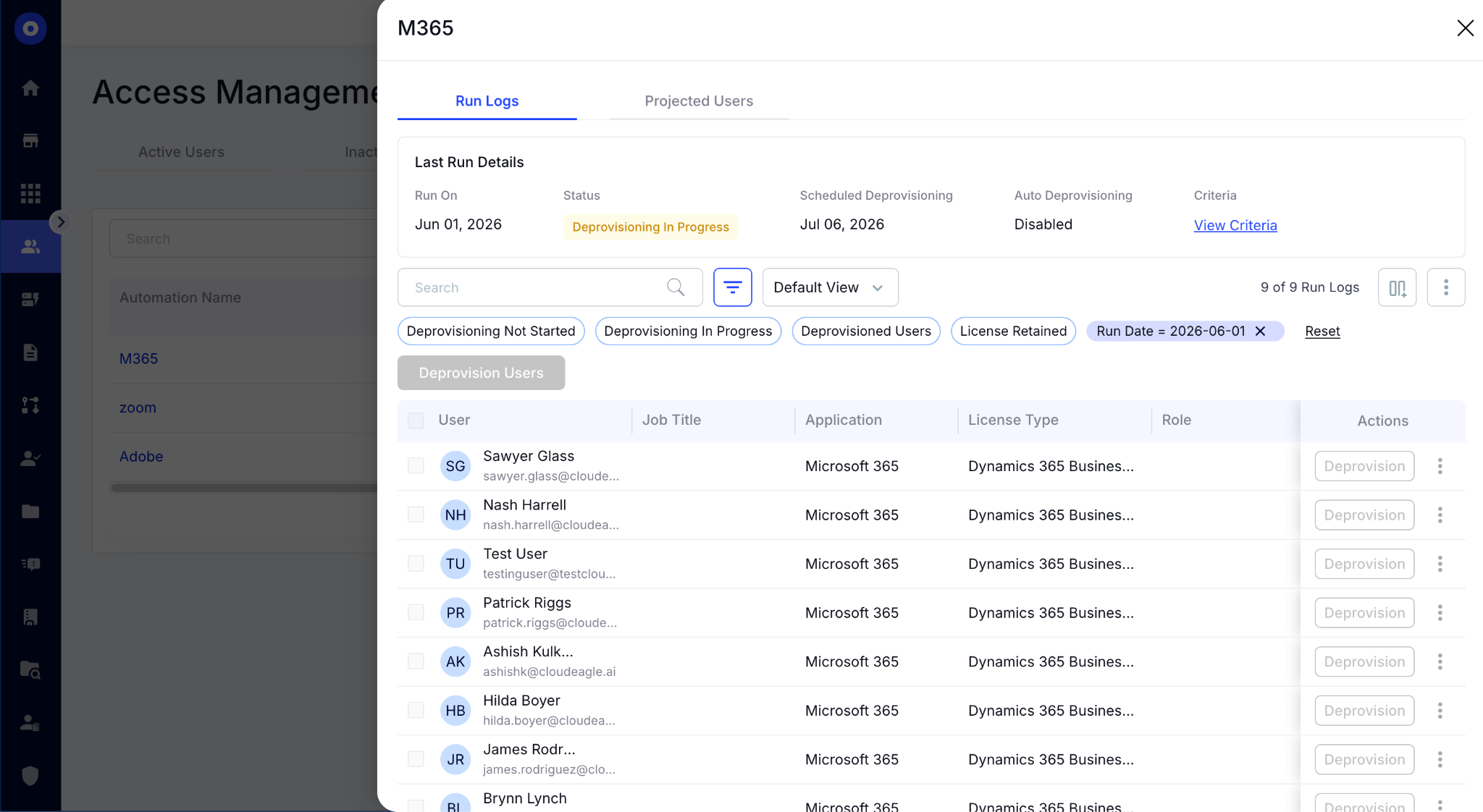
After the workflow is activated, CloudEagle.ai continuously monitors usage and automatically identifies reclaimable licenses. Administrators can track run logs, review deprovisioning activity, and monitor workflow status.

3. Three Governance Gaps Microsoft's Native Tooling Leaves Open

Microsoft gives teams the tools to deploy, manage, and build with Copilot. What those tools don't provide is a single governance layer connecting licenses, agents, usage, and ownership.

A. It Doesn’t Automate License Reclaim

The Copilot Dashboard tells you who is using a license and who isn't. What it doesn't do is act on that information.
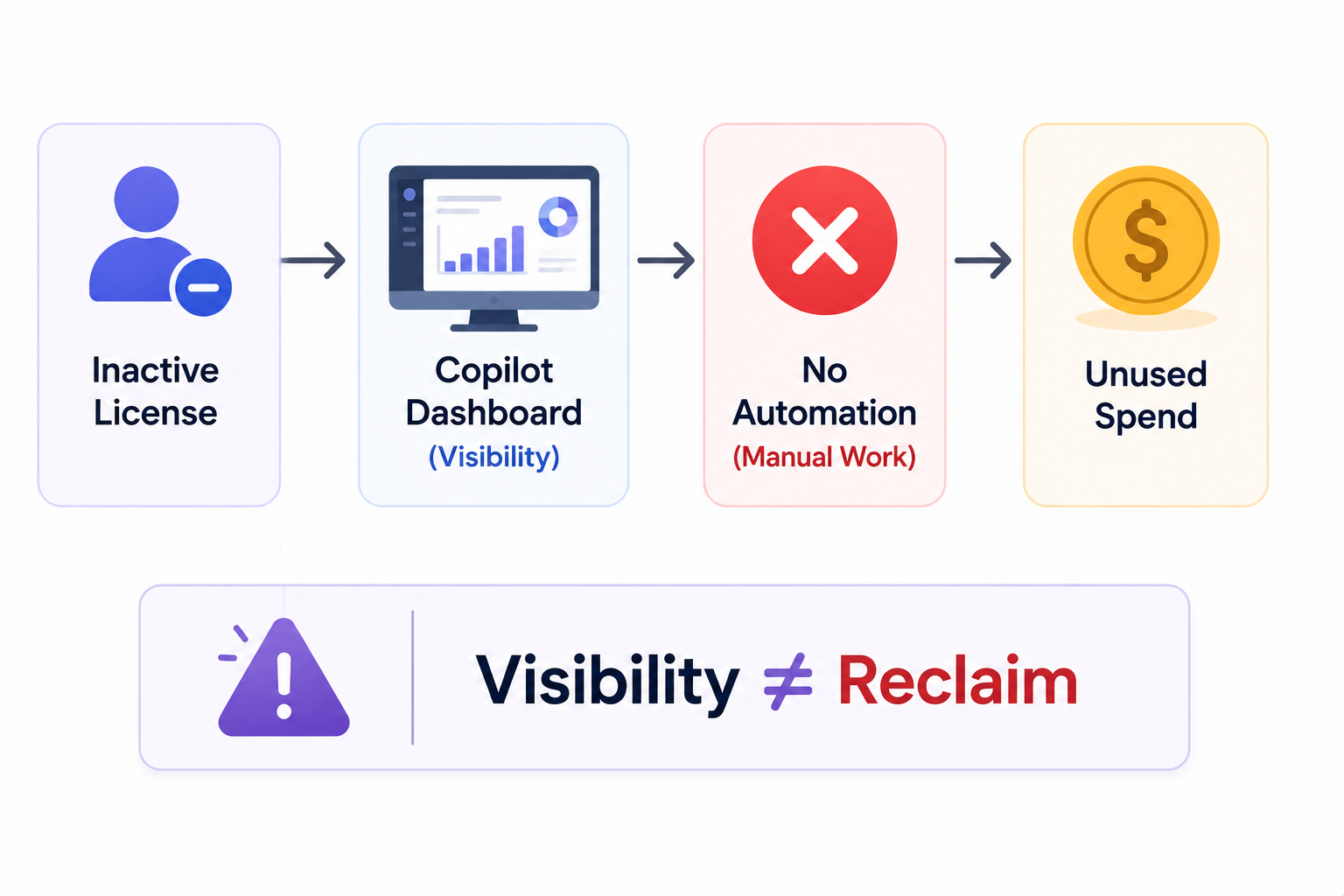
  • Reclaim doesn't happen automatically: The Dashboard surfaces inactive users. Converting that into a reclaimed license still requires a human to initiate every step.
  • Spreadsheet workflows don't scale: Exporting reports and chasing manager responses works at 50 users. At 500, it becomes a recurring project that never fully closes.
  • Offboarding doesn't trigger reclaim: Without an HRIS integration firing that trigger, departed employees hold access indefinitely.

The issue isn't visibility as the Dashboard already provides that. The issue is the gap between seeing an inactive license and recovering it.

B. It Doesn’t Govern Agents Created in Copilot Studio

Creating agents and governing them are two different things. An agent summarizing meeting notes carries limited risk. An agent connected to SharePoint sites containing financial forecasts or HR records carries a very different one.

  • No central approval gate: Agents can be built and deployed without IT or security ever reviewing them.
  • No activity monitoring: There's no native alert when an agent accesses data outside its intended scope or behaves unexpectedly.
  • Orphaned agents accumulate: When the employee who built an agent leaves, it keeps running with the same data access and no active owner.

Copilot Studio shows you what exists. It doesn't tell you who approved it or who owns it today.

C. It Doesn’t Consolidate Signals Across Your Microsoft Stack

The governance challenge isn't a lack of data but how that the data lives in four different tools with no single layer connecting them.

  • Copilot Dashboard shows adoption, not risk: You can see who's using Copilot. You can't see whether those users have access to sensitive content that hasn't been reviewed.
  • Entra ID manages identity, not usage: User roles and permissions are there. Whether those users are actively using the licenses attached to those permissions isn't.
  • Purview tracks compliance, not license status: DLP signals exist, disconnected from who holds a Copilot license and whether they're using it.
  • Viva Insights has productivity data, no governance layer: Usage patterns live in their own reporting layer with no connection to access reviews or identity context.

The gap appears when leadership asks a question that spans all four: which licensed users are actively using Copilot, have access to sensitive data, and haven't completed a recent access review?

The Biggest Costs Don't Look Expensive

At first.
See Why

4. What Copilot Governance Actually Looks Like When It’s Working

The previous sections covered the gaps. This one covers what closing them actually looks like in practice: what changes for the IT team, what gets automated, and what stops recurring manual effort quarterly.

A: Automated License Management and HRIS-Driven Reclaim

Once CloudEagle.ai is connected to M365 and your HRIS, inactive Microsoft Copilot license reclaim stops being a quarterly project and becomes a continuous background process.
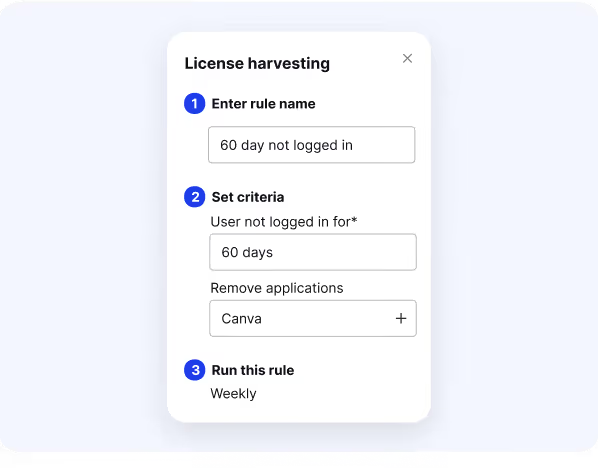
  • Inactive license detection: CloudEagle.ai monitors usage signals and flags licenses that have dropped below a defined activity threshold.
  • Automated user notification: Before any license is removed, the employee receives a notification confirming whether they still need access.
  • Admin review queue: Licenses requiring a decision surface as exceptions only, IT isn't reviewing everything, just the edge cases.
  • HRIS-triggered reclaim: When a departure is recorded in Workday, BambooHR, or Rippling, reclaim fires automatically. No offboarding checklist required.

Before: IT spends two weeks exporting data, chasing manager responses, and manually removing access, quarterly at best.

After: The process is a review queue of exceptions that takes hours, and departed employees never hold licenses past their last day.

B: Agent Governance Before Rollout Expands

The right time to govern Copilot agents is before there are 500 of them.

  • Agent inventory: Every agent across the organization is pulled into a centralized view: name, creator, connectors, data sources, last activity, and GenAI risk score.
  • Approval workflows before deployment: Agents requiring access to sensitive data sources trigger an approval workflow routed to IT or security before going live.
  • Ownership assignment: Every agent has an active owner. When that owner leaves, the agent is flagged immediately rather than becoming orphaned.
  • Activity monitoring: CloudEagle.ai flags agents inactive past a defined period, agents accessing data outside their intended scope, and agents whose connector permissions have changed since creation.

The goal isn't to slow down agent creation. It's to ensure every agent that goes live has an owner, an approval record, and a risk score.

C. Visibility Into What's Running Alongside Copilot

A Copilot deployment doesn't eliminate shadow AI. Employees use both and everything outside the Microsoft ecosystem needs to be visible too.

  • Shadow AI discovery: CloudEagle.ai surfaces every AI tool in use by correlating browser activity, SSO, finance systems, Zscaler, and CrowdStrike signals.
  • Prompt-level enforcement: When an employee tries to access an unapproved AI tool, a real-time block steps in before any company data is entered.
  • Token spend tracking: Usage-based tools running alongside Copilot like ChatGPT Enterprise, Gemini, Claude, Cursor are tracked per user, per team, and per tool so Finance has visibility before the invoice arrives.

5. Conclusion

Copilot governance isn't a Microsoft problem. It's a gap problem, between what Microsoft's native tooling surfaces and what IT teams actually need to act on it at scale.

The Copilot Dashboard, Entra, Purview, and Copilot Studio each hold a piece of the picture. None of them automate the reclaim, govern the agents, or consolidate the signals. 

Moreover, none of them see what's running alongside Copilot outside the Microsoft ecosystem. CloudEagle.ai closes those gaps without replacing the Microsoft stack you've already built.

With 500+ direct integrations, 30-minute onboarding, and GenAI Risk Scores across every AI tool in your environment, CloudEagle gives IT and security teams the automation and visibility to govern Copilot at scale.

6. FAQs

1. Does CloudEagle.ai work if we're still mid-rollout and haven't fully deployed Copilot yet?

It's actually the ideal time to connect. Establishing license governance, agent inventory, and shadow AI visibility before full deployment means governance scales with adoption rather than catching up to it afterward.

2. Can CloudEagle.ai govern Copilot licenses across multiple M365 tenants

Multi-tenant Microsoft environments are supported. CloudEagle consolidates license, usage, and agent data from separate tenants into a single governance view, which is particularly useful for organizations running parallel M365 instances after an acquisition.

3. How does CloudEagle.ai handle Copilot licenses bundled inside an M365 E3 or E5 agreement?

CloudEagle identifies Copilot entitlements regardless of how they are packaged, whether standalone or bundled inside enterprise agreements. License utilization is tracked at the individual user level so right-sizing decisions are based on actual usage, not contract structure.

4. Does CloudEagle.ai cover application-specific Copilot SKUs like Copilot for Sales or Copilot for Service?

Both core M365 Copilot licenses and application-specific SKUs including Copilot for Sales, Copilot for Service, and Copilot for Finance are covered, tracking usage, license status, and spend across all active Copilot entitlements.

5. What happens to agent governance if the Copilot Studio API connection is interrupted?

CloudEagle maintains the last-known agent inventory and flags the interruption for IT review. Governance workflows already in place, including ownership assignments, risk scores, and activity thresholds, continue operating on the existing inventory until the connection is restored.

Advertisement for a SaaS Subscription Tracking Template with a call-to-action button to download and a partial graphic of a tablet showing charts.Banner promoting a SaaS Agreement Checklist to streamline SaaS management and avoid budget waste with a call-to-action button labeled Download checklist.Blue banner with text 'The Ultimate Employee Offboarding Checklist!' and a black button labeled 'Download checklist' alongside partial views of checklist documents from cloudeagle.ai.Digital ad for download checklist titled 'The Ultimate Checklist for IT Leaders to Optimize SaaS Operations' by cloudeagle.ai, showing checklist pages.Slack Buyer's Guide offer with text 'Unlock insider insights to get the best deal on Slack!' and a button labeled 'Get Your Copy', accompanied by a preview of the guide featuring Slack's logo.Monday Pricing Guide by cloudeagle.ai offering exclusive pricing secrets to maximize investment with a call-to-action button labeled Get Your Copy and an image of the guide's cover.Blue banner for Canva Pricing Guide by cloudeagle.ai offering a guide to Canva costs, features, and alternatives with a call-to-action button saying Get Your Copy.Blue banner with white text reading 'Little-Known Negotiation Hacks to Get the Best Deal on Slack' and a white button labeled 'Get Your Copy'.Blue banner with text 'Little-Known Negotiation Hacks to Get the Best Deal on Monday.com' and a white button labeled 'Get Your Copy'.Blue banner with text 'Little-Known Negotiation Hacks to Get the Best Deal on Canva' and a white button labeled 'Get Your Copy'.Banner with text 'Slack Buyer's Guide' and a 'Download Now' button next to images of a guide titled 'Slack Buyer’s Guide: Features, Pricing & Best Practices'.Digital cover of Monday Pricing Guide with a button labeled Get Your Copy on a blue background.Canva Pricing Guide cover with a button labeled Get Your Copy on a blue gradient background.

Enter your email to
unlock the report

Oops! Something went wrong while submitting the form.
License Count
Benchmark
Per User/Per Year

Enter your email to
unlock the report

Oops! Something went wrong while submitting the form.
License Count
Benchmark
Per User/Per Year

Enter your email to
unlock the report

Oops! Something went wrong while submitting the form.
Notion Plus
License Count
Benchmark
Per User/Per Year
100-500
$67.20 - $78.72
500-1000
$59.52 - $72.00
1000+
$51.84 - $57.60
Canva Pro
License Count
Benchmark
Per User/Per Year
100-500
$74.33-$88.71
500-1000
$64.74-$80.32
1000+
$55.14-$62.34

Enter your email to
unlock the report

Oops! Something went wrong while submitting the form.

Enter your email to
unlock the report

Oops! Something went wrong while submitting the form.
Zoom Business
License Count
Benchmark
Per User/Per Year
100-500
$216.00 - $264.00
500-1000
$180.00 - $216.00
1000+
$156.00 - $180.00

Enter your email to
unlock the report

Oops! Something went wrong while submitting the form.

Get the Right Security Platform To Secure Your Cloud Infrastructure

Please enter a business email
Thank you!
The 2023 SaaS report has been sent to your email. Check your promotional or spam folder.
Oops! Something went wrong while submitting the form.

Access full report

Please enter a business email
Thank you!
The 2023 SaaS report has been sent to your email. Check your promotional or spam folder.
Oops! Something went wrong while submitting the form.

You buy 500 Microsoft Copilot licenses. Six months later, finance asks a simple question: "Which teams are actually using them?". You'd think that's easy to answer. But then a second question comes up:

"And how many Copilot agents have been created across the business?"

That's the question Microsoft's native tooling wasn't built to answer cleanly.

A department manager can create a Microsoft Copilot agent that pulls answers from SharePoint. Another team can build one that summarizes internal documents.

At $30 per user per month, a 500-seat deployment running at 70% utilization means $54K in annual spend attached to licenses nobody is actively using. 

The risk isn't that these agents exist. The risk is that most organizations can't answer:

  • which agents are active
  • who owns them
  • what data sources they can access
  • or whether anyone still needs them

That's why governing Microsoft Copilot is a different challenge from managing Microsoft 365 licenses, and why the tools Microsoft provides for one don't fully solve the other.

Governing Copilot doesn't require replacing the Microsoft stack you've already built. CloudEagle.ai connects to M365, Entra ID, and Copilot Studio to consolidate license status, agent inventory, and usage signals into a single governance layer.

In this article, we'll break down how to govern Microsoft Copilot, where organizations lose visibility into licenses and agents, and what gaps remain even after adopting Copilot Studio.

TL;DR

  • Microsoft Copilot governance becomes difficult when license growth and agent creation outpace oversight processes.
  • Native Microsoft tools provide visibility but do not automate license reclaim, agent governance, or cross-platform oversight.
  • Copilot Studio lacks centralized controls for agent ownership, approvals, activity monitoring, and lifecycle management.
  • CloudEagle.ai connects Microsoft 365, Entra ID, Copilot Studio, HRIS, and ITSM systems into a unified governance layer.
  • CloudEagle.ai automates Copilot license optimization, agent governance, shadow AI visibility, and risk-based policy enforcement.

1. The Governance Problem Copilot Deployments Hit After the Pilot

The governance problem starts when Microsoft Copilot moves beyond a pilot group and becomes part of everyday work. 

At 50 users, IT knows who has access, what they're testing, and which data sources they're touching. At 500, that visibility disappears fast.

  • License Sprawl: New users are added regularly, inactive licenses accumulate, and manual tracking doesn't scale.
  • Agent Sprawl: Teams build agents for different use cases. When the employees who built them leave, those agents keep running with no owner assigned.
  • Inherited Data Access: AI agents inherit access to SharePoint sites and confidential documents based on the creator's existing permissions.
  • Blurred Ownership: It becomes difficult to identify who is responsible for each agent, what data it can reach, and whether it was ever reviewed.

Microsoft 365, Entra ID, and Copilot Studio weren't designed to provide a single governance layer that answers:

  • Which Microsoft Copilot licenses are unused and recoverable?
  • Which agents haven't been accessed in 90 days or are owned by someone who left?
  • Which agents can access sensitive SharePoint content with no DLP policy applied?
  • What is the GenAI risk profile of each agent currently running?

The pilot proved the Copilot could deliver value. Now IT needs a way to govern it at scale and the tools that got them here aren't enough to do it alone.

Every License Has A Story

Most teams never read it.
See The Truth

2. How to Govern Microsoft Copilot Using CloudEagle.ai

CloudEagle.ai provides complete visibility into Microsoft Copilot licenses, usage, and spending through direct integrations with Microsoft environments and identity providers. 

It connects with Microsoft Entra ID, Active Directory, and SSO platforms like Okta to collect user, entitlement, and access data. The platform also analyzes finance and procurement records to match software spend against actual adoption.

CloudEagle.ai surfaces feature-level usage data across Microsoft applications, helping IT and procurement teams identify who is actively using Microsoft Copilot and who is not. Follow these steps to govern Microsoft Copilot effectively:

A. Select Microsoft Copilot from the Usage Filter

Navigate to the Microsoft tenant from the Application Dashboard. This provides centralized visibility into your Microsoft ecosystem, including Microsoft 365 applications and services.

Under the Usage Filter, select Copilot from the Apps & Services section to view dedicated Copilot analytics.

B. Review Copilot Usage and Spending

The Licenses and Utilization page provides a detailed view of Copilot consumption across your organization. 

You can review license types, purchased versus consumed units, utilization rates, and associated costs from a single dashboard. 

C. Analyze Department-Level Costs with Chargeback Reports

To understand how Copilot costs are distributed across the business, open the Chargeback Report. 

The report attributes spending to individual departments and teams, showing both purchased and consumed license costs. 

D. Identify Users with Copilot Access

The Users section provides a granular view of Copilot access and adoption. 

Here, you can see which employees have been assigned licenses, whether they currently have access, their department information, and their SSO status.

E. Automate License Harvesting for Unused Microsoft Copilot Licenses

CloudEagle.ai reclaims unused licenses through automated harvesting workflows. To get started, navigate to License Harvesting under Access Management and select Build Automation to create a new workflow.

Choose Microsoft Copilot as the target application and define inactivity thresholds based on your governance policy, such as 30, 60, 90, 120, or 180 days without activity. 

Once the conditions are configured, set the workflow schedule and select the actions you want CloudEagle.ai to take when inactive licenses are detected.

After the workflow is activated, CloudEagle.ai continuously monitors usage and automatically identifies reclaimable licenses. Administrators can track run logs, review deprovisioning activity, and monitor workflow status.

3. Three Governance Gaps Microsoft's Native Tooling Leaves Open

Microsoft gives teams the tools to deploy, manage, and build with Copilot. What those tools don't provide is a single governance layer connecting licenses, agents, usage, and ownership.

A. It Doesn’t Automate License Reclaim

The Copilot Dashboard tells you who is using a license and who isn't. What it doesn't do is act on that information.

  • Reclaim doesn't happen automatically: The Dashboard surfaces inactive users. Converting that into a reclaimed license still requires a human to initiate every step.
  • Spreadsheet workflows don't scale: Exporting reports and chasing manager responses works at 50 users. At 500, it becomes a recurring project that never fully closes.
  • Offboarding doesn't trigger reclaim: Without an HRIS integration firing that trigger, departed employees hold access indefinitely.

The issue isn't visibility as the Dashboard already provides that. The issue is the gap between seeing an inactive license and recovering it.

B. It Doesn’t Govern Agents Created in Copilot Studio

Creating agents and governing them are two different things. An agent summarizing meeting notes carries limited risk. An agent connected to SharePoint sites containing financial forecasts or HR records carries a very different one.

  • No central approval gate: Agents can be built and deployed without IT or security ever reviewing them.
  • No activity monitoring: There's no native alert when an agent accesses data outside its intended scope or behaves unexpectedly.
  • Orphaned agents accumulate: When the employee who built an agent leaves, it keeps running with the same data access and no active owner.

Copilot Studio shows you what exists. It doesn't tell you who approved it or who owns it today.

C. It Doesn’t Consolidate Signals Across Your Microsoft Stack

The governance challenge isn't a lack of data but how that the data lives in four different tools with no single layer connecting them.

  • Copilot Dashboard shows adoption, not risk: You can see who's using Copilot. You can't see whether those users have access to sensitive content that hasn't been reviewed.
  • Entra ID manages identity, not usage: User roles and permissions are there. Whether those users are actively using the licenses attached to those permissions isn't.
  • Purview tracks compliance, not license status: DLP signals exist, disconnected from who holds a Copilot license and whether they're using it.
  • Viva Insights has productivity data, no governance layer: Usage patterns live in their own reporting layer with no connection to access reviews or identity context.

The gap appears when leadership asks a question that spans all four: which licensed users are actively using Copilot, have access to sensitive data, and haven't completed a recent access review?

The Biggest Costs Don't Look Expensive

At first.
See Why

4. What Copilot Governance Actually Looks Like When It’s Working

The previous sections covered the gaps. This one covers what closing them actually looks like in practice: what changes for the IT team, what gets automated, and what stops recurring manual effort quarterly.

A: Automated License Management and HRIS-Driven Reclaim

Once CloudEagle.ai is connected to M365 and your HRIS, inactive Microsoft Copilot license reclaim stops being a quarterly project and becomes a continuous background process.

  • Inactive license detection: CloudEagle.ai monitors usage signals and flags licenses that have dropped below a defined activity threshold.
  • Automated user notification: Before any license is removed, the employee receives a notification confirming whether they still need access.
  • Admin review queue: Licenses requiring a decision surface as exceptions only, IT isn't reviewing everything, just the edge cases.
  • HRIS-triggered reclaim: When a departure is recorded in Workday, BambooHR, or Rippling, reclaim fires automatically. No offboarding checklist required.

Before: IT spends two weeks exporting data, chasing manager responses, and manually removing access, quarterly at best.

After: The process is a review queue of exceptions that takes hours, and departed employees never hold licenses past their last day.

B: Agent Governance Before Rollout Expands

The right time to govern Copilot agents is before there are 500 of them.

  • Agent inventory: Every agent across the organization is pulled into a centralized view: name, creator, connectors, data sources, last activity, and GenAI risk score.
  • Approval workflows before deployment: Agents requiring access to sensitive data sources trigger an approval workflow routed to IT or security before going live.
  • Ownership assignment: Every agent has an active owner. When that owner leaves, the agent is flagged immediately rather than becoming orphaned.
  • Activity monitoring: CloudEagle.ai flags agents inactive past a defined period, agents accessing data outside their intended scope, and agents whose connector permissions have changed since creation.

The goal isn't to slow down agent creation. It's to ensure every agent that goes live has an owner, an approval record, and a risk score.

C. Visibility Into What's Running Alongside Copilot

A Copilot deployment doesn't eliminate shadow AI. Employees use both and everything outside the Microsoft ecosystem needs to be visible too.

  • Shadow AI discovery: CloudEagle.ai surfaces every AI tool in use by correlating browser activity, SSO, finance systems, Zscaler, and CrowdStrike signals.
  • Prompt-level enforcement: When an employee tries to access an unapproved AI tool, a real-time block steps in before any company data is entered.
  • Token spend tracking: Usage-based tools running alongside Copilot like ChatGPT Enterprise, Gemini, Claude, Cursor are tracked per user, per team, and per tool so Finance has visibility before the invoice arrives.

5. Conclusion

Copilot governance isn't a Microsoft problem. It's a gap problem, between what Microsoft's native tooling surfaces and what IT teams actually need to act on it at scale.

The Copilot Dashboard, Entra, Purview, and Copilot Studio each hold a piece of the picture. None of them automate the reclaim, govern the agents, or consolidate the signals. 

Moreover, none of them see what's running alongside Copilot outside the Microsoft ecosystem. CloudEagle.ai closes those gaps without replacing the Microsoft stack you've already built.

With 500+ direct integrations, 30-minute onboarding, and GenAI Risk Scores across every AI tool in your environment, CloudEagle gives IT and security teams the automation and visibility to govern Copilot at scale.

6. FAQs

1. Does CloudEagle.ai work if we're still mid-rollout and haven't fully deployed Copilot yet?

It's actually the ideal time to connect. Establishing license governance, agent inventory, and shadow AI visibility before full deployment means governance scales with adoption rather than catching up to it afterward.

2. Can CloudEagle.ai govern Copilot licenses across multiple M365 tenants

Multi-tenant Microsoft environments are supported. CloudEagle consolidates license, usage, and agent data from separate tenants into a single governance view, which is particularly useful for organizations running parallel M365 instances after an acquisition.

3. How does CloudEagle.ai handle Copilot licenses bundled inside an M365 E3 or E5 agreement?

CloudEagle identifies Copilot entitlements regardless of how they are packaged, whether standalone or bundled inside enterprise agreements. License utilization is tracked at the individual user level so right-sizing decisions are based on actual usage, not contract structure.

4. Does CloudEagle.ai cover application-specific Copilot SKUs like Copilot for Sales or Copilot for Service?

Both core M365 Copilot licenses and application-specific SKUs including Copilot for Sales, Copilot for Service, and Copilot for Finance are covered, tracking usage, license status, and spend across all active Copilot entitlements.

5. What happens to agent governance if the Copilot Studio API connection is interrupted?

CloudEagle maintains the last-known agent inventory and flags the interruption for IT review. Governance workflows already in place, including ownership assignments, risk scores, and activity thresholds, continue operating on the existing inventory until the connection is restored.

CloudEagle.ai recognized in the 2025 Gartner® Magic Quadrant™ for SaaS Management Platforms
Download now
gartner chart
5x
Faster employee
onboarding
80%
Reduction in time for
user access reviews
30k
Workflows
automated
$15Bn
Analyzed in
contract spend
$2Bn
Saved in
SaaS spend

Streamline SaaS governance and save 10-30%

Book a Demo with Expert
CTA image