You need to enable JavaScript in order to use the AI chatbot tool powered by ChatBot

How CloudEagle.ai Integrates with Your HRIS to Automate SaaS Access from Day One to Last Day

Share via:
blog-cms-banner-bg
Little-Known Negotiation Hacks to Get the Best Deal on Slack
cta-bg-blogDownload Your Copy

HIPAA Compliance Checklist for 2025

Download PDF

A new employee's first day shouldn't start with a Slack message to IT asking why their tools aren't set up. But when your HRIS integration and your SaaS stack aren't connected, that's the default outcome.

The same gap follows employees through every lifecycle change. Someone leaving last month may still have active accounts in three SaaS tools. And an AI app they expensed personally was never on the offboarding checklist.

The result: orphaned identities, ungoverned access, and an audit risk hiding in a spreadsheet nobody updates in real time.

CloudEagle.ai connects to your HRIS (Workday, BambooHR, Zoho, ADP, etc.) turns every lifecycle event into an automated access action. New hire confirmed? Application provision automatically.

In this article, we’ll show how CloudEagle.ai helps automate access from an employee’s first day to their last.

TL;DR

  • Manual joiner, mover, and leaver workflows create SaaS access gaps, orphaned identities, and audit risks.
  • CloudEagle.ai connects HRIS systems with SaaS apps to automate provisioning and deprovisioning workflows.
  • Access updates happen automatically during role changes, reducing over-provisioned permissions and standing access.
  • CloudEagle.ai also detects shadow AI tools, non-human identities, and unmanaged accounts during offboarding.
  • Continuous visibility and automated lifecycle management help enterprises maintain secure, audit-ready SaaS access.

1. Why Manual User Lifecycle Management Creates SaaS Access Gaps

Manual user lifecycle management creates access gaps because employee changes happen faster than manual processes can track. 

New hires join, employees switch teams, and people leave regularly. However, access management still depends on spreadsheets, tickets, and back-and-forth approvals tied to manual JML processes

These gaps show up in three consistent patterns:

New Hires Wait for Access

A new sales employee joins on Monday but spends the first few hours requesting access to CRM and internal systems instead of starting work. Provisioning only begins after someone processes a ticket.

Role Changes Create Over-Provisioned Access

An employee moving from operations to customer success receives new applications but keeps access to the old ones.

Repeated across dozens of role changes, this produces standing access that no longer reflects anyone's current job.

Offboarding Leaves Orphaned Identities

Removing access from an identity provider doesn't remove it everywhere. Employees may retain direct accounts inside SaaS applications, active AI tools they provisioned outside IT's catalog, and API tokens.

Across hundreds of employees and applications, these aren't minor inconveniences. They're the kind that surfaces during audits, creates privileged access exposure, and requires manual remediation. 

Permissions Only Grow. Rarely Shrink.

That’s how access turns into exposure.
Cut It Back

2. How CloudEagle.ai Automates SaaS Access Through HRIS Integrations

Thanks to 500+ integrations, CloudEagle.ai connects directly to your HRIS (Workday, BambooHR, Zoho, ADP) and turns employee lifecycle events into automated access actions. 

Instead of tickets and manual follow-ups, CloudEagle reads employee attributes such as department, role, manager, location to trigger the right provisioning or deprovisioning workflow automatically. 

Here's how it works across each stage of the employee lifecycle:

A. Automatically Provision Applications for New Employees

When a new hire is confirmed in your HRIS, CloudEagle.ai triggers user provisioning immediately, before the employee's first login, without a single ticket. Teams can automate:
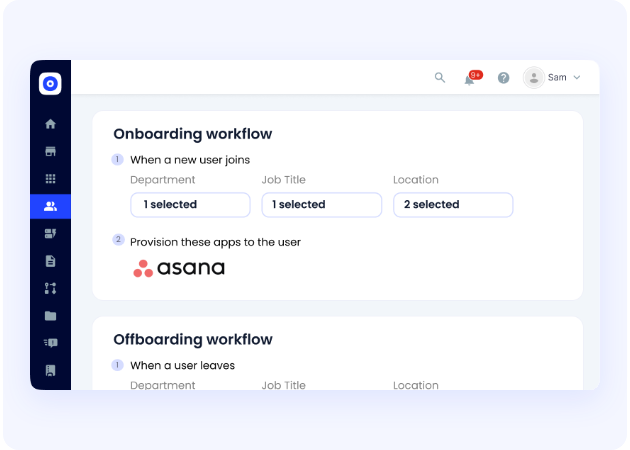
  • Role-Based Access Assignment: Employees receive a pre-configured application template based on their job function the day their HRIS record is created.
  • Self-Service App Catalog: Applications outside the default template are available for employees to request with a single click. Approvals route to the right manager automatically, without an IT ticket
  • Slack-Enabled Approvals: Access requests and approvals happen directly in Slack, so nothing waits on someone checking a portal
  • Time-Based Access: Temporary or time-based access is provisioned with a built-in expiry date, so it doesn't accumulate into standing access over time.

A sales employee joining on Monday should have their CRM, meeting tools, and internal systems ready before they log in. They shouldn’t spend the first morning requesting them. 

Enterprises using CloudEagle.ai reduce access request MTTR by up to 80%, so IT stops processing provisioning tickets and new employees start contributing from day one.

B. Adjust Access Automatically During Role Changes

When an employee's role, department, or team changes in the HRIS, CloudEagle.ai triggers an access update immediately. No need to wait for the next quarterly review. 

  • Automatic Access Removal: Applications tied to the previous role are flagged and removed as part of the transition, not left as standing access.
  • New Role Provisioning: Access relevant to the new role is granted automatically based on the updated HRIS attributes.
  • Manager-Triggered Access Reviews: Entitlements that don't cleanly map to either role are routed to the manager for a fast approval/deny.
  • Least Privilege Enforcement: Each transition is an opportunity to reset access to exactly what the new role requires, nothing more.

A customer success employee moving into sales should receive sales tools without carrying over every application from their previous role. 

Without automated mover workflows, employees accumulate over-provisioned access across every internal move.

C. Trigger SaaS Deprovisioning During Offboarding

When a termination is recorded in the HRIS, CloudEagle.ai begins user deprovisioning immediately. It’s effective across every connected application, not just the ones covered by SSO.

  • Immediate Access Revocation: Employee access is removed the moment their status changes in the HRIS, not when someone gets to the offboarding ticket.
  • Direct Account Deprovisioning: For applications not governed by SSO, CloudEagle.ai deprovisions directly via the application API. It will cover the full SaaS stack, not just the IdP-connected portion.
  • License Reclamation: Freed licenses are automatically reclaimed to the available pool for reassignment.
  • Orphaned Identity Detection: Any accounts missed during deprovisioning (shared logins, service accounts, API tokens) are surfaced for IT review before they become an audit finding.

Removing access from an identity provider doesn't remove it everywhere. Employees can retain direct accounts inside SaaS applications. Without automated deprovisioning, those orphaned identities accumulate.

D. Revoke Shadow AI Tools and Non-Human Identities on Exit

Standard offboarding covers the apps IT knows about. CloudEagle.ai covers the ones it doesn't. Employees routinely adopt AI tools outside of IT's catalog, and purchases that never go through procurement. 

When those employees leave, these tools don't appear on the offboarding checklist. They don't get deprovisioned. And unlike a forgotten SaaS subscription, AI tools often hold sensitive context. 

CloudEagle.ai addresses this through:

  • Shadow AI Discovery: CloudEagle.ai surfaces AI tools adopted outside approved procurement using browser-level, SSO, finance, and firewall signals. 
  • Non-Human Identity Detection: Non-human identities such as service accounts, API tokens, and bot accounts provisioned by or assigned to the departing employee are surfaced for review.
  • AI Usage Policy Enforcement: Access to ungoverned AI tools is revoked and flagged against the organization's AI usage policies.

An employee's last day should close every access path they opened. This includes the ones that never made it onto a checklist.

E. Maintain Continuous Visibility Across Employee Access

CloudEagle.ai provides a unified view of who has access to what across every connected application, updated continuously rather than surfaced only during audits.

  • User Access Reviews: Automated access reviews are triggered by lifecycle events, surfacing over-provisioned access, standing access, and accounts that no longer reflect an employee's current role.
  • Cross-System Correlation: CloudEagle.ai correlates access data across SSO, HRIS, finance, firewall, and browser signals to surface entitlements that appear clean in one system but are ungoverned in another.
  • AI Tool Sprawl Monitoring: New AI applications adopted outside IT's catalog are continuously surfaced and mapped to the employees using them.
  • Risk Correlation: Accounts with privileged access, orphaned identities, and policy violations are flagged continuously.

The result is an access posture that stays current between reviews. Moreover, there’ll be an audit-ready record of every access decision, change, and remediation across the employee lifecycle. 

One Weak App Is All It Takes

And most SaaS stacks have plenty of it.
Reveal It

3. Steps to Connect HRIS Integration with CloudEagle.ai

Here’s how your teams can use CloudEagle.ai to access HRIS integration:

A. Open the CloudEagle.ai Dashboard and Go to Admin Portal

Open the CloudEagle.ai dashboard and scroll to the bottom. Click on Admin Portal to access the integrations tab.

B. Navigate to HRIS Integrations

The integrations tab organizes all your connected systems in one place, SSO, Finance, Direct Integrations, HRIS, Contract Management, and Messaging. Click on HRIS.

C. Select Your HRIS System

You'll see all available HRIS systems including Workday, BambooHR, ADP, and Zoho. Click Connect to the integration you want to set up.

D. Enter Your Credentials and Connect

A setup popup will appear with step-by-step connection instructions on the left. Enter your credentials. For Workday, this means your ISU information on the right, then click Connect.

E. Invite App Admin to Connect
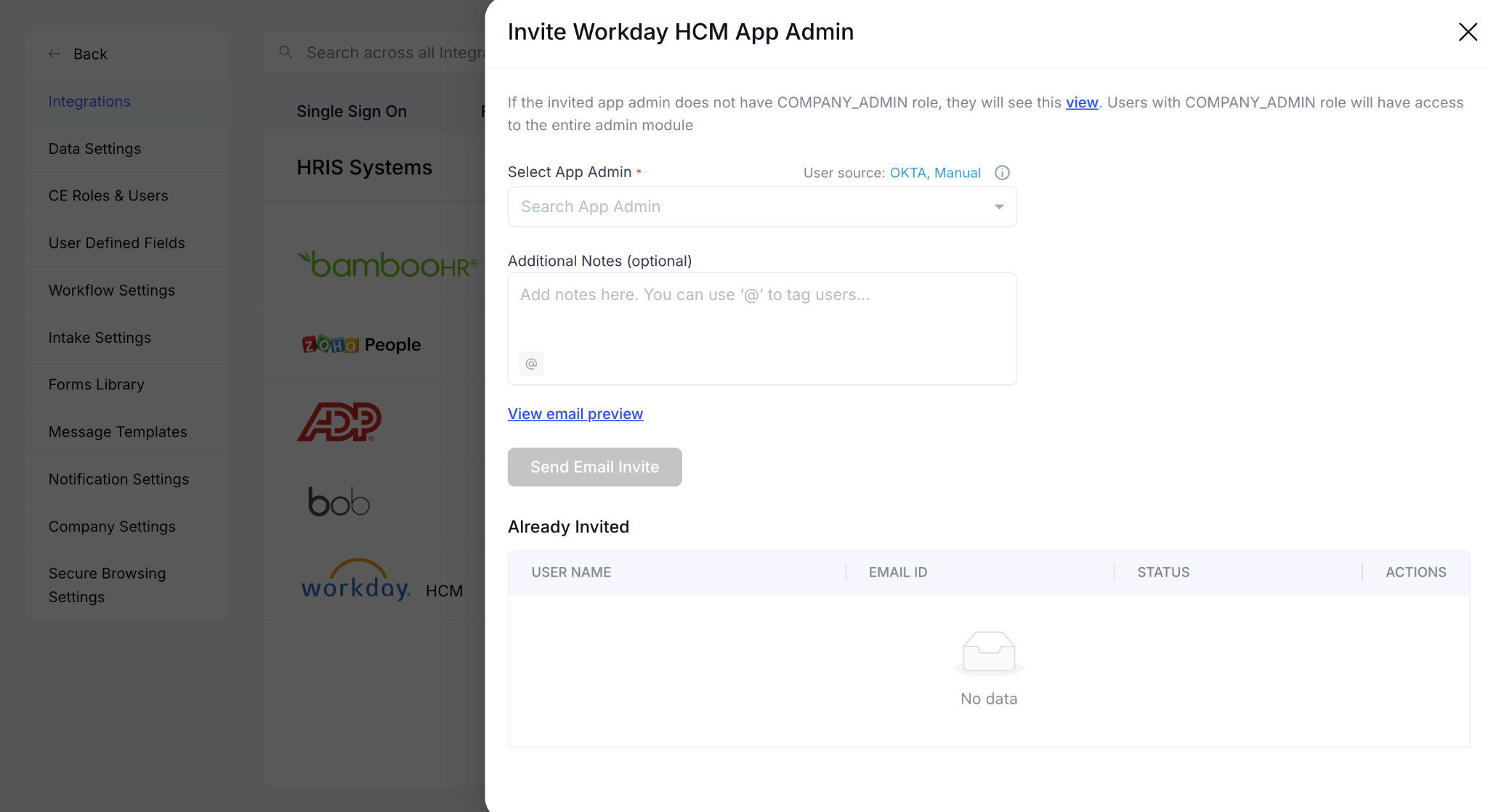
If you're not the system admin, click the three dots next to the Connect option to open an invite portal. Select the relevant app admin and send them an email invite directly from CloudEagle.ai.

Once connected, CloudEagle.ai begins reading employee lifecycle events from your HRIS immediately. Every subsequent joiner, mover, or leaver triggers the access workflows you've configured automatically.

4. Conclusion

Employee access doesn't manage itself. Every hire, role change, and departure creates an access decision. In manual JML processes, those decisions create over-provisioned access and orphaned identities. 

CloudEagle.ai connects directly to your HRIS and automates app access requests across the entire employee lifecycle. Joiners get provisioned before day one. Movers get the right access. Leavers are fully deprovisioned. 

If your team is still processing JML through spreadsheets and tickets, the gap between your HRIS and your SaaS stack is already costing you.

5. FAQs

1. What happens to access for contractors and temporary workers who aren't in the HRIS?

CloudEagle.ai supports non-employee identities through manual onboarding workflows and time-based access policies. Access is provisioned with a built-in expiry date, so it lapses automatically at the end of an engagement without a deprovisioning ticket.

2. Can CloudEagle.ai work alongside an existing IGA platform like SailPoint or Saviynt?

Yes. CloudEagle.ai fills the SaaS and AI governance gap that legacy IGA platforms weren't built for, covering SaaS applications, AI tools, and non-human identities that sit outside traditional IGA scope, while your existing platform continues governing legacy enterprise applications.

3. What if our HRIS data has errors like wrong department or outdated role? Will that affect provisioning?

For organizations with known data quality gaps, CloudEagle.ai supports manager approval checkpoints before provisioning fires, so a human confirms the access profile before it goes live rather than automating on potentially stale data.

4. Does CloudEagle.ai support organizations running multiple HRIS platforms after a merger or acquisition?

Yes. CloudEagle.ai connects to multiple HRIS systems simultaneously, consolidating employee identity data from separate platforms into a single access governance layer.

5. How does CloudEagle.ai handle access governance for applications without a direct integration?

CloudEagle.ai routes a deprovisioning task to the relevant application owner with the context they need to act. The action is tracked and logged in CloudEagle, so the audit record stays complete even when the deprovisioning step is manual.

Advertisement for a SaaS Subscription Tracking Template with a call-to-action button to download and a partial graphic of a tablet showing charts.Banner promoting a SaaS Agreement Checklist to streamline SaaS management and avoid budget waste with a call-to-action button labeled Download checklist.Blue banner with text 'The Ultimate Employee Offboarding Checklist!' and a black button labeled 'Download checklist' alongside partial views of checklist documents from cloudeagle.ai.Digital ad for download checklist titled 'The Ultimate Checklist for IT Leaders to Optimize SaaS Operations' by cloudeagle.ai, showing checklist pages.Slack Buyer's Guide offer with text 'Unlock insider insights to get the best deal on Slack!' and a button labeled 'Get Your Copy', accompanied by a preview of the guide featuring Slack's logo.Monday Pricing Guide by cloudeagle.ai offering exclusive pricing secrets to maximize investment with a call-to-action button labeled Get Your Copy and an image of the guide's cover.Blue banner for Canva Pricing Guide by cloudeagle.ai offering a guide to Canva costs, features, and alternatives with a call-to-action button saying Get Your Copy.Blue banner with white text reading 'Little-Known Negotiation Hacks to Get the Best Deal on Slack' and a white button labeled 'Get Your Copy'.Blue banner with text 'Little-Known Negotiation Hacks to Get the Best Deal on Monday.com' and a white button labeled 'Get Your Copy'.Blue banner with text 'Little-Known Negotiation Hacks to Get the Best Deal on Canva' and a white button labeled 'Get Your Copy'.Banner with text 'Slack Buyer's Guide' and a 'Download Now' button next to images of a guide titled 'Slack Buyer’s Guide: Features, Pricing & Best Practices'.Digital cover of Monday Pricing Guide with a button labeled Get Your Copy on a blue background.Canva Pricing Guide cover with a button labeled Get Your Copy on a blue gradient background.

Enter your email to
unlock the report

Oops! Something went wrong while submitting the form.
License Count
Benchmark
Per User/Per Year

Enter your email to
unlock the report

Oops! Something went wrong while submitting the form.
License Count
Benchmark
Per User/Per Year

Enter your email to
unlock the report

Oops! Something went wrong while submitting the form.
Notion Plus
License Count
Benchmark
Per User/Per Year
100-500
$67.20 - $78.72
500-1000
$59.52 - $72.00
1000+
$51.84 - $57.60
Canva Pro
License Count
Benchmark
Per User/Per Year
100-500
$74.33-$88.71
500-1000
$64.74-$80.32
1000+
$55.14-$62.34

Enter your email to
unlock the report

Oops! Something went wrong while submitting the form.

Enter your email to
unlock the report

Oops! Something went wrong while submitting the form.
Zoom Business
License Count
Benchmark
Per User/Per Year
100-500
$216.00 - $264.00
500-1000
$180.00 - $216.00
1000+
$156.00 - $180.00

Enter your email to
unlock the report

Oops! Something went wrong while submitting the form.

Get the Right Security Platform To Secure Your Cloud Infrastructure

Please enter a business email
Thank you!
The 2023 SaaS report has been sent to your email. Check your promotional or spam folder.
Oops! Something went wrong while submitting the form.

Access full report

Please enter a business email
Thank you!
The 2023 SaaS report has been sent to your email. Check your promotional or spam folder.
Oops! Something went wrong while submitting the form.

A new employee's first day shouldn't start with a Slack message to IT asking why their tools aren't set up. But when your HRIS integration and your SaaS stack aren't connected, that's the default outcome.

The same gap follows employees through every lifecycle change. Someone leaving last month may still have active accounts in three SaaS tools. And an AI app they expensed personally was never on the offboarding checklist.

The result: orphaned identities, ungoverned access, and an audit risk hiding in a spreadsheet nobody updates in real time.

CloudEagle.ai connects to your HRIS (Workday, BambooHR, Zoho, ADP, etc.) turns every lifecycle event into an automated access action. New hire confirmed? Application provision automatically.

In this article, we’ll show how CloudEagle.ai helps automate access from an employee’s first day to their last.

TL;DR

  • Manual joiner, mover, and leaver workflows create SaaS access gaps, orphaned identities, and audit risks.
  • CloudEagle.ai connects HRIS systems with SaaS apps to automate provisioning and deprovisioning workflows.
  • Access updates happen automatically during role changes, reducing over-provisioned permissions and standing access.
  • CloudEagle.ai also detects shadow AI tools, non-human identities, and unmanaged accounts during offboarding.
  • Continuous visibility and automated lifecycle management help enterprises maintain secure, audit-ready SaaS access.

1. Why Manual User Lifecycle Management Creates SaaS Access Gaps

Manual user lifecycle management creates access gaps because employee changes happen faster than manual processes can track. 

New hires join, employees switch teams, and people leave regularly. However, access management still depends on spreadsheets, tickets, and back-and-forth approvals tied to manual JML processes

These gaps show up in three consistent patterns:

New Hires Wait for Access

A new sales employee joins on Monday but spends the first few hours requesting access to CRM and internal systems instead of starting work. Provisioning only begins after someone processes a ticket.

Role Changes Create Over-Provisioned Access

An employee moving from operations to customer success receives new applications but keeps access to the old ones.

Repeated across dozens of role changes, this produces standing access that no longer reflects anyone's current job.

Offboarding Leaves Orphaned Identities

Removing access from an identity provider doesn't remove it everywhere. Employees may retain direct accounts inside SaaS applications, active AI tools they provisioned outside IT's catalog, and API tokens.

Across hundreds of employees and applications, these aren't minor inconveniences. They're the kind that surfaces during audits, creates privileged access exposure, and requires manual remediation. 

Permissions Only Grow. Rarely Shrink.

That’s how access turns into exposure.
Cut It Back

2. How CloudEagle.ai Automates SaaS Access Through HRIS Integrations

Thanks to 500+ integrations, CloudEagle.ai connects directly to your HRIS (Workday, BambooHR, Zoho, ADP) and turns employee lifecycle events into automated access actions. 

Instead of tickets and manual follow-ups, CloudEagle reads employee attributes such as department, role, manager, location to trigger the right provisioning or deprovisioning workflow automatically. 

Here's how it works across each stage of the employee lifecycle:

A. Automatically Provision Applications for New Employees

When a new hire is confirmed in your HRIS, CloudEagle.ai triggers user provisioning immediately, before the employee's first login, without a single ticket. Teams can automate:

  • Role-Based Access Assignment: Employees receive a pre-configured application template based on their job function the day their HRIS record is created.
  • Self-Service App Catalog: Applications outside the default template are available for employees to request with a single click. Approvals route to the right manager automatically, without an IT ticket
  • Slack-Enabled Approvals: Access requests and approvals happen directly in Slack, so nothing waits on someone checking a portal
  • Time-Based Access: Temporary or time-based access is provisioned with a built-in expiry date, so it doesn't accumulate into standing access over time.

A sales employee joining on Monday should have their CRM, meeting tools, and internal systems ready before they log in. They shouldn’t spend the first morning requesting them. 

Enterprises using CloudEagle.ai reduce access request MTTR by up to 80%, so IT stops processing provisioning tickets and new employees start contributing from day one.

B. Adjust Access Automatically During Role Changes

When an employee's role, department, or team changes in the HRIS, CloudEagle.ai triggers an access update immediately. No need to wait for the next quarterly review. 

  • Automatic Access Removal: Applications tied to the previous role are flagged and removed as part of the transition, not left as standing access.
  • New Role Provisioning: Access relevant to the new role is granted automatically based on the updated HRIS attributes.
  • Manager-Triggered Access Reviews: Entitlements that don't cleanly map to either role are routed to the manager for a fast approval/deny.
  • Least Privilege Enforcement: Each transition is an opportunity to reset access to exactly what the new role requires, nothing more.

A customer success employee moving into sales should receive sales tools without carrying over every application from their previous role. 

Without automated mover workflows, employees accumulate over-provisioned access across every internal move.

C. Trigger SaaS Deprovisioning During Offboarding

When a termination is recorded in the HRIS, CloudEagle.ai begins user deprovisioning immediately. It’s effective across every connected application, not just the ones covered by SSO.

  • Immediate Access Revocation: Employee access is removed the moment their status changes in the HRIS, not when someone gets to the offboarding ticket.
  • Direct Account Deprovisioning: For applications not governed by SSO, CloudEagle.ai deprovisions directly via the application API. It will cover the full SaaS stack, not just the IdP-connected portion.
  • License Reclamation: Freed licenses are automatically reclaimed to the available pool for reassignment.
  • Orphaned Identity Detection: Any accounts missed during deprovisioning (shared logins, service accounts, API tokens) are surfaced for IT review before they become an audit finding.

Removing access from an identity provider doesn't remove it everywhere. Employees can retain direct accounts inside SaaS applications. Without automated deprovisioning, those orphaned identities accumulate.

D. Revoke Shadow AI Tools and Non-Human Identities on Exit

Standard offboarding covers the apps IT knows about. CloudEagle.ai covers the ones it doesn't. Employees routinely adopt AI tools outside of IT's catalog, and purchases that never go through procurement. 

When those employees leave, these tools don't appear on the offboarding checklist. They don't get deprovisioned. And unlike a forgotten SaaS subscription, AI tools often hold sensitive context. 

CloudEagle.ai addresses this through:

  • Shadow AI Discovery: CloudEagle.ai surfaces AI tools adopted outside approved procurement using browser-level, SSO, finance, and firewall signals. 
  • Non-Human Identity Detection: Non-human identities such as service accounts, API tokens, and bot accounts provisioned by or assigned to the departing employee are surfaced for review.
  • AI Usage Policy Enforcement: Access to ungoverned AI tools is revoked and flagged against the organization's AI usage policies.

An employee's last day should close every access path they opened. This includes the ones that never made it onto a checklist.

E. Maintain Continuous Visibility Across Employee Access

CloudEagle.ai provides a unified view of who has access to what across every connected application, updated continuously rather than surfaced only during audits.

  • User Access Reviews: Automated access reviews are triggered by lifecycle events, surfacing over-provisioned access, standing access, and accounts that no longer reflect an employee's current role.
  • Cross-System Correlation: CloudEagle.ai correlates access data across SSO, HRIS, finance, firewall, and browser signals to surface entitlements that appear clean in one system but are ungoverned in another.
  • AI Tool Sprawl Monitoring: New AI applications adopted outside IT's catalog are continuously surfaced and mapped to the employees using them.
  • Risk Correlation: Accounts with privileged access, orphaned identities, and policy violations are flagged continuously.

The result is an access posture that stays current between reviews. Moreover, there’ll be an audit-ready record of every access decision, change, and remediation across the employee lifecycle. 

One Weak App Is All It Takes

And most SaaS stacks have plenty of it.
Reveal It

3. Steps to Connect HRIS Integration with CloudEagle.ai

Here’s how your teams can use CloudEagle.ai to access HRIS integration:

A. Open the CloudEagle.ai Dashboard and Go to Admin Portal

Open the CloudEagle.ai dashboard and scroll to the bottom. Click on Admin Portal to access the integrations tab.

B. Navigate to HRIS Integrations

The integrations tab organizes all your connected systems in one place, SSO, Finance, Direct Integrations, HRIS, Contract Management, and Messaging. Click on HRIS.

C. Select Your HRIS System

You'll see all available HRIS systems including Workday, BambooHR, ADP, and Zoho. Click Connect to the integration you want to set up.

D. Enter Your Credentials and Connect

A setup popup will appear with step-by-step connection instructions on the left. Enter your credentials. For Workday, this means your ISU information on the right, then click Connect.

E. Invite App Admin to Connect

If you're not the system admin, click the three dots next to the Connect option to open an invite portal. Select the relevant app admin and send them an email invite directly from CloudEagle.ai.

Once connected, CloudEagle.ai begins reading employee lifecycle events from your HRIS immediately. Every subsequent joiner, mover, or leaver triggers the access workflows you've configured automatically.

4. Conclusion

Employee access doesn't manage itself. Every hire, role change, and departure creates an access decision. In manual JML processes, those decisions create over-provisioned access and orphaned identities. 

CloudEagle.ai connects directly to your HRIS and automates app access requests across the entire employee lifecycle. Joiners get provisioned before day one. Movers get the right access. Leavers are fully deprovisioned. 

If your team is still processing JML through spreadsheets and tickets, the gap between your HRIS and your SaaS stack is already costing you.

5. FAQs

1. What happens to access for contractors and temporary workers who aren't in the HRIS?

CloudEagle.ai supports non-employee identities through manual onboarding workflows and time-based access policies. Access is provisioned with a built-in expiry date, so it lapses automatically at the end of an engagement without a deprovisioning ticket.

2. Can CloudEagle.ai work alongside an existing IGA platform like SailPoint or Saviynt?

Yes. CloudEagle.ai fills the SaaS and AI governance gap that legacy IGA platforms weren't built for, covering SaaS applications, AI tools, and non-human identities that sit outside traditional IGA scope, while your existing platform continues governing legacy enterprise applications.

3. What if our HRIS data has errors like wrong department or outdated role? Will that affect provisioning?

For organizations with known data quality gaps, CloudEagle.ai supports manager approval checkpoints before provisioning fires, so a human confirms the access profile before it goes live rather than automating on potentially stale data.

4. Does CloudEagle.ai support organizations running multiple HRIS platforms after a merger or acquisition?

Yes. CloudEagle.ai connects to multiple HRIS systems simultaneously, consolidating employee identity data from separate platforms into a single access governance layer.

5. How does CloudEagle.ai handle access governance for applications without a direct integration?

CloudEagle.ai routes a deprovisioning task to the relevant application owner with the context they need to act. The action is tracked and logged in CloudEagle, so the audit record stays complete even when the deprovisioning step is manual.

CloudEagle.ai recognized in the 2025 Gartner® Magic Quadrant™ for SaaS Management Platforms
Download now
gartner chart
5x
Faster employee
onboarding
80%
Reduction in time for
user access reviews
30k
Workflows
automated
$15Bn
Analyzed in
contract spend
$2Bn
Saved in
SaaS spend

Streamline SaaS governance and save 10-30%

Book a Demo with Expert
CTA image
One platform to Manage
all SaaS Products
Learn More