You need to enable JavaScript in order to use the AI chatbot tool powered by ChatBot

7 SaaS Security Challenges Every CISO Must Know

Share via:
blog-cms-banner-bg
Little-Known Negotiation Hacks to Get the Best Deal on Slack
cta-bg-blogDownload Your Copy

HIPAA Compliance Checklist for 2025

Download PDF

SaaS security is a high priority for 86% of enterprises. And the plot twist is that SaaS security challenges don’t usually begin with a breach. They begin with small visibility gaps, like unused admin accounts.

Most CISOs aren’t struggling with whether SaaS is secure. They’re struggling with how quickly SaaS sprawl expands beyond centralized control. New tools get added and integrations multiply faster than governance processes.

In this article, we break down seven concrete SaaS security challenges CISOs are dealing with right now, and why each one becomes harder to contain as adoption scales.

TL;DR

  • Dormant admin accounts, unmanaged integrations, and outdated permissions quietly expand the attack surface.
  • Enterprises often run dozens or hundreds of apps, many added without full security oversight.
  • Employees accumulate roles across apps while files, dashboards, and workspaces become broadly accessible.
  • Unapproved tools, inactive accounts, and inconsistent vendor security standards create hidden vulnerabilities.
  • CloudEagle.ai helps CISOs regain SaaS security visibility and control. It discovers apps, governs access, detects shadow IT and AI, and automates access reviews and offboarding.

1. Why Has SaaS Security Become Harder To Control?

SaaS security challenges are harder to control because most organizations don’t know exactly how many apps have access to their core systems or who has admin rights. 

What used to be centralized inside a data center now lives across dozens, sometimes hundreds, of SaaS applications.

  • Dormant Admin Accounts Still Active: Former project leads retain admin rights in tools like Salesforce or Jira months after role changes.
  • OAuth Apps With Broad Data Access: Third-party apps connected to Google Workspace or Microsoft 365 can read emails, files, and calendars without ongoing review.
  • Unused Apps Still Holding Data: Offboarded SaaS tools continue storing customer records, contracts, or internal files long after teams stop using them.

This isn’t theoretical. According to Backlinko, the average organization uses over 112 SaaS applications, many of which are adopted without centralized oversight.

The problem isn’t that SaaS is insecure by default. It’s that visibility doesn’t scale with adoption. And when you don’t know which apps hold data or which users have admin privileges, control becomes reactive instead of preventive.

However, with saas security solutions​, it will become easier to track. 

Identify hidden identity risks across SaaS apps

Download a breakdown of the most common IAM risks that expose user access
Download IAM Risk Breakdown

2. 7 SaaS Security Challenges Every CISO Must Know

The biggest SaaS security problems today aren’t zero-day exploits. They’re everyday control failures. And most CISOs don’t lack security tools, but they lack full visibility into who has access to what, which apps are connected, and where sensitive data is stored.

The following seven SaaS security challenges are not theoretical risks. They are operational realities that show up in Slack workspaces, Google tenants, Salesforce orgs, and dozens of other SaaS platforms every day.

A. Lack Of Complete SaaS Visibility Across The Enterprise

CISOs struggle with application visibility because many applications are purchased, trialed, or integrated without centralized tracking. SaaS Security teams often discover new apps only after an incident or audit.

Apps Purchased On Corporate Cards

Departments subscribe to tools like Notion or Canva without going through security review.

Free Trials With Production Data

Teams upload real customer or internal data into trial accounts before approval.

Multiple Accounts For The Same App

Different business units create separate instances of tools like Asana or HubSpot.

This creates blind spots that grow over time. And if not addressed, these SaaS security challenges can cause serious issues in the future. 

No Central Inventory Of SaaS Tools

Security cannot protect what it cannot see.

Unknown Data Storage Locations

Sensitive files may reside in apps not covered by monitoring tools.

Without reliable SaaS inventory management, CISOs aren’t defending a defined perimeter. They’re defending a constantly shifting landscape of apps, accounts, and data locations.

How to Prevent:

Maintain a continuously updated SaaS inventory using SSO, finance data, and API integrations. Block unsanctioned OAuth connections and require SaaS security review before any tool stores company data.

Also Read: Application Visibility: How Does CloudEagle.ai Help You Discover SaaS Apps?

B. Identity And Access Sprawl Across Multiple SaaS Platforms

Identity sprawl happens when the same employee has different roles, permissions, and admin rights across dozens of SaaS tools. Over time, access expands faster than it is reviewed making it one of the most crucial SaaS security challenges. 

  • Multiple Admin Roles Across Apps: A team lead may be an admin in Salesforce, billing owner in Slack, and a workspace admin in Notion.
  • Role Changes Without Access Cleanup: Employees who move departments retain access to previous systems.
  • Local Accounts Outside SSO: Some SaaS tools still allow direct login, bypassing centralized identity providers

This fragmentation creates measurable risk. According to Verizon, 74% of breaches involve the human element, often through misuse or compromised credentials. 

Noni Azhar, CIO at ProService Hawaii, highlights SaaS sprawl's impact in the podcast,

“SaaS sprawl happens when different departments sign up for tools in silos, leading to duplication and inefficiencies. The trick is to tackle the sprawl from a productivity standpoint.

  • Excess Privileges Across Platforms: One compromised account can impact multiple systems.
  • No Unified View Of User Permissions: SaaS security teams cannot easily see all roles assigned to a single employee.

How to Prevent:

Enforce single sign-on across all SaaS tools, remove local logins, and run quarterly access reviews that map every user’s roles across applications. Automatically revoke access when roles change or employment ends.

C. Misconfigured Sharing And Collaboration Settings

Misconfigured sharing settings create risk when files, dashboards, or workspaces are accessible beyond their intended audience. These SaaS security challenges happen through default settings that are never revisited.

  • Public Link Sharing Enabled: A Google Drive file is set to “Anyone with the link can view,” allowing external access without advanced authentication methods.
  • Slack Channels With External Guests: Sensitive discussions happen in shared channels that include third-party vendors.

These issues rarely look dramatic. They appear as small configuration choices made during setup or collaboration.

  • Default Settings Never Reviewed: Teams rely on initial configurations without periodic audits.
  • External Access Left Active: Vendor access remains enabled long after a project ends.
  • Broad Role-Based Visibility: Entire departments inherit access to data they don’t actively need.

Misconfigurations don’t require a breach to cause SaaS security challenges. They quietly expand visibility, making sensitive information easier to access while breaching SaaS security.

How to Prevent:

Review sharing policies quarterly, disable public link access by default, restrict external guest permissions, and audit high-sensitivity reports and folders for overexposure.

D. Delayed Offboarding And Dormant Accounts

An employee leaves the company on Friday. HR updates the system, but their access to Slack, Google Workspace, and Salesforce remains active through the weekend. This is one of the worst SaaS security challenges.

From an HR perspective, the departure is processed. Payroll is stopped, paperwork is completed, and the employee is marked inactive.

From a security perspective, the reality is that former employees still have access. The user can still log in, download files, access shared drives, and view internal conversations until each SaaS app is manually updated.

Over time, these inactive identities become easy targets. They don’t trigger alerts because they look legitimate, yet they provide direct access to production systems.

How to Prevent:

Integrate HR systems with your identity provider, automate deprovisioning across all SaaS tools, and run monthly scans to detect dormant or inactive accounts with remaining access.

Read More: Top 10 Employee Onboarding Software for Seamless New Hire Experiences

E. Inconsistent Vendor Security Posture And Compliance Gaps

Vendor risk becomes a SaaS security issue when third-party tools handle sensitive data without meeting your internal security standards. Many SaaS apps integrate deeply into core systems before security teams fully assess them.

  • No SOC 2 Or ISO Certification: Smaller vendors may store customer or financial data without formal audits.
  • Unclear Data Storage Locations: Some SaaS providers replicate data across regions without transparent controls.
  • Weak Incident Response Transparency: Vendors may not clearly define breach notification timelines.

This inconsistency is not rare. Process Unity revealed that enterprises face an average of 12 third-party data breaches every year. 

Without consistent vendor evaluation, SaaS security challenges extend beyond your internal controls. Your security posture becomes dependent on the weakest external provider.

How to Prevent:

Standardize vendor risk assessments before onboarding, require SOC 2 Type 2 or equivalent certifications for sensitive data access. One of the best saas security best practices​ is to continuously monitor third-party integrations for compliance alignment.

F. Shadow IT And Unapproved SaaS Adoption

Shadow IT becomes a security problem when employees start using SaaS tools that security never reviewed. These tools often store real company data before IT even knows they exist. As a result, it causes another SaaS security challenges layer. 

  • Team-Level Subscriptions Without Review: A marketing team signs up for Canva using a corporate card and uploads brand assets and campaign plans.
  • Free Tools With Production Data: Employees upload customer CSV files into online form builders or analytics tools.
  • Personal Emails Used For Work Tools: Staff create SaaS accounts with Gmail instead of company SSO.

This SaaS security problem isn’t just tool usage. It’s the data that moves into those tools without logging, monitoring, or backup controls. Joshua Peskay, a 3CPO at RoundTable Technology, explains in the podcast:

“Most staff just do it themselves through the use of SaaS applications, many of which are not sanctioned, creating huge amounts of risk, often referred to as Shadow IT."

How to Prevent:

Monitor corporate card transactions and SSO logs for new app usage, restrict data uploads to unsanctioned domains, and require centralized onboarding before any SaaS tool stores company data.

Stop Shadow IT and Shadow AI before risks spread

Learn how to detect unsanctioned apps and prevent hidden data exposure
Download Shadow IT & AI Playbook

G. Limited Monitoring Of Data Movement Between SaaS Apps

Data movement between SaaS apps often happens through built-in integrations and automation tools. Security teams rarely see what is being transferred once those connections are approved.

  • Automated Workflows Moving Customer Data: Tools like Zapier sync leads from HubSpot into spreadsheets or other apps automatically.
  • CRM Data Exported To BI Tools: Sales data flows from Salesforce into analytics platforms without field-level monitoring.
  • File Sync Across Cloud Storage Apps: Documents move between Google Drive and Dropbox through API connections.

Once these integrations are live, they operate continuously. The SaaS security challenge isn’t the connection itself, but the lack of visibility into what data fields are moving and who can access the destination system.

  • Sensitive Fields Replicated Across Systems: Personal data, revenue numbers, or contracts get copied into multiple environments.
  • Access Controls Not Mirrored: The receiving system may have weaker permissions than the source.

How to Prevent:

Audit all active integrations quarterly, restrict high-risk data fields from automated transfers, and monitor API-based data exports across SaaS applications.

3. How Does CloudEagle.ai Help CISOs Strengthen SaaS Security?

SaaS security risk rarely comes from one major breach. It builds quietly through shadow apps, excessive permissions, unmanaged AI tools, and incomplete offboarding.

CISOs are expected to demonstrate control across all of it: who has access, which tools are in use, what data is exposed, and where risk lives.

CloudEagle.ai acts as one of the best SaaS security tools​ across SaaS and AI, giving SaaS security leaders continuous visibility, automated remediation, and a defensible AI governance framework for better SaaS security. 

A: Eliminating Shadow IT Before It Becomes a SaaS Security Incident

CloudEagle.ai gives CISOs real-time visibility into every SaaS application used across the organization, removing blind spots and Shadow IT risks.

Current Process

IT relies on spreadsheets, expense reports, and fragmented logs to track applications. Employees adopt tools independently, using cards or free trials.

Pain Points

Unapproved apps handle sensitive data without review. SaaS security policies cannot be enforced consistently.
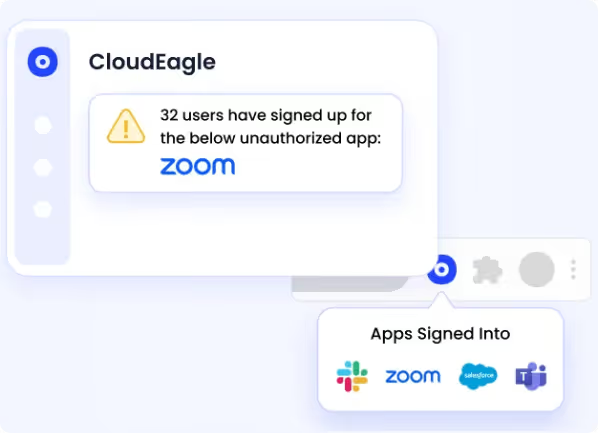
CloudEagle.ai showing all the authorized and unauthorized apps within the SaaS stack

How We Do It

CloudEagle.ai detects shadow IT using SSO, finance, and browser signals. All apps appear in one centralized inventory.

Why We Are Better

Shadow IT becomes visible immediately. SaaS security teams can assess, approve, or remediate before exposure escalates.

B: Detecting and Governing Shadow AI Usage

CloudEagle.ai saas security tool extends SaaS governance into the AI era, where risk expands faster, and data exposure is harder to track.

Current Process

Employees independently adopt tools like ChatGPT Enterprise, Copilot, or Gemini. AI usage is tracked through scattered logs and manual audits.

Pain Points

SaaS security teams cannot answer basic questions about AI usage. Sensitive prompts and API tokens may remain unmanaged.

loudEagle.ai detecting usage of all AI applications

How We Do It

CloudEagle.ai correlates browser, firewall, and SSO data with a proprietary AI app inventory to identify sanctioned and shadow AI tools.

Why We Are Better

AI visibility becomes centralized and continuous. CISOs gain control over a rapidly evolving risk category.

C. Continuous User Access Reviews With Risk-Based Prioritization

CloudEagle.ai replaces periodic manual reviews with structured, risk-aware user access reviews.

Current Process

User access reviews are conducted quarterly using manual data pulls and fragmented systems.

Pain Points

Managers rubber-stamp approvals. High-risk users and excessive permissions remain unnoticed.

CloudEagle.ai giving automated access reviews features

How We Do It

CloudEagle.ai centralizes roles, permissions, and SSO status in one dashboard. High-risk users are flagged automatically.

Why We Are Better

Reviews focus on elevated and risky accounts. Compliance improves while reducing reviewer fatigue.

D. Closing Offboarding Gaps and Orphaned Access

CloudEagle.ai streamlines employee offboarding so that departing employees do not leave behind active accounts or API tokens, which is one of the most effective saas security best practices​.

Current Process

IT manually deprovisions users across multiple applications. Not all tools are integrated with identity providers.

Pain Points

Ex-employees may retain access. Licenses are not reclaimed, and audit proof is difficult to gather.

CloudEagle.ai removing access from ex-employees to ensure secure offboarding

How We Do It

CloudEagle.ai automates role-based access control across all apps and updates license pools automatically.

Why We Are Better

Access removal is immediate, documented, and consistent. SaaS security gaps close without manual effort.

E. Creating Defensible Audit and Board-Ready Governance

CloudEagle.ai gives CISOs the ability to demonstrate structured SaaS and AI governance to auditors and boards.

Current Process

Audit preparation requires manual evidence collection across tickets, emails, and systems.

Pain Points

Proving governance takes weeks. Saas security posture appears reactive rather than controlled.
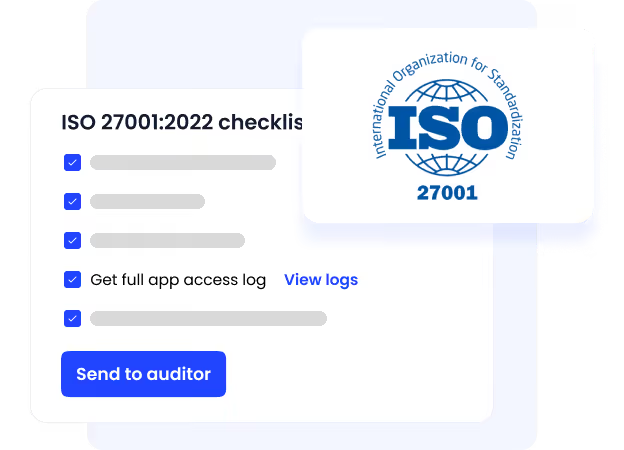
CloudEagle.ai creating audit logs

How We Do It

CloudEagle.ai logs approvals, deprovisioning actions, and access reviews automatically with audit-ready reporting.

Why We Are Better

CISOs gain defensible governance documentation instantly, strengthening trust with regulators and leadership.

F. Eliminating Excessive Privileged Users Before They Become Risk

CloudEagle.ai helps CISOs prevent privilege creep by continuously identifying and rightsizing excessive privileged access across the SaaS stack, before it turns into a compliance failure or breach.

Current Process

As employees change roles, they often retain admin or elevated permissions. Access reviews are periodic, and excessive privileges remain unnoticed between audit cycles.

Pain Points

Standing admin access expands the attack surface. SaaS security teams lack a clear view of who has elevated roles and why.
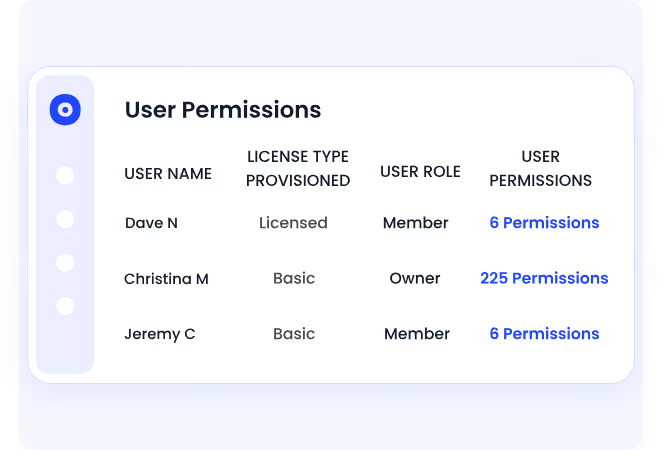
CloudEagle.ai removing privileged access to keep data safe

How We Do It

CloudEagle.ai continuously tracks privileged roles across applications and highlights least-privilege access. Automated workflows trigger reviews and enable immediate remediation.

Why We Are Better

SaaS security teams gain a single, reliable view of elevated users across the stack. Privileges are validated, reduced, or revoked automatically without waiting for the next audit.

Must Read: 10 Ways to Prevent Excessive Privileged Access For Security

G. Replacing Standing Privileges With Time-Bound, Policy-Driven Access

CloudEagle.ai strengthens Zero Trust posture by ensuring elevated permissions are temporary, approved, and fully auditable.

Current Process

IT grants perpetual elevated access for short-term tasks. Users retain admin rights long after projects are complete.

Pain Points

Excess access increases breach risk and compliance exposure. Removing unnecessary privileges requires manual effort and often gets delayed.
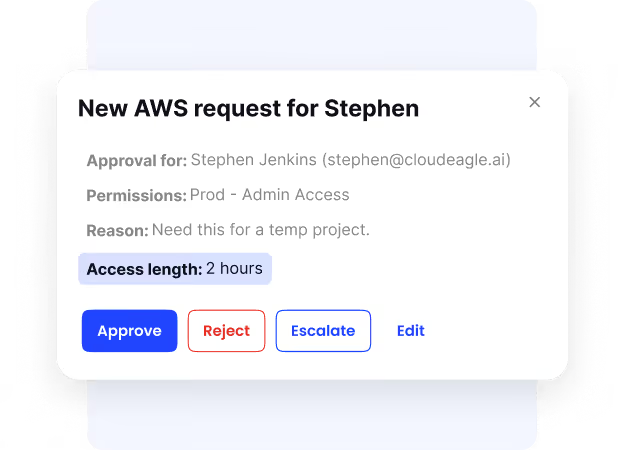
Junt-in-time access to ensure access expire after a certain time limit

How We Do It

CloudEagle.ai enables time-based access and automated least-privilege reviews triggered by usage or behavior changes.

Why We Are Better

Standing privileges are eliminated systematically. Every approval, modification, or revocation is documented for SOC 2 and ISO 27001 readiness.

4. How Do You Maintain Visibility Across A Rapidly Expanding SaaS Stack?

You maintain visibility by building a live inventory of every SaaS app, every integration, and every identity connected to your environment. Without that baseline, security decisions are based on assumptions instead of evidence.

  • Unified SaaS Inventory: Track apps discovered through SSO, finance systems, and API integrations in one place.
  • Centralized Identity Mapping: Map every user to every role across tools like Google Workspace, Slack, and Salesforce.
  • Continuous Integration Monitoring: Monitor OAuth connections and API tokens that move data between systems.

This scale is not small. According to Forbes, large enterprises use an average of 500 SaaS applications, which makes spreadsheet-based tracking impossible.

Visibility isn’t about another dashboard. It’s about knowing exactly which apps store sensitive data, which users have admin rights, and which integrations replicate data elsewhere before an incident reveals the gaps.

5. Conclusion

SaaS security challenges today are not abstract threats. They are specific control failures, like former employees retaining access, OAuth apps reading company email, public file links staying active, or CRM data syncing into unmonitored tools.

For CISOs, the difficulty isn’t a lack of security tools. It’s the speed at which SaaS adoption expands beyond centralized visibility. Every new app, integration, and identity adds another layer that must be tracked continuously.

This is where CloudEagle.ai becomes critical. It provides a live view of SaaS apps, user permissions, and integrations in one place, helping security teams identify excess access, dormant accounts, and risky data flows early.

6. FAQs

1. What are the security issues with SaaS?

Common SaaS security issues include excessive admin privileges, misconfigured sharing settings, delayed offboarding, shadow IT, and unmonitored data transfers between apps. These risks usually stem from visibility gaps rather than software flaws.

2. What are the 5 C's in security?

The 5 C’s typically refer to key security focus areas: Change, Compliance, Cost, Continuity, and Coverage. In SaaS environments, they relate to managing access changes, maintaining compliance, controlling spend, ensuring business continuity, and covering all apps under monitoring.

3. What are the challenges of SaaS?

SaaS challenges include tracking every app in use, managing user access across platforms, monitoring third-party integrations, and ensuring data isn’t overexposed through sharing or automation tools.

4. What does SaaS security secure?

SaaS security protects user identities, access permissions, stored data, integrations, and configurations inside cloud applications like Google Workspace, Salesforce, and Slack.

5. What is the 3-3-2-2-2 rule of SaaS?

The 3-3-2-2-2 rule refers to a framework some organizations use for SaaS management: review access every 3 months, monitor critical apps weekly, validate vendor security annually, enforce 2-factor authentication everywhere, and maintain at least 2 backup administrators per system. It’s a governance discipline model rather than a universal standard.

Advertisement for a SaaS Subscription Tracking Template with a call-to-action button to download and a partial graphic of a tablet showing charts.Banner promoting a SaaS Agreement Checklist to streamline SaaS management and avoid budget waste with a call-to-action button labeled Download checklist.Blue banner with text 'The Ultimate Employee Offboarding Checklist!' and a black button labeled 'Download checklist' alongside partial views of checklist documents from cloudeagle.ai.Digital ad for download checklist titled 'The Ultimate Checklist for IT Leaders to Optimize SaaS Operations' by cloudeagle.ai, showing checklist pages.Slack Buyer's Guide offer with text 'Unlock insider insights to get the best deal on Slack!' and a button labeled 'Get Your Copy', accompanied by a preview of the guide featuring Slack's logo.Monday Pricing Guide by cloudeagle.ai offering exclusive pricing secrets to maximize investment with a call-to-action button labeled Get Your Copy and an image of the guide's cover.Blue banner for Canva Pricing Guide by cloudeagle.ai offering a guide to Canva costs, features, and alternatives with a call-to-action button saying Get Your Copy.Blue banner with white text reading 'Little-Known Negotiation Hacks to Get the Best Deal on Slack' and a white button labeled 'Get Your Copy'.Blue banner with text 'Little-Known Negotiation Hacks to Get the Best Deal on Monday.com' and a white button labeled 'Get Your Copy'.Blue banner with text 'Little-Known Negotiation Hacks to Get the Best Deal on Canva' and a white button labeled 'Get Your Copy'.Banner with text 'Slack Buyer's Guide' and a 'Download Now' button next to images of a guide titled 'Slack Buyer’s Guide: Features, Pricing & Best Practices'.Digital cover of Monday Pricing Guide with a button labeled Get Your Copy on a blue background.Canva Pricing Guide cover with a button labeled Get Your Copy on a blue gradient background.

Enter your email to
unlock the report

Oops! Something went wrong while submitting the form.
License Count
Benchmark
Per User/Per Year

Enter your email to
unlock the report

Oops! Something went wrong while submitting the form.
License Count
Benchmark
Per User/Per Year

Enter your email to
unlock the report

Oops! Something went wrong while submitting the form.
Notion Plus
License Count
Benchmark
Per User/Per Year
100-500
$67.20 - $78.72
500-1000
$59.52 - $72.00
1000+
$51.84 - $57.60
Canva Pro
License Count
Benchmark
Per User/Per Year
100-500
$74.33-$88.71
500-1000
$64.74-$80.32
1000+
$55.14-$62.34

Enter your email to
unlock the report

Oops! Something went wrong while submitting the form.

Enter your email to
unlock the report

Oops! Something went wrong while submitting the form.
Zoom Business
License Count
Benchmark
Per User/Per Year
100-500
$216.00 - $264.00
500-1000
$180.00 - $216.00
1000+
$156.00 - $180.00

Enter your email to
unlock the report

Oops! Something went wrong while submitting the form.

Get the Right Security Platform To Secure Your Cloud Infrastructure

Please enter a business email
Thank you!
The 2023 SaaS report has been sent to your email. Check your promotional or spam folder.
Oops! Something went wrong while submitting the form.

Access full report

Please enter a business email
Thank you!
The 2023 SaaS report has been sent to your email. Check your promotional or spam folder.
Oops! Something went wrong while submitting the form.

SaaS security is a high priority for 86% of enterprises. And the plot twist is that SaaS security challenges don’t usually begin with a breach. They begin with small visibility gaps, like unused admin accounts.

Most CISOs aren’t struggling with whether SaaS is secure. They’re struggling with how quickly SaaS sprawl expands beyond centralized control. New tools get added and integrations multiply faster than governance processes.

In this article, we break down seven concrete SaaS security challenges CISOs are dealing with right now, and why each one becomes harder to contain as adoption scales.

TL;DR

  • Dormant admin accounts, unmanaged integrations, and outdated permissions quietly expand the attack surface.
  • Enterprises often run dozens or hundreds of apps, many added without full security oversight.
  • Employees accumulate roles across apps while files, dashboards, and workspaces become broadly accessible.
  • Unapproved tools, inactive accounts, and inconsistent vendor security standards create hidden vulnerabilities.
  • CloudEagle.ai helps CISOs regain SaaS security visibility and control. It discovers apps, governs access, detects shadow IT and AI, and automates access reviews and offboarding.

1. Why Has SaaS Security Become Harder To Control?

SaaS security challenges are harder to control because most organizations don’t know exactly how many apps have access to their core systems or who has admin rights. 

What used to be centralized inside a data center now lives across dozens, sometimes hundreds, of SaaS applications.

  • Dormant Admin Accounts Still Active: Former project leads retain admin rights in tools like Salesforce or Jira months after role changes.
  • OAuth Apps With Broad Data Access: Third-party apps connected to Google Workspace or Microsoft 365 can read emails, files, and calendars without ongoing review.
  • Unused Apps Still Holding Data: Offboarded SaaS tools continue storing customer records, contracts, or internal files long after teams stop using them.

This isn’t theoretical. According to Backlinko, the average organization uses over 112 SaaS applications, many of which are adopted without centralized oversight.

The problem isn’t that SaaS is insecure by default. It’s that visibility doesn’t scale with adoption. And when you don’t know which apps hold data or which users have admin privileges, control becomes reactive instead of preventive.

However, with saas security solutions​, it will become easier to track. 

Identify hidden identity risks across SaaS apps

Download a breakdown of the most common IAM risks that expose user access
Download IAM Risk Breakdown

2. 7 SaaS Security Challenges Every CISO Must Know

The biggest SaaS security problems today aren’t zero-day exploits. They’re everyday control failures. And most CISOs don’t lack security tools, but they lack full visibility into who has access to what, which apps are connected, and where sensitive data is stored.

The following seven SaaS security challenges are not theoretical risks. They are operational realities that show up in Slack workspaces, Google tenants, Salesforce orgs, and dozens of other SaaS platforms every day.

A. Lack Of Complete SaaS Visibility Across The Enterprise

CISOs struggle with application visibility because many applications are purchased, trialed, or integrated without centralized tracking. SaaS Security teams often discover new apps only after an incident or audit.

Apps Purchased On Corporate Cards

Departments subscribe to tools like Notion or Canva without going through security review.

Free Trials With Production Data

Teams upload real customer or internal data into trial accounts before approval.

Multiple Accounts For The Same App

Different business units create separate instances of tools like Asana or HubSpot.

This creates blind spots that grow over time. And if not addressed, these SaaS security challenges can cause serious issues in the future. 

No Central Inventory Of SaaS Tools

Security cannot protect what it cannot see.

Unknown Data Storage Locations

Sensitive files may reside in apps not covered by monitoring tools.

Without reliable SaaS inventory management, CISOs aren’t defending a defined perimeter. They’re defending a constantly shifting landscape of apps, accounts, and data locations.

How to Prevent:

Maintain a continuously updated SaaS inventory using SSO, finance data, and API integrations. Block unsanctioned OAuth connections and require SaaS security review before any tool stores company data.

Also Read: Application Visibility: How Does CloudEagle.ai Help You Discover SaaS Apps?

B. Identity And Access Sprawl Across Multiple SaaS Platforms

Identity sprawl happens when the same employee has different roles, permissions, and admin rights across dozens of SaaS tools. Over time, access expands faster than it is reviewed making it one of the most crucial SaaS security challenges. 

  • Multiple Admin Roles Across Apps: A team lead may be an admin in Salesforce, billing owner in Slack, and a workspace admin in Notion.
  • Role Changes Without Access Cleanup: Employees who move departments retain access to previous systems.
  • Local Accounts Outside SSO: Some SaaS tools still allow direct login, bypassing centralized identity providers

This fragmentation creates measurable risk. According to Verizon, 74% of breaches involve the human element, often through misuse or compromised credentials. 

Noni Azhar, CIO at ProService Hawaii, highlights SaaS sprawl's impact in the podcast,

“SaaS sprawl happens when different departments sign up for tools in silos, leading to duplication and inefficiencies. The trick is to tackle the sprawl from a productivity standpoint.

  • Excess Privileges Across Platforms: One compromised account can impact multiple systems.
  • No Unified View Of User Permissions: SaaS security teams cannot easily see all roles assigned to a single employee.

How to Prevent:

Enforce single sign-on across all SaaS tools, remove local logins, and run quarterly access reviews that map every user’s roles across applications. Automatically revoke access when roles change or employment ends.

C. Misconfigured Sharing And Collaboration Settings

Misconfigured sharing settings create risk when files, dashboards, or workspaces are accessible beyond their intended audience. These SaaS security challenges happen through default settings that are never revisited.

  • Public Link Sharing Enabled: A Google Drive file is set to “Anyone with the link can view,” allowing external access without advanced authentication methods.
  • Slack Channels With External Guests: Sensitive discussions happen in shared channels that include third-party vendors.

These issues rarely look dramatic. They appear as small configuration choices made during setup or collaboration.

  • Default Settings Never Reviewed: Teams rely on initial configurations without periodic audits.
  • External Access Left Active: Vendor access remains enabled long after a project ends.
  • Broad Role-Based Visibility: Entire departments inherit access to data they don’t actively need.

Misconfigurations don’t require a breach to cause SaaS security challenges. They quietly expand visibility, making sensitive information easier to access while breaching SaaS security.

How to Prevent:

Review sharing policies quarterly, disable public link access by default, restrict external guest permissions, and audit high-sensitivity reports and folders for overexposure.

D. Delayed Offboarding And Dormant Accounts

An employee leaves the company on Friday. HR updates the system, but their access to Slack, Google Workspace, and Salesforce remains active through the weekend. This is one of the worst SaaS security challenges.

From an HR perspective, the departure is processed. Payroll is stopped, paperwork is completed, and the employee is marked inactive.

From a security perspective, the reality is that former employees still have access. The user can still log in, download files, access shared drives, and view internal conversations until each SaaS app is manually updated.

Over time, these inactive identities become easy targets. They don’t trigger alerts because they look legitimate, yet they provide direct access to production systems.

How to Prevent:

Integrate HR systems with your identity provider, automate deprovisioning across all SaaS tools, and run monthly scans to detect dormant or inactive accounts with remaining access.

Read More: Top 10 Employee Onboarding Software for Seamless New Hire Experiences

E. Inconsistent Vendor Security Posture And Compliance Gaps

Vendor risk becomes a SaaS security issue when third-party tools handle sensitive data without meeting your internal security standards. Many SaaS apps integrate deeply into core systems before security teams fully assess them.

  • No SOC 2 Or ISO Certification: Smaller vendors may store customer or financial data without formal audits.
  • Unclear Data Storage Locations: Some SaaS providers replicate data across regions without transparent controls.
  • Weak Incident Response Transparency: Vendors may not clearly define breach notification timelines.

This inconsistency is not rare. Process Unity revealed that enterprises face an average of 12 third-party data breaches every year. 

Without consistent vendor evaluation, SaaS security challenges extend beyond your internal controls. Your security posture becomes dependent on the weakest external provider.

How to Prevent:

Standardize vendor risk assessments before onboarding, require SOC 2 Type 2 or equivalent certifications for sensitive data access. One of the best saas security best practices​ is to continuously monitor third-party integrations for compliance alignment.

F. Shadow IT And Unapproved SaaS Adoption

Shadow IT becomes a security problem when employees start using SaaS tools that security never reviewed. These tools often store real company data before IT even knows they exist. As a result, it causes another SaaS security challenges layer. 

  • Team-Level Subscriptions Without Review: A marketing team signs up for Canva using a corporate card and uploads brand assets and campaign plans.
  • Free Tools With Production Data: Employees upload customer CSV files into online form builders or analytics tools.
  • Personal Emails Used For Work Tools: Staff create SaaS accounts with Gmail instead of company SSO.

This SaaS security problem isn’t just tool usage. It’s the data that moves into those tools without logging, monitoring, or backup controls. Joshua Peskay, a 3CPO at RoundTable Technology, explains in the podcast:

“Most staff just do it themselves through the use of SaaS applications, many of which are not sanctioned, creating huge amounts of risk, often referred to as Shadow IT."

How to Prevent:

Monitor corporate card transactions and SSO logs for new app usage, restrict data uploads to unsanctioned domains, and require centralized onboarding before any SaaS tool stores company data.

Stop Shadow IT and Shadow AI before risks spread

Learn how to detect unsanctioned apps and prevent hidden data exposure
Download Shadow IT & AI Playbook

G. Limited Monitoring Of Data Movement Between SaaS Apps

Data movement between SaaS apps often happens through built-in integrations and automation tools. Security teams rarely see what is being transferred once those connections are approved.

  • Automated Workflows Moving Customer Data: Tools like Zapier sync leads from HubSpot into spreadsheets or other apps automatically.
  • CRM Data Exported To BI Tools: Sales data flows from Salesforce into analytics platforms without field-level monitoring.
  • File Sync Across Cloud Storage Apps: Documents move between Google Drive and Dropbox through API connections.

Once these integrations are live, they operate continuously. The SaaS security challenge isn’t the connection itself, but the lack of visibility into what data fields are moving and who can access the destination system.

  • Sensitive Fields Replicated Across Systems: Personal data, revenue numbers, or contracts get copied into multiple environments.
  • Access Controls Not Mirrored: The receiving system may have weaker permissions than the source.

How to Prevent:

Audit all active integrations quarterly, restrict high-risk data fields from automated transfers, and monitor API-based data exports across SaaS applications.

3. How Does CloudEagle.ai Help CISOs Strengthen SaaS Security?

SaaS security risk rarely comes from one major breach. It builds quietly through shadow apps, excessive permissions, unmanaged AI tools, and incomplete offboarding.

CISOs are expected to demonstrate control across all of it: who has access, which tools are in use, what data is exposed, and where risk lives.

CloudEagle.ai acts as one of the best SaaS security tools​ across SaaS and AI, giving SaaS security leaders continuous visibility, automated remediation, and a defensible AI governance framework for better SaaS security. 

A: Eliminating Shadow IT Before It Becomes a SaaS Security Incident

CloudEagle.ai gives CISOs real-time visibility into every SaaS application used across the organization, removing blind spots and Shadow IT risks.

Current Process

IT relies on spreadsheets, expense reports, and fragmented logs to track applications. Employees adopt tools independently, using cards or free trials.

Pain Points

Unapproved apps handle sensitive data without review. SaaS security policies cannot be enforced consistently.

CloudEagle.ai showing all the authorized and unauthorized apps within the SaaS stack

How We Do It

CloudEagle.ai detects shadow IT using SSO, finance, and browser signals. All apps appear in one centralized inventory.

Why We Are Better

Shadow IT becomes visible immediately. SaaS security teams can assess, approve, or remediate before exposure escalates.

B: Detecting and Governing Shadow AI Usage

CloudEagle.ai saas security tool extends SaaS governance into the AI era, where risk expands faster, and data exposure is harder to track.

Current Process

Employees independently adopt tools like ChatGPT Enterprise, Copilot, or Gemini. AI usage is tracked through scattered logs and manual audits.

Pain Points

SaaS security teams cannot answer basic questions about AI usage. Sensitive prompts and API tokens may remain unmanaged.

loudEagle.ai detecting usage of all AI applications

How We Do It

CloudEagle.ai correlates browser, firewall, and SSO data with a proprietary AI app inventory to identify sanctioned and shadow AI tools.

Why We Are Better

AI visibility becomes centralized and continuous. CISOs gain control over a rapidly evolving risk category.

C. Continuous User Access Reviews With Risk-Based Prioritization

CloudEagle.ai replaces periodic manual reviews with structured, risk-aware user access reviews.

Current Process

User access reviews are conducted quarterly using manual data pulls and fragmented systems.

Pain Points

Managers rubber-stamp approvals. High-risk users and excessive permissions remain unnoticed.

CloudEagle.ai giving automated access reviews features

How We Do It

CloudEagle.ai centralizes roles, permissions, and SSO status in one dashboard. High-risk users are flagged automatically.

Why We Are Better

Reviews focus on elevated and risky accounts. Compliance improves while reducing reviewer fatigue.

D. Closing Offboarding Gaps and Orphaned Access

CloudEagle.ai streamlines employee offboarding so that departing employees do not leave behind active accounts or API tokens, which is one of the most effective saas security best practices​.

Current Process

IT manually deprovisions users across multiple applications. Not all tools are integrated with identity providers.

Pain Points

Ex-employees may retain access. Licenses are not reclaimed, and audit proof is difficult to gather.

CloudEagle.ai removing access from ex-employees to ensure secure offboarding

How We Do It

CloudEagle.ai automates role-based access control across all apps and updates license pools automatically.

Why We Are Better

Access removal is immediate, documented, and consistent. SaaS security gaps close without manual effort.

E. Creating Defensible Audit and Board-Ready Governance

CloudEagle.ai gives CISOs the ability to demonstrate structured SaaS and AI governance to auditors and boards.

Current Process

Audit preparation requires manual evidence collection across tickets, emails, and systems.

Pain Points

Proving governance takes weeks. Saas security posture appears reactive rather than controlled.

CloudEagle.ai creating audit logs

How We Do It

CloudEagle.ai logs approvals, deprovisioning actions, and access reviews automatically with audit-ready reporting.

Why We Are Better

CISOs gain defensible governance documentation instantly, strengthening trust with regulators and leadership.

F. Eliminating Excessive Privileged Users Before They Become Risk

CloudEagle.ai helps CISOs prevent privilege creep by continuously identifying and rightsizing excessive privileged access across the SaaS stack, before it turns into a compliance failure or breach.

Current Process

As employees change roles, they often retain admin or elevated permissions. Access reviews are periodic, and excessive privileges remain unnoticed between audit cycles.

Pain Points

Standing admin access expands the attack surface. SaaS security teams lack a clear view of who has elevated roles and why.

CloudEagle.ai removing privileged access to keep data safe

How We Do It

CloudEagle.ai continuously tracks privileged roles across applications and highlights least-privilege access. Automated workflows trigger reviews and enable immediate remediation.

Why We Are Better

SaaS security teams gain a single, reliable view of elevated users across the stack. Privileges are validated, reduced, or revoked automatically without waiting for the next audit.

Must Read: 10 Ways to Prevent Excessive Privileged Access For Security

G. Replacing Standing Privileges With Time-Bound, Policy-Driven Access

CloudEagle.ai strengthens Zero Trust posture by ensuring elevated permissions are temporary, approved, and fully auditable.

Current Process

IT grants perpetual elevated access for short-term tasks. Users retain admin rights long after projects are complete.

Pain Points

Excess access increases breach risk and compliance exposure. Removing unnecessary privileges requires manual effort and often gets delayed.

Junt-in-time access to ensure access expire after a certain time limit

How We Do It

CloudEagle.ai enables time-based access and automated least-privilege reviews triggered by usage or behavior changes.

Why We Are Better

Standing privileges are eliminated systematically. Every approval, modification, or revocation is documented for SOC 2 and ISO 27001 readiness.

4. How Do You Maintain Visibility Across A Rapidly Expanding SaaS Stack?

You maintain visibility by building a live inventory of every SaaS app, every integration, and every identity connected to your environment. Without that baseline, security decisions are based on assumptions instead of evidence.

  • Unified SaaS Inventory: Track apps discovered through SSO, finance systems, and API integrations in one place.
  • Centralized Identity Mapping: Map every user to every role across tools like Google Workspace, Slack, and Salesforce.
  • Continuous Integration Monitoring: Monitor OAuth connections and API tokens that move data between systems.

This scale is not small. According to Forbes, large enterprises use an average of 500 SaaS applications, which makes spreadsheet-based tracking impossible.

Visibility isn’t about another dashboard. It’s about knowing exactly which apps store sensitive data, which users have admin rights, and which integrations replicate data elsewhere before an incident reveals the gaps.

5. Conclusion

SaaS security challenges today are not abstract threats. They are specific control failures, like former employees retaining access, OAuth apps reading company email, public file links staying active, or CRM data syncing into unmonitored tools.

For CISOs, the difficulty isn’t a lack of security tools. It’s the speed at which SaaS adoption expands beyond centralized visibility. Every new app, integration, and identity adds another layer that must be tracked continuously.

This is where CloudEagle.ai becomes critical. It provides a live view of SaaS apps, user permissions, and integrations in one place, helping security teams identify excess access, dormant accounts, and risky data flows early.

6. FAQs

1. What are the security issues with SaaS?

Common SaaS security issues include excessive admin privileges, misconfigured sharing settings, delayed offboarding, shadow IT, and unmonitored data transfers between apps. These risks usually stem from visibility gaps rather than software flaws.

2. What are the 5 C's in security?

The 5 C’s typically refer to key security focus areas: Change, Compliance, Cost, Continuity, and Coverage. In SaaS environments, they relate to managing access changes, maintaining compliance, controlling spend, ensuring business continuity, and covering all apps under monitoring.

3. What are the challenges of SaaS?

SaaS challenges include tracking every app in use, managing user access across platforms, monitoring third-party integrations, and ensuring data isn’t overexposed through sharing or automation tools.

4. What does SaaS security secure?

SaaS security protects user identities, access permissions, stored data, integrations, and configurations inside cloud applications like Google Workspace, Salesforce, and Slack.

5. What is the 3-3-2-2-2 rule of SaaS?

The 3-3-2-2-2 rule refers to a framework some organizations use for SaaS management: review access every 3 months, monitor critical apps weekly, validate vendor security annually, enforce 2-factor authentication everywhere, and maintain at least 2 backup administrators per system. It’s a governance discipline model rather than a universal standard.

Recognized as an Industry leader for our AI

CloudEagle.ai is Recognized in the 2024 Gartner® Magic Quadrant™ for SaaS Management Platforms

Recognition highlights CloudEagle’s innovation and leadership in the rapidly evolving SaaS management and procurement space.
Read More
Gartner Magic Quadrant for SaaS Management Platforms showing a chart divided into Challengers and Leaders quadrants with various companies plotted as dots.

CloudEagle.ai Recognized in the GigaOm Radar for SaaS Management Platforms

CloudEagle named a Leader and Outperformer in GigaOm Radar Report, validating its impact in the SaaS management platform landscape.
Read More
gigaom

Everest Group Positions CloudEagle.ai as a Trailblazer in SaaS Management Platforms

CloudEagle recognized as a Trailblazer by Everest Group, showcasing its rapid growth and innovation in SaaS spend and operations management.
Read More
qks

CloudEagle.ai is Recognized in the 2024 Gartner® Magic Quadrant™ for SaaS Management Platforms

Recognition highlights CloudEagle’s innovation and leadership in the rapidly evolving SaaS management and procurement space.
Read More
gartner
CloudEagle.ai recognized in the 2025 Gartner® Magic Quadrant™ for SaaS Management Platforms
Download now
gartner chart
5x
Faster employee
onboarding
80%
Reduction in time for
user access reviews
30k
Workflows
automated
$15Bn
Analyzed in
contract spend
$2Bn
Saved in
SaaS spend

Streamline SaaS governance and save 10-30%

Book a Demo with Expert
CTA image
One platform to Manage
all SaaS Products
Learn More