
%201.svg)


HIPAA Compliance Checklist for 2025

Identity drift happens when user access changes slower than user roles. An engineer transfers from the payments team to the infrastructure team. Six months later, they still have write access to the payments repository in GitHub.
Nothing appears wrong on the surface. The employees still authenticate through SSO and security logs show legitimate activity. But their permissions no longer match their current responsibilities, creating more SSO security risks.
This slow mismatch between roles and permissions is known as identity drift. In this article, we will explain how identity drift forms and how CloudEagle.ai can detect and prevent it before access sprawl grows out of control.
TL;DR
- Access granted for past projects or departments stays active, creating hidden security exposure across SaaS tools.
- Old repositories, admin privileges, and shared workspace access remain long after responsibilities change.
- Managers review large permission lists with limited context, often approving access without full verification.
- Multiple apps, integrations, and identity sources make it difficult to track who has access and why.
- CloudEagle.ai helps prevent crisis identity drift with automated access governance. It continuously reviews permissions, automates lifecycle management, and ensures access always matches real user roles.
1. What Exactly Happens When Identity Controls Start To Drift?
Identity drift begins when access granted for a specific role stays active after that role changes. Permissions accumulate across systems because access is added frequently but removed rarely.
- Old Project Access Stays Active: An engineer moved to infrastructure can still push code to a previous team’s repository in GitHub.
- Admin Rights Persist After Role Changes: A marketing manager retains administrator privileges in Salesforce months after leaving the CRM team.
- Shared Workspace Access Remains: Employees continue to access private channels and files in Slack or Google Workspace from past projects.
These permissions don’t look suspicious because the user is legitimate. Security and access control systems see normal logins, not unauthorized access.
- Privilege Accumulation Across Tools: One employee may hold elevated access across multiple SaaS platforms.
- Permissions No Longer Match Job Function: Access granted years ago still exists even though responsibilities have changed.
According to Verizon,
74% of data breaches involve the human element, which often includes misuse of legitimate access.
When identity controls drift, organizations don’t lose cloud access control immediately. Instead, permissions quietly expand beyond what users actually need, increasing risk without triggering obvious alarms.

2. Why Does Identity Drift Happen In Growing Enterprises?
Identity drift happens because access is granted faster than it is reviewed or removed. As companies grow, employees change teams, projects start and end, and new SaaS tools are added to the stack.
In the following sections, we’ll break down the most common operational reasons SaaS security risks form inside growing enterprises.
A. Frequent Role Changes Across Teams And Departments
Identity drift often begins when employees change roles but their previous permissions remain active. Access granted for one project or department continues long after the employee moves to a different team.
- Internal Team Transfers: An engineer moving from payments to infrastructure may still have commit rights in the payments repositories on GitHub.
- Department Changes Without Access Cleanup: A marketing employee switching roles keeps privileged access in Salesforce that were required for their previous position.
- Project-Based Access That Never Expires: Temporary permissions granted for product launches or campaigns remain active in shared tools like Google Workspace.
These changes happen constantly in growing enterprises. When role transitions occur faster than access reviews, permissions accumulate across systems and slowly drift away from what users actually need.
Read More: Role-Based Access Control (RBAC): The Key to IT Security Success
B. Manual Access Reviews Struggling To Keep Up
Manual access reviews struggle because the number of users, apps, and permissions grows faster than managers can realistically evaluate. What starts as a quarterly spreadsheet review quickly becomes thousands of permissions across dozens of tools.
- Large Permission Lists To Review: Managers receive export files showing every user’s roles in systems like Salesforce or Google Workspace.
- Limited Context For Reviewers: A manager reviewing access may not know why an employee originally received permissions.
- Approval Fatigue: When faced with hundreds of entries, reviewers often approve everything to finish the task.
This creates a gap between policy and crisis identity. Access reviews exist, but they rarely reflect whether permissions still match current responsibilities.
- Permissions Approved Without Verification: Reviewers confirm access because the employee “might still need it.”
- Old Roles Persist In Systems: Historical permissions remain active even when projects end.
As Bruce Schneier once said,
“Security is a process, not a product.”
When access reviews rely entirely on manual checks, that process struggles to keep pace with how quickly enterprises change.
C. Rapid SaaS Adoption Expanding Identity Complexity
Identity drift accelerates when enterprises adopt new SaaS tools faster than identity governance processes can adapt. Each new application introduces new roles, permission models, and access pathways.
- New SaaS Apps With Separate Permission Models: Tools like Notion, Slack, and HubSpot all define roles differently.
- Multiple Identity Sources: Users may authenticate through SSO tools but still hold local roles inside individual applications.
- Third-Party Integrations Creating Additional Identities: Integrations and service accounts introduce identities that are rarely reviewed.
As SaaS adoption grows, the identity surface expands across dozens or hundreds of systems. Without centralized visibility, it becomes increasingly difficult to understand exactly who has access to what and why.
3. How Can Enterprises Prevent Identity Drift From Escalating?
A product manager moves from the payments team to the growth team. Their SSO login still works, but their access to payment dashboards, private repositories, and finance reports is automatically removed within minutes.
IT Perspective:
Role-based access control in the HR system triggers automated access updates. When an employee changes departments, permissions in tools like GitHub, Salesforce, and Slack are recalculated based on the new role.
Security Perspective:
Access reviews no longer depend on spreadsheets. Identity governance tools continuously monitor permissions and flag users whose access no longer matches their job function.
Nothing dramatic changes overnight. But permissions stop accumulating silently, outdated roles disappear faster, and security and access control teams gain a clearer view of who actually needs access.
Preventing identity drift isn’t about adding more controls. It’s about making sure access evolves at the same speed as the enterprise itself.
4. How Does CloudEagle.ai Help Control Identity Drift Across SaaS Apps?
Identity drift happens quietly across SaaS environments. As employees change roles, join new teams, or adopt additional tools, their access rarely gets adjusted in time.
Permissions accumulate, admin rights remain unchecked, and ex-employees sometimes retain access longer than they should. Over time, this creates security exposure and compliance risk across the SaaS stack.
CloudEagle.ai brings structure to identity governance by continuously validating access, automating lifecycle management, and ensuring permissions always match real roles and usage.
A. Continuous User Access Reviews to Prevent Identity Drift
CloudEagle.ai ensures user access reviews remain accurate as roles evolve, preventing access from expanding unnoticed over time.
Current Process
IT teams conduct periodic access reviews by manually gathering data from multiple systems and logging into applications.
Pain Points
Reviews happen quarterly and often rely on manual verification. Managers may approve access without full context, allowing excessive permissions to persist.

How We Do It
CloudEagle.ai centralizes user roles and permissions into one dashboard and automates scheduled access reviews.
Why We Are Better
High-risk users, ex-employees, and elevated permissions are flagged automatically, allowing reviewers to focus on meaningful decisions.
Also Read: The Ultimate Guide To User Access Reviews: Checklist and Best Practices
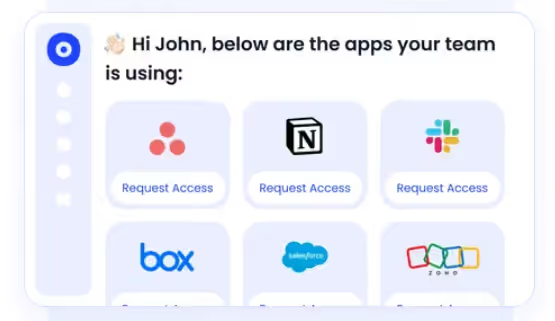
B. Centralized App Access Catalog With Structured Approvals
CloudEagle.ai prevents identity drift at the source by ensuring access is granted through structured workflows rather than informal requests.
Current Process
Employees request app access through email or Slack. IT manually verifies approvals, often chasing managers for confirmation.
Pain Points
Approvals are scattered across communication channels. Audit trails are incomplete, and employees sometimes bypass IT entirely.
How We Do It
CloudEagle.ai provides a centralized app catalog where employees request access to approved tools through automated workflows.
Why We Are Better
Approvals are documented, permissions stay aligned with roles, and security teams gain a clear record of who approved each access decision.
C. Time-Based Access That Prevents Privilege Creep
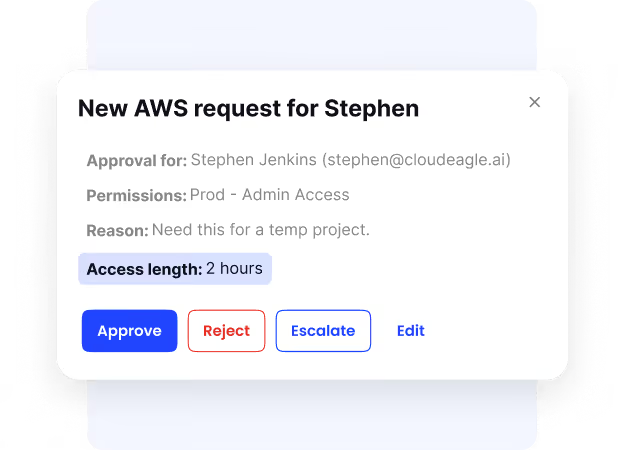
CloudEagle.ai ensures permissions expire when they are no longer needed, preventing access from lingering indefinitely.
Current Process
Users receive perpetual access even when permissions are only needed temporarily.
Pain Points
Excess permissions accumulate across applications, increasing both security and access control risk and compliance exposure.
How We Do It
CloudEagle.ai enables time-based access so permissions automatically expire after a defined period.
Why We Are Better
Standing privileges are reduced systematically, ensuring access aligns with actual needs rather than historical approvals.
D. Zero-Touch Onboarding and Offboarding Across SaaS
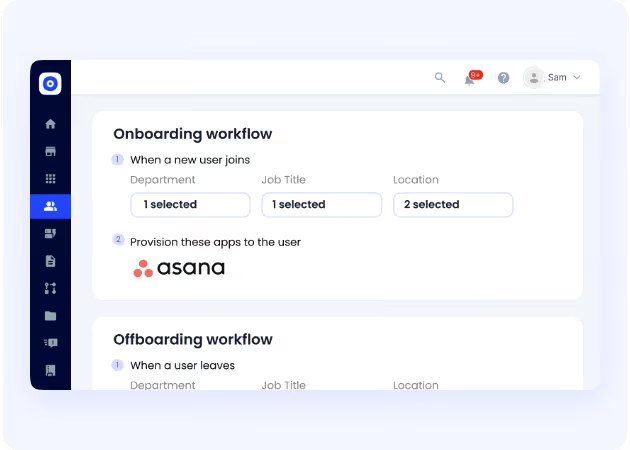
CloudEagle.ai ensures employee access always reflects their current role, from the moment they join until the moment they leave.
Current Process
IT teams manually provision and deprovision access across dozens of applications. Many tools are not integrated with identity providers.
Pain Points
Onboarding delays slow productivity, while offboarding gaps leave ex-employees with active access.
How We Do It
CloudEagle.ai automates onboarding and offboarding using role-based access rules across all SaaS applications.
Why We Are Better
Access is granted instantly when employees join and revoked automatically when they leave, eliminating identity drift.
Automate identity governance across SaaS apps


5. Conclusion
Identity drift rarely appears as a sudden failure. It builds gradually as employees change roles, projects end, and new SaaS tools are added without removing outdated permissions.
An engineer keeps committed access to a repository they no longer work on. A marketing manager still has administrator rights in a CRM from a previous role. These permissions remain active because access is granted frequently but reviewed too slowly.
This is where CloudEagle.ai becomes critical. It helps enterprises continuously monitor user access across SaaS applications, detect permissions that no longer match roles, and automate cleanup before SaaS sprawl grows.
6. FAQs
1. What is identity drift in cybersecurity?
Identity drift happens when a user’s permissions no longer match their current role. For example, an employee who moved teams may still have admin access in Salesforce or commit rights in GitHub from a previous project.
2. Why does identity drift happen in organizations?
Identity drift usually occurs when employees change roles, projects end, or new SaaS tools are added without updating access permissions. Over time, users accumulate permissions across multiple systems.
3. What risks does identity drift create?
Outdated permissions can allow employees or compromised accounts to access systems and data they no longer need. This increases the risk of data exposure or unauthorized changes.
4. How can companies detect identity drift?
Organizations detect identity drift by regularly reviewing user roles across applications, monitoring access changes, and identifying permissions that do not align with current job responsibilities.
5. How can enterprises prevent identity drift?
Companies prevent identity drift by automating access reviews, linking HR role changes to identity systems, and continuously monitoring permissions across SaaS tools.


.avif)


.avif)
.avif)




.png)








.avif)
.avif)
.avif)


