.avif)
%201.svg)


HIPAA Compliance Checklist for 2025

Your SSO dashboard shows every login through your identity provider. Your CASB report shows traffic to sanctioned cloud apps. Pull both during a security review, and the picture looks clean.
Neither will show you the developer who signed up for an AI tool with a personal account, or catch the $20 AI subscription sitting on someone's expense report. Neither sees the API key calling a model provider directly, or the AI feature that quietly activated inside a tool you already approved.
That's the gap. SSO and CASB were built to watch identity and network traffic. Here's exactly what those five places are, and what it takes to see them.
TL;DR
- Shadow AI enters through browsers, expense reports, API keys, bundled SaaS features, and locally installed tools.
- SSO only sees what employees authenticate through. CASB only sees sanctioned app traffic. Both are structurally blind to direct browser access.
- CloudEagle correlates five discovery sources to surface shadow AI that no single tool catches.
- The result is a live AI inventory with approval status, risk classification, and an owner attached, audit-ready from day one.
1. The 5 Ways Shadow AI Enters Your Environment
Before getting into why SSO and CASB miss it, here's exactly what they're missing.
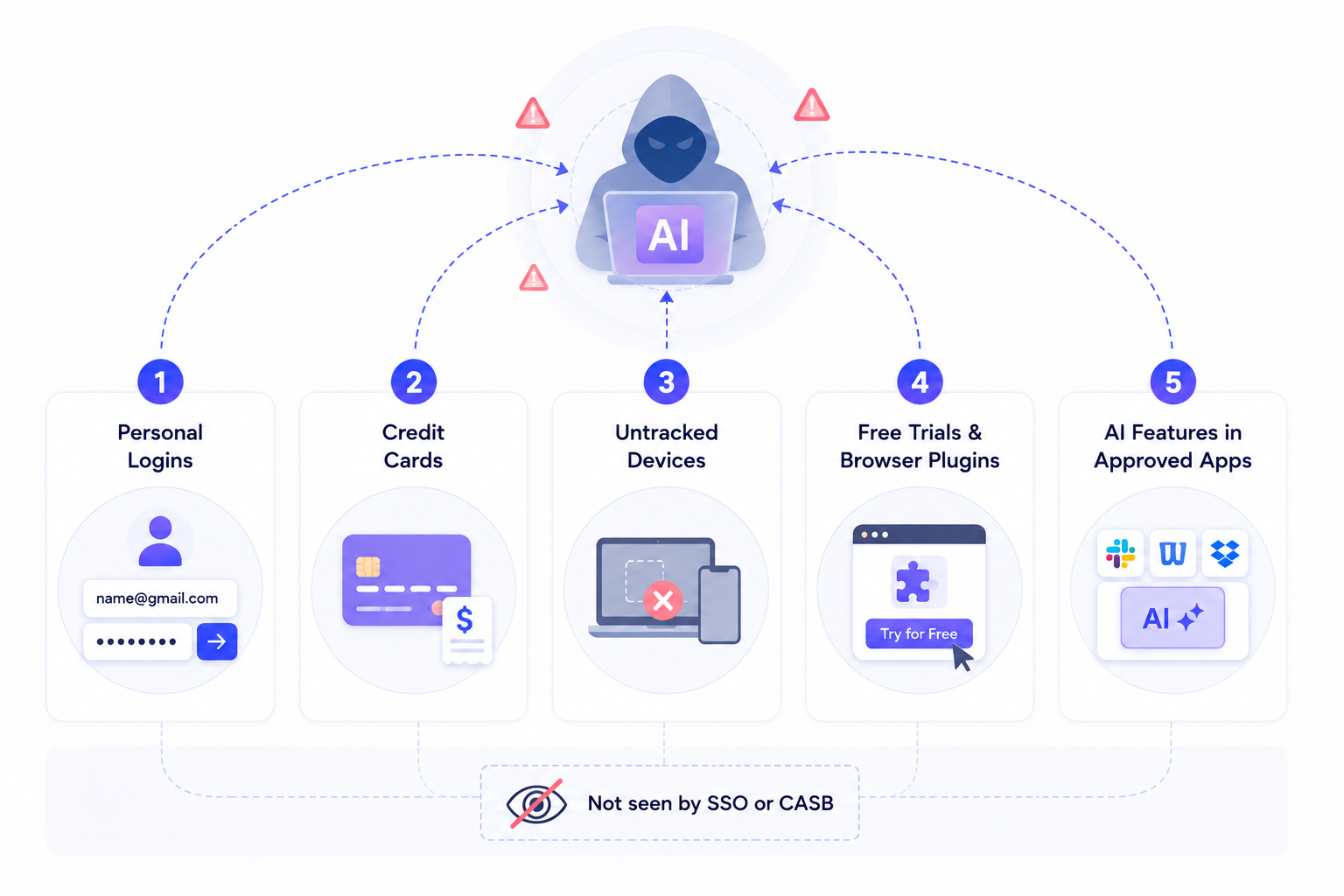
This is the part most shadow AI detection conversations skip past too fast. Shadow AI gets into your environment through five paths, and none of them require touching your identity provider.
1. Personal Logins
Someone signs up for an AI tool with a personal email instead of work SSO credentials. The account lives entirely outside corporate identity, so there's no login event for anyone to see.
This is the single most common entry point because it requires nothing more than an email address and takes under a minute.
2. Credit Cards
An AI subscription gets put on a corporate card or expensed after the fact, with no procurement workflow involved.
The charge sits in a finance system that IT never checks for software spend. By the time anyone notices, the tool has often been in use for months.
3. Devices That Aren't Tracked
AI tools get installed directly on a laptop or endpoint that isn't centrally managed, whether that's a personal device used for work, a contractor's machine, or a corporate device that fell out of MDM enrollment.
The install never touches the identity provider and never generates network proxy traffic, so it's invisible to both SSO and CASB by definition.
4. Free Trials and Browser Plugins
An employee opens an AI tool's free tier directly in the browser. No account approval, no procurement, sometimes not even a signup, just a tool that works the moment it's opened.
Browser-based access like this is the fastest-growing entry point because most AI tools are explicitly designed to remove every step between "I want to try this" and "I'm using it."
5. AI Features Bundled Into Approved Software
A tool already sitting behind your IDP ships an AI feature update, and employees start using it the same day it goes live. Nothing about the login changes.
The SSO event looks identical to yesterday's, because as far as the identity provider is concerned, it's the same approved app it's always been.
This is the hardest of the five to catch because the access point itself was never shadow AI. The capability inside it became shadow AI overnight.
Each of these looks small in isolation. Together, they're how shadow AI actually spreads, and why SSO logs and CASB reports keep coming back clean while real usage looks nothing like that.
2. Why SSO Logs and CASBs Can’t Find Shadow AI
- SSO only captures login events for apps that sit behind your identity provider. That's the entire scope of what it gives shadow AI detection to work with.
- CASB sits between users and sanctioned cloud apps, watching traffic at the API or proxy layer. Anything outside that traffic is invisible to it by design.
- Neither tool monitors personal accounts: An employee opening an AI tool with a personal login never generates an SSO event or a CASB event, because neither one watches anything outside corporate identity or sanctioned network traffic.
- The gap is widening: Gartner forecasts that 40% of enterprise applications will have task-specific AI agents embedded by the end of 2026, up from less than 5% in 2025. Even sanctioned apps now carry AI capability that SSO logs can't distinguish from base product usage.
Neither tool was built to look anywhere else, which is exactly why all five entry points above slip through.

3. How CloudEagle.ai Surfaces Shadow AI Across All Five Entry Points
Most shadow AI detection programs start with two sources: the identity provider, which shows known corporate apps, and the finance system, which shows what someone paid for. Everything else is unknown by default.
That "everything else" isn't one gap. It's five specific entry points, and each one needs a different discovery source to surface it. This is where shadow AI detection either becomes real or stays theoretical.
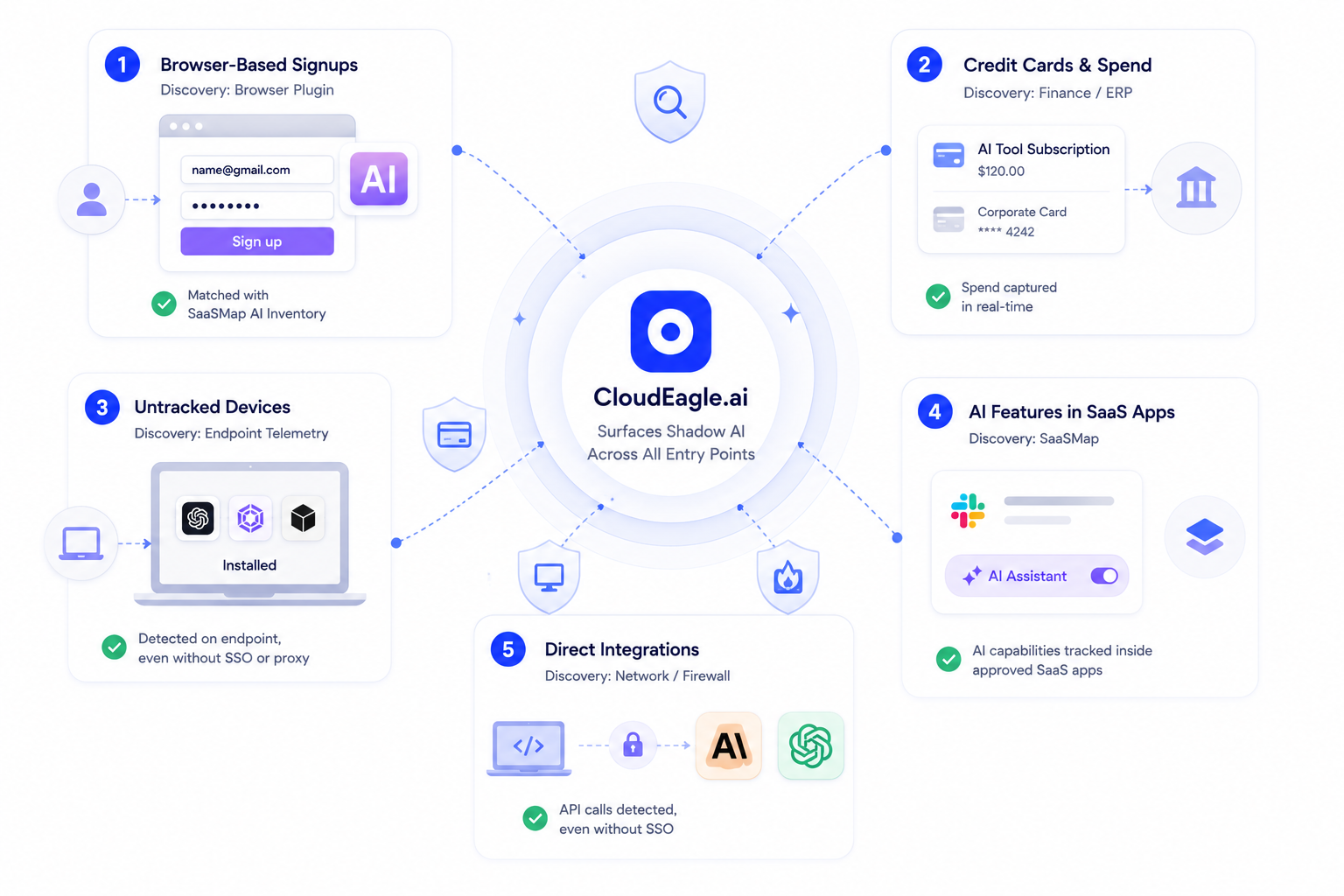
1. Browser-Based Signups
Discovery source: Browser plugin matched against personal IDs
- Flags AI tool access the moment someone signs up with a personal ID instead of a corporate SSO login
- Catches the access before any company data is ever entered
- Cross-referenced against CloudEagle's proprietary inventory of AI applications in SaaSMap
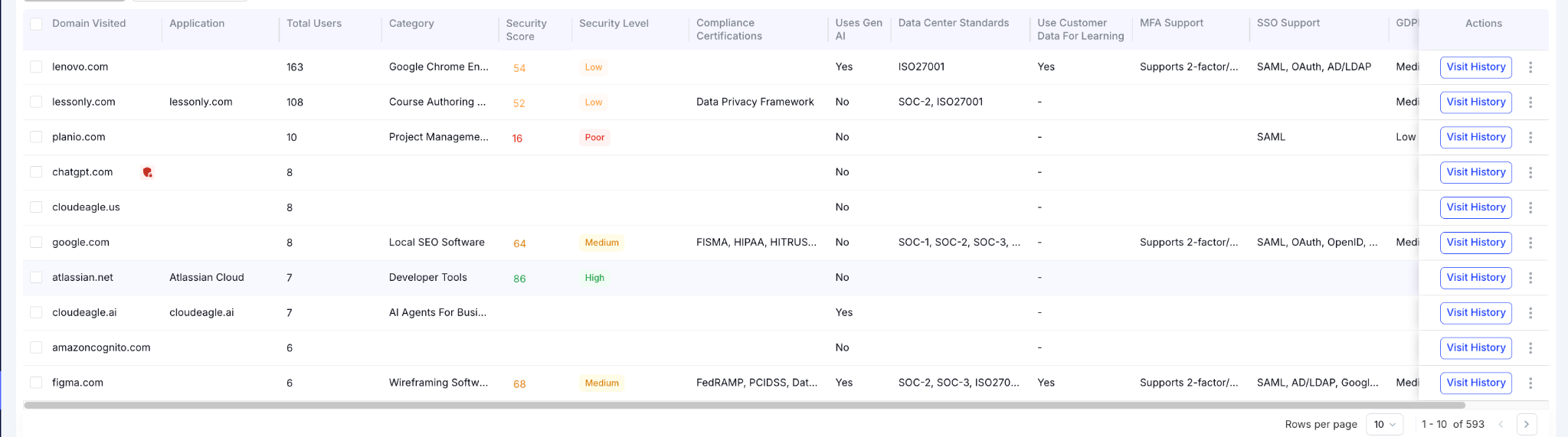
2. Credit Cards and Corporate Cards Spend
Discovery source: Finance and ERP integration
- Catches AI tools purchased independently on personal or corporate cards
- Surfaces them the moment they hit an expense report
- Attaches spend data automatically, so finance and IT see the same picture
3. Devices and Endpoints That Aren’t Tracked
Discovery source: Endpoint telemetry (CrowdStrike)
- Surfaces AI clients are installed directly on a device
- Catches tools invisible to both SSO and CASB because they never authenticate through corporate identity
- Extends visibility to tools that never generate proxy traffic either
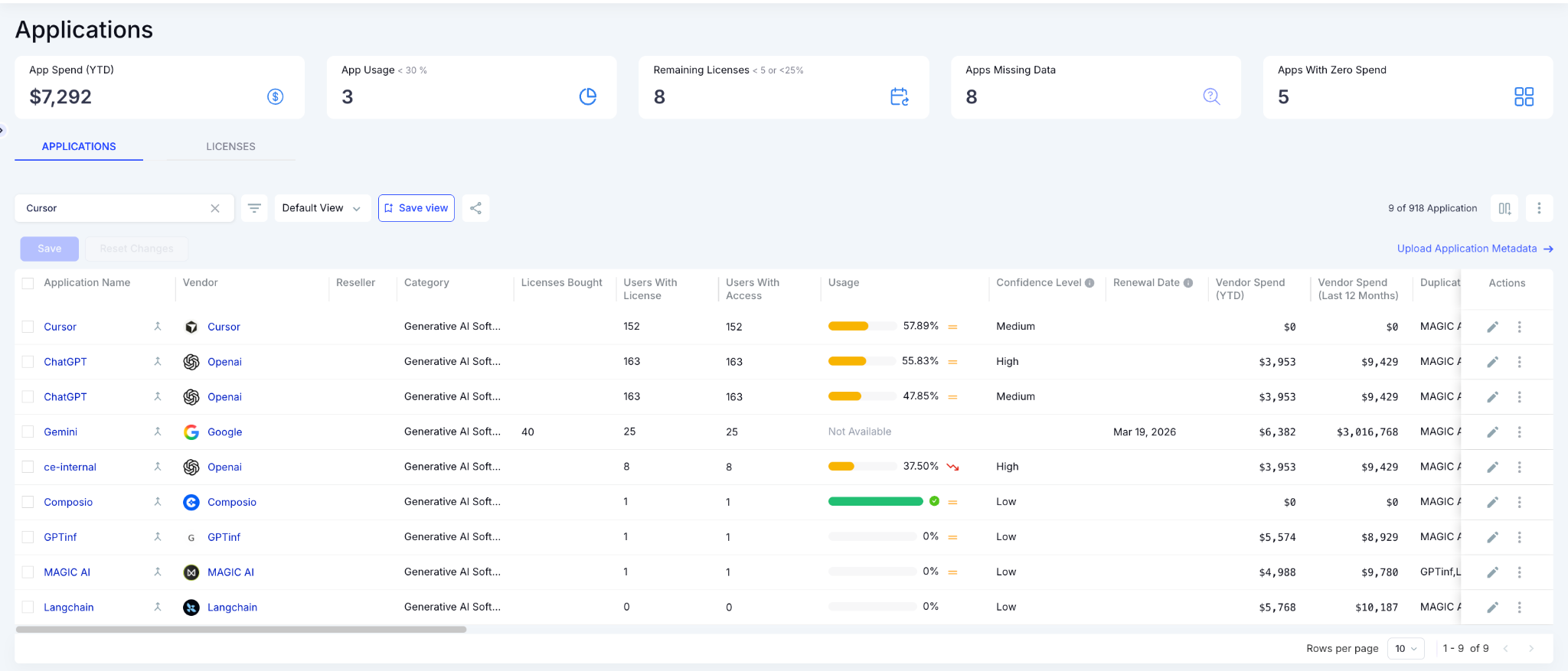
4. AI Features Bundled Into Sanctioned SaaS
Discovery source: SaaSMap
- Tracks AI capabilities embedded inside tools already sitting behind your IDP
- Distinguishes AI-feature usage from base-product usage, which SSO logs can't do
- Closes the gap where "approved app" quietly becomes "approved app plus an AI layer nobody reviewed"
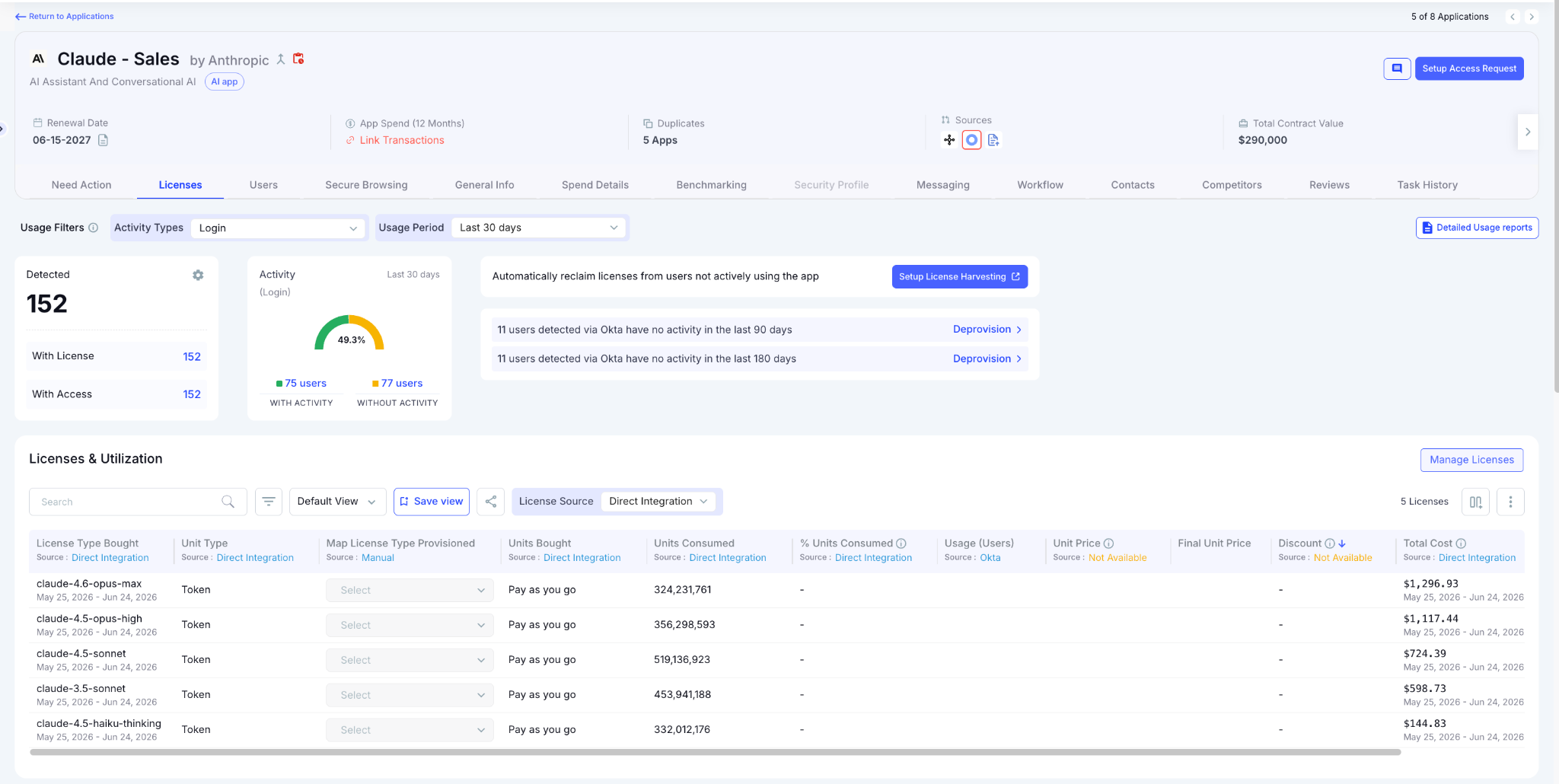
Customers get this kind of visibility fast. With onboarding measured in minutes, teams see their actual AI footprint immediately instead of waiting for the next audit cycle to find out what's been running. That's shadow AI detection running continuously instead of periodically.
5. Direct Integrations with Tools Like Claude or ChatGPT
Discovery source: Network and firewall integration (Zscaler)
- Catches API-key-based model calls that bypass SSO entirely
- Flags integrations before they become production dependencies, nobody reviewed
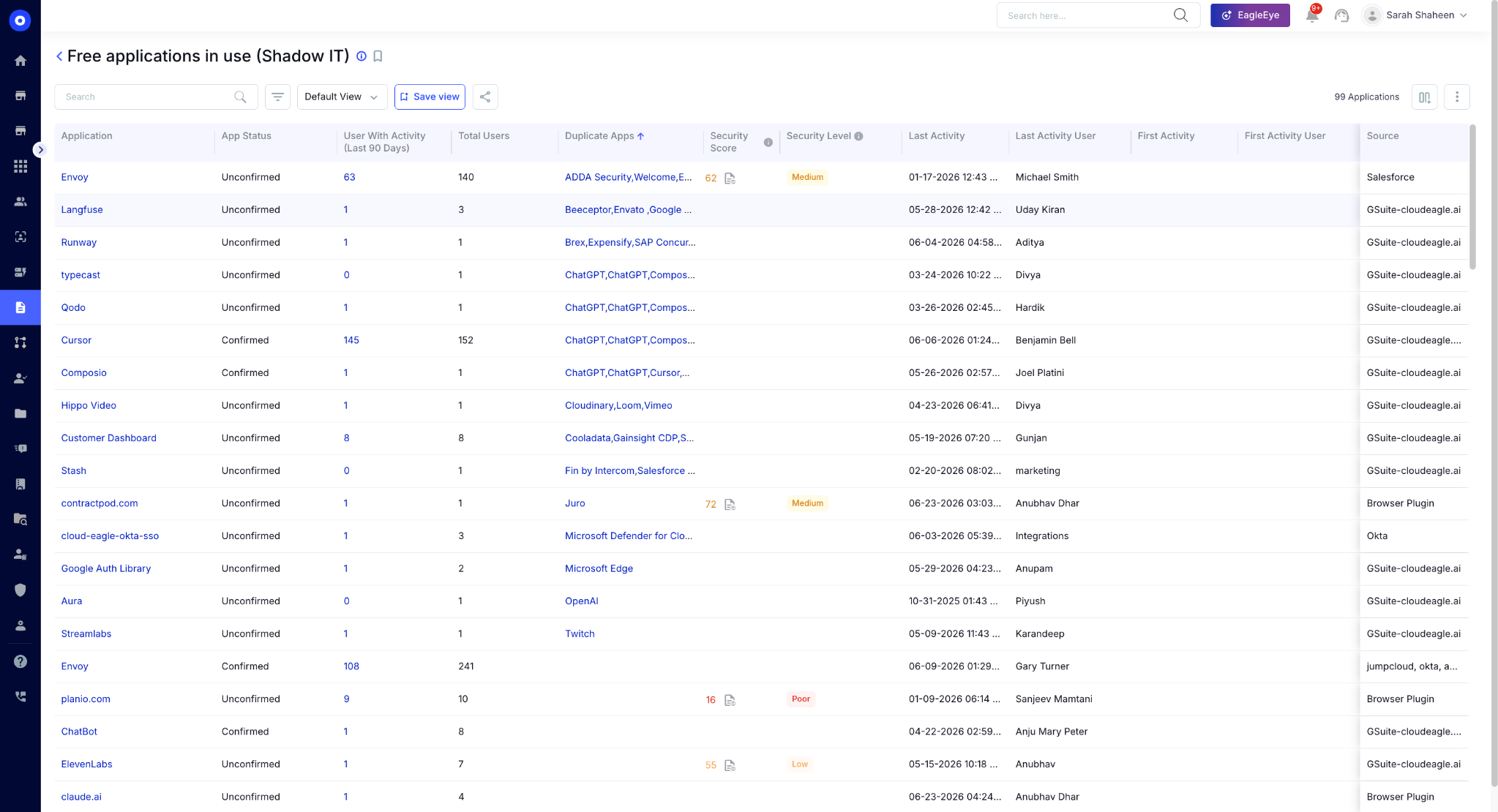
- Closes the gap that a developer hitting a model provider's API directly leaves wide open
Five Entry Points. One Dashboard. Zero Blind Spots


4. What Each Entry Point Looks Like in a Real Environment
Each entry point above sounds abstract until it's sitting inside your own environment. This is what shadow AI detection is actually catching when it works:
- Browser signup: A developer adds their work email to an AI tool's free tier to speed through a coding task. No SSO event fires. No CASB alert triggers. A browser plugin flags the access at first visit, before any code or data is entered.
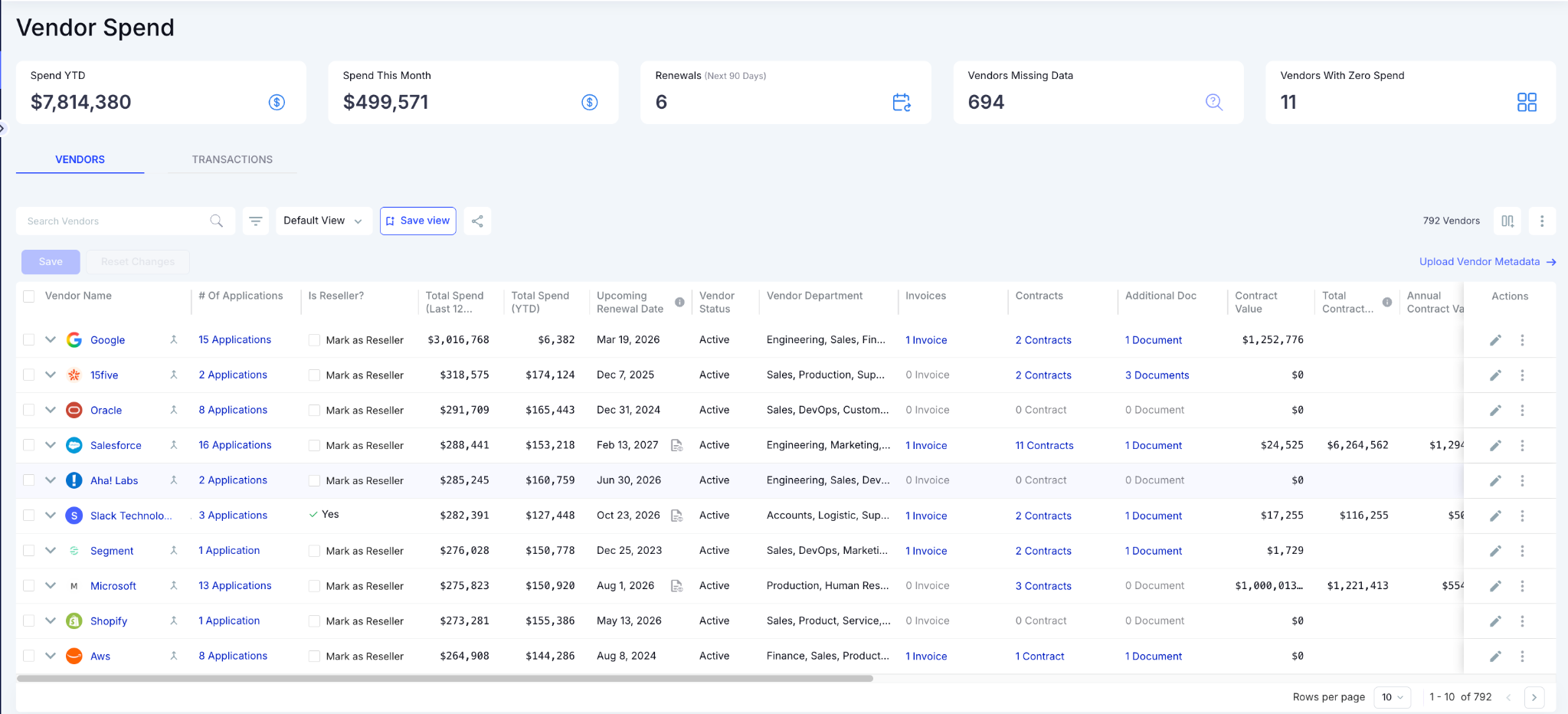
- Expense report: A marketing manager expenses a $20 monthly AI writing subscription on a corporate card because procurement would have taken three weeks. It shows up nowhere in IT's app inventory until the finance integration catches the line item and attaches it to a named tool.
- API key: A data scientist wires a model provider's API directly into an internal reporting script to save time. The integration goes into production. Nobody outside the team knows it exists until network-layer monitoring picks up the outbound calls.
- Local install: An employee installs a coding assistant locally to speed up a sprint. It never touches the identity provider and never generates proxy traffic, so it sits invisible until endpoint telemetry surfaces it.
- Bundled feature: A sanctioned collaboration tool ships an AI feature update with no internal announcement. Employees start using it the same day. SSO logs show the same login pattern as before, because as far as the identity provider is concerned, nothing changed.
Each of these moments is small on its own. Together, they're the actual shape of shadow AI in most enterprises, and none of them would have shown up in a clean SSO or CASB report.
5. What a Complete Shadow AI Inventory Needs to Include to Pass a Security Review
An audit-ready AI inventory is the output of real shadow AI detection. It needs five fields for every tool:
- Tool name
- Discovery source: which signal surfaced it
- Approval status: sanctioned, pending, or blocked
- Data access scope: what it can touch
- Accountable owner: who's responsible if something goes wrong
SSO logs hand an auditor login timestamps. CASB reports hand them a list of blocked domains.
Neither answers the questions an auditor actually asks, which is exactly the gap shadow AI detection is supposed to close and the gap that turns a checkbox audit into a failed one.
CloudEagle.ai automatically detects AI and SaaS applications by analyzing SSO, finance, and browser data together, then surfaces all of it in a single dashboard with usage, spend, and approval status attached.
The same correlation that finds duplicate and underutilized apps across a sanctioned environment finds the same patterns in the shadow environment running alongside it.
6. The Compliance Risk Shadow AI Creates Before You Know It's There
Most enterprises can't answer basic governance questions about their own AI footprint:
- How many AI tools are actually in use?
- Who has access to each one?
- What data is moving through them?
- How much is the organization spending on tools nobody approved?
Only 25% of organizations report having comprehensive visibility into how employees actually use AI, which means the other 75% are governing a problem they can't fully see.
That blind spot carries real exposure, and it's exactly why shadow AI detection has stopped being optional for compliance-heavy teams:
- Sensitive information gets pasted into public AI tools with no data handling guarantees
- Former employees can retain access to tools that nobody tracked closely enough to revoke
- API tokens and non-human identities operate without anyone reviewing what they can touch
Auditors have caught up to this. A policy document stating that AI use is governed no longer satisfies the question; they want evidence of AI data handling controls in practice.
A discovery layer that logs access attempts, flags interceptions, and tracks approval status creates the evidence trail compliance teams are starting to require as standard.
6. FAQs
1. How do you detect shadow AI?
Effective shadow AI detection correlates signals from SSO, finance systems, browser activity, and endpoint data. No single source catches every entry point on its own.
2. What is an example of shadow AI?
A developer using a personal account to access an AI coding tool, with company data, outside any IT approval process.
3. How can I prevent shadow AI?
Combine continuous, multi-source shadow AI detection with clear approval pathways, so sanctioned tools are faster to use than unsanctioned ones.
4. What are the leading shadow AI detection tools for enterprises?
Platforms that correlate identity, finance, browser, and endpoint signals into one inventory, rather than relying on any single data source.
Shadow AI enters through the five gaps SSO and CASB were never built to cover, and real shadow AI discovery means watching all five at once.
See CloudEagle's AI discovery in action. Book a demo.
Shadow AI Doesn't Show Up in a Clean SSO Report


.avif)


.avif)
.avif)




.png)






_.png)

.avif)
.avif)
.avif)


