
%201.svg)


HIPAA Compliance Checklist for 2025

Shadow AI is already happening inside most enterprises. An employee copies a customer email into ChatGPT to draft a reply. A marketer pastes internal campaign data into an AI tool to generate content.
None of these actions go through IT approval or data governance checks. Unlike Shadow IT, Shadow AI involves pasting real company data into external AI systems that store or learn from that input.
That’s why Shadow AI is more dangerous. In this article, we’ll break down where Shadow AI shows up and why it’s harder to control than Shadow IT ever was.
TL;DR
- Shadow AI occurs when employees use AI tools with company data without approval.
- Employees use AI in browsers to draft replies, write content, summarize tickets, or generate proposals.
- Once information is pasted into an AI tool, it may be processed, stored, or reused externally.
- Browser-based usage, personal accounts, and missing logs make monitoring and auditing difficult.
- CloudEagle.ai helps detect and control Shadow AI usage. It discovers unsanctioned AI tools, guides employees toward approved apps, and brings visibility to AI adoption.
1. Shadow AI Already Showing Up: But Where in Your Enterprise?
Shadow AI shows up wherever employees need faster output and fewer steps. It starts as a shortcut, usually inside a browser tab. Varonis revealed that 98% of enterprises have employees using unsanctioned shadow AI apps.
- Customer Support Workflows: Agents paste full customer tickets into tools like ChatGPT to generate replies or summaries.
- Marketing Content Creation: Teams input campaign briefs, audience data, or performance metrics into AI tools to draft copy.
- Engineering And Code Assistance: Developers share code snippets or internal logic with tools like GitHub Copilot or public AI models.
- Sales And Proposal Writing: Sales reps paste client requirements or pricing details to generate proposals quickly.
These actions feel harmless because they solve immediate problems. But they often involve copying real company data into tools that are not monitored or approved.
Sensitive Data Leaving Secure Systems
Emails, contracts, customer data, and internal documents are transmitted to external AI providers, often over unsecured or unmanaged sessions.
No Audit Trail Or Visibility
Security teams cannot see prompt content, output generation, or whether the data is retained, logged, or reused by the provider.
Shadow AI doesn’t live in one department. Unlike risks of Shadow IT, it spreads through everyday tasks, quietly embedding itself into workflows long before organizations realize it needs control.
That quiet spread is the core challenge in catching AI tools that run silently across an organization.

2. How Is Shadow AI Different From The Shadow IT You Already Manage?
An employee installs an unapproved SaaS tool to manage projects. IT eventually detects it, reviews the vendor, and either blocks or approves it. The risk is visible, even if delayed.
IT Perspective:
Shadow IT discovery introduces a system you can identify, monitor, and govern over time. You can enforce access controls, review contracts, and restrict data flows.
Security Perspective:
Shadow AI doesn’t behave like that. An employee pastes a contract, customer data, or internal report into ChatGPT, gets an output, and the interaction disappears. There’s no system to track, only data that has already left.
As Joshua Peskay, a 3CPO (CIO, CISO, and CPO) at RoundTable Technology said,
"Shadow IT is a term most people are not familiar with, that is pervasive. Every organization I've ever dealt with, save one, and that organization had only been eight months old."
Nothing installs, nothing persists, and nothing gets logged in the same way. But the data has already been processed outside your environment, something even robust data loss prevention techniques can’t recover.
Shadow IT created unknown tools inside your stack. Shadow AI creates untracked data flows to external AI systems, and that’s a harder problem to detect, explain, and control.
Also Read: Why Do You Need a Shadow AI Discovery Platform?
3. Shadow AI More Dangerous Than Traditional Shadow IT: What are the Reasons?
Shadow AI is more dangerous than Shadow IT because the risk is tied to data movement, not tool usage. With Shadow IT, you could track an app, review a vendor, and control access over time.
With Shadow AI, the moment an employee pastes internal data into an external AI tool, the exposure has already happened. That’s why the risk isn’t delayed or visible. It’s immediate and much more difficult to contain once it occurs.
A. Data Being Transformed, Not Just Accessed Or Stored
Shadow AI is more dangerous because it doesn’t just access or store data, it actively rewrites and reshapes it. The moment data is pasted into an AI tool, it is processed into summaries, answers, or new content.
- Summarization Of Sensitive Inputs: A full contract or internal report can be reduced into key points that are easier to share.
- Rewriting Internal Content: Emails, proposals, or documents are rewritten with added clarity, but may retain sensitive details.
- Structured Outputs From Raw Data: Unstructured inputs like chat logs or notes become clean, organized responses.
Menlo Security revealed that 57% of employees put sensitive data into free-tier AI tools like ChatGPT via personal accounts.
That said, what changes is not access, but output. Instead of raw data staying in its original form, it becomes something new, easier to consume, and easier to move beyond its original context.
B. AI Generating Insights From Data Users Shouldn’t Combine
Shadow AI creates risk when it combines data that users can access separately but shouldn’t logically connect. The issue isn’t user access review control, it’s what happens when multiple inputs are processed together.
- Cross-Input Prompting: A user pastes sales pipeline data and internal pricing strategy into one prompt to generate forecasts.
- Mixed Context Queries: Customer feedback and product roadmap notes are combined to create positioning or messaging.
- Blended Internal Signals: Financial metrics and hiring plans are used together to generate business summaries.
Individually, these data points may be acceptable to access. But when combined, they create insights that were never meant to exist in one place.
- Implicit Correlation: AI connects relationships between datasets without enforcing internal boundaries.
- New Insight Creation: Outputs reveal trends or strategies that weren’t explicitly documented.
- Loss Of Context Control: Data used together loses the restrictions tied to its original source.
Shadow AI doesn’t just retrieve information. It creates new layers of meaning from multiple inputs, and that’s where the risk moves beyond access into interpretation.
C. Risk Extending Beyond Apps Into Everyday Behavior
Shadow AI becomes more dangerous because it doesn’t stay confined to a tool or system. It becomes a habit. Employees start using AI in small, repetitive ways without thinking about the real cost of shadow AI.
Prompt As A Default Action
Instead of searching internally, users paste data into AI to get faster answers.
Copy-Paste Workflows
Customer messages, internal notes, and reports are routinely moved into external tools.
No Friction Or Approval Step
These actions happen instantly, without alerts, logging, or oversight.
Over time, this behavior compounds. What starts as occasional usage becomes embedded in daily work, making it harder to track or control.
- Repeated exposure of similar data types
- Increased reliance on external AI for internal tasks
As Bruce Schneier said,
“Security is a process, not a product.”
The risk isn’t one large event. It’s the accumulation of small, untracked actions happening every day. And without preventing Shadow AI, the behavior becomes way too normalized.
4. Why Is Shadow AI So Difficult To Detect And Monitor?
Shadow AI is difficult to detect because it doesn’t behave like traditional software usage. There’s no installation, no login event tied to your systems, and often no record inside your existing tools.
- Browser-Based Usage: Employees access tools like ChatGPT directly in a browser, outside managed environments.
- No System-Level Logs: Data pasted into AI tools isn’t captured in application logs or audit trails.
- Personal Account Usage: Employees often use personal emails, bypassing enterprise identity controls.
This makes the activity invisible by design. Even if you know how to manage shadow AI, you don’t know what data is being shared or how often.
No Data-Level Visibility
Security teams can’t see what was pasted or generated.
No Approval Or Review Step
Usage happens instantly, without workflows or checkpoints.
Shadow AI doesn’t leave the same footprints as Shadow IT. It operates in small, frequent interactions that slip past traditional monitoring, which is why it’s harder to detect before risk accumulates. Closing that gap takes purpose-built shadow AI discovery rather than the logs and audits that miss it.
5. How Does CloudEagle.ai Help Bring Shadow IT and Shadow AI Under Control?
Shadow AI spreads faster than traditional Shadow IT because AI tools slip faster, often without approval or awareness of risk.
CloudEagle.ai brings Shadow AI under control by combining discovery, guidance, and governance into a single system that works in real time.
Instead of blocking innovation, this shadow AI detection platform enables safe AI adoption by making usage visible, guiding employees toward approved tools, and enforcing policies without slowing teams down.
A: Discovering Shadow AI and Unsanctioned Applications Instantly
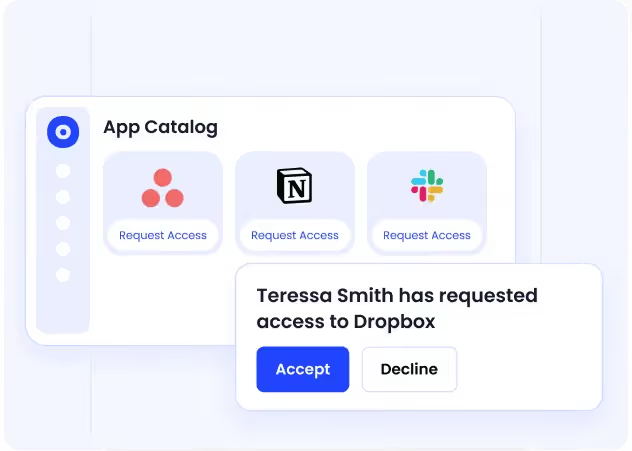
CloudEagle.ai gives organizations immediate visibility into every AI and SaaS application employees use, eliminating blind spots across the stack.
Current Process
IT relies on spreadsheets, expense reports, and scattered logs to track software usage. Employees often adopt tools independently using cards or free versions.
Pain Points
There is no complete view of apps in use. Shadow AI apps remain hidden, increasing security risks and duplicate spend.
How We Do It
CloudEagle.ai detects AI applications by analyzing SSO, finance, and browser-level data. All apps, usage, and spend appear in one unified dashboard.
Why We Are Better
Teams get a complete, real-time inventory without manual tracking. Shadow AI becomes visible the moment it appears.
B: Identifying AI App Usage Across the Organization
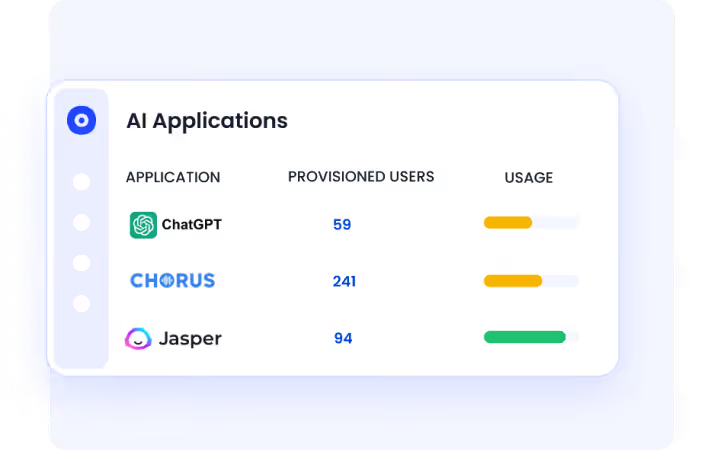
CloudEagle.ai helps teams understand not just which AI tools exist, but how they are being adopted across users and teams.
Current Process
AI usage is tracked through fragmented tools like browser plugins or network logs. Data remains incomplete and difficult to interpret.
Pain Points
Organizations lack clarity on which AI tools employees rely on. This creates gaps in SaaS compliance, security, and AI strategy.
How We Do It
CloudEagle.ai correlates browser, Zscaler, and Crowdstrike logs with its proprietary SaaSMap of AI tools to identify AI app usage patterns.
Why We Are Better
Teams gain a structured, comprehensive view of AI adoption, enabling informed decisions about tool standardization and governance.
Must Read: 5 Best Practices to Prevent Shadow AI & Reduce AI-Driven Security Risks
C: Guiding Employees Toward Approved AI Tools in Real Time
CloudEagle.ai reduces risk by influencing behavior at the moment of access, rather than reacting after exposure happens.
Current Process
Employees choose AI tools independently without guidance. IT policies exist but are not enforced at the point of usage.
Pain Points
Unapproved tools handle sensitive data. IT cannot prevent risky usage without blocking productivity.

How We Do It
CloudEagle.ai shows a real-time guidance layer when users access unapproved AI tools, redirecting them to approved alternatives.
Why We Are Better
Identity Governance happens without disruption. Employees stay productive while aligning with company-approved AI policies.
D: Preventing Shadow AI Through Controlled Access and Visibility
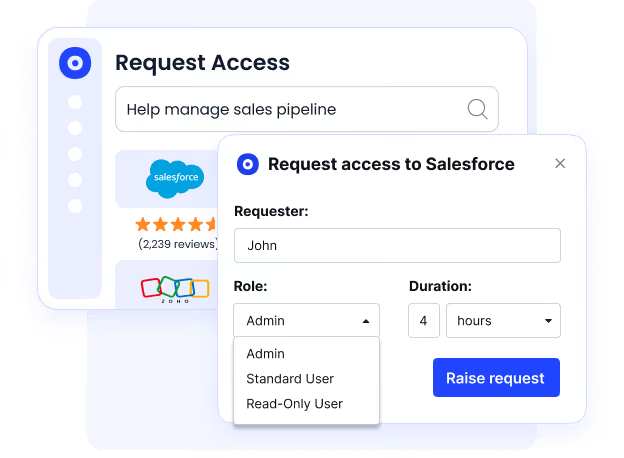
CloudEagle.ai removes the root cause of Shadow AI by making approved tools easy to find and access.
Current Process
Employees request apps through email or Slack, or bypass IT entirely due to delays. Approved tools are not clearly visible.
Pain Points
Slow approvals lead to shadow purchases. IT loses control over which tools employees adopt.
How We Do It
CloudEagle.ai provides a centralized app catalog with role-based visibility and automated approvals for faster access.
Why We Are Better
Employees discover and request only approved tools. Shadow AI reduces naturally without strict enforcement.
Bring Shadow AI under control


6. Conclusion
Shadow AI is more dangerous than Shadow IT because the risk happens in real time. It’s not about unknown tools running in your environment, it’s about known tools processing unknown data outside it.
Employees aren’t trying to bypass controls. They’re pasting customer emails, contracts, reports, and internal notes into AI tools to work faster. But each of those actions creates outputs that are easier to share and harder to track.
This is where CloudEagle becomes critical. It helps surface where AI usage is happening, which tools are involved, and how that usage connects to licenses, access, and governance. Instead of reacting after data has already moved, teams can start identifying patterns early.
Shadow AI won’t be stopped by blocking tools alone. It needs visibility into behavior. And the sooner organizations understand how it shows up in daily work, the easier it becomes to control before it scales.
7. FAQs
1. How to avoid shadow AI?
You avoid Shadow AI by reducing the need for unsafe shortcuts and adding visibility where it matters. Provide approved AI tools, define what data can’t be pasted externally, and monitor usage patterns instead of just blocking apps.
2. Is ChatGPT shadow AI?
ChatGPT itself isn’t Shadow AI. It becomes Shadow AI when employees use it with company data without approval, monitoring, or governance.
3. What are the risks of shadow AI?
The main risk is employees pasting sensitive data like customer emails, contracts, or internal reports into external AI tools. That data can be processed, stored, or used to generate outputs that are easier to share and harder to track.
4. How to detect shadow AI?
Shadow AI is detected by tracking browser-based tool usage, monitoring unusual data movement patterns, and identifying AI tools used outside approved environments. Traditional app discovery alone is not enough.
5. Is shadow IT a threat actor?
No. Shadow IT is not a threat actor, it’s a behavior where employees use unapproved tools. The risk comes from lack of visibility and control, not malicious intent.


.avif)


.avif)
.avif)




.png)






.avif)
.avif)
.avif)


