How to Discover Every Non-Human Identity in Your Environment

Share via:
blog-cms-banner-bg
Little-Known Negotiation Hacks to Get the Best Deal on Slack
cta-bg-blogDownload Your Copy

HIPAA Compliance Checklist for 2025

Download PDF

Ask a security team for a list of every employee with access to company systems and they'll have it in minutes. Ask for a complete inventory of every API key, workload identity, and application identity across the environment.

The honest answer is usually a guess, or silence.

Non-human identities aren't created through an onboarding process anyone tracks. They accumulate as integrations, automation scripts, and AI agents are deployed across different platforms without centralized inventory.

CloudEagle.ai connects to your identity providers, correlates every NHI automatically, and surfaces owner, access, and risk in one view. 

In this guide, we'll show you how to build that NHI inventory and how CloudEagle.ai automates it.

TL;DR

  • Non-human identities remain invisible because they're created across IdPs, cloud platforms, and SaaS apps without centralized ownership or inventory.
  • Effective NHI discovery requires identifying every identity source, extracting all identities, correlating duplicates, and classifying them by owner and access.
  • CloudEagle.ai automatically discovers, correlates, and classifies non-human identities across connected environments.
  • Centralized dashboards, ownership attribution, and audit logs help security teams prioritize high-risk NHIs and simplify governance.
  • CloudEagle.ai provides a unified, continuously updated inventory that serves as the foundation for effective non-human identity governance

1. Why Non-Human Identities Are Invisible By Default

Non-human identities don't become invisible because they're hidden. They become invisible because they're created and stored differently from employee identities. Three gaps make discovery difficult.

A. No HR-Equivalent Creation Event

Unlike employee accounts, non-human identities aren't created through a standardized onboarding process.

  • No Onboarding Workflow: Service accounts and API keys are created whenever an integration or automation needs them, with no approval chain, no ticket, and no record that anything was provisioned.
  • No Assigned Ownership: They often lack a documented owner, manager, or business context from day one, meaning nobody is accountable when the integration outlives its purpose.
  • No Central Record: There's no HR system or equivalent process logging that a new non-human identity was created, so the inventory gap starts at the moment of creation, not after.

B. Scattered Across Multiple Systems

Non-human identities are spread across the technology stack instead of living in a single directory.

  • Identity Providers: Service accounts and application identities exist in platforms like Okta and Microsoft Entra but only the ones that were federated.
  • Cloud Platforms: AWS, Azure, and GCP each manage their own workload and service identities independently with no built-in mechanism to surface them alongside IdP-managed identities.
  • SaaS Applications: Many SaaS tools create their own API keys, OAuth connections, and service accounts that never sync back to a central identity store.

C. No Correlation Layer

Even when teams collect identities from multiple platforms, they often end up with separate lists instead of a unified inventory. 

The same non-human identity can appear in multiple systems, making it difficult to determine ownership, understand actual access, or identify duplicate records.

Without correlating those identities, security teams can't confidently answer a simple question: how many non-human identities do we actually have?

One organization identified 882 distinct OAuth connections created by employees across its environment, with no centralized process to notice when connection 883 shows up tomorrow. 

That's how quickly non-human identities accumulate. You can't govern or review an identity you don't know exists. That's why discovery is the foundation of every successful non-human identity governance program.

You Can't Govern AI You Can't See

Find every hidden tool.
Get The Guide

2. How to Discover Every NHI in Your Environment: A Step-By-Step Approach

Discovering non-human identities isn't about scanning a single system. It requires building a complete inventory across every identity source. 

The following four steps take you from scattered, incomplete visibility to a unified NHI inventory. 

Step 1: Start With Every Place an NHI Could Exist

Before discovering non-human identities, identify every system where they can be created or managed.

This includes identity providers like Okta and Microsoft Entra, cloud platforms such as AWS, Azure, and GCP, and SaaS applications that maintain their own service accounts, API keys, or application identities. 

Many discovery efforts fail because they only query one of these sources, leaving the rest of the environment unchecked.

Step 2: Extract the Full Identity List From Each Source

Once you've identified every source, collect every non-human identity it manages, not just the ones that appear active or high risk.

  • Include Every Identity: Extract all service accounts, API keys, workload identities, OAuth applications, and AI agents without filtering by status or recency.
  • Ignore Activity Status: Don't filter out dormant or unused identities during discovery, an identity that hasn't been used for years may be exactly the one everyone has forgotten about.
  • Preserve Source Details: Capture available metadata such as creation date, last activity, permissions, and source system, this context is what makes deduplication and ownership assignment possible in the next step.

Step 3: Correlate and Deduplicate Into One Unified List

The same non-human identity can appear across multiple platforms, making raw inventories difficult to trust.

  • Match Duplicate Records: Identify identities that exist in more than one system and flag them for consolidation.
  • Merge Related Entries: Combine duplicate records into a single inventory entry instead of treating them as separate identities, inflated counts make ownership assignment and access reviews significantly harder.
  • Maintain Source References: Record every platform where the identity exists to preserve context for future reviews and audit records.

Without correlation, security teams end up reviewing the same identity multiple times, inflating inventory counts and making ownership harder to establish.

Step 4: Classify Every Identity by Type, Owner, and Access Scope

Once you've built a unified inventory, enrich each identity with the information needed for governance.

Classify whether it's a service account, API key, workload identity, or AI agent. Identify who or what created it, assign an owner wherever possible, and document the systems, applications, and permissions it can access.

An unclassified inventory tells you how many NHIs exist. A classified inventory tells you which ones carry risk, who is accountable for each one, and what needs to be reviewed first.

Not Every App Is On Your Inventory

That's the problem.
Find Them

3. How CloudEagle.ai Discovers Every NHI Automatically?

CloudEagle.ai automates all four discovery steps: connecting to every identity source, extracting the full identity list, correlating across sources into one unified inventory, and classifying every NHI by type, owner, and access scope. 

Here's what each step looks like in the product:

A. CloudEagle.ai's NHI Dashboard: Inventory and Risk in One View

The moment CloudEagle.ai connects to your environment, the NHI dashboard surfaces total NHIs, environment breakdown, identity type split, and a risk-prioritized insights panel that tells your security team exactly where to start.

Here's how the NHI dashboard surfaces inventory and risk simultaneously:
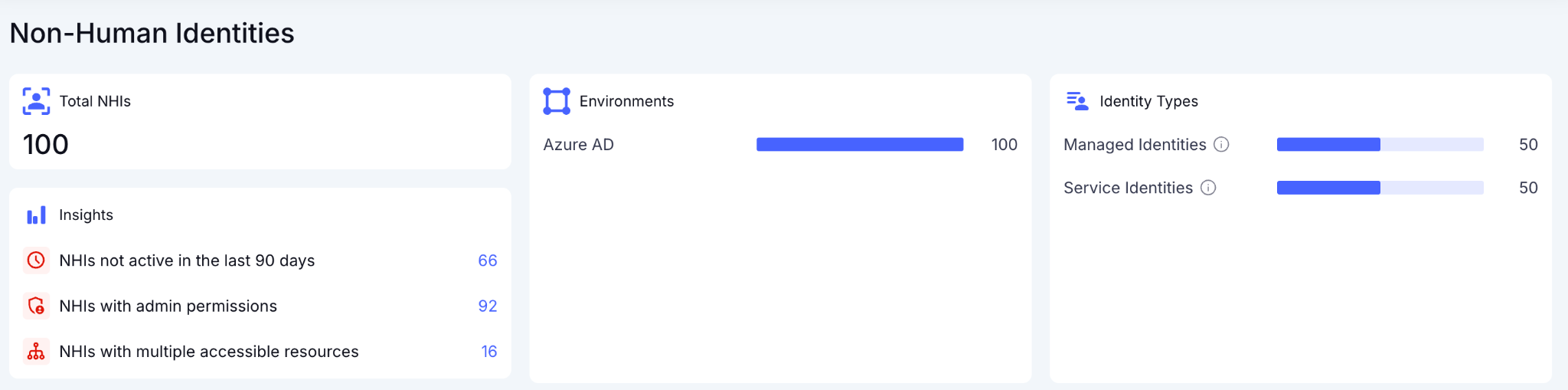
In CloudEagle.ai's NHI dashboard, the insights panel flags the three highest-priority risk categories immediately: NHIs not active in the last 90 days, NHIs with admin permissions, and NHIs with multiple accessible resources:
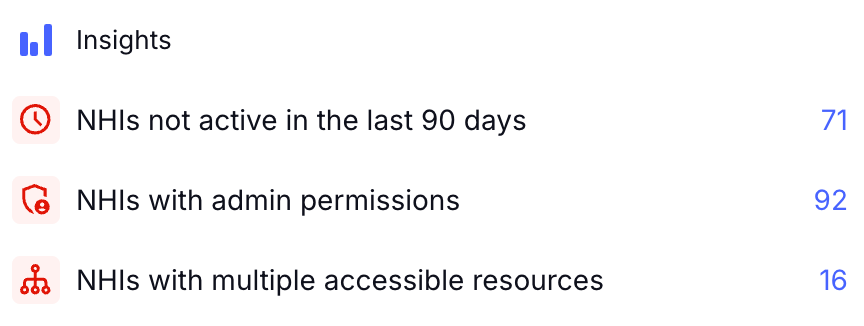
In the Freshworks deployment, this view was live in production the moment Azure AD was connected without separate data collection exercise and manual export. 

AWS and GCP are confirmed on the roadmap, expanding the same inventory and risk layer to cloud infrastructure NHIs in phase two.

B. CloudEagle.ai's NHI Inventory: Every Identity, Credential Type, and Owner in One Table

The full NHI inventory delivers the detailed per-identity view the program requires, credential type, last activity date, source environment, and owner status visible in a single table without opening a separate system.

Here's how the NHI inventory surfaces the full per-identity picture:
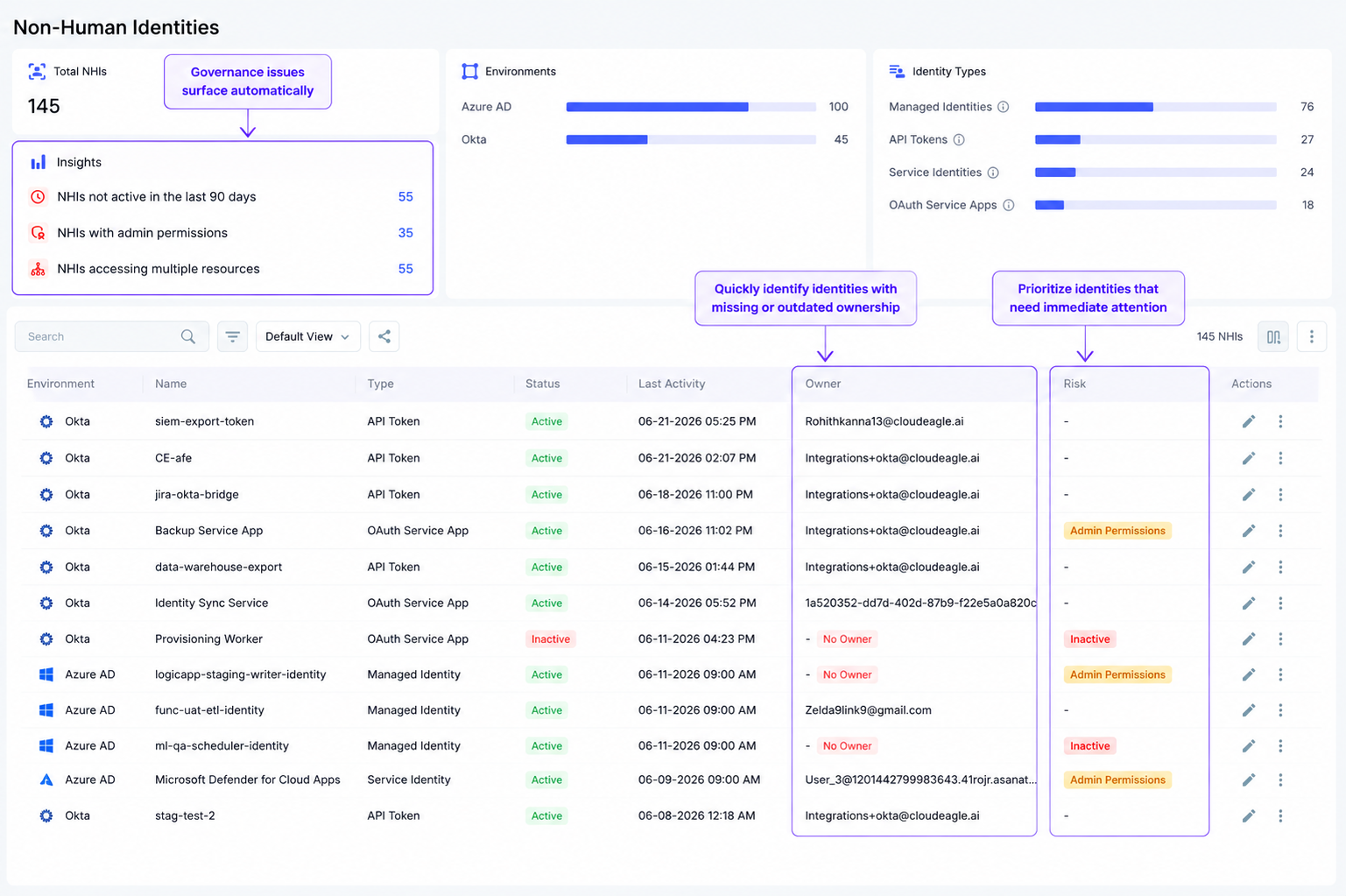
In CloudEagle.ai's NHI inventory, every identity appears with its source, type, active status, credential type, last activity date, and assigned owner. Every NHI with a missing owner is immediately visible:
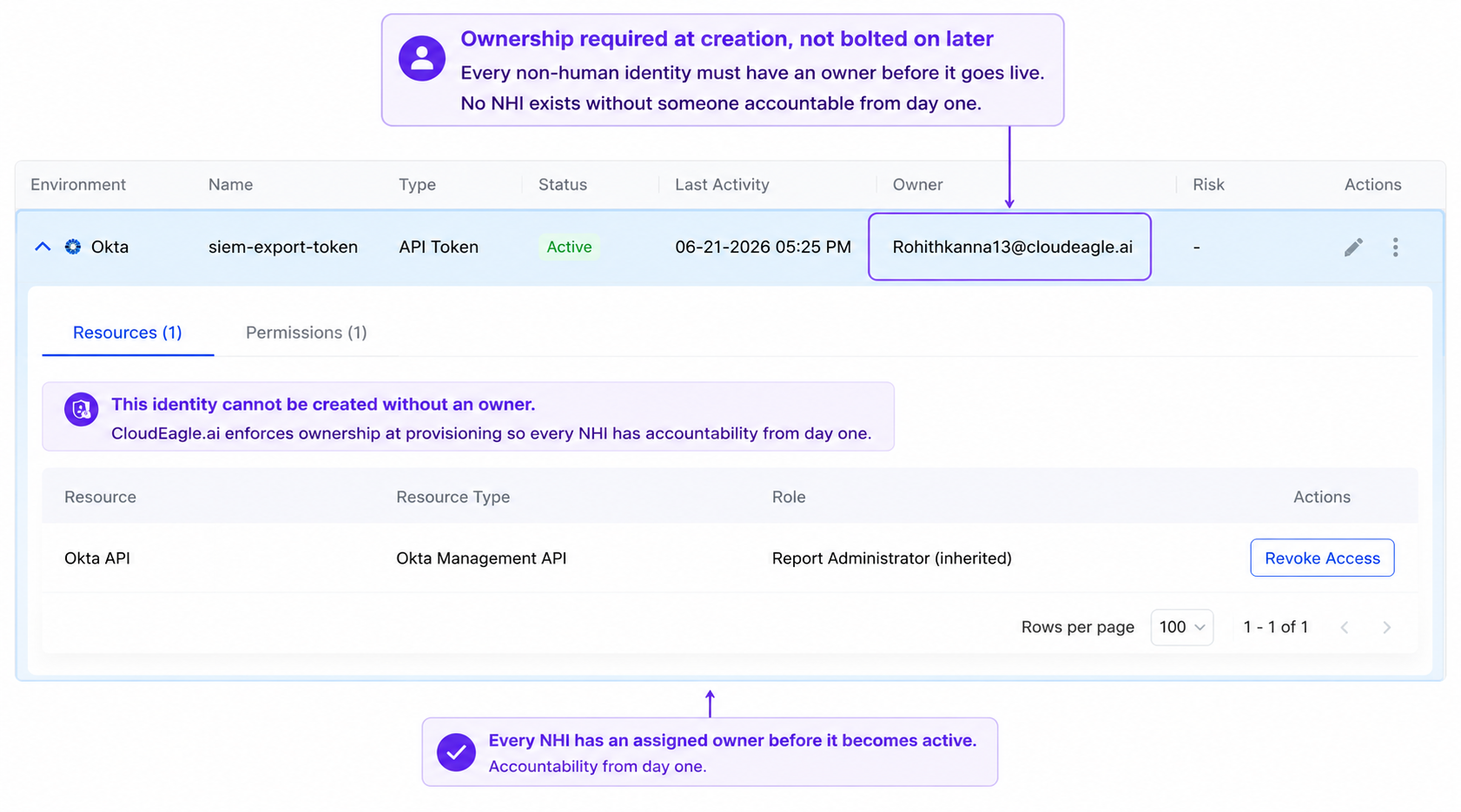
Expanding any row surfaces the role and permission drill-down, the exact view an access review requires to answer whether the permission scope is still appropriate. 

C. Ownership Assignment: Every Unowned NHI Flagged and Routed

CloudEagle.ai flags every unowned NHI automatically and routes it to the most likely owner based on application context including the integration creator, the application administrator, or the team responsible for the connected system.
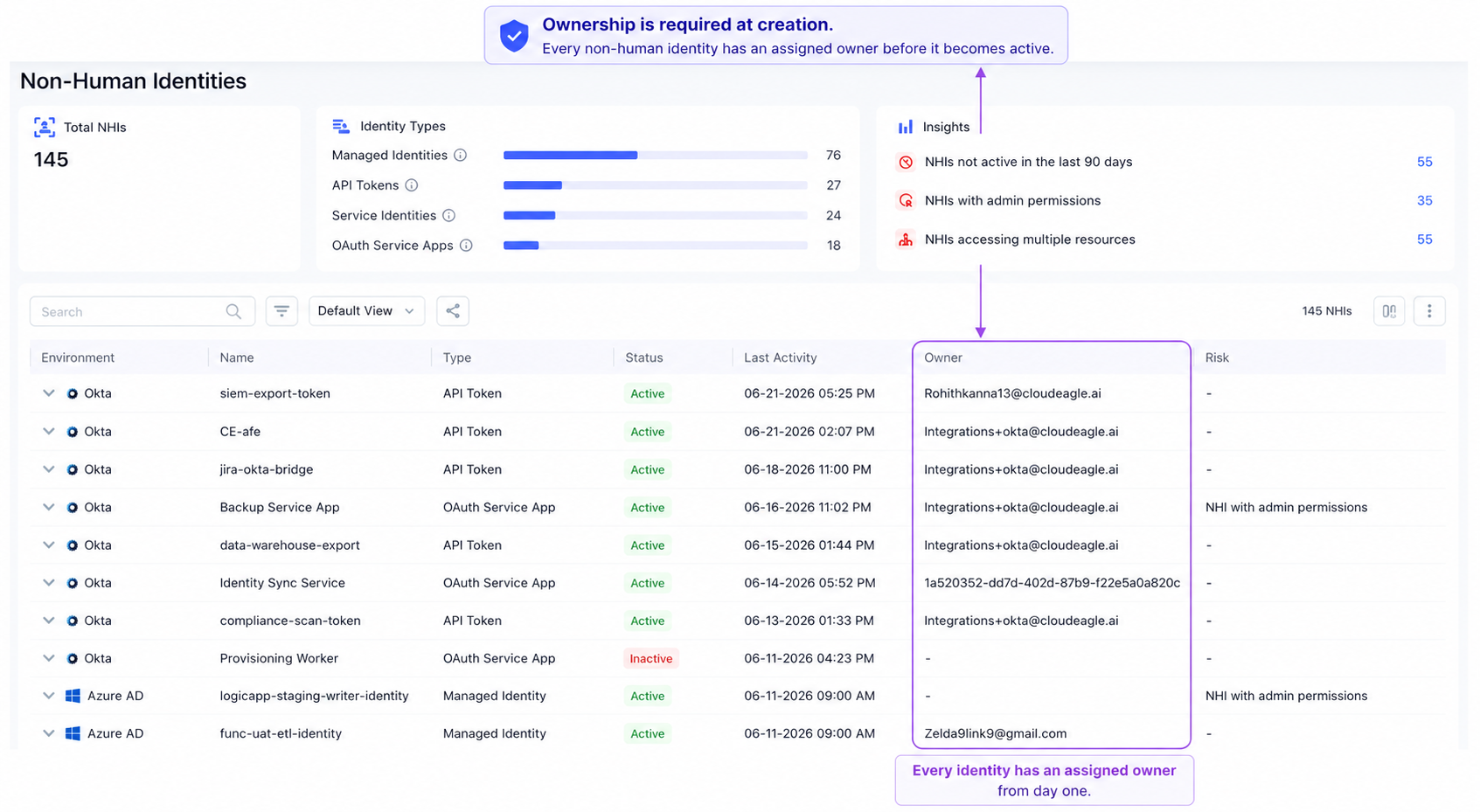
Every unowned NHI surfaces in a queue with suggested owner, application context, and permission scope. Ownership is confirmed before the next review cycle rather than discovered during an incident. 

D. Audit Log: Every Governance Action Timestamped and Traceable

Every action taken on a non-human identity such as ownership assignment, access revocation, permission downscope, credential rotation is logged automatically with the action, the change, who performed it, and the exact timestamp.

In CloudEagle.ai's audit log, every governance action is timestamped and attributable, producing the defensible evidence trail the program requires without any manual compilation:
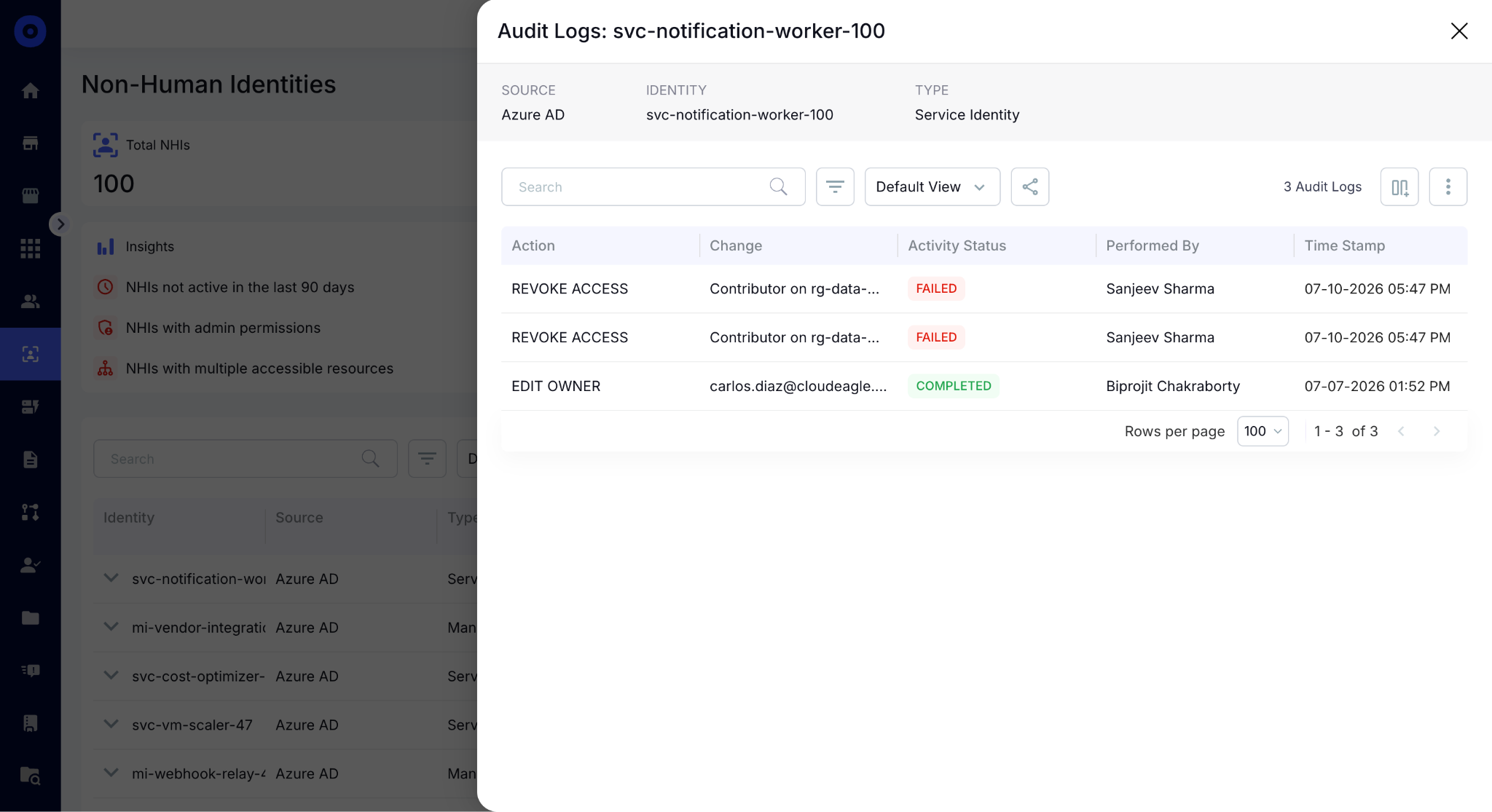
When an auditor asks who owns a specific service account and what actions have been taken on it, the answer is already in CloudEagle.ai, not assembled from Jira tickets the night before the review.

4. Conclusion

You can't govern, review, or revoke access for an identity you don't know exists. Discovery is the foundation the rest of NHI governance sits on, not something to revisit after the first access review.

CloudEagle.ai connects to your identity providers, correlates every NHI automatically, and surfaces owner, access, and risk in one view without manual cross-referencing required. 

The inventory that used to take weeks to assemble incompletely is available the moment the integration connects.

5. FAQs

1. Can CloudEagle.ai discover NHIs created inside SaaS applications that were never registered in an identity provider?

CloudEagle.ai surfaces NHIs through direct application integrations rather than relying solely on IdP data, so service accounts, API keys, and OAuth connections created inside SaaS vendor consoles without going through a central identity provider appear in the inventory automatically once the application integration is connected.

2. How does CloudEagle.ai handle NHIs associated with former employees who have already been offboarded?

When an employee is deprovisioned through CloudEagle.ai's HRIS integration, every NHI they created or owned is automatically flagged for review. Former-employee-owned identities surface in the ownership queue immediately rather than waiting to be discovered during a scheduled audit cycle.

3. Can CloudEagle.ai detect when a new NHI is created after the initial discovery is complete?

CloudEagle.ai monitors connected environments continuously rather than running periodic scans, so when a new service account, API key, or OAuth connection is created after the initial inventory is built, it surfaces in the NHI dashboard automatically without requiring a manual re-discovery exercise.

4. Does CloudEagle.ai support discovery across multiple Azure AD tenants for organizations that operate separate tenant environments?

CloudEagle.ai supports multi-tenant environments, pulling NHI data from separate Azure AD instances into a single consolidated inventory. Each tenant's identities are tracked independently and in aggregate  so organizations that acquired a company or operate distinct business units on separate tenants get a unified NHI picture without manually combining exports.

5. Can CloudEagle.ai prioritize which discovered NHIs to review first based on risk rather than requiring a manual triage exercise?

The NHI dashboard surfaces three risk-prioritized insight categories immediately after discovery: identities inactive for 90 or more days, identities carrying admin permissions, and identities with access to multiple resources simultaneously. These categories pre-sort the inventory by risk so the first review cycle starts with the highest-priority identities rather than working through a flat list from top to bottom.

Advertisement for a SaaS Subscription Tracking Template with a call-to-action button to download and a partial graphic of a tablet showing charts.Banner promoting a SaaS Agreement Checklist to streamline SaaS management and avoid budget waste with a call-to-action button labeled Download checklist.Blue banner with text 'The Ultimate Employee Offboarding Checklist!' and a black button labeled 'Download checklist' alongside partial views of checklist documents from cloudeagle.ai.Digital ad for download checklist titled 'The Ultimate Checklist for IT Leaders to Optimize SaaS Operations' by cloudeagle.ai, showing checklist pages.Slack Buyer's Guide offer with text 'Unlock insider insights to get the best deal on Slack!' and a button labeled 'Get Your Copy', accompanied by a preview of the guide featuring Slack's logo.Monday Pricing Guide by cloudeagle.ai offering exclusive pricing secrets to maximize investment with a call-to-action button labeled Get Your Copy and an image of the guide's cover.Blue banner for Canva Pricing Guide by cloudeagle.ai offering a guide to Canva costs, features, and alternatives with a call-to-action button saying Get Your Copy.Blue banner with white text reading 'Little-Known Negotiation Hacks to Get the Best Deal on Slack' and a white button labeled 'Get Your Copy'.Blue banner with text 'Little-Known Negotiation Hacks to Get the Best Deal on Monday.com' and a white button labeled 'Get Your Copy'.Blue banner with text 'Little-Known Negotiation Hacks to Get the Best Deal on Canva' and a white button labeled 'Get Your Copy'.Banner with text 'Slack Buyer's Guide' and a 'Download Now' button next to images of a guide titled 'Slack Buyer’s Guide: Features, Pricing & Best Practices'.Digital cover of Monday Pricing Guide with a button labeled Get Your Copy on a blue background.Canva Pricing Guide cover with a button labeled Get Your Copy on a blue gradient background.

Enter your email to
unlock the report

Oops! Something went wrong while submitting the form.
License Count
Benchmark
Per User/Per Year

Enter your email to
unlock the report

Oops! Something went wrong while submitting the form.
License Count
Benchmark
Per User/Per Year

Enter your email to
unlock the report

Oops! Something went wrong while submitting the form.
Notion Plus
License Count
Benchmark
Per User/Per Year
100-500
$67.20 - $78.72
500-1000
$59.52 - $72.00
1000+
$51.84 - $57.60
Canva Pro
License Count
Benchmark
Per User/Per Year
100-500
$74.33-$88.71
500-1000
$64.74-$80.32
1000+
$55.14-$62.34

Enter your email to
unlock the report

Oops! Something went wrong while submitting the form.

Enter your email to
unlock the report

Oops! Something went wrong while submitting the form.
Zoom Business
License Count
Benchmark
Per User/Per Year
100-500
$216.00 - $264.00
500-1000
$180.00 - $216.00
1000+
$156.00 - $180.00

Enter your email to
unlock the report

Oops! Something went wrong while submitting the form.

Get the Right Security Platform To Secure Your Cloud Infrastructure

Please enter a business email
Thank you!
The 2023 SaaS report has been sent to your email. Check your promotional or spam folder.
Oops! Something went wrong while submitting the form.

Access full report

Please enter a business email
Thank you!
The 2023 SaaS report has been sent to your email. Check your promotional or spam folder.
Oops! Something went wrong while submitting the form.

Ask a security team for a list of every employee with access to company systems and they'll have it in minutes. Ask for a complete inventory of every API key, workload identity, and application identity across the environment.

The honest answer is usually a guess, or silence.

Non-human identities aren't created through an onboarding process anyone tracks. They accumulate as integrations, automation scripts, and AI agents are deployed across different platforms without centralized inventory.

CloudEagle.ai connects to your identity providers, correlates every NHI automatically, and surfaces owner, access, and risk in one view. 

In this guide, we'll show you how to build that NHI inventory and how CloudEagle.ai automates it.

TL;DR

  • Non-human identities remain invisible because they're created across IdPs, cloud platforms, and SaaS apps without centralized ownership or inventory.
  • Effective NHI discovery requires identifying every identity source, extracting all identities, correlating duplicates, and classifying them by owner and access.
  • CloudEagle.ai automatically discovers, correlates, and classifies non-human identities across connected environments.
  • Centralized dashboards, ownership attribution, and audit logs help security teams prioritize high-risk NHIs and simplify governance.
  • CloudEagle.ai provides a unified, continuously updated inventory that serves as the foundation for effective non-human identity governance

1. Why Non-Human Identities Are Invisible By Default

Non-human identities don't become invisible because they're hidden. They become invisible because they're created and stored differently from employee identities. Three gaps make discovery difficult.

A. No HR-Equivalent Creation Event

Unlike employee accounts, non-human identities aren't created through a standardized onboarding process.

  • No Onboarding Workflow: Service accounts and API keys are created whenever an integration or automation needs them, with no approval chain, no ticket, and no record that anything was provisioned.
  • No Assigned Ownership: They often lack a documented owner, manager, or business context from day one, meaning nobody is accountable when the integration outlives its purpose.
  • No Central Record: There's no HR system or equivalent process logging that a new non-human identity was created, so the inventory gap starts at the moment of creation, not after.

B. Scattered Across Multiple Systems

Non-human identities are spread across the technology stack instead of living in a single directory.

  • Identity Providers: Service accounts and application identities exist in platforms like Okta and Microsoft Entra but only the ones that were federated.
  • Cloud Platforms: AWS, Azure, and GCP each manage their own workload and service identities independently with no built-in mechanism to surface them alongside IdP-managed identities.
  • SaaS Applications: Many SaaS tools create their own API keys, OAuth connections, and service accounts that never sync back to a central identity store.

C. No Correlation Layer

Even when teams collect identities from multiple platforms, they often end up with separate lists instead of a unified inventory. 

The same non-human identity can appear in multiple systems, making it difficult to determine ownership, understand actual access, or identify duplicate records.

Without correlating those identities, security teams can't confidently answer a simple question: how many non-human identities do we actually have?

One organization identified 882 distinct OAuth connections created by employees across its environment, with no centralized process to notice when connection 883 shows up tomorrow. 

That's how quickly non-human identities accumulate. You can't govern or review an identity you don't know exists. That's why discovery is the foundation of every successful non-human identity governance program.

You Can't Govern AI You Can't See

Find every hidden tool.
Get The Guide

2. How to Discover Every NHI in Your Environment: A Step-By-Step Approach

Discovering non-human identities isn't about scanning a single system. It requires building a complete inventory across every identity source. 

The following four steps take you from scattered, incomplete visibility to a unified NHI inventory. 

Step 1: Start With Every Place an NHI Could Exist

Before discovering non-human identities, identify every system where they can be created or managed.

This includes identity providers like Okta and Microsoft Entra, cloud platforms such as AWS, Azure, and GCP, and SaaS applications that maintain their own service accounts, API keys, or application identities. 

Many discovery efforts fail because they only query one of these sources, leaving the rest of the environment unchecked.

Step 2: Extract the Full Identity List From Each Source

Once you've identified every source, collect every non-human identity it manages, not just the ones that appear active or high risk.

  • Include Every Identity: Extract all service accounts, API keys, workload identities, OAuth applications, and AI agents without filtering by status or recency.
  • Ignore Activity Status: Don't filter out dormant or unused identities during discovery, an identity that hasn't been used for years may be exactly the one everyone has forgotten about.
  • Preserve Source Details: Capture available metadata such as creation date, last activity, permissions, and source system, this context is what makes deduplication and ownership assignment possible in the next step.

Step 3: Correlate and Deduplicate Into One Unified List

The same non-human identity can appear across multiple platforms, making raw inventories difficult to trust.

  • Match Duplicate Records: Identify identities that exist in more than one system and flag them for consolidation.
  • Merge Related Entries: Combine duplicate records into a single inventory entry instead of treating them as separate identities, inflated counts make ownership assignment and access reviews significantly harder.
  • Maintain Source References: Record every platform where the identity exists to preserve context for future reviews and audit records.

Without correlation, security teams end up reviewing the same identity multiple times, inflating inventory counts and making ownership harder to establish.

Step 4: Classify Every Identity by Type, Owner, and Access Scope

Once you've built a unified inventory, enrich each identity with the information needed for governance.

Classify whether it's a service account, API key, workload identity, or AI agent. Identify who or what created it, assign an owner wherever possible, and document the systems, applications, and permissions it can access.

An unclassified inventory tells you how many NHIs exist. A classified inventory tells you which ones carry risk, who is accountable for each one, and what needs to be reviewed first.

Not Every App Is On Your Inventory

That's the problem.
Find Them

3. How CloudEagle.ai Discovers Every NHI Automatically?

CloudEagle.ai automates all four discovery steps: connecting to every identity source, extracting the full identity list, correlating across sources into one unified inventory, and classifying every NHI by type, owner, and access scope. 

Here's what each step looks like in the product:

A. CloudEagle.ai's NHI Dashboard: Inventory and Risk in One View

The moment CloudEagle.ai connects to your environment, the NHI dashboard surfaces total NHIs, environment breakdown, identity type split, and a risk-prioritized insights panel that tells your security team exactly where to start.

Here's how the NHI dashboard surfaces inventory and risk simultaneously:

In CloudEagle.ai's NHI dashboard, the insights panel flags the three highest-priority risk categories immediately: NHIs not active in the last 90 days, NHIs with admin permissions, and NHIs with multiple accessible resources:

In the Freshworks deployment, this view was live in production the moment Azure AD was connected without separate data collection exercise and manual export. 

AWS and GCP are confirmed on the roadmap, expanding the same inventory and risk layer to cloud infrastructure NHIs in phase two.

B. CloudEagle.ai's NHI Inventory: Every Identity, Credential Type, and Owner in One Table

The full NHI inventory delivers the detailed per-identity view the program requires, credential type, last activity date, source environment, and owner status visible in a single table without opening a separate system.

Here's how the NHI inventory surfaces the full per-identity picture:

In CloudEagle.ai's NHI inventory, every identity appears with its source, type, active status, credential type, last activity date, and assigned owner. Every NHI with a missing owner is immediately visible:

Expanding any row surfaces the role and permission drill-down, the exact view an access review requires to answer whether the permission scope is still appropriate. 

C. Ownership Assignment: Every Unowned NHI Flagged and Routed

CloudEagle.ai flags every unowned NHI automatically and routes it to the most likely owner based on application context including the integration creator, the application administrator, or the team responsible for the connected system.

Every unowned NHI surfaces in a queue with suggested owner, application context, and permission scope. Ownership is confirmed before the next review cycle rather than discovered during an incident. 

D. Audit Log: Every Governance Action Timestamped and Traceable

Every action taken on a non-human identity such as ownership assignment, access revocation, permission downscope, credential rotation is logged automatically with the action, the change, who performed it, and the exact timestamp.

In CloudEagle.ai's audit log, every governance action is timestamped and attributable, producing the defensible evidence trail the program requires without any manual compilation:

When an auditor asks who owns a specific service account and what actions have been taken on it, the answer is already in CloudEagle.ai, not assembled from Jira tickets the night before the review.

4. Conclusion

You can't govern, review, or revoke access for an identity you don't know exists. Discovery is the foundation the rest of NHI governance sits on, not something to revisit after the first access review.

CloudEagle.ai connects to your identity providers, correlates every NHI automatically, and surfaces owner, access, and risk in one view without manual cross-referencing required. 

The inventory that used to take weeks to assemble incompletely is available the moment the integration connects.

5. FAQs

1. Can CloudEagle.ai discover NHIs created inside SaaS applications that were never registered in an identity provider?

CloudEagle.ai surfaces NHIs through direct application integrations rather than relying solely on IdP data, so service accounts, API keys, and OAuth connections created inside SaaS vendor consoles without going through a central identity provider appear in the inventory automatically once the application integration is connected.

2. How does CloudEagle.ai handle NHIs associated with former employees who have already been offboarded?

When an employee is deprovisioned through CloudEagle.ai's HRIS integration, every NHI they created or owned is automatically flagged for review. Former-employee-owned identities surface in the ownership queue immediately rather than waiting to be discovered during a scheduled audit cycle.

3. Can CloudEagle.ai detect when a new NHI is created after the initial discovery is complete?

CloudEagle.ai monitors connected environments continuously rather than running periodic scans, so when a new service account, API key, or OAuth connection is created after the initial inventory is built, it surfaces in the NHI dashboard automatically without requiring a manual re-discovery exercise.

4. Does CloudEagle.ai support discovery across multiple Azure AD tenants for organizations that operate separate tenant environments?

CloudEagle.ai supports multi-tenant environments, pulling NHI data from separate Azure AD instances into a single consolidated inventory. Each tenant's identities are tracked independently and in aggregate  so organizations that acquired a company or operate distinct business units on separate tenants get a unified NHI picture without manually combining exports.

5. Can CloudEagle.ai prioritize which discovered NHIs to review first based on risk rather than requiring a manual triage exercise?

The NHI dashboard surfaces three risk-prioritized insight categories immediately after discovery: identities inactive for 90 or more days, identities carrying admin permissions, and identities with access to multiple resources simultaneously. These categories pre-sort the inventory by risk so the first review cycle starts with the highest-priority identities rather than working through a flat list from top to bottom.

CloudEagle.ai recognized in the 2025 Gartner® Magic Quadrant™ for SaaS Management Platforms
Download now
gartner chart
5x
Faster employee
onboarding
80%
Reduction in time for
user access reviews
30k
Workflows
automated
$15Bn
Analyzed in
contract spend
$2Bn
Saved in
SaaS spend

Streamline SaaS governance and save 10-30%

Book a Demo with Expert
CTA image




