
%201.svg)


HIPAA Compliance Checklist for 2025

Most enterprises still lack a unified view of who's using their AI tools, what it's costing, and where token consumption is quietly driving budget overruns.
That gap widens as the AI stack grows. ChatGPT, Microsoft Copilot, Claude, and Gemini often run in parallel. Each of them are billed differently and tracked separately, if tracked at all.
Even seat counts don't tell the full story. Two users on the same plan can generate very different token costs, which means license spend and actual consumption rarely line up.
The solution is to centralize AI usage, cost, and token data into a single governance layer. CloudEagle.ai does exactly that by bringing together identity, API, browser, and spend data across every AI tool.
This guide explains how enterprises use that approach to monitor AI usage, costs, and token consumption at scale.
TL;DR
- Monitoring Claude Code requires combining identity sync, API telemetry, browser visibility, and centralized reporting to eliminate governance blind spots.
- Teams should track active licenses, token consumption, AI spend, and unmanaged Claude Code usage—not just seat counts.
- CloudEagle.ai unifies identity, usage, browser, and finance signals into a single AI governance layer for engineering teams.
- Shadow AI discovery, policy enforcement, and secure browsing help reduce code exposure and control unsanctioned AI usage.
- CloudEagle.ai enables engineering teams to optimize Claude Code adoption by governing usage, spend, security, and AI policies from one platform
1. Why Enterprise AI Costs Are Hard To Track
Enterprise AI spending breaks the usual SaaS playbook, and invoices alone can't explain why. Different pricing models, inconsistent usage patterns, and unmanaged AI tools create visibility gaps.
- Every AI Vendor Bills Differently: ChatGPT, Claude, Copilot, and Gemini use different pricing models, including per-seat, per-token, and API-based billing.
- Seats Don't Reflect Actual Consumption: Two developers on the same AI plan can generate completely different token usage. License counts show who has access, but token consumption reveals who is actually driving AI costs.
- Shadow AI Creates Blind Spots: Personal AI accounts and unsanctioned tools never appear in procurement systems or SSO.
Without pulling these sources together, finance, IT, and engineering end up working from fragmented reports instead of one picture of enterprise AI spend.

2. How Enterprises Track AI Usage, Costs, and Token Consumption
Enterprises track AI costs by combining API usage, token consumption, browser visibility, and centralized reporting. Together, these provide complete visibility into AI adoption and spend.
A. Connect Each AI Tool's Usage And Billing APIs
Vendor invoices show total costs, but they don't explain who generated them. Connecting directly to each AI platform's APIs provides real-time usage and spend data across your environment.
- Per-User Usage: Track how individual employees use ChatGPT, Claude, Copilot, and other AI tools.
- Token Consumption: Measure token usage instead of relying only on seat counts.
- Cross-Platform Visibility: Consolidate usage from multiple AI vendors instead of managing each one separately.
- Real-Time Cost Tracking: Monitor spend continuously rather than waiting for monthly invoices.
One enterprise, for example, centralized GitHub Copilot and ChatGPT usage into a single reporting layer instead of tracking each platform independently.
B. Track Token Consumption And Spend By Department
Token usage is the financial layer of AI governance. Department-level reporting helps identify where budgets are being consumed and supports accurate chargeback.
- Departmental Chargeback: Allocate AI costs to the teams generating the usage.
- High-Cost Users & API-Key Spend: Identify which developers, teams, or automated workloads are driving the highest token costs.
- Budget Forecasting: Monitor spending trends before budgets are exceeded.
This gives finance and engineering a common view of AI spending across the organization.
C. Monitor Unmanaged AI Usage Through Browser Or Endpoint Plugins
API integrations only capture managed AI environments. Browser or endpoint monitoring closes the gap by detecting AI usage outside approved enterprise accounts.
- Personal AI Accounts: Identify ChatGPT, Claude, or Gemini usage outside enterprise workspaces.
- Unsanctioned AI Tools: Detect AI applications that bypass procurement and SSO.
- Pilot Deployment: Start with a small user group before expanding organization-wide.
- Governance Coverage: Extend visibility beyond vendor APIs to include unmanaged AI activity.
At one organization, a browser extension was piloted with a small group first, then scaled once validated, the same phased approach that works well for any unmanaged AI rollout.
D. Centralize Everything Into One Governance Dashboard
AI governance becomes difficult when identity, usage, and spend data are spread across multiple systems. Bringing everything together creates a single source of truth.
- Unified AI Spend: View costs across every AI platform from one dashboard.
- Usage & Adoption: Monitor active users, token consumption, and license utilization.
- Cross-Functional Reporting: Give finance, IT, engineering, and security access to the same metrics.
- Governance Insights: Combine identity, browser, and API data to understand usage, costs, and potential risks.
One enterprise, for example, had an MCP server integration unified token usage reporting across tools that had previously been tracked separately, improving visibility for both finance and engineering.
Instead of reconciling separate reports, leadership gets one centralized view of enterprise AI usage and spending.
3. How CloudEagle.ai Centralizes AI Usage And Cost Tracking
CloudEagle.ai’s AI governance module helps enterprises know all about their AI tools. This includes how many tools an enterprise uses, if there are any unapproved tools, their usage, etc.
A. AI Usage and Token Consumption Tracking: See Who Is Using What and at What Scale
CloudEagle.ai tracks token consumption and API spend for Claude, ChatGPT, Cursor, Gemini, and GitHub Copilot, on per user, per team, per department basis.
This matters for cost control because unusual token consumption is often the first behavioral signal that something is wrong. Here's how per-user AI usage tracking is designed:
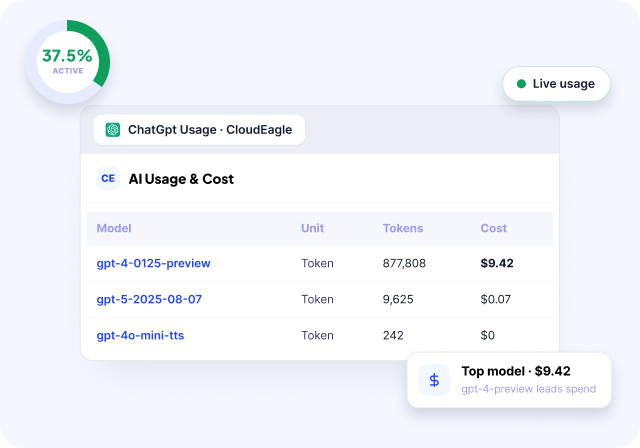
In CloudEagle.ai's AI usage dashboard, every user's consumption is visible by model tier and time period.
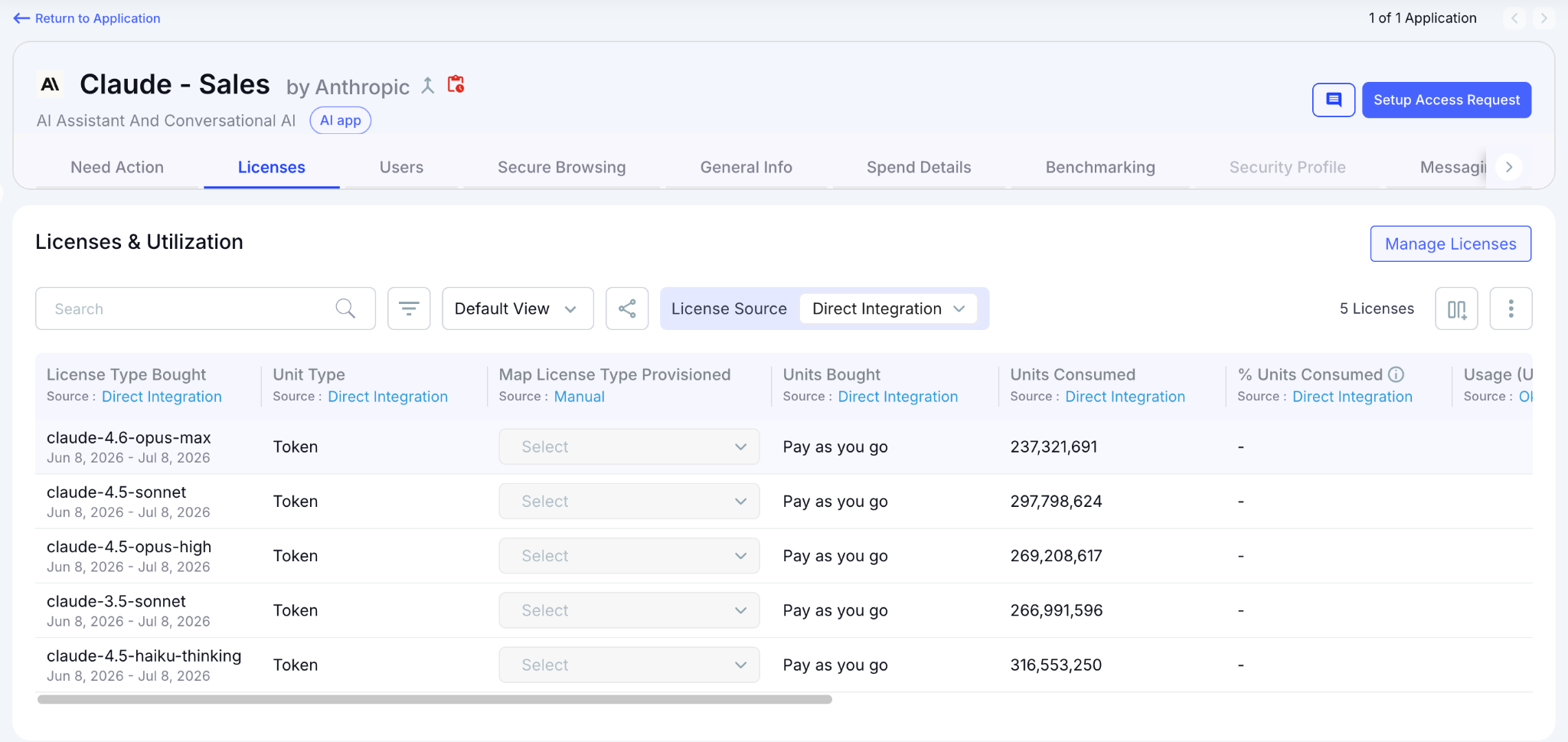
Security teams identify anomalies and Finance gets the chargeback data needed to enforce budget accountability.
B. Shadow AI Discovery: Surface Every Tool Before You Govern It
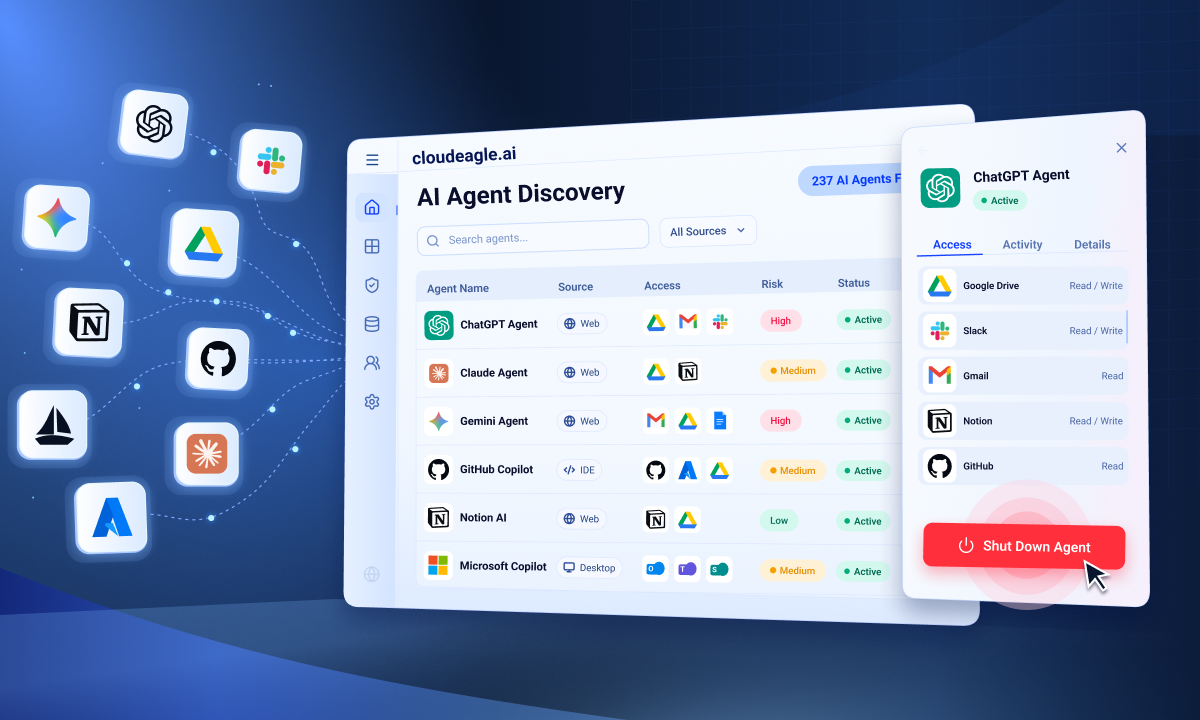
CloudEagle.ai detects Shadow AI through browser extensions, firewall logs, Zscaler, CrowdStrike, and finance signals simultaneously, building a single source of truth across every AI tool in use, sanctioned or not.
Here's how multi-signal Shadow AI discovery is designed to work:
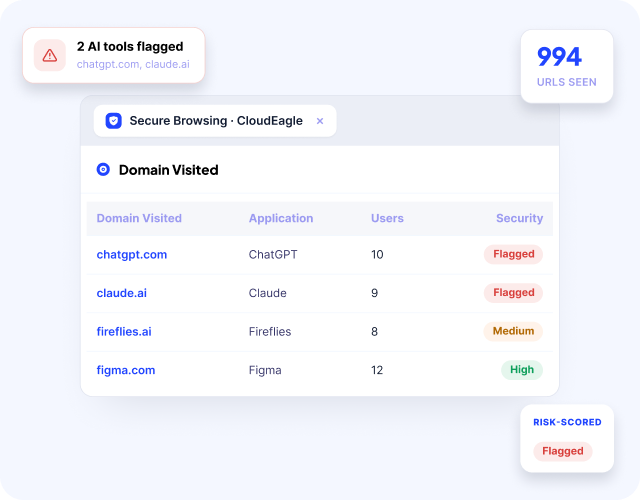
In CloudEagle.ai's AI application inventory, every tool appears with adoption by team and department.

It surfaces whether it was sanctioned or discovered through external signals, and whether it carries GenAI capabilities that were never part of the original procurement decision.
C. Spend Trend Forecasting: Run Rate Estimates Before the Bill Arrives
CloudEagle.ai surfaces run rate estimates based on current consumption trends. Finance gets the forecast view they need and IT gets threshold alerts before a team blows through the monthly budget.
Here's how spend trend forecasting is built into CloudEagle.ai's AI spend module:
In CloudEagle.ai's spend forecasting view, you can see week-over-week consumption trends per tool and per team, with projected run rates for the next 15, 30, 60, 90, 120, 180, and 365 days.
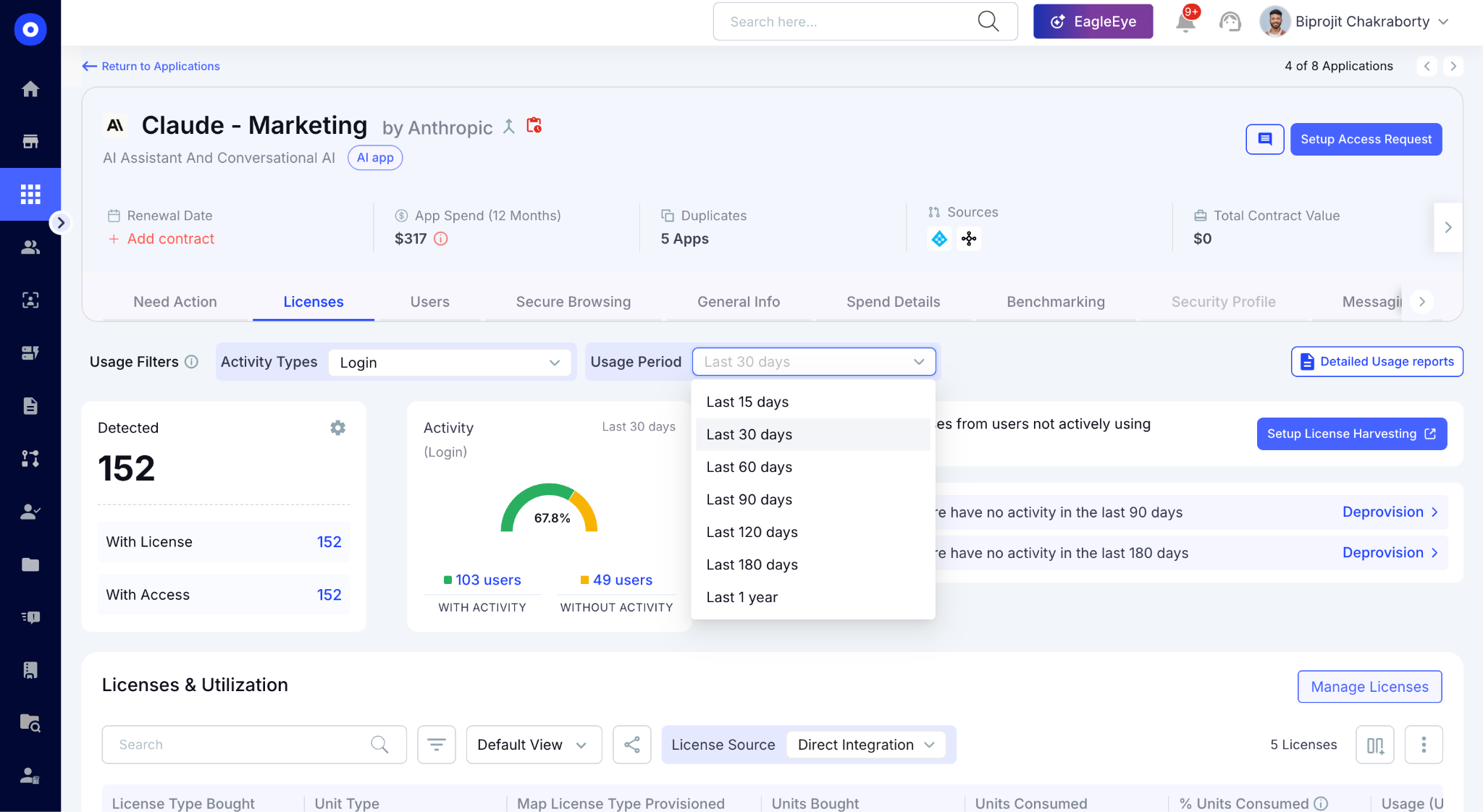
One procurement leader framed exactly this need: "I want to be able to estimate run rates and forecast off of the adoption and spend trends with the vendors." That's the view CloudEagle.ai delivers.
D. Secure Browser and Network Controls: Stop Overspend Before It Starts
Overspend also comes from employees subscribing to personal AI accounts, duplicate tools, or ungoverned AI apps. CloudEagle.ai's Secure Browser module and network integrations close that gap at the source.
Here's how CloudEagle.ai prevents unauthorized AI subscriptions from adding to the bill:
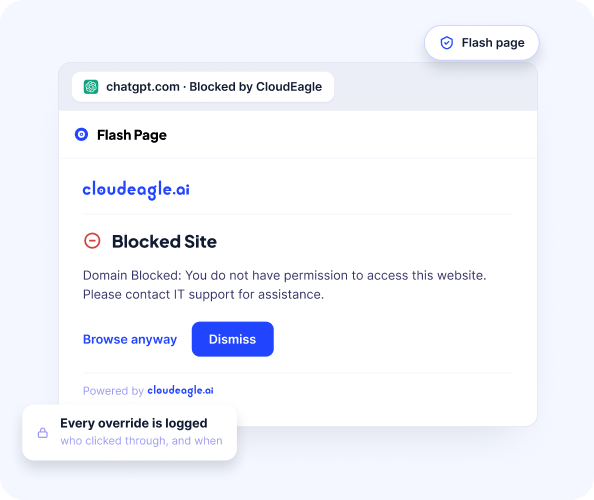
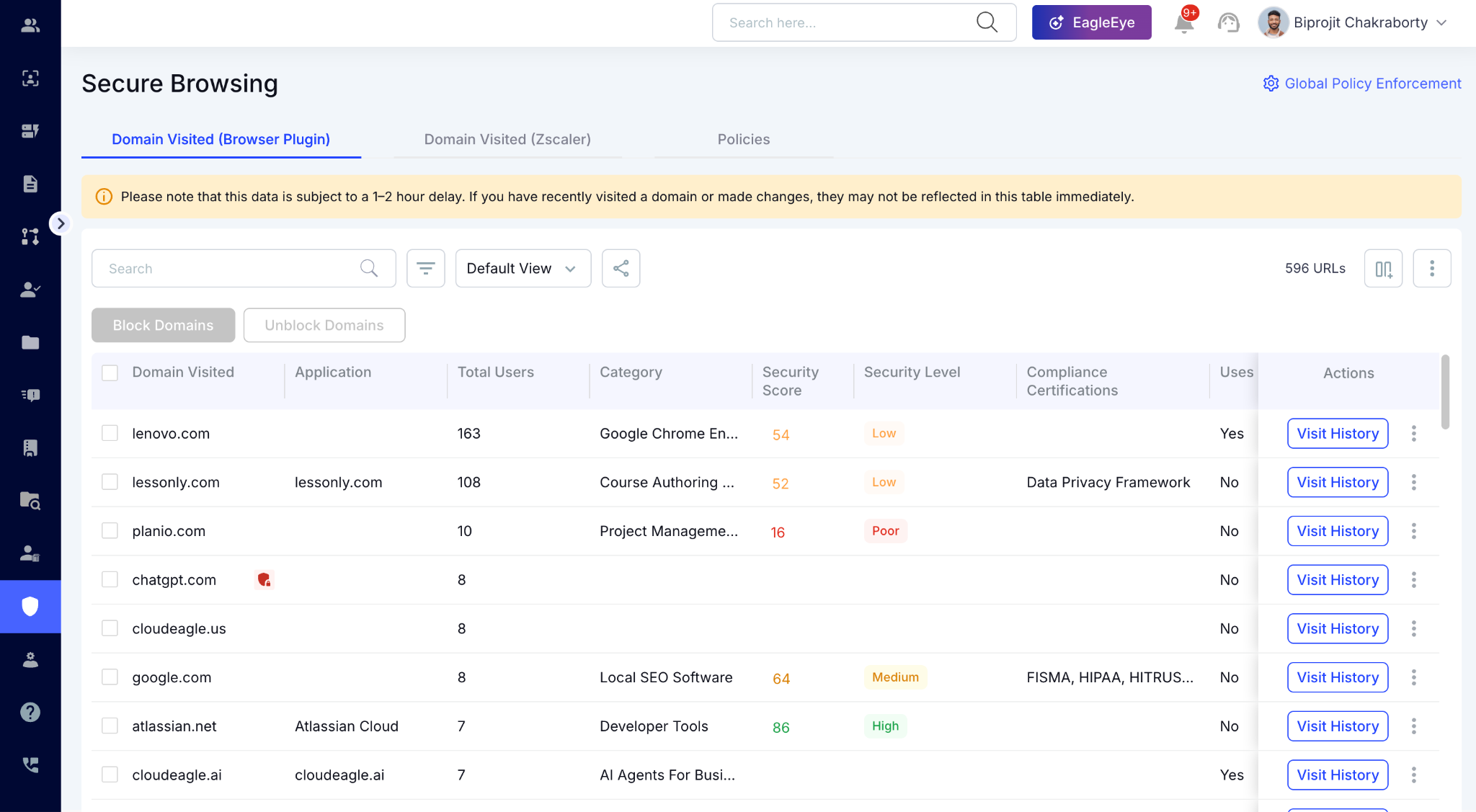
In CloudEagle.ai's Secure Browser module, every AI tool accessed via browser is detected in real time including personal Claude.ai or ChatGPT accounts on sanctioned domains.
For employees using different browsers or accessing AI tools through API keys, CloudEagle.ai's Zscaler and CrowdStrike integrations catch what the browser layer misses.
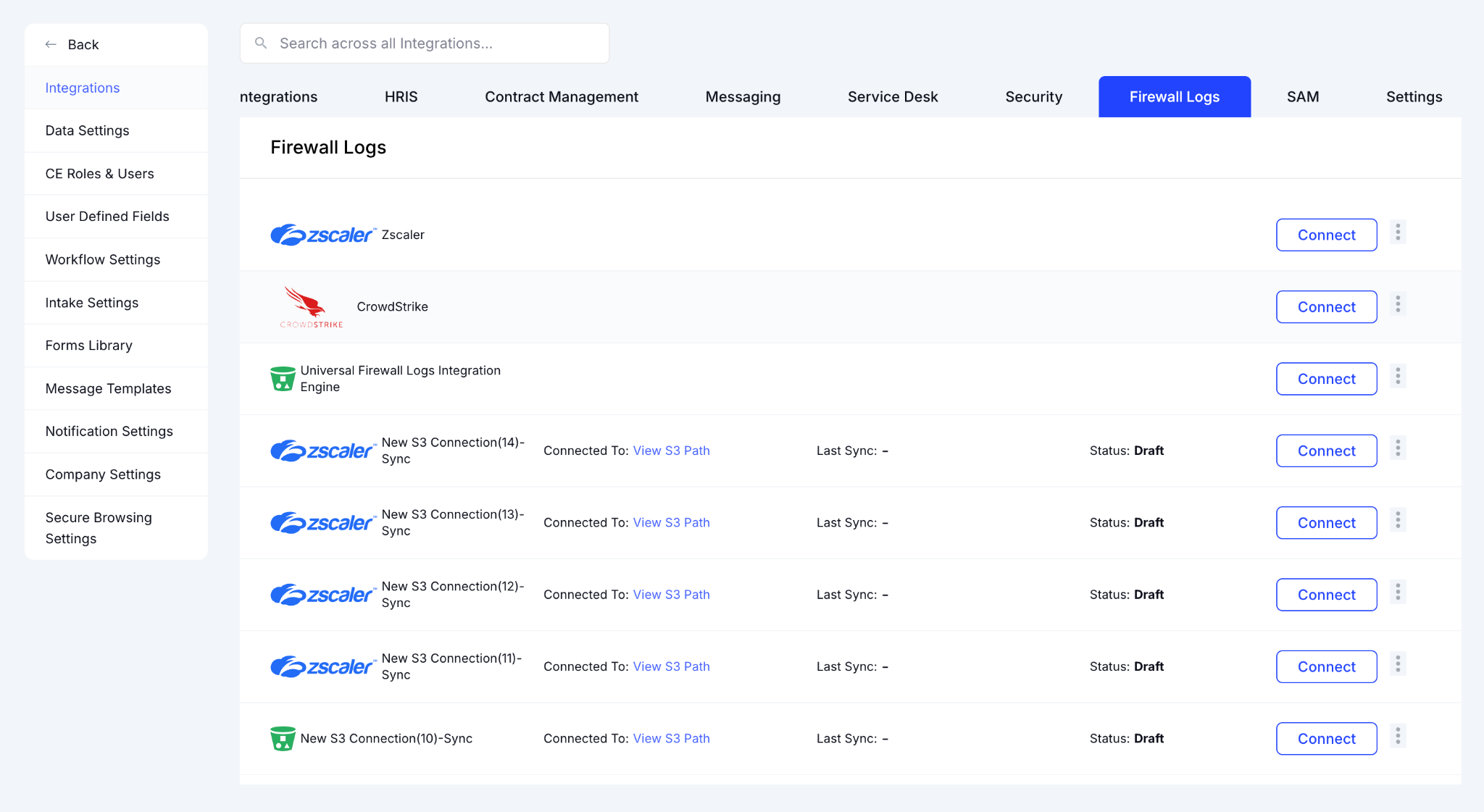
It surfaces personal account signups and ungoverned AI tool adoption across network and endpoint telemetry simultaneously.
E. CloudEagle.ai MCP: Query Your AI Spend Data From Inside Claude
CloudEagle.ai's MCP Server allows IT and Finance teams can query CloudEagle.ai data directly from inside Claude or any MCP-compatible AI tool.
Ask CloudEagle.ai questions in plain English from inside your AI tool of choice:
- "Which users are spending over $100 on AI this week?"
- "What's our Opus usage trending toward this month?"
- "Which team is driving the most token consumption right now?"
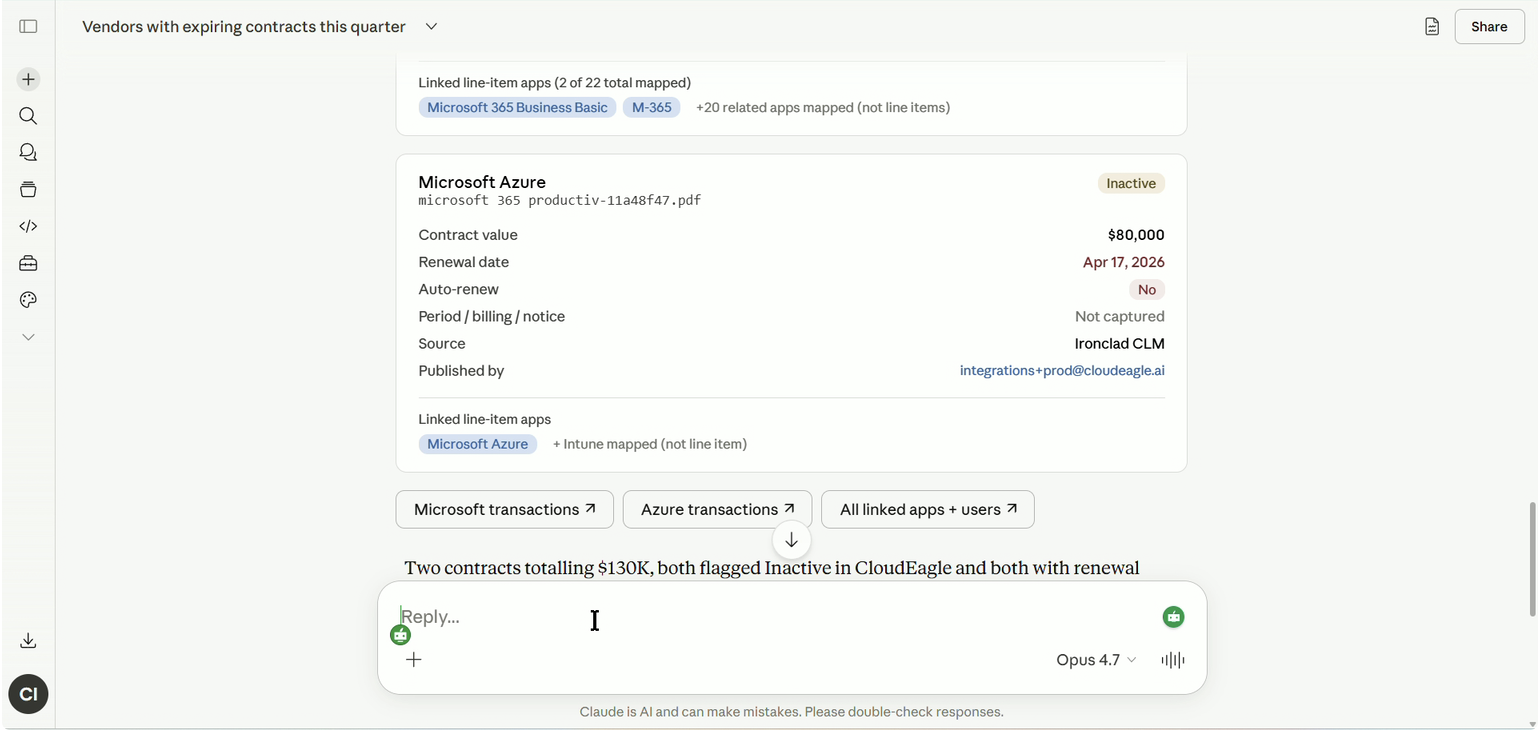
Enterprise teams now get instant answers on licenses, spend, and identities within their AI tool of choice without switching tabs, pulling a report, or waiting for a weekly digest.
F. Price Benchmarking: Make Sure You're Paying the Right Price for the AI Tools
CloudEagle.ai's price benchmarking module surfaces real-time pricing insights from over 2 billion transactions and 150,000+ vendors. procurement walks into every AI renewal knowing what peer companies are actually paying.
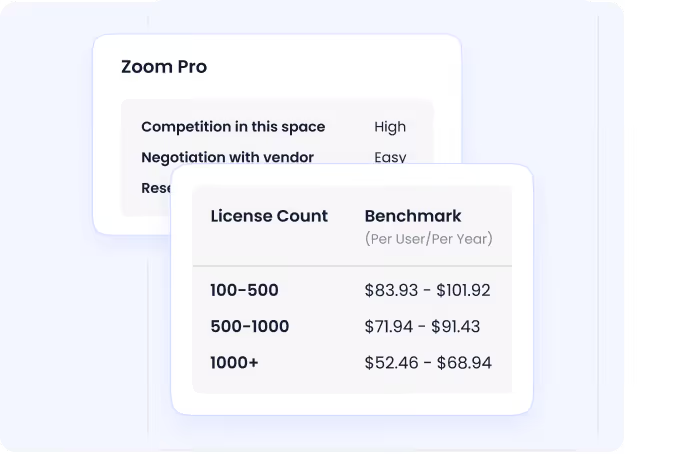
Here's how AI vendor benchmarking works inside CloudEagle.ai:
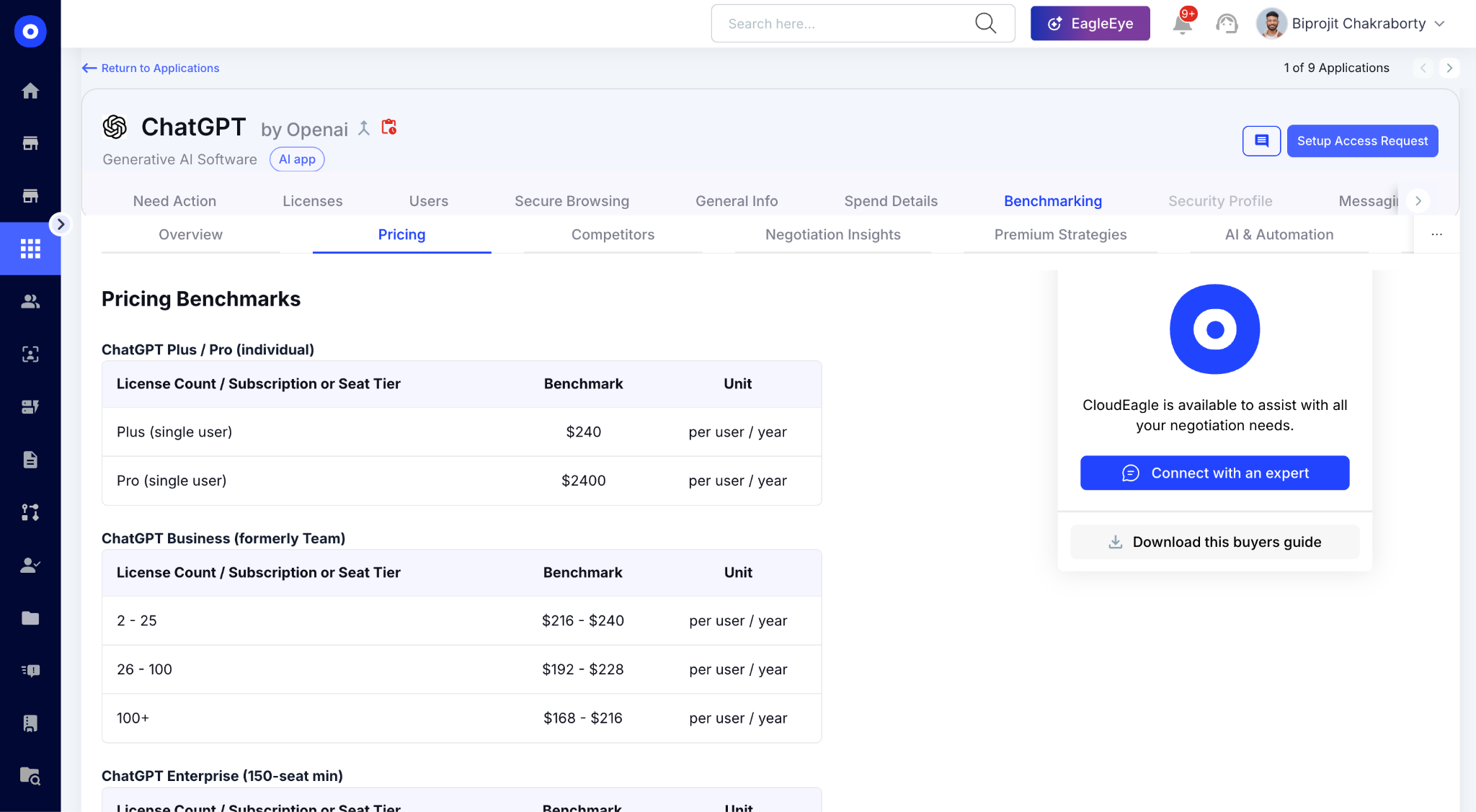
In CloudEagle.ai's benchmarking view, your current AI contract price is mapped against transaction-level peer data. Buying guides surface the negotiation levers, discount patterns, and renewal behaviors too.
Track Every Token. Control Every Cost.


4. Conclusion
Every AI tool an enterprise adopts adds another billing model, another usage report, and another blind spot IT has to chase down separately.
CloudEagle.ai pulls identity, API, browser, and spend data across every AI platform into one governance layer. Finance, IT, and security work from the same numbers instead of reconciling reports one at a time.
The payoff isn't just visibility. It's the ability to catch overspend before it happens, chargeback costs accurately by department, and enforce policy without slowing teams down.
5. FAQs
1. How do companies track AI usage?
Companies can use CloudEagle.ai to connect directly to each AI tool's usage and billing APIs, then layer in browser or endpoint monitoring to catch usage outside those managed accounts.
2. How do companies check for AI use?
CloudEagle.ai uses browser extensions and external telemetry to detect AI activity that doesn't run through approved enterprise accounts. It centralizes this data alongside identity information, so unsanctioned AI use shows up in one dashboard.
3. Can companies track your ChatGPT usage?
If ChatGPT is monitored via browser/endpoint tools, companies can see usage and cost data at the individual or department level. Platforms like CloudEagle.ai track token consumption and spend this way, without accessing the actual content of prompts or conversations.
4. Is there a way to detect AI use?
Combining AI usage APIs with browser or endpoint monitoring surfaces both sanctioned and unsanctioned AI activity. CloudEagle.ai uses this combined approach to flag personal AI accounts and unapproved tools that would otherwise stay invisible to IT.
Every AI Token Should Be Accounted For


.avif)


.avif)
.avif)




.png)






.avif)
.avif)
.avif)


