AI Governance

How to Monitor and Govern Claude Token Consumption

Share via:
Written by:
CloudEagle.ai Team
Reviewed by
Nidhi Jain
Last Updated:
August 25, 2026
blog-cms-banner-bg
Little-Known Negotiation Hacks to Get the Best Deal on Slack
cta-bg-blogDownload Your Copy

HIPAA Compliance Checklist for 2025

Download PDF

Someone on leadership asks an IT or security lead a simple question: how much are we spending on Claude, and who's driving it? Most weeks, the honest answer is a shrug and a promise to pull something together by Friday.

The tooling itself is the problem. SSO tells you who logged into Claude. It says nothing about which model got called, how many tokens burned through, or which team is quietly running up the Claude token consumption bill. 

Getting this right takes two separate efforts: three steps to see the real numbers, and three steps to actually act on what you find.

Step 1: Provision the Access That Actually Shows You Claude Token Consumption

SSO was never built to measure cost. It logs a login event and stops there: no model, no token count, no dollar figure attached to the session.

The real numbers live one layer deeper, inside Anthropic's own admin infrastructure, and getting to them takes three specific pieces most orgs never provision:

  • Your organization's ID, which anchors every API call to the right tenant
  • A Compliance API key, scoped for activity and session data
  • A separate Analytics API key, which reports engagement, adoption, and cost across Claude products

These aren't interchangeable, and a key minted for one won't authenticate calls meant for the other. Most orgs skip this setup for an unremarkable reason: SSO got configured because access required it, and nobody circled back to provision the other two. 

So there's a login record for every employee and a cost record for none of them, which is exactly the blind spot SSO logs and CASBs share: built to answer "who has access," not "what is that access costing."

Step 2: Correct the License Default Before It Skews Every Report

Any detected login gets marked "licensed" the moment it's found, whether or not anyone actually approved that seat. A trial account, a one-off expensed subscription, a seat nobody signed off on: all of it inherits the same tag as a real, budgeted seat, and every Claude token consumption chargeback report built on top of that number inherits the same error.

Run this before trusting anything downstream:

  • Cross-check every licensed Claude account against actual procurement and billing records
  • Flag anything marked "licensed" with no invoice or contract behind it
  • Repeat the check every time a new batch of logins gets detected, since the default resets each time

Every Unverified Claude Seat Is a Cost You Can't Defend.

Find every unsanctioned login before it skews your next report.
Download Checklist

Step 3: Filter Claude Token Consumption by User, Project, and API Key, Then Check Your Blind Spots

Consumption doesn't spread evenly, and it rarely sits where seat counts suggest. A department can show 40 licensed seats and a bill that looks reasonable at first glance, until you break it down and find three of those seats are driving 70% of consumption between them. Getting to that answer means filtering three ways:

  • By individual user, to separate normal usage from real outliers
  • By project, since Claude Enterprise usage tends to cluster around specific initiatives with their own budget owners
  • By API key, because programmatic and agent traffic often outpaces interactive chat and needs its own line of sight

Once you're filtering, check whether that visibility actually reaches every source of usage. Desktop app sessions, Claude Code invocations, and agent workflows calling the API directly all generate real consumption that a browser extension has no way to see, and extension coverage itself stops at a finite list of browsers. 

Personal AI accounts open the same kind of gap when someone routes around a slow or unsupported setup instead of waiting on IT. Confirm your monitoring reaches all of it before you trust the total.

Step 4: Decide Which AI Tools Are Approved, Then Enforce It

If Claude isn't your organization's documented, approved AI tool, every token running through it counts as shadow AI, not just an unbudgeted line item. A cost problem gets solved with a spending cap. A shadow AI problem needs a policy and something that enforces it, one piece of the broader AI governance program this whole process feeds into.

Most orgs skip the decision itself, usually because each team is working off a different assumption:

  • IT assumes Claude is sanctioned because procurement bought the seats
  • Security assumes ChatGPT is banned because nobody signed a contract for it
  • Employees use whichever tool finishes the task fastest, policy or no policy

Once the approved list is actually written down, pair it with a redirect-on-unauthorized-use policy: an employee tries a tool outside the list, and the system routes them to the sanctioned alternative in real time instead of logging the attempt after the fact. 

63% of enterprises still don't have a documented shadow AI policy, which means most teams are enforcing an assumption nobody wrote down, on a dashboard that can report the spike but can't stop it.

Step 5: Build the Request Path Before Someone Hits Their Limit

Without a defined path, people wait. A developer hits a Claude token consumption rate limit mid-task, files a request into a Slack channel or an inbox, and sits there. If the wait runs long enough, the next move is a personal account and a $20 subscription nobody governs, which is a worse outcome than the rate limit ever was.

Claude's own spend limits API already supports per-user overrides and approval endpoints built for this exact scenario, so most Claude Enterprise deployments have the underlying Claude token consumption control already. 

What's usually missing is the process wrapped around it: name an approver, set a response-time target, and make sure the next person who hits a limit gets the same repeatable path instead of starting the conversation from scratch.

Step 6: Put Claude Token Consumption Next to Every Other AI Tool You're Paying For

Claude, ChatGPT, and Copilot each live in their own silo, tracked by whoever set up monitoring first, with nothing stitching them together automatically. Anthropic's admin tools report on Claude. Microsoft's tools report on Copilot. 

Nobody's dashboard reports on both, so "total AI spend" is usually a number assembled from separate exports the night before a board meeting.

Once AI spend gets material enough to show up in budget conversations, that silo gets expensive on its own: teams end up negotiating Claude token consumption renewals in isolation from ChatGPT renewals, missing the overlap and leverage that only becomes visible when the numbers sit side by side. 

Only about 25% of organizations report comprehensive visibility into how employees actually use AI, and shadow AI already runs 4% to 9% of total enterprise software spend, two to three times the size of the formal AI budget line most finance teams are working from. 

Consolidating the view is what turns that number from a guess into something finance can actually act on.

How CloudEagle.ai Closes the Gaps in Claude Token Governance

Steps 1 through 6 work, but they're manual: provisioning API keys, running license audits, filtering dashboards, writing policy, building an approval workflow, and reconciling spend across vendors by hand, on a recurring basis, for as long as Claude stays in the stack. CloudEagle.ai is built to do that work as a platform instead of a checklist someone owns quietly on top of their actual job.

Real Claude Token Consumption Visibility, Not Just Login Data

Claude token consumption stays invisible until the invoice arrives for most finance and security teams, even after the Organization ID and API keys from Step 1 are set up correctly. 

The data exists inside Anthropic's admin infrastructure, but turning it into something finance and security can actually use still means building and maintaining that pipeline, and most teams don't have the bandwidth to keep it current.

How CloudEagle.ai solves it:

  • Builds a live Claude token consumption inventory by correlating SSO, browser, finance, and Organization ID and API data directly from Anthropic's admin infrastructure
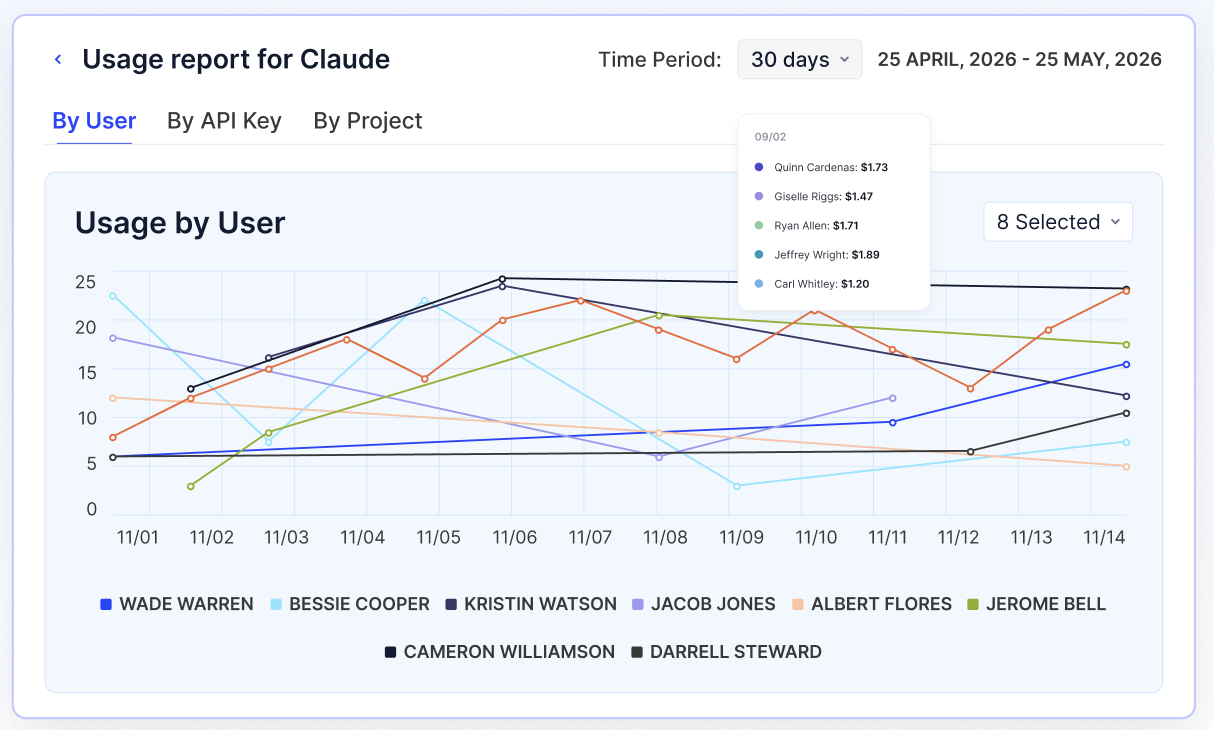
  • Tracks token consumption by individual user, project, and API key in one dashboard instead of three separate exports
  • Surfaces cost trends as they happen instead of at renewal or invoice time

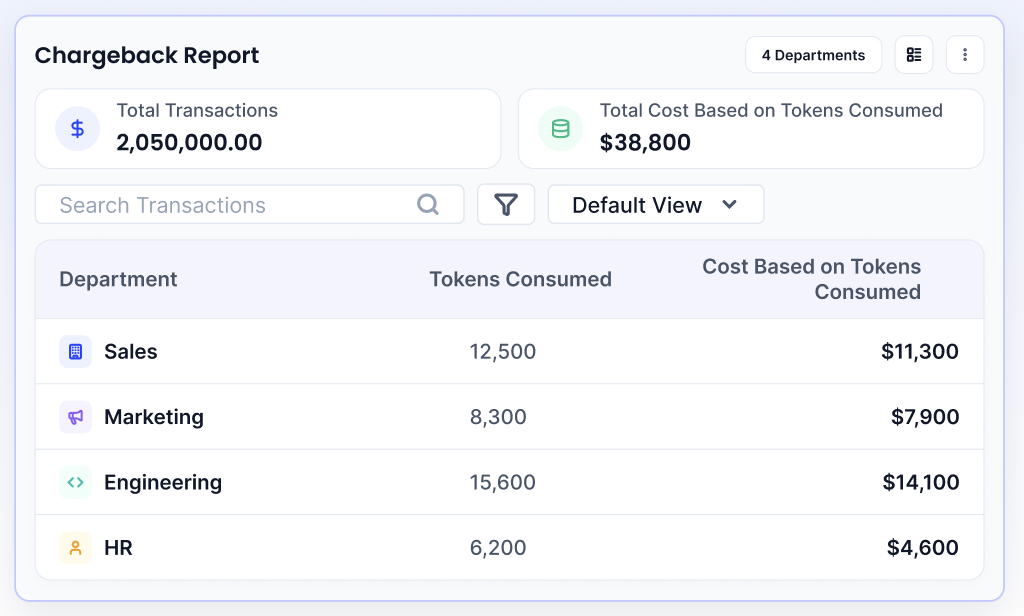
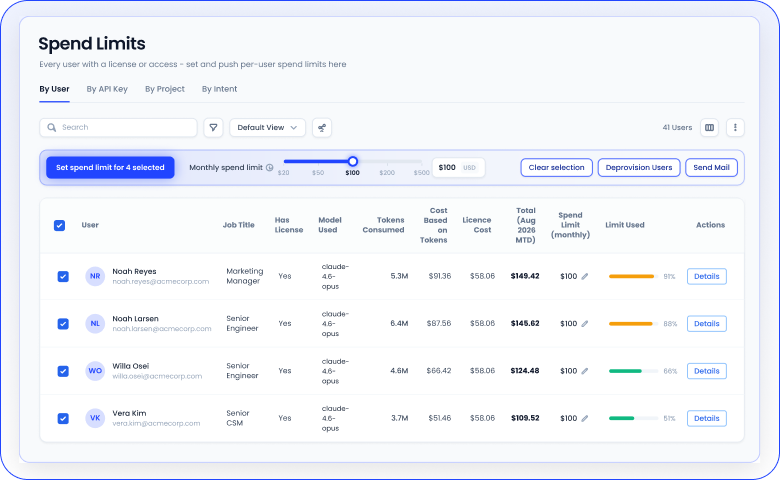
CloudEagle AI consumption report showing token usage by user, API key, and project, cost trends over time, and departmental token consumption and chargeback costs.

A Fortune 500 financial services firm ran into this exact wall: finance had no visibility into AI spend until invoices arrived, with no way to control costs before they compounded. CloudEagle.ai correlated SSO, browser extension, and finance data into a single live AI inventory, giving the security team an auditable view of every AI tool in use and every dollar behind it.

Unsanctioned Claude Use Caught Before It Becomes a Habit

Unsanctioned Claude use looks identical to sanctioned use until someone actually checks. 

An employee on a personal account or an unapproved tool generates no SSO event, ticket, or line item anyone reviews, which is exactly why it goes ungoverned for months at a time, and why Step 4's redirect policy is only as good as the enforcement layer behind it.

How CloudEagle.ai solves it:

  • Flags unsanctioned AI access in real time and redirects users to the approved alternative before the session continues
  • Logs every AI access event automatically, so compliance evidence exists before anyone has to ask for it
  • Applies GenAI risk scoring so unapproved tools get flagged by actual risk level, not just by presence

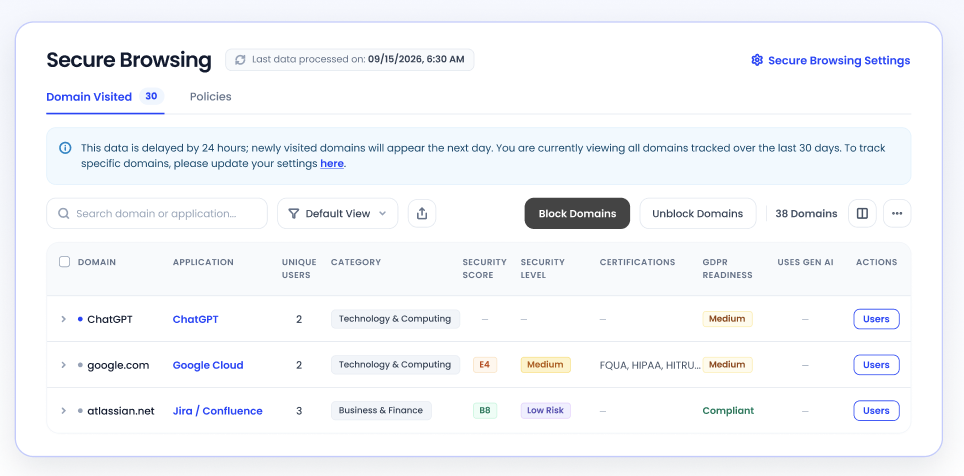
CloudEagle Secure Browsing dashboard showing unsanctioned AI access, AI usage by domain, security risk scores, active browsing policies, and controls to block or redirect unauthorized AI access.

CloudEagle.ai doesn't claim to control what happens inside a third-party AI vendor's own systems. It governs discovery and spend from the enterprise side, which is where the real decision points sit.

One Real Number for Total AI Spend

AI spend has no single home across vendors, so "total AI spend" rarely holds up as a number finance can defend in a review. 

Step 6 gets a team closer manually, pulling exports from each vendor's own admin tools, but that reconciliation has to happen fresh every renewal cycle unless something maintains the combined view continuously.

How CloudEagle.ai solves it:

  • Consolidates token and license spend across every AI vendor in one view, alongside the broader SaaS stack
  • Applies the same license harvesting and renewal benchmarking used across CloudEagle.ai's 500+ integrations to AI tools specifically
  • Gives finance and security a shared source of truth instead of competing spreadsheets going into the same renewal conversation

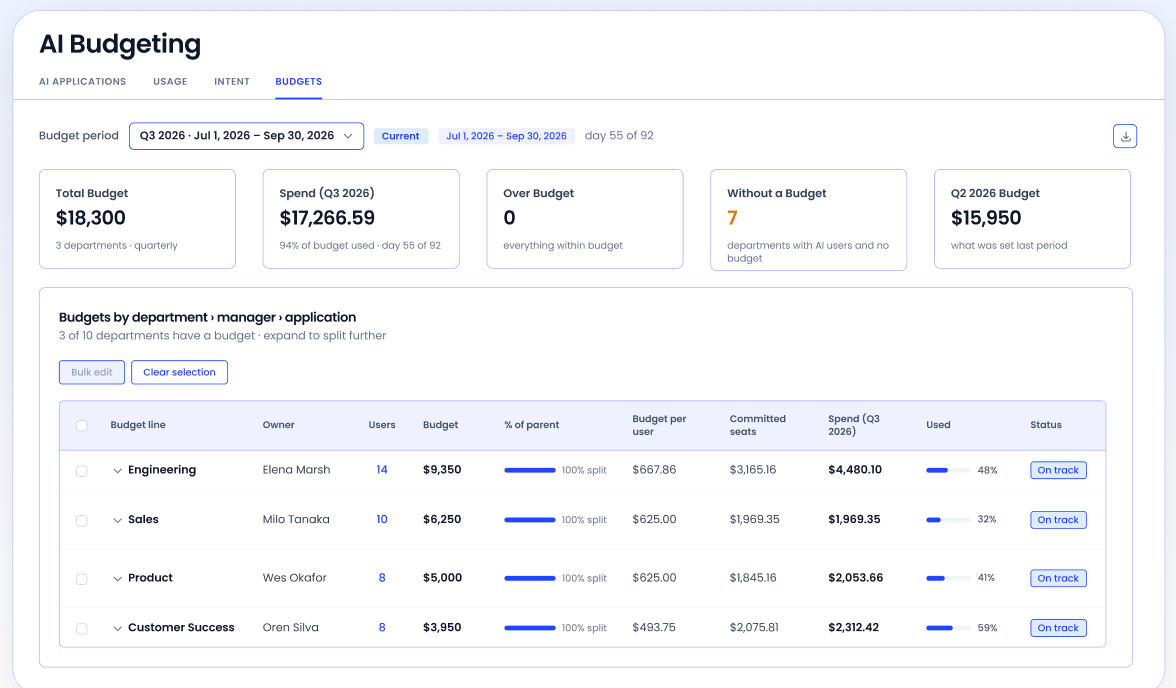
CloudEagle Applications dashboard showing total app spend, AI applications, usage, licenses, and vendor spend visibility, with red callouts highlighting a single total AI spend figure and AI vendors with usage and spend data.

CloudEagle.ai's AI Governance capability was built directly for this gap, following Gartner findings that 69% of organizations suspect or have confirmed employees using prohibited public GenAI tools, with 57% reporting they've used a personal GenAI account for work.

None of that replaces doing Steps 1 through 6 right. It just means someone other than your team has to keep doing them by hand.

FAQs

1. How do I track Claude token consumption by user?  

Provision an Analytics API key alongside your Organization ID, then filter usage reports by individual user rather than relying on seat counts alone.

2. Does Claude have a built-in dashboard for admins to monitor usage? 

Yes. Claude Enterprise includes an Analytics page for engagement and cost data, plus separate Compliance and Spend Limits APIs for deeper governance.

3. What counts as shadow AI when it comes to Claude? 

Any Claude usage, personal account or unsanctioned integration, that runs outside your organization's approved tool list and governance visibility.

4. Can IT actually block unauthorized Claude or AI tool access? 

Yes, with real-time redirect and enforcement policies in place. Visibility alone can report the issue but can't stop it without enforcement layered on top.

5. How is Claude token consumption typically billed? 

Based on tokens processed per request, varying by model and effort level, with Opus consuming more tokens than Sonnet meaningfully for comparable tasks.

Ready to see your actual Claude token consumption, by user, project, and API key, in one place? Book a demo with CloudEagle.ai.

Advertisement for a SaaS Subscription Tracking Template with a call-to-action button to download and a partial graphic of a tablet showing charts.Banner promoting a SaaS Agreement Checklist to streamline SaaS management and avoid budget waste with a call-to-action button labeled Download checklist.Blue banner with text 'The Ultimate Employee Offboarding Checklist!' and a black button labeled 'Download checklist' alongside partial views of checklist documents from cloudeagle.ai.Digital ad for download checklist titled 'The Ultimate Checklist for IT Leaders to Optimize SaaS Operations' by cloudeagle.ai, showing checklist pages.Slack Buyer's Guide offer with text 'Unlock insider insights to get the best deal on Slack!' and a button labeled 'Get Your Copy', accompanied by a preview of the guide featuring Slack's logo.Monday Pricing Guide by cloudeagle.ai offering exclusive pricing secrets to maximize investment with a call-to-action button labeled Get Your Copy and an image of the guide's cover.Blue banner for Canva Pricing Guide by cloudeagle.ai offering a guide to Canva costs, features, and alternatives with a call-to-action button saying Get Your Copy.Blue banner with white text reading 'Little-Known Negotiation Hacks to Get the Best Deal on Slack' and a white button labeled 'Get Your Copy'.Blue banner with text 'Little-Known Negotiation Hacks to Get the Best Deal on Monday.com' and a white button labeled 'Get Your Copy'.Blue banner with text 'Little-Known Negotiation Hacks to Get the Best Deal on Canva' and a white button labeled 'Get Your Copy'.Banner with text 'Slack Buyer's Guide' and a 'Download Now' button next to images of a guide titled 'Slack Buyer’s Guide: Features, Pricing & Best Practices'.Digital cover of Monday Pricing Guide with a button labeled Get Your Copy on a blue background.Canva Pricing Guide cover with a button labeled Get Your Copy on a blue gradient background.

Enter your email to
unlock the report

Oops! Something went wrong while submitting the form.
License Count
Benchmark
Per User/Per Year

Enter your email to
unlock the report

Oops! Something went wrong while submitting the form.
License Count
Benchmark
Per User/Per Year

Enter your email to
unlock the report

Oops! Something went wrong while submitting the form.
Notion Plus
License Count
Benchmark
Per User/Per Year
100-500
$67.20 - $78.72
500-1000
$59.52 - $72.00
1000+
$51.84 - $57.60
Canva Pro
License Count
Benchmark
Per User/Per Year
100-500
$74.33-$88.71
500-1000
$64.74-$80.32
1000+
$55.14-$62.34

Enter your email to
unlock the report

Oops! Something went wrong while submitting the form.

Enter your email to
unlock the report

Oops! Something went wrong while submitting the form.
Zoom Business
License Count
Benchmark
Per User/Per Year
100-500
$216.00 - $264.00
500-1000
$180.00 - $216.00
1000+
$156.00 - $180.00

Enter your email to
unlock the report

Oops! Something went wrong while submitting the form.

Get the Right Security Platform To Secure Your Cloud Infrastructure

Please enter a business email
Thank you!
The 2023 SaaS report has been sent to your email. Check your promotional or spam folder.
Oops! Something went wrong while submitting the form.

Access full report

Please enter a business email
Thank you!
The 2023 SaaS report has been sent to your email. Check your promotional or spam folder.
Oops! Something went wrong while submitting the form.

TL;DR

  • Monitor step 1: Provision an Organization ID, a Compliance API key, and an Analytics API key. SSO alone won't show you cost.
  • Monitor step 2: Audit every account auto-tagged "licensed" against real procurement records before you trust any chargeback report.
  • Monitor step 3: Filter consumption by user, project, and API key, and confirm your setup actually reaches desktop and agent usage, not just the browser.
  • Govern step 1: Decide and document which AI tools are actually approved, then enforce it with a redirect policy.
  • Govern step 2: Build a request-and-approval workflow for spend limit increases before someone hits their cap.
  • Govern step 3: Consolidate Claude spend with your other AI tools so "total AI spend" is a real number, not a guess.

Someone on leadership asks an IT or security lead a simple question: how much are we spending on Claude, and who's driving it? Most weeks, the honest answer is a shrug and a promise to pull something together by Friday.

The tooling itself is the problem. SSO tells you who logged into Claude. It says nothing about which model got called, how many tokens burned through, or which team is quietly running up the Claude token consumption bill. 

Getting this right takes two separate efforts: three steps to see the real numbers, and three steps to actually act on what you find.

Step 1: Provision the Access That Actually Shows You Claude Token Consumption

SSO was never built to measure cost. It logs a login event and stops there: no model, no token count, no dollar figure attached to the session.

The real numbers live one layer deeper, inside Anthropic's own admin infrastructure, and getting to them takes three specific pieces most orgs never provision:

  • Your organization's ID, which anchors every API call to the right tenant
  • A Compliance API key, scoped for activity and session data
  • A separate Analytics API key, which reports engagement, adoption, and cost across Claude products

These aren't interchangeable, and a key minted for one won't authenticate calls meant for the other. Most orgs skip this setup for an unremarkable reason: SSO got configured because access required it, and nobody circled back to provision the other two. 

So there's a login record for every employee and a cost record for none of them, which is exactly the blind spot SSO logs and CASBs share: built to answer "who has access," not "what is that access costing."

Step 2: Correct the License Default Before It Skews Every Report

Any detected login gets marked "licensed" the moment it's found, whether or not anyone actually approved that seat. A trial account, a one-off expensed subscription, a seat nobody signed off on: all of it inherits the same tag as a real, budgeted seat, and every Claude token consumption chargeback report built on top of that number inherits the same error.

Run this before trusting anything downstream:

  • Cross-check every licensed Claude account against actual procurement and billing records
  • Flag anything marked "licensed" with no invoice or contract behind it
  • Repeat the check every time a new batch of logins gets detected, since the default resets each time

Every Unverified Claude Seat Is a Cost You Can't Defend.

Find every unsanctioned login before it skews your next report.
Download Checklist

Step 3: Filter Claude Token Consumption by User, Project, and API Key, Then Check Your Blind Spots

Consumption doesn't spread evenly, and it rarely sits where seat counts suggest. A department can show 40 licensed seats and a bill that looks reasonable at first glance, until you break it down and find three of those seats are driving 70% of consumption between them. Getting to that answer means filtering three ways:

  • By individual user, to separate normal usage from real outliers
  • By project, since Claude Enterprise usage tends to cluster around specific initiatives with their own budget owners
  • By API key, because programmatic and agent traffic often outpaces interactive chat and needs its own line of sight

Once you're filtering, check whether that visibility actually reaches every source of usage. Desktop app sessions, Claude Code invocations, and agent workflows calling the API directly all generate real consumption that a browser extension has no way to see, and extension coverage itself stops at a finite list of browsers. 

Personal AI accounts open the same kind of gap when someone routes around a slow or unsupported setup instead of waiting on IT. Confirm your monitoring reaches all of it before you trust the total.

Step 4: Decide Which AI Tools Are Approved, Then Enforce It

If Claude isn't your organization's documented, approved AI tool, every token running through it counts as shadow AI, not just an unbudgeted line item. A cost problem gets solved with a spending cap. A shadow AI problem needs a policy and something that enforces it, one piece of the broader AI governance program this whole process feeds into.

Most orgs skip the decision itself, usually because each team is working off a different assumption:

  • IT assumes Claude is sanctioned because procurement bought the seats
  • Security assumes ChatGPT is banned because nobody signed a contract for it
  • Employees use whichever tool finishes the task fastest, policy or no policy

Once the approved list is actually written down, pair it with a redirect-on-unauthorized-use policy: an employee tries a tool outside the list, and the system routes them to the sanctioned alternative in real time instead of logging the attempt after the fact. 

63% of enterprises still don't have a documented shadow AI policy, which means most teams are enforcing an assumption nobody wrote down, on a dashboard that can report the spike but can't stop it.

Step 5: Build the Request Path Before Someone Hits Their Limit

Without a defined path, people wait. A developer hits a Claude token consumption rate limit mid-task, files a request into a Slack channel or an inbox, and sits there. If the wait runs long enough, the next move is a personal account and a $20 subscription nobody governs, which is a worse outcome than the rate limit ever was.

Claude's own spend limits API already supports per-user overrides and approval endpoints built for this exact scenario, so most Claude Enterprise deployments have the underlying Claude token consumption control already. 

What's usually missing is the process wrapped around it: name an approver, set a response-time target, and make sure the next person who hits a limit gets the same repeatable path instead of starting the conversation from scratch.

Step 6: Put Claude Token Consumption Next to Every Other AI Tool You're Paying For

Claude, ChatGPT, and Copilot each live in their own silo, tracked by whoever set up monitoring first, with nothing stitching them together automatically. Anthropic's admin tools report on Claude. Microsoft's tools report on Copilot. 

Nobody's dashboard reports on both, so "total AI spend" is usually a number assembled from separate exports the night before a board meeting.

Once AI spend gets material enough to show up in budget conversations, that silo gets expensive on its own: teams end up negotiating Claude token consumption renewals in isolation from ChatGPT renewals, missing the overlap and leverage that only becomes visible when the numbers sit side by side. 

Only about 25% of organizations report comprehensive visibility into how employees actually use AI, and shadow AI already runs 4% to 9% of total enterprise software spend, two to three times the size of the formal AI budget line most finance teams are working from. 

Consolidating the view is what turns that number from a guess into something finance can actually act on.

How CloudEagle.ai Closes the Gaps in Claude Token Governance

Steps 1 through 6 work, but they're manual: provisioning API keys, running license audits, filtering dashboards, writing policy, building an approval workflow, and reconciling spend across vendors by hand, on a recurring basis, for as long as Claude stays in the stack. CloudEagle.ai is built to do that work as a platform instead of a checklist someone owns quietly on top of their actual job.

Real Claude Token Consumption Visibility, Not Just Login Data

Claude token consumption stays invisible until the invoice arrives for most finance and security teams, even after the Organization ID and API keys from Step 1 are set up correctly. 

The data exists inside Anthropic's admin infrastructure, but turning it into something finance and security can actually use still means building and maintaining that pipeline, and most teams don't have the bandwidth to keep it current.

How CloudEagle.ai solves it:

  • Builds a live Claude token consumption inventory by correlating SSO, browser, finance, and Organization ID and API data directly from Anthropic's admin infrastructure
  • Tracks token consumption by individual user, project, and API key in one dashboard instead of three separate exports
  • Surfaces cost trends as they happen instead of at renewal or invoice time

CloudEagle AI consumption report showing token usage by user, API key, and project, cost trends over time, and departmental token consumption and chargeback costs.

A Fortune 500 financial services firm ran into this exact wall: finance had no visibility into AI spend until invoices arrived, with no way to control costs before they compounded. CloudEagle.ai correlated SSO, browser extension, and finance data into a single live AI inventory, giving the security team an auditable view of every AI tool in use and every dollar behind it.

Unsanctioned Claude Use Caught Before It Becomes a Habit

Unsanctioned Claude use looks identical to sanctioned use until someone actually checks. 

An employee on a personal account or an unapproved tool generates no SSO event, ticket, or line item anyone reviews, which is exactly why it goes ungoverned for months at a time, and why Step 4's redirect policy is only as good as the enforcement layer behind it.

How CloudEagle.ai solves it:

  • Flags unsanctioned AI access in real time and redirects users to the approved alternative before the session continues
  • Logs every AI access event automatically, so compliance evidence exists before anyone has to ask for it
  • Applies GenAI risk scoring so unapproved tools get flagged by actual risk level, not just by presence

CloudEagle Secure Browsing dashboard showing unsanctioned AI access, AI usage by domain, security risk scores, active browsing policies, and controls to block or redirect unauthorized AI access.

CloudEagle.ai doesn't claim to control what happens inside a third-party AI vendor's own systems. It governs discovery and spend from the enterprise side, which is where the real decision points sit.

One Real Number for Total AI Spend

AI spend has no single home across vendors, so "total AI spend" rarely holds up as a number finance can defend in a review. 

Step 6 gets a team closer manually, pulling exports from each vendor's own admin tools, but that reconciliation has to happen fresh every renewal cycle unless something maintains the combined view continuously.

How CloudEagle.ai solves it:

  • Consolidates token and license spend across every AI vendor in one view, alongside the broader SaaS stack
  • Applies the same license harvesting and renewal benchmarking used across CloudEagle.ai's 500+ integrations to AI tools specifically
  • Gives finance and security a shared source of truth instead of competing spreadsheets going into the same renewal conversation

CloudEagle Applications dashboard showing total app spend, AI applications, usage, licenses, and vendor spend visibility, with red callouts highlighting a single total AI spend figure and AI vendors with usage and spend data.

CloudEagle.ai's AI Governance capability was built directly for this gap, following Gartner findings that 69% of organizations suspect or have confirmed employees using prohibited public GenAI tools, with 57% reporting they've used a personal GenAI account for work.

None of that replaces doing Steps 1 through 6 right. It just means someone other than your team has to keep doing them by hand.

FAQs

1. How do I track Claude token consumption by user?  

Provision an Analytics API key alongside your Organization ID, then filter usage reports by individual user rather than relying on seat counts alone.

2. Does Claude have a built-in dashboard for admins to monitor usage? 

Yes. Claude Enterprise includes an Analytics page for engagement and cost data, plus separate Compliance and Spend Limits APIs for deeper governance.

3. What counts as shadow AI when it comes to Claude? 

Any Claude usage, personal account or unsanctioned integration, that runs outside your organization's approved tool list and governance visibility.

4. Can IT actually block unauthorized Claude or AI tool access? 

Yes, with real-time redirect and enforcement policies in place. Visibility alone can report the issue but can't stop it without enforcement layered on top.

5. How is Claude token consumption typically billed? 

Based on tokens processed per request, varying by model and effort level, with Opus consuming more tokens than Sonnet meaningfully for comparable tasks.

Ready to see your actual Claude token consumption, by user, project, and API key, in one place? Book a demo with CloudEagle.ai.

CloudEagle.ai recognized in the 2025 Gartner® Magic Quadrant™ for SaaS Management Platforms
Download now
gartner chart
5x
Faster employee
onboarding
80%
Reduction in time for
user access reviews
30k
Workflows
automated
$15Bn
Analyzed in
contract spend
$2Bn
Saved in
SaaS spend

Streamline SaaS governance and save 10-30%

Book a Demo with Expert
CTA image