%201.svg)


HIPAA Compliance Checklist for 2025

Imagine this: It's 4 PM and there are six tickets left in the queue. A support rep opens the AI tool already sitting in her other tab, pastes in a customer's ticket with their full name and account history, and asks for a summary.
Your AI policy covers that tool. Nothing in the browser was there to apply it.
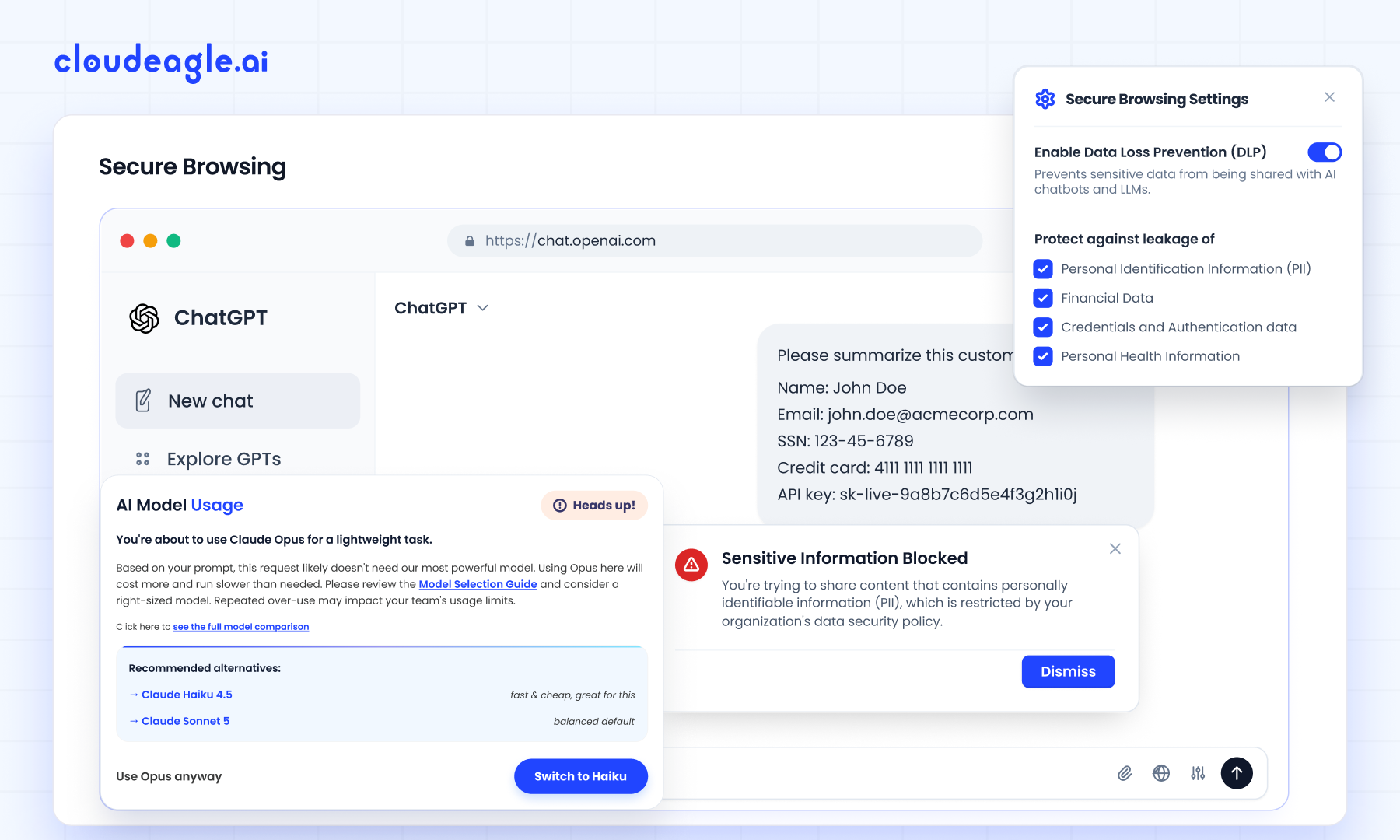
CloudEagle.ai has launched Secure Browser, an AI policy enforcement capability that stops employees from using unapproved AI tools and from uploading PHI or PII into LLMs. It runs as a browser extension, inside the session where the work happens.
Why AI Policy Enforcement Breaks Down at the Browser
Most enterprises have written an AI policy. Far fewer have anything that enforces it.
AI usually gets handled as a line item inside SaaS governance, even though it moves faster and carries different risks. So the policy lives on paper while the real decisions happen in a chat window.
The Gaps a Written Policy Leaves Open
- Tool choice: The approved list is published, and nothing steps in when an employee opens a different tool.
- Data going in: Customer records and API keys can be pasted into a public AI tool with no check at the moment it happens.
- Evidence afterward: When an auditor asks which controls applied to AI usage last quarter, most teams have to piece the answer together by hand.
Why the Existing Stack Misses It
Firewalls and CASBs can see that a session reached an AI domain, but they were never built to read a prompt. Traditional DLP watches files and email. Detection tools report what happened, and by the time they do, the data is already sitting with a third-party model.

Why Personal AI Accounts Are the Hardest Part of Shadow AI
A personal AI account sits outside SSO, so your identity provider has no record of the session and your DLP rules don't apply to it.
It's also common. A Gartner survey found that more than half of employees use personal GenAI accounts for work, and a third admit to entering sensitive company information into tools their employer never approved.
That changes what shadow AI looks like in practice:
- It's mostly an access problem, happening in accounts your organization has no relationship with
- Any control that depends on the tool being connected to your environment will miss it
Every one of those sessions still opens in a browser, whichever tool the employee picks. That makes the browser the one place a control can reach all of them.
What AI Policy Enforcement Looks Like at the Point of Use
The CloudEagle.ai browser extension runs four checks inside the session, before anything gets sent:
All four apply across sanctioned and shadow AI, including tools IT hasn't reviewed yet.
How CloudEagle.ai Enforces AI Policy Inside the Browser
IT deploys the extension once. From then on it sees which AI tool is opening and what's about to go into it, and it acts before the prompt is submitted.
"Blocking AI tools seldom works. People switch to a personal account and keep going.
Secure Browser redirects them to the approved tool the second they open an unapproved one, and stops a customer record from being pasted into an LLM that was never cleared to receive it," says Nidhi Jain, CEO of CloudEagle.ai. "That is the difference between an AI policy you publish and one that holds. Security gets enforcement at the moment of use, not a log entry after the fact."
Employees reach for whichever AI tool is fastest
When the approved tool takes three clicks and a login and the personal account takes one, the personal account usually wins.
How CloudEagle.ai solves it:
- Detects the unapproved tool as it loads in the browser.
- Shows a flash page that sends the employee to the approved alternative before any prompt is entered
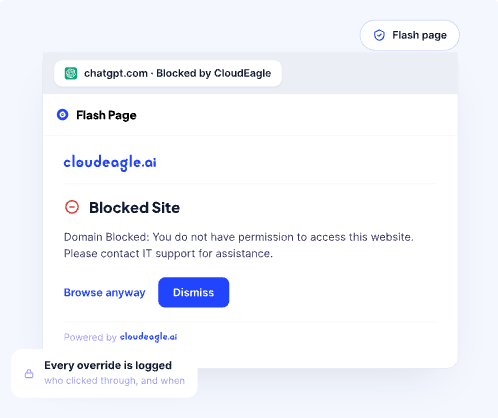
Employees end up in the sanctioned tool without IT having to follow up.
Sensitive data moves into models nobody cleared
PHI and PII reach public AI tools because nothing in the workflow stops them. The employee is usually just trying to summarize something faster.
How CloudEagle.ai solves it:
- Watches what's typed or uploaded into AI tools for sensitive data patterns
- Blocks the transfer when the destination isn't approved for that kind of data
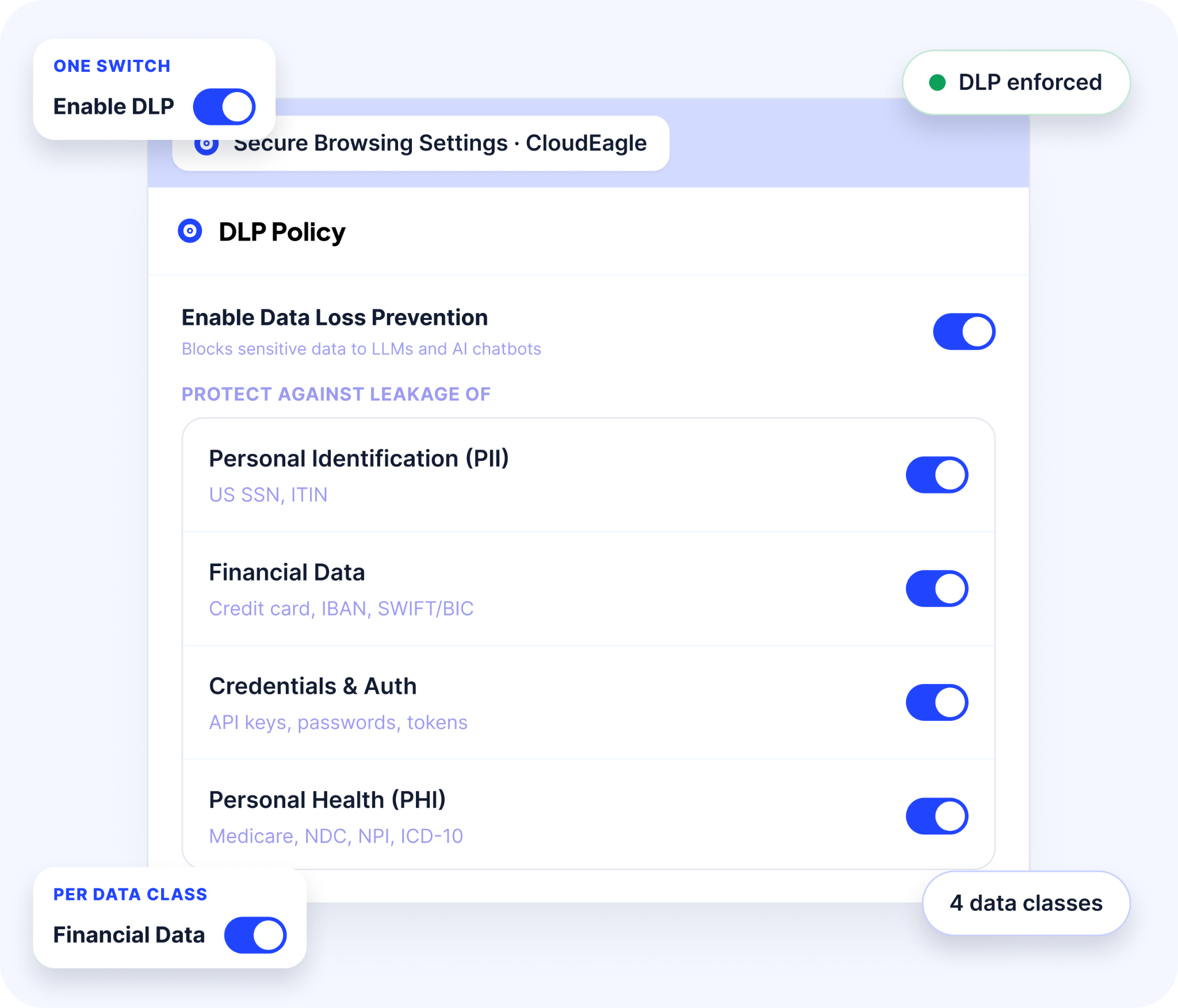
The data stays on the device.
Premium models get used for routine work
Employees tend to stay on the most capable model for everything, including tasks a lighter one handles fine. Drafting an email on Opus costs more and gets the same result.
2How CloudEagle.ai solves it:
- Checks the selected model against the task at hand
- Suggests a better-fit model before the prompt is sent, keeping premium models for work that needs them
AI spend goes where it earns its cost.
Personal logins slip past the usual checks
To most security tools, a personal ChatGPT or Gemini login looks like any other browser tab.
How CloudEagle.ai solves it:
- Identifies AI access through personal accounts as well as corporate logins
- Lists each user who signed in with a personal account, along with the AI tool they used
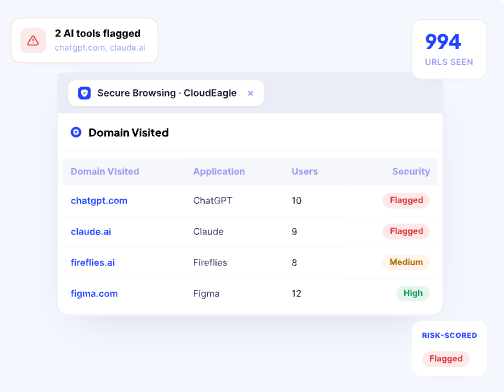
Personal accounts go into access reviews alongside everything else.
From Unmanaged AI Use to Governed AI Adoption
Security teams get one place to see which AI tools are in use and what's happening inside them. DLP signals sit next to the full AI inventory in the same CloudEagle.ai dashboard, so there's no separate DLP tool to run and no second report to reconcile.
That's what makes the governance defensible. When an auditor or the board asks, the team can point to the controls that applied to each tool and show what happened when someone worked outside policy.
It also changes how leadership thinks about adoption. With the controls running on their own, expanding AI use no longer depends on every employee remembering a policy they read during onboarding.
FAQs
1. What is a secure browser in AI governance?
A secure browser applies AI policy inside the browser session, redirecting employees away from unapproved AI tools and blocking sensitive data before it reaches an LLM.
2. How do you enforce an AI usage policy?
Enforcement has to run where employees work. Controls at the browser act on tool choice and data sharing at the moment of use, rather than reporting violations weeks later.
3. Can you stop employees from using ChatGPT at work?
Blocking the domain pushes usage to personal accounts. Redirecting employees to an approved tool when they open ChatGPT keeps the work sanctioned without killing productivity.
4. What is shadow AI?
Shadow AI is any AI tool used for work without IT approval. Most of it runs in personal accounts, so it never appears in SSO logs or application inventories.
5. Does a browser extension prevent data leakage to LLMs?
It can. Monitoring what gets typed or uploaded lets sensitive content be caught at the device, before it is submitted to a model that was never cleared to receive it.
AI policy enforcement through Secure Browser is available now to all CloudEagle.ai customers.
Book a demo to see how it runs in your environment.
See It Block a Leak in Real Time




.avif)


.avif)
.avif)




.png)





.png)

.avif)
.avif)
.avif)


