AI Governance

NIST AI Controls: The SP 800-53 Controls IT Can Use as Evidence for ChatGPT, Copilot, and AI Agents

Share via:
Written by:
CloudEagle.ai Team
Reviewed by
Nidhi Jain
Last Updated:
November 16, 2026
blog-cms-banner-bg
Little-Known Negotiation Hacks to Get the Best Deal on Slack
cta-bg-blogDownload Your Copy

HIPAA Compliance Checklist for 2025

Download PDF

‍

You probably have the AI RMF PDF and a draft AI policy. Your auditor wants something more specific: the NIST AI controls that cover ChatGPT, Copilot, and the agents your teams have built.

The AI RMF functions describe outcomes with no control IDs to test. NIST's SP 800-53 control overlays for AI are still in development, with a single annotated outline released so far.

That leaves IT owning AI controls nobody has finished writing.

The practical answer is to map AI tools to the 800-53 controls your auditors already test, then produce the evidence continuously. IT can run that work with the right inventory and access data, which is where CloudEagle.ai fits.

Below you'll find the controls list with the evidence each one needs, followed by the NIST documents it draws from.

‍

The NIST AI Controls List IT Can Evidence Today

The controls IT can evidence today are the SP 800-53 Rev. 5 controls you already test, applied to every AI tool and agent in your environment.

NIST hasn't published an AI-specific mapping for these yet, so treat this table as IT's working map until the COSIS overlays land. Each row goes a level deeper than the general AI control domains most teams start with, because it ends in evidence an auditor can check.

Control What it means for AI tools Evidence IT produces
CM-8 System Component Inventory Every AI app, extension and agent is recorded Live inventory with owner and discovery source
CM-7 Least Functionality Unapproved AI tools are restricted Blocklist plus browser policy enforcement logs
CM-10 Software Usage Restrictions AI use follows license and contract terms Approved tool list tied to contracts
AC-2 Account Management Each AI account maps to a known user Account roster per AI tool
AC-6 Least Privilege Users and agents get minimum scopes Permission and scope reports
IA-5 Authenticator Management API keys and tokens have owners and get rotated Key inventory with owner and age
PS-4 Personnel Termination Leavers lose AI access, keys included Deprovisioning log per leaver
RA-3 Risk Assessment Each AI tool carries a risk rating Risk score with review date
SA-9 External System Services AI vendors meet your security terms Completed vendor questionnaire
SR-6 Supplier Assessments and Reviews AI vendors get reassessed over time Review history per vendor
CA-7 Continuous Monitoring Controls get checked between audits Timestamped control status

‍

Where to start if you're short on time

  • CM-8 first: every other row depends on an accurate inventory.
  • AC-2 and PS-4 next: IBM's 2025 breach research found that 97% of organizations reporting an AI-related breach lacked proper AI access controls.
  • SA-9 and SR-6 after that: vendor reviews take the longest to collect, so start them early.

Use this NIST AI controls list as the spine of your evidence binder, and add rows as COSIS publishes its overlays.

‍

Also read: AI RMF implementation checklist if you need the build order for the program these controls sit inside, from Govern through to a documented Profile.

‍

Build Your CM-8 AI Inventory Checklist

A discovery checklist for AI tools your SSO never sees.
Download Checklist

‍

Where These NIST AI Controls Come From, and the PDFs to Bookmark

Six NIST sources feed these controls, and the two that matter most for control IDs are still drafts. If you came here for a NIST AI controls PDF, each item below links to the official document.

  1. NIST AI 100-1 (AI RMF 1.0), final: Released January 26, 2023, it defines four functions as outcomes, with no control IDs.
  2. AI RMF Playbook, online: Suggested actions for each subcategory, and the closest thing to a to-do list in the RMF family.
  3. NIST AI 600-1, final: The Generative AI Profile from July 26, 2024, covering GenAI-specific risks and actions.
  4. NIST AI 100-2e2025, final: A taxonomy of adversarial machine learning attacks and mitigations, useful for scoping AI-specific risks.
  5. NIST IR 8596, preliminary draft: The Cyber AI Profile applies CSF 2.0 to AI. Public comments on this draft closed January 30, 2026.
  6. SP 800-53 control overlays (COSIS), in development: The project tailors 800-53 controls for AI, using NIST AI 100-2e2025 to frame attack types. The only overlay content so far is an annotated outline for predictive AI from January 2026.

Name change to know: On October 20, 2026, NIST renamed COSAiS to COSIS, Control Overlays for Super Intelligence Systems, following a September 29, 2026 executive order directing agencies to use "Super Intelligence" in place of "AI". Earlier publications keep their original titles, so search for both names.

Which COSIS use case covers which tool

  • Generative AI assistants: ChatGPT and Copilot seats, plus LLM features inside SaaS apps. IT owns this one, and our NIST AI 600-1 guide covers its GenAI-specific risks.
  • Predictive AI: forecasting and scoring models, usually run by data teams. This is the only overlay with a published outline.
  • Single AI agents: an agent acting with one user's or service account's access. IT owns the AI agent identities side.
  • Multi-agent systems: agents calling other agents or MCP servers. Ownership is shared with engineering.
  • AI developers: teams building and training models. This sits mostly outside IT's scope.

Bookmark the NIST AI controls PDF links above, since COSIS drafts get replaced as each use case moves forward.

‍

Why NIST AI Controls Stall in IT's Ticket Queue

They stall because every row in that list assumes a complete inventory and current evidence, and AI usage produces neither by default.

AI tools arrive through browser tabs and features switched on inside existing SaaS apps, and many never touch your identity provider. Those SSO and CASB blind spots mean CM-8 starts incomplete, and every control downstream inherits the gap.

Policy alone doesn't close it. IBM found that 63% of breached organizations lacked AI governance policies to manage AI or prevent shadow AI.

Here's how the gap looks for most IT teams mapping NIST AI Controls by hand:

What the control expects What IT usually has
CM-8: a complete AI inventory An SSO app list plus expense reports
PS-4: AI access removed at exit SSO deprovisioning only
SA-9 and SR-6: reviewed AI vendors Questionnaires chased over email
CA-7: continuous evidence Screenshots gathered before each audit

‍

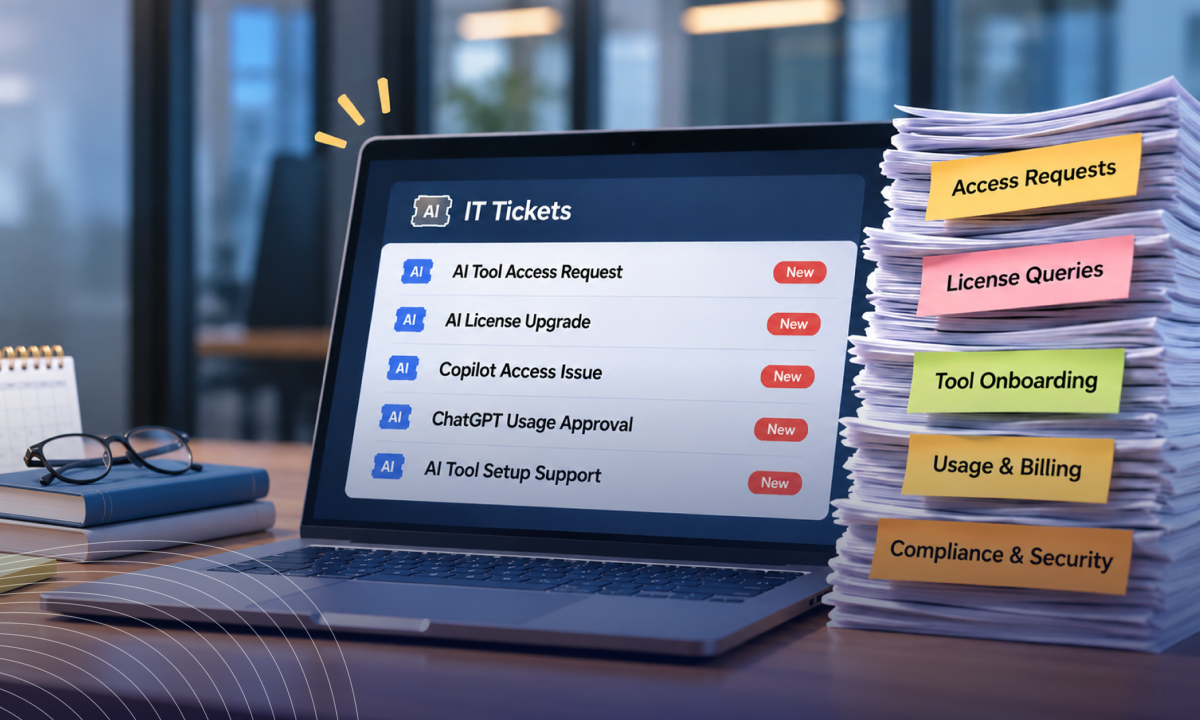
Each gap becomes a ticket, and the queue grows with every new AI tool your teams adopt.

Also read: AI governance auditing playbook if an auditor is already on the calendar and you want to see which evidence internal audit asks for first.

‍

Vet AI Vendors on 32 Criteria

Free sheet comparing vendors across 6 security groups.
Download Checklist

‍

How CloudEagle.ai Produces the Evidence Behind Your NIST AI Controls

NIST offers no certification for these controls, so the goal is evidence. CloudEagle.ai gives IT the records each control asks for, generated continuously, and ready to hand to Security and auditors.

Keep CM-8 Accurate Without Chasing Teams

Your AI inventory is only as complete as the sources feeding it. SSO misses tools employees sign into with personal accounts or reach through a browser extension, so the inventory your auditor sees is short from day one.

How CloudEagle.ai solves it:

  • Correlates SSO, browser, and finance signals with network data to surface AI apps a manual inventory misses.
  • Records owner, users, and discovery source for each tool, building an auditable AI app inventory.
  • Flags new AI tools and embedded AI features as they appear.

You hand auditors an inventory that matches what employees actually use, and the rest of your NIST AI controls start from that complete record.

Close AC-2, AC-6 and PS-4 for People and Agents

AI agents and API keys sit outside the identity lifecycle IT already runs. When someone leaves, their SSO access goes, while the agent they built keeps running with whatever permissions it was given.

How CloudEagle.ai solves it:

  • Discovers AI agents across consoles and assigns a named owner to each one.
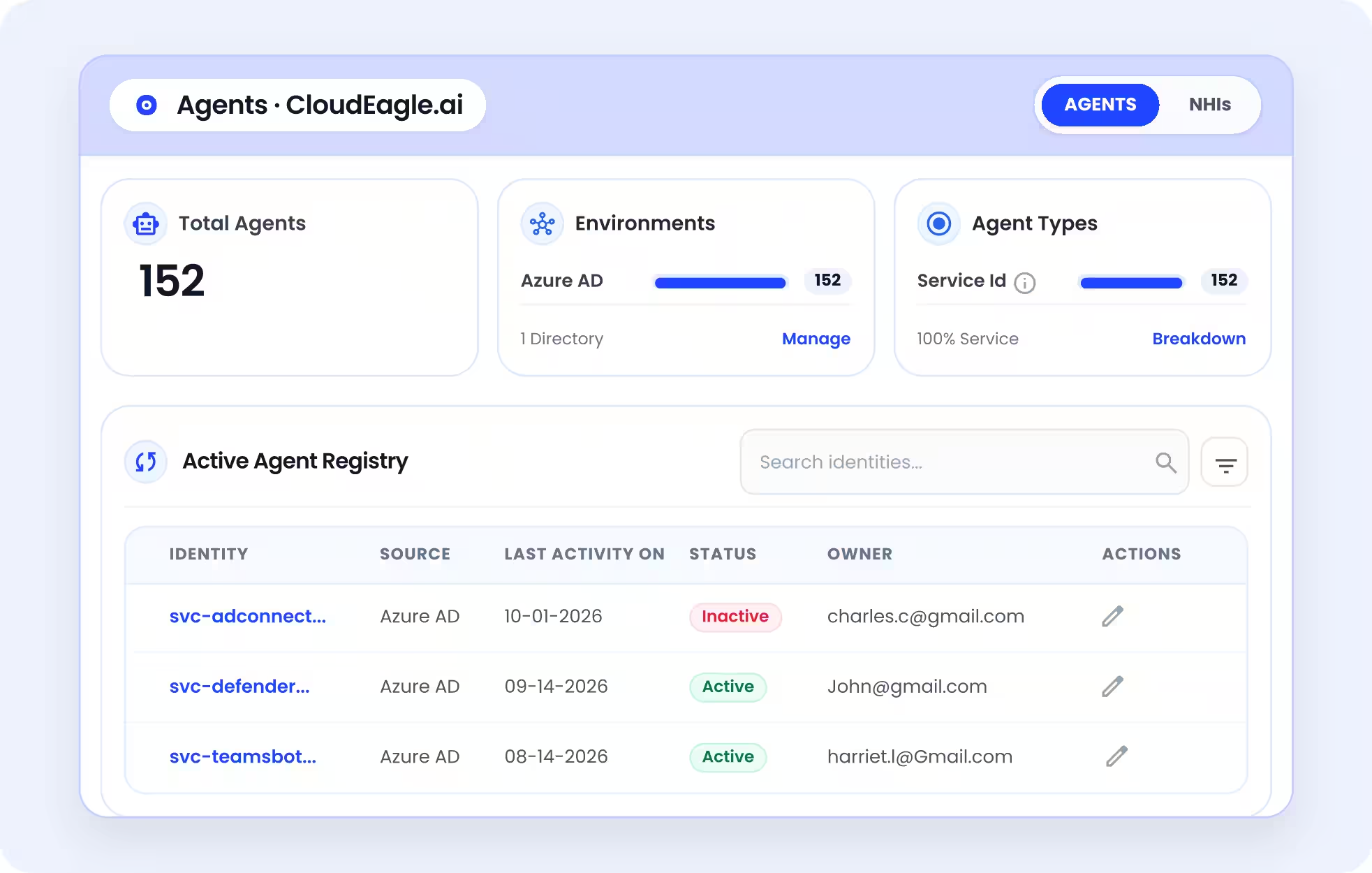
CloudEagle.ai Agents dashboard showing 152 discovered AI agents in Azure AD. The Active Agent Registry displays agent identities, sources, last activity dates, active or inactive status, and assigned owners, helping IT and security teams monitor and manage AI agent identities.
  • Flags agents and service accounts holding more access than their function needs, following NHI lifecycle management practice.
  • Ties AI access deprovisioning to the HR-driven identity lifecycle, with access reviews that trigger removal on rejection.

Ditto saw exactly this gap. CloudEagle.ai's first scan found 340 AI agents across its consoles, including 19 built by former employees that still held admin access to critical data, and all 19 were closed immediately.

Every account and agent maps to an owner with scoped access, so AC-2, AC-6 and PS-4 evidence covers non-human identities alongside employees.

Turn RA-3, SA-9 and SR-6 Into a Workflow

Vendor reviews for AI tools tend to live in inboxes. IT chases questionnaires for weeks, and the answers end up scattered across email threads that an auditor can't easily test.

How CloudEagle.ai solves it:

  • Sends AI vendor security questionnaires automatically and tracks responses.
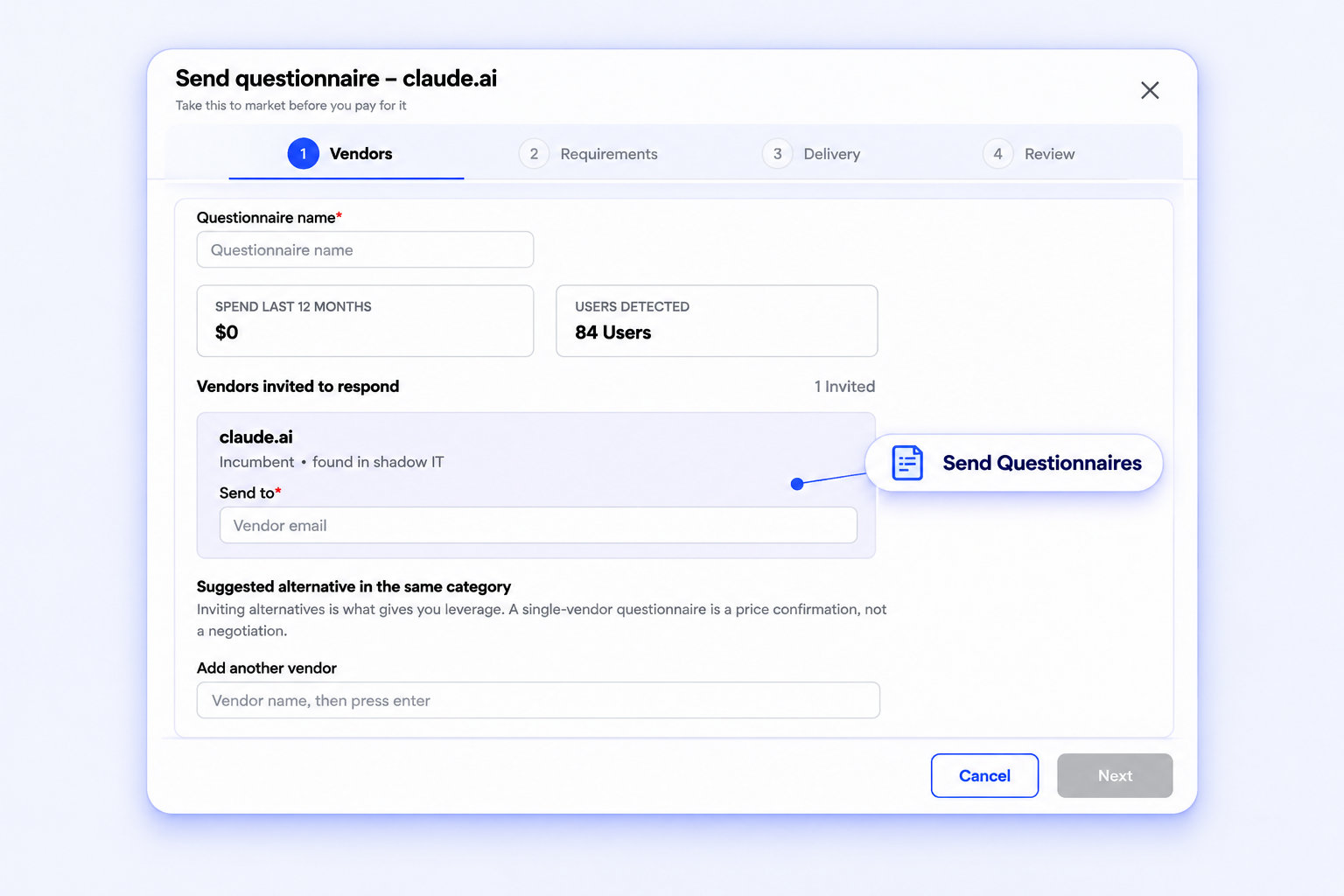
CloudEagle.ai vendor questionnaire interface showing a four-step workflow to collect vendor requirements and evaluate SaaS applications. The dashboard displays Claude.ai as a vendor discovered through Shadow IT, with 84 detected users, vendor invitation options, and the ability to add alternative vendors for comparison and negotiation.
  • Assigns each AI vendor a risk rating based on data handling, training policy and certifications.
  • Keeps review history per vendor, aligned with a standard vendor risk assessment checklist.

Each AI vendor carries a dated review and risk score, so the vendor rows of your NIST AI controls hold up, and Security receives a finished assessment it can sign off on.

Keep CA-7 and AU-6 Running Between Audits

Auditors test whether controls operate over time. Most IT teams prove it with screenshots gathered in the weeks before fieldwork, which show a single day and cost weeks of prep each cycle.

How CloudEagle.ai solves it:

  • Applies a compliance framework across SaaS and AI apps, with each control rated by severity.
  • Records control status changes with an evidence file, a note, and the user who made the change.
  • Logs browser policy events, such as redirects away from unapproved AI tools.
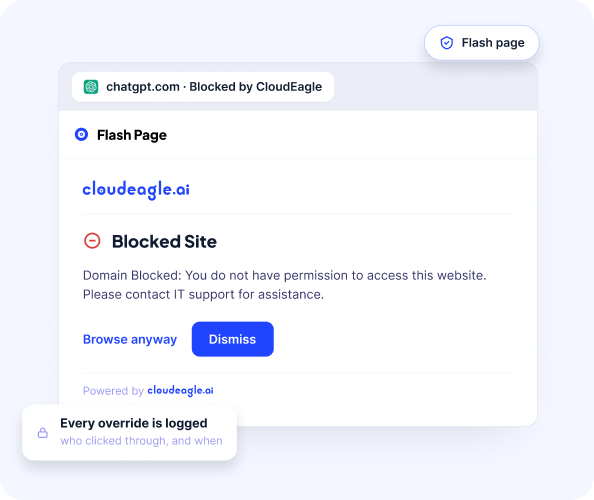
CloudEagle.ai Secure Browsing flash page displaying a blocked access warning for ChatGPT. The interface offers Browse Anyway and Dismiss options while highlighting that every policy override is logged, including who accessed the blocked website and when, helping IT teams monitor browsing policy violations.

Celigo's compliance team used to track SOC 2 posture for 84 SaaS and AI apps in a spreadsheet. With CloudEagle.ai, pre-audit review time fell from seven weeks to nine days, 31 failing Critical controls were closed before the audit, and the audit closed with zero apps flagged.

Evidence for your NIST AI controls builds up as the work happens, so audit prep starts from records that already exist.

‍

Your Auditors Already Test These Controls, So Start There

NIST will keep publishing AI overlays, and the names may keep changing. The 800-53 controls your auditors test today already apply to every AI tool your teams use.

That makes NIST AI controls an IT problem first. IT owns the inventory, the accounts and the vendor intake that every row in the list depends on.

Here's the order that holds up:

  1. Build the AI inventory first, because every other control inherits its gaps.
  2. Bring accounts, agents, and API keys into the identity lifecycle.
  3. Move AI vendor reviews out of email and into a tracked workflow.
  4. Keep evidence running between audits, so nothing needs rebuilding at fieldwork.

When the COSIS overlays land, you'll be adjusting a program that already works, and Security gets usable evidence from the day it asks.

‍

FAQs

What is AI according to NIST?

NIST defines an AI system as a machine-based system that generates outputs like predictions or decisions for a given set of objectives. That definition covers both the AI tools employees use and the agents teams build, so both fall in scope.

What are the NIST controls?

They’re the security and privacy controls in SP 800-53 Rev. 5, grouped into 20 families. NIST’s AI overlays will tailor them for AI systems. Until those land, IT can apply existing controls like CM-8 inventory and PS-4 offboarding to AI tools today.

What is the NIST Cybersecurity AI Framework?

It’s NIST IR 8596, a draft CSF 2.0 profile with three focus areas: securing AI, AI-enabled defense, thwarting AI-enabled attacks. It sits alongside the AI RMF, mapping AI risk into the CSF program most security teams already run.

What are the 5 pillars of NIST?

The original NIST CSF had five functions: Identify, Protect, Detect, Respond, Recover. CSF 2.0 added Govern, making six. For AI tools, Govern is the natural starting point, since it sets ownership and policy before the other functions apply.

‍

See how CloudEagle.ai builds the evidence behind every control on your list. Book a demo

‍

Advertisement for a SaaS Subscription Tracking Template with a call-to-action button to download and a partial graphic of a tablet showing charts.Banner promoting a SaaS Agreement Checklist to streamline SaaS management and avoid budget waste with a call-to-action button labeled Download checklist.Blue banner with text 'The Ultimate Employee Offboarding Checklist!' and a black button labeled 'Download checklist' alongside partial views of checklist documents from cloudeagle.ai.Digital ad for download checklist titled 'The Ultimate Checklist for IT Leaders to Optimize SaaS Operations' by cloudeagle.ai, showing checklist pages.Slack Buyer's Guide offer with text 'Unlock insider insights to get the best deal on Slack!' and a button labeled 'Get Your Copy', accompanied by a preview of the guide featuring Slack's logo.Monday Pricing Guide by cloudeagle.ai offering exclusive pricing secrets to maximize investment with a call-to-action button labeled Get Your Copy and an image of the guide's cover.Blue banner for Canva Pricing Guide by cloudeagle.ai offering a guide to Canva costs, features, and alternatives with a call-to-action button saying Get Your Copy.Blue banner with white text reading 'Little-Known Negotiation Hacks to Get the Best Deal on Slack' and a white button labeled 'Get Your Copy'.Blue banner with text 'Little-Known Negotiation Hacks to Get the Best Deal on Monday.com' and a white button labeled 'Get Your Copy'.Blue banner with text 'Little-Known Negotiation Hacks to Get the Best Deal on Canva' and a white button labeled 'Get Your Copy'.Banner with text 'Slack Buyer's Guide' and a 'Download Now' button next to images of a guide titled 'Slack Buyer’s Guide: Features, Pricing & Best Practices'.Digital cover of Monday Pricing Guide with a button labeled Get Your Copy on a blue background.Canva Pricing Guide cover with a button labeled Get Your Copy on a blue gradient background.

Enter your email to
unlock the report

Oops! Something went wrong while submitting the form.
License Count
Benchmark
Per User/Per Year

Enter your email to
unlock the report

Oops! Something went wrong while submitting the form.
License Count
Benchmark
Per User/Per Year

Enter your email to
unlock the report

Oops! Something went wrong while submitting the form.
Notion Plus
License Count
Benchmark
Per User/Per Year
100-500
$67.20 - $78.72
500-1000
$59.52 - $72.00
1000+
$51.84 - $57.60
Canva Pro
License Count
Benchmark
Per User/Per Year
100-500
$74.33-$88.71
500-1000
$64.74-$80.32
1000+
$55.14-$62.34

Enter your email to
unlock the report

Oops! Something went wrong while submitting the form.

Enter your email to
unlock the report

Oops! Something went wrong while submitting the form.
Zoom Business
License Count
Benchmark
Per User/Per Year
100-500
$216.00 - $264.00
500-1000
$180.00 - $216.00
1000+
$156.00 - $180.00

Enter your email to
unlock the report

Oops! Something went wrong while submitting the form.

Get the Right Security Platform To Secure Your Cloud Infrastructure

Please enter a business email
Thank you!
The 2023 SaaS report has been sent to your email. Check your promotional or spam folder.
Oops! Something went wrong while submitting the form.

Access full report

Please enter a business email
Thank you!
The 2023 SaaS report has been sent to your email. Check your promotional or spam folder.
Oops! Something went wrong while submitting the form.

TL;DR

  • Today's usable NIST AI controls are existing SP 800-53 Rev. 5 controls applied to AI tools, since NIST's AI-specific catalog is still in draft.
  • Twelve controls carry most of the weight for IT, from CM-8 inventory to PS-4 offboarding.
  • COSAiS was renamed COSIS on October 20, 2026, and its five planned use cases range from generative assistants to multi-agent systems.
  • The Cyber AI Profile (IR 8596) remains a preliminary draft built on CSF 2.0.
  • Most evidence gaps trace back to AI usage that never passes through SSO, like browser tools or agents.

‍

‍

You probably have the AI RMF PDF and a draft AI policy. Your auditor wants something more specific: the NIST AI controls that cover ChatGPT, Copilot, and the agents your teams have built.

The AI RMF functions describe outcomes with no control IDs to test. NIST's SP 800-53 control overlays for AI are still in development, with a single annotated outline released so far.

That leaves IT owning AI controls nobody has finished writing.

The practical answer is to map AI tools to the 800-53 controls your auditors already test, then produce the evidence continuously. IT can run that work with the right inventory and access data, which is where CloudEagle.ai fits.

Below you'll find the controls list with the evidence each one needs, followed by the NIST documents it draws from.

‍

The NIST AI Controls List IT Can Evidence Today

The controls IT can evidence today are the SP 800-53 Rev. 5 controls you already test, applied to every AI tool and agent in your environment.

NIST hasn't published an AI-specific mapping for these yet, so treat this table as IT's working map until the COSIS overlays land. Each row goes a level deeper than the general AI control domains most teams start with, because it ends in evidence an auditor can check.

Control What it means for AI tools Evidence IT produces
CM-8 System Component Inventory Every AI app, extension and agent is recorded Live inventory with owner and discovery source
CM-7 Least Functionality Unapproved AI tools are restricted Blocklist plus browser policy enforcement logs
CM-10 Software Usage Restrictions AI use follows license and contract terms Approved tool list tied to contracts
AC-2 Account Management Each AI account maps to a known user Account roster per AI tool
AC-6 Least Privilege Users and agents get minimum scopes Permission and scope reports
IA-5 Authenticator Management API keys and tokens have owners and get rotated Key inventory with owner and age
PS-4 Personnel Termination Leavers lose AI access, keys included Deprovisioning log per leaver
RA-3 Risk Assessment Each AI tool carries a risk rating Risk score with review date
SA-9 External System Services AI vendors meet your security terms Completed vendor questionnaire
SR-6 Supplier Assessments and Reviews AI vendors get reassessed over time Review history per vendor
CA-7 Continuous Monitoring Controls get checked between audits Timestamped control status

‍

Where to start if you're short on time

  • CM-8 first: every other row depends on an accurate inventory.
  • AC-2 and PS-4 next: IBM's 2025 breach research found that 97% of organizations reporting an AI-related breach lacked proper AI access controls.
  • SA-9 and SR-6 after that: vendor reviews take the longest to collect, so start them early.

Use this NIST AI controls list as the spine of your evidence binder, and add rows as COSIS publishes its overlays.

‍

Also read: AI RMF implementation checklist if you need the build order for the program these controls sit inside, from Govern through to a documented Profile.

‍

Build Your CM-8 AI Inventory Checklist

A discovery checklist for AI tools your SSO never sees.
Download Checklist

‍

Where These NIST AI Controls Come From, and the PDFs to Bookmark

Six NIST sources feed these controls, and the two that matter most for control IDs are still drafts. If you came here for a NIST AI controls PDF, each item below links to the official document.

  1. NIST AI 100-1 (AI RMF 1.0), final: Released January 26, 2023, it defines four functions as outcomes, with no control IDs.
  2. AI RMF Playbook, online: Suggested actions for each subcategory, and the closest thing to a to-do list in the RMF family.
  3. NIST AI 600-1, final: The Generative AI Profile from July 26, 2024, covering GenAI-specific risks and actions.
  4. NIST AI 100-2e2025, final: A taxonomy of adversarial machine learning attacks and mitigations, useful for scoping AI-specific risks.
  5. NIST IR 8596, preliminary draft: The Cyber AI Profile applies CSF 2.0 to AI. Public comments on this draft closed January 30, 2026.
  6. SP 800-53 control overlays (COSIS), in development: The project tailors 800-53 controls for AI, using NIST AI 100-2e2025 to frame attack types. The only overlay content so far is an annotated outline for predictive AI from January 2026.

Name change to know: On October 20, 2026, NIST renamed COSAiS to COSIS, Control Overlays for Super Intelligence Systems, following a September 29, 2026 executive order directing agencies to use "Super Intelligence" in place of "AI". Earlier publications keep their original titles, so search for both names.

Which COSIS use case covers which tool

  • Generative AI assistants: ChatGPT and Copilot seats, plus LLM features inside SaaS apps. IT owns this one, and our NIST AI 600-1 guide covers its GenAI-specific risks.
  • Predictive AI: forecasting and scoring models, usually run by data teams. This is the only overlay with a published outline.
  • Single AI agents: an agent acting with one user's or service account's access. IT owns the AI agent identities side.
  • Multi-agent systems: agents calling other agents or MCP servers. Ownership is shared with engineering.
  • AI developers: teams building and training models. This sits mostly outside IT's scope.

Bookmark the NIST AI controls PDF links above, since COSIS drafts get replaced as each use case moves forward.

‍

Why NIST AI Controls Stall in IT's Ticket Queue

They stall because every row in that list assumes a complete inventory and current evidence, and AI usage produces neither by default.

AI tools arrive through browser tabs and features switched on inside existing SaaS apps, and many never touch your identity provider. Those SSO and CASB blind spots mean CM-8 starts incomplete, and every control downstream inherits the gap.

Policy alone doesn't close it. IBM found that 63% of breached organizations lacked AI governance policies to manage AI or prevent shadow AI.

Here's how the gap looks for most IT teams mapping NIST AI Controls by hand:

What the control expects What IT usually has
CM-8: a complete AI inventory An SSO app list plus expense reports
PS-4: AI access removed at exit SSO deprovisioning only
SA-9 and SR-6: reviewed AI vendors Questionnaires chased over email
CA-7: continuous evidence Screenshots gathered before each audit

‍

Each gap becomes a ticket, and the queue grows with every new AI tool your teams adopt.

Also read: AI governance auditing playbook if an auditor is already on the calendar and you want to see which evidence internal audit asks for first.

‍

Vet AI Vendors on 32 Criteria

Free sheet comparing vendors across 6 security groups.
Download Checklist

‍

How CloudEagle.ai Produces the Evidence Behind Your NIST AI Controls

NIST offers no certification for these controls, so the goal is evidence. CloudEagle.ai gives IT the records each control asks for, generated continuously, and ready to hand to Security and auditors.

Keep CM-8 Accurate Without Chasing Teams

Your AI inventory is only as complete as the sources feeding it. SSO misses tools employees sign into with personal accounts or reach through a browser extension, so the inventory your auditor sees is short from day one.

How CloudEagle.ai solves it:

  • Correlates SSO, browser, and finance signals with network data to surface AI apps a manual inventory misses.
  • Records owner, users, and discovery source for each tool, building an auditable AI app inventory.
  • Flags new AI tools and embedded AI features as they appear.

You hand auditors an inventory that matches what employees actually use, and the rest of your NIST AI controls start from that complete record.

Close AC-2, AC-6 and PS-4 for People and Agents

AI agents and API keys sit outside the identity lifecycle IT already runs. When someone leaves, their SSO access goes, while the agent they built keeps running with whatever permissions it was given.

How CloudEagle.ai solves it:

  • Discovers AI agents across consoles and assigns a named owner to each one.
CloudEagle.ai Agents dashboard showing 152 discovered AI agents in Azure AD. The Active Agent Registry displays agent identities, sources, last activity dates, active or inactive status, and assigned owners, helping IT and security teams monitor and manage AI agent identities.
  • Flags agents and service accounts holding more access than their function needs, following NHI lifecycle management practice.
  • Ties AI access deprovisioning to the HR-driven identity lifecycle, with access reviews that trigger removal on rejection.

Ditto saw exactly this gap. CloudEagle.ai's first scan found 340 AI agents across its consoles, including 19 built by former employees that still held admin access to critical data, and all 19 were closed immediately.

Every account and agent maps to an owner with scoped access, so AC-2, AC-6 and PS-4 evidence covers non-human identities alongside employees.

Turn RA-3, SA-9 and SR-6 Into a Workflow

Vendor reviews for AI tools tend to live in inboxes. IT chases questionnaires for weeks, and the answers end up scattered across email threads that an auditor can't easily test.

How CloudEagle.ai solves it:

  • Sends AI vendor security questionnaires automatically and tracks responses.
CloudEagle.ai vendor questionnaire interface showing a four-step workflow to collect vendor requirements and evaluate SaaS applications. The dashboard displays Claude.ai as a vendor discovered through Shadow IT, with 84 detected users, vendor invitation options, and the ability to add alternative vendors for comparison and negotiation.
  • Assigns each AI vendor a risk rating based on data handling, training policy and certifications.
  • Keeps review history per vendor, aligned with a standard vendor risk assessment checklist.

Each AI vendor carries a dated review and risk score, so the vendor rows of your NIST AI controls hold up, and Security receives a finished assessment it can sign off on.

Keep CA-7 and AU-6 Running Between Audits

Auditors test whether controls operate over time. Most IT teams prove it with screenshots gathered in the weeks before fieldwork, which show a single day and cost weeks of prep each cycle.

How CloudEagle.ai solves it:

  • Applies a compliance framework across SaaS and AI apps, with each control rated by severity.
  • Records control status changes with an evidence file, a note, and the user who made the change.
  • Logs browser policy events, such as redirects away from unapproved AI tools.
CloudEagle.ai Secure Browsing flash page displaying a blocked access warning for ChatGPT. The interface offers Browse Anyway and Dismiss options while highlighting that every policy override is logged, including who accessed the blocked website and when, helping IT teams monitor browsing policy violations.

Celigo's compliance team used to track SOC 2 posture for 84 SaaS and AI apps in a spreadsheet. With CloudEagle.ai, pre-audit review time fell from seven weeks to nine days, 31 failing Critical controls were closed before the audit, and the audit closed with zero apps flagged.

Evidence for your NIST AI controls builds up as the work happens, so audit prep starts from records that already exist.

‍

Your Auditors Already Test These Controls, So Start There

NIST will keep publishing AI overlays, and the names may keep changing. The 800-53 controls your auditors test today already apply to every AI tool your teams use.

That makes NIST AI controls an IT problem first. IT owns the inventory, the accounts and the vendor intake that every row in the list depends on.

Here's the order that holds up:

  1. Build the AI inventory first, because every other control inherits its gaps.
  2. Bring accounts, agents, and API keys into the identity lifecycle.
  3. Move AI vendor reviews out of email and into a tracked workflow.
  4. Keep evidence running between audits, so nothing needs rebuilding at fieldwork.

When the COSIS overlays land, you'll be adjusting a program that already works, and Security gets usable evidence from the day it asks.

‍

FAQs

What is AI according to NIST?

NIST defines an AI system as a machine-based system that generates outputs like predictions or decisions for a given set of objectives. That definition covers both the AI tools employees use and the agents teams build, so both fall in scope.

What are the NIST controls?

They’re the security and privacy controls in SP 800-53 Rev. 5, grouped into 20 families. NIST’s AI overlays will tailor them for AI systems. Until those land, IT can apply existing controls like CM-8 inventory and PS-4 offboarding to AI tools today.

What is the NIST Cybersecurity AI Framework?

It’s NIST IR 8596, a draft CSF 2.0 profile with three focus areas: securing AI, AI-enabled defense, thwarting AI-enabled attacks. It sits alongside the AI RMF, mapping AI risk into the CSF program most security teams already run.

What are the 5 pillars of NIST?

The original NIST CSF had five functions: Identify, Protect, Detect, Respond, Recover. CSF 2.0 added Govern, making six. For AI tools, Govern is the natural starting point, since it sets ownership and policy before the other functions apply.

‍

See how CloudEagle.ai builds the evidence behind every control on your list. Book a demo

‍

CloudEagle.ai recognized in the 2025 Gartner® Magic Quadrant™ for SaaS Management Platforms
Download now
gartner chart
5x
Faster employee
onboarding
80%
Reduction in time for
user access reviews
30k
Workflows
automated
$15Bn
Analyzed in
contract spend
$2Bn
Saved in
SaaS spend

Streamline SaaS governance and save 10-30%

Book a Demo with Expert
CTA image