AI Governance

What Is AI Agent Management? A Framework for IT and Security Teams

Share via:
Written by:
CloudEagle.ai Team
Reviewed by
Nidhi Jain
Last Updated:
October 30, 2026
blog-cms-banner-bg
Little-Known Negotiation Hacks to Get the Best Deal on Slack
cta-bg-blogDownload Your Copy

HIPAA Compliance Checklist for 2025

Download PDF

‍

AI agent management is the practice of discovering, owning, securing, monitoring, and retiring every AI agent an organization runs, across every platform it was built on. It treats each agent as a non-human identity with a named owner, scoped access, a tracked cost, and a defined end date, so IT can say which agents exist, what they can reach, and who stops them.

The volume is why this can't wait. Gartner expects Fortune 500 companies to run as many as 150,000 agents each by 2028, up from about 15 in 2025.

Gartner also predicts that more than 40% of agentic AI projects will be canceled by the end of 2027, with inadequate risk controls among the causes.

‍

What Does AI Agent Management Involve?

Builder teams think about agents in terms of prompts, tools, and outputs. IT sees something closer to a new hire: an identity that holds credentials, reaches business systems, costs money every time it runs, and keeps working until someone switches it off.

AI agent management applies the identity and access controls IT already runs for people to that identity. In practice, it answers five questions for every agent:

Question What IT needs on record
Which agents exist? Every agent across build platforms, SaaS apps, and employee-created tools
Who owns it? A named owner and backup, linked to current employee records
What can it reach? Connected apps, data, credentials, and assigned permissions
What does it cost? Token consumption and other usage-based charges, by agent or team
When does it stop? A retirement trigger and an approved way to revoke access

‍

These records are what IT reaches for during an access review, an audit, or an incident. Without them, every one of those starts with a scramble across consoles.

Which Agents Fall Under AI Agent Management?

An AI agent is software that acts on its own using credentials it holds, such as updating a record, sending a message, or calling another system. Agents enter an organization through four routes:

  • Platforms teams build on, such as Microsoft Copilot Studio, Salesforce Agentforce, and ServiceNow
  • SaaS tools you already license, where vendors now embed agents by default
  • Employees building or connecting agents on their own, often through accounts IT never approved
  • The service accounts, OAuth tokens, API keys, and MCP servers agents use to reach your data

Most IT teams can see the first route. The other three are where unowned agents pile up, so a useful inventory covers both the agents and the credentials that let them act.

‍

How Is AI Agent Management Different From Orchestration, Observability, and Security?

The terms overlap, and vendors use them loosely. Each one answers a different question:

Practice What it answers
AI agent orchestration Which agent does which task, and in what order
AI agent observability What an agent did, how well, and why it failed
AI agent security How to stop attacks such as prompt injection and data exposure
AI agent management Which agents exist, who owns them, what they can reach, what they cost, and when they stop

‍

Ask a platform team how many agents run on Copilot Studio, and they can likely answer. Ask how many agents across the company can write to your CRM, and the answer needs data from several systems. AI agent management is the work of answering that second question.

‍

Why Do IT and Security Teams Need to Manage AI Agents Now?

Agents join an identity estate that is already hard to govern. CyberArk's 2025 Identity Security Landscape found 82 machine identities for every human one, and 42% of machine identities hold privileged or sensitive access.

In the same survey of 2,600 cybersecurity decision-makers, 68% said their organizations lack identity security controls for AI. Three gaps explain why.

1. Native Tools See One Platform at a Time

Platform vendors are adding real controls. Microsoft Copilot Studio offers agent inventory capabilities, and ServiceNow's AI Control Tower adds governance for AI systems.

Each console still starts from its own platform. Most enterprises run agents on several, so no single native view is complete.

What IT should do: build one inventory that reads from every source, then compare it with the approved register instead of assuming any one console sees everything.

2. Agents Outlive the People Who Built Them

Offboarding removes a departing employee's access. An agent that employee built often has its own identity and credentials, so it keeps running.

Offboarding misses happen even with human access. When Treasure Data connected its SaaS stack to CloudEagle.ai, it immediately found 30 former employees still holding access across 75 apps. The agents employees build are rarely on that checklist at all.

What IT should do: link agent ownership to current employee records, and trigger an ownership review whenever someone leaves or changes roles.

Related read: why offboarding misses agents their creators leave behind.

3. Permissions Drift Upward

Pilots get broad access so they work quickly, and that access is seldom scoped back down. An agent built to summarize support tickets can end up able to edit or delete them.

What IT should do: grant the minimum access each task needs, and review it before production and whenever the agent's tools or connected systems change.

‍

68% of Orgs Have No Identity Controls for AI

Find every agent, credential, and orphaned identity before the next audit.
Download Checklist

‍

How Does the AI Agent Lifecycle Work, From Joiner to Leaver?

The AI agent lifecycle follows the joiner-mover-leaver model IT already runs for employees, with one change: every step has to work across platforms, not inside one console. It breaks into three stages and six steps:

Stage Steps Done when
Joiner 1. Discover existing agents
2. Register new agents
3. Assign an owner
Every agent is on record with an accountable owner
Mover 4. Scope and review access
5. Monitor activity and spend
Access matches the task, and spend has alerts
Leaver 6. Retire or revoke Roles, secrets, and identity are removed and recorded

‍

Stage 1: Joiner

Step 1: Discover Existing Agents

  • Pull agent identities from identity providers such as Microsoft Entra ID and Okta
  • Add each agent platform's admin console and your connected SaaS apps
  • Map the service accounts, API keys, and integrations behind each agent
  • Record each agent's platform, purpose, status, creator, and connected resources
‍

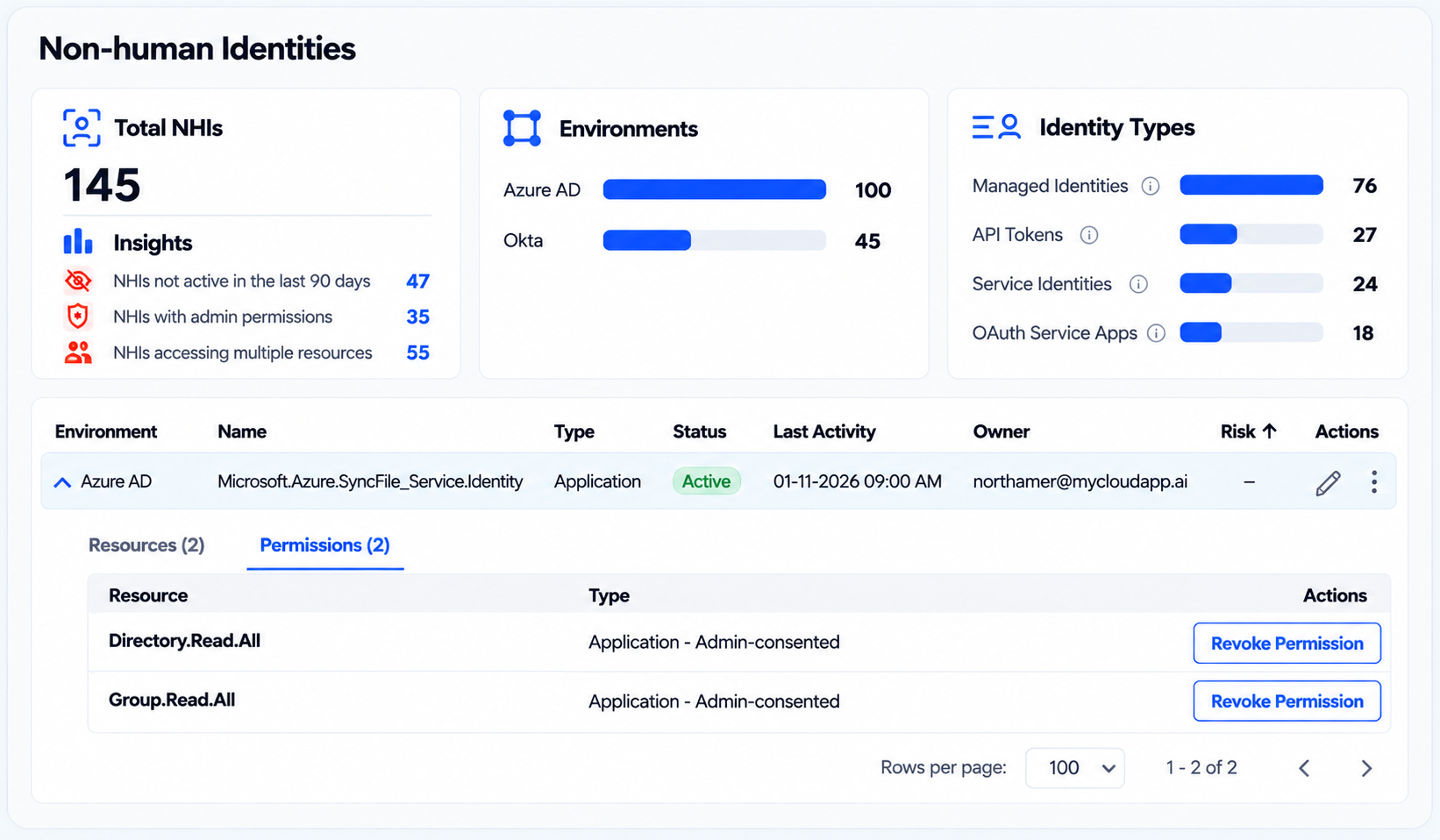
Dashboard showing 145 non-human identities across Azure AD and Okta, with identity types including managed identities, API tokens, service identities, and OAuth service apps. Highlights inactive identities, admin permissions, and identities accessing multiple resources, alongside a detailed permissions table with options to revoke access.

‍

A cross-platform inventory puts agent identities next to the managed identities, API tokens, and OAuth apps behind them.

Step 2: Register New Agents Before Launch

  • Add an intake gate, so agents are registered before they touch production data or sensitive systems
  • Capture the business purpose, owner, requested permissions, connected apps, and expected cost
  • Investigate anything discovered but unregistered, and confirm its owner and purpose before restricting or retiring it

Step 3: Assign an Owner and a Backup

  • Name one accountable owner who understands why the agent exists and approves its access
  • Add a backup for continuity when the owner is away or leaves
  • Link both to your HR system, so departures and role changes trigger a review automatically

Stage 2: Mover

Step 4: Scope and Review Access

  • Default to read-only access unless the agent must change data
  • Require explicit approval for write access to systems of record
  • Add agents to periodic access reviews; quarterly suits most production agents, and higher-risk ones need more
  • Remove permissions an agent no longer needs, after checking they don't support a rare but legitimate task

Step 5: Monitor Activity and Spend

  • Agent activity, covering actions taken, systems touched, and changes made
  • Identity events, covering sign-ins, permission changes, and credential use
  • Operating cost, covering token consumption by agent, app, or team
  • Execution patterns, such as repeated failures, activity spikes, or loops that trigger excessive tool calls

Every logged action should trace back to an agent and its owner. Set budget alerts too, since usage-based pricing can turn one looping agent into a cost spike.

Per-team limits catch problems early. Printify set AI spend limits with automatic alerts and caught $30K in overspend before it reached an invoice. Treasure Data now traces 2.8M tokens a month to a specific user, project, or model.

Stage 3: Leaver

Step 6: Retire Agents and Revoke Access

Start a retirement review when an agent's task ends, its owner leaves, its access is no longer appropriate, or its behavior turns risky. The runbook covers five actions:

  1. Disable execution, so the agent can't start new actions
  2. Revoke its roles and access to connected apps
  3. Revoke or rotate its tokens, keys, and secrets
  4. Remove leftover integrations, schedules, and related resources
  5. Record the retirement date, reason, and completed steps in the inventory

Give the runbook a named approver, so stopping an agent takes minutes rather than a ticket queue. If revoking roles, rotating secrets, and deactivating the identity happen in three consoles, containment waits on whoever has access to each one.

Want the product view of these controls? See how the CloudEagle.ai kill switch works.

‍

Agents Don’t Have an Offboarding Checklist

Run the same review cycle for agents that you run for employees.
Download Checklist

‍

How Much Oversight Does Each AI Agent Need?

Oversight should match what an agent can do, not how it was built. Grouping agents into three risk tiers keeps reviews focused where the impact is highest:

Risk tier Example Controls
Lower Searches or summarizes approved documents without changing records Named owner, documented permissions, periodic review
Moderate Updates CRM records or creates support tickets Owner approval before launch, scoped write access, activity logging, regular access reviews
Higher Holds admin rights or reaches sensitive data Security sign-off, tighter access, closer monitoring, a tested containment runbook

‍

Treat the tiers as a starting point. A read-only agent that reaches highly sensitive data may need higher-tier controls.

Before approving any agent, its owner should be able to answer four questions:

  • Does it need write access, or would read-only work?
  • Which sensitive data and systems can it reach?
  • Who can stop it, and how fast?
  • What happens to it if I leave or its purpose changes?

If the team can't answer these, the agent isn't ready for production access.

‍

What Should an AI Agent Inventory Record?

An AI agent inventory should answer the questions an auditor or incident responder asks first. A list of names and platforms is not enough. At minimum, record:

Field Why it matters
Name and unique identifier Separates the agent from other identities
Platform, creator, and creation date Shows where it came from and who introduced it
Business purpose and status Establishes why it exists and whether it is active
Owner and backup Identifies who is accountable
Credentials and identity references Locates authentication without exposing secrets
Connected apps and data Shows what the agent can reach
Assigned permissions Surfaces excessive access
Last activity Flags inactive or abandoned agents
Cost and usage Catches waste and budget overruns
Approval and review history Gives auditors evidence of authorization
Retirement status Confirms access was revoked and cleanup finished

‍

Matching owners against current employee records is the fastest way to find agents that need reassignment. Keep the inventory live by connecting it to discovery sources and making registration part of every launch.

‍

Who Owns AI Agent Management?

IT should own AI agent management. It already runs the identity providers agents authenticate through, the offboarding process agents slip past, and the access reviews agents need to join.

Handing agents to a separate AI team usually creates a second inventory that drifts from the first. Other teams feed decisions in; IT keeps the system of record and acts on it.

What IT Owns

  • The agent inventory and the intake gate
  • Owner assignment, and reassignment when owners leave
  • Access reviews for agents
  • Retirement and the kill-switch runbook
  • Reporting on agent count, orphaned agents, and spend

‍

Where IT Needs Input From Other Teams

Team What it gives IT
Security Risk tiers, access policy, and approval for high-risk agents and kill-switch use
Business owners The agent's purpose, approval before launch, and attestation in each review
Finance Budget thresholds for token-spend alerts
Chief AI Officer Sanctioned agent platforms and AI policy

‍

How CloudEagle.ai Manages AI Agents Across Platforms

CloudEagle.ai is an AI governance, SaaS management, and SaaS security platform that gives enterprises one command center to discover, govern, and secure their SaaS and AI stack, including human and non-human identities. RingCentral, Automation Anywhere, and Treasure Data are among its customers.

CloudEagle.ai treats every AI agent as a non-human identity and runs it through the same ownership, access review, and offboarding discipline IT applies to employees. It reads identity, permission, and activity data only, so agents keep running as they do today until an admin acts.

Why a Cross-Platform View Matters

What IT needs A native agent console CloudEagle.ai
Inventory Agents built on that platform Agents across Entra ID, Okta, and connected apps, registered or not
Ownership The creator recorded in that platform An owner per agent, flagged when that owner leaves
Permissions Roles within that platform Every role down to the resource, including access not yet used
Credentials Managed console by console Each agent tied to its service accounts, API tokens, and secrets
Shutdown One console at a time Revoke, rotate, or deactivate from one view, with every action logged

‍

Find Every Agent, Registered or Not

  • Reads agent identities from Microsoft Entra ID, Okta, and connected apps
  • Shows each agent's source, status, owner, credentials, and last activity in one inventory
  • Surfaces shadow agents IT never approved, alongside AI apps and MCP servers
‍

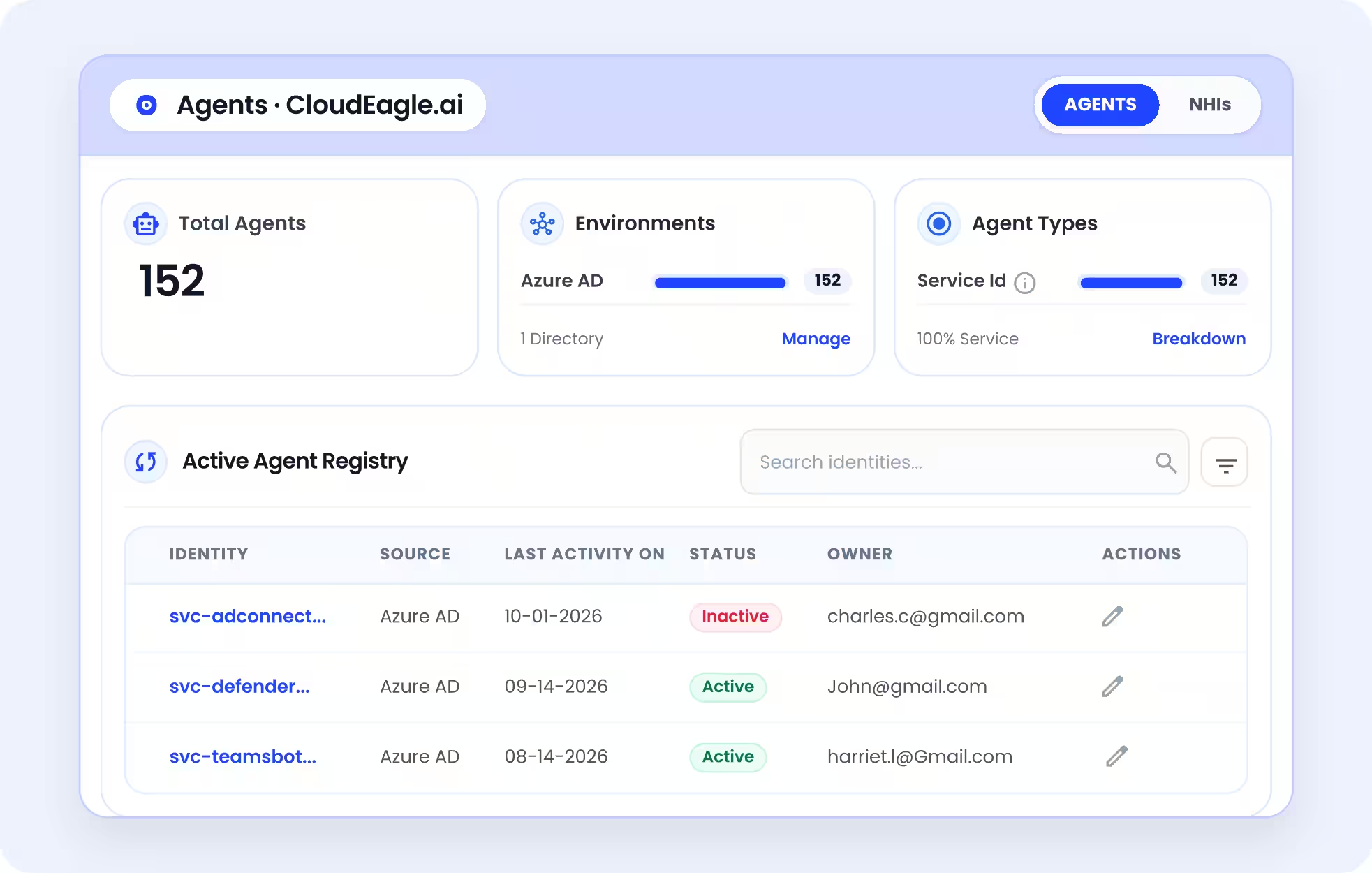
Product dashboard displaying 152 total AI agents, their Azure AD environment, agent types, and an active agent registry with identity names, last activity dates, status, assigned owners, and management actions.

‍

Every agent in one inventory, with its source, status, owner, and last activity.

See What Each Agent Can Reach

  • Lists every app and data source an agent connects to, from Salesforce to the HR system
  • Shows assigned and inherited roles, which is usually where the extra access sits
  • Flags agents with access to sensitive data, so reviews start with the riskiest ones
‍

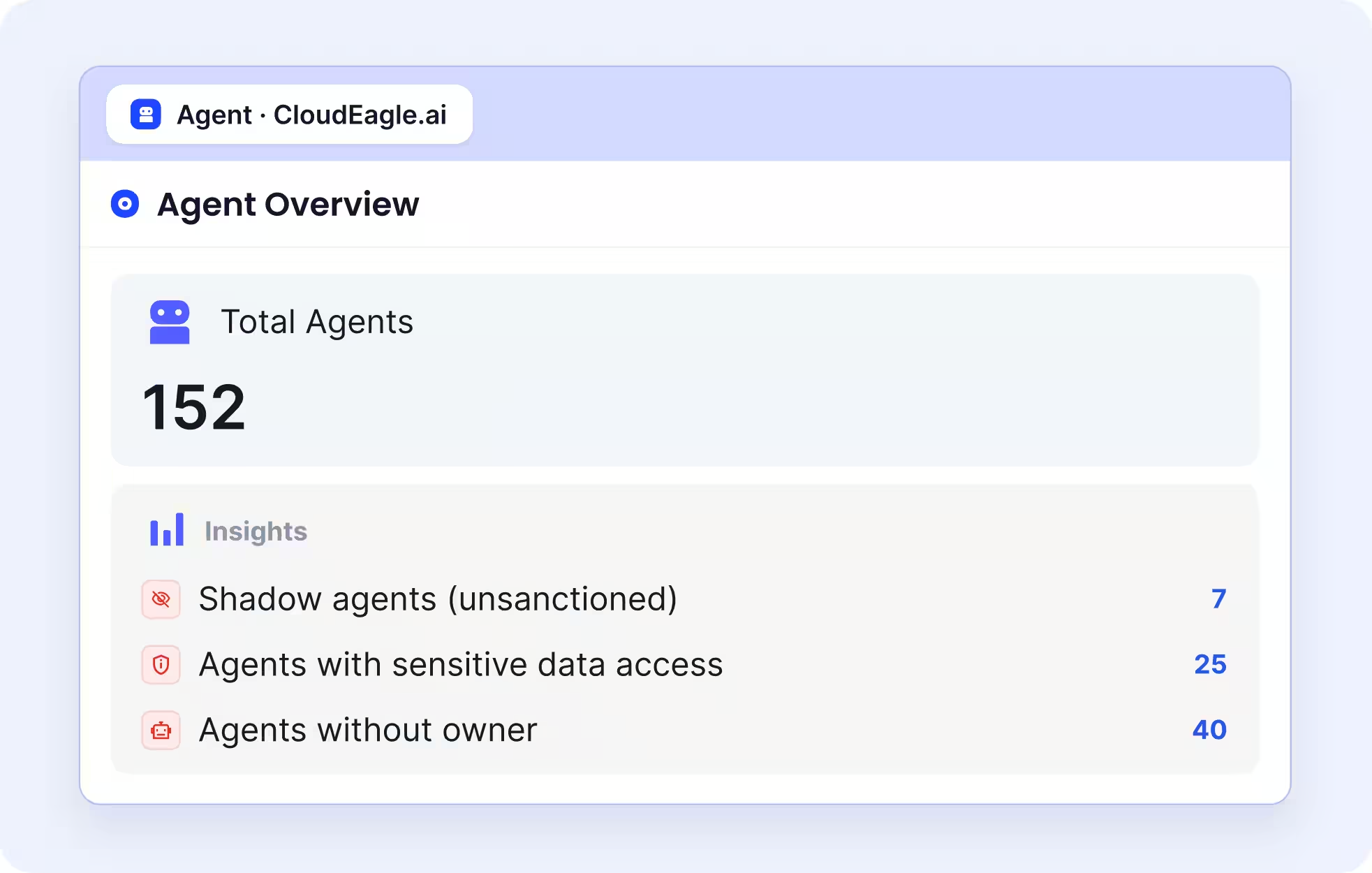
Agent overview displaying 152 total agents and highlighting three governance risks: seven unsanctioned shadow agents, 25 agents with sensitive data access, and 40 agents without assigned owners.

‍

Shadow agents, sensitive-data access, and ownerless agents flagged in one view.

Keep Every Agent Owned and on Least Privilege

  • Flags agents whose owner has left, so IT can reassign or retire them
  • Removes roles and permissions an agent doesn't need
  • Puts agents in the same access reviews as employees, filtered for inactive, ownerless, over-permissioned, or never-rotated agents
‍

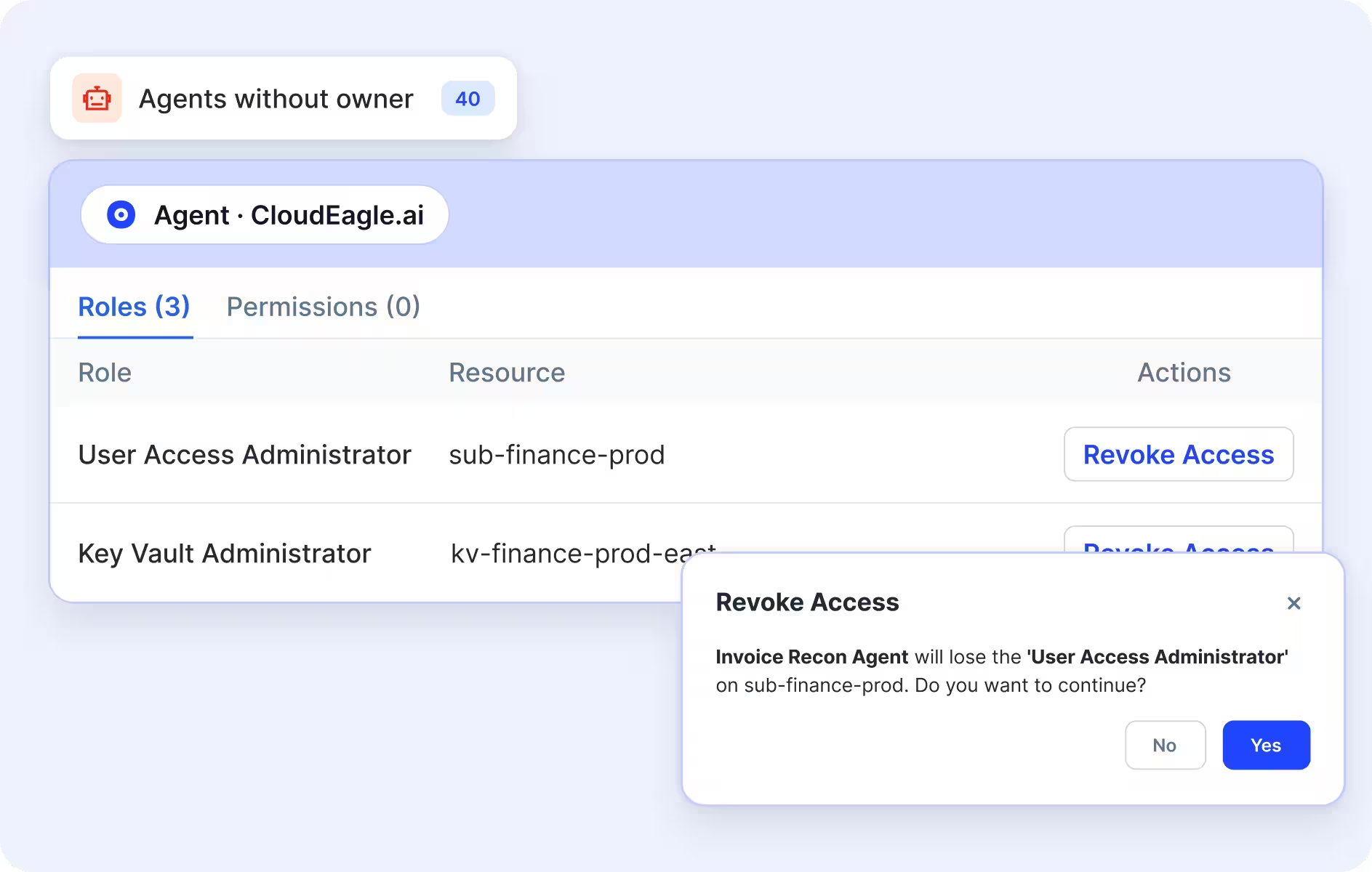
CloudEagle.ai interface showing 40 agents without owners, their assigned roles and resources, and a confirmation dialog for revoking an agent's access to sensitive business resources.

‍

Revoking an over-privileged role from an agent whose owner has left.

Trace Activity and Spend

  • Activity logs show what each agent did, changed, and touched, traced back to its owner
  • Token usage is tracked by user, team, and project, so a looping agent shows up before the invoice does
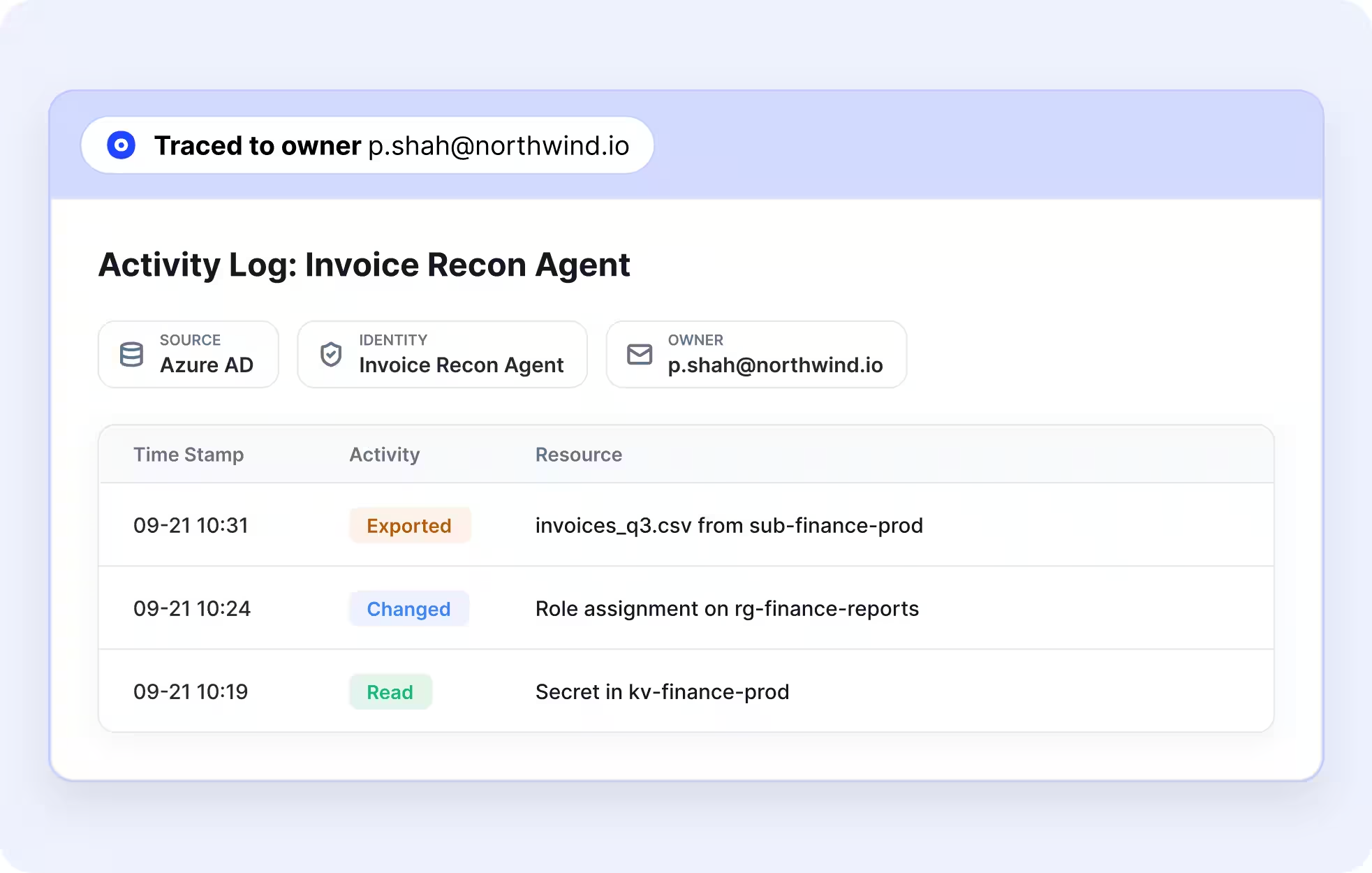
‍

Activity log for an Invoice Recon Agent, identifying its Azure AD source and assigned owner, with timestamps for exported invoice data, role changes, and secret access.

‍

Agent activity, from exports to secrets read, traced to the owner.

Stop a Risky Agent From the Same Screen

  • Revoke any role, down to a single resource
  • Rotate the agent's secret, where the platform supports it
  • Deactivate its identity

Nothing happens automatically. Admins decide, and every action is logged for auditors.

CloudEagle.ai governs identity and access rather than blocking individual agent actions at runtime. Teams that need runtime enforcement pair it with a runtime security tool.
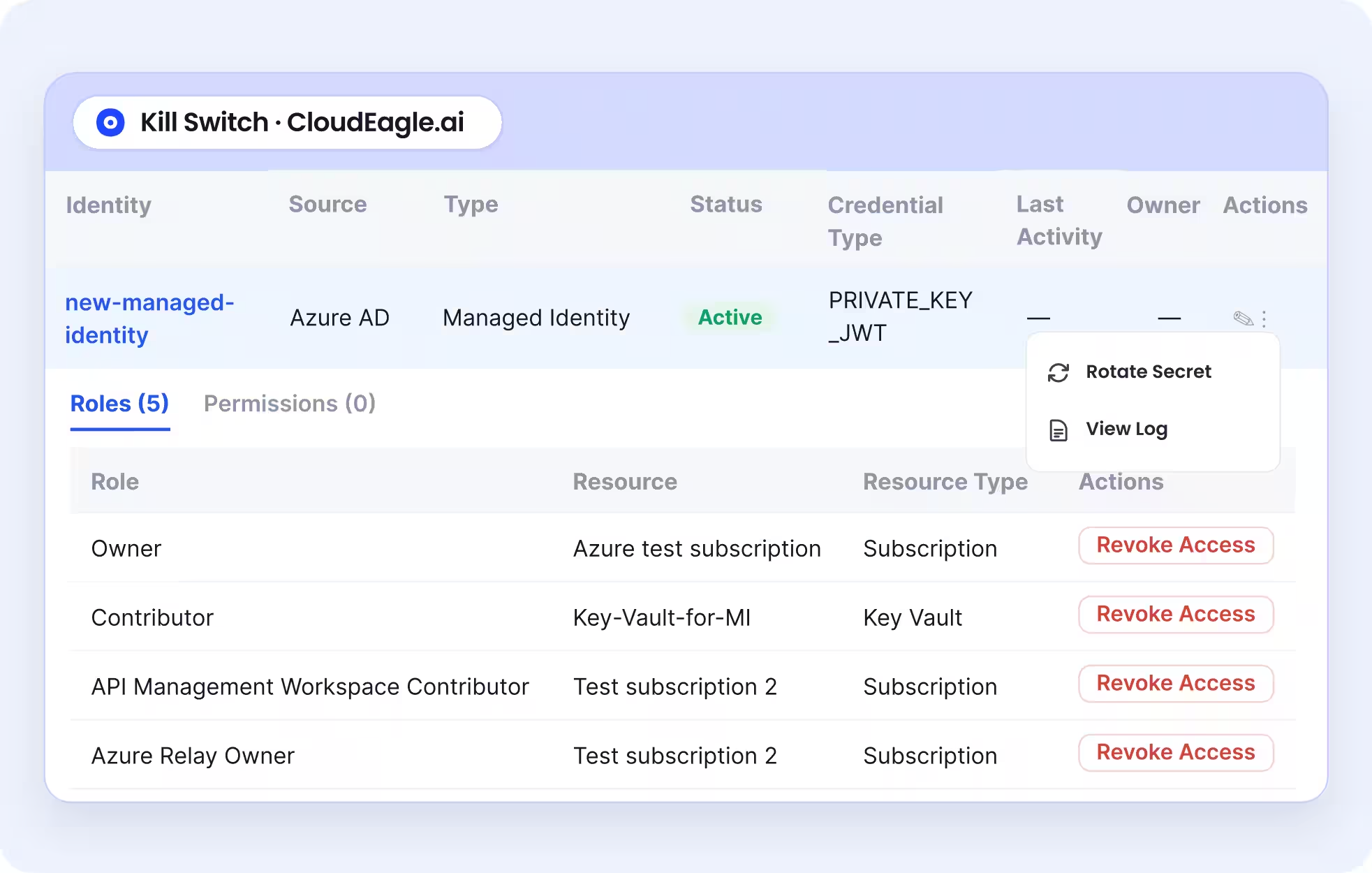
‍

Interface displaying a managed identity's status, credential type, assigned roles, and associated resources, with options to rotate secrets, view activity logs, and revoke access.

‍

The kill switch revokes roles, rotates secrets, or deactivates the agent, with every action logged.

‍

‍

What AI Agent Management Looks Like in Practice

ArmorCode already governed human identities tightly, with structured workflows, regular reviews, and least-privilege controls. Service accounts, API tokens, and AI agents sat outside all of it.

They were created for integrations and projects and rarely decommissioned when those ended, and many held admin-level access nobody had reviewed. The security team estimated it could see about 40% of them.

After bringing them into CloudEagle.ai:

Metric Result
Non-human identity visibility 40% → 95%
Unmanaged identities remediated 480
Over-privileged identities scoped down 220+

‍

New service accounts, tokens, and agents now enter the same continuous review cycle as employees. Governing non-human identities became just as important as managing human access.‍
— Karthik Swarnam, Chief Security and Trust Officer, ArmorCode

‍

How Do You Measure AI Agent Management Over Time?

A working AI agent management program shows up in a small set of operational metrics:

Metric What it tells you
Inventory coverage Share of discovered agents with an inventory record
Ownership coverage Share of active agents with a current, named owner
Unapproved agent count Discovered agents still lacking authorization
Access review completion Whether agents went through their scheduled reviews
Excessive permissions Agents holding more access than their documented need
Time to retire How fast access is revoked after a retirement decision
Cost variance Whether agent usage is running over budget

‍

Define how each metric is calculated before you use it as a target. Inventory coverage only means something when the discovery sources and known gaps are written down.

A growing agent count is not a problem by itself. It becomes one when ownership, access reviews, and retirement fall behind it.

CloudEagle.ai gives IT one inventory of every agent, its owner, and what it can reach, with a kill switch in the same view.

Book a demo
to see the agents running in your environment.

‍

Frequently Asked Questions

What Is the Difference Between AI Agent Management and AI Agent Governance?

AI agent governance sets the rules: which platforms are sanctioned, what data agents may touch, and who approves them. AI agent management applies those rules every day through inventory, ownership, access reviews, monitoring, and retirement.

Are AI Agents Non-Human Identities?

Yes. An AI agent authenticates with credentials such as a service account, an OAuth token, or an API key, so it should be managed like any other non-human identity, with a named owner, scoped permissions, and regular access reviews.

What Is an AI Agent Kill Switch?

An AI agent kill switch is an approved way to stop a risky agent fast by revoking its roles, rotating its secrets, or deactivating its identity. It should name who can trigger it and log every action. Stopping execution alone does not revoke existing credentials, so containment should cover both.

How Do You Find Shadow AI Agents?

Pull agent identities from your identity providers, agent platform consoles, and connected SaaS apps, including the service accounts and API keys agents use. Compare the results with your approved register. Anything unregistered is a shadow agent until its owner and purpose are confirmed.

Can Native Agent Consoles Manage AI Agents on Their Own?

For agents built on that platform, often yes. Copilot Studio and ServiceNow both offer inventory and governance controls. Each console starts from its own platform, though, so organizations running agents in several places usually need a cross-platform inventory as well.

Does CloudEagle.ai Work With Microsoft Entra ID and Okta?

Yes. CloudEagle.ai reads agent identities from Entra ID, Okta, and connected apps, so agents appear whether or not anyone registered them. It then adds the owner, roles, permissions, and activity to each agent record.

Does CloudEagle.ai Slow Down or Interfere With AI Agents?

No. CloudEagle.ai reads identity, permission, and activity data. Agents keep running as they do today until an admin chooses to revoke a role, rotate a secret, or deactivate an identity.

How Quickly Can CloudEagle.ai Be Set Up?

Onboarding takes about 30 minutes once your identity providers are connected. How much of your agent estate the inventory covers depends on which identity providers and apps you connect.

‍

Advertisement for a SaaS Subscription Tracking Template with a call-to-action button to download and a partial graphic of a tablet showing charts.Banner promoting a SaaS Agreement Checklist to streamline SaaS management and avoid budget waste with a call-to-action button labeled Download checklist.Blue banner with text 'The Ultimate Employee Offboarding Checklist!' and a black button labeled 'Download checklist' alongside partial views of checklist documents from cloudeagle.ai.Digital ad for download checklist titled 'The Ultimate Checklist for IT Leaders to Optimize SaaS Operations' by cloudeagle.ai, showing checklist pages.Slack Buyer's Guide offer with text 'Unlock insider insights to get the best deal on Slack!' and a button labeled 'Get Your Copy', accompanied by a preview of the guide featuring Slack's logo.Monday Pricing Guide by cloudeagle.ai offering exclusive pricing secrets to maximize investment with a call-to-action button labeled Get Your Copy and an image of the guide's cover.Blue banner for Canva Pricing Guide by cloudeagle.ai offering a guide to Canva costs, features, and alternatives with a call-to-action button saying Get Your Copy.Blue banner with white text reading 'Little-Known Negotiation Hacks to Get the Best Deal on Slack' and a white button labeled 'Get Your Copy'.Blue banner with text 'Little-Known Negotiation Hacks to Get the Best Deal on Monday.com' and a white button labeled 'Get Your Copy'.Blue banner with text 'Little-Known Negotiation Hacks to Get the Best Deal on Canva' and a white button labeled 'Get Your Copy'.Banner with text 'Slack Buyer's Guide' and a 'Download Now' button next to images of a guide titled 'Slack Buyer’s Guide: Features, Pricing & Best Practices'.Digital cover of Monday Pricing Guide with a button labeled Get Your Copy on a blue background.Canva Pricing Guide cover with a button labeled Get Your Copy on a blue gradient background.

Enter your email to
unlock the report

Oops! Something went wrong while submitting the form.
License Count
Benchmark
Per User/Per Year

Enter your email to
unlock the report

Oops! Something went wrong while submitting the form.
License Count
Benchmark
Per User/Per Year

Enter your email to
unlock the report

Oops! Something went wrong while submitting the form.
Notion Plus
License Count
Benchmark
Per User/Per Year
100-500
$67.20 - $78.72
500-1000
$59.52 - $72.00
1000+
$51.84 - $57.60
Canva Pro
License Count
Benchmark
Per User/Per Year
100-500
$74.33-$88.71
500-1000
$64.74-$80.32
1000+
$55.14-$62.34

Enter your email to
unlock the report

Oops! Something went wrong while submitting the form.

Enter your email to
unlock the report

Oops! Something went wrong while submitting the form.
Zoom Business
License Count
Benchmark
Per User/Per Year
100-500
$216.00 - $264.00
500-1000
$180.00 - $216.00
1000+
$156.00 - $180.00

Enter your email to
unlock the report

Oops! Something went wrong while submitting the form.

Get the Right Security Platform To Secure Your Cloud Infrastructure

Please enter a business email
Thank you!
The 2023 SaaS report has been sent to your email. Check your promotional or spam folder.
Oops! Something went wrong while submitting the form.

Access full report

Please enter a business email
Thank you!
The 2023 SaaS report has been sent to your email. Check your promotional or spam folder.
Oops! Something went wrong while submitting the form.

TL;DR

  • Treat every AI agent as a managed identity, with an owner, documented access, a tracked cost, and a retirement trigger
  • Run agents through the joiner-mover-leaver process IT already uses for employees, across every platform rather than one console
  • Start with three controls: a complete inventory, a named owner for every agent, and a tested way to stop a risky one

‍

‍

AI agent management is the practice of discovering, owning, securing, monitoring, and retiring every AI agent an organization runs, across every platform it was built on. It treats each agent as a non-human identity with a named owner, scoped access, a tracked cost, and a defined end date, so IT can say which agents exist, what they can reach, and who stops them.

The volume is why this can't wait. Gartner expects Fortune 500 companies to run as many as 150,000 agents each by 2028, up from about 15 in 2025.

Gartner also predicts that more than 40% of agentic AI projects will be canceled by the end of 2027, with inadequate risk controls among the causes.

‍

What Does AI Agent Management Involve?

Builder teams think about agents in terms of prompts, tools, and outputs. IT sees something closer to a new hire: an identity that holds credentials, reaches business systems, costs money every time it runs, and keeps working until someone switches it off.

AI agent management applies the identity and access controls IT already runs for people to that identity. In practice, it answers five questions for every agent:

Question What IT needs on record
Which agents exist? Every agent across build platforms, SaaS apps, and employee-created tools
Who owns it? A named owner and backup, linked to current employee records
What can it reach? Connected apps, data, credentials, and assigned permissions
What does it cost? Token consumption and other usage-based charges, by agent or team
When does it stop? A retirement trigger and an approved way to revoke access

‍

These records are what IT reaches for during an access review, an audit, or an incident. Without them, every one of those starts with a scramble across consoles.

Which Agents Fall Under AI Agent Management?

An AI agent is software that acts on its own using credentials it holds, such as updating a record, sending a message, or calling another system. Agents enter an organization through four routes:

  • Platforms teams build on, such as Microsoft Copilot Studio, Salesforce Agentforce, and ServiceNow
  • SaaS tools you already license, where vendors now embed agents by default
  • Employees building or connecting agents on their own, often through accounts IT never approved
  • The service accounts, OAuth tokens, API keys, and MCP servers agents use to reach your data

Most IT teams can see the first route. The other three are where unowned agents pile up, so a useful inventory covers both the agents and the credentials that let them act.

‍

How Is AI Agent Management Different From Orchestration, Observability, and Security?

The terms overlap, and vendors use them loosely. Each one answers a different question:

Practice What it answers
AI agent orchestration Which agent does which task, and in what order
AI agent observability What an agent did, how well, and why it failed
AI agent security How to stop attacks such as prompt injection and data exposure
AI agent management Which agents exist, who owns them, what they can reach, what they cost, and when they stop

‍

Ask a platform team how many agents run on Copilot Studio, and they can likely answer. Ask how many agents across the company can write to your CRM, and the answer needs data from several systems. AI agent management is the work of answering that second question.

‍

Why Do IT and Security Teams Need to Manage AI Agents Now?

Agents join an identity estate that is already hard to govern. CyberArk's 2025 Identity Security Landscape found 82 machine identities for every human one, and 42% of machine identities hold privileged or sensitive access.

In the same survey of 2,600 cybersecurity decision-makers, 68% said their organizations lack identity security controls for AI. Three gaps explain why.

1. Native Tools See One Platform at a Time

Platform vendors are adding real controls. Microsoft Copilot Studio offers agent inventory capabilities, and ServiceNow's AI Control Tower adds governance for AI systems.

Each console still starts from its own platform. Most enterprises run agents on several, so no single native view is complete.

What IT should do: build one inventory that reads from every source, then compare it with the approved register instead of assuming any one console sees everything.

2. Agents Outlive the People Who Built Them

Offboarding removes a departing employee's access. An agent that employee built often has its own identity and credentials, so it keeps running.

Offboarding misses happen even with human access. When Treasure Data connected its SaaS stack to CloudEagle.ai, it immediately found 30 former employees still holding access across 75 apps. The agents employees build are rarely on that checklist at all.

What IT should do: link agent ownership to current employee records, and trigger an ownership review whenever someone leaves or changes roles.

Related read: why offboarding misses agents their creators leave behind.

3. Permissions Drift Upward

Pilots get broad access so they work quickly, and that access is seldom scoped back down. An agent built to summarize support tickets can end up able to edit or delete them.

What IT should do: grant the minimum access each task needs, and review it before production and whenever the agent's tools or connected systems change.

‍

68% of Orgs Have No Identity Controls for AI

Find every agent, credential, and orphaned identity before the next audit.
Download Checklist

‍

How Does the AI Agent Lifecycle Work, From Joiner to Leaver?

The AI agent lifecycle follows the joiner-mover-leaver model IT already runs for employees, with one change: every step has to work across platforms, not inside one console. It breaks into three stages and six steps:

Stage Steps Done when
Joiner 1. Discover existing agents
2. Register new agents
3. Assign an owner
Every agent is on record with an accountable owner
Mover 4. Scope and review access
5. Monitor activity and spend
Access matches the task, and spend has alerts
Leaver 6. Retire or revoke Roles, secrets, and identity are removed and recorded

‍

Stage 1: Joiner

Step 1: Discover Existing Agents

  • Pull agent identities from identity providers such as Microsoft Entra ID and Okta
  • Add each agent platform's admin console and your connected SaaS apps
  • Map the service accounts, API keys, and integrations behind each agent
  • Record each agent's platform, purpose, status, creator, and connected resources

‍

Dashboard showing 145 non-human identities across Azure AD and Okta, with identity types including managed identities, API tokens, service identities, and OAuth service apps. Highlights inactive identities, admin permissions, and identities accessing multiple resources, alongside a detailed permissions table with options to revoke access.

‍

A cross-platform inventory puts agent identities next to the managed identities, API tokens, and OAuth apps behind them.

Step 2: Register New Agents Before Launch

  • Add an intake gate, so agents are registered before they touch production data or sensitive systems
  • Capture the business purpose, owner, requested permissions, connected apps, and expected cost
  • Investigate anything discovered but unregistered, and confirm its owner and purpose before restricting or retiring it

Step 3: Assign an Owner and a Backup

  • Name one accountable owner who understands why the agent exists and approves its access
  • Add a backup for continuity when the owner is away or leaves
  • Link both to your HR system, so departures and role changes trigger a review automatically

Stage 2: Mover

Step 4: Scope and Review Access

  • Default to read-only access unless the agent must change data
  • Require explicit approval for write access to systems of record
  • Add agents to periodic access reviews; quarterly suits most production agents, and higher-risk ones need more
  • Remove permissions an agent no longer needs, after checking they don't support a rare but legitimate task

Step 5: Monitor Activity and Spend

  • Agent activity, covering actions taken, systems touched, and changes made
  • Identity events, covering sign-ins, permission changes, and credential use
  • Operating cost, covering token consumption by agent, app, or team
  • Execution patterns, such as repeated failures, activity spikes, or loops that trigger excessive tool calls

Every logged action should trace back to an agent and its owner. Set budget alerts too, since usage-based pricing can turn one looping agent into a cost spike.

Per-team limits catch problems early. Printify set AI spend limits with automatic alerts and caught $30K in overspend before it reached an invoice. Treasure Data now traces 2.8M tokens a month to a specific user, project, or model.

Stage 3: Leaver

Step 6: Retire Agents and Revoke Access

Start a retirement review when an agent's task ends, its owner leaves, its access is no longer appropriate, or its behavior turns risky. The runbook covers five actions:

  1. Disable execution, so the agent can't start new actions
  2. Revoke its roles and access to connected apps
  3. Revoke or rotate its tokens, keys, and secrets
  4. Remove leftover integrations, schedules, and related resources
  5. Record the retirement date, reason, and completed steps in the inventory

Give the runbook a named approver, so stopping an agent takes minutes rather than a ticket queue. If revoking roles, rotating secrets, and deactivating the identity happen in three consoles, containment waits on whoever has access to each one.

Want the product view of these controls? See how the CloudEagle.ai kill switch works.

‍

Agents Don’t Have an Offboarding Checklist

Run the same review cycle for agents that you run for employees.
Download Checklist

‍

How Much Oversight Does Each AI Agent Need?

Oversight should match what an agent can do, not how it was built. Grouping agents into three risk tiers keeps reviews focused where the impact is highest:

Risk tier Example Controls
Lower Searches or summarizes approved documents without changing records Named owner, documented permissions, periodic review
Moderate Updates CRM records or creates support tickets Owner approval before launch, scoped write access, activity logging, regular access reviews
Higher Holds admin rights or reaches sensitive data Security sign-off, tighter access, closer monitoring, a tested containment runbook

‍

Treat the tiers as a starting point. A read-only agent that reaches highly sensitive data may need higher-tier controls.

Before approving any agent, its owner should be able to answer four questions:

  • Does it need write access, or would read-only work?
  • Which sensitive data and systems can it reach?
  • Who can stop it, and how fast?
  • What happens to it if I leave or its purpose changes?

If the team can't answer these, the agent isn't ready for production access.

‍

What Should an AI Agent Inventory Record?

An AI agent inventory should answer the questions an auditor or incident responder asks first. A list of names and platforms is not enough. At minimum, record:

Field Why it matters
Name and unique identifier Separates the agent from other identities
Platform, creator, and creation date Shows where it came from and who introduced it
Business purpose and status Establishes why it exists and whether it is active
Owner and backup Identifies who is accountable
Credentials and identity references Locates authentication without exposing secrets
Connected apps and data Shows what the agent can reach
Assigned permissions Surfaces excessive access
Last activity Flags inactive or abandoned agents
Cost and usage Catches waste and budget overruns
Approval and review history Gives auditors evidence of authorization
Retirement status Confirms access was revoked and cleanup finished

‍

Matching owners against current employee records is the fastest way to find agents that need reassignment. Keep the inventory live by connecting it to discovery sources and making registration part of every launch.

‍

Who Owns AI Agent Management?

IT should own AI agent management. It already runs the identity providers agents authenticate through, the offboarding process agents slip past, and the access reviews agents need to join.

Handing agents to a separate AI team usually creates a second inventory that drifts from the first. Other teams feed decisions in; IT keeps the system of record and acts on it.

What IT Owns

  • The agent inventory and the intake gate
  • Owner assignment, and reassignment when owners leave
  • Access reviews for agents
  • Retirement and the kill-switch runbook
  • Reporting on agent count, orphaned agents, and spend

‍

Where IT Needs Input From Other Teams

Team What it gives IT
Security Risk tiers, access policy, and approval for high-risk agents and kill-switch use
Business owners The agent's purpose, approval before launch, and attestation in each review
Finance Budget thresholds for token-spend alerts
Chief AI Officer Sanctioned agent platforms and AI policy

‍

How CloudEagle.ai Manages AI Agents Across Platforms

CloudEagle.ai is an AI governance, SaaS management, and SaaS security platform that gives enterprises one command center to discover, govern, and secure their SaaS and AI stack, including human and non-human identities. RingCentral, Automation Anywhere, and Treasure Data are among its customers.

CloudEagle.ai treats every AI agent as a non-human identity and runs it through the same ownership, access review, and offboarding discipline IT applies to employees. It reads identity, permission, and activity data only, so agents keep running as they do today until an admin acts.

Why a Cross-Platform View Matters

What IT needs A native agent console CloudEagle.ai
Inventory Agents built on that platform Agents across Entra ID, Okta, and connected apps, registered or not
Ownership The creator recorded in that platform An owner per agent, flagged when that owner leaves
Permissions Roles within that platform Every role down to the resource, including access not yet used
Credentials Managed console by console Each agent tied to its service accounts, API tokens, and secrets
Shutdown One console at a time Revoke, rotate, or deactivate from one view, with every action logged

‍

Find Every Agent, Registered or Not

  • Reads agent identities from Microsoft Entra ID, Okta, and connected apps
  • Shows each agent's source, status, owner, credentials, and last activity in one inventory
  • Surfaces shadow agents IT never approved, alongside AI apps and MCP servers

‍

Product dashboard displaying 152 total AI agents, their Azure AD environment, agent types, and an active agent registry with identity names, last activity dates, status, assigned owners, and management actions.

‍

Every agent in one inventory, with its source, status, owner, and last activity.

See What Each Agent Can Reach

  • Lists every app and data source an agent connects to, from Salesforce to the HR system
  • Shows assigned and inherited roles, which is usually where the extra access sits
  • Flags agents with access to sensitive data, so reviews start with the riskiest ones

‍

Agent overview displaying 152 total agents and highlighting three governance risks: seven unsanctioned shadow agents, 25 agents with sensitive data access, and 40 agents without assigned owners.

‍

Shadow agents, sensitive-data access, and ownerless agents flagged in one view.

Keep Every Agent Owned and on Least Privilege

  • Flags agents whose owner has left, so IT can reassign or retire them
  • Removes roles and permissions an agent doesn't need
  • Puts agents in the same access reviews as employees, filtered for inactive, ownerless, over-permissioned, or never-rotated agents

‍

CloudEagle.ai interface showing 40 agents without owners, their assigned roles and resources, and a confirmation dialog for revoking an agent's access to sensitive business resources.

‍

Revoking an over-privileged role from an agent whose owner has left.

Trace Activity and Spend

  • Activity logs show what each agent did, changed, and touched, traced back to its owner
  • Token usage is tracked by user, team, and project, so a looping agent shows up before the invoice does

‍

Activity log for an Invoice Recon Agent, identifying its Azure AD source and assigned owner, with timestamps for exported invoice data, role changes, and secret access.

‍

Agent activity, from exports to secrets read, traced to the owner.

Stop a Risky Agent From the Same Screen

  • Revoke any role, down to a single resource
  • Rotate the agent's secret, where the platform supports it
  • Deactivate its identity

Nothing happens automatically. Admins decide, and every action is logged for auditors.

CloudEagle.ai governs identity and access rather than blocking individual agent actions at runtime. Teams that need runtime enforcement pair it with a runtime security tool.

‍

Interface displaying a managed identity's status, credential type, assigned roles, and associated resources, with options to rotate secrets, view activity logs, and revoke access.

‍

The kill switch revokes roles, rotates secrets, or deactivates the agent, with every action logged.

‍

‍

What AI Agent Management Looks Like in Practice

ArmorCode already governed human identities tightly, with structured workflows, regular reviews, and least-privilege controls. Service accounts, API tokens, and AI agents sat outside all of it.

They were created for integrations and projects and rarely decommissioned when those ended, and many held admin-level access nobody had reviewed. The security team estimated it could see about 40% of them.

After bringing them into CloudEagle.ai:

Metric Result
Non-human identity visibility 40% → 95%
Unmanaged identities remediated 480
Over-privileged identities scoped down 220+

‍

New service accounts, tokens, and agents now enter the same continuous review cycle as employees. Governing non-human identities became just as important as managing human access.‍
— Karthik Swarnam, Chief Security and Trust Officer, ArmorCode

‍

How Do You Measure AI Agent Management Over Time?

A working AI agent management program shows up in a small set of operational metrics:

Metric What it tells you
Inventory coverage Share of discovered agents with an inventory record
Ownership coverage Share of active agents with a current, named owner
Unapproved agent count Discovered agents still lacking authorization
Access review completion Whether agents went through their scheduled reviews
Excessive permissions Agents holding more access than their documented need
Time to retire How fast access is revoked after a retirement decision
Cost variance Whether agent usage is running over budget

‍

Define how each metric is calculated before you use it as a target. Inventory coverage only means something when the discovery sources and known gaps are written down.

A growing agent count is not a problem by itself. It becomes one when ownership, access reviews, and retirement fall behind it.

CloudEagle.ai gives IT one inventory of every agent, its owner, and what it can reach, with a kill switch in the same view.

Book a demo
to see the agents running in your environment.

‍

Frequently Asked Questions

What Is the Difference Between AI Agent Management and AI Agent Governance?

AI agent governance sets the rules: which platforms are sanctioned, what data agents may touch, and who approves them. AI agent management applies those rules every day through inventory, ownership, access reviews, monitoring, and retirement.

Are AI Agents Non-Human Identities?

Yes. An AI agent authenticates with credentials such as a service account, an OAuth token, or an API key, so it should be managed like any other non-human identity, with a named owner, scoped permissions, and regular access reviews.

What Is an AI Agent Kill Switch?

An AI agent kill switch is an approved way to stop a risky agent fast by revoking its roles, rotating its secrets, or deactivating its identity. It should name who can trigger it and log every action. Stopping execution alone does not revoke existing credentials, so containment should cover both.

How Do You Find Shadow AI Agents?

Pull agent identities from your identity providers, agent platform consoles, and connected SaaS apps, including the service accounts and API keys agents use. Compare the results with your approved register. Anything unregistered is a shadow agent until its owner and purpose are confirmed.

Can Native Agent Consoles Manage AI Agents on Their Own?

For agents built on that platform, often yes. Copilot Studio and ServiceNow both offer inventory and governance controls. Each console starts from its own platform, though, so organizations running agents in several places usually need a cross-platform inventory as well.

Does CloudEagle.ai Work With Microsoft Entra ID and Okta?

Yes. CloudEagle.ai reads agent identities from Entra ID, Okta, and connected apps, so agents appear whether or not anyone registered them. It then adds the owner, roles, permissions, and activity to each agent record.

Does CloudEagle.ai Slow Down or Interfere With AI Agents?

No. CloudEagle.ai reads identity, permission, and activity data. Agents keep running as they do today until an admin chooses to revoke a role, rotate a secret, or deactivate an identity.

How Quickly Can CloudEagle.ai Be Set Up?

Onboarding takes about 30 minutes once your identity providers are connected. How much of your agent estate the inventory covers depends on which identity providers and apps you connect.

‍

CloudEagle.ai recognized in the 2025 Gartner® Magic Quadrant™ for SaaS Management Platforms
Download now
gartner chart
5x
Faster employee
onboarding
80%
Reduction in time for
user access reviews
30k
Workflows
automated
$15Bn
Analyzed in
contract spend
$2Bn
Saved in
SaaS spend

Streamline SaaS governance and save 10-30%

Book a Demo with Expert
CTA image




