Why Your AI Agents End Up With More Access Than Your Security Team

Share via:
blog-cms-banner-bg
Little-Known Negotiation Hacks to Get the Best Deal on Slack
cta-bg-blogDownload Your Copy

HIPAA Compliance Checklist for 2025

Download PDF

A senior developer builds an agent to automate part of the deployment pipeline and authenticates it with their own credentials, because that's the fastest way to get it working. 

Those credentials include admin access to the GitHub org, write access to production, and read access to the secrets manager.

The agent needs about 20% of that. It gets all of it, because nobody asked what the agent actually needs before connecting it to everything the builder can reach. 

That's an AI agent access control failure, and in most enterprises, it hasn't been solved yet.

TL;DR

  • AI agents inherit their builder's full permission footprint, not a scoped set designed for the agent's task.
  • Low-code platforms default to the broadest available scope, and almost nobody narrows it after the agent works.
  • Standard access reviews are built to catch humans behaving unusually. An agent using its full (excessive) access looks like normal agent behavior, so nothing flags it.
  • AI agent access control requires agent-specific credentials, connection-level inventory, and ownership tied to the agent's current purpose, not its builder's role history.
  • Most enterprises have no AI agent access control program at all, which is why the gap keeps growing quietly instead of getting caught early.

1. The Access Gap Behind Every Over-Permissioned Agent

AI agents end up with more access than they need. 

Here's why AI agent access control fails at the point they're built, what that failure looks like in a real environment, and why the controls you already have won't catch it.
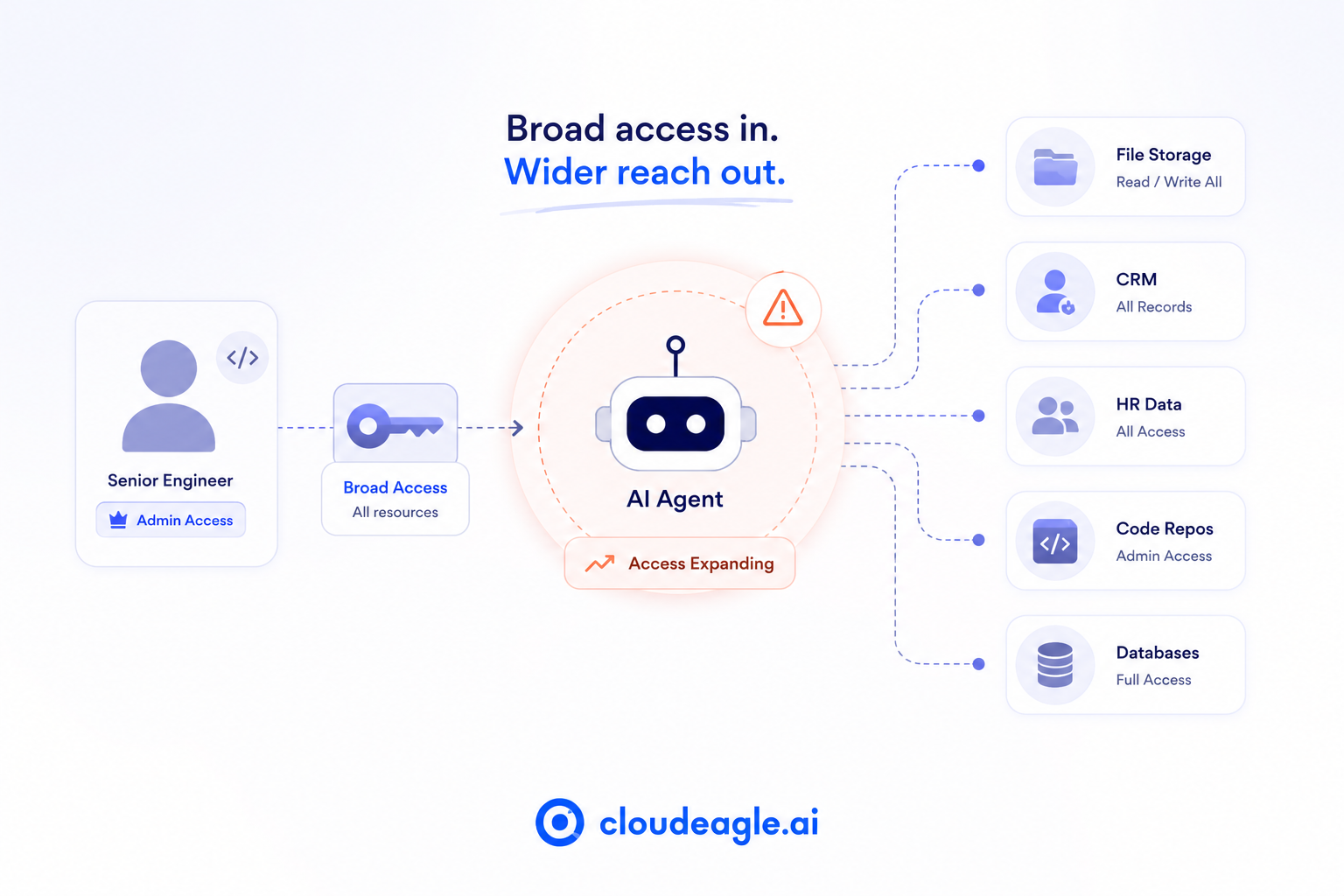
Diagram showing how an AI agent inherits broad admin permissions from a user, expanding access across file storage, CRM, HR systems, code repositories, and databases.

How Agents Inherit Excess Access: 

  • Builder credential inheritance: A senior engineer with admin GitHub access builds a code review agent. The agent gets admin GitHub access, even though it needs read access to one repository.
  • Default-broad low-code platforms: Copilot Studio, Zapier, n8n, and Make prompt users toward the widest available scope at setup (read/write all files, access all records, admin on the account) because that's what makes the integration work without troubleshooting.
  • No provisioning workflow for the agent itself: a new hire goes through manager approval and role-based access assignment before their first login. An agent built in a low-code platform goes through none of that, and AI agent permissions get set by default rather than by review.
  • Permission drift after go-live: New data sources get connected, and scope gets expanded to handle edge cases, with no change management step behind any of it.
  • Untouched test-time permissions: Broad access is what made testing easy. Nobody circles back to narrow it once the agent works in production.
  • Blast radius multiplication through sharing: An agent built by one person with broad access, shared with a team, hands that team query access to data most of them couldn't open directly.

What This Looks Like in Practice

Step New security analyst Copilot agent built by a finance manager
Access request Manager submits, IT reviews against role None, built solo in 45 minutes
Scope granted SIEM, ticketing, security docs only Finance SharePoint, exec SharePoint, CRM, HR analytics
Review cadence Quarterly, tied to HR records Never reviewed
Role change Access re-scoped automatically Access untouched, agent keeps running
Offboarding Deprovisioned on exit No trigger exists

The same pattern repeats across current tools:

  • Copilot Studio: an agent built to summarize customer feedback gets read access to the entire SharePoint tenant instead of one folder.
  • Zapier: a workflow syncing HubSpot to Slack runs on the ops manager's credentials, which include admin access to marketing and billing data the workflow never touches.
  • AI coding assistants (Cursor, GitHub Copilot): connect with a repo-admin API key when the task only needs read access to one service.

Why Standard Access Reviews Miss It

  • Anomaly detection assumes human behavior. A human accessing systems outside their normal pattern trips an alert. An agent accessing everything it's technically permitted to access looks like ordinary agent behavior, even when that scope is excessive.
  • The scale is already tilted against visibility. Palo Alto Networks' Identity Security Landscape report found machine identities, most of them AI agents, now outnumber human identities roughly 109 to 1 in the average enterprise. Separate research from Signisys puts machine identities at 100 to 1 or higher, with 97% carrying excessive privileges.
  • Regulated industries feel it first. Compliance teams in pharma and other regulated sectors are already flagging agent access as a growing compliance risk, not because agents misbehave, but because that access was never reviewed against the standard applied to human identities.
  • The blast radius is categorically different. An over-permissioned human accesses one system at a time, manually. An over-permissioned agent queries every connected system simultaneously, at machine speed, continuously.

It's the predictable result of building agents without a least-privilege provisioning step, and it's why AI agent access control has to work differently than the access reviews built for people. 

Any AI agent access control program that just reuses human review cycles will keep missing this category of risk by design.

97% of Machine Identities Carry Excessive Privileges

Find every over-permissioned agent in your stack right now.
Download Checklist

2. What AI Agent Access Control Requires

Fixing AI agent access control needs three specific mechanics: a governance model that doesn't just copy human access reviews, and a concrete way to start.

The Three Requirements

  • Access scoping at creation: a policy-enforced baseline that restricts AI agent permissions by default and requires an explicit exception request to widen them, rather than defaulting broad and hoping someone narrows it later.
  • A living agent access inventory: every agent's connections, permissions, last-used date, and owner, reviewed on the same cadence as human access, quarterly at minimum.
  • Owner-linked lifecycle governance: when an agent's creator changes roles or leaves, the agent's access gets flagged for review immediately, because the access was justified by that person's role, not by the agent's current purpose.

How This Differs From Human Access Governance

Human identity AI agent
Authentication SSO OAuth tokens and API keys, invisible to the IDP
Access structure Single role Collection of independent connections
Review trigger HR event, role change, session expiry None by default

This means AI agent access control needs connection-level inventory instead of role-level review, token and key lifecycle management instead of session management, and purpose-based scoping instead of role-based scoping. 

Bolting AI agent access control onto an existing human IAM program without changing these three assumptions is why most first attempts stall.

A Practical Starting Point

  1. Inventory first: find every agent in the environment before attempting to scope any single one.
  2. Classify by risk: agents connected to production systems, financial data, or customer records get scoped first.
  3. Start with new agents: apply least privilege AI agents provisioning to every agent created from today forward, and treat the existing estate as a separate remediation project. A least privilege AI agents policy only works going forward if it's the default for every new build, not a retrofit applied after the fact.

The common objection is that nobody knows what an agent needs until it's running in production. In practice, builders consistently overestimate what an agent needs at build time. 

Starting narrow and expanding on a real requirement costs far less than starting broad and never narrowing down.

Human Access Reviews Won't Catch Agent Access Drift

Use this checklist to close the gaps your current reviews are missing.
Download Checklist

3. How CloudEagle.ai Gives Security Teams Visibility Into Agent Access
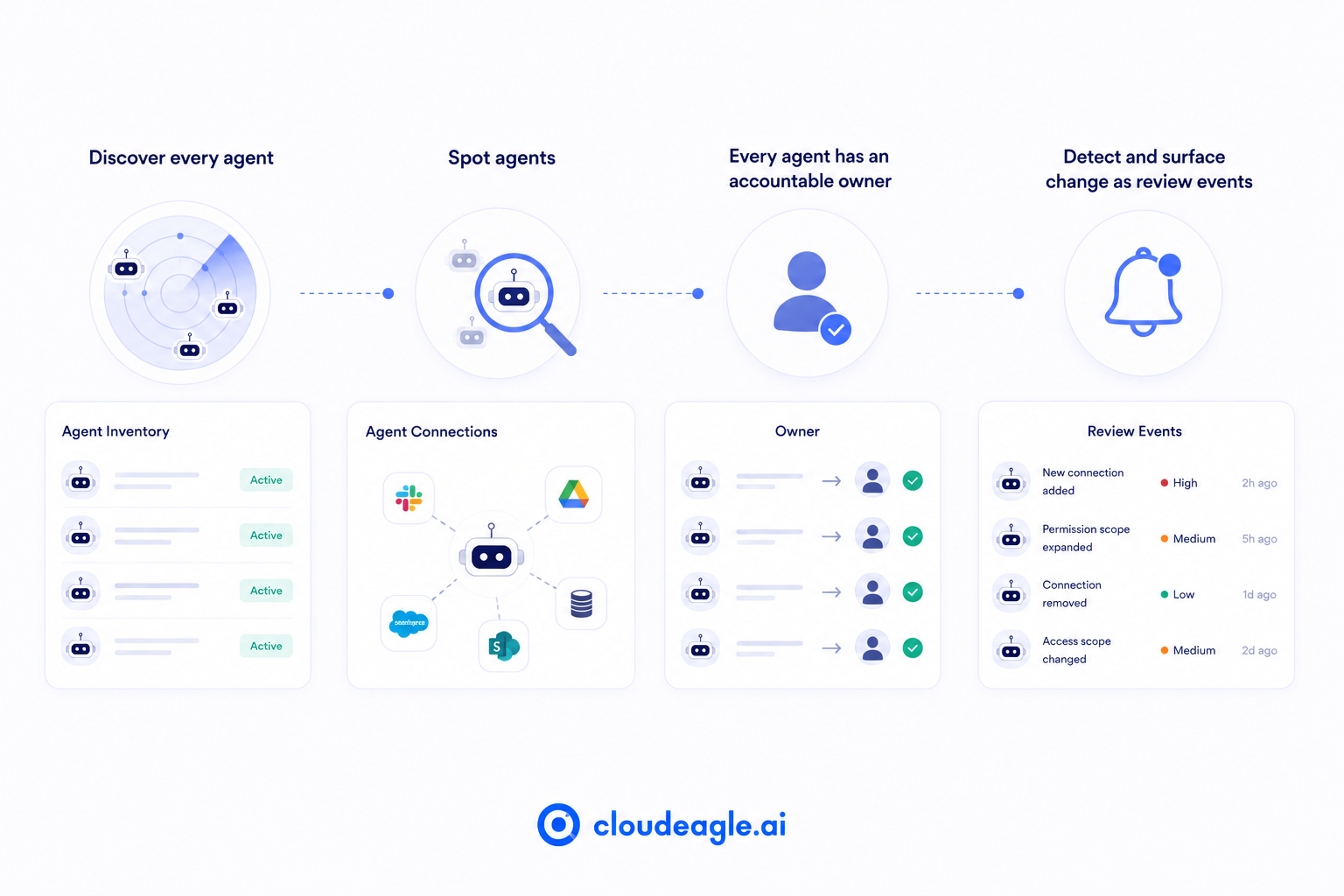
CloudEagle.ai workflow illustrating AI agent discovery, connection mapping, owner assignment, and continuous monitoring of permission changes through review events.

a) Agent inventory with connection detail: 

Nobody can assess AI agent access control without first knowing every agent that exists, what it connects to, and what it can reach, and most of that inventory currently lives nowhere. 

How CloudEagle.ai solves it:

  • Surfaces every agent in the environment, including ones built in low-code platforms that never went through IT
  • Maps each agent's connected systems and permission scope automatically
  • Correlates identity, HR, finance, and security data to catch unauthorized AI usage
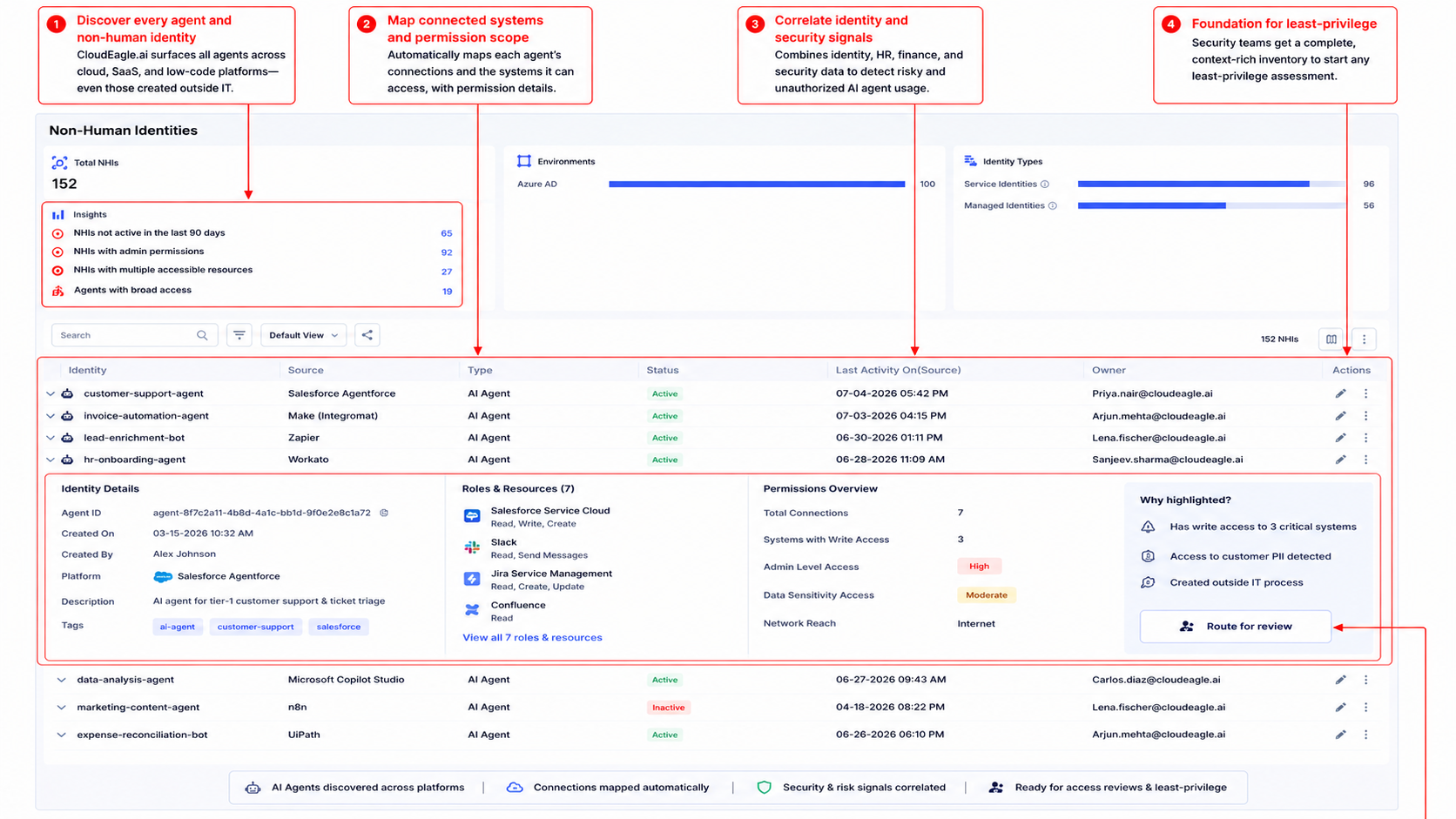
CloudEagle.ai AI agent inventory displaying discovered agents, connected applications, permission scope, ownership, security context, and risk indicators for least-privilege access reviews.

Security teams get the foundation any least-privilege assessment has to start from, instead of building it from scratch during an audit.

b) Over-permission flags: 

An agent with more access than its documented purpose requires usually stays invisible until an incident forces the question. 

How CloudEagle.ai solves it:

  • Flags agents whose connection scope exceeds their stated purpose
  • Surfaces the gap between what an agent needs and what it actually has. "What does this agent actually need versus what does it have?" becomes a question security can answer directly.
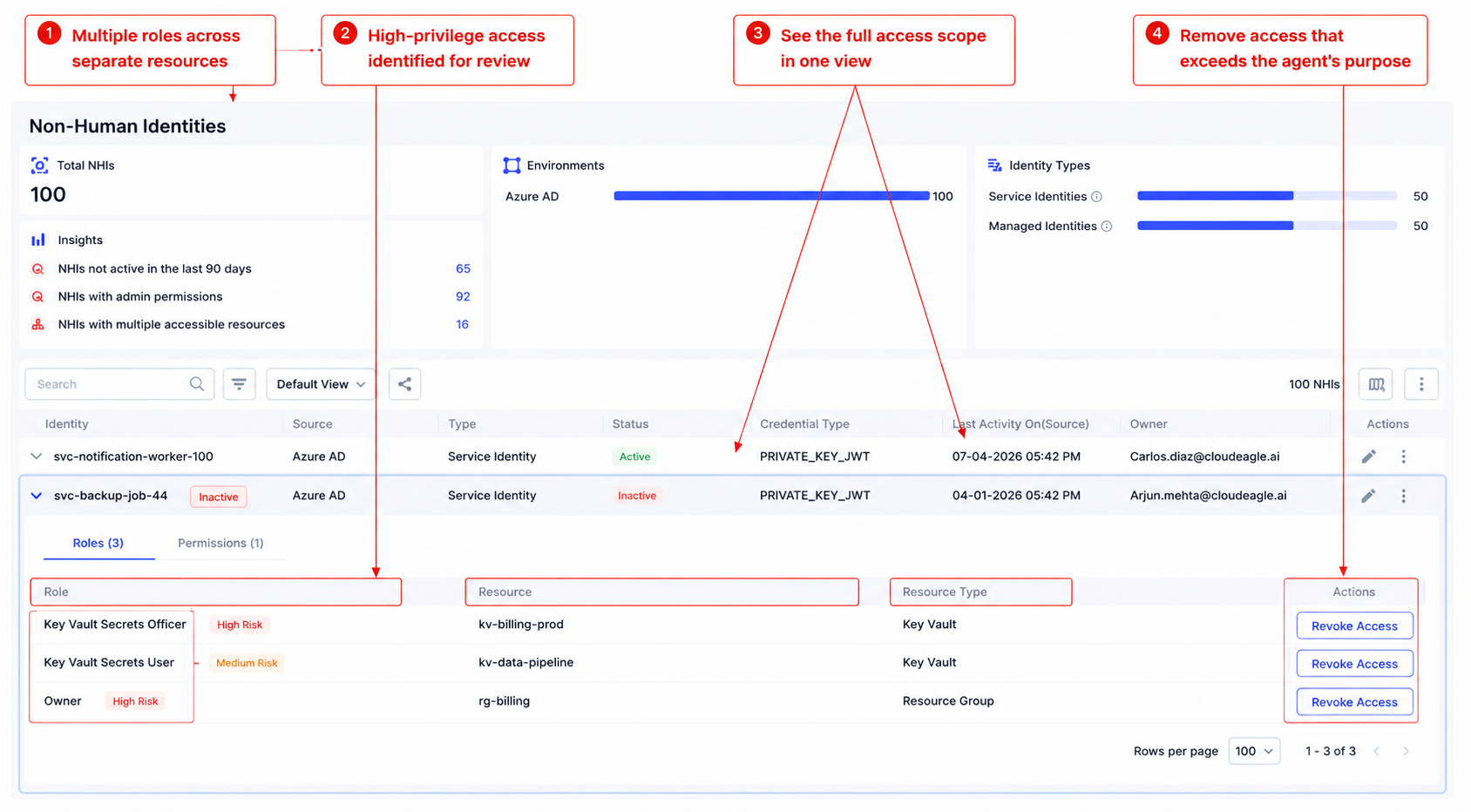
CloudEagle.ai dashboard showing detailed AI agent permissions across multiple resources, highlighting high-risk access and enabling one-click privilege revocation.

c) Ownership records

Access without an accountable owner never gets re-certified, so it just accumulates. 

How CloudEagle.ai solves it:

  • Assigns every agent an owner responsible for certifying its access scope
  • Applies the same non-human identity ownership model CloudEagle.ai uses for service accounts and API keys. No agent goes live or stays live without someone accountable for what it can reach.
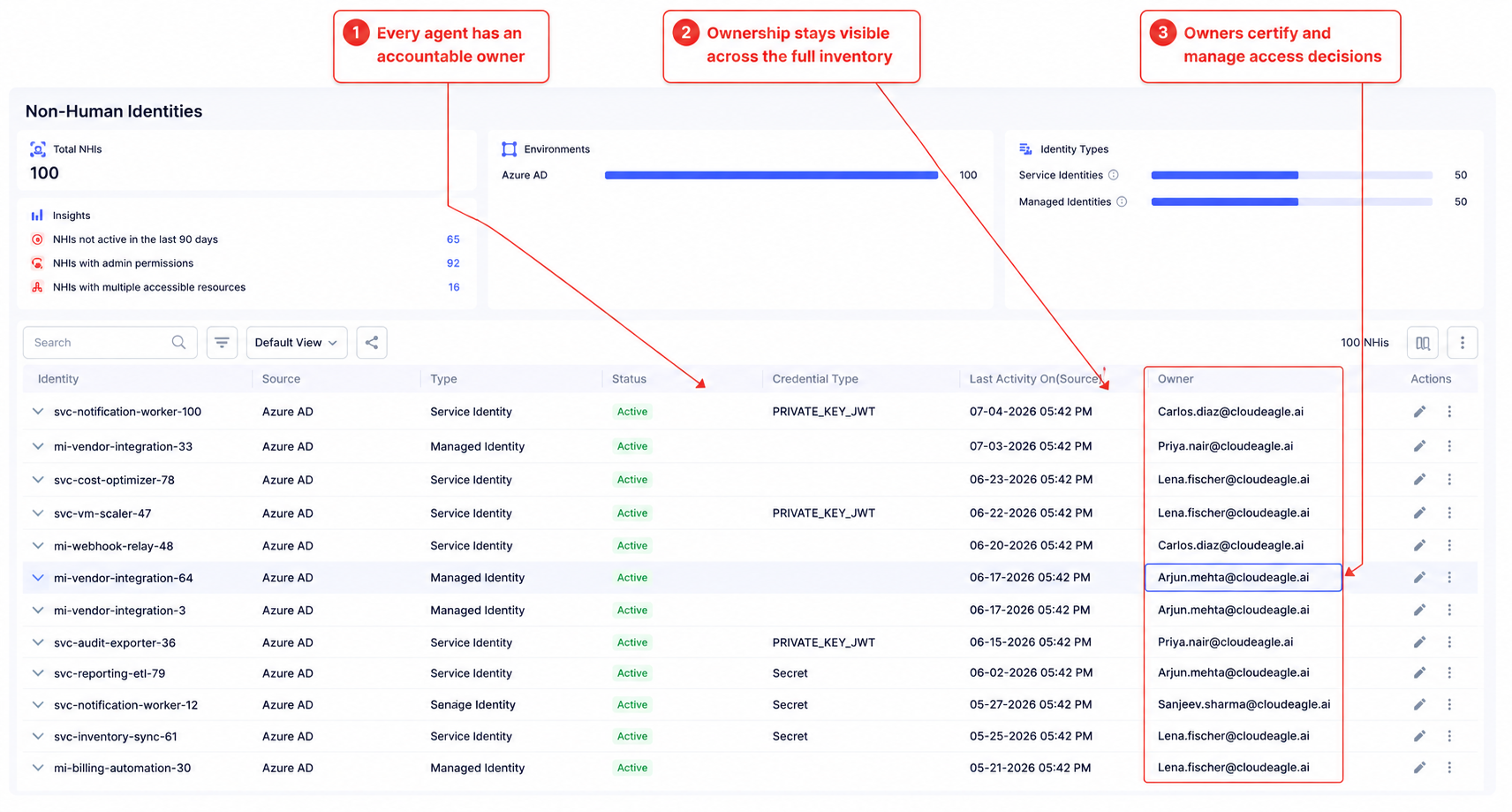
CloudEagle.ai inventory of AI agents and non-human identities with assigned owners, continuous ownership visibility, and accountability for access certification and governance.

For the mechanics of how ownership actually gets assigned, see how CloudEagle.ai assigns non-human identity ownership.

d) Scope change detection

Agent connections change constantly, and each change is a silent permission expansion if nobody's watching for it. How CloudEagle.ai solves it:

  • Detects when an agent's connections or scope change
  • Surfaces the change as a review event in the governance dashboard rather than letting it pass unnoticed. Scope expansion becomes something security reviews on purpose, not something they discover after the fact.
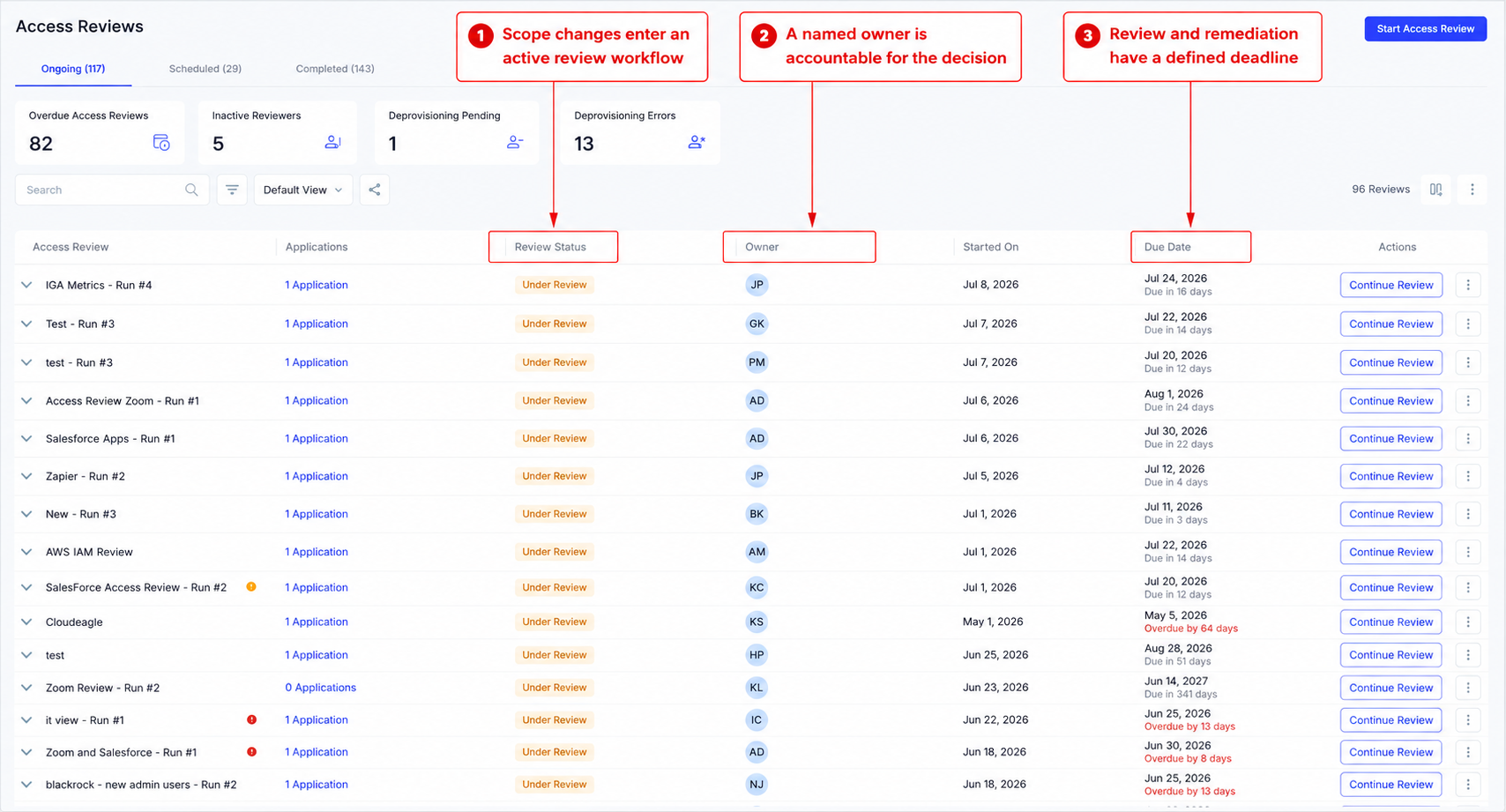
CloudEagle.ai access review dashboard tracking AI and application access reviews with review status, assigned owners, due dates, and remediation workflows for governance.

CloudEagle.ai gives security teams the inventory and connection visibility that AI agent access control depends on. It's the same governance backbone behind CloudEagle.ai's broader AI governance capability, which tracks every AI tool and token across the enterprise. 

For the conflict-of-interest angle on agents that can both retrieve and act on sensitive data, see how identity and access governance applies segregation of duties to agents. 

And if an agent showed up outside any approval process to begin with, that's a shadow AI problem before it's an access control problem.

4. FAQs

1. What are the biggest security risks of AI agents? 

Weak AI agent access control shows up as over-permissioned access inherited from builders, no provisioning review before go-live, and blast radius from agents querying every connected system at machine speed.

2. How do you make AI agents secure? 

Good AI agent access control scopes access at creation, issues agent-specific credentials, assigns an accountable owner, and reviews connection scope on the same cadence as human access reviews.

3. What are the 4 pillars of AI agents? 

Most frameworks name autonomy, tool use, memory, and reasoning as the core pillars, with access governance increasingly treated as a required fifth layer.

4. What are the main security risks when AI agents have excessive privileges in enterprise systems? 

Data exposure across every connected system at once, agent-mediated access for people who couldn't reach that data directly, and compliance gaps in regulated environments.

See how CloudEagle.ai handles AI agent access control end-to-end and brings agents into the same review cycle as human identities → book a demo.

Advertisement for a SaaS Subscription Tracking Template with a call-to-action button to download and a partial graphic of a tablet showing charts.Banner promoting a SaaS Agreement Checklist to streamline SaaS management and avoid budget waste with a call-to-action button labeled Download checklist.Blue banner with text 'The Ultimate Employee Offboarding Checklist!' and a black button labeled 'Download checklist' alongside partial views of checklist documents from cloudeagle.ai.Digital ad for download checklist titled 'The Ultimate Checklist for IT Leaders to Optimize SaaS Operations' by cloudeagle.ai, showing checklist pages.Slack Buyer's Guide offer with text 'Unlock insider insights to get the best deal on Slack!' and a button labeled 'Get Your Copy', accompanied by a preview of the guide featuring Slack's logo.Monday Pricing Guide by cloudeagle.ai offering exclusive pricing secrets to maximize investment with a call-to-action button labeled Get Your Copy and an image of the guide's cover.Blue banner for Canva Pricing Guide by cloudeagle.ai offering a guide to Canva costs, features, and alternatives with a call-to-action button saying Get Your Copy.Blue banner with white text reading 'Little-Known Negotiation Hacks to Get the Best Deal on Slack' and a white button labeled 'Get Your Copy'.Blue banner with text 'Little-Known Negotiation Hacks to Get the Best Deal on Monday.com' and a white button labeled 'Get Your Copy'.Blue banner with text 'Little-Known Negotiation Hacks to Get the Best Deal on Canva' and a white button labeled 'Get Your Copy'.Banner with text 'Slack Buyer's Guide' and a 'Download Now' button next to images of a guide titled 'Slack Buyer’s Guide: Features, Pricing & Best Practices'.Digital cover of Monday Pricing Guide with a button labeled Get Your Copy on a blue background.Canva Pricing Guide cover with a button labeled Get Your Copy on a blue gradient background.

Enter your email to
unlock the report

Oops! Something went wrong while submitting the form.
License Count
Benchmark
Per User/Per Year

Enter your email to
unlock the report

Oops! Something went wrong while submitting the form.
License Count
Benchmark
Per User/Per Year

Enter your email to
unlock the report

Oops! Something went wrong while submitting the form.
Notion Plus
License Count
Benchmark
Per User/Per Year
100-500
$67.20 - $78.72
500-1000
$59.52 - $72.00
1000+
$51.84 - $57.60
Canva Pro
License Count
Benchmark
Per User/Per Year
100-500
$74.33-$88.71
500-1000
$64.74-$80.32
1000+
$55.14-$62.34

Enter your email to
unlock the report

Oops! Something went wrong while submitting the form.

Enter your email to
unlock the report

Oops! Something went wrong while submitting the form.
Zoom Business
License Count
Benchmark
Per User/Per Year
100-500
$216.00 - $264.00
500-1000
$180.00 - $216.00
1000+
$156.00 - $180.00

Enter your email to
unlock the report

Oops! Something went wrong while submitting the form.

Get the Right Security Platform To Secure Your Cloud Infrastructure

Please enter a business email
Thank you!
The 2023 SaaS report has been sent to your email. Check your promotional or spam folder.
Oops! Something went wrong while submitting the form.

Access full report

Please enter a business email
Thank you!
The 2023 SaaS report has been sent to your email. Check your promotional or spam folder.
Oops! Something went wrong while submitting the form.

A senior developer builds an agent to automate part of the deployment pipeline and authenticates it with their own credentials, because that's the fastest way to get it working. 

Those credentials include admin access to the GitHub org, write access to production, and read access to the secrets manager.

The agent needs about 20% of that. It gets all of it, because nobody asked what the agent actually needs before connecting it to everything the builder can reach. 

That's an AI agent access control failure, and in most enterprises, it hasn't been solved yet.

TL;DR

  • AI agents inherit their builder's full permission footprint, not a scoped set designed for the agent's task.
  • Low-code platforms default to the broadest available scope, and almost nobody narrows it after the agent works.
  • Standard access reviews are built to catch humans behaving unusually. An agent using its full (excessive) access looks like normal agent behavior, so nothing flags it.
  • AI agent access control requires agent-specific credentials, connection-level inventory, and ownership tied to the agent's current purpose, not its builder's role history.
  • Most enterprises have no AI agent access control program at all, which is why the gap keeps growing quietly instead of getting caught early.

1. The Access Gap Behind Every Over-Permissioned Agent

AI agents end up with more access than they need. 

Here's why AI agent access control fails at the point they're built, what that failure looks like in a real environment, and why the controls you already have won't catch it.

Diagram showing how an AI agent inherits broad admin permissions from a user, expanding access across file storage, CRM, HR systems, code repositories, and databases.

How Agents Inherit Excess Access: 

  • Builder credential inheritance: A senior engineer with admin GitHub access builds a code review agent. The agent gets admin GitHub access, even though it needs read access to one repository.
  • Default-broad low-code platforms: Copilot Studio, Zapier, n8n, and Make prompt users toward the widest available scope at setup (read/write all files, access all records, admin on the account) because that's what makes the integration work without troubleshooting.
  • No provisioning workflow for the agent itself: a new hire goes through manager approval and role-based access assignment before their first login. An agent built in a low-code platform goes through none of that, and AI agent permissions get set by default rather than by review.
  • Permission drift after go-live: New data sources get connected, and scope gets expanded to handle edge cases, with no change management step behind any of it.
  • Untouched test-time permissions: Broad access is what made testing easy. Nobody circles back to narrow it once the agent works in production.
  • Blast radius multiplication through sharing: An agent built by one person with broad access, shared with a team, hands that team query access to data most of them couldn't open directly.

What This Looks Like in Practice

Step New security analyst Copilot agent built by a finance manager
Access request Manager submits, IT reviews against role None, built solo in 45 minutes
Scope granted SIEM, ticketing, security docs only Finance SharePoint, exec SharePoint, CRM, HR analytics
Review cadence Quarterly, tied to HR records Never reviewed
Role change Access re-scoped automatically Access untouched, agent keeps running
Offboarding Deprovisioned on exit No trigger exists

The same pattern repeats across current tools:

  • Copilot Studio: an agent built to summarize customer feedback gets read access to the entire SharePoint tenant instead of one folder.
  • Zapier: a workflow syncing HubSpot to Slack runs on the ops manager's credentials, which include admin access to marketing and billing data the workflow never touches.
  • AI coding assistants (Cursor, GitHub Copilot): connect with a repo-admin API key when the task only needs read access to one service.

Why Standard Access Reviews Miss It

  • Anomaly detection assumes human behavior. A human accessing systems outside their normal pattern trips an alert. An agent accessing everything it's technically permitted to access looks like ordinary agent behavior, even when that scope is excessive.
  • The scale is already tilted against visibility. Palo Alto Networks' Identity Security Landscape report found machine identities, most of them AI agents, now outnumber human identities roughly 109 to 1 in the average enterprise. Separate research from Signisys puts machine identities at 100 to 1 or higher, with 97% carrying excessive privileges.
  • Regulated industries feel it first. Compliance teams in pharma and other regulated sectors are already flagging agent access as a growing compliance risk, not because agents misbehave, but because that access was never reviewed against the standard applied to human identities.
  • The blast radius is categorically different. An over-permissioned human accesses one system at a time, manually. An over-permissioned agent queries every connected system simultaneously, at machine speed, continuously.

It's the predictable result of building agents without a least-privilege provisioning step, and it's why AI agent access control has to work differently than the access reviews built for people. 

Any AI agent access control program that just reuses human review cycles will keep missing this category of risk by design.

97% of Machine Identities Carry Excessive Privileges

Find every over-permissioned agent in your stack right now.
Download Checklist

2. What AI Agent Access Control Requires

Fixing AI agent access control needs three specific mechanics: a governance model that doesn't just copy human access reviews, and a concrete way to start.

The Three Requirements

  • Access scoping at creation: a policy-enforced baseline that restricts AI agent permissions by default and requires an explicit exception request to widen them, rather than defaulting broad and hoping someone narrows it later.
  • A living agent access inventory: every agent's connections, permissions, last-used date, and owner, reviewed on the same cadence as human access, quarterly at minimum.
  • Owner-linked lifecycle governance: when an agent's creator changes roles or leaves, the agent's access gets flagged for review immediately, because the access was justified by that person's role, not by the agent's current purpose.

How This Differs From Human Access Governance

Human identity AI agent
Authentication SSO OAuth tokens and API keys, invisible to the IDP
Access structure Single role Collection of independent connections
Review trigger HR event, role change, session expiry None by default

This means AI agent access control needs connection-level inventory instead of role-level review, token and key lifecycle management instead of session management, and purpose-based scoping instead of role-based scoping. 

Bolting AI agent access control onto an existing human IAM program without changing these three assumptions is why most first attempts stall.

A Practical Starting Point

  1. Inventory first: find every agent in the environment before attempting to scope any single one.
  2. Classify by risk: agents connected to production systems, financial data, or customer records get scoped first.
  3. Start with new agents: apply least privilege AI agents provisioning to every agent created from today forward, and treat the existing estate as a separate remediation project. A least privilege AI agents policy only works going forward if it's the default for every new build, not a retrofit applied after the fact.

The common objection is that nobody knows what an agent needs until it's running in production. In practice, builders consistently overestimate what an agent needs at build time. 

Starting narrow and expanding on a real requirement costs far less than starting broad and never narrowing down.

Human Access Reviews Won't Catch Agent Access Drift

Use this checklist to close the gaps your current reviews are missing.
Download Checklist

3. How CloudEagle.ai Gives Security Teams Visibility Into Agent Access

CloudEagle.ai workflow illustrating AI agent discovery, connection mapping, owner assignment, and continuous monitoring of permission changes through review events.

a) Agent inventory with connection detail: 

Nobody can assess AI agent access control without first knowing every agent that exists, what it connects to, and what it can reach, and most of that inventory currently lives nowhere. 

How CloudEagle.ai solves it:

  • Surfaces every agent in the environment, including ones built in low-code platforms that never went through IT
  • Maps each agent's connected systems and permission scope automatically
  • Correlates identity, HR, finance, and security data to catch unauthorized AI usage

CloudEagle.ai AI agent inventory displaying discovered agents, connected applications, permission scope, ownership, security context, and risk indicators for least-privilege access reviews.

Security teams get the foundation any least-privilege assessment has to start from, instead of building it from scratch during an audit.

b) Over-permission flags: 

An agent with more access than its documented purpose requires usually stays invisible until an incident forces the question. 

How CloudEagle.ai solves it:

  • Flags agents whose connection scope exceeds their stated purpose
  • Surfaces the gap between what an agent needs and what it actually has. "What does this agent actually need versus what does it have?" becomes a question security can answer directly.

CloudEagle.ai dashboard showing detailed AI agent permissions across multiple resources, highlighting high-risk access and enabling one-click privilege revocation.

c) Ownership records

Access without an accountable owner never gets re-certified, so it just accumulates. 

How CloudEagle.ai solves it:

  • Assigns every agent an owner responsible for certifying its access scope
  • Applies the same non-human identity ownership model CloudEagle.ai uses for service accounts and API keys. No agent goes live or stays live without someone accountable for what it can reach.

CloudEagle.ai inventory of AI agents and non-human identities with assigned owners, continuous ownership visibility, and accountability for access certification and governance.

For the mechanics of how ownership actually gets assigned, see how CloudEagle.ai assigns non-human identity ownership.

d) Scope change detection

Agent connections change constantly, and each change is a silent permission expansion if nobody's watching for it. How CloudEagle.ai solves it:

  • Detects when an agent's connections or scope change
  • Surfaces the change as a review event in the governance dashboard rather than letting it pass unnoticed. Scope expansion becomes something security reviews on purpose, not something they discover after the fact.

CloudEagle.ai access review dashboard tracking AI and application access reviews with review status, assigned owners, due dates, and remediation workflows for governance.

CloudEagle.ai gives security teams the inventory and connection visibility that AI agent access control depends on. It's the same governance backbone behind CloudEagle.ai's broader AI governance capability, which tracks every AI tool and token across the enterprise. 

For the conflict-of-interest angle on agents that can both retrieve and act on sensitive data, see how identity and access governance applies segregation of duties to agents. 

And if an agent showed up outside any approval process to begin with, that's a shadow AI problem before it's an access control problem.

4. FAQs

1. What are the biggest security risks of AI agents? 

Weak AI agent access control shows up as over-permissioned access inherited from builders, no provisioning review before go-live, and blast radius from agents querying every connected system at machine speed.

2. How do you make AI agents secure? 

Good AI agent access control scopes access at creation, issues agent-specific credentials, assigns an accountable owner, and reviews connection scope on the same cadence as human access reviews.

3. What are the 4 pillars of AI agents? 

Most frameworks name autonomy, tool use, memory, and reasoning as the core pillars, with access governance increasingly treated as a required fifth layer.

4. What are the main security risks when AI agents have excessive privileges in enterprise systems? 

Data exposure across every connected system at once, agent-mediated access for people who couldn't reach that data directly, and compliance gaps in regulated environments.

See how CloudEagle.ai handles AI agent access control end-to-end and brings agents into the same review cycle as human identities → book a demo.

CloudEagle.ai recognized in the 2025 Gartner® Magic Quadrant™ for SaaS Management Platforms
Download now
gartner chart
5x
Faster employee
onboarding
80%
Reduction in time for
user access reviews
30k
Workflows
automated
$15Bn
Analyzed in
contract spend
$2Bn
Saved in
SaaS spend

Streamline SaaS governance and save 10-30%

Book a Demo with Expert
CTA image