You need to enable JavaScript in order to use the AI chatbot tool powered by ChatBot

Why Offboarding an Employee Does Not Stop the AI Agents They Created

Share via:
blog-cms-banner-bg
Little-Known Negotiation Hacks to Get the Best Deal on Slack
cta-bg-blogDownload Your Copy

HIPAA Compliance Checklist for 2025

Download PDF

IT runs a clean offboarding. Okta access revoked, laptop wiped, email forwarded, ticket closed. 

Three weeks later, a Copilot Studio agent the departed employee built is still querying Salesforce records and posting summaries to a Slack channel. Nobody on the IT team knows it exists.

This is the structural gap behind AI agent offboarding. 

The process was built around human identity: revoke the person's credentials and their access ends. AI agents don't work that way. They authenticate on their own OAuth tokens, API keys, and service principals, established the moment the employee built them. Revoking the human's SSO session doesn't touch any of that.

The employee is gone. Their agents are still in your environment, still connected to the data they had access to on the day they were built. Most IT teams have no process to find them, and AI agent offboarding usually isn't even on the checklist.

TL;DR

  • AI agent offboarding fails because agents authenticate independently of the employee's SSO session, so standard offboarding never revokes their access
  • Five agent types routinely survive offboarding: Copilot Studio agents, Zapier and automation workflows, embedded API keys, agents built inside platforms like Salesforce, and MCP server connections
  • Orphaned agents create a compliance exposure, because access persists under an identity with no active owner
  • Closing the gap requires continuous agent discovery, ownership tied to HR status, and token revocation that covers AI credentials specifically

1. Why Offboarding an Employee Doesn't Offboard Their AI Agents

An AI agent authenticates on its own credentials, so revoking the person never revokes the agent. 
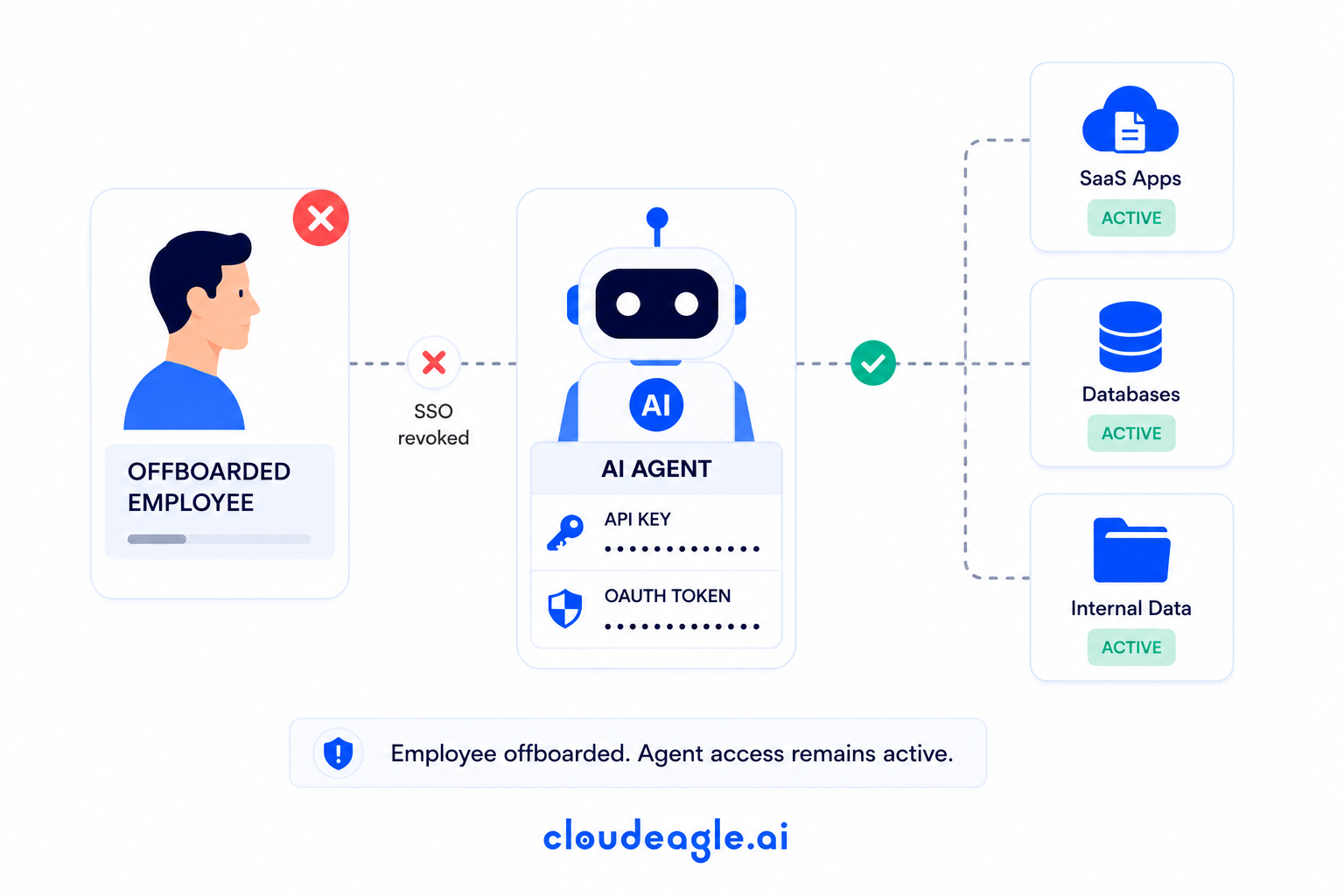
Illustration showing an offboarded employee with revoked SSO while an AI agent’s API key and OAuth token remain active across SaaS apps, databases, and internal data.

This is the core failure mode behind AI agent offboarding, and four structural reasons explain why the checklist misses it every time.

  • The agent's OAuth token, API key, or service principal was created separately from the employee's personal login. Disabling SSO doesn't touch it.
  • The agent isn't listed in the identity provider. It was never provisioned through IT; it was built by a business user inside a SaaS platform in minutes.
  • Offboarding workflows trigger off HR events recorded in Workday, BambooHR, or similar systems. The agent has no employment status, so no event covers it.
  • The agent doesn't appear on the asset inventory or CMDB because it's a workflow built inside an approved application, not an application itself.

Standard AI agent offboarding stops the person. It does nothing to what the person built.

SSO Revoked. Agent Still Running. Check Your Stack.

Use this checklist before you close the next offboarding ticket.
Download Checklist

2. The Five AI Agents Still Running After Your Employees Leave

These five categories account for most of the AI agent offboarding gap in a typical enterprise.

1. Copilot Studio Agents

Built inside Microsoft 365 in minutes, these authenticate through a tenant-level connector, so deprovisioning leaves the connector untouched. 

Our Microsoft Copilot governance guide covers the fix.

2. Zapier and Other Automation Platform Workflows

Zapier and Make workflows authenticate through platform-level OAuth tokens, so a nightly Salesforce sync keeps running long after its builder is gone.

3. API Keys Buried in Code and Internal Tools

Developers embed API keys for OpenAI or Anthropic straight into scripts and pipelines, tied to a personal account nobody tracks, so a departing developer's key keeps authenticating calls indefinitely.

4. AI Agents Built Inside Salesforce, HubSpot, and Other SaaS Platforms

Salesforce Einstein and HubSpot AI let business users build agents under the platform's own service layer, persisting under a shared account with no clear owner after departure.

5. MCP Server Connections

MCP servers let agents query internal systems and take action programmatically, authenticated at the server level, so they survive a standard offboarding cycle untouched.

3. The Compliance Exposure Hiding Behind Every Missed Agent
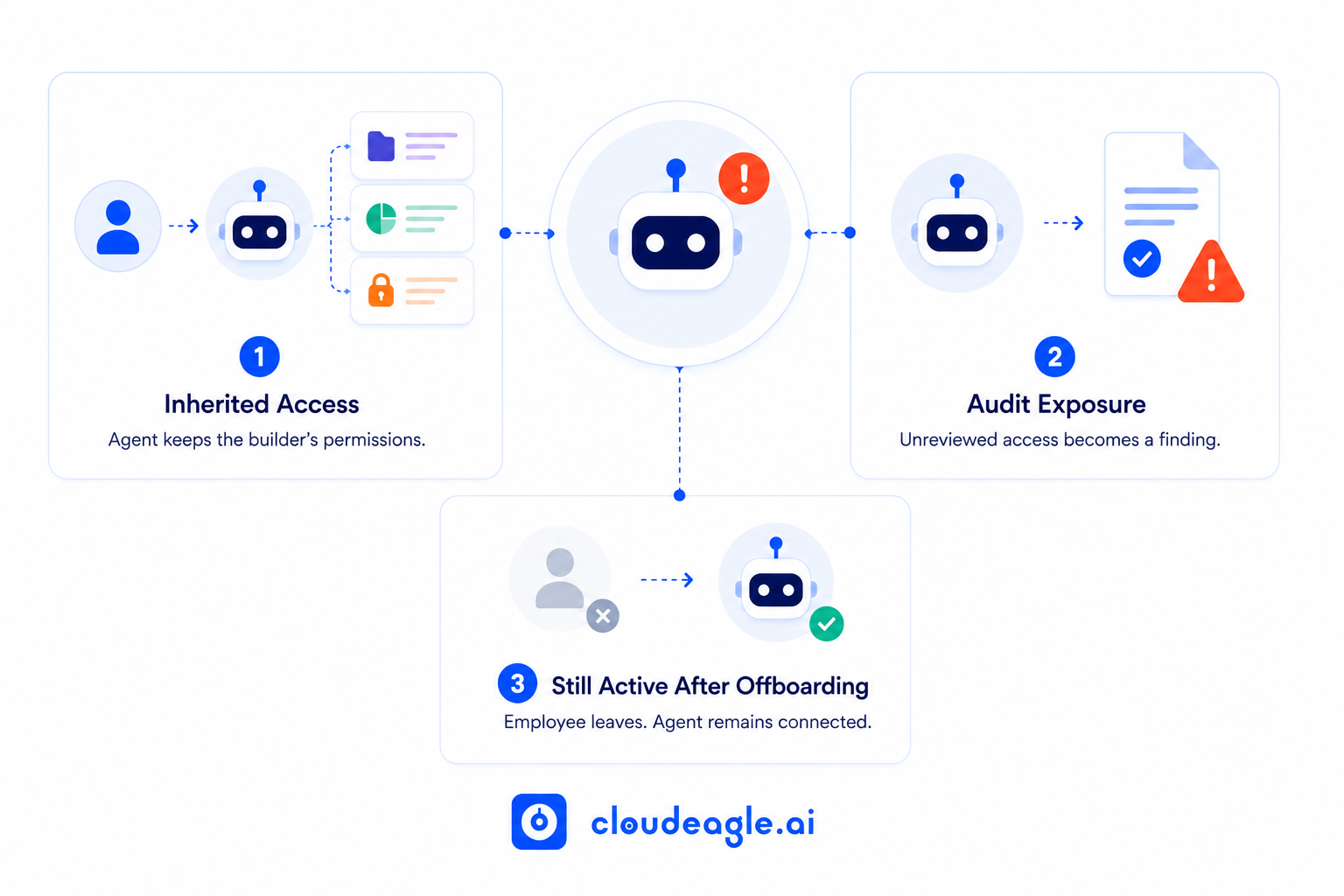
CloudEagle.ai infographic showing how an AI agent creates governance risk by inheriting its builder’s access, remaining unreviewed for audits, and staying connected after the employee offboards.

a) The Permission Scope Risk

Agents frequently inherit the permission scope of the employee who built them.

  • A finance analyst's agent may have read access to budget files that nobody reviewed at build time
  • A sales director's agent may carry admin-level CRM access, scoped once and never revisited
  • Scope creep compounds silently since nobody owns re-scoping an agent after launch

Nobody thought to scope this down before the agent was built, let alone review it after the person left.

b) The Compliance Risk

SOC 2, ISO 27001, and state AI laws increasingly expect organizations to show that access is revoked when it's no longer needed, and that expectation now extends to machine identities.

  • SOC 2 Type II reviews now ask for evidence of AI agent access revocation, not just human deprovisioning
  • ISO 27001 audits treat unreviewed service accounts as a documented control gap
  • State-level AI laws are starting to define machine identities within the same access control language as human ones

An agent still running under a departed employee's original grant is exactly the kind of finding an auditor is trained to catch.

c) The Insider Threat Risk

A departing employee who knows their agent is still active, still connected, and still unmonitored has a persistence mechanism that most security teams aren't looking for. It doesn't require malicious intent to matter. It just requires nobody checking.

A forgotten SaaS license is a spend problem, since the account sits idle with nobody able to log in. A forgotten AI agent is an access control finding, since it keeps acting on data with no current, authorized human behind it. 

This is why AI agent offboarding belongs in the same compliance conversation as human deprovisioning, not a side note to it. In regulated environments, non-human identity governance treats that distinction as the whole point.

Auditors Are Now Asking About Agent Access After Offboarding.

This checklist closes the gaps they'll find.
Download Checklist

4. What Leading IAM Teams Do Before They Close an Offboarding Ticket

Mature AI agent offboarding programs share five habits, in this order:

  • Trigger agent discovery at offboarding: Before closing a ticket, run a scan for every agent, automation, or workflow the departing employee created or owns. Manual checks don't scale past a handful of departures a month.
  • Assign a named owner to every agent: When that owner's employment status changes, the agent should automatically surface for review the same way a license would.
  • Make the decision binary: Every discovered agent gets transferred to an active owner or decommissioned. No agent sits in limbo because nobody wants to risk breaking it.
  • Revoke tokens and keys specifically: Revoking SSO access doesn't revoke a token issued before that session existed. AI agent offboarding needs its own revocation step.
  • Run periodic sweeps for agents that predate governance: Quarterly reviews catch what fell through before the process existed. Waiting for an incident to surface them is the expensive way to find out.

5. How CloudEagle.ai Closes the AI Agent Offboarding Gap

The five practices above are straightforward to describe and hard to run manually at scale because they all depend on knowing an agent exists before anyone thinks to look for it. 
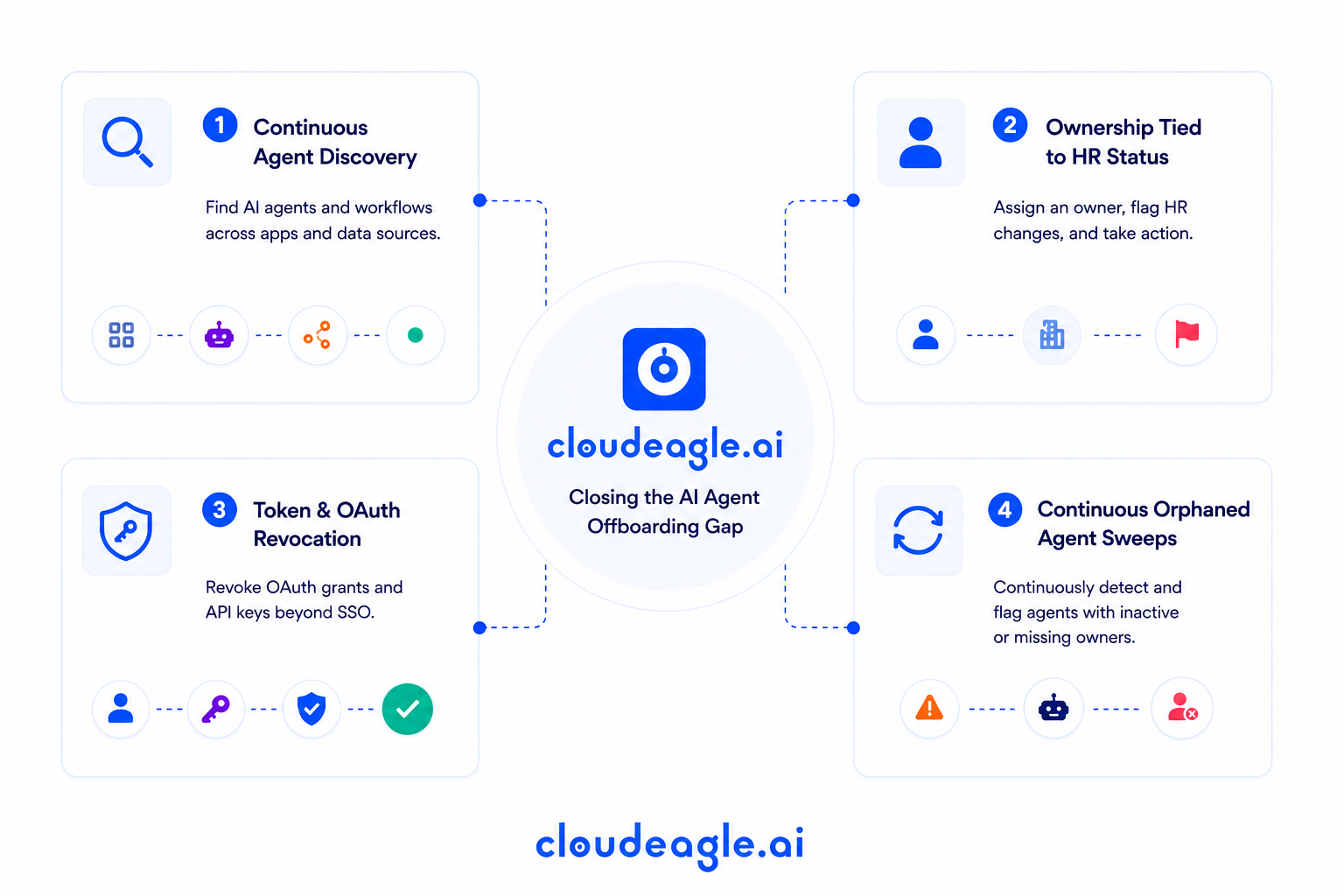
CloudEagle.ai infographic outlining four controls for closing the AI agent offboarding gap: continuous agent discovery, ownership tied to HR status, token and OAuth revocation, and continuous orphaned-agent sweeps.

CloudEagle's non-human identity governance operationalizes AI agent offboarding by tying agent discovery, ownership, and revocation directly to the identity lifecycle.

a) Continuous Agent Discovery

Most teams only find agents when someone goes looking, and by then, the departing employee is long gone. Closing that gap means the inventory has to exist before the search does:

  • Surfaces Copilot Studio agents, Zapier and n8n workflows, and API-key-driven agents in a single NHI inventory
  • Correlates signals across browser activity, finance data, and connected platforms rather than relying on IT provisioning records
  • Keeps the inventory live instead of rebuilding it before each audit cycle
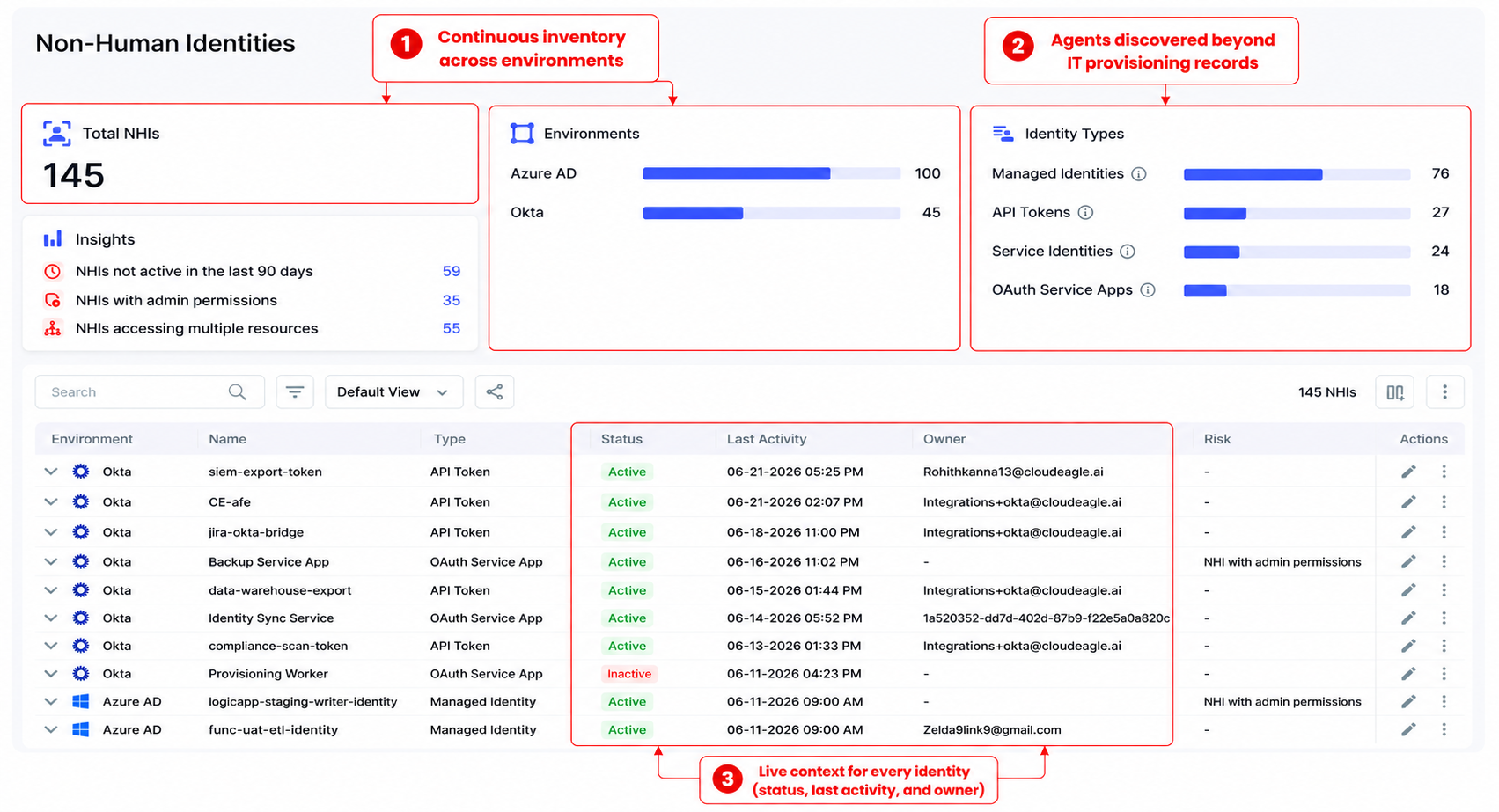
CloudEagle.ai Non-Human Identities dashboard showing continuous inventory across Azure AD and Okta, identity types, and live details such as status, last activity, and owner.

The practical result: agents show up in the inventory before the offboarding ticket is ever opened, so AI agent offboarding starts with a complete list instead of a guess.

b) Ownership Tied to HR Status

An agent with no owner is an agent nobody is accountable for, and that's usually invisible until something breaks. CloudEagle.ai ties ownership directly to employment status so the gap doesn't stay invisible:

  • Assigns a named owner to every discovered agent at the point of discovery
  • Flags every agent a departing employee owns the moment their HR status changes
  • Surfaces a transfer-or-decommission decision directly in the governance dashboard
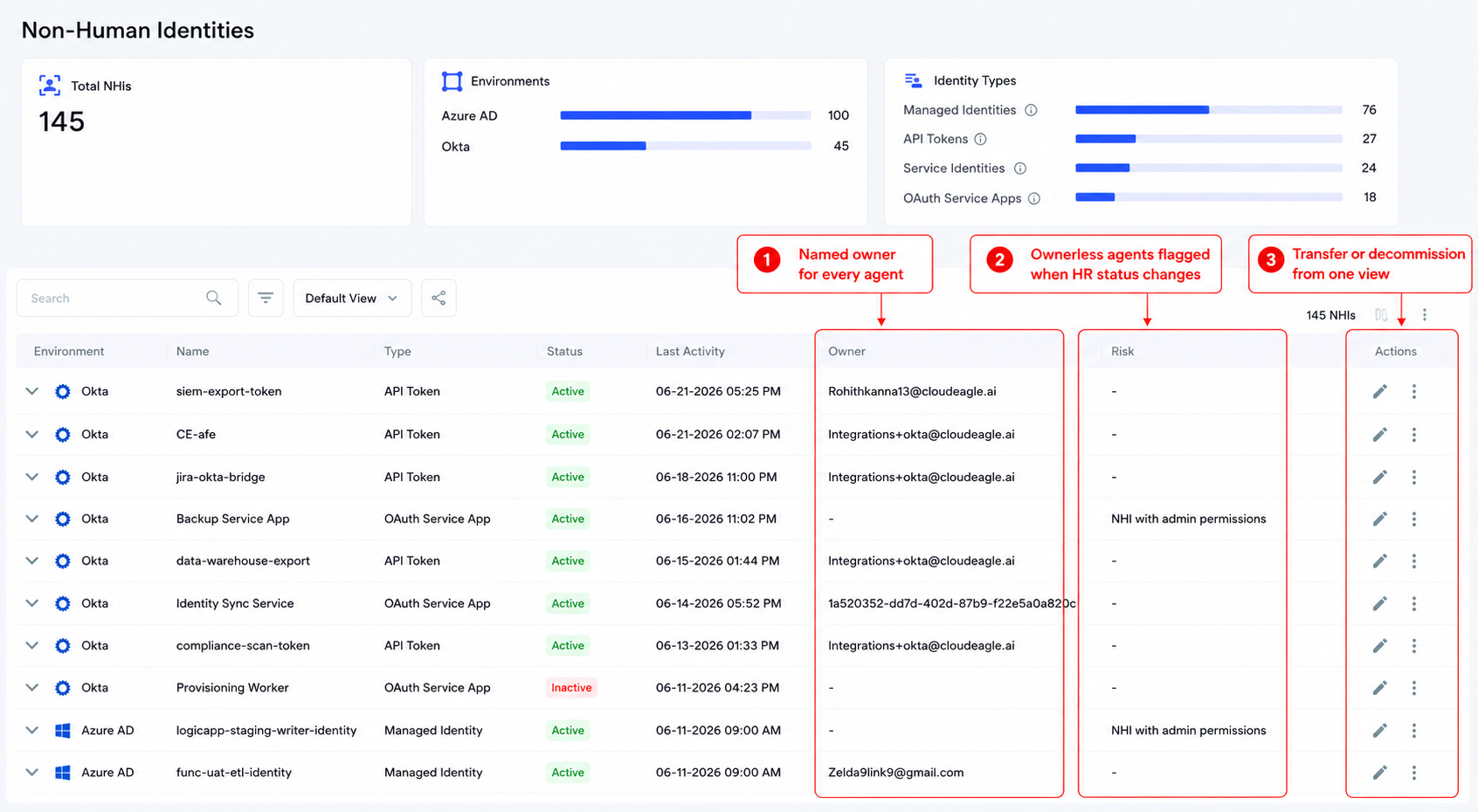
CloudEagle.ai Non-Human Identities dashboard highlighting named owners for every agent, ownerless agents flagged after HR status changes, and actions to transfer or decommission access.

For IT, that means ownership review stops being a manual task and starts firing on its own the moment someone's status changes in HR.

c) Token and OAuth Revocation

SSO deprovisioning was never designed to reach credentials issued outside the identity provider. CloudEagle.ai extends the revocation step to cover exactly that:

  • Flags high-risk and ex-employee accounts automatically across connected AI platforms
  • Extends the standard deprovisioning workflow to OAuth grants and API keys
  • Reduces the manual audit fatigue that leads teams to skip token reviews altogether

CloudEagle.ai Non-Human Identities table showing API tokens and OAuth service apps tracked alongside SSO access, automatically flagged high-risk identities, and direct access-revocation actions.

The upshot for security teams: tokens go dead in the same motion as SSO access, rather than sitting active for months after someone's last day.

d) Continuous Orphaned Agent Sweeps

Agents that predate a formal governance program don't disappear just because nobody's tracking them. Instead of waiting for a scheduled review, CloudEagle.ai watches for the signal that matters:

  • Continuously flags agents whose assigned owner is no longer active
  • Removes the need for a manual quarterly sweep, since flagging runs on an ongoing basis
  • Gives IT a standing view of exactly which agents are unowned at any point in time
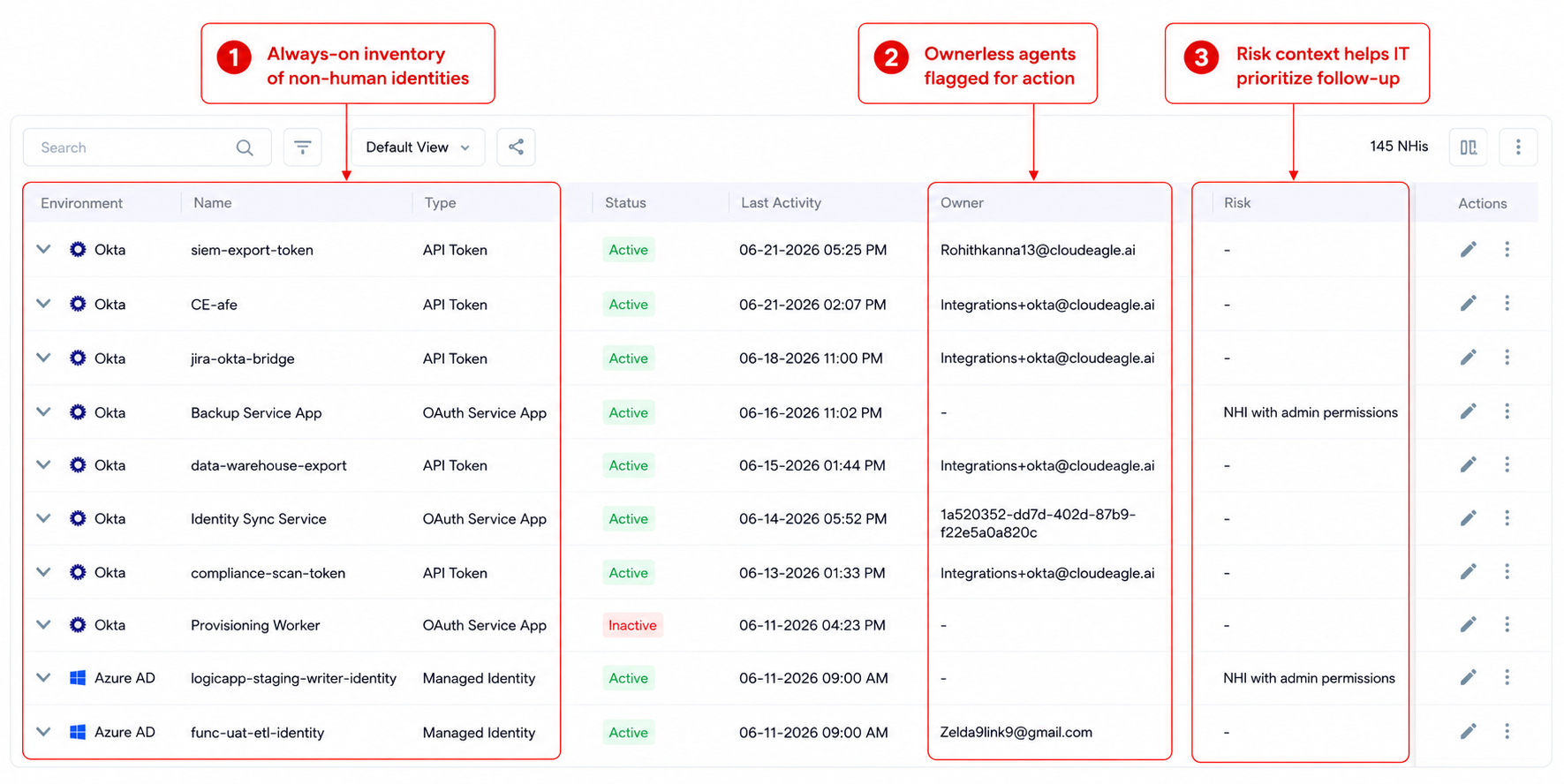
CloudEagle.ai Non-Human Identities inventory showing always-on visibility into identities, ownerless agents flagged for action, and risk context to help IT prioritize follow-up.

In practice, orphaned agents get caught the week they become orphaned. 

6. How to Find AI Agents a Departed Employee Left Behind

If you're mid-offboarding and suspect this problem already exists in your environment, three approaches to AI agent offboarding cover most of what's discoverable today.

  1. Check AI platform admin consoles directly: Copilot Studio, Zapier, Make, and n8n each have admin views that list agents by creator, which is the fastest way to check a specific platform you know the employee used.
  2. Audit OAuth grant records in connected systems: Salesforce, SharePoint, and Google Workspace all log active OAuth connections that can be filtered by the departed employee's credentials.
  3. Scan API key registries in secrets management tools: GitHub, AWS, and Azure maintain key registries that can be filtered by issuing user, surfacing embedded credentials that never touched the IDP.

These three methods find what you already know to look for on platforms you already know the employee used. They miss agents on platforms IT never knew existed, which is exactly where a continuous discovery layer like CloudEagle's SaaSMap adds coverage the admin consoles can't reach on their own.

7. What Auditors Are Starting to Ask About AI Agent Access After Offboarding

SOC 2 Type II and ISO 27001 reviewers are adding AI agent governance questions directly into access review scope, specifically asking how an organization ensures agents created by departed employees no longer hold active access. 

The honest answer at most organizations right now is that there's no specific process for it, and that answer is both true and a finding. 

IBM's breach research found that shadow AI incidents now account for one in five breaches and take longer to detect than the global average, which is exactly the exposure window an unreviewed agent creates. 

A CIO-level AI governance checklist increasingly treats AI agent offboarding as a standing control, not a one-time policy statement. 

CloudEagle.ai produces the audit evidence for this automatically: orphaned agent inventory, ownership transfer records, and token revocation logs, generated continuously instead of assembled by hand before each review.

8. FAQs

1. What happens to AI agents when an employee is offboarded? 

Without dedicated AI agent offboarding, the agent keeps running. Standard SSO deprovisioning doesn't touch agent-level credentials.

2. Can AI agents be governed the same way as human identities? 

Largely yes, with an owner, a lifecycle, and a review trigger, but agents need discovery methods that don't rely on IDP provisioning records.

3. Are OAuth tokens revoked automatically when SSO access is disabled? 

No. Tokens issued to a third-party platform or automation tool exist independently of the SSO session and stay active until revoked separately.

4. What is an orphaned AI agent? 

An agent whose original owner no longer works at the company, still holding standing access with nobody currently accountable for it.

5. How do you check AI agent access after offboarding is complete? 

Audit OAuth grants and API key registries by departed employee, or use continuous discovery so the check runs automatically.

See how CloudEagle.ai surfaces and governs AI agents across your environment. Book a demo.

Advertisement for a SaaS Subscription Tracking Template with a call-to-action button to download and a partial graphic of a tablet showing charts.Banner promoting a SaaS Agreement Checklist to streamline SaaS management and avoid budget waste with a call-to-action button labeled Download checklist.Blue banner with text 'The Ultimate Employee Offboarding Checklist!' and a black button labeled 'Download checklist' alongside partial views of checklist documents from cloudeagle.ai.Digital ad for download checklist titled 'The Ultimate Checklist for IT Leaders to Optimize SaaS Operations' by cloudeagle.ai, showing checklist pages.Slack Buyer's Guide offer with text 'Unlock insider insights to get the best deal on Slack!' and a button labeled 'Get Your Copy', accompanied by a preview of the guide featuring Slack's logo.Monday Pricing Guide by cloudeagle.ai offering exclusive pricing secrets to maximize investment with a call-to-action button labeled Get Your Copy and an image of the guide's cover.Blue banner for Canva Pricing Guide by cloudeagle.ai offering a guide to Canva costs, features, and alternatives with a call-to-action button saying Get Your Copy.Blue banner with white text reading 'Little-Known Negotiation Hacks to Get the Best Deal on Slack' and a white button labeled 'Get Your Copy'.Blue banner with text 'Little-Known Negotiation Hacks to Get the Best Deal on Monday.com' and a white button labeled 'Get Your Copy'.Blue banner with text 'Little-Known Negotiation Hacks to Get the Best Deal on Canva' and a white button labeled 'Get Your Copy'.Banner with text 'Slack Buyer's Guide' and a 'Download Now' button next to images of a guide titled 'Slack Buyer’s Guide: Features, Pricing & Best Practices'.Digital cover of Monday Pricing Guide with a button labeled Get Your Copy on a blue background.Canva Pricing Guide cover with a button labeled Get Your Copy on a blue gradient background.

Enter your email to
unlock the report

Oops! Something went wrong while submitting the form.
License Count
Benchmark
Per User/Per Year

Enter your email to
unlock the report

Oops! Something went wrong while submitting the form.
License Count
Benchmark
Per User/Per Year

Enter your email to
unlock the report

Oops! Something went wrong while submitting the form.
Notion Plus
License Count
Benchmark
Per User/Per Year
100-500
$67.20 - $78.72
500-1000
$59.52 - $72.00
1000+
$51.84 - $57.60
Canva Pro
License Count
Benchmark
Per User/Per Year
100-500
$74.33-$88.71
500-1000
$64.74-$80.32
1000+
$55.14-$62.34

Enter your email to
unlock the report

Oops! Something went wrong while submitting the form.

Enter your email to
unlock the report

Oops! Something went wrong while submitting the form.
Zoom Business
License Count
Benchmark
Per User/Per Year
100-500
$216.00 - $264.00
500-1000
$180.00 - $216.00
1000+
$156.00 - $180.00

Enter your email to
unlock the report

Oops! Something went wrong while submitting the form.

Get the Right Security Platform To Secure Your Cloud Infrastructure

Please enter a business email
Thank you!
The 2023 SaaS report has been sent to your email. Check your promotional or spam folder.
Oops! Something went wrong while submitting the form.

Access full report

Please enter a business email
Thank you!
The 2023 SaaS report has been sent to your email. Check your promotional or spam folder.
Oops! Something went wrong while submitting the form.

IT runs a clean offboarding. Okta access revoked, laptop wiped, email forwarded, ticket closed. 

Three weeks later, a Copilot Studio agent the departed employee built is still querying Salesforce records and posting summaries to a Slack channel. Nobody on the IT team knows it exists.

This is the structural gap behind AI agent offboarding. 

The process was built around human identity: revoke the person's credentials and their access ends. AI agents don't work that way. They authenticate on their own OAuth tokens, API keys, and service principals, established the moment the employee built them. Revoking the human's SSO session doesn't touch any of that.

The employee is gone. Their agents are still in your environment, still connected to the data they had access to on the day they were built. Most IT teams have no process to find them, and AI agent offboarding usually isn't even on the checklist.

TL;DR

  • AI agent offboarding fails because agents authenticate independently of the employee's SSO session, so standard offboarding never revokes their access
  • Five agent types routinely survive offboarding: Copilot Studio agents, Zapier and automation workflows, embedded API keys, agents built inside platforms like Salesforce, and MCP server connections
  • Orphaned agents create a compliance exposure, because access persists under an identity with no active owner
  • Closing the gap requires continuous agent discovery, ownership tied to HR status, and token revocation that covers AI credentials specifically

1. Why Offboarding an Employee Doesn't Offboard Their AI Agents

An AI agent authenticates on its own credentials, so revoking the person never revokes the agent. 

Illustration showing an offboarded employee with revoked SSO while an AI agent’s API key and OAuth token remain active across SaaS apps, databases, and internal data.

This is the core failure mode behind AI agent offboarding, and four structural reasons explain why the checklist misses it every time.

  • The agent's OAuth token, API key, or service principal was created separately from the employee's personal login. Disabling SSO doesn't touch it.
  • The agent isn't listed in the identity provider. It was never provisioned through IT; it was built by a business user inside a SaaS platform in minutes.
  • Offboarding workflows trigger off HR events recorded in Workday, BambooHR, or similar systems. The agent has no employment status, so no event covers it.
  • The agent doesn't appear on the asset inventory or CMDB because it's a workflow built inside an approved application, not an application itself.

Standard AI agent offboarding stops the person. It does nothing to what the person built.

SSO Revoked. Agent Still Running. Check Your Stack.

Use this checklist before you close the next offboarding ticket.
Download Checklist

2. The Five AI Agents Still Running After Your Employees Leave

These five categories account for most of the AI agent offboarding gap in a typical enterprise.

1. Copilot Studio Agents

Built inside Microsoft 365 in minutes, these authenticate through a tenant-level connector, so deprovisioning leaves the connector untouched. 

Our Microsoft Copilot governance guide covers the fix.

2. Zapier and Other Automation Platform Workflows

Zapier and Make workflows authenticate through platform-level OAuth tokens, so a nightly Salesforce sync keeps running long after its builder is gone.

3. API Keys Buried in Code and Internal Tools

Developers embed API keys for OpenAI or Anthropic straight into scripts and pipelines, tied to a personal account nobody tracks, so a departing developer's key keeps authenticating calls indefinitely.

4. AI Agents Built Inside Salesforce, HubSpot, and Other SaaS Platforms

Salesforce Einstein and HubSpot AI let business users build agents under the platform's own service layer, persisting under a shared account with no clear owner after departure.

5. MCP Server Connections

MCP servers let agents query internal systems and take action programmatically, authenticated at the server level, so they survive a standard offboarding cycle untouched.

3. The Compliance Exposure Hiding Behind Every Missed Agent

CloudEagle.ai infographic showing how an AI agent creates governance risk by inheriting its builder’s access, remaining unreviewed for audits, and staying connected after the employee offboards.

a) The Permission Scope Risk

Agents frequently inherit the permission scope of the employee who built them.

  • A finance analyst's agent may have read access to budget files that nobody reviewed at build time
  • A sales director's agent may carry admin-level CRM access, scoped once and never revisited
  • Scope creep compounds silently since nobody owns re-scoping an agent after launch

Nobody thought to scope this down before the agent was built, let alone review it after the person left.

b) The Compliance Risk

SOC 2, ISO 27001, and state AI laws increasingly expect organizations to show that access is revoked when it's no longer needed, and that expectation now extends to machine identities.

  • SOC 2 Type II reviews now ask for evidence of AI agent access revocation, not just human deprovisioning
  • ISO 27001 audits treat unreviewed service accounts as a documented control gap
  • State-level AI laws are starting to define machine identities within the same access control language as human ones

An agent still running under a departed employee's original grant is exactly the kind of finding an auditor is trained to catch.

c) The Insider Threat Risk

A departing employee who knows their agent is still active, still connected, and still unmonitored has a persistence mechanism that most security teams aren't looking for. It doesn't require malicious intent to matter. It just requires nobody checking.

A forgotten SaaS license is a spend problem, since the account sits idle with nobody able to log in. A forgotten AI agent is an access control finding, since it keeps acting on data with no current, authorized human behind it. 

This is why AI agent offboarding belongs in the same compliance conversation as human deprovisioning, not a side note to it. In regulated environments, non-human identity governance treats that distinction as the whole point.

Auditors Are Now Asking About Agent Access After Offboarding.

This checklist closes the gaps they'll find.
Download Checklist

4. What Leading IAM Teams Do Before They Close an Offboarding Ticket

Mature AI agent offboarding programs share five habits, in this order:

  • Trigger agent discovery at offboarding: Before closing a ticket, run a scan for every agent, automation, or workflow the departing employee created or owns. Manual checks don't scale past a handful of departures a month.
  • Assign a named owner to every agent: When that owner's employment status changes, the agent should automatically surface for review the same way a license would.
  • Make the decision binary: Every discovered agent gets transferred to an active owner or decommissioned. No agent sits in limbo because nobody wants to risk breaking it.
  • Revoke tokens and keys specifically: Revoking SSO access doesn't revoke a token issued before that session existed. AI agent offboarding needs its own revocation step.
  • Run periodic sweeps for agents that predate governance: Quarterly reviews catch what fell through before the process existed. Waiting for an incident to surface them is the expensive way to find out.

5. How CloudEagle.ai Closes the AI Agent Offboarding Gap

The five practices above are straightforward to describe and hard to run manually at scale because they all depend on knowing an agent exists before anyone thinks to look for it. 

CloudEagle.ai infographic outlining four controls for closing the AI agent offboarding gap: continuous agent discovery, ownership tied to HR status, token and OAuth revocation, and continuous orphaned-agent sweeps.

CloudEagle's non-human identity governance operationalizes AI agent offboarding by tying agent discovery, ownership, and revocation directly to the identity lifecycle.

a) Continuous Agent Discovery

Most teams only find agents when someone goes looking, and by then, the departing employee is long gone. Closing that gap means the inventory has to exist before the search does:

  • Surfaces Copilot Studio agents, Zapier and n8n workflows, and API-key-driven agents in a single NHI inventory
  • Correlates signals across browser activity, finance data, and connected platforms rather than relying on IT provisioning records
  • Keeps the inventory live instead of rebuilding it before each audit cycle

CloudEagle.ai Non-Human Identities dashboard showing continuous inventory across Azure AD and Okta, identity types, and live details such as status, last activity, and owner.

The practical result: agents show up in the inventory before the offboarding ticket is ever opened, so AI agent offboarding starts with a complete list instead of a guess.

b) Ownership Tied to HR Status

An agent with no owner is an agent nobody is accountable for, and that's usually invisible until something breaks. CloudEagle.ai ties ownership directly to employment status so the gap doesn't stay invisible:

  • Assigns a named owner to every discovered agent at the point of discovery
  • Flags every agent a departing employee owns the moment their HR status changes
  • Surfaces a transfer-or-decommission decision directly in the governance dashboard

CloudEagle.ai Non-Human Identities dashboard highlighting named owners for every agent, ownerless agents flagged after HR status changes, and actions to transfer or decommission access.

For IT, that means ownership review stops being a manual task and starts firing on its own the moment someone's status changes in HR.

c) Token and OAuth Revocation

SSO deprovisioning was never designed to reach credentials issued outside the identity provider. CloudEagle.ai extends the revocation step to cover exactly that:

  • Flags high-risk and ex-employee accounts automatically across connected AI platforms
  • Extends the standard deprovisioning workflow to OAuth grants and API keys
  • Reduces the manual audit fatigue that leads teams to skip token reviews altogether

CloudEagle.ai Non-Human Identities table showing API tokens and OAuth service apps tracked alongside SSO access, automatically flagged high-risk identities, and direct access-revocation actions.

The upshot for security teams: tokens go dead in the same motion as SSO access, rather than sitting active for months after someone's last day.

d) Continuous Orphaned Agent Sweeps

Agents that predate a formal governance program don't disappear just because nobody's tracking them. Instead of waiting for a scheduled review, CloudEagle.ai watches for the signal that matters:

  • Continuously flags agents whose assigned owner is no longer active
  • Removes the need for a manual quarterly sweep, since flagging runs on an ongoing basis
  • Gives IT a standing view of exactly which agents are unowned at any point in time

CloudEagle.ai Non-Human Identities inventory showing always-on visibility into identities, ownerless agents flagged for action, and risk context to help IT prioritize follow-up.

In practice, orphaned agents get caught the week they become orphaned. 

6. How to Find AI Agents a Departed Employee Left Behind

If you're mid-offboarding and suspect this problem already exists in your environment, three approaches to AI agent offboarding cover most of what's discoverable today.

  1. Check AI platform admin consoles directly: Copilot Studio, Zapier, Make, and n8n each have admin views that list agents by creator, which is the fastest way to check a specific platform you know the employee used.
  2. Audit OAuth grant records in connected systems: Salesforce, SharePoint, and Google Workspace all log active OAuth connections that can be filtered by the departed employee's credentials.
  3. Scan API key registries in secrets management tools: GitHub, AWS, and Azure maintain key registries that can be filtered by issuing user, surfacing embedded credentials that never touched the IDP.

These three methods find what you already know to look for on platforms you already know the employee used. They miss agents on platforms IT never knew existed, which is exactly where a continuous discovery layer like CloudEagle's SaaSMap adds coverage the admin consoles can't reach on their own.

7. What Auditors Are Starting to Ask About AI Agent Access After Offboarding

SOC 2 Type II and ISO 27001 reviewers are adding AI agent governance questions directly into access review scope, specifically asking how an organization ensures agents created by departed employees no longer hold active access. 

The honest answer at most organizations right now is that there's no specific process for it, and that answer is both true and a finding. 

IBM's breach research found that shadow AI incidents now account for one in five breaches and take longer to detect than the global average, which is exactly the exposure window an unreviewed agent creates. 

A CIO-level AI governance checklist increasingly treats AI agent offboarding as a standing control, not a one-time policy statement. 

CloudEagle.ai produces the audit evidence for this automatically: orphaned agent inventory, ownership transfer records, and token revocation logs, generated continuously instead of assembled by hand before each review.

8. FAQs

1. What happens to AI agents when an employee is offboarded? 

Without dedicated AI agent offboarding, the agent keeps running. Standard SSO deprovisioning doesn't touch agent-level credentials.

2. Can AI agents be governed the same way as human identities? 

Largely yes, with an owner, a lifecycle, and a review trigger, but agents need discovery methods that don't rely on IDP provisioning records.

3. Are OAuth tokens revoked automatically when SSO access is disabled? 

No. Tokens issued to a third-party platform or automation tool exist independently of the SSO session and stay active until revoked separately.

4. What is an orphaned AI agent? 

An agent whose original owner no longer works at the company, still holding standing access with nobody currently accountable for it.

5. How do you check AI agent access after offboarding is complete? 

Audit OAuth grants and API key registries by departed employee, or use continuous discovery so the check runs automatically.

See how CloudEagle.ai surfaces and governs AI agents across your environment. Book a demo.

CloudEagle.ai recognized in the 2025 Gartner® Magic Quadrant™ for SaaS Management Platforms
Download now
gartner chart
5x
Faster employee
onboarding
80%
Reduction in time for
user access reviews
30k
Workflows
automated
$15Bn
Analyzed in
contract spend
$2Bn
Saved in
SaaS spend

Streamline SaaS governance and save 10-30%

Book a Demo with Expert
CTA image