.avif)
%201.svg)


HIPAA Compliance Checklist for 2025

Your AI vendors each give you a dashboard. It shows usage signals, seat counts, and a monthly invoice.
It won't tell you what Copilot costs per person, which team is burning through ChatGPT tokens faster than their budget assumed, or how your Claude spend compares to Gemini, or whether the tools you're paying for are actually being used.
That's what happens when five enterprise AI contracts run without a unified management layer.
CloudEagle.ai integrates directly with Copilot, ChatGPT Enterprise, Claude, Gemini, and GitHub Copilot, and gives you spend, usage, and per-user cost across all of them from one dashboard. Here's how it works for each platform.
TL;DR
- Every AI vendor gives you a dashboard. None of them shows you what your AI stack costs as a whole
- CloudEagle.ai connects to Copilot, ChatGPT Enterprise, Claude, Gemini, and GitHub Copilot via direct API integrations
- Per-user cost, model-level breakdown, seat utilization, and run rate forecasting all live in one view
- Spend thresholds and model access policies are configurable per user or per team
- Most integrations activate in under an hour, no engineering work required
1. Why Managing Multiple AI Platforms Is Harder Than It Looks
Each platform bills differently, reports differently, and gives you no way to see across all of them at once. That's the problem. Three gaps make it worse:
a) No per-user cost: Every platform gives you an org-level number. None of them tells you which person or team is driving the spend. When leadership asks who spent what, you're back to manual log exports and spreadsheet math.
b) No cross-platform rollup: Copilot spend, Claude tokens, ChatGPT seats, and Gemini usage all live in separate admin consoles with different cost models. There's no native way to see total AI spend in one place.
c) No run rate visibility: Token consumption can double in a month with no alert. By the time the invoice arrives, the overage has already happened. There's no forecasting layer inside any vendor's native dashboard.
CloudEagle.ai closes all three gaps with one integration per platform.

2. Managing Copilot, ChatGPT, Claude, and Gemini in One Place with CloudEagle.ai
CloudEagle.ai connects to each platform via direct API integration and normalizes everything into one view. Here's what that looks like for each tool:
First: Connect CloudEagle.ai to Your AI Tools
CloudEagle.ai has direct integrations with all major enterprise AI platforms. There's no manual setup or technical configuration: connect your tools, and CloudEagle.ai starts pulling usage and spend data automatically.
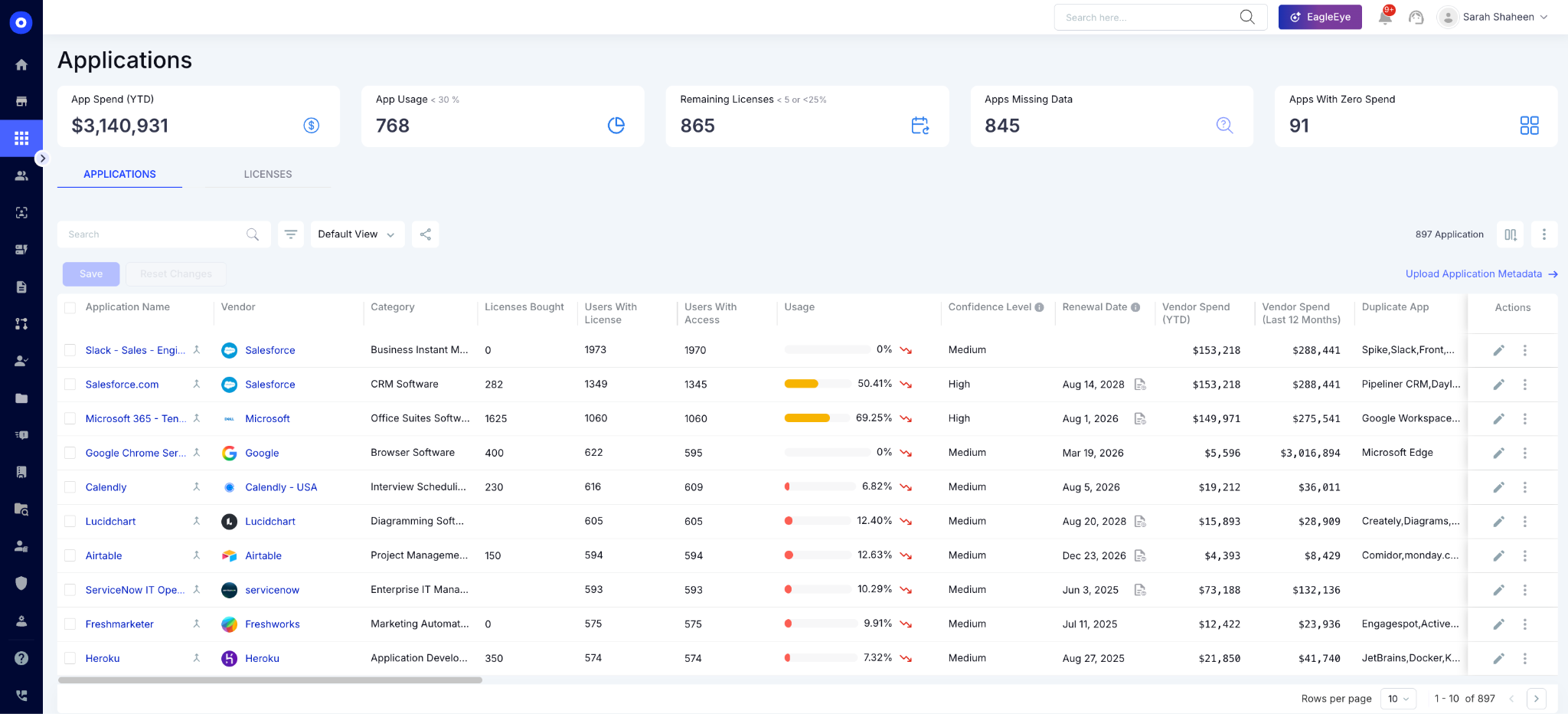
Supported platforms include Microsoft Copilot, ChatGPT Enterprise, Claude, Gemini for Workspace, GitHub Copilot, and Cursor. Each platform's data flows into a normalized cost model, so tokens, seats, credits, and API calls all convert into a common format you can compare and report on.
Managing Copilot Usage and Spend
Copilot is the hardest AI platform to govern natively, and not because Microsoft hasn't tried. Usage data is spread across Purview, Entra, VIVA Insights, and the Copilot Dashboard.
Each tool surfaces a different slice of the picture. None of them produces a per-user cost number. And if your teams are building Copilot Studio agents, there's no native reporting for that anywhere in Microsoft's tooling.
Most IT teams end up doing this reconciliation in Excel, pulling exports from two or three Microsoft portals, matching them against invoices. It's a biweekly process that still produces estimates.
What CloudEagle.ai surfaces after connecting:
- Copilot spend by user, team, and department
- Seat utilization tracked against actual activity, not just license assignment
- Unused seats are flagged automatically
- Copilot Studio agents as separate cost line items
For a breakdown of how Copilot costs scale beyond the base seat price, the Microsoft Copilot hidden costs guide covers what most teams miss before renewal.
Managing Claude Usage and Spend
Claude's billing model is fundamentally different from a seat-based tool, and that's where most teams get caught off guard. Two people on the same team, using Claude for similar tasks, can generate a 10x cost difference based on which model they're running.
Opus is significantly more expensive than Sonnet, and Sonnet is more than Haiku. If nobody is tracking model-tier usage by user, that cost difference is invisible until the invoice.
What CloudEagle.ai surfaces after connecting:
- Opus, Sonnet, and Haiku are tracked as separate line items, broken down by user
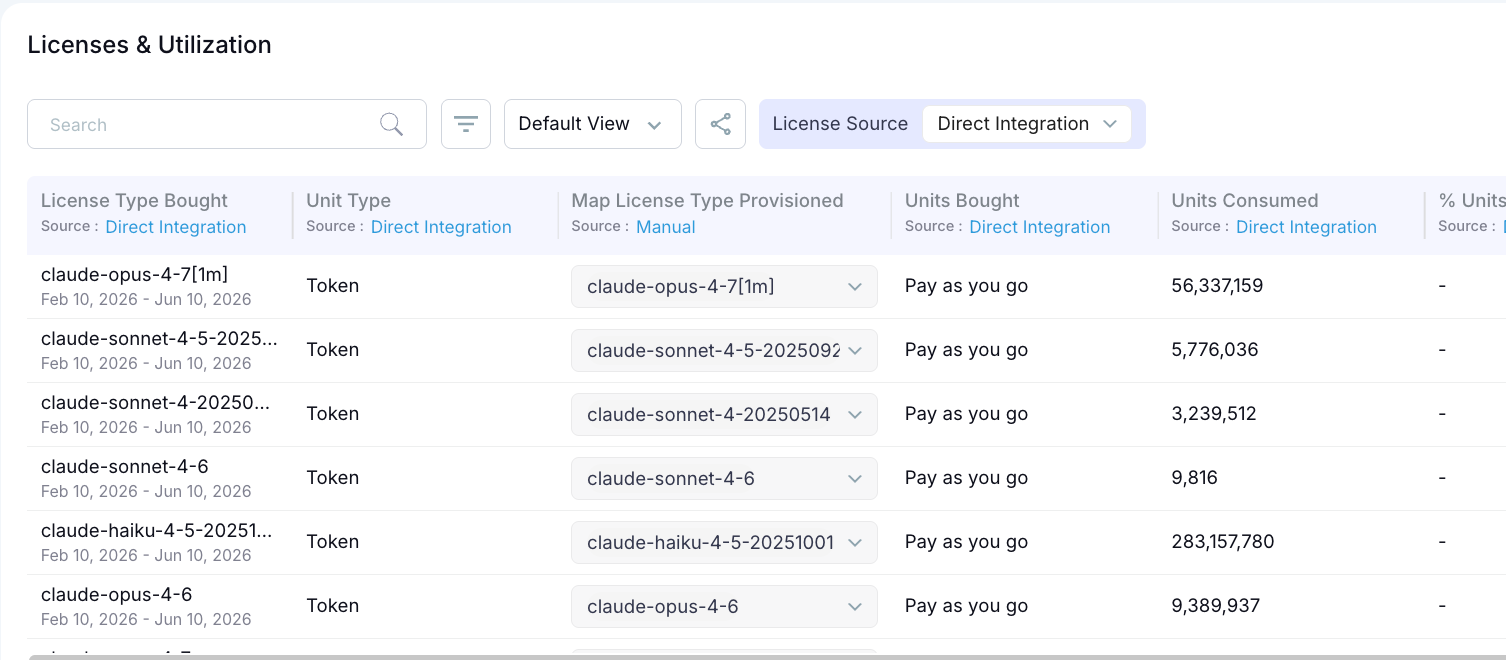
- Cost optimization flags when premium models are used for tasks that lighter tiers handle equally well
- Spend limits are configurable per user or per team
- Automated alerts before a budget is exceeded
Managing ChatGPT Enterprise Usage and Spend
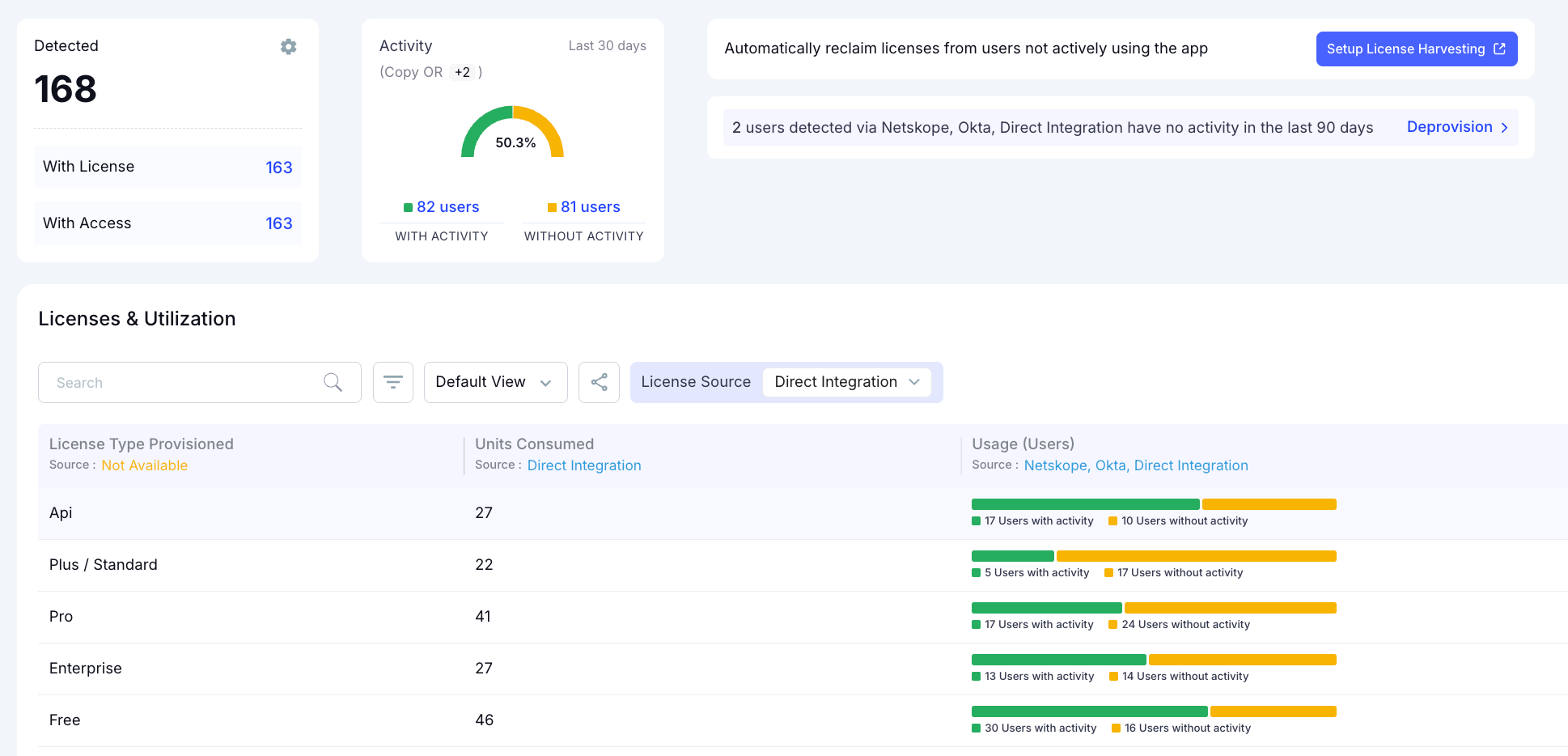
ChatGPT Enterprise's admin console is built for compliance, not cost governance. It tells you whether the deployment is active and how many seats are assigned. It doesn't tell you which users are actually using it, which model version they're on, or what the cost per person looks like month over month.
The other issue most teams don't catch until later: overlap. Companies running both ChatGPT Enterprise and Claude often have users subscribed to both, doing the same work in both tools. That redundancy adds up.
What CloudEagle.ai surfaces after connecting:
- Per-user, per-model cost tracking (GPT-4o vs GPT-4o mini)
- Token consumption tracked against contract terms
- Teams scaling faster than the budget assumed are flagged before the billing cycle closes
- Duplicate subscriptions across ChatGPT and Claude are flagged automatically
The ChatGPT pricing guide covers token costs by model tier and how enterprise agreements are typically structured.
Managing Gemini Usage and Spend
Gemini is the easiest platform to underestimate because it often comes bundled inside a Workspace contract. Teams assume it's covered. The usage quietly scales. And because the Workspace Admin console shows activity but not spend attribution, nobody knows what Gemini specifically is costing until finance asks.
What CloudEagle.ai surfaces after connecting:
- Per-team and per-user spend visibility
- License utilization is tracked, so underused seats are flagged before renewal
- Gemini-specific cost is separated from the broader Workspace contract spend
The Google Gemini pricing guide covers licensing tiers and what to watch at renewal.
Same Process, One Place, Unified Governance
Most teams assume governance means a separate project. It doesn't. Once CloudEagle.ai is connected to each platform, the same integration that surfaces spend handles enforcement.
Spend visibility across all platforms:
- Total AI spend by platform, team, user, and model tier
- Token consumption trends over time
- Run rate forecasting based on current adoption
- Idle seats are flagged across any platform
- Users on premium models for tasks that don't require them
Policy enforcement from the same dashboard:
- Spend thresholds by team or by user
- Model access controls (restrict Opus access to specific roles, for example)
- Automated alerts when consumption approaches a limit, before it's exceeded
There’s no additional tooling or separate configuration layer required. The visibility and the governance run from the same place.
Five AI Contracts. One View. Zero Spreadsheets.


3. Governance Doesn't Have to Be a Separate Project
CloudEagle.ai has live integrations with Copilot, ChatGPT Enterprise, Claude, Gemini, and GitHub Copilot. Most teams are fully connected within a day.
The teams that build this visibility now are the ones that walk into their next AI renewal knowing exactly which seats are underused, which tools have overlap, and what consumption looks like at the model level. That's a different negotiation than the one that starts with "here's last month's invoice."
For the enforcement side: spend limits, model access controls, and how IT, Finance, and Security govern from a shared view, the AI usage policies and guardrails post covers what that looks like in practice.
4. FAQs
1. Can CloudEagle.ai track usage across Copilot, ChatGPT, Claude, and Gemini simultaneously?
Yes. All platforms connect via direct API integrations and appear in the same dashboard with per-user, per-team, and per-model breakdowns.
2. Does CloudEagle.ai show per-user AI spend, not just org-level totals?
Yes. Every connected platform surfaces cost at the individual user level, broken down by model tier where applicable.
3. How long does it take to connect an AI platform to CloudEagle.ai?
Most integrations activate in under an hour. Setup involves authorizing API access and mapping your team structure once. No engineering work required after that.
4. Can CloudEagle.ai set spend limits per user or per team?
Yes. Spend thresholds are configurable per user, per team, or org-wide. Automated alerts fire when consumption approaches the limit, before the budget is exceeded.
5. Does CloudEagle.ai track Copilot Studio agents separately?
Yes. Copilot Studio agents are tracked as separate cost items, giving IT teams visibility into agent consumption that Microsoft's native tooling doesn't surface.
Ready to see all your AI platforms in one place? Book a demo with CloudEagle.ai.
Walk Into Your Next AI Renewal With Real Data.


.avif)


.avif)
.avif)




.png)





.png)

.avif)
.avif)
.avif)


