
%201.svg)


HIPAA Compliance Checklist for 2025

The employee has left the building. Their Salesforce login has not.
According to Beyond Identity research, 89% of former employees still retain access to private business apps and data after leaving.
In a SaaS-heavy environment, that is not an edge case. That is the default outcome when offboarding is done manually.
SaaS offboarding security is broken at most organizations. Here is why, and how to fix it.
TL;DR
- 89% of former employees retain access to business apps after departure, creating insider threat and compliance risk
- A secure offboarding process must go beyond disabling SSO. OAuth tokens, API keys, and shadow IT accounts all survive a standard offboarding process
- Orphaned SaaS accounts cost organizations money every month and create silent audit failures
- The average enterprise manages 275 SaaS apps, but IT controls only a fraction of them, making manual offboarding impossible to complete
- CloudEagle.ai automates employee offboarding access revocation across your entire SaaS stack, including the apps IT never knew existed
1. The Employee Leaves. The Access Doesn't. Why SaaS Offboarding Security Keeps Failing
Most IT teams think they have offboarding covered. They disable the account in Okta, remove the laptop, and move on.
What they miss is everything else. The Notion workspace that the employee created with a personal email. The Figma account was set up directly. The Slack integrations are tied to their credentials. None of that moves when you flip the SSO switch.
50% of Former Employee Accounts Stay Active After Departure
Research shows that 50% of former employee accounts remain active beyond one day. 25% stay active for a week or more, and another 25% remain active for an unknown duration.
That is a serious exposure window.
If access remains in systems like Salesforce or GitHub, a former employee can still interact with sensitive systems.
- Access persists beyond offboarding timelines
- Critical systems remain exposed post-departure
- No clear visibility into lingering accounts
Why SaaS Made Offboarding Dangerous
On-premise environments were centralized. Remove domain access, and everything followed.
SaaS changed that model completely.
Employees now create and use apps outside IT control, each with separate access and ownership models.
- Average employee uses dozens of SaaS apps
- Many accounts are created outside of IT provisioning
- Access is fragmented across tools and identities
You cannot deprovision what you cannot see.
Before going deeper into what survives a standard offboard, it is worth understanding what a complete SaaS inventory and access review actually looks like in practice.
📖 Worth a Read: Access reviews are only as good as the inventory behind them. Here is how to run one that actually catches what manual processes miss. 👉 How CloudEagle.ai Streamlines App Access Review for Compliance Success
2. What Survives a Standard Offboarding That Should Not
Disabling SSO is step one. It is not the finish line.
Here is what keeps running after a standard offboard:
- Shadow IT accounts remain active-
Accounts created outside IT using personal emails or free signups are not visible in Okta or SaaS tools - Unsanctioned SaaS apps create access blind spots-
Up to 65% of apps are outside IT control, leaving major offboarding gaps - OAuth tokens continue working post-offboarding-
Third-party connections remain active even after SSO access is disabled - API keys still grant backend access-
Keys tied to services like Stripe or Anthropic continue to function unless manually revoked - Shared credentials bypass offboarding controls-
Employees with access to shared accounts can still log in if passwords are unchanged - Admin access via shared logins remains intact-
Removing individual accounts does not remove access tied to shared credentials - AI tool integrations persist after employee exit-
Connections between tools like ChatGPT and internal systems or repos stay active unless explicitly removed - Personal-to-work integrations stay connected-
External tools linked to corporate data continue functioning beyond offboarding - No centralized visibility into lingering access-
IT lacks a complete view of what access still exists across apps and integrations
Automated employee offboarding needs to include AI tool connection revocation. Most current processes do not.

3. The Real Cost of Poor SaaS Offboarding Security
The risk is not just theoretical. Poor SaaS offboarding creates three very real problems.
Insider Threat Risk From Lingering Access
A former employee with active credentials knows exactly where to look.
They know which Salesforce dashboard holds your pipeline. They know which GitHub repo contains your source code. They know which Slack channel discusses unreleased product decisions. And if their access is still active, none of that is off limits.
20% of businesses have experienced data breaches connected to former employees, per Zippia research. 76% of IT leaders consider offboarding a significant security threat. The incidents are not rare. They are just rarely publicized.
Compliance Failures From Orphaned SaaS Accounts
GDPR, HIPAA, and SOC 2 all require timely access revocation when employment ends.
An orphaned SaaS account belonging to a departed employee is not just a security risk. It is a compliance violation waiting to be found. Auditors will ask for evidence that access was revoked. A manual process with no audit trail is not evidence. It is a finding.
Budget Waste From Licenses Nobody Is Using
Up to 30% of SaaS licenses are tied to former employees, per recent audit data.
Every departed employee with an active seat is a license your organization is paying for and getting zero value from. At enterprise scale, that adds up to significant monthly waste that compounds quietly until someone runs an audit.
4. Why SaaS Offboarding Is Harder Than It Looks
Most organizations underestimate the problem until they try to solve it manually.
- IT controls only a fraction of the apps employees actually use-
The average enterprise runs hundreds of SaaS apps, but many are adopted outside IT. These apps are not in SSO or management tools, so they remain active when an employee leaves.
- Disabling SSO is only the first layer, not the full solution-
SSO only cuts access to connected apps. OAuth tokens, API keys, and personal email signups continue to work independently, leaving multiple access paths open.
- Access is fragmented across identities, tools, and integrations-
Employees interact with SaaS through logins, tokens, shared credentials, and integrations. Offboarding one identity does not remove all these connections.
- Manual offboarding does not scale during high-volume events-
During layoffs or M&A, IT cannot track every app, token, and credential for each user. Gaps multiply quickly and remain unnoticed.
- Offboarding delays create real exposure windows-
Many teams take over 24 hours to fully offboard users. In large-scale scenarios, that window increases, leaving systems exposed longer than expected.
Hear how IT and security leaders are thinking about identity governance and offboarding at scale. This conversation covers the exact gaps most teams are not addressing.
🎙️ Podcast: Why Identity Governance Is a Leadership Problem, Not Just an IT Problem. Real talk on building offboarding into your daily security posture. 👉 Listen now
5. How to Build a Secure Offboarding Process for a SaaS-Heavy Environment
A secure offboarding process does not need to be complicated. It needs to be consistent and automated.
1. Maintain a Real-Time SaaS Inventory
You cannot offboard access to apps you do not know exist.
Keep a live inventory of every SaaS app in your environment, including shadow IT, by pulling from SSO logs, browser activity, expense reports, and financial data. Every app an employee uses should be visible before their last day, not discovered afterward.
2. Trigger Offboarding From HR, Not IT
Offboarding should start the moment HR marks an employee as departing, not when IT gets an email two days later.
Connect your HRIS to your SaaS management platform so that status changes trigger automated offboarding workflows immediately. Every hour of delay is unnecessary exposure.
3. Revoke SSO First, Then Verify Non-SSO Apps
Disable SSO-connected apps first. Then manually verify every non-SSO app in the employee's inventory.
This two-step approach catches what the identity provider misses. It takes longer than a single click, which is exactly why it needs to be automated rather than left to a manual checklist.
4. Hunt for OAuth Tokens, API Keys, and AI Integrations
Run a sweep for every OAuth grant, API key, and third-party integration tied to the departing user.
This includes personal AI tool connections, direct vendor integrations, and any credentials the employee embedded in internal tools or scripts. Revoke each one individually. Rotating shared passwords immediately is non-negotiable.
5. Reclaim and Reassign Licenses Within 24 Hours
Every license tied to a departing employee should be reclaimed within 24 hours of access revocation.
Reclaimed licenses can be immediately reassigned to new hires or active employees, turning a security process into a cost optimization step at the same time.
6. Run an Audit Log Review 30 Days Post-Departure
Set a 30-day post-departure review for every offboarding case.
Pull access logs for the departed employee across every app in your inventory. Look for any successful logins, API calls, or data access events after their official departure date. Catch anything that slipped through the initial offboarding sweep before it becomes a compliance finding.
📖 Worth a Read: Understanding the full scope of identity and access risks is the starting point for building a governance program that holds up under audit. 👉 8 Identity and Access Management Risks You Must Know
6. How CloudEagle.ai Automates SaaS Offboarding Security Across Your Entire Stack
Manual offboarding does not scale. By the time IT logs into every app, verifies access, and removes permissions, ex-employees may still have access to critical systems.
CloudEagle.ai is an AI-powered SaaS management, security, and identity governance and administration platform that gives enterprises a unified command center to discover, secure, govern, and optimize both human and non-human identities across their entire SaaS and AI ecosystem.
It turns offboarding into a zero-touch, policy-driven workflow across every application employees actually use, not just the ones behind Okta.
A. Complete Access Removal Across Every App
Challenge
Most offboarding processes only cover apps behind the IdP. Non-SSO apps, shadow IT, and employee-adopted tools are often missed, leaving serious security gaps.

CE Solution
- Removes access across both IdP and non-IdP apps
- Covers shadow IT and employee-adopted SaaS tools
- Eliminates the need to log into individual app consoles
- Ensures no application is missed during offboarding
Outcome
Access is removed completely, not partially, reducing the risk of ex-employees retaining access.
B. Automatic Offboarding Triggered by HR Systems
Challenge
Offboarding often depends on IT manually starting the process, creating delays between employee exit and access revocation.
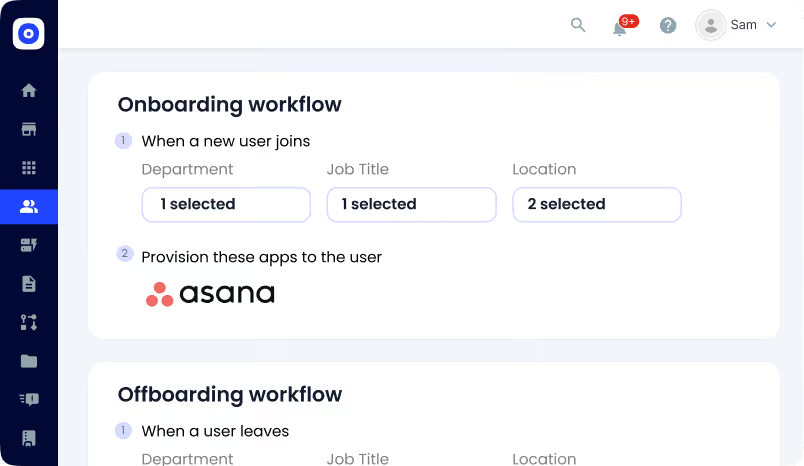
CE Solution
- Automatically triggers deprovisioning from HRIS updates
- Removes dependency on manual IT action
- Executes access removal immediately after exit is recorded
- Standardizes offboarding across all employees
Outcome
The gap between employee exit and access removal disappears, reducing insider risk and security exposure.
C. License Reclamation and Audit-Ready Proof
Challenge
Even after access is removed, licenses are often not returned, and proving offboarding during audits becomes a manual process.
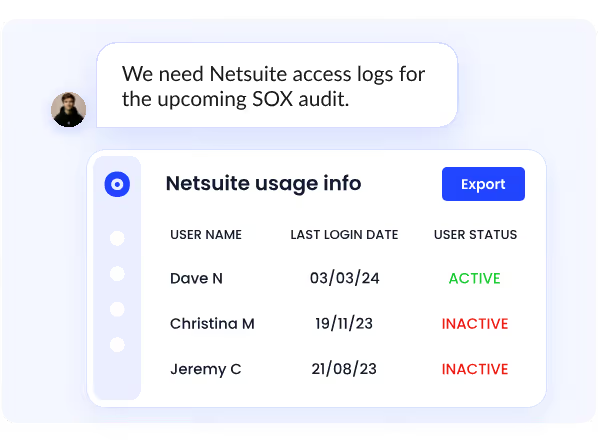
CE Solution
- Reclaims licenses immediately after deprovisioning
- Updates license inventory automatically
- Maintains timestamped logs of every access removal
- Creates a complete audit trail across all systems
Outcome
Organizations reduce wasted SaaS spend and can prove secure offboarding instantly during audits.
Does Your Offboarding Process Actually Remove All Access?


In a Nutshell
SaaS offboarding security is one of the most underestimated risks in enterprise IT. The employee leaves, but access often does not. Without full visibility and automation, these gaps go unnoticed until they turn into incidents.
A secure offboarding process must go beyond SSO. It needs to cover shadow IT, OAuth tokens, API keys, and AI tool integrations. Without this, orphaned accounts and lingering access are not just security issues; they become compliance and operational risks.
CloudEagle.ai automates employee offboarding access revocation across your entire SaaS stack, from SSO-connected apps to shadow IT accounts and AI integrations your team never knew existed.
If you are ready to close the access gaps that outlive your employees, book a demo with CloudEagle.ai and see what complete automated employee offboarding looks like.
Frequently Asked Questions
1. What are the security issues with SaaS?
SaaS risks include shadow IT, weak access controls, misconfigurations, data leakage, and risky third-party integrations due to limited visibility.
2. What is offboarding in cybersecurity?
Offboarding is removing a user’s access to apps, systems, and data when they leave, preventing unauthorized access.
3. Is SOC 2 only for SaaS?
No, SOC 2 applies to any company handling customer data in the cloud, not just SaaS businesses.
4. What does SaaS stand for in security?
SaaS means Software as a Service, cloud-based apps accessed online with shared security responsibility.
5. What is the process of offboarding?
Offboarding includes disabling accounts, revoking access, transferring data, recovering assets, and auditing access removal.
Does Your Offboarding Process Actually Remove All Access?


.avif)


.avif)
.avif)




.png)





.avif)
.avif)
.avif)


