
%201.svg)


HIPAA Compliance Checklist for 2025

The biggest mistake SaaS teams make before a renewal isn't buying the wrong software. It's paying for the right software long after people stopped using it.
A license gets assigned when someone requests access. Months later, that person changes teams. But the license stays active anyway. And because of auto renewals, nobody notices until the invoice is generated.
One IT operations leader we spoke with admitted she had never removed a license because someone wasn't using it. Deprovisioning only happened when an employee left.
CloudEagle.ai gives IT, SaaS Ops, and Procurement teams 90-day dormancy detection across 500+ applications and automated reclaim workflows that fire before the contract locks in. In this guide, we'll show you how.
TL;DR
- Unused SaaS licenses often survive multiple renewal cycles because provisioning is automated while deprovisioning is rarely enforced.
- Auto-renewals, fragmented ownership, and limited audit time make dormant licenses difficult to identify manually.
- CloudEagle.ai provides centralized license visibility, dormancy detection, and automated harvesting workflows across SaaS applications.
- Automated notifications, Slack approvals, and downgrade recommendations help optimize licenses before renewals occur
- CloudEagle.ai enables IT, Procurement, and SaaS Ops teams to eliminate waste and maximize license utilization continuously
1. Why Unused Licenses Keep Renewing Without Anyone Noticing
Most organizations don't intentionally pay for unused licenses. SaaS management is built to provision access, not continuously validate whether it's still needed.
So when employees change roles or stop using a tool, the license stays assigned, the renewal fires automatically, and another year of unused spend locks in.
A. Provisioning Is Reactive. Deprovisioning Almost Never Is
Most SaaS environments have a well-defined process for granting access. Very few have an equally strong process for taking it away.
When an employee needs a tool, access is provisioned immediately. When that employee stops using the tool, nothing happens. The license often remains assigned until the person leaves the company.
- Provisioning Has a Trigger: A manager requests access and IT fulfills it usually within hours.
- Deprovisioning Usually Doesn't: Non-usage creates no workflow, no notification, and no queue for anyone to act on.
- Dormant Licenses Accumulate Quietly: Users change roles, adopt different tools, and move on while the license stays assigned and the seat count stays on the invoice.
- Departure Becomes the Only Cleanup Event: Offboarding is the one moment that reliably triggers access removal. Everything before that is manual, if it happens at all.
One IT operations leader admitted she had "never deprovisioned someone just because I found out they're not using it anymore." Access was removed only when an employee left.
B. Autopay Removes the Moment That Would Otherwise Prompt a Question
Think about the last SaaS renewal that caught your attention. Chances are, it wasn't because the license count increased. It was because someone had to manually approve the spend.
Autopay removes that moment entirely.
- The invoice arrives.
- The seat count matches last year.
- The corporate card gets charged.
- The contract renews.
Nobody stops to ask whether all those licenses are still being used. One finance leader we spoke with was managing more than 160 subscriptions, most of them set to renew automatically through corporate cards.
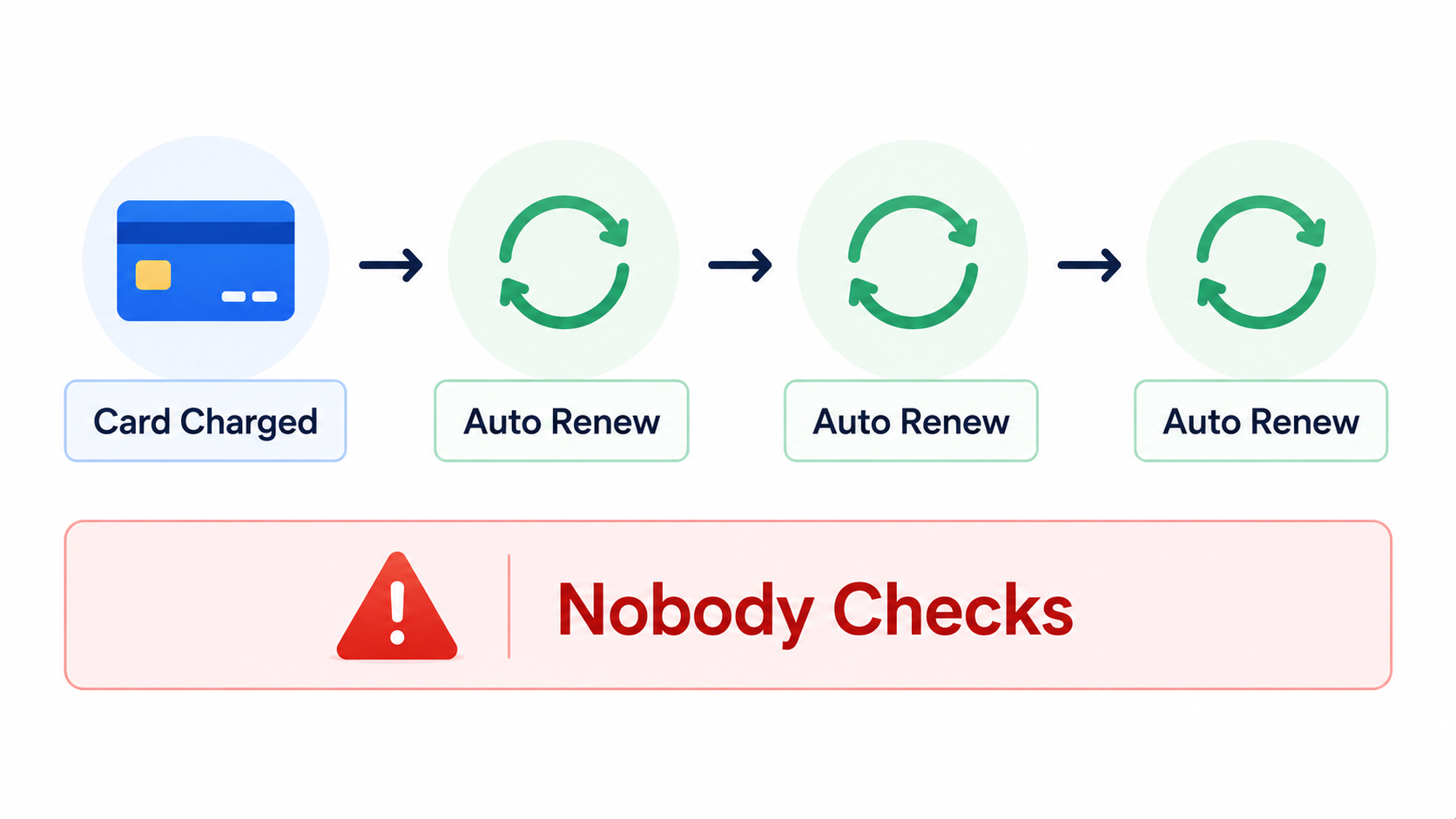
The challenge wasn't tracking payments. It was understanding who was actually using the software being renewed. That's why unused licenses often survive multiple renewal cycles.
C. When SaaS Is One of Many Responsibilities, Audits Don't Happen
Most unused licenses don't survive because somebody ignored them. They survive because nobody has time to look for them.
In many organizations, SaaS management is one responsibility among dozens. The same person handling renewals may also manage onboarding, offboarding, app access requests, and vendor relationships.
- Usage Audits Require Dedicated Time: Cross-referencing user lists and validating findings takes days when done manually across hundreds of applications
- Other Priorities Always Win: Access requests feel urgent. License optimization doesn't, until the renewal invoice arrives and it's too late to act
- Manual Reviews Don't Scale: One IT manager cannot realistically audit hundreds of applications every quarter while managing everything else
- No Trigger Means No Action: Without usage alerts or automated workflows, dormant licenses generate no signal and stay hidden indefinitely.
One IT operations leader put it simply:
"This is not my only job."
License waste is rarely caused by negligence. It's the result of limited time, fragmented data, and no repeatable process that runs without someone manually starting it.

2. How CloudEagle.ai Identifies and Cuts Unused SaaS Licenses
CloudEagle.ai's License Management and Harvesting capability replaces the manual export-and-spreadsheet cycle with a continuous, automated workflow.
CloudEagle.ai surfaces dormant licenses, confirms whether they're still needed, and reclaims them before the next renewal locks the seat count in.
A. Centralized License Visibility Across Your Entire Stack
CloudEagle provides real-time visibility into purchased, provisioned, and used licenses on a single dashboard.
It pulls data through 500+ direct integrations with nightly syncs so the numbers reflect what's happening today, not what was true last quarter. Here's how the License Management module is built to surface that gap:
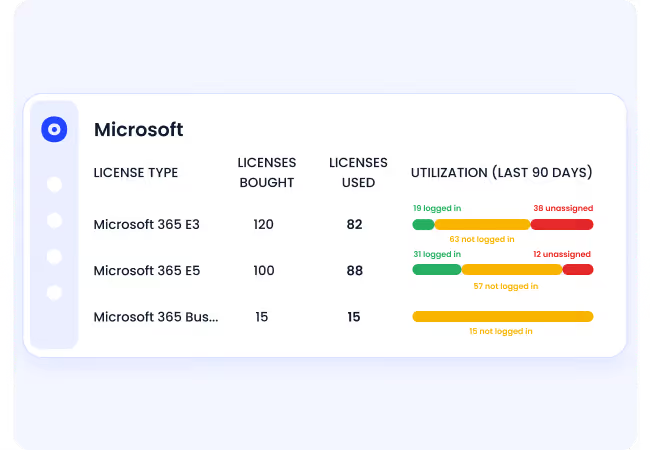
And here's what that looks like inside the platform with purchased licenses, provisioned licenses, and actively used licenses side by side, with last login dates and utilization rates visible per user:
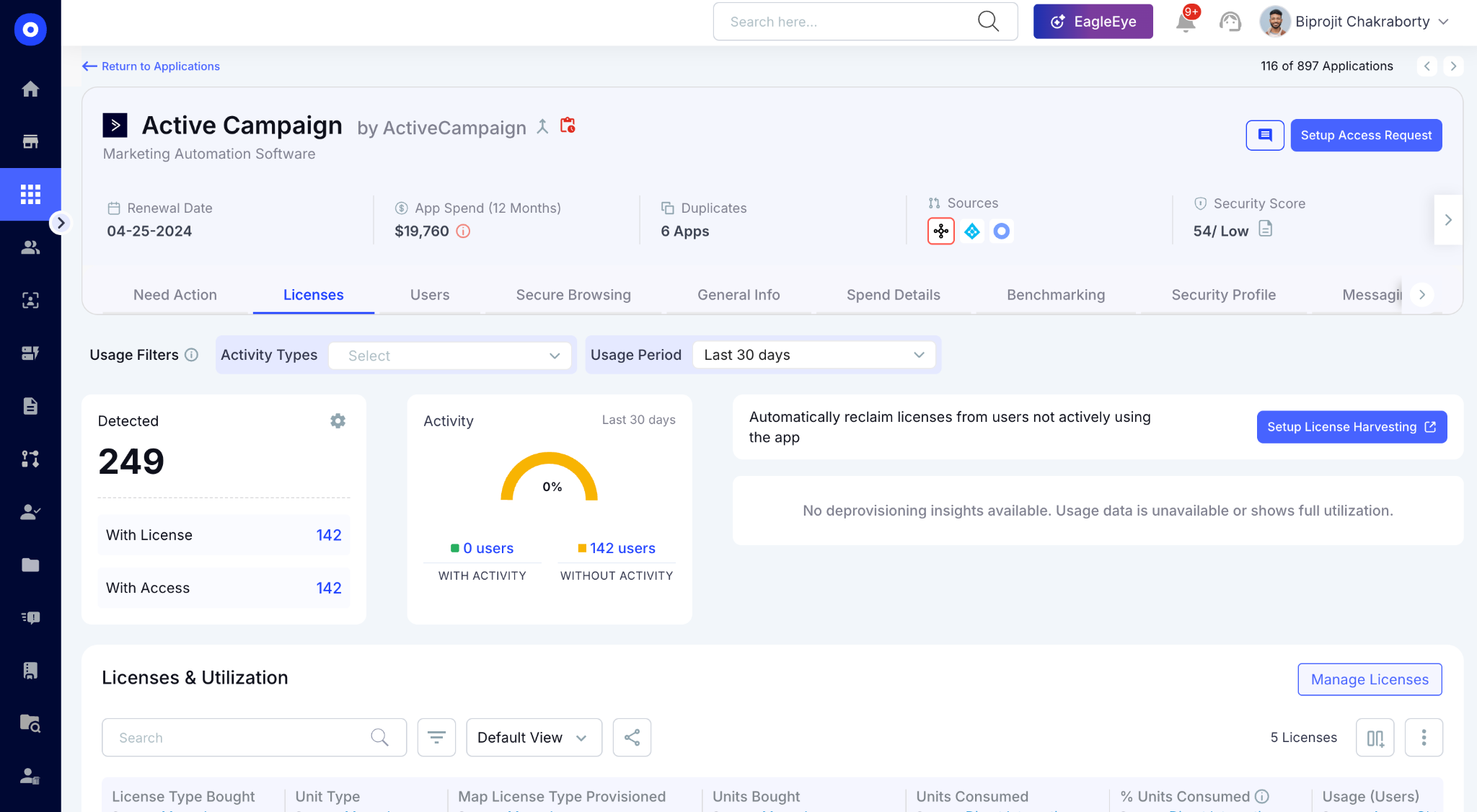
The gap between provisioned and actively used is where dormant licenses live. A license showing no login activity for 90 days appears here without anyone running a manual report.
B. Automated Dormancy Detection and Reclaim Workflows
CloudEagle analyzes real usage data, detects inactive or misassigned licenses, recommends downgrades, and reclaims unused seats automatically.
Inactivity thresholds such as 30, 60, 90, 120, or 180 days are configurable per application. Here's how the License Harvesting workflow is designed to run continuously without IT initiating it manually:
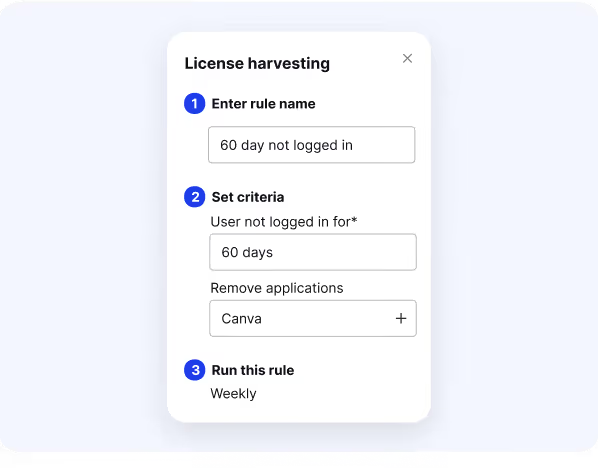
Inside the platform, here's what the harvesting workflow builder looks like, showing the status, automation schedule, trigger conditions, and the scheduled automation running daily or weekly:
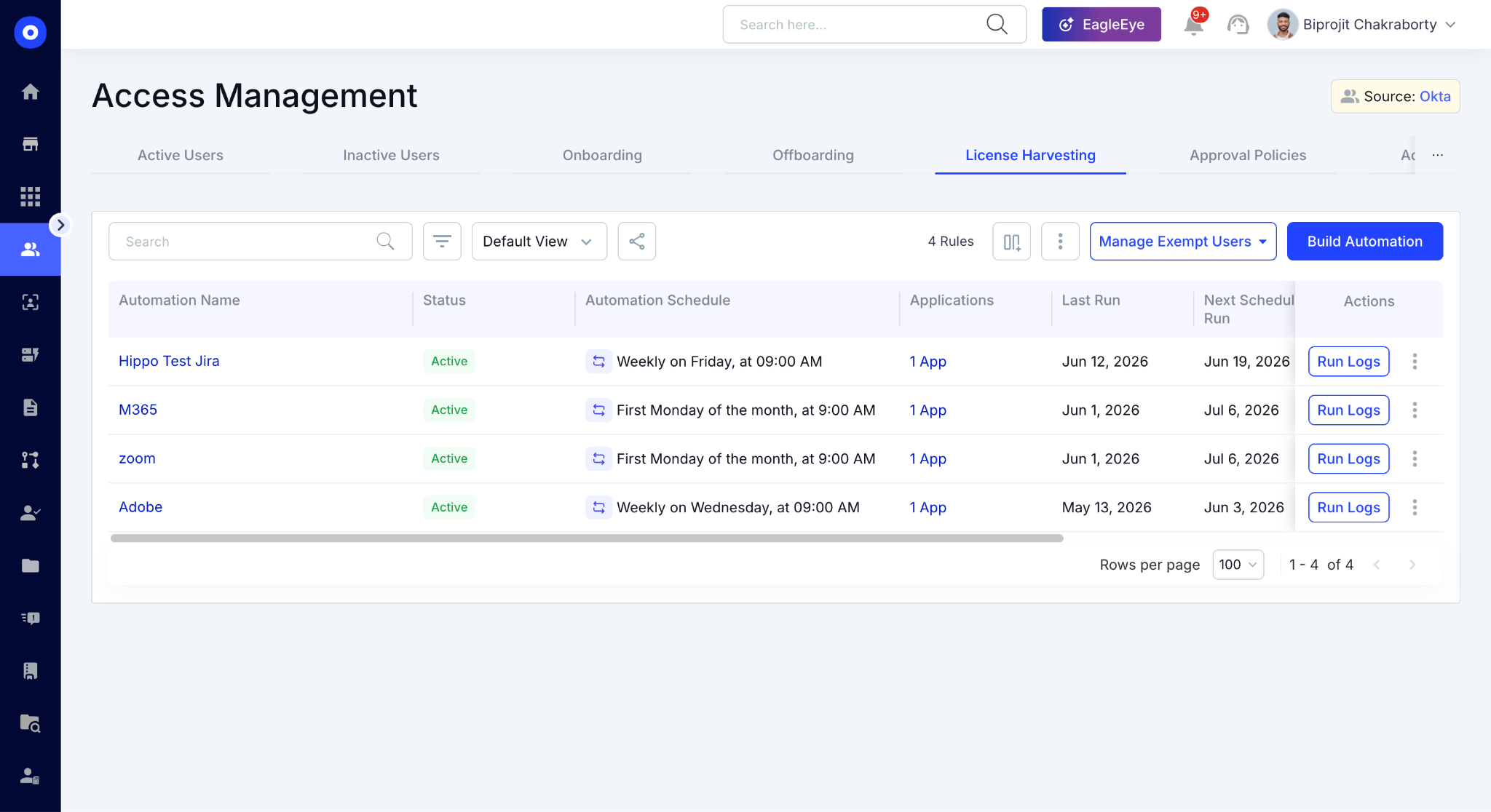
For enterprises managing hundreds of seats across Salesforce, Gong, HubSpot, and AI tools, this is the difference between a one-time cleanup and an ongoing process that runs in the background every renewal cycle.
C. User Notification Before Any License Is Removed
Before CloudEagle reclaims a license, the user is notified automatically. They can confirm whether they still need access.
It means legitimate edge cases get caught before a license is removed incorrectly, and the reviewer queue only contains licenses that genuinely need a human decision.
Here's what the notification looks like from the user's side and what the admin sees in the confirmation queue:
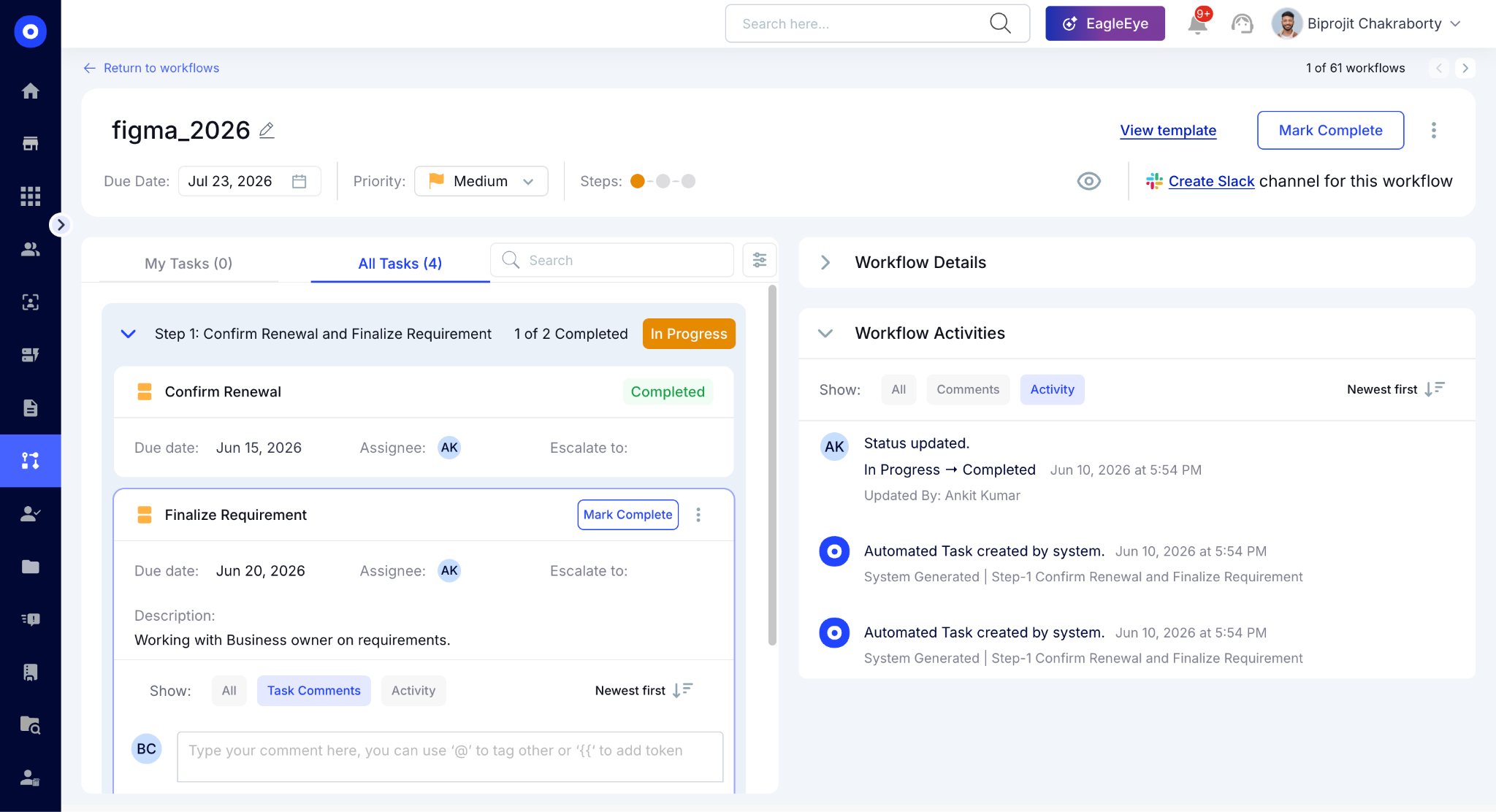
Reviewers get to see all the information so the decision is informed, not just a list of names to approve.
D. Slack-Native Approvals: No Portal Required
No-code Slack workflows automate access reviews, license optimization, and renewals, enabling IT, procurement, and security teams to streamline operations from a single platform.
License reclaim approvals route directly to the relevant manager in Slack with the usage context already attached.
No portal login. No email chain. No chasing approvals two weeks before the renewal deadline.
E. Downgrade Recommendations: Right-Sizing Without Cutting
CloudEagle analyzes feature-level usage and maps it against license tiers and SKUs, revealing downgrade opportunities that are otherwise invisible in standard admin reports.
Here's how CloudEagle's downgrade recommendation engine identifies right-sizing opportunities:
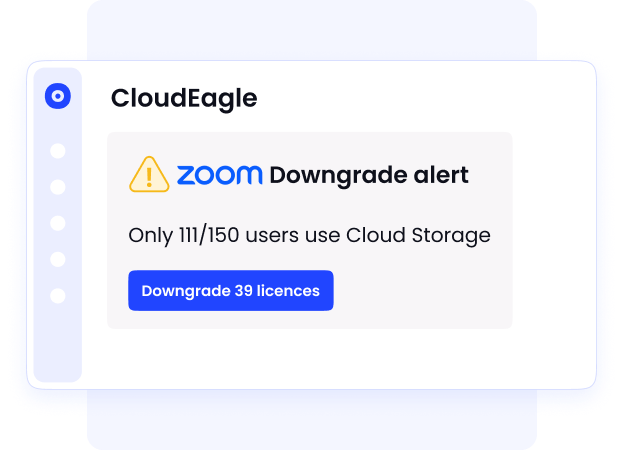
Here's what a feature-level usage breakdown looks like inside the platform, showing which users are on premium tiers but only using basic features:
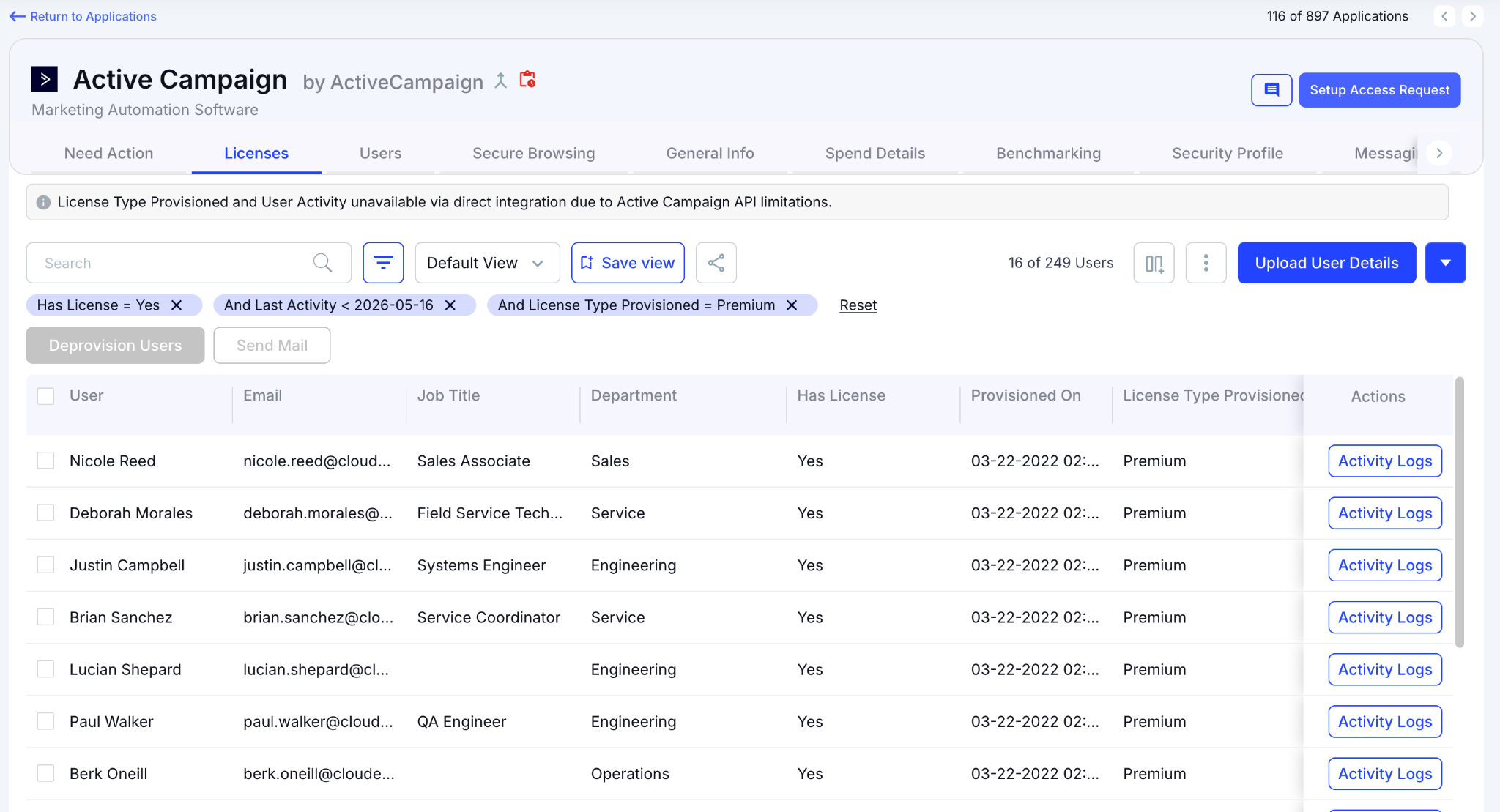
Instead of renewing premium tiers across the board, SaaS procurement teams can downgrade users who don't need advanced features, same vendor, lower cost, no disruption to users who are actively using the full tier.
Unused Licenses Aren't Harmless


3. Where to Find Usage Data and What Each Source Actually Tells You?
Not all usage data is created equal. Some sources tell you who has access. Others tell you who is actually using the application. Understanding the difference is what separates a successful license audit from a misleading one.
A. The SSO Gap
SSO and identity providers show who is provisioned, not who is actively using the application.
- Authentication Is Not the Same as Usage: A user who logged in once six months ago appears active in Okta or Entra, but may not have touched the tool since.
- SSO Gives You a User Inventory, Not a Usage Inventory: You can see who has access. You cannot see whether that access is generating any value.
- Auditing From SSO Alone Produces False Confidence: A list of provisioned users looks complete. It isn't and decisions made from it will leave dormant licenses in place.
B. Direct Integrations: Where Real Usage Lives
The most reliable usage signals come directly from application APIs such as records created, reports run, calls recorded, features accessed. This is where true dormancy becomes visible.
- Feature-Level Activity Reveals What Login Data Hides: A user who opens Salesforce once a month but creates no records is not an active user.
- 30, 60, and 90-Day Usage Patterns Surface the Real Picture: Dormancy thresholds based on actual activity, not authentication.
- The Numbers Are Material: In a live review with one customer, direct integration data surfaced 68 dormant Gong licenses and 151 dormant Salesforce licenses unused for 90 days, approximately $45,000 in recoverable spend ahead of the next renewal.
C. Finance and Expense Data: The Shadow Spend Layer
Not every SaaS purchase flows through IT or procurement.
- Team Credit Cards and Expense Reimbursements Bypass the Approval Process: A license purchased on a corporate card may never appear in SSO, never generate an IT ticket, and never make it into any application audit
- Payment Records May Be the Only Evidence the Subscription Exists: Without financial data ingestion, these licenses are invisible, they renew on autopay and never get reviewed
- AI Tools Make This Gap Worse: Most AI subscriptions like ChatGPT, Claude, Gemini, Cursor are purchased outside formal procurement, meaning finance data is often the only layer that catches them before they accumulate into a material budget problem.
4. Not Using” Means Three Different Things, Each With a Different Response
One of the biggest mistakes in SaaS audits is treating every underutilized license the same way. In practice, different usage patterns require different actions.
A. No Login Activity in 90 Days: Remove the License
This is the clearest case of shelfware.
- No login activity for 90 days
- No recent business dependency
- Low risk of disruption
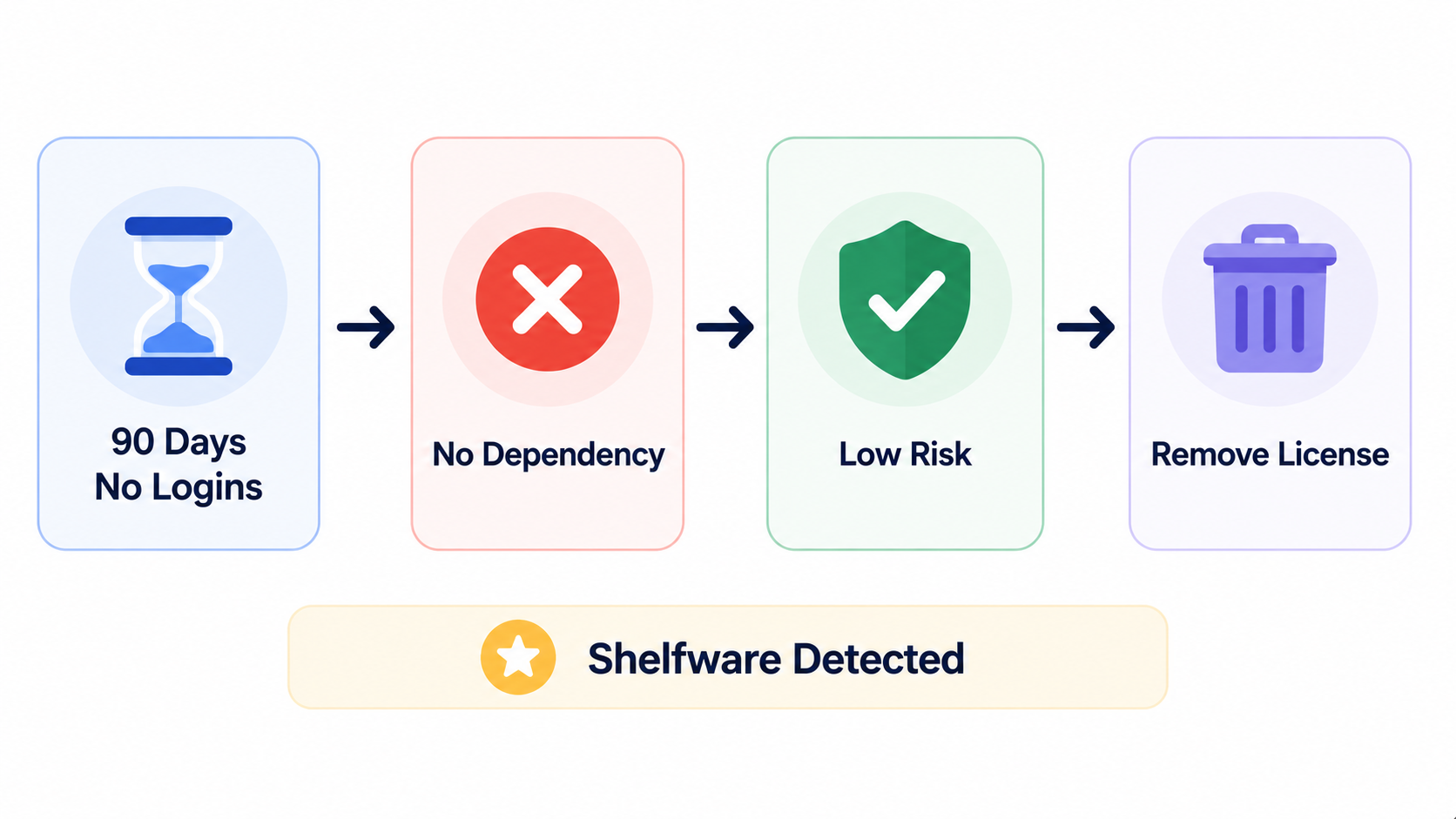
In most cases, you can move directly to a notification and deprovisioning workflow.
B. Login Activity but No Meaningful Output: Downgrade or Remove
Logging in doesn't automatically mean the license is delivering value.
- User opens the application occasionally
- Little or no feature-level activity
- No meaningful business output
As one CIO pointed out, utilization matters more than logins. A user may access Adobe, Salesforce, or Gong occasionally and still decide they don't actually need the license once usage data is shown to them.
C. Active Usage but Over-Licensed: Right-Size the Tier
Not every optimization opportunity requires removing access.
- User actively uses the application
- Only a subset of premium features are needed
- Lower-cost license tiers can support the workload
This is a right-sizing opportunity, not a deprovisioning decision. The user keeps the tool, but the organization stops paying for capabilities they aren't using.
5. Conclusion
Renewal dates don't wait for audits to catch up.
The teams that save the most money enter renewal discussions with 90 days of usage data, a clean license inventory, and a right-sized seat count. Everyone else is negotiating from last year's spreadsheet.
CloudEagle.ai is an AI-powered SaaS Management and Identity Governance platform that surfaces dormant licenses, automates reclaim workflows.
The platform also gives IT, SaaS Ops, and Procurement teams the usage data they need to act before the renewal fires.
6. FAQs
1. Can CloudEagle.ai reassign a reclaimed license to a new employee automatically?
Once a license is reclaimed, CloudEagle returns it to the available pool automatically. When a new employee is provisioned and their role matches the license type, it is reassigned from the pool rather than triggering a new purchase, eliminating the common pattern of buying new seats while unused ones sit idle. Cloudeagle
2. Can CloudEagle.ai connect to HRIS platforms to trigger license reclaim when someone changes roles, not just when they leave?
CloudEagle connects to HRIS platforms like Workday to match licenses with role-based needs and update access automatically when roles change. A role change triggers a review of whether the existing license still fits, not just an offboarding event. cloudeagle
3. Does CloudEagle.ai produce an audit trail of every license reclaim action for compliance purposes?
Every reclaim action, who was notified, when they responded, who approved the deprovisioning, and when the license was returned to the pool is logged automatically with a timestamp. Deprovisioning proof is auto-attached, with no evidence-gathering required after the fact, making the record audit-ready without any manual compilation. Cloudeagle
4. How does CloudEagle.ai handle licenses for applications that don't have a direct API integration?
For applications outside the 500+ direct integrations, CloudEagle routes a deprovisioning task to the relevant application owner with the context they need to act. The action is tracked and logged in CloudEagle so the audit record stays complete even when the reclaim step is executed manually.
5. Can CloudEagle.ai identify when the same user holds duplicate licenses across two contracts for the same tool?
CloudEagle detects multiple licenses assigned to the same user and highlights overlapping tools or redundant subscriptions across teams. This surfaces both individual duplication and team-level duplication where two departments independently purchased the same tool without knowing the other had it.
Every License Should Earn Its Cost


.avif)


.avif)
.avif)




.png)





.avif)
.avif)
.avif)


