
%201.svg)


HIPAA Compliance Checklist for 2025

TL;DR
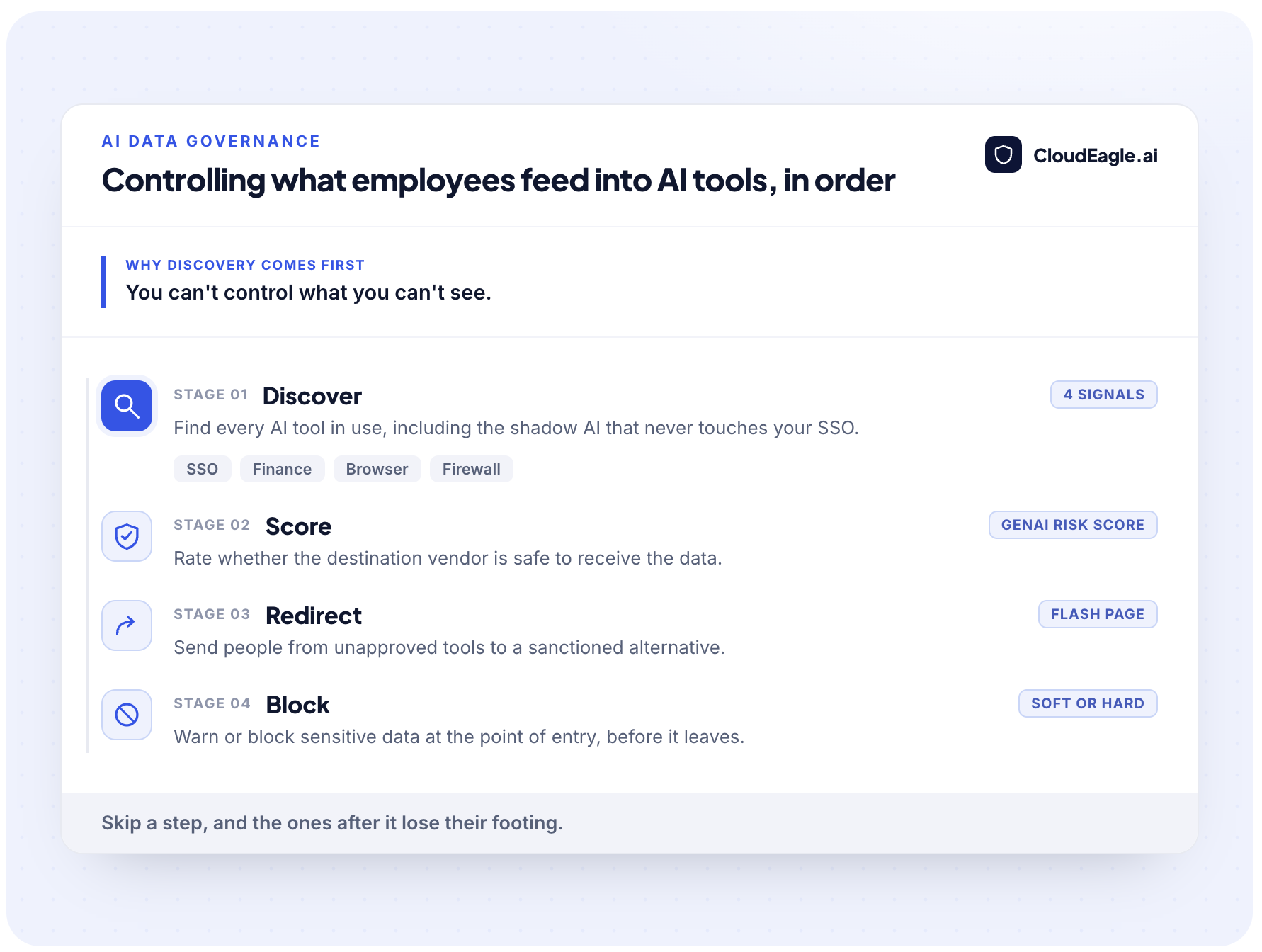
- Controlling what employees put into AI tools is not a filter you switch on. It runs in a specific order: discover every AI tool, score whether the destination is safe, redirect people to a sanctioned option, then block the sensitive data that still tries to leave.
- The block-at-the-browser approach most vendors sell is the last step, not the first.
- Employees are already pasting customer records, source code, and financials into ChatGPT, Claude, and Copilot, often through personal accounts that never touch your SSO.
- The hardest step is discovery, because the shadow AI that carries the most risk is the usage you have no signal for.
- CloudEagle.ai runs the whole sequence in one place: continuous discovery across SSO, browser, firewall, and finance, GenAI risk scores for every vendor, and point-of-entry governance that blocks PII and credentials before they reach an unmanaged tool.
AI data governance is the set of policies and technical controls that manage what data flows into and out of AI tools during everyday work. Here's how to actually control it.
How to Control What Employees Feed Into AI Tools: The Four-Step Sequence
Controlling AI inputs takes four steps in a specific order. Skip one, and the steps after it lose their footing.
Most programs buy step four first and wonder why exposure continues.
Step 1: Discover Every AI Tool First, Including the Ones You Can't See
Discovery is the foundation, and it has to reach the shadow AI that never touches your identity provider. No single signal catches everything, so the answer is to correlate several.
- SSO shows sanctioned logins.
- Finance data shows what got expensed.
- Browser activity shows the personal-account and consumer-tier usage the first two miss.
- Firewall logs catch traffic to AI domains that never ran through a login at all.
Correlating those signals against a known catalog of AI applications is what turns scattered logs into an actual inventory. Discovery has to be continuous, so a tool adopted on a Tuesday shows up in hours, not at the next audit.
One honest limit worth naming: a purely local desktop app with no web authentication is a blind spot for any browser-based approach, which is why network signals have to backstop it.
Step 2: Score the Destination Before the Data Moves
Not every AI tool carries the same risk, so the second step is scoring the destination before deciding what data can go there. The question is not only what the employee is sending, it is whether the vendor receiving it is safe.
A vendor that trains on your inputs, has no signed DPA, or routes data through unvetted subprocessors is a different risk than an enterprise tool with clear data-handling terms. Scoring makes that difference consistent, instead of leaving it to whichever analyst reviewed the tool.
This is the step point-of-use blocking tools skip. They inspect the prompt but never answer whether the destination should have been trusted.
Step 3: Redirect to a Sanctioned Tool, Then Block What Slips Through
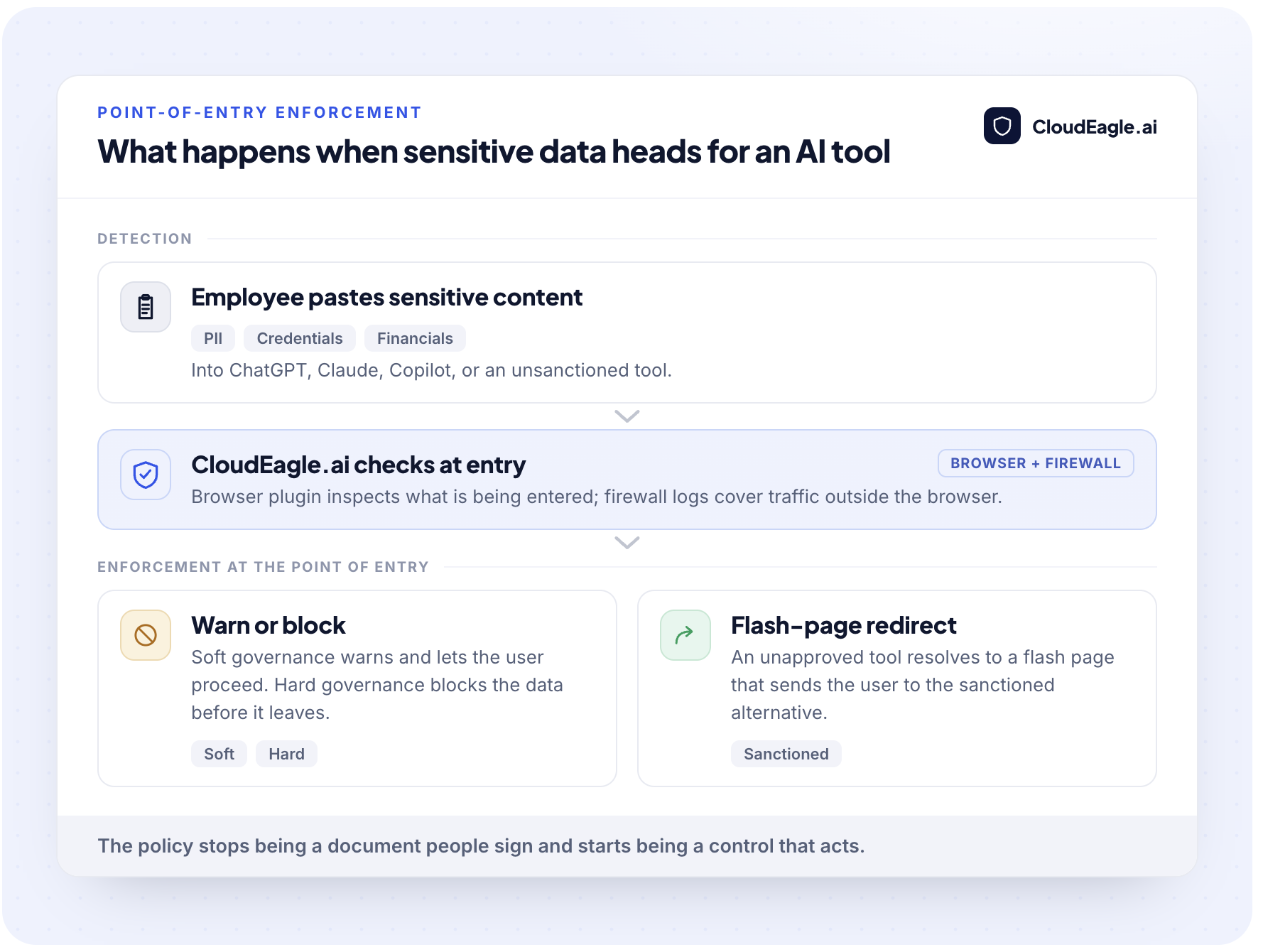
The final step is enforcement at the moment of use, in two parts that work together. First redirect people from an unapproved tool to a sanctioned equivalent, then warn or block the sensitive data that still tries to move.
Redirection solves the behavior, not just the incident. Reach for an unsanctioned tool, land on an approved one, and the data goes somewhere governed.
Blocking handles what remains. A warning or hard block the moment someone pastes PII, credentials, or card data stops the exposure before it leaves, not after.
Together they turn an acceptable-use policy from a document people sign into a control that acts where behavior happens.

Why the Sequence Has to Run in This Order
Each step above exists because of a specific failure mode. Skip discovery and you are blocking prompts on tools you do not know exist. Ban AI outright and usage does not stop, it just moves somewhere you cannot see. Here is why the order matters, and why the usage you most need to control is usually the usage you have the least visibility into.
Personal accounts, embedded AI features, and consumer-tier tools sit outside SSO, outside procurement, and outside most security tooling. Writing a policy and assuming enforcement follows is the common trap. IBM's 2025 Cost of a Data Breach report found that 63% of organizations have no policies in place to govern AI or prevent shadow AI, and a policy on paper stops nothing at the moment an employee hits paste.
Shadow AI and Personal-Account Logins
Shadow AI is any AI tool employees use without IT approval, and it is where most sensitive-data exposure actually happens. The reason it is so dangerous is that these tools are invisible to the systems you rely on to see them.
A personal ChatGPT or Gemini login never authenticates through your identity provider, so SSO-based inventories miss it. Cyberhaven put 32.3% of ChatGPT usage on personal accounts.
Free-tier accounts are the sharpest edge. Harmonic Security's analysis of 22 million prompts found 16.9% of sensitive-data exposures ran through personal free-tier accounts, where IT has no visibility.
AI Features Buried Inside Tools You Already Pay For
AI features now activate inside SaaS tools you already own, often with no clear moment where an employee knows they are using AI. Copilot-style assistants process business content quietly, creating exposure no acceptable-use policy anticipated.
There is no distinct 'I am using an AI tool' step to govern. Data flows into the AI feature the way it always flowed into the app.
An inventory built only from standalone AI vendors understates the real footprint, because the embedded features hide inside tools finance and SSO already count as approved.
Why Blocking All AI Backfires
Banning AI outright lowers your visibility, not your risk. Block the sanctioned tools and usage moves to personal devices and personal accounts, which is exactly where you have no control.
PagerDuty's 2026 survey found two-thirds of office workers used AI tools they believed their company did not permit.
Prohibition does not lower the odds that a customer list ends up in a public model, it removes your ability to see when it does. The goal is not to stop AI adoption. It is to channel it through a governed path, with an approved option and control at the point the data moves.
What AI Data Governance Actually Covers
AI data governance covers the data moving through AI tools: what employees send in, and what those tools retain, log, or train on. It is a narrower, faster-moving problem than traditional data governance, because the exposure happens in seconds, inside a prompt, often through a tool IT never approved.
The scope comes down to three things:
- The daily flow of prompts, uploads, and pasted content into generative AI.
- The vendor-side question of what happens to that data once it lands.
- The identities and tokens AI tools use to reach your other systems.
AI Data Governance vs Traditional Data Governance
The difference is timing. Traditional governance protects data you store and own. AI data governance has to act the moment data leaves your control boundary, which changes what a control does and when it fires.
When an employee pastes a contract into a public AI account, your access rules, retention policies, and audit logs no longer reach it. That is why the control has to live where the employee actually works, not in the database.
Why Every Prompt Is a Data Transfer
Every prompt an employee submits to a generative AI tool is a potential data transfer to a third party. Treating prompts as casual queries rather than outbound data movements is the mistake that leaves sensitive information exposed.
Cyberhaven's 2026 research found 39.7% of AI interactions involve sensitive corporate data, and the average employee inputs proprietary information into an AI tool once every three days.
Most of it is well-intentioned: dropping financials into a chatbot for a forecast, or pasting source code to debug it faster. It may still be retained, logged, or used to improve an external model under terms the employee never read.
How CloudEagle.ai Controls What Employees Feed Into AI Tools
We run the full sequence in one platform, so discovery, risk scoring, and enforcement inform each other instead of living in separate tools. Our AI governance module brings AI into the same control plane as the rest of your SaaS estate, which is what lets a discovery signal feed a risk score and a risk score drive an enforcement policy.
One Live Inventory Instead of Four Disconnected Signals
We build a single real-time inventory of every AI tool in use by correlating SSO, browser extension, firewall, and finance data against our proprietary AI application catalog, the SaaSMap. That correlation surfaces the shadow AI and personal-account logins that SSO-only and CASB-only tools cannot see.
Discovery is continuous, so a newly adopted tool shows up within hours, not at the next quarterly audit.
Lapzo had a sanctioned list of 26 vendors when we surfaced 115 tools in the first ten days, four processing regulated customer data with no signed DPA, covered in how CloudEagle.ai helped Lapzo eliminate high-risk AI apps.
For a wider comparison of approaches, we keep a running list of shadow AI discovery solutions worth evaluating.
GenAI Risk Scores for Every AI Vendor
We assign a GenAI risk score to every AI vendor in your environment, using one rubric so security, procurement, and legal read risk the same way. The score tells you whether a destination is safe to receive data before anyone sends any.
A Fortune 500 financial-services firm used this to move from having no answer about what data teams shared with tools like ChatGPT to a scored, defensible view of every AI vendor, described in how the firm got full visibility into AI spend, risky apps, and sensitive data exposure.
Governance at the Point of Entry
We enforce your AI acceptable use policy at the moment of use, through a browser plugin backed by firewall log ingestion. Access an unapproved tool and a flash page redirects you to the sanctioned alternative; try to paste PII, credentials, or confidential data and we can warn or block it before it reaches the tool.
- Soft governance shows a warning the employee can acknowledge.
- Hard governance blocks the data outright.
You match the strength to the sensitivity of what is moving.
We are precise about where this reaches. The plugin covers AI tools that authenticate through the web (the large majority), across the top browsers and pushed through your MDM, and firewall ingestion from tools like Zscaler covers traffic outside the browser. We would rather tell you where a control reaches than imply it catches every channel.
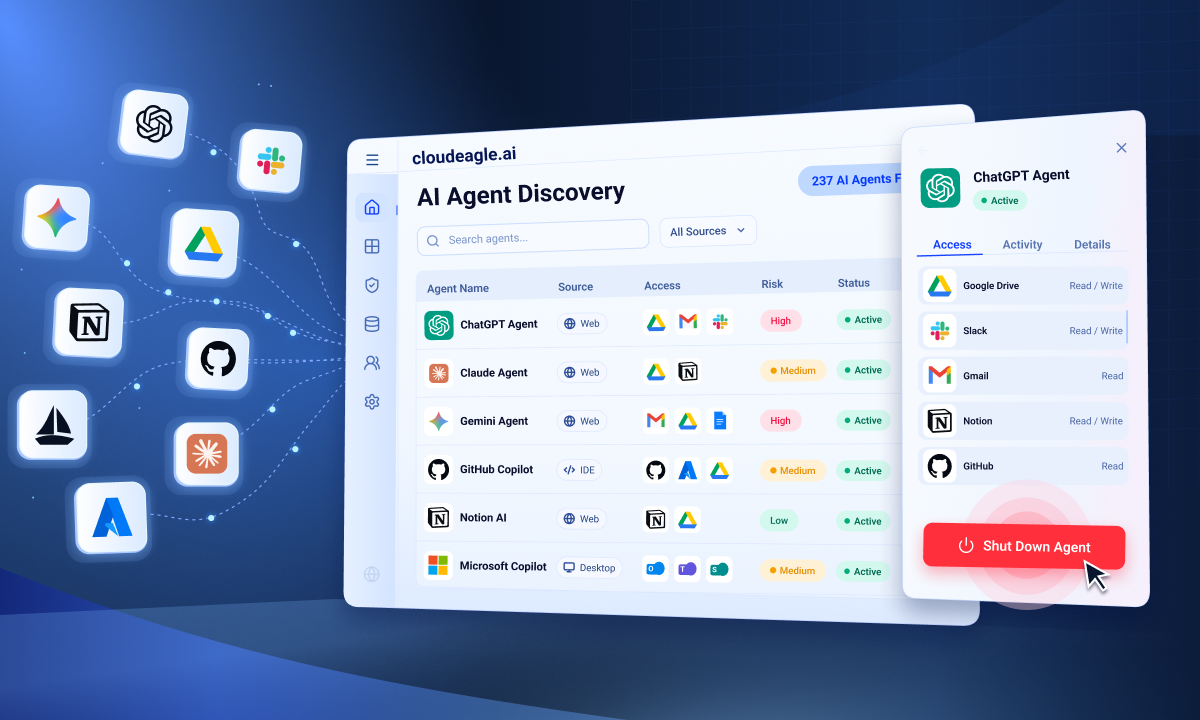
Access Reviews and Non-Human Identity Governance for AI Tokens
Controlling the prompt is not the end of the exposure, because AI tools carry identities, API tokens, and service accounts that outlive any session. We bring those non-human identities into the same access reviews as your human users.
The tokens an AI agent uses to reach other systems get reviewed, scoped, and rotated. A blocked prompt does nothing about an over-privileged token an agent has held for months.
We fold AI access into continuous user access reviews and extend them to machine identities, detailed in how to bring non-human identities into your access reviews.
When an employee leaves, their AI access, including tokens and personal-account logins, is revoked alongside everything else.
See Every AI Tool Before You Govern It


How to Build a Defensible AI Data Governance Program
A defensible AI data governance program is one where every access and enforcement decision produces evidence a board or auditor can read without a manual scramble. It rests on a policy you can enforce and an audit trail that builds itself.
Writing an AI Acceptable Use Policy You Can Enforce
An enforceable policy translates each rule into a specific technical action. A policy that only lists prohibited behaviors, with no control behind each one, is guidance, not governance.
Start from the data, not the tool. Define which categories can never leave for an AI tool, which are allowed with an approved one, and what happens the moment someone crosses the line, then tie each statement to an owner.
Turning AI Governance Into Audit-Ready Evidence
Audit-ready evidence means every governance action is logged, timestamped, and attributable as it happens, so proving your posture is a query rather than a project.
Regulators and boards increasingly expect you to show which AI tools are in use, who approved them, and what data controls are in place.
When enforcement and access decisions log automatically, that evidence is a byproduct of running the program, not a pre-audit scramble.
A firm that surfaced its AI tools this way moved board and regulator reporting from manual document pulls to live, audit-ready visibility, shown in how CloudEagle.ai surfaced AI tools and built a defensible AI governance program.
Discover first, score the destination, redirect to something sanctioned, block what still tries to leave, and log all of it. That sequence, kept in order, is what turns AI data governance from a policy on paper into a control that holds.
Turn Your AI Policy Into a Control That Holds
FAQs
Q1: How do I stop employees from putting sensitive data into AI tools?
You stop it by controlling AI use as a sequence, not with a single filter. First discover every AI tool employees use, then score whether each vendor is safe to receive data, redirect people from unapproved tools to sanctioned ones, and warn or block sensitive inputs at the point of entry. Blocking at the browser only helps for tools you already know about, so discovery comes first. A written policy alone stops nothing at the moment someone hits paste.
Q2: What is shadow AI, and why is it a data governance risk?
Shadow AI is any AI tool employees use without IT approval, from personal ChatGPT logins to browser extensions and AI features embedded in apps you already own. It is a data governance risk because these tools rarely authenticate through your SSO, so standard inventories miss them while sensitive data still flows out. Personal and free-tier accounts are the sharpest edge, since they sit entirely outside your security stack. You cannot govern what you have not discovered, which is why finding shadow AI comes before controlling it.
Q3: How is AI data governance different from DLP?
AI data governance overlaps with data loss prevention but covers more ground. DLP inspects content as it leaves your environment, while AI data governance also discovers which AI tools are in use, scores whether each vendor is safe to receive data, and governs the identities and tokens those tools hold. DLP answers whether a specific piece of content should leave. It does not tell you which AI tools are running or whether the destination can be trusted, which is why controlling AI inputs needs both.
Q4: Can you actually block what someone types into ChatGPT?
You can warn on or block sensitive data as someone enters it into ChatGPT, though not through every possible channel. A browser plugin can pop a warning or hard-block PII, credentials, and confidential content at the point of entry, and firewall logs catch traffic that sits outside the browser. The honest limit is that this covers AI tools which authenticate through the web, which is most of them. A local desktop app with no web login is a blind spot that network signals have to backstop.
Q5: How does CloudEagle.ai control what employees share with AI tools?
CloudEagle.ai runs discovery, risk scoring, and enforcement in one platform. It builds a live inventory of every AI tool by correlating SSO, browser, firewall, and finance data, assigns a GenAI risk score to each vendor, and enforces policy at the point of entry through warnings, blocks, and flash-page redirects to sanctioned tools. It also brings the API tokens and service accounts behind AI tools into access reviews, so the machine identities that outlive any single prompt get governed too.


.avif)


.avif)
.avif)




.png)





.avif)
.avif)
.avif)


