%201.svg)


HIPAA Compliance Checklist for 2025

Security teams can tell you how many employees have access to production. Almost none can tell you how many AI agents are running against the same systems, what credentials each one holds, or who owns them.
CloudEagle.ai, an AI governance, SaaS management, and SaaS security platform, has made its AI agent management capabilities generally available.
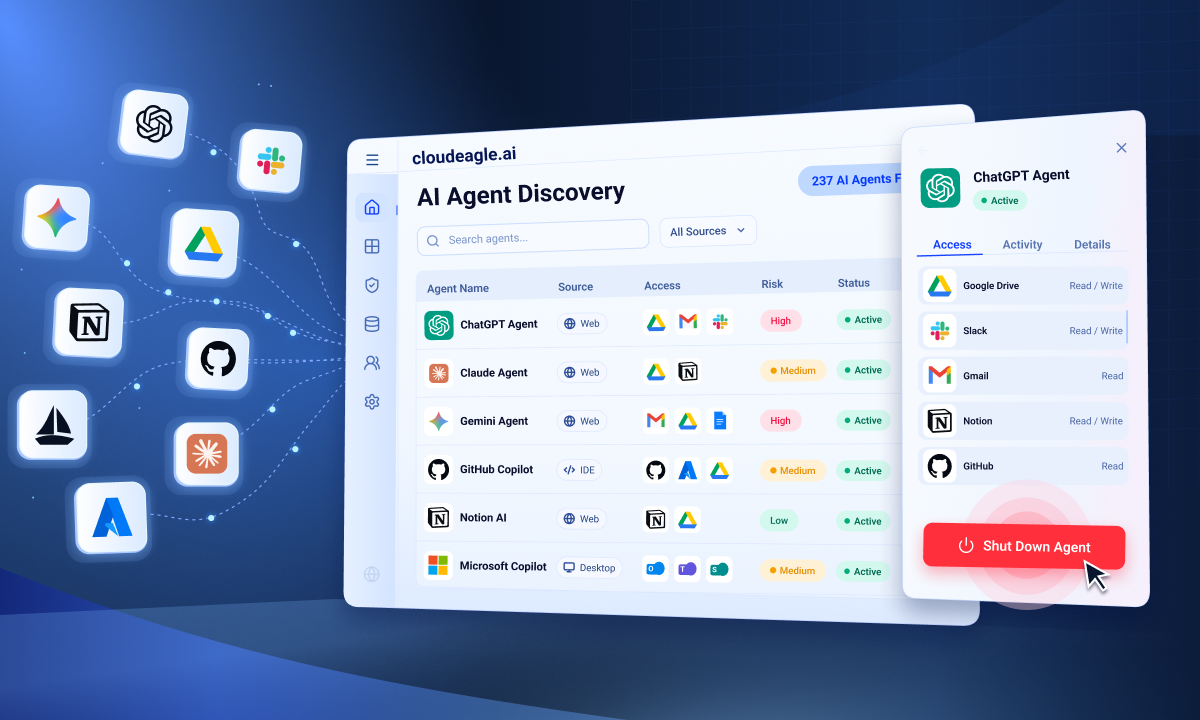
IT and security teams can now manage the full AI agent lifecycle from one place: continuously discover every AI agent operating across their environment, see who owns each one and what it can reach, and shut down rogue AI agents with a kill switch.
AI agent discovery, done properly, means holding a current inventory of every agent running in your environment, across provider consoles and the workflows agents are built into, with the owner, credentials, roles, permissions, and activity attached to each record. A one-time export is not discovery. Agents get created faster than anyone refreshes a spreadsheet.
Read official announcement about the feature here: CloudEagle.ai Helps Enterprises Manage the AI Agent Lifecycle, Including the Kill Switch for Rogue AI Agents
Why Agents Sit Outside the Controls Built for People
A new employee gets a background check, a defined role, access that matches that role, and a manager accountable for it from day one. AI agents arrive with none of that. When agents were a handful of experiments inside one team's workflow, nobody needed to care.
The tools enterprises already pay for now ship agents by default, and one employee can stand up dozens of them in an afternoon against production data. Gartner predicts that 40% of enterprise applications will be integrated with task-specific AI agents by the end of 2026, up from less than 5% in 2025.
Almost none of those agents arrive through an AI project somebody scoped and approved. They come inside applications the business already bought, so the agent population keeps growing whether or not anyone has decided how to govern it. The practical question is no longer whether agents need governing. It is what a tool has to do before it can.

What to Look for in an AI Agent Discovery Tool
Governing an agent comes down to five questions. They are also the five things worth testing in a demo rather than taking on trust, because most tools answer two or three of them and stop:
- Where are the agents? Across every provider console and every workflow they were built into, not one console at a time.
- What are they doing? A record of what each agent did and what it changed, not just that it is active.
- What can they access? The applications and environments each agent reaches.
- What permissions do they hold? Both the roles assigned to it and the ones it picked up on the way in.
- Can it be shut down? A kill switch in the same place you found the agent, not a change window and a ticket.
Most enterprises cannot answer any of the five today, because each answer sits in a different console and none of them stay current.
How CloudEagle.ai Helps You Manage the AI Agent Lifecycle
An AI agent's lifecycle runs from the moment somebody creates it to the moment somebody shuts it off, and most of that stretch currently goes unsupervised.
CloudEagle.ai picks each agent up as soon as it appears, keeps a current record of what it holds and what it is doing for as long as it runs, and shuts it down when it should no longer be running. All five questions get answered from one inventory, across every provider console and workflow.
a) Agent discovery
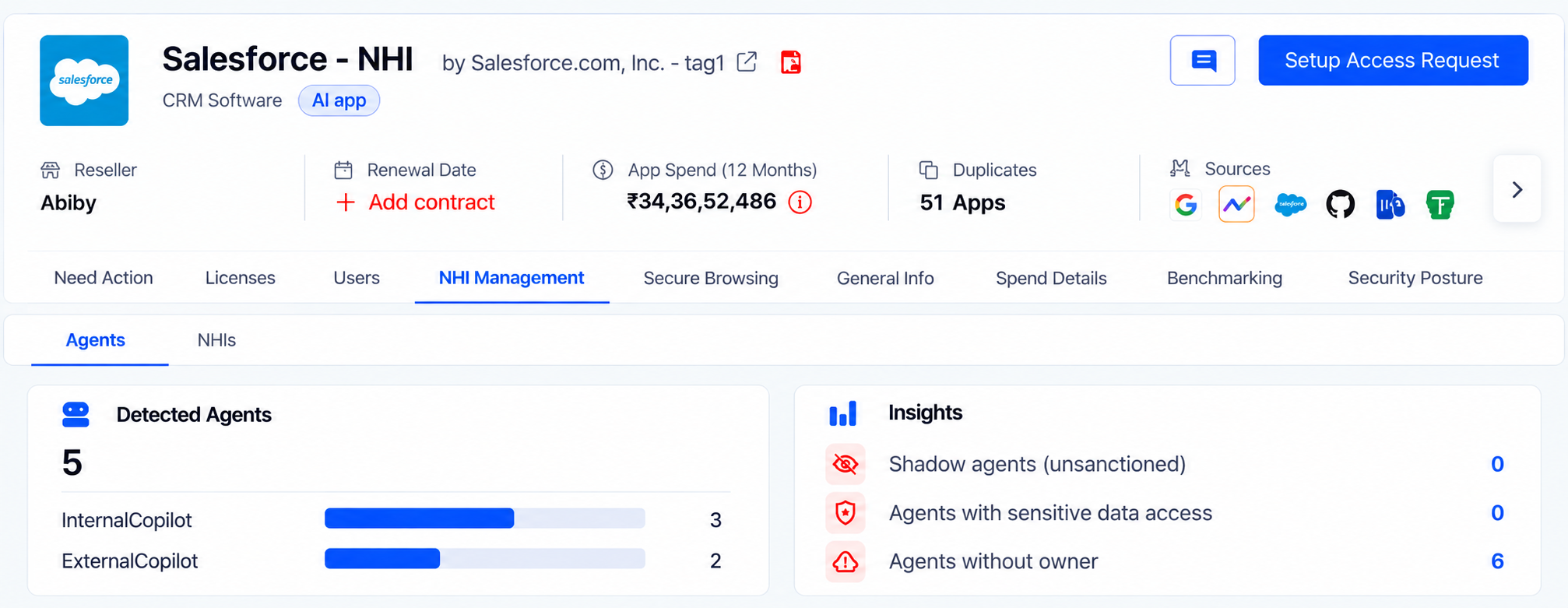
Every agent shows up with its status, last activity, owner, and credentials in a single view, at both the global and the application level, and the inventory updates continuously rather than at export time.
No agent gets discovered for the first time in the middle of an incident, and every one of them has a name against it, so there is somebody to call when an agent starts behaving in a way nobody expected.
b) Agent activity
Activity logs show what each agent did, what it changed, and which resources it touched. An investigation starts with answers rather than a week of reconstructing events across consoles.
c) Application context
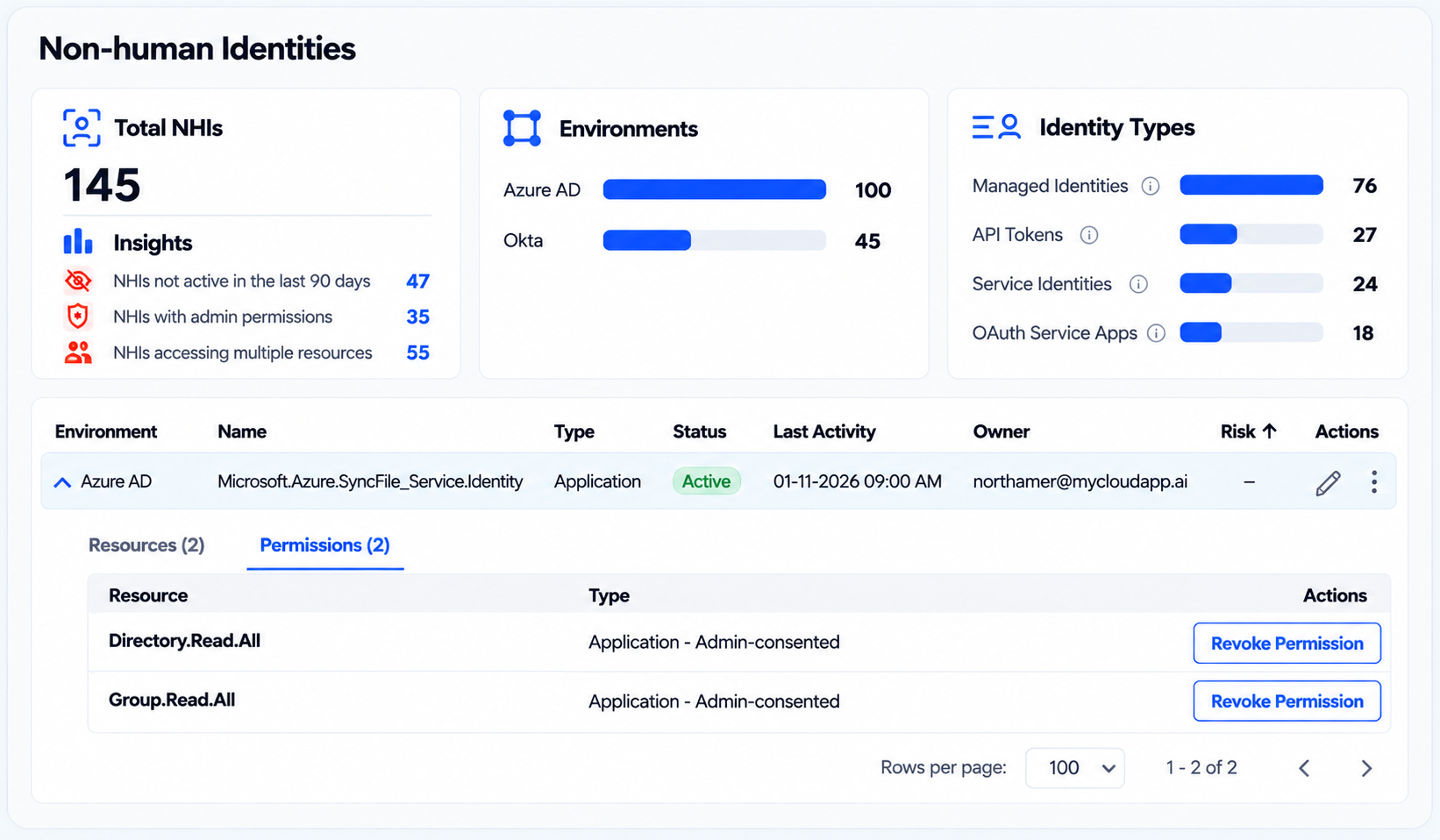
Each agent appears alongside the applications and environments it can reach, not just the console it was created in. Security teams can hand an application owner the list of agents touching their system instead of chasing that context themselves, and work through the applications holding sensitive data before the ones that do not.
d) Roles and permissions
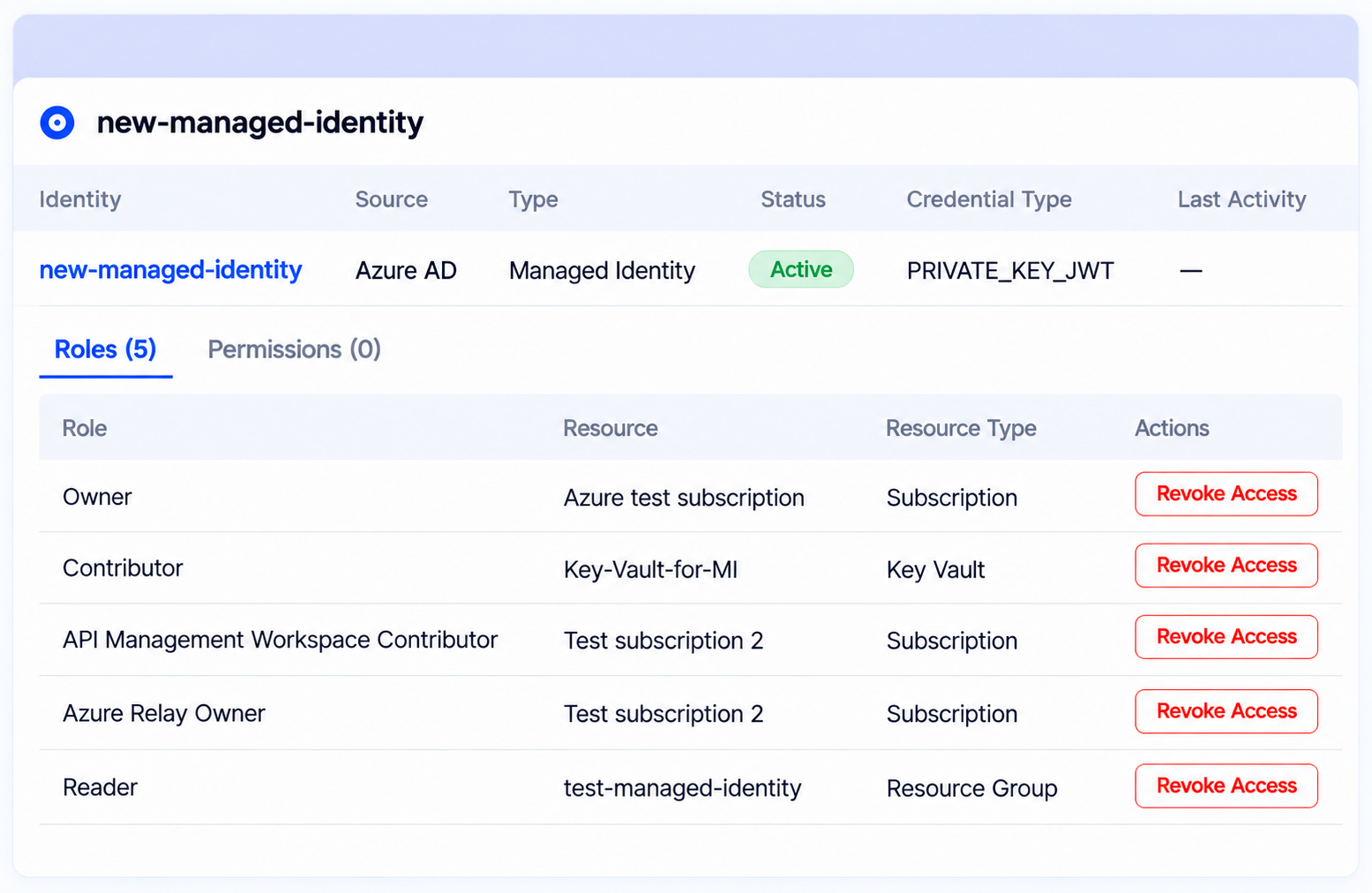
The roles each agent was given, and the ones it picked up along the way, which is usually where the wider access sits.
Teams can see how far an agent could actually reach rather than how far it was meant to, so over-permissioned agents surface before an audit or an incident finds them.
e) Kill switch
Rogue AI agents get stopped where they were found. Revoke the agent's roles, rotate the secret, or deactivate it entirely, with no hunting across five consoles first. Every action is written to the audit log, so the shutdown itself is evidence.
.png)
"The tools were never the problem; the untethered access agents get is. An agent runs on its own, keeps working long after the person who built it left the organization, and almost never shows up in an access review. Governance has to run continuously, in real time, at AI speed; a quarterly review was never going to catch this," said Nidhi Jain, CEO of CloudEagle.ai.
Agents Inside the Same Access Reviews as Employees
Discovery is the start of the AI agent lifecycle, not the whole of it. Once agents sit in one inventory, they go through the same access reviews as employees instead of sitting outside the process.
Teams can filter for the agents that need attention first:
- Inactive agents still holding live credentials
- Agents with no owner attached
- Agents carrying more access than their job requires
- Agents authenticating with secrets that have never been rotated
Because every action taken on an agent is logged, the evidence an auditor asks for is already there rather than something to assemble after the request arrives.
Where This Fits in Your AI Governance Program
AI agent management runs inside the same AI governance layer that already handles shadow AI discovery, GenAI risk scoring, and token consumption tracking for CloudEagle.ai customers.
Agent risk rarely announces itself, and it usually surfaces during an audit, or when somebody finally asks what an agent built for one narrow task can reach across the rest of the stack.
For the wider context on ungoverned AI adoption, start here: The shadow AI governance gap.
See What is Running in Your Environment
AI agent management is generally available to all CloudEagle.ai customers today. Book a demo to see your own AI agent inventory and what each agent in it can reach.
FAQs
1. What is AI agent discovery?
AI agent discovery is the continuous process of finding every AI agent running in an environment and recording what each one is: its owner, credentials, roles, permissions, and activity. It covers agents built inside provider consoles as well as agents embedded in workflows. A one-time export is an audit rather than discovery, because agents get created faster than a static list gets refreshed.
2. How do you evaluate AI agent discovery tools?
Test five things in the demo. Whether it finds agents across every provider console and workflow rather than one console at a time. Whether it records what each agent actually did. Whether it shows which applications and environments an agent can reach. Whether it shows inherited permissions and not only assigned ones. And whether you can shut an agent down from the same screen that found it. Most tools cover the first two and stop.
3. Where does CloudEagle.ai discover AI agents?
Across provider consoles and the workflows agents are built into, with visibility at both the global level and per application. Each agent arrives in the inventory with its status, last activity, owner, and credentials attached.
4. Can CloudEagle.ai shut down a rogue AI agent?
Yes. The kill switch revokes the agent's roles, rotates its secret, or deactivates the agent entirely, from the same place the agent was found. Every action is written to the audit log.
5. How is AI agent discovery different from shadow AI discovery?
Shadow AI discovery finds the AI applications employees adopt. AI agent discovery finds the autonomous agents running with their own credentials and permissions against your systems. Both run inside CloudEagle.ai's AI governance layer.
6. Does it show the permissions an agent inherited rather than was granted?
Yes. CloudEagle.ai surfaces both assigned and inherited roles and permissions, which is usually where the wider access sits.
See Every Agent Running in Your Stack Right Now




.avif)


.avif)
.avif)




.png)





.avif)
.avif)
.avif)


