You need to enable JavaScript in order to use the AI chatbot tool powered by ChatBot

How Enterprises Reduce AI Risk: 7 AI Security Best Practices to Implement Now

Share via:
blog-cms-banner-bg
Little-Known Negotiation Hacks to Get the Best Deal on Slack
cta-bg-blogDownload Your Copy

HIPAA Compliance Checklist for 2025

Download PDF

Your employees didn't wait for an AI policy. They just started using tools.

Claude for writing. Cursor for code. Copilot for everything. Personal ChatGPT accounts for the tasks nobody wanted to wait for IT to approve.

The result? AI sprawl. Freshworks discovered 92 AI engines in active use. Cooper Consumer Health uncovered 1,600 apps after integrating SSO, raising a question many IT and security teams still can't answer: What about the apps operating outside approved systems?

That question is where most enterprise AI risk actually lives.

This blog shares seven practical AI security best practices IT and security leaders can implement now to reduce risk, gain visibility, and govern AI use with confidence.

TL;DR

  • Shadow AI discovery is table stakes. Every other practice depends on knowing what is actually running in your environment
  • Risk scoring, policy enforcement at the browser layer, identity-tied access controls, and per-user consumption tracking together close the gaps that SSO and DLP alone cannot
  • AI agents, not just AI apps, are the fastest-growing ungoverned access risk in enterprise environments
  • The companies that govern AI well are not the ones that block it. They are the ones that can see it clearly enough to make deliberate decisions about what is approved, monitored, and off-limits

Practice 1: Find Every AI Tool Your Employees Are Actually Using

Sean Buckley, IT and Security at Immunocore, a regulated pharma company, called shadow AI discovery "table stakes, the first thing we need before anything else."

He is right. Every other practice on this list depends on visibility. You can't risk-score tools you don't know exist, enforce policies on apps you can't see, or review access for AI tools that employees adopted outside IT.

The gap is always the same: employees use personal accounts, browser extensions, and direct URLs that never touch your identity provider.

What full AI discovery actually requires:

Three layers working simultaneously, not one:

  • SSO integration: Surfaces apps employees authenticate through your identity provider. This is the layer most teams already have. It covers, at best, 40 to 60% of actual AI tool usage
  • Browser-level activity: Surfaces AI tools accessed through personal accounts, free tiers, and direct URLs that bypass SSO entirely. This is where most shadow AI lives
  • Finance and expense data: Surfaces AI subscriptions paid on corporate cards or expensed below procurement thresholds. Varahe discovered two separate teams paying for the same Claude subscription independently without knowing the other existed

Practice 2: Score AI Tools for Risk Before Employees Use Them

Knowing what is running is step one. Knowing which tools represent actual security risk is step two.

For many organizations, data residency is a major factor. AI services hosted outside approved regions may require additional review or be restricted entirely, regardless of how widely adopted they are elsewhere. The issue isn't popularity. It's where the data lives.

What makes an AI tool risky:

  • Data residency: where is the inference happening and where is the data processed?
  • Training data policies: does the vendor use your prompts and inputs to train their models?
  • Security posture: SOC 2, ISO 27001, and relevant certifications
  • Privacy posture: how is personal and sensitive data handled?
  • Data handling at the application layer: what happens to employee inputs after submission?

How risk scoring works in practice:

The goal isn't to block everything. Most AI tools aren't inherently risky, they become risky in specific contexts, with specific data, or for specific users. A binary block list drives employees to work around controls. Tiered policies create visibility and accountability.

Your Riskiest AI Tool Might Already Be Approved.

Learn how to spot risky AI tools before they become a problem.
Get the Guide

Practice 3: Enforce Policies Before Company Data Enters an Unapproved Tool

For Shellea Daniel at hover.to, one requirement was non-negotiable: no PII or PHI on unauthorized AI platforms. The challenge is that most controls act too late. Traditional DLP tools alert after data has already been shared.

Effective AI tool security requires enforcement at the point of access, before employees interact with an unapproved tool.

What this looks like in practice:

  • Block or warn users before they access unapproved AI tools.
  • Display policy pages explaining why a tool isn't approved.
  • Redirect employees to approved alternatives when available.
  • Restrict sensitive data categories, such as PII and PHI, from being shared with external AI services.
  • Log policy violations and exceptions for audit and compliance purposes.

Practice 4: Tie AI Access to Identity

Benito Ralph, EVP of IT and Security at Arrivia, wanted zero-trust principles applied to AI access. His concern was simple: employees with approved access to Copilot shouldn't automatically have access to shadow AI tools they install themselves.

AI governance without identity context is incomplete. You need to know who is using AI tools, what data they can access, and whether their permissions still match their role.

What role-based AI access looks like:

  • Developers get access to approved coding assistants by default.
  • Analysts get access only to AI tools that align with their data permissions.
  • Additional AI tools require approval through a governed workflow.
  • Role changes automatically trigger access reviews or revocation.

Practice 5: Track AI Consumption at the User Level

Benito's invoices didn't match usage data. Varahe discovered two teams paying for the same Claude subscription independently. Shellea wanted to know exactly who was using AI and how much it was costing.

That level of visibility isn't just a finance requirement. It's an AI security requirement.

What per-user AI consumption tracking looks like:

  • Usage broken down by user, model, and team.
  • Token consumption tracked in real time.
  • Duplicate subscriptions flagged automatically.
  • Users approaching license limits identified before renewal.
  • Usage spikes investigated as potential shadow AI activity.

📖 Worth a Read: How Enterprises Can Track Claude, Cursor, and Gemini Spend in One Place

Practice 6: Run AI Access Reviews on a Regular Cycle

Sean, a security and compliance leader at a regulated biotech company, had mature SaaS access reviews. AI access reviews still meant spreadsheets, manual HRIS checks, and managers rubber-stamping approvals.

This is how many organizations handle AI access reviews today. It is not sustainable at the rate AI adoption is moving.

Why AI access reviews are different:

AI tools retain context from employee sessions. Lingering access after someone leaves is not just a license cost. It is a data risk that does not exist the same way in project management or video conferencing tools.

What a useful AI access review includes:

  • Users with active access to each AI tool
  • Their access level and data categories touched
  • Last active date and frequency of use
  • Current role compared to the role when access was granted
  • One-click revocation or downgrade

Practice 7: Extend Governance to AI Agents, Not Just AI Apps

This is the newest AI governance risk and one of the least understood.

Jay at OTIP saw Copilot users building personal agents and workflows inside Copilot Studio without IT oversight. Sean at Immunocore flagged AI agents accessing internal systems as a growing compliance risk. Different organizations. Same problem.

An AI agent is an automated workflow inside an AI platform that connects to internal systems like SharePoint, Salesforce, or databases and acts without manual input each time it runs.

A user creates it once. Then it runs autonomously. Unless something is watching for it, IT may have no visibility into what it does or what data it touches.

Three things you should know about every AI agent:

  • Who created it and whether they are still employed
  • What data sources it connects to and what permissions it has
  • When it was last active and whether its activity pattern has changed

How CloudEagle.ai Addresses Each of These 7 Practices?

The through-line across all seven practices is the same: AI risks compounds when it is invisible.

Benito lacked visibility into AI spend. Sean couldn't verify AI usage outside IT. Shellea couldn't guarantee that PII stayed on approved platforms. Jay couldn't see which AI agents employees had built or what data they were accessing.

CloudEagle.ai is an AI-powered AI governance platform for SaaS security and identity governance that serves as the control plane for enterprise AI, giving IT and security teams the visibility layer that makes each of these seven practices operationally executable.

Discover Shadow AI. Eliminate Excess Access. Reduce SaaS Risk.

Shadow AI Discovery Outside SSO

CloudEagle discovers every AI tool in use by correlating signals across browser extensions, SSO, Zscaler, CrowdStrike, CASB, and finance integrations simultaneously:
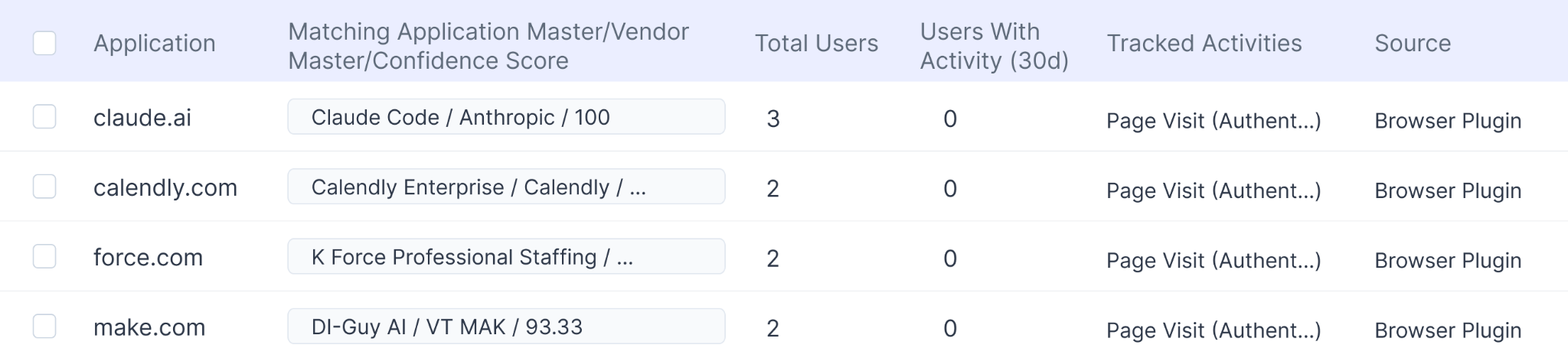
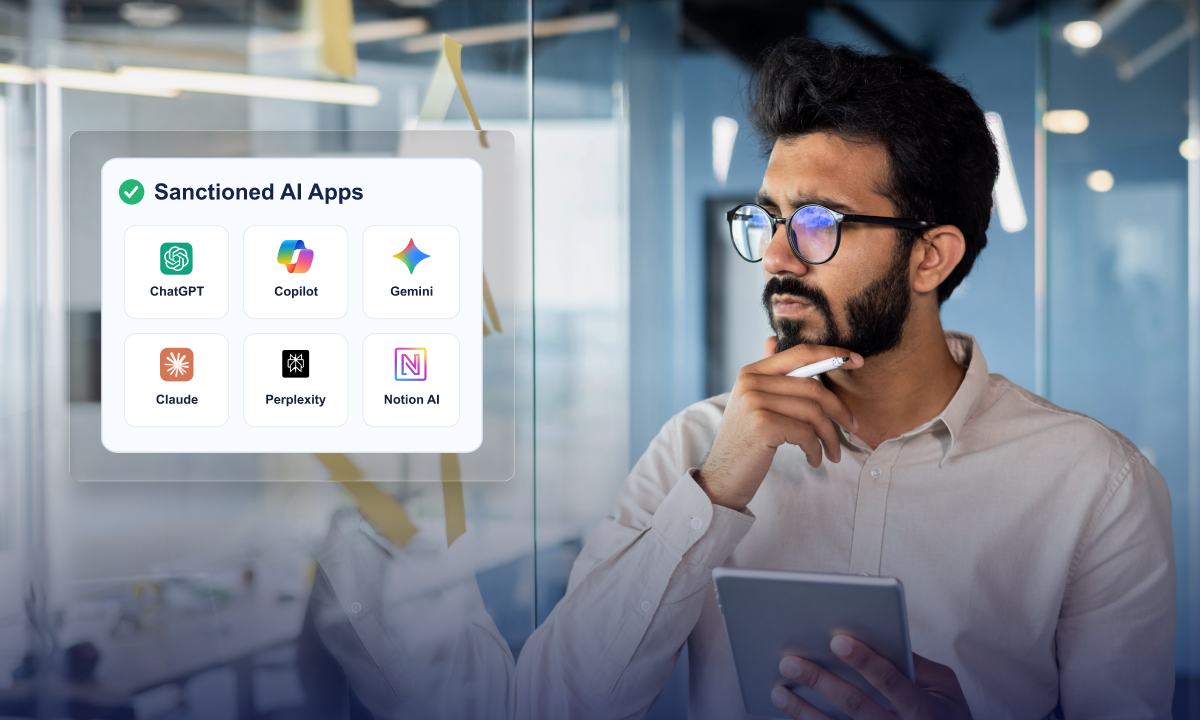
  • Sanctioned and unsanctioned AI tools surfaced including personal accounts and free trials
  • GenAI features activating silently inside approved SaaS products detected automatically
  • Every tool, every user, every risk visible in one inventory
  • Multi-signal discovery covers 95%+ of the AI footprint vs 40 to 60% for SSO-only approaches

Real-Time Policy Enforcement at the Point of Behavior

When an employee tries to access an unapproved AI tool, CloudEagle's lightweight browser extension intercepts the session before any company data is entered:
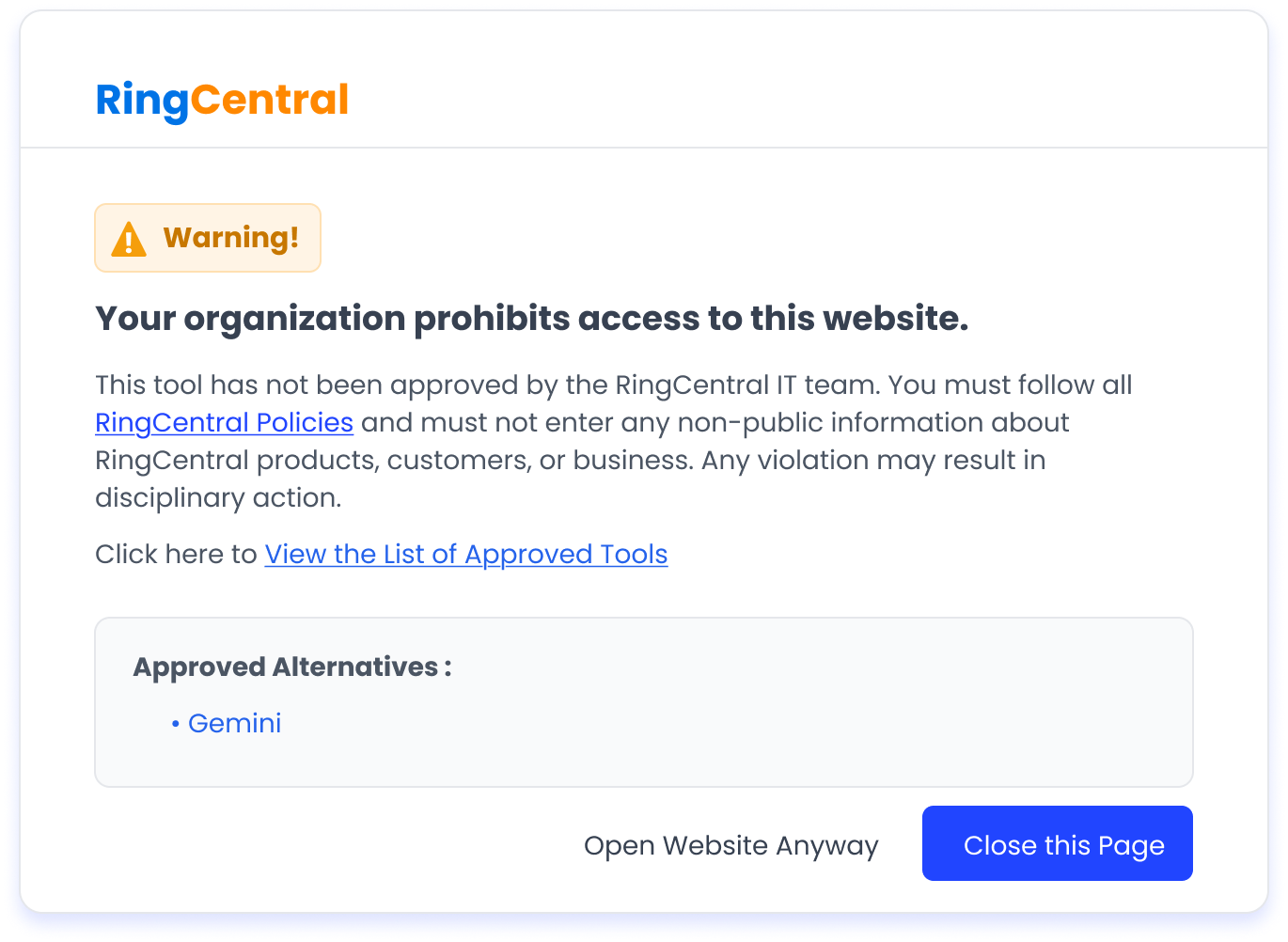
  • Flash page redirect to approved alternative, no separate DLP or endpoint agent required
  • Tiered policy enforcement: approved, conditionally approved, blocked with redirect, blocked
  • Sensitive data prevented from entering unapproved AI tools before the prompt is submitted

AI Vendor Risk Scoring Powered by Netskope

Every AI tool in your environment gets an automatically assigned risk score based on data residency, training data policies, security posture, and compliance certifications:
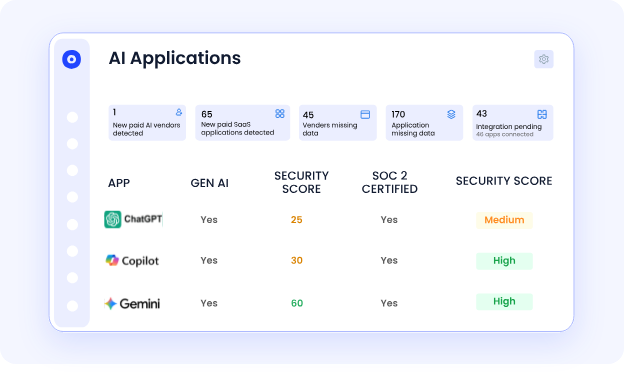
  • High-risk tools surfaced for human review, low-risk tools cleared for conditional use
  • GenAI features embedded inside approved SaaS products identified and scored
  • Continuous monitoring so risk scores update as vendor posture changes

Token-Level AI Spend Visibility

AI tools bill by token, API call, and credit, not by seat. CloudEagle gives Finance and IT the breakdown they both need:
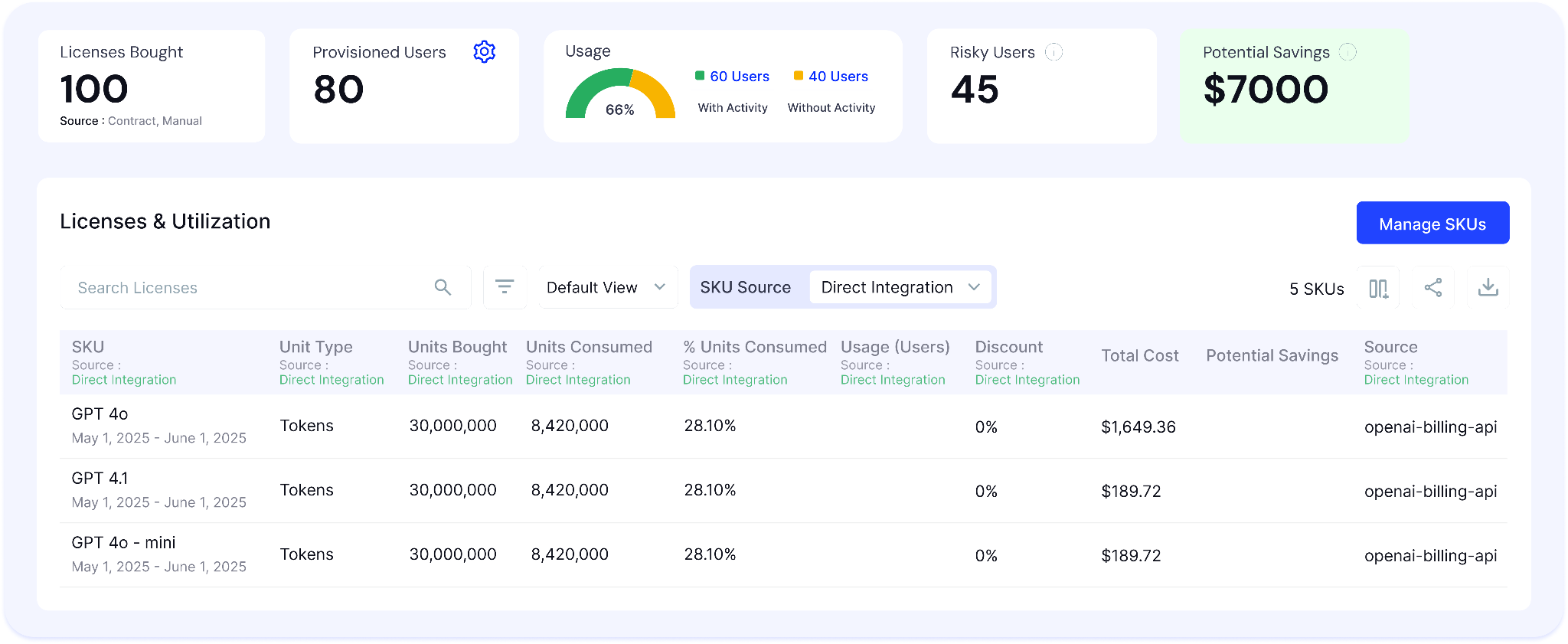
  • Real-time token consumption tracked per user, per team, per tool
  • Duplicate AI subscriptions and unused seats surfaced before the next billing cycle
  • AI costs allocated back to business units so every team owns its own AI budget

With 500+ direct integrations and $20B+ in SaaS spend managed across its customer base, CloudEagle delivers the AI governance coverage that makes these seven practices executable rather than aspirational.

Final Thoughts

The companies that govern AI well are not the ones that block it. They are the ones that can see it clearly enough to make deliberate decisions about what is approved, monitored, and restricted.

That visibility is what makes everything else possible. Without it, risk scoring, policy enforcement, access reviews, and agent governance become reactive instead of proactive.

These seven AI security best practices are designed to help IT and security teams build that visibility first, then layer on the controls needed to keep AI secure, compliant, and accountable.

Frequently Asked Questions

  1. What are the best practices for AI in cybersecurity?
    Key AI security best practices include discovering AI tools, risk scoring, enforcing policies, identity-based access, usage tracking, access reviews, and AI agent governance.
  2. What is the 30% rule for AI?
    The 30% rule is an informal guideline suggesting AI should automate tasks only when it can improve efficiency or outcomes by around 30% or more.
  3. Which of these are recommended practices for AI security?
    Recommended AI security practices include AI discovery, risk assessment, policy enforcement, identity governance, usage monitoring, and regular access reviews.
  4. What are the 7 C's of artificial intelligence?
    The 7 C's commonly refer to Context, Connectivity, Collaboration, Customization, Cognition, Creativity, and Continuous Learning.
  5. What are the 4 types of AI risk?
    The four main AI risks are security and privacy risks, compliance risks, operational risks, and ethical risks such as bias or lack of transparency.

Advertisement for a SaaS Subscription Tracking Template with a call-to-action button to download and a partial graphic of a tablet showing charts.Banner promoting a SaaS Agreement Checklist to streamline SaaS management and avoid budget waste with a call-to-action button labeled Download checklist.Blue banner with text 'The Ultimate Employee Offboarding Checklist!' and a black button labeled 'Download checklist' alongside partial views of checklist documents from cloudeagle.ai.Digital ad for download checklist titled 'The Ultimate Checklist for IT Leaders to Optimize SaaS Operations' by cloudeagle.ai, showing checklist pages.Slack Buyer's Guide offer with text 'Unlock insider insights to get the best deal on Slack!' and a button labeled 'Get Your Copy', accompanied by a preview of the guide featuring Slack's logo.Monday Pricing Guide by cloudeagle.ai offering exclusive pricing secrets to maximize investment with a call-to-action button labeled Get Your Copy and an image of the guide's cover.Blue banner for Canva Pricing Guide by cloudeagle.ai offering a guide to Canva costs, features, and alternatives with a call-to-action button saying Get Your Copy.Blue banner with white text reading 'Little-Known Negotiation Hacks to Get the Best Deal on Slack' and a white button labeled 'Get Your Copy'.Blue banner with text 'Little-Known Negotiation Hacks to Get the Best Deal on Monday.com' and a white button labeled 'Get Your Copy'.Blue banner with text 'Little-Known Negotiation Hacks to Get the Best Deal on Canva' and a white button labeled 'Get Your Copy'.Banner with text 'Slack Buyer's Guide' and a 'Download Now' button next to images of a guide titled 'Slack Buyer’s Guide: Features, Pricing & Best Practices'.Digital cover of Monday Pricing Guide with a button labeled Get Your Copy on a blue background.Canva Pricing Guide cover with a button labeled Get Your Copy on a blue gradient background.

Enter your email to
unlock the report

Oops! Something went wrong while submitting the form.
License Count
Benchmark
Per User/Per Year

Enter your email to
unlock the report

Oops! Something went wrong while submitting the form.
License Count
Benchmark
Per User/Per Year

Enter your email to
unlock the report

Oops! Something went wrong while submitting the form.
Notion Plus
License Count
Benchmark
Per User/Per Year
100-500
$67.20 - $78.72
500-1000
$59.52 - $72.00
1000+
$51.84 - $57.60
Canva Pro
License Count
Benchmark
Per User/Per Year
100-500
$74.33-$88.71
500-1000
$64.74-$80.32
1000+
$55.14-$62.34

Enter your email to
unlock the report

Oops! Something went wrong while submitting the form.

Enter your email to
unlock the report

Oops! Something went wrong while submitting the form.
Zoom Business
License Count
Benchmark
Per User/Per Year
100-500
$216.00 - $264.00
500-1000
$180.00 - $216.00
1000+
$156.00 - $180.00

Enter your email to
unlock the report

Oops! Something went wrong while submitting the form.

Get the Right Security Platform To Secure Your Cloud Infrastructure

Please enter a business email
Thank you!
The 2023 SaaS report has been sent to your email. Check your promotional or spam folder.
Oops! Something went wrong while submitting the form.

Access full report

Please enter a business email
Thank you!
The 2023 SaaS report has been sent to your email. Check your promotional or spam folder.
Oops! Something went wrong while submitting the form.

Your employees didn't wait for an AI policy. They just started using tools.

Claude for writing. Cursor for code. Copilot for everything. Personal ChatGPT accounts for the tasks nobody wanted to wait for IT to approve.

The result? AI sprawl. Freshworks discovered 92 AI engines in active use. Cooper Consumer Health uncovered 1,600 apps after integrating SSO, raising a question many IT and security teams still can't answer: What about the apps operating outside approved systems?

That question is where most enterprise AI risk actually lives.

This blog shares seven practical AI security best practices IT and security leaders can implement now to reduce risk, gain visibility, and govern AI use with confidence.

TL;DR

  • Shadow AI discovery is table stakes. Every other practice depends on knowing what is actually running in your environment
  • Risk scoring, policy enforcement at the browser layer, identity-tied access controls, and per-user consumption tracking together close the gaps that SSO and DLP alone cannot
  • AI agents, not just AI apps, are the fastest-growing ungoverned access risk in enterprise environments
  • The companies that govern AI well are not the ones that block it. They are the ones that can see it clearly enough to make deliberate decisions about what is approved, monitored, and off-limits

Practice 1: Find Every AI Tool Your Employees Are Actually Using

Sean Buckley, IT and Security at Immunocore, a regulated pharma company, called shadow AI discovery "table stakes, the first thing we need before anything else."

He is right. Every other practice on this list depends on visibility. You can't risk-score tools you don't know exist, enforce policies on apps you can't see, or review access for AI tools that employees adopted outside IT.

The gap is always the same: employees use personal accounts, browser extensions, and direct URLs that never touch your identity provider.

What full AI discovery actually requires:

Three layers working simultaneously, not one:

  • SSO integration: Surfaces apps employees authenticate through your identity provider. This is the layer most teams already have. It covers, at best, 40 to 60% of actual AI tool usage
  • Browser-level activity: Surfaces AI tools accessed through personal accounts, free tiers, and direct URLs that bypass SSO entirely. This is where most shadow AI lives
  • Finance and expense data: Surfaces AI subscriptions paid on corporate cards or expensed below procurement thresholds. Varahe discovered two separate teams paying for the same Claude subscription independently without knowing the other existed

Practice 2: Score AI Tools for Risk Before Employees Use Them

Knowing what is running is step one. Knowing which tools represent actual security risk is step two.

For many organizations, data residency is a major factor. AI services hosted outside approved regions may require additional review or be restricted entirely, regardless of how widely adopted they are elsewhere. The issue isn't popularity. It's where the data lives.

What makes an AI tool risky:

  • Data residency: where is the inference happening and where is the data processed?
  • Training data policies: does the vendor use your prompts and inputs to train their models?
  • Security posture: SOC 2, ISO 27001, and relevant certifications
  • Privacy posture: how is personal and sensitive data handled?
  • Data handling at the application layer: what happens to employee inputs after submission?

How risk scoring works in practice:

The goal isn't to block everything. Most AI tools aren't inherently risky, they become risky in specific contexts, with specific data, or for specific users. A binary block list drives employees to work around controls. Tiered policies create visibility and accountability.

Your Riskiest AI Tool Might Already Be Approved.

Learn how to spot risky AI tools before they become a problem.
Get the Guide

Practice 3: Enforce Policies Before Company Data Enters an Unapproved Tool

For Shellea Daniel at hover.to, one requirement was non-negotiable: no PII or PHI on unauthorized AI platforms. The challenge is that most controls act too late. Traditional DLP tools alert after data has already been shared.

Effective AI tool security requires enforcement at the point of access, before employees interact with an unapproved tool.

What this looks like in practice:

  • Block or warn users before they access unapproved AI tools.
  • Display policy pages explaining why a tool isn't approved.
  • Redirect employees to approved alternatives when available.
  • Restrict sensitive data categories, such as PII and PHI, from being shared with external AI services.
  • Log policy violations and exceptions for audit and compliance purposes.

Practice 4: Tie AI Access to Identity

Benito Ralph, EVP of IT and Security at Arrivia, wanted zero-trust principles applied to AI access. His concern was simple: employees with approved access to Copilot shouldn't automatically have access to shadow AI tools they install themselves.

AI governance without identity context is incomplete. You need to know who is using AI tools, what data they can access, and whether their permissions still match their role.

What role-based AI access looks like:

  • Developers get access to approved coding assistants by default.
  • Analysts get access only to AI tools that align with their data permissions.
  • Additional AI tools require approval through a governed workflow.
  • Role changes automatically trigger access reviews or revocation.

Practice 5: Track AI Consumption at the User Level

Benito's invoices didn't match usage data. Varahe discovered two teams paying for the same Claude subscription independently. Shellea wanted to know exactly who was using AI and how much it was costing.

That level of visibility isn't just a finance requirement. It's an AI security requirement.

What per-user AI consumption tracking looks like:

  • Usage broken down by user, model, and team.
  • Token consumption tracked in real time.
  • Duplicate subscriptions flagged automatically.
  • Users approaching license limits identified before renewal.
  • Usage spikes investigated as potential shadow AI activity.

📖 Worth a Read: How Enterprises Can Track Claude, Cursor, and Gemini Spend in One Place

Practice 6: Run AI Access Reviews on a Regular Cycle

Sean, a security and compliance leader at a regulated biotech company, had mature SaaS access reviews. AI access reviews still meant spreadsheets, manual HRIS checks, and managers rubber-stamping approvals.

This is how many organizations handle AI access reviews today. It is not sustainable at the rate AI adoption is moving.

Why AI access reviews are different:

AI tools retain context from employee sessions. Lingering access after someone leaves is not just a license cost. It is a data risk that does not exist the same way in project management or video conferencing tools.

What a useful AI access review includes:

  • Users with active access to each AI tool
  • Their access level and data categories touched
  • Last active date and frequency of use
  • Current role compared to the role when access was granted
  • One-click revocation or downgrade

Practice 7: Extend Governance to AI Agents, Not Just AI Apps

This is the newest AI governance risk and one of the least understood.

Jay at OTIP saw Copilot users building personal agents and workflows inside Copilot Studio without IT oversight. Sean at Immunocore flagged AI agents accessing internal systems as a growing compliance risk. Different organizations. Same problem.

An AI agent is an automated workflow inside an AI platform that connects to internal systems like SharePoint, Salesforce, or databases and acts without manual input each time it runs.

A user creates it once. Then it runs autonomously. Unless something is watching for it, IT may have no visibility into what it does or what data it touches.

Three things you should know about every AI agent:

  • Who created it and whether they are still employed
  • What data sources it connects to and what permissions it has
  • When it was last active and whether its activity pattern has changed

How CloudEagle.ai Addresses Each of These 7 Practices?

The through-line across all seven practices is the same: AI risks compounds when it is invisible.

Benito lacked visibility into AI spend. Sean couldn't verify AI usage outside IT. Shellea couldn't guarantee that PII stayed on approved platforms. Jay couldn't see which AI agents employees had built or what data they were accessing.

CloudEagle.ai is an AI-powered AI governance platform for SaaS security and identity governance that serves as the control plane for enterprise AI, giving IT and security teams the visibility layer that makes each of these seven practices operationally executable.

Discover Shadow AI. Eliminate Excess Access. Reduce SaaS Risk.

Shadow AI Discovery Outside SSO

CloudEagle discovers every AI tool in use by correlating signals across browser extensions, SSO, Zscaler, CrowdStrike, CASB, and finance integrations simultaneously:

  • Sanctioned and unsanctioned AI tools surfaced including personal accounts and free trials
  • GenAI features activating silently inside approved SaaS products detected automatically
  • Every tool, every user, every risk visible in one inventory
  • Multi-signal discovery covers 95%+ of the AI footprint vs 40 to 60% for SSO-only approaches

Real-Time Policy Enforcement at the Point of Behavior

When an employee tries to access an unapproved AI tool, CloudEagle's lightweight browser extension intercepts the session before any company data is entered:

  • Flash page redirect to approved alternative, no separate DLP or endpoint agent required
  • Tiered policy enforcement: approved, conditionally approved, blocked with redirect, blocked
  • Sensitive data prevented from entering unapproved AI tools before the prompt is submitted

AI Vendor Risk Scoring Powered by Netskope

Every AI tool in your environment gets an automatically assigned risk score based on data residency, training data policies, security posture, and compliance certifications:

  • High-risk tools surfaced for human review, low-risk tools cleared for conditional use
  • GenAI features embedded inside approved SaaS products identified and scored
  • Continuous monitoring so risk scores update as vendor posture changes

Token-Level AI Spend Visibility

AI tools bill by token, API call, and credit, not by seat. CloudEagle gives Finance and IT the breakdown they both need:

  • Real-time token consumption tracked per user, per team, per tool
  • Duplicate AI subscriptions and unused seats surfaced before the next billing cycle
  • AI costs allocated back to business units so every team owns its own AI budget

With 500+ direct integrations and $20B+ in SaaS spend managed across its customer base, CloudEagle delivers the AI governance coverage that makes these seven practices executable rather than aspirational.

Final Thoughts

The companies that govern AI well are not the ones that block it. They are the ones that can see it clearly enough to make deliberate decisions about what is approved, monitored, and restricted.

That visibility is what makes everything else possible. Without it, risk scoring, policy enforcement, access reviews, and agent governance become reactive instead of proactive.

These seven AI security best practices are designed to help IT and security teams build that visibility first, then layer on the controls needed to keep AI secure, compliant, and accountable.

Frequently Asked Questions

  1. What are the best practices for AI in cybersecurity?
    Key AI security best practices include discovering AI tools, risk scoring, enforcing policies, identity-based access, usage tracking, access reviews, and AI agent governance.
  2. What is the 30% rule for AI?
    The 30% rule is an informal guideline suggesting AI should automate tasks only when it can improve efficiency or outcomes by around 30% or more.
  3. Which of these are recommended practices for AI security?
    Recommended AI security practices include AI discovery, risk assessment, policy enforcement, identity governance, usage monitoring, and regular access reviews.
  4. What are the 7 C's of artificial intelligence?
    The 7 C's commonly refer to Context, Connectivity, Collaboration, Customization, Cognition, Creativity, and Continuous Learning.
  5. What are the 4 types of AI risk?
    The four main AI risks are security and privacy risks, compliance risks, operational risks, and ethical risks such as bias or lack of transparency.

CloudEagle.ai recognized in the 2025 Gartner® Magic Quadrant™ for SaaS Management Platforms
Download now
gartner chart
5x
Faster employee
onboarding
80%
Reduction in time for
user access reviews
30k
Workflows
automated
$15Bn
Analyzed in
contract spend
$2Bn
Saved in
SaaS spend

Streamline SaaS governance and save 10-30%

Book a Demo with Expert
CTA image