AI Governance

How to Prevent AI Budget Overruns Across Multiple LLM Platforms

Share via:
Written by:
CloudEagle.ai Team
Reviewed by
Nidhi Jain
Last Updated:
September 3, 2026
blog-cms-banner-bg
Little-Known Negotiation Hacks to Get the Best Deal on Slack
cta-bg-blogDownload Your Copy

HIPAA Compliance Checklist for 2025

Download PDF

You have three tabs open. One is the Anthropic console, tracking Claude spend against a cap you set two months ago. One is OpenAI's usage dashboard. One is Bedrock, buried three clicks deep in AWS billing. You check all three every Monday, and finance still messaged you last week asking why the AI line item ran 40% over plan.

Claude, OpenAI, and Bedrock each have their own console, their own cap, and their own idea of what counts as usage. 

According to Gartner, worldwide spending on generative AI models is projected to grow 80.8% in 2026, and most of that growth lands across three or four providers per company.

This is a structure for budgeting across multiple LLM platforms, built to hold up once Claude, OpenAI, and Bedrock are all running in production at the same time.

Why AI Spend Doesn't Behave Like a Software Budget

Software budgeting used to be arithmetic. AI budgeting runs on usage, and that shift is why AI budget overruns keep catching finance teams off guard.

Seat-based software Consumption-based AI
What drives cost Headcount Usage behavior
Predictability High: cost moves with hires and exits Low: cost moves with prompts, context size, and agent loops
Failure mode Unused licenses A single workflow burning a month's budget in three weeks

Claude, OpenAI, and Bedrock all bill by consumption. A team of 10 people can exhaust a monthly allocation in three weeks if one engineer runs an agent workflow that calls a model in a loop, a pattern headcount planning has no way to predict.

Gartner's research on generative AI project costs puts a number on this: at least 50% of GenAI projects will overrun their budgeted costs through 2028, driven by architectural choices and operational maturity, the same two levers this piece works through below.

The fix starts with a mental shift: treat AI spend as a number that moves with usage, and build the budget structure around that from day one.

Your AI Budget Already Has a Leak

Find what's burning spend before finance does.
Download Checklist

How to Prevent AI Budget Overruns Across Multiple LLM Platforms

Eight moves, built in order, close the gap that lets AI budget overruns creep in across Claude, OpenAI, and Bedrock:

  1. Set pooled budgets per team, not per platform.
  2. Build the warning before the cutoff, at 80 to 90% of the pool.
  3. Sync your governance layer to each platform's native cap.
  4. Restrict model access by team, rather than a blanket policy.
  5. Decide your cost attribution model before finance asks for one.
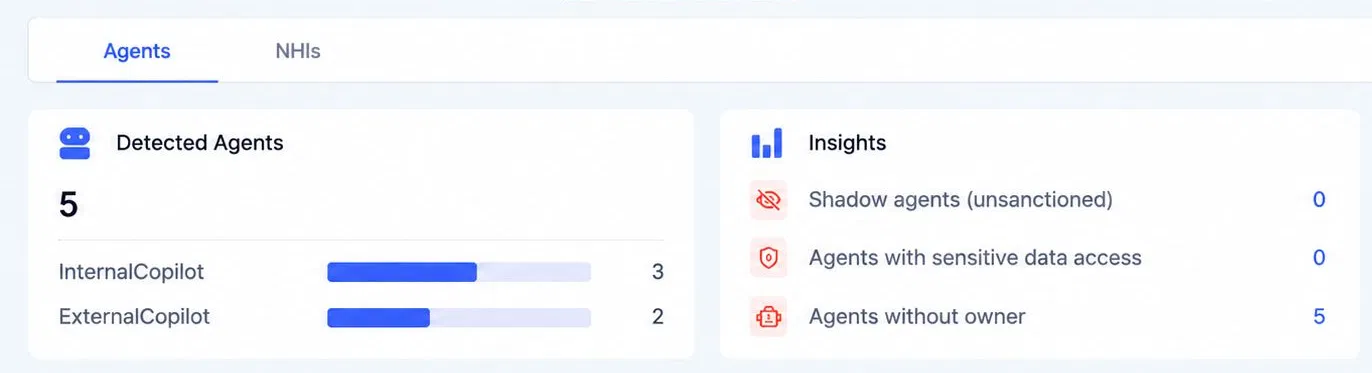
  6. Treat forgotten keys and shadow agents as a budget line.
  7. Catch false savings before they hide a real overrun.
  8. Use trend data to forecast forward, not just explain last month.

Each one is worth doing right. Here's how.

Here's that structure, in the order it needs to be built.

1. Set Pooled Budgets Per Team, Not Per Platform

A team rarely uses only one model, so a cap per platform doesn't hold. A support team might draft through Claude, integrate through GPT-4, and touch Bedrock through an internal tool, three caps that can each run out independently.

Pool the budget instead:

  • Define the pool at the team or department level, one number instead of one per vendor.
  • Let the pool draw from any approved model, so the team decides the platform and the budget tracks the outcome.
  • Keep the pool independent of which LLM is doing the work, so a new model doesn't force a redesign.

Platform caps still matter. This layer just gives finance and the team lead one number instead of three invoices to reconcile.

2. Build the Warning Before You Need the Cutoff

Most teams learn about an exhausted budget the hard way, a blocked request, a ticket, an afternoon spent tracing which of three consoles caused it. Build the warning ahead of that:

  • Alert at the pool level, not per platform.
  • Route it to the team lead who owns the pool, so they can approve more, slow the team down, or let the month run its course.
  • Set the threshold at 80 to 90%, before the first overage, not after.

Per-user, per-model trend visibility is what makes the alert meaningful. CloudEagle.ai's breakdown of tracking Claude, Cursor, and Gemini spend in one place goes deeper into what that view needs to show finance and IT.

3. Sync Your Governance Layer to Each Platform's Native Cap

One central dial does not control spend across every provider. Each cap still lives natively:

Platform Where the cap lives
Claude Anthropic console, set per workspace or API key
OpenAI Usage dashboard, set per project or organization
Bedrock AWS billing and service quotas, set per account

A governance layer surfaces and alerts on all three from one place. The native cap inside each platform is still what actually stops a request.

  • Treat native caps as enforcement, regardless of what a dashboard shows.
  • Keep the two layers in sync deliberately: every pooled budget change should get checked against the underlying cap.

Planning around this beats discovering it mid-incident.

4. Restrict Model Access by Team, Not by Blanket Policy

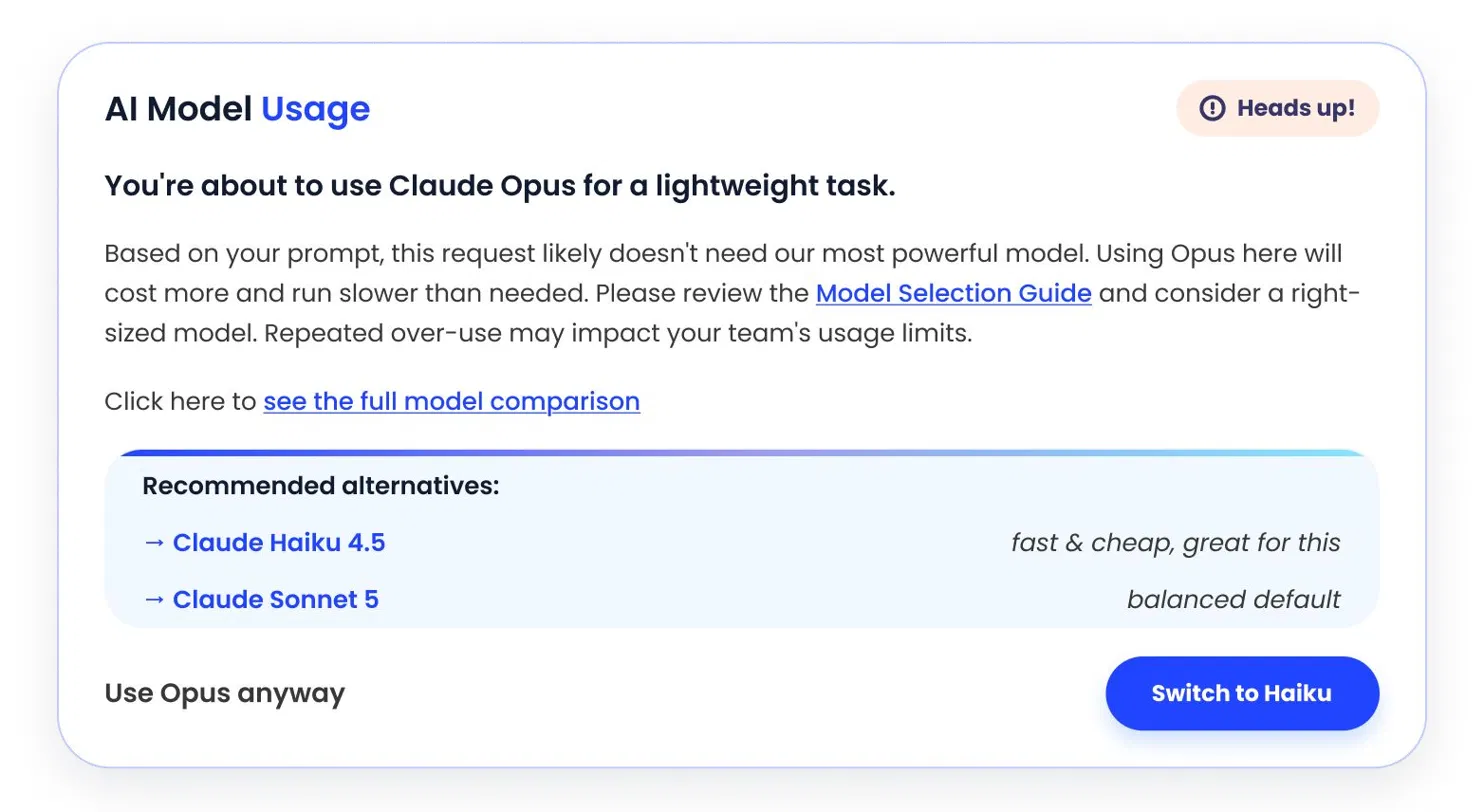
A team defaulting to the priciest model, because it's the console default, becomes a quiet, compounding source of AI budget overruns. The restriction already exists in Claude, OpenAI, and Bedrock's role-based settings; the gap is discipline, not a missing feature.

  • Set model access per team, based on the work that team does.
  • Apply the restriction inside each platform's native settings, so it's enforced, not a wiki guideline.
  • Revisit the mapping when a team's work changes.

CloudEagle.ai's guide to enforcing AI usage policies and guardrails covers pairing this restriction with real-time enforcement.

5. Decide How You'll Attribute Cost to Projects Before You Need To

Sooner or later finance asks you to bill AI spend back to a client, cost center, or project, and that's when most attribution models get tested for the first time.

Attribution model Works well when Gets tested when
Per-project API keys Every contributor touches exactly one project A person or agent works across more than one project
Per-user, tagged usage Contributors span multiple projects The platform or governance layer has to capture the tag at the point of use
Hybrid Some workloads are isolated, others shared Rarely, this is where most teams settle

The model matters less than picking one before finance asks for a retroactive breakdown.

Attribution Gaps Cost Real Money

Fix how AI spend gets tracked before chargebacks hit.
Download Checklist

6. Treat Forgotten Keys and Shadow Agents as a Budget Line

Old keys and unsanctioned agents carry more than security risk, they quietly consume budget that never shows up in any team-level report.

  • Keys tied to employees who have left, or projects that have closed, are still active and still consuming.
  • Agents built outside the approved procurement path, running on personal accounts or shared credentials.
  • Invoice usage that maps to no current team's pool is the clearest sign spend is leaking outside the structure above.

CloudEagle.ai's enterprise AI token governance breakdown covers attributing this kind of consumption down to the individual key.

7. Catch False Savings Before They Hide a Real Overrun

Lower spend doesn't always mean the budget's under control. A team quietly reverting to manual work looks like savings right up until the workaround itself becomes the costlier option.

Track both in the same report:

  • Cost metrics: spend per team and model, against the pool.
  • Value metrics: what the spend actually produced, tickets resolved, code shipped, hours saved.
  • The gap: falling spend with falling output is a different problem than falling spend with steady output.

8. Use Trend Data to Forecast Forward, Not Just to Explain Last Month

Most dashboards show where spend has been, useful for explaining an invoice, not for catching next quarter's overrun.

  • Track rolling trend windows per team, not just one month-over-month snapshot.
  • Project the trend against the pooled budget, so an on-pace overrun flags before the quarter ends.
  • Revisit the forecast when usage patterns shift, like a new agent workflow going live.

Where the Structure Above Still Breaks: One Layer Across Every Platform

Every piece above holds up on its own. Pooled budgets, early warnings, model restrictions, attribution decisions, and forward-looking forecasts are judgment calls a team and its lead make deliberately, and no single platform makes those calls automatically.

The friction shows up in execution. Each piece still gets checked, adjusted, and enforced across three separate vendor consoles, because Claude, OpenAI, and Bedrock each hold their own native caps and their own usage data. 

A team lead approving a budget increase for one pool still verifies it against the actual cap inside whichever platform the team is drawing from. A forecast flagging next quarter's overrun still requires someone to update three separate settings, and a model restriction decided for one team still gets applied inside each platform's own console.

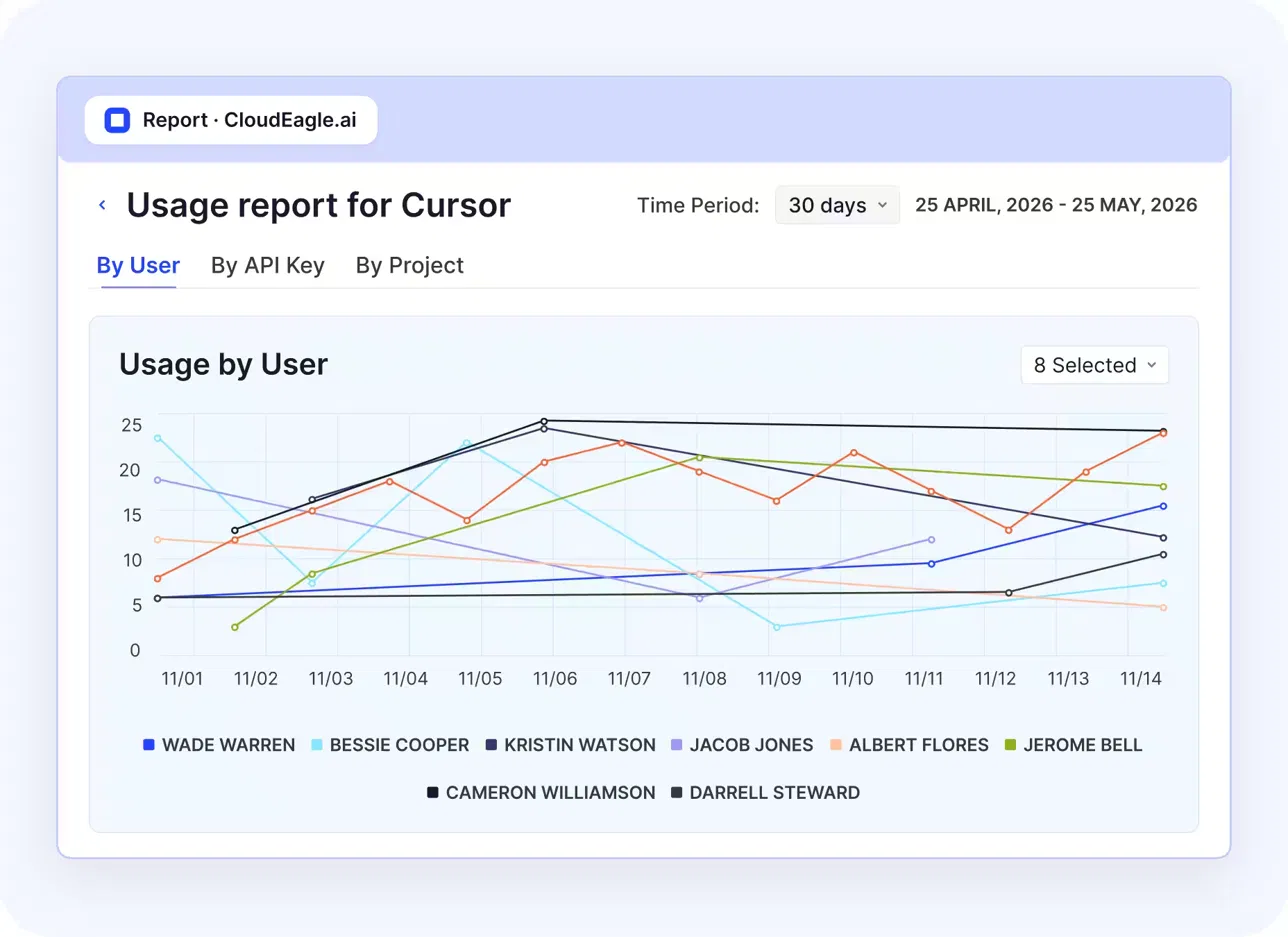
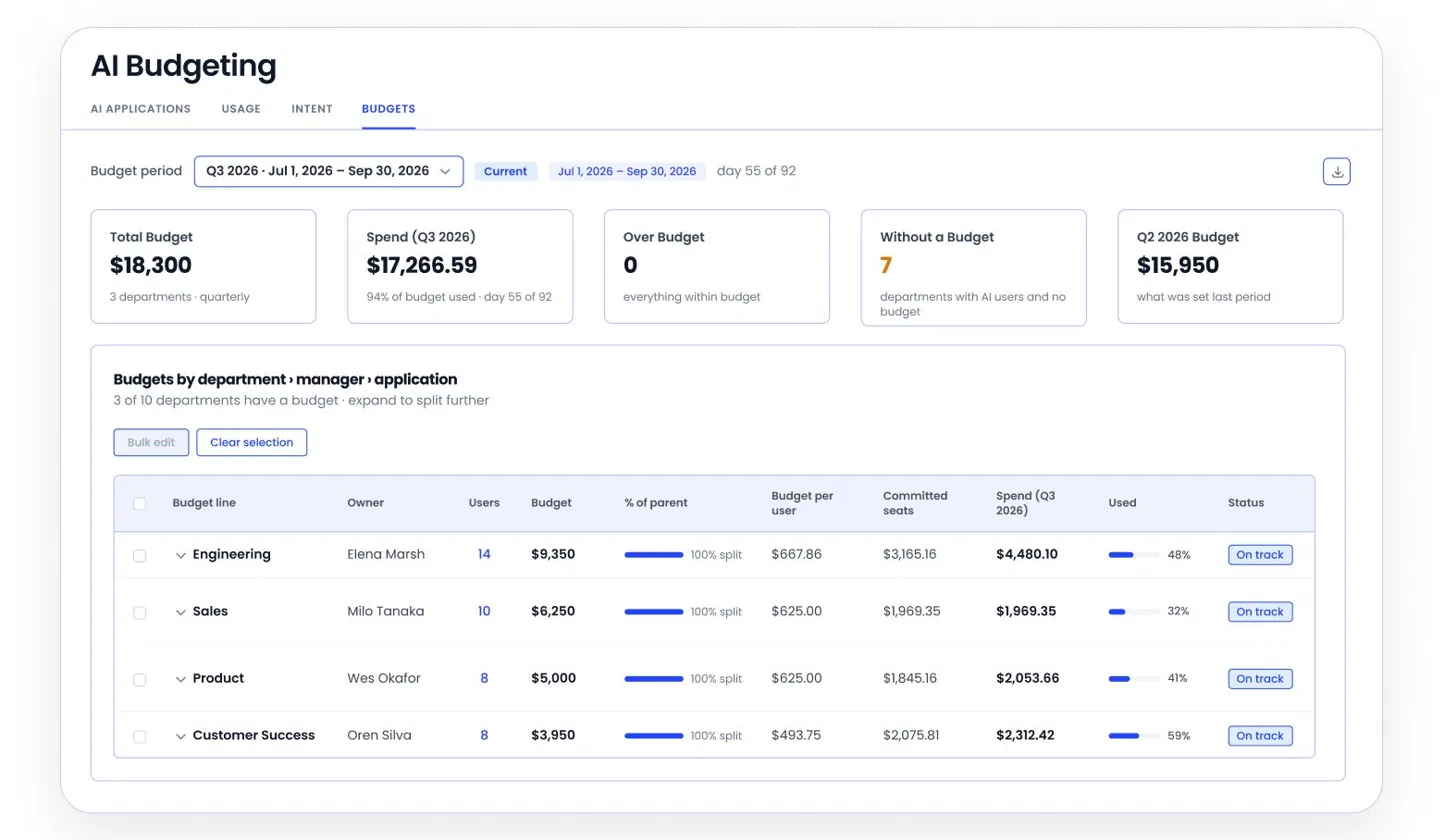
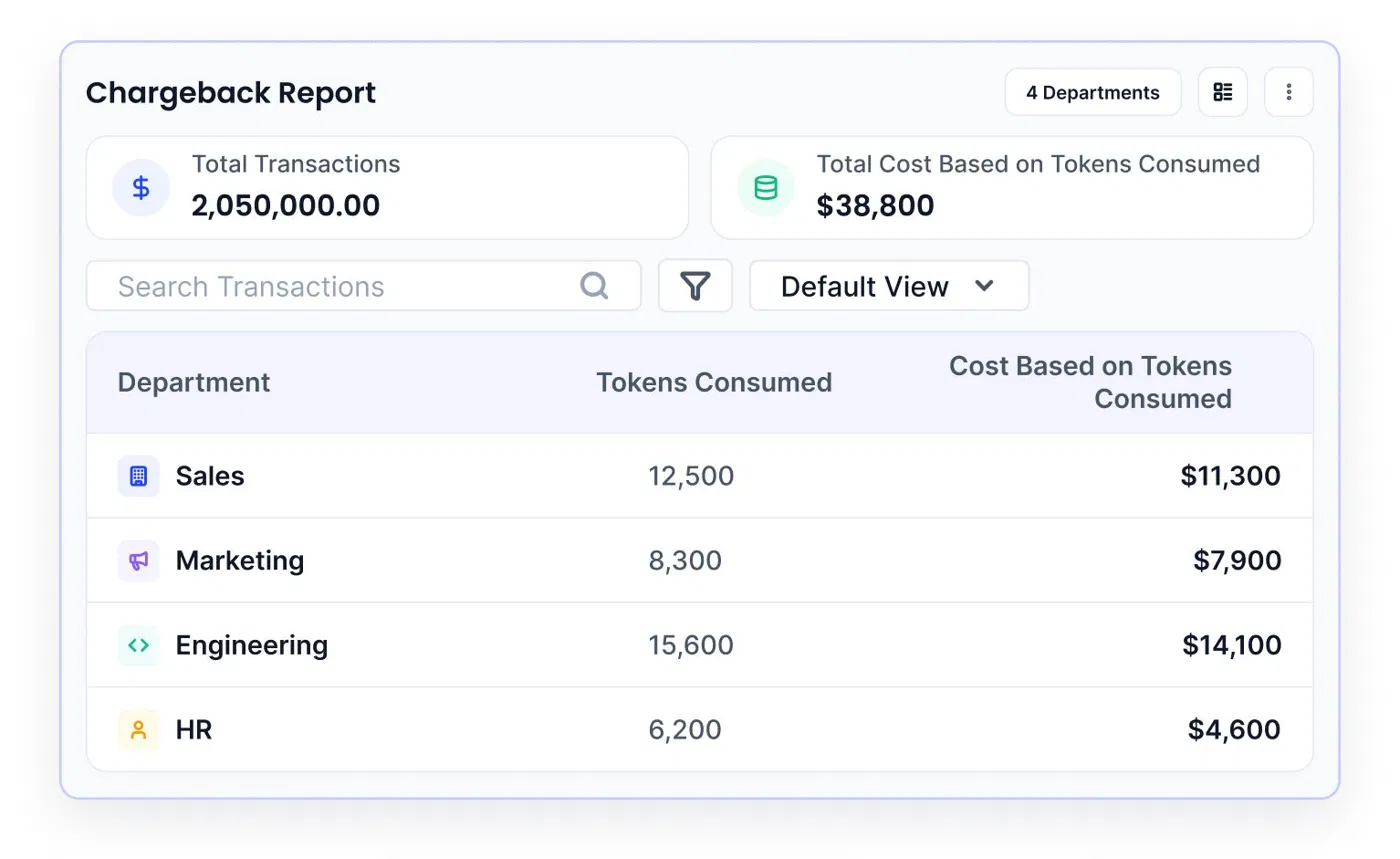
CloudEagle usage report showing AI spend by user over time, with options to analyze spend by user, API key, or project, and a chargeback report breaking down token consumption and AI costs by department.

How CloudEagle.ai solves it:

  • Pulls per-user, per-model spend and cap data from Claude, OpenAI, and Bedrock into one dashboard, so the team lead checking a pool no longer opens three consoles to do it.
  • Routes threshold alerts to the team lead who owns the pool, at the 80 to 90% mark, before a request gets blocked mid-task.
  • Attributes spend by team, model, and project for chargeback, and flags usage tied to closed projects or departed employees that never made it into any team's pool.
  • Tracks rolling trend windows per team and projects them against the pooled budget, so a team on pace to exceed its quarterly allocation shows up before the quarter ends.

CloudEagle AI applications dashboard showing 318 AI applications identified across the SaaS stack, with visibility into application usage, logged users, login activity, and discovery sources including Google Workspace, Salesforce, browser plugins, Okta, JumpCloud, and Netskope.

A Fortune 500 financial services firm used this approach to cut AI spend by 30% and triple its visibility into AI usage across the organization, closing the same gap between governance intent and enforcement this piece has walked through.

The judgment calls that built the structure above stay exactly where they belong: with the team and the lead who made them. CloudEagle.ai closes the execution gap between those calls and the three consoles they have to run through.

FAQs

What causes AI budget overruns across multiple LLM platforms? 

Consumption-based pricing, model choice, agent loops, and forgotten keys drive overruns, since none of them scale with headcount the way seat-based software did.

How do you set an AI budget across Claude, OpenAI, and Bedrock? 

Pool the budget at the team level, let it draw from any approved model, and keep each platform's native cap configured to match the pool.

Can one tool set spending limits across every AI platform at once? 

A governance layer can surface and alert on every platform's cap in one place, but each cap is still configured natively inside its own console.

How do you attribute AI costs to specific projects or clients? 

Per-project API keys work when contributors touch one project. Most teams move to tagged, per-user attribution once people work across projects.

What is a pooled AI budget? 

One allocation per team that draws from any approved model, instead of a separate cap for every LLM platform the team happens to use.

See how CloudEagle.ai gives finance and IT one view across every AI platform.

Advertisement for a SaaS Subscription Tracking Template with a call-to-action button to download and a partial graphic of a tablet showing charts.Banner promoting a SaaS Agreement Checklist to streamline SaaS management and avoid budget waste with a call-to-action button labeled Download checklist.Blue banner with text 'The Ultimate Employee Offboarding Checklist!' and a black button labeled 'Download checklist' alongside partial views of checklist documents from cloudeagle.ai.Digital ad for download checklist titled 'The Ultimate Checklist for IT Leaders to Optimize SaaS Operations' by cloudeagle.ai, showing checklist pages.Slack Buyer's Guide offer with text 'Unlock insider insights to get the best deal on Slack!' and a button labeled 'Get Your Copy', accompanied by a preview of the guide featuring Slack's logo.Monday Pricing Guide by cloudeagle.ai offering exclusive pricing secrets to maximize investment with a call-to-action button labeled Get Your Copy and an image of the guide's cover.Blue banner for Canva Pricing Guide by cloudeagle.ai offering a guide to Canva costs, features, and alternatives with a call-to-action button saying Get Your Copy.Blue banner with white text reading 'Little-Known Negotiation Hacks to Get the Best Deal on Slack' and a white button labeled 'Get Your Copy'.Blue banner with text 'Little-Known Negotiation Hacks to Get the Best Deal on Monday.com' and a white button labeled 'Get Your Copy'.Blue banner with text 'Little-Known Negotiation Hacks to Get the Best Deal on Canva' and a white button labeled 'Get Your Copy'.Banner with text 'Slack Buyer's Guide' and a 'Download Now' button next to images of a guide titled 'Slack Buyer’s Guide: Features, Pricing & Best Practices'.Digital cover of Monday Pricing Guide with a button labeled Get Your Copy on a blue background.Canva Pricing Guide cover with a button labeled Get Your Copy on a blue gradient background.

Enter your email to
unlock the report

Oops! Something went wrong while submitting the form.
License Count
Benchmark
Per User/Per Year

Enter your email to
unlock the report

Oops! Something went wrong while submitting the form.
License Count
Benchmark
Per User/Per Year

Enter your email to
unlock the report

Oops! Something went wrong while submitting the form.
Notion Plus
License Count
Benchmark
Per User/Per Year
100-500
$67.20 - $78.72
500-1000
$59.52 - $72.00
1000+
$51.84 - $57.60
Canva Pro
License Count
Benchmark
Per User/Per Year
100-500
$74.33-$88.71
500-1000
$64.74-$80.32
1000+
$55.14-$62.34

Enter your email to
unlock the report

Oops! Something went wrong while submitting the form.

Enter your email to
unlock the report

Oops! Something went wrong while submitting the form.
Zoom Business
License Count
Benchmark
Per User/Per Year
100-500
$216.00 - $264.00
500-1000
$180.00 - $216.00
1000+
$156.00 - $180.00

Enter your email to
unlock the report

Oops! Something went wrong while submitting the form.

Get the Right Security Platform To Secure Your Cloud Infrastructure

Please enter a business email
Thank you!
The 2023 SaaS report has been sent to your email. Check your promotional or spam folder.
Oops! Something went wrong while submitting the form.

Access full report

Please enter a business email
Thank you!
The 2023 SaaS report has been sent to your email. Check your promotional or spam folder.
Oops! Something went wrong while submitting the form.

TL;DR

  • Consumption-based pricing replaces seat-based budgeting. Pooled, per-team allocations work better than platform-by-platform caps.
  • Set warning thresholds at 80 to 90% of a pool, routed to a team lead, ahead of any hard cutoff.
  • Every LLM platform enforces its own native cap. A governance layer surfaces and alerts on all of them from one place.
  • Restrict model tier access by team through each platform's role-based settings, and settle on a cost attribution model before finance asks for one.
  • Forgotten keys and shadow agents belong on the budget line, and cost tracking and value tracking are two separate reports.

You have three tabs open. One is the Anthropic console, tracking Claude spend against a cap you set two months ago. One is OpenAI's usage dashboard. One is Bedrock, buried three clicks deep in AWS billing. You check all three every Monday, and finance still messaged you last week asking why the AI line item ran 40% over plan.

Claude, OpenAI, and Bedrock each have their own console, their own cap, and their own idea of what counts as usage. 

According to Gartner, worldwide spending on generative AI models is projected to grow 80.8% in 2026, and most of that growth lands across three or four providers per company.

This is a structure for budgeting across multiple LLM platforms, built to hold up once Claude, OpenAI, and Bedrock are all running in production at the same time.

Why AI Spend Doesn't Behave Like a Software Budget

Software budgeting used to be arithmetic. AI budgeting runs on usage, and that shift is why AI budget overruns keep catching finance teams off guard.

Seat-based software Consumption-based AI
What drives cost Headcount Usage behavior
Predictability High: cost moves with hires and exits Low: cost moves with prompts, context size, and agent loops
Failure mode Unused licenses A single workflow burning a month's budget in three weeks

Claude, OpenAI, and Bedrock all bill by consumption. A team of 10 people can exhaust a monthly allocation in three weeks if one engineer runs an agent workflow that calls a model in a loop, a pattern headcount planning has no way to predict.

Gartner's research on generative AI project costs puts a number on this: at least 50% of GenAI projects will overrun their budgeted costs through 2028, driven by architectural choices and operational maturity, the same two levers this piece works through below.

The fix starts with a mental shift: treat AI spend as a number that moves with usage, and build the budget structure around that from day one.

Your AI Budget Already Has a Leak

Find what's burning spend before finance does.
Download Checklist

How to Prevent AI Budget Overruns Across Multiple LLM Platforms

Eight moves, built in order, close the gap that lets AI budget overruns creep in across Claude, OpenAI, and Bedrock:

  1. Set pooled budgets per team, not per platform.
  2. Build the warning before the cutoff, at 80 to 90% of the pool.
  3. Sync your governance layer to each platform's native cap.
  4. Restrict model access by team, rather than a blanket policy.
  5. Decide your cost attribution model before finance asks for one.
  6. Treat forgotten keys and shadow agents as a budget line.
  7. Catch false savings before they hide a real overrun.
  8. Use trend data to forecast forward, not just explain last month.

Each one is worth doing right. Here's how.

Here's that structure, in the order it needs to be built.

1. Set Pooled Budgets Per Team, Not Per Platform

A team rarely uses only one model, so a cap per platform doesn't hold. A support team might draft through Claude, integrate through GPT-4, and touch Bedrock through an internal tool, three caps that can each run out independently.

Pool the budget instead:

  • Define the pool at the team or department level, one number instead of one per vendor.
  • Let the pool draw from any approved model, so the team decides the platform and the budget tracks the outcome.
  • Keep the pool independent of which LLM is doing the work, so a new model doesn't force a redesign.

Platform caps still matter. This layer just gives finance and the team lead one number instead of three invoices to reconcile.

2. Build the Warning Before You Need the Cutoff

Most teams learn about an exhausted budget the hard way, a blocked request, a ticket, an afternoon spent tracing which of three consoles caused it. Build the warning ahead of that:

  • Alert at the pool level, not per platform.
  • Route it to the team lead who owns the pool, so they can approve more, slow the team down, or let the month run its course.
  • Set the threshold at 80 to 90%, before the first overage, not after.

Per-user, per-model trend visibility is what makes the alert meaningful. CloudEagle.ai's breakdown of tracking Claude, Cursor, and Gemini spend in one place goes deeper into what that view needs to show finance and IT.

3. Sync Your Governance Layer to Each Platform's Native Cap

One central dial does not control spend across every provider. Each cap still lives natively:

Platform Where the cap lives
Claude Anthropic console, set per workspace or API key
OpenAI Usage dashboard, set per project or organization
Bedrock AWS billing and service quotas, set per account

A governance layer surfaces and alerts on all three from one place. The native cap inside each platform is still what actually stops a request.

  • Treat native caps as enforcement, regardless of what a dashboard shows.
  • Keep the two layers in sync deliberately: every pooled budget change should get checked against the underlying cap.

Planning around this beats discovering it mid-incident.

4. Restrict Model Access by Team, Not by Blanket Policy

A team defaulting to the priciest model, because it's the console default, becomes a quiet, compounding source of AI budget overruns. The restriction already exists in Claude, OpenAI, and Bedrock's role-based settings; the gap is discipline, not a missing feature.

  • Set model access per team, based on the work that team does.
  • Apply the restriction inside each platform's native settings, so it's enforced, not a wiki guideline.
  • Revisit the mapping when a team's work changes.

CloudEagle.ai's guide to enforcing AI usage policies and guardrails covers pairing this restriction with real-time enforcement.

5. Decide How You'll Attribute Cost to Projects Before You Need To

Sooner or later finance asks you to bill AI spend back to a client, cost center, or project, and that's when most attribution models get tested for the first time.

Attribution model Works well when Gets tested when
Per-project API keys Every contributor touches exactly one project A person or agent works across more than one project
Per-user, tagged usage Contributors span multiple projects The platform or governance layer has to capture the tag at the point of use
Hybrid Some workloads are isolated, others shared Rarely, this is where most teams settle

The model matters less than picking one before finance asks for a retroactive breakdown.

Attribution Gaps Cost Real Money

Fix how AI spend gets tracked before chargebacks hit.
Download Checklist

6. Treat Forgotten Keys and Shadow Agents as a Budget Line

Old keys and unsanctioned agents carry more than security risk, they quietly consume budget that never shows up in any team-level report.

  • Keys tied to employees who have left, or projects that have closed, are still active and still consuming.
  • Agents built outside the approved procurement path, running on personal accounts or shared credentials.
  • Invoice usage that maps to no current team's pool is the clearest sign spend is leaking outside the structure above.

CloudEagle.ai's enterprise AI token governance breakdown covers attributing this kind of consumption down to the individual key.

7. Catch False Savings Before They Hide a Real Overrun

Lower spend doesn't always mean the budget's under control. A team quietly reverting to manual work looks like savings right up until the workaround itself becomes the costlier option.

Track both in the same report:

  • Cost metrics: spend per team and model, against the pool.
  • Value metrics: what the spend actually produced, tickets resolved, code shipped, hours saved.
  • The gap: falling spend with falling output is a different problem than falling spend with steady output.

8. Use Trend Data to Forecast Forward, Not Just to Explain Last Month

Most dashboards show where spend has been, useful for explaining an invoice, not for catching next quarter's overrun.

  • Track rolling trend windows per team, not just one month-over-month snapshot.
  • Project the trend against the pooled budget, so an on-pace overrun flags before the quarter ends.
  • Revisit the forecast when usage patterns shift, like a new agent workflow going live.

Where the Structure Above Still Breaks: One Layer Across Every Platform

Every piece above holds up on its own. Pooled budgets, early warnings, model restrictions, attribution decisions, and forward-looking forecasts are judgment calls a team and its lead make deliberately, and no single platform makes those calls automatically.

The friction shows up in execution. Each piece still gets checked, adjusted, and enforced across three separate vendor consoles, because Claude, OpenAI, and Bedrock each hold their own native caps and their own usage data. 

A team lead approving a budget increase for one pool still verifies it against the actual cap inside whichever platform the team is drawing from. A forecast flagging next quarter's overrun still requires someone to update three separate settings, and a model restriction decided for one team still gets applied inside each platform's own console.

CloudEagle usage report showing AI spend by user over time, with options to analyze spend by user, API key, or project, and a chargeback report breaking down token consumption and AI costs by department.

How CloudEagle.ai solves it:

  • Pulls per-user, per-model spend and cap data from Claude, OpenAI, and Bedrock into one dashboard, so the team lead checking a pool no longer opens three consoles to do it.
  • Routes threshold alerts to the team lead who owns the pool, at the 80 to 90% mark, before a request gets blocked mid-task.
  • Attributes spend by team, model, and project for chargeback, and flags usage tied to closed projects or departed employees that never made it into any team's pool.
  • Tracks rolling trend windows per team and projects them against the pooled budget, so a team on pace to exceed its quarterly allocation shows up before the quarter ends.

CloudEagle AI applications dashboard showing 318 AI applications identified across the SaaS stack, with visibility into application usage, logged users, login activity, and discovery sources including Google Workspace, Salesforce, browser plugins, Okta, JumpCloud, and Netskope.

A Fortune 500 financial services firm used this approach to cut AI spend by 30% and triple its visibility into AI usage across the organization, closing the same gap between governance intent and enforcement this piece has walked through.

The judgment calls that built the structure above stay exactly where they belong: with the team and the lead who made them. CloudEagle.ai closes the execution gap between those calls and the three consoles they have to run through.

FAQs

What causes AI budget overruns across multiple LLM platforms? 

Consumption-based pricing, model choice, agent loops, and forgotten keys drive overruns, since none of them scale with headcount the way seat-based software did.

How do you set an AI budget across Claude, OpenAI, and Bedrock? 

Pool the budget at the team level, let it draw from any approved model, and keep each platform's native cap configured to match the pool.

Can one tool set spending limits across every AI platform at once? 

A governance layer can surface and alert on every platform's cap in one place, but each cap is still configured natively inside its own console.

How do you attribute AI costs to specific projects or clients? 

Per-project API keys work when contributors touch one project. Most teams move to tagged, per-user attribution once people work across projects.

What is a pooled AI budget? 

One allocation per team that draws from any approved model, instead of a separate cap for every LLM platform the team happens to use.

See how CloudEagle.ai gives finance and IT one view across every AI platform.

CloudEagle.ai recognized in the 2025 Gartner® Magic Quadrant™ for SaaS Management Platforms
Download now
gartner chart
5x
Faster employee
onboarding
80%
Reduction in time for
user access reviews
30k
Workflows
automated
$15Bn
Analyzed in
contract spend
$2Bn
Saved in
SaaS spend

Streamline SaaS governance and save 10-30%

Book a Demo with Expert
CTA image