You need to enable JavaScript in order to use the AI chatbot tool powered by ChatBot

Salesforce License Overprovisioning Killing Your Budget? Recovers 30% Spend with CloudEagle.ai

Share via:
blog-cms-banner-bg
Little-Known Negotiation Hacks to Get the Best Deal on Slack
cta-bg-blogDownload Your Copy

HIPAA Compliance Checklist for 2025

Download PDF

A sales manager requests ten new Salesforce licenses for new hires. Six months later, only four of those users log in regularly, but the company is still paying for all ten.

This is how Salesforce overspending usually starts. Licenses are purchased for future growth, role changes, or temporary projects, but they rarely get removed or downgraded when SaaS monitoring drops.

The result is license overprovisioning. In this article, we will break down how Salesforce license overprovisioning happens. You’ll know about the hidden spend and how CloudEagle.ai helps enterprises recover up to 30% of their Salesforce spend.

TL;DR

  • Salesforce overspending starts when licenses are bought in bulk but not reviewed against actual usage.
  • Inactive users, role changes, and temporary access often leave unused licenses assigned and paid for.
  • High-tier licenses are frequently given by default, even when users need only basic features.
  • Key signals include low login activity, dormant accounts, and gaps between purchased and active licenses.
  • CloudEagle.ai helps recover up to 30% spend through visibility, automation, and continuous license optimization

1. Why Does Salesforce License Spend Keep Growing Faster Than Usage?

Salesforce spend grows faster than usage because licenses are often purchased in bulk during contract renewals. Over time, some of those Salesforce licenses remain assigned even when the users stop logging in or change roles.

  • Inactive Users Still Holding Licenses: Employees who moved teams or left the company may still have assigned seats in Salesforce.
  • Premium Licenses Assigned By Default: Users receive higher-tier licenses with advanced features even when they only use basic CRM functions.
  • Temporary Access Becoming Permanent: Licenses granted for short-term projects remain active long after the work is completed.

This pattern is widely documented. According to Forbes, organizations typically waste around 25–30% of SaaS spend due to unused or underutilized licenses.

When licenses remain assigned without reviewing actual usage, spending grows quietly. The budget increases every renewal cycle even though the number of active users stays roughly the same.

You’re Paying For Ghost Licenses

Seats nobody uses. Costs nobody notices.
Check License Management Best Practices

2: Where Does Salesforce License Overprovisioning Typically Start?

Salesforce license overprovisioning usually begins during routine operational decisions. New hires, team restructures, and temporary projects all trigger license assignments that rarely get revisited later.

Bulk License Purchases During Hiring

Sales leaders request multiple licenses in advance so new employees can start immediately in Salesforce. Some of those seats remain unused when hiring slows down.

Default Assignment Of High-Tier Licenses

New users often receive full-feature licenses such as Sales Cloud Enterprise even when their role only requires basic CRM access.

Project-Based Access That Never Gets Removed

Contractors or cross-functional teams receive temporary access for campaigns or migrations but keep their licenses long after the project ends.

These salesforce license types​ rarely appear risky at first. The licenses were justified when they were requested.

  • Teams rarely check login frequency or feature usage before renewing licenses.
  • When employees change roles, their access governance is adjusted but the original license tier remains assigned.

As Marc Benioff once said,

“The business of business is improving the state of the world.”

But improving operations also means making sure the tools supporting those operations are used efficiently. When license assignments aren’t revisited regularly, Salesforce costs grow faster than actual usage.

Also Read: How to Streamline Adobe License Management with CloudEagle?

3: What Signals Indicate Your Salesforce Environment Is Overprovisioned?

Salesforce license overprovisioning rarely appears in financial reports first. It shows up in operational signals inside the system itself. These signals reveal when license assignments no longer match real usage.

A. Large Gaps Between License Count And Active Users

One of the signals of Salesforce overprovisioning is when the number of purchased licenses is higher than the number of people. Enterprises often buy licenses for projects, but those seats remain assigned after demand changes.

  • Licenses Purchased For Planned Hiring: Sales teams request additional seats in advance so new employees can start immediately in Salesforce.
  • Users Assigned Licenses But Rarely Logging In: Some employees may access the system only once or twice a month.
  • Temporary Users Still Holding Seats: Contractors or project teams retain licenses even after their work ends.

These gaps usually go unnoticed because license counts are reviewed during SaaS renewals rather than against real usage data.

When enterprises compare purchased Salesforce licenses with actual login activity, they often discover that seats are inactive or barely used.

B. High-Cost Editions Assigned To Low-Usage Roles

A regional sales manager assigns new hires the same license type used by senior sales reps. Everyone receives a full Sales Cloud Enterprise license in Salesforce so they can “have everything they might need.”

Sales Operations Perspective:

Giving every user the highest tier simplifies onboarding. No one has to request extra permissions later.

Finance Perspective:

Months later, the usage reports show that many of those users only update contact records and log activities. The advanced features bundled in the salesforce licensing cost​ are rarely touched.

Nothing appears broken inside the CRM. But Salesforce license tiers and real usage gradually drift apart.

Over time, assigning expensive editions to users who only perform basic CRM tasks quietly inflates Salesforce spend across the organization.

C. Dormant Accounts Still Consuming Paid Licenses

Another clear signal of Salesforce overprovisioning is when users have already left the enterprises that still hold active licenses. These salesforce license types​ continue consuming paid seats even though they no longer present.

  • Former Employees Still Assigned Licenses: Offboarded staff may retain access to Salesforce if deprovisioning is delayed or incomplete.
  • Users Who Haven’t Logged In For Months: Accounts remain active even when login history shows little or no recent activity.
  • Temporary Project Access Left Unchanged: Contractors or short-term team members keep their Salesforce licenses after projects end.

Dormant accounts are common in large SaaS environments. According to Varonis, organizations typically have around 7% of their SaaS accounts belonging to former employees.

When these accounts continue to hold Salesforce licenses, companies keep paying for seats that deliver no operational value. Over time, even a small percentage of inactive users can translate into a noticeable increase in CRM spend.

Your SaaS Spend Is Lying

Hidden tools. Silent renewals. Inflated bills.
See How to Optimize SaaS Spend

4. How Does CloudEagle.ai Help Recover Up To 30% Of Salesforce Spend?

Managing Salesforce enterprise licenses scattered across multiple SSO portals, usage dashboards, and billing records can quickly become overwhelming. Traditional spreadsheets may only capture the most visible apps, leaving many licenses untracked and overlooked.

This disjointed approach leads to avoidable overspending, SaaS compliance concerns, and missed chances to optimize usage.

CloudEagle.ai provides a unified, real-time view of every Salesforce license and related spend. It automates monitoring, usage insights, and renewal workflows, turning a previously manual and inconsistent process into a structured, intelligent, and data-guided system.

A. Direct Salesforce Admin Console Sync

Manually managing Salesforce licenses is slow, prone to mistakes, and draining for IT teams. Building tracking spreadsheets can take weeks, and by the time they are assembled, the information is already outdated. This leaves teams without accurate visibility into subscriptions, usage levels, or Salesforce plan details.

Current Process

Most organizations rely on spreadsheets and scattered tools to monitor renewals, license allocations, and user activity. This creates disconnected data sources, and updates often become stale before anyone evaluates them.

Pain Points

Manual data entry and delayed updates introduce inaccuracies and blind spots in software spend oversight. IT and finance teams are left without dependable, real-time visibility.
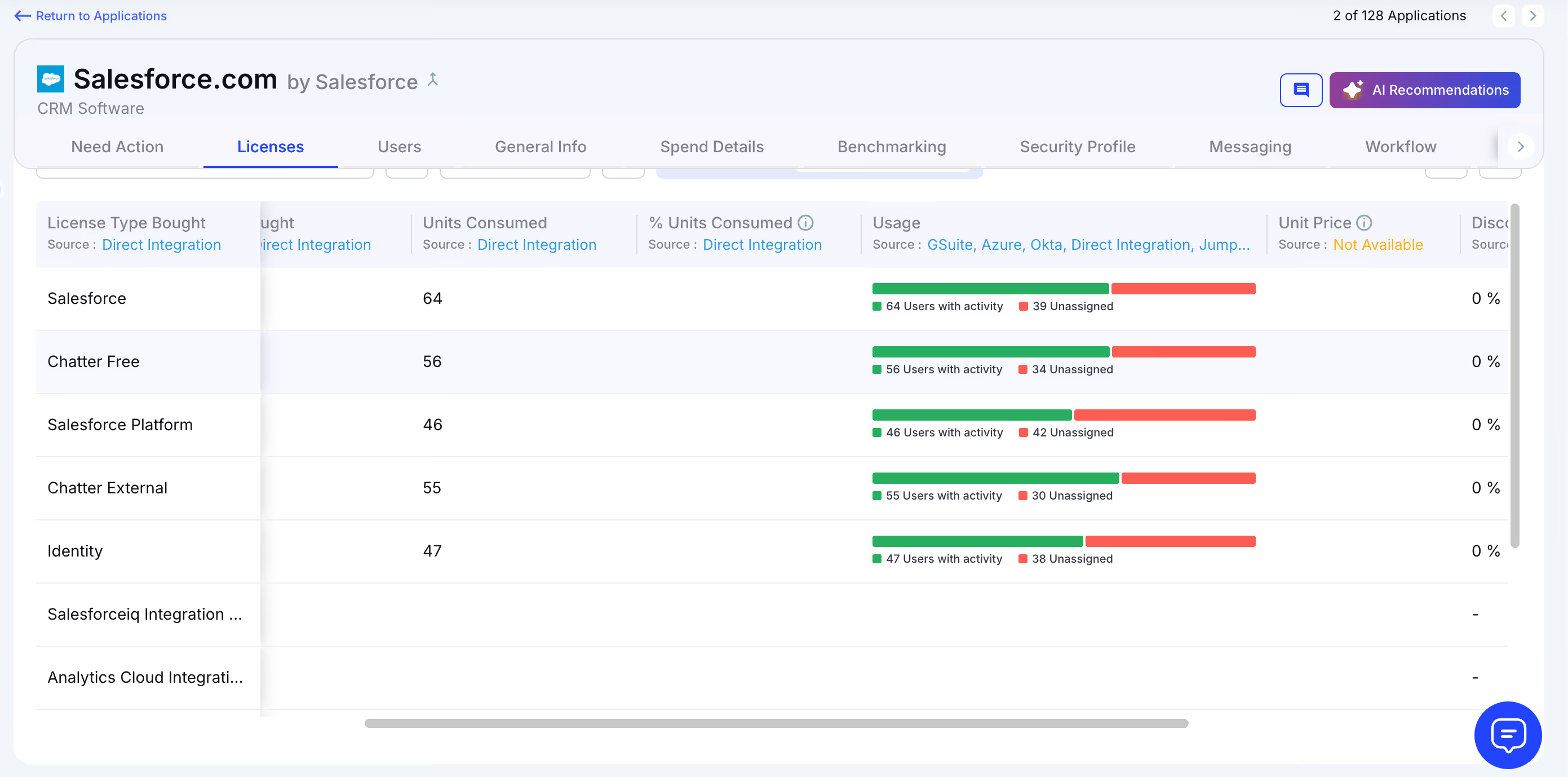
How We Do It

CloudEagle.ai consolidates vendor spend, usage trends, and AI-powered metadata extraction from every connected system in real time. Renewal timelines, cost summaries, and active usage appear together for quick, confident analysis.

Why We Are Better

Implementation requires only a few days. With 500+ native integrations and automated metadata extraction, CloudEagle.ai centralizes all license data in one place, ensuring it stays consistent, trustworthy, and continuously up to date.

B. Live Usage Insights & Shadow IT Visibility

Without centralized governance, Salesforce license usage and overlapping tools can quickly get out of hand. Shadow IT often slips under the radar, making it difficult for IT teams to identify redundant applications scattered across teams.

Current Process

Teams may purchase duplicate tools through corporate cards or sign up for free trials that later convert into billable subscriptions. Manually uncovering these overlaps across departments is incredibly challenging.

Pain Points

Shadow IT creates unmonitored Salesforce spend and introduces avoidable SaaS security risks. Trying to locate duplicate applications by hand is time-consuming and often fails to surface all redundancies.
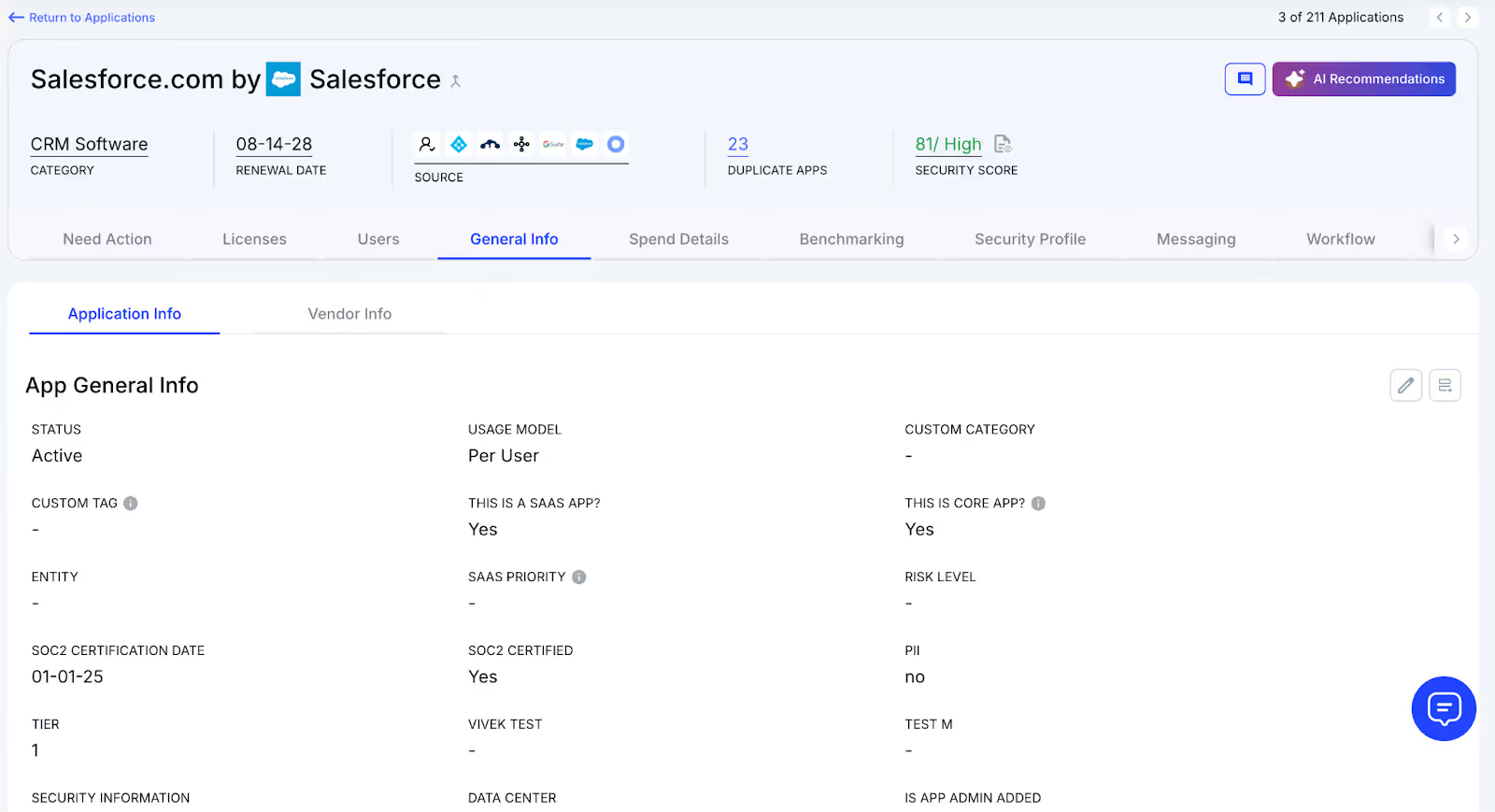
How We Do It

CloudEagle.ai continuously scans for duplicate and overlapping applications using AI, while also monitoring usage at a feature level. Any shadow tool is flagged immediately.

Why We Are Better

Our AI compares applications based on capabilities, not just their names. IT teams can automatically notify users, trigger workflows, or generate ITSM tickets to reclaim underused licenses and reduce risk exposure.

C. Unified License Oversight Across Teams

Handling Salesforce licenses distributed across various teams can quickly become overwhelming. Many organizations still rely on spreadsheets to track key applications, while manually piecing together SSO data, usage metrics, and contract details.

Current Process

Most companies only track their primary applications in spreadsheets, manually merging identity provider logs, feature usage data, and contract information. This slows updates, reduces accuracy, and creates inconsistent reporting.

Pain Points

Applications that go unmonitored drive avoidable spending, and license reassignments rarely happen at the right time. Renewal tracking often lacks consistency, leading to missed salesforce licensing cost​ saving opportunities.

How We Do It

CloudEagle.ai brings all license management into a single, centralized platform. Nightly synchronization merges IDP records, contract data, and connector inputs, providing real-time transparency into license allocation and usage.

Why We Are Better

Automated updates match purchased licenses to active users and feature-level usage across every application. Teams can filter by license tier and instantly make informed, data-backed decisions to SaaS spend optimization and allocation.

D. Automated License Reclamation

Unused Salesforce licenses can quietly inflate expenses, and most IT teams lack a scalable way to reclaim them. Manually reviewing usage patterns and emailing large groups of users every week is repetitive, error-prone, and consumes valuable time.

Current Process

IT departments often send one-off emails to inactive users and update spreadsheets by hand, making the workflow slow, manual, and frequently deprioritized.

Pain Points

Inactive seats remain assigned, increasing salesforce licensing costs and exposing the organization to unnecessary security and access risks. Manual reclamation processes simply do not scale with growth.

How We Do It

CloudEagle.ai automates the entire license harvesting cycle. Scheduled workflows detect inactivity, notify users, and reclaim or downgrade licenses automatically based on real usage data.

Why We Are Better

Automations can run daily or weekly through Okta or Microsoft AD. Licenses are reclaimed instantly, minimizing waste, saving operational time, and improving overall utilization efficiency.

E. License Cost Benchmarking for Smarter Renewals

CloudEagle.ai’s price benchmarking capability helps organizations secure stronger Salesforce license pricing during renewal cycles. By comparing contract terms against current market data, enterprises can negotiate confidently and avoid unnecessary overspending.

Current Process

Procurement teams often depend on vendor-provided quotes or legacy contracts. Peer comparisons are minimal, and available pricing references rarely reflect real, up-to-date market rates.

Pain Points

Insufficient pricing insight weakens negotiation leverage, resulting in higher-than-necessary costs or less favorable renewal terms.
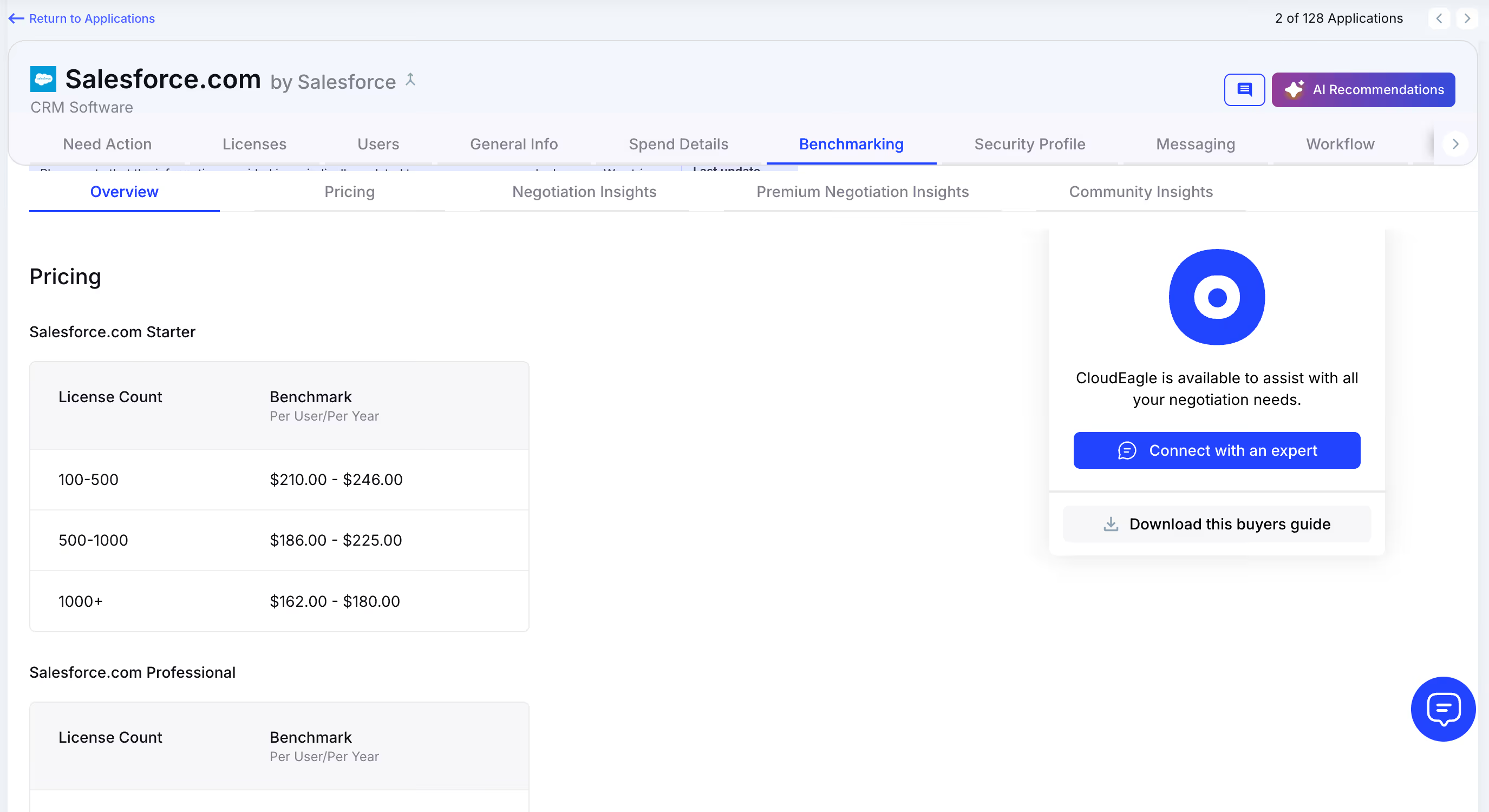
How We Do It

CloudEagle.ai delivers real-time benchmark data, historical pricing patterns, and structured Salesforce pricing guide to empower informed negotiation strategies supported by verifiable data.

Why We Are Better

Salesforce license pricing insights are broken down by SKU, license tier, and volume, along with recommended negotiation levers, ensuring renewal outcomes align with true market value rather than vendor-driven baselines.

F. Renewal Management, Done Proactively

CloudEagle.ai automates renewal oversight by triggering workflows aligned with contract timelines. From approval routing to adjusting Salesforce license counts, it helps teams avoid accidental auto-renewals and keeps SaaS renewal management streamlined and predictable.

Current Process

Renewals are typically monitored through spreadsheets and long email threads. Approval cycles slow down, and auto-renewal deadlines often slip past unnoticed.

Pain Points

Missed renewal windows lead to unnecessary spend, and last-minute vendor negotiations reduce leverage to secure better Salesforce license pricing or adjust license counts appropriately.

How We Do It

CloudEagle.ai creates an automated renewal calendar using AI-extracted contract data or integrations with CLMs such as Ironclad, Salesforce, or Zip. Workflows activate 90 days before notice dates, routing tasks to finance, legal, and business stakeholders for coordinated action.

Why We Are Better

Teams receive alerts that include usage trends, pricing benchmarks, and alternative vendor considerations. Approval decisions are tracked automatically, preventing missed renewals, accidental spend commitments, and stalled negotiations.

G. Utilize Centralized Vendor Dashboards

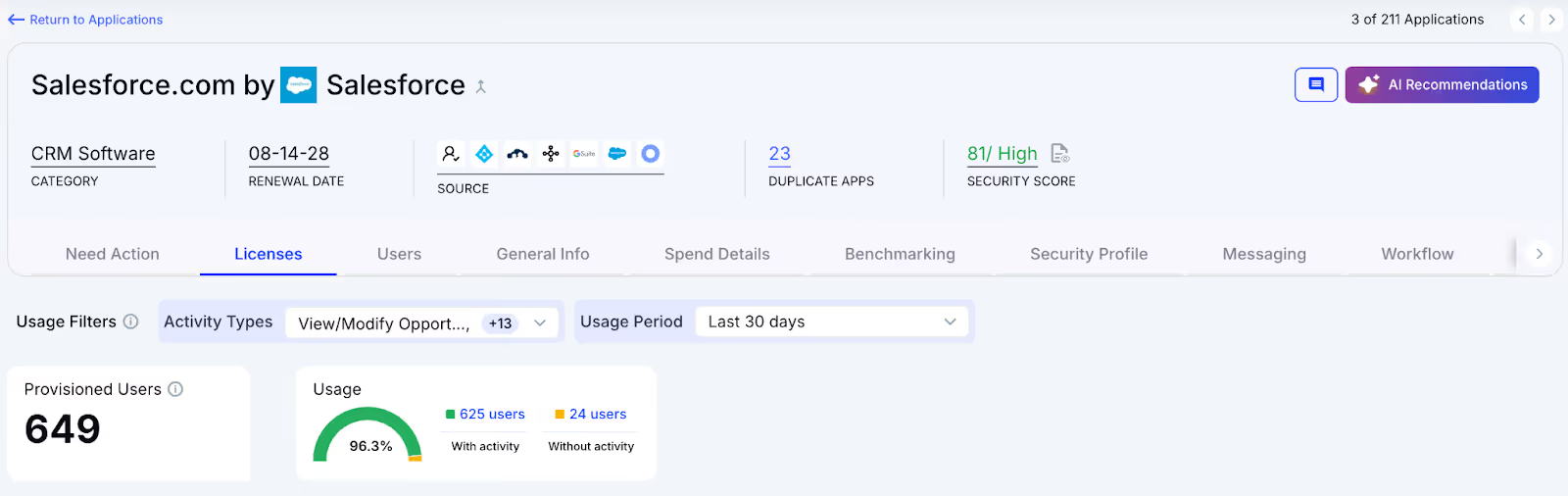
CloudEagle.ai offers vendor-specific dashboards that consolidate all Salesforce subscription data into one place. Teams gain visibility into license usage, renewal timelines, and spending patterns, enabling more informed, data-backed decisions.

These dashboards surface overspending and identify unused licenses, making reclamation straightforward. They also reveal adoption and usage trends, allowing organizations to proactively adjust license allocations and optimize overall Salesforce spending.

H. Streamlined Application Access Requests

CloudEagle.ai simplifies Salesforce access by enabling employees to request licenses directly through the platform or via Slack, removing the need for lengthy email threads and manual coordination. Managers can review and approve these requests in real time, ensuring users get timely access.

This process ensures employees receive the correct license type without unnecessary delays and eliminates approval bottlenecks. Every request is automatically logged for transparency and compliance, reducing administrative overhead while keeping user access reviews efficient and traceable.

5. Conclusion

Salesforce license overprovisioning rarely happens because of a single mistake. It builds gradually as new hires receive licenses and high-tier editions are assigned without revisiting actual usage.

This is where CloudEagle.ai helps. By analyzing login activity, license management, and feature usage in Salesforce, it identifies inactive users, oversized license tiers, and opportunities to reclaim seats.

When companies continuously review usage and rightsizing opportunities, they can often recover a meaningful portion of their Salesforce spend instead of letting unused licenses accumulate year after year.

6. FAQs

1. How much does a Salesforce license cost?

The cost of a Salesforce license depends on the product edition. Start Suite licenses typically range from lower-tier plans with basic CRM features to higher-tier editions that include advanced automation, analytics, and customization capabilities. Enterprise plans can cost significantly more per user each month.

2. Does Salesforce require a license?

Yes. Most users must have an assigned Salesforce license to access the platform. Each license defines what features a user can access, such as CRM records, reporting tools, or automation capabilities.

3. How many Salesforce licenses do I have?

You can check this in Salesforce by navigating to Setup → Company Information. This page displays the total number of purchased licenses, how many are currently assigned, and how many are still available.

4. Is Salesforce a free software?

No. Salesforce is a paid SaaS platform. While the free version may is available for evaluation, long-term usage requires purchasing licenses for each user who needs access.

5. What are the types of Salesforce licenses?

Salesforce offers multiple license types depending on the product and features required. Common examples include Sales Cloud licenses, Service Cloud licenses, Platform licenses, and Identity licenses, each providing different levels of access and functionality.

Advertisement for a SaaS Subscription Tracking Template with a call-to-action button to download and a partial graphic of a tablet showing charts.Banner promoting a SaaS Agreement Checklist to streamline SaaS management and avoid budget waste with a call-to-action button labeled Download checklist.Blue banner with text 'The Ultimate Employee Offboarding Checklist!' and a black button labeled 'Download checklist' alongside partial views of checklist documents from cloudeagle.ai.Digital ad for download checklist titled 'The Ultimate Checklist for IT Leaders to Optimize SaaS Operations' by cloudeagle.ai, showing checklist pages.Slack Buyer's Guide offer with text 'Unlock insider insights to get the best deal on Slack!' and a button labeled 'Get Your Copy', accompanied by a preview of the guide featuring Slack's logo.Monday Pricing Guide by cloudeagle.ai offering exclusive pricing secrets to maximize investment with a call-to-action button labeled Get Your Copy and an image of the guide's cover.Blue banner for Canva Pricing Guide by cloudeagle.ai offering a guide to Canva costs, features, and alternatives with a call-to-action button saying Get Your Copy.Blue banner with white text reading 'Little-Known Negotiation Hacks to Get the Best Deal on Slack' and a white button labeled 'Get Your Copy'.Blue banner with text 'Little-Known Negotiation Hacks to Get the Best Deal on Monday.com' and a white button labeled 'Get Your Copy'.Blue banner with text 'Little-Known Negotiation Hacks to Get the Best Deal on Canva' and a white button labeled 'Get Your Copy'.Banner with text 'Slack Buyer's Guide' and a 'Download Now' button next to images of a guide titled 'Slack Buyer’s Guide: Features, Pricing & Best Practices'.Digital cover of Monday Pricing Guide with a button labeled Get Your Copy on a blue background.Canva Pricing Guide cover with a button labeled Get Your Copy on a blue gradient background.

Enter your email to
unlock the report

Oops! Something went wrong while submitting the form.
License Count
Benchmark
Per User/Per Year

Enter your email to
unlock the report

Oops! Something went wrong while submitting the form.
License Count
Benchmark
Per User/Per Year

Enter your email to
unlock the report

Oops! Something went wrong while submitting the form.
Notion Plus
License Count
Benchmark
Per User/Per Year
100-500
$67.20 - $78.72
500-1000
$59.52 - $72.00
1000+
$51.84 - $57.60
Canva Pro
License Count
Benchmark
Per User/Per Year
100-500
$74.33-$88.71
500-1000
$64.74-$80.32
1000+
$55.14-$62.34

Enter your email to
unlock the report

Oops! Something went wrong while submitting the form.

Enter your email to
unlock the report

Oops! Something went wrong while submitting the form.
Zoom Business
License Count
Benchmark
Per User/Per Year
100-500
$216.00 - $264.00
500-1000
$180.00 - $216.00
1000+
$156.00 - $180.00

Enter your email to
unlock the report

Oops! Something went wrong while submitting the form.

Get the Right Security Platform To Secure Your Cloud Infrastructure

Please enter a business email
Thank you!
The 2023 SaaS report has been sent to your email. Check your promotional or spam folder.
Oops! Something went wrong while submitting the form.

Access full report

Please enter a business email
Thank you!
The 2023 SaaS report has been sent to your email. Check your promotional or spam folder.
Oops! Something went wrong while submitting the form.

A sales manager requests ten new Salesforce licenses for new hires. Six months later, only four of those users log in regularly, but the company is still paying for all ten.

This is how Salesforce overspending usually starts. Licenses are purchased for future growth, role changes, or temporary projects, but they rarely get removed or downgraded when SaaS monitoring drops.

The result is license overprovisioning. In this article, we will break down how Salesforce license overprovisioning happens. You’ll know about the hidden spend and how CloudEagle.ai helps enterprises recover up to 30% of their Salesforce spend.

TL;DR

  • Salesforce overspending starts when licenses are bought in bulk but not reviewed against actual usage.
  • Inactive users, role changes, and temporary access often leave unused licenses assigned and paid for.
  • High-tier licenses are frequently given by default, even when users need only basic features.
  • Key signals include low login activity, dormant accounts, and gaps between purchased and active licenses.
  • CloudEagle.ai helps recover up to 30% spend through visibility, automation, and continuous license optimization

1. Why Does Salesforce License Spend Keep Growing Faster Than Usage?

Salesforce spend grows faster than usage because licenses are often purchased in bulk during contract renewals. Over time, some of those Salesforce licenses remain assigned even when the users stop logging in or change roles.

  • Inactive Users Still Holding Licenses: Employees who moved teams or left the company may still have assigned seats in Salesforce.
  • Premium Licenses Assigned By Default: Users receive higher-tier licenses with advanced features even when they only use basic CRM functions.
  • Temporary Access Becoming Permanent: Licenses granted for short-term projects remain active long after the work is completed.

This pattern is widely documented. According to Forbes, organizations typically waste around 25–30% of SaaS spend due to unused or underutilized licenses.

When licenses remain assigned without reviewing actual usage, spending grows quietly. The budget increases every renewal cycle even though the number of active users stays roughly the same.

You’re Paying For Ghost Licenses

Seats nobody uses. Costs nobody notices.
Check License Management Best Practices

2: Where Does Salesforce License Overprovisioning Typically Start?

Salesforce license overprovisioning usually begins during routine operational decisions. New hires, team restructures, and temporary projects all trigger license assignments that rarely get revisited later.

Bulk License Purchases During Hiring

Sales leaders request multiple licenses in advance so new employees can start immediately in Salesforce. Some of those seats remain unused when hiring slows down.

Default Assignment Of High-Tier Licenses

New users often receive full-feature licenses such as Sales Cloud Enterprise even when their role only requires basic CRM access.

Project-Based Access That Never Gets Removed

Contractors or cross-functional teams receive temporary access for campaigns or migrations but keep their licenses long after the project ends.

These salesforce license types​ rarely appear risky at first. The licenses were justified when they were requested.

  • Teams rarely check login frequency or feature usage before renewing licenses.
  • When employees change roles, their access governance is adjusted but the original license tier remains assigned.

As Marc Benioff once said,

“The business of business is improving the state of the world.”

But improving operations also means making sure the tools supporting those operations are used efficiently. When license assignments aren’t revisited regularly, Salesforce costs grow faster than actual usage.

Also Read: How to Streamline Adobe License Management with CloudEagle?

3: What Signals Indicate Your Salesforce Environment Is Overprovisioned?

Salesforce license overprovisioning rarely appears in financial reports first. It shows up in operational signals inside the system itself. These signals reveal when license assignments no longer match real usage.

A. Large Gaps Between License Count And Active Users

One of the signals of Salesforce overprovisioning is when the number of purchased licenses is higher than the number of people. Enterprises often buy licenses for projects, but those seats remain assigned after demand changes.

  • Licenses Purchased For Planned Hiring: Sales teams request additional seats in advance so new employees can start immediately in Salesforce.
  • Users Assigned Licenses But Rarely Logging In: Some employees may access the system only once or twice a month.
  • Temporary Users Still Holding Seats: Contractors or project teams retain licenses even after their work ends.

These gaps usually go unnoticed because license counts are reviewed during SaaS renewals rather than against real usage data.

When enterprises compare purchased Salesforce licenses with actual login activity, they often discover that seats are inactive or barely used.

B. High-Cost Editions Assigned To Low-Usage Roles

A regional sales manager assigns new hires the same license type used by senior sales reps. Everyone receives a full Sales Cloud Enterprise license in Salesforce so they can “have everything they might need.”

Sales Operations Perspective:

Giving every user the highest tier simplifies onboarding. No one has to request extra permissions later.

Finance Perspective:

Months later, the usage reports show that many of those users only update contact records and log activities. The advanced features bundled in the salesforce licensing cost​ are rarely touched.

Nothing appears broken inside the CRM. But Salesforce license tiers and real usage gradually drift apart.

Over time, assigning expensive editions to users who only perform basic CRM tasks quietly inflates Salesforce spend across the organization.

C. Dormant Accounts Still Consuming Paid Licenses

Another clear signal of Salesforce overprovisioning is when users have already left the enterprises that still hold active licenses. These salesforce license types​ continue consuming paid seats even though they no longer present.

  • Former Employees Still Assigned Licenses: Offboarded staff may retain access to Salesforce if deprovisioning is delayed or incomplete.
  • Users Who Haven’t Logged In For Months: Accounts remain active even when login history shows little or no recent activity.
  • Temporary Project Access Left Unchanged: Contractors or short-term team members keep their Salesforce licenses after projects end.

Dormant accounts are common in large SaaS environments. According to Varonis, organizations typically have around 7% of their SaaS accounts belonging to former employees.

When these accounts continue to hold Salesforce licenses, companies keep paying for seats that deliver no operational value. Over time, even a small percentage of inactive users can translate into a noticeable increase in CRM spend.

Your SaaS Spend Is Lying

Hidden tools. Silent renewals. Inflated bills.
See How to Optimize SaaS Spend

4. How Does CloudEagle.ai Help Recover Up To 30% Of Salesforce Spend?

Managing Salesforce enterprise licenses scattered across multiple SSO portals, usage dashboards, and billing records can quickly become overwhelming. Traditional spreadsheets may only capture the most visible apps, leaving many licenses untracked and overlooked.

This disjointed approach leads to avoidable overspending, SaaS compliance concerns, and missed chances to optimize usage.

CloudEagle.ai provides a unified, real-time view of every Salesforce license and related spend. It automates monitoring, usage insights, and renewal workflows, turning a previously manual and inconsistent process into a structured, intelligent, and data-guided system.

A. Direct Salesforce Admin Console Sync

Manually managing Salesforce licenses is slow, prone to mistakes, and draining for IT teams. Building tracking spreadsheets can take weeks, and by the time they are assembled, the information is already outdated. This leaves teams without accurate visibility into subscriptions, usage levels, or Salesforce plan details.

Current Process

Most organizations rely on spreadsheets and scattered tools to monitor renewals, license allocations, and user activity. This creates disconnected data sources, and updates often become stale before anyone evaluates them.

Pain Points

Manual data entry and delayed updates introduce inaccuracies and blind spots in software spend oversight. IT and finance teams are left without dependable, real-time visibility.

How We Do It

CloudEagle.ai consolidates vendor spend, usage trends, and AI-powered metadata extraction from every connected system in real time. Renewal timelines, cost summaries, and active usage appear together for quick, confident analysis.

Why We Are Better

Implementation requires only a few days. With 500+ native integrations and automated metadata extraction, CloudEagle.ai centralizes all license data in one place, ensuring it stays consistent, trustworthy, and continuously up to date.

B. Live Usage Insights & Shadow IT Visibility

Without centralized governance, Salesforce license usage and overlapping tools can quickly get out of hand. Shadow IT often slips under the radar, making it difficult for IT teams to identify redundant applications scattered across teams.

Current Process

Teams may purchase duplicate tools through corporate cards or sign up for free trials that later convert into billable subscriptions. Manually uncovering these overlaps across departments is incredibly challenging.

Pain Points

Shadow IT creates unmonitored Salesforce spend and introduces avoidable SaaS security risks. Trying to locate duplicate applications by hand is time-consuming and often fails to surface all redundancies.

How We Do It

CloudEagle.ai continuously scans for duplicate and overlapping applications using AI, while also monitoring usage at a feature level. Any shadow tool is flagged immediately.

Why We Are Better

Our AI compares applications based on capabilities, not just their names. IT teams can automatically notify users, trigger workflows, or generate ITSM tickets to reclaim underused licenses and reduce risk exposure.

C. Unified License Oversight Across Teams

Handling Salesforce licenses distributed across various teams can quickly become overwhelming. Many organizations still rely on spreadsheets to track key applications, while manually piecing together SSO data, usage metrics, and contract details.

Current Process

Most companies only track their primary applications in spreadsheets, manually merging identity provider logs, feature usage data, and contract information. This slows updates, reduces accuracy, and creates inconsistent reporting.

Pain Points

Applications that go unmonitored drive avoidable spending, and license reassignments rarely happen at the right time. Renewal tracking often lacks consistency, leading to missed salesforce licensing cost​ saving opportunities.

How We Do It

CloudEagle.ai brings all license management into a single, centralized platform. Nightly synchronization merges IDP records, contract data, and connector inputs, providing real-time transparency into license allocation and usage.

Why We Are Better

Automated updates match purchased licenses to active users and feature-level usage across every application. Teams can filter by license tier and instantly make informed, data-backed decisions to SaaS spend optimization and allocation.

D. Automated License Reclamation

Unused Salesforce licenses can quietly inflate expenses, and most IT teams lack a scalable way to reclaim them. Manually reviewing usage patterns and emailing large groups of users every week is repetitive, error-prone, and consumes valuable time.

Current Process

IT departments often send one-off emails to inactive users and update spreadsheets by hand, making the workflow slow, manual, and frequently deprioritized.

Pain Points

Inactive seats remain assigned, increasing salesforce licensing costs and exposing the organization to unnecessary security and access risks. Manual reclamation processes simply do not scale with growth.

How We Do It

CloudEagle.ai automates the entire license harvesting cycle. Scheduled workflows detect inactivity, notify users, and reclaim or downgrade licenses automatically based on real usage data.

Why We Are Better

Automations can run daily or weekly through Okta or Microsoft AD. Licenses are reclaimed instantly, minimizing waste, saving operational time, and improving overall utilization efficiency.

E. License Cost Benchmarking for Smarter Renewals

CloudEagle.ai’s price benchmarking capability helps organizations secure stronger Salesforce license pricing during renewal cycles. By comparing contract terms against current market data, enterprises can negotiate confidently and avoid unnecessary overspending.

Current Process

Procurement teams often depend on vendor-provided quotes or legacy contracts. Peer comparisons are minimal, and available pricing references rarely reflect real, up-to-date market rates.

Pain Points

Insufficient pricing insight weakens negotiation leverage, resulting in higher-than-necessary costs or less favorable renewal terms.

How We Do It

CloudEagle.ai delivers real-time benchmark data, historical pricing patterns, and structured Salesforce pricing guide to empower informed negotiation strategies supported by verifiable data.

Why We Are Better

Salesforce license pricing insights are broken down by SKU, license tier, and volume, along with recommended negotiation levers, ensuring renewal outcomes align with true market value rather than vendor-driven baselines.

F. Renewal Management, Done Proactively

CloudEagle.ai automates renewal oversight by triggering workflows aligned with contract timelines. From approval routing to adjusting Salesforce license counts, it helps teams avoid accidental auto-renewals and keeps SaaS renewal management streamlined and predictable.

Current Process

Renewals are typically monitored through spreadsheets and long email threads. Approval cycles slow down, and auto-renewal deadlines often slip past unnoticed.

Pain Points

Missed renewal windows lead to unnecessary spend, and last-minute vendor negotiations reduce leverage to secure better Salesforce license pricing or adjust license counts appropriately.

How We Do It

CloudEagle.ai creates an automated renewal calendar using AI-extracted contract data or integrations with CLMs such as Ironclad, Salesforce, or Zip. Workflows activate 90 days before notice dates, routing tasks to finance, legal, and business stakeholders for coordinated action.

Why We Are Better

Teams receive alerts that include usage trends, pricing benchmarks, and alternative vendor considerations. Approval decisions are tracked automatically, preventing missed renewals, accidental spend commitments, and stalled negotiations.

G. Utilize Centralized Vendor Dashboards

CloudEagle.ai offers vendor-specific dashboards that consolidate all Salesforce subscription data into one place. Teams gain visibility into license usage, renewal timelines, and spending patterns, enabling more informed, data-backed decisions.

These dashboards surface overspending and identify unused licenses, making reclamation straightforward. They also reveal adoption and usage trends, allowing organizations to proactively adjust license allocations and optimize overall Salesforce spending.

H. Streamlined Application Access Requests

CloudEagle.ai simplifies Salesforce access by enabling employees to request licenses directly through the platform or via Slack, removing the need for lengthy email threads and manual coordination. Managers can review and approve these requests in real time, ensuring users get timely access.

This process ensures employees receive the correct license type without unnecessary delays and eliminates approval bottlenecks. Every request is automatically logged for transparency and compliance, reducing administrative overhead while keeping user access reviews efficient and traceable.

5. Conclusion

Salesforce license overprovisioning rarely happens because of a single mistake. It builds gradually as new hires receive licenses and high-tier editions are assigned without revisiting actual usage.

This is where CloudEagle.ai helps. By analyzing login activity, license management, and feature usage in Salesforce, it identifies inactive users, oversized license tiers, and opportunities to reclaim seats.

When companies continuously review usage and rightsizing opportunities, they can often recover a meaningful portion of their Salesforce spend instead of letting unused licenses accumulate year after year.

6. FAQs

1. How much does a Salesforce license cost?

The cost of a Salesforce license depends on the product edition. Start Suite licenses typically range from lower-tier plans with basic CRM features to higher-tier editions that include advanced automation, analytics, and customization capabilities. Enterprise plans can cost significantly more per user each month.

2. Does Salesforce require a license?

Yes. Most users must have an assigned Salesforce license to access the platform. Each license defines what features a user can access, such as CRM records, reporting tools, or automation capabilities.

3. How many Salesforce licenses do I have?

You can check this in Salesforce by navigating to Setup → Company Information. This page displays the total number of purchased licenses, how many are currently assigned, and how many are still available.

4. Is Salesforce a free software?

No. Salesforce is a paid SaaS platform. While the free version may is available for evaluation, long-term usage requires purchasing licenses for each user who needs access.

5. What are the types of Salesforce licenses?

Salesforce offers multiple license types depending on the product and features required. Common examples include Sales Cloud licenses, Service Cloud licenses, Platform licenses, and Identity licenses, each providing different levels of access and functionality.

CloudEagle.ai recognized in the 2025 Gartner® Magic Quadrant™ for SaaS Management Platforms
Download now
gartner chart
5x
Faster employee
onboarding
80%
Reduction in time for
user access reviews
30k
Workflows
automated
$15Bn
Analyzed in
contract spend
$2Bn
Saved in
SaaS spend

Streamline SaaS governance and save 10-30%

Book a Demo with Expert
CTA image
One platform to Manage
all SaaS Products
Learn More