You need to enable JavaScript in order to use the AI chatbot tool powered by ChatBot

How to Discover Claude Licenses in Your Organization

Share via:
blog-cms-banner-bg
Little-Known Negotiation Hacks to Get the Best Deal on Slack
cta-bg-blogDownload Your Copy

HIPAA Compliance Checklist for 2025

Download PDF

Most IT teams think they know how many Claude licenses their organization has. They are usually off by a significant margin.

The number in your procurement system reflects what IT approved. It does not reflect what marketing bought on a team credit card, what the engineering lead provisioned directly through Anthropic, or what fifteen employees are running through personal Pro accounts they expense at the end of the month.

Discovering Claude licenses is not a one-step process. Claude shows up in your organization through at least three distinct channels, and only one of them is visible in your admin console. This guide covers all three, how to surface them, and what to do once you have the full picture.

TL;DR 

  • Claude usage is fragmented across IT departments and personal accounts, so your current license count is likely wrong
  • A large portion of Claude access exists as shadow AI, bypassing SSO, audit logs, and governance controls
  • Claude access spans three channels: managed seats, API integrations, and individual accounts, all needing different discovery methods
  • You need to combine admin data, SSO logs, finance records, and endpoint signals to get a complete license inventory
  • Real value comes after discovery by eliminating unused licenses, consolidating accounts, and bringing all access under governance

1. Why Most IT Teams Do Not Know How Many Claude Licenses They Own?

The honest answer is that Claude was never designed with centralized IT discovery in mind. It was designed to be easy for individuals and teams to adopt quickly. That is a feature for users and a problem for governance.

How Claude seats get purchased outside IT through credit cards and team budgets

Department-level buying is the main driver.

Managers can spin up Claude independently with just a credit card and a minimum seat requirement. That low barrier means teams adopt it quickly, without looping in IT.

You typically see:

  • Teams are buying Claude directly from Anthropic
  • Multiple deployments running in parallel
  • No SSO enforcement or centralized admin view

By the time IT notices, usage is already fragmented across departments.

The shadow AI problem: employees using personal Claude accounts for work

This is where things get harder to control.
Employees often sign up for Claude Pro using personal emails and start using it for work. Whether it is expensed or not, IT has zero visibility into these accounts.

That leads to:

  • No insight into what data is being shared
  • No audit logs or monitoring
  • No enforcement of security or retention policies

According to CloudEagle’s 2025 IGA report, 60% of AI apps in enterprises operate outside IT visibility, and personal Claude usage is a big part of that.

Shadow AI is not a Claude-specific problem. It is a pattern that repeats across every AI tool your employees are using. Understanding the full scope of it is the starting point for any governance program.

🎬 Watch the Webinar:60% Invisible: Shadow AI and Hidden Access Crisis in SaaS and AI Environments. See how enterprise teams are discovering the AI tools IT never approved and what governance looks like once you have that visibility. 👉 Watch now

Your Claude Renewal Is Coming. Are You Walking In With Real Data?

Most IT teams negotiate SaaS renewals based on last year's seat count. This checklist shows you exactly what usage data to pull before any AI tool renewal conversation.
Get the License Management Checklist

2. The Three Types of Claude Access You Need to Account For

Before you start the discovery process, it helps to understand exactly what you are looking for. Claude access in enterprise environments falls into three categories, and each requires a different discovery method.

1. Centrally provisioned seats (Team or Enterprise)

These are the seats IT already knows about.

They are purchased through formal procurement, provisioned via the admin console, and tied to corporate emails. If configured correctly, they are also covered by SSO and visible in your identity provider.

This is the easiest layer to audit:

  • Pull the user roster from the admin console
  • Cross-check with your IdP

But this list is rarely complete. It only reflects governed usage, not total usage.

2. API access via Anthropic keys

This is where visibility starts to break.

Developers often use Claude through APIs instead of the UI, embedding it into internal tools, workflows, or pipelines using keys from Anthropic.

A few things make this risky:

  • API keys can be generated from personal accounts
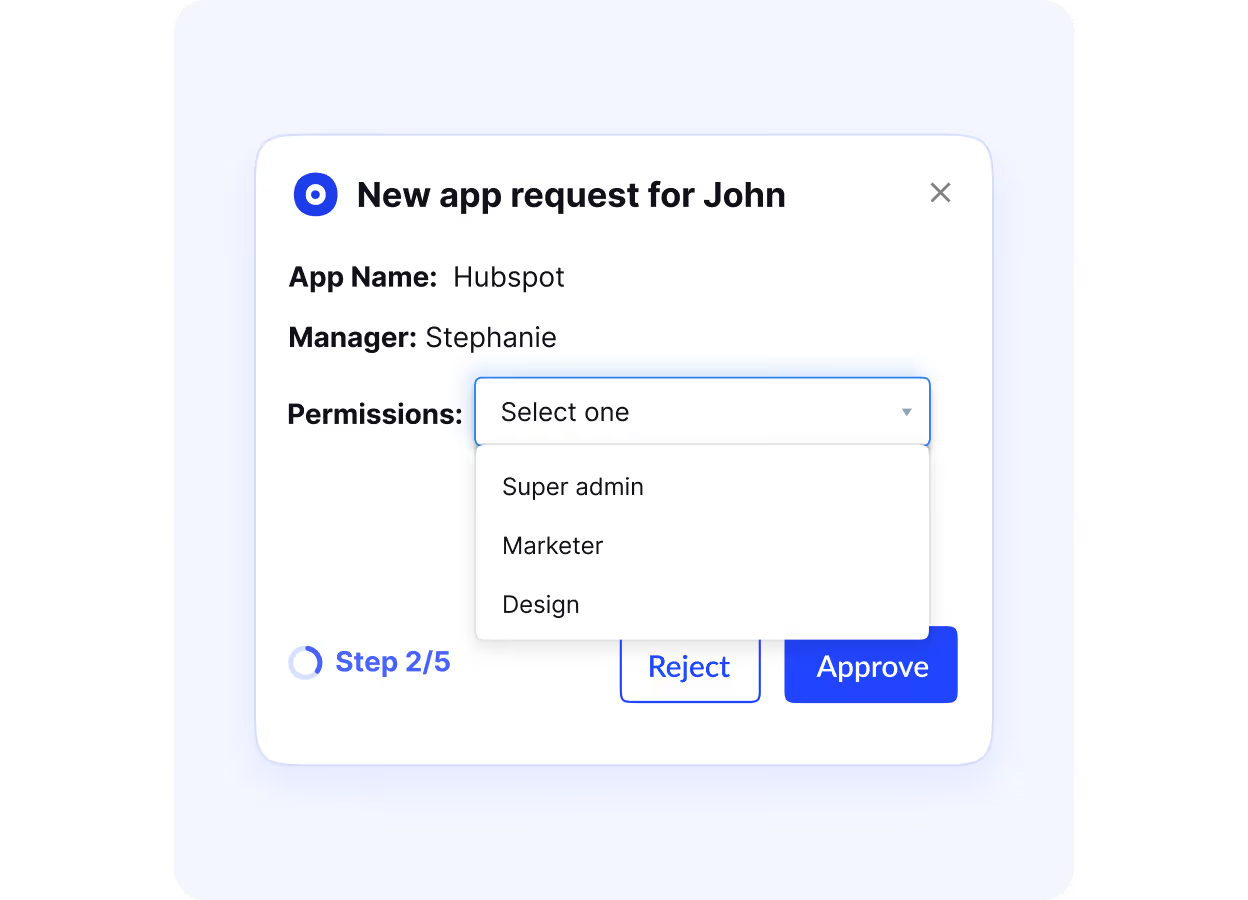
  • Keys can be embedded into shared tools or automations
  • Access scales silently as those tools get used

This type of usage does not appear as a “seat.”
It shows up as API consumption, often disconnected from procurement or identity systems.

3. Individual Pro or Max accounts

This is the most common and the hardest to track.

Employees sign up for Claude individually and use it for work, completely outside IT systems. Even when expensed, the visibility is minimal.

In practice:

  • Charges appear in finance as “Anthropic”
  • IT rarely reviews or links them to actual users
  • No access to usage data, prompts, or history

That means sensitive company data can flow through these accounts with zero oversight.

3. How to Discover Claude Licenses Across Your Organization: Step by Step

There is no single query that surfaces everything. Discovery requires looking across multiple data sources and triangulating the results.

1. Pull a report from your Claude admin console for provisioned seats

Start with your baseline. Log in to your Claude admin console and export the current seat roster.

This tells you who IT has provisioned, what tier they are on, and when they were last active. It is your cleanest dataset, but it is never the full picture.

  • Flag any seats tied to non-corporate email domains
  • These often indicate contractors or external users who are not fully tracked

2. Audit SSO and identity provider logs for Claude.ai login activity

If SSO is configured, your identity provider logs every authentication event. Pull at least 90 days of login data and map out who is accessing Claude.

The key step here is comparison. Cross-reference SSO users against your provisioned seat list. Any mismatch is a signal. These users could be accessing Claude through personal accounts linked to SSO, or through deployments IT never approved.

3. Scan expense reports and corporate card statements for Anthropic charges

Your finance data will surface what your systems miss.

Search for **Anthropic charges across the last 12 months and group them by amount.

  • ~$20/month typically indicates Pro accounts
  • $100–$200/month points to higher-tier plans
  • Larger, variable charges often map to Team usage

This step exposes both individual subscriptions and team-level purchases that bypassed procurement.

4. Survey department heads to surface team-funded or individually funded accounts

Do not overcomplicate this. A simple outreach works.

Ask department leads two direct questions:
Do you use Claude, and how are those accounts funded?

Most teams are not trying to hide anything. They adopted it because it was easy, not because it was approved. This step helps uncover usage that does not exist in any system of record.

5. Check your SaaS management platform for Claude in the discovered app inventory

If you have a SaaS management platform, use it as a secondary lens.

  • Look for Claude.ai in discovered applications
  • Correlate usage from SSO, browser activity, and financial data
  • Identify accounts that do not map to your official seat list

This is especially useful for catching personal account usage on corporate devices.

6. Review browser and endpoint logs for Claude.ai usage patterns

Finally, go to the lowest level of visibility. Pull domain-level access logs for Claude.ai from your endpoint or browser monitoring tools.

This shows every device that has accessed Claude, regardless of how the account was created or authenticated.

For most IT teams, this is where the real scale becomes obvious.
It is common to find far more devices accessing Claude than the number of provisioned seats suggests.

Shadow AI Is Already Inside Your Organization. Do You Know Where?

This guide walks through how to catch hidden AI tools in your software portfolio, including Claude, before they become a security or compliance problem.
Get the Shadow AI Discovery Guide

4. What to Do Once You Have Your Claude License Inventory?

Discovery gives you a list. What you do with that list determines whether this was a useful exercise or just an audit that sits in a folder.

Categorize licenses by tier, department, and actual usage

Start by structuring what you found.

Break your inventory across three dimensions:

  • Seat tier: Free, Pro, Max, Team, Enterprise, API-only
  • Department: Which teams are using Claude and how
  • Usage frequency: Based on admin and SSO activity

This quickly exposes inefficiencies.

You will see premium seats with no activity, teams running fragmented Pro accounts instead of a single Team plan, and API usage that cannot be tied back to a known user. That is where optimization begins.

Identify duplicates, overlaps, and inactive seats

Next, focus on waste.

Look for patterns that indicate unnecessary spending or poor allocation:

  • Users with both corporate seats and personal subscriptions
  • Mixed usage within teams (Team seats + individual Pro accounts)
  • Seats inactive for 30+ days

These are immediate cost recovery opportunities.

Duplicate accounts double your spend. Inactive seats quietly drain the budget without delivering any value.

Flag ungoverned API keys and personal accounts

This is where cost and security intersect.

Every API key should be reviewed in context. Who created it, where it is used, and what data flows through it.

Personal accounts and unmanaged API access are the biggest blind spots. They sit outside SSO, audit logs, and retention policies, which means they operate without any real oversight.

The goal here is simple:
Either bring them under governance or shut them down.

The license inventory you have just built is the foundation of a broader Claude governance program. If you want to understand what that governance program should look like in practice, this case study shows a real example.

📊 Case Study: RingCentral was managing SaaS licenses manually with no clear picture of what was being used or wasted. See how CloudEagle.ai gave them full visibility and automated the process, saving significant time and cost. 👉 Read the full case study

5. How CloudEagle.ai Automates Claude License Discovery? 

The six-step manual process above works. It also takes significant time and needs to be repeated regularly as your team grows and changes. CloudEagle.ai automates most of it.

Step 1: Detect Claude Usage Across the Organization

CloudEagle.ai identifies Claude usage using multiple signals, not just admin data.
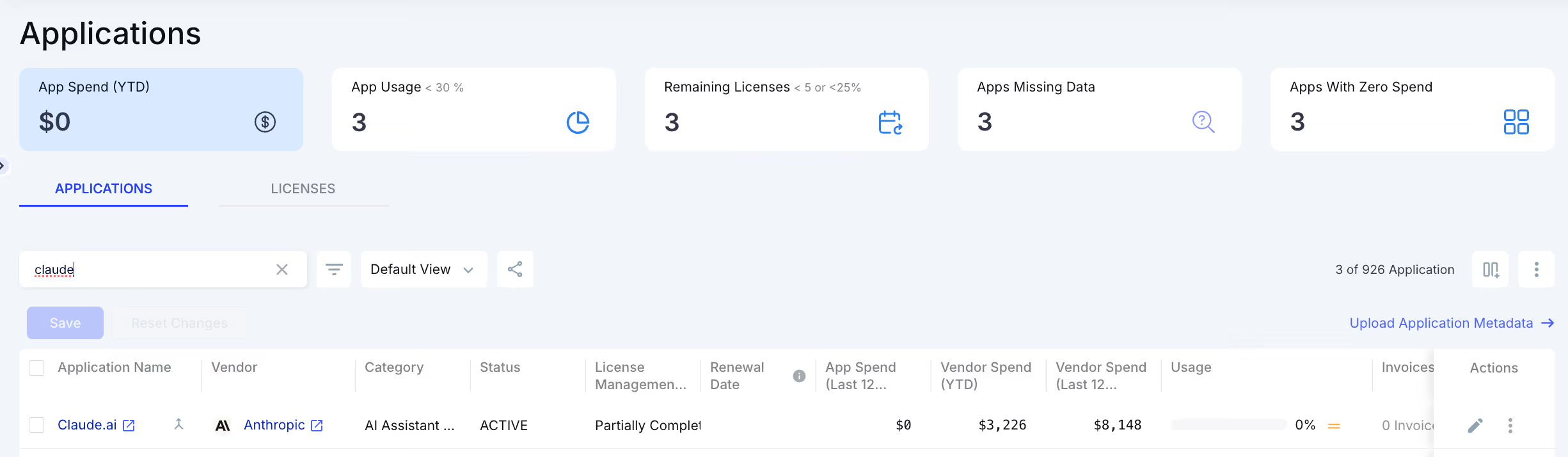
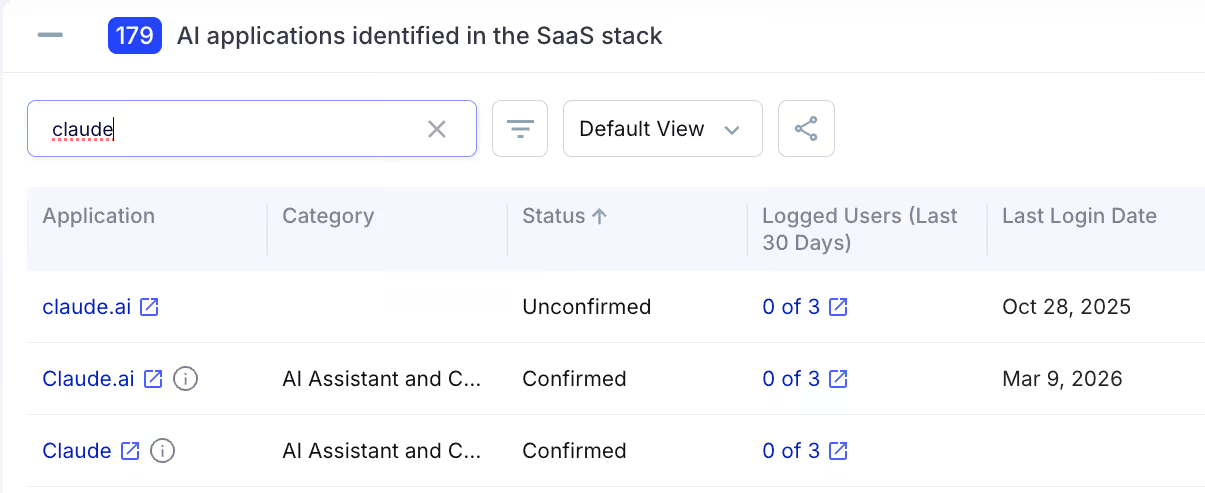
  • SSO and identity logs
  • Browser and login activity
  • Financial data (cards, invoices)
  • Direct integrations were available

This ensures even shadow AI usage is detected, including personal accounts and team-level purchases.

Step 2: Correlate Users, Usage, and Spend

Once detected, CloudEagle.ai connects all the fragmented data automatically.

It maps:

  • Who is using Claude
  • How often are they using it
  • Which plan are they on
  • Whether it is company-paid or expensed

The result is a single source of truth instead of scattered data across systems.

Step 3: Identify License Waste and Risk

With full visibility, CloudEagle.ai surfaces what actually matters.

On the cost side, it highlights inactive users, duplicate tools, and over-provisioned licenses. On the risk side, it flags unauthorized usage, excessive access, and potential data exposure.

This is where raw data turns into actionable insight.

Step 4: Automate License Optimization

CloudEagle.ai does not stop at insights; it takes action.
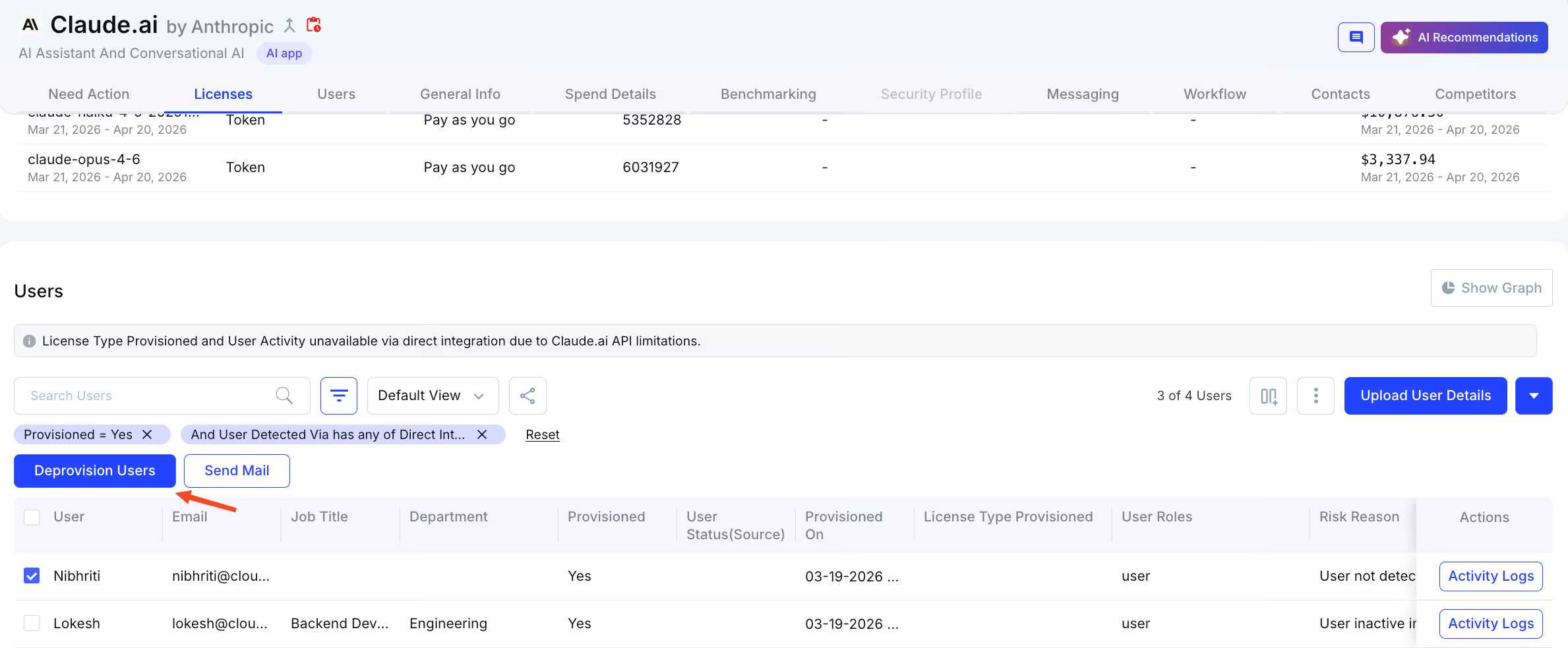
  • Notify inactive users
  • Reclaim unused licenses
  • Deprovision accounts when needed
  • Route new access through approval workflows

For example, inactive Claude users can be automatically identified and removed, with licenses reassigned without additional spend.

Step 5: Govern Claude as an Enterprise Application

Finally, CloudEagle.ai brings Claude under full governance.

It enables you to:

  • Add Claude to your app catalog
  • Enforce role-based access
  • Run continuous access reviews
  • Maintain audit-ready logs

Even if usage starts outside IT, it can be pulled back under control.

Conclusion

You almost certainly have more Claude licenses in your organization than your procurement records show.

The gap between what IT knows about and what is actually running includes department-provisioned Team accounts that bypassed procurement, individually funded Pro and Max accounts being used for work, and API keys embedded in internal tools that were never formally reviewed.

Closing that gap requires looking across your admin console, identity provider logs, expense reports, endpoint data, and department leads simultaneously. The six-step process in this guide gets you there manually. CloudEagle.ai automates it continuously.

The goal is not just an accurate inventory for its own sake. It is the foundation of cost governance, security oversight, and compliance coverage for a tool that is already deeply embedded in how your team works.

Frequently Asked Questions

1. How to verify a Claude account?
To verify a Claude account, users typically confirm their email during signup. In enterprise environments, verification can also happen through SSO, ensuring the account is linked to your organization and follows access controls.

2. Does Claude Code have access to search?
No, Claude Code does not have built-in internet browsing by default. It can only access external data if integrated with APIs, tools, or internal systems configured by the user.

3. Can I use Claude commercially?
Yes, Claude can be used for commercial purposes such as content creation, analysis, and automation, as long as usage complies with Anthropic’s terms and plan limits.

4. How much is a Claude licence?
Claude offers multiple pricing tiers, including a free plan, Pro (~$20/month), higher-tier plans like Max or Team, and custom Enterprise pricing. API usage is billed separately based on consumption.

5. Is Claude free for developers?
Yes, developers can use Claude’s free tier with limitations. For more advanced usage, paid plans or API-based pricing are typically required.

Advertisement for a SaaS Subscription Tracking Template with a call-to-action button to download and a partial graphic of a tablet showing charts.Banner promoting a SaaS Agreement Checklist to streamline SaaS management and avoid budget waste with a call-to-action button labeled Download checklist.Blue banner with text 'The Ultimate Employee Offboarding Checklist!' and a black button labeled 'Download checklist' alongside partial views of checklist documents from cloudeagle.ai.Digital ad for download checklist titled 'The Ultimate Checklist for IT Leaders to Optimize SaaS Operations' by cloudeagle.ai, showing checklist pages.Slack Buyer's Guide offer with text 'Unlock insider insights to get the best deal on Slack!' and a button labeled 'Get Your Copy', accompanied by a preview of the guide featuring Slack's logo.Monday Pricing Guide by cloudeagle.ai offering exclusive pricing secrets to maximize investment with a call-to-action button labeled Get Your Copy and an image of the guide's cover.Blue banner for Canva Pricing Guide by cloudeagle.ai offering a guide to Canva costs, features, and alternatives with a call-to-action button saying Get Your Copy.Blue banner with white text reading 'Little-Known Negotiation Hacks to Get the Best Deal on Slack' and a white button labeled 'Get Your Copy'.Blue banner with text 'Little-Known Negotiation Hacks to Get the Best Deal on Monday.com' and a white button labeled 'Get Your Copy'.Blue banner with text 'Little-Known Negotiation Hacks to Get the Best Deal on Canva' and a white button labeled 'Get Your Copy'.Banner with text 'Slack Buyer's Guide' and a 'Download Now' button next to images of a guide titled 'Slack Buyer’s Guide: Features, Pricing & Best Practices'.Digital cover of Monday Pricing Guide with a button labeled Get Your Copy on a blue background.Canva Pricing Guide cover with a button labeled Get Your Copy on a blue gradient background.

Enter your email to
unlock the report

Oops! Something went wrong while submitting the form.
License Count
Benchmark
Per User/Per Year

Enter your email to
unlock the report

Oops! Something went wrong while submitting the form.
License Count
Benchmark
Per User/Per Year

Enter your email to
unlock the report

Oops! Something went wrong while submitting the form.
Notion Plus
License Count
Benchmark
Per User/Per Year
100-500
$67.20 - $78.72
500-1000
$59.52 - $72.00
1000+
$51.84 - $57.60
Canva Pro
License Count
Benchmark
Per User/Per Year
100-500
$74.33-$88.71
500-1000
$64.74-$80.32
1000+
$55.14-$62.34

Enter your email to
unlock the report

Oops! Something went wrong while submitting the form.

Enter your email to
unlock the report

Oops! Something went wrong while submitting the form.
Zoom Business
License Count
Benchmark
Per User/Per Year
100-500
$216.00 - $264.00
500-1000
$180.00 - $216.00
1000+
$156.00 - $180.00

Enter your email to
unlock the report

Oops! Something went wrong while submitting the form.

Get the Right Security Platform To Secure Your Cloud Infrastructure

Please enter a business email
Thank you!
The 2023 SaaS report has been sent to your email. Check your promotional or spam folder.
Oops! Something went wrong while submitting the form.

Access full report

Please enter a business email
Thank you!
The 2023 SaaS report has been sent to your email. Check your promotional or spam folder.
Oops! Something went wrong while submitting the form.

Most IT teams think they know how many Claude licenses their organization has. They are usually off by a significant margin.

The number in your procurement system reflects what IT approved. It does not reflect what marketing bought on a team credit card, what the engineering lead provisioned directly through Anthropic, or what fifteen employees are running through personal Pro accounts they expense at the end of the month.

Discovering Claude licenses is not a one-step process. Claude shows up in your organization through at least three distinct channels, and only one of them is visible in your admin console. This guide covers all three, how to surface them, and what to do once you have the full picture.

TL;DR 

  • Claude usage is fragmented across IT departments and personal accounts, so your current license count is likely wrong
  • A large portion of Claude access exists as shadow AI, bypassing SSO, audit logs, and governance controls
  • Claude access spans three channels: managed seats, API integrations, and individual accounts, all needing different discovery methods
  • You need to combine admin data, SSO logs, finance records, and endpoint signals to get a complete license inventory
  • Real value comes after discovery by eliminating unused licenses, consolidating accounts, and bringing all access under governance

1. Why Most IT Teams Do Not Know How Many Claude Licenses They Own?

The honest answer is that Claude was never designed with centralized IT discovery in mind. It was designed to be easy for individuals and teams to adopt quickly. That is a feature for users and a problem for governance.

How Claude seats get purchased outside IT through credit cards and team budgets

Department-level buying is the main driver.

Managers can spin up Claude independently with just a credit card and a minimum seat requirement. That low barrier means teams adopt it quickly, without looping in IT.

You typically see:

  • Teams are buying Claude directly from Anthropic
  • Multiple deployments running in parallel
  • No SSO enforcement or centralized admin view

By the time IT notices, usage is already fragmented across departments.

The shadow AI problem: employees using personal Claude accounts for work

This is where things get harder to control.

Employees often sign up for Claude Pro using personal emails and start using it for work. Whether it is expensed or not, IT has zero visibility into these accounts.

That leads to:

  • No insight into what data is being shared
  • No audit logs or monitoring
  • No enforcement of security or retention policies

According to CloudEagle’s 2025 IGA report, 60% of AI apps in enterprises operate outside IT visibility, and personal Claude usage is a big part of that.

Shadow AI is not a Claude-specific problem. It is a pattern that repeats across every AI tool your employees are using. Understanding the full scope of it is the starting point for any governance program.

🎬 Watch the Webinar:60% Invisible: Shadow AI and Hidden Access Crisis in SaaS and AI Environments. See how enterprise teams are discovering the AI tools IT never approved and what governance looks like once you have that visibility. 👉 Watch now

Your Claude Renewal Is Coming. Are You Walking In With Real Data?

Most IT teams negotiate SaaS renewals based on last year's seat count. This checklist shows you exactly what usage data to pull before any AI tool renewal conversation.
Get the License Management Checklist

2. The Three Types of Claude Access You Need to Account For

Before you start the discovery process, it helps to understand exactly what you are looking for. Claude access in enterprise environments falls into three categories, and each requires a different discovery method.

1. Centrally provisioned seats (Team or Enterprise)

These are the seats IT already knows about.

They are purchased through formal procurement, provisioned via the admin console, and tied to corporate emails. If configured correctly, they are also covered by SSO and visible in your identity provider.

This is the easiest layer to audit:

  • Pull the user roster from the admin console
  • Cross-check with your IdP

But this list is rarely complete. It only reflects governed usage, not total usage.

2. API access via Anthropic keys

This is where visibility starts to break.

Developers often use Claude through APIs instead of the UI, embedding it into internal tools, workflows, or pipelines using keys from Anthropic.

A few things make this risky:

  • API keys can be generated from personal accounts
  • Keys can be embedded into shared tools or automations
  • Access scales silently as those tools get used

This type of usage does not appear as a “seat.”
It shows up as API consumption, often disconnected from procurement or identity systems.

3. Individual Pro or Max accounts

This is the most common and the hardest to track.

Employees sign up for Claude individually and use it for work, completely outside IT systems. Even when expensed, the visibility is minimal.

In practice:

  • Charges appear in finance as “Anthropic”
  • IT rarely reviews or links them to actual users
  • No access to usage data, prompts, or history

That means sensitive company data can flow through these accounts with zero oversight.

3. How to Discover Claude Licenses Across Your Organization: Step by Step

There is no single query that surfaces everything. Discovery requires looking across multiple data sources and triangulating the results.

1. Pull a report from your Claude admin console for provisioned seats

Start with your baseline. Log in to your Claude admin console and export the current seat roster.

This tells you who IT has provisioned, what tier they are on, and when they were last active. It is your cleanest dataset, but it is never the full picture.

  • Flag any seats tied to non-corporate email domains
  • These often indicate contractors or external users who are not fully tracked

2. Audit SSO and identity provider logs for Claude.ai login activity

If SSO is configured, your identity provider logs every authentication event. Pull at least 90 days of login data and map out who is accessing Claude.

The key step here is comparison. Cross-reference SSO users against your provisioned seat list. Any mismatch is a signal. These users could be accessing Claude through personal accounts linked to SSO, or through deployments IT never approved.

3. Scan expense reports and corporate card statements for Anthropic charges

Your finance data will surface what your systems miss.

Search for **Anthropic charges across the last 12 months and group them by amount.

  • ~$20/month typically indicates Pro accounts
  • $100–$200/month points to higher-tier plans
  • Larger, variable charges often map to Team usage

This step exposes both individual subscriptions and team-level purchases that bypassed procurement.

4. Survey department heads to surface team-funded or individually funded accounts

Do not overcomplicate this. A simple outreach works.

Ask department leads two direct questions:
Do you use Claude, and how are those accounts funded?

Most teams are not trying to hide anything. They adopted it because it was easy, not because it was approved. This step helps uncover usage that does not exist in any system of record.

5. Check your SaaS management platform for Claude in the discovered app inventory

If you have a SaaS management platform, use it as a secondary lens.

  • Look for Claude.ai in discovered applications
  • Correlate usage from SSO, browser activity, and financial data
  • Identify accounts that do not map to your official seat list

This is especially useful for catching personal account usage on corporate devices.

6. Review browser and endpoint logs for Claude.ai usage patterns

Finally, go to the lowest level of visibility. Pull domain-level access logs for Claude.ai from your endpoint or browser monitoring tools.

This shows every device that has accessed Claude, regardless of how the account was created or authenticated.

For most IT teams, this is where the real scale becomes obvious.
It is common to find far more devices accessing Claude than the number of provisioned seats suggests.

Shadow AI Is Already Inside Your Organization. Do You Know Where?

This guide walks through how to catch hidden AI tools in your software portfolio, including Claude, before they become a security or compliance problem.
Get the Shadow AI Discovery Guide

4. What to Do Once You Have Your Claude License Inventory?

Discovery gives you a list. What you do with that list determines whether this was a useful exercise or just an audit that sits in a folder.

Categorize licenses by tier, department, and actual usage

Start by structuring what you found.

Break your inventory across three dimensions:

  • Seat tier: Free, Pro, Max, Team, Enterprise, API-only
  • Department: Which teams are using Claude and how
  • Usage frequency: Based on admin and SSO activity

This quickly exposes inefficiencies.

You will see premium seats with no activity, teams running fragmented Pro accounts instead of a single Team plan, and API usage that cannot be tied back to a known user. That is where optimization begins.

Identify duplicates, overlaps, and inactive seats

Next, focus on waste.

Look for patterns that indicate unnecessary spending or poor allocation:

  • Users with both corporate seats and personal subscriptions
  • Mixed usage within teams (Team seats + individual Pro accounts)
  • Seats inactive for 30+ days

These are immediate cost recovery opportunities.

Duplicate accounts double your spend. Inactive seats quietly drain the budget without delivering any value.

Flag ungoverned API keys and personal accounts

This is where cost and security intersect.

Every API key should be reviewed in context. Who created it, where it is used, and what data flows through it.

Personal accounts and unmanaged API access are the biggest blind spots. They sit outside SSO, audit logs, and retention policies, which means they operate without any real oversight.

The goal here is simple:
Either bring them under governance or shut them down.

The license inventory you have just built is the foundation of a broader Claude governance program. If you want to understand what that governance program should look like in practice, this case study shows a real example.

📊 Case Study: RingCentral was managing SaaS licenses manually with no clear picture of what was being used or wasted. See how CloudEagle.ai gave them full visibility and automated the process, saving significant time and cost. 👉 Read the full case study

5. How CloudEagle.ai Automates Claude License Discovery? 

The six-step manual process above works. It also takes significant time and needs to be repeated regularly as your team grows and changes. CloudEagle.ai automates most of it.

Step 1: Detect Claude Usage Across the Organization

CloudEagle.ai identifies Claude usage using multiple signals, not just admin data.

  • SSO and identity logs
  • Browser and login activity
  • Financial data (cards, invoices)
  • Direct integrations were available

This ensures even shadow AI usage is detected, including personal accounts and team-level purchases.

Step 2: Correlate Users, Usage, and Spend

Once detected, CloudEagle.ai connects all the fragmented data automatically.

It maps:

  • Who is using Claude
  • How often are they using it
  • Which plan are they on
  • Whether it is company-paid or expensed

The result is a single source of truth instead of scattered data across systems.

Step 3: Identify License Waste and Risk

With full visibility, CloudEagle.ai surfaces what actually matters.

On the cost side, it highlights inactive users, duplicate tools, and over-provisioned licenses. On the risk side, it flags unauthorized usage, excessive access, and potential data exposure.

This is where raw data turns into actionable insight.

Step 4: Automate License Optimization

CloudEagle.ai does not stop at insights; it takes action.

  • Notify inactive users
  • Reclaim unused licenses
  • Deprovision accounts when needed
  • Route new access through approval workflows

For example, inactive Claude users can be automatically identified and removed, with licenses reassigned without additional spend.

Step 5: Govern Claude as an Enterprise Application

Finally, CloudEagle.ai brings Claude under full governance.

It enables you to:

  • Add Claude to your app catalog
  • Enforce role-based access
  • Run continuous access reviews
  • Maintain audit-ready logs

Even if usage starts outside IT, it can be pulled back under control.

Conclusion

You almost certainly have more Claude licenses in your organization than your procurement records show.

The gap between what IT knows about and what is actually running includes department-provisioned Team accounts that bypassed procurement, individually funded Pro and Max accounts being used for work, and API keys embedded in internal tools that were never formally reviewed.

Closing that gap requires looking across your admin console, identity provider logs, expense reports, endpoint data, and department leads simultaneously. The six-step process in this guide gets you there manually. CloudEagle.ai automates it continuously.

The goal is not just an accurate inventory for its own sake. It is the foundation of cost governance, security oversight, and compliance coverage for a tool that is already deeply embedded in how your team works.

Frequently Asked Questions

1. How to verify a Claude account?
To verify a Claude account, users typically confirm their email during signup. In enterprise environments, verification can also happen through SSO, ensuring the account is linked to your organization and follows access controls.

2. Does Claude Code have access to search?
No, Claude Code does not have built-in internet browsing by default. It can only access external data if integrated with APIs, tools, or internal systems configured by the user.

3. Can I use Claude commercially?
Yes, Claude can be used for commercial purposes such as content creation, analysis, and automation, as long as usage complies with Anthropic’s terms and plan limits.

4. How much is a Claude licence?
Claude offers multiple pricing tiers, including a free plan, Pro (~$20/month), higher-tier plans like Max or Team, and custom Enterprise pricing. API usage is billed separately based on consumption.

5. Is Claude free for developers?
Yes, developers can use Claude’s free tier with limitations. For more advanced usage, paid plans or API-based pricing are typically required.

CloudEagle.ai recognized in the 2025 Gartner® Magic Quadrant™ for SaaS Management Platforms
Download now
gartner chart
5x
Faster employee
onboarding
80%
Reduction in time for
user access reviews
30k
Workflows
automated
$15Bn
Analyzed in
contract spend
$2Bn
Saved in
SaaS spend

Streamline SaaS governance and save 10-30%

Book a Demo with Expert
CTA image
One platform to Manage
all SaaS Products
Learn More