
%201.svg)


HIPAA Compliance Checklist for 2025

The hidden costs of generative AI are expected to climb by 93%. It isn’t just the license you approve. It shows up in places teams don’t track, like duplicate tools, unused seats, and API overages.
A finance team might approve Copilot licenses, while marketing pays separately for ChatGPT and design teams use another AI tool. These costs don’t sit in one budget, so total spend looks smaller than it actually is.
At the same time, IT and security absorb hidden effort. Teams review access, monitor usage, investigate SaaS security risks, and manage tools that were never formally adopted.
In this article, we break down where generative AI actually creates hidden costs across finance, IT, and security, and why they’re easy to miss until they scale.
TL;DR
- Duplicate tools, unused seats, and API overages quietly increase total spend across teams.
- Different departments purchase separate tools, making overall spend appear smaller than it actually is.
- Usage-based billing, trials that become permanent, and unclear cost attribution create budgeting gaps.
- They manage integrations, permissions, policy updates, and investigations as AI usage expands.
- CloudEagle.ai helps enterprises control hidden AI costs. It unifies spend, usage, and contracts to eliminate duplicate tools, reclaim licenses, and improve forecasting.
1. Where Do Generative AI Costs Start Adding Up Without Clear Visibility?
Generative AI costs start adding up in places where usage is fragmented and ownership is unclear. SEO Sherpa revealed that 93% of companies say that they have used generative AI in 2025.
What looks like a few tool subscriptions often expands into multiple overlapping expenses across teams.
- Duplicate AI Tools Across Teams: Marketing uses ChatGPT, product uses another AI writer, and design adopts a separate tool.
- Unused Or Underused Licenses: Seats are purchased for entire teams, but those underutilized licenses pile up.
- Untracked API And Usage Costs: AI integrations generate usage-based charges that don’t show up in standard SaaS dashboards
These costs don’t appear risky at first. But without a single view across tools, usage, and spend, they accumulate quietly and only become visible when budgets are reviewed too late.

2. What Costs Are Finance Teams Missing When Budgeting For AI?
Finance teams usually budget for AI the same way they budget for SaaS, by counting licenses and known subscriptions. But generative AI introduces costs that don’t sit neatly in contracts or invoices.
Usage-Based Billing Variability
API calls, token usage, and integrations create fluctuating costs that are hard to predict upfront.
Overlapping Tool Spend
Multiple teams pay for similar AI tools under different budgets, masking total spend.
Short-Term Trials Turning Permanent
Pilot tools continue beyond evaluation, quietly becoming recurring expenses.
These gaps don’t show up during initial approvals. They appear later, when actual spend doesn’t match planned budgets.
- Budget Fragmentation: AI spend is split across departments, making consolidation difficult.
- Lack Of Cost Attribution: It’s unclear which teams or use cases are driving the highest AI costs.
Without visibility into these layers, finance teams aren’t underestimating intentionally. They’re creating SaaS budgeting based on incomplete signals, which is why AI costs feel unpredictable over time.
3. What Operational Costs Does IT Inherit As AI Adoption Grows?
IT inherits operational costs as AI usage expands across tools, teams, and integrations. These costs don’t come from purchasing AI, but from managing how it connects to existing systems.
As CIO advisor Tim Crawford said,
"AI is no longer just a tool—it's an operational dependency that IT teams are now responsible for sustaining at scale."
For a grounded example of what this looks like in practice, see how one CIO approached generative AI at scale, and the SaaS management decisions that came with it.
- Tool Onboarding And Integration: IT evaluates AI tools, connects them to existing systems, and manages authentication.
- Access And Permission Management: AI tools require mapping roles, permissions, and ephemeral access across multiple platforms.
- Support And Troubleshooting: Users rely on IT to resolve issues with prompts, integrations, or unexpected outputs.
These responsibilities increase as adoption spreads. What starts as a few tools quickly becomes a broader ecosystem that IT has to maintain.
Monitoring Multiple AI Tools
IT tracks usage across different platforms without a unified dashboard.
Managing API Dependencies
Integrations introduce dependencies that require ongoing maintenance.
Handling Change Requests
Teams continuously request new tools, features, or access.
Over time, IT isn’t just supporting AI, it’s sustaining it. And that ongoing effort becomes a hidden operational cost that doesn’t appear in initial budgets.
Generative AI reduces time on filler tasks like editing images or documents, allowing teams to focus on context and core building activities -- Carl Haviland, founder of Haviland Software
4. What Security And Compliance Costs Are Often Overlooked?
A security team notices unusual activity. An employee pasted a customer escalation email into ChatGPT to draft a response. There’s no alert, but now they need to assess what data was exposed.
According to Harmonic, Six GenAI apps drive 92.6% of enterprise data exposure risk, with ChatGPT alone at 71.2%. For security teams trying to prioritize which tools to act on first, it helps to understand how risk scores are assigned to AI tools, and what factors push a tool into the high-risk tier.
Security Perspective
Time goes into investigating prompts, reviewing access, and checking whether sensitive data left controlled systems. This effort wasn’t planned, but it becomes recurring.
Compliance Perspective
Policies need updates. Teams must define what data can be used in AI tools, document controls, and prepare for access reviews and license audits that now include AI usage. This is where purpose-built AI governance tools come in. They give compliance teams a structured place to track which AI tools employees are using and what data those tools can access.
Nothing breaks immediately. But reviews, policy updates, and audit preparation start taking more time. These costs don’t appear as line items, yet they grow with every new AI use case.
Over time, security and compliance don’t just monitor AI. They spend increasing effort trying to keep up with how it’s actually used. There are practical steps to prevent shadow AI from spreading across teams before it compounds those costs.
5. How Does CloudEagle.ai Help Manage AI Costs Across Finance, IT, And Security?
AI adoption is accelerating spend across teams, but cost visibility rarely keeps up. Finance sees invoices, IT sees usage, and security sees compliance risk. This disconnect leads to duplicate AI tools, unused licenses, and rising hidden costs.
CloudEagle.ai unifies usage, spend, contracts, and access into a single system, helping every team make cost-aware decisions in real time.
Instead of reacting to rising AI costs, enterprises gain control, predictability, and alignment across finance, IT, and security.
A: Unified AI Spend and Usage Visibility Across Teams
CloudEagle.ai gives every team a shared, real-time view of AI usage and spend, eliminating blind spots that drive unnecessary costs.
Current Process
Finance tracks invoices, IT tracks usage, and security monitors risk separately. Data lives in spreadsheets, ERPs, and app dashboards.
Pain Points
No unified view of AI spend. Decisions are made on incomplete data, leading to overspending and poor planning.
How We Do It
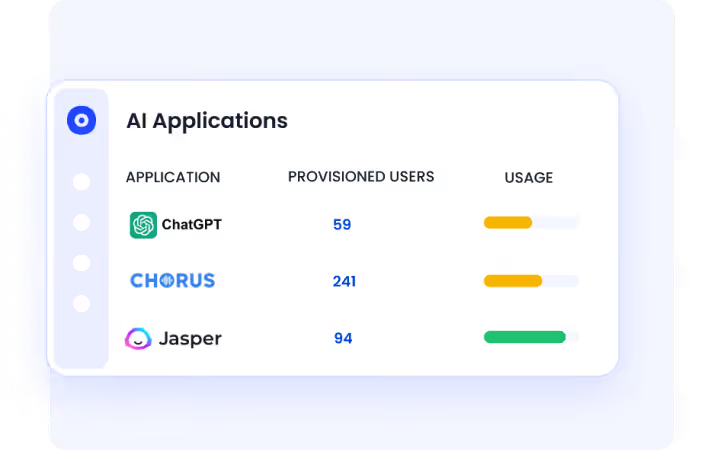
CloudEagle.ai aggregates spend, contract data, and usage across all AI tools into one centralized dashboard.
Why We Are Better
Finance, IT, and security operate from the same data. Cost decisions become aligned, accurate, and timely.
B: Eliminating Duplicate AI Tools and Shadow Spend
CloudEagle.ai helps enterprises identify overlapping AI tools and eliminate redundant spend across teams.
Current Process
Employees adopt AI tools independently. Procurement lacks visibility into existing tools that already solve similar use cases.
Pain Points
Duplicate AI apps increase costs. Shadow purchases inflate budgets without delivering additional value.
How We Do It
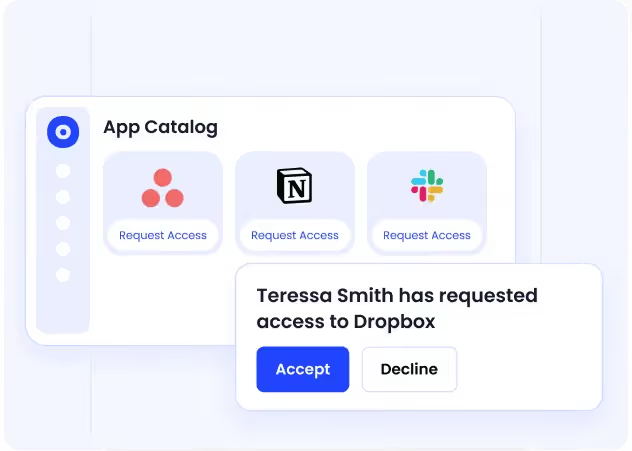
CloudEagle.ai detects all AI and SaaS applications using SSO, finance, and browser data, highlighting duplicate tools.
Why We Are Better
Teams consolidate vendors and reduce unnecessary spend while improving standardization and control.
Also Read: Finding Duplicate Apps and Redundant Spend With CloudEagle.ai
C: Optimizing AI License Usage and Reducing Waste
CloudEagle.ai ensures enterprises pay only for AI licenses that are actively used and aligned with actual needs.
Current Process
Licenses are assigned based on assumptions. IT struggles to track feature usage or reclaim unused licenses at scale.
Pain Points
Unused and underutilized licenses drive up AI costs. Teams overpay for premium tiers without realizing it.

How We Do It
CloudEagle.ai monitors usage continuously, identifies inactive or underused licenses, and automates license reclamation or downgrades.
Why We Are Better
License optimization happens continuously, reducing waste without requiring manual effort from IT.
D: Bringing Usage, Contracts, and Pricing Into One Negotiation View
CloudEagle.ai ensures procurement teams negotiate SaaS contracts with complete context, not fragmented data.
Current Process
Usage, pricing, and contract terms are stored in different systems. Teams prepare for renewals manually and often too late.
Pain Points
Negotiations lack leverage. Teams accept unfavorable pricing due to limited visibility and time constraints.

How We Do It
CloudEagle.ai combines usage data, contract terms, renewal timelines, and price benchmarking insights into one view.
Why We Are Better
Procurement negotiates with data-backed confidence, securing better pricing and avoiding unnecessary spend.
Also Read: SaaS Contract Negotiation Checklist: Key Clauses to Protect Cost and Risk
E: Proactive Budgeting and AI Cost Forecasting
CloudEagle.ai helps finance teams move from reactive tracking to proactive procurement of AI spend.
Current Process
Budgets are built using historical invoices and assumptions. SaaS budget forecasting lacks real usage context.
Pain Points
Unexpected renewals and upgrades lead to budget overruns. Forecasting remains inaccurate.

How We Do It
CloudEagle.ai provides real-time spend insights, department-level usage trends, and AI-driven forecasting.
Why We Are Better
Finance teams predict future AI costs accurately and prevent overruns before they happen.
F: Aligning Security Decisions With Cost Control
CloudEagle.ai connects security risks directly to cost impact, helping enterprises reduce SaaS security risk and compliance issues simultaneously.
Current Process
Security teams focus on risk, while finance focuses on cost. These decisions happen independently.
Pain Points
Unapproved AI tools create both security exposure and hidden costs. Teams address issues too late.
How We Do It
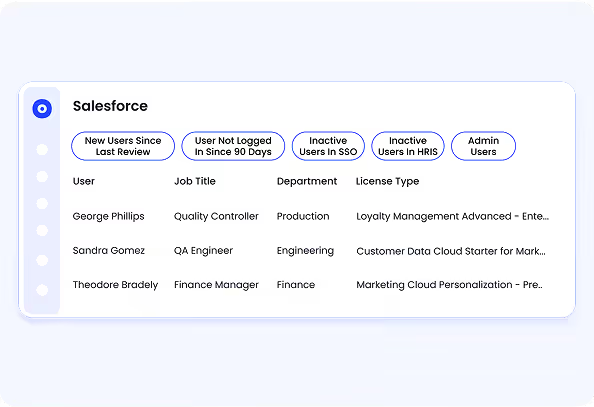
CloudEagle.ai detects shadow AI, flags risky tools, and connects them with usage and spend data.
Why We Are Better
Security actions also reduce cost. Organizations eliminate risky and unnecessary tools in one step.
Take control of AI spend and risk


6. Conclusion
Generative AI costs are easy to underestimate because they don’t sit in one place. Licenses show up in finance, usage spreads across teams, and the operational and security effort lands with IT and compliance.
The real cost isn’t just what you pay for tools. It’s duplicate spend across teams, unused licenses, API overages, and the time spent managing access, integrations, and risk. These costs grow quietly because they’re distributed.
This is where CloudEagle becomes critical. It brings visibility across AI tools, licenses, and usage, helping teams identify duplicate spend, reclaim unused licenses, and track real adoption. Instead of reacting after costs pile up, teams can control them early.
7. FAQs
1. What is one cost and/or impact of generative AI?
One common cost is time spent reviewing AI-generated outputs. Teams often need to validate summaries, emails, or reports before using them.
2. Can I use generative AI for free?
Yes, tools like ChatGPT offer free versions. But using them with company data without approval creates security and compliance risks.
3. What does generative AI cost?
Costs include subscriptions, API usage, and integrations. These vary by tool, usage volume, and how widely AI is adopted across teams.
4. What is the hidden cost of generative AI?
Hidden costs include duplicate tools, unused licenses, API overages, and operational effort from IT and security teams managing access and risk.


.avif)


.avif)
.avif)




.png)







.avif)
.avif)
.avif)


