AI Governance

Copilot Security: What It Can Access and What to Watch For

Share via:
Written by:
CloudEagle.ai Team
Reviewed by
Nidhi Jain
Last Updated:
October 9, 2026
blog-cms-banner-bg
Little-Known Negotiation Hacks to Get the Best Deal on Slack
cta-bg-blogDownload Your Copy

HIPAA Compliance Checklist for 2025

Download PDF

If your organization has rolled out Microsoft Copilot, these assurances probably sound familiar:

  • Copilot only surfaces what users can already access
  • A permissions cleanup before rollout takes care of oversharing
  • Microsoft's native controls cover the rest

Each is accurate on paper. Together, they describe a tenant that rarely exists: one where permissions are current, every Copilot is licensed through IT, and every assistant employees use is Microsoft's.

Security leaders already sense the gap. In Gartner's 2026 Copilot research, 51% of IT leaders named oversharing and data loss the top barrier to deployment, and 80% said agents need more governance before wide rollout.

This guide maps what each Copilot can reach, why common Copilot security assumptions fail after go-live, and what AI policy enforcement has to watch for continuously.

‍

1. What Can Microsoft Copilot Actually Access?

"Copilot" is a brand, not a product. At least five surfaces carry the name, and each draws its access boundary differently. A security review scoped only to Microsoft 365 Copilot covers one of them.

‍

Copilot surface What it can reach Access is decided by Where it slips
Microsoft 365 Copilot Email, files, chats, calendars and meetings through Microsoft Graph; third-party data through Graph connectors The user's existing Microsoft 365 permissions Stale sharing links and org-wide grants
Copilot Chat Web-grounded answers plus whatever the user pastes or uploads The prompt itself Employees paste what Graph permissions would have protected
Personal Copilot on work files Work documents open in Office desktop and mobile apps Work identity for the file, personal subscription for the AI Stays on unless IT disables multiple account access
Copilot Studio agents SharePoint sites, Dataverse, connectors, external APIs The agent's authentication setting, often its maker's credentials Org-wide sharing, no authentication, departed owners
GitHub Copilot Code, pull requests, issues and repo context The developer's repository permissions Secrets in repos, instructions hidden in PR content

‍

The pattern across all five: Copilot adds no permissions of its own. Microsoft's documentation is explicit that it "only accesses data that users are authorized to access."

That inheritance is the whole story. Copilot borrows access from users, from agent makers and from developers, so Copilot security is an identity and access problem before it is an AI problem.

‍

Who Invited These AI Tools?

Expose unapproved usage.
Find Out

‍

2. Why Do Copilot Security Assumptions Persist?

They persist because each one is true by design. Copilot does respect permissions, Microsoft does not train its models on tenant data, and Purview does apply to Copilot interactions. The shortcut is treating design as deployment.

Adoption pressure makes that shortcut attractive. In Gartner's 2024 survey of 132 IT leaders, reported by Computerworld, 60% had started pilots, only 6% had moved toward large-scale deployment, and 98% said employees were eager to use the tool.

When a stalled pilot is the visible cost, a reassuring line from vendor documentation quietly becomes the security posture. Yet Microsoft's own guidance adds the caveat most rollout decks drop: overshared or poorly governed content "can affect Copilot results and increase risk."

Gartner analyst Max Goss framed the trade-off precisely: "The better the information retrieval tool, the better your information governance has to be."

‍

3. Which Copilot Security Myths Put Enterprises at Risk?

Six assumptions show up in most Copilot deployments. Each holds on rollout day and erodes after it.

Myth 1: "If Copilot Respects Permissions, It Can't Overshare"

Copilot respects permissions exactly, and that is the problem. Most tenants carry years of convenience sharing: sites opened to the whole company, links meant to last a week, folders that inherited loose access from an old structure.

Concentric AI's analysis of more than 550 million records found 16% of business-critical data overshared, roughly 802,000 files at risk per organization. That exposure existed before Copilot. What changed is the cost of finding it.

Locating a payroll file on a misconfigured site once meant knowing the site, the library and the filename. Now it takes one plain-English question. Copilot didn't break access control; it removed obscurity, the control most tenants were quietly relying on.

What to Watch For

  • Org-wide grants and "anyone" links on libraries holding compensation, board, M&A or customer data
  • Exposure ranked by what Copilot users actually ask about, not by where files happen to sit

Myth 2: "A Pre-Rollout Permissions Cleanup Solves Oversharing"

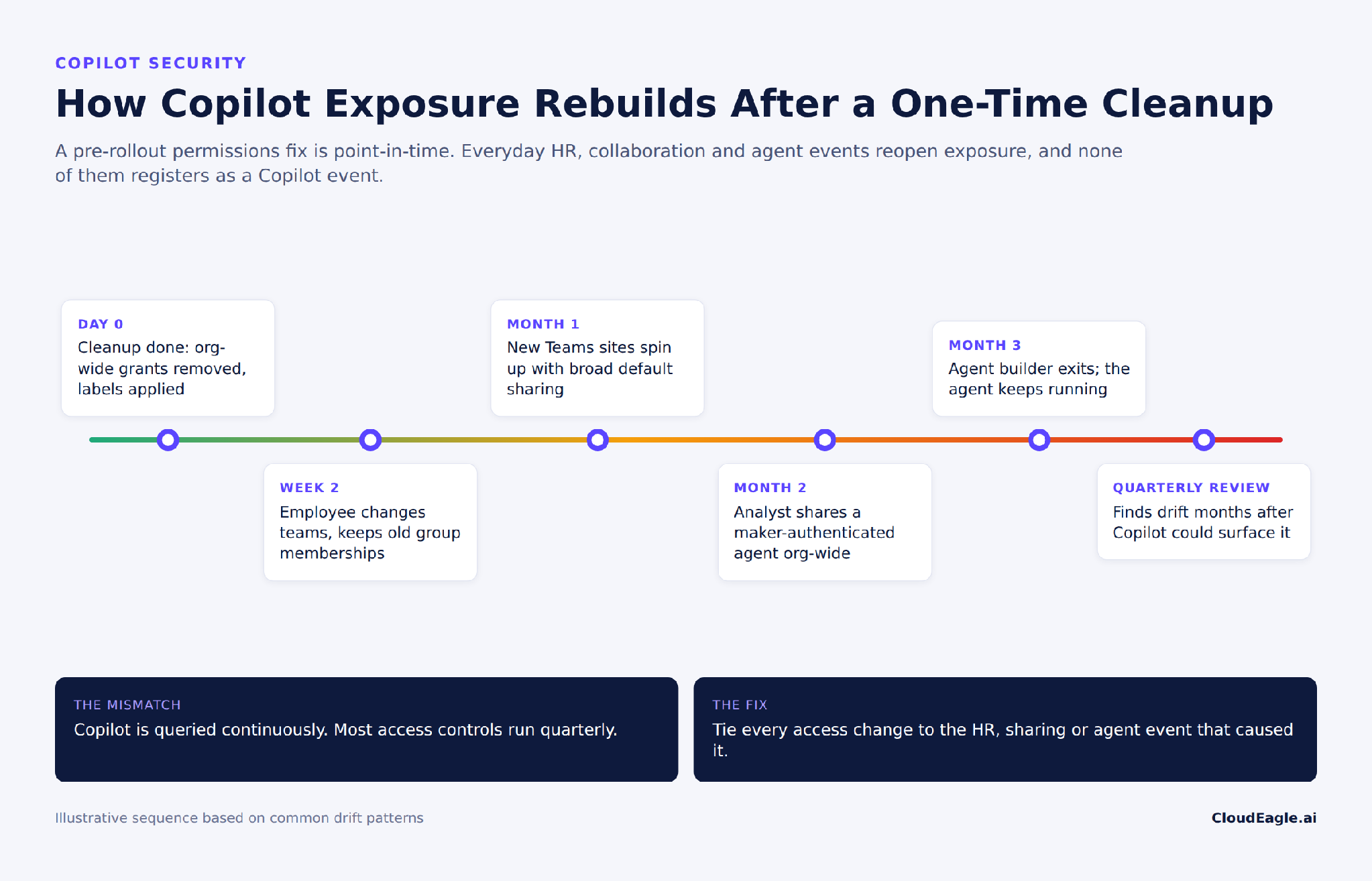
Microsoft's own guidance and most vendor playbooks frame remediation as a readiness step. It is a point-in-time fix applied to a system that changes daily. Permissions start drifting the week after cleanup.

Employees change teams and keep old group memberships. Contractors get converted to members. New Teams sites spin up with broad defaults, and site owners leave without handing over. None of this triggers a Copilot alert, because none of it is a Copilot event.

A control that runs quarterly cannot govern a system queried continuously. The only durable fix ties access changes to the events that should cause them.
‍

Timeline showing how Copilot exposure rebuilds after a one-time permissions cleanup

‍

What to Watch For

  • Role changes, department moves and exits in the HRIS with no matching access change
  • Sites and groups whose owner is disabled or gone

Myth 3: "Limiting Copilot to a Pilot Group Contains the Risk"

Gartner found 57% of organizations restricted Copilot to low-risk or trusted users. That limits who holds a license. It does not limit who uses AI on company data.

The unlicensed majority has options. Copilot Chat accepts pasted content. Multiple account access is on by default, letting employees apply a personal Microsoft 365 Copilot subscription to work files, and ChatGPT, Claude and Gemini are one tab away.

Microsoft keeps enterprise data protection on work files opened this way, so the leak risk is narrower than it sounds. The governance gap is not. A pilot restricted to 20% of staff doesn't shrink AI risk; it relocates it to the 80% you stopped watching.

What to Watch For

  • Personal-account Copilot activity on work documents, and whether multiple account access is deliberately on or off
  • Logins to unsanctioned AI apps and AI browser extensions among unlicensed users

Myth 4: "Copilot Studio Agents Are Just Another App"

Agents behave less like apps and more like employees with standing access. Microsoft's top 10 Copilot Studio agent risks include agents shared too broadly, agents with no authentication, and credentials stored in agent definitions.

The subtlest is maker authentication. When an agent runs on its builder's credentials, everyone who uses it borrows the builder's access. Share that agent org-wide, and a finance analyst's permissions become the whole company's.

Then the builder leaves. Offboarding deprovisions the person, not the agents they built. Gartner's 2026 data shows 68% of IT leaders already worry about agent sprawl.

What to Watch For

  • Every agent's owner, authentication mode, sharing scope and last activity in one inventory
  • Agents whose owner has been offboarded, plus the credentials and connectors they still hold

‍

One App. One Open Door

Find the security gaps in your app stack
Lock It Down

‍

Myth 5: "Prompt Injection Is Microsoft's Problem to Patch"

EchoLeak (CVE-2025-32711) showed a single crafted email with hidden instructions could make Microsoft 365 Copilot exfiltrate data from its context, with zero clicks. Microsoft patched it in June 2025.

CamoLeak did the same to GitHub Copilot Chat. Hidden pull request comments pulled AWS keys and private repository content out through GitHub's own image proxy. GitHub disabled image rendering in Copilot Chat to close it.

Vendors patch instances; the class persists, because assistants read untrusted content with the reader's permissions. Injection's blast radius equals the access of whoever triggers it, which makes permission scope the one injection defense you fully control.

What to Watch For

  • Copilot users with the widest reach: admins, executives, finance and anyone holding standing privileged access
  • Secrets committed to repositories, and external content feeding agent knowledge sources

Myth 6: "Purview and an AI Policy Cover Copilot Governance"

Purview governs Microsoft's data plane, and does it well. But Gartner's 2026 research found 66% of Copilot deployers also run at least two other enterprise AI assistants.

A Copilot-scoped control stack leaves those assistants governed by nothing stronger than a policy PDF. Safe AI usage policies have to govern the employee across every assistant, not the vendor's slice of the estate.

What to Watch For

  • Every AI tool in use, sanctioned or not, mapped to an approved tier, a data rule and an enforcement point
  • Assistants with no enforcement point at all

‍

4. What Does AI Policy Enforcement for Copilot Look Like in Practice?

AI policy enforcement turns each clause of a safe AI usage policy into three things: a signal someone can see, an action that follows it, and a response time. A clause missing any of the three is a statement of intent.

‍

Policy clause Signal to watch Enforcement action Cadence
Only approved AI tools touch company data Logins to unsanctioned AI apps; personal-account Copilot on work files Redirect to the approved tool; block high-risk apps Continuous
No sensitive data in prompts PII or financial data sent to AI vendors Monitor or block at the browser Continuous
Access follows role HRIS role change or exit with no matching access change Revoke groups; reclaim the license On the HR event
Every agent has an accountable owner Agents with a departed, disabled or missing owner Reassign or disable; rotate credentials Weekly
High-reach users hold least privilege Admin and executive accounts with broad site access Access review; time-bound elevation Monthly
AI spend tracks use Copilot seats with no activity Harvest or reassign Monthly


Read the "signal" column again. Most of those signals originate outside the Microsoft tenant: HR events in the HRIS, unsanctioned logins in the browser and firewall, AI spend in finance systems.

That is why Copilot governance cannot sit entirely inside Microsoft's control plane. The tenant sees what Copilot did. It cannot see the role change that should have preceded it, or the three other assistants the same employee used that afternoon.

Cadence matters as much as coverage. Signals tied to data leaving the company need continuous enforcement; signals tied to access hygiene can run on HR events and monthly reviews without widening exposure.

Related reading: shadow AI economy

‍

5. How Does CloudEagle.ai Govern Copilot Alongside Every Other AI Tool?

CloudEagle.ai sits across the signals the tenant can't see. It builds one AI inventory from SSO, browser, firewall and finance data, so Copilot Chat use, personal-account Copilot and every non-Microsoft assistant show up next to licensed Copilot, each with a risk score.

Enforcement happens at the moment of use. CloudEagle.ai's AI governance can monitor or block sensitive data headed to AI vendors, and redirect employees from an unsanctioned tool to the approved one, so the policy clause and the control are the same thing.

Identity lifecycle closes the drift. Zero-touch offboarding and role-based provisioning tie access changes to HR events across apps, including AI tools, while continuous access reviews surface high-reach users before an injection or an overshared site does.

Agents get the same treatment as people. CloudEagle.ai tracks non-human identities, including service accounts, API keys and AI agents, correlated from Entra and Okta with owner, status and permissions, so an agent orphaned by an exit gets flagged instead of forgotten. Unused Copilot seats get harvested on the same platform.

See what your Copilot deployment can actually reach, and what's reaching around it. CloudEagle.ai connects in 30 minutes across 500+ integrations. Book a demo to map your AI access in one view.

‍

‍

6. FAQs

1. Is Microsoft Copilot Safe for Enterprise Use?

Yes, when its access is governed as continuously as it is used. Copilot will surface whatever your identities can reach, through whichever surface an employee picks, at whatever moment they ask.

The organizations that scale it treat Copilot less like a feature to switch on and more like an identity to govern. Fix permissions once, and you buy a clean rollout. Enforce them continuously, and you keep one.

2. What Is the Difference Between Microsoft Copilot and Microsoft Security Copilot?

Microsoft Copilot is the productivity assistant inside Word, Outlook, Teams and other Microsoft 365 apps, grounded in your organization's documents, email and chats. Security Copilot is a separate tool for SOC analysts, identity admins and CISOs, grounded in security signals and threat intelligence. "Copilot security" usually means securing the first; the second is a defensive tool with its own access to your security data.

3. Does Microsoft Use Copilot Prompts to Train Its AI Models?

No. Under Microsoft's enterprise data protection commitments, prompts and responses in Microsoft 365 Copilot aren't used to train foundation models, and they stay within the Microsoft 365 service boundary. Training is rarely the real risk. What matters more is what Copilot can retrieve and who sees the answer.

4. Can Sensitivity Labels Stop Copilot From Surfacing a File?

Yes, if the label applies encryption. Copilot checks usage rights on encrypted content, and a user without the EXTRACT right can't get that content summarized, even when SharePoint permissions would otherwise allow access. Labels without encryption classify a file but don't block retrieval, so labeling coverage matters as much as label design.

5. Are Copilot Prompts and Responses Logged for Audit?

Yes. Copilot interactions are captured in the Microsoft 365 tenant and are available to Purview audit, eDiscovery and retention policies. That covers licensed Copilot activity inside the tenant; it doesn't cover prompts sent to non-Microsoft assistants, which need their own monitoring point.

6. How Do You Turn Off Personal Copilot on Work Documents?

Disable the "Multiple account access to Copilot for work documents" policy in the Cloud Policy service for Microsoft 365. If the policy is left unconfigured, employees with Microsoft 365 Personal, Family or Premium subscriptions can use their own Copilot on work files. Decide on it deliberately rather than inheriting the default.

7. How Should Copilot Studio Agents Be Secured Before Sharing?

Require authentication, avoid maker credentials for anything shared beyond the builder's team, and scope sharing to named groups rather than the whole organization. Every agent also needs a named owner and a review date. Microsoft's Agent 365, generally available since May 1, 2026, adds agent identities through Entra Agent ID. Ownership still has to be governed when builders change roles or leave.

8. What Should a Safe AI Usage Policy for Copilot Include?

At minimum: which AI tools are approved for which data classes, what data never goes into a prompt, whether personal AI accounts may touch work files, and who owns each agent. It should also name where each rule is enforced. A policy that covers Copilot alone leaves every other assistant ungoverned.

9. Is Copilot Safe for Regulated Industries Like Finance and Healthcare?

It can be, provided permissions, labels and audit capture are in place before sensitive workloads go live. Microsoft's contractual data protections apply, but they don't fix overshared content. Regulators will judge whether the organization could show who had access to what, and when.

‍

Advertisement for a SaaS Subscription Tracking Template with a call-to-action button to download and a partial graphic of a tablet showing charts.Banner promoting a SaaS Agreement Checklist to streamline SaaS management and avoid budget waste with a call-to-action button labeled Download checklist.Blue banner with text 'The Ultimate Employee Offboarding Checklist!' and a black button labeled 'Download checklist' alongside partial views of checklist documents from cloudeagle.ai.Digital ad for download checklist titled 'The Ultimate Checklist for IT Leaders to Optimize SaaS Operations' by cloudeagle.ai, showing checklist pages.Slack Buyer's Guide offer with text 'Unlock insider insights to get the best deal on Slack!' and a button labeled 'Get Your Copy', accompanied by a preview of the guide featuring Slack's logo.Monday Pricing Guide by cloudeagle.ai offering exclusive pricing secrets to maximize investment with a call-to-action button labeled Get Your Copy and an image of the guide's cover.Blue banner for Canva Pricing Guide by cloudeagle.ai offering a guide to Canva costs, features, and alternatives with a call-to-action button saying Get Your Copy.Blue banner with white text reading 'Little-Known Negotiation Hacks to Get the Best Deal on Slack' and a white button labeled 'Get Your Copy'.Blue banner with text 'Little-Known Negotiation Hacks to Get the Best Deal on Monday.com' and a white button labeled 'Get Your Copy'.Blue banner with text 'Little-Known Negotiation Hacks to Get the Best Deal on Canva' and a white button labeled 'Get Your Copy'.Banner with text 'Slack Buyer's Guide' and a 'Download Now' button next to images of a guide titled 'Slack Buyer’s Guide: Features, Pricing & Best Practices'.Digital cover of Monday Pricing Guide with a button labeled Get Your Copy on a blue background.Canva Pricing Guide cover with a button labeled Get Your Copy on a blue gradient background.

Enter your email to
unlock the report

Oops! Something went wrong while submitting the form.
License Count
Benchmark
Per User/Per Year

Enter your email to
unlock the report

Oops! Something went wrong while submitting the form.
License Count
Benchmark
Per User/Per Year

Enter your email to
unlock the report

Oops! Something went wrong while submitting the form.
Notion Plus
License Count
Benchmark
Per User/Per Year
100-500
$67.20 - $78.72
500-1000
$59.52 - $72.00
1000+
$51.84 - $57.60
Canva Pro
License Count
Benchmark
Per User/Per Year
100-500
$74.33-$88.71
500-1000
$64.74-$80.32
1000+
$55.14-$62.34

Enter your email to
unlock the report

Oops! Something went wrong while submitting the form.

Enter your email to
unlock the report

Oops! Something went wrong while submitting the form.
Zoom Business
License Count
Benchmark
Per User/Per Year
100-500
$216.00 - $264.00
500-1000
$180.00 - $216.00
1000+
$156.00 - $180.00

Enter your email to
unlock the report

Oops! Something went wrong while submitting the form.

Get the Right Security Platform To Secure Your Cloud Infrastructure

Please enter a business email
Thank you!
The 2023 SaaS report has been sent to your email. Check your promotional or spam folder.
Oops! Something went wrong while submitting the form.

Access full report

Please enter a business email
Thank you!
The 2023 SaaS report has been sent to your email. Check your promotional or spam folder.
Oops! Something went wrong while submitting the form.
  • Microsoft Copilot inherits existing user, agent, and developer permissions, making stale access, overshared files, and excessive privileges key security risks.
  • Enterprises must govern five Copilot surfaces: Microsoft 365 Copilot, Copilot Chat, personal Copilot, Copilot Studio agents, and GitHub Copilot.
  • Security assumptions fail when permissions drift, employees use personal AI accounts, agents lose their owners, or prompt injection exploits existing access.
  • Effective Copilot governance requires continuous AI discovery, sensitive-data controls, HR-triggered access changes, agent ownership reviews, least privilege, and license optimization.
  • CloudEagle.ai unifies AI discovery, policy enforcement, identity lifecycle management, non-human identity governance, access reviews, and unused Copilot license harvesting across enterprise AI tools.

If your organization has rolled out Microsoft Copilot, these assurances probably sound familiar:

  • Copilot only surfaces what users can already access
  • A permissions cleanup before rollout takes care of oversharing
  • Microsoft's native controls cover the rest

Each is accurate on paper. Together, they describe a tenant that rarely exists: one where permissions are current, every Copilot is licensed through IT, and every assistant employees use is Microsoft's.

Security leaders already sense the gap. In Gartner's 2026 Copilot research, 51% of IT leaders named oversharing and data loss the top barrier to deployment, and 80% said agents need more governance before wide rollout.

This guide maps what each Copilot can reach, why common Copilot security assumptions fail after go-live, and what AI policy enforcement has to watch for continuously.

‍

1. What Can Microsoft Copilot Actually Access?

"Copilot" is a brand, not a product. At least five surfaces carry the name, and each draws its access boundary differently. A security review scoped only to Microsoft 365 Copilot covers one of them.

‍

Copilot surface What it can reach Access is decided by Where it slips
Microsoft 365 Copilot Email, files, chats, calendars and meetings through Microsoft Graph; third-party data through Graph connectors The user's existing Microsoft 365 permissions Stale sharing links and org-wide grants
Copilot Chat Web-grounded answers plus whatever the user pastes or uploads The prompt itself Employees paste what Graph permissions would have protected
Personal Copilot on work files Work documents open in Office desktop and mobile apps Work identity for the file, personal subscription for the AI Stays on unless IT disables multiple account access
Copilot Studio agents SharePoint sites, Dataverse, connectors, external APIs The agent's authentication setting, often its maker's credentials Org-wide sharing, no authentication, departed owners
GitHub Copilot Code, pull requests, issues and repo context The developer's repository permissions Secrets in repos, instructions hidden in PR content

‍

The pattern across all five: Copilot adds no permissions of its own. Microsoft's documentation is explicit that it "only accesses data that users are authorized to access."

That inheritance is the whole story. Copilot borrows access from users, from agent makers and from developers, so Copilot security is an identity and access problem before it is an AI problem.

‍

Who Invited These AI Tools?

Expose unapproved usage.
Find Out

‍

2. Why Do Copilot Security Assumptions Persist?

They persist because each one is true by design. Copilot does respect permissions, Microsoft does not train its models on tenant data, and Purview does apply to Copilot interactions. The shortcut is treating design as deployment.

Adoption pressure makes that shortcut attractive. In Gartner's 2024 survey of 132 IT leaders, reported by Computerworld, 60% had started pilots, only 6% had moved toward large-scale deployment, and 98% said employees were eager to use the tool.

When a stalled pilot is the visible cost, a reassuring line from vendor documentation quietly becomes the security posture. Yet Microsoft's own guidance adds the caveat most rollout decks drop: overshared or poorly governed content "can affect Copilot results and increase risk."

Gartner analyst Max Goss framed the trade-off precisely: "The better the information retrieval tool, the better your information governance has to be."

‍

3. Which Copilot Security Myths Put Enterprises at Risk?

Six assumptions show up in most Copilot deployments. Each holds on rollout day and erodes after it.

Myth 1: "If Copilot Respects Permissions, It Can't Overshare"

Copilot respects permissions exactly, and that is the problem. Most tenants carry years of convenience sharing: sites opened to the whole company, links meant to last a week, folders that inherited loose access from an old structure.

Concentric AI's analysis of more than 550 million records found 16% of business-critical data overshared, roughly 802,000 files at risk per organization. That exposure existed before Copilot. What changed is the cost of finding it.

Locating a payroll file on a misconfigured site once meant knowing the site, the library and the filename. Now it takes one plain-English question. Copilot didn't break access control; it removed obscurity, the control most tenants were quietly relying on.

What to Watch For

  • Org-wide grants and "anyone" links on libraries holding compensation, board, M&A or customer data
  • Exposure ranked by what Copilot users actually ask about, not by where files happen to sit

Myth 2: "A Pre-Rollout Permissions Cleanup Solves Oversharing"

Microsoft's own guidance and most vendor playbooks frame remediation as a readiness step. It is a point-in-time fix applied to a system that changes daily. Permissions start drifting the week after cleanup.

Employees change teams and keep old group memberships. Contractors get converted to members. New Teams sites spin up with broad defaults, and site owners leave without handing over. None of this triggers a Copilot alert, because none of it is a Copilot event.

A control that runs quarterly cannot govern a system queried continuously. The only durable fix ties access changes to the events that should cause them.

‍

Timeline showing how Copilot exposure rebuilds after a one-time permissions cleanup

‍

What to Watch For

  • Role changes, department moves and exits in the HRIS with no matching access change
  • Sites and groups whose owner is disabled or gone

Myth 3: "Limiting Copilot to a Pilot Group Contains the Risk"

Gartner found 57% of organizations restricted Copilot to low-risk or trusted users. That limits who holds a license. It does not limit who uses AI on company data.

The unlicensed majority has options. Copilot Chat accepts pasted content. Multiple account access is on by default, letting employees apply a personal Microsoft 365 Copilot subscription to work files, and ChatGPT, Claude and Gemini are one tab away.

Microsoft keeps enterprise data protection on work files opened this way, so the leak risk is narrower than it sounds. The governance gap is not. A pilot restricted to 20% of staff doesn't shrink AI risk; it relocates it to the 80% you stopped watching.

What to Watch For

  • Personal-account Copilot activity on work documents, and whether multiple account access is deliberately on or off
  • Logins to unsanctioned AI apps and AI browser extensions among unlicensed users

Myth 4: "Copilot Studio Agents Are Just Another App"

Agents behave less like apps and more like employees with standing access. Microsoft's top 10 Copilot Studio agent risks include agents shared too broadly, agents with no authentication, and credentials stored in agent definitions.

The subtlest is maker authentication. When an agent runs on its builder's credentials, everyone who uses it borrows the builder's access. Share that agent org-wide, and a finance analyst's permissions become the whole company's.

Then the builder leaves. Offboarding deprovisions the person, not the agents they built. Gartner's 2026 data shows 68% of IT leaders already worry about agent sprawl.

What to Watch For

  • Every agent's owner, authentication mode, sharing scope and last activity in one inventory
  • Agents whose owner has been offboarded, plus the credentials and connectors they still hold

‍

One App. One Open Door

Find the security gaps in your app stack
Lock It Down

‍

Myth 5: "Prompt Injection Is Microsoft's Problem to Patch"

EchoLeak (CVE-2025-32711) showed a single crafted email with hidden instructions could make Microsoft 365 Copilot exfiltrate data from its context, with zero clicks. Microsoft patched it in June 2025.

CamoLeak did the same to GitHub Copilot Chat. Hidden pull request comments pulled AWS keys and private repository content out through GitHub's own image proxy. GitHub disabled image rendering in Copilot Chat to close it.

Vendors patch instances; the class persists, because assistants read untrusted content with the reader's permissions. Injection's blast radius equals the access of whoever triggers it, which makes permission scope the one injection defense you fully control.

What to Watch For

  • Copilot users with the widest reach: admins, executives, finance and anyone holding standing privileged access
  • Secrets committed to repositories, and external content feeding agent knowledge sources

Myth 6: "Purview and an AI Policy Cover Copilot Governance"

Purview governs Microsoft's data plane, and does it well. But Gartner's 2026 research found 66% of Copilot deployers also run at least two other enterprise AI assistants.

A Copilot-scoped control stack leaves those assistants governed by nothing stronger than a policy PDF. Safe AI usage policies have to govern the employee across every assistant, not the vendor's slice of the estate.

What to Watch For

  • Every AI tool in use, sanctioned or not, mapped to an approved tier, a data rule and an enforcement point
  • Assistants with no enforcement point at all

‍

4. What Does AI Policy Enforcement for Copilot Look Like in Practice?

AI policy enforcement turns each clause of a safe AI usage policy into three things: a signal someone can see, an action that follows it, and a response time. A clause missing any of the three is a statement of intent.

‍

Policy clause Signal to watch Enforcement action Cadence
Only approved AI tools touch company data Logins to unsanctioned AI apps; personal-account Copilot on work files Redirect to the approved tool; block high-risk apps Continuous
No sensitive data in prompts PII or financial data sent to AI vendors Monitor or block at the browser Continuous
Access follows role HRIS role change or exit with no matching access change Revoke groups; reclaim the license On the HR event
Every agent has an accountable owner Agents with a departed, disabled or missing owner Reassign or disable; rotate credentials Weekly
High-reach users hold least privilege Admin and executive accounts with broad site access Access review; time-bound elevation Monthly
AI spend tracks use Copilot seats with no activity Harvest or reassign Monthly


Read the "signal" column again. Most of those signals originate outside the Microsoft tenant: HR events in the HRIS, unsanctioned logins in the browser and firewall, AI spend in finance systems.

That is why Copilot governance cannot sit entirely inside Microsoft's control plane. The tenant sees what Copilot did. It cannot see the role change that should have preceded it, or the three other assistants the same employee used that afternoon.

Cadence matters as much as coverage. Signals tied to data leaving the company need continuous enforcement; signals tied to access hygiene can run on HR events and monthly reviews without widening exposure.

Related reading: shadow AI economy

‍

5. How Does CloudEagle.ai Govern Copilot Alongside Every Other AI Tool?

CloudEagle.ai sits across the signals the tenant can't see. It builds one AI inventory from SSO, browser, firewall and finance data, so Copilot Chat use, personal-account Copilot and every non-Microsoft assistant show up next to licensed Copilot, each with a risk score.

Enforcement happens at the moment of use. CloudEagle.ai's AI governance can monitor or block sensitive data headed to AI vendors, and redirect employees from an unsanctioned tool to the approved one, so the policy clause and the control are the same thing.

Identity lifecycle closes the drift. Zero-touch offboarding and role-based provisioning tie access changes to HR events across apps, including AI tools, while continuous access reviews surface high-reach users before an injection or an overshared site does.

Agents get the same treatment as people. CloudEagle.ai tracks non-human identities, including service accounts, API keys and AI agents, correlated from Entra and Okta with owner, status and permissions, so an agent orphaned by an exit gets flagged instead of forgotten. Unused Copilot seats get harvested on the same platform.

See what your Copilot deployment can actually reach, and what's reaching around it. CloudEagle.ai connects in 30 minutes across 500+ integrations. Book a demo to map your AI access in one view.

‍

‍

6. FAQs

1. Is Microsoft Copilot Safe for Enterprise Use?

Yes, when its access is governed as continuously as it is used. Copilot will surface whatever your identities can reach, through whichever surface an employee picks, at whatever moment they ask.

The organizations that scale it treat Copilot less like a feature to switch on and more like an identity to govern. Fix permissions once, and you buy a clean rollout. Enforce them continuously, and you keep one.

2. What Is the Difference Between Microsoft Copilot and Microsoft Security Copilot?

Microsoft Copilot is the productivity assistant inside Word, Outlook, Teams and other Microsoft 365 apps, grounded in your organization's documents, email and chats. Security Copilot is a separate tool for SOC analysts, identity admins and CISOs, grounded in security signals and threat intelligence. "Copilot security" usually means securing the first; the second is a defensive tool with its own access to your security data.

3. Does Microsoft Use Copilot Prompts to Train Its AI Models?

No. Under Microsoft's enterprise data protection commitments, prompts and responses in Microsoft 365 Copilot aren't used to train foundation models, and they stay within the Microsoft 365 service boundary. Training is rarely the real risk. What matters more is what Copilot can retrieve and who sees the answer.

4. Can Sensitivity Labels Stop Copilot From Surfacing a File?

Yes, if the label applies encryption. Copilot checks usage rights on encrypted content, and a user without the EXTRACT right can't get that content summarized, even when SharePoint permissions would otherwise allow access. Labels without encryption classify a file but don't block retrieval, so labeling coverage matters as much as label design.

5. Are Copilot Prompts and Responses Logged for Audit?

Yes. Copilot interactions are captured in the Microsoft 365 tenant and are available to Purview audit, eDiscovery and retention policies. That covers licensed Copilot activity inside the tenant; it doesn't cover prompts sent to non-Microsoft assistants, which need their own monitoring point.

6. How Do You Turn Off Personal Copilot on Work Documents?

Disable the "Multiple account access to Copilot for work documents" policy in the Cloud Policy service for Microsoft 365. If the policy is left unconfigured, employees with Microsoft 365 Personal, Family or Premium subscriptions can use their own Copilot on work files. Decide on it deliberately rather than inheriting the default.

7. How Should Copilot Studio Agents Be Secured Before Sharing?

Require authentication, avoid maker credentials for anything shared beyond the builder's team, and scope sharing to named groups rather than the whole organization. Every agent also needs a named owner and a review date. Microsoft's Agent 365, generally available since May 1, 2026, adds agent identities through Entra Agent ID. Ownership still has to be governed when builders change roles or leave.

8. What Should a Safe AI Usage Policy for Copilot Include?

At minimum: which AI tools are approved for which data classes, what data never goes into a prompt, whether personal AI accounts may touch work files, and who owns each agent. It should also name where each rule is enforced. A policy that covers Copilot alone leaves every other assistant ungoverned.

9. Is Copilot Safe for Regulated Industries Like Finance and Healthcare?

It can be, provided permissions, labels and audit capture are in place before sensitive workloads go live. Microsoft's contractual data protections apply, but they don't fix overshared content. Regulators will judge whether the organization could show who had access to what, and when.

‍

CloudEagle.ai recognized in the 2025 Gartner® Magic Quadrant™ for SaaS Management Platforms
Download now
gartner chart
5x
Faster employee
onboarding
80%
Reduction in time for
user access reviews
30k
Workflows
automated
$15Bn
Analyzed in
contract spend
$2Bn
Saved in
SaaS spend

Streamline SaaS governance and save 10-30%

Book a Demo with Expert
CTA image