
%201.svg)


HIPAA Compliance Checklist for 2025

Frontier companies, the top 1% of AI adopters, run more than 300 generative AI tools, and the median company runs 54, according to Cyberhaven's 2026 AI Adoption & Risk Report, which tracked AI data movement across 222 companies through 2025. Cautious companies run fewer than 15.
The 300 gets the headline; the 54 matters more. Fifty-four tools is already past the point where the usual way of governing software holds up: approve an app, buy the enterprise plan, assign an owner, review it at renewal. That model assumes a handful of tools.
It strains once employees run coding assistants, research tools, meeting copilots, agent builders and AI features switched on inside software they already pay for.
Frontier companies aren't running 300 tools out of an unusual appetite for software. They're further along the same curve everyone else is on, and the old operating model breaks long before a company gets there. This piece covers where it gives out, and what a company at 54 tools should change now.
1. What Does It Mean That Frontier Companies Run 300+ AI Tools?
Cyberhaven sorts organizations by how aggressively they adopt AI. Frontier companies, the top 1%, run 300+ GenAI tools; the median company runs 54; cautious companies run fewer than 15. Employee usage follows the same shape.
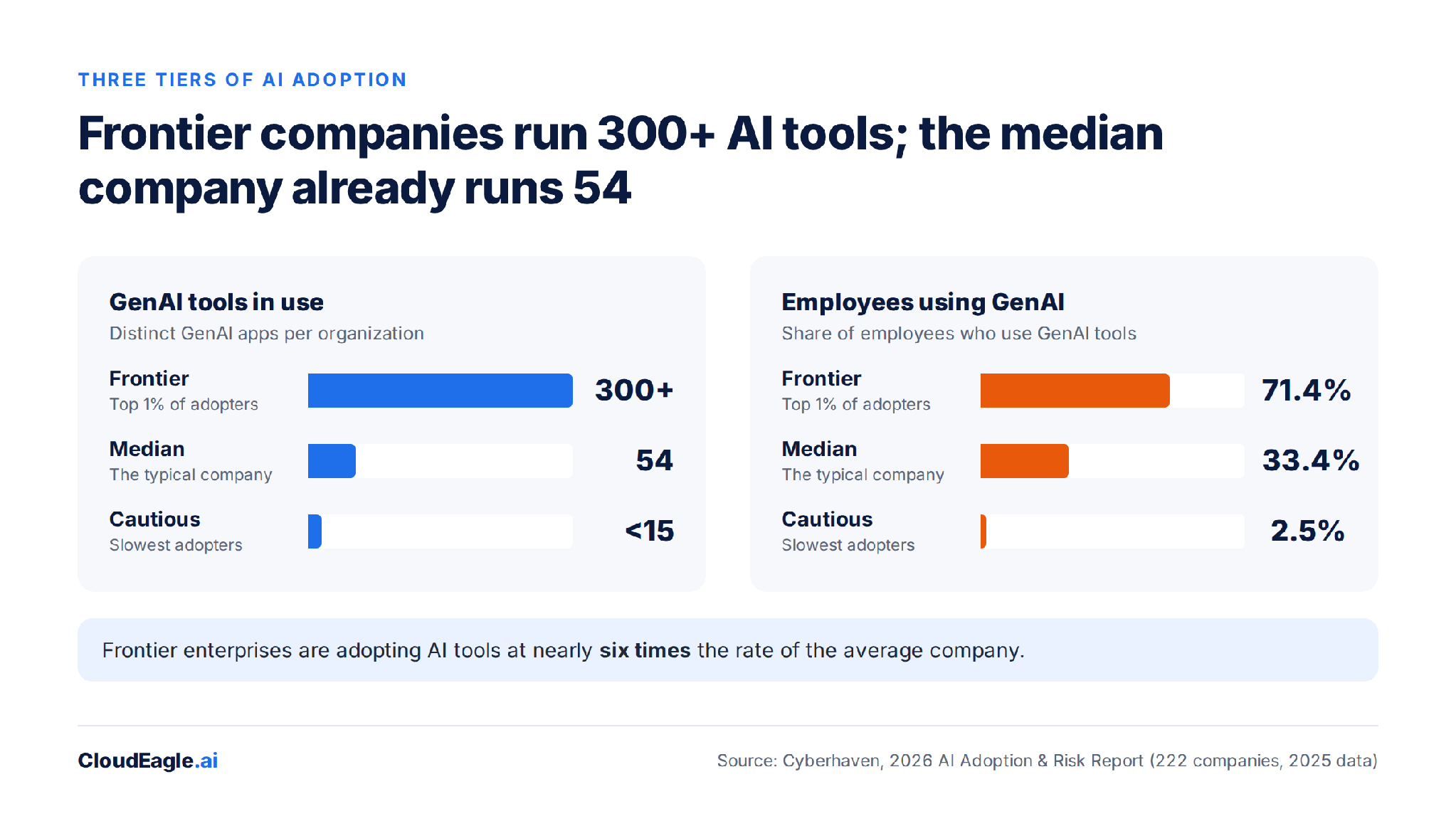
Two things the tiers don't mean. Frontier isn't a sector label: technology leads at 40.5% employee adoption, but pharmaceuticals (33%) and financial services (28.7%) sit close behind.
And 300 tools isn't 300 contracts. AI enters a company through several doors at once:
- An employee signs up for a free chatbot
- Engineering installs a coding assistant
- A team buys an AI writing tool on a corporate card
- Someone connects an agent builder to an internal workflow
- An existing SaaS product switches on a new AI feature
Only some of those reach procurement, which is why shadow AI discovery is where every count starts. The contracted part is growing too: Zylo's 2026 SaaS Management Index puts average spend on AI-native apps at $1.2M a year, up 108%, before counting AI features bundled into existing tools.
Our take: Tool count isn't a risk score. A 300-tool company on governed accounts can be safer than a 20-tool company running on personal logins. But tool count is a workload number, and workload is where governance programs break first.

2. Is a 300-Tool AI Stack a Warning or a Preview?
A preview. The categories frontier companies lead in spread fast through everyone else, and 2025 alone shows how fast:
- Coding assistants went from about 20% of developers in January to 49.5% by December; frontier companies sit near 90%
- Developers running two or more coding assistants doubled, from 16% to 32%
- 23% of enterprises adopted agent-building platforms such as n8n, OpenAI Agent Builder and Microsoft Copilot Studio
- The leaderboard keeps moving: Gemini overtook Claude in event volume, and Google now holds three of the top 20 tools
That is diffusion, not divergence. The gap between a frontier developer (11.5 times more likely to use a coding assistant) and a median one is a lag, and the lag is closing inside a single year.
Our take: The question for a median company isn't whether it will reach 300 tools. It's whether the governance it runs at 54 will still work at 150.
3. What Breaks When an Organization Runs 300 AI Tools?
Four assumptions that hold at 15 tools stop holding somewhere past 100.
A. App-by-App Approval Runs Out of Hours
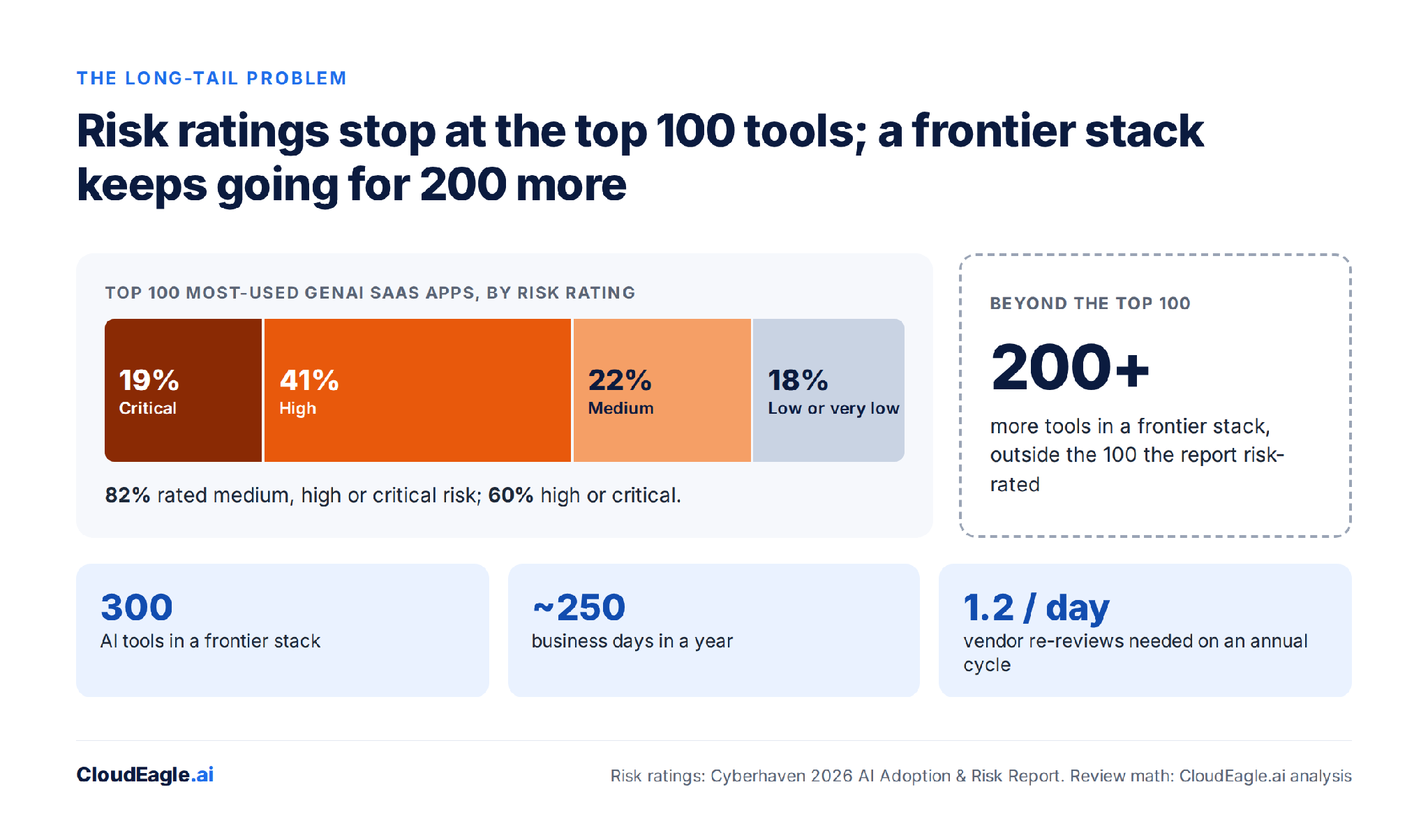
Re-review 300 tools once a year and that is 1.2 vendor reviews every business day, before a single new request arrives. Skipping reviews isn't an option either: in Cyberhaven's rating of the 100 most-used GenAI apps, 82% came out medium, high or critical risk, and a frontier stack runs 200 more tools past that list, unrated.
The way out is not reviewing everything equally. A summarization tool with no access to company data shouldn't take the same path as an agent that can read customer records and trigger workflows; risk should set the depth of review, not the order requests arrive in.
B. The Enterprise License Covers the First Tool, Not the Third
Companies buy enterprise seats for the tool they chose first, and usage on that tool moves to corporate accounts. The tools employees choose next arrive on personal AI accounts.
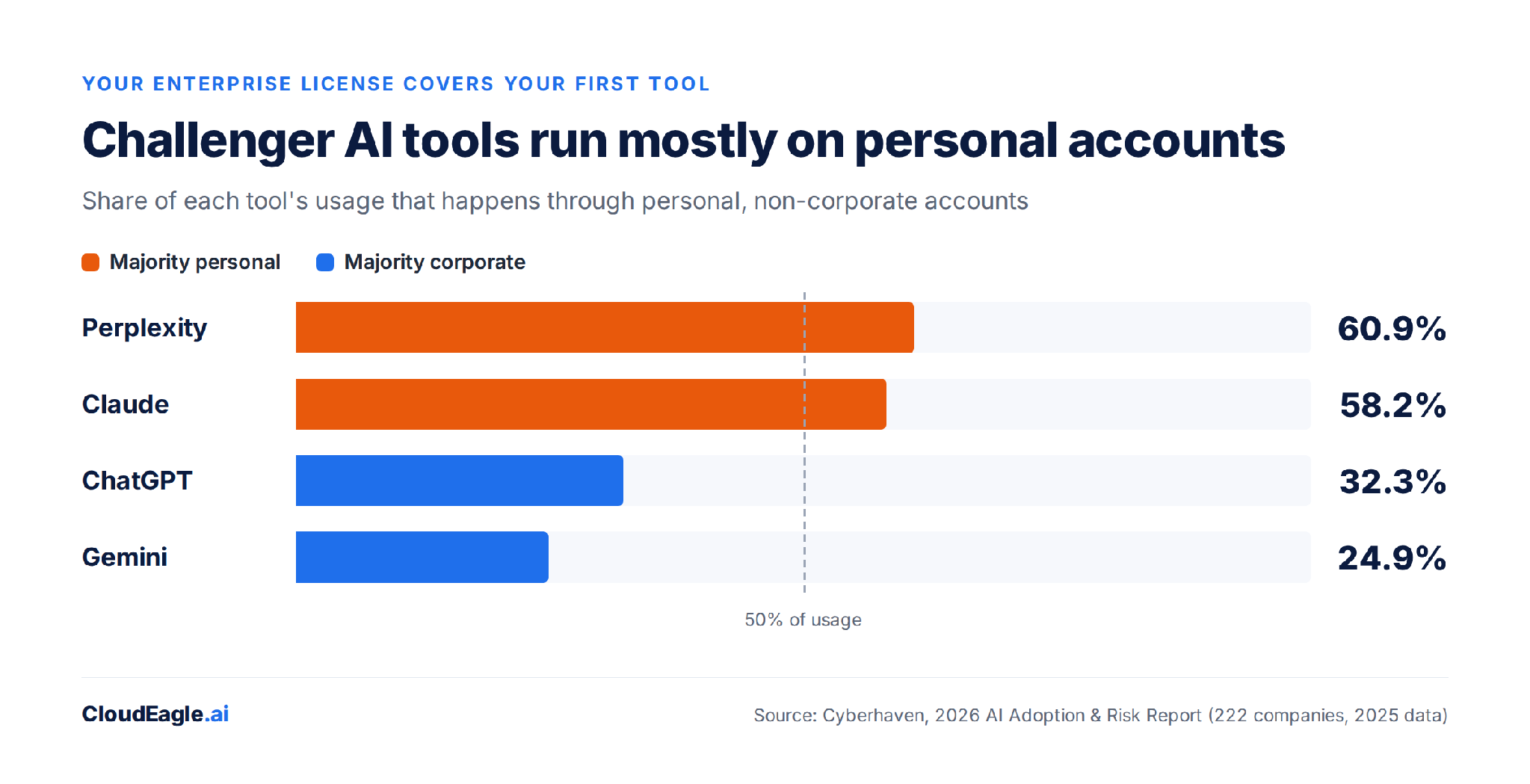
Claude (58.2% personal) and Perplexity (60.9%) sit past the halfway line, while ChatGPT (32.3%) and Gemini (24.9%) sit well short of it. That split tracks which tools companies bought, not which tools are riskier.
A personal account is hard to govern because the company doesn't own it: no SSO, no corporate contract, no central billing and no view of what data goes in. Every new tool in the portfolio starts life on the orange side of that chart.
C. One Sanctioned Tool per Job Stops Being True
A company can name ChatGPT its sanctioned assistant, and employees will still use Claude for one task, Perplexity for another, Cursor for code, NotebookLM for research and an agent builder for automation.
Developers show where this goes: a third of coding-assistant users already run two or more. People choose AI tools by task, so governance written around a single tool name covers less every quarter.
D. Spend Stops Matching Adoption
A traditional SaaS contract gives Finance a simple equation: seats × price. AI adds tokens, credits, usage caps, premium models and features bundled into products you already own. Zylo found 78% of IT leaders hit unexpected charges tied to consumption or AI features.
A company can have full visibility into its contracts and still have poor visibility into what AI costs it.
Tool count sets the workload; what each tool can reach sets the risk. Our piece on blast radius covers how to rank a large AI stack by exposure.
Our take: None of these four failures is a security incident. Each is an operating assumption that quietly stops being true, which is why most teams notice only after the backlog, the bill or the audit finding.
4. What Should Companies With 54 AI Tools Do Before They Reach 300?
Change the unit of governance from the app to the portfolio while the portfolio is still small enough to map. That starts with one admission: your SSO dashboard is not your AI inventory. It won't show the free tool someone signed up for with a personal email, every AI feature inside software you already own, or which tools people tried once versus use daily.
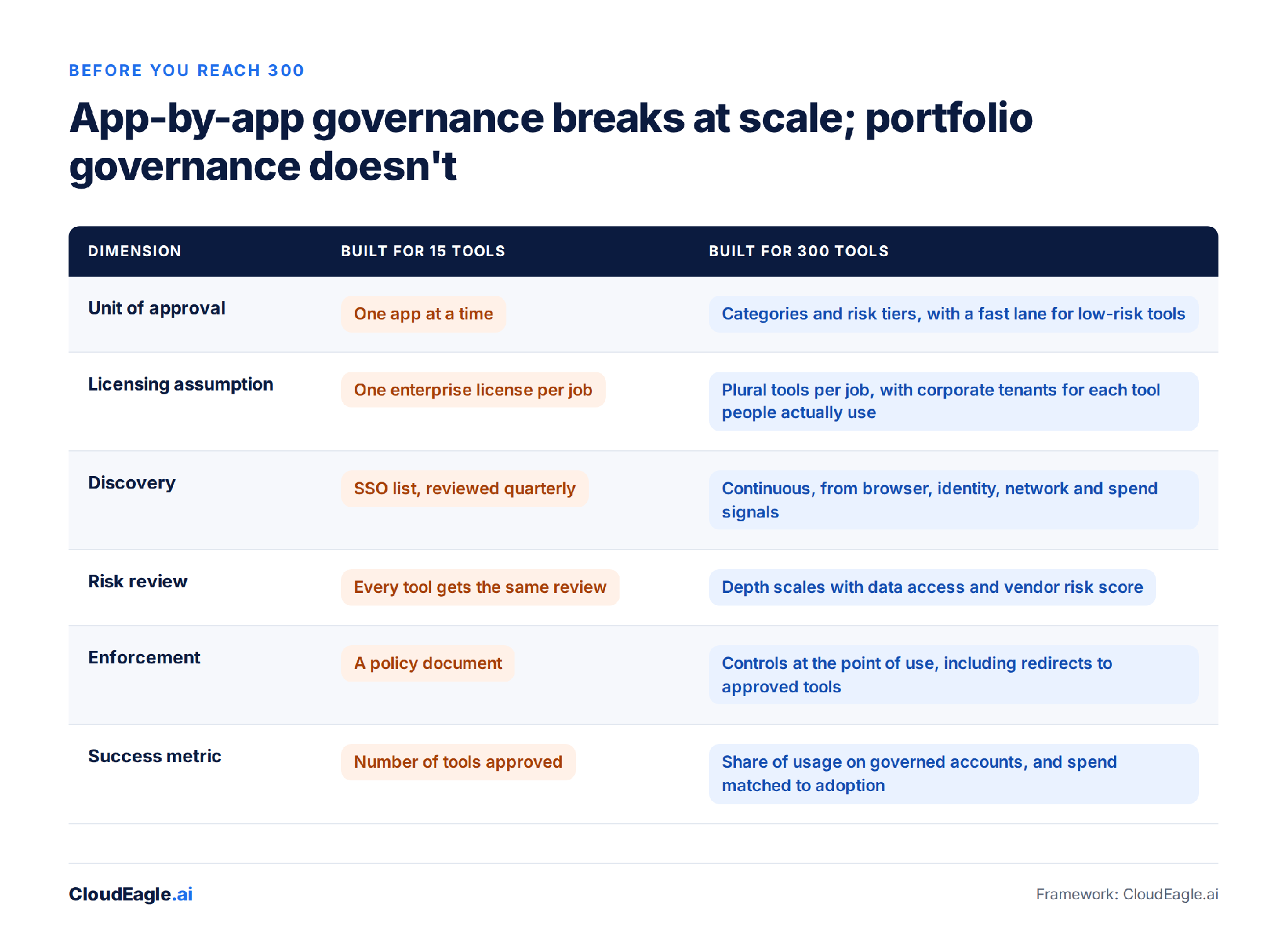
- Approve categories and risk tiers, not individual apps. Tier by what a tool can access and what employees put into it: public marketing copy takes a fast lane; source code, customer records and regulated data take the full review.
- Buy corporate tenants for the tools people already use, not only the one you picked. The personal-account share per tool tells you where to start, and it matters because 39.7% of AI interactions carry sensitive data.
- Govern data, not just destinations. Write usage policies around one question, what data may go where and under what conditions, so the policy survives the next tool.
- Rationalize each quarter on usage, not contracts: which tools overlap in a category, which are growing fastest, and which look like 200 licensed seats with 12 active users.
- Track the share of AI usage on governed accounts. That single number tells you whether governance is keeping up with adoption.
5. How CloudEagle.ai Governs a 300-Tool AI Stack
CloudEagle.ai treats the AI stack as a portfolio: one inventory, grouped by category, with controls that follow accounts and data rather than app names.
A. One Inventory, Risk-Scored
EagleIQ correlates seven discovery sources, including the IdP, spend, firewall and MDM logs, social-login signups and browser sessions, so free tiers and personal sign-ups land in the count. Each tool gets a GenAI risk score based on data training policies, feature controls, certifications and compliance posture, which is what lets security send low-risk tools down the fast lane.
B. Rationalization by Category
CloudEagle.ai's application rationalization puts overlapping tools side by side with usage, spend and adoption, and token tracking shows AI consumption by team and model. Consolidation becomes a data call instead of a political one.
C. Governed Accounts at the Point of Use
Browser-level policy enforcement flags logins to personal AI tenants, redirects employees from unapproved tools to sanctioned ones, and monitors sensitive data headed into AI apps. That moves usage onto governed accounts without blocking the tool people chose.
D. A Fast Lane for New Requests
An employee app catalog routes requests through automated approvals in Slack, with time-based access that expires on its own. The request queue stops being the bottleneck that pushes people to personal accounts in the first place.
The median company is on the same curve as the frontier, just further back. See how CloudEagle.ai builds portfolio-level AI governance before you reach 300. Book a demo and we'll map your current stack in 30 minutes.
300 Tools. Zero Room for Blind Spots.


6. FAQs
1. How Many AI Tools Does the Average Company Use?
The median company runs 54 generative AI tools, according to Cyberhaven's 2026 AI Adoption & Risk Report, which analyzed 222 companies through 2025. The top 1% of adopters run more than 300, and cautious companies run fewer than 15. At the median company, about a third of employees use GenAI tools.
2. Why Do Employees Use Personal AI Accounts at Work?
Personal accounts fill the gaps a company license leaves. Cyberhaven found 58.2% of Claude usage and 60.9% of Perplexity usage runs through personal accounts, against 32.3% for ChatGPT, which more companies license. Those accounts sit outside SSO, corporate contracts and central billing, so IT can't see what data goes into them.
3. How Should Companies Govern a Growing Number of AI Tools?
Govern the portfolio, not each app. Group tools by category, set review depth by the data each tool can reach, buy corporate tenants for the tools employees already use, and write policies by data type rather than tool name. Then track the share of AI usage on governed accounts as the core health metric.
4. How Does CloudEagle.ai Find AI Tools Outside SSO?
CloudEagle.ai's EagleIQ correlates seven discovery sources: the identity provider, contract metadata, firewall logs and MDM, approved purchases, social-login signups, shadow purchases and browser-extension sessions. Tools that never touch Okta or Entra, including free tiers and personal sign-ups, still appear in the inventory, each with a risk score.
Stop AI Sprawl Before It Outpaces IT.


.avif)


.avif)
.avif)




.png)






.avif)
.avif)
.avif)


