%201.svg)


HIPAA Compliance Checklist for 2025

A finance lead pulls up the OpenAI invoice and finds a number nobody can explain. IT has a guess. Engineering has a different guess, and the invoice does not care whose math is right.
OpenAI cost allocation is a process problem long before it becomes a tooling one. What counts as cost, whose org chart defines a team, and which number holds up when someone challenges it all get settled before any dashboard helps you.
This guide walks through the reconciliation habits that make OpenAI cost allocation defensible before you hand the numbers to finance.
Why Your First OpenAI Chargeback Report Will Confuse Everyone
The first version of most OpenAI cost allocation reports fails because the people reading it don't share the report builder's vocabulary. One customer assumed "chargeback" meant a refund was coming, which is a fast way to make an allocation exercise look like a billing dispute.
Align on vocabulary first
A report built on unshared terms breaks before the numbers even matter. Define these in writing and circulate them before the first report ships:
- Showback: reporting what a team consumed, with no money moved.
- Chargeback: billing that consumption to the team's actual budget.
- Cost owner: the person or team accountable for a spend line, who is often someone other than the report's main reader.
Decide what's in scope
Finance and IT rarely define "AI spend" the same way, and that mismatch changes the total without anyone deciding it on purpose. Document whether these are included before comparing any two reports:
Recent FinOps Foundation data backs up how fast this gap opened: 98% of FinOps practitioners now manage AI spend, up from just 31% two years ago. Most of that scope arrived faster than the definitions caught up, which is why OpenAI cost allocation stalls on vocabulary more often than on math.

How to Allocate OpenAI Costs, Step by Step
1. Your SSO groups know your org chart. OpenAI doesn't.
OpenAI can't tell you which team spent what, because OpenAI tracks users and projects rather than departments. The org chart you need lives in Okta or Entra.
Borrow it instead of waiting for OpenAI to build it:
- Pull group membership from your identity provider, since that's where "who reports to whom" already lives.
- Map each OpenAI user or project to the SSO group that owns it. A self-reported team field someone typed in once will not hold up.
- Refresh the mapping on a schedule. People move teams, and a mapping built in January is wrong by June.
OpenAI's admin console has gotten more granular here. The Global Admin Console now reports ChatGPT and Codex credit consumption together, sliced by user, product, and model. That breakdown still stops at the user level, so department attribution only works because you layered your own SSO data on top of it.
2. API spend and seat spend are not the same number
A per-team total that blends API spend with seat spend will look complete and still be wrong. These are two separate billing relationships with OpenAI, pulled through two separate connections.
- Seat-based usage comes from your ChatGPT Business or Enterprise subscription and shows up as a per-user license cost.
- API-key usage comes from token consumption on OpenAI's Usage and Cost APIs and scales with what each team's applications actually call.
A team can have heavy API usage and light seat usage, or the reverse. Averaging the two into one line item hides what's driving the bill. Before you assign blame for a spike, confirm that both connections are feeding the report and that neither is silently missing. If either connection is missing, the total is wrong at the source.
Seat totals also depend on how tightly you already manage ChatGPT licenses, since an unreclaimed seat still bills to whichever team it was assigned to.
3. One team, one tool, wildly different bills
Tool-level spend hides which model actually drove the cost, and that gap can be enormous. A team's usage might route through a cheaper model most weeks, then spike on a project that leans on a premium one, which shows up as a 10x swing in per-team cost with no change in headcount.
Break every team's total down by model before you draw conclusions about who's expensive:
- Pull per-model token counts from the Usage API, separated into input and output tokens, since output tokens are billed at a different rate.
- Multiply each model's tokens by that model's current per-million-token price rather than applying a blended average.
- Sum by team only after the model-level math is done.
Skipping this step is how a team gets flagged as an outlier when the real driver is one project on a premium model.
Once you know which model is responsible, cutting the number is a separate exercise: this walkthrough on reducing ChatGPT token costs covers model tier selection and the spend happening outside your tenant.
4. Licenses, access, and active users rarely match
Three numbers that should align in a clean environment almost never do. Treating them as one number is where most OpenAI cost allocation math breaks first.
- Purchased licenses: what you're being billed for under your OpenAI contract.
- Platform access: everyone who technically has a login, including people who never use it.
- Active users: people who generated at least one request in the reporting window.
Pull all three from separate sources, since none of them will hand you the other two. The spread between the first number and the third is where license harvesting pays for itself, since every seat in that gap is billing to a team that got nothing from it.
A team with 40 purchased seats, 52 people with access, and 18 active users in the last 30 days has three real numbers telling three different stories, and the allocation report needs to show all three rather than averaging them.
If active-user filtering across your whole AI stack is the piece you're missing, this walkthrough on user-level AI consumption tracking covers how to apply 30, 60, and 90-day activity windows before a renewal.
5. Division-level rollups don't exist yet. Build them by hand.
Division-level OpenAI cost allocation sounds like it should be a native report option, and in most environments it isn't. Team-level attribution is usually native, while division and business-unit rollups stay manual until the underlying data model catches up.
Build the rollup by hand for now:
- Export team-level totals from your SSO-mapped report.
- Map each team to its parent division using your HRIS org hierarchy. A spreadsheet someone maintains from memory drifts within a quarter.
- Sum team totals into division totals, and flag any team that doesn't map cleanly to one division instead of forcing a guess.
Anyone expecting full automation at the division layer should plan around this gap, since the tooling does not close it yet.
6. The few cents that aren't actually a data error
A small discrepancy between your spreadsheet and OpenAI's dashboard is usually a reporting-window problem. OpenAI's usage data reports in UTC, while your internal reporting window probably runs on local time.
Check the window alignment before escalating a discrepancy as a data quality issue:
- A team whose workday straddles midnight UTC will show usage split across two different days depending on which clock you read.
- This shows up most often for teams working late evening or very early morning relative to UTC, which is when the date rolls over on OpenAI's side.
- Multi-vendor environments compound it, since Claude, Cursor, and Gemini rarely share a reporting calendar with each other or with ChatGPT.
Reconcile one vendor's clock at a time before comparing cost totals across tools.
7. Trust the automation only after you've checked it by hand
No OpenAI cost allocation report should go straight from a script to finance without someone checking a handful of real users by hand first. That manual check is what builds trust in the automation, more than the elegance of the pipeline that produced it.
Before automating the full rollout:
- Pick 5 to 10 users across different teams and usage patterns, including at least one heavy user and one near-zero user.
- Manually pull their token counts and costs directly from the source data.
- Compare against what the automated report shows for the same users in the same window.
- Investigate every mismatch before scaling, since a discrepancy in a sample of 10 usually means a systemic issue in the other several hundred.
Teams in a hurry to show progress skip the sample check, and that shortcut is what determines whether finance trusts the next twelve reports or stops reading after the first one.
8. AI agents are quietly inflating your per-team numbers
An AI agent or automated workflow calling the OpenAI API often runs under a human employee's credentials by default, so its token consumption lands on that person and, by extension, their team. One team's usage can look inflated for months before anyone traces it to an agent.
Separate this out explicitly:
- Inventory every service account, automated script, and AI agent with API access alongside the human users in your SSO groups.
- Tag agent-driven usage distinctly in your cost reports instead of letting it blend into a person's total.
- Assign each agent a human owner, so accountability survives once the workload is automated.
Palo Alto Networks' 2026 Identity Security Landscape report puts machine identities at 109 for every human identity, with AI agents making up the majority of that population. OpenAI cost allocation built around human SSO groups alone keeps missing this category of spend entirely.
If agent ownership is the gap you're closing next, this guide to non-human identity governance covers assigning owners at scale.
Where CloudEagle.ai Picks Up After the Manual Work
Everything above is a worthwhile exercise, and most teams doing it for the first time will do it manually with spreadsheets and API exports. The problem is that none of it stays accurate on its own. SSO group membership changes, new agents get spun up, and last quarter's org mapping is stale by the time the next report is due.
CloudEagle.ai keeps that OpenAI cost allocation current instead of rebuilding it every cycle, as part of broader AI spend visibility across the stack.
Team attribution that survives an org chart change
Manually mapping OpenAI users to SSO groups works once. It breaks the moment someone changes teams, and nobody updates the spreadsheet.
How CloudEagle.ai solves it:
- Connects directly to OpenAI, Claude, Gemini, Cursor, and GitHub Copilot alongside your identity provider, so team mapping updates as your org chart changes.
- Surfaces per-user, per-team, and per-department spend from one dashboard without a manual export.
Attribution stays accurate without someone rebuilding the mapping every quarter.
Model-level breakdown without manual token math
Calculating per-model spend by hand means pulling raw token counts and applying pricing tables that change as OpenAI updates rates.
How CloudEagle.ai solves it:
- Breaks down spend by model, showing input and output token splits per user and per team across 15, 30, 60, and 90-day windows.
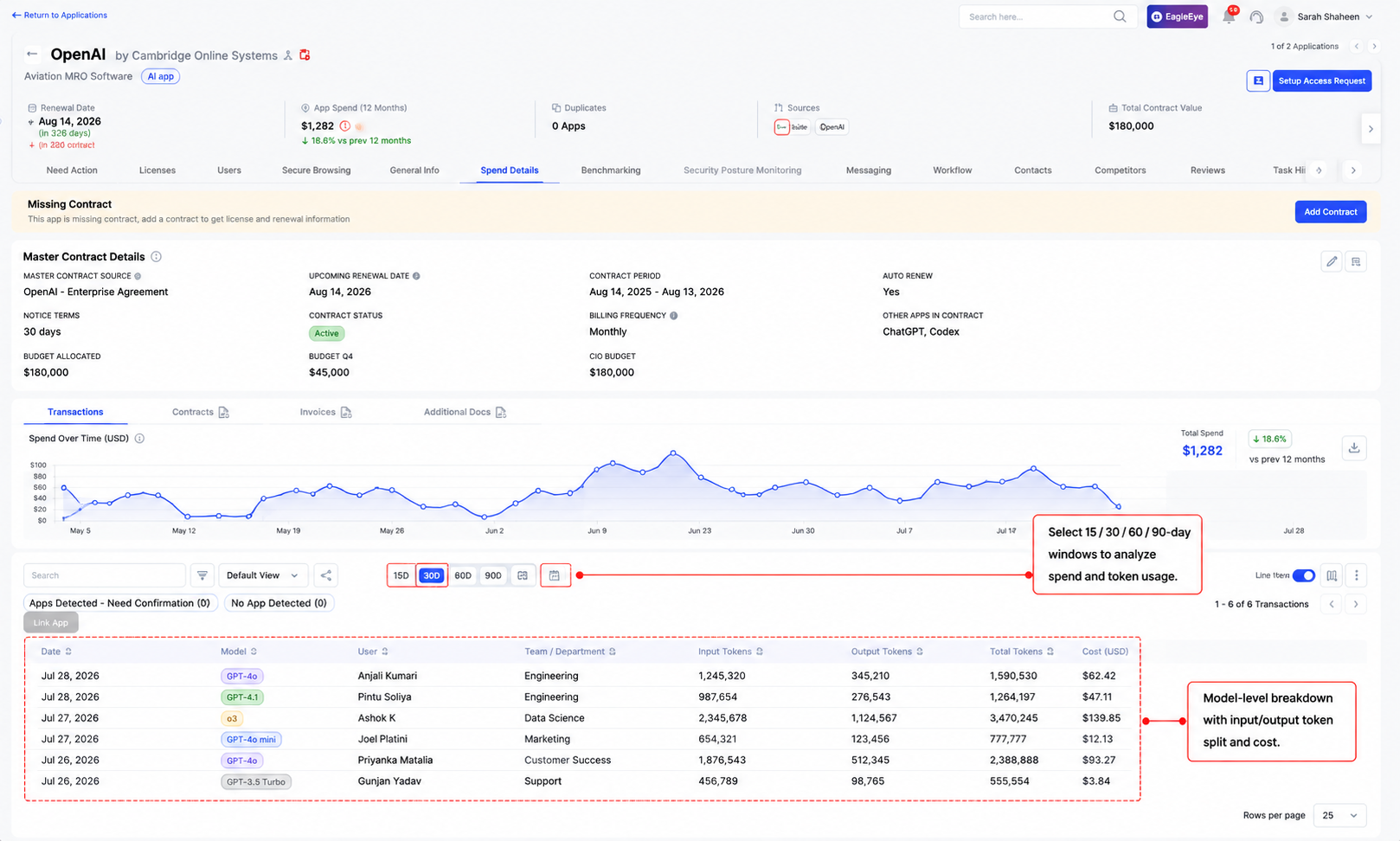
- Fires threshold alerts when a team's consumption approaches a configured budget limit, before the invoice lands.
Finance gets model-level attribution without engineering rebuilding a pricing spreadsheet every time rates move.
Non-human identities allocated apart from people
Separating agent-driven usage from human usage by hand requires an inventory that's out of date the day after you build it.
How CloudEagle.ai solves it:
- Surfaces service accounts, API keys, and AI agents as their own identity category, each with an assigned human owner.
- Tags agent-driven token consumption distinctly from person-level usage in the same dashboard.
Per-team numbers stop absorbing agent activity that was never a person's usage to begin with.
FAQs
How do I allocate OpenAI costs by team if we share one API key?
Add project or key-level tagging in the OpenAI Usage API, or use a platform that maps requests to users and teams independently of the shared key.
How often should OpenAI cost allocation be reconciled against SSO data?
Monthly at minimum, on a set schedule. Team membership changes faster than most manual mappings get updated, and stale mappings misallocate spend.
Why don't my license count and my active user count match?
Purchased licenses, platform access, and active users come from three different systems. They rarely align in any real environment, so report all three.
Should cloud infrastructure spend count toward OpenAI cost allocation?
Decide once with finance and IT together, document it, and apply it consistently, since the two teams usually assume different defaults.
What causes small discrepancies between our report and OpenAI's dashboard?
Time zone drift is the common cause. OpenAI usage data reports in UTC while internal reports often run on local time, splitting usage across days.
Do AI agents affect per-team OpenAI cost allocation?
Yes. Agents often run under a human's credentials by default, inflating that person's team total unless agent usage is tagged and allocated separately.
Ready to stop rebuilding this reconciliation by hand every quarter? Book a demo to see SSO-mapped OpenAI cost allocation, model-level breakdowns, and NHI tracking in one dashboard.
Stop Rebuilding This Report Every Quarter.




.avif)


.avif)
.avif)




.png)





.avif)
.avif)
.avif)


