AI Governance

Cursor Security Risks: What Data Can Cursor Access?

Share via:
Written by:
CloudEagle.ai Team
Reviewed by
Nidhi Jain
Last Updated:
October 9, 2026
blog-cms-banner-bg
Little-Known Negotiation Hacks to Get the Best Deal on Slack
cta-bg-blogDownload Your Copy

HIPAA Compliance Checklist for 2025

Download PDF

Cursor says it is used by more than half of the Fortune 500, and most security reviews of it open with the same question: what data can Cursor access?

The honest answer is uncomfortable. Cursor can reach whatever the developer's operating-system account can reach: cloud credentials, SSH keys, SaaS sessions, and every repository cloned to that laptop. Privacy Mode decides what model providers may keep; it does not decide what the agent can read, run, or sign in as.

Three defaults widen that gap, and most published guidance gets at least one of them wrong. Workspace Trust ships disabled, .cursorignore does not bind the agent's terminal, and Privacy Mode follows the account rather than the device. This guide maps what leaves the machine, what stays exposed on it, and how to turn a safe AI usage policy into controls you can prove to an auditor.

‍

1. What Data Does Cursor Send, Store, and Retain?

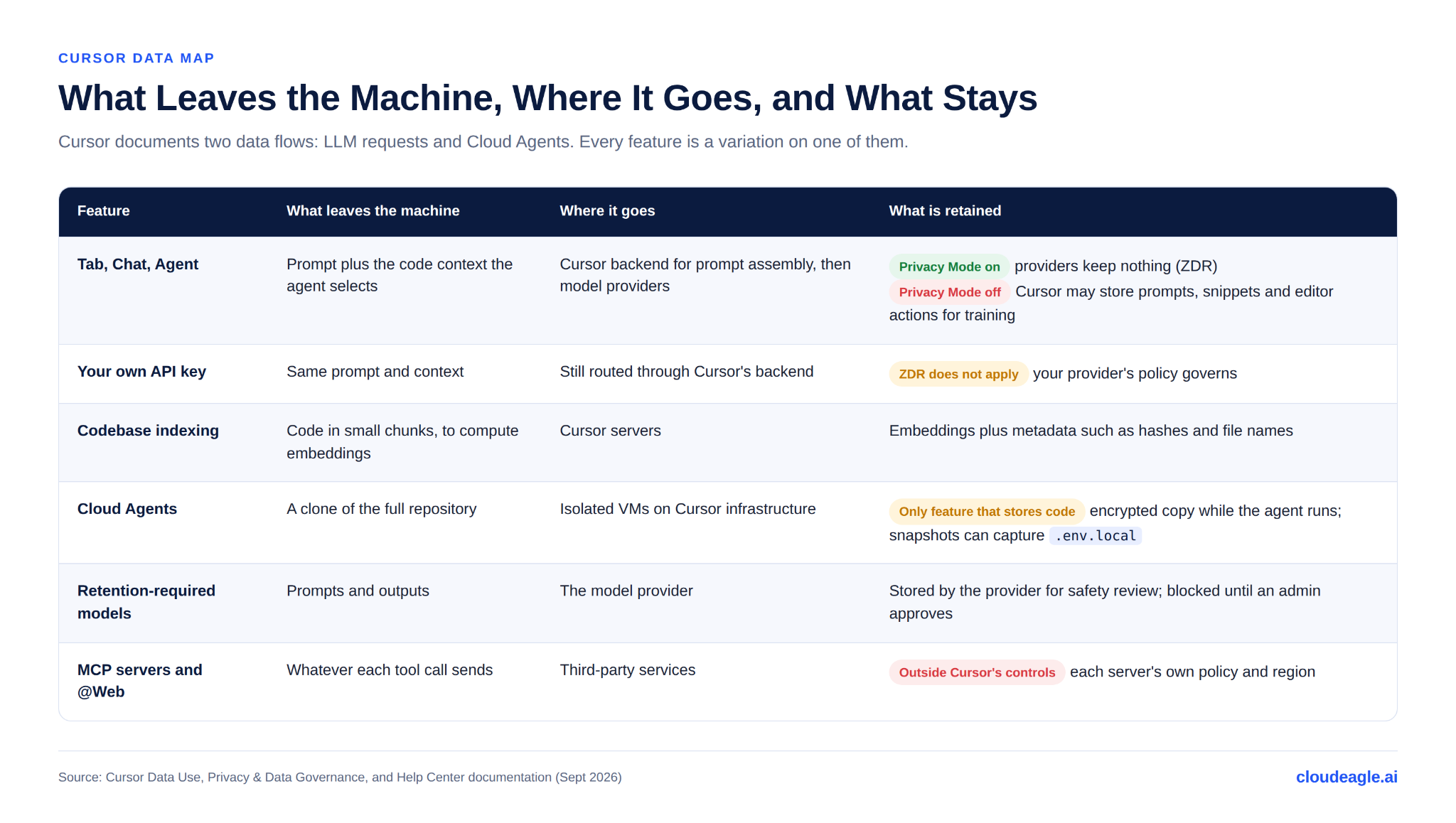
Cursor's privacy and data governance documentation describes two data flows: 

  1. LLM requests
  2. Cloud Agents.

Every feature is a variation on one of them.
‍

‍

1. Two rows catch most buyers off guard. The first is bring-your-own-key. Cursor's data use page says requests still pass through its backend for final prompt building, and its privacy help article says zero data retention does not apply when you use your own keys. Teams that moved to BYOK to keep data with their provider often gave up a guarantee instead of gaining one.

2. The second is Cloud Agents, which Cursor calls the only feature that requires it to store code. Encrypted repository copies sit on its infrastructure while the agent runs, and Cursor's own docs warn that .env.local files included in a snapshot get saved. Treat a cloud agent as a remote build worker that holds your repository and possibly your secrets..

3. Indexing deserves a line too. Plaintext chunks are discarded after embeddings are computed, but the embeddings and metadata such as hashes and file names are stored. If your data classification treats file names as sensitive (think acquisition-target-q3/), indexing is in scope.

4. Finally, some models sit outside Cursor's retention agreements. Cursor's docs name Claude Fable 5 and 5.1 as models whose provider stores inputs and outputs for harm-prevention review; with Privacy Mode on, requests fail until an admin approves the retention policy for the whole team. That approval is a subprocessor decision and belongs in the same review as any other.

‍

You Can't Govern What You Can't Find

Hidden AI tools won't reveal themselves
Find Them

‍

2. What Can Cursor Reach Beyond the Code You Share With It?

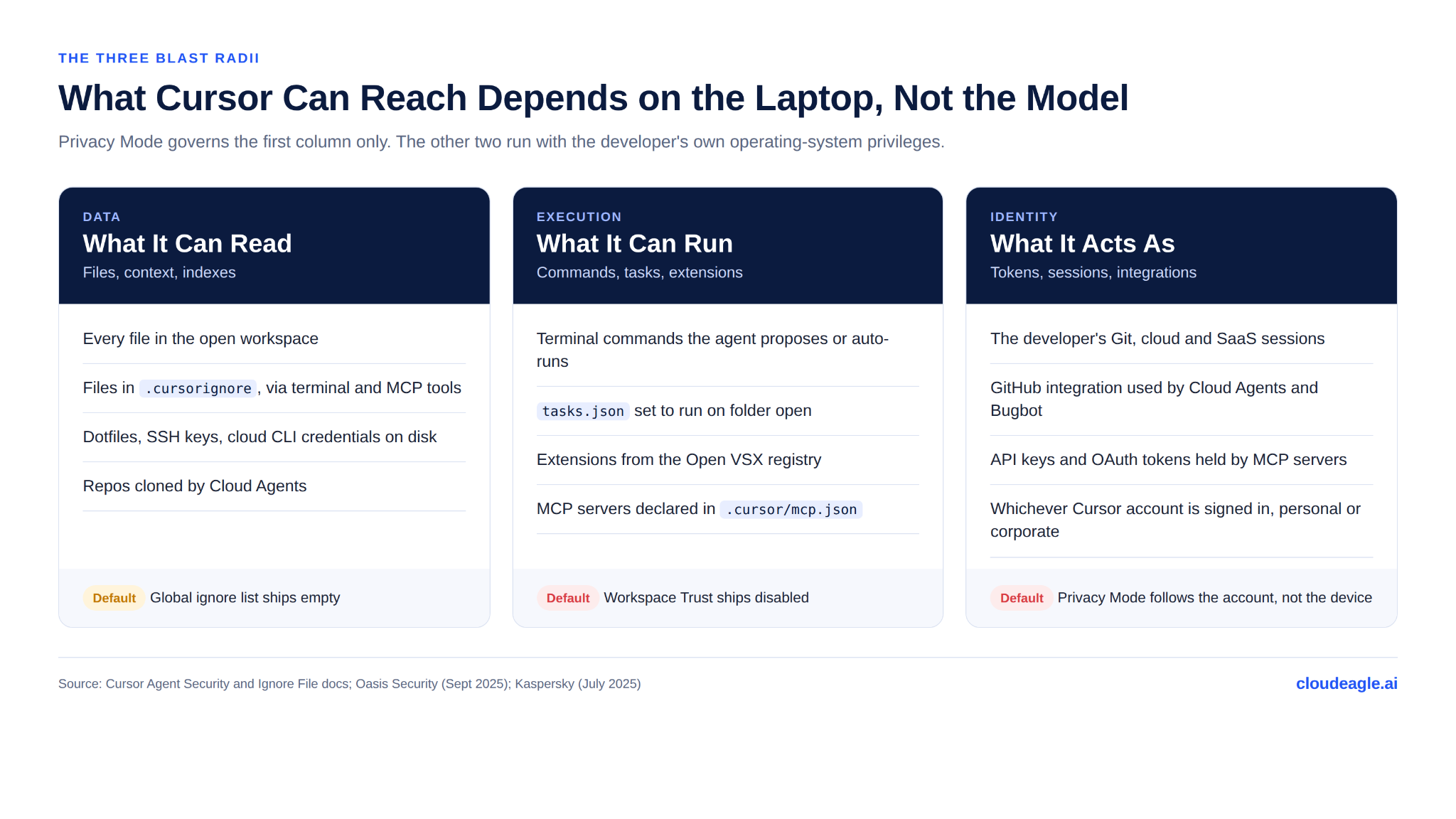
The data map covers what Cursor sends. The larger exposure is what Cursor can touch locally, and it falls into three blast radii: data, execution, and identity.
‍

‍

A. Opening a Repository Can Execute Code

Cursor supports VS Code's Workspace Trust but ships it disabled. In September 2025, Oasis Security showed that a malicious .vscode/tasks.json set to run on folder open executes the moment a developer opens the project, with no prompt.

Cursor told BleepingComputer that Workspace Trust "disables AI and other features our users want," and its agent security docs still say restricted mode breaks AI features. On a default install, "clone and browse" is an execution event.

B. .cursorignore Is a Filter, Not a Boundary

The ignore file stops Agent, Tab, Inline Edit, and @-mentions from reading listed files. The same page states that the terminal and MCP tools used by Agent cannot block access to ignored files, and that complete protection "isn't guaranteed due to LLM unpredictability." The global ignore list ships empty.

So an agent told not to read .env can still run cat .env once terminal commands are approved or auto-run. Use .cursorignore to reduce noise; keep live secrets off the workstation.

C. Extensions and MCP Servers Run With Developer Privileges

Cursor installs extensions from Open VSX, not Microsoft's marketplace. In July 2025, Kaspersky traced a roughly $500,000 crypto theft to a fake "Solidity Language" extension whose download count was inflated to outrank the real one.

MCP configuration is the other execution path. CurXecute (CVE-2025-54135) let a poisoned Slack message, summarized by the agent, write a new .cursor/mcp.json that ran attacker commands. MCPoison (CVE-2025-54136) let anyone with write access to a shared repo swap the command behind an already-approved MCP server without re-approval.

Both were patched in mid-2025. The pattern they exposed, configuration files that grant execution, is still yours to govern.

D. Approval Prompts and Allowlists Are Best-Effort

Cursor asks for approval before terminal commands by default, and lets teams build terminal and MCP allowlists. Its documentation is candid that those allowlists are enforced on a best-effort basis and can be bypassed, and it advises against "Run Everything" mode because it skips safety checks.

Two operating realities follow. Approval fatigue turns prompts into reflexes within a week, and an allowlisted command such as curl or npm install is still a door. Treat approvals as a speed bump for honest mistakes, and put the real limit on what credentials the machine holds.

‍

Security Gaps Hide In Plain Sight

Find them before attackers do.
See The Checklist

‍

3. Why Does Privacy Mode Not Settle the Data Question?

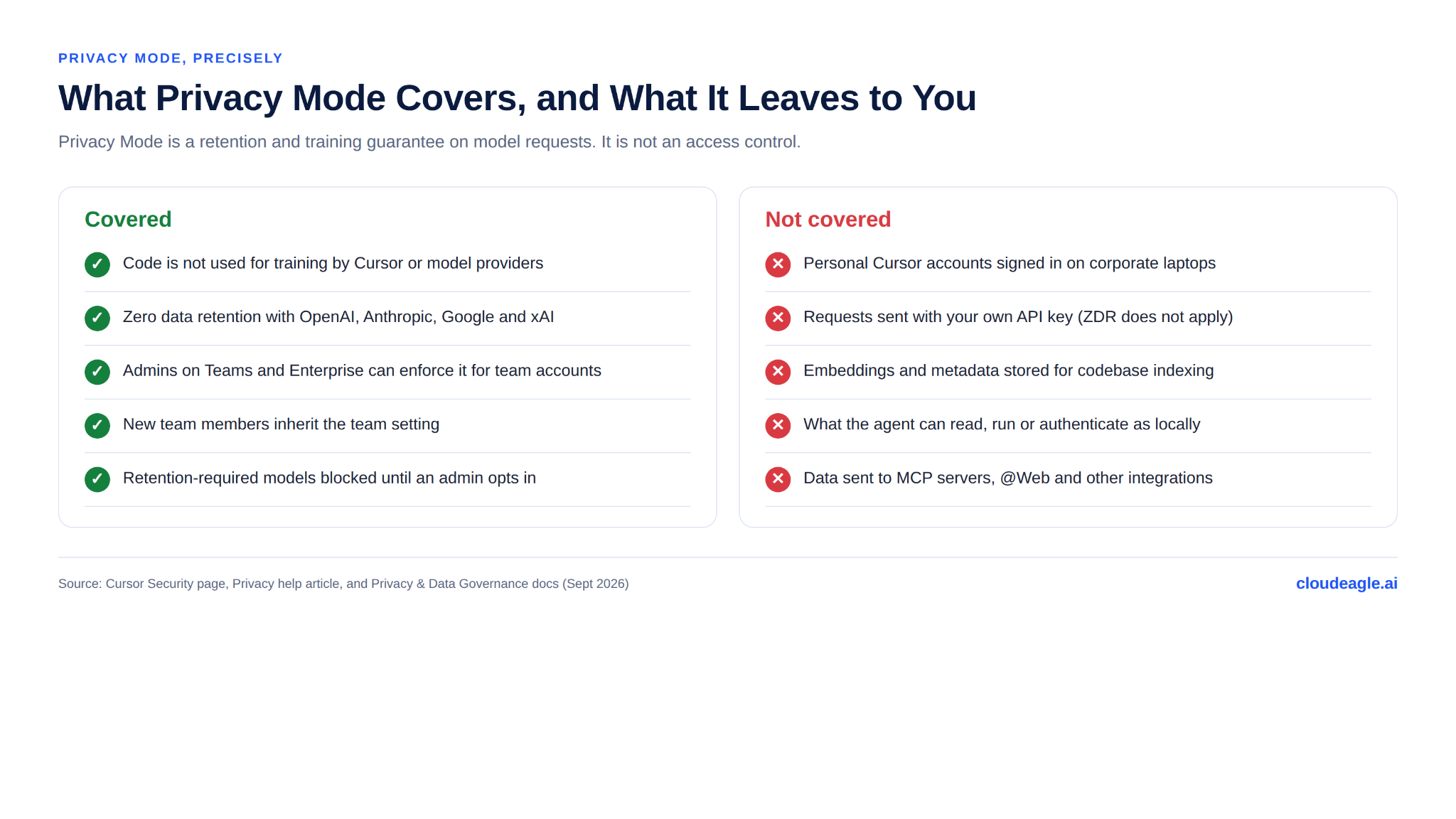
Privacy Mode is where most reviews stop. It is a retention and training guarantee on model requests, and it is worth knowing exactly where it ends.
‍

‍

A. Privacy Mode Follows the Account, Not the Laptop

Teams and Enterprise admins can enforce Privacy Mode so members cannot turn it off. That enforcement applies to team accounts. A developer who signs into a personal free account on a corporate laptop sits outside it.

Cursor documents this exact failure. Its MDM "Allowed Team IDs" policy exists to stop personal accounts, which "might not have Privacy Mode enabled," from logging in on corporate devices. If that policy is not deployed, your data-handling guarantee rests on each developer's login choice.

This is where Cursor security becomes an AI policy enforcement problem. The policy says "company account, Privacy Mode on." Enforcement means knowing who is actually running Cursor, under which account, and paid for by whom.

Want to see that picture across every AI coding tool, not just Cursor? Here is how teams track Cursor spend alongside Claude and Gemini in one place.

B. Residency and Certifications Have Documented Edges

Cursor now offers US-only data residency on Enterprise, and it lists what can leave the region anyway: SSO through its identity provider WorkOS, BYOK, custom model gateways, MCP servers and @Web, Bugbot, shared links, and Slack- or web-triggered Cloud Agents.

Its certifications, SOC 2 Type II, ISO 27001, ISO 42001, and AIUC-1, attest to how Cursor runs its own infrastructure. They say nothing about whether your developers enabled Workspace Trust or which MCP servers they approved.

4. Which Cursor Security Risks Should Leadership Prioritize First?

Most guides give seven or eight risks equal weight. Leadership needs an order. Rank by two factors: how little it takes to trigger the risk, and how far the damage spreads.

The top three are identity and configuration problems. AI-generated code quality, which dominates most Cursor security guides, is the fifth.

That ordering reflects who wrote the guides as much as where the risk is. Code scanning vendors frame Cursor as a code problem. For a CIO, the faster exposure is a personal login, a default setting, and a token nobody scoped.

‍

5. How Do You Turn a Safe AI Usage Policy Into Enforced Cursor Controls?

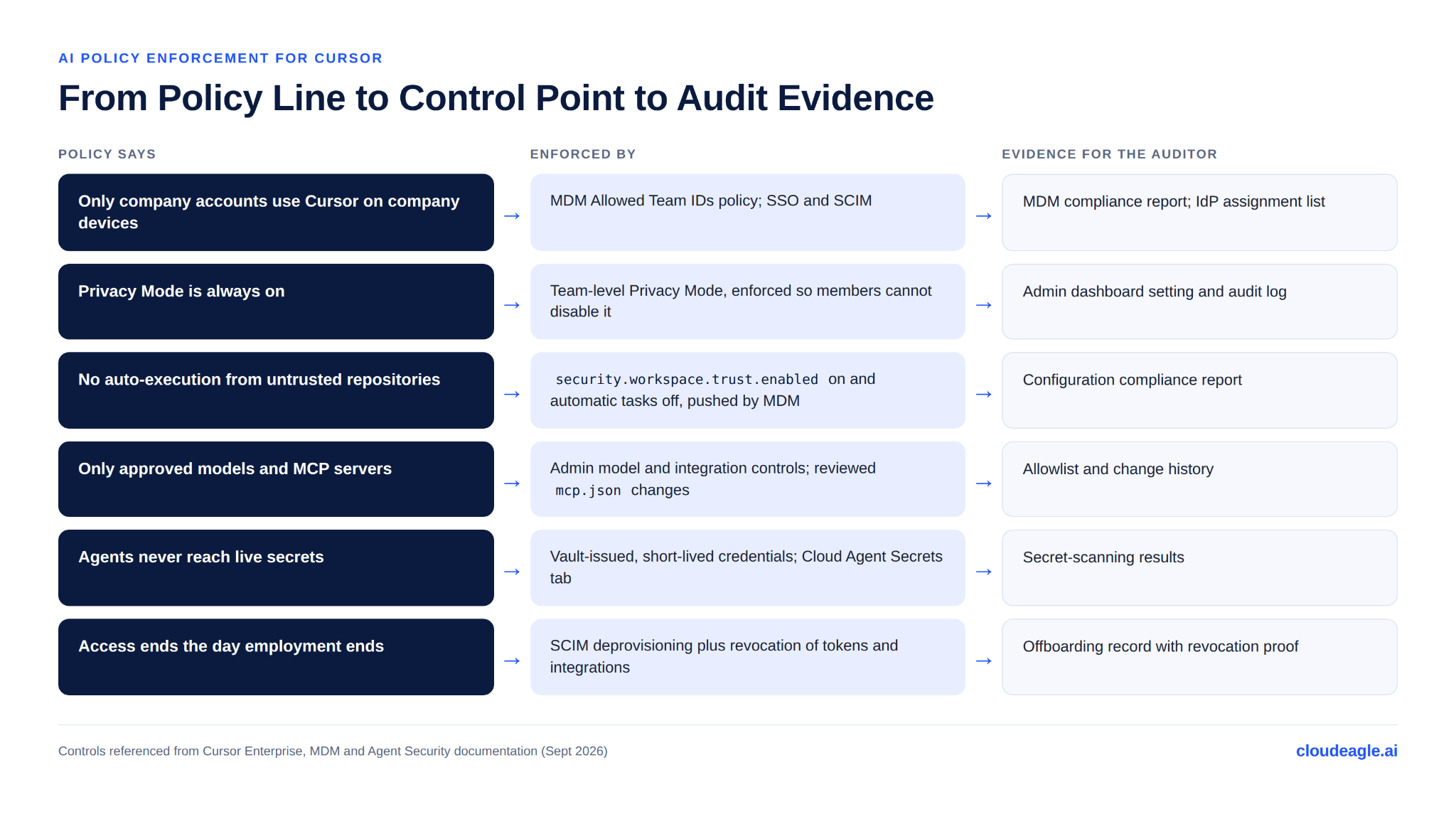
Most enterprises now have a safe AI usage policy. Few can show where each line of it is enforced. For Cursor, every policy statement needs a control point and a piece of evidence an auditor would accept.
‍

‍

A. Close the Account Boundary First

Discovery comes before enforcement. Find every Cursor account in use, including Pro seats expensed on corporate cards and personal accounts on managed devices, then deploy the Allowed Team IDs policy so only your team can sign in.

B. Treat Cursor's Integrations as Non-Human Identities

Cloud Agents and Bugbot work through a Git integration that can clone repositories and push branches. MCP servers hold API keys and OAuth tokens, often in plaintext config. Each is a non-human identity with standing access.

The stakes are measurable. GitGuardian's 2026 secrets sprawl research reports that developers using AI coding tools leak secrets at roughly twice the baseline rate, and that secrets in internal repositories are far more likely to still be valid than those in public ones.

Each one needs three things:

  • A named human owner
  • A scope review against what it actually needs
  • A revocation step in the offboarding runbook, alongside the SCIM seat removal

C. Review Continuously, Not at Procurement

Cursor's surface keeps widening, with Cloud Agents, Automations, a CLI, and a plugin marketplace each adding a data path. Settings reviewed once at purchase drift. Tie Cursor's admin settings, MDM profile, and integration list to the same continuous review cycle as your other critical SaaS.

‍

6. What Should You Confirm Before Approving Cursor Enterprise-Wide?

A procurement security questionnaire rarely reaches these settings. Ask them of your own configuration, not only of the vendor:

  • Which plan are we on, and is Privacy Mode enforced at team level so members cannot disable it?
  • Is the MDM Allowed Team IDs policy deployed to every managed device that can run Cursor?
  • Is security.workspace.trust.enabled set to true, and automatic tasks turned off, through MDM rather than per-user settings?
  • Is terminal auto-run off by default, and who can change that?
  • Which MCP servers are approved, who reviews changes to mcp.json in shared repositories, and where are their tokens stored?
  • Are Cloud Agents enabled? If yes, which repositories can they reach, and are secrets delivered through the Secrets tab rather than snapshotted files?
  • Has anyone approved a retention-required model for the team, and was that logged as a subprocessor decision?
  • Is BYOK allowed? If yes, does the team understand that zero data retention no longer applies?
  • Are audit logs exported to your SIEM, and does offboarding revoke Cursor seats, Git integrations, and MCP tokens together?

A "no" or "not sure" on any of the first three is a higher priority than any code-scanning gap.

‍

7. How Does CloudEagle.ai Enforce AI Policies Across Cursor and Other AI Tools?

Cursor's admin dashboard governs Cursor's team. It cannot see the personal account on a contractor's laptop, the Pro subscription on a corporate card, or the Git token a cloud agent still holds after its owner left. CloudEagle.ai works across those seams.

A. Find Every Cursor Account, Sanctioned or Not

CloudEagle.ai correlates SSO logins, finance and card spend, firewall and endpoint logs, and its browser plugin against EagleIQ, its inventory of AI applications. Cursor seats bought outside procurement show up next to sanctioned ones, each with a risk score, so security knows which to bring under governance first.

B. Enforce the Policy Where It Can Be Enforced

AI policy enforcement in CloudEagle.ai applies approved-tool rules across AI apps. In the browser, it can monitor or block sensitive data shared with AI tools and redirect users from unsanctioned tools to approved ones. For a desktop tool like Cursor, the lever is the account and its access, which is where the next two capabilities come in.

C. Govern the Identities Cursor Creates

CloudEagle.ai tracks non-human identities such as service accounts, API keys, and AI agents from Okta, Entra, and connected apps, with owner, status, and permissions for each. Orphaned credentials get flagged and revoked.

D. Close Access the Day Someone Leaves

Zero-touch offboarding removes the Cursor seat along with the developer's other app access, whether or not each app sits behind the IdP, and attaches proof of deprovisioning for the audit trail. Token usage tracking by user and team shows who is actually using Cursor, and at what cost.

Cursor's risk was never only about what the model sees; it is about what the developer's laptop can reach and which account is signed in. CloudEagle.ai gives IT and security one view of every AI tool, account, and non-human identity, with the controls to act on it. Book a demo to see your Cursor footprint in 30 minutes.

‍

‍

8. Frequently Asked Questions About Cursor Security

1. Is Cursor Safe for Enterprise Use?

Cursor can be run safely at enterprise scale, but its defaults are tuned for developer speed. Enforced Privacy Mode, the Allowed Team IDs policy, Workspace Trust turned on through MDM, and credentials kept off developer machines close most of the gap between the vendor's certifications and your actual exposure.

2. Does Cursor Train on My Code?

Not with Privacy Mode enabled. Cursor and its model providers operate under zero data retention agreements for those requests. With Privacy Mode off, Cursor says it may store and use codebase data, prompts, and editor actions to train its models. Privacy Mode is on by default for Enterprise teams.

3. Can Cursor Read My .env File?

Cursor ignores .env files by default for Agent, Tab, and @-mentions. The agent's terminal and MCP tools are not bound by those ignore rules, so an approved command can still read the file. Keep live secrets in a vault, not on disk.

4. Does Privacy Mode Apply to Personal Cursor Accounts?

Only if the individual turns it on. Team enforcement covers team accounts; a personal account on a corporate laptop follows its own settings. The MDM Allowed Team IDs policy blocks those sign-ins on managed devices.

‍

Advertisement for a SaaS Subscription Tracking Template with a call-to-action button to download and a partial graphic of a tablet showing charts.Banner promoting a SaaS Agreement Checklist to streamline SaaS management and avoid budget waste with a call-to-action button labeled Download checklist.Blue banner with text 'The Ultimate Employee Offboarding Checklist!' and a black button labeled 'Download checklist' alongside partial views of checklist documents from cloudeagle.ai.Digital ad for download checklist titled 'The Ultimate Checklist for IT Leaders to Optimize SaaS Operations' by cloudeagle.ai, showing checklist pages.Slack Buyer's Guide offer with text 'Unlock insider insights to get the best deal on Slack!' and a button labeled 'Get Your Copy', accompanied by a preview of the guide featuring Slack's logo.Monday Pricing Guide by cloudeagle.ai offering exclusive pricing secrets to maximize investment with a call-to-action button labeled Get Your Copy and an image of the guide's cover.Blue banner for Canva Pricing Guide by cloudeagle.ai offering a guide to Canva costs, features, and alternatives with a call-to-action button saying Get Your Copy.Blue banner with white text reading 'Little-Known Negotiation Hacks to Get the Best Deal on Slack' and a white button labeled 'Get Your Copy'.Blue banner with text 'Little-Known Negotiation Hacks to Get the Best Deal on Monday.com' and a white button labeled 'Get Your Copy'.Blue banner with text 'Little-Known Negotiation Hacks to Get the Best Deal on Canva' and a white button labeled 'Get Your Copy'.Banner with text 'Slack Buyer's Guide' and a 'Download Now' button next to images of a guide titled 'Slack Buyer’s Guide: Features, Pricing & Best Practices'.Digital cover of Monday Pricing Guide with a button labeled Get Your Copy on a blue background.Canva Pricing Guide cover with a button labeled Get Your Copy on a blue gradient background.

Enter your email to
unlock the report

Oops! Something went wrong while submitting the form.
License Count
Benchmark
Per User/Per Year

Enter your email to
unlock the report

Oops! Something went wrong while submitting the form.
License Count
Benchmark
Per User/Per Year

Enter your email to
unlock the report

Oops! Something went wrong while submitting the form.
Notion Plus
License Count
Benchmark
Per User/Per Year
100-500
$67.20 - $78.72
500-1000
$59.52 - $72.00
1000+
$51.84 - $57.60
Canva Pro
License Count
Benchmark
Per User/Per Year
100-500
$74.33-$88.71
500-1000
$64.74-$80.32
1000+
$55.14-$62.34

Enter your email to
unlock the report

Oops! Something went wrong while submitting the form.

Enter your email to
unlock the report

Oops! Something went wrong while submitting the form.
Zoom Business
License Count
Benchmark
Per User/Per Year
100-500
$216.00 - $264.00
500-1000
$180.00 - $216.00
1000+
$156.00 - $180.00

Enter your email to
unlock the report

Oops! Something went wrong while submitting the form.

Get the Right Security Platform To Secure Your Cloud Infrastructure

Please enter a business email
Thank you!
The 2023 SaaS report has been sent to your email. Check your promotional or spam folder.
Oops! Something went wrong while submitting the form.

Access full report

Please enter a business email
Thank you!
The 2023 SaaS report has been sent to your email. Check your promotional or spam folder.
Oops! Something went wrong while submitting the form.
  • Cursor's security risks extend beyond code sharing to local credentials, repository access, terminal execution, MCP integrations, and personal accounts.
  • Privacy Mode limits data retention and training, but doesn't restrict local access, enforce account boundaries, or prevent unsafe code execution.
  • Enterprises should enforce team-only accounts, enable Workspace Trust, restrict terminal execution, secure MCP credentials, and continuously review integrations.
  • Effective Cursor governance requires discovering every account, assigning ownership to non-human identities, reviewing permissions, and automating offboarding.
  • CloudEagle.ai extends governance across Cursor and other AI tools with account discovery, AI policy enforcement, non-human identity governance, usage tracking, and automated offboarding.

Cursor says it is used by more than half of the Fortune 500, and most security reviews of it open with the same question: what data can Cursor access?

The honest answer is uncomfortable. Cursor can reach whatever the developer's operating-system account can reach: cloud credentials, SSH keys, SaaS sessions, and every repository cloned to that laptop. Privacy Mode decides what model providers may keep; it does not decide what the agent can read, run, or sign in as.

Three defaults widen that gap, and most published guidance gets at least one of them wrong. Workspace Trust ships disabled, .cursorignore does not bind the agent's terminal, and Privacy Mode follows the account rather than the device. This guide maps what leaves the machine, what stays exposed on it, and how to turn a safe AI usage policy into controls you can prove to an auditor.

‍

1. What Data Does Cursor Send, Store, and Retain?

Cursor's privacy and data governance documentation describes two data flows: 

  1. LLM requests
  2. Cloud Agents.

Every feature is a variation on one of them.

‍

‍

1. Two rows catch most buyers off guard. The first is bring-your-own-key. Cursor's data use page says requests still pass through its backend for final prompt building, and its privacy help article says zero data retention does not apply when you use your own keys. Teams that moved to BYOK to keep data with their provider often gave up a guarantee instead of gaining one.

2. The second is Cloud Agents, which Cursor calls the only feature that requires it to store code. Encrypted repository copies sit on its infrastructure while the agent runs, and Cursor's own docs warn that .env.local files included in a snapshot get saved. Treat a cloud agent as a remote build worker that holds your repository and possibly your secrets..

3. Indexing deserves a line too. Plaintext chunks are discarded after embeddings are computed, but the embeddings and metadata such as hashes and file names are stored. If your data classification treats file names as sensitive (think acquisition-target-q3/), indexing is in scope.

4. Finally, some models sit outside Cursor's retention agreements. Cursor's docs name Claude Fable 5 and 5.1 as models whose provider stores inputs and outputs for harm-prevention review; with Privacy Mode on, requests fail until an admin approves the retention policy for the whole team. That approval is a subprocessor decision and belongs in the same review as any other.

‍

You Can't Govern What You Can't Find

Hidden AI tools won't reveal themselves
Find Them

‍

2. What Can Cursor Reach Beyond the Code You Share With It?

The data map covers what Cursor sends. The larger exposure is what Cursor can touch locally, and it falls into three blast radii: data, execution, and identity.

‍

‍

A. Opening a Repository Can Execute Code

Cursor supports VS Code's Workspace Trust but ships it disabled. In September 2025, Oasis Security showed that a malicious .vscode/tasks.json set to run on folder open executes the moment a developer opens the project, with no prompt.

Cursor told BleepingComputer that Workspace Trust "disables AI and other features our users want," and its agent security docs still say restricted mode breaks AI features. On a default install, "clone and browse" is an execution event.

B. .cursorignore Is a Filter, Not a Boundary

The ignore file stops Agent, Tab, Inline Edit, and @-mentions from reading listed files. The same page states that the terminal and MCP tools used by Agent cannot block access to ignored files, and that complete protection "isn't guaranteed due to LLM unpredictability." The global ignore list ships empty.

So an agent told not to read .env can still run cat .env once terminal commands are approved or auto-run. Use .cursorignore to reduce noise; keep live secrets off the workstation.

C. Extensions and MCP Servers Run With Developer Privileges

Cursor installs extensions from Open VSX, not Microsoft's marketplace. In July 2025, Kaspersky traced a roughly $500,000 crypto theft to a fake "Solidity Language" extension whose download count was inflated to outrank the real one.

MCP configuration is the other execution path. CurXecute (CVE-2025-54135) let a poisoned Slack message, summarized by the agent, write a new .cursor/mcp.json that ran attacker commands. MCPoison (CVE-2025-54136) let anyone with write access to a shared repo swap the command behind an already-approved MCP server without re-approval.

Both were patched in mid-2025. The pattern they exposed, configuration files that grant execution, is still yours to govern.

D. Approval Prompts and Allowlists Are Best-Effort

Cursor asks for approval before terminal commands by default, and lets teams build terminal and MCP allowlists. Its documentation is candid that those allowlists are enforced on a best-effort basis and can be bypassed, and it advises against "Run Everything" mode because it skips safety checks.

Two operating realities follow. Approval fatigue turns prompts into reflexes within a week, and an allowlisted command such as curl or npm install is still a door. Treat approvals as a speed bump for honest mistakes, and put the real limit on what credentials the machine holds.

‍

Security Gaps Hide In Plain Sight

Find them before attackers do.
See The Checklist

‍

3. Why Does Privacy Mode Not Settle the Data Question?

Privacy Mode is where most reviews stop. It is a retention and training guarantee on model requests, and it is worth knowing exactly where it ends.

‍

‍

A. Privacy Mode Follows the Account, Not the Laptop

Teams and Enterprise admins can enforce Privacy Mode so members cannot turn it off. That enforcement applies to team accounts. A developer who signs into a personal free account on a corporate laptop sits outside it.

Cursor documents this exact failure. Its MDM "Allowed Team IDs" policy exists to stop personal accounts, which "might not have Privacy Mode enabled," from logging in on corporate devices. If that policy is not deployed, your data-handling guarantee rests on each developer's login choice.

This is where Cursor security becomes an AI policy enforcement problem. The policy says "company account, Privacy Mode on." Enforcement means knowing who is actually running Cursor, under which account, and paid for by whom.

Want to see that picture across every AI coding tool, not just Cursor? Here is how teams track Cursor spend alongside Claude and Gemini in one place.

B. Residency and Certifications Have Documented Edges

Cursor now offers US-only data residency on Enterprise, and it lists what can leave the region anyway: SSO through its identity provider WorkOS, BYOK, custom model gateways, MCP servers and @Web, Bugbot, shared links, and Slack- or web-triggered Cloud Agents.

Its certifications, SOC 2 Type II, ISO 27001, ISO 42001, and AIUC-1, attest to how Cursor runs its own infrastructure. They say nothing about whether your developers enabled Workspace Trust or which MCP servers they approved.

4. Which Cursor Security Risks Should Leadership Prioritize First?

Most guides give seven or eight risks equal weight. Leadership needs an order. Rank by two factors: how little it takes to trigger the risk, and how far the damage spreads.

The top three are identity and configuration problems. AI-generated code quality, which dominates most Cursor security guides, is the fifth.

That ordering reflects who wrote the guides as much as where the risk is. Code scanning vendors frame Cursor as a code problem. For a CIO, the faster exposure is a personal login, a default setting, and a token nobody scoped.

‍

5. How Do You Turn a Safe AI Usage Policy Into Enforced Cursor Controls?

Most enterprises now have a safe AI usage policy. Few can show where each line of it is enforced. For Cursor, every policy statement needs a control point and a piece of evidence an auditor would accept.

‍

‍

A. Close the Account Boundary First

Discovery comes before enforcement. Find every Cursor account in use, including Pro seats expensed on corporate cards and personal accounts on managed devices, then deploy the Allowed Team IDs policy so only your team can sign in.

B. Treat Cursor's Integrations as Non-Human Identities

Cloud Agents and Bugbot work through a Git integration that can clone repositories and push branches. MCP servers hold API keys and OAuth tokens, often in plaintext config. Each is a non-human identity with standing access.

The stakes are measurable. GitGuardian's 2026 secrets sprawl research reports that developers using AI coding tools leak secrets at roughly twice the baseline rate, and that secrets in internal repositories are far more likely to still be valid than those in public ones.

Each one needs three things:

  • A named human owner
  • A scope review against what it actually needs
  • A revocation step in the offboarding runbook, alongside the SCIM seat removal

C. Review Continuously, Not at Procurement

Cursor's surface keeps widening, with Cloud Agents, Automations, a CLI, and a plugin marketplace each adding a data path. Settings reviewed once at purchase drift. Tie Cursor's admin settings, MDM profile, and integration list to the same continuous review cycle as your other critical SaaS.

‍

6. What Should You Confirm Before Approving Cursor Enterprise-Wide?

A procurement security questionnaire rarely reaches these settings. Ask them of your own configuration, not only of the vendor:

  • Which plan are we on, and is Privacy Mode enforced at team level so members cannot disable it?
  • Is the MDM Allowed Team IDs policy deployed to every managed device that can run Cursor?
  • Is security.workspace.trust.enabled set to true, and automatic tasks turned off, through MDM rather than per-user settings?
  • Is terminal auto-run off by default, and who can change that?
  • Which MCP servers are approved, who reviews changes to mcp.json in shared repositories, and where are their tokens stored?
  • Are Cloud Agents enabled? If yes, which repositories can they reach, and are secrets delivered through the Secrets tab rather than snapshotted files?
  • Has anyone approved a retention-required model for the team, and was that logged as a subprocessor decision?
  • Is BYOK allowed? If yes, does the team understand that zero data retention no longer applies?
  • Are audit logs exported to your SIEM, and does offboarding revoke Cursor seats, Git integrations, and MCP tokens together?

A "no" or "not sure" on any of the first three is a higher priority than any code-scanning gap.

‍

7. How Does CloudEagle.ai Enforce AI Policies Across Cursor and Other AI Tools?

Cursor's admin dashboard governs Cursor's team. It cannot see the personal account on a contractor's laptop, the Pro subscription on a corporate card, or the Git token a cloud agent still holds after its owner left. CloudEagle.ai works across those seams.

A. Find Every Cursor Account, Sanctioned or Not

CloudEagle.ai correlates SSO logins, finance and card spend, firewall and endpoint logs, and its browser plugin against EagleIQ, its inventory of AI applications. Cursor seats bought outside procurement show up next to sanctioned ones, each with a risk score, so security knows which to bring under governance first.

B. Enforce the Policy Where It Can Be Enforced

AI policy enforcement in CloudEagle.ai applies approved-tool rules across AI apps. In the browser, it can monitor or block sensitive data shared with AI tools and redirect users from unsanctioned tools to approved ones. For a desktop tool like Cursor, the lever is the account and its access, which is where the next two capabilities come in.

C. Govern the Identities Cursor Creates

CloudEagle.ai tracks non-human identities such as service accounts, API keys, and AI agents from Okta, Entra, and connected apps, with owner, status, and permissions for each. Orphaned credentials get flagged and revoked.

D. Close Access the Day Someone Leaves

Zero-touch offboarding removes the Cursor seat along with the developer's other app access, whether or not each app sits behind the IdP, and attaches proof of deprovisioning for the audit trail. Token usage tracking by user and team shows who is actually using Cursor, and at what cost.

Cursor's risk was never only about what the model sees; it is about what the developer's laptop can reach and which account is signed in. CloudEagle.ai gives IT and security one view of every AI tool, account, and non-human identity, with the controls to act on it. Book a demo to see your Cursor footprint in 30 minutes.

‍

‍

8. Frequently Asked Questions About Cursor Security

1. Is Cursor Safe for Enterprise Use?

Cursor can be run safely at enterprise scale, but its defaults are tuned for developer speed. Enforced Privacy Mode, the Allowed Team IDs policy, Workspace Trust turned on through MDM, and credentials kept off developer machines close most of the gap between the vendor's certifications and your actual exposure.

2. Does Cursor Train on My Code?

Not with Privacy Mode enabled. Cursor and its model providers operate under zero data retention agreements for those requests. With Privacy Mode off, Cursor says it may store and use codebase data, prompts, and editor actions to train its models. Privacy Mode is on by default for Enterprise teams.

3. Can Cursor Read My .env File?

Cursor ignores .env files by default for Agent, Tab, and @-mentions. The agent's terminal and MCP tools are not bound by those ignore rules, so an approved command can still read the file. Keep live secrets in a vault, not on disk.

4. Does Privacy Mode Apply to Personal Cursor Accounts?

Only if the individual turns it on. Team enforcement covers team accounts; a personal account on a corporate laptop follows its own settings. The MDM Allowed Team IDs policy blocks those sign-ins on managed devices.

‍

CloudEagle.ai recognized in the 2025 Gartner® Magic Quadrant™ for SaaS Management Platforms
Download now
gartner chart
5x
Faster employee
onboarding
80%
Reduction in time for
user access reviews
30k
Workflows
automated
$15Bn
Analyzed in
contract spend
$2Bn
Saved in
SaaS spend

Streamline SaaS governance and save 10-30%

Book a Demo with Expert
CTA image