
%201.svg)


HIPAA Compliance Checklist for 2025

The funny thing about app access requests is that everyone assumes there’s a real system behind them, until they try making one. Then it turns into a scavenger hunt. What should’ve taken minutes quietly becomes a chain of pings and forwards.
And people don’t skip the process because they want to break rules. That’s why, according to Business Insider, nearly 55% of app access happens outside a formal workflow.
This is how Shadow IT is born. This is how license sprawl grows. CloudEagle.ai fixes this by doing something deceptively simple: it turns the chaos into a predictable flow. No bottlenecks. No mystery permissions. No accidental license bloat.
TL;DR
- App access requests often turn into messy threads, leading to delays, confusion, and shadow IT growth.
- Nearly 55% of access happens outside workflows, creating hidden risks and uncontrolled license sprawl.
- Automation fixes the root problem by routing approvals, enforcing policies, and removing manual follow-ups.
- CloudEagle standardizes requests with catalogs, workflows, time-based access, and audit-ready tracking.
- With CloudEagle, app access becomes predictable, governed, and tightly aligned with cost and compliance.

1. What Does It Actually Mean by App Access Automation?
Most teams hear “app access automation” and picture a fancy version of the same approval process they already have. But the real meaning sits much deeper. Automation isn’t about speeding up a broken workflow.
It’s about removing the parts that make the workflow break in the first place. Instead of people chasing approvals, the system understands who needs to approve what, when, and why.
- It matches requests to the right owner automatically: No guessing who should approve a marketing tool, a CRM seat, or an engineering add-on.
- It checks policy before people get involved: License limits, data sensitivity, role rules, all validated instantly.
- It eliminates the “who dropped the ball?” moments: No stalled emails or forgotten messages holding up access.
Once automation kicks in, app access stops feeling like a negotiation and starts feeling like a system that actually knows how your company works.
- Teams get access faster because the path is clear and automatic.
- IT stops firefighting because requests don’t get lost in inboxes.
- Finance gets visibility because every new license is tied to an approved workflow.
And thus, access request management becomes cleaner, safer, and finally predictable. It turns a messy human chain into a guided flow where everyone knows exactly what happens next.
Also Read: What are the Risks of Poor Access Controls?
2. Why Does App Access Automation Matter More Than Teams Admit?
There’s a moment every company hits, when someone tries to get access to a tool, and suddenly the whole approval process reveals how fragile it really is. By that time, the employee has either found a workaround or signed up for the free version.
What do requesters think?
They’re just trying to get work done. Waiting three days for access to a calendar tool or design app feels absurd when the deadline is tomorrow. So they skip the line, grab a free seat, or use a colleague’s account.
From IT or security’s perspective:
Every skipped approval creates risk, the kind that doesn’t show up until an audit or renewal cycle. Shadow accounts multiply, permissions stack in odd places, and suddenly IT is maintaining a system that doesn’t match what’s actually happening on the ground.
What starts as a convenience decision becomes a license discrepancy. A missed approval becomes a SaaS compliance flag. A free trial becomes a paid subscription no one meant to purchase.
3. Why Does a Simple App Request Turn Into a Weeklong Thread?
Ask someone why getting access to a tool takes so long, and they’ll usually shrug. A single request quietly touches five different checkpoints. None of these steps are wrong. They just aren’t connected.
A. Employees Installing Tools Before Anyone Responds
Someone asks for access, waits a day or two, and then realizes the project can’t pause just because the approval chain did. So they install the tool themselves because silence feels like a “yes” when deadlines are loud.
- The “Just for Today” Download: A harmless free trial the team promises to cancel later and never does.
- The Shadow Seat Upgrade: A user unlocks a feature mid-task, assuming someone will sort out billing later.
- The Personal Email Workaround: A quick sign-up with a non-corporate email to avoid waiting for access.
By the time IT sees the tool on the network, it’s already in the workflow. And finance? They often spot it weeks later when a trial becomes a subscription and quietly renews itself.
B. Managers Forwarding Requests Without Knowing What They’re Approving
Most managers don’t wake up thinking, “Today I will become a license expert.” So when an app request lands in their inbox, they forward it to someone who might know more, or approve it to keep the project moving.
But that quick approval often hides a quiet truth: they don’t actually know the license tier, the real cost, or whether the team already has unused seats available.
When the license shows up on the invoice later, nobody remembers who approved the licenses it or why. The requester swears it was necessary, the manager barely recalls the thread.
4. How Does CloudEagle.ai Turn App Requests Into Governed Workflows
App requests often create confusion and delays because approvals live in emails, provisioning spans multiple consoles, and ownership is unclear.
CloudEagle.ai transforms this scattered process into a governed framework where every request moves through the right steps, reaches the right approver, and results in consistent provisioning backed by full audit trails.
IT no longer chases approvals or updates spreadsheets, and employees receive access quickly, securely, and with the correct entitlements every time.
A: A Centralized App Catalog That Prevents Shadow IT
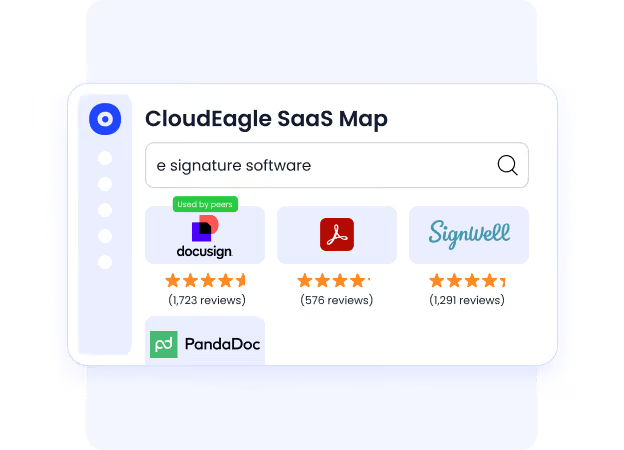
CloudEagle.ai gives employees a centralized app catalog to request apps, ensuring they access only approved tools while IT retains full governance and visibility.
Current Process
Employees request apps through Slack or email, and IT verifies access manually. Ticketing systems lack role-based visibility, often exposing apps that shouldn’t be available to everyone.
Pain Points
Approvals stall, access becomes inconsistent, and shadow IT grows because employees bypass slow processes or missing catalogs.
How We Do It
CloudEagle.ai provides a curated catalog where employees request only approved apps. Each request routes through configurable workflows based on role or department.
Why We Are Better
CloudEagle.ai prevents unauthorized purchases and ensures governance by showing employees only the apps they’re allowed to request, helping teams stay compliant and in control.
B: Automated Approval Workflows That Remove Bottlenecks
CloudEagle.ai ensures app requests never get stuck in inboxes. Approvals move quickly, consistently, and with full visibility across teams.
Current Process
IT spends hours chasing managers for approvals. Emails get lost, and access delays pile up across onboarding or internal moves.
Pain Points
Manual approvals slow productivity and lead to inconsistent decisions. IT loses time verifying justification across multiple threads.

How We Do It
CloudEagle.ai auto-routes approvals to the correct manager, app owner, or finance team. Each step is tracked automatically, eliminating manual follow-ups.
Why We Are Better
CloudEagle.ai reduces IT effort and accelerates access by keeping every approval in a governed workflow with clear accountability and audit logs.
C: Time-Based Access That Removes Permissions Automatically
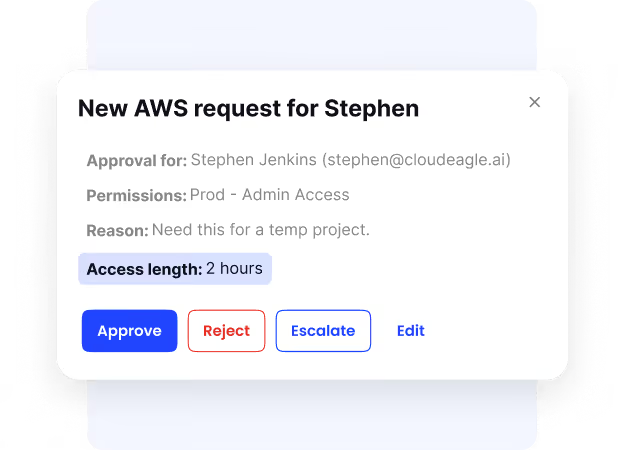
CloudEagle.ai ensures that time-based access always expires on time, eliminating long-term risks created by forgotten permissions.
Current Process
Temporary permissions must be tracked in spreadsheets. IT must manually remember when to revoke access or downgrade user roles.
Pain Points
Unused or excessive access lingers for months, creating security risk and unnecessary license spend.
How We Do It
CloudEagle.ai assigns time-limited access automatically. Permissions expire after the defined period unless renewed.
Why We Are Better
CloudEagle.ai enforces least-privilege access by design. Teams reduce overspending and tighten security with automated expirations.
Also Read: Role-Based Access Control (RBAC): The Key to IT Security Success
D: Zero-Touch Provisioning and Deprovisioning Across Every App
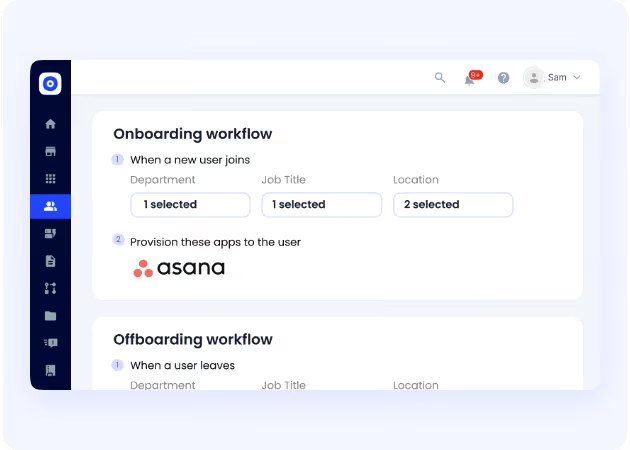
CloudEagle.ai provisions apps automatically, even when the tools aren’t connected to Okta or SailPoint, removing delays and inconsistencies from onboarding and offboarding.
Current Challenges
IT provisions 30–40 apps manually. Many apps fall outside IDPs, and unused licenses aren’t reclaimed after offboarding. Approval proof scatters across emails and tickets.
How We Do It
CloudEagle.ai detects new employees, recommends apps by role, and provisions access automatically through IDPs, direct connectors, or task workflows. Deprovisioning updates license counts instantly.
Why We’re Better
CloudEagle.ai provides one console to provision every app, whether behind Okta or not. IT avoids learning dozens of admin consoles, stays consistent, and reduces errors without expensive IDP tiers.
E: Audit-Ready Access Logs and Complete Governance Records
CloudEagle.ai ensures every access request, approval, provisioning action, and deprovisioning event is fully documented for audits.
Current Process
Approval records live across Slack, JIRA, email, and spreadsheets. Provisioning history is rarely complete, making audits slow and stressful.
Pain Points
Compliance teams lack reliable proof. IT must recreate timelines manually, increasing risk of audit findings or delays.
How We Do It
CloudEagle.ai logs every event, from request to approval to provisioning, and generates PDF audit trails on demand.
Why We Are Better
CloudEagle.ai centralizes the entire user lifecycle, giving auditors traceable evidence with a few clicks and removing the manual burden from IT.
Automate app access without bottlenecks


5. Conclusion
App requests aren’t supposed to feel like negotiations, detective work, or weeklong email threads. But people improvise, managers guess, IT backtracks, and finance gets blindsided by licenses no one remembers approving.
Automating that flow isn’t about speed for the sake of speed. It’s about restoring clarity. It’s about giving every request a predictable path and giving managers the information they never had.
CloudEagle.ai makes that shift feel effortless. It turns scattered decision-making into a guided process, reduces license waste before it appears, and keeps every access change tied to a clear, documented trail.
6. FAQs
1. How to get app access?
Request access through your company’s app portal or approval workflow. Once approved, IT or your admin grants the correct license and permissions.
2. How do I submit an access request?
Use your organization’s request form or access tool, choose the app, explain the need, and submit. The request routes to the right approvers automatically.
3. How to see app access?
Check your company’s app dashboard, SSO portal, or access management system. It lists all tools you currently have permissions for.
4. What are the risks of granting app access?
Improper access can expose sensitive data, create compliance issues, increase license costs, or introduce shadow IT if not reviewed carefully.
5. How do I ask someone to approve a request?
Submit the request through the workflow and the approver gets notified automatically. No chasing, the system handles the reminders.


.avif)


.avif)
.avif)




.png)






.png)

.avif)
.avif)
.avif)


