You need to enable JavaScript in order to use the AI chatbot tool powered by ChatBot

Why Contractors Are Becoming a SaaS Cost & Security Risk

Share via:
blog-cms-banner-bg
Little-Known Negotiation Hacks to Get the Best Deal on Slack
cta-bg-blogDownload Your Copy

HIPAA Compliance Checklist for 2025

Download PDF

There is a decent chance someone who no longer works with your company still has access to your SaaS applications.

Most IT teams do not notice this immediately. They find it during an audit, a renewal review, or while cleaning up unused licenses and realizing a contractor who left months ago still has active access to Slack, Jira, Salesforce, or Google Workspace.

And it is more common than people think. Studies have shown that nearly half of organizations have former employees or contractors retaining access to company systems after leaving.

The problem is not that companies are careless. Contractors are usually onboarded quickly so work can move fast, but offboarding is rarely as structured. Over time, that leaves behind unused licenses, unmanaged accounts, and third-party access that quietly turns into both a cost issue and a security risk.

TL;DR

  • Contractors are provisioned like full-time employees but offboarded far less reliably, creating a persistent SaaS security risk that most IT teams cannot see
  • 50% of companies have discovered former employees still accessing SaaS applications months after departure. For contractors, that number is likely higher
  • Most HRIS systems do not treat contractors the same as FTEs, so automated offboarding workflows never fire when a contract ends
  • The cost impact is real: full-tier licenses paid monthly for contractors who left, duplicate accounts, and license reclamation lag that averages months
  • CloudEagle.ai governs contractor access governance through automated JML workflows, time-based access controls, and a self-service app catalog that keeps every provisioning decision audit-ready

1. The Contractor Access Problem in Plain Terms

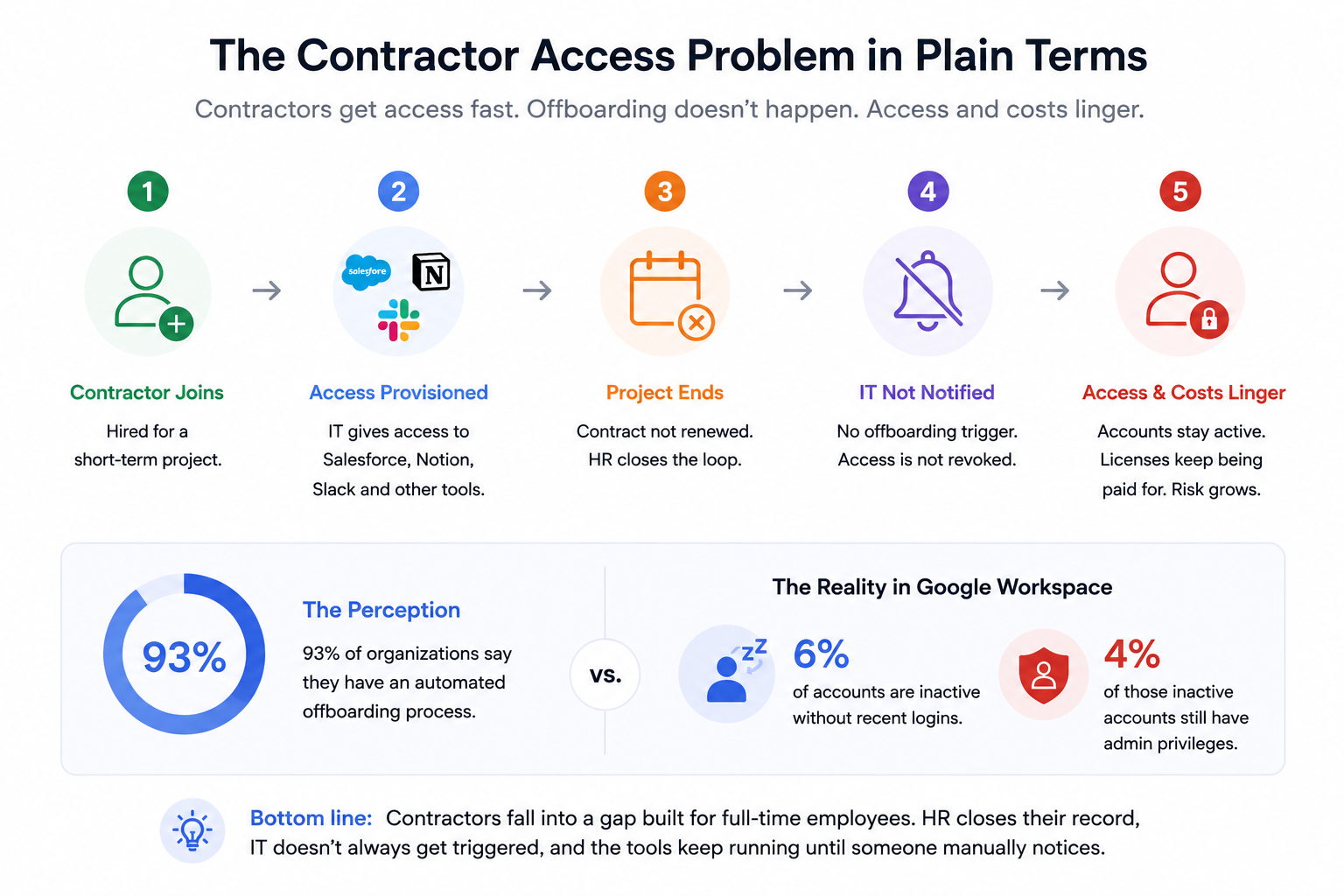
Picture this. A contractor joins for a three-month project. IT provisions them access to Salesforce, Notion, Slack, and a few internal tools. The project ends. Their contract is not renewed. HR closes the loop on their end. IT gets no notification.

Three months later, the contractor's Salesforce account is still active. Their Slack access still works. The licenses are still being paid for. And because their email is still in the system, nobody flagged it.
Access Control Problems

That is not a hypothetical. 93% of organizations claim to have an automated offboarding process. 

But in platforms like Google Workspace, an average of 6% of accounts are inactive without recent logins, and 4% of those have admin privileges. The perception and the reality are very different things.

The problem with contractors, specifically, is that they fall into a gap that was designed for full-time employees. HR closes their record. IT does not always get triggered. And the tools those contractors used keep running until someone manually notices.

2. Why Contractors Fall Through the Governance Gap?

You are dealing with a systems problem, not a process problem. The systems were not designed for this.
Governance Gap

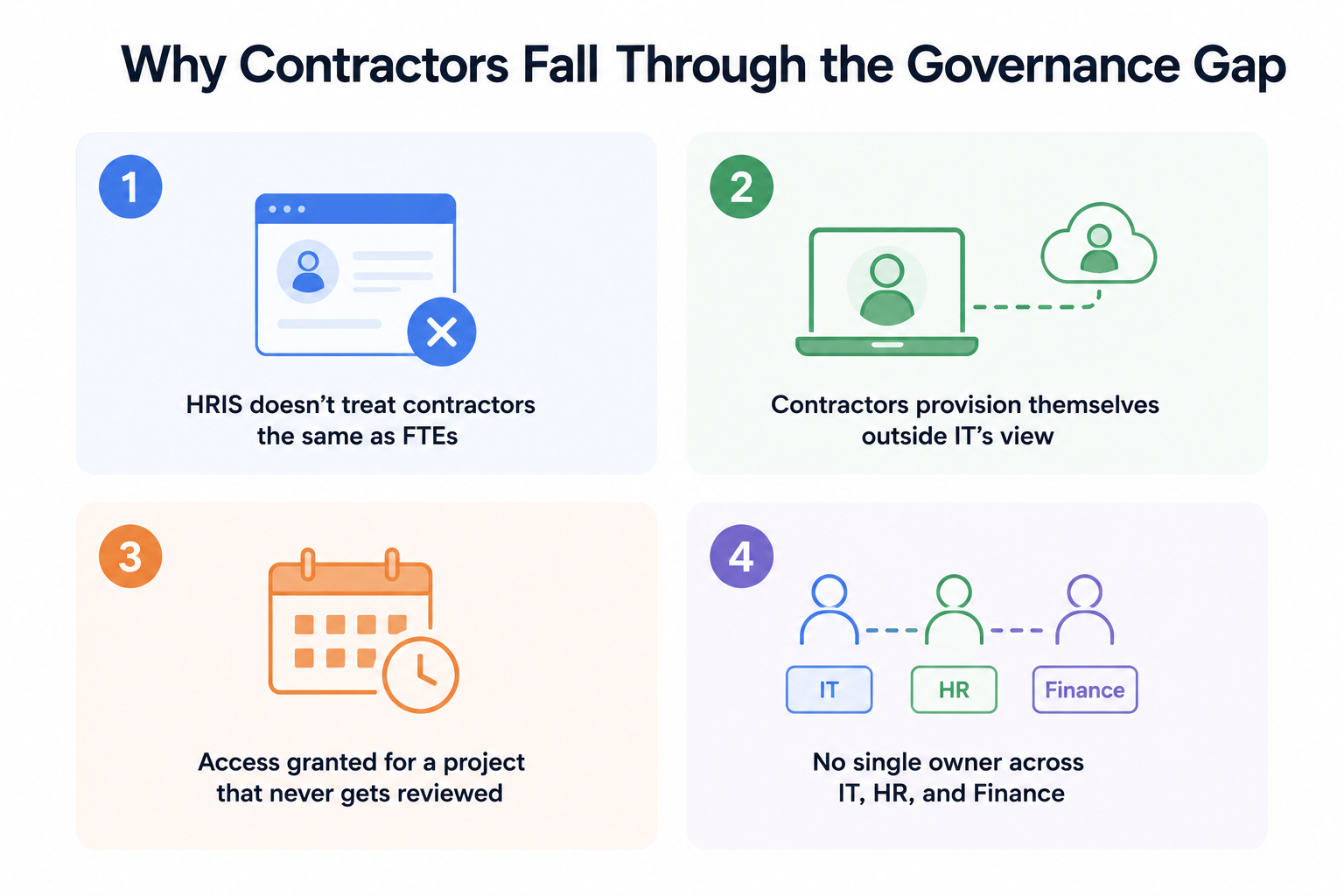
  • HRIS does not treat contractors the same as FTEs: When a full-time employee leaves, your HRIS typically triggers an offboarding workflow. When a contractor's engagement ends, that trigger often does not fire. The contractor record is closed, but the downstream systems never receive notification.
  • Contractors provision themselves outside IT's view: A contractor working remotely signs up for a tool using their personal email to get the job done faster. IT has no visibility. When they leave, that account goes with them. Except it does not always go cleanly. Sometimes the data stays behind.
  • Access granted for a project that never gets reviewed: A 90-day project becomes 6 months. The contractor stays on. Their access expands. When the engagement finally ends, nobody audits what they had because nobody is watching contractor accounts with the same cadence as employee accounts.
  • No single owner across IT, HR, and Finance: IT manages permissions, HR manages contractors, and Finance manages the spend. Meanwhile, SaaS apps keep accumulating users, service accounts, OAuth apps, and API keys faster than teams can keep up.

Nobody owns the contractor access problem end-to-end. That is why it persists.

Does Your IT Team Know Exactly Which Contractors Still Have Active SaaS Access Right Now?

Most don't. This checklist walks through every step of a proper offboarding process so nothing gets left behind.
Get the Checklist

3. The SaaS Cost Impact of Unmanaged Contractor Access

This is where it gets quantifiable. And uncomfortable.

  1. Unused licenses paid for departed contractors: The average contractor tenure is around six months. License reclamation, when it happens manually, lags significantly behind. That means you are regularly paying for months of licenses on accounts that are not being used by anyone.
  2. Full-tier licenses for limited-use access: A contractor who needs read-only access to one database gets provisioned the same way a full-time employee does. Salesforce Professional for someone who checks one report a week. Enterprise Slack for someone on a 60-day engagement. The tier does not match the need, and nobody reviews it until renewal.
  3. Duplicate accounts nobody audited: The contractor has a company-provisioned account. They also have a personal account for the same tool they signed up for before IT got to them. Both are active. One is paid for by the company. One is carrying company data and going entirely unmonitored.

48% of IT staff worry about missing key offboarding steps. For contractors, that worry is even more justified because the process is less structured to begin with.

4. How CloudEagle.ai Helps You Govern Contractor Access?

Most enterprises manage contractor access the same way they manage everything else that falls through the cracks: manually, reactively, and not quite well enough.

The problem is not intent. It is infrastructure. When contractors are not separated from FTEs in your systems, when offboarding does not fire automatically on contract end dates, and when nobody has a complete view of what a contractor actually has access to, gaps are inevitable.

CloudEagle.ai is an AI-powered SaaS Management, Security, and Identity Governance platform that gives IT teams the infrastructure to govern contractor access the way it should have been governed from the start.

The Right Access, For the Right Person, At the Right Time.

Contractor Tagging and Lifecycle Separation

Before governance can work, your systems need to know who contractors are. 

CloudEagle separates contractors from FTEs at the provisioning stage, applying different governance rules, different access policies, and different offboarding triggers from day one.
Access Reviews

  • Contractors are tagged distinctly in the system, so they are never governed like permanent employees
  • Role-based access is provisioned automatically based on engagement type, department, and duration
  • Access is visible by team, department, and user type, so IT always has a complete picture

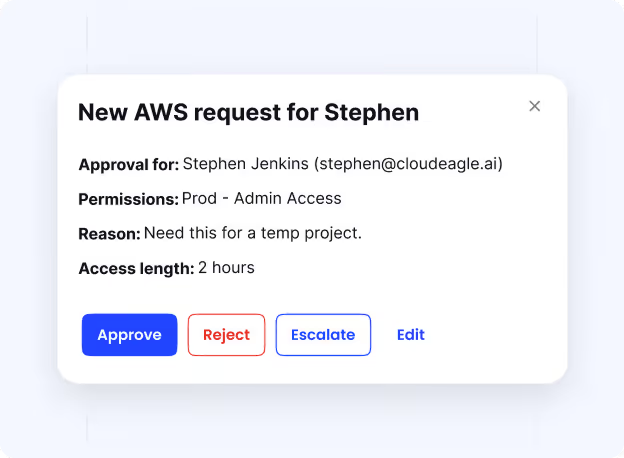
Just-in-Time Access That Expires on Contract End Date

The most consistent source of contractor access risk is access that was not designed to expire. 

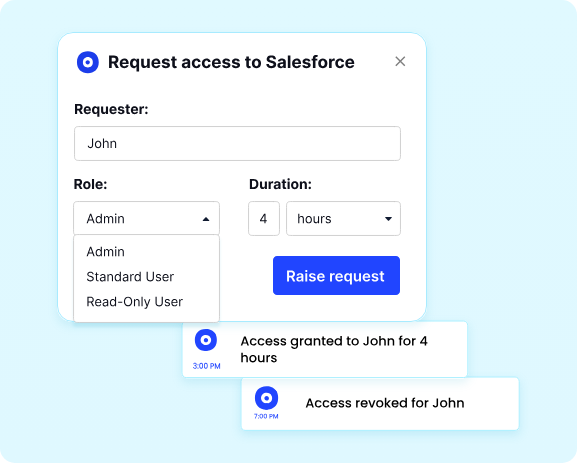
CloudEagle closes that gap with time-based access controls that revoke permissions automatically when the engagement ends, with no reminder, no manual step, and no grace period.
Just In Time Access

  • Access for contractors, projects, or sensitive tasks is automatically revoked when the period ends
  • Governance stays intact without IT having to track or follow up on temporary permissions
  • Licenses are immediately reclaimed and returned to the pool, keeping spend aligned with active headcount

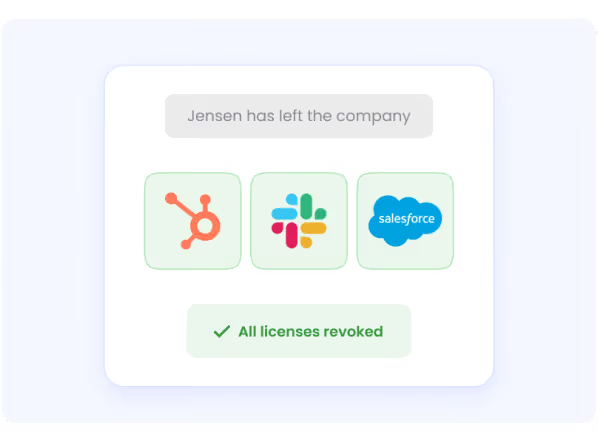
Zero-Touch Offboarding Across Every App, Including Non-SSO

When a contractor's engagement ends, CloudEagle deprovisions access across every application in their profile, including apps that are not connected to your identity provider.
Zero-Touch Offboarding

Zero-Touch Offboarding

  • All app access removed from one unified console, no manual logins into individual apps
  • Deprovisioning rules set once and run automatically, with no dependency on expensive IdP tiers
  • Every offboarding action is logged with a timestamp, giving you audit-ready evidence without manual documentation

"Provisioning and deprovisioning took hours and created security gaps. CloudEagle.ai's automated workflows now deliver Day 1 access for new hires and instant offboarding, saving time and boosting security."

-Sam Middleton, Head of IT, Bloom & Wild

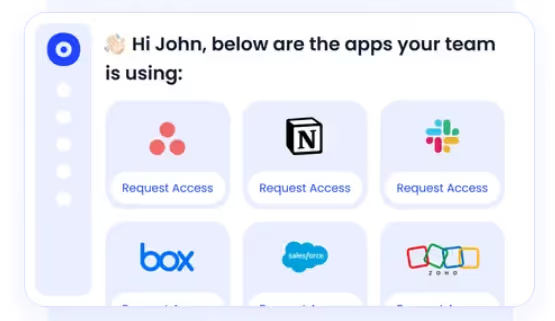
Self-Service App Catalog That Eliminates Shadow Accounts

When contractors cannot get the tools they need quickly through official channels, they use personal accounts. CloudEagle's self-service app catalog gives them a fast, governed alternative.
Self-Service App Catalog

  • Contractors see only the apps approved for their role and engagement type
  • Access requests go through automated approvals, no email chains, no Slack follow-ups
  • Every request, approval, and provisioning action is tracked end-to-end and audit-ready

With 500+ direct integrations, CloudEagle governs contractor access across your full SaaS and AI stack, from provisioning through offboarding, without requiring IT to manually manage each step.

5. Why This Becomes a Bigger Problem Than Just SaaS Spend?

The cost issue is frustrating. The security issue is genuinely dangerous.

Contractor access rarely has a clean lifecycle

Employees usually follow structured onboarding and offboarding processes. Contractors often do not. Managers change, projects get extended, vendors rotate resources, and nobody always remembers to remove every account when the work ends.

That leaves behind active accounts, unused licenses, OAuth connections, and API tokens that quietly stay inside the SaaS environment.

A lot of this access is invisible

Most teams are not actively monitoring old integrations or dormant third-party access.

A contractor connects a tool to Microsoft 365 during a project. The project ends, but the OAuth connection stays active. Someone creates work in a personal Notion workspace because provisioning was taking too long. Temporary API keys created for integrations never get removed.

Over time, security teams lose visibility into what access still exists and whether it is still legitimate.

The compliance risk shows up later

This usually becomes visible during audits or reviews.

SOC 2 auditors want evidence that access was removed when engagements ended. GDPR requires organizations to revoke unnecessary access to personal data. If contractor offboarding is manual or undocumented, proving that the cleanup happened becomes difficult very quickly.

📖 Worth a Read: SaaS Offboarding Security: Why Access Gaps Outlive Employees

Conclusion

Contractor access has become a normal part of enterprise SaaS management, but most organizations still handle it with manual processes that were never designed for it.

The result is familiar: inactive accounts, unused licenses, lingering OAuth connections, and access that stays active long after the work ends.

CloudEagle.ai helps IT teams automate contractor access management with time-based access expiration, automated offboarding, and audit-ready visibility across the SaaS stack.

If contractor offboarding is still manual in your organization, it is probably worth fixing before the next audit or renewal cycle forces the issue.

Frequently Asked Questions

  1. Why is contractor SaaS access a security risk?

Contractors often get broad access quickly, but offboarding is rarely as consistent. Accounts, OAuth connections, and API tokens can stay active long after the engagement ends, creating unnecessary access and visibility gaps across the SaaS environment.

  1. How do you offboard contractors from SaaS apps?

The most effective approach is automated offboarding tied to contract end dates. That includes removing access across SSO and non-SSO apps, reclaiming licenses, and maintaining audit logs without relying on manual follow-ups.

  1. How should enterprises manage contractor software access?

Treat contractors separately from full-time employees. Use SSO, time-based access expiration, automated provisioning and deprovisioning, and regular access reviews to keep visibility and control consistent.

  1. What SaaS licenses are commonly wasted on contractors?

Enterprise licenses for tools like Slack, Salesforce, Microsoft 365, and Zoom are commonly overprovisioned for short-term contractors and often stay active after the engagement ends.

  1. What compliance risks come from poor contractor offboarding?

Frameworks like GDPR, SOC 2, and HIPAA expect organizations to revoke unnecessary access promptly and maintain proof that offboarding happened. Manual processes make it difficult to verify during audits.

Advertisement for a SaaS Subscription Tracking Template with a call-to-action button to download and a partial graphic of a tablet showing charts.Banner promoting a SaaS Agreement Checklist to streamline SaaS management and avoid budget waste with a call-to-action button labeled Download checklist.Blue banner with text 'The Ultimate Employee Offboarding Checklist!' and a black button labeled 'Download checklist' alongside partial views of checklist documents from cloudeagle.ai.Digital ad for download checklist titled 'The Ultimate Checklist for IT Leaders to Optimize SaaS Operations' by cloudeagle.ai, showing checklist pages.Slack Buyer's Guide offer with text 'Unlock insider insights to get the best deal on Slack!' and a button labeled 'Get Your Copy', accompanied by a preview of the guide featuring Slack's logo.Monday Pricing Guide by cloudeagle.ai offering exclusive pricing secrets to maximize investment with a call-to-action button labeled Get Your Copy and an image of the guide's cover.Blue banner for Canva Pricing Guide by cloudeagle.ai offering a guide to Canva costs, features, and alternatives with a call-to-action button saying Get Your Copy.Blue banner with white text reading 'Little-Known Negotiation Hacks to Get the Best Deal on Slack' and a white button labeled 'Get Your Copy'.Blue banner with text 'Little-Known Negotiation Hacks to Get the Best Deal on Monday.com' and a white button labeled 'Get Your Copy'.Blue banner with text 'Little-Known Negotiation Hacks to Get the Best Deal on Canva' and a white button labeled 'Get Your Copy'.Banner with text 'Slack Buyer's Guide' and a 'Download Now' button next to images of a guide titled 'Slack Buyer’s Guide: Features, Pricing & Best Practices'.Digital cover of Monday Pricing Guide with a button labeled Get Your Copy on a blue background.Canva Pricing Guide cover with a button labeled Get Your Copy on a blue gradient background.

Enter your email to
unlock the report

Oops! Something went wrong while submitting the form.
License Count
Benchmark
Per User/Per Year

Enter your email to
unlock the report

Oops! Something went wrong while submitting the form.
License Count
Benchmark
Per User/Per Year

Enter your email to
unlock the report

Oops! Something went wrong while submitting the form.
Notion Plus
License Count
Benchmark
Per User/Per Year
100-500
$67.20 - $78.72
500-1000
$59.52 - $72.00
1000+
$51.84 - $57.60
Canva Pro
License Count
Benchmark
Per User/Per Year
100-500
$74.33-$88.71
500-1000
$64.74-$80.32
1000+
$55.14-$62.34

Enter your email to
unlock the report

Oops! Something went wrong while submitting the form.

Enter your email to
unlock the report

Oops! Something went wrong while submitting the form.
Zoom Business
License Count
Benchmark
Per User/Per Year
100-500
$216.00 - $264.00
500-1000
$180.00 - $216.00
1000+
$156.00 - $180.00

Enter your email to
unlock the report

Oops! Something went wrong while submitting the form.

Get the Right Security Platform To Secure Your Cloud Infrastructure

Please enter a business email
Thank you!
The 2023 SaaS report has been sent to your email. Check your promotional or spam folder.
Oops! Something went wrong while submitting the form.

Access full report

Please enter a business email
Thank you!
The 2023 SaaS report has been sent to your email. Check your promotional or spam folder.
Oops! Something went wrong while submitting the form.

There is a decent chance someone who no longer works with your company still has access to your SaaS applications.

Most IT teams do not notice this immediately. They find it during an audit, a renewal review, or while cleaning up unused licenses and realizing a contractor who left months ago still has active access to Slack, Jira, Salesforce, or Google Workspace.

And it is more common than people think. Studies have shown that nearly half of organizations have former employees or contractors retaining access to company systems after leaving.

The problem is not that companies are careless. Contractors are usually onboarded quickly so work can move fast, but offboarding is rarely as structured. Over time, that leaves behind unused licenses, unmanaged accounts, and third-party access that quietly turns into both a cost issue and a security risk.

TL;DR

  • Contractors are provisioned like full-time employees but offboarded far less reliably, creating a persistent SaaS security risk that most IT teams cannot see
  • 50% of companies have discovered former employees still accessing SaaS applications months after departure. For contractors, that number is likely higher
  • Most HRIS systems do not treat contractors the same as FTEs, so automated offboarding workflows never fire when a contract ends
  • The cost impact is real: full-tier licenses paid monthly for contractors who left, duplicate accounts, and license reclamation lag that averages months
  • CloudEagle.ai governs contractor access governance through automated JML workflows, time-based access controls, and a self-service app catalog that keeps every provisioning decision audit-ready

1. The Contractor Access Problem in Plain Terms

Picture this. A contractor joins for a three-month project. IT provisions them access to Salesforce, Notion, Slack, and a few internal tools. The project ends. Their contract is not renewed. HR closes the loop on their end. IT gets no notification.

Three months later, the contractor's Salesforce account is still active. Their Slack access still works. The licenses are still being paid for. And because their email is still in the system, nobody flagged it.

Access Control Problems

That is not a hypothetical. 93% of organizations claim to have an automated offboarding process. 

But in platforms like Google Workspace, an average of 6% of accounts are inactive without recent logins, and 4% of those have admin privileges. The perception and the reality are very different things.

The problem with contractors, specifically, is that they fall into a gap that was designed for full-time employees. HR closes their record. IT does not always get triggered. And the tools those contractors used keep running until someone manually notices.

2. Why Contractors Fall Through the Governance Gap?

You are dealing with a systems problem, not a process problem. The systems were not designed for this.

Governance Gap

  • HRIS does not treat contractors the same as FTEs: When a full-time employee leaves, your HRIS typically triggers an offboarding workflow. When a contractor's engagement ends, that trigger often does not fire. The contractor record is closed, but the downstream systems never receive notification.
  • Contractors provision themselves outside IT's view: A contractor working remotely signs up for a tool using their personal email to get the job done faster. IT has no visibility. When they leave, that account goes with them. Except it does not always go cleanly. Sometimes the data stays behind.
  • Access granted for a project that never gets reviewed: A 90-day project becomes 6 months. The contractor stays on. Their access expands. When the engagement finally ends, nobody audits what they had because nobody is watching contractor accounts with the same cadence as employee accounts.
  • No single owner across IT, HR, and Finance: IT manages permissions, HR manages contractors, and Finance manages the spend. Meanwhile, SaaS apps keep accumulating users, service accounts, OAuth apps, and API keys faster than teams can keep up.

Nobody owns the contractor access problem end-to-end. That is why it persists.

Does Your IT Team Know Exactly Which Contractors Still Have Active SaaS Access Right Now?

Most don't. This checklist walks through every step of a proper offboarding process so nothing gets left behind.
Get the Checklist

3. The SaaS Cost Impact of Unmanaged Contractor Access

This is where it gets quantifiable. And uncomfortable.

  1. Unused licenses paid for departed contractors: The average contractor tenure is around six months. License reclamation, when it happens manually, lags significantly behind. That means you are regularly paying for months of licenses on accounts that are not being used by anyone.
  2. Full-tier licenses for limited-use access: A contractor who needs read-only access to one database gets provisioned the same way a full-time employee does. Salesforce Professional for someone who checks one report a week. Enterprise Slack for someone on a 60-day engagement. The tier does not match the need, and nobody reviews it until renewal.
  3. Duplicate accounts nobody audited: The contractor has a company-provisioned account. They also have a personal account for the same tool they signed up for before IT got to them. Both are active. One is paid for by the company. One is carrying company data and going entirely unmonitored.

48% of IT staff worry about missing key offboarding steps. For contractors, that worry is even more justified because the process is less structured to begin with.

4. How CloudEagle.ai Helps You Govern Contractor Access?

Most enterprises manage contractor access the same way they manage everything else that falls through the cracks: manually, reactively, and not quite well enough.

The problem is not intent. It is infrastructure. When contractors are not separated from FTEs in your systems, when offboarding does not fire automatically on contract end dates, and when nobody has a complete view of what a contractor actually has access to, gaps are inevitable.

CloudEagle.ai is an AI-powered SaaS Management, Security, and Identity Governance platform that gives IT teams the infrastructure to govern contractor access the way it should have been governed from the start.

The Right Access, For the Right Person, At the Right Time.

Contractor Tagging and Lifecycle Separation

Before governance can work, your systems need to know who contractors are. 

CloudEagle separates contractors from FTEs at the provisioning stage, applying different governance rules, different access policies, and different offboarding triggers from day one.

Access Reviews

  • Contractors are tagged distinctly in the system, so they are never governed like permanent employees
  • Role-based access is provisioned automatically based on engagement type, department, and duration
  • Access is visible by team, department, and user type, so IT always has a complete picture

Just-in-Time Access That Expires on Contract End Date

The most consistent source of contractor access risk is access that was not designed to expire. 

CloudEagle closes that gap with time-based access controls that revoke permissions automatically when the engagement ends, with no reminder, no manual step, and no grace period.

Just In Time Access

  • Access for contractors, projects, or sensitive tasks is automatically revoked when the period ends
  • Governance stays intact without IT having to track or follow up on temporary permissions
  • Licenses are immediately reclaimed and returned to the pool, keeping spend aligned with active headcount

Zero-Touch Offboarding Across Every App, Including Non-SSO

When a contractor's engagement ends, CloudEagle deprovisions access across every application in their profile, including apps that are not connected to your identity provider.

Zero-Touch Offboarding

Zero-Touch Offboarding

  • All app access removed from one unified console, no manual logins into individual apps
  • Deprovisioning rules set once and run automatically, with no dependency on expensive IdP tiers
  • Every offboarding action is logged with a timestamp, giving you audit-ready evidence without manual documentation

"Provisioning and deprovisioning took hours and created security gaps. CloudEagle.ai's automated workflows now deliver Day 1 access for new hires and instant offboarding, saving time and boosting security."

-Sam Middleton, Head of IT, Bloom & Wild

Self-Service App Catalog That Eliminates Shadow Accounts

When contractors cannot get the tools they need quickly through official channels, they use personal accounts. CloudEagle's self-service app catalog gives them a fast, governed alternative.

Self-Service App Catalog

  • Contractors see only the apps approved for their role and engagement type
  • Access requests go through automated approvals, no email chains, no Slack follow-ups
  • Every request, approval, and provisioning action is tracked end-to-end and audit-ready

With 500+ direct integrations, CloudEagle governs contractor access across your full SaaS and AI stack, from provisioning through offboarding, without requiring IT to manually manage each step.

5. Why This Becomes a Bigger Problem Than Just SaaS Spend?

The cost issue is frustrating. The security issue is genuinely dangerous.

Contractor access rarely has a clean lifecycle

Employees usually follow structured onboarding and offboarding processes. Contractors often do not. Managers change, projects get extended, vendors rotate resources, and nobody always remembers to remove every account when the work ends.

That leaves behind active accounts, unused licenses, OAuth connections, and API tokens that quietly stay inside the SaaS environment.

A lot of this access is invisible

Most teams are not actively monitoring old integrations or dormant third-party access.

A contractor connects a tool to Microsoft 365 during a project. The project ends, but the OAuth connection stays active. Someone creates work in a personal Notion workspace because provisioning was taking too long. Temporary API keys created for integrations never get removed.

Over time, security teams lose visibility into what access still exists and whether it is still legitimate.

The compliance risk shows up later

This usually becomes visible during audits or reviews.

SOC 2 auditors want evidence that access was removed when engagements ended. GDPR requires organizations to revoke unnecessary access to personal data. If contractor offboarding is manual or undocumented, proving that the cleanup happened becomes difficult very quickly.

📖 Worth a Read: SaaS Offboarding Security: Why Access Gaps Outlive Employees

Conclusion

Contractor access has become a normal part of enterprise SaaS management, but most organizations still handle it with manual processes that were never designed for it.

The result is familiar: inactive accounts, unused licenses, lingering OAuth connections, and access that stays active long after the work ends.

CloudEagle.ai helps IT teams automate contractor access management with time-based access expiration, automated offboarding, and audit-ready visibility across the SaaS stack.

If contractor offboarding is still manual in your organization, it is probably worth fixing before the next audit or renewal cycle forces the issue.

Frequently Asked Questions

  1. Why is contractor SaaS access a security risk?

Contractors often get broad access quickly, but offboarding is rarely as consistent. Accounts, OAuth connections, and API tokens can stay active long after the engagement ends, creating unnecessary access and visibility gaps across the SaaS environment.

  1. How do you offboard contractors from SaaS apps?

The most effective approach is automated offboarding tied to contract end dates. That includes removing access across SSO and non-SSO apps, reclaiming licenses, and maintaining audit logs without relying on manual follow-ups.

  1. How should enterprises manage contractor software access?

Treat contractors separately from full-time employees. Use SSO, time-based access expiration, automated provisioning and deprovisioning, and regular access reviews to keep visibility and control consistent.

  1. What SaaS licenses are commonly wasted on contractors?

Enterprise licenses for tools like Slack, Salesforce, Microsoft 365, and Zoom are commonly overprovisioned for short-term contractors and often stay active after the engagement ends.

  1. What compliance risks come from poor contractor offboarding?

Frameworks like GDPR, SOC 2, and HIPAA expect organizations to revoke unnecessary access promptly and maintain proof that offboarding happened. Manual processes make it difficult to verify during audits.

CloudEagle.ai recognized in the 2025 Gartner® Magic Quadrant™ for SaaS Management Platforms
Download now
gartner chart
5x
Faster employee
onboarding
80%
Reduction in time for
user access reviews
30k
Workflows
automated
$15Bn
Analyzed in
contract spend
$2Bn
Saved in
SaaS spend

Streamline SaaS governance and save 10-30%

Book a Demo with Expert
CTA image
One platform to Manage
all SaaS Products
Learn More