You need to enable JavaScript in order to use the AI chatbot tool powered by ChatBot

Application Rationalization Checklist: What to Review, Keep, and Retire

Share via:
blog-cms-banner-bg
Little-Known Negotiation Hacks to Get the Best Deal on Slack
cta-bg-blogDownload Your Copy

HIPAA Compliance Checklist for 2025

Download PDF

SaaS Optimization Guide

Learn how to identify redundant applications, consolidate tools, and reduce operational complexity across your SaaS stack.

Download Guide
CTA Thumbnail

SaaS sprawl doesn’t happen overnight. It builds quietly as teams adopt tools to solve immediate problems, upgrade licenses without review, and renew software no one questions anymore. Over time, this creates overlapping apps, rising costs, and growing security exposure.

For enterprises, application rationalization is no longer a one-time cleanup exercise. 

It’s an ongoing discipline that helps organizations reduce redundancy, control spend, and regain visibility across their software ecosystem.

In this blog, you’ll learn what application rationalization really means, why it’s critical for modern IT teams, how to apply an application rationalization checklist, where initiatives often fail, and how automation simplifies the entire process.

TL;DR

  • Application rationalization helps enterprises reduce redundancy, control spend, and lower risk.
  • Duplicate tools, unused apps, and Shadow IT drive most inefficiencies.
  • A structured application rationalization checklist enables data-driven decisions.
  • Manual, spreadsheet-based rationalization doesn’t scale for large SaaS stacks.
  • CloudEagle.ai automates discovery, analysis, and retain–replace–retire decisions.

1. What Is Application Rationalization?

Application rationalization is the structured process of evaluating all applications in use and deciding which ones to keep, consolidate, replace, or retire. The goal is to align software usage with business value, cost efficiency, and risk tolerance.

At an enterprise level, IT application rationalization goes beyond counting tools. It assesses usage, business criticality, security posture, compliance impact, and total cost of ownership. 

This creates a data-driven foundation for smarter software decisions.

A strong app rationalization framework ensures decisions are repeatable and defensible, not subjective or political.

SaaS Operations Checklist

Use this checklist to evaluate application usage, ownership, cost, and value for rationalization decisions.

Get Checklist
CTA Thumbnail

2. Why Application Rationalization Is Critical?

As organizations scale, software stacks become harder to manage. Without regular rationalization, complexity grows faster than control.

A. Duplicate tools doing the same job

Different teams often adopt similar tools independently. What starts as flexibility quickly turns into fragmentation across workflows and data.

Common duplication issues include:

  • Multiple project management  tools across teams
  • Overlapping design, collaboration, or communication apps
  • Separate tools for the same function in different departments
  • Redundant licenses paid for parallel solutions
  • Inconsistent workflows and reporting

SaaS rationalization helps consolidate overlapping tools and standardize how work gets done.

B. Uncontrolled growth in software spend

Software spend rarely spikes overnight. It grows quietly through unused licenses, tier upgrades, and auto-renewals that go unnoticed.

Typical cost drivers include:

  • Licenses assigned but never used
  • Automatic renewals without usage review
  • Premium plans purchased “just in case.”
  • Redundant tools renewed by different teams
  • No clear ownership for spending accountability

Application rationalization introduces discipline into software investment decisions by tying spend to real value.

C. Security and compliance exposure

Every additional application expands the organization’s attack surface. Apps that aren’t actively reviewed often lack proper access controls, security configurations, or vendor oversight.

Common risk areas include:

  • Users with lingering access after role changes
  • Admin privileges granted without review
  • Apps operating outside SSO and logging
  • Missing vendor security assessments
  • Inconsistent compliance controls

Without rationalization, Shadow IT becomes a long-term security and compliance liability.

SaaS Management Best Practices

Understand how enterprises standardize app rationalization using governance frameworks and lifecycle management processes.

Read Best Practices
CTA Thumbnail

3. Application Rationalization Checklist

A practical application rationalization checklist helps teams move from gut-driven decisions to structured evaluation. These are the key steps enterprises should follow.

A. Discovering every application in use

You can’t rationalize what you can’t see. Full visibility is the foundation of any rationalization effort.

Checklist focus areas:

  • Applications discovered via SSO, finance systems, browser activity, and usage data
  • Paid, free, trial, and department-owned tools included
  • Mapping each application to a business owner and a technical owner

Complete discovery prevents blind spots and ensures no app escapes review.

B. Spotting duplicate and overlapping tools

Once visibility is established, the next step is identifying redundancy across the stack.

Checklist focus areas:

  • Tools serving the same or similar functions
  • Overlapping features across multiple applications
  • Different departments use different tools for the same job

This is where the biggest consolidation opportunities typically emerge.

C. Reviewing usage and adoption levels

Not every application delivers ongoing value. Usage data helps separate mission-critical tools from shelfware.

Checklist focus areas:

  • Active versus inactive users
  • Frequency of logins and engagement
  • Feature and license tier adoption

Low usage is often the clearest signal to retire, downgrade, or consolidate an app.

D. Evaluating business criticality

Some applications may show low usage but still play a strategic role. Usage alone shouldn’t drive decisions.

Checklist focus areas:

  • Impact on core business operations
  • Dependency on critical teams or workflows
  • Complexity and cost of replacing the application

Rationalization balances adoption metrics with real business impact.

E. Assessing security and compliance risk

Security posture should directly influence rationalization decisions. High-risk apps deserve closer scrutiny.

Checklist focus areas:

  • Access controls and admin privilege distribution
  • Vendor security posture and certifications
  • Compliance requirements and audit exposure
  • Sensitivity of data handled by the app

Risk-heavy applications often become candidates for consolidation or retirement.

F. Deciding what to retain, replace, or retire

This is where insight turns into action. Clear criteria ensure decisions are consistent and defensible.

Checklist focus areas:

  • Retain applications with high value and strong adoption
  • Replace redundant or costly tools with better alternatives
  • Retire low-usage, high-risk, or outdated applications

Defined decision rules make application rationalization scalable across the enterprise.

4. Application Rationalization Checklist Template

An application rationalization checklist template standardizes evaluations across teams and departments. It ensures every app is reviewed using the same criteria instead of subjective opinions.

Templates help IT teams maintain consistency while accelerating decision-making. 

Evaluation Area What to Review Key Decision Criteria Review Frequency
Application Inventory All apps in use across SSO, finance, and usage data Do we have complete visibility into paid, free, and shadow apps? Annual
Duplicate Tools Overlapping apps by category Are multiple tools solving the same problem? Annual
Usage & Adoption Active users, frequency, feature usage Is the app actively used and delivering value? Quarterly
Business Criticality Dependency on core workflows Would removing this app disrupt operations? Annual
Cost & Contracts License cost, renewal terms, notice periods Is the cost justified by usage and value? Annual
Security & Compliance Access controls, vendor posture, data sensitivity Does the app introduce unnecessary risk? Annual
Final Decision Retain, replace, or retire Should the app stay, be consolidated, or be removed? Annual

5. Why Application Rationalization Fails?

Despite good intentions, many rationalization efforts stall or fail entirely.

A. Lack of complete application visibility

Rationalization decisions are only as good as the visibility behind them. When discovery relies solely on SSO or finance data, a large portion of the application landscape remains hidden.

Common visibility gaps include:

  • Applications used without SSO integration
  • Free or trial tools not captured in finance systems
  • Department-owned or browser-based apps
  • AI-powered tools adopted outside procurement
  • Incomplete ownership mapping

Visibility gaps undermine the entire rationalization process and lead to missed risk and savings opportunities.

B. Resistance from business stakeholders

Teams often become attached to the tools they use daily. Without clear data, rationalization conversations quickly turn subjective.

Typical resistance points include:

  • Perceived loss of productivity
  • Fear of workflow disruption
  • Preference for familiar tools
  • Lack of visibility into actual usage
  • No shared evaluation criteria

Usage and cost data help shift discussions from personal preference to measurable business impact.

C. Manual analysis that doesn’t scale

Spreadsheets and one-off reviews might work for a handful of applications, but they fail quickly at enterprise scale. Data becomes outdated, reviews are inconsistent, and follow-through breaks down.

Scaling challenges include:

  • Static data that doesn’t reflect real usage
  • High manual effort for every review cycle
  • No automated alerts or updates
  • Difficulty tracking decisions over time
  • Inconsistent criteria across teams

Application rationalization needs automation to remain accurate, repeatable, and effective over time.

6. How CloudEagle.ai Automates Application Rationalization?

Application rationalization is no longer a one-time cleanup exercise; it needs to be continuous, data-driven, and automated. 

CloudEagle.ai removes the manual effort traditionally involved in identifying, evaluating, and eliminating redundant SaaS applications.

Here’s how CloudEagle automates application rationalization end-to-end:

A. Discovers Every Application, Approved or Not

CloudEagle automatically discovers all SaaS and AI applications in use across the organization by correlating:

  • Login and SSO data
  • Spend and credit card transactions
  • Direct app integrations

This ensures visibility into duplicate, overlapping, free, and unsanctioned tools that often escape IT oversight.

Outcome: A complete, always-updated application inventory, no spreadsheets required.

B. Identifies Redundant & Overlapping Applications Using AI

CloudEagle’s AI categorization engine analyzes applications based on:

  • Functional overlap (e.g., multiple project management or note-taking tools)
  • Department-level usage patterns
  • User-level access across similar tools
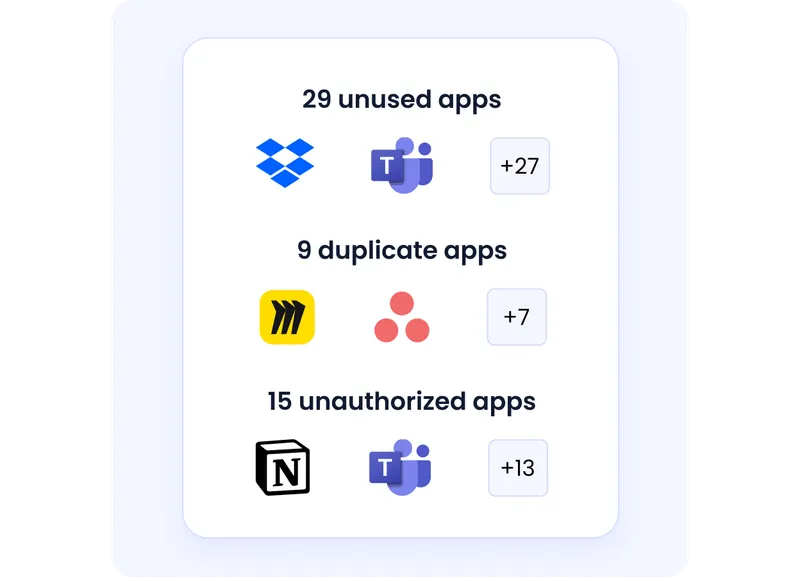
Instead of relying on manual tagging, CloudEagle intelligently groups duplicate apps and highlights overlaps across teams.

Outcome: Clear, data-backed recommendations on which apps to consolidate or eliminate.

C. Maps Users to Duplicate Tools

Beyond identifying duplicate apps, CloudEagle shows:

  • Which users have access to multiple similar tools
  • Where licenses overlap across departments
  • Which tools are actively used vs. rarely touched
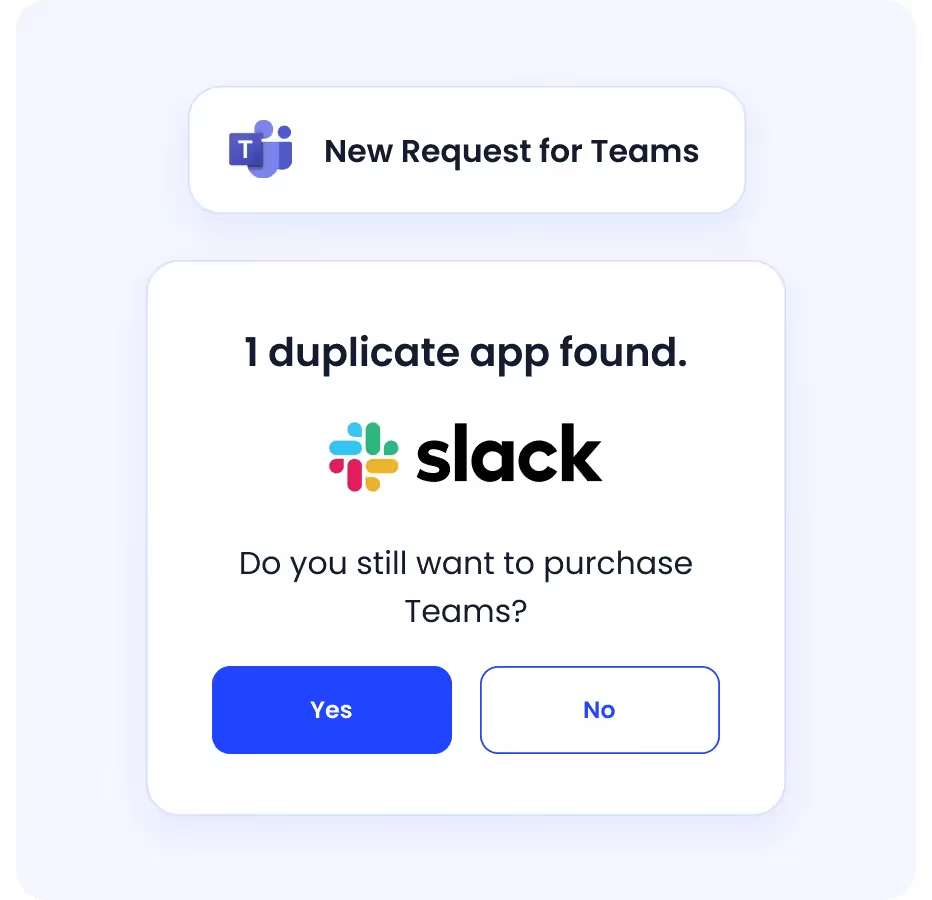
This allows teams to rationalize users, not just applications.

Outcome: Safer consolidation without disrupting productivity.

D. Quantifies Cost, Risk, and Impact

For every redundant or underutilized app, CloudEagle surfaces:

  • License and spend impact
  • Usage trends over time
  • Security and compliance risk signals

This helps IT, security, and procurement teams prioritize rationalization efforts based on real business impact.

Outcome: Decisions driven by data, not gut feel.

E. Enables Action, Directly from the Platform

CloudEagle doesn’t stop at insights. Teams can take action instantly by:

  • Reclaiming or removing unused licenses
  • Deprovisioning access
  • Notifying users or managers via Slack/email
  • Triggering workflows or ITSM tickets

All remediation happens without switching tools.

Outcome: Faster rationalization with less operational friction.

F. Makes Application Rationalization Continuous

Unlike periodic cleanup projects, CloudEagle continuously monitors:

  • New app adoption
  • Emerging duplicates
  • Changes in usage or spend

This ensures rationalization is ongoing, automated, and scalable as the SaaS stack grows.

Outcome: Long-term SaaS hygiene, not short-term fixes.

7. In A Nutshell 

Application rationalization is essential for enterprises looking to control complexity, reduce waste, and improve security. Without a structured approach, software stacks grow faster than teams can manage.

A consistent application rationalization checklist helps organizations evaluate tools objectively, align software with business value, and reduce long-term risk. When rationalization is continuous instead of reactive, benefits compound over time.

CloudEagle.ai simplifies application rationalization by turning visibility and usage data into actionable decisions, helping IT teams stay in control as their SaaS environments evolve.

Book a free demo to see how CloudEagle.ai streamlines application rationalization at scale.

Frequently Asked Questions 

1. What is the goal of application rationalization?

The goal is to reduce redundancy, control software spend, improve security, and align applications with business value.

2. How do companies decide which apps to retire?

Apps are typically retired based on low usage, high cost, security risk, redundancy, and availability of better alternatives.

3. How often should application rationalization be done?

Most enterprises conduct application rationalization annually, with lighter quarterly reviews for high-cost or high-risk apps.

4. What is the Gartner time framework for application rationalization?

Gartner typically recommends a phased approach—assess, categorize, decide, and execute—repeated on a regular cycle to maintain control over application portfolios.

Advertisement for a SaaS Subscription Tracking Template with a call-to-action button to download and a partial graphic of a tablet showing charts.Banner promoting a SaaS Agreement Checklist to streamline SaaS management and avoid budget waste with a call-to-action button labeled Download checklist.Blue banner with text 'The Ultimate Employee Offboarding Checklist!' and a black button labeled 'Download checklist' alongside partial views of checklist documents from cloudeagle.ai.Digital ad for download checklist titled 'The Ultimate Checklist for IT Leaders to Optimize SaaS Operations' by cloudeagle.ai, showing checklist pages.Slack Buyer's Guide offer with text 'Unlock insider insights to get the best deal on Slack!' and a button labeled 'Get Your Copy', accompanied by a preview of the guide featuring Slack's logo.Monday Pricing Guide by cloudeagle.ai offering exclusive pricing secrets to maximize investment with a call-to-action button labeled Get Your Copy and an image of the guide's cover.Blue banner for Canva Pricing Guide by cloudeagle.ai offering a guide to Canva costs, features, and alternatives with a call-to-action button saying Get Your Copy.Blue banner with white text reading 'Little-Known Negotiation Hacks to Get the Best Deal on Slack' and a white button labeled 'Get Your Copy'.Blue banner with text 'Little-Known Negotiation Hacks to Get the Best Deal on Monday.com' and a white button labeled 'Get Your Copy'.Blue banner with text 'Little-Known Negotiation Hacks to Get the Best Deal on Canva' and a white button labeled 'Get Your Copy'.Banner with text 'Slack Buyer's Guide' and a 'Download Now' button next to images of a guide titled 'Slack Buyer’s Guide: Features, Pricing & Best Practices'.Digital cover of Monday Pricing Guide with a button labeled Get Your Copy on a blue background.Canva Pricing Guide cover with a button labeled Get Your Copy on a blue gradient background.

Enter your email to
unlock the report

Oops! Something went wrong while submitting the form.
License Count
Benchmark
Per User/Per Year

Enter your email to
unlock the report

Oops! Something went wrong while submitting the form.
License Count
Benchmark
Per User/Per Year

Enter your email to
unlock the report

Oops! Something went wrong while submitting the form.
Notion Plus
License Count
Benchmark
Per User/Per Year
100-500
$67.20 - $78.72
500-1000
$59.52 - $72.00
1000+
$51.84 - $57.60
Canva Pro
License Count
Benchmark
Per User/Per Year
100-500
$74.33-$88.71
500-1000
$64.74-$80.32
1000+
$55.14-$62.34

Enter your email to
unlock the report

Oops! Something went wrong while submitting the form.

Enter your email to
unlock the report

Oops! Something went wrong while submitting the form.
Zoom Business
License Count
Benchmark
Per User/Per Year
100-500
$216.00 - $264.00
500-1000
$180.00 - $216.00
1000+
$156.00 - $180.00

Enter your email to
unlock the report

Oops! Something went wrong while submitting the form.

Get the Right Security Platform To Secure Your Cloud Infrastructure

Please enter a business email
Thank you!
The 2023 SaaS report has been sent to your email. Check your promotional or spam folder.
Oops! Something went wrong while submitting the form.

Access full report

Please enter a business email
Thank you!
The 2023 SaaS report has been sent to your email. Check your promotional or spam folder.
Oops! Something went wrong while submitting the form.

SaaS Optimization Guide

Learn how to identify redundant applications, consolidate tools, and reduce operational complexity across your SaaS stack.

Download Guide
CTA Thumbnail

SaaS sprawl doesn’t happen overnight. It builds quietly as teams adopt tools to solve immediate problems, upgrade licenses without review, and renew software no one questions anymore. Over time, this creates overlapping apps, rising costs, and growing security exposure.

For enterprises, application rationalization is no longer a one-time cleanup exercise. 

It’s an ongoing discipline that helps organizations reduce redundancy, control spend, and regain visibility across their software ecosystem.

In this blog, you’ll learn what application rationalization really means, why it’s critical for modern IT teams, how to apply an application rationalization checklist, where initiatives often fail, and how automation simplifies the entire process.

TL;DR

  • Application rationalization helps enterprises reduce redundancy, control spend, and lower risk.
  • Duplicate tools, unused apps, and Shadow IT drive most inefficiencies.
  • A structured application rationalization checklist enables data-driven decisions.
  • Manual, spreadsheet-based rationalization doesn’t scale for large SaaS stacks.
  • CloudEagle.ai automates discovery, analysis, and retain–replace–retire decisions.

1. What Is Application Rationalization?

Application rationalization is the structured process of evaluating all applications in use and deciding which ones to keep, consolidate, replace, or retire. The goal is to align software usage with business value, cost efficiency, and risk tolerance.

At an enterprise level, IT application rationalization goes beyond counting tools. It assesses usage, business criticality, security posture, compliance impact, and total cost of ownership. 

This creates a data-driven foundation for smarter software decisions.

A strong app rationalization framework ensures decisions are repeatable and defensible, not subjective or political.

SaaS Operations Checklist

Use this checklist to evaluate application usage, ownership, cost, and value for rationalization decisions.

Get Checklist
CTA Thumbnail

2. Why Application Rationalization Is Critical?

As organizations scale, software stacks become harder to manage. Without regular rationalization, complexity grows faster than control.

A. Duplicate tools doing the same job

Different teams often adopt similar tools independently. What starts as flexibility quickly turns into fragmentation across workflows and data.

Common duplication issues include:

  • Multiple project management  tools across teams
  • Overlapping design, collaboration, or communication apps
  • Separate tools for the same function in different departments
  • Redundant licenses paid for parallel solutions
  • Inconsistent workflows and reporting

SaaS rationalization helps consolidate overlapping tools and standardize how work gets done.

B. Uncontrolled growth in software spend

Software spend rarely spikes overnight. It grows quietly through unused licenses, tier upgrades, and auto-renewals that go unnoticed.

Typical cost drivers include:

  • Licenses assigned but never used
  • Automatic renewals without usage review
  • Premium plans purchased “just in case.”
  • Redundant tools renewed by different teams
  • No clear ownership for spending accountability

Application rationalization introduces discipline into software investment decisions by tying spend to real value.

C. Security and compliance exposure

Every additional application expands the organization’s attack surface. Apps that aren’t actively reviewed often lack proper access controls, security configurations, or vendor oversight.

Common risk areas include:

  • Users with lingering access after role changes
  • Admin privileges granted without review
  • Apps operating outside SSO and logging
  • Missing vendor security assessments
  • Inconsistent compliance controls

Without rationalization, Shadow IT becomes a long-term security and compliance liability.

SaaS Management Best Practices

Understand how enterprises standardize app rationalization using governance frameworks and lifecycle management processes.

Read Best Practices
CTA Thumbnail

3. Application Rationalization Checklist

A practical application rationalization checklist helps teams move from gut-driven decisions to structured evaluation. These are the key steps enterprises should follow.

A. Discovering every application in use

You can’t rationalize what you can’t see. Full visibility is the foundation of any rationalization effort.

Checklist focus areas:

  • Applications discovered via SSO, finance systems, browser activity, and usage data
  • Paid, free, trial, and department-owned tools included
  • Mapping each application to a business owner and a technical owner

Complete discovery prevents blind spots and ensures no app escapes review.

B. Spotting duplicate and overlapping tools

Once visibility is established, the next step is identifying redundancy across the stack.

Checklist focus areas:

  • Tools serving the same or similar functions
  • Overlapping features across multiple applications
  • Different departments use different tools for the same job

This is where the biggest consolidation opportunities typically emerge.

C. Reviewing usage and adoption levels

Not every application delivers ongoing value. Usage data helps separate mission-critical tools from shelfware.

Checklist focus areas:

  • Active versus inactive users
  • Frequency of logins and engagement
  • Feature and license tier adoption

Low usage is often the clearest signal to retire, downgrade, or consolidate an app.

D. Evaluating business criticality

Some applications may show low usage but still play a strategic role. Usage alone shouldn’t drive decisions.

Checklist focus areas:

  • Impact on core business operations
  • Dependency on critical teams or workflows
  • Complexity and cost of replacing the application

Rationalization balances adoption metrics with real business impact.

E. Assessing security and compliance risk

Security posture should directly influence rationalization decisions. High-risk apps deserve closer scrutiny.

Checklist focus areas:

  • Access controls and admin privilege distribution
  • Vendor security posture and certifications
  • Compliance requirements and audit exposure
  • Sensitivity of data handled by the app

Risk-heavy applications often become candidates for consolidation or retirement.

F. Deciding what to retain, replace, or retire

This is where insight turns into action. Clear criteria ensure decisions are consistent and defensible.

Checklist focus areas:

  • Retain applications with high value and strong adoption
  • Replace redundant or costly tools with better alternatives
  • Retire low-usage, high-risk, or outdated applications

Defined decision rules make application rationalization scalable across the enterprise.

4. Application Rationalization Checklist Template

An application rationalization checklist template standardizes evaluations across teams and departments. It ensures every app is reviewed using the same criteria instead of subjective opinions.

Templates help IT teams maintain consistency while accelerating decision-making. 

Evaluation Area What to Review Key Decision Criteria Review Frequency
Application Inventory All apps in use across SSO, finance, and usage data Do we have complete visibility into paid, free, and shadow apps? Annual
Duplicate Tools Overlapping apps by category Are multiple tools solving the same problem? Annual
Usage & Adoption Active users, frequency, feature usage Is the app actively used and delivering value? Quarterly
Business Criticality Dependency on core workflows Would removing this app disrupt operations? Annual
Cost & Contracts License cost, renewal terms, notice periods Is the cost justified by usage and value? Annual
Security & Compliance Access controls, vendor posture, data sensitivity Does the app introduce unnecessary risk? Annual
Final Decision Retain, replace, or retire Should the app stay, be consolidated, or be removed? Annual

5. Why Application Rationalization Fails?

Despite good intentions, many rationalization efforts stall or fail entirely.

A. Lack of complete application visibility

Rationalization decisions are only as good as the visibility behind them. When discovery relies solely on SSO or finance data, a large portion of the application landscape remains hidden.

Common visibility gaps include:

  • Applications used without SSO integration
  • Free or trial tools not captured in finance systems
  • Department-owned or browser-based apps
  • AI-powered tools adopted outside procurement
  • Incomplete ownership mapping

Visibility gaps undermine the entire rationalization process and lead to missed risk and savings opportunities.

B. Resistance from business stakeholders

Teams often become attached to the tools they use daily. Without clear data, rationalization conversations quickly turn subjective.

Typical resistance points include:

  • Perceived loss of productivity
  • Fear of workflow disruption
  • Preference for familiar tools
  • Lack of visibility into actual usage
  • No shared evaluation criteria

Usage and cost data help shift discussions from personal preference to measurable business impact.

C. Manual analysis that doesn’t scale

Spreadsheets and one-off reviews might work for a handful of applications, but they fail quickly at enterprise scale. Data becomes outdated, reviews are inconsistent, and follow-through breaks down.

Scaling challenges include:

  • Static data that doesn’t reflect real usage
  • High manual effort for every review cycle
  • No automated alerts or updates
  • Difficulty tracking decisions over time
  • Inconsistent criteria across teams

Application rationalization needs automation to remain accurate, repeatable, and effective over time.

6. How CloudEagle.ai Automates Application Rationalization?

Application rationalization is no longer a one-time cleanup exercise; it needs to be continuous, data-driven, and automated. 

CloudEagle.ai removes the manual effort traditionally involved in identifying, evaluating, and eliminating redundant SaaS applications.

Here’s how CloudEagle automates application rationalization end-to-end:

A. Discovers Every Application, Approved or Not

CloudEagle automatically discovers all SaaS and AI applications in use across the organization by correlating:

  • Login and SSO data
  • Spend and credit card transactions
  • Direct app integrations

This ensures visibility into duplicate, overlapping, free, and unsanctioned tools that often escape IT oversight.

Outcome: A complete, always-updated application inventory, no spreadsheets required.

B. Identifies Redundant & Overlapping Applications Using AI

CloudEagle’s AI categorization engine analyzes applications based on:

  • Functional overlap (e.g., multiple project management or note-taking tools)
  • Department-level usage patterns
  • User-level access across similar tools

Instead of relying on manual tagging, CloudEagle intelligently groups duplicate apps and highlights overlaps across teams.

Outcome: Clear, data-backed recommendations on which apps to consolidate or eliminate.

C. Maps Users to Duplicate Tools

Beyond identifying duplicate apps, CloudEagle shows:

  • Which users have access to multiple similar tools
  • Where licenses overlap across departments
  • Which tools are actively used vs. rarely touched

This allows teams to rationalize users, not just applications.

Outcome: Safer consolidation without disrupting productivity.

D. Quantifies Cost, Risk, and Impact

For every redundant or underutilized app, CloudEagle surfaces:

  • License and spend impact
  • Usage trends over time
  • Security and compliance risk signals

This helps IT, security, and procurement teams prioritize rationalization efforts based on real business impact.

Outcome: Decisions driven by data, not gut feel.

E. Enables Action, Directly from the Platform

CloudEagle doesn’t stop at insights. Teams can take action instantly by:

  • Reclaiming or removing unused licenses
  • Deprovisioning access
  • Notifying users or managers via Slack/email
  • Triggering workflows or ITSM tickets

All remediation happens without switching tools.

Outcome: Faster rationalization with less operational friction.

F. Makes Application Rationalization Continuous

Unlike periodic cleanup projects, CloudEagle continuously monitors:

  • New app adoption
  • Emerging duplicates
  • Changes in usage or spend

This ensures rationalization is ongoing, automated, and scalable as the SaaS stack grows.

Outcome: Long-term SaaS hygiene, not short-term fixes.

7. In A Nutshell 

Application rationalization is essential for enterprises looking to control complexity, reduce waste, and improve security. Without a structured approach, software stacks grow faster than teams can manage.

A consistent application rationalization checklist helps organizations evaluate tools objectively, align software with business value, and reduce long-term risk. When rationalization is continuous instead of reactive, benefits compound over time.

CloudEagle.ai simplifies application rationalization by turning visibility and usage data into actionable decisions, helping IT teams stay in control as their SaaS environments evolve.

Book a free demo to see how CloudEagle.ai streamlines application rationalization at scale.

Frequently Asked Questions 

1. What is the goal of application rationalization?

The goal is to reduce redundancy, control software spend, improve security, and align applications with business value.

2. How do companies decide which apps to retire?

Apps are typically retired based on low usage, high cost, security risk, redundancy, and availability of better alternatives.

3. How often should application rationalization be done?

Most enterprises conduct application rationalization annually, with lighter quarterly reviews for high-cost or high-risk apps.

4. What is the Gartner time framework for application rationalization?

Gartner typically recommends a phased approach—assess, categorize, decide, and execute—repeated on a regular cycle to maintain control over application portfolios.

CloudEagle.ai recognized in the 2025 Gartner® Magic Quadrant™ for SaaS Management Platforms
Download now
gartner chart
5x
Faster employee
onboarding
80%
Reduction in time for
user access reviews
30k
Workflows
automated
$15Bn
Analyzed in
contract spend
$2Bn
Saved in
SaaS spend

Recognized as an Industry leader for our AI

CloudEagle.ai is Recognized in the 2024 Gartner® Magic Quadrant™ for SaaS Management Platforms

Recognition highlights CloudEagle’s innovation and leadership in the rapidly evolving SaaS management and procurement space.
Read More
Gartner Magic Quadrant for SaaS Management Platforms showing a chart divided into Challengers and Leaders quadrants with various companies plotted as dots.

CloudEagle.ai Recognized in the GigaOm Radar for SaaS Management Platforms

CloudEagle named a Leader and Outperformer in GigaOm Radar Report, validating its impact in the SaaS management platform landscape.
Read More
gigaom

Everest Group Positions CloudEagle.ai as a Trailblazer in SaaS Management Platforms

CloudEagle recognized as a Trailblazer by Everest Group, showcasing its rapid growth and innovation in SaaS spend and operations management.
Read More
qks

CloudEagle.ai is Recognized in the 2024 Gartner® Magic Quadrant™ for SaaS Management Platforms

Recognition highlights CloudEagle’s innovation and leadership in the rapidly evolving SaaS management and procurement space.
Read More
gartner

Streamline SaaS governance and save 10-30%

Book a Demo with Expert
CTA image
One platform to Manage
all SaaS Products
Learn More