You need to enable JavaScript in order to use the AI chatbot tool powered by ChatBot

The Do’s and Don’ts of Effective Asset Tracking

Share via:
blog-cms-banner-bg
Little-Known Negotiation Hacks to Get the Best Deal on Slack
cta-bg-blogDownload Your Copy

HIPAA Compliance Checklist for 2025

Download PDF

Tracking your IT and SaaS assets is a safeguard procedure against wasted spend and operational blind spots. But without a clear system, it's easy to lose control. According to a 2023 report by TechRepublic, nearly 50% of software licenses go unused, leading to more than $44 million in wasted spend every month.

That waste doesn’t happen overnight. Left unchecked, asset sprawl doesn't just eat into your budget but also weakens your security posture and creates audit headaches. In this guide, you’ll walk through the essential do’s and don’ts of effective asset tracking. 

TL;DR

  • SaaS asset tracking is more than listing tools—it's about full lifecycle oversight to stop cost leaks, security risks, and redundancy.
  • Use a unified, real-time platform to track ownership, usage, cost, and access; spreadsheets won’t cut it.
  • Give one function (IT, FinOps, or procurement) control over asset tracking to avoid accountability gaps.
  • Set automated alerts and monthly reviews instead of reacting to renewals or audits last-minute.
  • Connect tracking tools with HRIS, SSO, and finance systems; platforms like CloudEagle.ai help cut waste, flag risks, and regain control.

1. What is SaaS Asset Tracking and Why Does It Matter?

If you don’t know what software your company is using, who’s using it, or how much it costs, there’s a good chance your budget is leaking and your risk surface is growing. That’s what SaaS asset tracking solves. It gives you visibility into every subscription, license, and access point tied to your tech stack.

It’s not just about making a list of apps. It’s about tracking the entire lifecycle. When you’re not doing this consistently, you end up with overlapping tools, idle licenses, and former employees still having access they shouldn’t have.

This isn't a minor oversight—it’s a strategic gap. Bill Gates once said:

“The first rule of any technology used in a business is that automation applied to an efficient operation will magnify the efficiency… The second is that automation applied to an inefficient operation will magnify the inefficiency.”

That applies directly to asset tracking. If your tracking process is flawed or nonexistent, any automation layered on top will just accelerate the mess. That’s why visibility isn’t a luxury. It’s the starting point for making smarter decisions about cost, access, security, and compliance.
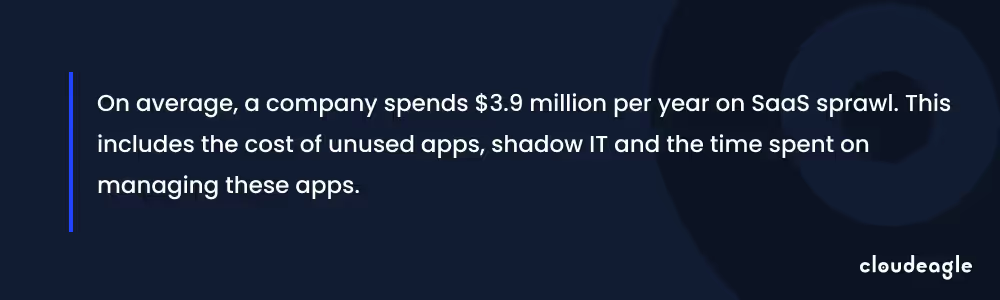
A quote related to SaaS sprawl

SaaS sprawl isn’t slowing down. The only way to stay in control is to treat asset tracking as a core discipline, not a one-off cleanup task.

What Is Asset Tracking in IT and SaaS?

Asset tracking in IT and SaaS environments goes beyond traditional hardware inventory management. It's a continuous, system-driven process that discovers, records, and monitors all software assets including applications, licenses, contracts, user access permissions, spending, and actual usage patterns, throughout their entire lifecycle. 

  1. SaaS asset tracking continuously discovers, records, and monitors all software assets, including applications, licenses, contracts, user access permissions, spending, and usage patterns.
  2. Focuses specifically on software subscriptions, cloud applications, and digital services, unlike broader IT asset management.
  3. Provides visibility into the software portfolio for better governance, security, and cost control.
  4. Integrates data from SSO systems, HRIS, and finance platforms for real-time insights.
  5. Helps monitor software usage, spending, and license utilization.
  6. Prevents security vulnerabilities and budget waste.

Asset Tracking vs. Inventory Tracking: Why the Difference Matters

Key Differences:

  • Asset tracking – Manages long-lived business-critical tools (SaaS apps, software licenses, devices) including ownership, access rights, lifecycle stages, and compliance requirements
  • Inventory tracking – Focuses on stock levels, quantities, and movement of consumable goods requiring replenishment

Operational Distinctions:

  • Asset tracking: Captures user permissions, license utilization, renewal dates, compliance status, and usage patterns through 500+ direct integrations with IT, security, finance, and HR platforms to monitor real-time access
  • Inventory tracking: Manages purchase orders, stock counts, supplier relationships, and replenishment schedules via ERP systems, primarily handled by procurement and warehouse teams

Why Prioritize SaaS Asset Tracking:

  • Lack of visibility leads to unauthorized access, data breaches, compliance violations, redundant apps, unused licenses, and shadow IT
  • Unlike physical inventory, software assets require continuous governance to prevent security risks, optimize costs, and ensure compliance

Specialized asset tracking is essential for effective SaaS management

2. The Do’s and Don’ts of Asset Tracking

A. How Do You Build a Reliable Asset Inventory?

Do: Maintain a centralized, real-time asset database

To track your assets effectively, you need one place where all your SaaS and IT assets are visible, current, and tied to ownership. That means using a system that updates in real-time, integrates with procurement, HR, and identity tools, and reflects changes as they happen.

Without that, you’re constantly playing catch-up. A centralized platform not only gives you visibility but also lets you filter by department, cost center, or renewal status. That kind of clarity makes it easier to spot waste, prevent surprise renewals, and stay ahead of compliance.

Don’t: Rely on spreadsheets or isolated tools

Relying on spreadsheets for asset tracking is fraught with challenges. They cannot sync with user activity, fail to provide timely alerts for access issues, and are a burden during audits. Moreover, spreadsheets often exist in silos within different departments, leading to inconsistent and outdated information.

B. What Data Should You Be Tracking for Each Asset?

Do: Track ownership, usage, cost, renewal dates, and user access

Effective asset management requires a holistic approach. For each asset, you should document:​

  • Ownership: Who is responsible for the asset?​
  • Usage: How and how often is the asset being utilized?​
  • Cost: What are the acquisition and ongoing expenses?​
  • Renewal Dates: When are contracts or licenses up for renewal?​
  • User Access: Who has permission to use the asset?

Don’t: Limit tracking to just purchase and expiration dates

Focusing solely on purchase and expiration dates provides an incomplete picture. Without insights into usage patterns and access controls, you risk overspending on underutilized assets and exposing your organization to security vulnerabilities.​

For instance, 69% of companies experienced cyberattacks due to unknown or unmanaged internet-facing assets. This underscores the critical need for comprehensive asset tracking to mitigate security risks.

C. Who Should Own Asset Tracking Within the Company?

Do: Assign clear ownership (IT, procurement, or FinOps)

You need a dedicated function, whether it’s IT, procurement, or FinOps, that’s responsible for maintaining your asset inventory, ensuring data accuracy, and coordinating with other departments. Clear ownership brings accountability, streamlines decision-making, and helps you avoid finger-pointing when something falls through the cracks.

Don’t: Spread responsibility across teams without coordination

When asset tracking is everyone’s job, it often becomes no one’s priority. Spreading it across departments without coordination leads to duplicate entries, inconsistent data, and critical gaps in visibility. Assign one team to lead and empower them to collaborate with others, but make sure there's a single point of control.

D. How Often Should Asset Data Be Reviewed or Updated?

Do: Set automated checks and monthly reviews

Asset tracking isn’t a set-it-and-forget-it task. You should schedule monthly reviews and implement automated systems that flag changes in usage, access, or cost. This keeps your data fresh and actionable so you can spot waste, identify security gaps, and stay ahead of renewal deadlines.

Don’t: Wait for audits or renewal notices to act

If you're only updating asset data when compliance audits come around or when a renewal lands in your inbox, you're already too late. By then, you're reacting to problems instead of preventing them. Regular reviews give you the breathing room to make smart, deliberate decisions, not rushed corrections.

E. How Can You Avoid Duplicate or Unused Tools?

Do: Use tools that flag redundancy and underuse

Without a system that highlights overlap, it’s easy for departments to unknowingly buy different tools that solve the same problem. That’s where automated visibility tools make a difference. They scan for:

  • Apps with similar functions across different teams
  • Licenses that haven’t been used in 30, 60, or 90+ days
  • Tools that were onboarded but never fully adopted

With this data, you can consolidate licenses, negotiate better deals, or retire tools that aren’t pulling their weight.

Don’t: Approve every team’s preferred app without oversight

It’s tempting to let every team choose their own stack for the sake of speed. But if there’s no central governance, you’ll quickly end up with:

  • Multiple project management tools doing the same thing
  • Redundant storage platforms with overlapping features
  • SaaS contracts you didn’t know existed until the renewal hits

Let teams innovate but with precautions. Every app should go through a lightweight review to check for duplication, security posture, and long-term fit.

F. What Role Does Employee Offboarding Play in Asset Tracking?

Do: Tie asset revocation to offboarding workflows

When an employee exits your organization, it's crucial to immediately revoke their access to all company systems and data. Integrating asset deprovisioning into your offboarding process ensures that departing staff no longer have entry points into your infrastructure. This practice safeguards sensitive information and reduces the risk of unauthorized activities.

Don’t: Forget to deprovision access across all platforms

Neglecting to remove access can lead to significant security vulnerabilities. Former employees ' credentials may inadvertently or intentionally exploit them, posing threats to your organization's integrity.

A notable example is the 2005 cyberattack on Wal-Mart. Hackers exploited a VPN account assigned to a former employee, which hadn't been deactivated, to infiltrate the company's network. This breach highlighted the critical need for the timely deprovisioning of ex-employee accounts. ​Here’s an image highlighting the consequences of inappropriate security measures.
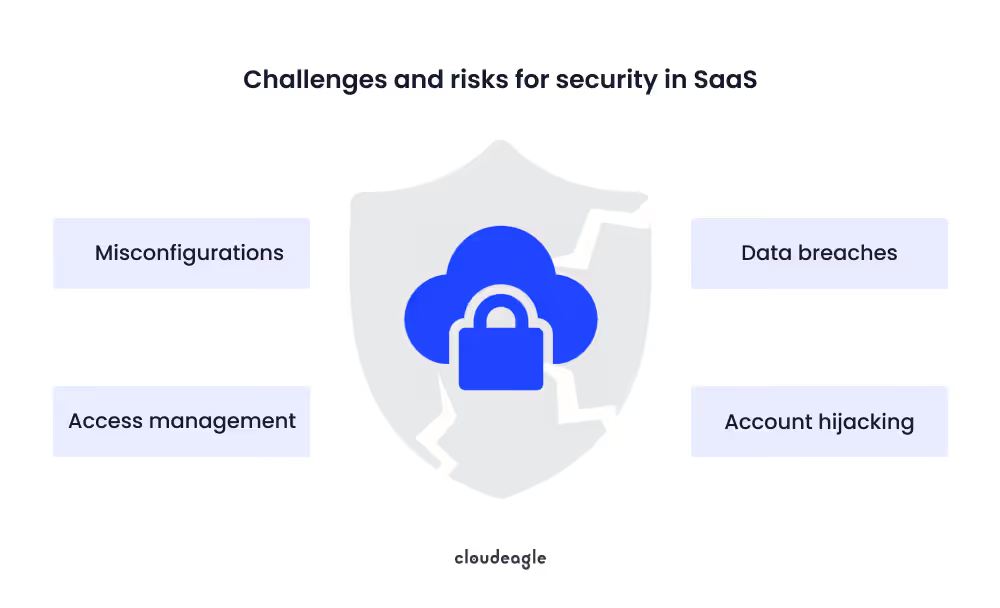
CloudEagle.ai SaaS security risks

Implementing a comprehensive offboarding protocol that includes prompt deactivation of all user accounts is essential to maintaining organizational security and protecting against potential breaches.

G. How Do Compliance and Audits Fit Into Your Tracking Strategy?

Do: Align asset tracking with SOC 2, ISO 27001, etc.

Integrating asset tracking into your compliance efforts ensures that your organization meets the stringent requirements of frameworks like SOC 2 and ISO 27001. This proactive approach not only streamlines the audit process but also fortifies your security posture by maintaining an up-to-date inventory of assets.​

Don’t: Scramble to gather data only when audits come up

Waiting until an audit is imminent to organize asset data can lead to oversights and increased stress. A continuous asset management strategy keeps you prepared and reduces the risk of non-compliance.

For instance, according to a report by IT Governance UK, in 2023, over 350 million people were affected by data breaches. Had they followed robust asset management practices, they could’ve prevented unauthorized access and ensured compliance.

H. When Should You Integrate Asset Tracking With Other Systems?

Do: Connect with HRIS, SSO, and finance systems

Asset tracking becomes significantly more powerful when it's not operating in isolation. By connecting your tracking system with:

  • HRIS: You can automatically add or remove assets as employees join or leave
  • SSO: You gain insight into who’s using what, and when
  • Finance tools: You get real-time visibility into spend and contract status

This integration eliminates blind spots and gives you a tighter handle on both cost control and risk management.

Don’t: Treat asset tracking as a standalone process

Siloed tracking leads to duplicated data, missed renewals, and security vulnerabilities. Without integrations, your system is reactive, not strategic. Make asset tracking part of your broader operational ecosystem to gain full context and control.

Smart Asset Tracking for Regulatory Compliance: 10 Practical Ways

Effective SaaS asset tracking is critical for organizations aiming to maintain compliance across frameworks like SOC 2, ISO 27001, and HIPAA. Without a clear system, hidden or unmanaged applications can create compliance gaps and security risks. Here are 10 practical ways to ensure your SaaS assets are fully governed:

  1. Maintain a Complete, Always-Current Asset Register
    Track every SaaS application in use, including its purpose, owner, and compliance status. This eliminates blind spots and ensures no app operates outside governance oversight.
  2. Integrate Access Management with HRIS and SSO Systems - Automate user provisioning and deprovisioning. This prevents orphaned accounts and reduces the risk of unauthorized access.
  3. Centralize Approval Workflows - Ensure all access requests go through a single system with built-in audit trails. This provides clear documentation of authorizations for compliance purposes.
  4. Use Contract Management Systems - Automatically monitor contract renewal dates, opt-out periods, and compliance obligations to prevent missed deadlines or violations.
  5. Automate Evidence Generation - Generate compliance reports and attach deprovisioning proofs automatically, reducing manual effort and human error.
  6. Monitor Compliance in Real-Time - Continuously validate adherence to policies instead of relying on periodic reviews, ensuring immediate detection of potential violations.
  7. Implement Automated Offboarding - Immediately revoke access when employees leave to close potential security gaps.
  8. Apply AI-Powered Risk-Based Access Controls - Identify unusual permission patterns and flag potential risks, improving security and compliance simultaneously.
  9. Track Anomalous Permissions Continuously - Detect excessive or irregular access assignments proactively to prevent insider threats or compliance violations.
  10. Leverage Platform Integrations for Sustainable Automation - With 500+ platform integrations, asset tracking and compliance enforcement can be streamlined for lean IT and security teams, making best practices easy to sustain.

How to Implement an Asset Tracking System: Steps & Best Practices

Implementing an effective asset tracking system requires a structured approach with clear objectives and cross-functional collaboration. Start by defining your scope whether focused on cost optimization, risk reduction, or compliance and conduct a comprehensive inventory of SaaS applications, contracts, and ownership by analyzing SSO, finance, and browser data to establish your baseline.

Select a centralized platform with 500+ direct connectors to integrate with HRIS, SSO, and finance systems for real-time data synchronization. Configure automated workflows for onboarding/offboarding, renewal management, and access reviews with appropriate task routing and escalation paths.

Establish governance by assigning clear ownership to IT, procurement, or FinOps teams and defining roles, review cadences, and KPIs. Implement periodic access reviews and automated alerts for high-risk users and compliance violations. Success requires strong change management and collaboration across IT, security, finance, and procurement teams to ensure each function understands their responsibilities.

Asset Tracking Software: Features & Capabilities to Look For

Modern asset tracking platforms deliver powerful capabilities through deep integrations with IT, security, finance, and HR systems:

  • Complete Visibility: Native API connections provide full visibility into applications, licenses, spend, and vendors eliminating data silos from static spreadsheets
  • Automated Discovery: Real-time usage analytics and automated application discovery
  • Smart Access Governance: Ensure the right employees have appropriate access at the right time
  • Renewal Intelligence: Contract tracking, alert workflows, and automated renewal management
  • Cost Optimization: Benchmark costs against industry standards for better vendor negotiations
  • No-Code Workflows: Automate onboarding/offboarding, access reviews, and license management

These capabilities transform asset tracking from a compliance burden into a strategic cost-optimization tool, enabling teams to move from reactive spreadsheet tracking to proactive governance with detailed usage insights that optimize your tech stack.

How Does Asset Tracking Strengthen Cybersecurity?

Effective asset tracking serves as your first line of defense against cyber threats by eliminating dangerous blind spots in your IT environment. Unknown or unmanaged apps, idle accounts, and excessive permissions dramatically expand your attack surface, creating entry points that hackers can exploit. When you don't know what applications exist in your environment or who has access to them, you can't secure them properly.

Continuous discovery paired with robust access governance including SSO/HRIS integrations, automated offboarding, and regular access reviews significantly reduces these security risks. 

Do: continuously reconcile your asset inventory with identity systems and prioritize high-risk apps for tighter monitoring.

Don't: leave orphaned accounts active after employee departures or allow perpetual access without regular validation. This systematic approach to asset tracking compliance directly supports frameworks like SOC 2 and ISO 27001, transforming security from reactive damage control into proactive risk management.

How to Build an Effective SaaS Asset Management Operating Model

Effective SaaS asset management in SaaS-heavy environments is not about isolated best practices. It is about building a cohesive operating model that connects governance, automation, and lifecycle control into a single system.

Establish Governance and a Single Source of Truth

A strong SaaS asset management model starts with clear ownership and accountability. IT, security, and procurement must have defined roles for asset discovery, approvals, access control, and compliance oversight. Without this clarity, SaaS environments quickly fragment.

Centralizing SaaS data is equally critical. Integrating HRIS, SSO, and finance systems creates a single source of truth for applications, users, licenses, and spend. This eliminates blind spots, reduces manual reconciliation, and ensures that access and cost decisions are based on accurate, real-time data.

Automate Discovery, Access, and Usage Visibility

Manual tracking cannot keep pace with modern SaaS adoption. Automated discovery and monitoring provide continuous visibility into application usage, license utilization, and user access patterns.

Real-time insights enable teams to detect shadow IT, identify unused or underutilized licenses, and monitor access risk as it emerges. Automated workflows further streamline provisioning, access reviews, and offboarding, ensuring that permissions remain aligned with current roles rather than legacy access.

Manage SaaS Assets Across the Full Lifecycle

Effective SaaS asset management extends across the entire application lifecycle, not just procurement or renewals.

During request and evaluation, teams should capture business justification, assign application owners, and apply approval workflows alongside vendor risk and security assessments. This prevents unnecessary tool sprawl before it begins.

During onboarding and active use, documenting license types, access models, and integration touchpoints enables role-based provisioning and time-bound access controls. Continuous monitoring of usage metrics, feature adoption, and cost per user supports proactive license right-sizing, access reviews, and duplicate application consolidation.

As renewals approach, automated workflows triggered well in advance, often 90 days or more, combine usage data, contract terms, and benchmarking insights to inform renewal, renegotiation, or retirement decisions. Automated contract tracking and vendor evaluations reduce last-minute decisions and unnecessary renewals.

Outcomes of an Automated SaaS Asset Management Model

When governance, automation, and lifecycle controls operate as one system, organizations move from reactive asset management to proactive SaaS governance.

Security improves through continuous access monitoring and timely deprovisioning. Costs are optimized through automated license reclamation and application rationalization. Operational efficiency increases as workflows replace spreadsheets and manual coordination. Compliance becomes faster and less disruptive, with audit-ready reports generated in hours rather than weeks.

This operating model ensures that SaaS assets remain secure, cost-effective, and compliant throughout their entire lifecycle.

3. How Can CloudEagle.ai Streamline Asset Management?

CloudEagle.ai is built to take the friction out of managing and purchasing SaaS tools. It helps you gain tighter control over your software portfolio without drowning in spreadsheets or manual tracking.

The platform gives you a unified view of all your applications, contracts, and usage patterns, helping you spot inefficiencies and tighten spend. Every license, renewal date, and usage metric is centralized, so nothing slips through the cracks.

Its automation capabilities reduce the back-and-forth in procurement cycles, flag wasteful renewals ahead of time, and help you recover underused licenses before they eat into your budget.

Application Discovery

CloudEagle.ai delivers complete visibility into your SaaS environment in under 30 minutes, quickly surfacing redundant tools and duplicate apps that quietly inflate your software budget.
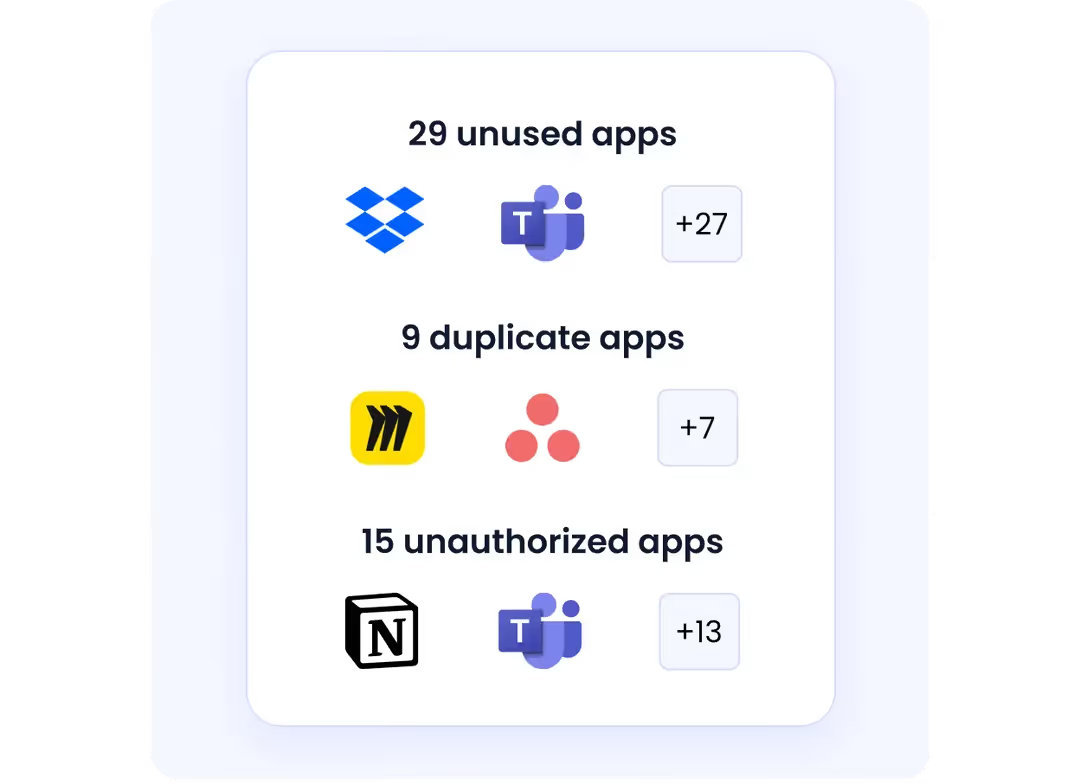
CloudEagle.ai app discovery

By pulling all assets into a single, centralized platform, it removes the guesswork from application oversight. Native API integrations go beyond basic tracking to provide detailed usage patterns, making it easier to decommission unused tools and consolidate overlapping apps.

You can also set up intelligent alerts to flag unapproved software purchases made via company credit cards, shutting down shadow IT before it becomes a security liability.

Take, for example, a large media enterprise with over 10,000 employees. Relying on Flexera, the company struggled with incomplete data and lacked actionable usage insights. After switching to CloudEagle.ai, they finally had a clear picture of their SaaS stack. 

License Management

CloudEagle.ai gives you granular visibility into how every tool in your stack is being used. Whether data is pulled via direct integrations or imported through Excel, the platform surfaces feature-level insights that go far beyond basic license counts.
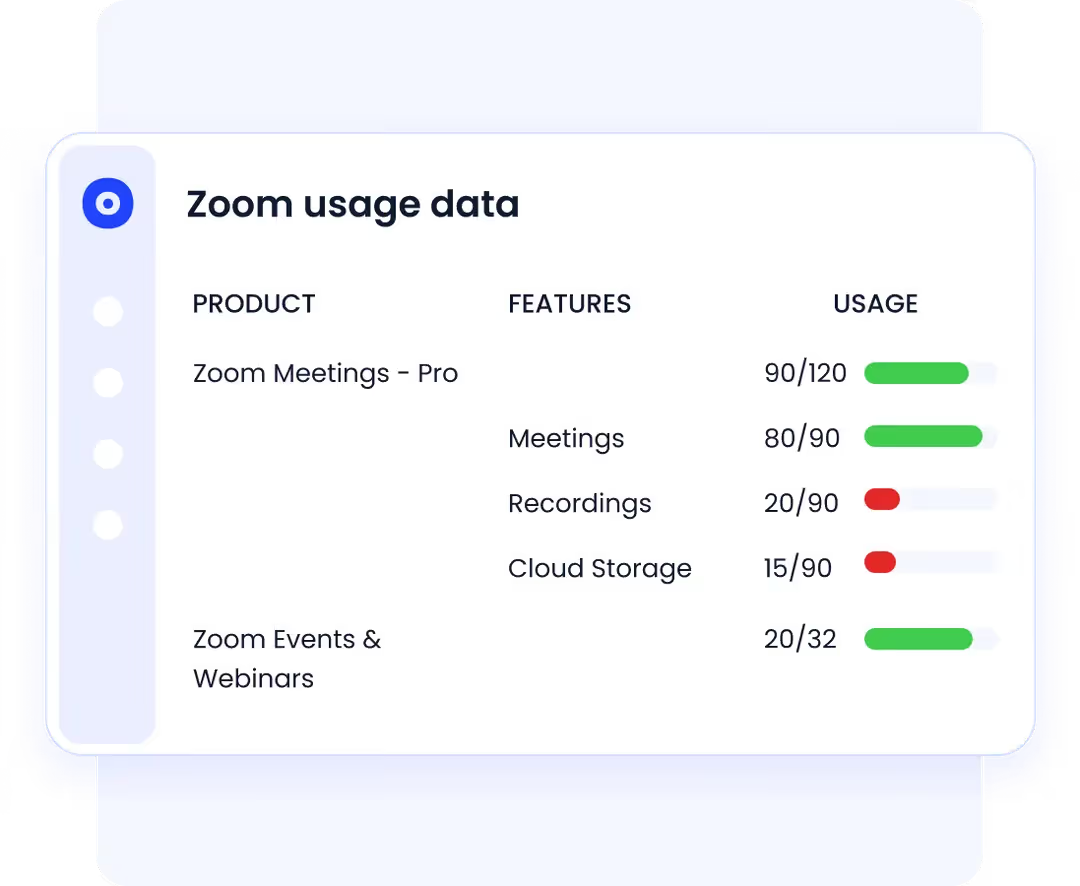
CloudEagle.ai license management

From a single dashboard, you can monitor license types, see which users are active or idle, review login behavior, and track spending tied to individual licenses. This level of detail helps eliminate guesswork and spot underused tools before they drain your budget.

You can also configure usage-based alerts to flag when it's time to upgrade high-usage users or downgrade inactive ones. App admins can run regular audits, reclaim unused licenses, and offboard users efficiently—keeping your SaaS portfolio lean and tightly managed.

Contract Management

CloudEagle.ai simplifies contract management by pulling all vendor agreements into a centralized workspace. No more scrambling before renewal deadlines as automated workflows kick in up to 90 days in advance, routing tasks to the right stakeholders. Slack and email notifications ensure nothing gets missed along the way.

CloudEagle.ai contract management

From the unified dashboard, you can quickly review contract spend while the platform’s AI parses essential metadata like renewal terms, billing cycles, payment conditions, and auto-renewal clauses, giving you a clear picture in just minutes.

The system integrates with tools like DocuSign, Workday, Ironclad, Google Drive, Dropbox, and Box, making it easy to bring in contracts from multiple sources. Once imported, CloudEagle.ai automatically extracts and organizes key data, building a complete and accessible contract archive.

Beyond contract visibility, the platform helps you reduce waste. With 500+ integrations, it pulls accurate usage data across your stack and flags when licenses are sitting idle or can be downgraded, allowing you to recover costs and eliminate unused features with minimal effort.

Spend Optimization

As your company scales, it’s easy for duplicate tools and idle subscriptions to pile up, quietly driving up SaaS costs and complicating your stack.

CloudEagle.ai brings clarity to your software portfolio with deep usage insights. It highlights underused applications, flags overlapping subscriptions, and equips you to trim excess spend without sacrificing functionality.

Price Benchmarking

CloudEagle.ai draws on a dataset of over three billion transactions to give you neutral, data-backed pricing benchmarks. With insights from 150,000+ vendors, you can assess how your software costs compare to similar enterprises based on your size, contract length, license volume, and IT spend.
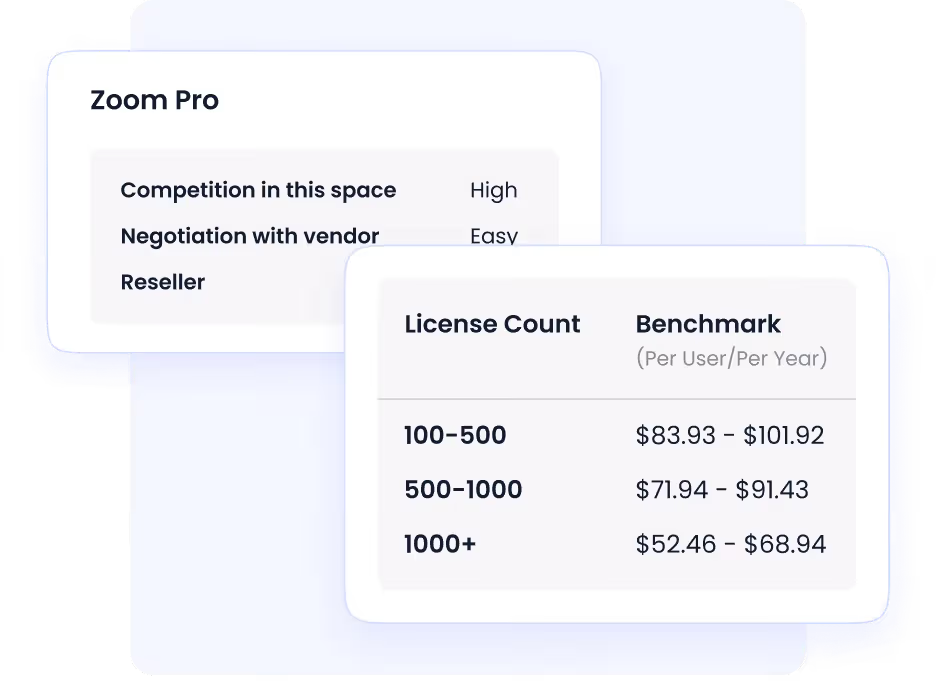
CloudEagle.ai price benchmarking

Its AI engine evaluates pricing scenarios across multiple dimensions, helping you determine whether your rates are competitive or inflated so you can walk into vendor negotiations with real leverage.

Renewal Management

CloudEagle.ai initiates workflows up to 90 days before contract deadlines, giving stakeholders enough time to review, approve, or negotiate terms.
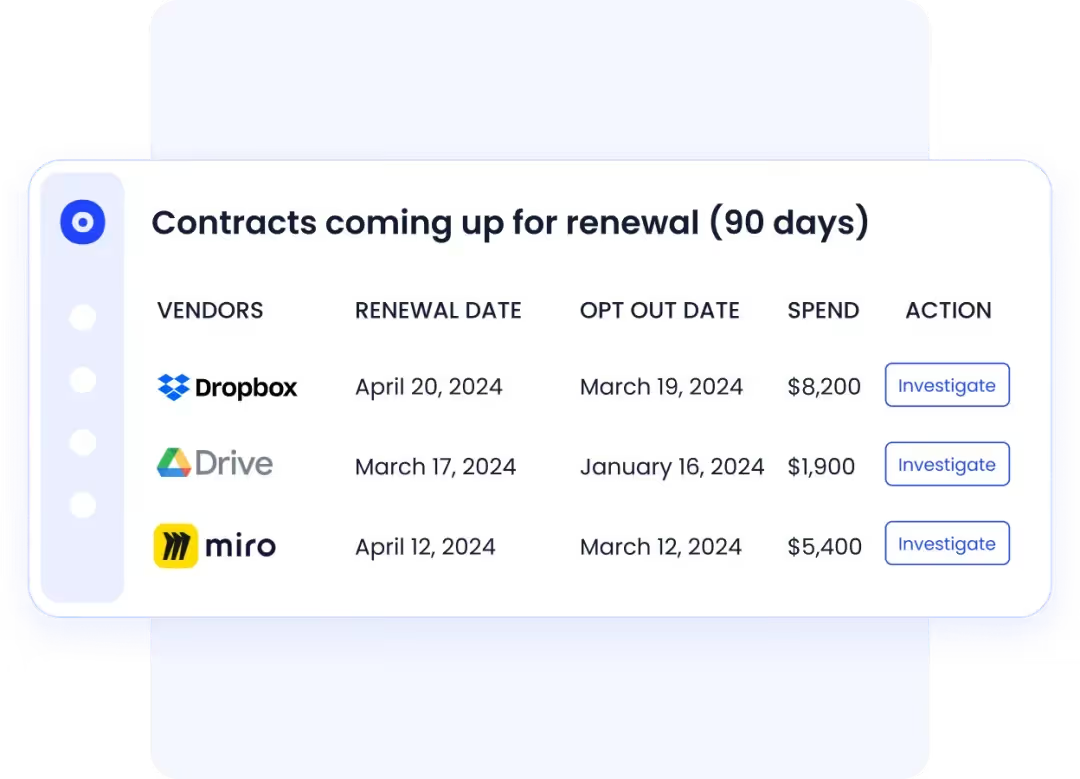
CloudEagle.ai contract renewal

Built-in communication channels streamline approvals and feedback. You can also track opt-out windows well in advance (30, 60, or 90 days) so your team can act proactively instead of reacting under pressure.

Vendor Research

Researching software shouldn’t eat up your time. CloudEagle.ai’s AI-powered discovery engine takes your requirements and instantly delivers a shortlist of SaaS vendors that meet your criteria.

CloudEagle.ai vendor research

Each option comes with consolidated reviews, outlining real pros and cons in one place. You can compare vendors side by side without bouncing between tabs or spreadsheets.

4. Conclusion

SaaS and IT asset tracking isn’t something you set up once and forget. It’s a living system that supports your company’s financial efficiency, data security, and compliance posture. When done right, it gives you the clarity to cut waste, tighten controls, and make smarter tech investments.

Thanks to CloudEagle.ai, you can manage all your company’s software effectively. As you can track them, there will be fewer chances of SaaS sprawl and hidden renewals. So, contact the experts and let them show you how CloudEagle.ai works. 

Frequently Asked Questions

1. What is the best way to track assets?

The best way to track SaaS assets is by using a SaaS management platform like CloudEagle.ai that automatically discovers, monitors, and categorizes all subscriptions. This gives you real-time visibility into usage, renewals, and spend.

2. How do you manage assets effectively?

To manage SaaS assets effectively, centralize all subscriptions, monitor usage and renewals, and enforce access controls tied to roles. Platforms like CloudEagle.ai automate these tasks to reduce waste and improve ROI.

3. What are the benefits of SaaS asset tracking?

SaaS asset tracking helps you optimize costs by identifying unused or underused subscriptions, ensuring compliance with licensing agreements, and improving security through better access management. It also enables proactive renewals and enhances visibility for budgeting and planning.

4. Which 3 are principles of asset management?

The three key principles of SaaS asset management are visibility, optimization, and compliance. These principles help you track all subscriptions, eliminate waste by optimizing usage, and ensure your organization stays compliant with licensing agreements and regulations.

5. What is the best practice for asset management?

The best practice for SaaS asset management is to centralize your SaaS tools in a single platform, automate tracking, and regularly review usage to eliminate waste. Implementing access controls, enforcing renewal processes, and ensuring compliance with licensing agreements are also essential for optimal management.

Advertisement for a SaaS Subscription Tracking Template with a call-to-action button to download and a partial graphic of a tablet showing charts.Banner promoting a SaaS Agreement Checklist to streamline SaaS management and avoid budget waste with a call-to-action button labeled Download checklist.Blue banner with text 'The Ultimate Employee Offboarding Checklist!' and a black button labeled 'Download checklist' alongside partial views of checklist documents from cloudeagle.ai.Digital ad for download checklist titled 'The Ultimate Checklist for IT Leaders to Optimize SaaS Operations' by cloudeagle.ai, showing checklist pages.Slack Buyer's Guide offer with text 'Unlock insider insights to get the best deal on Slack!' and a button labeled 'Get Your Copy', accompanied by a preview of the guide featuring Slack's logo.Monday Pricing Guide by cloudeagle.ai offering exclusive pricing secrets to maximize investment with a call-to-action button labeled Get Your Copy and an image of the guide's cover.Blue banner for Canva Pricing Guide by cloudeagle.ai offering a guide to Canva costs, features, and alternatives with a call-to-action button saying Get Your Copy.Blue banner with white text reading 'Little-Known Negotiation Hacks to Get the Best Deal on Slack' and a white button labeled 'Get Your Copy'.Blue banner with text 'Little-Known Negotiation Hacks to Get the Best Deal on Monday.com' and a white button labeled 'Get Your Copy'.Blue banner with text 'Little-Known Negotiation Hacks to Get the Best Deal on Canva' and a white button labeled 'Get Your Copy'.Banner with text 'Slack Buyer's Guide' and a 'Download Now' button next to images of a guide titled 'Slack Buyer’s Guide: Features, Pricing & Best Practices'.Digital cover of Monday Pricing Guide with a button labeled Get Your Copy on a blue background.Canva Pricing Guide cover with a button labeled Get Your Copy on a blue gradient background.

Enter your email to
unlock the report

Oops! Something went wrong while submitting the form.
License Count
Benchmark
Per User/Per Year

Enter your email to
unlock the report

Oops! Something went wrong while submitting the form.
License Count
Benchmark
Per User/Per Year

Enter your email to
unlock the report

Oops! Something went wrong while submitting the form.
Notion Plus
License Count
Benchmark
Per User/Per Year
100-500
$67.20 - $78.72
500-1000
$59.52 - $72.00
1000+
$51.84 - $57.60
Canva Pro
License Count
Benchmark
Per User/Per Year
100-500
$74.33-$88.71
500-1000
$64.74-$80.32
1000+
$55.14-$62.34

Enter your email to
unlock the report

Oops! Something went wrong while submitting the form.

Enter your email to
unlock the report

Oops! Something went wrong while submitting the form.
Zoom Business
License Count
Benchmark
Per User/Per Year
100-500
$216.00 - $264.00
500-1000
$180.00 - $216.00
1000+
$156.00 - $180.00

Enter your email to
unlock the report

Oops! Something went wrong while submitting the form.

Get the Right Security Platform To Secure Your Cloud Infrastructure

Please enter a business email
Thank you!
The 2023 SaaS report has been sent to your email. Check your promotional or spam folder.
Oops! Something went wrong while submitting the form.

Access full report

Please enter a business email
Thank you!
The 2023 SaaS report has been sent to your email. Check your promotional or spam folder.
Oops! Something went wrong while submitting the form.

Tracking your IT and SaaS assets is a safeguard procedure against wasted spend and operational blind spots. But without a clear system, it's easy to lose control. According to a 2023 report by TechRepublic, nearly 50% of software licenses go unused, leading to more than $44 million in wasted spend every month.

That waste doesn’t happen overnight. Left unchecked, asset sprawl doesn't just eat into your budget but also weakens your security posture and creates audit headaches. In this guide, you’ll walk through the essential do’s and don’ts of effective asset tracking. 

TL;DR

  • SaaS asset tracking is more than listing tools—it's about full lifecycle oversight to stop cost leaks, security risks, and redundancy.
  • Use a unified, real-time platform to track ownership, usage, cost, and access; spreadsheets won’t cut it.
  • Give one function (IT, FinOps, or procurement) control over asset tracking to avoid accountability gaps.
  • Set automated alerts and monthly reviews instead of reacting to renewals or audits last-minute.
  • Connect tracking tools with HRIS, SSO, and finance systems; platforms like CloudEagle.ai help cut waste, flag risks, and regain control.

1. What is SaaS Asset Tracking and Why Does It Matter?

If you don’t know what software your company is using, who’s using it, or how much it costs, there’s a good chance your budget is leaking and your risk surface is growing. That’s what SaaS asset tracking solves. It gives you visibility into every subscription, license, and access point tied to your tech stack.

It’s not just about making a list of apps. It’s about tracking the entire lifecycle. When you’re not doing this consistently, you end up with overlapping tools, idle licenses, and former employees still having access they shouldn’t have.

This isn't a minor oversight—it’s a strategic gap. Bill Gates once said:

“The first rule of any technology used in a business is that automation applied to an efficient operation will magnify the efficiency… The second is that automation applied to an inefficient operation will magnify the inefficiency.”

That applies directly to asset tracking. If your tracking process is flawed or nonexistent, any automation layered on top will just accelerate the mess. That’s why visibility isn’t a luxury. It’s the starting point for making smarter decisions about cost, access, security, and compliance.

A quote related to SaaS sprawl

SaaS sprawl isn’t slowing down. The only way to stay in control is to treat asset tracking as a core discipline, not a one-off cleanup task.

What Is Asset Tracking in IT and SaaS?

Asset tracking in IT and SaaS environments goes beyond traditional hardware inventory management. It's a continuous, system-driven process that discovers, records, and monitors all software assets including applications, licenses, contracts, user access permissions, spending, and actual usage patterns, throughout their entire lifecycle. 

  1. SaaS asset tracking continuously discovers, records, and monitors all software assets, including applications, licenses, contracts, user access permissions, spending, and usage patterns.
  2. Focuses specifically on software subscriptions, cloud applications, and digital services, unlike broader IT asset management.
  3. Provides visibility into the software portfolio for better governance, security, and cost control.
  4. Integrates data from SSO systems, HRIS, and finance platforms for real-time insights.
  5. Helps monitor software usage, spending, and license utilization.
  6. Prevents security vulnerabilities and budget waste.

Asset Tracking vs. Inventory Tracking: Why the Difference Matters

Key Differences:

  • Asset tracking – Manages long-lived business-critical tools (SaaS apps, software licenses, devices) including ownership, access rights, lifecycle stages, and compliance requirements
  • Inventory tracking – Focuses on stock levels, quantities, and movement of consumable goods requiring replenishment

Operational Distinctions:

  • Asset tracking: Captures user permissions, license utilization, renewal dates, compliance status, and usage patterns through 500+ direct integrations with IT, security, finance, and HR platforms to monitor real-time access
  • Inventory tracking: Manages purchase orders, stock counts, supplier relationships, and replenishment schedules via ERP systems, primarily handled by procurement and warehouse teams

Why Prioritize SaaS Asset Tracking:

  • Lack of visibility leads to unauthorized access, data breaches, compliance violations, redundant apps, unused licenses, and shadow IT
  • Unlike physical inventory, software assets require continuous governance to prevent security risks, optimize costs, and ensure compliance

Specialized asset tracking is essential for effective SaaS management

2. The Do’s and Don’ts of Asset Tracking

A. How Do You Build a Reliable Asset Inventory?

Do: Maintain a centralized, real-time asset database

To track your assets effectively, you need one place where all your SaaS and IT assets are visible, current, and tied to ownership. That means using a system that updates in real-time, integrates with procurement, HR, and identity tools, and reflects changes as they happen.

Without that, you’re constantly playing catch-up. A centralized platform not only gives you visibility but also lets you filter by department, cost center, or renewal status. That kind of clarity makes it easier to spot waste, prevent surprise renewals, and stay ahead of compliance.

Don’t: Rely on spreadsheets or isolated tools

Relying on spreadsheets for asset tracking is fraught with challenges. They cannot sync with user activity, fail to provide timely alerts for access issues, and are a burden during audits. Moreover, spreadsheets often exist in silos within different departments, leading to inconsistent and outdated information.

B. What Data Should You Be Tracking for Each Asset?

Do: Track ownership, usage, cost, renewal dates, and user access

Effective asset management requires a holistic approach. For each asset, you should document:​

  • Ownership: Who is responsible for the asset?​
  • Usage: How and how often is the asset being utilized?​
  • Cost: What are the acquisition and ongoing expenses?​
  • Renewal Dates: When are contracts or licenses up for renewal?​
  • User Access: Who has permission to use the asset?

Don’t: Limit tracking to just purchase and expiration dates

Focusing solely on purchase and expiration dates provides an incomplete picture. Without insights into usage patterns and access controls, you risk overspending on underutilized assets and exposing your organization to security vulnerabilities.​

For instance, 69% of companies experienced cyberattacks due to unknown or unmanaged internet-facing assets. This underscores the critical need for comprehensive asset tracking to mitigate security risks.

C. Who Should Own Asset Tracking Within the Company?

Do: Assign clear ownership (IT, procurement, or FinOps)

You need a dedicated function, whether it’s IT, procurement, or FinOps, that’s responsible for maintaining your asset inventory, ensuring data accuracy, and coordinating with other departments. Clear ownership brings accountability, streamlines decision-making, and helps you avoid finger-pointing when something falls through the cracks.

Don’t: Spread responsibility across teams without coordination

When asset tracking is everyone’s job, it often becomes no one’s priority. Spreading it across departments without coordination leads to duplicate entries, inconsistent data, and critical gaps in visibility. Assign one team to lead and empower them to collaborate with others, but make sure there's a single point of control.

D. How Often Should Asset Data Be Reviewed or Updated?

Do: Set automated checks and monthly reviews

Asset tracking isn’t a set-it-and-forget-it task. You should schedule monthly reviews and implement automated systems that flag changes in usage, access, or cost. This keeps your data fresh and actionable so you can spot waste, identify security gaps, and stay ahead of renewal deadlines.

Don’t: Wait for audits or renewal notices to act

If you're only updating asset data when compliance audits come around or when a renewal lands in your inbox, you're already too late. By then, you're reacting to problems instead of preventing them. Regular reviews give you the breathing room to make smart, deliberate decisions, not rushed corrections.

E. How Can You Avoid Duplicate or Unused Tools?

Do: Use tools that flag redundancy and underuse

Without a system that highlights overlap, it’s easy for departments to unknowingly buy different tools that solve the same problem. That’s where automated visibility tools make a difference. They scan for:

  • Apps with similar functions across different teams
  • Licenses that haven’t been used in 30, 60, or 90+ days
  • Tools that were onboarded but never fully adopted

With this data, you can consolidate licenses, negotiate better deals, or retire tools that aren’t pulling their weight.

Don’t: Approve every team’s preferred app without oversight

It’s tempting to let every team choose their own stack for the sake of speed. But if there’s no central governance, you’ll quickly end up with:

  • Multiple project management tools doing the same thing
  • Redundant storage platforms with overlapping features
  • SaaS contracts you didn’t know existed until the renewal hits

Let teams innovate but with precautions. Every app should go through a lightweight review to check for duplication, security posture, and long-term fit.

F. What Role Does Employee Offboarding Play in Asset Tracking?

Do: Tie asset revocation to offboarding workflows

When an employee exits your organization, it's crucial to immediately revoke their access to all company systems and data. Integrating asset deprovisioning into your offboarding process ensures that departing staff no longer have entry points into your infrastructure. This practice safeguards sensitive information and reduces the risk of unauthorized activities.

Don’t: Forget to deprovision access across all platforms

Neglecting to remove access can lead to significant security vulnerabilities. Former employees ' credentials may inadvertently or intentionally exploit them, posing threats to your organization's integrity.

A notable example is the 2005 cyberattack on Wal-Mart. Hackers exploited a VPN account assigned to a former employee, which hadn't been deactivated, to infiltrate the company's network. This breach highlighted the critical need for the timely deprovisioning of ex-employee accounts. ​Here’s an image highlighting the consequences of inappropriate security measures.

CloudEagle.ai SaaS security risks

Implementing a comprehensive offboarding protocol that includes prompt deactivation of all user accounts is essential to maintaining organizational security and protecting against potential breaches.

G. How Do Compliance and Audits Fit Into Your Tracking Strategy?

Do: Align asset tracking with SOC 2, ISO 27001, etc.

Integrating asset tracking into your compliance efforts ensures that your organization meets the stringent requirements of frameworks like SOC 2 and ISO 27001. This proactive approach not only streamlines the audit process but also fortifies your security posture by maintaining an up-to-date inventory of assets.​

Don’t: Scramble to gather data only when audits come up

Waiting until an audit is imminent to organize asset data can lead to oversights and increased stress. A continuous asset management strategy keeps you prepared and reduces the risk of non-compliance.

For instance, according to a report by IT Governance UK, in 2023, over 350 million people were affected by data breaches. Had they followed robust asset management practices, they could’ve prevented unauthorized access and ensured compliance.

H. When Should You Integrate Asset Tracking With Other Systems?

Do: Connect with HRIS, SSO, and finance systems

Asset tracking becomes significantly more powerful when it's not operating in isolation. By connecting your tracking system with:

  • HRIS: You can automatically add or remove assets as employees join or leave
  • SSO: You gain insight into who’s using what, and when
  • Finance tools: You get real-time visibility into spend and contract status

This integration eliminates blind spots and gives you a tighter handle on both cost control and risk management.

Don’t: Treat asset tracking as a standalone process

Siloed tracking leads to duplicated data, missed renewals, and security vulnerabilities. Without integrations, your system is reactive, not strategic. Make asset tracking part of your broader operational ecosystem to gain full context and control.

Smart Asset Tracking for Regulatory Compliance: 10 Practical Ways

Effective SaaS asset tracking is critical for organizations aiming to maintain compliance across frameworks like SOC 2, ISO 27001, and HIPAA. Without a clear system, hidden or unmanaged applications can create compliance gaps and security risks. Here are 10 practical ways to ensure your SaaS assets are fully governed:

  1. Maintain a Complete, Always-Current Asset Register
    Track every SaaS application in use, including its purpose, owner, and compliance status. This eliminates blind spots and ensures no app operates outside governance oversight.
  2. Integrate Access Management with HRIS and SSO Systems - Automate user provisioning and deprovisioning. This prevents orphaned accounts and reduces the risk of unauthorized access.
  3. Centralize Approval Workflows - Ensure all access requests go through a single system with built-in audit trails. This provides clear documentation of authorizations for compliance purposes.
  4. Use Contract Management Systems - Automatically monitor contract renewal dates, opt-out periods, and compliance obligations to prevent missed deadlines or violations.
  5. Automate Evidence Generation - Generate compliance reports and attach deprovisioning proofs automatically, reducing manual effort and human error.
  6. Monitor Compliance in Real-Time - Continuously validate adherence to policies instead of relying on periodic reviews, ensuring immediate detection of potential violations.
  7. Implement Automated Offboarding - Immediately revoke access when employees leave to close potential security gaps.
  8. Apply AI-Powered Risk-Based Access Controls - Identify unusual permission patterns and flag potential risks, improving security and compliance simultaneously.
  9. Track Anomalous Permissions Continuously - Detect excessive or irregular access assignments proactively to prevent insider threats or compliance violations.
  10. Leverage Platform Integrations for Sustainable Automation - With 500+ platform integrations, asset tracking and compliance enforcement can be streamlined for lean IT and security teams, making best practices easy to sustain.

How to Implement an Asset Tracking System: Steps & Best Practices

Implementing an effective asset tracking system requires a structured approach with clear objectives and cross-functional collaboration. Start by defining your scope whether focused on cost optimization, risk reduction, or compliance and conduct a comprehensive inventory of SaaS applications, contracts, and ownership by analyzing SSO, finance, and browser data to establish your baseline.

Select a centralized platform with 500+ direct connectors to integrate with HRIS, SSO, and finance systems for real-time data synchronization. Configure automated workflows for onboarding/offboarding, renewal management, and access reviews with appropriate task routing and escalation paths.

Establish governance by assigning clear ownership to IT, procurement, or FinOps teams and defining roles, review cadences, and KPIs. Implement periodic access reviews and automated alerts for high-risk users and compliance violations. Success requires strong change management and collaboration across IT, security, finance, and procurement teams to ensure each function understands their responsibilities.

Asset Tracking Software: Features & Capabilities to Look For

Modern asset tracking platforms deliver powerful capabilities through deep integrations with IT, security, finance, and HR systems:

  • Complete Visibility: Native API connections provide full visibility into applications, licenses, spend, and vendors eliminating data silos from static spreadsheets
  • Automated Discovery: Real-time usage analytics and automated application discovery
  • Smart Access Governance: Ensure the right employees have appropriate access at the right time
  • Renewal Intelligence: Contract tracking, alert workflows, and automated renewal management
  • Cost Optimization: Benchmark costs against industry standards for better vendor negotiations
  • No-Code Workflows: Automate onboarding/offboarding, access reviews, and license management

These capabilities transform asset tracking from a compliance burden into a strategic cost-optimization tool, enabling teams to move from reactive spreadsheet tracking to proactive governance with detailed usage insights that optimize your tech stack.

How Does Asset Tracking Strengthen Cybersecurity?

Effective asset tracking serves as your first line of defense against cyber threats by eliminating dangerous blind spots in your IT environment. Unknown or unmanaged apps, idle accounts, and excessive permissions dramatically expand your attack surface, creating entry points that hackers can exploit. When you don't know what applications exist in your environment or who has access to them, you can't secure them properly.

Continuous discovery paired with robust access governance including SSO/HRIS integrations, automated offboarding, and regular access reviews significantly reduces these security risks. 

Do: continuously reconcile your asset inventory with identity systems and prioritize high-risk apps for tighter monitoring.

Don't: leave orphaned accounts active after employee departures or allow perpetual access without regular validation. This systematic approach to asset tracking compliance directly supports frameworks like SOC 2 and ISO 27001, transforming security from reactive damage control into proactive risk management.

How to Build an Effective SaaS Asset Management Operating Model

Effective SaaS asset management in SaaS-heavy environments is not about isolated best practices. It is about building a cohesive operating model that connects governance, automation, and lifecycle control into a single system.

Establish Governance and a Single Source of Truth

A strong SaaS asset management model starts with clear ownership and accountability. IT, security, and procurement must have defined roles for asset discovery, approvals, access control, and compliance oversight. Without this clarity, SaaS environments quickly fragment.

Centralizing SaaS data is equally critical. Integrating HRIS, SSO, and finance systems creates a single source of truth for applications, users, licenses, and spend. This eliminates blind spots, reduces manual reconciliation, and ensures that access and cost decisions are based on accurate, real-time data.

Automate Discovery, Access, and Usage Visibility

Manual tracking cannot keep pace with modern SaaS adoption. Automated discovery and monitoring provide continuous visibility into application usage, license utilization, and user access patterns.

Real-time insights enable teams to detect shadow IT, identify unused or underutilized licenses, and monitor access risk as it emerges. Automated workflows further streamline provisioning, access reviews, and offboarding, ensuring that permissions remain aligned with current roles rather than legacy access.

Manage SaaS Assets Across the Full Lifecycle

Effective SaaS asset management extends across the entire application lifecycle, not just procurement or renewals.

During request and evaluation, teams should capture business justification, assign application owners, and apply approval workflows alongside vendor risk and security assessments. This prevents unnecessary tool sprawl before it begins.

During onboarding and active use, documenting license types, access models, and integration touchpoints enables role-based provisioning and time-bound access controls. Continuous monitoring of usage metrics, feature adoption, and cost per user supports proactive license right-sizing, access reviews, and duplicate application consolidation.

As renewals approach, automated workflows triggered well in advance, often 90 days or more, combine usage data, contract terms, and benchmarking insights to inform renewal, renegotiation, or retirement decisions. Automated contract tracking and vendor evaluations reduce last-minute decisions and unnecessary renewals.

Outcomes of an Automated SaaS Asset Management Model

When governance, automation, and lifecycle controls operate as one system, organizations move from reactive asset management to proactive SaaS governance.

Security improves through continuous access monitoring and timely deprovisioning. Costs are optimized through automated license reclamation and application rationalization. Operational efficiency increases as workflows replace spreadsheets and manual coordination. Compliance becomes faster and less disruptive, with audit-ready reports generated in hours rather than weeks.

This operating model ensures that SaaS assets remain secure, cost-effective, and compliant throughout their entire lifecycle.

3. How Can CloudEagle.ai Streamline Asset Management?

CloudEagle.ai is built to take the friction out of managing and purchasing SaaS tools. It helps you gain tighter control over your software portfolio without drowning in spreadsheets or manual tracking.

The platform gives you a unified view of all your applications, contracts, and usage patterns, helping you spot inefficiencies and tighten spend. Every license, renewal date, and usage metric is centralized, so nothing slips through the cracks.

Its automation capabilities reduce the back-and-forth in procurement cycles, flag wasteful renewals ahead of time, and help you recover underused licenses before they eat into your budget.

Application Discovery

CloudEagle.ai delivers complete visibility into your SaaS environment in under 30 minutes, quickly surfacing redundant tools and duplicate apps that quietly inflate your software budget.

CloudEagle.ai app discovery

By pulling all assets into a single, centralized platform, it removes the guesswork from application oversight. Native API integrations go beyond basic tracking to provide detailed usage patterns, making it easier to decommission unused tools and consolidate overlapping apps.

You can also set up intelligent alerts to flag unapproved software purchases made via company credit cards, shutting down shadow IT before it becomes a security liability.

Take, for example, a large media enterprise with over 10,000 employees. Relying on Flexera, the company struggled with incomplete data and lacked actionable usage insights. After switching to CloudEagle.ai, they finally had a clear picture of their SaaS stack. 

License Management

CloudEagle.ai gives you granular visibility into how every tool in your stack is being used. Whether data is pulled via direct integrations or imported through Excel, the platform surfaces feature-level insights that go far beyond basic license counts.

CloudEagle.ai license management

From a single dashboard, you can monitor license types, see which users are active or idle, review login behavior, and track spending tied to individual licenses. This level of detail helps eliminate guesswork and spot underused tools before they drain your budget.

You can also configure usage-based alerts to flag when it's time to upgrade high-usage users or downgrade inactive ones. App admins can run regular audits, reclaim unused licenses, and offboard users efficiently—keeping your SaaS portfolio lean and tightly managed.

Contract Management

CloudEagle.ai simplifies contract management by pulling all vendor agreements into a centralized workspace. No more scrambling before renewal deadlines as automated workflows kick in up to 90 days in advance, routing tasks to the right stakeholders. Slack and email notifications ensure nothing gets missed along the way.

CloudEagle.ai contract management

From the unified dashboard, you can quickly review contract spend while the platform’s AI parses essential metadata like renewal terms, billing cycles, payment conditions, and auto-renewal clauses, giving you a clear picture in just minutes.

The system integrates with tools like DocuSign, Workday, Ironclad, Google Drive, Dropbox, and Box, making it easy to bring in contracts from multiple sources. Once imported, CloudEagle.ai automatically extracts and organizes key data, building a complete and accessible contract archive.

Beyond contract visibility, the platform helps you reduce waste. With 500+ integrations, it pulls accurate usage data across your stack and flags when licenses are sitting idle or can be downgraded, allowing you to recover costs and eliminate unused features with minimal effort.

Spend Optimization

As your company scales, it’s easy for duplicate tools and idle subscriptions to pile up, quietly driving up SaaS costs and complicating your stack.

CloudEagle.ai brings clarity to your software portfolio with deep usage insights. It highlights underused applications, flags overlapping subscriptions, and equips you to trim excess spend without sacrificing functionality.

Price Benchmarking

CloudEagle.ai draws on a dataset of over three billion transactions to give you neutral, data-backed pricing benchmarks. With insights from 150,000+ vendors, you can assess how your software costs compare to similar enterprises based on your size, contract length, license volume, and IT spend.

CloudEagle.ai price benchmarking

Its AI engine evaluates pricing scenarios across multiple dimensions, helping you determine whether your rates are competitive or inflated so you can walk into vendor negotiations with real leverage.

Renewal Management

CloudEagle.ai initiates workflows up to 90 days before contract deadlines, giving stakeholders enough time to review, approve, or negotiate terms.

CloudEagle.ai contract renewal

Built-in communication channels streamline approvals and feedback. You can also track opt-out windows well in advance (30, 60, or 90 days) so your team can act proactively instead of reacting under pressure.

Vendor Research

Researching software shouldn’t eat up your time. CloudEagle.ai’s AI-powered discovery engine takes your requirements and instantly delivers a shortlist of SaaS vendors that meet your criteria.

CloudEagle.ai vendor research

Each option comes with consolidated reviews, outlining real pros and cons in one place. You can compare vendors side by side without bouncing between tabs or spreadsheets.

4. Conclusion

SaaS and IT asset tracking isn’t something you set up once and forget. It’s a living system that supports your company’s financial efficiency, data security, and compliance posture. When done right, it gives you the clarity to cut waste, tighten controls, and make smarter tech investments.

Thanks to CloudEagle.ai, you can manage all your company’s software effectively. As you can track them, there will be fewer chances of SaaS sprawl and hidden renewals. So, contact the experts and let them show you how CloudEagle.ai works. 

Frequently Asked Questions

1. What is the best way to track assets?

The best way to track SaaS assets is by using a SaaS management platform like CloudEagle.ai that automatically discovers, monitors, and categorizes all subscriptions. This gives you real-time visibility into usage, renewals, and spend.

2. How do you manage assets effectively?

To manage SaaS assets effectively, centralize all subscriptions, monitor usage and renewals, and enforce access controls tied to roles. Platforms like CloudEagle.ai automate these tasks to reduce waste and improve ROI.

3. What are the benefits of SaaS asset tracking?

SaaS asset tracking helps you optimize costs by identifying unused or underused subscriptions, ensuring compliance with licensing agreements, and improving security through better access management. It also enables proactive renewals and enhances visibility for budgeting and planning.

4. Which 3 are principles of asset management?

The three key principles of SaaS asset management are visibility, optimization, and compliance. These principles help you track all subscriptions, eliminate waste by optimizing usage, and ensure your organization stays compliant with licensing agreements and regulations.

5. What is the best practice for asset management?

The best practice for SaaS asset management is to centralize your SaaS tools in a single platform, automate tracking, and regularly review usage to eliminate waste. Implementing access controls, enforcing renewal processes, and ensuring compliance with licensing agreements are also essential for optimal management.

CloudEagle.ai recognized in the 2025 Gartner® Magic Quadrant™ for SaaS Management Platforms
Download now
gartner chart
5x
Faster employee
onboarding
80%
Reduction in time for
user access reviews
30k
Workflows
automated
$15Bn
Analyzed in
contract spend
$2Bn
Saved in
SaaS spend

Recognized as an Industry leader for our AI

CloudEagle.ai is Recognized in the 2024 Gartner® Magic Quadrant™ for SaaS Management Platforms

Recognition highlights CloudEagle’s innovation and leadership in the rapidly evolving SaaS management and procurement space.
Read More
Gartner Magic Quadrant for SaaS Management Platforms showing a chart divided into Challengers and Leaders quadrants with various companies plotted as dots.

CloudEagle.ai Recognized in the GigaOm Radar for SaaS Management Platforms

CloudEagle named a Leader and Outperformer in GigaOm Radar Report, validating its impact in the SaaS management platform landscape.
Read More
gigaom

Everest Group Positions CloudEagle.ai as a Trailblazer in SaaS Management Platforms

CloudEagle recognized as a Trailblazer by Everest Group, showcasing its rapid growth and innovation in SaaS spend and operations management.
Read More
qks

CloudEagle.ai is Recognized in the 2024 Gartner® Magic Quadrant™ for SaaS Management Platforms

Recognition highlights CloudEagle’s innovation and leadership in the rapidly evolving SaaS management and procurement space.
Read More
gartner

Streamline SaaS governance and save 10-30%

Book a Demo with Expert
CTA image
One platform to Manage
all SaaS Products
Learn More