
%201.svg)


HIPAA Compliance Checklist for 2025

During a quarterly filing, the CFO signs a certification stating that financial reports are accurate. An auditor then asks IT: “Show who has access to modify financial data.”
If the team cannot produce access logs, change history, and review evidence immediately, it becomes a SOX 302 compliance risk. Sarbanes-Oxley Act Section 302 requires that internal controls over financial reporting are in place and working.
For IT teams, this means proving that only authorized users can access financial systems, changes are tracked, and access is reviewed regularly
In this article, we will break down SOX 302 compliance requirements for IT teams, the exact evidence auditors expect, and a practical checklist to stay audit-ready.
TL;DR
- SOX 302 requires executives to certify financial accuracy backed by strong internal controls.
- IT teams must provide audit-ready proof of access, changes, and control reviews.
- Compliance depends on role-based access, audit logs, and documented review processes.
- Manual reviews and delayed offboarding are the most common causes of compliance gaps.
- CloudEagle ensures continuous compliance with automated access control, reviews, and audit tracking.
1. What is the SOX 302 Compliance?
SOX section 302 means executives must certify that financial reports are accurate. Moreover, they also need to ensure that there are controls to prevent unauthorized access or changes to financial data.
Executive Certification Of Financial Reports
CEOs and CFOs must sign quarterly statements confirming that financial data is accurate and controls are effective under Sarbanes-Oxley Act Section 302.
Access Control Over Financial Systems
Only authorized users should have access to systems like Oracle NetSuite or SAP ERP, with permissions aligned to their roles.
Audit Logs And Change Tracking
Enterprises must maintain logs showing who accessed financial data, what changes were made, and when those actions occurred.
SOX 302 compliance ensures that financial reporting is backed by verifiable system-level controls, not just executive statements.
Also Read: AI Compliance Checklist: SOC 2, GDPR, and EU AI Act
2. What Does SOX 302 Actually Require From IT Teams?
SOX 302 compliance requires IT teams to prove who can access financial systems and track every change made to financial data. Auditors don’t accept policies alone. They ask for system-level evidence.
Access Control Over Financial Systems
IT must show exactly which users have access to systems like Oracle NetSuite or SAP ERP, and whether that access matches their job role.
Change Tracking And Audit Logs
Every change to financial data or configurations must be logged, including who made the change, what was changed, and when it happened.
Quarterly Access Reviews With Evidence
IT must demonstrate user access review to financial systems is reviewed periodically and approvals are documented.
SOX section 302 is not optional. They are tied directly to executive SOX 302 certification.
- Control Failures Must Be Reported: If unauthorized access or missing logs are found, they must be disclosed before financial reports are signed.
- Evidence Must Be Audit-Ready: Logs, access records, and review approvals must be readily available during audits.
The risk of getting this wrong is significant. Exabeam revealed that false certifications under SOX 302 can reach $1 million fines.
For IT teams, SOX 302 compliance is about continuously proving that access, changes, and controls around financial data are tightly governed and auditable.

3. What Does a SOX 302 Compliance Checklist Look Like for IT Teams?
A SOX checklist for IT teams is a set of verifiable controls and evidence points that auditors will ask for during a review.
SOX 302 compliance focuses on three things: who has access to financial systems, what changes were made, and whether those controls were reviewed and approved.
A. Verify Role-Based Access Controls Across Financial Systems
SOX section 302 requires IT teams to ensure that only authorized users can access and modify financial data. This means every user’s access must be tied to role-based access control, not granted individually without structure.
- Map Roles To System Permissions: Finance users, auditors, and administrators should have clearly defined roles in systems like Oracle NetSuite or SAP ERP.
- Limit Access To Financial Data: Only users responsible for reporting, reconciliation, or approvals should have access to general ledger, revenue, or expense data.
- Remove Direct User-Level Permissions: Access should be assigned through roles, not manually granted to individuals, to ensure consistency and auditability.
When role-based access is properly implemented, IT teams can quickly show auditors which users have access to financial systems and why that access exists.
B. Conduct Periodic Access Reviews and Document Results
SOX 302 compliance requires IT teams to prove that user access to financial systems is reviewed regularly and approved by the right stakeholders. That said, auditors ask for SOX 302 certification of when they happened and who approved them.
- Quarterly Access Review Cycles: Managers must review user access to systems like Oracle NetSuite or SAP ERP and confirm whether each user still needs access.
- Approval Records For Each Review: Every access decision should be documented with timestamps and approver details.
- Identification Of Excess Or Outdated Access: Reviews should flag users who have permissions that no longer match their role.
These reviews are only effective if they are documented and traceable.
- Evidence Stored For Audits: Screenshots, logs, or system-generated reports must show that reviews were completed.
- Consistent Review Process Across Systems: Access reviews should follow the same structure across all financial applications.
- Clear Ownership Of Reviews: Each system should have a defined owner responsible for validating access.
As Warren Buffett said,
“Risk comes from not knowing what you’re doing.”
Regular, documented access reviews reduce SaaS security risks by ensuring that financial system access stays aligned with actual responsibilities.
C. Track and Monitor Changes to Financial Systems
An auditor reviewing financial controls will ask: “Show every change made to revenue reports last quarter and who approved them.” If IT cannot produce a clear change history, it becomes a section 302 SOX issue immediately.
Log All Configuration And Data Changes
Systems like Oracle NetSuite or SAP ERP must record changes to financial data, reports, and system settings.
Maintain Detailed Audit Trails
Logs should include user identity, timestamp, and the exact action performed, such as modifying revenue entries or updating financial reports.
Monitor Unauthorized Or Unusual Changes
Alerts should trigger when unexpected actions occur, like bulk edits to financial data or changes outside business hours.
Change tracking is a critical control. According to the ACFE, organizations lose an estimated 5% of revenue to fraud each year, often linked to weak monitoring and internal controls.
When every change is logged and traceable, IT teams can answer auditor questions immediately instead of reconstructing activity after the fact.
D. Automate Offboarding and Access Revocation
Delayed offboarding is one of the most common reasons organizations fail SOX 302 compliance. Auditors often check whether former employees still have access to financial systems days or weeks after leaving.
- Immediate Access Revocation Across Systems: When an employee exits, access to systems like Oracle NetSuite or SAP ERP should be removed automatically, not through manual tickets.
- Centralized Offboarding Triggers: HR systems should trigger deprovisioning across all connected SaaS tools, ensuring no system is missed.
- Data Transfer Before Access Removal: Ownership of financial reports, dashboards, or files must be reassigned before accounts are disabled.
These failures usually happen because offboarding is manual and fragmented across tools.
- Missed Applications During Offboarding: IT may revoke access in core systems but forget secondary tools.
- Delayed Ticket-Based Processes: Access removal depends on IT queues instead of real-time automation.
- No Visibility Into Completed Offboarding: Teams cannot confirm whether access was fully revoked across all systems.
This is where automation becomes critical.
In CloudEagle’s webinar on automating offboarding, teams see how access can be revoked across tools like Box, Microsoft 365, Zoom, Lucidchart, and Tableau from a single workflow.
When offboarding is automated and auditable, IT teams can prove to auditors that access to financial systems is revoked immediately and consistently, reducing one of the most common SOX 302 control failures.
4. How Can IT Teams Maintain Continuous SOX 302 Compliance?
IT teams maintain continuous SOX 302 compliance by ensuring that access, changes, and reviews are tracked in real time and always audit-ready, not prepared manually at quarter-end.
Automated Access Reviews And Approvals
Replace spreadsheet-based reviews with system-driven workflows that record approvals with timestamps.
Real-Time Change Tracking And Alerts
Monitor changes to financial data and configurations, with alerts for unusual activity or unauthorized updates.
These practices reduce last-minute audit effort and prevent control gaps from accumulating.
According to the SEC, companies that fail to maintain effective internal controls over financial reporting can face significant penalties and restatements.
5. How Does CloudEagle.ai Help Simplify SOX 302 Compliance?
SOX 302 requires executives to certify that financial reporting controls are accurate, complete, and effective. However, most enterprises still rely on manual access reviews, scattered approval records, and delayed visibility.
CloudEagle.ai simplifies SOX 302 compliance by continuously monitoring access, enforcing controls, and maintaining audit-readiness across all critical systems.
A: Continuous Access Controls for Financial Systems
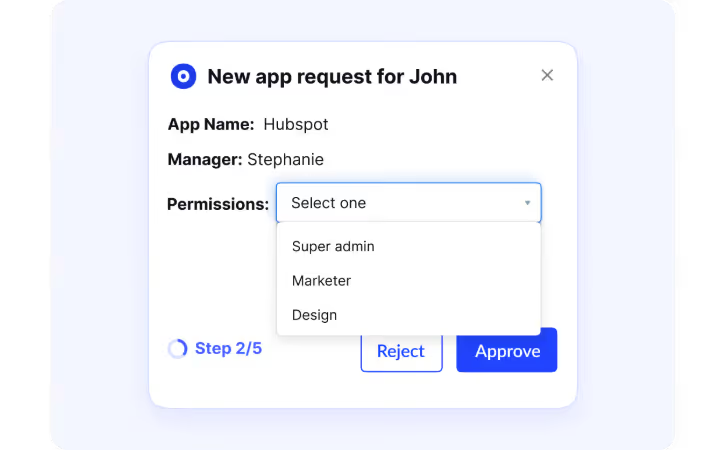
CloudEagle.ai ensures only authorized users have access to systems that impact financial reporting.
Current Process
Access to financial systems is managed manually. Reviews happen periodically and require data collection from multiple sources.
Pain Points
Unauthorized or excessive access may go unnoticed between review cycles. Control validation is time-consuming.
How We Do It
CloudEagle.ai continuously monitors user access across SaaS applications and flags unauthorized or high-risk permissions.
Why We Are Better
Access controls remain accurate at all times, ensuring compliance with SOX 302 requirements.
B: Automated User Access Reviews for Certification
CloudEagle.ai streamlines user access review processes required for SOX 302 compliance.
Current Process
Managers manually review and certify user access using spreadsheets or ticketing systems.
Pain Points
Reviews are slow and prone to errors. Managers often approve access without complete visibility.

How We Do It
CloudEagle.ai automates access review workflows, providing managers with real-time data on roles and permissions.
Why We Are Better
SOX 302 certification become faster, more accurate, and easier to track across departments.
Must Read: How CloudEagle.ai Streamlines App Access Review for Compliance Success?
C: Complete Audit Trails for Financial Control Evidence
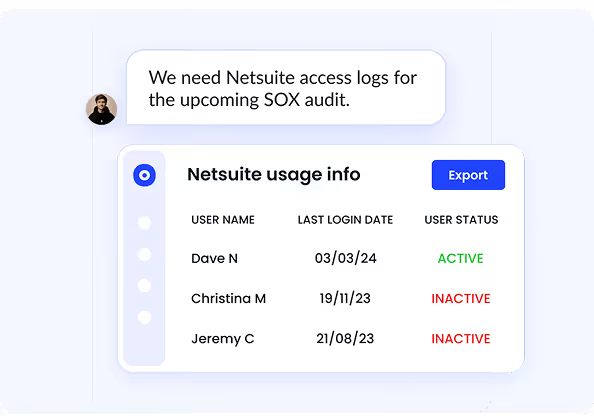
CloudEagle.ai ensures every access decision is documented and traceable for audit purposes.
Current Process
Audit evidence is collected manually from emails, logs, and multiple systems.
Pain Points
Missing or incomplete records delay audits and increase compliance risk.
How We Do It
CloudEagle.ai automatically logs approvals, role changes, and provisioning actions across all applications.
Why We Are Better
Audit-ready evidence is always available, supporting executive certification without last-minute effort.
D: Detecting and Preventing Unauthorized Access Changes
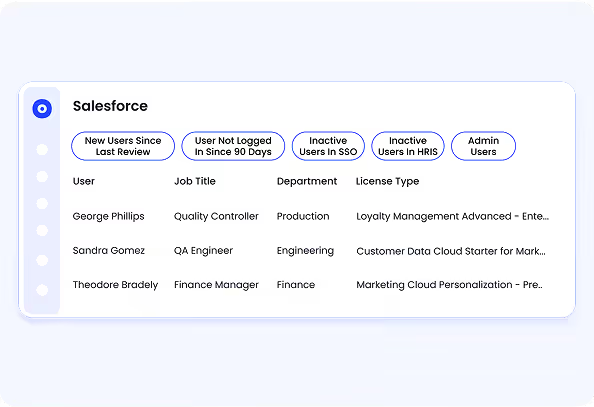
CloudEagle.ai helps enterprises identify and respond to unauthorized access changes in real time.
Current Process
Access changes are reviewed periodically, leaving gaps where unauthorized changes may go unnoticed.
Pain Points
Security risks increase when access changes are not tracked continuously.
How We Do It
CloudEagle.ai monitors access changes, privilege escalations, and anomalous behavior across SaaS systems.
Why We Are Better
Organizations detect and address risks immediately, maintaining strong internal controls.
What Are You Actually Certifying?


6. Conclusion
SOX 302 compliance is not about proving controls once a quarter. It is about being able to answer auditor questions immediately.
Most failures don’t happen because controls are missing. They happen because evidence is scattered across systems, reviews are manual, and offboarding is delayed.
This is where CloudEagle becomes critical. It helps IT teams centralize access visibility, automate access reviews, track changes across SaaS applications, and ensure offboarding is completed across all systems.
When access, changes, and reviews are continuously monitored and documented, compliance stops being a quarterly scramble and becomes a built-in operational process.
7. FAQs
1. What is the difference between SOX 302 and 404?
Sarbanes-Oxley Act Section 302 requires executives to certify that financial reports are accurate and controls are in place each quarter. Sarbanes-Oxley Act Section 404 goes deeper by requiring formal testing and auditing of those internal controls over financial reporting.
2. What is Section 302 and 906 of the SOX?
Section 302 requires CEOs and CFOs to certify the accuracy of financial reports and the effectiveness of internal controls. Sarbanes-Oxley Act Section 906 focuses on criminal liability, meaning executives can face penalties if they knowingly certify inaccurate financial statements.
3. What are the 4 pillars of SOX excellence?
The four pillars typically include access control, change management, audit logging, and monitoring. These ensure that only authorized users access financial systems, changes are tracked, and activities are continuously reviewed.
4. What are the 5 components of SOX?
The five components align with the COSO framework: control environment, risk assessment, control activities, information and communication, and monitoring. These components define how organizations design and maintain effective internal controls over financial reporting.


.avif)


.avif)
.avif)




.png)






.png)
.avif)
.avif)
.avif)


